INTRODUCTION TO COMPUTING
CCS1101
LECTURE 1 INTRODUCTION
OBJECTIVES
• Learn about computer systems
• Discuss the layers of a computing system
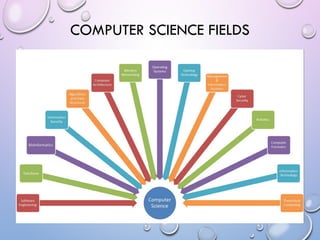
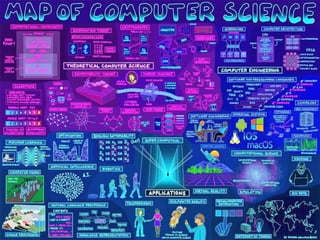
• List Computer Science fields
• Present the course outline and assessment methodology
COMPUTING SYSTEMS
• A computing system is a dynamic entity, used to solve problems and
interact with its environment. A computing system is composed of
hardware, software, and the data that they manage.
• Computer hardware is the collection of physical elements that make up
the machine and its related pieces: boxes, circuit boards, chips, wires, disk
drives, keyboards, monitors, printers, and so on.
• Computer software is the collection of programs that provide the
instructions that a computer carries out.
• At the very heart of a computer system is the information that it manages.
Without data, the hardware and software are essentially useless.
• Note the difference between a computer and a computing system
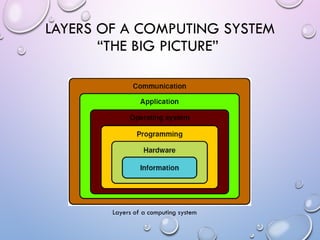
LAYERS OF A COMPUTING SYSTEM
“THE BIG PICTURE”
Layers of a computing system
LAYERS OF A COMPUTING SYSTEM
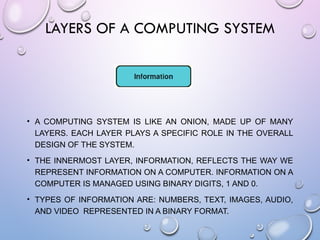
• A COMPUTING SYSTEM IS LIKE AN ONION, MADE UP OF MANY
LAYERS. EACH LAYER PLAYS A SPECIFIC ROLE IN THE OVERALL
DESIGN OF THE SYSTEM.
• THE INNERMOST LAYER, INFORMATION, REFLECTS THE WAY WE
REPRESENT INFORMATION ON A COMPUTER. INFORMATION ON A
COMPUTER IS MANAGED USING BINARY DIGITS, 1 AND 0.
• TYPES OF INFORMATION ARE: NUMBERS, TEXT, IMAGES, AUDIO,
AND VIDEO REPRESENTED IN A BINARY FORMAT.
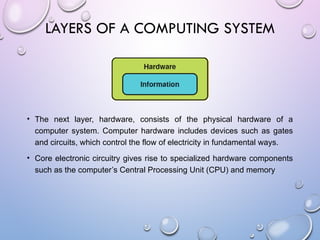
• The next layer, hardware, consists of the physical hardware of a
computer system. Computer hardware includes devices such as gates
and circuits, which control the flow of electricity in fundamental ways.
• Core electronic circuitry gives rise to specialized hardware components
such as the computer’s Central Processing Unit (CPU) and memory
LAYERS OF A COMPUTING SYSTEM
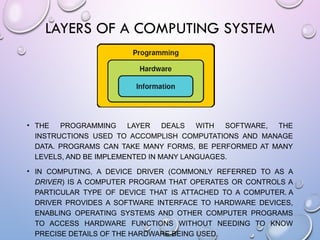
• THE PROGRAMMING LAYER DEALS WITH SOFTWARE, THE
INSTRUCTIONS USED TO ACCOMPLISH COMPUTATIONS AND MANAGE
DATA. PROGRAMS CAN TAKE MANY FORMS, BE PERFORMED AT MANY
LEVELS, AND BE IMPLEMENTED IN MANY LANGUAGES.
• IN COMPUTING, A DEVICE DRIVER (COMMONLY REFERRED TO AS A
DRIVER) IS A COMPUTER PROGRAM THAT OPERATES OR CONTROLS A
PARTICULAR TYPE OF DEVICE THAT IS ATTACHED TO A COMPUTER. A
DRIVER PROVIDES A SOFTWARE INTERFACE TO HARDWARE DEVICES,
ENABLING OPERATING SYSTEMS AND OTHER COMPUTER PROGRAMS
TO ACCESS HARDWARE FUNCTIONS WITHOUT NEEDING TO KNOW
PRECISE DETAILS OF THE HARDWARE BEING USED.
LAYERS OF A COMPUTING SYSTEM
• These previous (inner) layers focus on making a computer system work.
The application layer, on the other hand, focuses on using the computer
to solve specific real-world problems. We run application programs to
make use of the computer’s abilities in other domains, such as helping
us design a building or play a game.
• Every computer has an Operating System (OS) to help manage the
computer’s resources. Operating systems, such as Windows, Linux, or
the Mac OS, help us interact with the computer system and manage the
way hardware devices, programs, and data interact.
LAYERS OF A COMPUTING SYSTEM
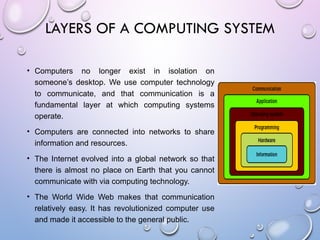
• Computers no longer exist in isolation on
someone’s desktop. We use computer technology
to communicate, and that communication is a
fundamental layer at which computing systems
operate.
• Computers are connected into networks to share
information and resources.
• The Internet evolved into a global network so that
there is almost no place on Earth that you cannot
communicate with via computing technology.
• The World Wide Web makes that communication
relatively easy. It has revolutionized computer use
and made it accessible to the general public.
LAYERS OF A COMPUTING SYSTEM
• Computers have inherent limitations on their ability to represent information,
and they are only as good as their programming makes them. Furthermore,
it turns out that some problems cannot be solved at all
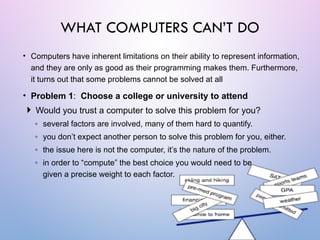
• Problem 1: Choose a college or university to attend
 Would you trust a computer to solve this problem for you?
◦ several factors are involved, many of them hard to quantify.
◦ you don’t expect another person to solve this problem for you, either.
◦ the issue here is not the computer, it’s the nature of the problem.
◦ in order to “compute” the best choice you would need to be
given a precise weight to each factor.
WHAT COMPUTERS CAN’T DO
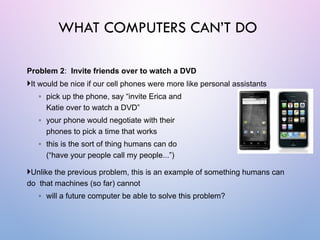
Problem 2: Invite friends over to watch a DVD
It would be nice if our cell phones were more like personal assistants
◦ pick up the phone, say “invite Erica and
Katie over to watch a DVD”
◦ your phone would negotiate with their
phones to pick a time that works
◦ this is the sort of thing humans can do
(“have your people call my people...”)
Unlike the previous problem, this is an example of something humans can
do that machines (so far) cannot
◦ will a future computer be able to solve this problem?
WHAT COMPUTERS CAN’T DO
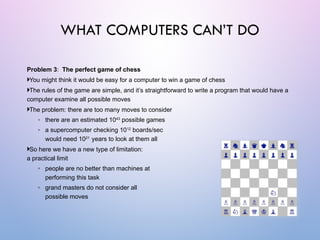
Problem 3: The perfect game of chess
You might think it would be easy for a computer to win a game of chess
The rules of the game are simple, and it’s straightforward to write a program that would have a
computer examine all possible moves
The problem: there are too many moves to consider
◦ there are an estimated 1043
possible games
◦ a supercomputer checking 1012
boards/sec
would need 1021
years to look at them all
So here we have a new type of limitation:
a practical limit
◦ people are no better than machines at
performing this task
◦ grand masters do not consider all
possible moves
WHAT COMPUTERS CAN’T DO
Problem 4: Non-computable functions
A famous problem in computer science
is known as “the halting problem”.
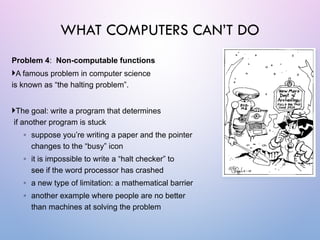
The goal: write a program that determines
if another program is stuck
◦ suppose you’re writing a paper and the pointer
changes to the “busy” icon
◦ it is impossible to write a “halt checker” to
see if the word processor has crashed
◦ a new type of limitation: a mathematical barrier
◦ another example where people are no better
than machines at solving the problem
WHAT COMPUTERS CAN’T DO
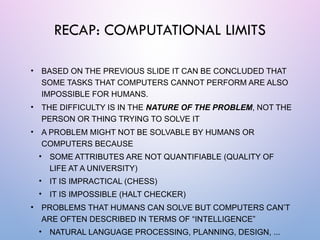
• BASED ON THE PREVIOUS SLIDE IT CAN BE CONCLUDED THAT
SOME TASKS THAT COMPUTERS CANNOT PERFORM ARE ALSO
IMPOSSIBLE FOR HUMANS.
• THE DIFFICULTY IS IN THE NATURE OF THE PROBLEM, NOT THE
PERSON OR THING TRYING TO SOLVE IT
• A PROBLEM MIGHT NOT BE SOLVABLE BY HUMANS OR
COMPUTERS BECAUSE
• SOME ATTRIBUTES ARE NOT QUANTIFIABLE (QUALITY OF
LIFE AT A UNIVERSITY)
• IT IS IMPRACTICAL (CHESS)
• IT IS IMPOSSIBLE (HALT CHECKER)
• PROBLEMS THAT HUMANS CAN SOLVE BUT COMPUTERS CAN’T
ARE OFTEN DESCRIBED IN TERMS OF “INTELLIGENCE”
• NATURAL LANGUAGE PROCESSING, PLANNING, DESIGN, ...
RECAP: COMPUTATIONAL LIMITS
COMPUTER SCIENCE FIELDS
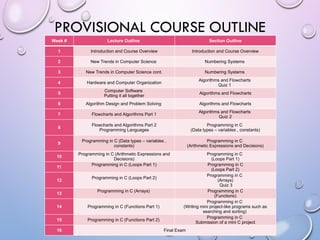
PROVISIONAL COURSE OUTLINE
Week # Lecture Outline Section Outline
1 Introduction and Course Overview Introduction and Course Overview
2 New Trends in Computer Science Numbering Systems
3 New Trends in Computer Science cont. Numbering Systems
4 Hardware and Computer Organization
Algorithms and Flowcharts
Quiz 1
5
Computer Software
Putting it all together
Algorithms and Flowcharts
6 Algorithm Design and Problem Solving Algorithms and Flowcharts
7 Flowcharts and Algorithms Part 1
Algorithms and Flowcharts
Quiz 2
8
Flowcharts and Algorithms Part 2
Programming Languages
Programming in C
(Data types – variables , constants)
9
Programming in C (Data types – variables ,
constants)
Programming in C
(Arithmetic Expressions and Decisions)
10
Programming in C (Arithmetic Expressions and
Decisions)
Programming in C
(Loops Part 1)
11
Programming in C (Loops Part 1) Programming in C
(Loops Part 2)
12
Programming in C (Loops Part 2)
Programming in C
(Arrays)
Quiz 3
13
Programming in C (Arrays) Programming in C
(Functions)
14 Programming in C (Functions Part 1)
Programming in C
(Writing mini project-like programs such as
searching and sorting)
15 Programming in C (Functions Part 2)
Programming in C
Submission of a mini C project
16 Final Exam
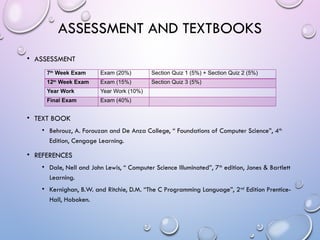
ASSESSMENT AND TEXTBOOKS
• ASSESSMENT
• TEXT BOOK
• Behrouz, A. Forouzan and De Anza College, “ Foundations of Computer Science”, 4th
Edition, Cengage Learning.
• REFERENCES
• Dale, Nell and John Lewis, “ Computer Science Illuminated”, 7th
edition, Jones & Bartlett
Learning.
• Kernighan, B.W. and Ritchie, D.M. “The C Programming Language”, 2nd
Edition Prentice-
Hall, Hoboken.
7th
Week Exam Exam (20%) Section Quiz 1 (5%) + Section Quiz 2 (5%)
12th
Week Exam Exam (15%) Section Quiz 3 (5%)
Year Work Year Work (10%)
Final Exam Exam (40%)
SUMMARY AND
DISCUSSION

An Introduction to Computin course lecture 1.pptx

  • 1.
  • 2.
    OBJECTIVES • Learn aboutcomputer systems • Discuss the layers of a computing system • List Computer Science fields • Present the course outline and assessment methodology
  • 3.
    COMPUTING SYSTEMS • Acomputing system is a dynamic entity, used to solve problems and interact with its environment. A computing system is composed of hardware, software, and the data that they manage. • Computer hardware is the collection of physical elements that make up the machine and its related pieces: boxes, circuit boards, chips, wires, disk drives, keyboards, monitors, printers, and so on. • Computer software is the collection of programs that provide the instructions that a computer carries out. • At the very heart of a computer system is the information that it manages. Without data, the hardware and software are essentially useless. • Note the difference between a computer and a computing system
  • 4.
    LAYERS OF ACOMPUTING SYSTEM “THE BIG PICTURE” Layers of a computing system
  • 5.
    LAYERS OF ACOMPUTING SYSTEM • A COMPUTING SYSTEM IS LIKE AN ONION, MADE UP OF MANY LAYERS. EACH LAYER PLAYS A SPECIFIC ROLE IN THE OVERALL DESIGN OF THE SYSTEM. • THE INNERMOST LAYER, INFORMATION, REFLECTS THE WAY WE REPRESENT INFORMATION ON A COMPUTER. INFORMATION ON A COMPUTER IS MANAGED USING BINARY DIGITS, 1 AND 0. • TYPES OF INFORMATION ARE: NUMBERS, TEXT, IMAGES, AUDIO, AND VIDEO REPRESENTED IN A BINARY FORMAT.
  • 6.
    • The nextlayer, hardware, consists of the physical hardware of a computer system. Computer hardware includes devices such as gates and circuits, which control the flow of electricity in fundamental ways. • Core electronic circuitry gives rise to specialized hardware components such as the computer’s Central Processing Unit (CPU) and memory LAYERS OF A COMPUTING SYSTEM
  • 7.
    • THE PROGRAMMINGLAYER DEALS WITH SOFTWARE, THE INSTRUCTIONS USED TO ACCOMPLISH COMPUTATIONS AND MANAGE DATA. PROGRAMS CAN TAKE MANY FORMS, BE PERFORMED AT MANY LEVELS, AND BE IMPLEMENTED IN MANY LANGUAGES. • IN COMPUTING, A DEVICE DRIVER (COMMONLY REFERRED TO AS A DRIVER) IS A COMPUTER PROGRAM THAT OPERATES OR CONTROLS A PARTICULAR TYPE OF DEVICE THAT IS ATTACHED TO A COMPUTER. A DRIVER PROVIDES A SOFTWARE INTERFACE TO HARDWARE DEVICES, ENABLING OPERATING SYSTEMS AND OTHER COMPUTER PROGRAMS TO ACCESS HARDWARE FUNCTIONS WITHOUT NEEDING TO KNOW PRECISE DETAILS OF THE HARDWARE BEING USED. LAYERS OF A COMPUTING SYSTEM
  • 8.
    • These previous(inner) layers focus on making a computer system work. The application layer, on the other hand, focuses on using the computer to solve specific real-world problems. We run application programs to make use of the computer’s abilities in other domains, such as helping us design a building or play a game. • Every computer has an Operating System (OS) to help manage the computer’s resources. Operating systems, such as Windows, Linux, or the Mac OS, help us interact with the computer system and manage the way hardware devices, programs, and data interact. LAYERS OF A COMPUTING SYSTEM
  • 9.
    • Computers nolonger exist in isolation on someone’s desktop. We use computer technology to communicate, and that communication is a fundamental layer at which computing systems operate. • Computers are connected into networks to share information and resources. • The Internet evolved into a global network so that there is almost no place on Earth that you cannot communicate with via computing technology. • The World Wide Web makes that communication relatively easy. It has revolutionized computer use and made it accessible to the general public. LAYERS OF A COMPUTING SYSTEM
  • 10.
    • Computers haveinherent limitations on their ability to represent information, and they are only as good as their programming makes them. Furthermore, it turns out that some problems cannot be solved at all • Problem 1: Choose a college or university to attend  Would you trust a computer to solve this problem for you? ◦ several factors are involved, many of them hard to quantify. ◦ you don’t expect another person to solve this problem for you, either. ◦ the issue here is not the computer, it’s the nature of the problem. ◦ in order to “compute” the best choice you would need to be given a precise weight to each factor. WHAT COMPUTERS CAN’T DO
  • 11.
    Problem 2: Invitefriends over to watch a DVD It would be nice if our cell phones were more like personal assistants ◦ pick up the phone, say “invite Erica and Katie over to watch a DVD” ◦ your phone would negotiate with their phones to pick a time that works ◦ this is the sort of thing humans can do (“have your people call my people...”) Unlike the previous problem, this is an example of something humans can do that machines (so far) cannot ◦ will a future computer be able to solve this problem? WHAT COMPUTERS CAN’T DO
  • 12.
    Problem 3: Theperfect game of chess You might think it would be easy for a computer to win a game of chess The rules of the game are simple, and it’s straightforward to write a program that would have a computer examine all possible moves The problem: there are too many moves to consider ◦ there are an estimated 1043 possible games ◦ a supercomputer checking 1012 boards/sec would need 1021 years to look at them all So here we have a new type of limitation: a practical limit ◦ people are no better than machines at performing this task ◦ grand masters do not consider all possible moves WHAT COMPUTERS CAN’T DO
  • 13.
    Problem 4: Non-computablefunctions A famous problem in computer science is known as “the halting problem”. The goal: write a program that determines if another program is stuck ◦ suppose you’re writing a paper and the pointer changes to the “busy” icon ◦ it is impossible to write a “halt checker” to see if the word processor has crashed ◦ a new type of limitation: a mathematical barrier ◦ another example where people are no better than machines at solving the problem WHAT COMPUTERS CAN’T DO
  • 14.
    • BASED ONTHE PREVIOUS SLIDE IT CAN BE CONCLUDED THAT SOME TASKS THAT COMPUTERS CANNOT PERFORM ARE ALSO IMPOSSIBLE FOR HUMANS. • THE DIFFICULTY IS IN THE NATURE OF THE PROBLEM, NOT THE PERSON OR THING TRYING TO SOLVE IT • A PROBLEM MIGHT NOT BE SOLVABLE BY HUMANS OR COMPUTERS BECAUSE • SOME ATTRIBUTES ARE NOT QUANTIFIABLE (QUALITY OF LIFE AT A UNIVERSITY) • IT IS IMPRACTICAL (CHESS) • IT IS IMPOSSIBLE (HALT CHECKER) • PROBLEMS THAT HUMANS CAN SOLVE BUT COMPUTERS CAN’T ARE OFTEN DESCRIBED IN TERMS OF “INTELLIGENCE” • NATURAL LANGUAGE PROCESSING, PLANNING, DESIGN, ... RECAP: COMPUTATIONAL LIMITS
  • 15.
  • 17.
    PROVISIONAL COURSE OUTLINE Week# Lecture Outline Section Outline 1 Introduction and Course Overview Introduction and Course Overview 2 New Trends in Computer Science Numbering Systems 3 New Trends in Computer Science cont. Numbering Systems 4 Hardware and Computer Organization Algorithms and Flowcharts Quiz 1 5 Computer Software Putting it all together Algorithms and Flowcharts 6 Algorithm Design and Problem Solving Algorithms and Flowcharts 7 Flowcharts and Algorithms Part 1 Algorithms and Flowcharts Quiz 2 8 Flowcharts and Algorithms Part 2 Programming Languages Programming in C (Data types – variables , constants) 9 Programming in C (Data types – variables , constants) Programming in C (Arithmetic Expressions and Decisions) 10 Programming in C (Arithmetic Expressions and Decisions) Programming in C (Loops Part 1) 11 Programming in C (Loops Part 1) Programming in C (Loops Part 2) 12 Programming in C (Loops Part 2) Programming in C (Arrays) Quiz 3 13 Programming in C (Arrays) Programming in C (Functions) 14 Programming in C (Functions Part 1) Programming in C (Writing mini project-like programs such as searching and sorting) 15 Programming in C (Functions Part 2) Programming in C Submission of a mini C project 16 Final Exam
  • 18.
    ASSESSMENT AND TEXTBOOKS •ASSESSMENT • TEXT BOOK • Behrouz, A. Forouzan and De Anza College, “ Foundations of Computer Science”, 4th Edition, Cengage Learning. • REFERENCES • Dale, Nell and John Lewis, “ Computer Science Illuminated”, 7th edition, Jones & Bartlett Learning. • Kernighan, B.W. and Ritchie, D.M. “The C Programming Language”, 2nd Edition Prentice- Hall, Hoboken. 7th Week Exam Exam (20%) Section Quiz 1 (5%) + Section Quiz 2 (5%) 12th Week Exam Exam (15%) Section Quiz 3 (5%) Year Work Year Work (10%) Final Exam Exam (40%)
  • 19.