12/7/12                         An Introduction to Apex Code Test Methods - developer.force.com


                                                                                                                               DE LOGIN                   JOIN NOW


                                                                                                                                 Search


          Home          Technical Library       Boards        Cookbook            Code Share             Blogs        Partners          More


                                                                                                                                                                     page  |  edit
          Technical Library
          Documentation                 An Introduction to Apex Code Test Methods
          Core Resources

          Tools                         Abstract

                                        To facilitate the development of robust, error­free code, Apex Code requires the creation and execution of unit tests. Unit tests are
          Integration                   comprised of test methods and classes that verify whether a particular piece of code is working properly.
          App Logic                     This article introduces test methods. It details why test methods are a critical part of Force.com application development, test method
          User Interface                syntax, best practices, and advanced topics such as test methods for Visualforce controllers and Apex web service callouts.

          Database

          Security                      Introduction to Test Methods

          Web Sites                     To facilitate and promote the development of robust, error­free code, Apex Code requires the creation and execution of unit tests. Unit

          Mobile                        tests are class methods that verify whether a particular piece of code is working properly. Unit tests are written in Apex Code and
                                        annotated with the testMethod keyword (we will go into formal syntax in the next section).
          App Distribution
                                        It is important to understand that test methods are required to deploy Apex to a production environment. They are also required if your

          Newsletter                    code is going to be packaged and placed on Force.com AppExchange. The test methods must provide at least 75% code coverage.
                                        Think of a test method as 'Apex code that tests other Apex code.' Code coverage is calculated by dividing the number of unique Apex
          Release Information
                                        code lines executed during your test method execution by the total number of Apex code lines in all of your trigger and classes. (Note:
                                        these numbers do not include lines of code within your testMethods)

                                        It is also important to not think of test methods as simply a requirement by the Force.com platform. It should not be an afterthought.
                                        Writing test methods should be a critical part of Force.com development and they are required to ensure your success. Test methods
          Contributors                  provide test automation which can enable greater QA efficiency. It also provides an automated regression testing framework to validate
                                        bug fixes or future development enhancements.
          Login
                                        The following sections of this article will help articulate test method syntax, illustrate how to execute test methods, and elaborate on the
                                        key best practices.

                                        Test Method Syntax and Static Methods

          RSS Feeds                     As discussed earlier, test methods are written in Apex Code. If you are unfamiliar with Apex, check out the article An Introduction to Apex
                                        Code.
          Featured Content
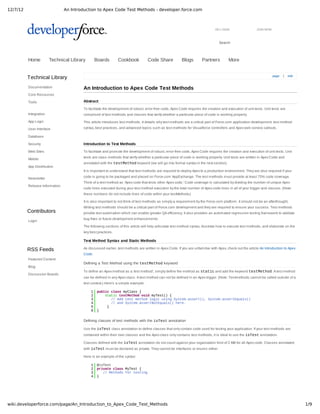
                                        Defining a Test Method using the testMethod keyword
          Blog
                                        To define an Apex method as a 'test method', simply define the method as static and add the keyword testMethod. A test method
          Discussion Boards
                                        can be defined in any Apex class. A test method can not be defined in an Apex trigger. (Note: Testmethods cannot be called outside of a
                                        test context.) Here's a simple example:

                                            1    public class myClass {
                                            2        static testMethod void myTest() {
                                            3           // Add test method logic using System.assert(), System.assertEquals()
                                            4           // and System.assertNotEquals() here.
                                            5         }
                                            6    }


                                        Defining classes of test methods with the isTest annotation

                                        Use the isTest class annotation to define classes that only contain code used for testing your application. If your test methods are
                                        contained within their own classes and the Apex class only contains test methods, it is ideal to use the isTest annotation.

                                        Classes defined with the isTest annotation do not count against your organization limit of 2 MB for all Apex code. Classes annotated
                                        with isTest must be declared as private. They cannot be interfaces or enums either.

                                        Here is an example of the syntax:

                                            1    @isTest
                                            2    private class MyTest {
                                            3       // Methods for testing
                                            4    }


wiki.developerforce.com/page/An_Introduction_to_Apex_Code_Test_Methods                                                                                                                 1/9
12/7/12                 An Introduction to Apex Code Test Methods - developer.force.com

                                 Test.startTest/Test.stopTest

                                 There are two additional system static methods provided by Apex. These methods, Test.startTest and Test.stopTest, are
                                 used when testing governor limits. Or in other words, executing test scenarios with a larger data set.

                                 The Test.startTest method marks the point in your test code when your test actually begins. Each test method is allowed to call
                                 this method only once. All of the code before this method should be used to initialize variables, populate data structures, and so on,
                                 allowing you to set up everything you need in order to run your test. After you call this method, you get a fresh set of governor limits for the
                                 remainder of the test until you call Test.stopTest.

                                 The Test.stopTest method marks the point in your test code when your test ends. Use this method in conjunction with the
                                 startTest method. Each test method is allowed to call this method only once. After calling this method, any post assertions are done
                                 in the original context.

                                 These static methods allow a test method to separate the Apex resources and governor limits being used to prepare and initialize the
                                 dataset from the resources and limits used during the actual test execution.

                                 Here is a sample test method function that uses these methods:

                                    01    static testMethod void verifyAccountDescriptionsWhereOverwritten(){
                                    02        // Perform our data preparation.
                                    03        List<Account> accounts = new List<Account>{};
                                    04             
                                    05        for(Integer i = 0; i < 200; i++){
                                    06            Account a = new Account(Name = 'Test Account ' + i);
                                    07            accounts.add(a);
                                    08        }
                                    09     
                                    10        // Start the test, this changes governor limit context to
                                    11        // that of trigger rather than test.
                                    12        test.startTest();
                                    13             
                                    14        // Insert the Account records that cause the trigger to execute.
                                    15        insert accounts;

                                    16             
                                    17        // Stop the test, this changes limit context back to test from trigger.
                                    18        test.stopTest();
                                    19             
                                    20        // Query the database for the newly inserted records.
                                    21        List<Account> insertedAccounts = [SELECT Name, Description
                                    22                                          FROM Account
                                    23                                          WHERE Id IN :accounts];
                                    24             
                                    25        // Assert that the Description fields contains the proper value now.
                                    26        for(Account a : insertedAccounts){
                                    27          System.assertEquals(
                                    28            'This Account is probably left over from testing. It should probably be deleted.',
                                    29            a.Description);
                                    30        }
                                    31    }

                                      1   trigger OverwriteTestAccountDescriptions on Account (before insert) {
                                      2     for(Account a: Trigger.new){
                                      3       if (a.Name.toLowerCase().contains('test')){
                                      4         a.Description =
                                      5           'This Account is probably left over from testing. It should probably be deleted.';
                                      6       }
                                      7       }
                                      8   }

                                 The example above helps illustrate how to separate the test data preparation from the actual test scenario. The first step of the example
                                 creates 200 Accounts that are required for the test scenario­and inserting these 200 Account records will have them applied to the
                                 governor limits. So in order to separate the Apex resources and governor limits used during test data preparation from the actual test
                                 scenario, the example uses the Test.startTest() and Test.stopTest() methods. Therefore, the Apex code executing within
                                 the startTest and stopTest methods will obtain their own Apex governor limits and resources. If the test method did not use
                                 startTest() and stopTest(), the test scenario might have hit a governor limit since some of the available Apex resources (such
                                 as total number of records processed by a DML statement) were used up by data preparation steps.

                                 System.runAs()

                                 Generally, all Apex code runs in system mode, and the permissions and record sharing of the current user are not taken into account.
                                 The system method, System.runAs(), lets you write test methods that change user contexts to either an existing user or a new user.
                                 All of that user's record sharing is then enforced. You can only use runAs in a test method. The original system context is started
                                 again after all runAs() test methods complete.

                                 Please note that the runAs() functionality will test and verify proper data sharing and data access. But runAs() does not validate CRUD
                                 or Field Level Security permissions.

                                    01    public class TestRunAs {
                                    02       public static testMethod void testRunAs() {
                                    03          // Setup test data
                                    04          // This code runs as the system user
                                    05     
                                    06             Profile p = [select id from profile where name='Standard User'];


wiki.developerforce.com/page/An_Introduction_to_Apex_Code_Test_Methods                                                                                                              2/9
12/7/12                 An Introduction to Apex Code Test Methods - developer.force.com

                                    07             User u = new User(alias = 'standt', email='standarduser@testorg.com',

                                    08                emailencodingkey='UTF­8', lastname='Testing', languagelocalekey='en_US',
                                    09                localesidkey='en_US', profileid = p.Id,
                                    10                timezonesidkey='America/Los_Angeles', username='standarduser@testorg.com');
                                    11     
                                    12     
                                    13             System.runAs(u) {
                                    14               // The following code runs as user 'u'
                                    15               System.debug('Current User: ' + UserInfo.getUserName());
                                    16               System.debug('Current Profile: ' + UserInfo.getProfileId()); }
                                    17               // Run some code that checks record sharing
                                    18            }
                                    19    }

                                 The above test method creates a new user (with a profile of a standard user), and executes a block of code in the context of this new
                                 user.

                                 Running Test Methods
                                 There are 2 primary ways to execute test methods:

                                    Salesforce UI
                                         Via the Apex Test Execution Page
                                         Via the list of classes under Setup > Develop > Apex Classes
                                         Via a specific class under Setup > Develop > Apex Classes > Class Name
                                    Metadata API
                                         via Force.com IDE
                                         runTests() method in the SOAP API

                                 The following section shows how to execute test methods in each of these environments.

                                 Executing Test Methods through the Salesforce User Interface

                                 You can run unit tests for a specific class or you can run all the unit tests in your organization using the Salesforce User Interface.


                                 To run the unit tests for a specific class, click Setup | Develop | Apex Classes, click the name of the class, then click Run Test. If your
                                 class calls another class or causes a trigger to execute, those Apex code lines are included in the total amount used for calculating the
                                 percentage of code covered.


                                 To run all the unit tests in your organization, click Setup | Develop | Apex Classes, then click Run All Tests. 


                                 The result page for running unit tests contains the following:

                                    A summary section that details the number of tests run, the number of failures, and the percentage of Apex scripts that are covered
                                    by unit tests
                                    Test failures, if any
                                    Detailed information about the Apex scripts that are covered by unit tests, including line and column numbers for all tested code, the
                                    number of times the code was executed, and the amount of time it took for that code to be tested
                                    Detailed information about Apex that is not covered by unit tests, including line and column numbers
                                    Test coverage warnings, if any
                                    The debug log
                                 Here's a screenshot showing these data for a test run:


wiki.developerforce.com/page/An_Introduction_to_Apex_Code_Test_Methods                                                                                                         3/9
12/7/12                 An Introduction to Apex Code Test Methods - developer.force.com


                                 Executing Test Methods through the Force.com IDE

                                 In addition to executing test methods through the Salesforce user interface, test methods can be executed from within the Force.com
                                 IDE. If you aren't familiar with the Force.com IDE, please visit Force.com IDE for installation and documentation.

                                 Using the IDE, you can run all the test methods for the organization or you can run just the test methods for a particular Apex class.

                                 To run all test methods in a given organization, go to the Force.com Ide, select the project, expand the project until you see the Classes
                                 folder, and right click. Next, open up the Force.com properties and select 'Run All Tests':


                                 The output or results will be displayed in the Apex Test Runner view. You must be in the Force.com perspective within Eclipse to see the
                                 Apex Test Runner view. This is where you will see the results for number of tests run, number of failures, code coverage percentage,
                                 debug log, and so on:


wiki.developerforce.com/page/An_Introduction_to_Apex_Code_Test_Methods                                                                                                        4/9
12/7/12                 An Introduction to Apex Code Test Methods - developer.force.com


                                 Test Method Best Practices & Tips

                                 This section contains a bulleted list of several key tips and best practices. For additional information, see the article How to Write Good
                                 Unit Tests which explores the proper structure of unit tests, the code scenarios that unit tests should cover, and the properties of well­
                                 written unit tests in additional depth.

                                    Test methods take no arguments, commit no data to the database, and cannot send any emails.
                                    Strive for 100% code coverage. Do not focus on the 75% requirement.
                                     Instead, focus on writing test methods that execute all of the possible scenarios, both positive and
                                     negative.

                                    Write portable test methods
                                     Since the Apex code is developed in one organization and then deployed to another Production organization (or installed as an
                                     AppExchange package), it is critical that the test methods do not expect any Id or rely upon a specific data set. Otherwise the test
                                     methods will fail when deployed to a different organization.

                                 For example, here is a poorly written test method that hardcodes the expected test data:

                                    01    static testMethod void myTestHardcodedIds(){
                                    02         
                                    03         // INCORRECT ­ By hardcoding this Account Id in the test method, the test method
                                    04         // will fail in every other org where this code is deployed because the hardcoded
                                    05         // Account Id won't exist there.
                                    06         Account testAccount = [select id,name from Account where Id='001300000040lMM'];
                                    07         testAccount.billingState='CA';
                                    08            
                                    09         update testAccount;   
                                    10     
                                    11         // Verify that the billingState field was updated in the database.
                                    12         Account updatedAccount = [SELECT billingState FROM Account WHERE Id = :testAccount.Id];
                                    13         System.assertEquals('CA', updatedAccount.billingState);
                                    14            
                                    15         // INCORRECT ­ By hardcoding this Product Name in the test method, the test method
                                    16         // will fail in every other org where this code is deployed becuase the hardcoded
                                    17         // Product Id won't exist there.
                                    18         Product2 prod = [select id, name from Product2 where Name='Router'];
                                    19         prod.productcode='RTR2000';
                                    20         update prod;
                                    21     
                                    22         // Verify that the productcode field was updated in the database.
                                    23         Product2 updatedProduct = [SELECT productcode FROM Product2 WHERE Id = :prod.Id];
                                    24         System.assertEquals('RTR2000', updatedProduct.productcode);
                                    25    }      

                                 Now here is the properly written, portable test method.

                                    01    static testMethod void myTestDynamicIds(){
                                    02         
                                    03         // CORRECT ­ Create the required test data needed for the test scenario.
                                    04         // In this case, I need to update an Account to have a BillingState='CA'
                                    05         // So I create that Account in my test method itself.
                                    06         Account testAccount = new Account(name='Test Company Name');
                                    07         insert testAccount;
                                    08            
                                    09         testAccount.billingState='CA';
                                    10         update testAccount;
                                    11     
                                    12         // Verify that the billingState field was updated in the database.
                                    13         Account updatedAccount = [SELECT billingState FROM Account WHERE Id = :testAccount.Id];
                                    14         System.assertEquals('CA', updatedAccount.billingState);
                                    15     
                                    16         // CORRECT ­ In this case, I need to update a Product to have a productcode ='RTR2000'
                                    17         // So I create that Product2 record in my test method itself.
                                    18         Product2 prod = new Product2(name='Router');
                                    19         insert prod;
                                    20            
                                    21         prod.productcode='RTR2000';


wiki.developerforce.com/page/An_Introduction_to_Apex_Code_Test_Methods                                                                                                         5/9
12/7/12                 An Introduction to Apex Code Test Methods - developer.force.com

                                    22        update prod;

                                    23    
                                    24        // Verify that the productcode field was updated in the database.
                                    25        Product2 updatedProduct = [SELECT productcode FROM Product2 WHERE Id = :prod.Id];
                                    26        System.assertEquals('RTR2000', updatedProduct.productcode);
                                    27   }

                                    Use System.assert methods to prove that code behaves properly.
                                     This is key to ensure that the Apex code executes to the expected value or behavior. This will also facilitate regression testing as the
                                     Apex code changes over time.

                                    In the case of conditional logic (including ternary operators), execute each branch of code logic.
                                    Use the runAs method to test your application in different user contexts.
                                     With different profiles having different permissions and data visibility privileges, it's critical to validate that the Apex code behaves
                                     properly in all scenarios.

                                    Exercise bulk trigger functionality—use at least 20 records in your tests.
                                     This is a critical item since all Apex code runs in 'bulk mode' so the Apex triggers and classes must be
                                     developed to handle multiple records without reaching any governor limits. So make sure there are test methods that execute the
                                     Apex code scenarios with large data sets.

                                 The following sections provides some additional advice on these and other best practices.

                                 Test Methods and Bulk Operations
                                 Since Apex code executes in bulk, it is essential to have test scenarios to verify that the Apex being tested is designed to handle large
                                 datasets and not just single records To elaborate, an Apex trigger can be invoked either by a data operation from the user interface or by
                                 a data operation from the Force.com SOAP API. And the API should send multiple records per batch, leading to the trigger being invoked
                                 with several records. Therefore, it is key to have test methods that verify that all Apex code is properly designed to handle larger datasets
                                 and that it does not exceed governor limits.

                                 The example below shows you a poorly written trigger that does not handle bulk properly and therefore hits a governor limit. Later, the
                                 trigger is revised to properly handle bulk datasets.

                                 First, here is the poorly written Contact trigger. For each contact, the trigger performs a SOQL query to retrieve the related Account. The
                                 invalid part of this trigger is that the SOQL query is within the for loop and therefore will throw a governor limit exception if more than
                                 100 Contacts are inserted/updated.

                                    01   trigger contactTest on Contact (before insert, before update) {
                                    02       
                                    03      for(Contact ct: Trigger.new){
                                    04        
                                    05          Account acct = [select id, name, billingState from Account where Id=:ct.AccountId];
                                    06          if(acct.BillingState=='CA'){
                                    07              System.debug('found a contact related to an account in california...');
                                    08              ct.email = 'test_email@testing.com';
                                    09              //Apply more logic here....
                                    10          }
                                    11      }
                                    12       
                                    13   }

                                 Here is the test method that tests if this trigger properly handles volume datasets.

                                    01   public class sampleTestMethodCls {
                                    02    
                                    03       static testMethod void testAccountTrigger(){
                                    04            
                                    05           //First, prepare 200 contacts for the test data
                                    06           Account acct = new Account(name='test account');
                                    07           insert acct;
                                    08            
                                    09           Contact[] contactsToCreate = new Contact[]{};
                                    10           for(Integer x=0; x<200;x++){
                                    11               Contact ct = new Contact(AccountId=acct.Id,lastname='testing',firstname='apex');
                                    12               contactsToCreate.add(ct);
                                    13           }
                                    14            
                                    15           //Now insert data causing an contact trigger to fire.
                                    16           Test.startTest();
                                    17           insert contactsToCreate;
                                    18           Test.stopTest();   
                                    19       }  
                                    20   }

                                 This test method creates an array of 200 contacts and inserts them. The insert will, in turn, cause the trigger to fire. When this test
                                 method is executed, a System.LimitException will be thrown when it hits a governor limit. Since the trigger shown above
                                 executes a SOQL query for each Contact in the batch, this test method throws the exception 'Too many SOQL queries: 101'. A trigger can
                                 only execute at most 100 queries.

                                 Now let's correct the trigger to properly handle bulk operations. The key to fixing this trigger is to get the SOQL query outside the for
                                 loop and only do 1 SOQL Query.


wiki.developerforce.com/page/An_Introduction_to_Apex_Code_Test_Methods                                                                                                           6/9
12/7/12                 An Introduction to Apex Code Test Methods - developer.force.com

                                    01   trigger contactTest on Contact (before insert, before update) {

                                    02       
                                    03      Set<Id> accountIds = new Set<Id>();
                                    04      for(Contact ct: Trigger.new)
                                    05          accountIds.add(ct.AccountId);
                                    06       
                                    07      //Do SOQL Query    
                                    08      Map<Id, Account> accounts = new Map<Id, Account>(
                                    09           [select id, name, billingState from Account where id in :accountIds]);
                                    10      
                                    11      for(Contact ct: Trigger.new){
                                    12          if(accounts.get(ct.AccountId).BillingState=='CA'){
                                    13              System.debug('found a contact related to an account in California...');
                                    14              ct.email = 'test_email@testing.com';
                                    15              //Apply more logic here....
                                    16          }
                                    17      }
                                    18       
                                    19   }

                                 Note how the SOQL query retrieving the accounts is now done once only. If you re­run the test method shown above, it will now execute
                                 successfully with no errors and 100% code coverage.

                                 Test Methods and Visualforce Controllers

                                 Custom controllers and controller extensions, like all Apex code, require test methods. So don't forget to develop the proper test
                                 methods when developing Visualforce controllers. Test methods that cover controllers can automate the user interaction by setting
                                 query parameters, or navigating to different pages. There are some additional Apex classes that assist in writing test methods for
                                 Visualforce controllers.

                                 Here is an example provided in the Visualforce Reference Guide with additional comments to highlight some of the key features and
                                 functions:

                                    01   public static testMethod void testMyController() {
                                    02           
                                    03          //Use the PageReference Apex class to instantiate a page
                                    04          PageReference pageRef = Page.success;
                                    05           
                                    06          //In this case, the Visualforce page named 'success' is the starting point of this test
                                         method.
                                    07          Test.setCurrentPage(pageRef);
                                    08         
                                    09          //Instantiate and construct the controller class.  
                                    10          thecontroller controller = new thecontroller();
                                    11    
                                    12          //Example of calling an Action method. Same as calling any other Apex method.
                                    13          //Normally this is executed by a user clicking a button or a link from the Visualforce
                                    14          //page, but in the test method, just test the action method the same as any
                                    15          //other method by calling it directly.
                                    16    
                                    17          //The .getURL will return the page url the Save() method returns.
                                    18          String nextPage = controller.save().getUrl();
                                    19    
                                    20          //Check that the save() method returns the proper URL.
                                    21          System.assertEquals('/apex/failure?error=noParam', nextPage);
                                    22    
                                    23          //Add parameters to page URL
                                    24          ApexPages.currentPage().getParameters().put('qp', 'yyyy');
                                    25         
                                    26          //Instantiate a new controller with all parameters in the page
                                    27          controller = new thecontroller();
                                    28    
                                    29          //Example of calling the 'setter' method for several properties.
                                    30          //Normally these setter methods are initiated by a user interacting with the Visualforce
                                         page,
                                    31          //but in a test method, just call the setter method directly.
                                    32          controller.setLastName('lastname');
                                    33          controller.setFirstName('firstname');
                                    34          controller.setCompany('acme');
                                    35          controller.setEmail('firstlast@acme.com');
                                    36          nextPage = controller.save().getUrl();
                                    37    
                                    38          //Verify that the success page displays
                                    39          System.assertEquals('/apex/success', nextPage);
                                    40           
                                    41      }

                                 Note how you can reference pages, instantiate controllers, add parameters and invoke actions methods.

                                 Test Methods and Apex Callouts
                                 Apex Code has built in functionality to call external Web services, such as Amazon Web Services, Facebook, Google, or any publicly
                                 available web service. As a result, you will need to have the proper test method code coverage for the related Apex code that makes
                                 these callouts. But since the Force.com platform has no control over the external Web service and the impact of making the web service
                                 call, test methods can not invoke a 3rd party web service. This section provides a viable workaround to ensure proper code coverage.

                                 The main part of this solution is not in the test method itself, but in the primary Apex Code that executes the web service call. It is
                                 recommended to refactor the Apex code into the following methods:


wiki.developerforce.com/page/An_Introduction_to_Apex_Code_Test_Methods                                                                                                     7/9
12/7/12                 An Introduction to Apex Code Test Methods - developer.force.com

                                    An Apex method that builds the web service request and related data. This method should not invoke the web service. Here is
                                    pseudo­code:

                                      1   public HttpRequest buildWebServiceRequest(){
                                      2    
                                      3       //Build HTTP Request object
                                      4       HttpRequest req = new HttpRequest();
                                      5       req.setEndpoint(<insert endpoint url here>);
                                      6       req.setMethod('GET');
                                      7   }

                                    An Apex method that invokes the web service. It receives the HTTP request parameter and invokes the web service. It returns the
                                    HTTP response object. It should be only a few lines of Apex, for example:

                                      1   public HttpResponse invokeWebService(Http h, HttpRequest req){
                                      2         
                                      3        //Invoke Web Service
                                      4        HttpResponse res = h.send(req);
                                      5        return res;
                                      6   }

                                    An Apex method that handles the HTTP response. This is the Apex method that is executed after the web service has returned. Here
                                    is the pseudo­code:

                                      1   public void handleWebServiceResponse(HttpResponse res){
                                      2    
                                      3        //Parse and apply logic to the res message
                                      4   }

                                 Now that the web service execution is broken up into these subsections with each handling a subset of the request­response, the 3
                                 Apex methods can be invoked in order from the main Apex code script. For example:

                                    01    public void main(){
                                    02         
                                    03       //apply business logic
                                    04        
                                    05       //now need to make web service callout
                                    06     
                                    07       //First, build the http request
                                    08       Http h = new Http();
                                    09       HttpRequest req = buildWebServiceRequest();
                                    10        
                                    11       //Second, invoke web service call
                                    12       HttpResponse res = invokeWebService(h, req);
                                    13        

                                    14       //Last, handling the response
                                    15       handleWebServiceResponse(res);
                                    16       
                                    17       //continue with the apex script logic
                                    18         
                                    19    }


                                 With this refactored web service code in place, we are ready to write the test method to obtain proper code coverage. With the web
                                 service processing broken up into 3 methods, we can test all of the Apex methods except for the small method that performs the web
                                 service call. For example:

                                    01    static testMethod void testWebService(){
                                    02          //First, build the http request
                                    03          HttpRequest req = buildWebServiceRequest();
                                    04        
                                    05          //NOTE ­ WE DO NOT EXECUTE THE METHOD, invokeWebService.
                                    06           
                                    07          //Now, since we can't execute the actual web service,
                                    08          //write apex code to build a sample HttpResponse object
                                    09          HttpResponse res = new HttpResponse();
                                    10          //Apply test data and attributes to the HttpResponse object as needed
                                    11          handleWebServiceResponse(res);
                                    12       
                                    13    }

                                 The key to this solution is to refactor the Apex logic to break out (a) building the web service request (b) the actual web service invocation
                                 and (c) the handling of the web service response. This allows the test methods to validate (a) building the web service request and (b)
                                 handling of the web service response without truly invoking the web service.

                                 Summary

                                 This article provides an introduction to starting your test method development. It explores the syntax for creating test methods, shows
                                 how to execute these tests, and provide best practice advice. Test methods are not intended to be roadblocks to your development.
                                 Rather, they ensure your success. Do not approach testing and developing your test methods as an afterthought. Test methods should
                                 be written during the development effort. Valid test methods will provide you with an automated test suite to ensure quality and execute
                                 regression testing.

                                 References

                                    See the Apex wiki page for a comprehensive list of resources about Apex Code.


wiki.developerforce.com/page/An_Introduction_to_Apex_Code_Test_Methods                                                                                                            8/9
12/7/12                 An Introduction to Apex Code Test Methods - developer.force.com

                                      How to Write Good Unit Tests provides excellent additional material on constructing good unit tests.
                                      Visit Force.com IDE to learn about the IDE.
                                      Testing Best Practices Documentation.
                                      Testing Example Documentation.
                                      Learn all about Governors in Apex Code
                                      The Apex Test Coverage Best Practices recorded Dreamforce 2008 session provides a lot of good advice for writing tests for your
                                      code.

                                   About the Author
                                   Andrew Albert is a Technical Evangelist at salesforce.com, focusing on the Force.com Platform.


                                    Category: Apex ­ Testing


                                                                                   Follow us on


                                           United States | 1­800­no­softw are | Privacy Statement | Security Statement | Terms of Use  


                            © Copyright 2000­2011 salesforce.com, inc. Web­based Customer Relationship Management (CRM) Softw are­as­a­Service (SaaS). 
                                                        All rights reserved Various trademarks held by their respective ow ners.

                                         Salesforce.com, inc. The Landmark @ One Market, Suite 300, San Francisco, CA, 94105, United States 
                                                   General Enquiries: 415­901­7000 | Fax: 415­901­7040 | Sales: 1­800­no­softw are


wiki.developerforce.com/page/An_Introduction_to_Apex_Code_Test_Methods                                                                                                  9/9

An introduction to apex code test methods developer.force

  • 1.
    12/7/12 An Introduction to Apex Code Test Methods - developer.force.com DE LOGIN JOIN NOW Search Home Technical Library Boards Cookbook Code Share Blogs Partners More page  |  edit Technical Library Documentation An Introduction to Apex Code Test Methods Core Resources Tools Abstract To facilitate the development of robust, error­free code, Apex Code requires the creation and execution of unit tests. Unit tests are Integration comprised of test methods and classes that verify whether a particular piece of code is working properly. App Logic This article introduces test methods. It details why test methods are a critical part of Force.com application development, test method User Interface syntax, best practices, and advanced topics such as test methods for Visualforce controllers and Apex web service callouts. Database Security Introduction to Test Methods Web Sites To facilitate and promote the development of robust, error­free code, Apex Code requires the creation and execution of unit tests. Unit Mobile tests are class methods that verify whether a particular piece of code is working properly. Unit tests are written in Apex Code and annotated with the testMethod keyword (we will go into formal syntax in the next section). App Distribution It is important to understand that test methods are required to deploy Apex to a production environment. They are also required if your Newsletter code is going to be packaged and placed on Force.com AppExchange. The test methods must provide at least 75% code coverage. Think of a test method as 'Apex code that tests other Apex code.' Code coverage is calculated by dividing the number of unique Apex Release Information code lines executed during your test method execution by the total number of Apex code lines in all of your trigger and classes. (Note: these numbers do not include lines of code within your testMethods) It is also important to not think of test methods as simply a requirement by the Force.com platform. It should not be an afterthought. Writing test methods should be a critical part of Force.com development and they are required to ensure your success. Test methods Contributors provide test automation which can enable greater QA efficiency. It also provides an automated regression testing framework to validate bug fixes or future development enhancements. Login The following sections of this article will help articulate test method syntax, illustrate how to execute test methods, and elaborate on the key best practices. Test Method Syntax and Static Methods RSS Feeds As discussed earlier, test methods are written in Apex Code. If you are unfamiliar with Apex, check out the article An Introduction to Apex Code. Featured Content Defining a Test Method using the testMethod keyword Blog To define an Apex method as a 'test method', simply define the method as static and add the keyword testMethod. A test method Discussion Boards can be defined in any Apex class. A test method can not be defined in an Apex trigger. (Note: Testmethods cannot be called outside of a test context.) Here's a simple example: 1 public class myClass { 2     static testMethod void myTest() { 3        // Add test method logic using System.assert(), System.assertEquals() 4        // and System.assertNotEquals() here. 5      } 6 } Defining classes of test methods with the isTest annotation Use the isTest class annotation to define classes that only contain code used for testing your application. If your test methods are contained within their own classes and the Apex class only contains test methods, it is ideal to use the isTest annotation. Classes defined with the isTest annotation do not count against your organization limit of 2 MB for all Apex code. Classes annotated with isTest must be declared as private. They cannot be interfaces or enums either. Here is an example of the syntax: 1 @isTest 2 private class MyTest { 3    // Methods for testing 4 } wiki.developerforce.com/page/An_Introduction_to_Apex_Code_Test_Methods 1/9
  • 2.
    12/7/12 An Introduction to Apex Code Test Methods - developer.force.com Test.startTest/Test.stopTest There are two additional system static methods provided by Apex. These methods, Test.startTest and Test.stopTest, are used when testing governor limits. Or in other words, executing test scenarios with a larger data set. The Test.startTest method marks the point in your test code when your test actually begins. Each test method is allowed to call this method only once. All of the code before this method should be used to initialize variables, populate data structures, and so on, allowing you to set up everything you need in order to run your test. After you call this method, you get a fresh set of governor limits for the remainder of the test until you call Test.stopTest. The Test.stopTest method marks the point in your test code when your test ends. Use this method in conjunction with the startTest method. Each test method is allowed to call this method only once. After calling this method, any post assertions are done in the original context. These static methods allow a test method to separate the Apex resources and governor limits being used to prepare and initialize the dataset from the resources and limits used during the actual test execution. Here is a sample test method function that uses these methods: 01 static testMethod void verifyAccountDescriptionsWhereOverwritten(){ 02     // Perform our data preparation. 03     List<Account> accounts = new List<Account>{}; 04           05     for(Integer i = 0; i < 200; i++){ 06         Account a = new Account(Name = 'Test Account ' + i); 07         accounts.add(a); 08     } 09   10     // Start the test, this changes governor limit context to 11     // that of trigger rather than test. 12     test.startTest(); 13           14     // Insert the Account records that cause the trigger to execute. 15     insert accounts; 16           17     // Stop the test, this changes limit context back to test from trigger. 18     test.stopTest(); 19           20     // Query the database for the newly inserted records. 21     List<Account> insertedAccounts = [SELECT Name, Description 22                                       FROM Account 23                                       WHERE Id IN :accounts]; 24           25     // Assert that the Description fields contains the proper value now. 26     for(Account a : insertedAccounts){ 27       System.assertEquals( 28         'This Account is probably left over from testing. It should probably be deleted.', 29         a.Description); 30     } 31 } 1 trigger OverwriteTestAccountDescriptions on Account (before insert) { 2   for(Account a: Trigger.new){ 3     if (a.Name.toLowerCase().contains('test')){ 4       a.Description = 5         'This Account is probably left over from testing. It should probably be deleted.'; 6     } 7     } 8 } The example above helps illustrate how to separate the test data preparation from the actual test scenario. The first step of the example creates 200 Accounts that are required for the test scenario­and inserting these 200 Account records will have them applied to the governor limits. So in order to separate the Apex resources and governor limits used during test data preparation from the actual test scenario, the example uses the Test.startTest() and Test.stopTest() methods. Therefore, the Apex code executing within the startTest and stopTest methods will obtain their own Apex governor limits and resources. If the test method did not use startTest() and stopTest(), the test scenario might have hit a governor limit since some of the available Apex resources (such as total number of records processed by a DML statement) were used up by data preparation steps. System.runAs() Generally, all Apex code runs in system mode, and the permissions and record sharing of the current user are not taken into account. The system method, System.runAs(), lets you write test methods that change user contexts to either an existing user or a new user. All of that user's record sharing is then enforced. You can only use runAs in a test method. The original system context is started again after all runAs() test methods complete. Please note that the runAs() functionality will test and verify proper data sharing and data access. But runAs() does not validate CRUD or Field Level Security permissions. 01 public class TestRunAs { 02    public static testMethod void testRunAs() { 03       // Setup test data 04       // This code runs as the system user 05   06          Profile p = [select id from profile where name='Standard User']; wiki.developerforce.com/page/An_Introduction_to_Apex_Code_Test_Methods 2/9
  • 3.
    12/7/12 An Introduction to Apex Code Test Methods - developer.force.com 07          User u = new User(alias = 'standt', email='standarduser@testorg.com', 08             emailencodingkey='UTF­8', lastname='Testing', languagelocalekey='en_US', 09             localesidkey='en_US', profileid = p.Id, 10             timezonesidkey='America/Los_Angeles', username='standarduser@testorg.com'); 11   12   13          System.runAs(u) { 14            // The following code runs as user 'u' 15            System.debug('Current User: ' + UserInfo.getUserName()); 16            System.debug('Current Profile: ' + UserInfo.getProfileId()); } 17            // Run some code that checks record sharing 18         } 19 } The above test method creates a new user (with a profile of a standard user), and executes a block of code in the context of this new user. Running Test Methods There are 2 primary ways to execute test methods: Salesforce UI Via the Apex Test Execution Page Via the list of classes under Setup > Develop > Apex Classes Via a specific class under Setup > Develop > Apex Classes > Class Name Metadata API via Force.com IDE runTests() method in the SOAP API The following section shows how to execute test methods in each of these environments. Executing Test Methods through the Salesforce User Interface You can run unit tests for a specific class or you can run all the unit tests in your organization using the Salesforce User Interface. To run the unit tests for a specific class, click Setup | Develop | Apex Classes, click the name of the class, then click Run Test. If your class calls another class or causes a trigger to execute, those Apex code lines are included in the total amount used for calculating the percentage of code covered. To run all the unit tests in your organization, click Setup | Develop | Apex Classes, then click Run All Tests.  The result page for running unit tests contains the following: A summary section that details the number of tests run, the number of failures, and the percentage of Apex scripts that are covered by unit tests Test failures, if any Detailed information about the Apex scripts that are covered by unit tests, including line and column numbers for all tested code, the number of times the code was executed, and the amount of time it took for that code to be tested Detailed information about Apex that is not covered by unit tests, including line and column numbers Test coverage warnings, if any The debug log Here's a screenshot showing these data for a test run: wiki.developerforce.com/page/An_Introduction_to_Apex_Code_Test_Methods 3/9
  • 4.
    12/7/12 An Introduction to Apex Code Test Methods - developer.force.com Executing Test Methods through the Force.com IDE In addition to executing test methods through the Salesforce user interface, test methods can be executed from within the Force.com IDE. If you aren't familiar with the Force.com IDE, please visit Force.com IDE for installation and documentation. Using the IDE, you can run all the test methods for the organization or you can run just the test methods for a particular Apex class. To run all test methods in a given organization, go to the Force.com Ide, select the project, expand the project until you see the Classes folder, and right click. Next, open up the Force.com properties and select 'Run All Tests': The output or results will be displayed in the Apex Test Runner view. You must be in the Force.com perspective within Eclipse to see the Apex Test Runner view. This is where you will see the results for number of tests run, number of failures, code coverage percentage, debug log, and so on: wiki.developerforce.com/page/An_Introduction_to_Apex_Code_Test_Methods 4/9
  • 5.
    12/7/12 An Introduction to Apex Code Test Methods - developer.force.com Test Method Best Practices & Tips This section contains a bulleted list of several key tips and best practices. For additional information, see the article How to Write Good Unit Tests which explores the proper structure of unit tests, the code scenarios that unit tests should cover, and the properties of well­ written unit tests in additional depth. Test methods take no arguments, commit no data to the database, and cannot send any emails. Strive for 100% code coverage. Do not focus on the 75% requirement. Instead, focus on writing test methods that execute all of the possible scenarios, both positive and negative. Write portable test methods Since the Apex code is developed in one organization and then deployed to another Production organization (or installed as an AppExchange package), it is critical that the test methods do not expect any Id or rely upon a specific data set. Otherwise the test methods will fail when deployed to a different organization. For example, here is a poorly written test method that hardcodes the expected test data: 01 static testMethod void myTestHardcodedIds(){ 02       03      // INCORRECT ­ By hardcoding this Account Id in the test method, the test method 04      // will fail in every other org where this code is deployed because the hardcoded 05      // Account Id won't exist there. 06      Account testAccount = [select id,name from Account where Id='001300000040lMM']; 07      testAccount.billingState='CA'; 08          09      update testAccount;    10   11      // Verify that the billingState field was updated in the database. 12      Account updatedAccount = [SELECT billingState FROM Account WHERE Id = :testAccount.Id]; 13      System.assertEquals('CA', updatedAccount.billingState); 14          15      // INCORRECT ­ By hardcoding this Product Name in the test method, the test method 16      // will fail in every other org where this code is deployed becuase the hardcoded 17      // Product Id won't exist there. 18      Product2 prod = [select id, name from Product2 where Name='Router']; 19      prod.productcode='RTR2000'; 20      update prod; 21   22      // Verify that the productcode field was updated in the database. 23      Product2 updatedProduct = [SELECT productcode FROM Product2 WHERE Id = :prod.Id]; 24      System.assertEquals('RTR2000', updatedProduct.productcode); 25 }       Now here is the properly written, portable test method. 01 static testMethod void myTestDynamicIds(){ 02       03      // CORRECT ­ Create the required test data needed for the test scenario. 04      // In this case, I need to update an Account to have a BillingState='CA' 05      // So I create that Account in my test method itself. 06      Account testAccount = new Account(name='Test Company Name'); 07      insert testAccount; 08          09      testAccount.billingState='CA'; 10      update testAccount; 11   12      // Verify that the billingState field was updated in the database. 13      Account updatedAccount = [SELECT billingState FROM Account WHERE Id = :testAccount.Id]; 14      System.assertEquals('CA', updatedAccount.billingState); 15   16      // CORRECT ­ In this case, I need to update a Product to have a productcode ='RTR2000' 17      // So I create that Product2 record in my test method itself. 18      Product2 prod = new Product2(name='Router'); 19      insert prod; 20          21      prod.productcode='RTR2000'; wiki.developerforce.com/page/An_Introduction_to_Apex_Code_Test_Methods 5/9
  • 6.
    12/7/12 An Introduction to Apex Code Test Methods - developer.force.com 22      update prod; 23   24      // Verify that the productcode field was updated in the database. 25      Product2 updatedProduct = [SELECT productcode FROM Product2 WHERE Id = :prod.Id]; 26      System.assertEquals('RTR2000', updatedProduct.productcode); 27 } Use System.assert methods to prove that code behaves properly. This is key to ensure that the Apex code executes to the expected value or behavior. This will also facilitate regression testing as the Apex code changes over time. In the case of conditional logic (including ternary operators), execute each branch of code logic. Use the runAs method to test your application in different user contexts. With different profiles having different permissions and data visibility privileges, it's critical to validate that the Apex code behaves properly in all scenarios. Exercise bulk trigger functionality—use at least 20 records in your tests. This is a critical item since all Apex code runs in 'bulk mode' so the Apex triggers and classes must be developed to handle multiple records without reaching any governor limits. So make sure there are test methods that execute the Apex code scenarios with large data sets. The following sections provides some additional advice on these and other best practices. Test Methods and Bulk Operations Since Apex code executes in bulk, it is essential to have test scenarios to verify that the Apex being tested is designed to handle large datasets and not just single records To elaborate, an Apex trigger can be invoked either by a data operation from the user interface or by a data operation from the Force.com SOAP API. And the API should send multiple records per batch, leading to the trigger being invoked with several records. Therefore, it is key to have test methods that verify that all Apex code is properly designed to handle larger datasets and that it does not exceed governor limits. The example below shows you a poorly written trigger that does not handle bulk properly and therefore hits a governor limit. Later, the trigger is revised to properly handle bulk datasets. First, here is the poorly written Contact trigger. For each contact, the trigger performs a SOQL query to retrieve the related Account. The invalid part of this trigger is that the SOQL query is within the for loop and therefore will throw a governor limit exception if more than 100 Contacts are inserted/updated. 01 trigger contactTest on Contact (before insert, before update) { 02      03    for(Contact ct: Trigger.new){ 04       05        Account acct = [select id, name, billingState from Account where Id=:ct.AccountId]; 06        if(acct.BillingState=='CA'){ 07            System.debug('found a contact related to an account in california...'); 08            ct.email = 'test_email@testing.com'; 09            //Apply more logic here.... 10        } 11    } 12      13 } Here is the test method that tests if this trigger properly handles volume datasets. 01 public class sampleTestMethodCls { 02   03     static testMethod void testAccountTrigger(){ 04           05         //First, prepare 200 contacts for the test data 06         Account acct = new Account(name='test account'); 07         insert acct; 08           09         Contact[] contactsToCreate = new Contact[]{}; 10         for(Integer x=0; x<200;x++){ 11             Contact ct = new Contact(AccountId=acct.Id,lastname='testing',firstname='apex'); 12             contactsToCreate.add(ct); 13         } 14           15         //Now insert data causing an contact trigger to fire. 16         Test.startTest(); 17         insert contactsToCreate; 18         Test.stopTest();    19     }   20 } This test method creates an array of 200 contacts and inserts them. The insert will, in turn, cause the trigger to fire. When this test method is executed, a System.LimitException will be thrown when it hits a governor limit. Since the trigger shown above executes a SOQL query for each Contact in the batch, this test method throws the exception 'Too many SOQL queries: 101'. A trigger can only execute at most 100 queries. Now let's correct the trigger to properly handle bulk operations. The key to fixing this trigger is to get the SOQL query outside the for loop and only do 1 SOQL Query. wiki.developerforce.com/page/An_Introduction_to_Apex_Code_Test_Methods 6/9
  • 7.
    12/7/12 An Introduction to Apex Code Test Methods - developer.force.com 01 trigger contactTest on Contact (before insert, before update) { 02      03    Set<Id> accountIds = new Set<Id>(); 04    for(Contact ct: Trigger.new) 05        accountIds.add(ct.AccountId); 06      07    //Do SOQL Query     08    Map<Id, Account> accounts = new Map<Id, Account>( 09         [select id, name, billingState from Account where id in :accountIds]); 10     11    for(Contact ct: Trigger.new){ 12        if(accounts.get(ct.AccountId).BillingState=='CA'){ 13            System.debug('found a contact related to an account in California...'); 14            ct.email = 'test_email@testing.com'; 15            //Apply more logic here.... 16        } 17    } 18      19 } Note how the SOQL query retrieving the accounts is now done once only. If you re­run the test method shown above, it will now execute successfully with no errors and 100% code coverage. Test Methods and Visualforce Controllers Custom controllers and controller extensions, like all Apex code, require test methods. So don't forget to develop the proper test methods when developing Visualforce controllers. Test methods that cover controllers can automate the user interaction by setting query parameters, or navigating to different pages. There are some additional Apex classes that assist in writing test methods for Visualforce controllers. Here is an example provided in the Visualforce Reference Guide with additional comments to highlight some of the key features and functions: 01 public static testMethod void testMyController() { 02          03        //Use the PageReference Apex class to instantiate a page 04        PageReference pageRef = Page.success; 05          06        //In this case, the Visualforce page named 'success' is the starting point of this test method. 07        Test.setCurrentPage(pageRef); 08        09        //Instantiate and construct the controller class.   10        thecontroller controller = new thecontroller(); 11   12        //Example of calling an Action method. Same as calling any other Apex method. 13        //Normally this is executed by a user clicking a button or a link from the Visualforce 14        //page, but in the test method, just test the action method the same as any 15        //other method by calling it directly. 16   17        //The .getURL will return the page url the Save() method returns. 18        String nextPage = controller.save().getUrl(); 19   20        //Check that the save() method returns the proper URL. 21        System.assertEquals('/apex/failure?error=noParam', nextPage); 22   23        //Add parameters to page URL 24        ApexPages.currentPage().getParameters().put('qp', 'yyyy'); 25        26        //Instantiate a new controller with all parameters in the page 27        controller = new thecontroller(); 28   29        //Example of calling the 'setter' method for several properties. 30        //Normally these setter methods are initiated by a user interacting with the Visualforce page, 31        //but in a test method, just call the setter method directly. 32        controller.setLastName('lastname'); 33        controller.setFirstName('firstname'); 34        controller.setCompany('acme'); 35        controller.setEmail('firstlast@acme.com'); 36        nextPage = controller.save().getUrl(); 37   38        //Verify that the success page displays 39        System.assertEquals('/apex/success', nextPage); 40          41    } Note how you can reference pages, instantiate controllers, add parameters and invoke actions methods. Test Methods and Apex Callouts Apex Code has built in functionality to call external Web services, such as Amazon Web Services, Facebook, Google, or any publicly available web service. As a result, you will need to have the proper test method code coverage for the related Apex code that makes these callouts. But since the Force.com platform has no control over the external Web service and the impact of making the web service call, test methods can not invoke a 3rd party web service. This section provides a viable workaround to ensure proper code coverage. The main part of this solution is not in the test method itself, but in the primary Apex Code that executes the web service call. It is recommended to refactor the Apex code into the following methods: wiki.developerforce.com/page/An_Introduction_to_Apex_Code_Test_Methods 7/9
  • 8.
    12/7/12 An Introduction to Apex Code Test Methods - developer.force.com An Apex method that builds the web service request and related data. This method should not invoke the web service. Here is pseudo­code: 1 public HttpRequest buildWebServiceRequest(){ 2   3     //Build HTTP Request object 4     HttpRequest req = new HttpRequest(); 5     req.setEndpoint(<insert endpoint url here>); 6     req.setMethod('GET'); 7 } An Apex method that invokes the web service. It receives the HTTP request parameter and invokes the web service. It returns the HTTP response object. It should be only a few lines of Apex, for example: 1 public HttpResponse invokeWebService(Http h, HttpRequest req){ 2        3      //Invoke Web Service 4      HttpResponse res = h.send(req); 5      return res; 6 } An Apex method that handles the HTTP response. This is the Apex method that is executed after the web service has returned. Here is the pseudo­code: 1 public void handleWebServiceResponse(HttpResponse res){ 2   3      //Parse and apply logic to the res message 4 } Now that the web service execution is broken up into these subsections with each handling a subset of the request­response, the 3 Apex methods can be invoked in order from the main Apex code script. For example: 01 public void main(){ 02       03    //apply business logic 04      05    //now need to make web service callout 06   07    //First, build the http request 08    Http h = new Http(); 09    HttpRequest req = buildWebServiceRequest(); 10      11    //Second, invoke web service call 12    HttpResponse res = invokeWebService(h, req); 13      14    //Last, handling the response 15    handleWebServiceResponse(res); 16     17    //continue with the apex script logic 18       19 } With this refactored web service code in place, we are ready to write the test method to obtain proper code coverage. With the web service processing broken up into 3 methods, we can test all of the Apex methods except for the small method that performs the web service call. For example: 01 static testMethod void testWebService(){ 02       //First, build the http request 03       HttpRequest req = buildWebServiceRequest(); 04      05       //NOTE ­ WE DO NOT EXECUTE THE METHOD, invokeWebService. 06         07       //Now, since we can't execute the actual web service, 08       //write apex code to build a sample HttpResponse object 09       HttpResponse res = new HttpResponse(); 10       //Apply test data and attributes to the HttpResponse object as needed 11       handleWebServiceResponse(res); 12     13 } The key to this solution is to refactor the Apex logic to break out (a) building the web service request (b) the actual web service invocation and (c) the handling of the web service response. This allows the test methods to validate (a) building the web service request and (b) handling of the web service response without truly invoking the web service. Summary This article provides an introduction to starting your test method development. It explores the syntax for creating test methods, shows how to execute these tests, and provide best practice advice. Test methods are not intended to be roadblocks to your development. Rather, they ensure your success. Do not approach testing and developing your test methods as an afterthought. Test methods should be written during the development effort. Valid test methods will provide you with an automated test suite to ensure quality and execute regression testing. References See the Apex wiki page for a comprehensive list of resources about Apex Code. wiki.developerforce.com/page/An_Introduction_to_Apex_Code_Test_Methods 8/9
  • 9.
    12/7/12 An Introduction to Apex Code Test Methods - developer.force.com How to Write Good Unit Tests provides excellent additional material on constructing good unit tests. Visit Force.com IDE to learn about the IDE. Testing Best Practices Documentation. Testing Example Documentation. Learn all about Governors in Apex Code The Apex Test Coverage Best Practices recorded Dreamforce 2008 session provides a lot of good advice for writing tests for your code. About the Author Andrew Albert is a Technical Evangelist at salesforce.com, focusing on the Force.com Platform. Category: Apex ­ Testing Follow us on       United States | 1­800­no­softw are | Privacy Statement | Security Statement | Terms of Use   © Copyright 2000­2011 salesforce.com, inc. Web­based Customer Relationship Management (CRM) Softw are­as­a­Service (SaaS).  All rights reserved Various trademarks held by their respective ow ners. Salesforce.com, inc. The Landmark @ One Market, Suite 300, San Francisco, CA, 94105, United States  General Enquiries: 415­901­7000 | Fax: 415­901­7040 | Sales: 1­800­no­softw are   wiki.developerforce.com/page/An_Introduction_to_Apex_Code_Test_Methods 9/9