1
ALV for
Web Dynpro
2
© SAP AG 2005, ABAP Web Dynpro
ALV integration in Web Dynpro
ALV Configuration Model
Contents:
ALV for Web Dynpro
3
© SAP AG 2005, ABAP Web Dynpro
After completing this lesson, you will be able to:
Describe the ALV usage in Web Dynpro
Use the ALV in Web Dynpro
ALV for Web Dynpro: Objectives
4
© SAP AG 2005, ABAP Web Dynpro
ALV in NetWeaver 2004s
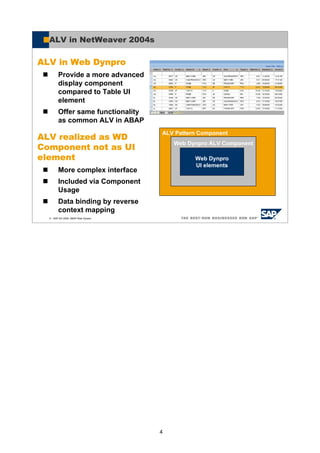
ALV in Web Dynpro
Provide a more advanced
display component
compared to Table UI
element
Offer same functionality
as common ALV in ABAP
ALV realized as WD
Component not as UI
element
More complex interface
Included via Component
Usage
Data binding by reverse
context mapping
ALV Pattern Component
Web Dynpro ALV Component
Web Dynpro
UI elements
5
© SAP AG 2005, ABAP Web Dynpro
ALV in NetWeaver 04s
Web Dynpro ABAP based UI component
Provide an optional list-header and list-footer area for
displaying additional information
Offer a set of generic functions
Choose columns which you want to display out of a set of columns
Interactive sorting by simple header click or by choosing multiple criteria
Interactive filtering by entering a filter-string in the edit field above the
column
Aggregation on multiple key figures (total, min, max, average, count)
Sub-aggregation if group-level (defined by sort criteria) changes
Editability
Persistence of configurations (layouts)
Export to PDF
Offer interface to application to enhance set of generic
functions with application specific functions
6
© SAP AG 2005, ABAP Web Dynpro
Not in Scope for Paris
Deal with more complex filter criteria (e.g. regular expressions)
Semantics of exceptions
Offer Export functionality to spreadsheets like Excel
Switch view to Graphics or Formatted Report
Hierarchical lead column
PopIns in the table
Broadcasting of results (e.g. mail, cRoom, …)
7
© SAP AG 2005, ABAP Web Dynpro
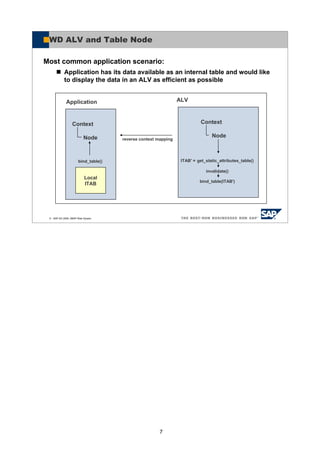
WD ALV and Table Node
Application ALV
Local
ITAB
Context
Node
Context
Node
reverse context mapping
bind_table() ITAB' = get_static_attributes_table()
invalidate()
bind_table(ITAB')
Most common application scenario:
Application has its data available as an internal table and would like
to display the data in an ALV as efficient as possible
8
© SAP AG 2005, ABAP Web Dynpro
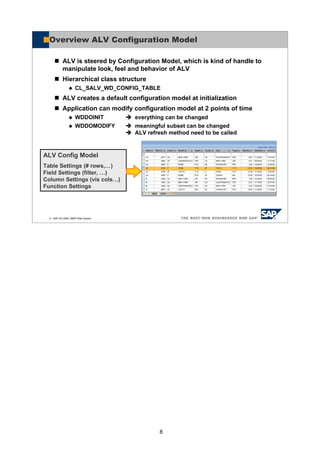
Overview ALV Configuration Model
ALV is steered by Configuration Model, which is kind of handle to
manipulate look, feel and behavior of ALV
Hierarchical class structure
CL_SALV_WD_CONFIG_TABLE
ALV creates a default configuration model at initialization
Application can modify configuration model at 2 points of time
WDDOINIT everything can be changed
WDDOMODIFY meaningful subset can be changed
ALV refresh method need to be called
ALV Config Model
Table Settings (# rows,…)
Field Settings (filter, …)
Column Settings (vis cols…)
Function Settings
9
© SAP AG 2005, ABAP Web Dynpro
You should now be able to:
Describe the ALV usage in Web dynpro
Use the ALV in Web Dynpro
ALV for Web Dynpro: Summary

Alv for web

  • 1.
  • 2.
    2 © SAP AG2005, ABAP Web Dynpro ALV integration in Web Dynpro ALV Configuration Model Contents: ALV for Web Dynpro
  • 3.
    3 © SAP AG2005, ABAP Web Dynpro After completing this lesson, you will be able to: Describe the ALV usage in Web Dynpro Use the ALV in Web Dynpro ALV for Web Dynpro: Objectives
  • 4.
    4 © SAP AG2005, ABAP Web Dynpro ALV in NetWeaver 2004s ALV in Web Dynpro Provide a more advanced display component compared to Table UI element Offer same functionality as common ALV in ABAP ALV realized as WD Component not as UI element More complex interface Included via Component Usage Data binding by reverse context mapping ALV Pattern Component Web Dynpro ALV Component Web Dynpro UI elements
  • 5.
    5 © SAP AG2005, ABAP Web Dynpro ALV in NetWeaver 04s Web Dynpro ABAP based UI component Provide an optional list-header and list-footer area for displaying additional information Offer a set of generic functions Choose columns which you want to display out of a set of columns Interactive sorting by simple header click or by choosing multiple criteria Interactive filtering by entering a filter-string in the edit field above the column Aggregation on multiple key figures (total, min, max, average, count) Sub-aggregation if group-level (defined by sort criteria) changes Editability Persistence of configurations (layouts) Export to PDF Offer interface to application to enhance set of generic functions with application specific functions
  • 6.
    6 © SAP AG2005, ABAP Web Dynpro Not in Scope for Paris Deal with more complex filter criteria (e.g. regular expressions) Semantics of exceptions Offer Export functionality to spreadsheets like Excel Switch view to Graphics or Formatted Report Hierarchical lead column PopIns in the table Broadcasting of results (e.g. mail, cRoom, …)
  • 7.
    7 © SAP AG2005, ABAP Web Dynpro WD ALV and Table Node Application ALV Local ITAB Context Node Context Node reverse context mapping bind_table() ITAB' = get_static_attributes_table() invalidate() bind_table(ITAB') Most common application scenario: Application has its data available as an internal table and would like to display the data in an ALV as efficient as possible
  • 8.
    8 © SAP AG2005, ABAP Web Dynpro Overview ALV Configuration Model ALV is steered by Configuration Model, which is kind of handle to manipulate look, feel and behavior of ALV Hierarchical class structure CL_SALV_WD_CONFIG_TABLE ALV creates a default configuration model at initialization Application can modify configuration model at 2 points of time WDDOINIT everything can be changed WDDOMODIFY meaningful subset can be changed ALV refresh method need to be called ALV Config Model Table Settings (# rows,…) Field Settings (filter, …) Column Settings (vis cols…) Function Settings
  • 9.
    9 © SAP AG2005, ABAP Web Dynpro You should now be able to: Describe the ALV usage in Web dynpro Use the ALV in Web Dynpro ALV for Web Dynpro: Summary