TAKING OF ROLL CALL
 55.(4) Roll-call shall be completed not later than 40 minutes after
the time fixed for the commencement of formal instruction at the school
meeting. A minimum period of 10 minutes shall be set down in the time-table
for roll-call
 Call roll at 9.50 am daily
 Which teacher has the worst record for taking daily roll call on time?????
 Now time for a period of reflection and self examination
(deep analysis called for)
N.E.W.B. TUSLA RETURNS
 Quarterly returns
 End of September
 End of December
 End of March
 End of June
 Annual return
 End of school year
 Educational Welfare Officer
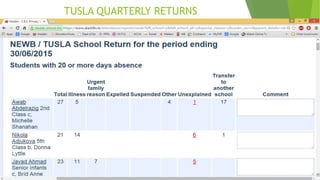
TUSLA QUARTERLY RETURNS
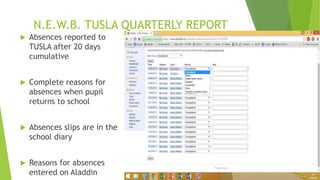
N.E.W.B. TUSLA QUARTERLY REPORT
 Absences reported to
TUSLA after 20 days
cumulative
 Complete reasons for
absences when pupil
returns to school
 Absences slips are in the
school diary
 Reasons for absences
entered on Aladdin
REASONS FOR ABSENCES
 7 Reasons listed in Aladdin
Unexplained (Default setting)
Illness
Urgent family reason
Expelled
Suspended
Other
Transferred to other school
REASON FOR ABSENCES
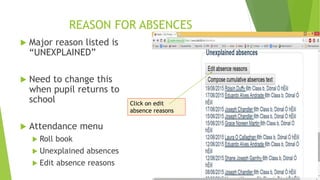
 Major reason listed is
“UNEXPLAINED”
 Need to change this
when pupil returns to
school
 Attendance menu
 Roll book
 Unexplained absences
 Edit absence reasons
Click on edit
absence reasons
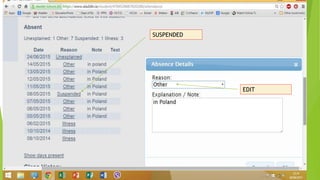
SUSPENDED
EDIT
MISTAKEN ATTENDANCE
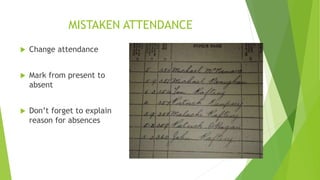
 Change attendance
 Mark from present to
absent
 Don’t forget to explain
reason for absences
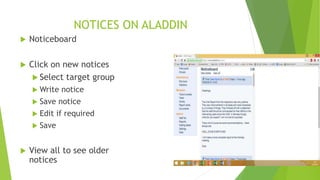
NOTICES ON ALADDIN
 Noticeboard
 Click on new notices
 Select target group
 Write notice
 Save notice
 Edit if required
 Save
 View all to see older
notices
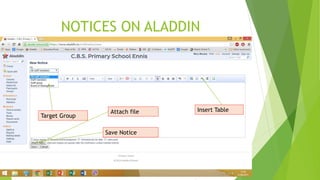
NOTICES ON ALADDIN
Target Group
Insert Table
Save Notice
Attach file
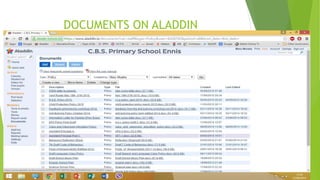
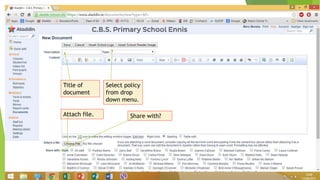
DOCUMENTS ON ALADDIN
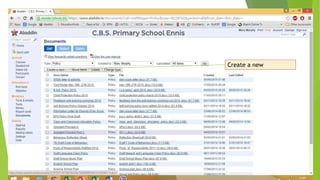
Create a new
Title of
document
Select policy
from drop
down menu.
Attach file. Share with?
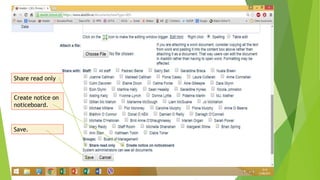
Share read only
Create notice on
noticeboard.
Save.
ALADDIN TEST RESULTS
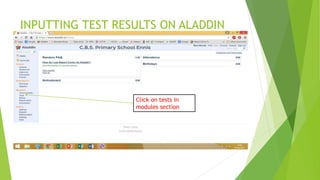
INPUTTING TEST RESULTS ON ALADDIN
Click on tests in
modules section
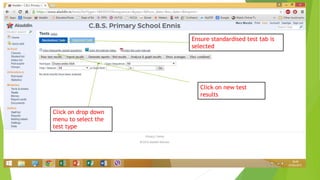
Click on new test
results
Click on drop down
menu to select the
test type
Ensure standardised test tab is
selected
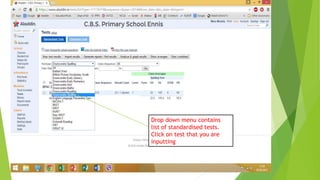
Drop down menu contains
list of standardised tests.
Click on test that you are
inputting
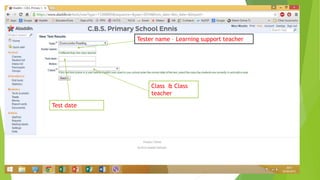
Test date
Class & Class
teacher
Tester name – Learning support teacher
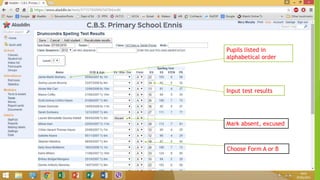
Pupils listed in
alphabetical order
Input test results
Mark absent, excused
Choose Form A or B
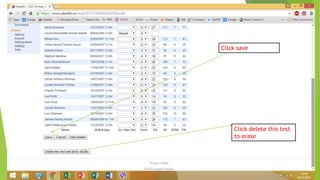
Click save
Click delete this test
to erase
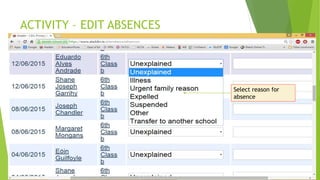
ACTIVITY – EDIT ABSENCES
Select reason for
absence
ACTIVITY
 PUT UP NOTICE ON ALADDIN
 CREATE DOCUMENT ON ALADDIN

Aladdin presentation june 2015

  • 1.
    TAKING OF ROLLCALL  55.(4) Roll-call shall be completed not later than 40 minutes after the time fixed for the commencement of formal instruction at the school meeting. A minimum period of 10 minutes shall be set down in the time-table for roll-call  Call roll at 9.50 am daily  Which teacher has the worst record for taking daily roll call on time?????  Now time for a period of reflection and self examination (deep analysis called for)
  • 2.
    N.E.W.B. TUSLA RETURNS Quarterly returns  End of September  End of December  End of March  End of June  Annual return  End of school year  Educational Welfare Officer
  • 3.
  • 4.
    N.E.W.B. TUSLA QUARTERLYREPORT  Absences reported to TUSLA after 20 days cumulative  Complete reasons for absences when pupil returns to school  Absences slips are in the school diary  Reasons for absences entered on Aladdin
  • 5.
    REASONS FOR ABSENCES 7 Reasons listed in Aladdin Unexplained (Default setting) Illness Urgent family reason Expelled Suspended Other Transferred to other school
  • 6.
    REASON FOR ABSENCES Major reason listed is “UNEXPLAINED”  Need to change this when pupil returns to school  Attendance menu  Roll book  Unexplained absences  Edit absence reasons Click on edit absence reasons
  • 7.
  • 8.
    MISTAKEN ATTENDANCE  Changeattendance  Mark from present to absent  Don’t forget to explain reason for absences
  • 9.
    NOTICES ON ALADDIN Noticeboard  Click on new notices  Select target group  Write notice  Save notice  Edit if required  Save  View all to see older notices
  • 10.
    NOTICES ON ALADDIN TargetGroup Insert Table Save Notice Attach file
  • 11.
  • 12.
  • 13.
    Title of document Select policy fromdrop down menu. Attach file. Share with?
  • 14.
    Share read only Createnotice on noticeboard. Save.
  • 15.
  • 16.
    INPUTTING TEST RESULTSON ALADDIN Click on tests in modules section
  • 17.
    Click on newtest results Click on drop down menu to select the test type Ensure standardised test tab is selected
  • 18.
    Drop down menucontains list of standardised tests. Click on test that you are inputting
  • 19.
    Test date Class &Class teacher Tester name – Learning support teacher
  • 20.
    Pupils listed in alphabeticalorder Input test results Mark absent, excused Choose Form A or B
  • 21.
    Click save Click deletethis test to erase
  • 22.
    ACTIVITY – EDITABSENCES Select reason for absence
  • 23.
    ACTIVITY  PUT UPNOTICE ON ALADDIN  CREATE DOCUMENT ON ALADDIN