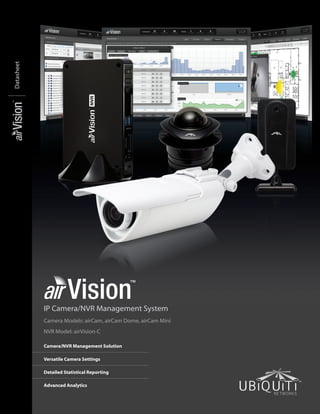
IP Camera/NVR Management System
Camera Models: airCam, airCam Dome, airCam Mini
NVR Model: airVision-C
Camera/NVR Management Solution
Versatile Camera Settings
Detailed Statistical Reporting
Advanced Analytics
Datasheet
Datasheet
2
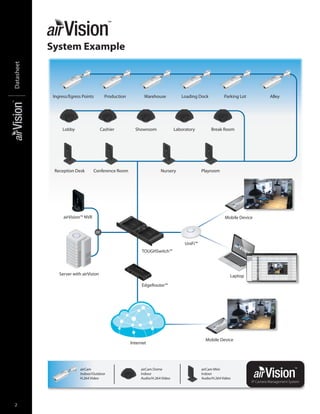
airCam
Indoor/Outdoor
H.264 Video
airCam Dome
Indoor
Audio/H.264 Video
airCam Mini
Indoor
Audio/H.264 Video
UniFi™
TOUGHSwitch™
airVision™ NVR
EdgeRouter™
Server with airVision
Mobile Device
Mobile Device
Internet
Ingress/Egress Points Production
CashierLobby Showroom Laboratory Break Room
Reception Desk Conference Room Nursery Playroom
Warehouse Loading Dock Parking Lot Alley
Laptop
or
airVision
screenshot
airVision
screenshot
IP Camera Management System
System Example
3
Datasheet
www.ubnt.com/airvision
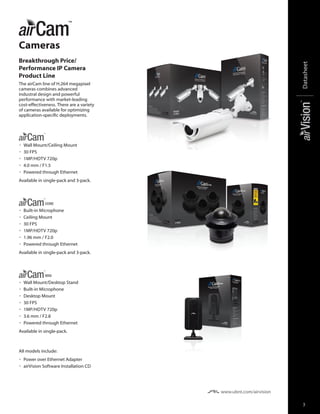
Cameras
Breakthrough Price/
Performance IP Camera
Product Line
The airCam line of H.264 megapixel
cameras combines advanced
industral design and powerful
performance with market-leading
cost-effectiveness. There are a variety
of cameras available for optimizing
application-specific deployments.
•	 Wall Mount/Ceiling Mount
•	 30 FPS
•	 1MP/HDTV 720p
•	 4.0 mm / F1.5
•	 Powered through Ethernet
Available in single-pack and 3-pack.
DOME
•	 Built-in Microphone
•	 Ceiling Mount
•	 30 FPS
•	 1MP/HDTV 720p
•	 1.96 mm / F2.0
•	 Powered through Ethernet
Available in single-pack and 3-pack.
MINI
•	 Wall Mount/Desktop Stand
•	 Built-in Microphone
•	 Desktop Mount
•	 30 FPS
•	 1MP/HDTV 720p
•	 3.6 mm / F2.8
•	 Powered through Ethernet
Available in single-pack.
All models include:
•	 Power over Ethernet Adapter
•	 airVision Software Installation CD
Datasheet
4
www.ubnt.com/airvision
V2.0 Software
Improved Reliability and
Performance
airVision 2.0 has been rebuilt from the ground
up to improve reliability and performance.
Recordings now use H.264 video instead of
Motion JPEG for crisper video with smaller file
sizes. airVision 2.0 supports audio recording on
cameras with audio capability.
Features
Feature Packed User Interface  Accessible
from any web browser, airVision’s user interface
was designed to be easy to use yet packed with
advanced features. airVision’s user interface is
incredibly intuitive and loaded with powerful
features such as detailed statistical reporting,
multiple views, versatile camera settings,
advanced analytics, and customizable event
recordings.
Mobile Support  The airVision web interface
is accessible on iOS and Android tablets and
phones.
Easy Deployment  Automatic camera detection
and a single setup package for the Controller
and NVR make airVision 2.0 easier to install and
deploy. airCam settings are now integrated into
the airVision software, making it unnecessary
to go to the airCam UI to configure camera
settings, reboot the camera, or upgrade the
firmware.
Camera-Based Motion Detection  The camera
now handles motion detection instead of the
server, relieving the workload on the server and
ensuring that compression and noise won’t
affect motion detection.
Additional Live Views  Playlists can be created
with a configurable live camera feed rotation.
Define the cameras you want included in the
playlist and how long you want them to appear
on the screen before moving on to the next live
feed.
Disk Management Features  airVision 2.0
has automatic recording management to free
up disk space. User‑definable disk space and
date-based auto purge allow users to keep a
set amount of free disk space or automatically
delete recordings after a certain number of
days. Another storage feature is the ability to
map external USB or network storage drives.
Cost-Effective Solution  Shattering
conventional industry thinking, Ubiquiti offers
airVision’s powerful IP surveillance software
completely free of charge. No huge upfront
costs, no monthly subscription fees.
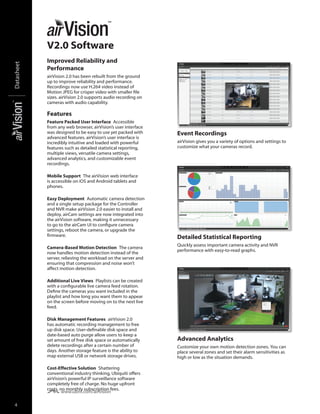
Advanced Analytics
Customize your own motion detection zones. You can
place several zones and set their alarm sensitivities as
high or low as the situation demands.
Detailed Statistical Reporting
Quickly assess important camera activity and NVR
performance with easy-to-read graphs.
Event Recordings
airVision gives you a variety of options and settings to
customize what your cameras record.
5
Datasheet
www.ubnt.com/airvision
Specifications
NVR Specifications
Dimensions 135 x 190 x 25 mm
Weight 483 g
Processor Intel D2550
Memory 4 GB
Hard Drive Capacity 500 GB
Ports (1) 10/100/1000 Ethernet
Power Supply 65 W, 19V, 3.42A
Certifications   CE, IC
airVision Specifications
Software Browser-Based Interface, Tablets and Smartphones Supported
System Setup Plug-and-Play Installation, Automatic Camera Detection
Camera Support Recommended for up to 50 Cameras, Supports Ubiquiti airCams
Supported Devices Operating Systems: Windows, Apple, and Linux
Browsers: Chrome, Internet Explorer 10, Firefox, and Safari
Smartphones: iPhone and Android
Media Formats Video: H.264, MP4
Audio: AAC
Scheduling Day/Time/Camera
Scheduled Video Recording/Motion Detection/Email Alerts
Views Custom Views of Multiple Cameras
Full Screen Capability
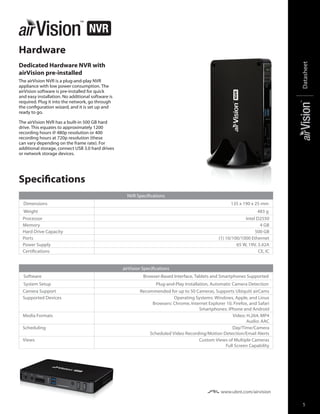
Hardware
Dedicated Hardware NVR with
airVision pre-installed
The airVision NVR is a plug-and-play NVR
appliance with low power consumption. The
airVision software is pre‑installed for quick
and easy installation. No additional software is
required. Plug it into the network, go through
the configuration wizard, and it is set up and
ready to go.
The airVision NVR has a built-in 500 GB hard
drive. This equates to approximately 1200
recording hours @ 480p resolution or 400
recording hours at 720p resolution (these
can vary depending on the frame rate). For
additional storage, connect USB 3.0 hard drives
or network storage devices.
Datasheet
6
Specifications
airCam Specifications
Dimensions 158 x 61.5 x 58.5 mm (without mounting arm)
264 x 61.5 x 58.5 mm (with mounting arm)
Weight 240 g (196 g without mounting arm)
Ports (1) 10/100 Ethernet
Sensor Progressive Scan RGB CMOS ¼"
Lens 4.0 mm/ F1.5
Power LED Orange
Link/Activity LED Green
Buttons Factory Reset Button
Power Method Passive Power over Ethernet (12-24V)
Power Supply 24V, 0.5A PoE Adapter included
Maximum Power Consumption 2.4 W
Certifications   CE, FCC, IC
Mounting Wall/Ceiling Adapter Kit Included
Operating Temperature –40 to 70° C
Operating Humidity 20 - 80% Noncondensing
Video
Video Compression H.264
Resolution 1MP/HDTV 720p
Maximum Frame Rate 30 FPS
Image Setting Brightness, Contrast, Sharpness, Saturation, Noise Reduction, 50 Hz/60 Hz
General
Processor ARM-Based 32-Bit RISC
Memory 128 MB DDR2 SDRAM, 8 MB Flash
Connector RJ-45 10BASE-T/100BASE-TX PoE
Maximum Active Array Size 1280 x 800
View Angle 	 47° (H)
	 31° (V)
	 54° (D)
Network
Security Multiple User Access Levels with Password Protection, User Access Log
7
Datasheet
Specifications
airCam Dome Specifications
Dimensions 100 x 94 mm (length x diameter)
Weight 184 g
Ports (1) 10/100 Ethernet, MicroSD Card Slot
Sensor Progressive Scan RGB CMOS ¼"
Lens 1.96 mm/F2.0
Power LED Orange
Link/Activity LED Green
Buttons Factory Reset Button
Power Method Passive Power over Ethernet (12-24V)
Power Supply 24V, 0.5A PoE Adapter Included
Maximum Power Consumption 3.5 W
Certifications   CE, FCC, IC
Mounting Ceiling Mount
Operating Temperature 0 to 40° C
Operating Humidity 20 - 80% Noncondensing
Video
Video Compression H.264
Resolution 1MP/HDTV 720p
Maximum Frame Rate 30 FPS
Image Setting Brightness, Contrast, Sharpness, Saturation, Mirror, Flip, Noise Reduction, 50 Hz/60 Hz
Audio
Built-In Microphone ECM (Omni.); Sensitivity = -42 ± 3 dB; S/N = 60 dBA
General
Processor ARM-Based 32-bit RISC
Memory 128 MB DDR2 SDRAM, 8 MB Flash
Local Storage MicroSD Card Slot (card not included)
Maximum Active Array Size 1280 x 800
View Angle 	 90° (H)
	 62° (V)
	 101° (D)
Network
Security Multiple User Access Levels with Password Protection, User Access Log
Datasheet
8
Specifications
airCam Mini Specifications
Dimensions 55 x 55 x 125 mm
Weight 166 g
Ports (1) 10/100 Ethernet, MicroSD card slot
Sensor Progressive Scan RGB CMOS ¼"
Lens 3.6 mm/ F2.8
Networking Interface (1) 10/100 Ethernet Port
Power LED Orange
Link/Activity LED Green
Buttons Factory Reset Button
Power Method Passive Power over Ethernet (12-24V)
Power Supply 24V, 0.5A PoE Adapter Included
Maximum Power Consumption 3 W
Certifications CE, FCC, IC
Mounting Wall Mount/Desk Mount
Operating Temperature 0 to 40° C
Operating Humidity 20 - 80% Noncondensing
Video
Video Compression H.264
Resolution 1MP/HDTV 720p
Maximum Frame Rate 30 FPS
Image Setting Brightness, Contrast, Sharpness, Saturation, Mirror, Flip, Noise Reduction, 50 Hz/60 Hz
Audio
Microphone ECM (Omni.); Sensitivity = -42 ± 3 dB; S/N = 60 dBA
General
Processor ARM-Based 32-bit RISC
Memory 128 MB DDR2 SDRAM, 8 MB Flash
Local Storage MicroSD Card Slot (Card not included)
Maximum Active Array Size 1280 x 800
View Angle 	 52° (H)
	 34° (V)
	 59° (D)
Network
Security Multiple User Access Levels with Password Protection, User Access Log
9
Datasheet
All specifications in this document are subject to change without notice. www.ubnt.com
RR060513
Protect your networks from the most
brutal environments with Ubiquiti
Networks’ industrial-grade, shielded
Ethernet cable, TOUGHCable.
Increase Performance 
Dramatically improve your
Ethernet link states, speeds, and
overall performance with Ubiquiti
TOUGHCable.
Extreme Weatherproof 
Designed for outdoor use,
TOUGHCable has been built to
perform even in the harshest weather
and environments.
ESD Damage Protection 
Protect your networks from
devastating electrostatic discharge
(ESD) attacks.
Extended Cable Support 
TOUGHCable has been developed to
increase power handling performance
for extended cable run lengths.
Advanced Gigabit PoE
Managed Switch
Introducing the Advanced
Power over Ethernet Controllers,
TOUGHSwitch™
 PoE from Ubiquiti
Networks. TOUGHSwitch PoE
delivers reliable passive PoE and fast
10/100/1000 Mbps connectivity to
attached Ubiquiti devices and other
devices that support passive PoE.
To connect your PoE devices, simply
enable PoE in the easy-to-use
TOUGHSwitch Configuration Interface.
Each port can be individually
configured to provide PoE, so both
PoE and non‑PoE devices can be
connected.
TOUGHCable Connectors
Specifically designed for use with Ubiquiti TOUGHCable, TOUGHCable Connectors
protect against ESD attacks and Ethernet hardware damage, while allowing rapid
field deployment without soldering. The standard TOUGHCable Connectors are
available in a box of 100, while the TC-GND versions include ground wires and are
available in a box of 20.
© 2013 Ubiquiti Networks, Inc. All rights reserved.

Air vision

  • 1.
    IP Camera/NVR ManagementSystem Camera Models: airCam, airCam Dome, airCam Mini NVR Model: airVision-C Camera/NVR Management Solution Versatile Camera Settings Detailed Statistical Reporting Advanced Analytics Datasheet
  • 2.
    Datasheet 2 airCam Indoor/Outdoor H.264 Video airCam Dome Indoor Audio/H.264Video airCam Mini Indoor Audio/H.264 Video UniFi™ TOUGHSwitch™ airVision™ NVR EdgeRouter™ Server with airVision Mobile Device Mobile Device Internet Ingress/Egress Points Production CashierLobby Showroom Laboratory Break Room Reception Desk Conference Room Nursery Playroom Warehouse Loading Dock Parking Lot Alley Laptop or airVision screenshot airVision screenshot IP Camera Management System System Example
  • 3.
    3 Datasheet www.ubnt.com/airvision Cameras Breakthrough Price/ Performance IPCamera Product Line The airCam line of H.264 megapixel cameras combines advanced industral design and powerful performance with market-leading cost-effectiveness. There are a variety of cameras available for optimizing application-specific deployments. • Wall Mount/Ceiling Mount • 30 FPS • 1MP/HDTV 720p • 4.0 mm / F1.5 • Powered through Ethernet Available in single-pack and 3-pack. DOME • Built-in Microphone • Ceiling Mount • 30 FPS • 1MP/HDTV 720p • 1.96 mm / F2.0 • Powered through Ethernet Available in single-pack and 3-pack. MINI • Wall Mount/Desktop Stand • Built-in Microphone • Desktop Mount • 30 FPS • 1MP/HDTV 720p • 3.6 mm / F2.8 • Powered through Ethernet Available in single-pack. All models include: • Power over Ethernet Adapter • airVision Software Installation CD
  • 4.
    Datasheet 4 www.ubnt.com/airvision V2.0 Software Improved Reliabilityand Performance airVision 2.0 has been rebuilt from the ground up to improve reliability and performance. Recordings now use H.264 video instead of Motion JPEG for crisper video with smaller file sizes. airVision 2.0 supports audio recording on cameras with audio capability. Features Feature Packed User Interface  Accessible from any web browser, airVision’s user interface was designed to be easy to use yet packed with advanced features. airVision’s user interface is incredibly intuitive and loaded with powerful features such as detailed statistical reporting, multiple views, versatile camera settings, advanced analytics, and customizable event recordings. Mobile Support  The airVision web interface is accessible on iOS and Android tablets and phones. Easy Deployment  Automatic camera detection and a single setup package for the Controller and NVR make airVision 2.0 easier to install and deploy. airCam settings are now integrated into the airVision software, making it unnecessary to go to the airCam UI to configure camera settings, reboot the camera, or upgrade the firmware. Camera-Based Motion Detection  The camera now handles motion detection instead of the server, relieving the workload on the server and ensuring that compression and noise won’t affect motion detection. Additional Live Views  Playlists can be created with a configurable live camera feed rotation. Define the cameras you want included in the playlist and how long you want them to appear on the screen before moving on to the next live feed. Disk Management Features  airVision 2.0 has automatic recording management to free up disk space. User‑definable disk space and date-based auto purge allow users to keep a set amount of free disk space or automatically delete recordings after a certain number of days. Another storage feature is the ability to map external USB or network storage drives. Cost-Effective Solution  Shattering conventional industry thinking, Ubiquiti offers airVision’s powerful IP surveillance software completely free of charge. No huge upfront costs, no monthly subscription fees. Advanced Analytics Customize your own motion detection zones. You can place several zones and set their alarm sensitivities as high or low as the situation demands. Detailed Statistical Reporting Quickly assess important camera activity and NVR performance with easy-to-read graphs. Event Recordings airVision gives you a variety of options and settings to customize what your cameras record.
  • 5.
    5 Datasheet www.ubnt.com/airvision Specifications NVR Specifications Dimensions 135x 190 x 25 mm Weight 483 g Processor Intel D2550 Memory 4 GB Hard Drive Capacity 500 GB Ports (1) 10/100/1000 Ethernet Power Supply 65 W, 19V, 3.42A Certifications   CE, IC airVision Specifications Software Browser-Based Interface, Tablets and Smartphones Supported System Setup Plug-and-Play Installation, Automatic Camera Detection Camera Support Recommended for up to 50 Cameras, Supports Ubiquiti airCams Supported Devices Operating Systems: Windows, Apple, and Linux Browsers: Chrome, Internet Explorer 10, Firefox, and Safari Smartphones: iPhone and Android Media Formats Video: H.264, MP4 Audio: AAC Scheduling Day/Time/Camera Scheduled Video Recording/Motion Detection/Email Alerts Views Custom Views of Multiple Cameras Full Screen Capability Hardware Dedicated Hardware NVR with airVision pre-installed The airVision NVR is a plug-and-play NVR appliance with low power consumption. The airVision software is pre‑installed for quick and easy installation. No additional software is required. Plug it into the network, go through the configuration wizard, and it is set up and ready to go. The airVision NVR has a built-in 500 GB hard drive. This equates to approximately 1200 recording hours @ 480p resolution or 400 recording hours at 720p resolution (these can vary depending on the frame rate). For additional storage, connect USB 3.0 hard drives or network storage devices.
  • 6.
    Datasheet 6 Specifications airCam Specifications Dimensions 158x 61.5 x 58.5 mm (without mounting arm) 264 x 61.5 x 58.5 mm (with mounting arm) Weight 240 g (196 g without mounting arm) Ports (1) 10/100 Ethernet Sensor Progressive Scan RGB CMOS ¼" Lens 4.0 mm/ F1.5 Power LED Orange Link/Activity LED Green Buttons Factory Reset Button Power Method Passive Power over Ethernet (12-24V) Power Supply 24V, 0.5A PoE Adapter included Maximum Power Consumption 2.4 W Certifications   CE, FCC, IC Mounting Wall/Ceiling Adapter Kit Included Operating Temperature –40 to 70° C Operating Humidity 20 - 80% Noncondensing Video Video Compression H.264 Resolution 1MP/HDTV 720p Maximum Frame Rate 30 FPS Image Setting Brightness, Contrast, Sharpness, Saturation, Noise Reduction, 50 Hz/60 Hz General Processor ARM-Based 32-Bit RISC Memory 128 MB DDR2 SDRAM, 8 MB Flash Connector RJ-45 10BASE-T/100BASE-TX PoE Maximum Active Array Size 1280 x 800 View Angle 47° (H) 31° (V) 54° (D) Network Security Multiple User Access Levels with Password Protection, User Access Log
  • 7.
    7 Datasheet Specifications airCam Dome Specifications Dimensions100 x 94 mm (length x diameter) Weight 184 g Ports (1) 10/100 Ethernet, MicroSD Card Slot Sensor Progressive Scan RGB CMOS ¼" Lens 1.96 mm/F2.0 Power LED Orange Link/Activity LED Green Buttons Factory Reset Button Power Method Passive Power over Ethernet (12-24V) Power Supply 24V, 0.5A PoE Adapter Included Maximum Power Consumption 3.5 W Certifications   CE, FCC, IC Mounting Ceiling Mount Operating Temperature 0 to 40° C Operating Humidity 20 - 80% Noncondensing Video Video Compression H.264 Resolution 1MP/HDTV 720p Maximum Frame Rate 30 FPS Image Setting Brightness, Contrast, Sharpness, Saturation, Mirror, Flip, Noise Reduction, 50 Hz/60 Hz Audio Built-In Microphone ECM (Omni.); Sensitivity = -42 ± 3 dB; S/N = 60 dBA General Processor ARM-Based 32-bit RISC Memory 128 MB DDR2 SDRAM, 8 MB Flash Local Storage MicroSD Card Slot (card not included) Maximum Active Array Size 1280 x 800 View Angle 90° (H) 62° (V) 101° (D) Network Security Multiple User Access Levels with Password Protection, User Access Log
  • 8.
    Datasheet 8 Specifications airCam Mini Specifications Dimensions55 x 55 x 125 mm Weight 166 g Ports (1) 10/100 Ethernet, MicroSD card slot Sensor Progressive Scan RGB CMOS ¼" Lens 3.6 mm/ F2.8 Networking Interface (1) 10/100 Ethernet Port Power LED Orange Link/Activity LED Green Buttons Factory Reset Button Power Method Passive Power over Ethernet (12-24V) Power Supply 24V, 0.5A PoE Adapter Included Maximum Power Consumption 3 W Certifications CE, FCC, IC Mounting Wall Mount/Desk Mount Operating Temperature 0 to 40° C Operating Humidity 20 - 80% Noncondensing Video Video Compression H.264 Resolution 1MP/HDTV 720p Maximum Frame Rate 30 FPS Image Setting Brightness, Contrast, Sharpness, Saturation, Mirror, Flip, Noise Reduction, 50 Hz/60 Hz Audio Microphone ECM (Omni.); Sensitivity = -42 ± 3 dB; S/N = 60 dBA General Processor ARM-Based 32-bit RISC Memory 128 MB DDR2 SDRAM, 8 MB Flash Local Storage MicroSD Card Slot (Card not included) Maximum Active Array Size 1280 x 800 View Angle 52° (H) 34° (V) 59° (D) Network Security Multiple User Access Levels with Password Protection, User Access Log
  • 9.
    9 Datasheet All specifications inthis document are subject to change without notice. www.ubnt.com RR060513 Protect your networks from the most brutal environments with Ubiquiti Networks’ industrial-grade, shielded Ethernet cable, TOUGHCable. Increase Performance  Dramatically improve your Ethernet link states, speeds, and overall performance with Ubiquiti TOUGHCable. Extreme Weatherproof  Designed for outdoor use, TOUGHCable has been built to perform even in the harshest weather and environments. ESD Damage Protection  Protect your networks from devastating electrostatic discharge (ESD) attacks. Extended Cable Support  TOUGHCable has been developed to increase power handling performance for extended cable run lengths. Advanced Gigabit PoE Managed Switch Introducing the Advanced Power over Ethernet Controllers, TOUGHSwitch™  PoE from Ubiquiti Networks. TOUGHSwitch PoE delivers reliable passive PoE and fast 10/100/1000 Mbps connectivity to attached Ubiquiti devices and other devices that support passive PoE. To connect your PoE devices, simply enable PoE in the easy-to-use TOUGHSwitch Configuration Interface. Each port can be individually configured to provide PoE, so both PoE and non‑PoE devices can be connected. TOUGHCable Connectors Specifically designed for use with Ubiquiti TOUGHCable, TOUGHCable Connectors protect against ESD attacks and Ethernet hardware damage, while allowing rapid field deployment without soldering. The standard TOUGHCable Connectors are available in a box of 100, while the TC-GND versions include ground wires and are available in a box of 20. © 2013 Ubiquiti Networks, Inc. All rights reserved.