MCS24101 – Advances in
Computer Networks
Module 1.2
Dr. R RAJKUMAR
Professor - CSE
NATIONAL EDUCATION FOUNDATION
GLOBAL ACADEMY OF TECHNOLOGY
Autonomous Institute Affiliated to VTU, Recognized by GOK, Approved by AICTE, New Delhi
(NAAC ‘A Grade’ Accredited, Aditya Layout, Rajarajeshwari Nagar,
Bengaluru, Karnataka - 560 098
Ph: 080-28603158/57 URL: www.gat.ac.in
Contents
• Introduction
• Foundation
• Building a Network, Applications, Requirements, Architecture, Software
Performance.
• Packets
• Packet Delay, Variability, Packet Size, Error Detection.
• IP Version 4
• The IPv4 Header, Special Addresses, IPv4 Subnets
• Dynamic Host Configuration Protocol (DHCP)
• IP version 6
• IPv6 Header, IPv6 addresses, IPv6 Host Address Assignment, ICMPv6.

Dept. of Computer Science and Engineering
24-11-2025 2
Packet Delay
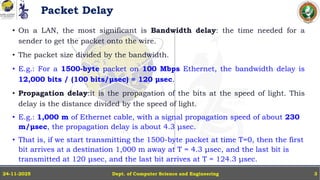
• On a LAN, the most significant is Bandwidth delay: the time needed for a
sender to get the packet onto the wire.
• The packet size divided by the bandwidth.
• E.g.: For a 1500-byte packet on 100 Mbps Ethernet, the bandwidth delay is
12,000 bits / (100 bits/μsec) = 120 μsec.
• Propagation delay:it is the propagation of the bits at the speed of light. This
delay is the distance divided by the speed of light.
• E.g.: 1,000 m of Ethernet cable, with a signal propagation speed of about 230
m/μsec, the propagation delay is about 4.3 μsec.
• That is, if we start transmitting the 1500-byte packet at time T=0, then the first
bit arrives at a destination 1,000 m away at T = 4.3 μsec, and the last bit is
transmitted at 120 μsec, and the last bit arrives at T = 124.3 μsec.
Dept. of Computer Science and Engineering
24-11-2025 3
Packet Delay
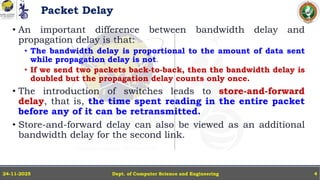
• An important difference between bandwidth delay and
propagation delay is that:
• The bandwidth delay is proportional to the amount of data sent
while propagation delay is not.
• If we send two packets back-to-back, then the bandwidth delay is
doubled but the propagation delay counts only once.
• The introduction of switches leads to store-and-forward
delay, that is, the time spent reading in the entire packet
before any of it can be retransmitted.
• Store-and-forward delay can also be viewed as an additional
bandwidth delay for the second link.
Dept. of Computer Science and Engineering
24-11-2025 4
Packet Delay
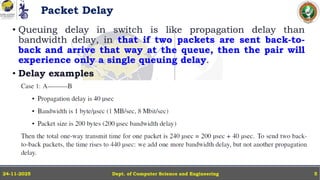
• Queuing delay in switch is like propagation delay than
bandwidth delay, in that if two packets are sent back-to-
back and arrive that way at the queue, then the pair will
experience only a single queuing delay.
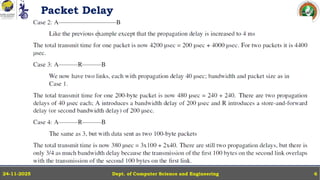
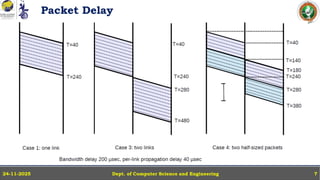
• Delay examples
Dept. of Computer Science and Engineering
24-11-2025 5
Packet Delay
Dept. of Computer Science and Engineering
24-11-2025 6
Packet Delay
Dept. of Computer Science and Engineering
24-11-2025 7
Dept. of Computer Science and Engineering
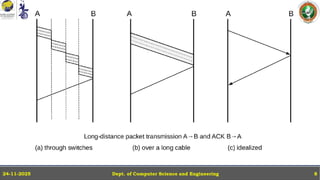
24-11-2025 8
Packet Size
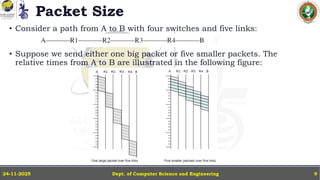
• Consider a path from A to B with four switches and five links:
• Suppose we send either one big packet or five smaller packets. The
relative times from A to B are illustrated in the following figure:
Dept. of Computer Science and Engineering
24-11-2025 9
Error Rates and Packet Size
• Packet size is also influenced, to a modest degree, by the transmission error rate.
• Impact of Error Rate: Higher transmission error rates favor smaller packets,
since any error results in loss of the whole packet.
• Success Rate Example Calculations:
• Probability a bit is correct: 0.9999 (1 bit in 10,000 corrupted)
• 1,000 - bit packet: Success rate = ൫𝟎. 𝟗𝟗𝟗𝟗)𝟏𝟎𝟎𝟎
≈ 𝟗𝟎%
• 10,000 - bit packet: Success rate = ൫𝟎. 𝟗𝟗𝟗𝟗)𝟏𝟎,𝟎𝟎𝟎
≈ 𝟑𝟕%
• 20,000 - bit packet: Success rate = ൫𝟎. 𝟗𝟗𝟗𝟗)𝟐𝟎,𝟎𝟎𝟎
< 𝟏𝟒%
• Actual Transmission Cost Example: Send 1,000,000 bits:
• As 1000-bit packets: Need 1,000 packets; expected retransmits = 𝟏, 𝟎𝟎𝟎/𝟗𝟎%
= 1,111 packets, totalling 1,111,000 bits sent.
• As 20,000-bit packets: Only 50 packets needed in lossless case, but with success rate
<14% each packet must be sent about 7 times (𝟓𝟎 × 𝟕 = 𝟑𝟓𝟎), totalling 7,000,000 bits sent.
Dept. of Computer Science and Engineering
24-11-2025 10
Packet Size and Real-Time Traffic
Maximum Packet Size & Real-Time Traffic
• Bulk vs. Real-Time Traffic Priority:
Routers can prioritize real-time packets over bulk data. However, if a bulk-
traffic packet is already being transmitted, it cannot be interrupted to serve
waiting real-time packets.
• Largest-Packet Delay:
The time needed to send the largest bulk-traffic packet defines a key delay
bound for real-time flows—called largest-packet delay. Real-time packets
might be delayed by the ongoing transmission of a large bulk packet.
Dept. of Computer Science and Engineering
24-11-2025 11
Packet Size and Real-Time Traffic
Maximum Packet Size & Real-Time Traffic
• Practical Packet Size Examples:
• Most IPv4 packets are capped at 1,500 bytes (Ethernet maximum).
• IPv6 supports “jumbograms” up to 2 MB.
• Transmission impact:
• A 2 MB packet on a 100 Mbps link takes approximately 1/6 second to send, which
can cause unacceptable delays for real-time traffic sharing the same link.
• In summary:
• Larger packet sizes, especially in bulk transfers, can introduce significant
worst-case delays for real-time applications, even with priority scheduling.
• Limiting maximum packet size helps guarantee timely delivery for real-time
data.
Dept. of Computer Science and Engineering
24-11-2025 12
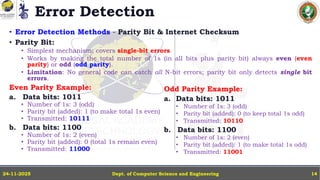
Error Detection
• The basic strategy for packet error detection is to add some extra bits – formally
known as an error-detection code.
• Extra bits (error-detection code) are appended to each packet, allowing the
receiver to check if the packet was corrupted during transit.
• If an error is detected, the receiver discards the packet. Higher protocol layers treat
discarded packets the same as lost/missing ones.
• Relative Frequency: Bit-error-induced packet loss is much less common than
losses due to queue overflows, but accurate error detection is still critical for data
integrity.
• Types of Packet Errors:
1. Low-frequency bit errors: Rare, often single-bit corruptions, caused by phenomena like
cosmic rays.
2. Burst or interference errors: Clusters of multiple bit errors in a packet, often caused by
electrical interference or malfunctioning devices.
Dept. of Computer Science and Engineering
24-11-2025 13
Error Detection
• Error Detection Methods - Parity Bit & Internet Checksum
• Parity Bit:
• Simplest mechanism: covers single-bit errors.
• Works by making the total number of 1s (in all bits plus parity bit) always even (even
parity) or odd (odd parity).
• Limitation: No general code can catch all N-bit errors; parity bit only detects single bit
errors.
Even Parity Example:
a. Data bits: 1011
• Number of 1s: 3 (odd)
• Parity bit (added): 1 (to make total 1s even)
• Transmitted: 10111
b. Data bits: 1100
• Number of 1s: 2 (even)
• Parity bit (added): 0 (total 1s remain even)
• Transmitted: 11000
Dept. of Computer Science and Engineering
24-11-2025 14
Odd Parity Example:
a. Data bits: 1011
• Number of 1s: 3 (odd)
• Parity bit (added): 0 (to keep total 1s odd)
• Transmitted: 10110
b. Data bits: 1100
• Number of 1s: 2 (even)
• Parity bit (added): 1 (to make total 1s odd)
• Transmitted: 11001
Error Detection
• Error Detection Methods - Parity Bit & Internet Checksum
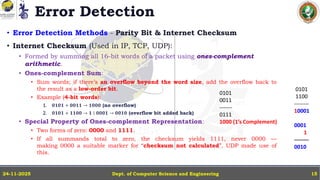
• Internet Checksum (Used in IP, TCP, UDP):
• Formed by summing all 16-bit words of a packet using ones-complement
arithmetic.
• Ones-complement Sum:
• Sum words; if there’s an overflow beyond the word size, add the overflow back to
the result as a low-order bit.
• Example (4-bit words):
1. 𝟎𝟏𝟎𝟏 + 𝟎𝟎𝟏𝟏 → 𝟏𝟎𝟎𝟎 (no overflow)
2. 𝟎𝟏𝟎𝟏 + 𝟏𝟏𝟎𝟎 → 𝟏 ∣ 𝟎𝟎𝟎𝟏 → 𝟎𝟎𝟏𝟎 (overflow bit added back)
• Special Property of Ones-complement Representation:
• Two forms of zero: 0000 and 1111.
• If all summands total to zero, the checksum yields 1111, never 0000 —
making 0000 a suitable marker for “checksum not calculated”. UDP made use of
this.
Dept. of Computer Science and Engineering
24-11-2025 15
0101
0011
-------
0111
1000 (1’s Complement)
0101
1100
--------
10001
0001
1
--------
0010
Cyclical Redundancy Check: CRC
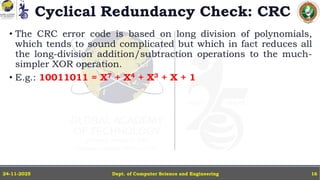
• The CRC error code is based on long division of polynomials,
which tends to sound complicated but which in fact reduces all
the long-division addition/subtraction operations to the much-
simpler XOR operation.
• E.g.: 10011011 = X7 + X4 + X3 + X + 1
Dept. of Computer Science and Engineering
24-11-2025 16
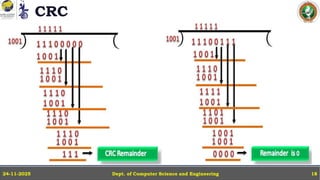
CRC
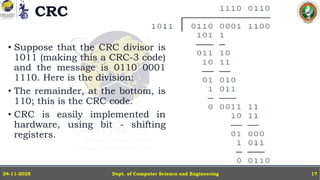
• Suppose that the CRC divisor is
1011 (making this a CRC-3 code)
and the message is 0110 0001
1110. Here is the division:
• The remainder, at the bottom, is
110; this is the CRC code.
• CRC is easily implemented in
hardware, using bit - shifting
registers.
Dept. of Computer Science and Engineering
24-11-2025 17
CRC
Dept. of Computer Science and Engineering
24-11-2025 18
Error-Correcting Codes
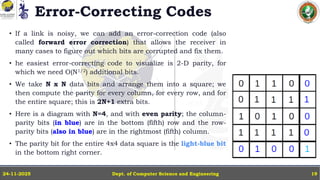
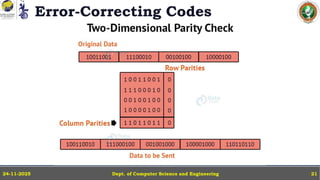
• If a link is noisy, we can add an error-correction code (also
called forward error correction) that allows the receiver in
many cases to figure out which bits are corrupted and fix them.
• he easiest error-correcting code to visualize is 2-D parity, for
which we need O(N1/2) additional bits.
• We take N x N data bits and arrange them into a square; we
then compute the parity for every column, for every row, and for
the entire square; this is 2N+1 extra bits.
• Here is a diagram with N=4, and with even parity; the column-
parity bits (in blue) are in the bottom (fifth) row and the row-
parity bits (also in blue) are in the rightmost (fifth) column.
• The parity bit for the entire 4x4 data square is the light-blue bit
in the bottom right corner.
Dept. of Computer Science and Engineering
24-11-2025 19
Error-Correcting Codes
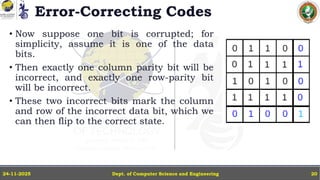
• Now suppose one bit is corrupted; for
simplicity, assume it is one of the data
bits.
• Then exactly one column parity bit will be
incorrect, and exactly one row-parity bit
will be incorrect.
• These two incorrect bits mark the column
and row of the incorrect data bit, which we
can then flip to the correct state.
Dept. of Computer Science and Engineering
24-11-2025 20
Error-Correcting Codes
Dept. of Computer Science and Engineering
24-11-2025 21
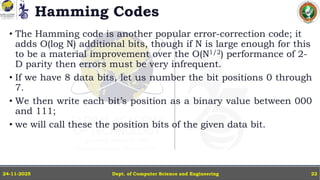
Hamming Codes
• The Hamming code is another popular error-correction code; it
adds O(log N) additional bits, though if N is large enough for this
to be a material improvement over the O(N1/2) performance of 2-
D parity then errors must be very infrequent.
• If we have 8 data bits, let us number the bit positions 0 through
7.
• We then write each bit’s position as a binary value between 000
and 111;
• we will call these the position bits of the given data bit.
Dept. of Computer Science and Engineering
24-11-2025 22
Hamming Codes
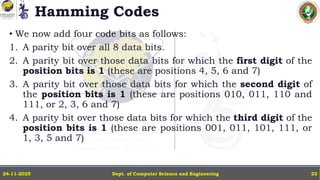
• We now add four code bits as follows:
1. A parity bit over all 8 data bits.
2. A parity bit over those data bits for which the first digit of the
position bits is 1 (these are positions 4, 5, 6 and 7)
3. A parity bit over those data bits for which the second digit of
the position bits is 1 (these are positions 010, 011, 110 and
111, or 2, 3, 6 and 7)
4. A parity bit over those data bits for which the third digit of the
position bits is 1 (these are positions 001, 011, 101, 111, or
1, 3, 5 and 7)
Dept. of Computer Science and Engineering
24-11-2025 23
Hamming Codes
Dept. of Computer Science and Engineering
24-11-2025 24
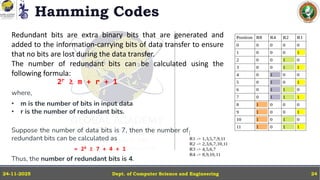
Redundant bits are extra binary bits that are generated and
added to the information-carrying bits of data transfer to ensure
that no bits are lost during the data transfer.
The number of redundant bits can be calculated using the
following formula:
2r ≥ m + r + 1
where,
• m is the number of bits in input data
• r is the number of redundant bits.
Suppose the number of data bits is 7, then the number of
redundant bits can be calculated as
= 24 ≥ 7 + 4 + 1
Thus, the number of redundant bits is 4.
Hamming Codes
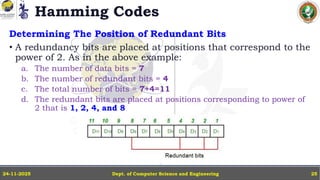
Determining The Position of Redundant Bits
• A redundancy bits are placed at positions that correspond to the
power of 2. As in the above example:
a. The number of data bits = 7
b. The number of redundant bits = 4
c. The total number of bits = 7+4=11
d. The redundant bits are placed at positions corresponding to power of
2 that is 1, 2, 4, and 8
Dept. of Computer Science and Engineering
24-11-2025 25
Hamming Codes
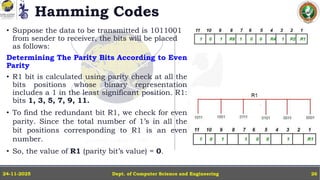
• Suppose the data to be transmitted is 1011001
from sender to receiver, the bits will be placed
as follows:
Determining The Parity Bits According to Even
Parity
• R1 bit is calculated using parity check at all the
bits positions whose binary representation
includes a 1 in the least significant position. R1:
bits 1, 3, 5, 7, 9, 11.
• To find the redundant bit R1, we check for even
parity. Since the total number of 1’s in all the
bit positions corresponding to R1 is an even
number.
• So, the value of R1 (parity bit’s value) = 0.
Dept. of Computer Science and Engineering
24-11-2025 26
Hamming Codes
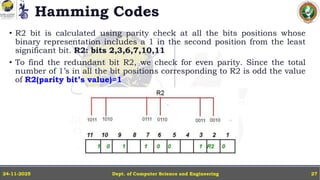
• R2 bit is calculated using parity check at all the bits positions whose
binary representation includes a 1 in the second position from the least
significant bit. R2: bits 2,3,6,7,10,11
• To find the redundant bit R2, we check for even parity. Since the total
number of 1’s in all the bit positions corresponding to R2 is odd the value
of R2(parity bit’s value)=1
Dept. of Computer Science and Engineering
24-11-2025 27
Hamming Codes
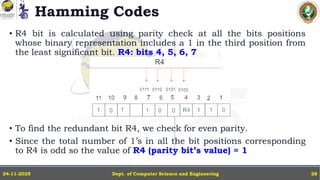
• R4 bit is calculated using parity check at all the bits positions
whose binary representation includes a 1 in the third position from
the least significant bit. R4: bits 4, 5, 6, 7
• To find the redundant bit R4, we check for even parity.
• Since the total number of 1’s in all the bit positions corresponding
to R4 is odd so the value of R4 (parity bit’s value) = 1
Dept. of Computer Science and Engineering
24-11-2025 28
Hamming Codes
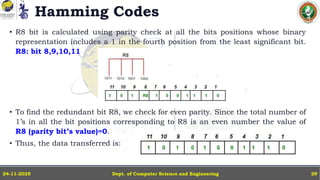
• R8 bit is calculated using parity check at all the bits positions whose binary
representation includes a 1 in the fourth position from the least significant bit.
R8: bit 8,9,10,11
• To find the redundant bit R8, we check for even parity. Since the total number of
1’s in all the bit positions corresponding to R8 is an even number the value of
R8 (parity bit’s value)=0.
• Thus, the data transferred is:
Dept. of Computer Science and Engineering
24-11-2025 29
Hamming Codes
Error Detection and Correction
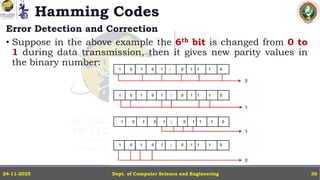
• Suppose in the above example the 6th bit is changed from 0 to
1 during data transmission, then it gives new parity values in
the binary number:
Dept. of Computer Science and Engineering
24-11-2025 30
Hamming Codes
Error Detection and Correction
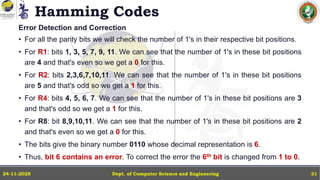
• For all the parity bits we will check the number of 1's in their respective bit positions.
• For R1: bits 1, 3, 5, 7, 9, 11. We can see that the number of 1's in these bit positions
are 4 and that's even so we get a 0 for this.
• For R2: bits 2,3,6,7,10,11. We can see that the number of 1's in these bit positions
are 5 and that's odd so we get a 1 for this.
• For R4: bits 4, 5, 6, 7. We can see that the number of 1's in these bit positions are 3
and that's odd so we get a 1 for this.
• For R8: bit 8,9,10,11. We can see that the number of 1's in these bit positions are 2
and that's even so we get a 0 for this.
• The bits give the binary number 0110 whose decimal representation is 6.
• Thus, bit 6 contains an error. To correct the error the 6th bit is changed from 1 to 0.
Dept. of Computer Science and Engineering
24-11-2025 31
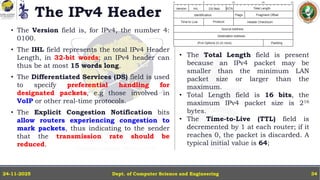
The IPv4 Header
The IPv4 Header needs to contain the following information:
• Destination and Source addresses
• Indication of IPv4 versus IPv6
• A Time To Live (TTL) value, to prevent infinite routing loops
• A field indicating what comes next in the packet (e.g. TCP v UDP)
• Fields supporting fragmentation and reassembly.
• Each row is 32 bits wide.
Dept. of Computer Science and Engineering
24-11-2025 32
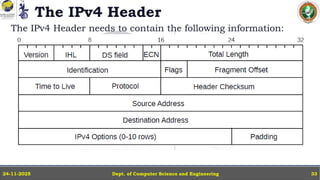
The IPv4 Header
The IPv4 Header needs to contain the following information:
Dept. of Computer Science and Engineering
24-11-2025 33
The IPv4 Header
• The Version field is, for IPv4, the number 4:
0100.
• The IHL field represents the total IPv4 Header
Length, in 32-bit words; an IPv4 header can
thus be at most 15 words long.
• The Differentiated Services (DS) field is used
to specify preferential handling for
designated packets, e.g those involved in
VoIP or other real-time protocols.
• The Explicit Congestion Notification bits
allow routers experiencing congestion to
mark packets, thus indicating to the sender
that the transmission rate should be
reduced.
Dept. of Computer Science and Engineering
24-11-2025 34
• The Total Length field is present
because an IPv4 packet may be
smaller than the minimum LAN
packet size or larger than the
maximum.
• Total Length field is 16 bits, the
maximum IPv4 packet size is 216
bytes.
• The Time-to-Live (TTL) field is
decremented by 1 at each router; if it
reaches 0, the packet is discarded. A
typical initial value is 64;
The IPv4 Header
• The Protocol field contains a value to
identify the contents of the packet body.
• A few of the more common values are:
• 1: an ICMP packet
• 4: an encapsulated IPv4 packet
• 6: a TCP packet
• 17: a UDP packet
• 41: an encapsulated IPv6 packet
• 50: an Encapsulating Security Payload
• The Header Checksum field is the
“Internet checksum” applied to the
header only, not the body. Its only
purpose is to allow the discarding of
packets with corrupted headers.
Dept. of Computer Science and Engineering
24-11-2025 35
• The Source and Destination
Address fields contain, of course,
the IPv4 addresses.
• One IPv4 option is the Record
Route option, in which routers are
to insert their own IPv4 address
into the IPv4 header option area.
• The Timestamp option is related;
intermediate routers are requested
to mark packets with their address
and a local timestamp.
Special Addresses
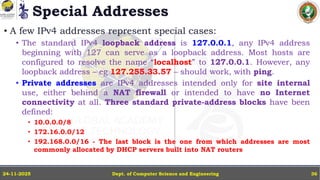
• A few IPv4 addresses represent special cases:
• The standard IPv4 loopback address is 127.0.0.1, any IPv4 address
beginning with 127 can serve as a loopback address. Most hosts are
configured to resolve the name “localhost” to 127.0.0.1. However, any
loopback address – eg 127.255.33.57 – should work, with ping.
• Private addresses are IPv4 addresses intended only for site internal
use, either behind a NAT firewall or intended to have no Internet
connectivity at all. Three standard private-address blocks have been
defined:
• 10.0.0.0/8
• 172.16.0.0/12
• 192.168.0.0/16 - The last block is the one from which addresses are most
commonly allocated by DHCP servers built into NAT routers
Dept. of Computer Science and Engineering
24-11-2025 36
Special Addresses
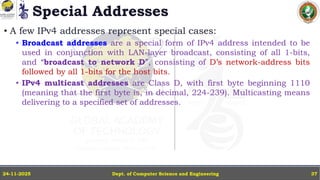
• A few IPv4 addresses represent special cases:
• Broadcast addresses are a special form of IPv4 address intended to be
used in conjunction with LAN-layer broadcast, consisting of all 1-bits,
and “broadcast to network D”, consisting of D’s network-address bits
followed by all 1-bits for the host bits.
• IPv4 multicast addresses are Class D, with first byte beginning 1110
(meaning that the first byte is, in decimal, 224-239). Multicasting means
delivering to a specified set of addresses.
Dept. of Computer Science and Engineering
24-11-2025 37
IPv4 Subnets
Dept. of Computer Science and Engineering
24-11-2025 38
• IPv4 subnetting is the process of dividing a larger IP network into smaller
subnetworks (subnets) to improve management, security, and efficient use of IP
addresses.
• A subnet mask determines which part of an IPv4 address is the network portion
and which is the host portion. Some of the features of IPv4 subnets are:
• IPv4 Address: 32-bit address written as four decimal octets (e.g., 192.168.1.0).
• Subnet Mask: Also 32 bits, with bits set to 1 to mark the network portion, and 0 for the host
portion.
• For example, 255.255.255.0 (binary: 11111111.11111111.11111111.00000000).
• CIDR Notation: A shorthand for the subnet mask showing the number of 1 bits, e.g., /24
corresponds to 255.255.255.0.
• Host Bits: The bits set to zero in the mask represent the number of hosts in the subnet.
• Number of Hosts: Calculated as (2number of host bits − 𝟐 ( subtracting network and broadcast
addresses).
IPv4 Subnets
Dept. of Computer Science and Engineering
24-11-2025 39
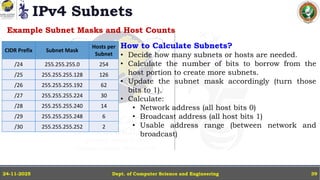
Example Subnet Masks and Host Counts
CIDR Prefix Subnet Mask
Hosts per
Subnet
/24 255.255.255.0 254
/25 255.255.255.128 126
/26 255.255.255.192 62
/27 255.255.255.224 30
/28 255.255.255.240 14
/29 255.255.255.248 6
/30 255.255.255.252 2
How to Calculate Subnets?
• Decide how many subnets or hosts are needed.
• Calculate the number of bits to borrow from the
host portion to create more subnets.
• Update the subnet mask accordingly (turn those
bits to 1).
• Calculate:
• Network address (all host bits 0)
• Broadcast address (all host bits 1)
• Usable address range (between network and
broadcast)
IPv4 Subnets
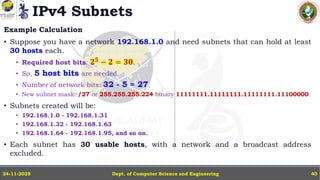
Example Calculation
• Suppose you have a network 192.168.1.0 and need subnets that can hold at least
30 hosts each.
• Required host bits: 𝟐𝟓
− 𝟐 = 𝟑𝟎.
• So, 5 host bits are needed.
• Number of network bits: 32 - 5 = 27.
• New subnet mask: /27 or 255.255.255.224 binary 11111111.11111111.11111111.11100000.
• Subnets created will be:
• 192.168.1.0 - 192.168.1.31
• 192.168.1.32 - 192.168.1.63
• 192.168.1.64 - 192.168.1.95, and so on.
• Each subnet has 30 usable hosts, with a network and a broadcast address
excluded.
Dept. of Computer Science and Engineering
24-11-2025 40
IPv4 Subnets
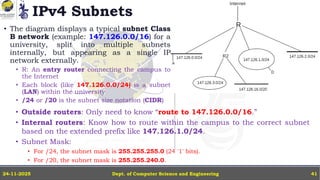
• The diagram displays a typical subnet Class
B network (example: 147.126.0.0/16) for a
university, split into multiple subnets
internally, but appearing as a single IP
network externally.
• R: An entry router connecting the campus to
the Internet
• Each block (like 147.126.0.0/24) is a subnet
(LAN) within the university
• /24 or /20 is the subnet size notation (CIDR)
Dept. of Computer Science and Engineering
24-11-2025 41
• Outside routers: Only need to know “route to 147.126.0.0/16.”
• Internal routers: Know how to route within the campus to the correct subnet
based on the extended prefix like 147.126.1.0/24.
• Subnet Mask:
• For /24, the subnet mask is 255.255.255.0 (24 '1' bits).
• For /20, the subnet mask is 255.255.240.0.
IPv4 Subnets
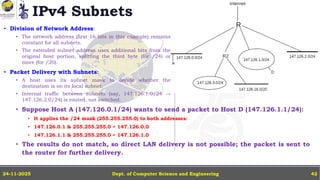
• Division of Network Address:
• The network address (first 16 bits in this example) remains
constant for all subnets.
• The extended subnet address uses additional bits from the
original host portion, splitting the third byte (for /24) or
more (for /20).
• Packet Delivery with Subnets:
• A host uses its subnet mask to decide whether the
destination is on its local subnet.
• Internal traffic between subnets (say, 147.126.1.0/24 →
147.126.2.0/24) is routed, not switched.
Dept. of Computer Science and Engineering
24-11-2025 42
• Suppose Host A (147.126.0.1/24) wants to send a packet to Host D (147.126.1.1/24):
• It applies the /24 mask (255.255.255.0) to both addresses:
• 147.126.0.1 & 255.255.255.0 = 147.126.0.0
• 147.126.1.1 & 255.255.255.0 = 147.126.1.0
• The results do not match, so direct LAN delivery is not possible; the packet is sent to
the router for further delivery.
Dynamic Host Configuration Protocol (DHCP)
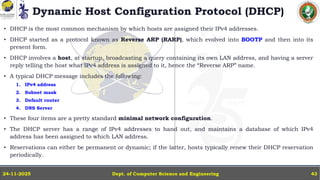
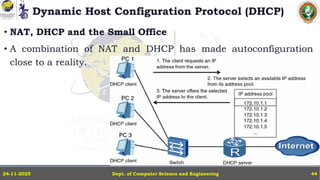
• DHCP is the most common mechanism by which hosts are assigned their IPv4 addresses.
• DHCP started as a protocol known as Reverse ARP (RARP), which evolved into BOOTP and then into its
present form.
• DHCP involves a host, at startup, broadcasting a query containing its own LAN address, and having a server
reply telling the host what IPv4 address is assigned to it, hence the “Reverse ARP” name.
• A typical DHCP message includes the following:
1. IPv4 address
2. Subnet mask
3. Default router
4. DNS Server
• These four items are a pretty standard minimal network configuration.
• The DHCP server has a range of IPv4 addresses to hand out, and maintains a database of which IPv4
address has been assigned to which LAN address.
• Reservations can either be permanent or dynamic; if the latter, hosts typically renew their DHCP reservation
periodically.
Dept. of Computer Science and Engineering
24-11-2025 43
Dynamic Host Configuration Protocol (DHCP)
• NAT, DHCP and the Small Office
• A combination of NAT and DHCP has made autoconfiguration
close to a reality.
Dept. of Computer Science and Engineering
24-11-2025 44
Dynamic Host Configuration Protocol (DHCP)
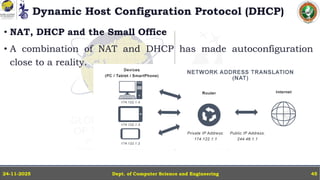
• NAT, DHCP and the Small Office
• A combination of NAT and DHCP has made autoconfiguration
close to a reality.
Dept. of Computer Science and Engineering
24-11-2025 45
Dynamic Host Configuration Protocol (DHCP)
Dept. of Computer Science and Engineering
24-11-2025 46
Dynamic Host Configuration Protocol (DHCP)
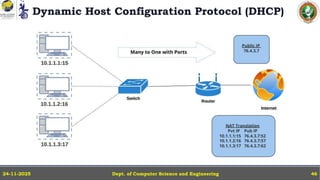
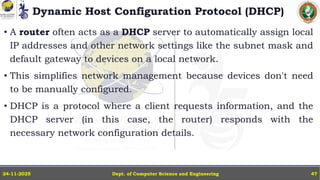
• A router often acts as a DHCP server to automatically assign local
IP addresses and other network settings like the subnet mask and
default gateway to devices on a local network.
• This simplifies network management because devices don't need
to be manually configured.
• DHCP is a protocol where a client requests information, and the
DHCP server (in this case, the router) responds with the
necessary network configuration details.
Dept. of Computer Science and Engineering
24-11-2025 47
Internet Control Message Protocol
• It is part of the IP layer and is mainly used for sending error messages and
operational information.
• ICMP messages are used by hosts and routers to communicate error/report
conditions in IP operations.
• ICMP is not for end-user data — it’s used by network devices, not applications
directly.
• Typical ICMP uses:
• Inform a host when a packet could not reach its destination.
• Diagnose network problems (e.g., ping uses ICMP Echo Request and Echo Reply).
• ICMP messages are carried inside IP packets (type field in the IP header set to 1 for
ICMP).
• No ports: ICMP messages are not directed to UDP/TCP ports.
• Sent/received directly by the IP layer in hosts/routers.
Dept. of Computer Science and Engineering
24-11-2025 48
IPv6 – The IPv6 Header
• The IPv6 fixed header is 40 bytes, it is twice the size of the IPv4
header.
• The fixed header is intended to support only what every packet
needs:
• there is no support for fragmentation,
• no header checksum, and
• no option fields.
Dept. of Computer Science and Engineering
24-11-2025 49
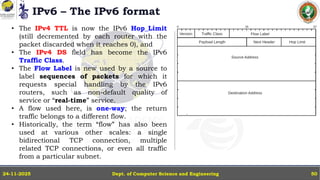
IPv6 – The IPv6 format
Dept. of Computer Science and Engineering
24-11-2025 50
• The IPv4 TTL is now the IPv6 Hop_Limit
(still decremented by each router with the
packet discarded when it reaches 0), and
• The IPv4 DS field has become the IPv6
Traffic Class.
• The Flow Label is new used by a source to
label sequences of packets for which it
requests special handling by the IPv6
routers, such as non-default quality of
service or “real-time” service.
• A flow used here, is one-way; the return
traffic belongs to a different flow.
• Historically, the term “flow” has also been
used at various other scales: a single
bidirectional TCP connection, multiple
related TCP connections, or even all traffic
from a particular subnet.
IPv6 Addresses
Dept. of Computer Science and Engineering
24-11-2025 51
• IPv6 addresses are written in eight groups of four hex digits, with a-f
preferred over A-F.
• The groups are separated by colons, and have leading 0’s removed, e.g.
fedc:13:1654:310:fedc:bc37:61:3210
• If an address contains a long run of 0’s, the string ”::” should be used to
represent. To avoid ambiguity this can be used only once.
• Also, embedded IPv4 addresses may continue to use the ”.” separator:
::ffff:147.126.65.141
• The IPv6 loopback address is ::1 (that is, 127 0-bits followed by a 1-bit).
• Network address prefixes may be written with the “/” notation, as in IPv4:
12ab:0:0:cd30::/60
• /60 means that the first 60 bits are the network prefix, and the
remaining bits are for hosts or subnets.
IPv6 Addresses
Dept. of Computer Science and Engineering
24-11-2025 52
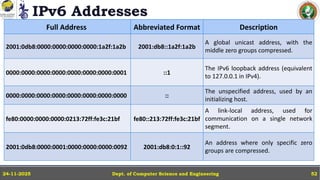
Full Address Abbreviated Format Description
2001:0db8:0000:0000:0000:0000:1a2f:1a2b 2001:db8::1a2f:1a2b
A global unicast address, with the
middle zero groups compressed.
0000:0000:0000:0000:0000:0000:0000:0001 ::1
The IPv6 loopback address (equivalent
to 127.0.0.1 in IPv4).
0000:0000:0000:0000:0000:0000:0000:0000 ::
The unspecified address, used by an
initializing host.
fe80:0000:0000:0000:0213:72ff:fe3c:21bf fe80::213:72ff:fe3c:21bf
A link-local address, used for
communication on a single network
segment.
2001:0db8:0000:0001:0000:0000:0000:0092 2001:db8:0:1::92
An address where only specific zero
groups are compressed.
IPv6 - Interface identifiers
Dept. of Computer Science and Engineering
24-11-2025 53
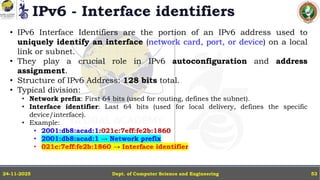
• IPv6 Interface Identifiers are the portion of an IPv6 address used to
uniquely identify an interface (network card, port, or device) on a local
link or subnet.
• They play a crucial role in IPv6 autoconfiguration and address
assignment.
• Structure of IPv6 Address: 128 bits total.
• Typical division:
• Network prefix: First 64 bits (used for routing, defines the subnet).
• Interface identifier: Last 64 bits (used for local delivery, defines the specific
device/interface).
• Example:
• 2001:db8:acad:1:021c:7eff:fe2b:1860
• 2001:db8:acad:1 → Network prefix
• 021c:7eff:fe2b:1860 → Interface identifier
IPv6 - How are Interface Identifiers Created?
Dept. of Computer Science and Engineering
24-11-2025 54
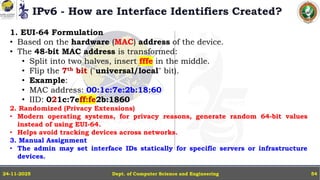
1. EUI-64 Formulation
• Based on the hardware (MAC) address of the device.
• The 48-bit MAC address is transformed:
• Split into two halves, insert fffe in the middle.
• Flip the 7th bit ("universal/local" bit).
• Example:
• MAC address: 00:1c:7e:2b:18:60
• IID: 021c:7eff:fe2b:1860
2. Randomized (Privacy Extensions)
• Modern operating systems, for privacy reasons, generate random 64-bit values
instead of using EUI-64.
• Helps avoid tracking devices across networks.
3. Manual Assignment
• The admin may set interface IDs statically for specific servers or infrastructure
devices.
IPv6 - Link-local addresses
Dept. of Computer Science and Engineering
24-11-2025 55
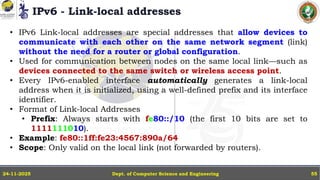
• IPv6 Link-local addresses are special addresses that allow devices to
communicate with each other on the same network segment (link)
without the need for a router or global configuration.
• Used for communication between nodes on the same local link—such as
devices connected to the same switch or wireless access point.
• Every IPv6-enabled interface automatically generates a link-local
address when it is initialized, using a well-defined prefix and its interface
identifier.
• Format of Link-local Addresses
• Prefix: Always starts with fe80::/10 (the first 10 bits are set to
1111111010).
• Example: fe80::1ff:fe23:4567:890a/64
• Scope: Only valid on the local link (not forwarded by routers).
IPv6 - Link-local addresses
Dept. of Computer Science and Engineering
24-11-2025 56
Generation of Link-local Address
• Prefix: Fixed: fe80::
• Interface Identifier: Generated from MAC address (using EUI-64 format)
or randomized for privacy.
• Final address: Combines the link-local prefix (fe80::) for the first 64
bits, and the IID for the last 64 bits.
Usage Scenarios
• Neighbour Discovery: Devices use link-local addresses to discover other
devices on the same network.
• Stateless Address Autoconfiguration: Initial communication for
automatic IPv6 address configuration uses link-local addresses.
• Essential for network operation: Important protocols, such as the
Router Advertisement messages, are sent using link-local addresses.
IPv6 - Anycast addresses in IPv6
Dept. of Computer Science and Engineering
24-11-2025 57
• In IPv6, anycast addresses are a special type of address used to deliver
packets to the nearest member of a group of hosts that share that
address. Anycast is designed to optimize routing by reaching the "closest"
destination based on routing metrics.
• Definition: An anycast address is assigned to a set of interfaces (usually
on different nodes). When a packet is sent to an anycast address, the
network delivers it to the nearest interface (host) in that set.
• Nearest Member: "Nearest" is determined by the routing protocol's view
of the network topology—not necessarily geographic closeness.
• Uniqueness: Anycast addresses are syntactically indistinguishable from
unicast addresses; the difference is in configuration, not format.
• Router Responsibility: Routers handle the routing to the nearest
instance of a node with that anycast address.
IPv6 Host Address Assignment
Dept. of Computer Science and Engineering
24-11-2025 58
• IPv6 Host Address Assignment refers to the methods and protocols by
which an IPv6-enabled device (host) obtains its IPv6 address(es) for use
on a network.
• IPv6 greatly expands on the options available in IPv4, making address
assignment more flexible, automated, and scalable.
1. Stateless Address Autoconfiguration (SLAAC):
• Hosts automatically generate their own address using network
advertisements from routers.
• Router sends Router Advertisement (RA) containing network prefix.
• Host appends its interface identifier (often based on MAC or random value)
to the prefix.
• Host forms a full IPv6 address (typically global and link-local).
• Advantages:
• No need for manual configuration or servers for address assignment.
• Simple, automatic, robust.
IPv6 Host Address Assignment
Dept. of Computer Science and Engineering
24-11-2025 59
2. DHCPv6 (Dynamic Host Configuration Protocol for IPv6):
• Hosts obtain addresses, and possibly other configuration info, from a DHCPv6
server.
• Host sends DHCPv6 request.
• Server replies with assigned address, DNS server, and configuration options.
• Advantages:
• Centralized control, useful for enterprise environments.
• Can assign stable addresses, manage pools, set options.
3. Manual (Static) Assignment: Addresses are configured directly on the device by
an administrator.
• Advantages: Useful for servers, infrastructure devices, or places needing predictable
addresses.
• Disadvantages: Not scalable for large networks.
IPv6 - ICMPv6
Dept. of Computer Science and Engineering
24-11-2025 60
• ICMPv6 is the Internet Control Message Protocol for IPv6.
• It plays a vital role in the operation and reliability of IPv6 networks, supporting
diagnostics, error reporting, neighbor discovery, and essential protocol features.
• ICMPv6 provides error messages, informational messages, and essential control
messages that help maintain and troubleshoot IPv6 networks.
Main Functions of ICMPv6
1. Error Reporting
Types of Error Messages:
a. Destination Unreachable: Network, host, or service is unreachable.
b. Packet Too Big: Indicates to the sender that a packet is too large for the next hop's MTU.
c. Time Exceeded: Time to live (Hop Limit) has expired in transit.
d. Parameter Problem: Something is wrong in the IPv6 header (e.g., field format).
2. Informational Messages
• Echo Request/Echo Reply
• Used for network diagnostics (like ping in IPv4).
IPv6 - ICMPv6
Dept. of Computer Science and Engineering
24-11-2025 61
3. Neighbor Discovery Protocol (NDP)
• Critical for IPv6 operation. ICMPv6 carries NDP messages, which replace ARP and
IPv4's ICMP Router Discovery:
a. Router Solicitation — Host asks routers to announce themselves.
b. Router Advertisement — Router announces presence and configuration details.
c. Neighbor Solicitation — Hosts ask for the link-layer address of another host on
the same link.
d. Neighbor Advertisement — Replies with the link-layer address.
e. Redirect Message — Routers inform hosts of a better next-hop on the same
subnet.
4. Multicast Listener Discovery (MLD)
• ICMPv6 supports MLD, allowing hosts to inform routers about their interest in receiving
specific multicast traffic.
Dept. of Computer Science and Engineering
24-11-2025 62

Advances in Computer Networks Module 1 part 2

  • 1.
    MCS24101 – Advancesin Computer Networks Module 1.2 Dr. R RAJKUMAR Professor - CSE NATIONAL EDUCATION FOUNDATION GLOBAL ACADEMY OF TECHNOLOGY Autonomous Institute Affiliated to VTU, Recognized by GOK, Approved by AICTE, New Delhi (NAAC ‘A Grade’ Accredited, Aditya Layout, Rajarajeshwari Nagar, Bengaluru, Karnataka - 560 098 Ph: 080-28603158/57 URL: www.gat.ac.in
  • 2.
    Contents • Introduction • Foundation •Building a Network, Applications, Requirements, Architecture, Software Performance. • Packets • Packet Delay, Variability, Packet Size, Error Detection. • IP Version 4 • The IPv4 Header, Special Addresses, IPv4 Subnets • Dynamic Host Configuration Protocol (DHCP) • IP version 6 • IPv6 Header, IPv6 addresses, IPv6 Host Address Assignment, ICMPv6. Dept. of Computer Science and Engineering 24-11-2025 2

  • 3.
    Packet Delay • Ona LAN, the most significant is Bandwidth delay: the time needed for a sender to get the packet onto the wire. • The packet size divided by the bandwidth. • E.g.: For a 1500-byte packet on 100 Mbps Ethernet, the bandwidth delay is 12,000 bits / (100 bits/μsec) = 120 μsec. • Propagation delay:it is the propagation of the bits at the speed of light. This delay is the distance divided by the speed of light. • E.g.: 1,000 m of Ethernet cable, with a signal propagation speed of about 230 m/μsec, the propagation delay is about 4.3 μsec. • That is, if we start transmitting the 1500-byte packet at time T=0, then the first bit arrives at a destination 1,000 m away at T = 4.3 μsec, and the last bit is transmitted at 120 μsec, and the last bit arrives at T = 124.3 μsec. Dept. of Computer Science and Engineering 24-11-2025 3
  • 4.
    Packet Delay • Animportant difference between bandwidth delay and propagation delay is that: • The bandwidth delay is proportional to the amount of data sent while propagation delay is not. • If we send two packets back-to-back, then the bandwidth delay is doubled but the propagation delay counts only once. • The introduction of switches leads to store-and-forward delay, that is, the time spent reading in the entire packet before any of it can be retransmitted. • Store-and-forward delay can also be viewed as an additional bandwidth delay for the second link. Dept. of Computer Science and Engineering 24-11-2025 4
  • 5.
    Packet Delay • Queuingdelay in switch is like propagation delay than bandwidth delay, in that if two packets are sent back-to- back and arrive that way at the queue, then the pair will experience only a single queuing delay. • Delay examples Dept. of Computer Science and Engineering 24-11-2025 5
  • 6.
    Packet Delay Dept. ofComputer Science and Engineering 24-11-2025 6
  • 7.
    Packet Delay Dept. ofComputer Science and Engineering 24-11-2025 7
  • 8.
    Dept. of ComputerScience and Engineering 24-11-2025 8
  • 9.
    Packet Size • Considera path from A to B with four switches and five links: • Suppose we send either one big packet or five smaller packets. The relative times from A to B are illustrated in the following figure: Dept. of Computer Science and Engineering 24-11-2025 9
  • 10.
    Error Rates andPacket Size • Packet size is also influenced, to a modest degree, by the transmission error rate. • Impact of Error Rate: Higher transmission error rates favor smaller packets, since any error results in loss of the whole packet. • Success Rate Example Calculations: • Probability a bit is correct: 0.9999 (1 bit in 10,000 corrupted) • 1,000 - bit packet: Success rate = ൫𝟎. 𝟗𝟗𝟗𝟗)𝟏𝟎𝟎𝟎 ≈ 𝟗𝟎% • 10,000 - bit packet: Success rate = ൫𝟎. 𝟗𝟗𝟗𝟗)𝟏𝟎,𝟎𝟎𝟎 ≈ 𝟑𝟕% • 20,000 - bit packet: Success rate = ൫𝟎. 𝟗𝟗𝟗𝟗)𝟐𝟎,𝟎𝟎𝟎 < 𝟏𝟒% • Actual Transmission Cost Example: Send 1,000,000 bits: • As 1000-bit packets: Need 1,000 packets; expected retransmits = 𝟏, 𝟎𝟎𝟎/𝟗𝟎% = 1,111 packets, totalling 1,111,000 bits sent. • As 20,000-bit packets: Only 50 packets needed in lossless case, but with success rate <14% each packet must be sent about 7 times (𝟓𝟎 × 𝟕 = 𝟑𝟓𝟎), totalling 7,000,000 bits sent. Dept. of Computer Science and Engineering 24-11-2025 10
  • 11.
    Packet Size andReal-Time Traffic Maximum Packet Size & Real-Time Traffic • Bulk vs. Real-Time Traffic Priority: Routers can prioritize real-time packets over bulk data. However, if a bulk- traffic packet is already being transmitted, it cannot be interrupted to serve waiting real-time packets. • Largest-Packet Delay: The time needed to send the largest bulk-traffic packet defines a key delay bound for real-time flows—called largest-packet delay. Real-time packets might be delayed by the ongoing transmission of a large bulk packet. Dept. of Computer Science and Engineering 24-11-2025 11
  • 12.
    Packet Size andReal-Time Traffic Maximum Packet Size & Real-Time Traffic • Practical Packet Size Examples: • Most IPv4 packets are capped at 1,500 bytes (Ethernet maximum). • IPv6 supports “jumbograms” up to 2 MB. • Transmission impact: • A 2 MB packet on a 100 Mbps link takes approximately 1/6 second to send, which can cause unacceptable delays for real-time traffic sharing the same link. • In summary: • Larger packet sizes, especially in bulk transfers, can introduce significant worst-case delays for real-time applications, even with priority scheduling. • Limiting maximum packet size helps guarantee timely delivery for real-time data. Dept. of Computer Science and Engineering 24-11-2025 12
  • 13.
    Error Detection • Thebasic strategy for packet error detection is to add some extra bits – formally known as an error-detection code. • Extra bits (error-detection code) are appended to each packet, allowing the receiver to check if the packet was corrupted during transit. • If an error is detected, the receiver discards the packet. Higher protocol layers treat discarded packets the same as lost/missing ones. • Relative Frequency: Bit-error-induced packet loss is much less common than losses due to queue overflows, but accurate error detection is still critical for data integrity. • Types of Packet Errors: 1. Low-frequency bit errors: Rare, often single-bit corruptions, caused by phenomena like cosmic rays. 2. Burst or interference errors: Clusters of multiple bit errors in a packet, often caused by electrical interference or malfunctioning devices. Dept. of Computer Science and Engineering 24-11-2025 13
  • 14.
    Error Detection • ErrorDetection Methods - Parity Bit & Internet Checksum • Parity Bit: • Simplest mechanism: covers single-bit errors. • Works by making the total number of 1s (in all bits plus parity bit) always even (even parity) or odd (odd parity). • Limitation: No general code can catch all N-bit errors; parity bit only detects single bit errors. Even Parity Example: a. Data bits: 1011 • Number of 1s: 3 (odd) • Parity bit (added): 1 (to make total 1s even) • Transmitted: 10111 b. Data bits: 1100 • Number of 1s: 2 (even) • Parity bit (added): 0 (total 1s remain even) • Transmitted: 11000 Dept. of Computer Science and Engineering 24-11-2025 14 Odd Parity Example: a. Data bits: 1011 • Number of 1s: 3 (odd) • Parity bit (added): 0 (to keep total 1s odd) • Transmitted: 10110 b. Data bits: 1100 • Number of 1s: 2 (even) • Parity bit (added): 1 (to make total 1s odd) • Transmitted: 11001
  • 15.
    Error Detection • ErrorDetection Methods - Parity Bit & Internet Checksum • Internet Checksum (Used in IP, TCP, UDP): • Formed by summing all 16-bit words of a packet using ones-complement arithmetic. • Ones-complement Sum: • Sum words; if there’s an overflow beyond the word size, add the overflow back to the result as a low-order bit. • Example (4-bit words): 1. 𝟎𝟏𝟎𝟏 + 𝟎𝟎𝟏𝟏 → 𝟏𝟎𝟎𝟎 (no overflow) 2. 𝟎𝟏𝟎𝟏 + 𝟏𝟏𝟎𝟎 → 𝟏 ∣ 𝟎𝟎𝟎𝟏 → 𝟎𝟎𝟏𝟎 (overflow bit added back) • Special Property of Ones-complement Representation: • Two forms of zero: 0000 and 1111. • If all summands total to zero, the checksum yields 1111, never 0000 — making 0000 a suitable marker for “checksum not calculated”. UDP made use of this. Dept. of Computer Science and Engineering 24-11-2025 15 0101 0011 ------- 0111 1000 (1’s Complement) 0101 1100 -------- 10001 0001 1 -------- 0010
  • 16.
    Cyclical Redundancy Check:CRC • The CRC error code is based on long division of polynomials, which tends to sound complicated but which in fact reduces all the long-division addition/subtraction operations to the much- simpler XOR operation. • E.g.: 10011011 = X7 + X4 + X3 + X + 1 Dept. of Computer Science and Engineering 24-11-2025 16
  • 17.
    CRC • Suppose thatthe CRC divisor is 1011 (making this a CRC-3 code) and the message is 0110 0001 1110. Here is the division: • The remainder, at the bottom, is 110; this is the CRC code. • CRC is easily implemented in hardware, using bit - shifting registers. Dept. of Computer Science and Engineering 24-11-2025 17
  • 18.
    CRC Dept. of ComputerScience and Engineering 24-11-2025 18
  • 19.
    Error-Correcting Codes • Ifa link is noisy, we can add an error-correction code (also called forward error correction) that allows the receiver in many cases to figure out which bits are corrupted and fix them. • he easiest error-correcting code to visualize is 2-D parity, for which we need O(N1/2) additional bits. • We take N x N data bits and arrange them into a square; we then compute the parity for every column, for every row, and for the entire square; this is 2N+1 extra bits. • Here is a diagram with N=4, and with even parity; the column- parity bits (in blue) are in the bottom (fifth) row and the row- parity bits (also in blue) are in the rightmost (fifth) column. • The parity bit for the entire 4x4 data square is the light-blue bit in the bottom right corner. Dept. of Computer Science and Engineering 24-11-2025 19
  • 20.
    Error-Correcting Codes • Nowsuppose one bit is corrupted; for simplicity, assume it is one of the data bits. • Then exactly one column parity bit will be incorrect, and exactly one row-parity bit will be incorrect. • These two incorrect bits mark the column and row of the incorrect data bit, which we can then flip to the correct state. Dept. of Computer Science and Engineering 24-11-2025 20
  • 21.
    Error-Correcting Codes Dept. ofComputer Science and Engineering 24-11-2025 21
  • 22.
    Hamming Codes • TheHamming code is another popular error-correction code; it adds O(log N) additional bits, though if N is large enough for this to be a material improvement over the O(N1/2) performance of 2- D parity then errors must be very infrequent. • If we have 8 data bits, let us number the bit positions 0 through 7. • We then write each bit’s position as a binary value between 000 and 111; • we will call these the position bits of the given data bit. Dept. of Computer Science and Engineering 24-11-2025 22
  • 23.
    Hamming Codes • Wenow add four code bits as follows: 1. A parity bit over all 8 data bits. 2. A parity bit over those data bits for which the first digit of the position bits is 1 (these are positions 4, 5, 6 and 7) 3. A parity bit over those data bits for which the second digit of the position bits is 1 (these are positions 010, 011, 110 and 111, or 2, 3, 6 and 7) 4. A parity bit over those data bits for which the third digit of the position bits is 1 (these are positions 001, 011, 101, 111, or 1, 3, 5 and 7) Dept. of Computer Science and Engineering 24-11-2025 23
  • 24.
    Hamming Codes Dept. ofComputer Science and Engineering 24-11-2025 24 Redundant bits are extra binary bits that are generated and added to the information-carrying bits of data transfer to ensure that no bits are lost during the data transfer. The number of redundant bits can be calculated using the following formula: 2r ≥ m + r + 1 where, • m is the number of bits in input data • r is the number of redundant bits. Suppose the number of data bits is 7, then the number of redundant bits can be calculated as = 24 ≥ 7 + 4 + 1 Thus, the number of redundant bits is 4.
  • 25.
    Hamming Codes Determining ThePosition of Redundant Bits • A redundancy bits are placed at positions that correspond to the power of 2. As in the above example: a. The number of data bits = 7 b. The number of redundant bits = 4 c. The total number of bits = 7+4=11 d. The redundant bits are placed at positions corresponding to power of 2 that is 1, 2, 4, and 8 Dept. of Computer Science and Engineering 24-11-2025 25
  • 26.
    Hamming Codes • Supposethe data to be transmitted is 1011001 from sender to receiver, the bits will be placed as follows: Determining The Parity Bits According to Even Parity • R1 bit is calculated using parity check at all the bits positions whose binary representation includes a 1 in the least significant position. R1: bits 1, 3, 5, 7, 9, 11. • To find the redundant bit R1, we check for even parity. Since the total number of 1’s in all the bit positions corresponding to R1 is an even number. • So, the value of R1 (parity bit’s value) = 0. Dept. of Computer Science and Engineering 24-11-2025 26
  • 27.
    Hamming Codes • R2bit is calculated using parity check at all the bits positions whose binary representation includes a 1 in the second position from the least significant bit. R2: bits 2,3,6,7,10,11 • To find the redundant bit R2, we check for even parity. Since the total number of 1’s in all the bit positions corresponding to R2 is odd the value of R2(parity bit’s value)=1 Dept. of Computer Science and Engineering 24-11-2025 27
  • 28.
    Hamming Codes • R4bit is calculated using parity check at all the bits positions whose binary representation includes a 1 in the third position from the least significant bit. R4: bits 4, 5, 6, 7 • To find the redundant bit R4, we check for even parity. • Since the total number of 1’s in all the bit positions corresponding to R4 is odd so the value of R4 (parity bit’s value) = 1 Dept. of Computer Science and Engineering 24-11-2025 28
  • 29.
    Hamming Codes • R8bit is calculated using parity check at all the bits positions whose binary representation includes a 1 in the fourth position from the least significant bit. R8: bit 8,9,10,11 • To find the redundant bit R8, we check for even parity. Since the total number of 1’s in all the bit positions corresponding to R8 is an even number the value of R8 (parity bit’s value)=0. • Thus, the data transferred is: Dept. of Computer Science and Engineering 24-11-2025 29
  • 30.
    Hamming Codes Error Detectionand Correction • Suppose in the above example the 6th bit is changed from 0 to 1 during data transmission, then it gives new parity values in the binary number: Dept. of Computer Science and Engineering 24-11-2025 30
  • 31.
    Hamming Codes Error Detectionand Correction • For all the parity bits we will check the number of 1's in their respective bit positions. • For R1: bits 1, 3, 5, 7, 9, 11. We can see that the number of 1's in these bit positions are 4 and that's even so we get a 0 for this. • For R2: bits 2,3,6,7,10,11. We can see that the number of 1's in these bit positions are 5 and that's odd so we get a 1 for this. • For R4: bits 4, 5, 6, 7. We can see that the number of 1's in these bit positions are 3 and that's odd so we get a 1 for this. • For R8: bit 8,9,10,11. We can see that the number of 1's in these bit positions are 2 and that's even so we get a 0 for this. • The bits give the binary number 0110 whose decimal representation is 6. • Thus, bit 6 contains an error. To correct the error the 6th bit is changed from 1 to 0. Dept. of Computer Science and Engineering 24-11-2025 31
  • 32.
    The IPv4 Header TheIPv4 Header needs to contain the following information: • Destination and Source addresses • Indication of IPv4 versus IPv6 • A Time To Live (TTL) value, to prevent infinite routing loops • A field indicating what comes next in the packet (e.g. TCP v UDP) • Fields supporting fragmentation and reassembly. • Each row is 32 bits wide. Dept. of Computer Science and Engineering 24-11-2025 32
  • 33.
    The IPv4 Header TheIPv4 Header needs to contain the following information: Dept. of Computer Science and Engineering 24-11-2025 33
  • 34.
    The IPv4 Header •The Version field is, for IPv4, the number 4: 0100. • The IHL field represents the total IPv4 Header Length, in 32-bit words; an IPv4 header can thus be at most 15 words long. • The Differentiated Services (DS) field is used to specify preferential handling for designated packets, e.g those involved in VoIP or other real-time protocols. • The Explicit Congestion Notification bits allow routers experiencing congestion to mark packets, thus indicating to the sender that the transmission rate should be reduced. Dept. of Computer Science and Engineering 24-11-2025 34 • The Total Length field is present because an IPv4 packet may be smaller than the minimum LAN packet size or larger than the maximum. • Total Length field is 16 bits, the maximum IPv4 packet size is 216 bytes. • The Time-to-Live (TTL) field is decremented by 1 at each router; if it reaches 0, the packet is discarded. A typical initial value is 64;
  • 35.
    The IPv4 Header •The Protocol field contains a value to identify the contents of the packet body. • A few of the more common values are: • 1: an ICMP packet • 4: an encapsulated IPv4 packet • 6: a TCP packet • 17: a UDP packet • 41: an encapsulated IPv6 packet • 50: an Encapsulating Security Payload • The Header Checksum field is the “Internet checksum” applied to the header only, not the body. Its only purpose is to allow the discarding of packets with corrupted headers. Dept. of Computer Science and Engineering 24-11-2025 35 • The Source and Destination Address fields contain, of course, the IPv4 addresses. • One IPv4 option is the Record Route option, in which routers are to insert their own IPv4 address into the IPv4 header option area. • The Timestamp option is related; intermediate routers are requested to mark packets with their address and a local timestamp.
  • 36.
    Special Addresses • Afew IPv4 addresses represent special cases: • The standard IPv4 loopback address is 127.0.0.1, any IPv4 address beginning with 127 can serve as a loopback address. Most hosts are configured to resolve the name “localhost” to 127.0.0.1. However, any loopback address – eg 127.255.33.57 – should work, with ping. • Private addresses are IPv4 addresses intended only for site internal use, either behind a NAT firewall or intended to have no Internet connectivity at all. Three standard private-address blocks have been defined: • 10.0.0.0/8 • 172.16.0.0/12 • 192.168.0.0/16 - The last block is the one from which addresses are most commonly allocated by DHCP servers built into NAT routers Dept. of Computer Science and Engineering 24-11-2025 36
  • 37.
    Special Addresses • Afew IPv4 addresses represent special cases: • Broadcast addresses are a special form of IPv4 address intended to be used in conjunction with LAN-layer broadcast, consisting of all 1-bits, and “broadcast to network D”, consisting of D’s network-address bits followed by all 1-bits for the host bits. • IPv4 multicast addresses are Class D, with first byte beginning 1110 (meaning that the first byte is, in decimal, 224-239). Multicasting means delivering to a specified set of addresses. Dept. of Computer Science and Engineering 24-11-2025 37
  • 38.
    IPv4 Subnets Dept. ofComputer Science and Engineering 24-11-2025 38 • IPv4 subnetting is the process of dividing a larger IP network into smaller subnetworks (subnets) to improve management, security, and efficient use of IP addresses. • A subnet mask determines which part of an IPv4 address is the network portion and which is the host portion. Some of the features of IPv4 subnets are: • IPv4 Address: 32-bit address written as four decimal octets (e.g., 192.168.1.0). • Subnet Mask: Also 32 bits, with bits set to 1 to mark the network portion, and 0 for the host portion. • For example, 255.255.255.0 (binary: 11111111.11111111.11111111.00000000). • CIDR Notation: A shorthand for the subnet mask showing the number of 1 bits, e.g., /24 corresponds to 255.255.255.0. • Host Bits: The bits set to zero in the mask represent the number of hosts in the subnet. • Number of Hosts: Calculated as (2number of host bits − 𝟐 ( subtracting network and broadcast addresses).
  • 39.
    IPv4 Subnets Dept. ofComputer Science and Engineering 24-11-2025 39 Example Subnet Masks and Host Counts CIDR Prefix Subnet Mask Hosts per Subnet /24 255.255.255.0 254 /25 255.255.255.128 126 /26 255.255.255.192 62 /27 255.255.255.224 30 /28 255.255.255.240 14 /29 255.255.255.248 6 /30 255.255.255.252 2 How to Calculate Subnets? • Decide how many subnets or hosts are needed. • Calculate the number of bits to borrow from the host portion to create more subnets. • Update the subnet mask accordingly (turn those bits to 1). • Calculate: • Network address (all host bits 0) • Broadcast address (all host bits 1) • Usable address range (between network and broadcast)
  • 40.
    IPv4 Subnets Example Calculation •Suppose you have a network 192.168.1.0 and need subnets that can hold at least 30 hosts each. • Required host bits: 𝟐𝟓 − 𝟐 = 𝟑𝟎. • So, 5 host bits are needed. • Number of network bits: 32 - 5 = 27. • New subnet mask: /27 or 255.255.255.224 binary 11111111.11111111.11111111.11100000. • Subnets created will be: • 192.168.1.0 - 192.168.1.31 • 192.168.1.32 - 192.168.1.63 • 192.168.1.64 - 192.168.1.95, and so on. • Each subnet has 30 usable hosts, with a network and a broadcast address excluded. Dept. of Computer Science and Engineering 24-11-2025 40
  • 41.
    IPv4 Subnets • Thediagram displays a typical subnet Class B network (example: 147.126.0.0/16) for a university, split into multiple subnets internally, but appearing as a single IP network externally. • R: An entry router connecting the campus to the Internet • Each block (like 147.126.0.0/24) is a subnet (LAN) within the university • /24 or /20 is the subnet size notation (CIDR) Dept. of Computer Science and Engineering 24-11-2025 41 • Outside routers: Only need to know “route to 147.126.0.0/16.” • Internal routers: Know how to route within the campus to the correct subnet based on the extended prefix like 147.126.1.0/24. • Subnet Mask: • For /24, the subnet mask is 255.255.255.0 (24 '1' bits). • For /20, the subnet mask is 255.255.240.0.
  • 42.
    IPv4 Subnets • Divisionof Network Address: • The network address (first 16 bits in this example) remains constant for all subnets. • The extended subnet address uses additional bits from the original host portion, splitting the third byte (for /24) or more (for /20). • Packet Delivery with Subnets: • A host uses its subnet mask to decide whether the destination is on its local subnet. • Internal traffic between subnets (say, 147.126.1.0/24 → 147.126.2.0/24) is routed, not switched. Dept. of Computer Science and Engineering 24-11-2025 42 • Suppose Host A (147.126.0.1/24) wants to send a packet to Host D (147.126.1.1/24): • It applies the /24 mask (255.255.255.0) to both addresses: • 147.126.0.1 & 255.255.255.0 = 147.126.0.0 • 147.126.1.1 & 255.255.255.0 = 147.126.1.0 • The results do not match, so direct LAN delivery is not possible; the packet is sent to the router for further delivery.
  • 43.
    Dynamic Host ConfigurationProtocol (DHCP) • DHCP is the most common mechanism by which hosts are assigned their IPv4 addresses. • DHCP started as a protocol known as Reverse ARP (RARP), which evolved into BOOTP and then into its present form. • DHCP involves a host, at startup, broadcasting a query containing its own LAN address, and having a server reply telling the host what IPv4 address is assigned to it, hence the “Reverse ARP” name. • A typical DHCP message includes the following: 1. IPv4 address 2. Subnet mask 3. Default router 4. DNS Server • These four items are a pretty standard minimal network configuration. • The DHCP server has a range of IPv4 addresses to hand out, and maintains a database of which IPv4 address has been assigned to which LAN address. • Reservations can either be permanent or dynamic; if the latter, hosts typically renew their DHCP reservation periodically. Dept. of Computer Science and Engineering 24-11-2025 43
  • 44.
    Dynamic Host ConfigurationProtocol (DHCP) • NAT, DHCP and the Small Office • A combination of NAT and DHCP has made autoconfiguration close to a reality. Dept. of Computer Science and Engineering 24-11-2025 44
  • 45.
    Dynamic Host ConfigurationProtocol (DHCP) • NAT, DHCP and the Small Office • A combination of NAT and DHCP has made autoconfiguration close to a reality. Dept. of Computer Science and Engineering 24-11-2025 45
  • 46.
    Dynamic Host ConfigurationProtocol (DHCP) Dept. of Computer Science and Engineering 24-11-2025 46
  • 47.
    Dynamic Host ConfigurationProtocol (DHCP) • A router often acts as a DHCP server to automatically assign local IP addresses and other network settings like the subnet mask and default gateway to devices on a local network. • This simplifies network management because devices don't need to be manually configured. • DHCP is a protocol where a client requests information, and the DHCP server (in this case, the router) responds with the necessary network configuration details. Dept. of Computer Science and Engineering 24-11-2025 47
  • 48.
    Internet Control MessageProtocol • It is part of the IP layer and is mainly used for sending error messages and operational information. • ICMP messages are used by hosts and routers to communicate error/report conditions in IP operations. • ICMP is not for end-user data — it’s used by network devices, not applications directly. • Typical ICMP uses: • Inform a host when a packet could not reach its destination. • Diagnose network problems (e.g., ping uses ICMP Echo Request and Echo Reply). • ICMP messages are carried inside IP packets (type field in the IP header set to 1 for ICMP). • No ports: ICMP messages are not directed to UDP/TCP ports. • Sent/received directly by the IP layer in hosts/routers. Dept. of Computer Science and Engineering 24-11-2025 48
  • 49.
    IPv6 – TheIPv6 Header • The IPv6 fixed header is 40 bytes, it is twice the size of the IPv4 header. • The fixed header is intended to support only what every packet needs: • there is no support for fragmentation, • no header checksum, and • no option fields. Dept. of Computer Science and Engineering 24-11-2025 49
  • 50.
    IPv6 – TheIPv6 format Dept. of Computer Science and Engineering 24-11-2025 50 • The IPv4 TTL is now the IPv6 Hop_Limit (still decremented by each router with the packet discarded when it reaches 0), and • The IPv4 DS field has become the IPv6 Traffic Class. • The Flow Label is new used by a source to label sequences of packets for which it requests special handling by the IPv6 routers, such as non-default quality of service or “real-time” service. • A flow used here, is one-way; the return traffic belongs to a different flow. • Historically, the term “flow” has also been used at various other scales: a single bidirectional TCP connection, multiple related TCP connections, or even all traffic from a particular subnet.
  • 51.
    IPv6 Addresses Dept. ofComputer Science and Engineering 24-11-2025 51 • IPv6 addresses are written in eight groups of four hex digits, with a-f preferred over A-F. • The groups are separated by colons, and have leading 0’s removed, e.g. fedc:13:1654:310:fedc:bc37:61:3210 • If an address contains a long run of 0’s, the string ”::” should be used to represent. To avoid ambiguity this can be used only once. • Also, embedded IPv4 addresses may continue to use the ”.” separator: ::ffff:147.126.65.141 • The IPv6 loopback address is ::1 (that is, 127 0-bits followed by a 1-bit). • Network address prefixes may be written with the “/” notation, as in IPv4: 12ab:0:0:cd30::/60 • /60 means that the first 60 bits are the network prefix, and the remaining bits are for hosts or subnets.
  • 52.
    IPv6 Addresses Dept. ofComputer Science and Engineering 24-11-2025 52 Full Address Abbreviated Format Description 2001:0db8:0000:0000:0000:0000:1a2f:1a2b 2001:db8::1a2f:1a2b A global unicast address, with the middle zero groups compressed. 0000:0000:0000:0000:0000:0000:0000:0001 ::1 The IPv6 loopback address (equivalent to 127.0.0.1 in IPv4). 0000:0000:0000:0000:0000:0000:0000:0000 :: The unspecified address, used by an initializing host. fe80:0000:0000:0000:0213:72ff:fe3c:21bf fe80::213:72ff:fe3c:21bf A link-local address, used for communication on a single network segment. 2001:0db8:0000:0001:0000:0000:0000:0092 2001:db8:0:1::92 An address where only specific zero groups are compressed.
  • 53.
    IPv6 - Interfaceidentifiers Dept. of Computer Science and Engineering 24-11-2025 53 • IPv6 Interface Identifiers are the portion of an IPv6 address used to uniquely identify an interface (network card, port, or device) on a local link or subnet. • They play a crucial role in IPv6 autoconfiguration and address assignment. • Structure of IPv6 Address: 128 bits total. • Typical division: • Network prefix: First 64 bits (used for routing, defines the subnet). • Interface identifier: Last 64 bits (used for local delivery, defines the specific device/interface). • Example: • 2001:db8:acad:1:021c:7eff:fe2b:1860 • 2001:db8:acad:1 → Network prefix • 021c:7eff:fe2b:1860 → Interface identifier
  • 54.
    IPv6 - Howare Interface Identifiers Created? Dept. of Computer Science and Engineering 24-11-2025 54 1. EUI-64 Formulation • Based on the hardware (MAC) address of the device. • The 48-bit MAC address is transformed: • Split into two halves, insert fffe in the middle. • Flip the 7th bit ("universal/local" bit). • Example: • MAC address: 00:1c:7e:2b:18:60 • IID: 021c:7eff:fe2b:1860 2. Randomized (Privacy Extensions) • Modern operating systems, for privacy reasons, generate random 64-bit values instead of using EUI-64. • Helps avoid tracking devices across networks. 3. Manual Assignment • The admin may set interface IDs statically for specific servers or infrastructure devices.
  • 55.
    IPv6 - Link-localaddresses Dept. of Computer Science and Engineering 24-11-2025 55 • IPv6 Link-local addresses are special addresses that allow devices to communicate with each other on the same network segment (link) without the need for a router or global configuration. • Used for communication between nodes on the same local link—such as devices connected to the same switch or wireless access point. • Every IPv6-enabled interface automatically generates a link-local address when it is initialized, using a well-defined prefix and its interface identifier. • Format of Link-local Addresses • Prefix: Always starts with fe80::/10 (the first 10 bits are set to 1111111010). • Example: fe80::1ff:fe23:4567:890a/64 • Scope: Only valid on the local link (not forwarded by routers).
  • 56.
    IPv6 - Link-localaddresses Dept. of Computer Science and Engineering 24-11-2025 56 Generation of Link-local Address • Prefix: Fixed: fe80:: • Interface Identifier: Generated from MAC address (using EUI-64 format) or randomized for privacy. • Final address: Combines the link-local prefix (fe80::) for the first 64 bits, and the IID for the last 64 bits. Usage Scenarios • Neighbour Discovery: Devices use link-local addresses to discover other devices on the same network. • Stateless Address Autoconfiguration: Initial communication for automatic IPv6 address configuration uses link-local addresses. • Essential for network operation: Important protocols, such as the Router Advertisement messages, are sent using link-local addresses.
  • 57.
    IPv6 - Anycastaddresses in IPv6 Dept. of Computer Science and Engineering 24-11-2025 57 • In IPv6, anycast addresses are a special type of address used to deliver packets to the nearest member of a group of hosts that share that address. Anycast is designed to optimize routing by reaching the "closest" destination based on routing metrics. • Definition: An anycast address is assigned to a set of interfaces (usually on different nodes). When a packet is sent to an anycast address, the network delivers it to the nearest interface (host) in that set. • Nearest Member: "Nearest" is determined by the routing protocol's view of the network topology—not necessarily geographic closeness. • Uniqueness: Anycast addresses are syntactically indistinguishable from unicast addresses; the difference is in configuration, not format. • Router Responsibility: Routers handle the routing to the nearest instance of a node with that anycast address.
  • 58.
    IPv6 Host AddressAssignment Dept. of Computer Science and Engineering 24-11-2025 58 • IPv6 Host Address Assignment refers to the methods and protocols by which an IPv6-enabled device (host) obtains its IPv6 address(es) for use on a network. • IPv6 greatly expands on the options available in IPv4, making address assignment more flexible, automated, and scalable. 1. Stateless Address Autoconfiguration (SLAAC): • Hosts automatically generate their own address using network advertisements from routers. • Router sends Router Advertisement (RA) containing network prefix. • Host appends its interface identifier (often based on MAC or random value) to the prefix. • Host forms a full IPv6 address (typically global and link-local). • Advantages: • No need for manual configuration or servers for address assignment. • Simple, automatic, robust.
  • 59.
    IPv6 Host AddressAssignment Dept. of Computer Science and Engineering 24-11-2025 59 2. DHCPv6 (Dynamic Host Configuration Protocol for IPv6): • Hosts obtain addresses, and possibly other configuration info, from a DHCPv6 server. • Host sends DHCPv6 request. • Server replies with assigned address, DNS server, and configuration options. • Advantages: • Centralized control, useful for enterprise environments. • Can assign stable addresses, manage pools, set options. 3. Manual (Static) Assignment: Addresses are configured directly on the device by an administrator. • Advantages: Useful for servers, infrastructure devices, or places needing predictable addresses. • Disadvantages: Not scalable for large networks.
  • 60.
    IPv6 - ICMPv6 Dept.of Computer Science and Engineering 24-11-2025 60 • ICMPv6 is the Internet Control Message Protocol for IPv6. • It plays a vital role in the operation and reliability of IPv6 networks, supporting diagnostics, error reporting, neighbor discovery, and essential protocol features. • ICMPv6 provides error messages, informational messages, and essential control messages that help maintain and troubleshoot IPv6 networks. Main Functions of ICMPv6 1. Error Reporting Types of Error Messages: a. Destination Unreachable: Network, host, or service is unreachable. b. Packet Too Big: Indicates to the sender that a packet is too large for the next hop's MTU. c. Time Exceeded: Time to live (Hop Limit) has expired in transit. d. Parameter Problem: Something is wrong in the IPv6 header (e.g., field format). 2. Informational Messages • Echo Request/Echo Reply • Used for network diagnostics (like ping in IPv4).
  • 61.
    IPv6 - ICMPv6 Dept.of Computer Science and Engineering 24-11-2025 61 3. Neighbor Discovery Protocol (NDP) • Critical for IPv6 operation. ICMPv6 carries NDP messages, which replace ARP and IPv4's ICMP Router Discovery: a. Router Solicitation — Host asks routers to announce themselves. b. Router Advertisement — Router announces presence and configuration details. c. Neighbor Solicitation — Hosts ask for the link-layer address of another host on the same link. d. Neighbor Advertisement — Replies with the link-layer address. e. Redirect Message — Routers inform hosts of a better next-hop on the same subnet. 4. Multicast Listener Discovery (MLD) • ICMPv6 supports MLD, allowing hosts to inform routers about their interest in receiving specific multicast traffic.
  • 62.
    Dept. of ComputerScience and Engineering 24-11-2025 62