Advanced
Angular
Tushar Raj
Gaurav Sharma
Krishnan Mudaliar
Copyright © 2019 Talentica Software (I) Pvt Ltd. All rights reserved.
Advanced Templating
• <ng-container>
• <ng-content>
• <ng-template>
2
Copyright © 2019 Talentica Software (I) Pvt Ltd. All rights reserved.
<ng-container>
• The <ng-container> is a syntax element
recognized by the Angular parser. It's not a
directive, component, class, or interface.
• This element is just a wrapper. It does not get
rendered.
• It is useful in case
a. You don't want to pollute the DOM.
b. You want to use two structural directives in one place.
c. You want to output valid HTML.
3
Copyright © 2019 Talentica Software (I) Pvt Ltd. All rights reserved.
<ng-content>
• Used for "content projection" :
– projecting content from the parent component into the
designated child component.
• Essentially, it acts as placeholder for dynamic
content.
• Also used to implement the slot pattern
• Use the @ContentChild decorator to query inside
projected content.
4
Copyright © 2019 Talentica Software (I) Pvt Ltd. All rights reserved.
<ng-template>
• Was earlier called just <template>. Changed
from Angular 4 onwards.
• Used by Angular under the hood for structural
directives like *ngIf and *ngFor
• It holds a template which some other element
can render using the *ngTemplateOutlet
directive.
5
Copyright © 2019 Talentica Software (I) Pvt Ltd. All rights reserved.
Dependency Injection
• In Angular, the DI framework provides declared
dependencies to a class when that class is
instantiated.
• Dependencies can have other dependencies.
• Dependencies have a hierarchy by default.
6
Copyright © 2019 Talentica Software (I) Pvt Ltd. All rights reserved.
Dependency injection tokens
• When you configure an injector with a provider,
you associate that provider with a DI token.
• The injector maintains an internal token-
provider map that it references when asked for a
dependency. The token is the key to the map.
7
Copyright © 2019 Talentica Software (I) Pvt Ltd. All rights reserved.
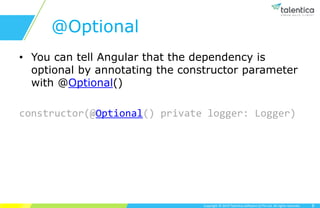
@Optional
• You can tell Angular that the dependency is
optional by annotating the constructor parameter
with @Optional()
constructor(@Optional() private logger: Logger)
8
Copyright © 2019 Talentica Software (I) Pvt Ltd. All rights reserved.
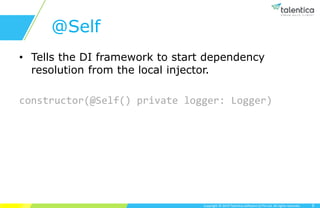
@Self
• Tells the DI framework to start dependency
resolution from the local injector.
constructor(@Self() private logger: Logger)
9
Copyright © 2019 Talentica Software (I) Pvt Ltd. All rights reserved.
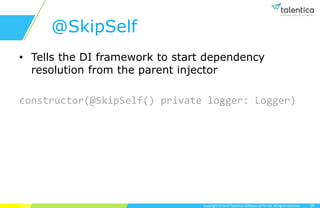
@SkipSelf
• Tells the DI framework to start dependency
resolution from the parent injector
constructor(@SkipSelf() private logger: Logger)
10
Copyright © 2019 Talentica Software (I) Pvt Ltd. All rights reserved.
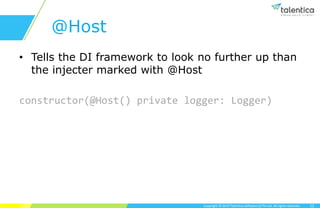
@Host
• Tells the DI framework to look no further up than
the injecter marked with @Host
constructor(@Host() private logger: Logger)
11
Copyright © 2019 Talentica Software (I) Pvt Ltd. All rights reserved.
TSPs
• As of Angular 6, angular prefers services to be
tree-shakable.
• The providedIn syntax achieves that.
12
Copyright © 2019 Talentica Software (I) Pvt Ltd. All rights reserved.
Change Detection Strategy: Default
• What is change detection?
• By default, angular detects the changes in the app
starting from root components, then it’s children and
then grand children, until all the components are
checked. Then all necessary DOM updates are done in
a single batch.
• Any change in any of the application’s component
starts the whole change detection from root
component to all the way down.
• That’s really not a very performant, right?
Copyright © 2019 Talentica Software (I) Pvt Ltd. All rights reserved.
Change Detection Strategy: OnPush
• Angular offers another change detection strategy:
OnPush.
• It can be defined on any component.
• With this strategy, the component will only be checked
in two cases:
– Reference of Input property changes (immutable)
– An event handler of the component was triggered.
Copyright © 2019 Talentica Software (I) Pvt Ltd. All rights reserved.
OnPush with Observable
• Any changes made in the subscription of an Observable
will not trigger the change detection.
• To trigger the change detection, the subscription has to be
done in component’s template using the ‘async’ pipe.
• It will trigger the change detection when a new value is
received.
Copyright © 2019 Talentica Software (I) Pvt Ltd. All rights reserved.
ChangeDetectorRef
• To manually trigger the change detection in angular, inject
ChangeDetectorRef.
• Use markForCheck / detectChanges methods from
ChangeDetectorRef to manually trigger the change
detection.
• detectChanges triggers the change detection only for the
current component and it’s children.
• markForCheck triggers the change detection for the whole
app.
Copyright © 2019 Talentica Software (I) Pvt Ltd. All rights reserved.
Eager Loading
• By default, angular modules are eagerly loaded, i.e. as
soon as the app loads, all the modules loads too, whether
or not they are immediately necessary.
• Because of this eager loading of modules, the initial
bundle size becomes quite significant, and hence
increases the load time of the application.
• To tackle this problem, angular introduced Lazy Loading.
Copyright © 2019 Talentica Software (I) Pvt Ltd. All rights reserved.
Lazy Loading
• With Lazy Loading, angular loads a module only when it’s
necessary.
• Since all the modules are not required at the application
load time, so those modules will be excluded from the initial
bundle, and hence decreases the application’s load time.
• Let’s see how to configure Lazy Loading.
Copyright © 2019 Talentica Software (I) Pvt Ltd. All rights reserved.
Configuring Lazy Loading
• Three main steps to setup the lazy-loaded module:
– Create feature modules (ng g m module-name)
– Create feature module components
– Configure the routes
• PreLoadingStrategy : To load the lazy modules once
the application is loaded.
Copyright © 2019 Talentica Software (I) Pvt Ltd. All rights reserved.
forRoot vs forChild in RouterModule
• ‘forRoot’ specifies that this is the root routing module for
the application.
• ‘forRoot’ creates a module that contains directives (router-
outlet etc.), registered routes and the router service.
• ‘forChild’ creates a module that only contains directives and
registered routes. It uses the router service created at the
root level itself.
• ‘forRoot’ can be used only once, at the root level.
• Just a heads up, with the new IVY rendering engine, you
can lazy load a component as well.
Copyright © 2019 Talentica Software (I) Pvt Ltd. All rights reserved.
Workspace in Angular
• A collection of Angular projects (that is, applications and
libraries) that are typically co-located in source control.
• To create an empty angular workspace, use the command
below:
– ng new angular-workspace --create-application=false
• --create-application option can be used to create an empty
workspace (without initial application). By default it is true.
• To add an application to the empty workspace, use the
command below:
– ng generate application admin
– This will create an application named ‘admin’ and update the
‘angular.json’ file as well.
Copyright © 2019 Talentica Software (I) Pvt Ltd. All rights reserved.
Library in Angular Workspace
• To create a library in the workspace, use the
command below:
– ng generate library library-name
• A library is an angular project which cannot run on it’s
own (unlike angular application). A library must be
imported and use in an app.
• Library can contain modules, components, directives,
pipes, services etc., just like an angular app.
• The main purpose of a library is to keep the reusable
code at one place.
• Build the library before using it in the application.
Copyright © 2019 Talentica Software (I) Pvt Ltd. All rights reserved.
What, Why and How?
• Basic concept – Scaffolding
• Purpose of Scaffolding – Boilerplate
• Relevance of Schematics – ng g c & @schematics/angular
• Top down approach
– Identify requirement
– Solve problem
The requirement
Copyright © 2019 Talentica Software (I) Pvt Ltd. All rights reserved.
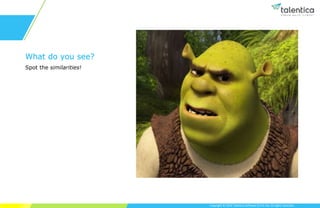
What do you see?
Spot the similarities!
Copyright © 2019 Talentica Software (I) Pvt Ltd. All rights reserved.
A CRUD Admin Portal
The Pattern:
• List of Entities
• Entity – Form window
• Entity Form Validations
• Entity States – Enabled, Disabled, Delete, Save
• Route States – Create, Edit, Delete, Preview
• Related Sub-Entities
My Ultimate Goal?
• Get everything generated using a single command~!
Copyright © 2019 Talentica Software (I) Pvt Ltd. All rights reserved.
Automate at scale
Schematics
Copyright © 2019 Talentica Software (I) Pvt Ltd. All rights reserved.
What is Schematics?
• A template-based code generator that supports complex
logic.
• A scaffolding tool, a.k.a. workflow tool.
• Can apply transforms to new or existing project.
Copyright © 2019 Talentica Software (I) Pvt Ltd. All rights reserved.
What’s the big deal?
• It’s not your regular scripting language, like Bash,
PowerShell
• Run over file system in a Tree
• Transactional
– Do not affect files directly
– Describe transformations on a Tree, then commit
• Angular itself uses Schematics internally.
Copyright © 2019 Talentica Software (I) Pvt Ltd. All rights reserved.
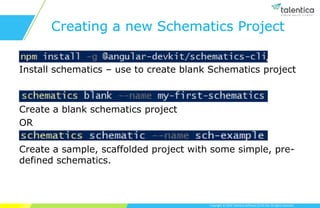
Creating a new Schematics Project
Install schematics – use to create blank Schematics project
Create a blank schematics project
OR
Create a sample, scaffolded project with some simple, pre-
defined schematics.
Schematics project code
Copyright © 2019 Talentica Software (I) Pvt Ltd. All rights reserved.
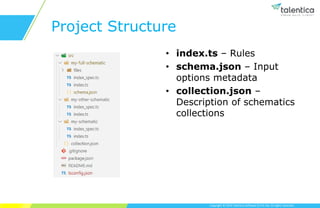
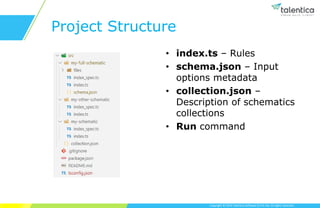
Project Structure
• index.ts – Rules
• schema.json – Input
options metadata
• collection.json –
Description of schematics
collections
Schematics – index.ts
Copyright © 2019 Talentica Software (I) Pvt Ltd. All rights reserved.
Rules
• Name of the class
• Camel-case / Pascal-case or Kebab-case the name
• New files
• New comments at top of (or in between) a file
• New import to an existing file
• Change import statement or route variable
• Anything!
Copyright © 2019 Talentica Software (I) Pvt Ltd. All rights reserved.
Rules – index.ts
• index.ts file exports a function that outputs a Rule
• You can cascade Rules one after the other
• You can chain, revert and commit (actual file update)
Rules
Schematics – schema.json
Copyright © 2019 Talentica Software (I) Pvt Ltd. All rights reserved.
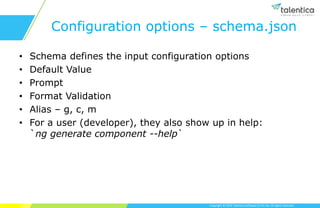
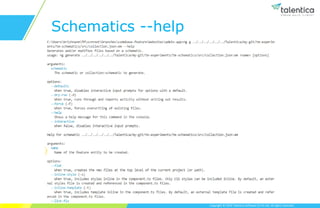
Configuration options – schema.json
• Schema defines the input configuration options
• Default Value
• Prompt
• Format Validation
• Alias – g, c, m
• For a user (developer), they also show up in help:
`ng generate component --help`
Copyright © 2019 Talentica Software (I) Pvt Ltd. All rights reserved.
Schematics --help
Schematics – collection.json
Copyright © 2019 Talentica Software (I) Pvt Ltd. All rights reserved.
Project Structure
• index.ts – Rules
• schema.json – Input
options metadata
• collection.json –
Description of schematics
collections
• Run command
Copyright © 2019 Talentica Software (I) Pvt Ltd. All rights reserved.
How to run Schematics
• npm run build
• schematics .:schema-name --options here
• schematics .:schema-name --options here --dry-
run=false
Copyright © 2019 Talentica Software (I) Pvt Ltd. All rights reserved.
Scaffold an “Entity Module”
Copyright © 2019 Talentica Software (I) Pvt Ltd. All rights reserved.
Entity Module Pattern
• Entities List
• Entity Form
• Entity Overview
• Entity Get Started
Let’s see how what all components need to be generated for a
given feature entity in my Angular project.
Let’s see how this can be achieved in the Schematics project.
Copyright © 2019 Talentica Software (I) Pvt Ltd. All rights reserved.
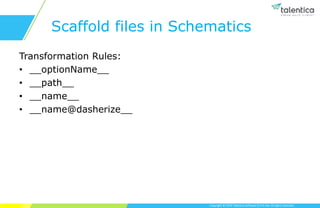
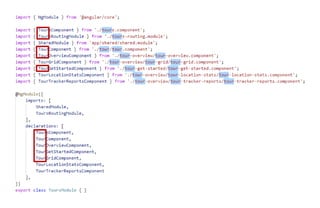
Scaffold files in Schematics
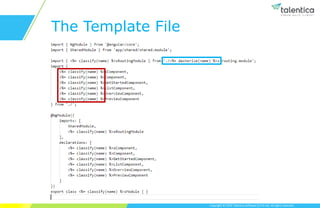
Transformation Rules:
• __optionName__
• __path__
• __name__
• __name@dasherize__
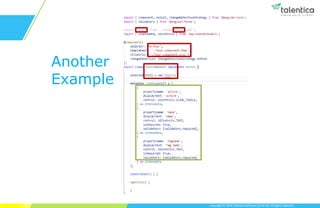
Let’s see what all need to be “rule-ified” inside files in the Angular project.
Copyright © 2019 Talentica Software (I) Pvt Ltd. All rights reserved.
Another
Example
Copyright © 2019 Talentica Software (I) Pvt Ltd. All rights reserved.
The Template File
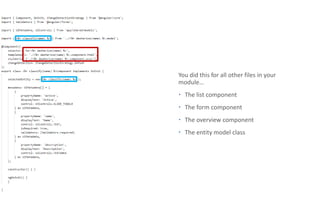
You did this for all other files in your
module…
 The list component
 The form component
 The overview component
 The entity model class
Build Schematics again: schematics .:em --name=ghost-rider
Copyright © 2019 Talentica Software (I) Pvt Ltd. All rights reserved.
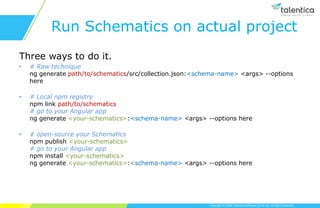
Run Schematics on actual project
Three ways to do it.
• # Raw technique
ng generate path/to/schematics/src/collection.json:<schema-name> <args> --options
here
• # Local npm registry
npm link path/to/schematics
# go to your Angular app
ng generate <your-schematics>:<schema-name> <args> --options here
• # open-source your Schematics
npm publish <your-schematics>
# go to your Angular app
npm install <your-schematics>
ng generate <your-schematics>:<schema-name> <args> --options here
Run Schematics in my actual Angular application.
Copyright © 2019 Talentica Software (I) Pvt Ltd. All rights reserved.
Other cool stuffs
• Watch build – `npm run build -w`
• Add tests using karma.js – *.spec.ts
• Build on top of Angular Schematics
Copyright © 2019 Talentica Software (I) Pvt Ltd. All rights reserved.
When to go for it
• Have an existing solution that contains the code you want
to generate.
• A proper process defined for your application
development.
– Develop your app, identify pattern, then Schematicize!
Copyright © 2019 Talentica Software (I) Pvt Ltd. All rights reserved.
Beware! When NOT to go for it
• Don’t begin your Angular project starting with a
Schematics project.
• Remember – pattern recognition first!
• Functionality is an Asset. Code is a liability!
– That includes automation of code scaffolding too.
– Why?
Copyright © 2019 Talentica Software (I) Pvt Ltd. All rights reserved.
Other Live applications of
Schematics
• Angular’s ng generate commands
• RxJS upgrade v4 to v5
• Ngrx commands
Copyright © 2019 Talentica Software (I) Pvt Ltd. All rights reserved.
There’s so much more
Build on top of Angular’s Schematics
• ng generate component <name>
• Modify on top of component files generated
• Use AST (Abstract Syntax Tree) functions to modify an
existing Tree structure (existing file content)
Copyright © 2019 Talentica Software (I) Pvt Ltd. All rights reserved.
References
• E-book – https://leanpub.com/angular-schematics
• Live project – https://github.com/manfredsteyer/angular-
crud
• Detailed presentation – Angular Schematics
Copyright © 2019 Talentica Software (I) Pvt Ltd. All rights reserved.
Questions?

Advanced angular

  • 1.
  • 2.
    Copyright © 2019Talentica Software (I) Pvt Ltd. All rights reserved. Advanced Templating • <ng-container> • <ng-content> • <ng-template> 2
  • 3.
    Copyright © 2019Talentica Software (I) Pvt Ltd. All rights reserved. <ng-container> • The <ng-container> is a syntax element recognized by the Angular parser. It's not a directive, component, class, or interface. • This element is just a wrapper. It does not get rendered. • It is useful in case a. You don't want to pollute the DOM. b. You want to use two structural directives in one place. c. You want to output valid HTML. 3
  • 4.
    Copyright © 2019Talentica Software (I) Pvt Ltd. All rights reserved. <ng-content> • Used for "content projection" : – projecting content from the parent component into the designated child component. • Essentially, it acts as placeholder for dynamic content. • Also used to implement the slot pattern • Use the @ContentChild decorator to query inside projected content. 4
  • 5.
    Copyright © 2019Talentica Software (I) Pvt Ltd. All rights reserved. <ng-template> • Was earlier called just <template>. Changed from Angular 4 onwards. • Used by Angular under the hood for structural directives like *ngIf and *ngFor • It holds a template which some other element can render using the *ngTemplateOutlet directive. 5
  • 6.
    Copyright © 2019Talentica Software (I) Pvt Ltd. All rights reserved. Dependency Injection • In Angular, the DI framework provides declared dependencies to a class when that class is instantiated. • Dependencies can have other dependencies. • Dependencies have a hierarchy by default. 6
  • 7.
    Copyright © 2019Talentica Software (I) Pvt Ltd. All rights reserved. Dependency injection tokens • When you configure an injector with a provider, you associate that provider with a DI token. • The injector maintains an internal token- provider map that it references when asked for a dependency. The token is the key to the map. 7
  • 8.
    Copyright © 2019Talentica Software (I) Pvt Ltd. All rights reserved. @Optional • You can tell Angular that the dependency is optional by annotating the constructor parameter with @Optional() constructor(@Optional() private logger: Logger) 8
  • 9.
    Copyright © 2019Talentica Software (I) Pvt Ltd. All rights reserved. @Self • Tells the DI framework to start dependency resolution from the local injector. constructor(@Self() private logger: Logger) 9
  • 10.
    Copyright © 2019Talentica Software (I) Pvt Ltd. All rights reserved. @SkipSelf • Tells the DI framework to start dependency resolution from the parent injector constructor(@SkipSelf() private logger: Logger) 10
  • 11.
    Copyright © 2019Talentica Software (I) Pvt Ltd. All rights reserved. @Host • Tells the DI framework to look no further up than the injecter marked with @Host constructor(@Host() private logger: Logger) 11
  • 12.
    Copyright © 2019Talentica Software (I) Pvt Ltd. All rights reserved. TSPs • As of Angular 6, angular prefers services to be tree-shakable. • The providedIn syntax achieves that. 12
  • 13.
    Copyright © 2019Talentica Software (I) Pvt Ltd. All rights reserved. Change Detection Strategy: Default • What is change detection? • By default, angular detects the changes in the app starting from root components, then it’s children and then grand children, until all the components are checked. Then all necessary DOM updates are done in a single batch. • Any change in any of the application’s component starts the whole change detection from root component to all the way down. • That’s really not a very performant, right?
  • 14.
    Copyright © 2019Talentica Software (I) Pvt Ltd. All rights reserved. Change Detection Strategy: OnPush • Angular offers another change detection strategy: OnPush. • It can be defined on any component. • With this strategy, the component will only be checked in two cases: – Reference of Input property changes (immutable) – An event handler of the component was triggered.
  • 15.
    Copyright © 2019Talentica Software (I) Pvt Ltd. All rights reserved. OnPush with Observable • Any changes made in the subscription of an Observable will not trigger the change detection. • To trigger the change detection, the subscription has to be done in component’s template using the ‘async’ pipe. • It will trigger the change detection when a new value is received.
  • 16.
    Copyright © 2019Talentica Software (I) Pvt Ltd. All rights reserved. ChangeDetectorRef • To manually trigger the change detection in angular, inject ChangeDetectorRef. • Use markForCheck / detectChanges methods from ChangeDetectorRef to manually trigger the change detection. • detectChanges triggers the change detection only for the current component and it’s children. • markForCheck triggers the change detection for the whole app.
  • 17.
    Copyright © 2019Talentica Software (I) Pvt Ltd. All rights reserved. Eager Loading • By default, angular modules are eagerly loaded, i.e. as soon as the app loads, all the modules loads too, whether or not they are immediately necessary. • Because of this eager loading of modules, the initial bundle size becomes quite significant, and hence increases the load time of the application. • To tackle this problem, angular introduced Lazy Loading.
  • 18.
    Copyright © 2019Talentica Software (I) Pvt Ltd. All rights reserved. Lazy Loading • With Lazy Loading, angular loads a module only when it’s necessary. • Since all the modules are not required at the application load time, so those modules will be excluded from the initial bundle, and hence decreases the application’s load time. • Let’s see how to configure Lazy Loading.
  • 19.
    Copyright © 2019Talentica Software (I) Pvt Ltd. All rights reserved. Configuring Lazy Loading • Three main steps to setup the lazy-loaded module: – Create feature modules (ng g m module-name) – Create feature module components – Configure the routes • PreLoadingStrategy : To load the lazy modules once the application is loaded.
  • 20.
    Copyright © 2019Talentica Software (I) Pvt Ltd. All rights reserved. forRoot vs forChild in RouterModule • ‘forRoot’ specifies that this is the root routing module for the application. • ‘forRoot’ creates a module that contains directives (router- outlet etc.), registered routes and the router service. • ‘forChild’ creates a module that only contains directives and registered routes. It uses the router service created at the root level itself. • ‘forRoot’ can be used only once, at the root level. • Just a heads up, with the new IVY rendering engine, you can lazy load a component as well.
  • 21.
    Copyright © 2019Talentica Software (I) Pvt Ltd. All rights reserved. Workspace in Angular • A collection of Angular projects (that is, applications and libraries) that are typically co-located in source control. • To create an empty angular workspace, use the command below: – ng new angular-workspace --create-application=false • --create-application option can be used to create an empty workspace (without initial application). By default it is true. • To add an application to the empty workspace, use the command below: – ng generate application admin – This will create an application named ‘admin’ and update the ‘angular.json’ file as well.
  • 22.
    Copyright © 2019Talentica Software (I) Pvt Ltd. All rights reserved. Library in Angular Workspace • To create a library in the workspace, use the command below: – ng generate library library-name • A library is an angular project which cannot run on it’s own (unlike angular application). A library must be imported and use in an app. • Library can contain modules, components, directives, pipes, services etc., just like an angular app. • The main purpose of a library is to keep the reusable code at one place. • Build the library before using it in the application.
  • 23.
    Copyright © 2019Talentica Software (I) Pvt Ltd. All rights reserved. What, Why and How? • Basic concept – Scaffolding • Purpose of Scaffolding – Boilerplate • Relevance of Schematics – ng g c & @schematics/angular • Top down approach – Identify requirement – Solve problem
  • 24.
  • 25.
    Copyright © 2019Talentica Software (I) Pvt Ltd. All rights reserved. What do you see? Spot the similarities!
  • 26.
    Copyright © 2019Talentica Software (I) Pvt Ltd. All rights reserved. A CRUD Admin Portal The Pattern: • List of Entities • Entity – Form window • Entity Form Validations • Entity States – Enabled, Disabled, Delete, Save • Route States – Create, Edit, Delete, Preview • Related Sub-Entities My Ultimate Goal? • Get everything generated using a single command~!
  • 27.
    Copyright © 2019Talentica Software (I) Pvt Ltd. All rights reserved. Automate at scale Schematics
  • 28.
    Copyright © 2019Talentica Software (I) Pvt Ltd. All rights reserved. What is Schematics? • A template-based code generator that supports complex logic. • A scaffolding tool, a.k.a. workflow tool. • Can apply transforms to new or existing project.
  • 29.
    Copyright © 2019Talentica Software (I) Pvt Ltd. All rights reserved. What’s the big deal? • It’s not your regular scripting language, like Bash, PowerShell • Run over file system in a Tree • Transactional – Do not affect files directly – Describe transformations on a Tree, then commit • Angular itself uses Schematics internally.
  • 30.
    Copyright © 2019Talentica Software (I) Pvt Ltd. All rights reserved. Creating a new Schematics Project Install schematics – use to create blank Schematics project Create a blank schematics project OR Create a sample, scaffolded project with some simple, pre- defined schematics.
  • 31.
  • 32.
    Copyright © 2019Talentica Software (I) Pvt Ltd. All rights reserved. Project Structure • index.ts – Rules • schema.json – Input options metadata • collection.json – Description of schematics collections
  • 33.
  • 34.
    Copyright © 2019Talentica Software (I) Pvt Ltd. All rights reserved. Rules • Name of the class • Camel-case / Pascal-case or Kebab-case the name • New files • New comments at top of (or in between) a file • New import to an existing file • Change import statement or route variable • Anything!
  • 35.
    Copyright © 2019Talentica Software (I) Pvt Ltd. All rights reserved. Rules – index.ts • index.ts file exports a function that outputs a Rule • You can cascade Rules one after the other • You can chain, revert and commit (actual file update) Rules
  • 36.
  • 37.
    Copyright © 2019Talentica Software (I) Pvt Ltd. All rights reserved. Configuration options – schema.json • Schema defines the input configuration options • Default Value • Prompt • Format Validation • Alias – g, c, m • For a user (developer), they also show up in help: `ng generate component --help`
  • 38.
    Copyright © 2019Talentica Software (I) Pvt Ltd. All rights reserved. Schematics --help
  • 39.
  • 40.
    Copyright © 2019Talentica Software (I) Pvt Ltd. All rights reserved. Project Structure • index.ts – Rules • schema.json – Input options metadata • collection.json – Description of schematics collections • Run command
  • 41.
    Copyright © 2019Talentica Software (I) Pvt Ltd. All rights reserved. How to run Schematics • npm run build • schematics .:schema-name --options here • schematics .:schema-name --options here --dry- run=false
  • 42.
    Copyright © 2019Talentica Software (I) Pvt Ltd. All rights reserved. Scaffold an “Entity Module”
  • 43.
    Copyright © 2019Talentica Software (I) Pvt Ltd. All rights reserved. Entity Module Pattern • Entities List • Entity Form • Entity Overview • Entity Get Started
  • 44.
    Let’s see howwhat all components need to be generated for a given feature entity in my Angular project.
  • 45.
    Let’s see howthis can be achieved in the Schematics project.
  • 46.
    Copyright © 2019Talentica Software (I) Pvt Ltd. All rights reserved. Scaffold files in Schematics Transformation Rules: • __optionName__ • __path__ • __name__ • __name@dasherize__
  • 47.
    Let’s see whatall need to be “rule-ified” inside files in the Angular project.
  • 49.
    Copyright © 2019Talentica Software (I) Pvt Ltd. All rights reserved. Another Example
  • 50.
    Copyright © 2019Talentica Software (I) Pvt Ltd. All rights reserved. The Template File
  • 51.
    You did thisfor all other files in your module…  The list component  The form component  The overview component  The entity model class
  • 52.
    Build Schematics again:schematics .:em --name=ghost-rider
  • 53.
    Copyright © 2019Talentica Software (I) Pvt Ltd. All rights reserved. Run Schematics on actual project Three ways to do it. • # Raw technique ng generate path/to/schematics/src/collection.json:<schema-name> <args> --options here • # Local npm registry npm link path/to/schematics # go to your Angular app ng generate <your-schematics>:<schema-name> <args> --options here • # open-source your Schematics npm publish <your-schematics> # go to your Angular app npm install <your-schematics> ng generate <your-schematics>:<schema-name> <args> --options here
  • 54.
    Run Schematics inmy actual Angular application.
  • 55.
    Copyright © 2019Talentica Software (I) Pvt Ltd. All rights reserved. Other cool stuffs • Watch build – `npm run build -w` • Add tests using karma.js – *.spec.ts • Build on top of Angular Schematics
  • 56.
    Copyright © 2019Talentica Software (I) Pvt Ltd. All rights reserved. When to go for it • Have an existing solution that contains the code you want to generate. • A proper process defined for your application development. – Develop your app, identify pattern, then Schematicize!
  • 57.
    Copyright © 2019Talentica Software (I) Pvt Ltd. All rights reserved. Beware! When NOT to go for it • Don’t begin your Angular project starting with a Schematics project. • Remember – pattern recognition first! • Functionality is an Asset. Code is a liability! – That includes automation of code scaffolding too. – Why?
  • 58.
    Copyright © 2019Talentica Software (I) Pvt Ltd. All rights reserved. Other Live applications of Schematics • Angular’s ng generate commands • RxJS upgrade v4 to v5 • Ngrx commands
  • 59.
    Copyright © 2019Talentica Software (I) Pvt Ltd. All rights reserved. There’s so much more Build on top of Angular’s Schematics • ng generate component <name> • Modify on top of component files generated • Use AST (Abstract Syntax Tree) functions to modify an existing Tree structure (existing file content)
  • 60.
    Copyright © 2019Talentica Software (I) Pvt Ltd. All rights reserved. References • E-book – https://leanpub.com/angular-schematics • Live project – https://github.com/manfredsteyer/angular- crud • Detailed presentation – Angular Schematics
  • 61.
    Copyright © 2019Talentica Software (I) Pvt Ltd. All rights reserved. Questions?

Editor's Notes

  • #24 Scaffolding anyone?
  • #27 Run a ready-made command that generates an entity module.
  • #46 files folder files structure inside Run schematics
  • #49 Rule, Tree, Schema, Collection, Schematics