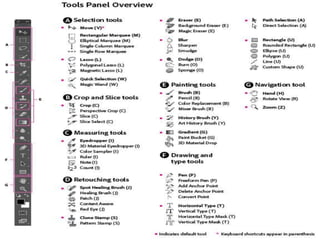
ADOBE PHOTOSHOP
CREATIVE CLOUD
Adobe Creative Cloud is a set of
applications and services from
Adobe Systems that gives
subscribers access to a collection of
software used for graphic design,
video editing, web development,
photography, along with a set of
mobile applications and also some
optional cloud services.
How to download Adobe
Photoshop CC?
Simply download Photoshop from the adobe.com website
and install it on your desktop.
Go to the Creative Cloud apps catalog. Locate Photoshop,
and click Download. ...
Your app begins to download. ...
To launch your new app, find the Photoshop icon in the
Apps panel and click Open.
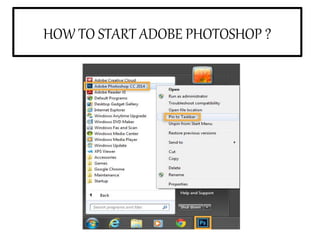
HOW TO START ADOBE PHOTOSHOP ?
COMPONENT
S OF
PHOTOSHOP
CC
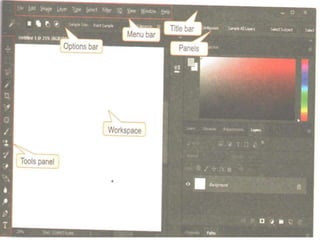
MENU BAR-In
the top most
horizontal bar in
photoshop window
that contains all
the main menus of
photoshop such as
Edit, Image,
Layer, Type,
Select, Filter.
OPTIONS BAR CONTROL
PANEL- The option bar
controls panel lies below the
menu bar. It displays the
ptions related to the
currently selected tool in the
tools panel.
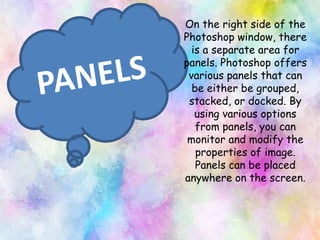
On the right side of the
Photoshop window, there
is a separate area for
panels. Photoshop offers
various panels that can
be either be grouped,
stacked, or docked. By
using various options
from panels, you can
monitor and modify the
properties of image.
Panels can be placed
anywhere on the screen.
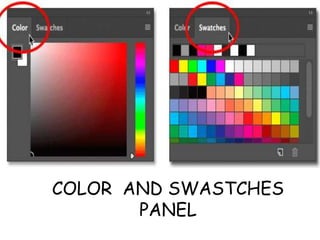
COLOR AND SWASTCHES
PANEL
ADJUSTMENT
PANEL
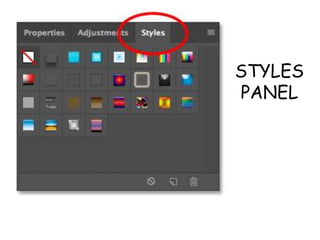
STYLES
PANEL
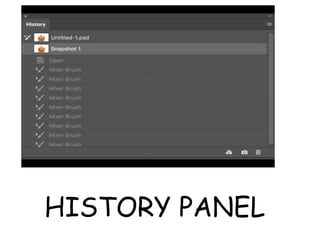
HISTORY PANEL
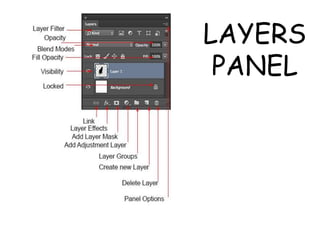
LAYERS
PANEL
Adobe photoshop creative cloud

Adobe photoshop creative cloud

  • 1.
  • 2.
    Adobe Creative Cloudis a set of applications and services from Adobe Systems that gives subscribers access to a collection of software used for graphic design, video editing, web development, photography, along with a set of mobile applications and also some optional cloud services.
  • 3.
    How to downloadAdobe Photoshop CC? Simply download Photoshop from the adobe.com website and install it on your desktop. Go to the Creative Cloud apps catalog. Locate Photoshop, and click Download. ... Your app begins to download. ... To launch your new app, find the Photoshop icon in the Apps panel and click Open.
  • 4.
    HOW TO STARTADOBE PHOTOSHOP ?
  • 6.
  • 8.
    MENU BAR-In the topmost horizontal bar in photoshop window that contains all the main menus of photoshop such as Edit, Image, Layer, Type, Select, Filter.
  • 9.
    OPTIONS BAR CONTROL PANEL-The option bar controls panel lies below the menu bar. It displays the ptions related to the currently selected tool in the tools panel.
  • 10.
    On the rightside of the Photoshop window, there is a separate area for panels. Photoshop offers various panels that can be either be grouped, stacked, or docked. By using various options from panels, you can monitor and modify the properties of image. Panels can be placed anywhere on the screen.
  • 11.
  • 12.
  • 13.
  • 14.
  • 15.