Freudenberg IT KG                     AdicomClient - Guide


AdicomClient - Guide


Versions-Nr.: 0.10                                                                 Print Date: 11.04.2012

                     Created:   06.04.2012                   Created by: itflurm
Freudenberg IT KG                                                AdicomClient - Guide


         Table of Contents


         TABLE OF CONTENTS ..........................................................................................................................................2
         1      SCOPE AND PURPOSE .................................................................................................................................3
         2      HOW TO USE THE NEW ADICOMCLIENT .....................................................................................................4
             2.1      WHERE YOU CAN FIND THE NEW CLIENT ............................................................................................................. 4
             2.2      LOGIN ......................................................................................................................................................... 5
             2.3      CLIENTREPORT1 - PERSONAL COST AND TIME...................................................................................................... 6
             2.4      EXPORT TO EXCEL .......................................................................................................................................... 8


Versions-Nr.: 0.10                                                                                                                                           Print Date: 11.04.2012

                           Created:                     06.04.2012                                                               Created by: itflurm
Freudenberg IT KG                               AdicomClient - Guide


         1               Scope and Purpose

         The new AdicomClient will open up the following possibilities:

               -     without to install the Adicom Suite, to run reports from Adicom
               -     easy and fast report of your personal cost and time (by one project)
               -     export to Excel
               -     with the new function, Sumcost, you can see your total cost


         Two different reports:

               -     Activity: for all your actuals, which you have entered into Adicom
               -     Expense: for all your travel, hotel, entertainment, and other cost


Versions-Nr.: 0.10                                                                                         Print Date: 11.04.2012

                         Created:         06.04.2012                                 Created by: itflurm
Freudenberg IT KG                           AdicomClient - Guide


         2              How to use the new AdicomClient


         2.1            Where you can find the new client
                     1. Open the link:
                        10.134.128.55t_interchange_interchange_suzhou$itliuhadicompersaclient
                        (Notice: You have to be in the internal network)


                     2. Then select startbinbatch -> AdicomClient.bat


Versions-Nr.: 0.10                                                                             Print Date: 11.04.2012

                        Created:      06.04.2012                         Created by: itflurm
Freudenberg IT KG                           AdicomClient - Guide


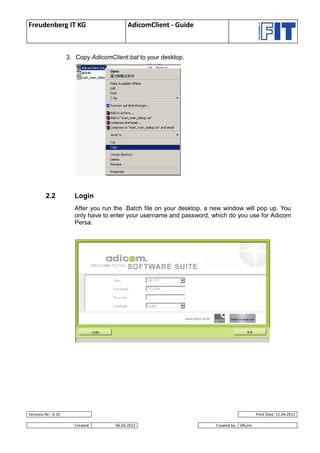
                     3. Copy AdicomClient.bat to your desktop.


         2.2           Login
                       After you run the .Batch file on your desktop, a new window will pop up. You
                       only have to enter your username and password, which do you use for Adicom
                       Persa.


Versions-Nr.: 0.10                                                                            Print Date: 11.04.2012

                       Created:       06.04.2012                        Created by: itflurm
Freudenberg IT KG                           AdicomClient - Guide


         2.3           ClientReport1 - Personal cost and time
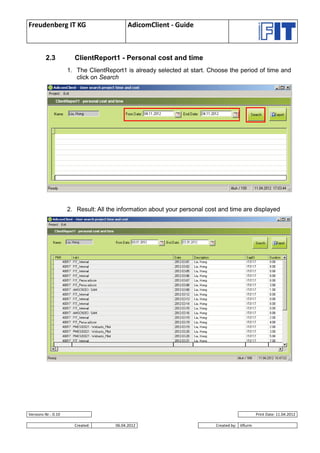
                     1. The ClientReport1 is already selected at start. Choose the period of time and
                        click on Search


                     2. Result: All the information about your personal cost and time are displayed


Versions-Nr.: 0.10                                                                               Print Date: 11.04.2012

                       Created:       06.04.2012                           Created by: itflurm
Freudenberg IT KG                           AdicomClient - Guide


                     3. To optimum the column width, right click on the left row -> Optimum column
                        width


                     4. Result: All necessary information at one glance


Versions-Nr.: 0.10                                                                              Print Date: 11.04.2012

                       Created:       06.04.2012                          Created by: itflurm
Freudenberg IT KG                              AdicomClient - Guide


         2.4           Export to Excel
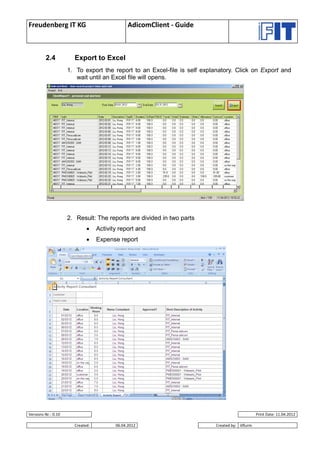
                     1. To export the report to an Excel-file is self explanatory. Click on Export and
                        wait until an Excel file will opens.


                     2. Result: The reports are divided in two parts
                                 Activity report and
                                 Expense report


Versions-Nr.: 0.10                                                                              Print Date: 11.04.2012

                       Created:          06.04.2012                       Created by: itflurm
Freudenberg IT KG                            AdicomClient - Guide


                     3. In the second tab description of the Expense Report are the total cost listed


         Notice:
         If you have paid in dollars, the column Travel will also be in the currency dollar. In the
         column Sum Cost the currency is RMB.


Versions-Nr.: 0.10                                                                                Print Date: 11.04.2012

                       Created:        06.04.2012                           Created by: itflurm

Adicom client demo - guide (pdf)

  • 1.
    Freudenberg IT KG AdicomClient - Guide AdicomClient - Guide Versions-Nr.: 0.10 Print Date: 11.04.2012 Created: 06.04.2012 Created by: itflurm
  • 2.
    Freudenberg IT KG AdicomClient - Guide Table of Contents TABLE OF CONTENTS ..........................................................................................................................................2 1 SCOPE AND PURPOSE .................................................................................................................................3 2 HOW TO USE THE NEW ADICOMCLIENT .....................................................................................................4 2.1 WHERE YOU CAN FIND THE NEW CLIENT ............................................................................................................. 4 2.2 LOGIN ......................................................................................................................................................... 5 2.3 CLIENTREPORT1 - PERSONAL COST AND TIME...................................................................................................... 6 2.4 EXPORT TO EXCEL .......................................................................................................................................... 8 Versions-Nr.: 0.10 Print Date: 11.04.2012 Created: 06.04.2012 Created by: itflurm
  • 3.
    Freudenberg IT KG AdicomClient - Guide 1 Scope and Purpose The new AdicomClient will open up the following possibilities: - without to install the Adicom Suite, to run reports from Adicom - easy and fast report of your personal cost and time (by one project) - export to Excel - with the new function, Sumcost, you can see your total cost Two different reports: - Activity: for all your actuals, which you have entered into Adicom - Expense: for all your travel, hotel, entertainment, and other cost Versions-Nr.: 0.10 Print Date: 11.04.2012 Created: 06.04.2012 Created by: itflurm
  • 4.
    Freudenberg IT KG AdicomClient - Guide 2 How to use the new AdicomClient 2.1 Where you can find the new client 1. Open the link: 10.134.128.55t_interchange_interchange_suzhou$itliuhadicompersaclient (Notice: You have to be in the internal network) 2. Then select startbinbatch -> AdicomClient.bat Versions-Nr.: 0.10 Print Date: 11.04.2012 Created: 06.04.2012 Created by: itflurm
  • 5.
    Freudenberg IT KG AdicomClient - Guide 3. Copy AdicomClient.bat to your desktop. 2.2 Login After you run the .Batch file on your desktop, a new window will pop up. You only have to enter your username and password, which do you use for Adicom Persa. Versions-Nr.: 0.10 Print Date: 11.04.2012 Created: 06.04.2012 Created by: itflurm
  • 6.
    Freudenberg IT KG AdicomClient - Guide 2.3 ClientReport1 - Personal cost and time 1. The ClientReport1 is already selected at start. Choose the period of time and click on Search 2. Result: All the information about your personal cost and time are displayed Versions-Nr.: 0.10 Print Date: 11.04.2012 Created: 06.04.2012 Created by: itflurm
  • 7.
    Freudenberg IT KG AdicomClient - Guide 3. To optimum the column width, right click on the left row -> Optimum column width 4. Result: All necessary information at one glance Versions-Nr.: 0.10 Print Date: 11.04.2012 Created: 06.04.2012 Created by: itflurm
  • 8.
    Freudenberg IT KG AdicomClient - Guide 2.4 Export to Excel 1. To export the report to an Excel-file is self explanatory. Click on Export and wait until an Excel file will opens. 2. Result: The reports are divided in two parts  Activity report and  Expense report Versions-Nr.: 0.10 Print Date: 11.04.2012 Created: 06.04.2012 Created by: itflurm
  • 9.
    Freudenberg IT KG AdicomClient - Guide 3. In the second tab description of the Expense Report are the total cost listed Notice: If you have paid in dollars, the column Travel will also be in the currency dollar. In the column Sum Cost the currency is RMB. Versions-Nr.: 0.10 Print Date: 11.04.2012 Created: 06.04.2012 Created by: itflurm