
1 Copyright © 2013, Oracle and/or its affiliates. All rights reserved.
2 Copyright © 2013, Oracle and/or its affiliates. All rights reserved.
Real World ADF Design & Architecture Principles
Error and Information Logging
ORACLE
PRODUCT
LOGO
15th Feb 2013 v1.0
3 Copyright © 2013, Oracle and/or its affiliates. All rights reserved.
Learning Objectives
•  At the end of this module you should be able to:
–  Understand logging in Oracle ADF
–  Know when to log and when to log
–  Know how to read and analyze ADF logs
Image: imagerymajestic/ FreeDigitalPhotos.net
4 Copyright © 2013, Oracle and/or its affiliates. All rights reserved.
Program Agenda
•  Why instrument?
•  Logging design
•  Logging and the developer
5 Copyright © 2013, Oracle and/or its affiliates. All rights reserved.
Why Instrument Your Applications?
•  It’s a great debugging aid for development
–  But that is not the primary goal
•  The dirty truth about end users:
–  Use the application not your code –
• They can’t explain what they are doing in a way
that relates to what you’re looking at
–  Don’t remember what they did to cause the error
• “I didn’t do anything”
–  They lie
6 Copyright © 2013, Oracle and/or its affiliates. All rights reserved.
Instrumentation Goals
•  Help the intelligent site admin self diagnose
–  Good logging should not assume that the reader has the source
code
•  Help your support organization make an educated guess
–  Log messages are great search terms
•  Help developers focus on the likely cause
–  “How on earth is that parameter null….?”
–  “What did you do before you didn’t do anything?”
7 Copyright © 2013, Oracle and/or its affiliates. All rights reserved.7 Copyright © 2011, Oracle and/or its affiliates. All rights reserved.
Wouldn't it be best to log everything that happens
within an application to leave fine traces of what
happens in case things go wrong?
Image: imagerymajestic/ FreeDigitalPhotos.net
8 Copyright © 2013, Oracle and/or its affiliates. All rights reserved.
Program Agenda
•  Why instrument?
•  Logging design
•  Logging and the developer
9 Copyright © 2013, Oracle and/or its affiliates. All rights reserved.
Why use the ADF Logger?
•  System.out.println is not a logger!
–  Cannot be switched off, filtered or easily captured
•  Many Java logging implementations exist but you should use the
ADF Logger
–  It’s part of the framework, no extra libraries, no classloader issues
–  Fully integrated with both JDeveloper and Enterprise Manager
–  Integrates with FMW-wide logging infrastructure (ECID)
–  Switchable at runtime
–  Uses java.util.Logging under the covers
10 Copyright © 2013, Oracle and/or its affiliates. All rights reserved.
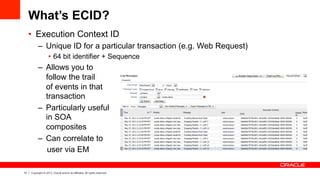
What’s ECID?
•  Execution Context ID
–  Unique ID for a particular transaction (e.g. Web Request)
•  64 bit identifier + Sequence
–  Allows you to
follow the trail
of events in that
transaction
–  Particularly useful
in SOA
composites
–  Can correlate to
user via EM
11 Copyright © 2013, Oracle and/or its affiliates. All rights reserved.
Programatically Accessing the ECID
•  Potentially useful in some error messages
•  Code:
weblogic.diagnostics.context.
DiagnosticContextHelper.getContextId();
12 Copyright © 2013, Oracle and/or its affiliates. All rights reserved.
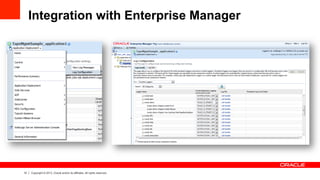
Integration with Enterprise Manager
13 Copyright © 2013, Oracle and/or its affiliates. All rights reserved.
Using the Logger
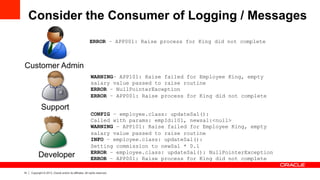
•  However, logging needs a degree of design
•  Consider
–  Placement
–  Message Level (use Config, Info, Warning, Error)
–  Detail / content
–  Message consumers [User Admin | Support | Developer]
14 Copyright © 2013, Oracle and/or its affiliates. All rights reserved.
Consider the Consumer of Logging / Messages
Developer
Support
Customer Admin
ERROR – APP001: Raise process for King did not complete
CONFIG – employee.class: updateSal():
Called with params: empId:101, newsal:<null>
WARNING – APP101: Raise failed for Employee King, empty
salary value passed to raise routine
INFO – employee.class: updateSal():
Setting commission to newSal * 0.1
ERROR – employee.class: updateSal(): NullPointerException
ERROR – APP001: Raise process for King did not complete
WARNING– APP101: Raise failed for Employee King, empty
salary value passed to raise routine
ERROR – NullPointerException
ERROR – APP001: Raise process for King did not complete
15 Copyright © 2013, Oracle and/or its affiliates. All rights reserved.
Logging Rules
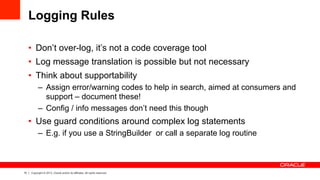
•  Don’t over-log, it’s not a code coverage tool
•  Log message translation is possible but not necessary
•  Think about supportability
–  Assign error/warning codes to help in search, aimed at consumers and
support – document these!
–  Config / info messages don’t need this though
•  Use guard conditions around complex log statements
–  E.g. if you use a StringBuilder or call a separate log routine
16 Copyright © 2013, Oracle and/or its affiliates. All rights reserved.
Logging Rules continued
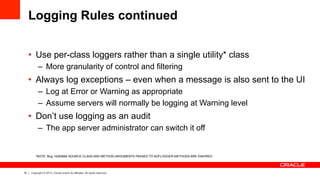
•  Use per-class loggers rather than a single utility* class
–  More granularity of control and filtering
•  Always log exceptions – even when a message is also sent to the UI
–  Log at Error or Warning as appropriate
–  Assume servers will normally be logging at Warning level
•  Don’t use logging as an audit
–  The app server administrator can switch it off
*NOTE: Bug 14283664 SOURCE CLASS AND METHOD ARGUMENTS PASSED TO ADFLOGGER METHODS ARE IGNORED
17 Copyright © 2013, Oracle and/or its affiliates. All rights reserved.
Where to Log?
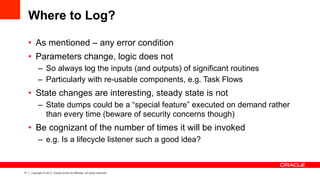
•  As mentioned – any error condition
•  Parameters change, logic does not
–  So always log the inputs (and outputs) of significant routines
–  Particularly with re-usable components, e.g. Task Flows
•  State changes are interesting, steady state is not
–  State dumps could be a “special feature” executed on demand rather
than every time (beware of security concerns though)
•  Be cognizant of the number of times it will be invoked
–  e.g. Is a lifecycle listener such a good idea?
18 Copyright © 2013, Oracle and/or its affiliates. All rights reserved.
Examples of Key Log Points
•  Task flows:
–  Initializer, Finalizer: Log the parameters / results
–  Error Handler
•  ADF BC
–  View Objects: bindParametersForCollection override for bind variable
values
–  Application Modules: doCheckout, prepareSession for tuning and PL/
SQL session setup in particular
–  Good candidates for your super-classes
19 Copyright © 2013, Oracle and/or its affiliates. All rights reserved.
Examples of Key Log Points continued
•  Managed beans
–  Particularly useful in common constructor superclass to help understand
the lifecycle of beans
•  Override DCErrorHandlerImpl to catch ADFm exceptions
•  Timers / Async callbacks
–  Can identify sequence issues not visible in debug environment
20 Copyright © 2013, Oracle and/or its affiliates. All rights reserved.
What not to Log?
•  Be aware that the framework is already instrumented
–  You may not want to duplicate that at the finest level
21 Copyright © 2013, Oracle and/or its affiliates. All rights reserved.21 Copyright © 2011, Oracle and/or its affiliates. All rights reserved.
Any other ideas for good logging points or places
we should not log?
Image: imagerymajestic/ FreeDigitalPhotos.net
22 Copyright © 2013, Oracle and/or its affiliates. All rights reserved.
Program Agenda
•  Why instrument?
•  Logging design
•  Logging and the developer
23 Copyright © 2013, Oracle and/or its affiliates. All rights reserved.
The Other Side of Logging
•  Well instrumented code can save a lot of time during development
–  Hot switchable – no need to start and stop the server
–  Faster than stepping through in the debugger*
•  Built-in logging can help with understanding Framework operation
and problems
•  Great tuning tool
–  Over execution of code becomes obvious
* However, this is not an excuse for not learning how to use the debugger properly
24 Copyright © 2013, Oracle and/or its affiliates. All rights reserved.
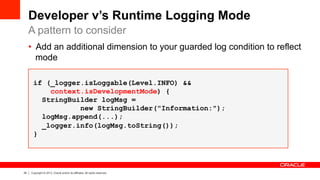
•  Add an additional dimension to your guarded log condition to reflect
mode
if (_logger.isLoggable(Level.INFO) &&
context.isDevelopmentMode) {
StringBuilder logMsg =
new StringBuilder("Information:");
logMsg.append(...);
_logger.info(logMsg.toString());
}
Developer v’s Runtime Logging Mode
A pattern to consider
25 Copyright © 2013, Oracle and/or its affiliates. All rights reserved.
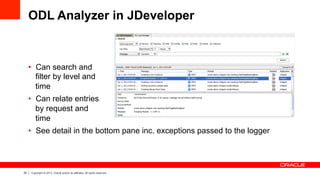
ODL Analyzer in JDeveloper
•  Can search and
filter by level and
time
•  Can relate entries
by request and
time
•  See detail in the bottom pane inc. exceptions passed to the logger
26 Copyright © 2013, Oracle and/or its affiliates. All rights reserved.
Framework Logging
•  To gain real value, set the following to Config level in the ODL
logging configuration screen:
–  oracle.adf, oracle.adfinternal, oracle.jbo
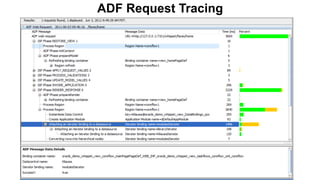
•  Now you can trace by ADF Request
–  Relate each action to the lifecycle
–  See how long each one takes
–  Observe what gets refreshed / executed
•  Replaces the old –Djbo.debugoutput=console flag
–  No need to re-start the server
27 Copyright © 2013, Oracle and/or its affiliates. All rights reserved.27 Copyright © 2011, Oracle and/or its affiliates. All rights reserved.
ADF Request Tracing
28 Copyright © 2013, Oracle and/or its affiliates. All rights reserved.
Conclusion
•  Make logging simple and fun
–  Use the code templates to cut down on
keystrokes
•  Install permanent logger for your package root
–  Performance hit not an issue during development
–  Helps you appreciate when you have over-logged
•  Consider lifecycle based logging
•  Learn to use the analyzer
29 Copyright © 2013, Oracle and/or its affiliates. All rights reserved.
Further Reading
•  Adventures in logging
–  https://blogs.oracle.com/groundside/entry/adventures_in_logging_index
•  Oracle ADF Developer Guide on OTN
–  "Testing and Debugging ADF Components"
•  JDeveloper Code Templates (download)
–  http://bit.ly/OhEFfJ
30 Copyright © 2013, Oracle and/or its affiliates. All rights reserved.

Oracle ADF Architecture TV - Development - Logging

  • 1.
    1 Copyright ©2013, Oracle and/or its affiliates. All rights reserved.
  • 2.
    2 Copyright ©2013, Oracle and/or its affiliates. All rights reserved. Real World ADF Design & Architecture Principles Error and Information Logging ORACLE PRODUCT LOGO 15th Feb 2013 v1.0
  • 3.
    3 Copyright ©2013, Oracle and/or its affiliates. All rights reserved. Learning Objectives •  At the end of this module you should be able to: –  Understand logging in Oracle ADF –  Know when to log and when to log –  Know how to read and analyze ADF logs Image: imagerymajestic/ FreeDigitalPhotos.net
  • 4.
    4 Copyright ©2013, Oracle and/or its affiliates. All rights reserved. Program Agenda •  Why instrument? •  Logging design •  Logging and the developer
  • 5.
    5 Copyright ©2013, Oracle and/or its affiliates. All rights reserved. Why Instrument Your Applications? •  It’s a great debugging aid for development –  But that is not the primary goal •  The dirty truth about end users: –  Use the application not your code – • They can’t explain what they are doing in a way that relates to what you’re looking at –  Don’t remember what they did to cause the error • “I didn’t do anything” –  They lie
  • 6.
    6 Copyright ©2013, Oracle and/or its affiliates. All rights reserved. Instrumentation Goals •  Help the intelligent site admin self diagnose –  Good logging should not assume that the reader has the source code •  Help your support organization make an educated guess –  Log messages are great search terms •  Help developers focus on the likely cause –  “How on earth is that parameter null….?” –  “What did you do before you didn’t do anything?”
  • 7.
    7 Copyright ©2013, Oracle and/or its affiliates. All rights reserved.7 Copyright © 2011, Oracle and/or its affiliates. All rights reserved. Wouldn't it be best to log everything that happens within an application to leave fine traces of what happens in case things go wrong? Image: imagerymajestic/ FreeDigitalPhotos.net
  • 8.
    8 Copyright ©2013, Oracle and/or its affiliates. All rights reserved. Program Agenda •  Why instrument? •  Logging design •  Logging and the developer
  • 9.
    9 Copyright ©2013, Oracle and/or its affiliates. All rights reserved. Why use the ADF Logger? •  System.out.println is not a logger! –  Cannot be switched off, filtered or easily captured •  Many Java logging implementations exist but you should use the ADF Logger –  It’s part of the framework, no extra libraries, no classloader issues –  Fully integrated with both JDeveloper and Enterprise Manager –  Integrates with FMW-wide logging infrastructure (ECID) –  Switchable at runtime –  Uses java.util.Logging under the covers
  • 10.
    10 Copyright ©2013, Oracle and/or its affiliates. All rights reserved. What’s ECID? •  Execution Context ID –  Unique ID for a particular transaction (e.g. Web Request) •  64 bit identifier + Sequence –  Allows you to follow the trail of events in that transaction –  Particularly useful in SOA composites –  Can correlate to user via EM
  • 11.
    11 Copyright ©2013, Oracle and/or its affiliates. All rights reserved. Programatically Accessing the ECID •  Potentially useful in some error messages •  Code: weblogic.diagnostics.context. DiagnosticContextHelper.getContextId();
  • 12.
    12 Copyright ©2013, Oracle and/or its affiliates. All rights reserved. Integration with Enterprise Manager
  • 13.
    13 Copyright ©2013, Oracle and/or its affiliates. All rights reserved. Using the Logger •  However, logging needs a degree of design •  Consider –  Placement –  Message Level (use Config, Info, Warning, Error) –  Detail / content –  Message consumers [User Admin | Support | Developer]
  • 14.
    14 Copyright ©2013, Oracle and/or its affiliates. All rights reserved. Consider the Consumer of Logging / Messages Developer Support Customer Admin ERROR – APP001: Raise process for King did not complete CONFIG – employee.class: updateSal(): Called with params: empId:101, newsal:<null> WARNING – APP101: Raise failed for Employee King, empty salary value passed to raise routine INFO – employee.class: updateSal(): Setting commission to newSal * 0.1 ERROR – employee.class: updateSal(): NullPointerException ERROR – APP001: Raise process for King did not complete WARNING– APP101: Raise failed for Employee King, empty salary value passed to raise routine ERROR – NullPointerException ERROR – APP001: Raise process for King did not complete
  • 15.
    15 Copyright ©2013, Oracle and/or its affiliates. All rights reserved. Logging Rules •  Don’t over-log, it’s not a code coverage tool •  Log message translation is possible but not necessary •  Think about supportability –  Assign error/warning codes to help in search, aimed at consumers and support – document these! –  Config / info messages don’t need this though •  Use guard conditions around complex log statements –  E.g. if you use a StringBuilder or call a separate log routine
  • 16.
    16 Copyright ©2013, Oracle and/or its affiliates. All rights reserved. Logging Rules continued •  Use per-class loggers rather than a single utility* class –  More granularity of control and filtering •  Always log exceptions – even when a message is also sent to the UI –  Log at Error or Warning as appropriate –  Assume servers will normally be logging at Warning level •  Don’t use logging as an audit –  The app server administrator can switch it off *NOTE: Bug 14283664 SOURCE CLASS AND METHOD ARGUMENTS PASSED TO ADFLOGGER METHODS ARE IGNORED
  • 17.
    17 Copyright ©2013, Oracle and/or its affiliates. All rights reserved. Where to Log? •  As mentioned – any error condition •  Parameters change, logic does not –  So always log the inputs (and outputs) of significant routines –  Particularly with re-usable components, e.g. Task Flows •  State changes are interesting, steady state is not –  State dumps could be a “special feature” executed on demand rather than every time (beware of security concerns though) •  Be cognizant of the number of times it will be invoked –  e.g. Is a lifecycle listener such a good idea?
  • 18.
    18 Copyright ©2013, Oracle and/or its affiliates. All rights reserved. Examples of Key Log Points •  Task flows: –  Initializer, Finalizer: Log the parameters / results –  Error Handler •  ADF BC –  View Objects: bindParametersForCollection override for bind variable values –  Application Modules: doCheckout, prepareSession for tuning and PL/ SQL session setup in particular –  Good candidates for your super-classes
  • 19.
    19 Copyright ©2013, Oracle and/or its affiliates. All rights reserved. Examples of Key Log Points continued •  Managed beans –  Particularly useful in common constructor superclass to help understand the lifecycle of beans •  Override DCErrorHandlerImpl to catch ADFm exceptions •  Timers / Async callbacks –  Can identify sequence issues not visible in debug environment
  • 20.
    20 Copyright ©2013, Oracle and/or its affiliates. All rights reserved. What not to Log? •  Be aware that the framework is already instrumented –  You may not want to duplicate that at the finest level
  • 21.
    21 Copyright ©2013, Oracle and/or its affiliates. All rights reserved.21 Copyright © 2011, Oracle and/or its affiliates. All rights reserved. Any other ideas for good logging points or places we should not log? Image: imagerymajestic/ FreeDigitalPhotos.net
  • 22.
    22 Copyright ©2013, Oracle and/or its affiliates. All rights reserved. Program Agenda •  Why instrument? •  Logging design •  Logging and the developer
  • 23.
    23 Copyright ©2013, Oracle and/or its affiliates. All rights reserved. The Other Side of Logging •  Well instrumented code can save a lot of time during development –  Hot switchable – no need to start and stop the server –  Faster than stepping through in the debugger* •  Built-in logging can help with understanding Framework operation and problems •  Great tuning tool –  Over execution of code becomes obvious * However, this is not an excuse for not learning how to use the debugger properly
  • 24.
    24 Copyright ©2013, Oracle and/or its affiliates. All rights reserved. •  Add an additional dimension to your guarded log condition to reflect mode if (_logger.isLoggable(Level.INFO) && context.isDevelopmentMode) { StringBuilder logMsg = new StringBuilder("Information:"); logMsg.append(...); _logger.info(logMsg.toString()); } Developer v’s Runtime Logging Mode A pattern to consider
  • 25.
    25 Copyright ©2013, Oracle and/or its affiliates. All rights reserved. ODL Analyzer in JDeveloper •  Can search and filter by level and time •  Can relate entries by request and time •  See detail in the bottom pane inc. exceptions passed to the logger
  • 26.
    26 Copyright ©2013, Oracle and/or its affiliates. All rights reserved. Framework Logging •  To gain real value, set the following to Config level in the ODL logging configuration screen: –  oracle.adf, oracle.adfinternal, oracle.jbo •  Now you can trace by ADF Request –  Relate each action to the lifecycle –  See how long each one takes –  Observe what gets refreshed / executed •  Replaces the old –Djbo.debugoutput=console flag –  No need to re-start the server
  • 27.
    27 Copyright ©2013, Oracle and/or its affiliates. All rights reserved.27 Copyright © 2011, Oracle and/or its affiliates. All rights reserved. ADF Request Tracing
  • 28.
    28 Copyright ©2013, Oracle and/or its affiliates. All rights reserved. Conclusion •  Make logging simple and fun –  Use the code templates to cut down on keystrokes •  Install permanent logger for your package root –  Performance hit not an issue during development –  Helps you appreciate when you have over-logged •  Consider lifecycle based logging •  Learn to use the analyzer
  • 29.
    29 Copyright ©2013, Oracle and/or its affiliates. All rights reserved. Further Reading •  Adventures in logging –  https://blogs.oracle.com/groundside/entry/adventures_in_logging_index •  Oracle ADF Developer Guide on OTN –  "Testing and Debugging ADF Components" •  JDeveloper Code Templates (download) –  http://bit.ly/OhEFfJ
  • 30.
    30 Copyright ©2013, Oracle and/or its affiliates. All rights reserved.