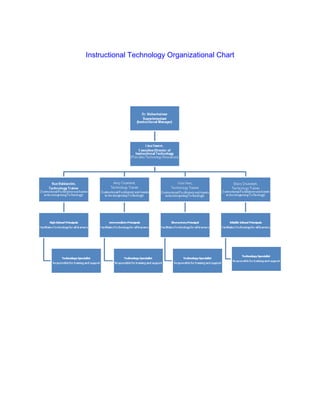
Instructional Technology Organizational Chart
Professional Development

Session Purpose: To provide staff training on the use of polleverywhere.com in the classroom.

Learning Objective to Be Addressed: Increasing the use of technology to gather data.

Approving Principal: Dustin Blank                      Presentation Date: December 18th, 2009

Grade Level:          Facilitator:         Location:           Start Time:        End-Time:
 th   th
7 –8                  Tammy Hayes          Library             1:00               1:35


Learner-Centered                                                                    Estimated
                          Purpose            Description              Steps
    Activity                                                                          Time

Welcome and           Introduction and     Mr. Blank to        * Discuss need     5 minutes
Focus                 welcome to           introduce the       to use more
                      session. Goal        goal for training   technology in
                      setting for          and introduce       the classroom.
                      session and          the facilitator.    * Introduce Mrs.
                      motivation of                            Hayes
                      teachers.

Introduce          To share with           On the screen,      * Faculty will     3 minutes
Polleverywhere.com faculty the ease        have the            text to ‘99503’
                   of creating and         Polleverywhere      one of three
                   using the on-line       question ‘Would     codes: ‘48611’
                   tool.                   you use             for yes; ‘48620’
                                           Polleverywhere      for no, and
                                           as an               ‘48623’ for
                                           instructional       maybe.
                                           tool?

Share the data with   To allow the         Briefly discuss     *Just watch as   2 minutes
the staff.            faculty to           how the data is     the results are
                      experience the       available           computed in real
                      use of               immediately and     time on the
                      Polleverywhere,      continually         screen.
                      and that the         changes until all
                      results are          faculty has given
                      immediate.           their answers.

How to create an      To let faculty see   Step the faculty    *Follow the        1 minute
account on            how easy and         through the         steps on the
Polleverywhere.       quick it is to       steps in creating   website to
                      create and           a K12 account       create an
                      account.             on                  account for a
                                           Polleverywhere.     teacher.

How to create the     To provide the       Step the faculty    *Create a          4 minutes
different types of     teachers with       through the          multiple choice
poll questions.        understanding       creation of a poll   question relating
                       that the            question that        to a specific
                       questions, can      could be used in     subject matter.
                       be multiple         a classroom.
                       choice or free
                       choice.

Discuss the benefits   To provide an       Discuss the          *Round table         20 minutes
of technology in the   additional          benefits of using    discussions at
class.                 technology tool     Polleverywhere       each table.
                       that the teachers   in the review of     *One
                       can use in the      and/or               representative
                       instruction of      instruction of a     from each table
                       their students.     new concept, in      to present their
                                           the digital world.   likes, dislikes or
                                                                concerns.

Closure                                                         * Evaluations        5 minutes
                                                                handed out to
                                                                teachers.
                                                                * Placement of
                                                                “parking lot”
                                                                questions and
                                                                comments for
                                                                further teacher
                                                                clarification.
Technology Action Plan

                           Tammy Hayes- Fossil Hill Middle School


Goal: Improve technology integration to promote learning for all students.


Results/Accomplishments:


 Action Steps        Responsibilities      Time   What measure will   Potential Barriers
                                                  we use to assess
                                           line   the effectiveness   A. What
                                                                         individuals or
                                                  of these
                                                                         organizations
                                                  strategies?            might resist?
                                                                      B. Why?
Step 1:

Enhance                                                                  A. Digital
teacher learning                           2009                             Immigrants
                          Principal,
by promoting                                to    Staff Development
                    Facilitator, Teacher
technology                                 2010
                                                                         B. Lack of
training.                                                                   experience


Step 2:

Identify                                   2009                          A. Old farts
curricular                Principal,              Staff Development
                                            to
technology          Facilitator, Teacher          and Lesson Plans
                                           2010
                                                                         B. Don’t like
embedded
                                                                            change.
lessons.

Step 3:                   Principal,       2009     Collaborative
                    Facilitator, Teacher    to       Team; Staff
Provide                                    2010     Development          A. Schedule
opportunities for
teachers to
                                                                         B. Lack of time
collaborate and
                                                                            or conflicts
mentor each                                                                 in
other in using                                                              scheduling.
technology as a
tool for high
level student
learning.

Step 4:

Develop
expectations for                          2009
campus/teacher                                                       A. Old farts
                         Principal,        and
websites as                                       Teacher Websites
                   Facilitator, Teacher    on-
communication                             going                      B. You can’t
and                                                                     teach an old
collaboration                                                           dog new
tools.                                                                  tricks.

Step 5:

Students solve                            2009                       A. Lack of
real-world               Principal,        and                          technology.
                                                   Snapshot Data
problems           Facilitator, Teacher    on-
through the use                           going
                                                                     B. Funding.
of technology

Action Plan

  • 1.
  • 2.
    Professional Development Session Purpose:To provide staff training on the use of polleverywhere.com in the classroom. Learning Objective to Be Addressed: Increasing the use of technology to gather data. Approving Principal: Dustin Blank Presentation Date: December 18th, 2009 Grade Level: Facilitator: Location: Start Time: End-Time: th th 7 –8 Tammy Hayes Library 1:00 1:35 Learner-Centered Estimated Purpose Description Steps Activity Time Welcome and Introduction and Mr. Blank to * Discuss need 5 minutes Focus welcome to introduce the to use more session. Goal goal for training technology in setting for and introduce the classroom. session and the facilitator. * Introduce Mrs. motivation of Hayes teachers. Introduce To share with On the screen, * Faculty will 3 minutes Polleverywhere.com faculty the ease have the text to ‘99503’ of creating and Polleverywhere one of three using the on-line question ‘Would codes: ‘48611’ tool. you use for yes; ‘48620’ Polleverywhere for no, and as an ‘48623’ for instructional maybe. tool? Share the data with To allow the Briefly discuss *Just watch as 2 minutes the staff. faculty to how the data is the results are experience the available computed in real use of immediately and time on the Polleverywhere, continually screen. and that the changes until all results are faculty has given immediate. their answers. How to create an To let faculty see Step the faculty *Follow the 1 minute account on how easy and through the steps on the Polleverywhere. quick it is to steps in creating website to create and a K12 account create an account. on account for a Polleverywhere. teacher. How to create the To provide the Step the faculty *Create a 4 minutes
  • 3.
    different types of teachers with through the multiple choice poll questions. understanding creation of a poll question relating that the question that to a specific questions, can could be used in subject matter. be multiple a classroom. choice or free choice. Discuss the benefits To provide an Discuss the *Round table 20 minutes of technology in the additional benefits of using discussions at class. technology tool Polleverywhere each table. that the teachers in the review of *One can use in the and/or representative instruction of instruction of a from each table their students. new concept, in to present their the digital world. likes, dislikes or concerns. Closure * Evaluations 5 minutes handed out to teachers. * Placement of “parking lot” questions and comments for further teacher clarification.
  • 4.
    Technology Action Plan Tammy Hayes- Fossil Hill Middle School Goal: Improve technology integration to promote learning for all students. Results/Accomplishments: Action Steps Responsibilities Time What measure will Potential Barriers we use to assess line the effectiveness A. What individuals or of these organizations strategies? might resist? B. Why? Step 1: Enhance A. Digital teacher learning 2009 Immigrants Principal, by promoting to Staff Development Facilitator, Teacher technology 2010 B. Lack of training. experience Step 2: Identify 2009 A. Old farts curricular Principal, Staff Development to technology Facilitator, Teacher and Lesson Plans 2010 B. Don’t like embedded change. lessons. Step 3: Principal, 2009 Collaborative Facilitator, Teacher to Team; Staff Provide 2010 Development A. Schedule opportunities for teachers to B. Lack of time collaborate and or conflicts mentor each in other in using scheduling.
  • 5.
    technology as a toolfor high level student learning. Step 4: Develop expectations for 2009 campus/teacher A. Old farts Principal, and websites as Teacher Websites Facilitator, Teacher on- communication going B. You can’t and teach an old collaboration dog new tools. tricks. Step 5: Students solve 2009 A. Lack of real-world Principal, and technology. Snapshot Data problems Facilitator, Teacher on- through the use going B. Funding. of technology