
ACTi NVR Introduction ACTi  ●  ACTi  ●  ACTi  ●  ACTi  ●  ACTi  ●  ACTi  ●  ACTi  ●  ACTi  ●  ACTi
ToC NVR Categories NVR Basic function Intro.  NVR Server – Client Intro ACTi’s software solution Appendix Successful project reference
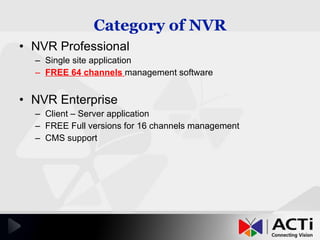
Category of NVR NVR Professional  Single site application FREE 64 channels  management software NVR Enterprise Client – Server application FREE Full versions for 16 channels management CMS support
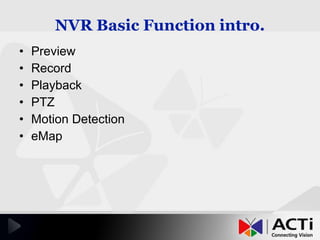
NVR Basic Function intro. Preview Record Playback PTZ Motion Detection eMap
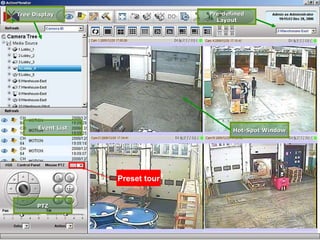
  Event List PTZ Tree Display Pre-defined Layout Hot-Spot Window Preset tour
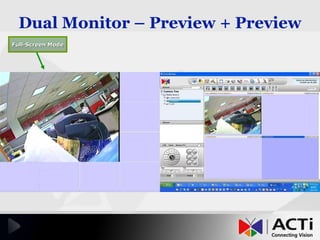
Dual Monitor – Preview + Preview   Full-Screen Mode
Recording setting   Tree Display Schedule/ Event recording Per channel setting Weekly based recording rule
  4-Channel Sync. Playback Time-based Search Bar Export to AVI Record While  Playback Snapshot Viewer
  Snapshots Link to  Playback Snapshots with Original Size
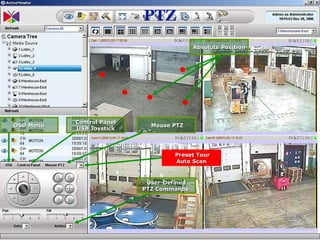
PTZ   Mouse PTZ OSD Menu Control Panel USB Joystick User-Defined  PTZ Commands  Preset Tour Auto Scan Absolute Position
  OSD 32 Preset Position
  IP Joystick Button Setups
Motion setting 3 square Hardware MD.
Motion Detection   Actions/ Mail Snapshot/ FTP/ DO Commend actions Notify via E-mail
  Preview-All Mode Motion Event  on Map Mini-Preview w/ Original Resolution eMap
NVR Server Client Intro.
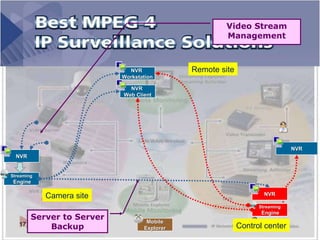
  NVR Mobile Explorer NVR  Workstation NVR NVR Video Stream Management Server to Server Backup Streaming Engine Streaming Engine NVR  Web Client Camera site Remote site Control center
Lots of Clients   IP Camera
Multi-site Deployment Example Taipei office Owner in Greece for Vocation CEO in USA for business trip Local Security service provider  IP Camera IP Camera IP Camera
IE browser for NVR
Remote Monitoring ACTi NVR Clients functions
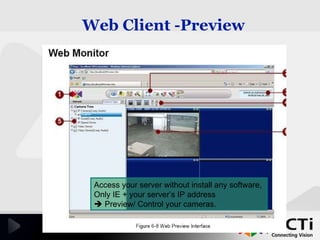
Web Client -Preview   Access your server without install any software,  Only IE + your server’s IP address     Preview/ Control your cameras.
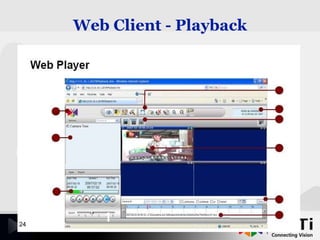
Web Client - Playback
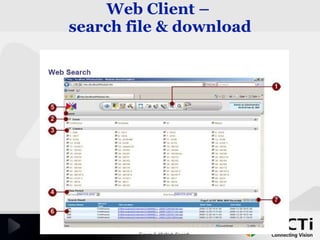
Web Client –  search file & download
Web Client – e-Map
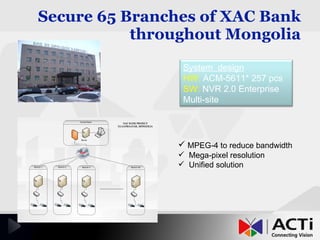
Secure 65 Branches of XAC Bank throughout Mongolia MPEG-4 to reduce bandwidth Mega-pixel resolution Unified solution System  design HW:  ACM-5611* 257 pcs SW:  NVR 2.0 Enterprise Multi-site
Central Management Server  1 NVR Server Enterprise 2 NVR Server Enterprise 3NVR Server Enterprise 4 NVR Server Enterprise CMS A, B, C A, B, C A, B, C A, B, C 1A, 3C,  All
CONTACT US 7F, No. 1, Alley 20, Lane 407, Sec. 2, Ti-Ding Blvd.,  Neihu District, Taipei, Taiwan 114, R.O.C.      +886-2-2656-2588 +886-2-2656-2599      Taiwan Office   > ADD: TEL: FAX: http://www.acti.com ACTi  ●  ACTi  ●  ACTi  ●  ACTi  ●  ACTi  ●  ACTi  ●  ACTi  ●  ACTi  ●  ACTi  [email_address]

ACTi IP CCTV NVR Presentation

  • 1.
    ACTi NVR IntroductionACTi ● ACTi ● ACTi ● ACTi ● ACTi ● ACTi ● ACTi ● ACTi ● ACTi
  • 2.
    ToC NVR CategoriesNVR Basic function Intro. NVR Server – Client Intro ACTi’s software solution Appendix Successful project reference
  • 3.
    Category of NVRNVR Professional Single site application FREE 64 channels management software NVR Enterprise Client – Server application FREE Full versions for 16 channels management CMS support
  • 4.
    NVR Basic Functionintro. Preview Record Playback PTZ Motion Detection eMap
  • 5.
    EventList PTZ Tree Display Pre-defined Layout Hot-Spot Window Preset tour
  • 6.
    Dual Monitor –Preview + Preview Full-Screen Mode
  • 7.
    Recording setting Tree Display Schedule/ Event recording Per channel setting Weekly based recording rule
  • 8.
    4-ChannelSync. Playback Time-based Search Bar Export to AVI Record While Playback Snapshot Viewer
  • 9.
    SnapshotsLink to Playback Snapshots with Original Size
  • 10.
    PTZ Mouse PTZ OSD Menu Control Panel USB Joystick User-Defined PTZ Commands Preset Tour Auto Scan Absolute Position
  • 11.
    OSD32 Preset Position
  • 12.
    IPJoystick Button Setups
  • 13.
    Motion setting 3square Hardware MD.
  • 14.
    Motion Detection Actions/ Mail Snapshot/ FTP/ DO Commend actions Notify via E-mail
  • 15.
    Preview-AllMode Motion Event on Map Mini-Preview w/ Original Resolution eMap
  • 16.
  • 17.
    NVRMobile Explorer NVR Workstation NVR NVR Video Stream Management Server to Server Backup Streaming Engine Streaming Engine NVR Web Client Camera site Remote site Control center
  • 18.
    Lots of Clients IP Camera
  • 19.
  • 20.
    Multi-site Deployment ExampleTaipei office Owner in Greece for Vocation CEO in USA for business trip Local Security service provider IP Camera IP Camera IP Camera
  • 21.
  • 22.
    Remote Monitoring ACTiNVR Clients functions
  • 23.
    Web Client -Preview Access your server without install any software, Only IE + your server’s IP address  Preview/ Control your cameras.
  • 24.
    Web Client -Playback
  • 25.
    Web Client – search file & download
  • 26.
  • 27.
    Secure 65 Branchesof XAC Bank throughout Mongolia MPEG-4 to reduce bandwidth Mega-pixel resolution Unified solution System design HW: ACM-5611* 257 pcs SW: NVR 2.0 Enterprise Multi-site
  • 28.
    Central Management Server 1 NVR Server Enterprise 2 NVR Server Enterprise 3NVR Server Enterprise 4 NVR Server Enterprise CMS A, B, C A, B, C A, B, C A, B, C 1A, 3C, All
  • 29.
    CONTACT US 7F,No. 1, Alley 20, Lane 407, Sec. 2, Ti-Ding Blvd., Neihu District, Taipei, Taiwan 114, R.O.C.     +886-2-2656-2588 +886-2-2656-2599     Taiwan Office > ADD: TEL: FAX: http://www.acti.com ACTi ● ACTi ● ACTi ● ACTi ● ACTi ● ACTi ● ACTi ● ACTi ● ACTi [email_address]

Editor's Notes

  • #18 Divided into 3 parts – camera site, control center, and remote site All streamings from cameras goes to NVR, and send it to streaming engine. The streaming engine is dedicated for managing every streaming, and broadcast the streaming effectively to every client and station. Therefore, all cameras have only 1 stream to streaming engine, so the client get the steaming from streaming engine  No limitation for concurrent user.
  • #19 Upload bandwidth & download bandwidth inquiry
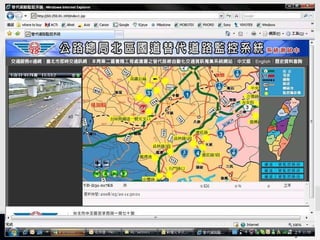
  • #20 This is the Taipei highway replacement monitoring system. You could see every camera on the website for understanding more about the situation for the road. Try to imagine that if there’s 100 people want to see 1 camera, and link to the camera, it will not work anymore However, with ACTi NVR streaming engine, every client could get the streaming.
  • #21 With this infrastructure, you could get the video stream from Remote office, for example, the boss is in France, and he wants to see what happen in the company, he only need to use IE (Internet Explorer) to link into the server, and he could see every information from the server.
  • #22 This is what I get from the customers.
  • #23 With IE browser, customers could get Preview Record Playback, and download the file from the server Motion Detection event list
  • #29 Data Flow & Streaming flow highlight Charged by clients, but not by servers. Manage for the TV wall.