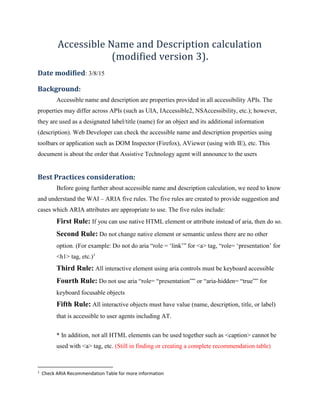
Accessible Name and Description calculation
(modified version 3).
Date modified: 3/8/15
Background:
Accessible name and description are properties provided in all accessibility APIs. The
properties may differ across APIs (such as UIA, IAccessible2, NSAccessibility, etc.); however,
they are used as a designated label/title (name) for an object and its additional information
(description). Web Developer can check the accessible name and description properties using
toolbars or application such as DOM Inspector (Firefox), AViewer (using with IE), etc. This
document is about the order that Assistive Technology agent will announce to the users
Best Practices consideration:
Before going further about accessible name and description calculation, we need to know
and understand the WAI – ARIA five rules. The five rules are created to provide suggestion and
cases which ARIA attributes are appropriate to use. The five rules include:
First Rule: If you can use native HTML element or attribute instead of aria, then do so.
Second Rule: Do not change native element or semantic unless there are no other
option. (For example: Do not do aria “role = ‘link’” for <a> tag, “role= ‘presentation’ for
<h1> tag, etc.)1
Third Rule: All interactive element using aria controls must be keyboard accessible
Fourth Rule: Do not use aria “role= “presentation”” or “aria-hidden= “true”” for
keyboard focusable objects
Fifth Rule: All interactive objects must have value (name, description, title, or label)
that is accessible to user agents including AT.
* In addition, not all HTML elements can be used together such as <caption> cannot be
used with <a> tag, etc. (Still in finding or creating a complete recommendation table)
1
Check ARIA Recommendation Table for more information
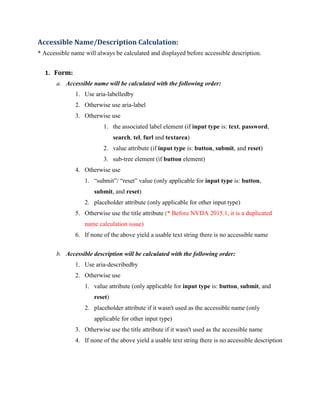
Accessible Name/Description Calculation:
* Accessible name will always be calculated and displayed before accessible description.
1. Form:
a. Accessible name will be calculated with the following order:
1. Use aria-labelledby
2. Otherwise use aria-label
3. Otherwise use
1. the associated label element (if input type is: text, password,
search, tel, furl and textarea)
2. value attribute (if input type is: button, submit, and reset)
3. sub-tree element (if button element)
4. Otherwise use
1. “submit”/ “reset” value (only applicable for input type is: button,
submit, and reset)
2. placeholder attribute (only applicable for other input type)
5. Otherwise use the title attribute (* Before NVDA 2015.1, it is a duplicated
name calculation issue)
6. If none of the above yield a usable text string there is no accessible name
b. Accessible description will be calculated with the following order:
1. Use aria-describedby
2. Otherwise use
1. value attribute (only applicable for input type is: button, submit, and
reset)
2. placeholder attribute if it wasn't used as the accessible name (only
applicable for other input type)
3. Otherwise use the title attribute if it wasn't used as the accessible name
4. If none of the above yield a usable text string there is no accessible description
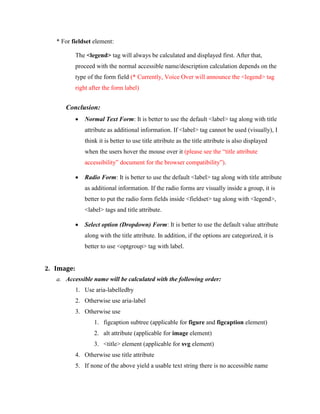
* For fieldset element:
The <legend> tag will always be calculated and displayed first. After that,
proceed with the normal accessible name/description calculation depends on the
type of the form field (* Currently, Voice Over will announce the <legend> tag
right after the form label)
Conclusion:
 Normal Text Form: It is better to use the default <label> tag along with title
attribute as additional information. If <label> tag cannot be used (visually), I
think it is better to use title attribute as the title attribute is also displayed
when the users hover the mouse over it (please see the “title attribute
accessibility” document for the browser compatibility”).
 Radio Form: It is better to use the default <label> tag along with title attribute
as additional information. If the radio forms are visually inside a group, it is
better to put the radio form fields inside <fieldset> tag along with <legend>,
<label> tags and title attribute.
 Select option (Dropdown) Form: It is better to use the default value attribute
along with the title attribute. In addition, if the options are categorized, it is
better to use <optgroup> tag with label.
2. Image:
a. Accessible name will be calculated with the following order:
1. Use aria-labelledby
2. Otherwise use aria-label
3. Otherwise use
1. figcaption subtree (applicable for figure and figcaption element)
2. alt attribute (applicable for image element)
3. <title> element (applicable for svg element)
4. Otherwise use title attribute
5. If none of the above yield a usable text string there is no accessible name
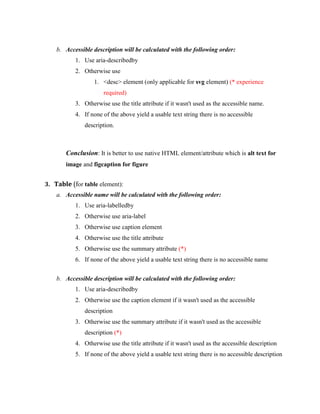
b. Accessible description will be calculated with the following order:
1. Use aria-describedby
2. Otherwise use
1. <desc> element (only applicable for svg element) (* experience
required)
3. Otherwise use the title attribute if it wasn't used as the accessible name.
4. If none of the above yield a usable text string there is no accessible
description.
Conclusion: It is better to use native HTML element/attribute which is alt text for
image and figcaption for figure
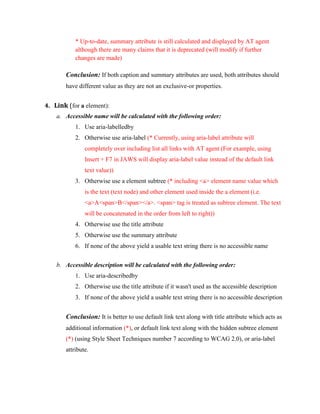
3. Table (for table element):
a. Accessible name will be calculated with the following order:
1. Use aria-labelledby
2. Otherwise use aria-label
3. Otherwise use caption element
4. Otherwise use the title attribute
5. Otherwise use the summary attribute (*)
6. If none of the above yield a usable text string there is no accessible name
b. Accessible description will be calculated with the following order:
1. Use aria-describedby
2. Otherwise use the caption element if it wasn't used as the accessible
description
3. Otherwise use the summary attribute if it wasn't used as the accessible
description (*)
4. Otherwise use the title attribute if it wasn't used as the accessible description
5. If none of the above yield a usable text string there is no accessible description
* Up-to-date, summary attribute is still calculated and displayed by AT agent
although there are many claims that it is deprecated (will modify if further
changes are made)
Conclusion: If both caption and summary attributes are used, both attributes should
have different value as they are not an exclusive-or properties.
4. Link (for a element):
a. Accessible name will be calculated with the following order:
1. Use aria-labelledby
2. Otherwise use aria-label (* Currently, using aria-label attribute will
completely over including list all links with AT agent (For example, using
Insert + F7 in JAWS will display aria-label value instead of the default link
text value))
3. Otherwise use a element subtree (* including <a> element name value which
is the text (text node) and other element used inside the a element (i.e.
<a>A<span>B</span></a>. <span> tag is treated as subtree element. The text
will be concatenated in the order from left to right))
4. Otherwise use the title attribute
5. Otherwise use the summary attribute
6. If none of the above yield a usable text string there is no accessible name
b. Accessible description will be calculated with the following order:
1. Use aria-describedby
2. Otherwise use the title attribute if it wasn't used as the accessible description
3. If none of the above yield a usable text string there is no accessible description
Conclusion: It is better to use default link text along with title attribute which acts as
additional information (*), or default link text along with the hidden subtree element
(*) (using Style Sheet Techniques number 7 according to WCAG 2.0), or aria-label
attribute.
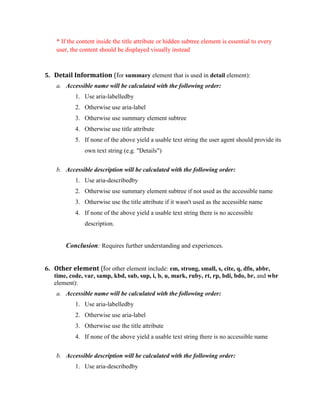
* If the content inside the title attribute or hidden subtree element is essential to every
user, the content should be displayed visually instead
5. Detail Information (for summary element that is used in detail element):
a. Accessible name will be calculated with the following order:
1. Use aria-labelledby
2. Otherwise use aria-label
3. Otherwise use summary element subtree
4. Otherwise use title attribute
5. If none of the above yield a usable text string the user agent should provide its
own text string (e.g. "Details")
b. Accessible description will be calculated with the following order:
1. Use aria-describedby
2. Otherwise use summary element subtree if not used as the accessible name
3. Otherwise use the title attribute if it wasn't used as the accessible name
4. If none of the above yield a usable text string there is no accessible
description.
Conclusion: Requires further understanding and experiences.
6. Other element (for other element include: em, strong, small, s, cite, q, dfn, abbr,
time, code, var, samp, kbd, sub, sup, i, b, u, mark, ruby, rt, rp, bdi, bdo, br, and wbr
element):
a. Accessible name will be calculated with the following order:
1. Use aria-labelledby
2. Otherwise use aria-label
3. Otherwise use the title attribute
4. If none of the above yield a usable text string there is no accessible name
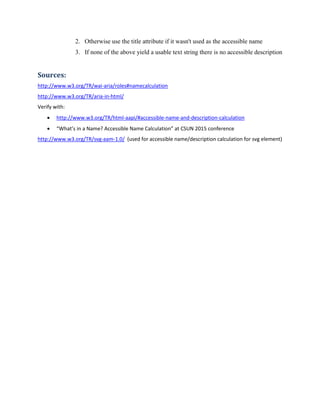
b. Accessible description will be calculated with the following order:
1. Use aria-describedby
2. Otherwise use the title attribute if it wasn't used as the accessible name
3. If none of the above yield a usable text string there is no accessible description
Sources:
http://www.w3.org/TR/wai-aria/roles#namecalculation
http://www.w3.org/TR/aria-in-html/
Verify with:
 http://www.w3.org/TR/html-aapi/#accessible-name-and-description-calculation
 “What’s in a Name? Accessible Name Calculation” at CSUN 2015 conference
http://www.w3.org/TR/svg-aam-1.0/ (used for accessible name/description calculation for svg element)

Accessible Name and Description calculation

  • 1.
    Accessible Name andDescription calculation (modified version 3). Date modified: 3/8/15 Background: Accessible name and description are properties provided in all accessibility APIs. The properties may differ across APIs (such as UIA, IAccessible2, NSAccessibility, etc.); however, they are used as a designated label/title (name) for an object and its additional information (description). Web Developer can check the accessible name and description properties using toolbars or application such as DOM Inspector (Firefox), AViewer (using with IE), etc. This document is about the order that Assistive Technology agent will announce to the users Best Practices consideration: Before going further about accessible name and description calculation, we need to know and understand the WAI – ARIA five rules. The five rules are created to provide suggestion and cases which ARIA attributes are appropriate to use. The five rules include: First Rule: If you can use native HTML element or attribute instead of aria, then do so. Second Rule: Do not change native element or semantic unless there are no other option. (For example: Do not do aria “role = ‘link’” for <a> tag, “role= ‘presentation’ for <h1> tag, etc.)1 Third Rule: All interactive element using aria controls must be keyboard accessible Fourth Rule: Do not use aria “role= “presentation”” or “aria-hidden= “true”” for keyboard focusable objects Fifth Rule: All interactive objects must have value (name, description, title, or label) that is accessible to user agents including AT. * In addition, not all HTML elements can be used together such as <caption> cannot be used with <a> tag, etc. (Still in finding or creating a complete recommendation table) 1 Check ARIA Recommendation Table for more information
  • 2.
    Accessible Name/Description Calculation: *Accessible name will always be calculated and displayed before accessible description. 1. Form: a. Accessible name will be calculated with the following order: 1. Use aria-labelledby 2. Otherwise use aria-label 3. Otherwise use 1. the associated label element (if input type is: text, password, search, tel, furl and textarea) 2. value attribute (if input type is: button, submit, and reset) 3. sub-tree element (if button element) 4. Otherwise use 1. “submit”/ “reset” value (only applicable for input type is: button, submit, and reset) 2. placeholder attribute (only applicable for other input type) 5. Otherwise use the title attribute (* Before NVDA 2015.1, it is a duplicated name calculation issue) 6. If none of the above yield a usable text string there is no accessible name b. Accessible description will be calculated with the following order: 1. Use aria-describedby 2. Otherwise use 1. value attribute (only applicable for input type is: button, submit, and reset) 2. placeholder attribute if it wasn't used as the accessible name (only applicable for other input type) 3. Otherwise use the title attribute if it wasn't used as the accessible name 4. If none of the above yield a usable text string there is no accessible description
  • 3.
    * For fieldsetelement: The <legend> tag will always be calculated and displayed first. After that, proceed with the normal accessible name/description calculation depends on the type of the form field (* Currently, Voice Over will announce the <legend> tag right after the form label) Conclusion:  Normal Text Form: It is better to use the default <label> tag along with title attribute as additional information. If <label> tag cannot be used (visually), I think it is better to use title attribute as the title attribute is also displayed when the users hover the mouse over it (please see the “title attribute accessibility” document for the browser compatibility”).  Radio Form: It is better to use the default <label> tag along with title attribute as additional information. If the radio forms are visually inside a group, it is better to put the radio form fields inside <fieldset> tag along with <legend>, <label> tags and title attribute.  Select option (Dropdown) Form: It is better to use the default value attribute along with the title attribute. In addition, if the options are categorized, it is better to use <optgroup> tag with label. 2. Image: a. Accessible name will be calculated with the following order: 1. Use aria-labelledby 2. Otherwise use aria-label 3. Otherwise use 1. figcaption subtree (applicable for figure and figcaption element) 2. alt attribute (applicable for image element) 3. <title> element (applicable for svg element) 4. Otherwise use title attribute 5. If none of the above yield a usable text string there is no accessible name
  • 4.
    b. Accessible descriptionwill be calculated with the following order: 1. Use aria-describedby 2. Otherwise use 1. <desc> element (only applicable for svg element) (* experience required) 3. Otherwise use the title attribute if it wasn't used as the accessible name. 4. If none of the above yield a usable text string there is no accessible description. Conclusion: It is better to use native HTML element/attribute which is alt text for image and figcaption for figure 3. Table (for table element): a. Accessible name will be calculated with the following order: 1. Use aria-labelledby 2. Otherwise use aria-label 3. Otherwise use caption element 4. Otherwise use the title attribute 5. Otherwise use the summary attribute (*) 6. If none of the above yield a usable text string there is no accessible name b. Accessible description will be calculated with the following order: 1. Use aria-describedby 2. Otherwise use the caption element if it wasn't used as the accessible description 3. Otherwise use the summary attribute if it wasn't used as the accessible description (*) 4. Otherwise use the title attribute if it wasn't used as the accessible description 5. If none of the above yield a usable text string there is no accessible description
  • 5.
    * Up-to-date, summaryattribute is still calculated and displayed by AT agent although there are many claims that it is deprecated (will modify if further changes are made) Conclusion: If both caption and summary attributes are used, both attributes should have different value as they are not an exclusive-or properties. 4. Link (for a element): a. Accessible name will be calculated with the following order: 1. Use aria-labelledby 2. Otherwise use aria-label (* Currently, using aria-label attribute will completely over including list all links with AT agent (For example, using Insert + F7 in JAWS will display aria-label value instead of the default link text value)) 3. Otherwise use a element subtree (* including <a> element name value which is the text (text node) and other element used inside the a element (i.e. <a>A<span>B</span></a>. <span> tag is treated as subtree element. The text will be concatenated in the order from left to right)) 4. Otherwise use the title attribute 5. Otherwise use the summary attribute 6. If none of the above yield a usable text string there is no accessible name b. Accessible description will be calculated with the following order: 1. Use aria-describedby 2. Otherwise use the title attribute if it wasn't used as the accessible description 3. If none of the above yield a usable text string there is no accessible description Conclusion: It is better to use default link text along with title attribute which acts as additional information (*), or default link text along with the hidden subtree element (*) (using Style Sheet Techniques number 7 according to WCAG 2.0), or aria-label attribute.
  • 6.
    * If thecontent inside the title attribute or hidden subtree element is essential to every user, the content should be displayed visually instead 5. Detail Information (for summary element that is used in detail element): a. Accessible name will be calculated with the following order: 1. Use aria-labelledby 2. Otherwise use aria-label 3. Otherwise use summary element subtree 4. Otherwise use title attribute 5. If none of the above yield a usable text string the user agent should provide its own text string (e.g. "Details") b. Accessible description will be calculated with the following order: 1. Use aria-describedby 2. Otherwise use summary element subtree if not used as the accessible name 3. Otherwise use the title attribute if it wasn't used as the accessible name 4. If none of the above yield a usable text string there is no accessible description. Conclusion: Requires further understanding and experiences. 6. Other element (for other element include: em, strong, small, s, cite, q, dfn, abbr, time, code, var, samp, kbd, sub, sup, i, b, u, mark, ruby, rt, rp, bdi, bdo, br, and wbr element): a. Accessible name will be calculated with the following order: 1. Use aria-labelledby 2. Otherwise use aria-label 3. Otherwise use the title attribute 4. If none of the above yield a usable text string there is no accessible name b. Accessible description will be calculated with the following order: 1. Use aria-describedby
  • 7.
    2. Otherwise usethe title attribute if it wasn't used as the accessible name 3. If none of the above yield a usable text string there is no accessible description Sources: http://www.w3.org/TR/wai-aria/roles#namecalculation http://www.w3.org/TR/aria-in-html/ Verify with:  http://www.w3.org/TR/html-aapi/#accessible-name-and-description-calculation  “What’s in a Name? Accessible Name Calculation” at CSUN 2015 conference http://www.w3.org/TR/svg-aam-1.0/ (used for accessible name/description calculation for svg element)