Accessibility is not enough: An 
examination of the role universities 
play in using technologies to 
promote the inclusion of disabled 
students 
Professor Jane Seale 
ICITS 2014 Keynote, September 18th
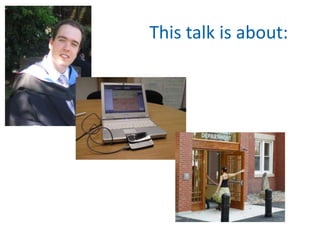
This talk is about:
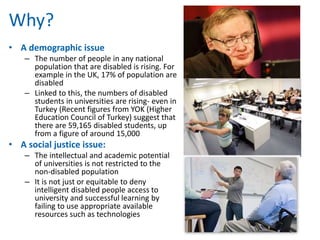
Why? 
• A demographic issue 
– The number of people in any national 
population that are disabled is rising. For 
example in the UK, 17% of population are 
disabled 
– Linked to this, the numbers of disabled 
students in universities are rising- even in 
Turkey (Recent figures from YOK (Higher 
Education Council of Turkey) suggest that 
there are 59,165 disabled students, up 
from a figure of around 15,000 
• A social justice issue: 
– The intellectual and academic potential 
of universities is not restricted to the 
non-disabled population 
– It is not just or equitable to deny 
intelligent disabled people access to 
university and successful learning by 
failing to use appropriate available 
resources such as technologies
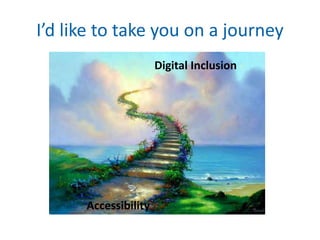
I’d like to take you on a journey 
Accessibility 
Digital Inclusion
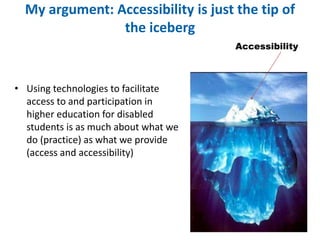
My argument: Accessibility is just the tip of 
the iceberg 
• Using technologies to facilitate 
access to and participation in 
higher education for disabled 
students is as much about what we 
do (practice) as what we provide 
(access and accessibility) 
Accessibility
Who am I?
In the beginning… 
• Around the beginning of the millennium much 
of the focus relating to e-learning, disability 
and universities was on accessibility of 
university websites (home pages, library 
pages) 
• Drivers 
– Disability discrimination legislation 
– Web Accessibility Guidelines and Standards 
• WC3
The message 
• Universities must make their websites 
accessible 
• It is easy, just use the guidelines 
• Get on and do it…..
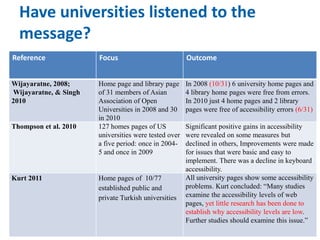
Have universities listened to the 
message? 
Reference Focus Outcome 
Wijayaratne, 2008; 
Wijayaratne, & Singh 
2010 
Home page and library page 
of 31 members of Asian 
Association of Open 
Universities in 2008 and 30 
in 2010 
In 2008 (10/31) 6 university home pages and 
4 library home pages were free from errors. 
In 2010 just 4 home pages and 2 library 
pages were free of accessibility errors (6/31) 
Thompson et al. 2010 127 homes pages of US 
universities were tested over 
a five period: once in 2004- 
5 and once in 2009 
Significant positive gains in accessibility 
were revealed on some measures but 
declined in others, Improvements were made 
for issues that were basic and easy to 
implement. There was a decline in keyboard 
accessibility. 
Kurt 2011 Home pages of 10/77 
established public and 
private Turkish universities 
All university pages show some accessibility 
problems. Kurt concluded: “Many studies 
examine the accessibility levels of web 
pages, yet little research has been done to 
establish why accessibility levels are low. 
Further studies should examine this issue.”
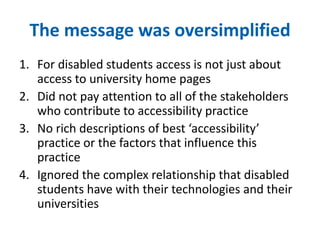
The message was oversimplified 
1. For disabled students access is not just about 
access to university home pages 
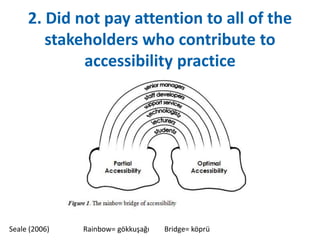
2. Did not pay attention to all of the stakeholders 
who contribute to accessibility practice 
3. No rich descriptions of best ‘accessibility’ 
practice or the factors that influence this 
practice 
4. Ignored the complex relationship that disabled 
students have with their technologies and their 
universities
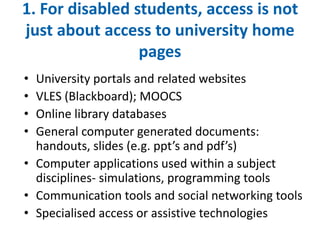
1. For disabled students, access is not 
just about access to university home 
pages 
• University portals and related websites 
• VLES (Blackboard); MOOCS 
• Online library databases 
• General computer generated documents: 
handouts, slides (e.g. ppt’s and pdf’s) 
• Computer applications used within a subject 
disciplines- simulations, programming tools 
• Communication tools and social networking tools 
• Specialised access or assistive technologies
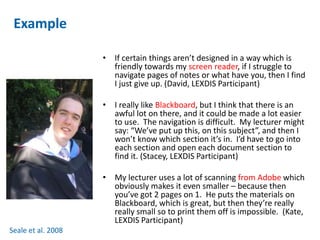
Example 
• If certain things aren’t designed in a way which is 
friendly towards my screen reader, if I struggle to 
navigate pages of notes or what have you, then I find 
I just give up. (David, LEXDIS Participant) 
• I really like Blackboard, but I think that there is an 
awful lot on there, and it could be made a lot easier 
to use. The navigation is difficult. My lecturer might 
say: “We’ve put up this, on this subject”, and then I 
won’t know which section it’s in. I’d have to go into 
each section and open each document section to 
find it. (Stacey, LEXDIS Participant) 
• My lecturer uses a lot of scanning from Adobe which 
obviously makes it even smaller – because then 
you’ve got 2 pages on 1. He puts the materials on 
Blackboard, which is great, but then they’re really 
really small so to print them off is impossible. (Kate, 
LEXDIS Participant) 
Seale et al. 2008
2. Did not pay attention to all of the 
stakeholders who contribute to 
accessibility practice 
Seale (2006) Rainbow= gökkuşağı Bridge= köprü
Who? 
• Senior Managers- Offer leadership, 
facilitate joined up thinking, work to 
embed accessibility across the institution 
from procurement to support 
• Staff and educational developers-link 
institutional agendas to departmental and 
individual agendas
Who? 
• Student support services- when assessing 
student needs they need to be aware of how 
courses are using e-learning so that they can 
make appropriate, informed recommendations; 
• Learning Technologists (e.g. Computing 
Services)- how we can support distance learners 
at “home” and how can this support be aligned 
to the support we offer on campus, so that e-learning 
experience is seamless for students?
Who? 
• Lecturers: We need to understand how they 
conceptualise course design, their ideas about 
effective teaching and learning (e-learning) and 
their beliefs about appropriate student support 
in order to understand whether and how 
accessible e-learning can, or needs to be, part of 
their practice 
• Students: Student are the experts on what their 
learning needs are BUT we are not necessarily 
good at listening to those needs or valuing the 
skills and experiences that student bring with 
them
An example 
• Assistive Technology Centre: in the central 
library; managed by a senior librarian, staffed by 
two unqualified but dedicated “assistive 
technologists” 
• Disabled students could be referred by Student 
Services or could just drop in to use the 
“accessible workstations” and specialised 
assistive technologies
An example 
• Workstations in the ATC frequently had 
compatibility problems with central 
network- specialised software caused 
system conflicts 
• Computing services refused to contribute 
to, or take responsibility for the funding of 
new workstations and specialist 
equipment 
• Manager of the ATC complained that 
people in the university were unaware of 
the services they offer
3. No rich descriptions of best 
‘accessibility’ practice or the factors 
that influence this practice 
• Practitioners know that they should be making 
e-learning accessible to disabled students, 
BUT they do not know how to make e-learning 
accessible. (Seale, 2006) 
• Missing Voices: there is very little literature 
where university practitioners conceptualise, 
describe, evaluate or discuss accessibility 
practices (Seale, 2014)
What do we need rich descriptions of? 
• Detailed accounts of how practitioners in 
universities have interpreted accessibility related 
rules, tools, approaches and procedures and the 
'personal and collective meanings‘ that have 
developed from these interpretations 
• We also need accounts of the stakeholder 
responses to the mediators and drivers of 
accessibility 
– How stakeholders have developed strategic and effective 
relationships with one another
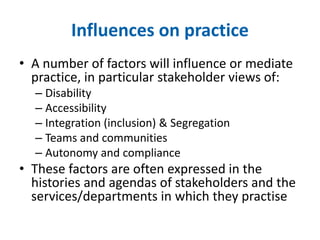
Influences on practice 
• A number of factors will influence or mediate 
practice, in particular stakeholder views of: 
– Disability 
– Accessibility 
– Integration (inclusion) & Segregation 
– Teams and communities 
– Autonomy and compliance 
• These factors are often expressed in the 
histories and agendas of stakeholders and the 
services/departments in which they practise
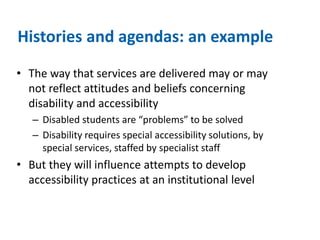
Histories and agendas: an example 
• The way that services are delivered may or may 
not reflect attitudes and beliefs concerning 
disability and accessibility 
– Disabled students are “problems” to be solved 
– Disability requires special accessibility solutions, by 
special services, staffed by specialist staff 
• But they will influence attempts to develop 
accessibility practices at an institutional level
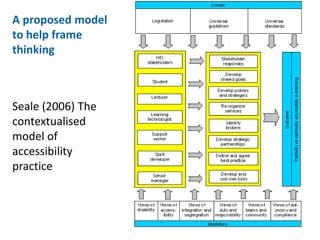
A proposed model 
to help frame 
thinking 
Seale (2006) The 
contextualised 
model of 
accessibility 
practice
4. Ignored the complex relationship that 
disabled students have with their 
technologies and their universities 
• Disabled students: 
– Are digitally agile (competent and confident users) 
– Use a wide range of generic and specialist 
technologies 
– Adopt a wide range of strategies for using 
technologies to support their learning 
– Hold a wide range of personal beliefs about the value 
of technology and how they might use them in ways 
that are personally acceptable or meaningful 
– Have access to a range of cultural and social resources 
that support technology use (before and during 
university) 
(Seale et al. 2008, 2010; Seale, 2012; Seale et al. 2014)
4. Ignored the complex relationship that 
disabled students have with their 
technologies and their universities 
• Despite this, they can: 
– Make decisions to abandon technologies 
(particularly assistive technologies) 
– Rely heavily on formal training for help using 
specialist technologies 
• But find it difficult to engage with the training due to 
time pressures 
(Seale et al. 2008, 2010; Seale, 2012; Seale et al. 2014)
Example: Beliefs about technology 
stigmatising disabled students 
Nick: I wouldn't use voice dictation software in public. I'd feel to 
self-conscious. 
Reena: I have to say that if I’d got that technology, I would use it 
at home. I wouldn’t use it in the lab. […]But with technology, I 
still think there’s a stigma to it. If I did have assistive 
technology I would use it on my home computer. There’s no 
way I would use a lot of it in the lab because I wouldn’t want 
that stigma on me like that thing – which is bad, but it’s how 
people are.
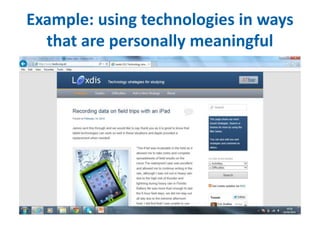
Example: using technologies in ways 
that are personally meaningful
Example: cultural resources 
• Before university: 43% of the students were encouraged 
to undertake a formal generic ICT qualification 
• For those who undertook a formal generic ICT 
qualification 63.4% said the knowledge gained had not 
helped in their current technology use at college or 
university. (n=153) 
– Common reasons given= irrelevant, out of date 
• Once at university: Interviewees talked a lot about 
investing time in training to use specialist equipment 
• Why hadn’t their ICT qualifications prepared them for 
using specialist technologies so that they could be less 
reliant on extra time-consuming AT training once at 
university 
Seale et al. 2014
Example: 
social 
resources 
“through the college I could not believe the 
support and guidance I have been given to support 
my studies. It has also helped me come to terms 
with my disability and realise that I am not alone 
and I can also achieve as well as others and I am 
not a problem” 
• Asked which sources of support they accessed at university 
if they needed help using specialist technologies, 
respondents (n=144) indicated that their most helpful 
source of support was, privately funded support workers 
followed by friends from the same course and lecturers. 
– Disabled students do not appear to be connecting with other 
disabled students to gather support for their specialist 
technology use 
– Is there a role for universities in encouraging such 
networking?
Example: Decisions to abandon 
specialist technologies 
Can I afford to invest time, in order to save time? 
e.g Stephanie: 
…when I got all my software in autumn last year, and they 
said: “You need to have your training on this” – I did feel like I 
was doing two courses and that was, frankly, too much. I had 
to stay with my old bad habits because I just didn’t feel I had 
the time to take out to learn something new to help me. It 
was a vicious circle, really.
Example: difficulties engaging in AT 
training 
Factors Example 
Flexibility It was difficult because he had quite a lot that he had to do. And with 
being a part-time student they don’t necessarily understand that you’re 
working [..] he would want mornings and I couldn’t possibly take time 
off work, he can’t come in the evenings. It was just untidy and by the 
time I'd see him again in a months' time, well I’d completely forgotten 
what he taught me, so it didn’t work, it just didn’t work.[22] 
Timeliness The lengthiness of the DSA process made me feel a little behind so 
this should be addressed. Maybe identified prior to starting so the 
process can be underway before lectures start. Also then I could have 
learnt the technology before sessions start so I am ready to go.[17] 
Duration Whereas the guys who installed it a. they were very technology 
minded as well but they also did it in four-hour blocks and it’s like, by 
the end of two hours, I’ve taken in enough and everything else went 
out of my head.[7]
Accessibility is not enough 
• The lens of accessibility, therefore, is no longer 
sufficient in enabling us to understanding the 
complex relationship between students, their 
technologies, the institutions in which they 
study and the different stakeholders within 
that institution
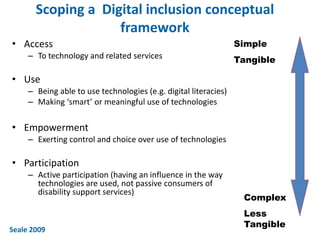
Scoping a Digital inclusion conceptual 
framework 
• Access 
– To technology and related services 
• Use 
– Being able to use technologies (e.g. digital literacies) 
– Making ‘smart’ or meaningful use of technologies 
• Empowerment 
– Exerting control and choice over use of technologies 
• Participation 
– Active participation (having an influence in the way 
technologies are used, not passive consumers of 
disability support services) 
Simple 
Tangible 
Complex 
Less 
Tangible 
Seale 2009
Digital inclusion: An alternative lens? 
• Digital inclusion as a process whereby universities transform 
their structures and processes to ensure that disabled 
students are able to participate in higher education. This 
transformation requires three key actions: 
• Using technology in all college and university administrative 
and teaching processes as a tool to increase both the 
accessibility of higher education to disabled students and the 
equity of learning opportunities and outcomes; 
• Enabling disabled students to make informed and empowered 
decisions about how to use technology to support their 
learning in ways that are personally meaningful; 
• Ensuring disabled students have ready access to the resources 
they require to act on these decisions. 
Seale (2014)
What resources do universities need 
to facilitate access to? 
• Temporal resources: time-sensitive assistive technology 
training; 
• Material resources: technologies and related services that 
span the whole university and the relevant stakeholders; 
• Mental resources: information on the benefits of engaging 
in AT training, the range of technologies available and 
strategies for using them to support learning; 
• Social resources: recognition and support for development 
of formal and informal social networks & relationships ( e.g. 
online virtual community of disabled students) where 
students can gain support for their technology use. 
Adapted from Van Dyk 2005
Thank you, any questions? 
• Contact details: j.seale@exeter.ac.uk 
• Ask me about MEd, PhD & EdD opportunities in Inclusive and Special 
Education at Exeter University
References 
• Seale, J (2014) E-learning and disability in higher education: Accessibility research and 
practice. 2nd Edition. Routledge. New York. 
• Seale, Georgeson, Mamas & Swain (2014) How Useful Is The Concept Of Digital Capital in 
Helping Universities To Identify How To Reduce Inequities For Disabled Students? Paper 
presented at ECER, Porto, September 2nd 2014. http://www.eera-ecer.de/ecer-programmes/ 
print/conference/19/contribution/31770/ 
• Seale, J (2012) When digital capital is not enough: reconsidering the digital lives of disabled 
university students, Learning Media and Technology, 38,3, 256-269 
• Seale, Draffan, & Wald (2010) Digital agility and digital decision-making: Conceptualising 
digital inclusion in the context of disabled learners in higher education, Studies in Higher 
Education, 35, 4, 445-461 
• Seale, J (2009) Digital Inclusion. A research briefing by the Technology Enhanced Learning 
Phase of the Teaching and Learning Research Programme. Available: 
http://www.tlrp.org/docs/DigitalInclusion.pdf 
• Seale, J., Draffan, E.A & Wald, M (2008) Exploring disabled learners’ experiences of learning, 
LEXDIS Final Report to JISC Available from: 
http://www.lexdis.ecs.soton.ac.uk/project/media/LEXDIS_ProjectReport_Dec08final.doc 
• Seale, J (2006) E-learning and disability in higher education: Accessibility research and 
practice. Routledge. London.

Accessibility is not enough

  • 1.
    Accessibility is notenough: An examination of the role universities play in using technologies to promote the inclusion of disabled students Professor Jane Seale ICITS 2014 Keynote, September 18th
  • 2.
  • 3.
    Why? • Ademographic issue – The number of people in any national population that are disabled is rising. For example in the UK, 17% of population are disabled – Linked to this, the numbers of disabled students in universities are rising- even in Turkey (Recent figures from YOK (Higher Education Council of Turkey) suggest that there are 59,165 disabled students, up from a figure of around 15,000 • A social justice issue: – The intellectual and academic potential of universities is not restricted to the non-disabled population – It is not just or equitable to deny intelligent disabled people access to university and successful learning by failing to use appropriate available resources such as technologies
  • 4.
    I’d like totake you on a journey Accessibility Digital Inclusion
  • 5.
    My argument: Accessibilityis just the tip of the iceberg • Using technologies to facilitate access to and participation in higher education for disabled students is as much about what we do (practice) as what we provide (access and accessibility) Accessibility
  • 6.
  • 7.
    In the beginning… • Around the beginning of the millennium much of the focus relating to e-learning, disability and universities was on accessibility of university websites (home pages, library pages) • Drivers – Disability discrimination legislation – Web Accessibility Guidelines and Standards • WC3
  • 8.
    The message •Universities must make their websites accessible • It is easy, just use the guidelines • Get on and do it…..
  • 9.
    Have universities listenedto the message? Reference Focus Outcome Wijayaratne, 2008; Wijayaratne, & Singh 2010 Home page and library page of 31 members of Asian Association of Open Universities in 2008 and 30 in 2010 In 2008 (10/31) 6 university home pages and 4 library home pages were free from errors. In 2010 just 4 home pages and 2 library pages were free of accessibility errors (6/31) Thompson et al. 2010 127 homes pages of US universities were tested over a five period: once in 2004- 5 and once in 2009 Significant positive gains in accessibility were revealed on some measures but declined in others, Improvements were made for issues that were basic and easy to implement. There was a decline in keyboard accessibility. Kurt 2011 Home pages of 10/77 established public and private Turkish universities All university pages show some accessibility problems. Kurt concluded: “Many studies examine the accessibility levels of web pages, yet little research has been done to establish why accessibility levels are low. Further studies should examine this issue.”
  • 10.
    The message wasoversimplified 1. For disabled students access is not just about access to university home pages 2. Did not pay attention to all of the stakeholders who contribute to accessibility practice 3. No rich descriptions of best ‘accessibility’ practice or the factors that influence this practice 4. Ignored the complex relationship that disabled students have with their technologies and their universities
  • 11.
    1. For disabledstudents, access is not just about access to university home pages • University portals and related websites • VLES (Blackboard); MOOCS • Online library databases • General computer generated documents: handouts, slides (e.g. ppt’s and pdf’s) • Computer applications used within a subject disciplines- simulations, programming tools • Communication tools and social networking tools • Specialised access or assistive technologies
  • 12.
    Example • Ifcertain things aren’t designed in a way which is friendly towards my screen reader, if I struggle to navigate pages of notes or what have you, then I find I just give up. (David, LEXDIS Participant) • I really like Blackboard, but I think that there is an awful lot on there, and it could be made a lot easier to use. The navigation is difficult. My lecturer might say: “We’ve put up this, on this subject”, and then I won’t know which section it’s in. I’d have to go into each section and open each document section to find it. (Stacey, LEXDIS Participant) • My lecturer uses a lot of scanning from Adobe which obviously makes it even smaller – because then you’ve got 2 pages on 1. He puts the materials on Blackboard, which is great, but then they’re really really small so to print them off is impossible. (Kate, LEXDIS Participant) Seale et al. 2008
  • 13.
    2. Did notpay attention to all of the stakeholders who contribute to accessibility practice Seale (2006) Rainbow= gökkuşağı Bridge= köprü
  • 14.
    Who? • SeniorManagers- Offer leadership, facilitate joined up thinking, work to embed accessibility across the institution from procurement to support • Staff and educational developers-link institutional agendas to departmental and individual agendas
  • 15.
    Who? • Studentsupport services- when assessing student needs they need to be aware of how courses are using e-learning so that they can make appropriate, informed recommendations; • Learning Technologists (e.g. Computing Services)- how we can support distance learners at “home” and how can this support be aligned to the support we offer on campus, so that e-learning experience is seamless for students?
  • 16.
    Who? • Lecturers:We need to understand how they conceptualise course design, their ideas about effective teaching and learning (e-learning) and their beliefs about appropriate student support in order to understand whether and how accessible e-learning can, or needs to be, part of their practice • Students: Student are the experts on what their learning needs are BUT we are not necessarily good at listening to those needs or valuing the skills and experiences that student bring with them
  • 17.
    An example •Assistive Technology Centre: in the central library; managed by a senior librarian, staffed by two unqualified but dedicated “assistive technologists” • Disabled students could be referred by Student Services or could just drop in to use the “accessible workstations” and specialised assistive technologies
  • 18.
    An example •Workstations in the ATC frequently had compatibility problems with central network- specialised software caused system conflicts • Computing services refused to contribute to, or take responsibility for the funding of new workstations and specialist equipment • Manager of the ATC complained that people in the university were unaware of the services they offer
  • 19.
    3. No richdescriptions of best ‘accessibility’ practice or the factors that influence this practice • Practitioners know that they should be making e-learning accessible to disabled students, BUT they do not know how to make e-learning accessible. (Seale, 2006) • Missing Voices: there is very little literature where university practitioners conceptualise, describe, evaluate or discuss accessibility practices (Seale, 2014)
  • 20.
    What do weneed rich descriptions of? • Detailed accounts of how practitioners in universities have interpreted accessibility related rules, tools, approaches and procedures and the 'personal and collective meanings‘ that have developed from these interpretations • We also need accounts of the stakeholder responses to the mediators and drivers of accessibility – How stakeholders have developed strategic and effective relationships with one another
  • 21.
    Influences on practice • A number of factors will influence or mediate practice, in particular stakeholder views of: – Disability – Accessibility – Integration (inclusion) & Segregation – Teams and communities – Autonomy and compliance • These factors are often expressed in the histories and agendas of stakeholders and the services/departments in which they practise
  • 22.
    Histories and agendas:an example • The way that services are delivered may or may not reflect attitudes and beliefs concerning disability and accessibility – Disabled students are “problems” to be solved – Disability requires special accessibility solutions, by special services, staffed by specialist staff • But they will influence attempts to develop accessibility practices at an institutional level
  • 23.
    A proposed model to help frame thinking Seale (2006) The contextualised model of accessibility practice
  • 24.
    4. Ignored thecomplex relationship that disabled students have with their technologies and their universities • Disabled students: – Are digitally agile (competent and confident users) – Use a wide range of generic and specialist technologies – Adopt a wide range of strategies for using technologies to support their learning – Hold a wide range of personal beliefs about the value of technology and how they might use them in ways that are personally acceptable or meaningful – Have access to a range of cultural and social resources that support technology use (before and during university) (Seale et al. 2008, 2010; Seale, 2012; Seale et al. 2014)
  • 25.
    4. Ignored thecomplex relationship that disabled students have with their technologies and their universities • Despite this, they can: – Make decisions to abandon technologies (particularly assistive technologies) – Rely heavily on formal training for help using specialist technologies • But find it difficult to engage with the training due to time pressures (Seale et al. 2008, 2010; Seale, 2012; Seale et al. 2014)
  • 26.
    Example: Beliefs abouttechnology stigmatising disabled students Nick: I wouldn't use voice dictation software in public. I'd feel to self-conscious. Reena: I have to say that if I’d got that technology, I would use it at home. I wouldn’t use it in the lab. […]But with technology, I still think there’s a stigma to it. If I did have assistive technology I would use it on my home computer. There’s no way I would use a lot of it in the lab because I wouldn’t want that stigma on me like that thing – which is bad, but it’s how people are.
  • 27.
    Example: using technologiesin ways that are personally meaningful
  • 28.
    Example: cultural resources • Before university: 43% of the students were encouraged to undertake a formal generic ICT qualification • For those who undertook a formal generic ICT qualification 63.4% said the knowledge gained had not helped in their current technology use at college or university. (n=153) – Common reasons given= irrelevant, out of date • Once at university: Interviewees talked a lot about investing time in training to use specialist equipment • Why hadn’t their ICT qualifications prepared them for using specialist technologies so that they could be less reliant on extra time-consuming AT training once at university Seale et al. 2014
  • 29.
    Example: social resources “through the college I could not believe the support and guidance I have been given to support my studies. It has also helped me come to terms with my disability and realise that I am not alone and I can also achieve as well as others and I am not a problem” • Asked which sources of support they accessed at university if they needed help using specialist technologies, respondents (n=144) indicated that their most helpful source of support was, privately funded support workers followed by friends from the same course and lecturers. – Disabled students do not appear to be connecting with other disabled students to gather support for their specialist technology use – Is there a role for universities in encouraging such networking?
  • 30.
    Example: Decisions toabandon specialist technologies Can I afford to invest time, in order to save time? e.g Stephanie: …when I got all my software in autumn last year, and they said: “You need to have your training on this” – I did feel like I was doing two courses and that was, frankly, too much. I had to stay with my old bad habits because I just didn’t feel I had the time to take out to learn something new to help me. It was a vicious circle, really.
  • 31.
    Example: difficulties engagingin AT training Factors Example Flexibility It was difficult because he had quite a lot that he had to do. And with being a part-time student they don’t necessarily understand that you’re working [..] he would want mornings and I couldn’t possibly take time off work, he can’t come in the evenings. It was just untidy and by the time I'd see him again in a months' time, well I’d completely forgotten what he taught me, so it didn’t work, it just didn’t work.[22] Timeliness The lengthiness of the DSA process made me feel a little behind so this should be addressed. Maybe identified prior to starting so the process can be underway before lectures start. Also then I could have learnt the technology before sessions start so I am ready to go.[17] Duration Whereas the guys who installed it a. they were very technology minded as well but they also did it in four-hour blocks and it’s like, by the end of two hours, I’ve taken in enough and everything else went out of my head.[7]
  • 32.
    Accessibility is notenough • The lens of accessibility, therefore, is no longer sufficient in enabling us to understanding the complex relationship between students, their technologies, the institutions in which they study and the different stakeholders within that institution
  • 33.
    Scoping a Digitalinclusion conceptual framework • Access – To technology and related services • Use – Being able to use technologies (e.g. digital literacies) – Making ‘smart’ or meaningful use of technologies • Empowerment – Exerting control and choice over use of technologies • Participation – Active participation (having an influence in the way technologies are used, not passive consumers of disability support services) Simple Tangible Complex Less Tangible Seale 2009
  • 34.
    Digital inclusion: Analternative lens? • Digital inclusion as a process whereby universities transform their structures and processes to ensure that disabled students are able to participate in higher education. This transformation requires three key actions: • Using technology in all college and university administrative and teaching processes as a tool to increase both the accessibility of higher education to disabled students and the equity of learning opportunities and outcomes; • Enabling disabled students to make informed and empowered decisions about how to use technology to support their learning in ways that are personally meaningful; • Ensuring disabled students have ready access to the resources they require to act on these decisions. Seale (2014)
  • 35.
    What resources douniversities need to facilitate access to? • Temporal resources: time-sensitive assistive technology training; • Material resources: technologies and related services that span the whole university and the relevant stakeholders; • Mental resources: information on the benefits of engaging in AT training, the range of technologies available and strategies for using them to support learning; • Social resources: recognition and support for development of formal and informal social networks & relationships ( e.g. online virtual community of disabled students) where students can gain support for their technology use. Adapted from Van Dyk 2005
  • 36.
    Thank you, anyquestions? • Contact details: j.seale@exeter.ac.uk • Ask me about MEd, PhD & EdD opportunities in Inclusive and Special Education at Exeter University
  • 37.
    References • Seale,J (2014) E-learning and disability in higher education: Accessibility research and practice. 2nd Edition. Routledge. New York. • Seale, Georgeson, Mamas & Swain (2014) How Useful Is The Concept Of Digital Capital in Helping Universities To Identify How To Reduce Inequities For Disabled Students? Paper presented at ECER, Porto, September 2nd 2014. http://www.eera-ecer.de/ecer-programmes/ print/conference/19/contribution/31770/ • Seale, J (2012) When digital capital is not enough: reconsidering the digital lives of disabled university students, Learning Media and Technology, 38,3, 256-269 • Seale, Draffan, & Wald (2010) Digital agility and digital decision-making: Conceptualising digital inclusion in the context of disabled learners in higher education, Studies in Higher Education, 35, 4, 445-461 • Seale, J (2009) Digital Inclusion. A research briefing by the Technology Enhanced Learning Phase of the Teaching and Learning Research Programme. Available: http://www.tlrp.org/docs/DigitalInclusion.pdf • Seale, J., Draffan, E.A & Wald, M (2008) Exploring disabled learners’ experiences of learning, LEXDIS Final Report to JISC Available from: http://www.lexdis.ecs.soton.ac.uk/project/media/LEXDIS_ProjectReport_Dec08final.doc • Seale, J (2006) E-learning and disability in higher education: Accessibility research and practice. Routledge. London.

Editor's Notes

  • #11 It is my argument that the drive for accessibility was not completely successful because the accessibility message was oversimplified in four key ways. For disabled students access is not just about access to university home pages Did not pay attention to all of the stakeholders who contribute to accessibility practice No rich descriptions of best ‘accessibility’ practice or the factors that influence this practice Ignored the complex relationship that disabled students have with their technologies and their universities I will now illustrate and provide evidence for my argument, focusing on these four areas.
  • #12 Along side the web accessibility debates there has been a growing realisation that for disabled students access is not just about access to university home pages. To succeed in university they need access to a whole range of ICT related resources. University portals and related websites VLES (Blackboard); MOOCS Online library databases General computer generated documents: handouts, slides (e.g. ppt’s and pdf’s) Computer applications used within a subject disciplines- simulations, programming tools Communication tools and social networking tools Specialised access or assistive technologies
  • #13 So for example students in one of the studies I conducted: Talked a lot about how their assistive technologies such as screen readers They talked about the poor accessibility of Blackboard in terms of how course content was organised And they were often frustrated at the inaccessibility of documents placed in Blackboard by lecturers, such as pdf files and ppt files.
  • #14 In my 2006 review of accessibility research and practices I argued that we were not paying enough attention to all the stakeholders in a university wo have a role to play in facilitating accessibility of ICT related resources: most attention was paid to lecturers and technologists. However, I identifed 6 stakeholders: senior manages, staff developers, students support services, learning technologists, lecturers and students. I used the metaphor of a rainbow bridge to represent these stakeholers and to argue that they need to work together. The seamless combination of the different colours in a rainbow is often used to symbolise co-operation and cohesion and represent diverse groups of people, united in working together for a common purpose. In working together for a common purpose, the rainbow bridge can take stakeholders to a place they want to go: Asgard, enlightenment, optimal accessibility
  • #15 Each stakeholder has an important role to play. Senior Managers- Offer leadership, facilitate joined up thinking, work to embed accessibility across the institution from procurement to support Staff and educational developers-link institutional agendas to departmental and individual agendas
  • #16 Student support services- when assessing student needs they need to be aware of how courses are using e-learning so that they can make appropriate, informed recommendations; Learning Technologists (e.g. Computing Services)- how we can support distance learners at “home” and how can this support be aligned to the support we offer on campus, so that e-learning experience is seamless for students?
  • #17 Lecturers: We need to understand how they conceptualise course design, their ideas about effective teaching and learning (e-learning) and their beliefs about appropriate student support in order to understand whether and how accessible e-learning can, or needs to be, part of their practice Students: Student are the experts on what their learning needs are BUT we are not necessarily good at listening to those needs or valuing the skills and experiences that student bring with them
  • #18 The argument underpinning the rainbow bridge metaphor is that: accessible e-learning practice will not develop through the actions of individual practitioners or stakeholders alone. Accessible e-learning practice will develop and progress when all the different stakeholders join to work together Let me present an example drawn from my own observations. This could be happening at my university, it could be happening at yours: Let us imagine that there is an Assistive Technology Centre in the central library of our university; managed by a senior librarian, staffed by two unqualified but dedicated “assistive technologists”. Disabled students can be referred by Student Services or could just drop in to use the “accessible workstations” and specialised assistive technologies. One common problem that can happen with a scenario like this is that key staekholders such as student support services and computing services don’t talk to one another.
  • #19  So that there can be compatibility problems with specialised software and the central IT network; computing services may refuse to contribute or take responsibility for the funding of new workstations and specialist equipment; or they are unaware of the services that the ATC offer. This can lead to a potentially frustrating or negative learning experiences for disabled students
  • #20 The third reason why the accessibility issue has been oversimplified is that there are no rich descriptions of best ‘accessibility’ practice or the factors that influence this practice: Practitioners know that they should be making e-learning accessible to disabled students, BUT they do not know how to make e-learning accessible. (Seale, 2006) Added to this there is very little literature where university practitioners conceptualise, describe, evaluate or discuss accessibility practices (Seale, 2014)
  • #22 A number of factors will influence or mediate practice, in particular stakeholder views of: Disability Accessibility Integration (inclusion) & Segregation Teams and communities Autonomy and compliance These factors are often expressed in the histories and agendas of stakeholders and the services/departments in which they practise
  • #23 Let me give you an example:
  • #24 One of the things I have tried to do in my work is to create a ‘model’ that will help those working in universities to: Describe and evaluate their current practice Conceptualise what ‘best’ accessibility practice might be like Here in my contextualised model of accessibility practice I have included: drivers such as legislation and guidelines. All the stakeholders And the factors that might influence their practice- such as views of disability, inclusion. I have tried to show that the accessibility practices that develop in a university will be influenced by both drivers and mediators.
  • #25 The fourth reason why the drive for accessibility has been oversimplified is that it ignored the complex relationship that disabled students have with their technologies and their universities. The evidence underpinning this argument comes from the research I have done exploring disabled students use of technologies,. I have found that many disabled students: Are digitally agile (competent and confident users) Use a wide range of generic and specialist technologies Adopt a wide range of strategies for using technologies to support their learning Hold a wide range of personal beliefs about the value of technology and how they might use them in ways that are personally acceptable or meaningful Have access to a range of cultural and social resources that support technology use (before and during university)
  • #26 Despite their high skill level and experiences, disabled students can: Make decisions to abandon technologies (particularly assistive technologies) Rely heavily on formal training for help using specialist technologies But find it difficult to engage with the training due to time pressures
  • #27 What I would like to do now is give you some quotes from students in my studies to illustrate my findings. So here is a classic exampe of how some (not all) disabled students believe that technology marks them out as different (that they are stigmatised) by their technology use. This belief affects whether and how they use specialists technologies in public.
  • #28 Many disabled students in my studies shared the ways that they used non-specialist technologies to support their learning. They had adopted many different personalised strategies and technologies all of which contributed to making technology use valued and meaningful. For example, in this screenshot we have a student talking about how they use their i-pad on field trips
  • #29 One of the non-technological sources of support that disabled students have available to support their technology use at university is something I have called digital cultural resources. For example in one study I explored the technology related qualifications and training that disabled students had both before and during university. Before university: 43% of the students were encouraged to undertake a formal generic ICT qualification For those who undertook a formal generic ICT qualification 63.4% said the knowledge gained had not helped in their current technology use at college or university. (n=153) Common reasons given= irrelevant, out of date Once at university: Interviewees talked a lot about investing time in training to use specialist equipment Why hadn’t their ICT qualifications prepared them for using specialist technologies so that they could be less reliant on extra time-consuming AT training once at university
  • #30 I have also explored the social networks that disabled students draw upon for help and support with technology use. The majority of disabled students said that when they need help using specialist technologies, they go to privately funded support workers, followed by friends on the same course and then lecturers. Disabled students no not appear to be connecting with other disabled students to gather support for using their specialist technologies
  • #31 Despite students ability, confidence and available training and support I found that some disabled students still abandon their technologies or decide not to use them at all. A common question they ask themselves is can I afford to spend the time learning to use the specialists technologies
  • #32 One of the biggest reasons for abandoning or not using technologies is around the timing and delivery of assistive technology training. Students complain that: it is not flexible enough to suit their study time-tables That it is not available early enough in their studies to be of real value That it lasts too long.
  • #33 So in my talk this morning I have presented you with evidence and examples to support my argument that I do not think it is helpful to just talk about accessibility when we talk about disabled students and technology. The lens of accessibility is not enough. It is no longer longer sufficient in enabling us to understanding the complex relationship between students, their technologies, the institutions in which they study and the different stakeholders within that institution
  • #34 A better concept or lens to use in my opinion is that of digital inclusion. In my review and analysis of accessibility and digital divide literature I have identified a range of concepts, that can be argued to exist on a continuum from the simple to the complex. Concepts such as access, use, empowerment and participation when taken together all contribute to digital inclsuion. Access to technology is important- it underpins inclusion. But disabled students also need To be able to use their technologies in ways that are smart or meaningful to them ]To be able to have control and choice over what technologies they use, when they use them and how they use them To be active consumers of technologies rather than passive consumers of support services
  • #35 In my most recent work I have defined digital inclusion as: a process whereby universities transform their structures and processes to ensure that disabled students are able to participate in higher education. This transformation requires three key actions:  Using technology in all college and university administrative and teaching processes as a tool to increase both the accessibility of higher education to disabled students and the equity of learning opportunities and outcomes; Enabling disabled students to make informed and empowered decisions about how to use technology to support their learning in ways that are personally meaningful; Ensuring disabled students have ready access to the resources they require to act on these decisions.
  • #36 So thinking about the role that universities might play in using technologies to promote the inclusion of disabled students, it is my suggestion that they need to facilitate access to: Temporal resources: time-sensitive assistive technology training; Material resources: technologies and related services that span the whole university and the relevant stakeholders; Mental resources: information on the benefits of engaging in AT training, the range of technologies available and strategies for using them to support learning; Social resources: recognition and support for development of formal and informal social networks & relationships ( e.g. online virtual community of disabled students) where students can gain support for their technology use.