November 2012
   Provide some food for thought as you refine
    your web strategy.

   Provide context to help you plan and
    prioritize moving forwards.

   Generate some discussion around websites.
    Note: While this will provide a good overview not an in-depth
    review examination of each area!
   A vast majority of websites are set up to dramatically
    underperform.

   This is ridiculous when you consider that the website
    is the focal point of most marketing activities.

   Several root causes of the problem:
    ◦ Business owners/managers aren’t always web experts.
    ◦ Website developers don’t always understand business goals and/or
      know how to integrate them in sites.
    ◦ Website developers typically aren’t experts in all the online
      channels.
    ◦ Business owners/website developers don’t want to slow down the
      site creation process.

    ◦ Bottom line is that you need someone within your organization to
      “own” the process and make sure all the right things happen.
   There is no one “formula” but rather a set of
    principles to apply and analyze:
    ◦ Goals X Audience type X strategy X execution =
      infinite variations.

   The ultimate goal is to create your own set
    of best practices.
    If you don’t know where you’re going, any road
     will take you there!

    Hierarchy of strategy:

1.   Overall Business Objectives.
2.   Web Strategy (how can the site support the overall business
     strategy).
3.   Overall site goals derived from strategy.
4.   Goals as they apply to the different sections/pages of the site.
5.   Measurement of goals and adjustment.


    What might this look like in practical terms...
Simplified example – PlusROI’s upcoming site redevelopment:


   Our top business objective is to build a
    portfolio of long term clients with an
    appreciation for the type of work we’re doing.

   Our web strategy is to build credibility and
    educate our clients/potential clients in order
    that they can understand web marketing and
    consider us if they’re ever looking for help.
   Our site goals are to:
    1. Get visitors who are not “in the market” to sign up
       for our educational newsletters.
    2. Generate inquiries regarding our services.

   As we’ve clarified and prioritized our goals, it’s fairly
    easy to identify how to apply them in different
    sections of the site:
    ◦ The main call to action on the home page will be to
      sign up for the newsletter.
    ◦ The secondary call to action will be to contact us.
    ◦ The over-riding call to action on service pages will
      be “contact.”
    ◦ The over-riding call to action in our blog and
      resource pages will be to “sign up.”
To measure our goals (simplified):
   On a monthly basis we’ll track the number of
    contacts and signups according to which page they
    came from (and the campaign source).

   We’ll test different calls to action for the different
    actions.

   We’ll tinker (and track) how different page layouts
    and types of copy/content affect our goals.
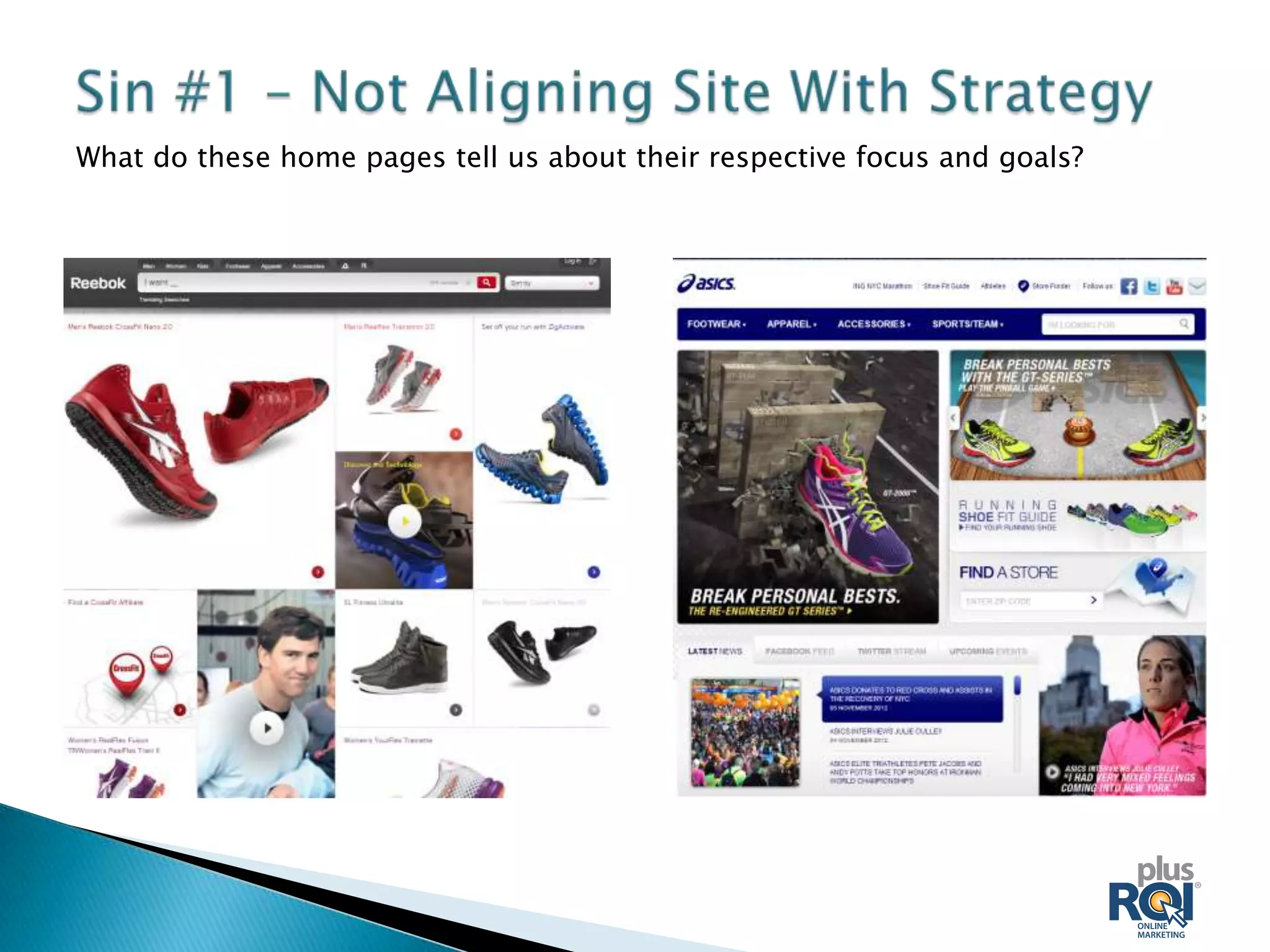
What do these home pages tell us about their respective focus and goals?
At a high level, you need to understand the needs of your
  visitors so you can:

   Let them know immediately they’re in the right place and
    that your site/company offers the best solution for their
    needs (benefit-driven
    headlines, subheads, bullets, images).

   Establish instantly that you’re credible and trustworthy
    (short testimonials, recognition, featured high profile
    clients, professional affiliations, good design and
    professional copy).

   Offer a clear and logical call to action.

   This is particularly important on the home page but
    critical to consider this on all important “entry pages.”
We don’t have time today to dig deep into
 persona development, but at a minimum you
 need to:

1) Prioritize your visitor types after describing
   each different “target”:
  ◦   Age.
  ◦   Sex.
  ◦   Location.
  ◦   Education.
  ◦   Motivations for using your product/services).
  ◦   Etc, etc, etc.

  ◦ Note that a fully fledged effort goes MUCH deeper than this and often
    involves creating several fictional “personas” who embody your
    different visitor types.
2) Prioritize your visitor types and consider ALL
   the decision makers. ie:
    ◦ For a photo app site the visitor likely IS the decision maker.
    ◦ For a family activity, the kids may be stakeholders but MOM is likely
      the decision maker.
    ◦ Corporate purchasers looking for a technical solution may have:
       An IT researcher whose wants the most advanced technical solution.
       A Manager who wants a functional solution, but for whom the CYA
        imperative is the most important factor.
       A CFO who needs to sign of whose criteria are cost and/or ROI.


   If you don’t consider your visitor types and decision
    makers, you’re not going to be nearly as successful as you could
    be.
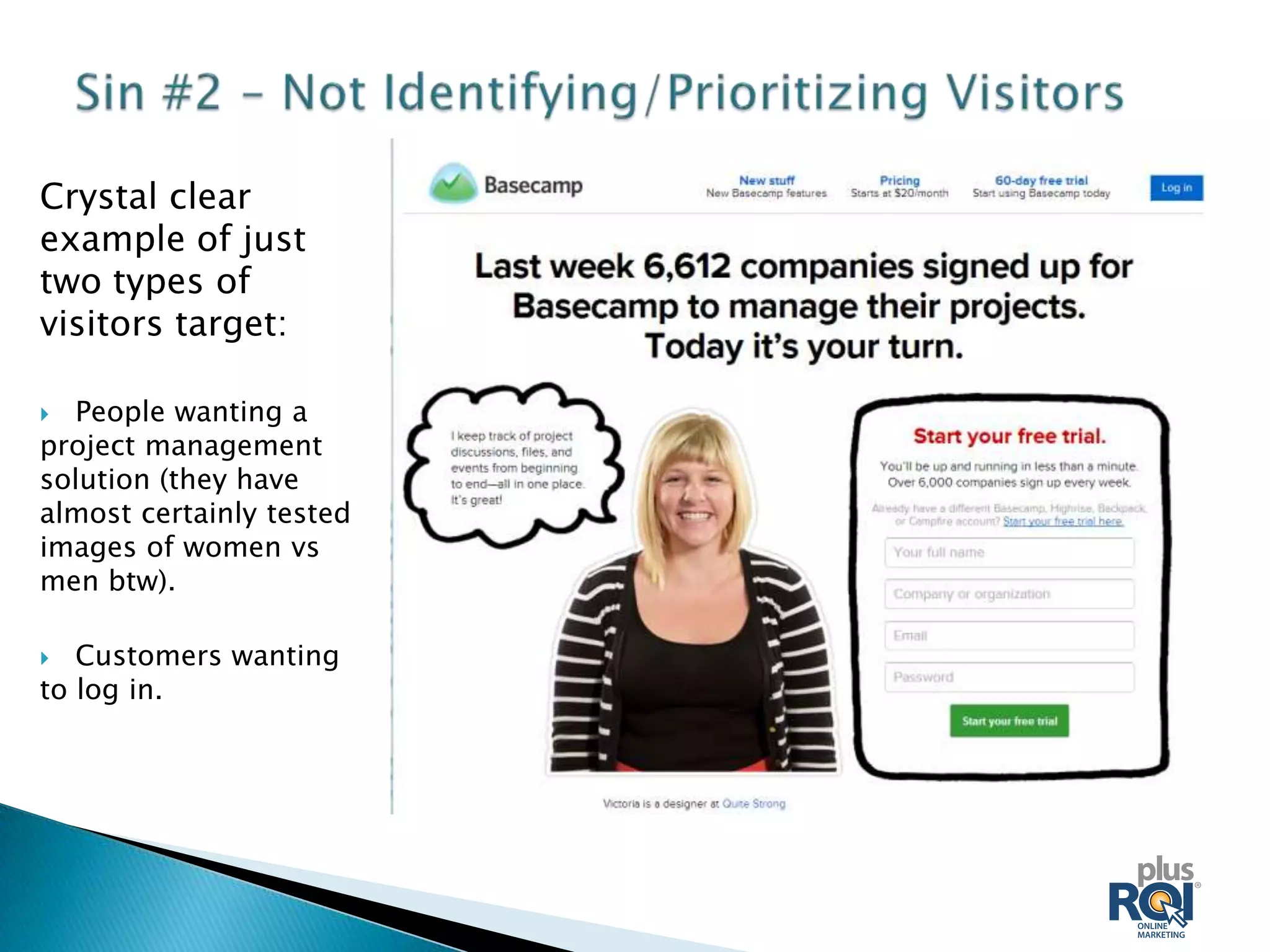
Crystal clear
example of just
two types of
visitors target:

 People wanting a
project management
solution (they have
almost certainly tested
images of women vs
men btw).

  Customers wanting
to log in.
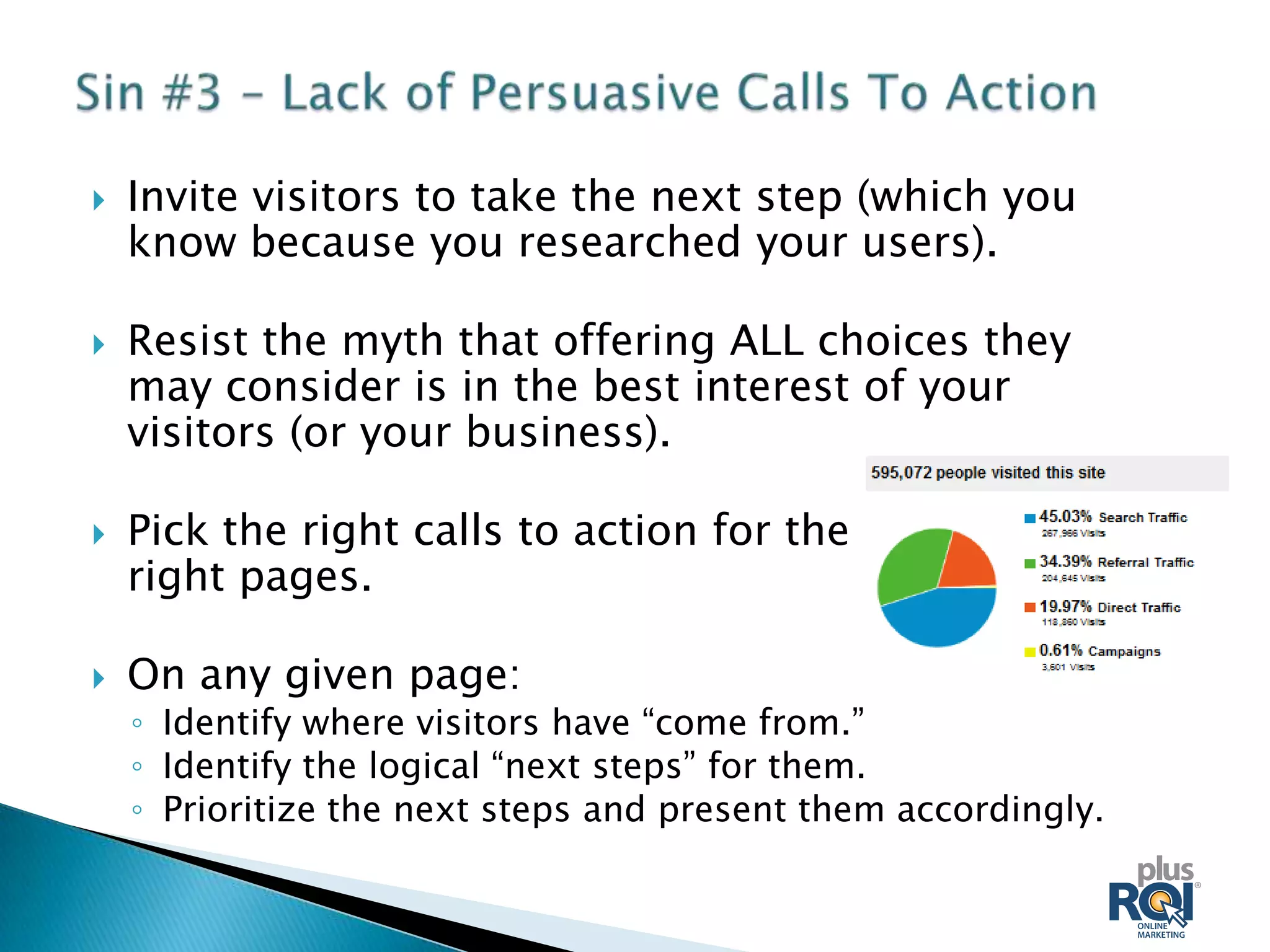
   Invite visitors to take the next step (which you
    know because you researched your users).

   Resist the myth that offering ALL choices they
    may consider is in the best interest of your
    visitors (or your business).

   Pick the right calls to action for the
    right pages.

   On any given page:
    ◦ Identify where visitors have “come from.”
    ◦ Identify the logical “next steps” for them.
    ◦ Prioritize the next steps and present them accordingly.
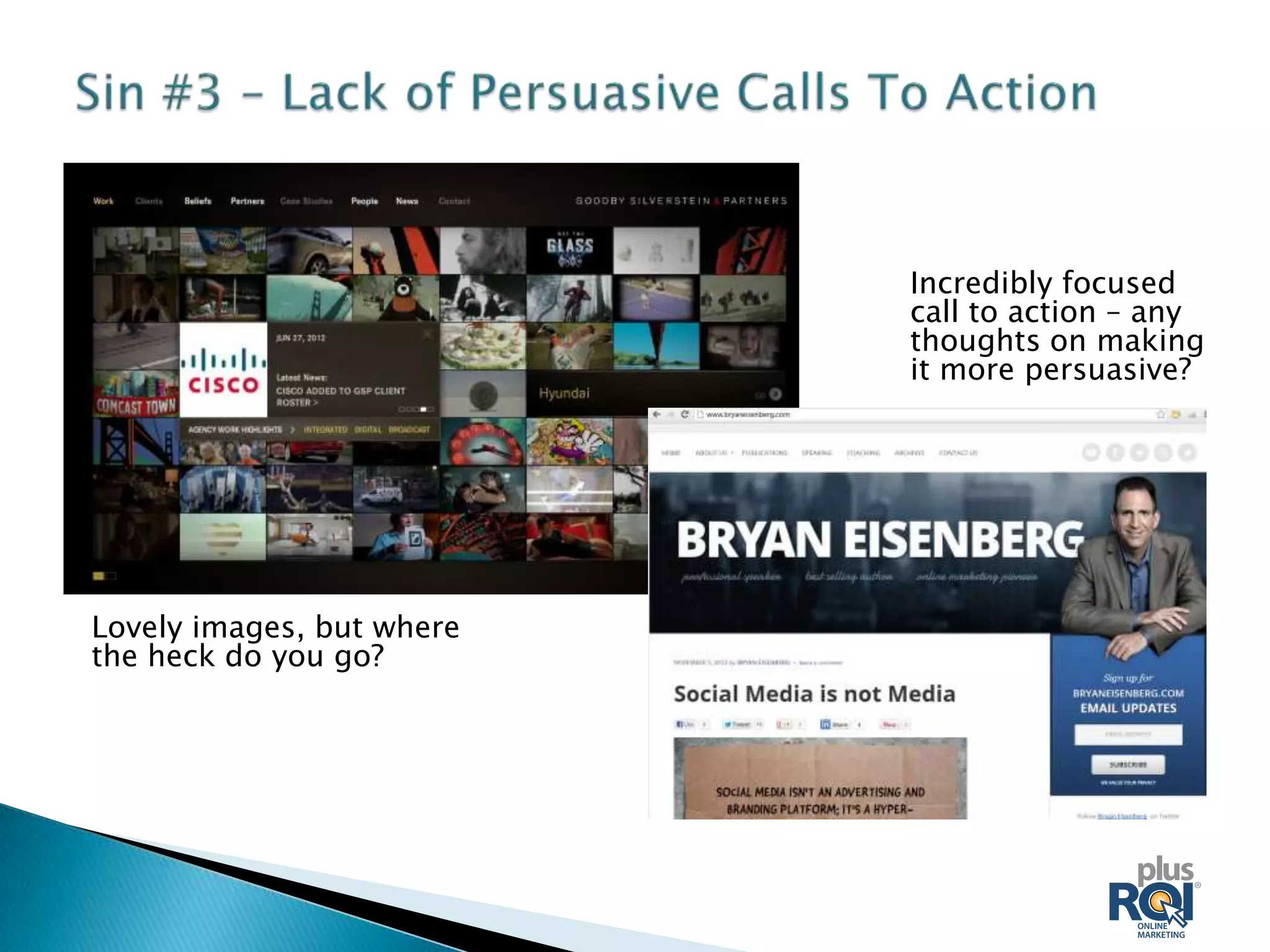
Incredibly focused
                           call to action – any
                           thoughts on making
                           it more persuasive?


Lovely images, but where
the heck do you go?
   SEO is often NOT a part of the traditional web
    development process.

   You must integrate your SEO strategy with the
    site creation process and all other marketing
    efforts for it to be effective (which also drives
    dramatically higher ROI for those other efforts
    over time).

   SEO requires some ongoing effort, but is an
    extremely high-ROI activity for those companies
    who pursue it!
   Many see SEO as an awkward, artificial process.

   To succeed in having a site that appeals to both
    users and search engines you need to get
    beyond that. We advocate that you:
    1. Use research to find the actual terms (keywords)
       people are using to search for your type of product or
       service.
    2. Incorporate these keywords into your site copy.
    3. Optimize the relevant pages on your site for the
       relevant keywords.

    Not so hard, but few people do it well!
    Guide link provided at end of presentation.
   If you “set it and forget it” you can expect very few
    visitors. Imagine opening a physical store without
    signage, ads or a phone listing.

   Many see a web site launch as the end of a process.
    It’s really just the start!

   You need to look at the right combination of:
    ◦   Advertising.
    ◦   Branding (even as simple as a great signature encouraging visitors to your site).
    ◦   Community Participation.
    ◦   Social Media.
    ◦   Online PR.
    ◦   Guest Posting.
    ◦   Link Building.
    ◦   Offline Activities.
   For fast-moving companies, content is not always the
    most exciting area BUT:
    ◦ Google has made it necessary to create content and leverage a
      content strategy if you want to succeed in a competitive market.

    ◦ Content is critical for building trust/credibility with visitors (which
      you MUST achieve before they’ll get out their wallets).

    ◦ Content is mandatory for “inbound marketing” (the current en
      vogue term for “pull” marketing).

    ◦ If you don’t have content, it’s impossible to succeed at:
       Search Engine Optimization.
       Social Media.
       Email Marketing.

   Two kinds of currency on the web: cash or content.
   Your content plan should incorporate some or all of the
    following:
    ◦   Your blog.
    ◦   Guest posting on other sites/blogs.
    ◦   Your “news” section.
    ◦   Your case studies, white papers, user stories, etc.
    ◦   Your email marketing efforts.
    ◦   Your social media strategy.
    ◦   Your Search Engine Optimization goals and priorities.
    ◦   Your online PR and traditional PR.
    ◦   Offline trade shows and advertising.
    ◦   Speaking engagements.

   You don’t have to do all these things but you’ll be hard pressed
    to succeed on the web without some consistent efforts.

   By leveraging a strategy and common themes you can
    exponentially improve your content ROI.
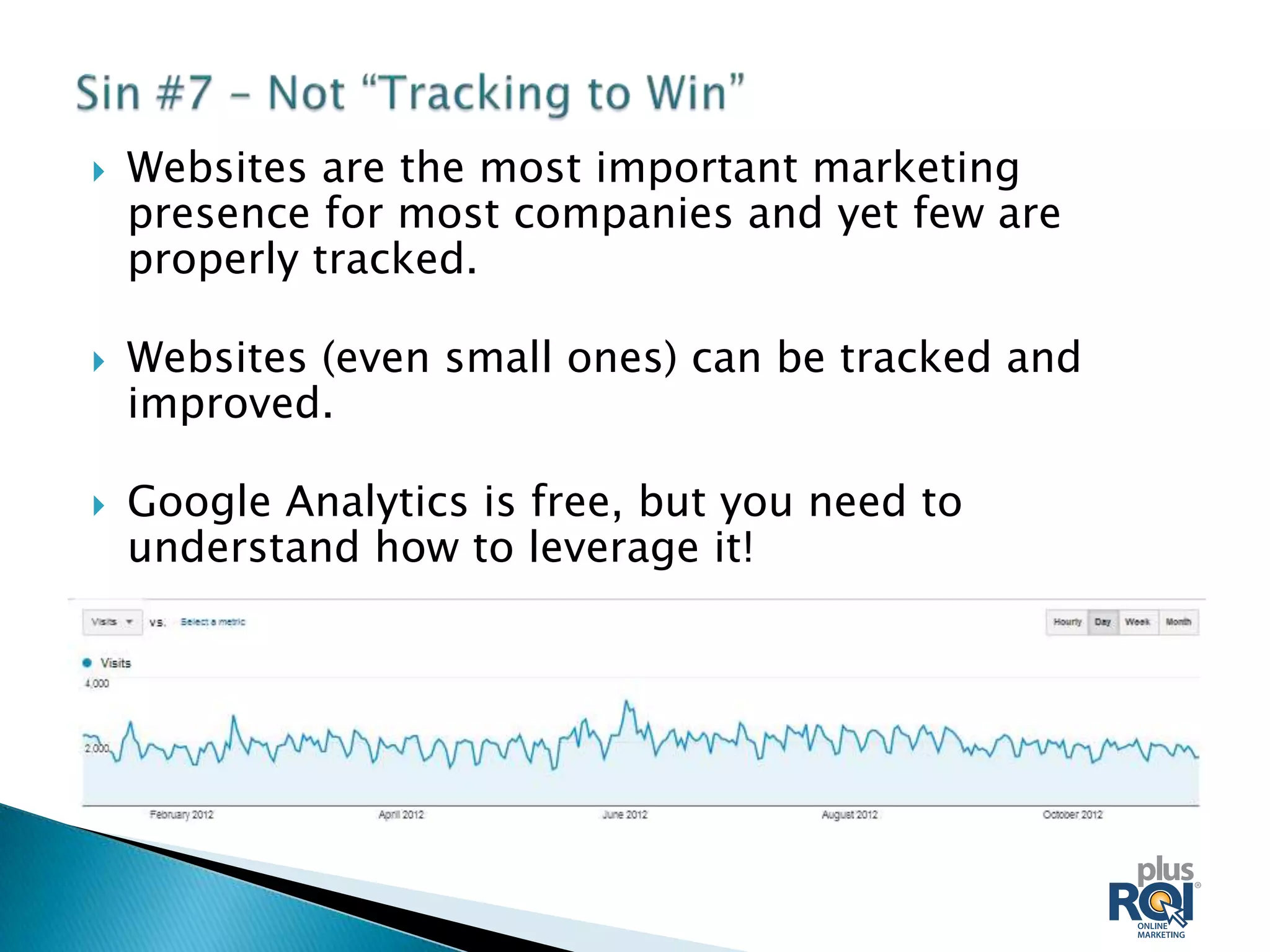
   Websites are the most important marketing
    presence for most companies and yet few are
    properly tracked.

   Websites (even small ones) can be tracked and
    improved.

   Google Analytics is free, but you need to
    understand how to leverage it!
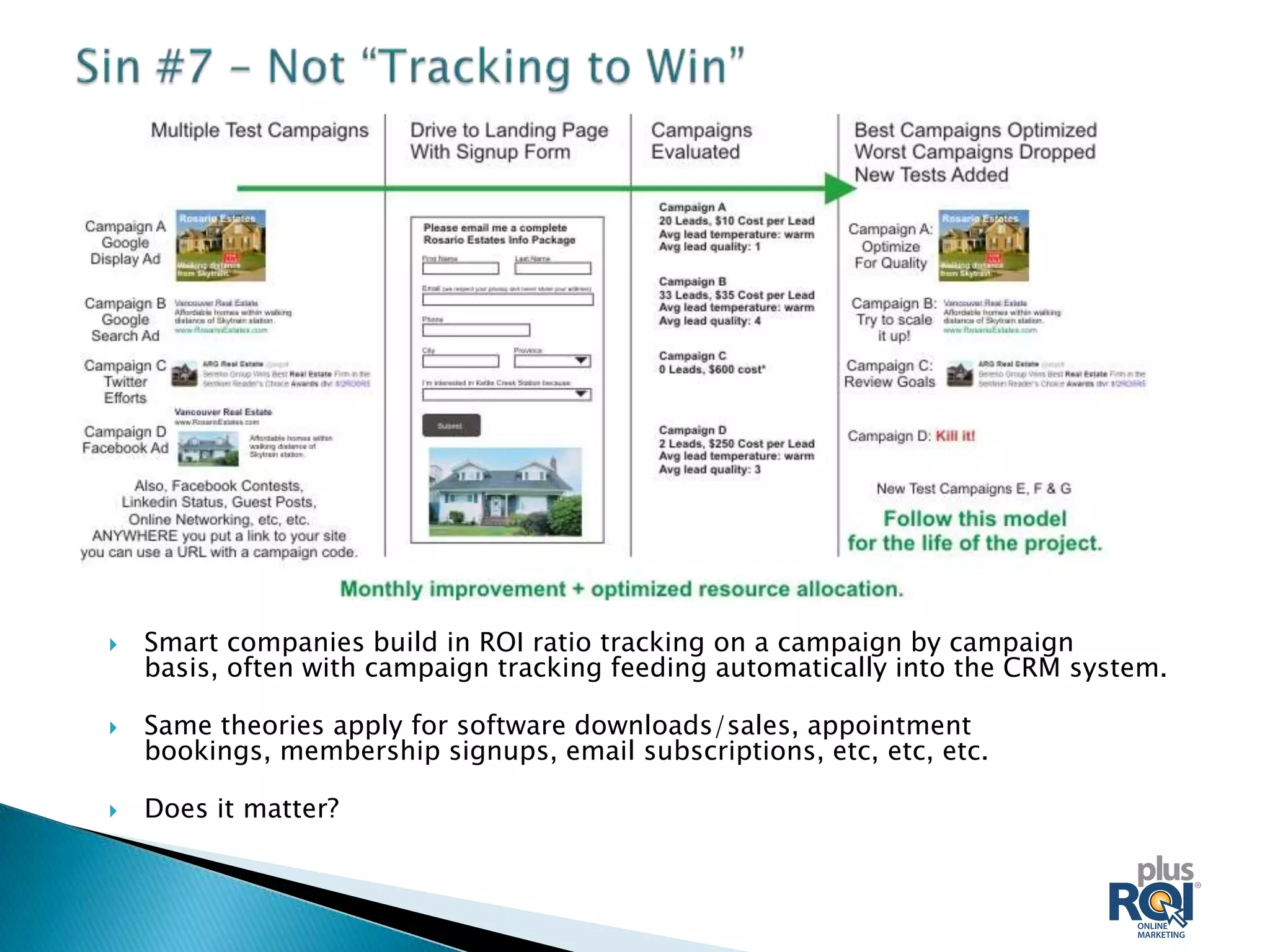
   Smart companies build in ROI ratio tracking on a campaign by campaign
    basis, often with campaign tracking feeding automatically into the CRM system.

   Same theories apply for software downloads/sales, appointment
    bookings, membership signups, email subscriptions, etc, etc, etc.

   Does it matter?
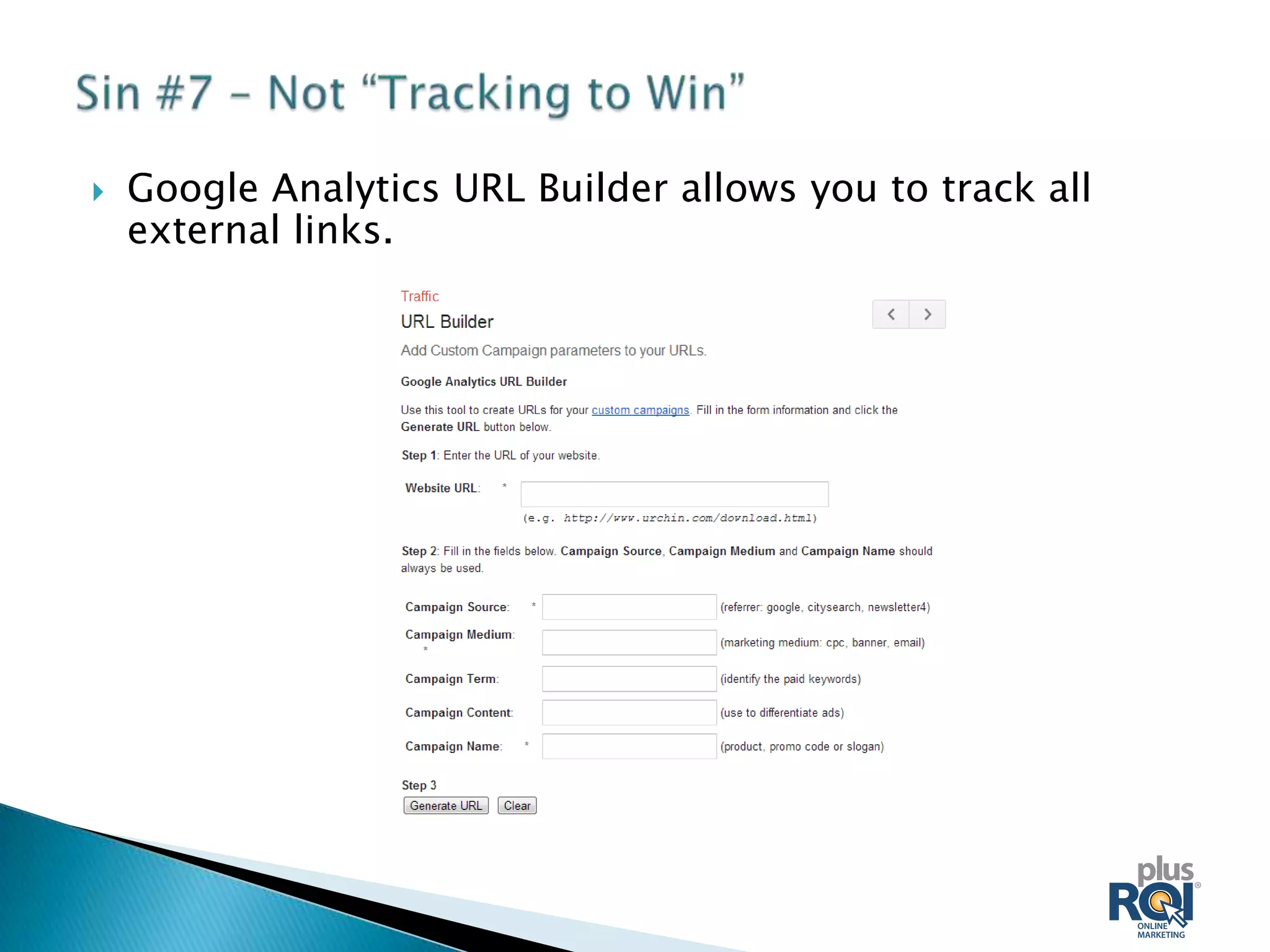
   Google Analytics URL Builder allows you to track all
    external links.
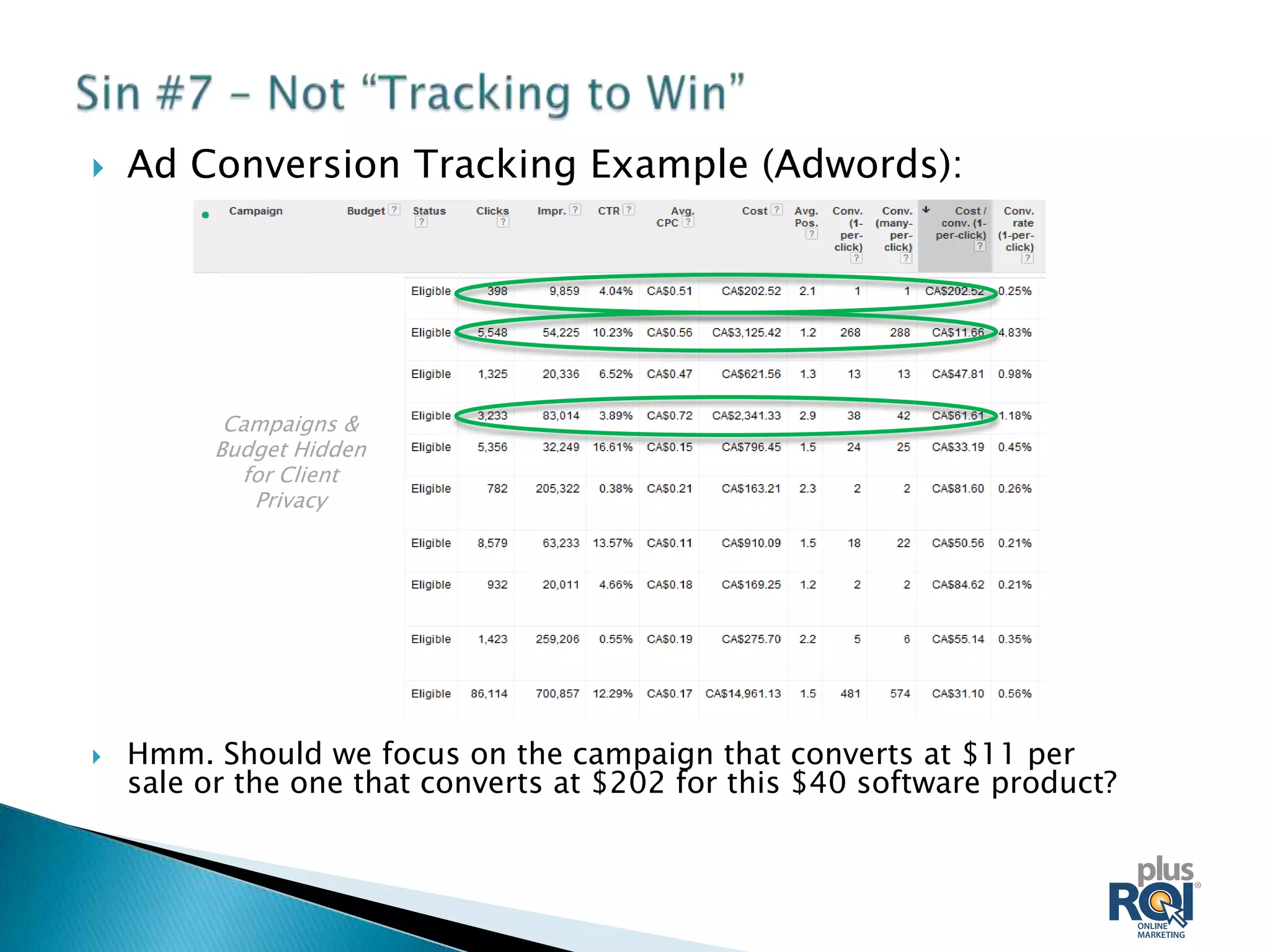
   Ad Conversion Tracking Example (Adwords):


          Campaigns &
         Budget Hidden
           for Client
            Privacy


   Hmm. Should we focus on the campaign that converts at $11 per
    sale or the one that converts at $202 for this $40 software product?
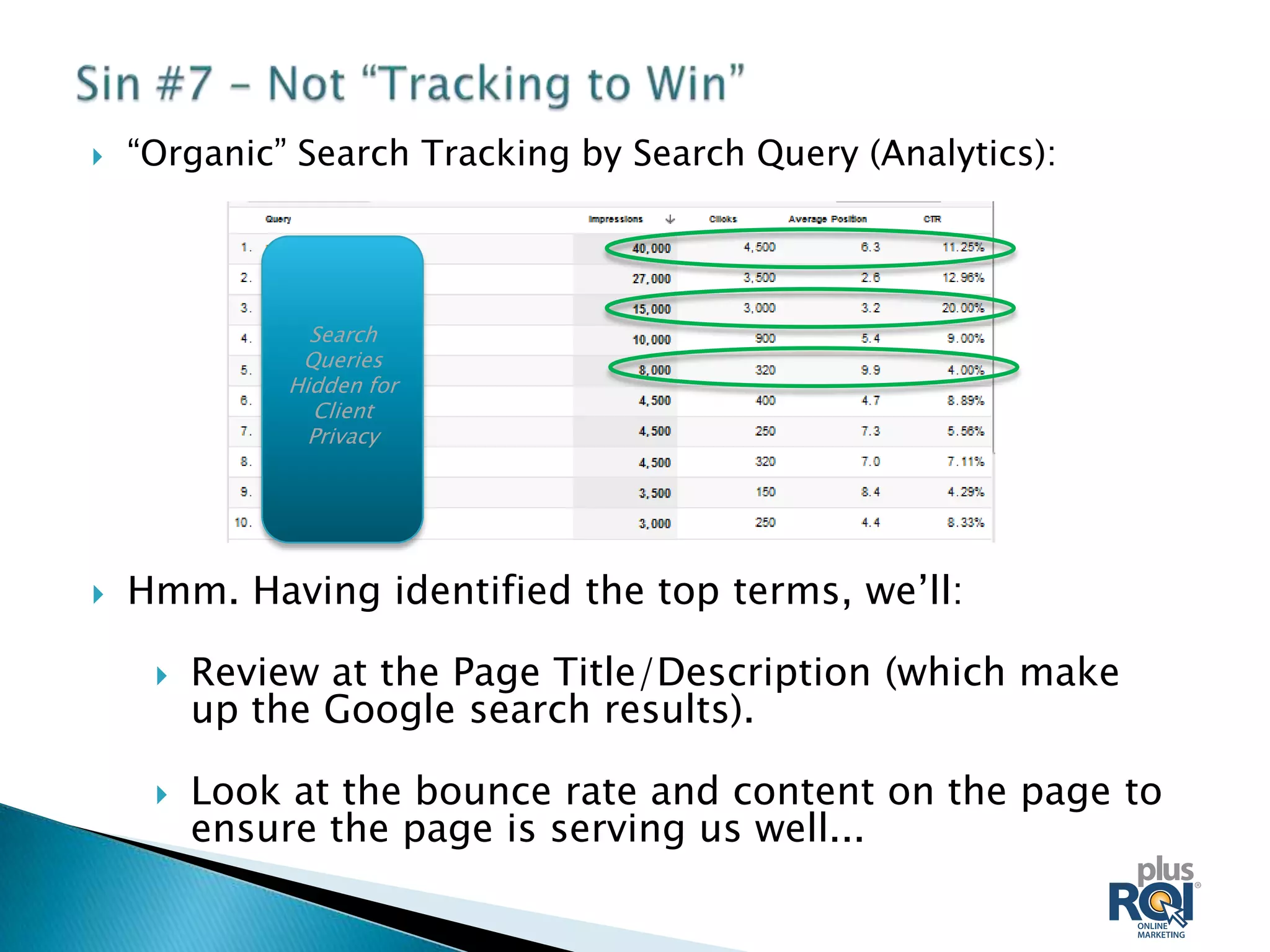
   “Organic” Search Tracking by Search Query (Analytics):


                Search
               Queries
              Hidden for
                Client
                Privacy


   Hmm. Having identified the top terms, we’ll:

        Review at the Page Title/Description (which make
         up the Google search results).

        Look at the bounce rate and content on the page to
         ensure the page is serving us well...
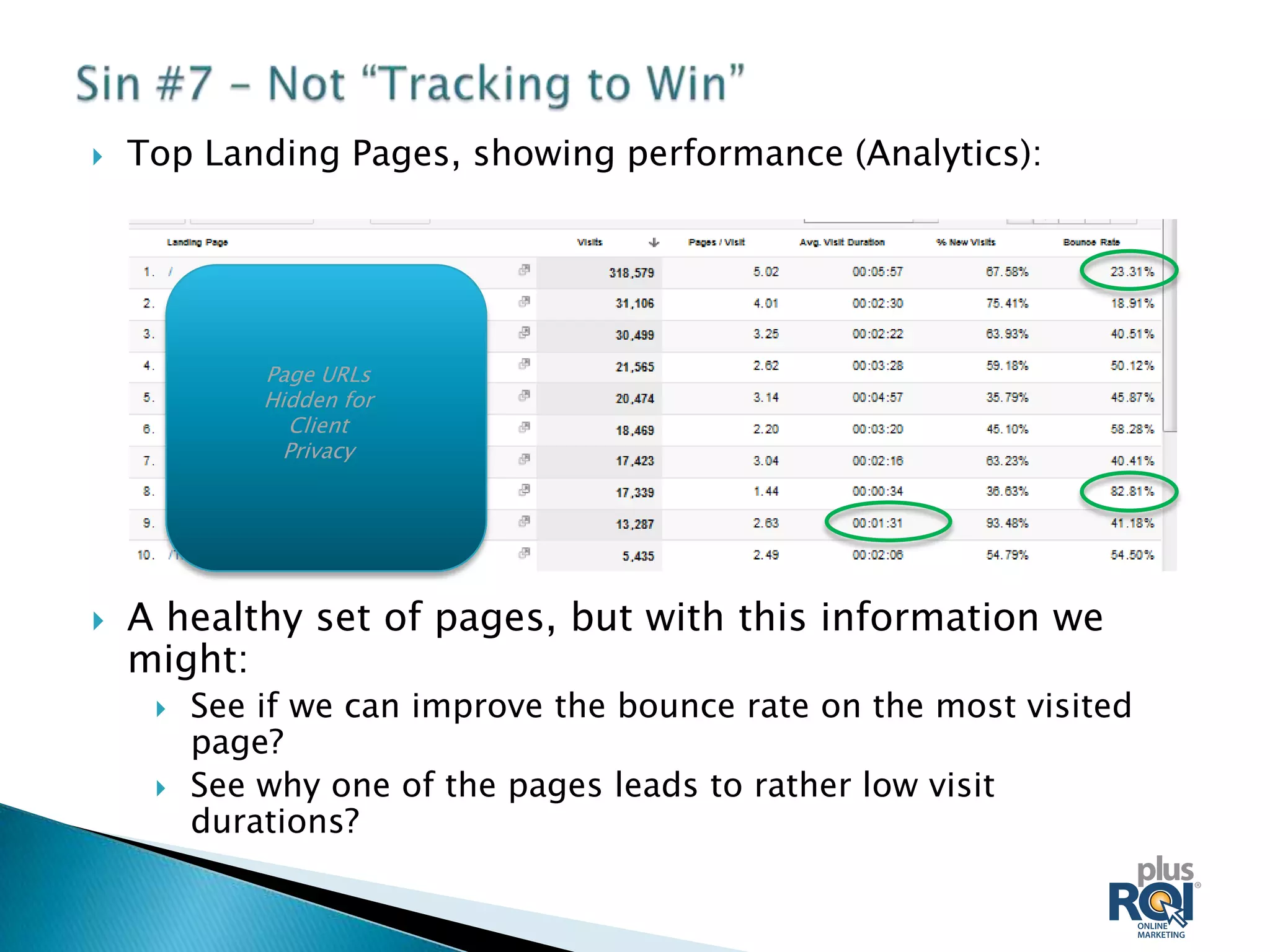
   Top Landing Pages, showing performance (Analytics):


             Page URLs
             Hidden for
               Client
               Privacy


   A healthy set of pages, but with this information we
    might:
        See if we can improve the bounce rate on the most visited
         page?
        See why one of the pages leads to rather low visit
         durations?
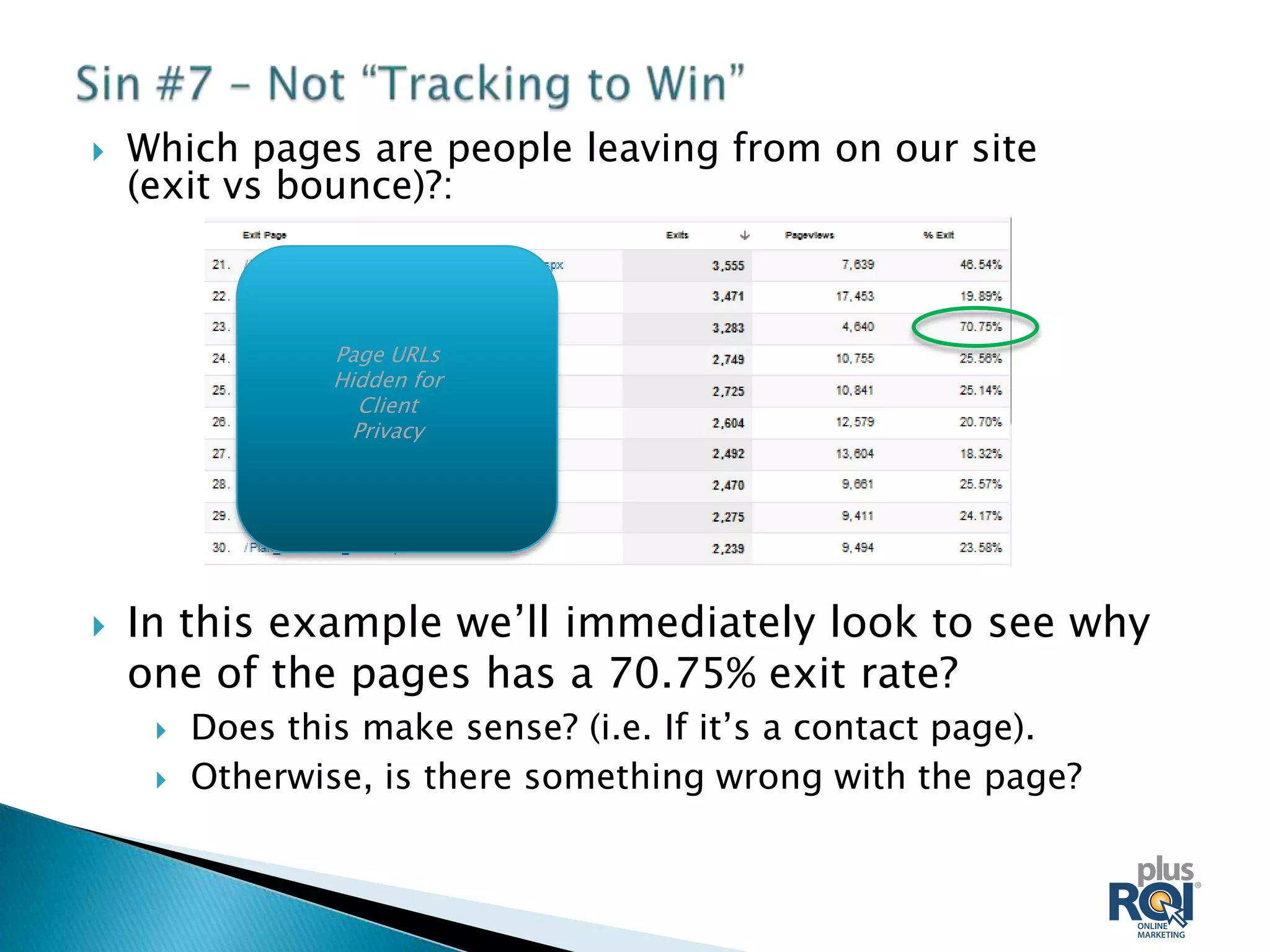
   Which pages are people leaving from on our site
    (exit vs bounce)?:


                 Page URLs
                 Hidden for
                   Client
                   Privacy


   In this example we’ll immediately look to see why
    one of the pages has a 70.75% exit rate?
        Does this make sense? (i.e. If it’s a contact page).
        Otherwise, is there something wrong with the page?
Other elements to look at include:

   Percentage of visits from mobile devices
    (including exactly which devices).

   Visits by Country, Province/State and City).

   # of visits “referred” by other sites (and which
    sites are sending traffic).

   There’s a wealth of information that most small
    to medium size businesses don’t even look at
    monthly, much less act on!
   Prioritize the areas you want to work on so you
    can focus on the most important one and not
    feel overwhelmed.

   Adjust your scope so you can do a good job on
    the areas you tackle (better than doing a bad
    job on a wide variety of areas).

   Do further research on your top areas.

   Use common sense – look at everything in the
    context of your visitors and goals and you’ll do
    great!
   Google Campaign Builder (for links tagged as campaigns):
    http://support.google.com/analytics/bin/answer.py?hl=en-
    GB&answer=1033867

   Google Guide to SEO
    (PDF): http://static.googleusercontent.com/external_content/u
    ntrusted_dlcp/www.google.com/en//webmasters/docs/search-
    engine-optimization-starter-guide.pdf

   Our blog: http://jumpstartweb.com/blog/ (for now!)

   Upcoming Seminars.

   With your permission, I'll also sign you up for our newsletter
    and send a link to the slides.

   Contact me at Rob@PlusROI.com with any web marketing or
    website questions.

Accelerate Tectoria - 7 Sins of Website Strategy

  • 1.
  • 2.
    Provide some food for thought as you refine your web strategy.  Provide context to help you plan and prioritize moving forwards.  Generate some discussion around websites. Note: While this will provide a good overview not an in-depth review examination of each area!
  • 3.
    A vast majority of websites are set up to dramatically underperform.  This is ridiculous when you consider that the website is the focal point of most marketing activities.  Several root causes of the problem: ◦ Business owners/managers aren’t always web experts. ◦ Website developers don’t always understand business goals and/or know how to integrate them in sites. ◦ Website developers typically aren’t experts in all the online channels. ◦ Business owners/website developers don’t want to slow down the site creation process. ◦ Bottom line is that you need someone within your organization to “own” the process and make sure all the right things happen.
  • 4.
    There is no one “formula” but rather a set of principles to apply and analyze: ◦ Goals X Audience type X strategy X execution = infinite variations.  The ultimate goal is to create your own set of best practices.
  • 5.
    If you don’t know where you’re going, any road will take you there!  Hierarchy of strategy: 1. Overall Business Objectives. 2. Web Strategy (how can the site support the overall business strategy). 3. Overall site goals derived from strategy. 4. Goals as they apply to the different sections/pages of the site. 5. Measurement of goals and adjustment.  What might this look like in practical terms...
  • 6.
    Simplified example –PlusROI’s upcoming site redevelopment:  Our top business objective is to build a portfolio of long term clients with an appreciation for the type of work we’re doing.  Our web strategy is to build credibility and educate our clients/potential clients in order that they can understand web marketing and consider us if they’re ever looking for help.
  • 7.
    Our site goals are to: 1. Get visitors who are not “in the market” to sign up for our educational newsletters. 2. Generate inquiries regarding our services.  As we’ve clarified and prioritized our goals, it’s fairly easy to identify how to apply them in different sections of the site: ◦ The main call to action on the home page will be to sign up for the newsletter. ◦ The secondary call to action will be to contact us. ◦ The over-riding call to action on service pages will be “contact.” ◦ The over-riding call to action in our blog and resource pages will be to “sign up.”
  • 8.
    To measure ourgoals (simplified):  On a monthly basis we’ll track the number of contacts and signups according to which page they came from (and the campaign source).  We’ll test different calls to action for the different actions.  We’ll tinker (and track) how different page layouts and types of copy/content affect our goals.
  • 9.
    What do thesehome pages tell us about their respective focus and goals?
  • 10.
    At a highlevel, you need to understand the needs of your visitors so you can:  Let them know immediately they’re in the right place and that your site/company offers the best solution for their needs (benefit-driven headlines, subheads, bullets, images).  Establish instantly that you’re credible and trustworthy (short testimonials, recognition, featured high profile clients, professional affiliations, good design and professional copy).  Offer a clear and logical call to action.  This is particularly important on the home page but critical to consider this on all important “entry pages.”
  • 11.
    We don’t havetime today to dig deep into persona development, but at a minimum you need to: 1) Prioritize your visitor types after describing each different “target”: ◦ Age. ◦ Sex. ◦ Location. ◦ Education. ◦ Motivations for using your product/services). ◦ Etc, etc, etc. ◦ Note that a fully fledged effort goes MUCH deeper than this and often involves creating several fictional “personas” who embody your different visitor types.
  • 12.
    2) Prioritize yourvisitor types and consider ALL the decision makers. ie: ◦ For a photo app site the visitor likely IS the decision maker. ◦ For a family activity, the kids may be stakeholders but MOM is likely the decision maker. ◦ Corporate purchasers looking for a technical solution may have:  An IT researcher whose wants the most advanced technical solution.  A Manager who wants a functional solution, but for whom the CYA imperative is the most important factor.  A CFO who needs to sign of whose criteria are cost and/or ROI.  If you don’t consider your visitor types and decision makers, you’re not going to be nearly as successful as you could be.
  • 13.
    Crystal clear example ofjust two types of visitors target:  People wanting a project management solution (they have almost certainly tested images of women vs men btw).  Customers wanting to log in.
  • 14.
    Invite visitors to take the next step (which you know because you researched your users).  Resist the myth that offering ALL choices they may consider is in the best interest of your visitors (or your business).  Pick the right calls to action for the right pages.  On any given page: ◦ Identify where visitors have “come from.” ◦ Identify the logical “next steps” for them. ◦ Prioritize the next steps and present them accordingly.
  • 15.
    Incredibly focused call to action – any thoughts on making it more persuasive? Lovely images, but where the heck do you go?
  • 16.
    SEO is often NOT a part of the traditional web development process.  You must integrate your SEO strategy with the site creation process and all other marketing efforts for it to be effective (which also drives dramatically higher ROI for those other efforts over time).  SEO requires some ongoing effort, but is an extremely high-ROI activity for those companies who pursue it!
  • 17.
    Many see SEO as an awkward, artificial process.  To succeed in having a site that appeals to both users and search engines you need to get beyond that. We advocate that you: 1. Use research to find the actual terms (keywords) people are using to search for your type of product or service. 2. Incorporate these keywords into your site copy. 3. Optimize the relevant pages on your site for the relevant keywords.  Not so hard, but few people do it well!  Guide link provided at end of presentation.
  • 18.
    If you “set it and forget it” you can expect very few visitors. Imagine opening a physical store without signage, ads or a phone listing.  Many see a web site launch as the end of a process. It’s really just the start!  You need to look at the right combination of: ◦ Advertising. ◦ Branding (even as simple as a great signature encouraging visitors to your site). ◦ Community Participation. ◦ Social Media. ◦ Online PR. ◦ Guest Posting. ◦ Link Building. ◦ Offline Activities.
  • 19.
    For fast-moving companies, content is not always the most exciting area BUT: ◦ Google has made it necessary to create content and leverage a content strategy if you want to succeed in a competitive market. ◦ Content is critical for building trust/credibility with visitors (which you MUST achieve before they’ll get out their wallets). ◦ Content is mandatory for “inbound marketing” (the current en vogue term for “pull” marketing). ◦ If you don’t have content, it’s impossible to succeed at:  Search Engine Optimization.  Social Media.  Email Marketing.  Two kinds of currency on the web: cash or content.
  • 20.
    Your content plan should incorporate some or all of the following: ◦ Your blog. ◦ Guest posting on other sites/blogs. ◦ Your “news” section. ◦ Your case studies, white papers, user stories, etc. ◦ Your email marketing efforts. ◦ Your social media strategy. ◦ Your Search Engine Optimization goals and priorities. ◦ Your online PR and traditional PR. ◦ Offline trade shows and advertising. ◦ Speaking engagements.  You don’t have to do all these things but you’ll be hard pressed to succeed on the web without some consistent efforts.  By leveraging a strategy and common themes you can exponentially improve your content ROI.
  • 21.
    Websites are the most important marketing presence for most companies and yet few are properly tracked.  Websites (even small ones) can be tracked and improved.  Google Analytics is free, but you need to understand how to leverage it!
  • 22.
    Smart companies build in ROI ratio tracking on a campaign by campaign basis, often with campaign tracking feeding automatically into the CRM system.  Same theories apply for software downloads/sales, appointment bookings, membership signups, email subscriptions, etc, etc, etc.  Does it matter?
  • 23.
    Google Analytics URL Builder allows you to track all external links.
  • 24.
    Ad Conversion Tracking Example (Adwords): Campaigns & Budget Hidden for Client Privacy  Hmm. Should we focus on the campaign that converts at $11 per sale or the one that converts at $202 for this $40 software product?
  • 25.
    “Organic” Search Tracking by Search Query (Analytics): Search Queries Hidden for Client Privacy  Hmm. Having identified the top terms, we’ll:  Review at the Page Title/Description (which make up the Google search results).  Look at the bounce rate and content on the page to ensure the page is serving us well...
  • 26.
    Top Landing Pages, showing performance (Analytics): Page URLs Hidden for Client Privacy  A healthy set of pages, but with this information we might:  See if we can improve the bounce rate on the most visited page?  See why one of the pages leads to rather low visit durations?
  • 27.
    Which pages are people leaving from on our site (exit vs bounce)?: Page URLs Hidden for Client Privacy  In this example we’ll immediately look to see why one of the pages has a 70.75% exit rate?  Does this make sense? (i.e. If it’s a contact page).  Otherwise, is there something wrong with the page?
  • 28.
    Other elements tolook at include:  Percentage of visits from mobile devices (including exactly which devices).  Visits by Country, Province/State and City).  # of visits “referred” by other sites (and which sites are sending traffic).  There’s a wealth of information that most small to medium size businesses don’t even look at monthly, much less act on!
  • 29.
    Prioritize the areas you want to work on so you can focus on the most important one and not feel overwhelmed.  Adjust your scope so you can do a good job on the areas you tackle (better than doing a bad job on a wide variety of areas).  Do further research on your top areas.  Use common sense – look at everything in the context of your visitors and goals and you’ll do great!
  • 30.
    Google Campaign Builder (for links tagged as campaigns): http://support.google.com/analytics/bin/answer.py?hl=en- GB&answer=1033867  Google Guide to SEO (PDF): http://static.googleusercontent.com/external_content/u ntrusted_dlcp/www.google.com/en//webmasters/docs/search- engine-optimization-starter-guide.pdf  Our blog: http://jumpstartweb.com/blog/ (for now!)  Upcoming Seminars.  With your permission, I'll also sign you up for our newsletter and send a link to the slides.  Contact me at Rob@PlusROI.com with any web marketing or website questions.

Editor's Notes

  • #2 ----- Meeting Notes (12-10-30 10:20) -----