1
• AET is specialized Bahrain based GPS Tracking and Fleet
Management company.
• We offer and support a wide range of GPS Tracking devices for
Personal Tracking, Vehicle Tracking, Fleet Management and
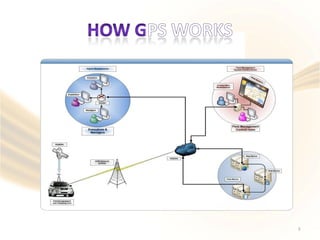
Asset Tracking applications. Our web based software include
Dashboards, Real time tracking, Worldwide street Maps,
Professional Reports, Alerts and integration with Mobile phones,
Desktop and web services.
2
3
How could your company benefit with a fleet tracking System
There are so many benefits to fleet tracking, it’s often difficult to sort them down to just a few. Our clients often
remark how they accrued benefits after installing the system they never anticipated.
1, Lower fuel costs – When your drivers know their vehicles are being tracked constantly, there is less temptation to
stray from their assigned routes. Your fuel costs become more predictable – and, lower – because your vehicles
are sticking to their assigned routes instead of being used for personal errands away from the route.
2, Less employee overtime – Same as above; when drivers know they are being tracked on a given route and are
expected to perform in a known time frame, they are not as likely to make false overtime claims,
3, Better staff productivity – overstay lunch hours, performing personal errands on company time, Idling, using your
vehicle as a personal Taxi will all become things of the past increasing your revenue and reducing your costs.
4, The ability to locate your fleet instantly for quick reassignment – When you know the constant location of your
fleet, you know which vehicles may be available for quick reassignment if a customer has an urgent need or the
vehicle may be needed for another use, such as to take the place of a disabled vehicle.
5, Improved fleet maintenance – The non-obvious – but, still large – benefit of fleet tracking is the data which is
collected and goes into the vehicle’s log to help schedule vehicle maintenance. Better maintenance equals lower
operating costs equals higher profit per vehicle along with reduced breakdown and off road time.
Our Software offers a variety of data gathering and reports which can be used by every part of your fleet
management system, from employee scheduling to vehicle maintenance to records for risk management and
more.
4
•
•
•
•
•
•
•
•
•
•
•
•
•
•
•
•
•
Reduced vehicle fuel and operating expenses
Improved utilisation and productivity
Greater and more organised planning
Reduced communication costs with fleet drivers
Accurate verification of timesheets and overtime
Overview of private mileage
Reduction in travel expenditure
Fewer needless journeys
Trip routing implementation and improvements
Improved customer response times
Proof of delivery or work
Enhanced service levels
Increased vehicle security and driver safety
Added insight into driving behaviour
Reduced environmental impact
Service and maintenance management
Protection for staff in traffic related incidents/offences
5
When it comes to calculating potential savings, you need to start with your current expenses. Typically, companies can
establish a return based on just two primary expenses:
•
•
Fuel costs
Payroll / staff productivity costs
These are critical expense numbers, and are also places where vehicle tracking systems have shown a proven impact.
Focusing in on just these two expenses helps in a variety of ways:
-Companies can usually quantify these expenses easily.
-These two expenses are usually pretty substantial, creating good leverage for the calculation.
-By eliminating the noise of “soft benefits” that are more speculative or preventative in nature, the calculated return should
be conservative.
If you can’t achieve a positive ROI using just these two factors, you will probably not be able to justify
the investment in vehicle tracking.
Fuel Costs and Savings
Using a GPS vehicle tracking system is a proven way to decrease overall mileage by eliminating unauthorized travel and
improving daily routing.
Features like speeding reports and alerts, along with idling alerts also help reduce these fuel wasting behaviors that can
add up quickly for any fleet.
Understand your current costs
To determine how much your company could save, first start with your current fuel costs. You may use a fuel card system
report or tally gas receipts to understand what your monthly gas costs are for your fleet. If you have those numbers
available, give yourself a comparison for costs before implementation, and 30-60-90days after solution implementation.
•
•
•
•
•
•
•
6
• We can provide you the best possible solution to suit your fleet requirements and the functionality features you
require to maximize your cost savings turning your working fleet into an efficient business tool.
We provide specialized platform functionality tailored towards your business functionality and customization of
features is standard in our offering.
•
•
•
•
•
•
•
•
•
•
•
•
•
Business Fleets
Car Hire and Leasing
Construction Trucks
Refrigeration Trucks
Product Delivery Trucks/Vans
Logistics Heavy Goods Vehicles
Taxi Companies
Staff minibuses / pick, drop
School Buses
Public service vehicles / Police,Fire,Ambulances
Plant and Equipment Hire ( mobile and static )
In Vehicle CCTV
7
AET FM1100 AET FM5300 + Garmin
8
9
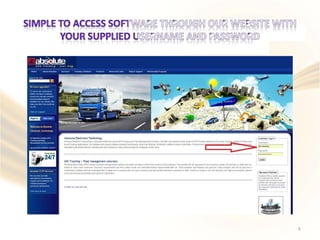
Access to System
Absolute’s software offers a full hierarchy system to fully control
access to Division vehicles

 Access to specific features, events, data
as required and this would relate to:
and reports etc would be allocated to individuals
•
•
•
•
•
•
Top Management
H.R Department
Payroll Department
Division Managers
Supervisors
Operators
Each Division manager and his staff receive log in details for them only and as such they can only view
vehicles,events,reports and alerts etc relating to their specific controlled vehicles. This can even be
further detailed to control specific department managers or supervisors within a division.
Top management,H.R,Payroll would be able if required to view all vehicles throughout all divisions
and obtain specific daily,weekly,monthly automated reports custom generated and based on
requirements
Page 10
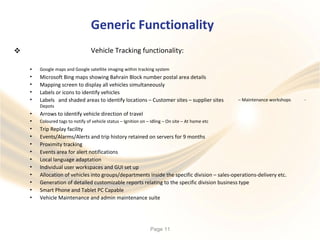
Generic Functionality
Vehicle Tracking functionality:
•
•
•
•
•
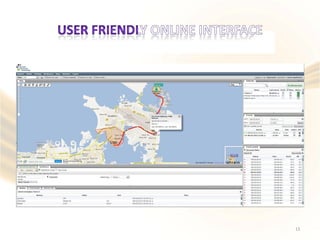
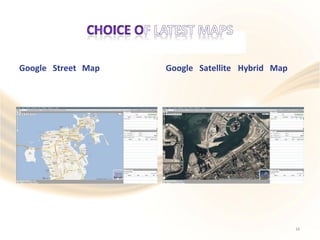
Google maps and Google satellite imaging within tracking system
Microsoft Bing maps showing Bahrain Block number postal area details
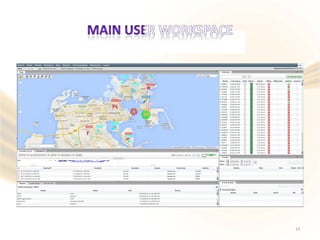
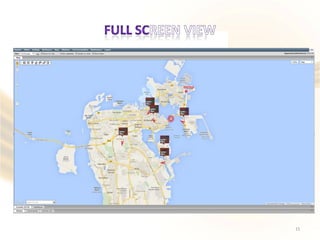
Mapping screen to display all vehicles simultaneously
Labels or icons to identify vehicles
Labels and shaded areas to identify locations – Customer sites – supplier sites
Depots
Arrows to identify vehicle direction of travel
– Maintenance workshops -
•
•
•
•
•
•
•
•
•
•
•
•
Coloured tags to notify of vehicle status – Ignition on – Idling – On site – At home etc
Trip Replay facility
Events/Alarms/Alerts and trip history retained on servers for 9 months
Proximity tracking
Events area for alert notifications
Local language adaptation
Individual user workspaces and GUI set up
Allocation of vehicles into groups/departments inside the specific division – sales-operations-delivery etc.
Generation of detailed customizable reports relating to the specific division business type
Smart Phone and Tablet PC Capable
Vehicle Maintenance and admin maintenance suite
Page 11
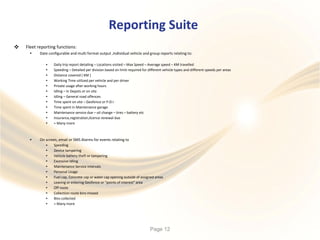
Reporting Suite
 Fleet reporting functions:
• Date configurable and multi format output ,Individual vehicle and group reports relating to:
•
•
•
•
•
•
•
•
•
•
•
•
Daily trip report detailing – Locations visited – Max Speed – Average speed – KM travelled
Speeding – Detailed per division based on limit required for different vehicle types and different speeds per areas
Distance covered ( KM )
Working Time utilized per vehicle and per driver
Private usage after working hours
Idling – In Depots or on site
Idling – General road offences
Time spent on site – Geofence or P.O.I
Time spent in Maintenance garage
Maintenance service due – oil change – tires – battery etc
Insurance,registration,licence renewal due
+ Many more
• On screen, email or SMS Alarms for events relating to
•
•
•
•
•
•
•
•
•
•
•
•
Speeding
Device tampering
Vehicle battery theft or tampering
Excessive Idling
Maintenance Service intervals
Personal Usage
Fuel cap, Concrete cap or water cap opening outside of assigned areas
Leaving or entering Geofence or “points of interest” area
Off route
Collection route bins missed
Bins collected
+ Many more
Page 12
13
14
15
Google Street Map Google Satellite Hybrid Map
16
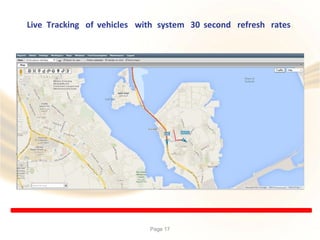
Live Tracking of vehicles with system 30 second refresh rates
Page 17
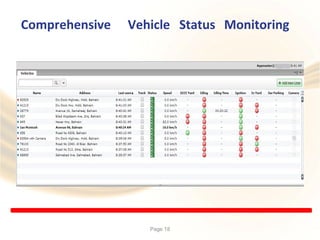
Comprehensive Vehicle Status Monitoring
Page 18
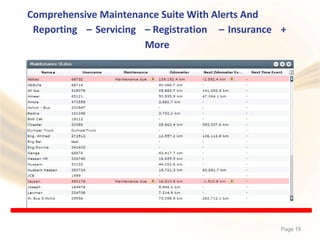
Comprehensive Maintenance Suite With Alerts And
Reporting – Servicing – Registration
More
– Insurance +
Page 19
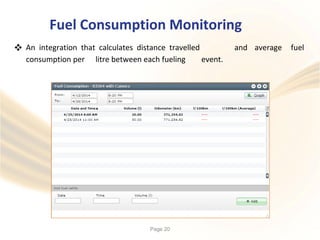
Fuel Consumption Monitoring
 An integration that calculates distance travelled and average fuel
consumption per litre between each fueling event.
Page 20
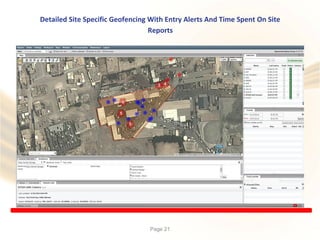
Detailed Site Specific Geofencing With Entry Alerts And Time Spent On Site
Reports
Page 21
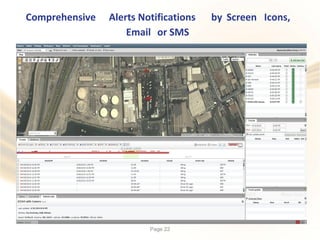
Comprehensive Alerts Notifications by Screen Icons,
Email or SMS
Page 22
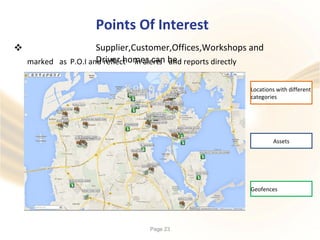
Points Of Interest
Supplier,Customer,Offices,Workshops and
Driver homes can be

marked as P.O.I and reflect in alerts and reports directly
Page 23
Geofences
Assets
Locations with different
categories
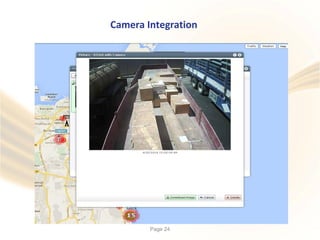
Camera Integration
Page 24
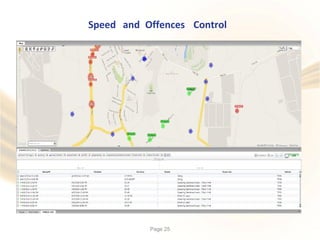
Speed and Offences Control
Page 25
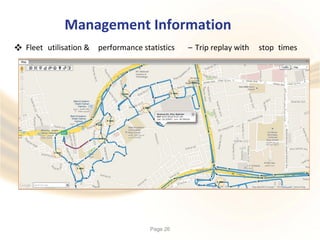
Management Information
 Fleet utilisation & performance statistics – Trip replay with stop times
Page 26
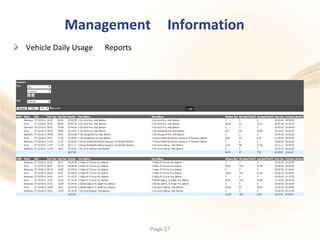
Management Information
Vehicle Daily Usage Reports
Page 27
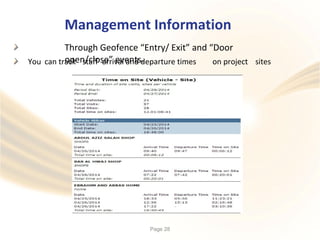
Management Information
Through Geofence “Entry/ Exit” and “Door
open/close” events.You can track staff arrival and departure times on project sites
Page 28
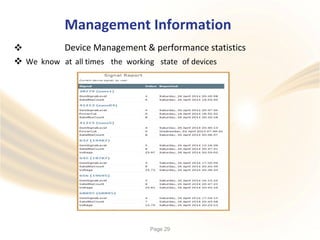
Management Information
Device Management & performance statistics
 We know at all times the working state of devices
Page 29
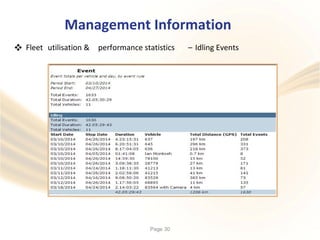
Management Information
 Fleet utilisation & performance statistics – Idling Events
Page 30
Management Information
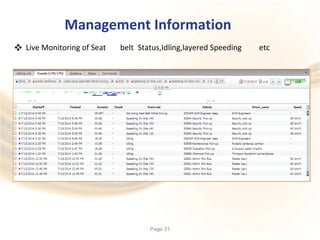
 Live Monitoring of Seat belt Status,Idling,layered Speeding etc
Page 31
Management Information
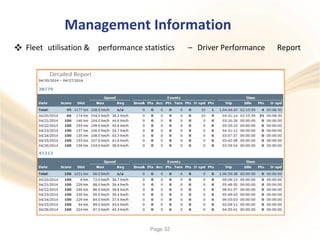
 Fleet utilisation & performance statistics – Driver Performance Report
Page 32

Absolute Electronic Technology - No.1 GPS Tracking Bahrain

  • 1.
  • 2.
    • AET isspecialized Bahrain based GPS Tracking and Fleet Management company. • We offer and support a wide range of GPS Tracking devices for Personal Tracking, Vehicle Tracking, Fleet Management and Asset Tracking applications. Our web based software include Dashboards, Real time tracking, Worldwide street Maps, Professional Reports, Alerts and integration with Mobile phones, Desktop and web services. 2
  • 3.
  • 4.
    How could yourcompany benefit with a fleet tracking System There are so many benefits to fleet tracking, it’s often difficult to sort them down to just a few. Our clients often remark how they accrued benefits after installing the system they never anticipated. 1, Lower fuel costs – When your drivers know their vehicles are being tracked constantly, there is less temptation to stray from their assigned routes. Your fuel costs become more predictable – and, lower – because your vehicles are sticking to their assigned routes instead of being used for personal errands away from the route. 2, Less employee overtime – Same as above; when drivers know they are being tracked on a given route and are expected to perform in a known time frame, they are not as likely to make false overtime claims, 3, Better staff productivity – overstay lunch hours, performing personal errands on company time, Idling, using your vehicle as a personal Taxi will all become things of the past increasing your revenue and reducing your costs. 4, The ability to locate your fleet instantly for quick reassignment – When you know the constant location of your fleet, you know which vehicles may be available for quick reassignment if a customer has an urgent need or the vehicle may be needed for another use, such as to take the place of a disabled vehicle. 5, Improved fleet maintenance – The non-obvious – but, still large – benefit of fleet tracking is the data which is collected and goes into the vehicle’s log to help schedule vehicle maintenance. Better maintenance equals lower operating costs equals higher profit per vehicle along with reduced breakdown and off road time. Our Software offers a variety of data gathering and reports which can be used by every part of your fleet management system, from employee scheduling to vehicle maintenance to records for risk management and more. 4
  • 5.
    • • • • • • • • • • • • • • • • • Reduced vehicle fueland operating expenses Improved utilisation and productivity Greater and more organised planning Reduced communication costs with fleet drivers Accurate verification of timesheets and overtime Overview of private mileage Reduction in travel expenditure Fewer needless journeys Trip routing implementation and improvements Improved customer response times Proof of delivery or work Enhanced service levels Increased vehicle security and driver safety Added insight into driving behaviour Reduced environmental impact Service and maintenance management Protection for staff in traffic related incidents/offences 5
  • 6.
    When it comesto calculating potential savings, you need to start with your current expenses. Typically, companies can establish a return based on just two primary expenses: • • Fuel costs Payroll / staff productivity costs These are critical expense numbers, and are also places where vehicle tracking systems have shown a proven impact. Focusing in on just these two expenses helps in a variety of ways: -Companies can usually quantify these expenses easily. -These two expenses are usually pretty substantial, creating good leverage for the calculation. -By eliminating the noise of “soft benefits” that are more speculative or preventative in nature, the calculated return should be conservative. If you can’t achieve a positive ROI using just these two factors, you will probably not be able to justify the investment in vehicle tracking. Fuel Costs and Savings Using a GPS vehicle tracking system is a proven way to decrease overall mileage by eliminating unauthorized travel and improving daily routing. Features like speeding reports and alerts, along with idling alerts also help reduce these fuel wasting behaviors that can add up quickly for any fleet. Understand your current costs To determine how much your company could save, first start with your current fuel costs. You may use a fuel card system report or tally gas receipts to understand what your monthly gas costs are for your fleet. If you have those numbers available, give yourself a comparison for costs before implementation, and 30-60-90days after solution implementation. • • • • • • • 6
  • 7.
    • We canprovide you the best possible solution to suit your fleet requirements and the functionality features you require to maximize your cost savings turning your working fleet into an efficient business tool. We provide specialized platform functionality tailored towards your business functionality and customization of features is standard in our offering. • • • • • • • • • • • • • Business Fleets Car Hire and Leasing Construction Trucks Refrigeration Trucks Product Delivery Trucks/Vans Logistics Heavy Goods Vehicles Taxi Companies Staff minibuses / pick, drop School Buses Public service vehicles / Police,Fire,Ambulances Plant and Equipment Hire ( mobile and static ) In Vehicle CCTV 7
  • 8.
    AET FM1100 AETFM5300 + Garmin 8
  • 9.
  • 10.
    Access to System Absolute’ssoftware offers a full hierarchy system to fully control access to Division vehicles   Access to specific features, events, data as required and this would relate to: and reports etc would be allocated to individuals • • • • • • Top Management H.R Department Payroll Department Division Managers Supervisors Operators Each Division manager and his staff receive log in details for them only and as such they can only view vehicles,events,reports and alerts etc relating to their specific controlled vehicles. This can even be further detailed to control specific department managers or supervisors within a division. Top management,H.R,Payroll would be able if required to view all vehicles throughout all divisions and obtain specific daily,weekly,monthly automated reports custom generated and based on requirements Page 10
  • 11.
    Generic Functionality Vehicle Trackingfunctionality: • • • • • Google maps and Google satellite imaging within tracking system Microsoft Bing maps showing Bahrain Block number postal area details Mapping screen to display all vehicles simultaneously Labels or icons to identify vehicles Labels and shaded areas to identify locations – Customer sites – supplier sites Depots Arrows to identify vehicle direction of travel – Maintenance workshops - • • • • • • • • • • • • Coloured tags to notify of vehicle status – Ignition on – Idling – On site – At home etc Trip Replay facility Events/Alarms/Alerts and trip history retained on servers for 9 months Proximity tracking Events area for alert notifications Local language adaptation Individual user workspaces and GUI set up Allocation of vehicles into groups/departments inside the specific division – sales-operations-delivery etc. Generation of detailed customizable reports relating to the specific division business type Smart Phone and Tablet PC Capable Vehicle Maintenance and admin maintenance suite Page 11
  • 12.
    Reporting Suite  Fleetreporting functions: • Date configurable and multi format output ,Individual vehicle and group reports relating to: • • • • • • • • • • • • Daily trip report detailing – Locations visited – Max Speed – Average speed – KM travelled Speeding – Detailed per division based on limit required for different vehicle types and different speeds per areas Distance covered ( KM ) Working Time utilized per vehicle and per driver Private usage after working hours Idling – In Depots or on site Idling – General road offences Time spent on site – Geofence or P.O.I Time spent in Maintenance garage Maintenance service due – oil change – tires – battery etc Insurance,registration,licence renewal due + Many more • On screen, email or SMS Alarms for events relating to • • • • • • • • • • • • Speeding Device tampering Vehicle battery theft or tampering Excessive Idling Maintenance Service intervals Personal Usage Fuel cap, Concrete cap or water cap opening outside of assigned areas Leaving or entering Geofence or “points of interest” area Off route Collection route bins missed Bins collected + Many more Page 12
  • 13.
  • 14.
  • 15.
  • 16.
    Google Street MapGoogle Satellite Hybrid Map 16
  • 17.
    Live Tracking ofvehicles with system 30 second refresh rates Page 17
  • 18.
    Comprehensive Vehicle StatusMonitoring Page 18
  • 19.
    Comprehensive Maintenance SuiteWith Alerts And Reporting – Servicing – Registration More – Insurance + Page 19
  • 20.
    Fuel Consumption Monitoring An integration that calculates distance travelled and average fuel consumption per litre between each fueling event. Page 20
  • 21.
    Detailed Site SpecificGeofencing With Entry Alerts And Time Spent On Site Reports Page 21
  • 22.
    Comprehensive Alerts Notificationsby Screen Icons, Email or SMS Page 22
  • 23.
    Points Of Interest Supplier,Customer,Offices,Workshopsand Driver homes can be  marked as P.O.I and reflect in alerts and reports directly Page 23 Geofences Assets Locations with different categories
  • 24.
  • 25.
    Speed and OffencesControl Page 25
  • 26.
    Management Information  Fleetutilisation & performance statistics – Trip replay with stop times Page 26
  • 27.
  • 28.
    Management Information Through Geofence“Entry/ Exit” and “Door open/close” events.You can track staff arrival and departure times on project sites Page 28
  • 29.
    Management Information Device Management& performance statistics  We know at all times the working state of devices Page 29
  • 30.
    Management Information  Fleetutilisation & performance statistics – Idling Events Page 30
  • 31.
    Management Information  LiveMonitoring of Seat belt Status,Idling,layered Speeding etc Page 31
  • 32.
    Management Information  Fleetutilisation & performance statistics – Driver Performance Report Page 32