®
3URJUDPPLQJ LQ +5
+
(
/
3

3
$
;
;
5HOHDVH %
3URJUDPPLQJ LQ +5 6$3 $*
 -XQH 
RSULJKW
© Copyright 1998 SAP AG. All rights reserved.
No part of this brochure may be reproduced or transmitted in any form or for any purpose without
the express permission of SAP AG. The information contained herein may be changed without
prior notice.
SAP AG further does not warrant the accuracy or completeness of the information, text, graphics,
links, or other items contained within these materials. SAP AG shall not be liable for any special,
indirect, incidental, or consequential damages, including without limitation, lost revenues or lost
profits, which may result from the use of these materials. The information in this documentation is
subject to change without notice and does not represent a commitment on the part of SAP AG for
the future.
Some software products marketed by SAP AG and its distributors contain proprietary software
components of other software vendors.
Microsoft®, WINDOWS®, NT®, EXCEL® and SQL-Server® are registered trademarks of
Microsoft Corporation.
IBM®, DB2®, OS/2®, DB2/6000®, Parallel Sysplex®, MVS/ESA®, RS/6000®, AIX®, S/390®,
AS/400®, OS/390®, and OS/400® are registered trademarks of IBM Corporation.
OSF/Motif® is a registered trademark of Open Software Foundation.
ORACLE® is a registered trademark of ORACLE Corporation, California, USA.
INFORMIX®-OnLine IRU 6$3 is a registered trademark of Informix Software Incorporated.
UNIX® and X/Open® are registered trademarks of SCO Santa Cruz Operation.
ADABAS® is a registered trademark of Software AG.
SAP®, R/2®, R/3®, RIVA®, ABAP/4®, SAP ArchiveLink®, SAPaccess®, SAPmail®,
SAPoffice®, SAP-EDI®, R/3 Retail®, SAP EarlyWatch®, SAP Business Workflow®, ALE/WEB™,
Team SAP™, BAPI™, Management Cockpit™ are registered or unregistered trademarks of SAP
AG.
,FRQV
,FRQ 0HDQLQJ
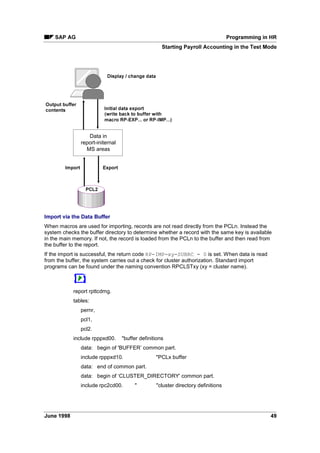
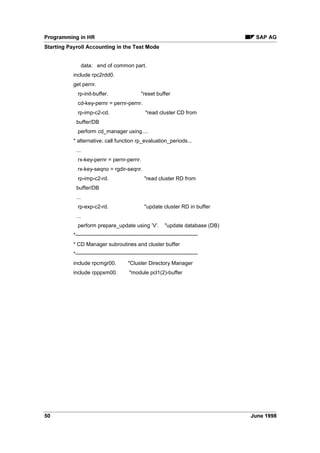
Caution
Example
Note
6$3 $* 3URJUDPPLQJ LQ +5
-XQH  
RQWHQWV
3URJUDPPLQJ LQ +5 
/RJLFDO 'DWDEDVH 3$3$'
$FWLYDWLQJ WKH /RJLFDO 'DWDEDVH 3$3$'
)XQFWLRQV 3$3$'
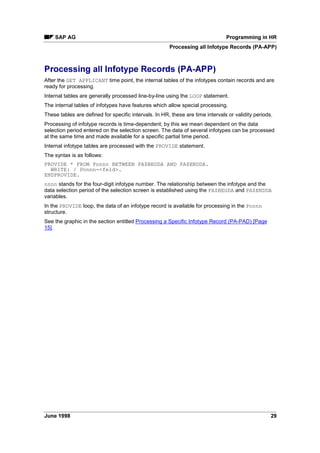
Selection Criteria (PA-PAD) ....................................................................................................... 9
Selection Screen (PA-PAD)...................................................................................................... 10
SAP - Naming Conventions for Report Classes (PA-PAD)................................................. 11
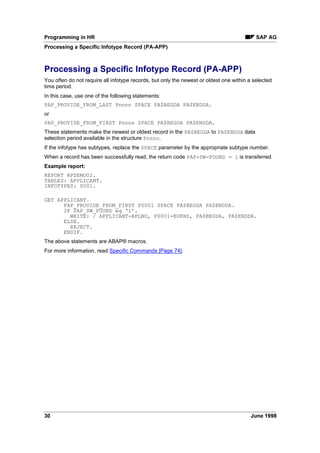
5HSRUW 6WUXFWXUH 3$3$'
,QIRWSH 3URFHVVLQJ 3$3$'
Processing All Infotype Records (PA-PAD).............................................................................. 15
Processing a Specific Infotype Record (PA-PAD).................................................................... 16
'DWD 6WUXFWXUHV 3$3$'
7LPH 'DWD 3$3$'
5HSHDW 6WUXFWXUHV 3$3$'
$XWKRUL]DWLRQ KHFNV LQ 5HSRUWLQJ 3$3$'
/RJLFDO 'DWDEDVH 3$$33
$FWLYDWLQJ WKH /RJLFDO 'DWDEDVH 3$$33
)XQFWLRQV 3$$33
6HOHFWLRQ ULWHULD 3$$33
6WUXFWXUH RI D 5HSRUW 3$$33
,QIRWSH 3URFHVVLQJ 3$$33
Processing all Infotype Records (PA-APP) .............................................................................. 29
Processing a Specific Infotype Record (PA-APP).................................................................... 30
'DWD 6WUXFWXUHV 3$$33
$XWKRUL]DWLRQ KHFNV LQ 5HSRUWLQJ 3$$33
9LHZV 
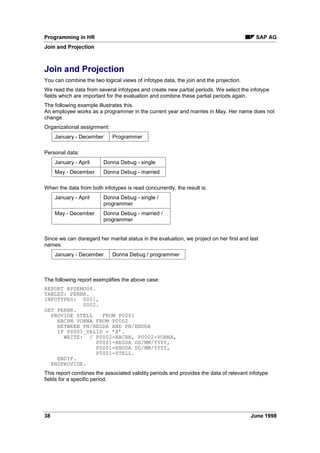
Join ........................................................................................................................................... 34
Projection.................................................................................................................................. 36
Join and Projection................................................................................................................... 38
Time-Dependent Control Tables .............................................................................................. 40
Generalization of the View........................................................................................................ 41
,PSRUW([SRUW )LOHV LQ +5 
)LOHV 3/ 3/ 3/ DQG 3/  
6WRULQJ 'DWD LQ 3/Q )LOHV 
xx Key....................................................................................................................................... 45
3/Q %XIIHU 
Retroactive Accounting of Payroll Results ............................................................................... 47
Starting Payroll Accounting in the Test Mode .......................................................................... 48
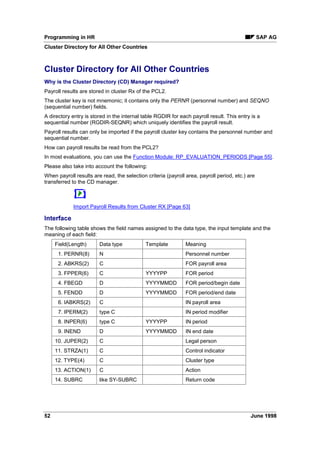
OXVWHU 'LUHFWRU 
Cluster Directory for All Other Countries.................................................................................. 52
Function Module: RP_EVALUATION_PERIODS ............................................................... 55
Reading Payroll Results Using the Function RP_EVALUATION_PERIODS ................ 57
3URJUDPPLQJ LQ +5 6$3 $*
 -XQH 
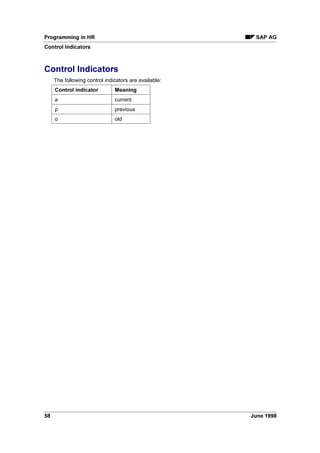
Control Indicators ................................................................................................................ 58
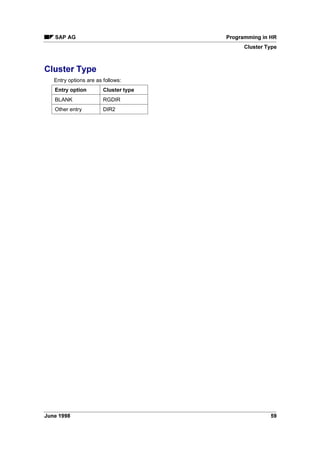
Cluster Type ........................................................................................................................ 59
Action................................................................................................................................... 60
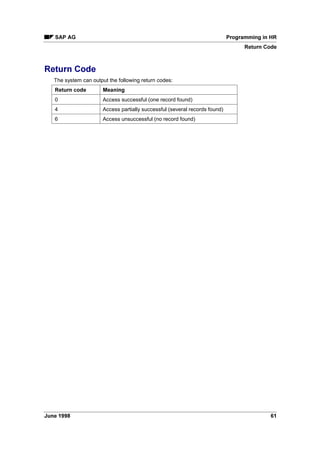
Return Code........................................................................................................................ 61
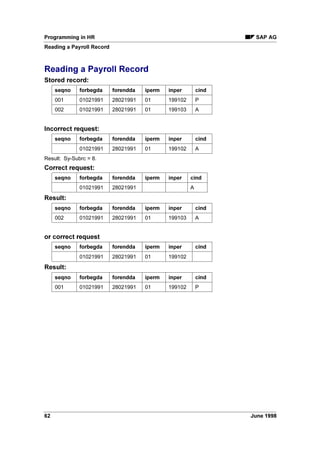
Reading a Payroll Record ................................................................................................... 62
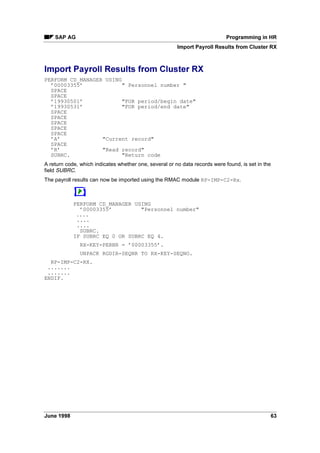
Import Payroll Results from Cluster RX .............................................................................. 63
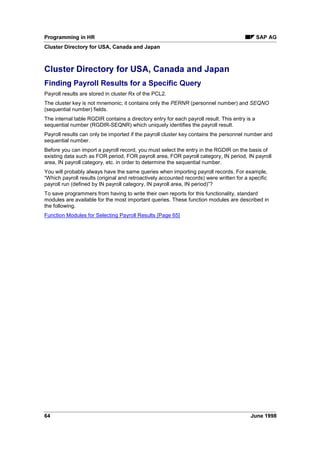
Cluster Directory for USA, Canada and Japan......................................................................... 64
Function Modules for Selecting Payroll Results.................................................................. 65
Function Module: CD_EVALUATION_PERIODS.......................................................... 66
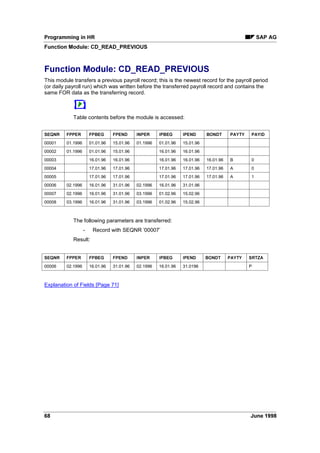
Function Module: CD_READ_PREVIOUS..................................................................... 68
Function Module: CD_READ_PREVIOUS_ORIGINAL ................................................. 69
Other Modules for the Payroll Cluster............................................................................ 70
Explanation of Fields................................................................................................. 71
Example Report ............................................................................................................. 72
6SHFLILF RPPDQGV  
)XQFWLRQ 0RGXOHV LQ +5 
0DFUR 0RGXOHV 
8WLOLWLHV LQ +5
6$3 $* 3URJUDPPLQJ LQ +5
-XQH  
3URJUDPPLQJ LQ +5
This document is intended for all persons who would like to program their own evaluations in HR
or customize standard ones.
It does not serve as an introduction to programming but only describes the special features of
programming in HR.
A general knowledge of ABAP/4® programming and HR applications is a prerequisite. This can
be acquired by reading the relevant documentation and attending the courses.
This document provides information which enables programmers to become acquainted with the
special features of programming in HR.
The course 3URJUDPPLQJ LQ +5 and this document should be seen as an entity. We recommend
that you attend this course to supplement the knowledge acquired from the documentation.
2YHUYLHZ
This documentation is divided into four sections:
The first section gives an introduction to the logical database in HR. The functions of the logical
database and the basic structure of the reports which use the logical database are explained. In
addition,it describes special evaluation techniques used in time management as well as repeat
structures and authorization checks.
Logical Database (PA-PAD) [Page 6]
The second section deals with the evaluation of import/export files. How payroll results are read
is explained in greater detail.
Import/Export Files in HR [Page 42]
Specific language elements of HR are presented in the third section. It also describes the
function modules and the use of ABAP/4® macros in HR.
Specific Commands [Page 74]
The last section presents all utilities available in HR.
Utilities in HR [Page 77]
The contents and structure of this document generally correspond to that of the 3URJUDPPLQJ LQ
+5 course.
3URJUDPPLQJ LQ +5 6$3 $*
/RJLFDO 'DWDEDVH 3$3$'
-XQH 
/RJLFDO 'DWDEDVH 3$3$'
The logical database PNP is provided for evaluation of HR master data and time data. It enables
convenient, high-performance evaluation of the transparent table PAnnnn (nnnn is the infotype
number - table PA2011 is an exception.)
Activating the Logical Database (PA-PAD) [Page 7]
Functions (PA-PAD) [Page 8]
Report Structure (PA-PAD) [Page 12]
Data Structures (PA-PAD) [Page 17]
Time Data (PA-PAD) [Page 18]
Repeat Structures (PA-PAD) [Page 20]
Authorization Checks in Reporting (PA-PAD) [Page 21]
6$3 $* 3URJUDPPLQJ LQ +5
$FWLYDWLQJ WKH /RJLFDO 'DWDEDVH 3$3$'
-XQH  
$FWLYDWLQJ WKH /RJLFDO 'DWDEDVH 3$3$'
The logical database consists of the database driver SAPDBPNP. If you would like to create your
own evaluations with the logical database, activate the database driver by maintaining the report
attributes logical database PN and application P.
3URJUDPPLQJ LQ +5 6$3 $*
)XQFWLRQV 3$3$'
-XQH 
)XQFWLRQV 3$3$'
'DWD 5HWULHYDO
When you run your report, the logical database loads the personnel data for each employee into
the main memory and makes it available for processing.
The entire history of each infotype is loaded into the main memory, that is all infotype records
from the lowest to highest system date.
The data of the previous personnel number is deleted when you select another personnel
number.
$XWKRUL]DWLRQ KHFN
The logical database executes an authorization check for personnel data.
It checks whether the master record of the user who starts the report contains the authorizations
for the data that is to be read in the report.
A distinction is made between a personnel and a data authorization.
The system first checks whether the user has an authorization for the employee in accordance
with the criteria of organizational assignment. Employees for which the user has no authorization
are not evaluated.
The system then checks whether the user is authorized to process the infotypes of the specified
report. A list would be meaningless if the data were not evaluated completely.
The following describes all selection criteria provided by the logical database.
Selection Criteria (PA-PAD) [Page 9]
The selection screen layout is described in the next section.
Selection Screen (PA-PAD) [Page 10]
6$3 $* 3URJUDPPLQJ LQ +5
6HOHFWLRQ ULWHULD 3$3$'
-XQH  
6HOHFWLRQ ULWHULD 3$3$'
The logical database provides several selection criteria. These are divided into the following
groups:
• person selection
• sorting of the person selection
• data selection
3HUVRQ 6HOHFWLRQ
The person selections define the set of personnel numbers which are to be evaluated.
The following list contains some of the options for person selection:
• personnel number
• person selection period
• period defined/payroll area
• period defined/payroll period
• period defined/payroll year
• period defined/indicator
• ... and 30 other selection criteria.
3HUVRQ 6HOHFWLRQ XVLQJ WKH 0DWFKFRGH
You can use the 0DWFKFRGH function key to select persons. When you select this function, a list
of existing matchcode IDs is displayed.
6RUWLQJ WKH 3HUVRQ 6HOHFWLRQ
Selected employees are standardly processed in ascending order according to personnel
number or matchcode. You can use the 6RUW function key to sort employees according to name
or organizational assignment criteria.
'DWD 6HOHFWLRQ
In the data selection field, you can define the period for which infotype data is to be evaluated.
Although the entire infotype history is loaded into the main memory during data retrieval, the
system processes only those infotype records which either partly or completely are within the
data selection period.
• data selection period
You can also define the data selection period using a time period determinator.
• time period determinator
3URJUDPPLQJ LQ +5 6$3 $*
6HOHFWLRQ 6FUHHQ 3$3$'
-XQH 
6HOHFWLRQ 6FUHHQ 3$3$'
Since the required selection criteria depend on the report, you must define the scope of the
selection screen.
You can do this by assigning the report to a report class.
The report class defines and determines the required selection criteria and function keys
(matchcode, sort, etc.). Reports are assigned to a report class in table 7% or 7:. The
customer maintains the entries in table 7% while table 7: contains the SAP
assignments. Once reports have been assigned a class, the customer (table T599C) or SAP
(table T599F) default class settings are valid.
All standard HR reports are already assigned to SAP report classes. SAP report classes names
comply with the naming convention.
Please also read:
SAP - Naming Conventions for Report Classes (PA-PAD) [Page 11]
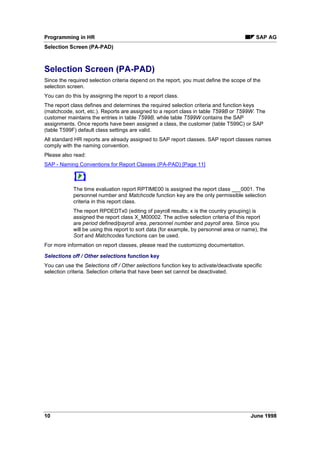
The time evaluation report RPTIME00 is assigned the report class ___0001. The
personnel number and 0DWFKFRGH function key are the only permissible selection
criteria in this report class.
The report RPDEDTx0 (editing of payroll results; x is the country grouping) is
assigned the report class X_M00002. The active selection criteria of this report
are SHULRG GHILQHGSDUROO DUHD, SHUVRQQHO QXPEHU and SDUROO DUHD. Since you
will be using this report to sort data (for example, by personnel area or name), the
6RUW and 0DWFKFRGHV functions can be used.
For more information on report classes, please read the customizing documentation.
6HOHFWLRQV RII  2WKHU VHOHFWLRQV IXQFWLRQ NH
You can use the 6HOHFWLRQV RII  2WKHU VHOHFWLRQV function key to activate/deactivate specific
selection criteria. Selection criteria that have been set cannot be deactivated.
6$3 $* 3URJUDPPLQJ LQ +5
6$3  1DPLQJ RQYHQWLRQV IRU 5HSRUW ODVVHV 3$3$'
-XQH  
6$3  1DPLQJ RQYHQWLRQV IRU 5HSRUW ODVVHV 3$3$'
Report class names have eight characters:
6 ( 3 ' $ Q Q Q
These characters have the following meaning:
KDUD
FWHU
0HDQLQJ 9DOXHV
6 Sort BLANK Do not use sort
; Use sort
( Data selection period
=
BLANK Equality applies
Person selection
period
; Equality does not apply
3 Payroll area, period
and year
BLANK Line is not displayed
; Line is displayed
0 Line is displayed and payroll
area is a required field
' Data selection period  No entry, line is not
displayed
 Key date; only ‘from’ date is
in input mode
 Interval; ‘from’ and ‘to’ dates
are in input mode
$ Person selection
period
Like data selection period
QQQ Sequential number, begins
with 
The numeric name range is reserved for customer report classes.
3URJUDPPLQJ LQ +5 6$3 $*
5HSRUW 6WUXFWXUH 3$3$'
-XQH 
5HSRUW 6WUXFWXUH 3$3$'
([DPSOH RI DQ +5 UHSRUW
An HR report which uses the logical database has the following basic structure:
REPORT RPABAP01.
TABLES: PERNR.
INFOTYPES: 0001.
GET PERNR.
PROVIDE * FROM P0001 BETWEEN PN/BEGDA AND PN/ENDDA.
WRITE: / P0001-PERNR,
P0001-STELL,
P0001-BEGDA,
P0001-ENDDA.
ENDPROVIDE.
This report evaluates the 2UJDQL]DWLRQDO $VVLJQPHQW infotype records in the specified data
selection period.
,QIRWSH 'HFODUDWLRQ
All infotypes to be processed in the report are listed in the ABAP/4® INFOTYPES language
element.
The database does not normally contain only one record for each infotype and personnel number
but several records with different validity periods. Infotypes are time-dependent since their data
changes over time. For this reason, one structure or work area would not suffice for provision of
infotype data in the main memory.
The INFOTYPES statement is therefore used to create an internal table for each of the listed
infotypes. The structure of this table corresponds to that of the relevant infotype.
'DWD 5HWULHYDO
Data is retrieved at the GET PERNR time point. The GET PERNR action is executed for all
personnel numbers that were selected on the basis of selection screen entries. The time point
should therefore be viewed as a loop via the selected personnel numbers.
GET PERNR fills the internal tables of infotypes that are declared for each employee using the
INFOTYPES statement.
The internal infotype table is filled with all records from the lowest to highest system date. Pnnnn
is the name of the internal table; nnnn represents the infotype number.
The headers of the internal tables Pnnnn is undefined after the GET PERNR
action. These headers are reset to their initial values if no records are found for a
new personnel number.
For information on processing of infotype records, read Infotype Processing (PA-
PAD) [Page 14].
PERNR is a Data Dictionary structure without a database. You must declare this structure using
the TABLES statement. This structure contains the personnel number data chosen on the basis
of the selection screen entries.
Infotype Processing (PA-PAD) [Page 14]
6$3 $* 3URJUDPPLQJ LQ +5
5HSRUW 6WUXFWXUH 3$3$'
-XQH  
Views [Page 33]
3URJUDPPLQJ LQ +5 6$3 $*
,QIRWSH 3URFHVVLQJ 3$3$'
-XQH 
,QIRWSH 3URFHVVLQJ 3$3$'
We distinguish between processing of all infotype records and processing of the newest/oldest
infotype record in the data selection period.
Processing a Specific Infotype Record (PA-PAD) [Page 15]
Infotype Processing (PA-PAD) [Page 16]
6$3 $* 3URJUDPPLQJ LQ +5
3URFHVVLQJ $OO ,QIRWSH 5HFRUGV 3$3$'
-XQH  
3URFHVVLQJ $OO ,QIRWSH 5HFRUGV 3$3$'
After the GET PERNR time point, the internal tables of the infotypes contain records and are
ready for processing.
Internal tables are generally processed line-by-line using the LOOP statement.
The internal tables of infotypes have features which allow special processing.
These tables are defined for specific intervals. In HR, these are time intervals or validity periods.
Processing of infotype records is time-dependent; by this we mean dependent on the data
selection period entered on the selection screen. The data of several infotypes can be processed
at the same time and made available for a specific partial time period.
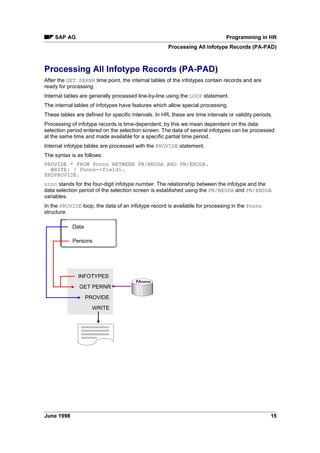
Internal infotype tables are processed with the PROVIDE statement.
The syntax is as follows:
PROVIDE * FROM Pnnnn BETWEEN PN/BEGDA AND PN/ENDDA.
WRITE: / Pnnnn-field.
ENDPROVIDE.
nnnn stands for the four-digit infotype number. The relationship between the infotype and the
data selection period of the selection screen is established using the PN/BEGDA and PN/ENDDA
variables.
In the PROVIDE loop, the data of an infotype record is available for processing in the Pnnnn
structure.
INFOTYPES
WRITE
GET PERNR
PROVIDE
Data
Persons
3$QQQQ
3URJUDPPLQJ LQ +5 6$3 $*
3URFHVVLQJ D 6SHFLILF ,QIRWSH 5HFRUG 3$3$'
-XQH 
3URFHVVLQJ D 6SHFLILF ,QIRWSH 5HFRUG 3$3$'
You often do not require all infotype records, but only the newest or oldest one within a selected
time period.
In this case, use one of the following statements:
RP-PROVIDE-FROM-LAST Pnnnn SPACE PN/BEGDA PN/ENDDA.
or
RP-PROVIDE-FROM-FIRST Pnnnn SPACE PN/BEGDA PN/ENDDA.
These statements make the newest or oldest record in the PN/BEGDA to PN/ENDDA data
selection period available in the structure Pnnnn for infotype nnnn.
If the infotype has subtypes, replace the SPACE parameter by the appropriate subtype number.
When a record has been successfully read, the return code PNP-SW-FOUND = 1 is transferred.
([DPSOH UHSRUW
REPORT RPDEMO02.
TABLES: PERNR.
INFOTYPES: 0001.
GET PERNR.
RP-PROVIDE-FROM-LAST P0001 SPACE PN/BEGDA PN/ENDDA
IF PNP-SW-FOUND eq ‘1’.
WRITE: / PERNR-PERNR, P0001-STELL, PN/BEGDA, PN/ENDDA.
ELSE.
REJECT.
ENDIF.
The above statements are ABAP/4® macros.
For more information, read Specific Commands [Page 74].
6$3 $* 3URJUDPPLQJ LQ +5
'DWD 6WUXFWXUHV 3$3$'
-XQH  
'DWD 6WUXFWXUHV 3$3$'
6WUXFWXUH RI +5 0DVWHU 'DWD DQG 7LPH 'DWD 7DEOHV
HR master data and time data are stored in the transparent tables PAnnnn. In addition to keys
(client, personnel number, subtype, object ID, lock indicator, validity period and sequential
number), these tables contain data of the infotype nnnn.
6WUXFWXUH RI ,QIRWSHV
The Data Dictionary contains a Pnnnn structure for each infotype nnnn.
The infotype structure Pnnnn corresponds to the table PAnnnn. It contains the infotype number
but not the client.
The infotype is defined in the Data Dictionary as a structure without a database.
The Pnnnn structure of the infotype is used as the field structure for the infotype entry screen.
When you declare an infotype using the ,1)273(6 statement, an internal table Pnnnn with the
structure Pnnnn is created and all records of the infotype are transferred to this table:
DATA BEGIN OF Pnnnn OCCURS 10.
INCLUDE STRUCTURE Pnnnn.
DATA END OF Pnnnn VALID BETWEEN BEGDA AND ENDDA.
The infotype records can be processed using the infotype structure when the report is run.
PERNR structure
Time point language elements for data retrieval from a logical database have the following
syntax:
GET TABLE.
The logical HR database uses the table PERNR. You must declare it in the TABLES statement.
At the GET PERNR time point, the PERNR structure contains the data for a personnel number
chosen on the basis of selection screen entries.
The PERNR-PERNR field contains the personnel number which is selected for processing.
Only the PERNR-PERNR field should be read from the work area of the PERNR
table. The other fields are intended for internal purposes only.
3URJUDPPLQJ LQ +5 6$3 $*
7LPH 'DWD 3$3$'
-XQH 
7LPH 'DWD 3$3$'
5HDGLQJ 'DWD
Infotypes 2000 to 2999 are time infotypes. The time data in these infotypes stored in tables
PA2000 to PA2999. Infotypes are declared with the INFOTYPE statement, and data is made
available for processing in the internal infotype tables (infotype 2011 is an exception).
You should not load all time infotype records from the lowest to highest system dates into the
main memory. This would quickly lead to a memory overload, especially if a front-end time
recording system is connected to your HR system.
This is why time data should be read only for a specific period.
Use the infotype declaration supplement MODE N to define that the internal time infotype tables
should be declared but not filled at the GET PERNR time point.
Later you can fill these tables using a statement with selection period parameters.
Use the following report to read time data:
REPORT RPABAP05.
TABLES: PERNR.
INFOTYPES: 2001 MODE N.
GET PERNR.
RP-READ-ALL-TIME-ITY PN/BEGDA PN/ENDDA.
LOOP AT P2001.
WRITE: / P2001-ABWTG.
ENDLOOP.
An ABAP/4® macro reads the time data. This macro uses the data selection period parameter of
the selection screen.
Please also read Macro Modules [Page 76].
3URFHVVLQJ 'DWD
Due to the time constraint of infotypes, several special features must be taken into account when
processing time data. Views of time data are generally not practical.
In time infotypes, data is determined on the basis of the validity period.
When you enter an absence record, the number of days of absence is calculated on the basis of
the absence period.
In a view, new partial periods are created without any changes being made to infotype data. This
would lead to incorrect results in time infotypes, since this data depends on the validity period.
For example, if, a leave record extends from the middle of January to the middle of February and
20 days of leave are calculated for this period, then a view for the month of February would result
in a leave record which extends from the beginning to the middle of February. The number of
days of leave would not have changed and the information would be incorrect.
In master data, the time constraint is a definite feature of the infotype or subtype. There are no
time dependencies between infotypes and subtypes.
Time data is basically different. Let us assume that an employee becomes sick during vacation.
The leave record is then delimited on the first day of the sickness, and the sickness record
follows.
6$3 $* 3URJUDPPLQJ LQ +5
7LPH 'DWD 3$3$'
-XQH  
Likewise, the system prohibits the entry of a leave record that coincides with a sickness record.
The same also applies to overtime during a sickness.
The time dependency of time infotype records is not limited only to dependencies between
records of one and the same infotype, but covers all infotypes and subtypes.
The time constraint of time infotypes is not an attribute but is defined by the relationships
between infotypes.
Moreover, certain time infotype records have specific clock-in/clock out times. Several records
may therefore exist for one infotype on a particular day.
Since views require explicit data and this prerequisite is not fulfilled by time infotypes, you should
not use joins and projections for time data.
Time infotype tables are processed with the LOOP statement since the PROVIDE statement limits,
and thus changes, the infotype begin and end dates to the data selection period.
3URJUDPPLQJ LQ +5 6$3 $*
5HSHDW 6WUXFWXUHV 3$3$'
-XQH 
5HSHDW 6WUXFWXUHV 3$3$'
In many master data infotypes, data is entered in table form. This, for example, allows you to
enter up to twenty different wage types and their amounts. The entry screen has seven lines for
wage type entry and, if you use the scroll function, you can enter up to twenty wage types.
The structure of the wage type line is stored in the infotype structure P0008, and the individual
fields are numbered from one to twenty. Each field of the wage type table is defined.
When evaluating repeat structures, you must ensure that all fields are entered. In the case of the
Basic Pay infotype, 20 * 5 = 100 fields are scanned.
A loop offers a more graceful method of evaluation. Here, one line of the repeat structure is
evaluated each time the loop is executed.
To use this method of evaluation, define a field string whose structure corresponds to the fields in
one line of the repeat structure.
In this field string, one line of the basic pay wage types is evaluated each time the loop is
executed.
REPORT RPABAP06.
TABLES:PERNR.
INFOTYPES: 0008.
DATA: BEGIN OF WAGETYPES,
LGA LIKE P0008-LGA01,
BET LIKE P0008-BET01,
ANZ LIKE P0008-ANZ01,
EIN LIKE P0008-EIN01,
OPK LIKE P0008-OPK01,
END OF WAGETYPES.
GET PERNR.
RP-PROVIDE-FROM-LAST P0008 SPACE PN/BEGDA PN/ENDDA.
DO 20 TIMES VARYING WAGETYPES
FROM P0008-LGA01
NEXT P0008-LGA02.
IF WAGETYPES-LGA IS INITIAL.
EXIT.
ELSE.
WRITE: / WAGETYPES-LGA, WAGETYPES-BET.
ENDIF.
ENDDO.
Repeat structures are also found in the /HDYH (QWLWOHPHQW RVW 'LVWULEXWLRQ $SSUDLVDOV and
:DJH 0DLQWHQDQFH infotypes. These are evaluated accordingly.
6$3 $* 3URJUDPPLQJ LQ +5
$XWKRUL]DWLRQ KHFNV LQ 5HSRUWLQJ 3$3$'
-XQH  
$XWKRUL]DWLRQ KHFNV LQ 5HSRUWLQJ 3$3$'
Authorization checks in reporting do not differ from those in the transactions. Since data access
in reporting is always of the read type, the system checks for a read authorization; the
authorization group must be 5 or 
.
You may want to use a simplified authorization check when running reports. The objects
RPORGIN and RPABAP are then required for the check; if these authorizations are available, a
simpler and faster check is performed.
If the report cannot read certain personnel data due to lack of authorization, all data for these
persons is not processed at the GET PERNR time point. A note appears at the end of the list
stating the number of persons who were skipped due to lack of authorization.
3URJUDPPLQJ LQ +5 6$3 $*
/RJLFDO 'DWDEDVH 3$$33
-XQH 
/RJLFDO 'DWDEDVH 3$$33
The logical database PAP is provided for evaluation of HR applicant data. It enables convenient,
high-performance evaluation of the transparent table PBnnnn (nnnn is the infotype number)
Activating the Logical Database (PA-APP) [Page 23]
Functions (PA-APP) [Page 24]
Selection Criteria (PA-APP) [Page 25]
Structure of a Report (PA-APP) [Page 26]
Infotype Processing (PA-APP) [Page 28]
Data Structures (PA-APP) [Page 31]
Authorization Checks in Reporting (PA-APP) [Page 32]
Views [Page 33]
6$3 $* 3URJUDPPLQJ LQ +5
$FWLYDWLQJ WKH /RJLFDO 'DWDEDVH 3$$33
-XQH  
$FWLYDWLQJ WKH /RJLFDO 'DWDEDVH 3$$33
The logical database consists of the database driver SAPDBPAP. If you would like to create your
own evaluations with the logical database, activate the database driver by maintaining the report
attributes logical database PNP.
3URJUDPPLQJ LQ +5 6$3 $*
)XQFWLRQV 3$$33
-XQH 
)XQFWLRQV 3$$33
'DWD 5HWULHYDO
When you run your report, the logical database loads the personnel data for each applicant into
the main memory and makes it available for processing.
The entire history of each infotype is loaded into the main memory, that is all infotype records
from the lowest to highest system date.
The data of the previous personnel number is deleted when you select another personnel
number.
6HH DOVR
Selection Criteria (PA-APP) [Page 25]
$XWKRUL]DWLRQ KHFN
The logical database executes an authorization check for applicant data.
It checks whether the master record of the user who starts the report contains the authorizations
for the data that is to be read in the report.
A distinction is made between a personnel and a data authorization.
The system first checks whether the user has an authorization for the applicant in accordance
with the criteria of organizational assignment. Employees for which the user has no authorization
are not evaluated.
The system then checks whether the user is authorized to process the infotypes of the specified
report. A list would be meaningless if the data were not evaluated completely.
6HH DOVR
Authorization Checks in Reporting (PA-APP) [Page 32]

Abap hr programming

  • 1.
  • 2.
    3URJUDPPLQJ LQ +56$3 $* -XQH RSULJKW © Copyright 1998 SAP AG. All rights reserved. No part of this brochure may be reproduced or transmitted in any form or for any purpose without the express permission of SAP AG. The information contained herein may be changed without prior notice. SAP AG further does not warrant the accuracy or completeness of the information, text, graphics, links, or other items contained within these materials. SAP AG shall not be liable for any special, indirect, incidental, or consequential damages, including without limitation, lost revenues or lost profits, which may result from the use of these materials. The information in this documentation is subject to change without notice and does not represent a commitment on the part of SAP AG for the future. Some software products marketed by SAP AG and its distributors contain proprietary software components of other software vendors. Microsoft®, WINDOWS®, NT®, EXCEL® and SQL-Server® are registered trademarks of Microsoft Corporation. IBM®, DB2®, OS/2®, DB2/6000®, Parallel Sysplex®, MVS/ESA®, RS/6000®, AIX®, S/390®, AS/400®, OS/390®, and OS/400® are registered trademarks of IBM Corporation. OSF/Motif® is a registered trademark of Open Software Foundation. ORACLE® is a registered trademark of ORACLE Corporation, California, USA. INFORMIX®-OnLine IRU 6$3 is a registered trademark of Informix Software Incorporated. UNIX® and X/Open® are registered trademarks of SCO Santa Cruz Operation. ADABAS® is a registered trademark of Software AG. SAP®, R/2®, R/3®, RIVA®, ABAP/4®, SAP ArchiveLink®, SAPaccess®, SAPmail®, SAPoffice®, SAP-EDI®, R/3 Retail®, SAP EarlyWatch®, SAP Business Workflow®, ALE/WEB™, Team SAP™, BAPI™, Management Cockpit™ are registered or unregistered trademarks of SAP AG. ,FRQV ,FRQ 0HDQLQJ Caution Example Note
  • 3.
    6$3 $* 3URJUDPPLQJLQ +5 -XQH RQWHQWV 3URJUDPPLQJ LQ +5 /RJLFDO 'DWDEDVH 3$3$'
  • 4.
    $FWLYDWLQJ WKH /RJLFDO'DWDEDVH 3$3$'
  • 5.
  • 6.
    Selection Criteria (PA-PAD)....................................................................................................... 9 Selection Screen (PA-PAD)...................................................................................................... 10 SAP - Naming Conventions for Report Classes (PA-PAD)................................................. 11 5HSRUW 6WUXFWXUH 3$3$'
  • 7.
  • 8.
    Processing All InfotypeRecords (PA-PAD).............................................................................. 15 Processing a Specific Infotype Record (PA-PAD).................................................................... 16 'DWD 6WUXFWXUHV 3$3$'
  • 9.
  • 10.
  • 11.
    $XWKRUL]DWLRQ KHFNV LQ5HSRUWLQJ 3$3$'
  • 12.
  • 13.
    $FWLYDWLQJ WKH /RJLFDO'DWDEDVH 3$$33
  • 14.
  • 15.
  • 16.
    6WUXFWXUH RI D5HSRUW 3$$33
  • 17.
  • 18.
    Processing all InfotypeRecords (PA-APP) .............................................................................. 29 Processing a Specific Infotype Record (PA-APP).................................................................... 30 'DWD 6WUXFWXUHV 3$$33
  • 19.
    $XWKRUL]DWLRQ KHFNV LQ5HSRUWLQJ 3$$33
  • 20.
    9LHZV Join ...........................................................................................................................................34 Projection.................................................................................................................................. 36 Join and Projection................................................................................................................... 38 Time-Dependent Control Tables .............................................................................................. 40 Generalization of the View........................................................................................................ 41 ,PSRUW([SRUW )LOHV LQ +5 )LOHV 3/ 3/ 3/ DQG 3/ 6WRULQJ 'DWD LQ 3/Q )LOHV xx Key....................................................................................................................................... 45 3/Q %XIIHU Retroactive Accounting of Payroll Results ............................................................................... 47 Starting Payroll Accounting in the Test Mode .......................................................................... 48 OXVWHU 'LUHFWRU Cluster Directory for All Other Countries.................................................................................. 52 Function Module: RP_EVALUATION_PERIODS ............................................................... 55 Reading Payroll Results Using the Function RP_EVALUATION_PERIODS ................ 57
  • 21.
    3URJUDPPLQJ LQ +56$3 $* -XQH Control Indicators ................................................................................................................ 58 Cluster Type ........................................................................................................................ 59 Action................................................................................................................................... 60 Return Code........................................................................................................................ 61 Reading a Payroll Record ................................................................................................... 62 Import Payroll Results from Cluster RX .............................................................................. 63 Cluster Directory for USA, Canada and Japan......................................................................... 64 Function Modules for Selecting Payroll Results.................................................................. 65 Function Module: CD_EVALUATION_PERIODS.......................................................... 66 Function Module: CD_READ_PREVIOUS..................................................................... 68 Function Module: CD_READ_PREVIOUS_ORIGINAL ................................................. 69 Other Modules for the Payroll Cluster............................................................................ 70 Explanation of Fields................................................................................................. 71 Example Report ............................................................................................................. 72 6SHFLILF RPPDQGV )XQFWLRQ 0RGXOHV LQ +5 0DFUR 0RGXOHV 8WLOLWLHV LQ +5
  • 22.
    6$3 $* 3URJUDPPLQJLQ +5 -XQH 3URJUDPPLQJ LQ +5 This document is intended for all persons who would like to program their own evaluations in HR or customize standard ones. It does not serve as an introduction to programming but only describes the special features of programming in HR. A general knowledge of ABAP/4® programming and HR applications is a prerequisite. This can be acquired by reading the relevant documentation and attending the courses. This document provides information which enables programmers to become acquainted with the special features of programming in HR. The course 3URJUDPPLQJ LQ +5 and this document should be seen as an entity. We recommend that you attend this course to supplement the knowledge acquired from the documentation. 2YHUYLHZ This documentation is divided into four sections: The first section gives an introduction to the logical database in HR. The functions of the logical database and the basic structure of the reports which use the logical database are explained. In addition,it describes special evaluation techniques used in time management as well as repeat structures and authorization checks. Logical Database (PA-PAD) [Page 6] The second section deals with the evaluation of import/export files. How payroll results are read is explained in greater detail. Import/Export Files in HR [Page 42] Specific language elements of HR are presented in the third section. It also describes the function modules and the use of ABAP/4® macros in HR. Specific Commands [Page 74] The last section presents all utilities available in HR. Utilities in HR [Page 77] The contents and structure of this document generally correspond to that of the 3URJUDPPLQJ LQ +5 course.
  • 23.
    3URJUDPPLQJ LQ +56$3 $* /RJLFDO 'DWDEDVH 3$3$'
  • 24.
  • 25.
    The logical databasePNP is provided for evaluation of HR master data and time data. It enables convenient, high-performance evaluation of the transparent table PAnnnn (nnnn is the infotype number - table PA2011 is an exception.) Activating the Logical Database (PA-PAD) [Page 7] Functions (PA-PAD) [Page 8] Report Structure (PA-PAD) [Page 12] Data Structures (PA-PAD) [Page 17] Time Data (PA-PAD) [Page 18] Repeat Structures (PA-PAD) [Page 20] Authorization Checks in Reporting (PA-PAD) [Page 21]
  • 26.
    6$3 $* 3URJUDPPLQJLQ +5 $FWLYDWLQJ WKH /RJLFDO 'DWDEDVH 3$3$'
  • 27.
    -XQH $FWLYDWLQJWKH /RJLFDO 'DWDEDVH 3$3$'
  • 28.
    The logical databaseconsists of the database driver SAPDBPNP. If you would like to create your own evaluations with the logical database, activate the database driver by maintaining the report attributes logical database PN and application P.
  • 29.
    3URJUDPPLQJ LQ +56$3 $* )XQFWLRQV 3$3$'
  • 30.
  • 31.
    'DWD 5HWULHYDO When yourun your report, the logical database loads the personnel data for each employee into the main memory and makes it available for processing. The entire history of each infotype is loaded into the main memory, that is all infotype records from the lowest to highest system date. The data of the previous personnel number is deleted when you select another personnel number. $XWKRUL]DWLRQ KHFN The logical database executes an authorization check for personnel data. It checks whether the master record of the user who starts the report contains the authorizations for the data that is to be read in the report. A distinction is made between a personnel and a data authorization. The system first checks whether the user has an authorization for the employee in accordance with the criteria of organizational assignment. Employees for which the user has no authorization are not evaluated. The system then checks whether the user is authorized to process the infotypes of the specified report. A list would be meaningless if the data were not evaluated completely. The following describes all selection criteria provided by the logical database. Selection Criteria (PA-PAD) [Page 9] The selection screen layout is described in the next section. Selection Screen (PA-PAD) [Page 10]
  • 32.
    6$3 $* 3URJUDPPLQJLQ +5 6HOHFWLRQ ULWHULD 3$3$'
  • 33.
    -XQH 6HOHFWLRQULWHULD 3$3$'
  • 34.
    The logical databaseprovides several selection criteria. These are divided into the following groups: • person selection • sorting of the person selection • data selection 3HUVRQ 6HOHFWLRQ The person selections define the set of personnel numbers which are to be evaluated. The following list contains some of the options for person selection: • personnel number • person selection period • period defined/payroll area • period defined/payroll period • period defined/payroll year • period defined/indicator • ... and 30 other selection criteria. 3HUVRQ 6HOHFWLRQ XVLQJ WKH 0DWFKFRGH You can use the 0DWFKFRGH function key to select persons. When you select this function, a list of existing matchcode IDs is displayed. 6RUWLQJ WKH 3HUVRQ 6HOHFWLRQ Selected employees are standardly processed in ascending order according to personnel number or matchcode. You can use the 6RUW function key to sort employees according to name or organizational assignment criteria. 'DWD 6HOHFWLRQ In the data selection field, you can define the period for which infotype data is to be evaluated. Although the entire infotype history is loaded into the main memory during data retrieval, the system processes only those infotype records which either partly or completely are within the data selection period. • data selection period You can also define the data selection period using a time period determinator. • time period determinator
  • 35.
    3URJUDPPLQJ LQ +56$3 $* 6HOHFWLRQ 6FUHHQ 3$3$'
  • 36.
  • 37.
    Since the requiredselection criteria depend on the report, you must define the scope of the selection screen. You can do this by assigning the report to a report class. The report class defines and determines the required selection criteria and function keys (matchcode, sort, etc.). Reports are assigned to a report class in table 7% or 7:. The customer maintains the entries in table 7% while table 7: contains the SAP assignments. Once reports have been assigned a class, the customer (table T599C) or SAP (table T599F) default class settings are valid. All standard HR reports are already assigned to SAP report classes. SAP report classes names comply with the naming convention. Please also read: SAP - Naming Conventions for Report Classes (PA-PAD) [Page 11] The time evaluation report RPTIME00 is assigned the report class ___0001. The personnel number and 0DWFKFRGH function key are the only permissible selection criteria in this report class. The report RPDEDTx0 (editing of payroll results; x is the country grouping) is assigned the report class X_M00002. The active selection criteria of this report are SHULRG GHILQHGSDUROO DUHD, SHUVRQQHO QXPEHU and SDUROO DUHD. Since you will be using this report to sort data (for example, by personnel area or name), the 6RUW and 0DWFKFRGHV functions can be used. For more information on report classes, please read the customizing documentation. 6HOHFWLRQV RII 2WKHU VHOHFWLRQV IXQFWLRQ NH You can use the 6HOHFWLRQV RII 2WKHU VHOHFWLRQV function key to activate/deactivate specific selection criteria. Selection criteria that have been set cannot be deactivated.
  • 38.
    6$3 $* 3URJUDPPLQJLQ +5 6$3 1DPLQJ RQYHQWLRQV IRU 5HSRUW ODVVHV 3$3$'
  • 39.
    -XQH 6$3 1DPLQJ RQYHQWLRQV IRU 5HSRUW ODVVHV 3$3$'
  • 40.
    Report class nameshave eight characters: 6 ( 3 ' $ Q Q Q These characters have the following meaning: KDUD FWHU 0HDQLQJ 9DOXHV 6 Sort BLANK Do not use sort ; Use sort ( Data selection period = BLANK Equality applies Person selection period ; Equality does not apply 3 Payroll area, period and year BLANK Line is not displayed ; Line is displayed 0 Line is displayed and payroll area is a required field ' Data selection period No entry, line is not displayed Key date; only ‘from’ date is in input mode Interval; ‘from’ and ‘to’ dates are in input mode $ Person selection period Like data selection period QQQ Sequential number, begins with The numeric name range is reserved for customer report classes.
  • 41.
    3URJUDPPLQJ LQ +56$3 $* 5HSRUW 6WUXFWXUH 3$3$'
  • 42.
  • 43.
    ([DPSOH RI DQ+5 UHSRUW An HR report which uses the logical database has the following basic structure: REPORT RPABAP01. TABLES: PERNR. INFOTYPES: 0001. GET PERNR. PROVIDE * FROM P0001 BETWEEN PN/BEGDA AND PN/ENDDA. WRITE: / P0001-PERNR, P0001-STELL, P0001-BEGDA, P0001-ENDDA. ENDPROVIDE. This report evaluates the 2UJDQL]DWLRQDO $VVLJQPHQW infotype records in the specified data selection period. ,QIRWSH 'HFODUDWLRQ All infotypes to be processed in the report are listed in the ABAP/4® INFOTYPES language element. The database does not normally contain only one record for each infotype and personnel number but several records with different validity periods. Infotypes are time-dependent since their data changes over time. For this reason, one structure or work area would not suffice for provision of infotype data in the main memory. The INFOTYPES statement is therefore used to create an internal table for each of the listed infotypes. The structure of this table corresponds to that of the relevant infotype. 'DWD 5HWULHYDO Data is retrieved at the GET PERNR time point. The GET PERNR action is executed for all personnel numbers that were selected on the basis of selection screen entries. The time point should therefore be viewed as a loop via the selected personnel numbers. GET PERNR fills the internal tables of infotypes that are declared for each employee using the INFOTYPES statement. The internal infotype table is filled with all records from the lowest to highest system date. Pnnnn is the name of the internal table; nnnn represents the infotype number. The headers of the internal tables Pnnnn is undefined after the GET PERNR action. These headers are reset to their initial values if no records are found for a new personnel number. For information on processing of infotype records, read Infotype Processing (PA- PAD) [Page 14]. PERNR is a Data Dictionary structure without a database. You must declare this structure using the TABLES statement. This structure contains the personnel number data chosen on the basis of the selection screen entries. Infotype Processing (PA-PAD) [Page 14]
  • 44.
    6$3 $* 3URJUDPPLQJLQ +5 5HSRUW 6WUXFWXUH 3$3$'
  • 45.
    -XQH Views[Page 33]
  • 46.
    3URJUDPPLQJ LQ +56$3 $* ,QIRWSH 3URFHVVLQJ 3$3$'
  • 47.
  • 48.
    We distinguish betweenprocessing of all infotype records and processing of the newest/oldest infotype record in the data selection period. Processing a Specific Infotype Record (PA-PAD) [Page 15] Infotype Processing (PA-PAD) [Page 16]
  • 49.
    6$3 $* 3URJUDPPLQJLQ +5 3URFHVVLQJ $OO ,QIRWSH 5HFRUGV 3$3$'
  • 50.
    -XQH 3URFHVVLQJ$OO ,QIRWSH 5HFRUGV 3$3$'
  • 51.
    After the GETPERNR time point, the internal tables of the infotypes contain records and are ready for processing. Internal tables are generally processed line-by-line using the LOOP statement. The internal tables of infotypes have features which allow special processing. These tables are defined for specific intervals. In HR, these are time intervals or validity periods. Processing of infotype records is time-dependent; by this we mean dependent on the data selection period entered on the selection screen. The data of several infotypes can be processed at the same time and made available for a specific partial time period. Internal infotype tables are processed with the PROVIDE statement. The syntax is as follows: PROVIDE * FROM Pnnnn BETWEEN PN/BEGDA AND PN/ENDDA. WRITE: / Pnnnn-field. ENDPROVIDE. nnnn stands for the four-digit infotype number. The relationship between the infotype and the data selection period of the selection screen is established using the PN/BEGDA and PN/ENDDA variables. In the PROVIDE loop, the data of an infotype record is available for processing in the Pnnnn structure. INFOTYPES WRITE GET PERNR PROVIDE Data Persons 3$QQQQ
  • 52.
    3URJUDPPLQJ LQ +56$3 $* 3URFHVVLQJ D 6SHFLILF ,QIRWSH 5HFRUG 3$3$'
  • 53.
    -XQH 3URFHVVLQJ D6SHFLILF ,QIRWSH 5HFRUG 3$3$'
  • 54.
    You often donot require all infotype records, but only the newest or oldest one within a selected time period. In this case, use one of the following statements: RP-PROVIDE-FROM-LAST Pnnnn SPACE PN/BEGDA PN/ENDDA. or RP-PROVIDE-FROM-FIRST Pnnnn SPACE PN/BEGDA PN/ENDDA. These statements make the newest or oldest record in the PN/BEGDA to PN/ENDDA data selection period available in the structure Pnnnn for infotype nnnn. If the infotype has subtypes, replace the SPACE parameter by the appropriate subtype number. When a record has been successfully read, the return code PNP-SW-FOUND = 1 is transferred. ([DPSOH UHSRUW REPORT RPDEMO02. TABLES: PERNR. INFOTYPES: 0001. GET PERNR. RP-PROVIDE-FROM-LAST P0001 SPACE PN/BEGDA PN/ENDDA IF PNP-SW-FOUND eq ‘1’. WRITE: / PERNR-PERNR, P0001-STELL, PN/BEGDA, PN/ENDDA. ELSE. REJECT. ENDIF. The above statements are ABAP/4® macros. For more information, read Specific Commands [Page 74].
  • 55.
    6$3 $* 3URJUDPPLQJLQ +5 'DWD 6WUXFWXUHV 3$3$'
  • 56.
    -XQH 'DWD6WUXFWXUHV 3$3$'
  • 57.
    6WUXFWXUH RI +50DVWHU 'DWD DQG 7LPH 'DWD 7DEOHV HR master data and time data are stored in the transparent tables PAnnnn. In addition to keys (client, personnel number, subtype, object ID, lock indicator, validity period and sequential number), these tables contain data of the infotype nnnn. 6WUXFWXUH RI ,QIRWSHV The Data Dictionary contains a Pnnnn structure for each infotype nnnn. The infotype structure Pnnnn corresponds to the table PAnnnn. It contains the infotype number but not the client. The infotype is defined in the Data Dictionary as a structure without a database. The Pnnnn structure of the infotype is used as the field structure for the infotype entry screen. When you declare an infotype using the ,1)273(6 statement, an internal table Pnnnn with the structure Pnnnn is created and all records of the infotype are transferred to this table: DATA BEGIN OF Pnnnn OCCURS 10. INCLUDE STRUCTURE Pnnnn. DATA END OF Pnnnn VALID BETWEEN BEGDA AND ENDDA. The infotype records can be processed using the infotype structure when the report is run. PERNR structure Time point language elements for data retrieval from a logical database have the following syntax: GET TABLE. The logical HR database uses the table PERNR. You must declare it in the TABLES statement. At the GET PERNR time point, the PERNR structure contains the data for a personnel number chosen on the basis of selection screen entries. The PERNR-PERNR field contains the personnel number which is selected for processing. Only the PERNR-PERNR field should be read from the work area of the PERNR table. The other fields are intended for internal purposes only.
  • 58.
    3URJUDPPLQJ LQ +56$3 $* 7LPH 'DWD 3$3$'
  • 59.
  • 60.
    5HDGLQJ 'DWD Infotypes 2000to 2999 are time infotypes. The time data in these infotypes stored in tables PA2000 to PA2999. Infotypes are declared with the INFOTYPE statement, and data is made available for processing in the internal infotype tables (infotype 2011 is an exception). You should not load all time infotype records from the lowest to highest system dates into the main memory. This would quickly lead to a memory overload, especially if a front-end time recording system is connected to your HR system. This is why time data should be read only for a specific period. Use the infotype declaration supplement MODE N to define that the internal time infotype tables should be declared but not filled at the GET PERNR time point. Later you can fill these tables using a statement with selection period parameters. Use the following report to read time data: REPORT RPABAP05. TABLES: PERNR. INFOTYPES: 2001 MODE N. GET PERNR. RP-READ-ALL-TIME-ITY PN/BEGDA PN/ENDDA. LOOP AT P2001. WRITE: / P2001-ABWTG. ENDLOOP. An ABAP/4® macro reads the time data. This macro uses the data selection period parameter of the selection screen. Please also read Macro Modules [Page 76]. 3URFHVVLQJ 'DWD Due to the time constraint of infotypes, several special features must be taken into account when processing time data. Views of time data are generally not practical. In time infotypes, data is determined on the basis of the validity period. When you enter an absence record, the number of days of absence is calculated on the basis of the absence period. In a view, new partial periods are created without any changes being made to infotype data. This would lead to incorrect results in time infotypes, since this data depends on the validity period. For example, if, a leave record extends from the middle of January to the middle of February and 20 days of leave are calculated for this period, then a view for the month of February would result in a leave record which extends from the beginning to the middle of February. The number of days of leave would not have changed and the information would be incorrect. In master data, the time constraint is a definite feature of the infotype or subtype. There are no time dependencies between infotypes and subtypes. Time data is basically different. Let us assume that an employee becomes sick during vacation. The leave record is then delimited on the first day of the sickness, and the sickness record follows.
  • 61.
    6$3 $* 3URJUDPPLQJLQ +5 7LPH 'DWD 3$3$'
  • 62.
    -XQH Likewise,the system prohibits the entry of a leave record that coincides with a sickness record. The same also applies to overtime during a sickness. The time dependency of time infotype records is not limited only to dependencies between records of one and the same infotype, but covers all infotypes and subtypes. The time constraint of time infotypes is not an attribute but is defined by the relationships between infotypes. Moreover, certain time infotype records have specific clock-in/clock out times. Several records may therefore exist for one infotype on a particular day. Since views require explicit data and this prerequisite is not fulfilled by time infotypes, you should not use joins and projections for time data. Time infotype tables are processed with the LOOP statement since the PROVIDE statement limits, and thus changes, the infotype begin and end dates to the data selection period.
  • 63.
    3URJUDPPLQJ LQ +56$3 $* 5HSHDW 6WUXFWXUHV 3$3$'
  • 64.
  • 65.
    In many masterdata infotypes, data is entered in table form. This, for example, allows you to enter up to twenty different wage types and their amounts. The entry screen has seven lines for wage type entry and, if you use the scroll function, you can enter up to twenty wage types. The structure of the wage type line is stored in the infotype structure P0008, and the individual fields are numbered from one to twenty. Each field of the wage type table is defined. When evaluating repeat structures, you must ensure that all fields are entered. In the case of the Basic Pay infotype, 20 * 5 = 100 fields are scanned. A loop offers a more graceful method of evaluation. Here, one line of the repeat structure is evaluated each time the loop is executed. To use this method of evaluation, define a field string whose structure corresponds to the fields in one line of the repeat structure. In this field string, one line of the basic pay wage types is evaluated each time the loop is executed. REPORT RPABAP06. TABLES:PERNR. INFOTYPES: 0008. DATA: BEGIN OF WAGETYPES, LGA LIKE P0008-LGA01, BET LIKE P0008-BET01, ANZ LIKE P0008-ANZ01, EIN LIKE P0008-EIN01, OPK LIKE P0008-OPK01, END OF WAGETYPES. GET PERNR. RP-PROVIDE-FROM-LAST P0008 SPACE PN/BEGDA PN/ENDDA. DO 20 TIMES VARYING WAGETYPES FROM P0008-LGA01 NEXT P0008-LGA02. IF WAGETYPES-LGA IS INITIAL. EXIT. ELSE. WRITE: / WAGETYPES-LGA, WAGETYPES-BET. ENDIF. ENDDO. Repeat structures are also found in the /HDYH (QWLWOHPHQW RVW 'LVWULEXWLRQ $SSUDLVDOV and :DJH 0DLQWHQDQFH infotypes. These are evaluated accordingly.
  • 66.
    6$3 $* 3URJUDPPLQJLQ +5 $XWKRUL]DWLRQ KHFNV LQ 5HSRUWLQJ 3$3$'
  • 67.
    -XQH $XWKRUL]DWLRQKHFNV LQ 5HSRUWLQJ 3$3$'
  • 68.
    Authorization checks inreporting do not differ from those in the transactions. Since data access in reporting is always of the read type, the system checks for a read authorization; the authorization group must be 5 or . You may want to use a simplified authorization check when running reports. The objects RPORGIN and RPABAP are then required for the check; if these authorizations are available, a simpler and faster check is performed. If the report cannot read certain personnel data due to lack of authorization, all data for these persons is not processed at the GET PERNR time point. A note appears at the end of the list stating the number of persons who were skipped due to lack of authorization.
  • 69.
    3URJUDPPLQJ LQ +56$3 $* /RJLFDO 'DWDEDVH 3$$33
  • 70.
  • 71.
    The logical databasePAP is provided for evaluation of HR applicant data. It enables convenient, high-performance evaluation of the transparent table PBnnnn (nnnn is the infotype number) Activating the Logical Database (PA-APP) [Page 23] Functions (PA-APP) [Page 24] Selection Criteria (PA-APP) [Page 25] Structure of a Report (PA-APP) [Page 26] Infotype Processing (PA-APP) [Page 28] Data Structures (PA-APP) [Page 31] Authorization Checks in Reporting (PA-APP) [Page 32] Views [Page 33]
  • 72.
    6$3 $* 3URJUDPPLQJLQ +5 $FWLYDWLQJ WKH /RJLFDO 'DWDEDVH 3$$33
  • 73.
    -XQH $FWLYDWLQJWKH /RJLFDO 'DWDEDVH 3$$33
  • 74.
    The logical databaseconsists of the database driver SAPDBPAP. If you would like to create your own evaluations with the logical database, activate the database driver by maintaining the report attributes logical database PNP.
  • 75.
    3URJUDPPLQJ LQ +56$3 $* )XQFWLRQV 3$$33
  • 76.
  • 77.
    'DWD 5HWULHYDO When yourun your report, the logical database loads the personnel data for each applicant into the main memory and makes it available for processing. The entire history of each infotype is loaded into the main memory, that is all infotype records from the lowest to highest system date. The data of the previous personnel number is deleted when you select another personnel number. 6HH DOVR Selection Criteria (PA-APP) [Page 25] $XWKRUL]DWLRQ KHFN The logical database executes an authorization check for applicant data. It checks whether the master record of the user who starts the report contains the authorizations for the data that is to be read in the report. A distinction is made between a personnel and a data authorization. The system first checks whether the user has an authorization for the applicant in accordance with the criteria of organizational assignment. Employees for which the user has no authorization are not evaluated. The system then checks whether the user is authorized to process the infotypes of the specified report. A list would be meaningless if the data were not evaluated completely. 6HH DOVR Authorization Checks in Reporting (PA-APP) [Page 32]