© LPU :: CSE101 C Programming
Lecture #4
Chandni
Assistant Professor
School of EEE, LPU
C character set, Identifiers and keywords, Data types
©LPU CSE101 C Programming
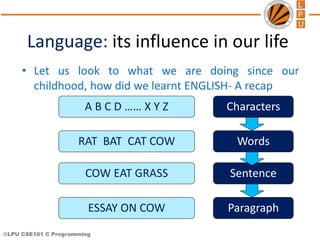
Language: its influence in our life
• Let us look to what we are doing since our
childhood, how did we learnt ENGLISH- A recap
A B C D …… X Y Z
RAT BAT CAT COW
COW EAT GRASS
ESSAY ON COW
Characters
Words
Sentence
Paragraph
©LPU CSE101 C Programming
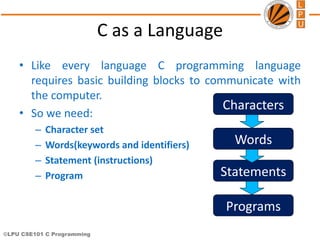
C as a Language
• Like every language C programming language
requires basic building blocks to communicate with
the computer.
• So we need:
– Character set
– Words(keywords and identifiers)
– Statement (instructions)
– Program
Characters
Words
Statements
Programs
©LPU CSE101 C Programming
Character Set
• The character set of C represents alphabet, digit or
any symbol used to represent information.
Types Character Set
Uppercase Alphabets A, B, C, … Y, Z
Lowercase Alphabets a, b, c, … y, z
Digits 0, 1, 2, 3, … 9
Special Symbols
~ ‘ ! @ # % ^ & * ( ) _ - + = |  { } [ ]
: ; " ' < > , . ? /
White spaces Single space, tab, new line.
©LPU CSE101 C Programming
Token
• Smallest unit in a program/statement.
• Every single element in a C Program is called Token.
• It makes the compiler understand what is written in the program.
• Example: main, printf , name,), etc.
Tokens are broadly classified as:
– Identifiers
– Keywords
– Constants
– Variables
– Strings
– Operators
– Special character
©LPU CSE101 C Programming
Identifiers
• To identify things, we have some name given to them
.
• Used to give names to variables, functions,
constant, and user defined data.
• They are user-defined names and consist of a
sequence of letters and digits
©LPU CSE101 C Programming
Rules for naming an Identifier
1. An identifier name is any combination of alphabets, digits or underscores.
2. The first character in the identifier name must be an alphabet or underscore.
3. No blanks or special symbol other than an underscore can be used in an identifier
name.
4. Keywords are not allowed to be used as identifiers.
©LPU CSE101 C Programming
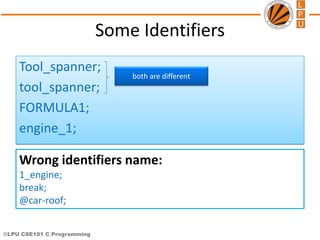
Some Identifiers
Tool_spanner;
tool_spanner;
FORMULA1;
engine_1;
both are different
Wrong identifiers name:
1_engine;
break;
@car-roof;
©LPU CSE101 C Programming
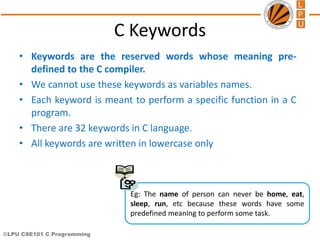
C Keywords
• Keywords are the reserved words whose meaning pre-
defined to the C compiler.
• We cannot use these keywords as variables names.
• Each keyword is meant to perform a specific function in a C
program.
• There are 32 keywords in C language.
• All keywords are written in lowercase only
Eg: The name of person can never be home, eat,
sleep, run, etc because these words have some
predefined meaning to perform some task.
©LPU CSE101 C Programming
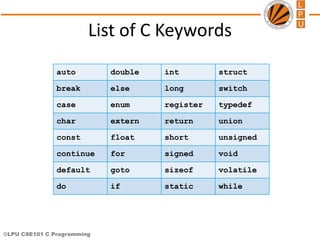
List of C Keywords
auto double int struct
break else long switch
case enum register typedef
char extern return union
const float short unsigned
continue for signed void
default goto sizeof volatile
do if static while
©LPU CSE101 C Programming
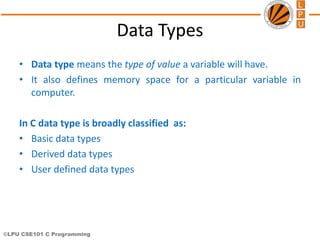
Data Types
• Data type means the type of value a variable will have.
• It also defines memory space for a particular variable in
computer.
In C data type is broadly classified as:
• Basic data types
• Derived data types
• User defined data types
©LPU CSE101 C Programming
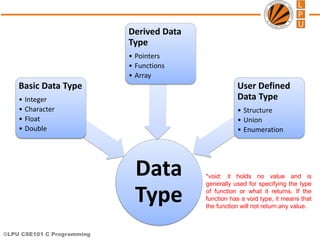
Data
Type
Basic Data Type
• Integer
• Character
• Float
• Double
Derived Data
Type
• Pointers
• Functions
• Array
User Defined
Data Type
• Structure
• Union
• Enumeration
*void: it holds no value and is
generally used for specifying the type
of function or what it returns. If the
function has a void type, it means that
the function will not return any value.
©LPU CSE101 C Programming
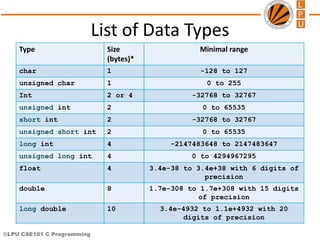
List of Data Types
Type Size
(bytes)*
Minimal range
char 1 -128 to 127
unsigned char 1 0 to 255
Int 2 or 4 -32768 to 32767
unsigned int 2 0 to 65535
short int 2 -32768 to 32767
unsigned short int 2 0 to 65535
long int 4 -2147483648 to 2147483647
unsigned long int 4 0 to 4294967295
float 4 3.4e-38 to 3.4e+38 with 6 digits of
precision
double 8 1.7e-308 to 1.7e+308 with 15 digits
of precision
long double 10 3.4e-4932 to 1.1e+4932 with 20
digits of precision
©LPU CSE101 C Programming
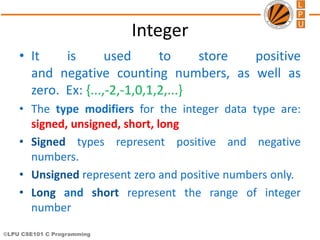
Integer
• It is used to store positive
and negative counting numbers, as well as
zero. Ex: {...,-2,-1,0,1,2,...}
• The type modifiers for the integer data type are:
signed, unsigned, short, long
• Signed types represent positive and negative
numbers.
• Unsigned represent zero and positive numbers only.
• Long and short represent the range of integer
number
©LPU CSE101 C Programming
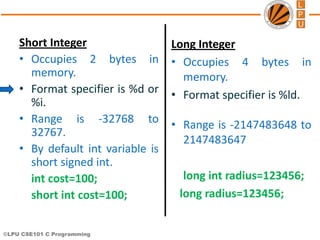
Long Integer
• Occupies 4 bytes in
memory.
• Format specifier is %ld.
• Range is -2147483648 to
2147483647
long int radius=123456;
long radius=123456;
Short Integer
• Occupies 2 bytes in
memory.
• Format specifier is %d or
%i.
• Range is -32768 to
32767.
• By default int variable is
short signed int.
int cost=100;
short int cost=100;
©LPU CSE101 C Programming
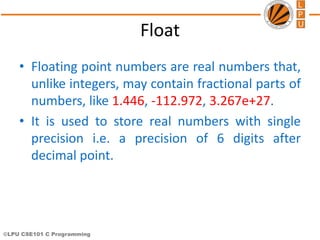
Float
• Floating point numbers are real numbers that,
unlike integers, may contain fractional parts of
numbers, like 1.446, -112.972, 3.267e+27.
• It is used to store real numbers with single
precision i.e. a precision of 6 digits after
decimal point.
©LPU CSE101 C Programming
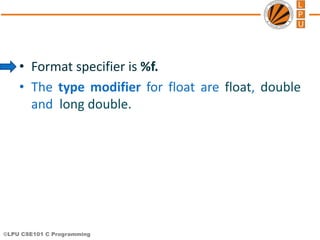
• Format specifier is %f.
• The type modifier for float are float, double
and long double.
©LPU CSE101 C Programming
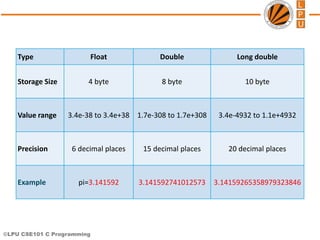
Type Float Double Long double
Storage Size 4 byte 8 byte 10 byte
Value range 3.4e-38 to 3.4e+38 1.7e-308 to 1.7e+308 3.4e-4932 to 1.1e+4932
Precision 6 decimal places 15 decimal places 20 decimal places
Example pi=3.141592 3.141592741012573 3.14159265358979323846
©LPU CSE101 C Programming
Character
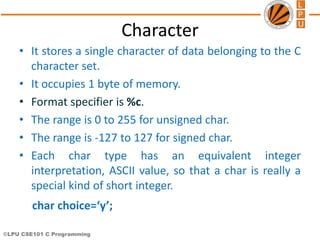
• It stores a single character of data belonging to the C
character set.
• It occupies 1 byte of memory.
• Format specifier is %c.
• The range is 0 to 255 for unsigned char.
• The range is -127 to 127 for signed char.
• Each char type has an equivalent integer
interpretation, ASCII value, so that a char is really a
special kind of short integer.
char choice=‘y’;
©LPU CSE101 C Programming
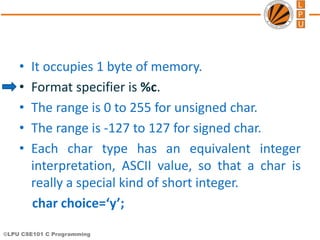
• It occupies 1 byte of memory.
• Format specifier is %c.
• The range is 0 to 255 for unsigned char.
• The range is -127 to 127 for signed char.
• Each char type has an equivalent integer
interpretation, ASCII value, so that a char is
really a special kind of short integer.
char choice=‘y’;
©LPU CSE101 C Programming
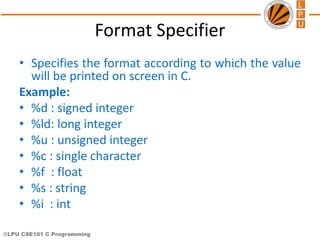
Format Specifier
• Specifies the format according to which the value
will be printed on screen in C.
Example:
• %d : signed integer
• %ld: long integer
• %u : unsigned integer
• %c : single character
• %f : float
• %s : string
• %i : int
©LPU CSE101 C Programming
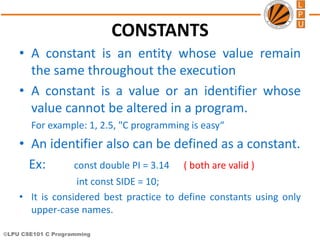
CONSTANTS
• A constant is an entity whose value remain
the same throughout the execution
• A constant is a value or an identifier whose
value cannot be altered in a program.
For example: 1, 2.5, "C programming is easy“
• An identifier also can be defined as a constant.
Ex: const double PI = 3.14 ( both are valid )
int const SIDE = 10;
• It is considered best practice to define constants using only
upper-case names.
©LPU CSE101 C Programming
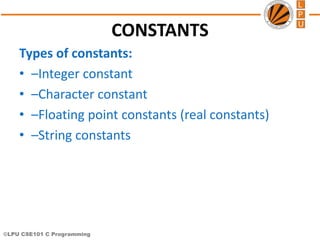
CONSTANTS
Types of constants:
• –Integer constant
• –Character constant
• –Floating point constants (real constants)
• –String constants
©LPU CSE101 C Programming
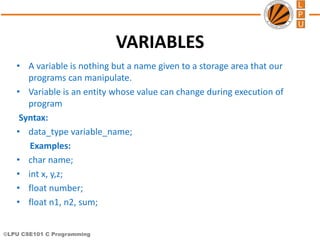
VARIABLES
• A variable is nothing but a name given to a storage area that our
programs can manipulate.
• Variable is an entity whose value can change during execution of
program
Syntax:
• data_type variable_name;
Examples:
• char name;
• int x, y,z;
• float number;
• float n1, n2, sum;
©LPU CSE101 C Programming
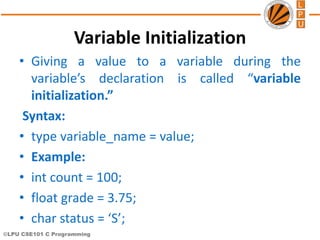
Variable Initialization
• Giving a value to a variable during the
variable’s declaration is called “variable
initialization.”
Syntax:
• type variable_name = value;
• Example:
• int count = 100;
• float grade = 3.75;
• char status = ‘S’;
©LPU CSE101 C Programming
Escape Sequence
• C supports some character constants having a
backslash in front of it. The lists of backslash
characters have a specific meaning which is
known to the compiler. They are also termed
as "Escape Sequence".
©LPU CSE101 C Programming
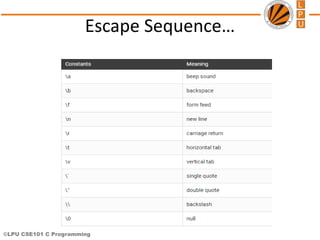
Escape Sequence…
©LPU CSE101 C Programming
cse101@lpu.co.in
Topic:
Expressions
and
operators
© LPU :: CSE101 C Programming
Chandni
Assistant Professor
School of EEE, LPU
Topic: Expressions, operators and its types
©LPU CSE101 C Programming
Expressions
• Expressions are the statements or the
instruction given to computer to perform
some operation.
– Expression to calculate speed of a car.
• Speed=distance/time
• Expressions in C are basically operators acting on
operands. Ex: a = b + c;
• An operand is an entity on which operation is to be
performed.
Example: addition of two numbers, 5+8, these numbers will be
operands.
©LPU CSE101 C Programming
Types of Expressions
• The type of expression depend upon the type of
operator used in the expression.
• It can be:
– Arithmetic operators.
3 + 6 = 9
4 * 2 = 8
– Relational or logical operators.
height_boy>=height_girl
– Increment and decrement operator.
count=count++
©LPU CSE101 C Programming
Operators
• Operator is the symbol which performs some
operations on the operands. 5+5=10
• Types of operators are:
1. Arithmetic operator
» Unary operator
» Binary operator
2. Relational operator
3. Logical operator
4. Assignment operator
5. Conditional operator
6. Bitwise operator
7. Special operator
©LPU CSE101 C Programming
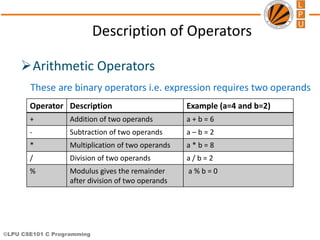
Description of Operators
Arithmetic Operators
These are binary operators i.e. expression requires two operands
Operator Description Example (a=4 and b=2)
+ Addition of two operands a + b = 6
- Subtraction of two operands a – b = 2
* Multiplication of two operands a * b = 8
/ Division of two operands a / b = 2
% Modulus gives the remainder
after division of two operands
a % b = 0
©LPU CSE101 C Programming
Arithmetic
Operators
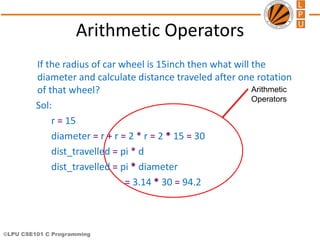
Arithmetic Operators
If the radius of car wheel is 15inch then what will the
diameter and calculate distance traveled after one rotation
of that wheel?
Sol:
r = 15
diameter = r + r = 2 * r = 2 * 15 = 30
dist_travelled = pi * d
dist_travelled = pi * diameter
= 3.14 * 30 = 94.2
©LPU CSE101 C Programming
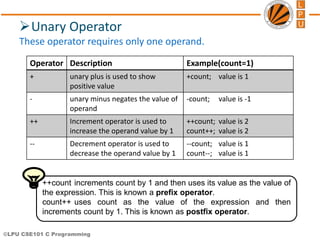
Unary Operator
These operator requires only one operand.
Operator Description Example(count=1)
+ unary plus is used to show
positive value
+count; value is 1
- unary minus negates the value of
operand
-count; value is -1
++ Increment operator is used to
increase the operand value by 1
++count; value is 2
count++; value is 2
-- Decrement operator is used to
decrease the operand value by 1
--count; value is 1
count--; value is 1
++count increments count by 1 and then uses its value as the value of
the expression. This is known a prefix operator.
count++ uses count as the value of the expression and then
increments count by 1. This is known as postfix operator.
©LPU CSE101 C Programming
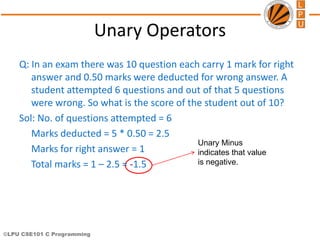
Unary Minus
indicates that value
is negative.
Unary Operators
Q: In an exam there was 10 question each carry 1 mark for right
answer and 0.50 marks were deducted for wrong answer. A
student attempted 6 questions and out of that 5 questions
were wrong. So what is the score of the student out of 10?
Sol: No. of questions attempted = 6
Marks deducted = 5 * 0.50 = 2.5
Marks for right answer = 1
Total marks = 1 – 2.5 = -1.5
©LPU CSE101 C Programming
counter++
++counter
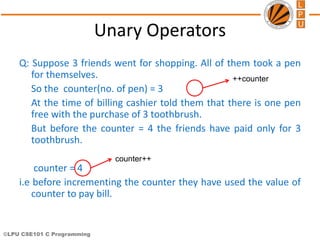
Unary Operators
Q: Suppose 3 friends went for shopping. All of them took a pen
for themselves.
So the counter(no. of pen) = 3
At the time of billing cashier told them that there is one pen
free with the purchase of 3 toothbrush.
But before the counter = 4 the friends have paid only for 3
toothbrush.
counter = 4
i.e before incrementing the counter they have used the value of
counter to pay bill.
©LPU CSE101 C Programming
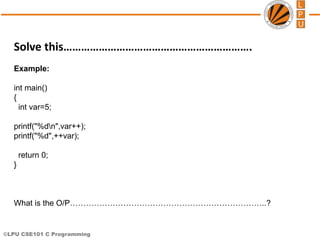
Solve this……………………………………………………….
Example:
int main()
{
int var=5;
printf("%dn",var++);
printf("%d",++var);
return 0;
}
What is the O/P………………………………………………………………..?
©LPU CSE101 C Programming
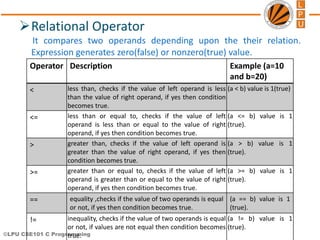
Relational Operator
It compares two operands depending upon the their relation.
Expression generates zero(false) or nonzero(true) value.
Operator Description Example (a=10
and b=20)
< less than, checks if the value of left operand is less
than the value of right operand, if yes then condition
becomes true.
(a < b) value is 1(true)
<= less than or equal to, checks if the value of left
operand is less than or equal to the value of right
operand, if yes then condition becomes true.
(a <= b) value is 1
(true).
> greater than, checks if the value of left operand is
greater than the value of right operand, if yes then
condition becomes true.
(a > b) value is 1
(true).
>= greater than or equal to, checks if the value of left
operand is greater than or equal to the value of right
operand, if yes then condition becomes true.
(a >= b) value is 1
(true).
== equality ,checks if the value of two operands is equal
or not, if yes then condition becomes true.
(a == b) value is 1
(true).
!= inequality, checks if the value of two operands is equal
or not, if values are not equal then condition becomes
true.
(a != b) value is 1
(true).
©LPU CSE101 C Programming
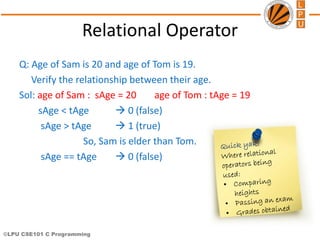
Relational Operator
Q: Age of Sam is 20 and age of Tom is 19.
Verify the relationship between their age.
Sol: age of Sam : sAge = 20 age of Tom : tAge = 19
sAge < tAge  0 (false)
sAge > tAge  1 (true)
So, Sam is elder than Tom.
sAge == tAge  0 (false)
©LPU CSE101 C Programming
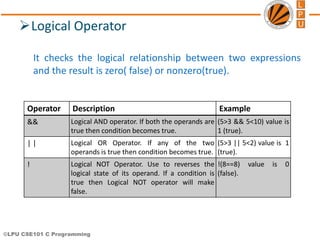
Logical Operator
It checks the logical relationship between two expressions
and the result is zero( false) or nonzero(true).
Operator Description Example
&& Logical AND operator. If both the operands are
true then condition becomes true.
(5>3 && 5<10) value is
1 (true).
| | Logical OR Operator. If any of the two
operands is true then condition becomes true.
(5>3 || 5<2) value is 1
(true).
! Logical NOT Operator. Use to reverses the
logical state of its operand. If a condition is
true then Logical NOT operator will make
false.
!(8==8) value is 0
(false).
©LPU CSE101 C Programming
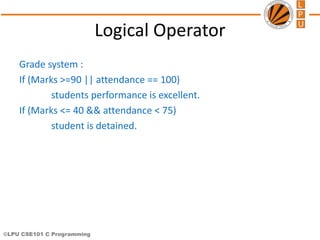
Logical Operator
Grade system :
If (Marks >=90 || attendance == 100)
students performance is excellent.
If (Marks <= 40 && attendance < 75)
student is detained.
©LPU CSE101 C Programming
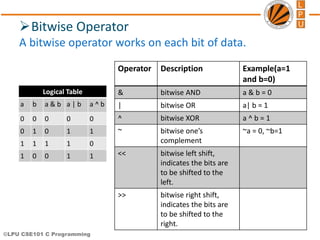
Bitwise Operator
A bitwise operator works on each bit of data.
Operator Description Example(a=1
and b=0)
& bitwise AND a & b = 0
| bitwise OR a| b = 1
^ bitwise XOR a ^ b = 1
~ bitwise one’s
complement
~a = 0, ~b=1
<< bitwise left shift,
indicates the bits are
to be shifted to the
left.
>> bitwise right shift,
indicates the bits are
to be shifted to the
right.
Logical Table
a b a & b a | b a ^ b
0 0 0 0 0
0 1 0 1 1
1 1 1 1 0
1 0 0 1 1
©LPU CSE101 C Programming
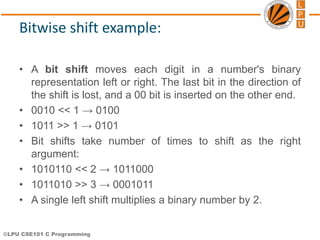
Bitwise shift example:
• A bit shift moves each digit in a number's binary
representation left or right. The last bit in the direction of
the shift is lost, and a 00 bit is inserted on the other end.
• 0010 << 1 → 0100
• 1011 >> 1 → 0101
• Bit shifts take number of times to shift as the right
argument:
• 1010110 << 2 → 1011000
• 1011010 >> 3 → 0001011
• A single left shift multiplies a binary number by 2.
©LPU CSE101 C Programming
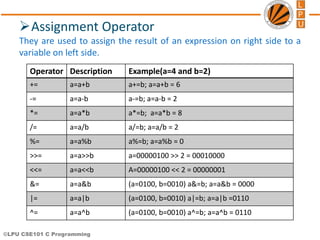
Assignment Operator
They are used to assign the result of an expression on right side to a
variable on left side.
Operator Description Example(a=4 and b=2)
+= a=a+b a+=b; a=a+b = 6
-= a=a-b a-=b; a=a-b = 2
*= a=a*b a*=b; a=a*b = 8
/= a=a/b a/=b; a=a/b = 2
%= a=a%b a%=b; a=a%b = 0
>>= a=a>>b a=00000100 >> 2 = 00010000
<<= a=a<<b A=00000100 << 2 = 00000001
&= a=a&b (a=0100, b=0010) a&=b; a=a&b = 0000
|= a=a|b (a=0100, b=0010) a|=b; a=a|b =0110
^= a=a^b (a=0100, b=0010) a^=b; a=a^b = 0110
©LPU CSE101 C Programming
Assignment Operator
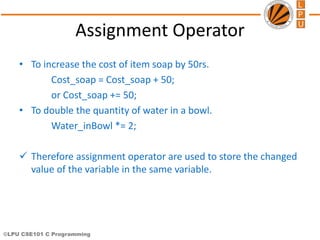
• To increase the cost of item soap by 50rs.
Cost_soap = Cost_soap + 50;
or Cost_soap += 50;
• To double the quantity of water in a bowl.
Water_inBowl *= 2;
 Therefore assignment operator are used to store the changed
value of the variable in the same variable.
©LPU CSE101 C Programming
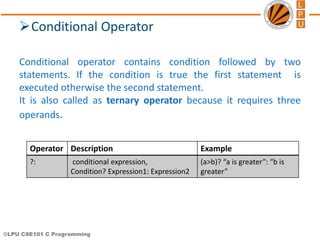
Conditional Operator
Conditional operator contains condition followed by two
statements. If the condition is true the first statement is
executed otherwise the second statement.
It is also called as ternary operator because it requires three
operands.
Operator Description Example
?: conditional expression,
Condition? Expression1: Expression2
(a>b)? “a is greater”: “b is
greater”
©LPU CSE101 C Programming
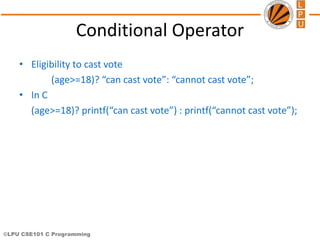
Conditional Operator
• Eligibility to cast vote
(age>=18)? “can cast vote”: “cannot cast vote”;
• In C
(age>=18)? printf(“can cast vote”) : printf(“cannot cast vote”);
©LPU CSE101 C Programming
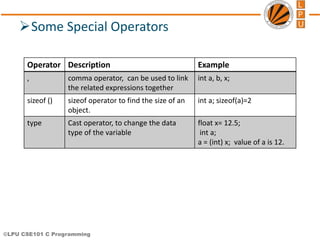
Some Special Operators
Operator Description Example
, comma operator, can be used to link
the related expressions together
int a, b, x;
sizeof () sizeof operator to find the size of an
object.
int a; sizeof(a)=2
type Cast operator, to change the data
type of the variable
float x= 12.5;
int a;
a = (int) x; value of a is 12.
©LPU CSE101 C Programming
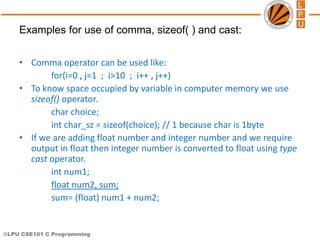
• Comma operator can be used like:
for(i=0 , j=1 ; i>10 ; i++ , j++)
• To know space occupied by variable in computer memory we use
sizeof() operator.
char choice;
int char_sz = sizeof(choice); // 1 because char is 1byte
• If we are adding float number and integer number and we require
output in float then integer number is converted to float using type
cast operator.
int num1;
float num2, sum;
sum= (float) num1 + num2;
Examples for use of comma, sizeof( ) and cast:
©LPU CSE101 C Programming
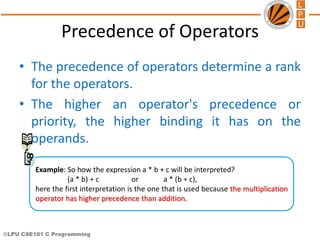
Precedence of Operators
Example: So how the expression a * b + c will be interpreted?
(a * b) + c or a * (b + c),
here the first interpretation is the one that is used because the multiplication
operator has higher precedence than addition.
• The precedence of operators determine a rank
for the operators.
• The higher an operator's precedence or
priority, the higher binding it has on the
operands.
©LPU CSE101 C Programming
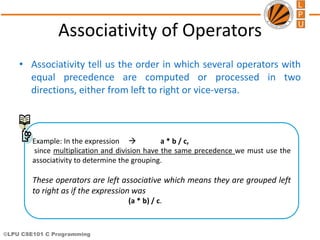
Associativity of Operators
• Associativity tell us the order in which several operators with
equal precedence are computed or processed in two
directions, either from left to right or vice-versa.
Example: In the expression  a * b / c,
since multiplication and division have the same precedence we must use the
associativity to determine the grouping.
These operators are left associative which means they are grouped left
to right as if the expression was
(a * b) / c.
©LPU CSE101 C Programming
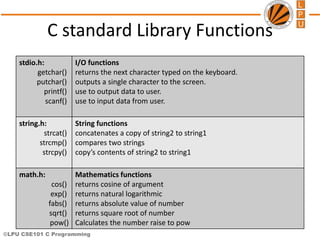
C standard Library Functions
stdio.h:
getchar()
putchar()
printf()
scanf()
I/O functions
returns the next character typed on the keyboard.
outputs a single character to the screen.
use to output data to user.
use to input data from user.
string.h:
strcat()
strcmp()
strcpy()
String functions
concatenates a copy of string2 to string1
compares two strings
copy’s contents of string2 to string1
math.h:
cos()
exp()
fabs()
sqrt()
pow()
Mathematics functions
returns cosine of argument
returns natural logarithmic
returns absolute value of number
returns square root of number
Calculates the number raise to pow
©LPU CSE101 C Programming
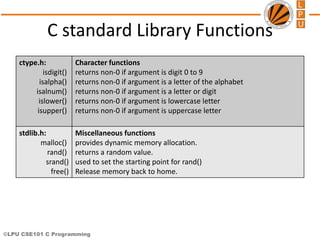
C standard Library Functions
ctype.h:
isdigit()
isalpha()
isalnum()
islower()
isupper()
Character functions
returns non-0 if argument is digit 0 to 9
returns non-0 if argument is a letter of the alphabet
returns non-0 if argument is a letter or digit
returns non-0 if argument is lowercase letter
returns non-0 if argument is uppercase letter
stdlib.h:
malloc()
rand()
srand()
free()
Miscellaneous functions
provides dynamic memory allocation.
returns a random value.
used to set the starting point for rand()
Release memory back to home.
©LPU CSE101 C Programming
cse101@lpu.co.in
Next Class: Control Structures

A798057369_21039_13_2018_Structure & Organization-Anima

  • 1.
    © LPU ::CSE101 C Programming Lecture #4 Chandni Assistant Professor School of EEE, LPU C character set, Identifiers and keywords, Data types
  • 2.
    ©LPU CSE101 CProgramming Language: its influence in our life • Let us look to what we are doing since our childhood, how did we learnt ENGLISH- A recap A B C D …… X Y Z RAT BAT CAT COW COW EAT GRASS ESSAY ON COW Characters Words Sentence Paragraph
  • 3.
    ©LPU CSE101 CProgramming C as a Language • Like every language C programming language requires basic building blocks to communicate with the computer. • So we need: – Character set – Words(keywords and identifiers) – Statement (instructions) – Program Characters Words Statements Programs
  • 4.
    ©LPU CSE101 CProgramming Character Set • The character set of C represents alphabet, digit or any symbol used to represent information. Types Character Set Uppercase Alphabets A, B, C, … Y, Z Lowercase Alphabets a, b, c, … y, z Digits 0, 1, 2, 3, … 9 Special Symbols ~ ‘ ! @ # % ^ & * ( ) _ - + = | { } [ ] : ; " ' < > , . ? / White spaces Single space, tab, new line.
  • 5.
    ©LPU CSE101 CProgramming Token • Smallest unit in a program/statement. • Every single element in a C Program is called Token. • It makes the compiler understand what is written in the program. • Example: main, printf , name,), etc. Tokens are broadly classified as: – Identifiers – Keywords – Constants – Variables – Strings – Operators – Special character
  • 6.
    ©LPU CSE101 CProgramming Identifiers • To identify things, we have some name given to them . • Used to give names to variables, functions, constant, and user defined data. • They are user-defined names and consist of a sequence of letters and digits
  • 7.
    ©LPU CSE101 CProgramming Rules for naming an Identifier 1. An identifier name is any combination of alphabets, digits or underscores. 2. The first character in the identifier name must be an alphabet or underscore. 3. No blanks or special symbol other than an underscore can be used in an identifier name. 4. Keywords are not allowed to be used as identifiers.
  • 8.
    ©LPU CSE101 CProgramming Some Identifiers Tool_spanner; tool_spanner; FORMULA1; engine_1; both are different Wrong identifiers name: 1_engine; break; @car-roof;
  • 9.
    ©LPU CSE101 CProgramming C Keywords • Keywords are the reserved words whose meaning pre- defined to the C compiler. • We cannot use these keywords as variables names. • Each keyword is meant to perform a specific function in a C program. • There are 32 keywords in C language. • All keywords are written in lowercase only Eg: The name of person can never be home, eat, sleep, run, etc because these words have some predefined meaning to perform some task.
  • 10.
    ©LPU CSE101 CProgramming List of C Keywords auto double int struct break else long switch case enum register typedef char extern return union const float short unsigned continue for signed void default goto sizeof volatile do if static while
  • 11.
    ©LPU CSE101 CProgramming Data Types • Data type means the type of value a variable will have. • It also defines memory space for a particular variable in computer. In C data type is broadly classified as: • Basic data types • Derived data types • User defined data types
  • 12.
    ©LPU CSE101 CProgramming Data Type Basic Data Type • Integer • Character • Float • Double Derived Data Type • Pointers • Functions • Array User Defined Data Type • Structure • Union • Enumeration *void: it holds no value and is generally used for specifying the type of function or what it returns. If the function has a void type, it means that the function will not return any value.
  • 13.
    ©LPU CSE101 CProgramming List of Data Types Type Size (bytes)* Minimal range char 1 -128 to 127 unsigned char 1 0 to 255 Int 2 or 4 -32768 to 32767 unsigned int 2 0 to 65535 short int 2 -32768 to 32767 unsigned short int 2 0 to 65535 long int 4 -2147483648 to 2147483647 unsigned long int 4 0 to 4294967295 float 4 3.4e-38 to 3.4e+38 with 6 digits of precision double 8 1.7e-308 to 1.7e+308 with 15 digits of precision long double 10 3.4e-4932 to 1.1e+4932 with 20 digits of precision
  • 14.
    ©LPU CSE101 CProgramming Integer • It is used to store positive and negative counting numbers, as well as zero. Ex: {...,-2,-1,0,1,2,...} • The type modifiers for the integer data type are: signed, unsigned, short, long • Signed types represent positive and negative numbers. • Unsigned represent zero and positive numbers only. • Long and short represent the range of integer number
  • 15.
    ©LPU CSE101 CProgramming Long Integer • Occupies 4 bytes in memory. • Format specifier is %ld. • Range is -2147483648 to 2147483647 long int radius=123456; long radius=123456; Short Integer • Occupies 2 bytes in memory. • Format specifier is %d or %i. • Range is -32768 to 32767. • By default int variable is short signed int. int cost=100; short int cost=100;
  • 16.
    ©LPU CSE101 CProgramming Float • Floating point numbers are real numbers that, unlike integers, may contain fractional parts of numbers, like 1.446, -112.972, 3.267e+27. • It is used to store real numbers with single precision i.e. a precision of 6 digits after decimal point.
  • 17.
    ©LPU CSE101 CProgramming • Format specifier is %f. • The type modifier for float are float, double and long double.
  • 18.
    ©LPU CSE101 CProgramming Type Float Double Long double Storage Size 4 byte 8 byte 10 byte Value range 3.4e-38 to 3.4e+38 1.7e-308 to 1.7e+308 3.4e-4932 to 1.1e+4932 Precision 6 decimal places 15 decimal places 20 decimal places Example pi=3.141592 3.141592741012573 3.14159265358979323846
  • 19.
    ©LPU CSE101 CProgramming Character • It stores a single character of data belonging to the C character set. • It occupies 1 byte of memory. • Format specifier is %c. • The range is 0 to 255 for unsigned char. • The range is -127 to 127 for signed char. • Each char type has an equivalent integer interpretation, ASCII value, so that a char is really a special kind of short integer. char choice=‘y’;
  • 20.
    ©LPU CSE101 CProgramming • It occupies 1 byte of memory. • Format specifier is %c. • The range is 0 to 255 for unsigned char. • The range is -127 to 127 for signed char. • Each char type has an equivalent integer interpretation, ASCII value, so that a char is really a special kind of short integer. char choice=‘y’;
  • 21.
    ©LPU CSE101 CProgramming Format Specifier • Specifies the format according to which the value will be printed on screen in C. Example: • %d : signed integer • %ld: long integer • %u : unsigned integer • %c : single character • %f : float • %s : string • %i : int
  • 22.
    ©LPU CSE101 CProgramming CONSTANTS • A constant is an entity whose value remain the same throughout the execution • A constant is a value or an identifier whose value cannot be altered in a program. For example: 1, 2.5, "C programming is easy“ • An identifier also can be defined as a constant. Ex: const double PI = 3.14 ( both are valid ) int const SIDE = 10; • It is considered best practice to define constants using only upper-case names.
  • 23.
    ©LPU CSE101 CProgramming CONSTANTS Types of constants: • –Integer constant • –Character constant • –Floating point constants (real constants) • –String constants
  • 24.
    ©LPU CSE101 CProgramming VARIABLES • A variable is nothing but a name given to a storage area that our programs can manipulate. • Variable is an entity whose value can change during execution of program Syntax: • data_type variable_name; Examples: • char name; • int x, y,z; • float number; • float n1, n2, sum;
  • 25.
    ©LPU CSE101 CProgramming Variable Initialization • Giving a value to a variable during the variable’s declaration is called “variable initialization.” Syntax: • type variable_name = value; • Example: • int count = 100; • float grade = 3.75; • char status = ‘S’;
  • 26.
    ©LPU CSE101 CProgramming Escape Sequence • C supports some character constants having a backslash in front of it. The lists of backslash characters have a specific meaning which is known to the compiler. They are also termed as "Escape Sequence".
  • 27.
    ©LPU CSE101 CProgramming Escape Sequence…
  • 28.
    ©LPU CSE101 CProgramming cse101@lpu.co.in Topic: Expressions and operators
  • 29.
    © LPU ::CSE101 C Programming Chandni Assistant Professor School of EEE, LPU Topic: Expressions, operators and its types
  • 30.
    ©LPU CSE101 CProgramming Expressions • Expressions are the statements or the instruction given to computer to perform some operation. – Expression to calculate speed of a car. • Speed=distance/time • Expressions in C are basically operators acting on operands. Ex: a = b + c; • An operand is an entity on which operation is to be performed. Example: addition of two numbers, 5+8, these numbers will be operands.
  • 31.
    ©LPU CSE101 CProgramming Types of Expressions • The type of expression depend upon the type of operator used in the expression. • It can be: – Arithmetic operators. 3 + 6 = 9 4 * 2 = 8 – Relational or logical operators. height_boy>=height_girl – Increment and decrement operator. count=count++
  • 32.
    ©LPU CSE101 CProgramming Operators • Operator is the symbol which performs some operations on the operands. 5+5=10 • Types of operators are: 1. Arithmetic operator » Unary operator » Binary operator 2. Relational operator 3. Logical operator 4. Assignment operator 5. Conditional operator 6. Bitwise operator 7. Special operator
  • 33.
    ©LPU CSE101 CProgramming Description of Operators Arithmetic Operators These are binary operators i.e. expression requires two operands Operator Description Example (a=4 and b=2) + Addition of two operands a + b = 6 - Subtraction of two operands a – b = 2 * Multiplication of two operands a * b = 8 / Division of two operands a / b = 2 % Modulus gives the remainder after division of two operands a % b = 0
  • 34.
    ©LPU CSE101 CProgramming Arithmetic Operators Arithmetic Operators If the radius of car wheel is 15inch then what will the diameter and calculate distance traveled after one rotation of that wheel? Sol: r = 15 diameter = r + r = 2 * r = 2 * 15 = 30 dist_travelled = pi * d dist_travelled = pi * diameter = 3.14 * 30 = 94.2
  • 35.
    ©LPU CSE101 CProgramming Unary Operator These operator requires only one operand. Operator Description Example(count=1) + unary plus is used to show positive value +count; value is 1 - unary minus negates the value of operand -count; value is -1 ++ Increment operator is used to increase the operand value by 1 ++count; value is 2 count++; value is 2 -- Decrement operator is used to decrease the operand value by 1 --count; value is 1 count--; value is 1 ++count increments count by 1 and then uses its value as the value of the expression. This is known a prefix operator. count++ uses count as the value of the expression and then increments count by 1. This is known as postfix operator.
  • 36.
    ©LPU CSE101 CProgramming Unary Minus indicates that value is negative. Unary Operators Q: In an exam there was 10 question each carry 1 mark for right answer and 0.50 marks were deducted for wrong answer. A student attempted 6 questions and out of that 5 questions were wrong. So what is the score of the student out of 10? Sol: No. of questions attempted = 6 Marks deducted = 5 * 0.50 = 2.5 Marks for right answer = 1 Total marks = 1 – 2.5 = -1.5
  • 37.
    ©LPU CSE101 CProgramming counter++ ++counter Unary Operators Q: Suppose 3 friends went for shopping. All of them took a pen for themselves. So the counter(no. of pen) = 3 At the time of billing cashier told them that there is one pen free with the purchase of 3 toothbrush. But before the counter = 4 the friends have paid only for 3 toothbrush. counter = 4 i.e before incrementing the counter they have used the value of counter to pay bill.
  • 38.
    ©LPU CSE101 CProgramming Solve this………………………………………………………. Example: int main() { int var=5; printf("%dn",var++); printf("%d",++var); return 0; } What is the O/P………………………………………………………………..?
  • 39.
    ©LPU CSE101 CProgramming Relational Operator It compares two operands depending upon the their relation. Expression generates zero(false) or nonzero(true) value. Operator Description Example (a=10 and b=20) < less than, checks if the value of left operand is less than the value of right operand, if yes then condition becomes true. (a < b) value is 1(true) <= less than or equal to, checks if the value of left operand is less than or equal to the value of right operand, if yes then condition becomes true. (a <= b) value is 1 (true). > greater than, checks if the value of left operand is greater than the value of right operand, if yes then condition becomes true. (a > b) value is 1 (true). >= greater than or equal to, checks if the value of left operand is greater than or equal to the value of right operand, if yes then condition becomes true. (a >= b) value is 1 (true). == equality ,checks if the value of two operands is equal or not, if yes then condition becomes true. (a == b) value is 1 (true). != inequality, checks if the value of two operands is equal or not, if values are not equal then condition becomes true. (a != b) value is 1 (true).
  • 40.
    ©LPU CSE101 CProgramming Relational Operator Q: Age of Sam is 20 and age of Tom is 19. Verify the relationship between their age. Sol: age of Sam : sAge = 20 age of Tom : tAge = 19 sAge < tAge  0 (false) sAge > tAge  1 (true) So, Sam is elder than Tom. sAge == tAge  0 (false)
  • 41.
    ©LPU CSE101 CProgramming Logical Operator It checks the logical relationship between two expressions and the result is zero( false) or nonzero(true). Operator Description Example && Logical AND operator. If both the operands are true then condition becomes true. (5>3 && 5<10) value is 1 (true). | | Logical OR Operator. If any of the two operands is true then condition becomes true. (5>3 || 5<2) value is 1 (true). ! Logical NOT Operator. Use to reverses the logical state of its operand. If a condition is true then Logical NOT operator will make false. !(8==8) value is 0 (false).
  • 42.
    ©LPU CSE101 CProgramming Logical Operator Grade system : If (Marks >=90 || attendance == 100) students performance is excellent. If (Marks <= 40 && attendance < 75) student is detained.
  • 43.
    ©LPU CSE101 CProgramming Bitwise Operator A bitwise operator works on each bit of data. Operator Description Example(a=1 and b=0) & bitwise AND a & b = 0 | bitwise OR a| b = 1 ^ bitwise XOR a ^ b = 1 ~ bitwise one’s complement ~a = 0, ~b=1 << bitwise left shift, indicates the bits are to be shifted to the left. >> bitwise right shift, indicates the bits are to be shifted to the right. Logical Table a b a & b a | b a ^ b 0 0 0 0 0 0 1 0 1 1 1 1 1 1 0 1 0 0 1 1
  • 44.
    ©LPU CSE101 CProgramming Bitwise shift example: • A bit shift moves each digit in a number's binary representation left or right. The last bit in the direction of the shift is lost, and a 00 bit is inserted on the other end. • 0010 << 1 → 0100 • 1011 >> 1 → 0101 • Bit shifts take number of times to shift as the right argument: • 1010110 << 2 → 1011000 • 1011010 >> 3 → 0001011 • A single left shift multiplies a binary number by 2.
  • 45.
    ©LPU CSE101 CProgramming Assignment Operator They are used to assign the result of an expression on right side to a variable on left side. Operator Description Example(a=4 and b=2) += a=a+b a+=b; a=a+b = 6 -= a=a-b a-=b; a=a-b = 2 *= a=a*b a*=b; a=a*b = 8 /= a=a/b a/=b; a=a/b = 2 %= a=a%b a%=b; a=a%b = 0 >>= a=a>>b a=00000100 >> 2 = 00010000 <<= a=a<<b A=00000100 << 2 = 00000001 &= a=a&b (a=0100, b=0010) a&=b; a=a&b = 0000 |= a=a|b (a=0100, b=0010) a|=b; a=a|b =0110 ^= a=a^b (a=0100, b=0010) a^=b; a=a^b = 0110
  • 46.
    ©LPU CSE101 CProgramming Assignment Operator • To increase the cost of item soap by 50rs. Cost_soap = Cost_soap + 50; or Cost_soap += 50; • To double the quantity of water in a bowl. Water_inBowl *= 2;  Therefore assignment operator are used to store the changed value of the variable in the same variable.
  • 47.
    ©LPU CSE101 CProgramming Conditional Operator Conditional operator contains condition followed by two statements. If the condition is true the first statement is executed otherwise the second statement. It is also called as ternary operator because it requires three operands. Operator Description Example ?: conditional expression, Condition? Expression1: Expression2 (a>b)? “a is greater”: “b is greater”
  • 48.
    ©LPU CSE101 CProgramming Conditional Operator • Eligibility to cast vote (age>=18)? “can cast vote”: “cannot cast vote”; • In C (age>=18)? printf(“can cast vote”) : printf(“cannot cast vote”);
  • 49.
    ©LPU CSE101 CProgramming Some Special Operators Operator Description Example , comma operator, can be used to link the related expressions together int a, b, x; sizeof () sizeof operator to find the size of an object. int a; sizeof(a)=2 type Cast operator, to change the data type of the variable float x= 12.5; int a; a = (int) x; value of a is 12.
  • 50.
    ©LPU CSE101 CProgramming • Comma operator can be used like: for(i=0 , j=1 ; i>10 ; i++ , j++) • To know space occupied by variable in computer memory we use sizeof() operator. char choice; int char_sz = sizeof(choice); // 1 because char is 1byte • If we are adding float number and integer number and we require output in float then integer number is converted to float using type cast operator. int num1; float num2, sum; sum= (float) num1 + num2; Examples for use of comma, sizeof( ) and cast:
  • 51.
    ©LPU CSE101 CProgramming Precedence of Operators Example: So how the expression a * b + c will be interpreted? (a * b) + c or a * (b + c), here the first interpretation is the one that is used because the multiplication operator has higher precedence than addition. • The precedence of operators determine a rank for the operators. • The higher an operator's precedence or priority, the higher binding it has on the operands.
  • 52.
    ©LPU CSE101 CProgramming Associativity of Operators • Associativity tell us the order in which several operators with equal precedence are computed or processed in two directions, either from left to right or vice-versa. Example: In the expression  a * b / c, since multiplication and division have the same precedence we must use the associativity to determine the grouping. These operators are left associative which means they are grouped left to right as if the expression was (a * b) / c.
  • 53.
    ©LPU CSE101 CProgramming
  • 54.
    ©LPU CSE101 CProgramming C standard Library Functions stdio.h: getchar() putchar() printf() scanf() I/O functions returns the next character typed on the keyboard. outputs a single character to the screen. use to output data to user. use to input data from user. string.h: strcat() strcmp() strcpy() String functions concatenates a copy of string2 to string1 compares two strings copy’s contents of string2 to string1 math.h: cos() exp() fabs() sqrt() pow() Mathematics functions returns cosine of argument returns natural logarithmic returns absolute value of number returns square root of number Calculates the number raise to pow
  • 55.
    ©LPU CSE101 CProgramming C standard Library Functions ctype.h: isdigit() isalpha() isalnum() islower() isupper() Character functions returns non-0 if argument is digit 0 to 9 returns non-0 if argument is a letter of the alphabet returns non-0 if argument is a letter or digit returns non-0 if argument is lowercase letter returns non-0 if argument is uppercase letter stdlib.h: malloc() rand() srand() free() Miscellaneous functions provides dynamic memory allocation. returns a random value. used to set the starting point for rand() Release memory back to home.
  • 56.
    ©LPU CSE101 CProgramming cse101@lpu.co.in Next Class: Control Structures