International Research Journal of Engineering and Technology (IRJET) e-ISSN: 2395-0056
Volume: 10 Issue: 06 | June 2023 www.irjet.net p-ISSN: 2395-0072
© 2023, IRJET | Impact Factor value: 8.226 | ISO 9001:2008 Certified Journal | Page 636
A Smart Assistance for Visually Impaired
Rohith Reddy Appidi1, Ummagani Avinash2
1Dept. Of Electronis and Communication Engineering, VNR Vignana Jyothi Institute of Engineering and Technology
Hyderabad, India
2Dept. Of Electronis and Communication Engineering, VNR Vignana Jyothi Institute of Engineering and Technology
Hyderabad, India
---------------------------------------------------------------------***---------------------------------------------------------------------
Abstract - Independent living is one of the major concerns
for people around the globe. But when it comes to people who
are visually challenged, they always relyonotherpeopleto get
their daily things done. In today's advanced technical
environment, the need for self-sufficiency is recognized in the
situation of visually impaired people who are socially
restricted. More than 90% of individuals with blindness and
low vision are mostly seen in developing countries. Visually
impaired people always need the help of others, and they rely
on others for essential needs. In this project, we developed a
system that uses a conglomeration of technologies like Object
detection, Speech Recognition, etc, to solve the problemsfaced
by blind people to a certain extent. It makes use of a camera
module that acts as a virtual eye for the visually impaired and
helps them recognize objects surrounding them. This system
also includes other features like searching Wikipedia and
sending emails. All the features are implemented using a
headset that provides voice assistanceforaneasierlifestyle for
the visually impaired. The whole system was developed in the
Python programming language.
Key Words: Visually Impaired, Text to Speech, Speech to
Text, SMTP Protocol, Wikipedia,API,ObjectDetection, YOLO,
COCO dataset.
1. INTRODUCTION
Human vision is a gift to humanity that allows us to visually
experience and interact with objectsacrosstheplanet. When
it comes to a person with a visual impairment, it becomes a
difficult situation that they must deal with every second of
their lives. It is the most prevalent type of disability
identified in people (about 285 million according to WHO).
Visual impairment has a significant impact on several
abilities related to vision: Daily activities (which necessitate
vision), Interaction over the Internet (which necessitate
interaction with others over the Internet), Emergencies
(which necessitate safety). A Smart Assistance Application
for the Visually Impaired is an application thathelpsvisually
impaired persons get more familiar with their surroundings
and recognize objects. We used a system that integrated
technologies like object recognition,speech-to-text,andtext-
to-voice conversion in this project to help blind individuals
overcome some of the challenges they confront. The object
detection method is used on the saved image, which aids in
the detection of an object in the image. To execute inference
on the image collected, the You Only Look Once Object
detection algorithm was employed. We used the weights of
the model trained on the COCO dataset to do inferences on
the captured image in this project. The COCO dataset, which
stands for Common Things in Context, isaimedtoillustratea
vast group of objects that humans see regularly. The COCO
Dataset contains 121,408 pictures, 883,331 object
annotations, and 80 objecttypes(categories).Anotheraspect
of our system is the ability to search Wikipedia and send
emails. The entire system was built using the Python
programming language.
2. PROPOSED METHODOLOGY
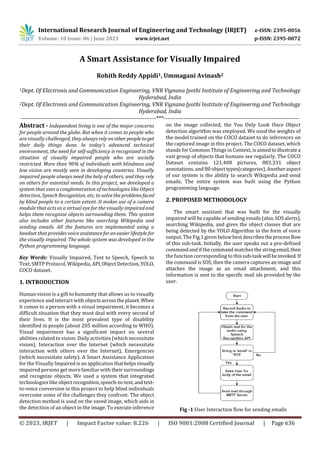
The smart assistant that was built for the visually
impaired will be capable of sending emails (also, SOS alerts),
searching Wikipedia, and gives the object classes that are
being detected by the YOLO Algorithm in the form of voice
output. The Fig.1 given belowbest describestheprocessflow
of this sub-task. Initially, the user speaks out a pre-defined
command and if the command matches the stringemail,then
the function corresponding to thissub-taskwillbeinvoked.If
the command is SOS, then the camera captures an image and
attaches the image as an email attachment, and this
information is sent to the specific mail ids provided by the
user.
Fig -1:User Interaction flow for sending emails
International Research Journal of Engineering and Technology (IRJET) e-ISSN: 2395-0056
Volume: 10 Issue: 06 | June 2023 www.irjet.net p-ISSN: 2395-0072
© 2023, IRJET | Impact Factor value: 8.226 | ISO 9001:2008 Certified Journal | Page 637
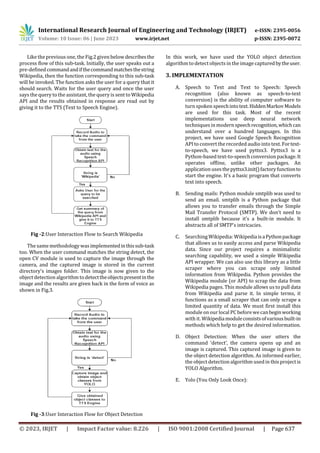
Like the previous one, the Fig.2 given below describesthe
process flow of this sub-task. Initially, the user speaks out a
pre-definedcommandandifthecommandmatchesthestring
Wikipedia, then the function corresponding to this sub-task
will be invoked. The function asks the user for a query that it
should search. Waits for the user query and once the user
says the query to the assistant, the query is sent to Wikipedia
API and the results obtained in response are read out by
giving it to the TTS (Text to Speech Engine).
Fig -2:User Interaction Flow to Search Wikipedia
The same methodology was implementedinthissub-task
too. When the user command matches the string detect, the
open CV module is used to capture the image through the
camera, and the captured image is stored in the current
directory’s images folder. This image is now given to the
object detection algorithm todetecttheobjectspresentinthe
image and the results are given back in the form of voice as
shown in Fig.3.
Fig -3:User Interaction Flow for Object Detection
In this work, we have used the YOLO object detection
algorithm to detect objects in the image capturedbytheuser.
3. IMPLEMENTATION
A. Speech to Text and Text to Speech: Speech
recognition (also known as speech-to-text
conversion) is the ability of computer software to
turnspoken speechintotext.HiddenMarkovModels
are used for this task. Most of the recent
implementations use deep neural network
techniques in modernspeechrecognition,whichcan
understand over a hundred languages. In this
project, we have used Google Speech Recognition
API to convert the recorded audio into text.Fortext-
to-speech, we have used pyttsx3. Pyttsx3 is a
Python-based text-to-speechconversion package.It
operates offline, unlike other packages. An
application usesthepyttsx3.init()factoryfunctionto
start the engine. It's a basic program that converts
text into speech.
B. Sending mails: Python module smtplib was used to
send an email. smtplib is a Python package that
allows you to transfer emails through the Simple
Mail Transfer Protocol (SMTP). We don't need to
install smtplib because it's a built-in module. It
abstracts all of SMTP's intricacies.
C. Searching Wikipedia: WikipediaisaPythonpackage
that allows us to easily access and parse Wikipedia
data. Since our project requires a minimalistic
searching capability, we used a simple Wikipedia
API wrapper. We can also use this library as a little
scraper where you can scrape only limited
information from Wikipedia. Python provides the
Wikipedia module (or API) to scrap the data from
Wikipedia pages. This module allows us to pull data
from Wikipedia and parse it. In simple terms, it
functions as a small scraper that can only scrape a
limited quantity of data. We must first install this
module on our local PC before wecanbeginworking
with it. Wikipediamoduleconsistsofvariousbuilt-in
methods which help to get the desired information.
D. Object Detection: When the user utters the
command ‘detect’, the camera opens up and an
image is captured. This captured image is given to
the object detection algorithm. As informed earlier,
the object detection algorithm used in this project is
YOLO Algorithm.
E. Yolo (You Only Look Once):
International Research Journal of Engineering and Technology (IRJET) e-ISSN: 2395-0056
Volume: 10 Issue: 06 | June 2023 www.irjet.net p-ISSN: 2395-0072
© 2023, IRJET | Impact Factor value: 8.226 | ISO 9001:2008 Certified Journal | Page 638
Fig -4:Yolo V3 Detection Process
There are four differentversionsoftheYOLOmodels
in use right now. Each version has its own set of
benefits and drawbacks. However, YOLO v3 is
currently the most widely used real-time object
detection method in the world. The YOLO v3 (YOU
LOOK ONLY ONCE) algorithm is one of the fastest
algorithms in use today. Fig.4shownabovegivesthe
process involved in YOLO V3. Even though it is not
the most precise method available, it is an excellent
choice when real-time object identification is
required without sacrificing too much precision.
YOLO v3 has 53 layers, but YOLO v2 has just 19.
Fig -5:Feature Extraction
As a result, the performance and accuracy of YOLO v3 are
significantly better than that of YOLO v2, but due to the
additional layers, the performance and accuracy of YOLO v3
are far better than that of YOLO v2. The obtained multi-scale
features are given to the detector from where we obtain the
output detections through 1x1 convolutions. Fig.5 shows the
detailed feature extractor architecture. There will be
convolutional downsampling layers and residual blocks
which were first introduced in ResNets. The multi-scale
features are now given to the detection head and the output
of the network would be based on the input image size. If the
input image size is 416x416, then the ultimate output of the
detectors will be [(52, 52, 3, (4 + 1 + 80)], (26, 26, 3, (4 + 1 +
80)], (13, 13, 3, (4 + 1 + 80)] if the number of classes is
80(COCO dataset consists of 80 object classes). The list's
three elementsrepresentdetectionsforthreedifferentscales.
The obtained object classes are given to the text-to-speech
engine to let the user know the objects present in the image.
4. RESULTS
All the results obtained in the project are in audio format.
Since, this project involves voice assistance,whichcannotbe
represented here, we have used our best way to present the
outputs in the form of console outputs.
A. Sending emails: This feature mainly contains
sending normal emails and also in case of any
inconvenient situation, the user can say SOS, which
triggers an alert to the mail recipient with an image
captured as the attachment. Fig.6 gives the console
output of this sub-task.
Fig -6:Console output for email sub-task
B. Searching Wikipedia: Fig.7 given below shows the
console output when a user uses the feature of
searching Wikipedia. The results are returned in
audio format.
International Research Journal of Engineering and Technology (IRJET) e-ISSN: 2395-0056
Volume: 10 Issue: 06 | June 2023 www.irjet.net p-ISSN: 2395-0072
© 2023, IRJET | Impact Factor value: 8.226 | ISO 9001:2008 Certified Journal | Page 639
Fig -7:Console output for Wikipedia sub-task
C. Detecting Objects:Thedetectionprocessandoutput
of the Yolo v3 network were explained already. For
the input image captured by the camera shown in
Fig.8, the network predictions are shown in Fig.9.
Fig -8:Captured Image
Fig -9:Output Predictions
As the user only requires audio output, we only give the
detected objects list to the user in the form of audio. The
console output is shown in the Fig.10.
Fig -10:Console output of Object detection sub-task
5. CONCLUSIONS
This project ‘A Smart Assistance Application for Visually
Impaired’ can hence help the visually impaired in getting
themselves familiar with their surroundings and capable of
sending emails and searching Wikipedia through voice
assistance. The YOLO Algorithm which was used in this
project has a mean average precision of about 57.9 mAP on
the COCO-Test dataset. The YOLO V3 network used in this
project was a proven real-time network capable ofdetecting
objects at a faster rate. The network takes about 29
milliseconds to obtain the inference for an input image. The
project can be improved by adding a greater number of
features. Instead of solely detecting and givingobjectclasses
to the user, we can addImagecaptioningtechniques wherein
the user will be able to get a brief description of what is in
the image.
REFERENCES
[1] S. Subhash, P. N. Srivatsa, S. Siddesh, A. Ullas, and B.
Santhosh, "Artificial Intelligence-basedVoiceAssistant,"
2020 Fourth World Conference on Smart Trends in
Systems, Security and Sustainability (WorldS4), 2020,
pp. 593-596, doi:
10.1109/WorldS450073.2020.9210344.
[2] Ankush Yadav, Aman Singh, Aniket Sharma, Ankur
Sindhu, Umang Rastogi, “Desktop Voice Assistant for
Visually Impaired” International Research Journal of
Engineering and Technology (IRJET), 2020,
doi:10.35940/ijrte.A2753.079220.
[3] P. Abima, R. Aslin Sushmitha, Sivagami, Dr. A.
Radhakrishnan, “Smart assistant for visually challenged
person”, International Research Journal of Engineering
and Technology (IRJET), 2020,
doi:12.35331/ijrte.A2753.172420.
International Research Journal of Engineering and Technology (IRJET) e-ISSN: 2395-0056
Volume: 10 Issue: 06 | June 2023 www.irjet.net p-ISSN: 2395-0072
© 2023, IRJET | Impact Factor value: 8.226 | ISO 9001:2008 Certified Journal | Page 640
[4] E. Marvin, "Digital Assistant for the Visually Impaired,"
2020 International Conference on Artificial Intelligence
in Information and Communication (ICAIIC), 2020, pp.
723-728, doi: 10.1109/ICAIIC48513.2020.9065191.
[5] S. A. Sabab and M. H. Ashmafee, "Blind Reader: An
intelligent assistant for blind," 2016 19th International
Conference on Computer and Information Technology
(ICCIT), 2016, pp. 229-234, doi:
10.1109/ICCITECHN.2016.7860200.
[6] Redmon, J., & Farhadi, A. (2018). YOLO V3: An
Incremental Approach. Computer Vision and Pattern
Recognition. ArXiv.Org. Published.
https://arxiv.org/abs/1804.02767v1.

A Smart Assistance for Visually Impaired

  • 1.
    International Research Journalof Engineering and Technology (IRJET) e-ISSN: 2395-0056 Volume: 10 Issue: 06 | June 2023 www.irjet.net p-ISSN: 2395-0072 © 2023, IRJET | Impact Factor value: 8.226 | ISO 9001:2008 Certified Journal | Page 636 A Smart Assistance for Visually Impaired Rohith Reddy Appidi1, Ummagani Avinash2 1Dept. Of Electronis and Communication Engineering, VNR Vignana Jyothi Institute of Engineering and Technology Hyderabad, India 2Dept. Of Electronis and Communication Engineering, VNR Vignana Jyothi Institute of Engineering and Technology Hyderabad, India ---------------------------------------------------------------------***--------------------------------------------------------------------- Abstract - Independent living is one of the major concerns for people around the globe. But when it comes to people who are visually challenged, they always relyonotherpeopleto get their daily things done. In today's advanced technical environment, the need for self-sufficiency is recognized in the situation of visually impaired people who are socially restricted. More than 90% of individuals with blindness and low vision are mostly seen in developing countries. Visually impaired people always need the help of others, and they rely on others for essential needs. In this project, we developed a system that uses a conglomeration of technologies like Object detection, Speech Recognition, etc, to solve the problemsfaced by blind people to a certain extent. It makes use of a camera module that acts as a virtual eye for the visually impaired and helps them recognize objects surrounding them. This system also includes other features like searching Wikipedia and sending emails. All the features are implemented using a headset that provides voice assistanceforaneasierlifestyle for the visually impaired. The whole system was developed in the Python programming language. Key Words: Visually Impaired, Text to Speech, Speech to Text, SMTP Protocol, Wikipedia,API,ObjectDetection, YOLO, COCO dataset. 1. INTRODUCTION Human vision is a gift to humanity that allows us to visually experience and interact with objectsacrosstheplanet. When it comes to a person with a visual impairment, it becomes a difficult situation that they must deal with every second of their lives. It is the most prevalent type of disability identified in people (about 285 million according to WHO). Visual impairment has a significant impact on several abilities related to vision: Daily activities (which necessitate vision), Interaction over the Internet (which necessitate interaction with others over the Internet), Emergencies (which necessitate safety). A Smart Assistance Application for the Visually Impaired is an application thathelpsvisually impaired persons get more familiar with their surroundings and recognize objects. We used a system that integrated technologies like object recognition,speech-to-text,andtext- to-voice conversion in this project to help blind individuals overcome some of the challenges they confront. The object detection method is used on the saved image, which aids in the detection of an object in the image. To execute inference on the image collected, the You Only Look Once Object detection algorithm was employed. We used the weights of the model trained on the COCO dataset to do inferences on the captured image in this project. The COCO dataset, which stands for Common Things in Context, isaimedtoillustratea vast group of objects that humans see regularly. The COCO Dataset contains 121,408 pictures, 883,331 object annotations, and 80 objecttypes(categories).Anotheraspect of our system is the ability to search Wikipedia and send emails. The entire system was built using the Python programming language. 2. PROPOSED METHODOLOGY The smart assistant that was built for the visually impaired will be capable of sending emails (also, SOS alerts), searching Wikipedia, and gives the object classes that are being detected by the YOLO Algorithm in the form of voice output. The Fig.1 given belowbest describestheprocessflow of this sub-task. Initially, the user speaks out a pre-defined command and if the command matches the stringemail,then the function corresponding to thissub-taskwillbeinvoked.If the command is SOS, then the camera captures an image and attaches the image as an email attachment, and this information is sent to the specific mail ids provided by the user. Fig -1:User Interaction flow for sending emails
  • 2.
    International Research Journalof Engineering and Technology (IRJET) e-ISSN: 2395-0056 Volume: 10 Issue: 06 | June 2023 www.irjet.net p-ISSN: 2395-0072 © 2023, IRJET | Impact Factor value: 8.226 | ISO 9001:2008 Certified Journal | Page 637 Like the previous one, the Fig.2 given below describesthe process flow of this sub-task. Initially, the user speaks out a pre-definedcommandandifthecommandmatchesthestring Wikipedia, then the function corresponding to this sub-task will be invoked. The function asks the user for a query that it should search. Waits for the user query and once the user says the query to the assistant, the query is sent to Wikipedia API and the results obtained in response are read out by giving it to the TTS (Text to Speech Engine). Fig -2:User Interaction Flow to Search Wikipedia The same methodology was implementedinthissub-task too. When the user command matches the string detect, the open CV module is used to capture the image through the camera, and the captured image is stored in the current directory’s images folder. This image is now given to the object detection algorithm todetecttheobjectspresentinthe image and the results are given back in the form of voice as shown in Fig.3. Fig -3:User Interaction Flow for Object Detection In this work, we have used the YOLO object detection algorithm to detect objects in the image capturedbytheuser. 3. IMPLEMENTATION A. Speech to Text and Text to Speech: Speech recognition (also known as speech-to-text conversion) is the ability of computer software to turnspoken speechintotext.HiddenMarkovModels are used for this task. Most of the recent implementations use deep neural network techniques in modernspeechrecognition,whichcan understand over a hundred languages. In this project, we have used Google Speech Recognition API to convert the recorded audio into text.Fortext- to-speech, we have used pyttsx3. Pyttsx3 is a Python-based text-to-speechconversion package.It operates offline, unlike other packages. An application usesthepyttsx3.init()factoryfunctionto start the engine. It's a basic program that converts text into speech. B. Sending mails: Python module smtplib was used to send an email. smtplib is a Python package that allows you to transfer emails through the Simple Mail Transfer Protocol (SMTP). We don't need to install smtplib because it's a built-in module. It abstracts all of SMTP's intricacies. C. Searching Wikipedia: WikipediaisaPythonpackage that allows us to easily access and parse Wikipedia data. Since our project requires a minimalistic searching capability, we used a simple Wikipedia API wrapper. We can also use this library as a little scraper where you can scrape only limited information from Wikipedia. Python provides the Wikipedia module (or API) to scrap the data from Wikipedia pages. This module allows us to pull data from Wikipedia and parse it. In simple terms, it functions as a small scraper that can only scrape a limited quantity of data. We must first install this module on our local PC before wecanbeginworking with it. Wikipediamoduleconsistsofvariousbuilt-in methods which help to get the desired information. D. Object Detection: When the user utters the command ‘detect’, the camera opens up and an image is captured. This captured image is given to the object detection algorithm. As informed earlier, the object detection algorithm used in this project is YOLO Algorithm. E. Yolo (You Only Look Once):
  • 3.
    International Research Journalof Engineering and Technology (IRJET) e-ISSN: 2395-0056 Volume: 10 Issue: 06 | June 2023 www.irjet.net p-ISSN: 2395-0072 © 2023, IRJET | Impact Factor value: 8.226 | ISO 9001:2008 Certified Journal | Page 638 Fig -4:Yolo V3 Detection Process There are four differentversionsoftheYOLOmodels in use right now. Each version has its own set of benefits and drawbacks. However, YOLO v3 is currently the most widely used real-time object detection method in the world. The YOLO v3 (YOU LOOK ONLY ONCE) algorithm is one of the fastest algorithms in use today. Fig.4shownabovegivesthe process involved in YOLO V3. Even though it is not the most precise method available, it is an excellent choice when real-time object identification is required without sacrificing too much precision. YOLO v3 has 53 layers, but YOLO v2 has just 19. Fig -5:Feature Extraction As a result, the performance and accuracy of YOLO v3 are significantly better than that of YOLO v2, but due to the additional layers, the performance and accuracy of YOLO v3 are far better than that of YOLO v2. The obtained multi-scale features are given to the detector from where we obtain the output detections through 1x1 convolutions. Fig.5 shows the detailed feature extractor architecture. There will be convolutional downsampling layers and residual blocks which were first introduced in ResNets. The multi-scale features are now given to the detection head and the output of the network would be based on the input image size. If the input image size is 416x416, then the ultimate output of the detectors will be [(52, 52, 3, (4 + 1 + 80)], (26, 26, 3, (4 + 1 + 80)], (13, 13, 3, (4 + 1 + 80)] if the number of classes is 80(COCO dataset consists of 80 object classes). The list's three elementsrepresentdetectionsforthreedifferentscales. The obtained object classes are given to the text-to-speech engine to let the user know the objects present in the image. 4. RESULTS All the results obtained in the project are in audio format. Since, this project involves voice assistance,whichcannotbe represented here, we have used our best way to present the outputs in the form of console outputs. A. Sending emails: This feature mainly contains sending normal emails and also in case of any inconvenient situation, the user can say SOS, which triggers an alert to the mail recipient with an image captured as the attachment. Fig.6 gives the console output of this sub-task. Fig -6:Console output for email sub-task B. Searching Wikipedia: Fig.7 given below shows the console output when a user uses the feature of searching Wikipedia. The results are returned in audio format.
  • 4.
    International Research Journalof Engineering and Technology (IRJET) e-ISSN: 2395-0056 Volume: 10 Issue: 06 | June 2023 www.irjet.net p-ISSN: 2395-0072 © 2023, IRJET | Impact Factor value: 8.226 | ISO 9001:2008 Certified Journal | Page 639 Fig -7:Console output for Wikipedia sub-task C. Detecting Objects:Thedetectionprocessandoutput of the Yolo v3 network were explained already. For the input image captured by the camera shown in Fig.8, the network predictions are shown in Fig.9. Fig -8:Captured Image Fig -9:Output Predictions As the user only requires audio output, we only give the detected objects list to the user in the form of audio. The console output is shown in the Fig.10. Fig -10:Console output of Object detection sub-task 5. CONCLUSIONS This project ‘A Smart Assistance Application for Visually Impaired’ can hence help the visually impaired in getting themselves familiar with their surroundings and capable of sending emails and searching Wikipedia through voice assistance. The YOLO Algorithm which was used in this project has a mean average precision of about 57.9 mAP on the COCO-Test dataset. The YOLO V3 network used in this project was a proven real-time network capable ofdetecting objects at a faster rate. The network takes about 29 milliseconds to obtain the inference for an input image. The project can be improved by adding a greater number of features. Instead of solely detecting and givingobjectclasses to the user, we can addImagecaptioningtechniques wherein the user will be able to get a brief description of what is in the image. REFERENCES [1] S. Subhash, P. N. Srivatsa, S. Siddesh, A. Ullas, and B. Santhosh, "Artificial Intelligence-basedVoiceAssistant," 2020 Fourth World Conference on Smart Trends in Systems, Security and Sustainability (WorldS4), 2020, pp. 593-596, doi: 10.1109/WorldS450073.2020.9210344. [2] Ankush Yadav, Aman Singh, Aniket Sharma, Ankur Sindhu, Umang Rastogi, “Desktop Voice Assistant for Visually Impaired” International Research Journal of Engineering and Technology (IRJET), 2020, doi:10.35940/ijrte.A2753.079220. [3] P. Abima, R. Aslin Sushmitha, Sivagami, Dr. A. Radhakrishnan, “Smart assistant for visually challenged person”, International Research Journal of Engineering and Technology (IRJET), 2020, doi:12.35331/ijrte.A2753.172420.
  • 5.
    International Research Journalof Engineering and Technology (IRJET) e-ISSN: 2395-0056 Volume: 10 Issue: 06 | June 2023 www.irjet.net p-ISSN: 2395-0072 © 2023, IRJET | Impact Factor value: 8.226 | ISO 9001:2008 Certified Journal | Page 640 [4] E. Marvin, "Digital Assistant for the Visually Impaired," 2020 International Conference on Artificial Intelligence in Information and Communication (ICAIIC), 2020, pp. 723-728, doi: 10.1109/ICAIIC48513.2020.9065191. [5] S. A. Sabab and M. H. Ashmafee, "Blind Reader: An intelligent assistant for blind," 2016 19th International Conference on Computer and Information Technology (ICCIT), 2016, pp. 229-234, doi: 10.1109/ICCITECHN.2016.7860200. [6] Redmon, J., & Farhadi, A. (2018). YOLO V3: An Incremental Approach. Computer Vision and Pattern Recognition. ArXiv.Org. Published. https://arxiv.org/abs/1804.02767v1.