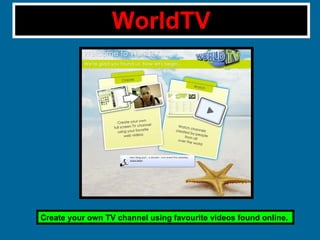
WorldTV Create your own TV channel using favourite videos found online.
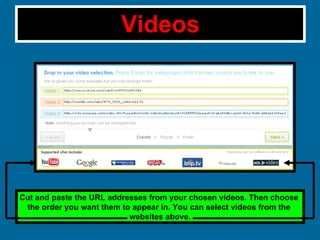
Videos Cut and paste the URL addresses from your chosen videos. Then choose  the order you want them to appear in. You can select videos from the  websites above.
Logos Choose a name for your television channel. Choose from a number of different styles for your channel title.
Control your video with the toolbar at the bottom of the  screen. Type your email address to finish your channel. Finishing your Setup
Editing your Channel Personalize your channel and the videos in it.
TV Editor Search and add more videos to your channel. Add Webcam to your website Use a web phone to broadcast to your channel viewers
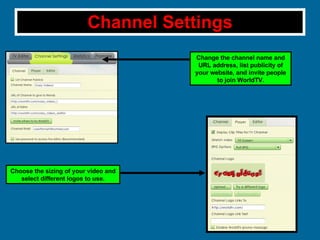
Channel Settings Change the channel name and URL address, list publicity of your website, and invite people to join WorldTV. Choose the sizing of your video and select different logos to use.
Channel Settings Pt.2 Observe how many users have viewed your videos over the past days/weeks and months. Also see how many new users are checking out your website. You have now completed your television channel website!

A guide to using WorldTV

  • 1.
    WorldTV Create yourown TV channel using favourite videos found online.
  • 2.
    Videos Cut andpaste the URL addresses from your chosen videos. Then choose the order you want them to appear in. You can select videos from the websites above.
  • 3.
    Logos Choose aname for your television channel. Choose from a number of different styles for your channel title.
  • 4.
    Control your videowith the toolbar at the bottom of the screen. Type your email address to finish your channel. Finishing your Setup
  • 5.
    Editing your ChannelPersonalize your channel and the videos in it.
  • 6.
    TV Editor Searchand add more videos to your channel. Add Webcam to your website Use a web phone to broadcast to your channel viewers
  • 7.
    Channel Settings Changethe channel name and URL address, list publicity of your website, and invite people to join WorldTV. Choose the sizing of your video and select different logos to use.
  • 8.
    Channel Settings Pt.2Observe how many users have viewed your videos over the past days/weeks and months. Also see how many new users are checking out your website. You have now completed your television channel website!