View Complete Web Developer course details at www.edureka.co/complete-web-developer
A Complete Solution for WEB Development
Slide 2 www.edureka.co/complete-web-developerSlide 2Slide 2Slide 2
What will you learn today?
 Introduction to world of Web Development
 Getting Started with Twitter Bootstrap 3
 Working with Twitter Bootstrap 3
 Carousel
 Fixed Navigation Bar
 Grids
 Font-Awesome Icons
 Thumbnails
 Hands-On
Slide 3 www.edureka.co/complete-web-developerSlide 3Slide 3Slide 3
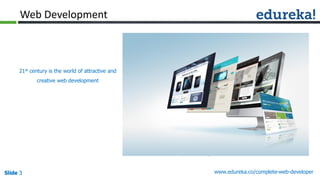
Web Development
21st century is the world of attractive and
creative web development
Slide 4 www.edureka.co/complete-web-developerSlide 4Slide 4Slide 4
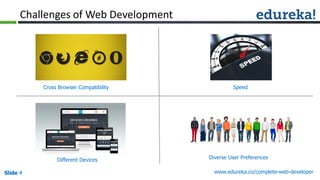
Challenges of Web Development
Cross Browser Compatibility Speed
Diverse User PreferencesDifferent Devices
Slide 5 www.edureka.co/complete-web-developerSlide 5
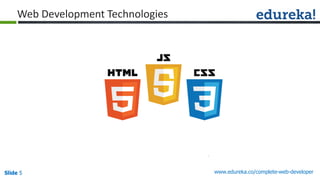
Web Development Technologies
Slide 6 www.edureka.co/complete-web-developerSlide 6
Web Development Technologies
Can we
combine all
of them ?
Slide 7 www.edureka.co/complete-web-developerSlide 7
Somebody has already done that - Bootstrap
So you don’t have to start from scratch …
Slide 8 www.edureka.co/complete-web-developerSlide 8
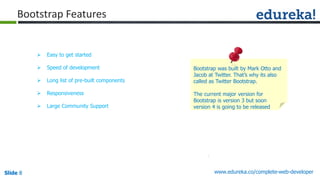
Bootstrap Features
 Easy to get started
 Speed of development
 Long list of pre-built components
 Responsiveness
 Large Community Support
Bootstrap was built by Mark Otto and
Jacob at Twitter. That’s why its also
called as Twitter Bootstrap.
The current major version for
Bootstrap is version 3 but soon
version 4 is going to be released
Slide 9 www.edureka.co/complete-web-developerSlide 9
Hacking the Bootstrap
Next we are going to see how to use following Bootstrap components:
 Carousel
 Fixed Navigation Bar
 Bootstrap Grids
 Thumbnails
 Font Awesome Icons
Slide 10 www.edureka.co/complete-web-developerSlide 10
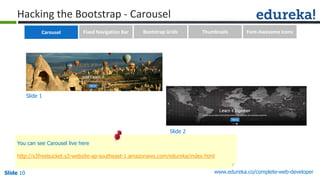
Hacking the Bootstrap - Carousel
Slide 1
Slide 2
You can see Carousel live here
http://s3freebucket.s3-website-ap-southeast-1.amazonaws.com/edureka/index.html
Carousel Fixed Navigation Bar Bootstrap Grids Thumbnails Font-Awesome Icons
Slide 11 www.edureka.co/testing-with-selenium-webdriver
Selenium Suite – Selenium Grid
 Selenium-Grid runs multiple
tests at the same time
against different machines
running different browsers
and operating systems
Node 1: IE
on Windows
Node 2:
Android
Node 3: Safari
on Mac
Node 4: Firefox
in Ubuntu
Let’s create a Carousel
Slide 12 www.edureka.co/complete-web-developerSlide 12
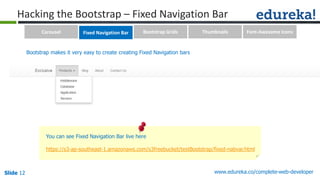
Hacking the Bootstrap – Fixed Navigation Bar
You can see Fixed Navigation Bar live here
https://s3-ap-southeast-1.amazonaws.com/s3freebucket/testBootstrap/fixed-nabvar.html
Bootstrap makes it very easy to create creating Fixed Navigation bars
Carousel Fixed Navigation Bar Bootstrap Grids Thumbnails Font-Awesome Icons
Slide 13 www.edureka.co/testing-with-selenium-webdriver
Selenium Suite – Selenium Grid
 Selenium-Grid runs multiple
tests at the same time
against different machines
running different browsers
and operating systems
Node 1: IE
on Windows
Node 2:
Android
Node 3: Safari
on Mac
Node 4: Firefox
in Ubuntu
Let’s create Fixed Navigation bar
Slide 14 www.edureka.co/complete-web-developerSlide 14
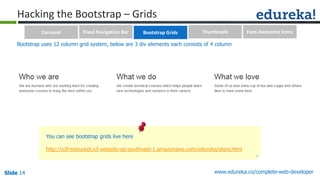
Hacking the Bootstrap – Grids
You can see bootstrap grids live here
http://s3freebucket.s3-website-ap-southeast-1.amazonaws.com/edureka/story.html
Bootstrap uses 12 column grid system, below are 3 div elements each consists of 4 column
Carousel Fixed Navigation Bar Bootstrap Grids Thumbnails Font-Awesome Icons
Slide 15 www.edureka.co/testing-with-selenium-webdriver
Selenium Suite – Selenium Grid
 Selenium-Grid runs multiple
tests at the same time
against different machines
running different browsers
and operating systems
Node 1: IE
on Windows
Node 2:
Android
Node 3: Safari
on Mac
Node 4: Firefox
in Ubuntu
Let’s use bootstrap grids
Slide 16 www.edureka.co/complete-web-developerSlide 16
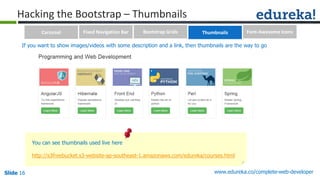
Hacking the Bootstrap – Thumbnails
You can see thumbnails used live here
http://s3freebucket.s3-website-ap-southeast-1.amazonaws.com/edureka/courses.html
If you want to show images/videos with some description and a link, then thumbnails are the way to go
Carousel Fixed Navigation Bar Bootstrap Grids Thumbnails Font-Awesome Icons
Slide 17 www.edureka.co/testing-with-selenium-webdriver
Selenium Suite – Selenium Grid
 Selenium-Grid runs multiple
tests at the same time
against different machines
running different browsers
and operating systems
Node 1: IE
on Windows
Node 2:
Android
Node 3: Safari
on Mac
Node 4: Firefox
in Ubuntu
Let’s use Thumbnails
Slide 18 www.edureka.co/complete-web-developerSlide 18
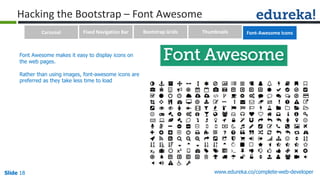
Hacking the Bootstrap – Font Awesome
Font Awesome makes it easy to display icons on
the web pages.
Rather than using images, font-awesome icons are
preferred as they take less time to load
Carousel Fixed Navigation Bar Bootstrap Grids Thumbnails Font-Awesome Icons
Slide 19 www.edureka.co/complete-web-developerSlide 19
Hacking the Bootstrap – Font Awesome
You can see font awesome icons used live here
http://s3freebucket.s3-website-ap-southeast-1.amazonaws.com/edureka/index.html
Below we have used font-awesome icons for linkedIn, twitter, facebook, youtube and google plus
Carousel Fixed Navigation Bar Bootstrap Grids Thumbnails Font-Awesome Icons
Slide 20 www.edureka.co/testing-with-selenium-webdriver
Selenium Suite – Selenium Grid
 Selenium-Grid runs multiple
tests at the same time
against different machines
running different browsers
and operating systems
Node 1: IE
on Windows
Node 2:
Android
Node 3: Safari
on Mac
Node 4: Firefox
in Ubuntu
Let’s use Font Awesome Icons
Slide 21 www.edureka.co/complete-web-developerSlide 21Slide 21Slide 21
Certification
Get certified in The Complete Web Developer Course by Edureka
Edureka's The Complete Web Developer course:
• It starts from the basics of web development like HTML elements, styling the HTML elements with CSS, using newly introduced
features in HTML5 and CSS3 to deploying the websites on Amazon Simple Storage Service.
• You will learn how to use Twitter Bootstrap 3 components like Carousel, ScrollSpy, Fixed Navigation Bar, Accordion, Jumbotron,
Thumbnails, Forms, Modals, Bootstrap tour etc.
• Online Live Courses: 30 hours
• Assignments: 25 hours
• Project: 20 hours
• Lifetime Access + 24 X 7 Support
Go to www.edureka.co/complete-web-developer
Slide 22 www.edureka.co/complete-web-developerSlide 22
Survey
Your feedback is vital for us, be it a compliment, a suggestion or a complaint. It helps us to
make your experience better!
Please spare few minutes to take the survey after the webinar.
Thank You …
Questions/Queries/Feedback
Recording and presentation will be made available to you within 24 hours

A Complete Solution for Web Development

  • 1.
    View Complete WebDeveloper course details at www.edureka.co/complete-web-developer A Complete Solution for WEB Development
  • 2.
    Slide 2 www.edureka.co/complete-web-developerSlide2Slide 2Slide 2 What will you learn today?  Introduction to world of Web Development  Getting Started with Twitter Bootstrap 3  Working with Twitter Bootstrap 3  Carousel  Fixed Navigation Bar  Grids  Font-Awesome Icons  Thumbnails  Hands-On
  • 3.
    Slide 3 www.edureka.co/complete-web-developerSlide3Slide 3Slide 3 Web Development 21st century is the world of attractive and creative web development
  • 4.
    Slide 4 www.edureka.co/complete-web-developerSlide4Slide 4Slide 4 Challenges of Web Development Cross Browser Compatibility Speed Diverse User PreferencesDifferent Devices
  • 5.
  • 6.
    Slide 6 www.edureka.co/complete-web-developerSlide6 Web Development Technologies Can we combine all of them ?
  • 7.
    Slide 7 www.edureka.co/complete-web-developerSlide7 Somebody has already done that - Bootstrap So you don’t have to start from scratch …
  • 8.
    Slide 8 www.edureka.co/complete-web-developerSlide8 Bootstrap Features  Easy to get started  Speed of development  Long list of pre-built components  Responsiveness  Large Community Support Bootstrap was built by Mark Otto and Jacob at Twitter. That’s why its also called as Twitter Bootstrap. The current major version for Bootstrap is version 3 but soon version 4 is going to be released
  • 9.
    Slide 9 www.edureka.co/complete-web-developerSlide9 Hacking the Bootstrap Next we are going to see how to use following Bootstrap components:  Carousel  Fixed Navigation Bar  Bootstrap Grids  Thumbnails  Font Awesome Icons
  • 10.
    Slide 10 www.edureka.co/complete-web-developerSlide10 Hacking the Bootstrap - Carousel Slide 1 Slide 2 You can see Carousel live here http://s3freebucket.s3-website-ap-southeast-1.amazonaws.com/edureka/index.html Carousel Fixed Navigation Bar Bootstrap Grids Thumbnails Font-Awesome Icons
  • 11.
    Slide 11 www.edureka.co/testing-with-selenium-webdriver SeleniumSuite – Selenium Grid  Selenium-Grid runs multiple tests at the same time against different machines running different browsers and operating systems Node 1: IE on Windows Node 2: Android Node 3: Safari on Mac Node 4: Firefox in Ubuntu Let’s create a Carousel
  • 12.
    Slide 12 www.edureka.co/complete-web-developerSlide12 Hacking the Bootstrap – Fixed Navigation Bar You can see Fixed Navigation Bar live here https://s3-ap-southeast-1.amazonaws.com/s3freebucket/testBootstrap/fixed-nabvar.html Bootstrap makes it very easy to create creating Fixed Navigation bars Carousel Fixed Navigation Bar Bootstrap Grids Thumbnails Font-Awesome Icons
  • 13.
    Slide 13 www.edureka.co/testing-with-selenium-webdriver SeleniumSuite – Selenium Grid  Selenium-Grid runs multiple tests at the same time against different machines running different browsers and operating systems Node 1: IE on Windows Node 2: Android Node 3: Safari on Mac Node 4: Firefox in Ubuntu Let’s create Fixed Navigation bar
  • 14.
    Slide 14 www.edureka.co/complete-web-developerSlide14 Hacking the Bootstrap – Grids You can see bootstrap grids live here http://s3freebucket.s3-website-ap-southeast-1.amazonaws.com/edureka/story.html Bootstrap uses 12 column grid system, below are 3 div elements each consists of 4 column Carousel Fixed Navigation Bar Bootstrap Grids Thumbnails Font-Awesome Icons
  • 15.
    Slide 15 www.edureka.co/testing-with-selenium-webdriver SeleniumSuite – Selenium Grid  Selenium-Grid runs multiple tests at the same time against different machines running different browsers and operating systems Node 1: IE on Windows Node 2: Android Node 3: Safari on Mac Node 4: Firefox in Ubuntu Let’s use bootstrap grids
  • 16.
    Slide 16 www.edureka.co/complete-web-developerSlide16 Hacking the Bootstrap – Thumbnails You can see thumbnails used live here http://s3freebucket.s3-website-ap-southeast-1.amazonaws.com/edureka/courses.html If you want to show images/videos with some description and a link, then thumbnails are the way to go Carousel Fixed Navigation Bar Bootstrap Grids Thumbnails Font-Awesome Icons
  • 17.
    Slide 17 www.edureka.co/testing-with-selenium-webdriver SeleniumSuite – Selenium Grid  Selenium-Grid runs multiple tests at the same time against different machines running different browsers and operating systems Node 1: IE on Windows Node 2: Android Node 3: Safari on Mac Node 4: Firefox in Ubuntu Let’s use Thumbnails
  • 18.
    Slide 18 www.edureka.co/complete-web-developerSlide18 Hacking the Bootstrap – Font Awesome Font Awesome makes it easy to display icons on the web pages. Rather than using images, font-awesome icons are preferred as they take less time to load Carousel Fixed Navigation Bar Bootstrap Grids Thumbnails Font-Awesome Icons
  • 19.
    Slide 19 www.edureka.co/complete-web-developerSlide19 Hacking the Bootstrap – Font Awesome You can see font awesome icons used live here http://s3freebucket.s3-website-ap-southeast-1.amazonaws.com/edureka/index.html Below we have used font-awesome icons for linkedIn, twitter, facebook, youtube and google plus Carousel Fixed Navigation Bar Bootstrap Grids Thumbnails Font-Awesome Icons
  • 20.
    Slide 20 www.edureka.co/testing-with-selenium-webdriver SeleniumSuite – Selenium Grid  Selenium-Grid runs multiple tests at the same time against different machines running different browsers and operating systems Node 1: IE on Windows Node 2: Android Node 3: Safari on Mac Node 4: Firefox in Ubuntu Let’s use Font Awesome Icons
  • 21.
    Slide 21 www.edureka.co/complete-web-developerSlide21Slide 21Slide 21 Certification Get certified in The Complete Web Developer Course by Edureka Edureka's The Complete Web Developer course: • It starts from the basics of web development like HTML elements, styling the HTML elements with CSS, using newly introduced features in HTML5 and CSS3 to deploying the websites on Amazon Simple Storage Service. • You will learn how to use Twitter Bootstrap 3 components like Carousel, ScrollSpy, Fixed Navigation Bar, Accordion, Jumbotron, Thumbnails, Forms, Modals, Bootstrap tour etc. • Online Live Courses: 30 hours • Assignments: 25 hours • Project: 20 hours • Lifetime Access + 24 X 7 Support Go to www.edureka.co/complete-web-developer
  • 22.
    Slide 22 www.edureka.co/complete-web-developerSlide22 Survey Your feedback is vital for us, be it a compliment, a suggestion or a complaint. It helps us to make your experience better! Please spare few minutes to take the survey after the webinar.
  • 23.
    Thank You … Questions/Queries/Feedback Recordingand presentation will be made available to you within 24 hours