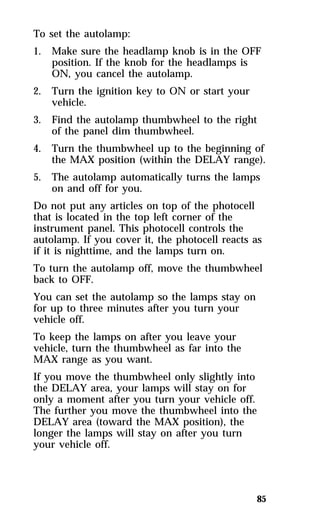
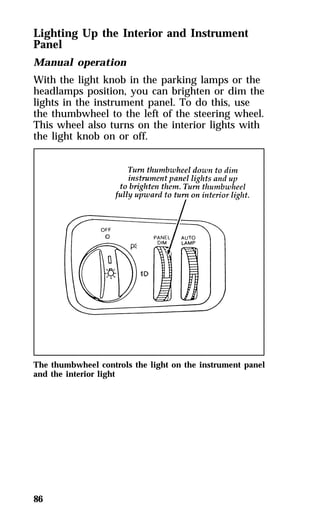
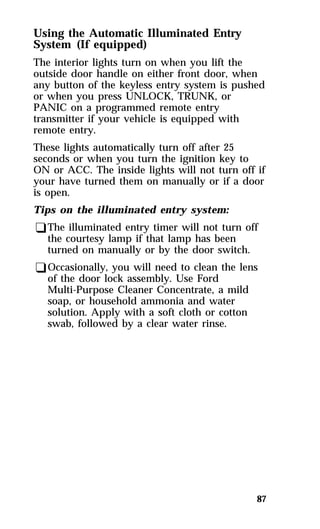
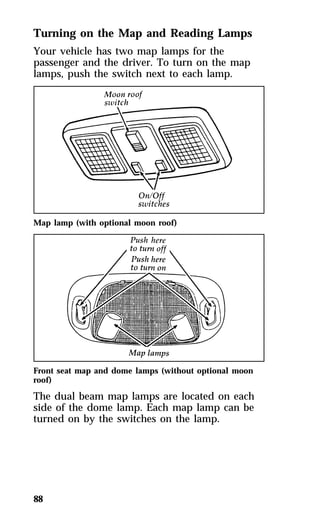
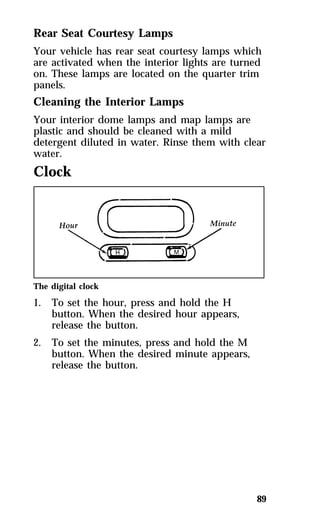
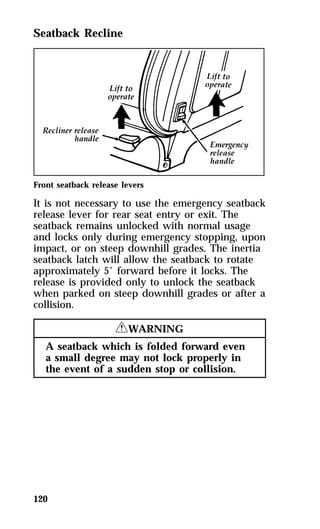
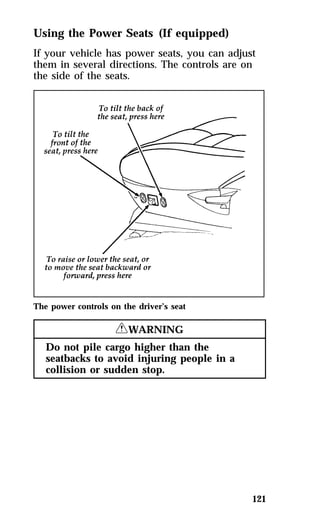
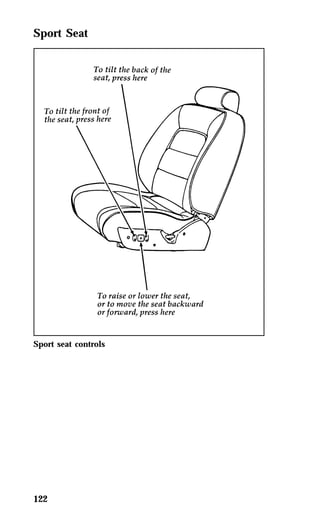
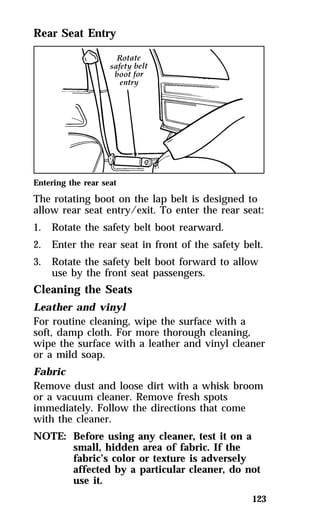
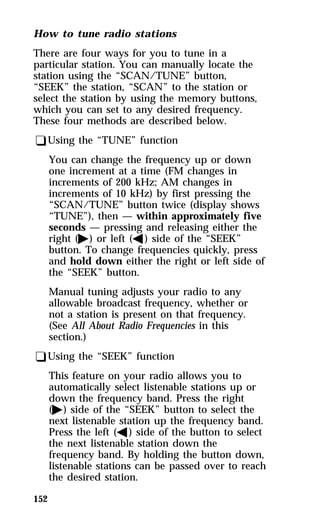
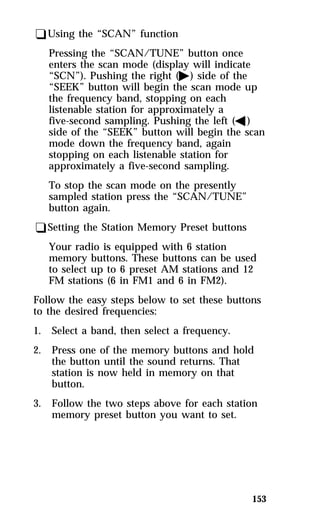
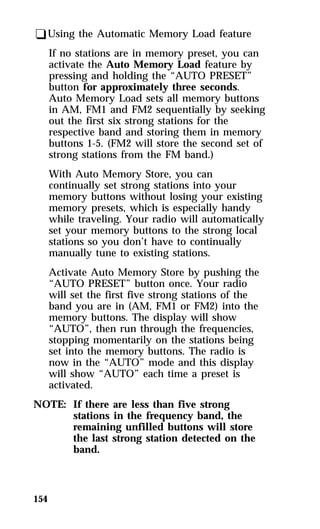
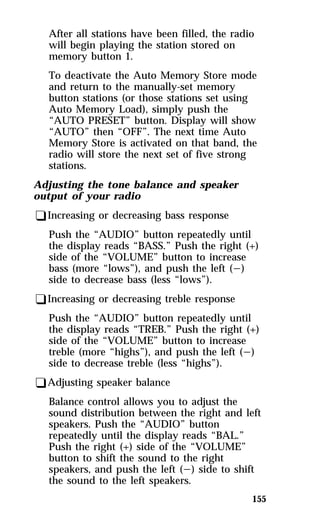
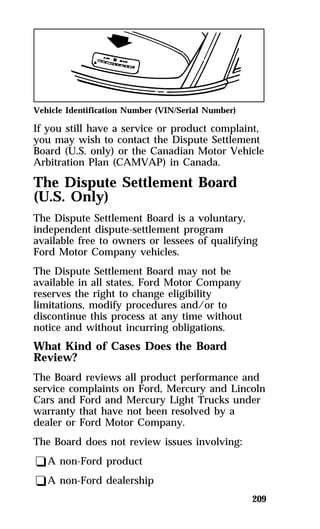
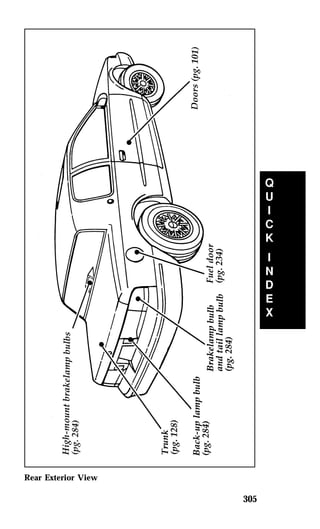
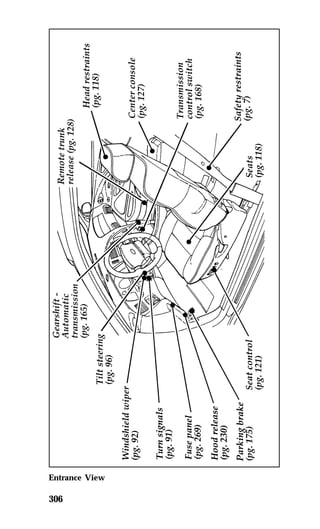
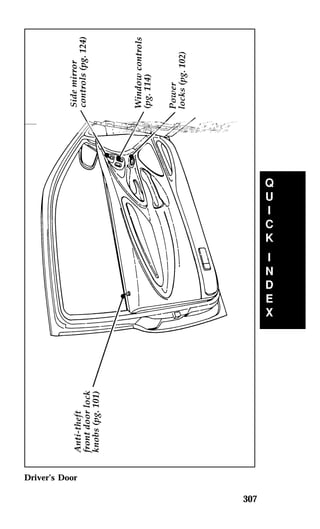
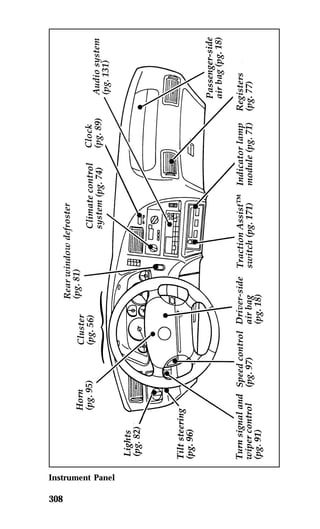
1 
Introductory Information 
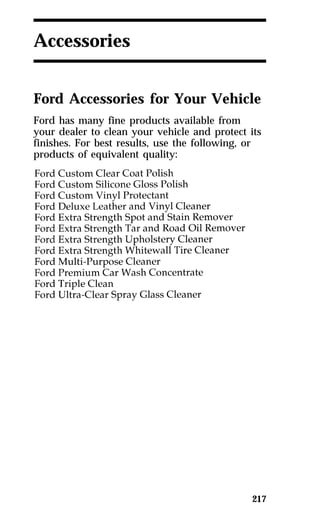
Ford’s Commitment to You 
Our Guiding Principles 
qQuality comes first. For your satisfaction, the 
quality of our products and services must be 
our number one priority. 
qYou are the focus of everything we do. Our 
work must be done with you in mind, 
providing better products and services than 
our competition. 
qContinuous improvement is essential to our 
success. We must strive for excellence in 
everything we do: in our products — in their 
safety and value — and in our services, our 
human relations, our competitiveness, and 
our profitability. 
qEmployee involvement is our way of life. 
We are a team. We must treat one another 
with trust and respect. 
qDealers and suppliers are our partners. We 
must maintain mutually beneficial 
relationships with dealers, suppliers, and our 
other business associates. 
qIntegrity is never compromised. Our conduct 
worldwide must be pursued in a manner that 
is socially responsible and commands respect 
for its integrity and for its positive 
contributions to society.
Things to Know About Using 
This Guide 
Congratulations on the purchase of your new 
vehicle. This guide has information about the 
equipment and the options for your new vehicle. 
You may not have bought all of the options 
available to you. If you do not know which 
information applies to your vehicle, talk to your 
dealer. 
This guide describes equipment and gives 
specifications for equipment that was in effect 
when this guide was approved for printing. Ford 
may discontinue models or change specifications 
or design without any notice and without 
incurring obligation. 
NOTES and WARNINGS 
NOTES give you additional information about 
the subject matter you are referencing. 
WARNINGS remind you to be especially careful 
in those areas where carelessness can cause 
damage to your vehicle or personal injury to 
yourself, your passengers or other people. Please 
read all WARNINGS carefully. 
2 
RWARNING 
Finding Information in This Guide 
After you have read this guide once, you will 
probably return to it when you have a specific 
question or need additional information. To help 
you find specific information quickly, you can 
use the Quick Index or the Index.
The Quick Index at the end of the book 
provides a page number following each item 
which indicates where detailed information can 
be found. 
To use the Index, turn to the back of the book 
and search in the alphabetical listing for the 
word that best describes the information you 
need. If the word you chose is not listed, think 
of other related words and look them up. We 
have designed the Index so that you can find 
information under a technical term. 
Canadian Owners — French Version 
French Owner Guides can be obtained from your 
dealer or by writing to Ford Motor Company of 
Canada, Limited, Service Publications, P.O. Box 
1580, Station B, Mississauga, Ontario L4Y 4G3. 
Your Maintenance Schedule and 
Record Booklet 
The Maintenance Schedule and Record booklet lists 
the services that are most important for keeping 
your vehicle in good condition. A record log is 
also provided to help you keep track of all 
services performed. 
About the Warranties 
Your vehicle is covered by three types of 
warranties: Basic Vehicle Warranty, Extended 
Warranties on certain parts, and Emissions 
Warranties. 
Read your Warranty Information Booklet carefully 
to find out about your vehicle’s warranties and 
your basic rights and responsibilities. 
3
If you lose your Warranty Information Booklet, you 
can get a new one free of charge. Contact any 
Ford or Lincoln-Mercury dealer, or refer to the 
addresses and phone numbers on the first page 
of this owner guide. 
Buying a Ford Extended Service Plan 
If you bought your vehicle in the U.S., you can 
buy a Ford Extended Service Plan for your 
vehicle. This optional contract provides service 
protection for a longer period of time than the 
basic warranty that comes with your vehicle. 
You do not have to buy this option when you 
buy your vehicle. However, your option to 
purchase the Ford Extended Service Plan runs 
out after 18 months or 18,000 miles. See your 
dealer for more details about the Ford Extended 
Service Plan. 
If you purchased a Canadian vehicle and did not 
take advantage of the Ford Extended Service 
Plan at the time of purchase, you may still be 
eligible. See your dealer for the details. 
Breaking Your Vehicle In 
Your new vehicle goes through an adjustment or 
break-in period during the first 1,000 miles 
(1,600 km) that you drive it. During the break-in 
period, you need to pay careful attention to how 
you drive your vehicle. 
qAvoid sudden stops. Because your vehicle 
4 
has new brake linings, you should take these 
steps: 
—Watch traffic carefully so that you can 
anticipate when to stop. 
—Begin braking well in advance. 
—Apply the brakes gradually.
The break-in period for new brake linings 
lasts for 100 miles (160 km) of city driving or 
1,000 miles (1,600 km) of highway driving. 
qUse only the type of engine oil that Ford 
recommends. See Engine oil recommendations 
in the Index. Do not use special “break-in” 
oils. 
Your vehicle is equipped with an Electronic 
Powertrain Control Module that limits engine 
and/or vehicle speeds with a cut-out mode to 
promote durability. 
Cleaning the Outside of Your 
Vehicle 
Pollen, bird droppings and tree sap can damage 
the paint, especially in hot weather. Wash your 
vehicle as often as necessary to keep it clean. 
Take similar precautions if your vehicle is 
exposed to chemical industrial fallout. 
Paint damage resulting from fallout is not 
related to a defect in paint materials or 
workmanship and therefore is not covered by 
warranty. Ford, however, believes that continual 
improvement in customer satisfaction is a high 
priority. For this reason, Ford has authorized its 
dealers to repair, at no charge to the owner, the 
surfaces of new vehicles damaged by 
environmental fallout within 12 months or 12,000 
miles (20,000 km) of purchase, whichever comes 
first. Customers may be required to bring their 
vehicle in for inspection by a Ford 
representative. 
5
Washing and Polishing Your Vehicle 
Wash the outside of your vehicle, including the 
underside, with a mild detergent. 
DO NOT: 
qWash your vehicle with hot water 
qWash your vehicle while it sits in direct 
sunlight 
qWash your vehicle while the body is hot 
Polish your vehicle to remove harmful deposits 
and protect the finish. 
Cleaning Chrome and Aluminum Parts 
Wash chrome and aluminum parts with a mild 
detergent. Do not use steel wool, abrasive 
cleaners, fuel, or strong detergents. 
Cleaning Plastic Parts 
Some of your vehicle’s exterior trim parts are 
plastic. Clean with a tar and road oil remover if 
necessary. Use a vinyl cleaner for routine 
cleaning. 
Do not clean plastic parts with thinners, solvents 
or petroleum-based cleaners. 
If you have your vehicle rustproofed, remove 
oversprayed rustproofing with a tar and road oil 
remover. If rustproofing is not removed from 
plastic and rubber parts, it can cause 
deterioration. 
6
7 
Safety Restraints 
Important Safety Belt Information 
The use of safety belts helps to restrain you and 
your passengers in case of a collision. In most 
states and in Canada the law requires their use. 
Safety belts provide best restraint when: 
qthe seatback is upright 
qthe occupant is sitting upright (not slouched) 
qthe lap belt is snug and low on the hips 
qthe shoulder belt is snug against the chest 
qthe knees are straight forward 
To help you remember to fasten your safety belt, 
a warning light may come on and a chime may 
sound. See Safety Belt Warning Light and Chime in 
the Warning Lights and Gauges chapter. 
See the following sections in this chapter for 
directions on how to properly use these safety 
belts. Also see Safety Restraints for Children in this 
chapter for special instructions about using 
safety belts for children. 
RWARNING 
Make sure that you and your passengers 
wear safety belts. Always drive and ride 
with your seatback upright and the lap 
belt snug and low across the hips.
8 
RWARNING 
Never wear the shoulder belt under the 
arm. Never swing it around the neck over 
the inside shoulder. Never use a single 
belt for more than one person or across 
more than one seating position. Each 
seating position in your vehicle has a 
specific safety belt assembly which is 
made up of one buckle and one tongue 
that are designed to be used as a pair. 
Failure to follow these precautions could 
increase the risk and/or severity of injury 
in a collision. 
RWARNING 
Ford recommends that all safety belt 
assemblies and attaching hardware should 
be inspected by a qualified technician 
after any collision. Safety belt assemblies 
not in use during a collision should also 
be inspected and replaced if either 
damage or improper operation is noted. 
RWARNING 
To reduce the risk of serious injury in a 
collision, children should always ride with 
the seatback upright. 
RWARNING 
Never let a passenger hold a child on his 
or her lap while the vehicle is moving. 
The passenger cannot protect the child 
from injury in a collision. 
Lock the doors of your vehicle before driving to 
lessen the risk of the door coming open in a 
collision.
Combination Lap and Shoulder 
Belts 
While your vehicle is in motion, the combination 
lap and shoulder belt adjusts to your movement. 
However, if you brake hard, corner hard or if 
your vehicle receives an impact of 5 mph 
(8 km/h) or more, the lap and shoulder belt 
locks and helps reduce your forward movement. 
After you get into your vehicle, close the door 
and lock it. Then adjust the seat to the position 
that suits you best. 
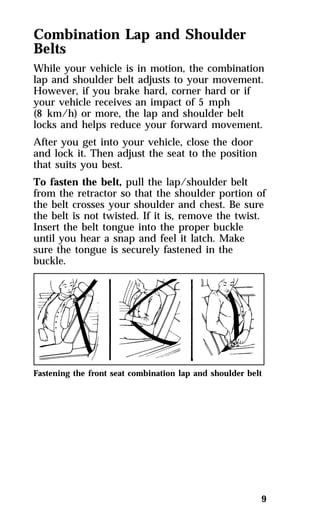
To fasten the belt, pull the lap/shoulder belt 
from the retractor so that the shoulder portion of 
the belt crosses your shoulder and chest. Be sure 
the belt is not twisted. If it is, remove the twist. 
Insert the belt tongue into the proper buckle 
until you hear a snap and feel it latch. Make 
sure the tongue is securely fastened in the 
buckle. 
Fastening the front seat combination lap and shoulder belt 
9
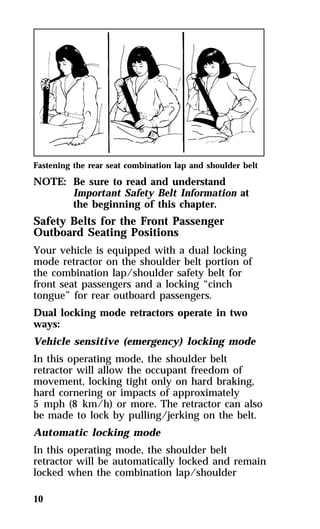
Fastening the rear seat combination lap and shoulder belt 
NOTE: Be sure to read and understand 
10 
Important Safety Belt Information at 
the beginning of this chapter. 
Safety Belts for the Front Passenger 
Outboard Seating Positions 
Your vehicle is equipped with a dual locking 
mode retractor on the shoulder belt portion of 
the combination lap/shoulder safety belt for 
front seat passengers and a locking “cinch 
tongue” for rear outboard passengers. 
Dual locking mode retractors operate in two 
ways: 
Vehicle sensitive (emergency) locking mode 
In this operating mode, the shoulder belt 
retractor will allow the occupant freedom of 
movement, locking tight only on hard braking, 
hard cornering or impacts of approximately 
5 mph (8 km/h) or more. The retractor can also 
be made to lock by pulling/jerking on the belt. 
Automatic locking mode 
In this operating mode, the shoulder belt 
retractor will be automatically locked and remain 
locked when the combination lap/shoulder
safety belt is buckled, and does not allow the 
occupant freedom of movement. This mode 
provides the following: 
qA tight lap/shoulder belt fit on the occupant. 
qChild seat or infant carrier installation 
11 
restraint. 
RWARNING 
Never install a rear-facing child seat or 
infant carrier in the right front passenger 
seat. 
This mode must be used when installing a child 
safety seat on the front passenger seat and rear 
outboard seats where dual locking retractors are 
provided. 
To switch the retractor from the emergency 
locking mode to the automatic locking mode, 
perform the following steps: 
1. Buckle the lap/shoulder combination belt. 
2. Grasp the shoulder portion of the belt and 
pull downward until all of the belt is 
extracted, and when allowed to retract, a 
clicking sound will be heard. At this time, 
the belt retractor is in the automatic locking 
mode (child restraint mode). 
3. A clicking sound will contnue to be heard as 
the belt is allowed to retract. 
NOTE: When the combination lap/shoulder 
belt is unbuckled and allowed to 
retract completely, the retractor will 
switch back to the vehicle sensitive 
(emergency) locking mode. See the 
detailed instructions under Safety Seats 
for Children in this chapter.
Safety Belts with Locking Cinch Tongue 
for Rear Outboard Seating Positions 
Your vehicle is equipped with safety seat belts 
containing a cinch tongue at the rear outboard 
seating positions. 
The locking cinch tongue will slide up and 
down the belt webbing when the belt is in the 
stowed position or while putting seat belts on. 
When the locking cinch tongue of the 
lap/shoulder combination seat belt is latched 
into the buckle, the cinch tongue will allow the 
lap portion to become shorter, but locks the 
webbing in place to restrict it from becoming 
longer. 
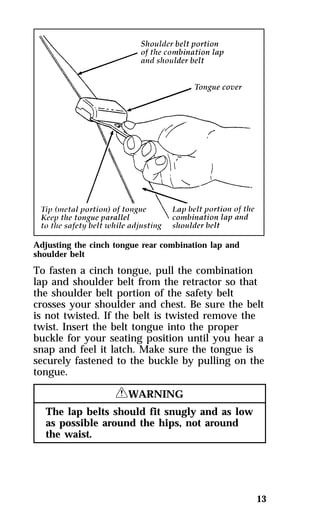
Before you can reach and latch a combination 
lap and shoulder belt having a cinch tongue into 
the buckle, you may have to lengthen the lap 
belt portion of it. To lengthen the lap belt, pull 
some webbing out of the shoulder belt retractor. 
While holding the webbing below the tongue, 
grasp the tip (metal portion) of the tongue so 
that it is parallel to the webbing and slide the 
tongue upward. Provide enough lap belt length 
so that the tongue can reach the buckle. 
NOTE: If you grasp the tongue by the tongue 
12 
cover to lengthen the belt, the tongue 
cover will grab the webbing, making it 
difficult to slide.
Adjusting the cinch tongue rear combination lap and 
shoulder belt 
To fasten a cinch tongue, pull the combination 
lap and shoulder belt from the retractor so that 
the shoulder belt portion of the safety belt 
crosses your shoulder and chest. Be sure the belt 
is not twisted. If the belt is twisted remove the 
twist. Insert the belt tongue into the proper 
buckle for your seating position until you hear a 
snap and feel it latch. Make sure the tongue is 
securely fastened to the buckle by pulling on the 
tongue. 
13 
RWARNING 
The lap belts should fit snugly and as low 
as possible around the hips, not around 
the waist.
14 
RWARNING 
All front and rear seat outboard 
occupants (including pregnant women) 
should wear lap and shoulder belts, for 
optimum protection in a collision. 
RWARNING 
Failure to follow these precautions could 
increase the risk and/or severity of injury 
in a collision. 1) Use the shoulder belt on 
the outside shoulder only. Never wear the 
shoulder belt under the arm. 2) Never 
swing it around your neck over the inside 
shoulder. 3) Never use a single belt for 
more than one person. 
Due to folding rear seats, sometimes the buckles 
and tongues toward the center of the vehicle 
may be hidden by the rear edge of the seat 
cushion. Pull them out so they will be accessible. 
While you are fastened in the seat belt, the 
combination lap/shoulder belt with a cinch 
tongue adjusts to your movement. However, if 
you brake hard, turn hard, or if your vehicle 
receives an impact of 5 mph (8 km/h) or more, 
the safety belt will become locked and help 
reduce your forward movement.
15 
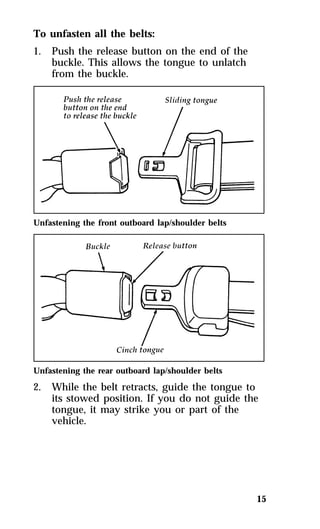
To unfasten all the belts: 
1. Push the release button on the end of the 
buckle. This allows the tongue to unlatch 
from the buckle. 
Unfastening the front outboard lap/shoulder belts 
Unfastening the rear outboard lap/shoulder belts 
2. While the belt retracts, guide the tongue to 
its stowed position. If you do not guide the 
tongue, it may strike you or part of the 
vehicle.
Lap Belts — Rear Center Seating 
Positions 
The lap belt in the center of the rear seat does 
not adjust automatically. You must adjust it to 
fit snugly and as low as possible around your 
hips. Do not wear it around your waist. 
Pull the belt across your hips and insert the 
tongue into the correct buckle on your seat 
until you hear a snap and feel it lock. Make sure 
the buckle is securely fastened. 
If you need to lengthen the belt, unfasten it and 
tip the belt tongue at a right angle to the belt. 
Pull the belt tongue over your lap until it 
reaches the buckle. 
If you need to shorten the belt, pull on the loose 
end of the webbing until the belt fits snugly. 
To unfasten the belt, push the release button on 
the buckle. This allows the tongue to unlatch 
from the buckle. 
Because the center lap belt does not have a 
retractor, it should be shortened and fastened 
when not in use. 
Unfastening center rear seat lap belt 
16
Safety Belt Extension Assembly 
For some people, the safety belt may be too 
short even when it is fully extended. You can 
add about eight inches (20 cm) to the belt length 
with a safety belt extension assembly (part 
number 611C22). Safety belt extensions are 
available at no cost from your dealer. 
17 
RWARNING 
Failure to follow these instructions will 
affect the performance of the safety belts 
and increase the risk of personal injury. 
Use only extensions manufactured by the same 
supplier as the safety belt. Manufacturer 
identification is located at the end of the 
webbing on the label. Also, use the safety belt 
extension only if the safety belt is too short for 
you when fully extended. Do not use extension 
to change the fit of the shoulder belt across the 
torso. 
Safety Belt Maintenance 
Check the safety belt systems periodically to 
make sure that they work properly and are not 
damaged. 
All safety belt assemblies, including retractors, 
buckles, front seat belt buckle support assemblies 
(slide bar) (if equipped), child safety seat tether 
bracket assemblies (if equipped), and attaching 
hardware, should be inspected after any 
collision. Ford recommends that all safety belt 
assemblies used in vehicles involved in a 
collision be replaced. However, if the collision 
was minor and a qualified technician finds that 
the belts do not show damage and continue to 
operate properly, they do not need to be 
replaced. Safety belt assemblies not in use
during a collision should also be inspected and 
replaced if either damage or improper operation 
is noted. 
Cleaning the Safety Belts 
Clean the safety belts with any mild soap 
solution that is recommended for cleaning 
upholstery or carpets. Do not bleach or dye the 
belt webbing because this may weaken it. 
Air Bag Supplemental Restraint 
System (SRS) 
The driver and right front passenger air bags are 
Supplemental Restraint Systems (SRS), provided 
at these seating positions in addition to the 
lap/shoulder belt, and are designed to 
supplement the protection provided to properly 
belted occupants in moderate to severe frontal 
collisions. The supplemental air bag system does 
not provide restraint to the lower body. 
The Importance of Wearing Safety Belts 
18 
RWARNING 
Safety belts must be worn by all vehicle 
occupants to be properly restrained and 
help reduce the risk of injury in a 
collision. 
RWARNING 
All occupants of the vehicle, including the 
driver, should always wear their safety 
belts, even when an air bag Supplemental 
Restraint System is provided.
19 
There are four very important reasons to use 
safety belts even with an air bag system. Use 
your safety belts to: 
qhelp keep you in the proper position (away 
from the air bag) when it inflates 
qreduce the risk of harm in rollover, side or 
rear impact collisions, because an air bag is 
not designed to inflate in such situations 
qreduce the risk of harm in frontal collisions 
that are not severe enough to activate the 
supplemental air bag 
qreduce the risk of being thrown from your 
vehicle 
The Importance of Being Properly Seated 
In a collision, the air bag must inflate extremely 
fast to help provide additional protection for 
you. In order to do this, the air bag must inflate 
with considerable force. If you are not seated in 
a normal riding position with your back against 
the seatback, the air bag may not protect you 
properly and could possibly hurt you as it 
inflates. 
RWARNING 
If a passenger is not properly seated and 
restrained, an inflating air bag could cause 
serious injury. 
RWARNING 
Rear-facing infant seats should never be 
placed in the front seat.
In rear-facing infant seats, the infant’s head is 
closer to the air bag. The force of the rapidly 
inflating air bag could push the top of the 
rear-facing seat against the vehicle seatback, 
center console (if so equipped), or center 
armrests (if so equipped). REAR-FACING 
INFANT SEATS MUST ALWAYS BE SECURED 
IN THE REAR SEAT, and other child safety 
seats and infant seats should be secured in the 
rear seat whenever possible. 
Your vehicle is equipped with a right front 
passenger air bag. Air bags deploy with great 
force, faster than the blink of an eye. Front 
passengers, especially children and small adults, 
must never sit on the front edge of the seat, 
stand near the glove compartment of the 
instrument panel, or lean over near the air bag 
cover when the vehicle is moving. All occupants 
should sit with their backs against the seatback, 
move the seat to the most rearward position if 
possible and use the safety belts. Children 
weighing less than 40 lbs. (18 kg) always should 
use child or infant seats. 
20 
RWARNING 
When using forward-facing child seats 
move the passenger seat as far back from 
the instrument panel as possible. NEVER 
SECURE REAR-FACING INFANT SEATS 
IN THE FRONT SEAT. 
THE FORCE OF THE RAPIDLY INFLATING 
PASSENGER AIR BAG COULD PUSH THE TOP 
OF THE REAR-FACING SEAT AGAINST THE 
VEHICLE SEATBACK OR CENTER 
CONSOLE/ARMRESTS. REAR-FACING 
INFANT SEATS MUST ALWAYS BE PLACED 
IN THE REAR SEAT.
21 
RWARNING 
Do not place objects or mount equipment 
on or near the air bag cover on the 
steering wheel or in front seat areas that 
may come in contact with a deploying air 
bag. Failure to follow this instruction may 
increase the risk of personal injury in the 
event of a collision. 
For additional important safety information on 
the proper use of seat belts, child seats, and 
infant seats, please read the other sections of this 
part of the Owner Guide, especially sections 
entitled Safety Belts for Children and Safety Seats 
for Children. 
For further information about the proper 
mounting of equipment in the front seat of this 
vehicle, please refer to Ford’s brochure entitled 
Some Important Information About Air Bag 
Supplemental Restraint System which can be 
obtained by calling Helm Inc. at 1-800-782-4356. 
Ask for brochure FPS-8602. 
How the Air Bag Supplemental Restraint 
System Operates 
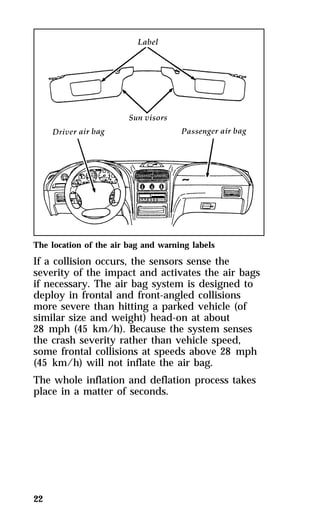
The driver air bag is in the center of the steering 
wheel. The right front passenger seat air bag is 
in the upper right hand section of the 
instrument panel ledge above the glove 
compartment. Both air bags are designed to stay 
out of sight until they are activated.
The location of the air bag and warning labels 
If a collision occurs, the sensors sense the 
severity of the impact and activates the air bags 
if necessary. The air bag system is designed to 
deploy in frontal and front-angled collisions 
more severe than hitting a parked vehicle (of 
similar size and weight) head-on at about 
28 mph (45 km/h). Because the system senses 
the crash severity rather than vehicle speed, 
some frontal collisions at speeds above 28 mph 
(45 km/h) will not inflate the air bag. 
The whole inflation and deflation process takes 
place in a matter of seconds. 
22
23 
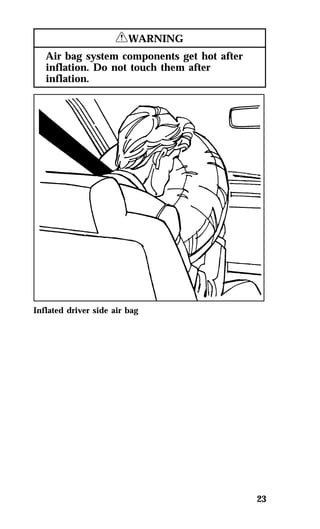
RWARNING 
Air bag system components get hot after 
inflation. Do not touch them after 
inflation. 
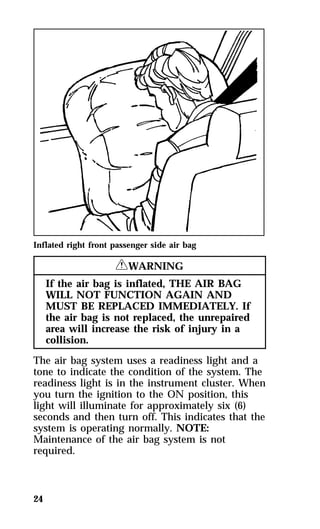
Inflated driver side air bag
Inflated right front passenger side air bag 
24 
RWARNING 
If the air bag is inflated, THE AIR BAG 
WILL NOT FUNCTION AGAIN AND 
MUST BE REPLACED IMMEDIATELY. If 
the air bag is not replaced, the unrepaired 
area will increase the risk of injury in a 
collision. 
The air bag system uses a readiness light and a 
tone to indicate the condition of the system. The 
readiness light is in the instrument cluster. When 
you turn the ignition to the ON position, this 
light will illuminate for approximately six (6) 
seconds and then turn off. This indicates that the 
system is operating normally. NOTE: 
Maintenance of the air bag system is not 
required.
A problem with the system is indicated by one 
or more of the following: 
qthe readiness light will either flash or stay lit, 
or 
qit will not light immediately after the ignition 
is turned on, or 
qa group of five beeps will be heard. 
If any of these things happen, have the air bag 
system serviced at your Ford or Lincoln-Mercury 
dealer immediately. Unless serviced, the air bag 
supplemental restraint system may not function 
properly in the event of a collision. 
25 
RWARNING 
Do not attempt to service, repair, or 
modify the Air Bag Supplemental 
Restraint System or its fuses. See your 
Ford or Lincoln-Mercury dealer. 
Disposal of air bags or air bag equipped 
vehicles 
For disposal of air bags or air bag equipped 
vehicles, see your local Ford or Lincoln-Mercury 
dealer. Air bags MUST be disposed of by 
qualified personnel. 
Safety Restraints for Children 
In the U.S. and Canada, you are required by law 
to use safety restraints for children. If small 
children ride in your vehicle — this generally 
includes children who are four years old or 
younger and who weigh 40 pounds (18 kg) or 
less — you must put them in safety seats that 
are made specially for children. Safety belts 
alone do not provide maximum protection for 
these children. Check your local and state laws 
for specific requirements.
26 
RWARNING 
Never let a passenger hold a child on his 
or her lap while the vehicle is moving. 
The passenger cannot protect the child 
from injury in a collision. 
RWARNING 
Passengers should not be allowed to ride 
in the cargo area. Persons not riding in a 
seat with a fastened seat belt are much 
more likely to suffer serious injury in a 
collision. Cargo should always be secured 
to prevent it from shifting and causing 
damage to the vehicle or harm to 
passengers. 
When possible, put children in the rear seat of 
your vehicle. Accident statistics suggest that 
children are safer when properly restrained in 
the rear seating positions than in the front 
seating positions. 
RWARNING 
Carefully follow all of the manufacturer’s 
instructions included with the safety seat 
you put in your vehicle. If you do not 
install and use the safety seat properly, 
the child may be injured in a sudden stop 
or collision. 
RWARNING 
Safety belts and seats can become hot in a 
vehicle that has been closed up in sunny 
weather; they could burn a small child. 
Check seat covers and buckles before you 
place a child anywhere near them.
27 
RWARNING 
Never leave a child unattended in your 
vehicle. 
RWARNING 
When using forward-facing child seats 
move the passenger seat as far back from 
the instrument panel as possible. NEVER 
SECURE REAR-FACING INFANT SEATS 
IN THE FRONT SEAT. 
Safety Seats for Children 
Use a safety seat that is recommended for the 
size and weight of the child. Always follow the 
safety seat manufacturer’s instructions when 
installing and using the safety seat. 
Ford recommends the use of a child safety seat 
having a top tether strap. Install the child safety 
seat in a seating position which is capable of 
providing a tether anchorage. For more 
information on top tether straps see your Ford 
or Lincoln-Mercury dealer. 
When installing a child safety seat, be sure to 
use the correct safety belt buckle for that seating 
position, and make sure the tongue is securely 
fastened in the buckle. 
Children weighing less than 40 lbs. (18 kg) 
should use child or infant seats. Forward facing 
child seats must have the passenger seat moved 
as far back from the instrument panel as 
possible.
28 
RWARNING 
REAR-FACING INFANT SEATS SHOULD 
NEVER BE USED IN THE FRONT SEAT. 
REAR-FACING INFANT SEATS MUST 
ALWAYS BE PLACED IN THE REAR 
SEAT. Failure to follow these instructions 
could result in serious injury. 
All child restraint systems are designed to be 
secured in vehicle seats by lap belts or by the 
lap portion of a lap-shoulder belt. 
RWARNING 
If you do not properly secure the safety 
seat, the child occupying the seat may be 
injured during a collision or sudden stop. 
An unsecured safety seat could also injure 
other passengers. 
RWARNING 
Carefully follow all of the manufacturer’s 
instructions included with the safety seat 
you put in your vehicle. If you do not 
install and use the safety seat properly, 
the child may be injured in a sudden stop 
or collision. 
RWARNING 
Always keep the buckle release button 
pointing upward and away from the child 
seat, with the tongue between the child 
seat and the release button as shown in 
the following illustration.
Installing Safety Seats in the Front 
Outboard Passenger Seating Position 
For seating positions equipped with a dual 
locking mode retractor, use the following 
procedure. 
If you choose to install a child safety seat or 
infant carrier in the front seating positions, move 
vehicle seat as far back as possible. 
1. Position the child seat in the center of the 
29 
passenger seat. 
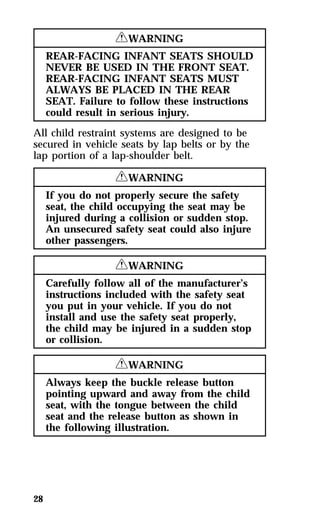
2. Pull down on shoulder belt, then grasp 
shoulder belt and lap belt together. Figure 1.
3. While holding the shoulder and lap belt 
30 
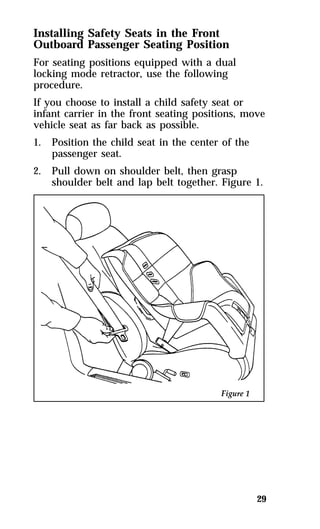
portions together, route the tongue through 
the child seat according to the child seat 
manufacturer’s instructions. See Figure 2. Be 
sure that the belt webbing is not twisted. 
Routing the lap/shoulder belt
4. Insert the belt tongue into the buckle for that 
seating position until you hear and feel the 
latch engage. Figure 3. Make sure tongue is 
latched securely to buckle by pulling on 
tongue. 
31 
Buckling the belt
5. Grasp the shoulder portion of the belt and 
32 
pull downward until all of the belt is 
extracted and a click is heard. At this time, 
the retractor is in the automatic locking 
mode (child seat restraint mode). Figure 4. 
NOTE: The dual-locking mode retractor must 
be in the automatic locking mode to 
properly restrain a child. 
Setting the retractor to automatic locking mode 
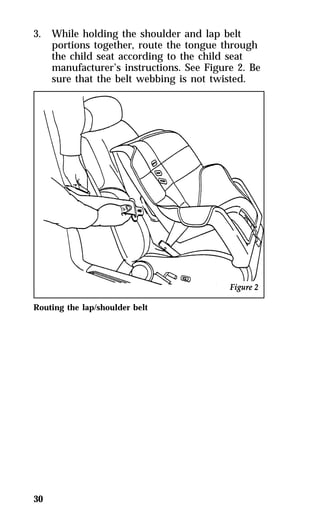
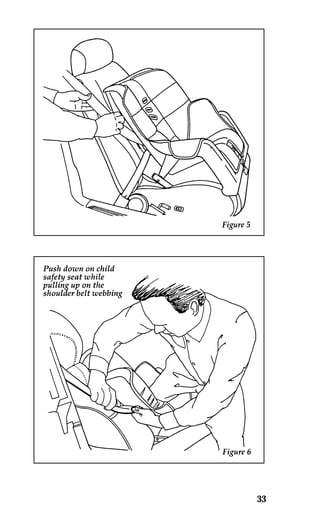
6. Allow the belt to retract. Pull up on the 
shoulder webbing. A clicking sound will be 
heard as the belt retracts. This indicates the 
retractor is in the automatic locking mode. 
Push down on the child seat while you pull 
up on the belt to remove any slack in the 
belt. Figures 5 and 6.
33
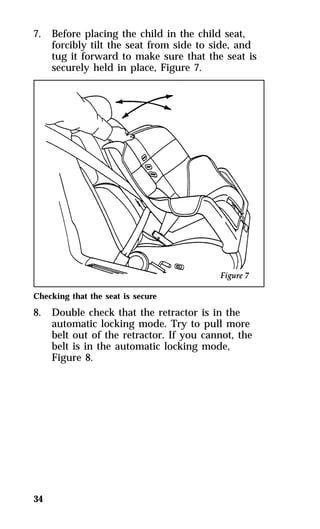
7. Before placing the child in the child seat, 
34 
forcibly tilt the seat from side to side, and 
tug it forward to make sure that the seat is 
securely held in place, Figure 7. 
Checking that the seat is secure 
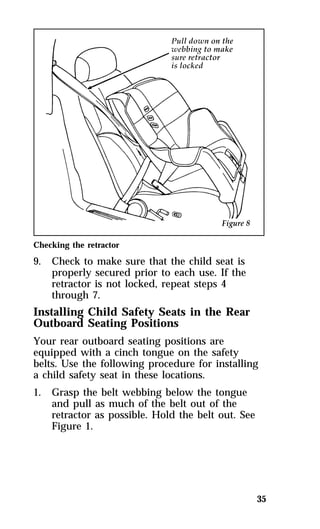
8. Double check that the retractor is in the 
automatic locking mode. Try to pull more 
belt out of the retractor. If you cannot, the 
belt is in the automatic locking mode, 
Figure 8.
35 
Checking the retractor 
9. Check to make sure that the child seat is 
properly secured prior to each use. If the 
retractor is not locked, repeat steps 4 
through 7. 
Installing Child Safety Seats in the Rear 
Outboard Seating Positions 
Your rear outboard seating positions are 
equipped with a cinch tongue on the safety 
belts. Use the following procedure for installing 
a child safety seat in these locations. 
1. Grasp the belt webbing below the tongue 
and pull as much of the belt out of the 
retractor as possible. Hold the belt out. See 
Figure 1.
NOTE: The belt webbing below the tongue is 
36 
the lap belt portion of the combination 
lap/shoulder belt, and the belt webbing 
above the tongue is the shoulder belt 
portion of the combination 
lap/shoulder belt. 
2. With your other hand, grasp the tip (metal 
portion) of the tongue (not the cover) and 
slide the tongue up the webbing as far as it 
will go. See Figure 1. Release the tongue, but 
do not let go of the lap portion of the belt 
webbing. 
3. While still holding the belt webbing below 
the tongue in one hand, use your other hand 
to grasp the tip (metal portion) of the tongue 
and belt webbing together, and again pull 
out as much of the belt as possible. Then, let 
go of the lap portion of the belt webbing.
37 
4. While holding the shoulder and lap belt 
portions together, route the tongue and 
webbing through the child seat according to 
the child seat manufacturer’s instructions. 
See Figure 2. Be sure that the belt webbing 
is not twisted.
5. Insert the belt tongue into the proper buckle 
38 
for that seating position until you hear a 
snap and feel it latch. Make sure the tongue 
is securely latched to the buckle by pulling 
on the tongue. See Figure 3.
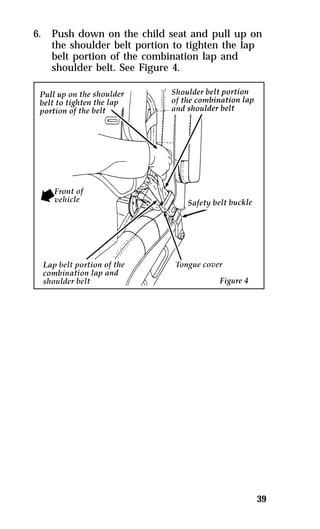
6. Push down on the child seat and pull up on 
39 
the shoulder belt portion to tighten the lap 
belt portion of the combination lap and 
shoulder belt. See Figure 4.
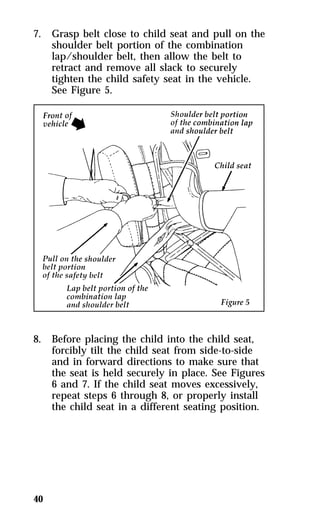
7. Grasp belt close to child seat and pull on the 
40 
shoulder belt portion of the combination 
lap/shoulder belt, then allow the belt to 
retract and remove all slack to securely 
tighten the child safety seat in the vehicle. 
See Figure 5. 
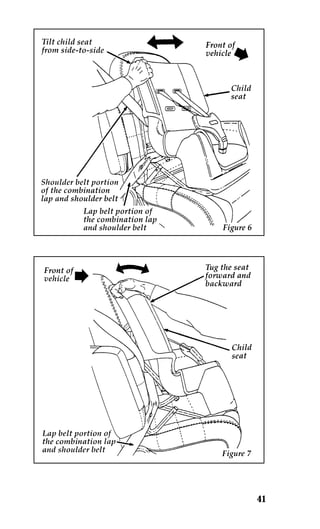
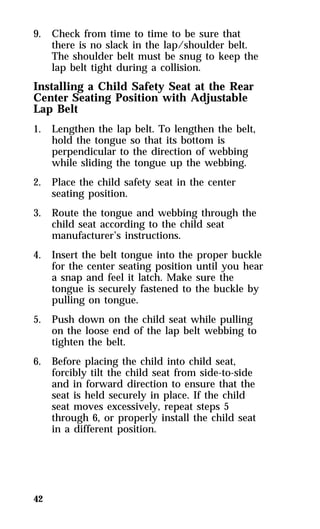
8. Before placing the child into the child seat, 
forcibly tilt the child seat from side-to-side 
and in forward directions to make sure that 
the seat is held securely in place. See Figures 
6 and 7. If the child seat moves excessively, 
repeat steps 6 through 8, or properly install 
the child seat in a different seating position.
41
9. Check from time to time to be sure that 
42 
there is no slack in the lap/shoulder belt. 
The shoulder belt must be snug to keep the 
lap belt tight during a collision. 
Installing a Child Safety Seat at the Rear 
Center Seating Position with Adjustable 
Lap Belt 
1. Lengthen the lap belt. To lengthen the belt, 
hold the tongue so that its bottom is 
perpendicular to the direction of webbing 
while sliding the tongue up the webbing. 
2. Place the child safety seat in the center 
seating position. 
3. Route the tongue and webbing through the 
child seat according to the child seat 
manufacturer’s instructions. 
4. Insert the belt tongue into the proper buckle 
for the center seating position until you hear 
a snap and feel it latch. Make sure the 
tongue is securely fastened to the buckle by 
pulling on tongue. 
5. Push down on the child seat while pulling 
on the loose end of the lap belt webbing to 
tighten the belt. 
6. Before placing the child into child seat, 
forcibly tilt the child seat from side-to-side 
and in forward direction to ensure that the 
seat is held securely in place. If the child 
seat moves excessively, repeat steps 5 
through 6, or properly install the child seat 
in a different position.
Safety Belts for Children 
Children who are too large for child safety seats 
should always wear safety belts. (See instructions 
with your child seat, or contact its manufacturer, 
to determine maximum size of child that will 
safely fit in the seat.) 
43 
RWARNING 
If safety belts are not properly worn and 
adjusted as described, the risk of serious 
injury to the child in a collision will be 
much greater. 
If the shoulder belt portion of one of the lap and 
shoulder belts can be positioned so that it does 
not cross or rest in front of the child’s face or 
neck, the child should wear the lap and shoulder 
belt. Moving the child closer to the center of the 
vehicle may help provide a good shoulder belt 
fit. 
RWARNING 
If the shoulder belt cannot be properly 
positioned, the child should sit in the 
center rear seat and use the lap belt.
To improve the fit of lap and shoulder belts on 
children who have outgrown child safety seats, 
Ford recommends use of a belt-positioning 
booster seat that is labelled as conforming to all 
Federal motor vehicle safety standards. 
Belt-positioning booster seats raise the child and 
provide a shorter, firmer seating cushion that 
encourages safer seating posture and better fit of 
lap and shoulder belts on the child. A 
belt-positioning booster should be used if the 
shoulder belt rests in front of the child’s face or 
neck, or if the lap belt does not fit snugly on 
both thighs, or if the thighs are too short to let 
the child sit all the way back on the seat cushion 
when the lower legs hang over the edge of the 
seat cushion. You may wish to discuss the 
specific needs of your child with your 
pediatrician. 
44 
RWARNING 
Do not use a belt-positioning booster with 
a lap-only belt. 
Lap belts and the lap belt portion of lap and 
shoulder belts should always be worn snugly 
and below the hips, touching the child’s thighs. 
RWARNING 
To reduce the risk of serious injury in a 
collision, children should always ride with 
the seatback upright.
45 
Starting Your Cougar 
Ignition 
Understanding the Positions of the Ignition 
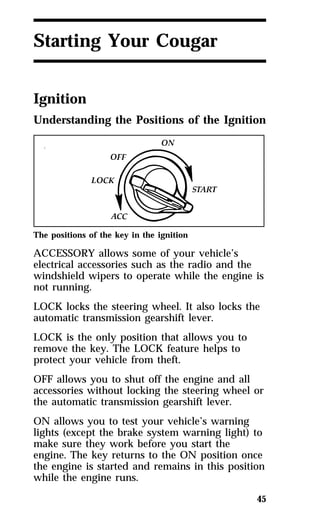
The positions of the key in the ignition 
ACCESSORY allows some of your vehicle’s 
electrical accessories such as the radio and the 
windshield wipers to operate while the engine is 
not running. 
LOCK locks the steering wheel. It also locks the 
automatic transmission gearshift lever. 
LOCK is the only position that allows you to 
remove the key. The LOCK feature helps to 
protect your vehicle from theft. 
OFF allows you to shut off the engine and all 
accessories without locking the steering wheel or 
the automatic transmission gearshift lever. 
ON allows you to test your vehicle’s warning 
lights (except the brake system warning light) to 
make sure they work before you start the 
engine. The key returns to the ON position once 
the engine is started and remains in this position 
while the engine runs.
START cranks the engine. Release the key once 
the engine starts so that you do not damage the 
starter. The key should return to ON when you 
release it. The START position also allows you 
to test the brake warning light. 
Removing the Key From the Ignition 
1. Put the gearshift in P (Park). 
2. Set the parking brake fully. 
3. Turn the ignition key to LOCK. 
4. Remove the key. 
NOTE: The automatic transmission gearshift 
46 
must be in P (Park) to move the key to 
the lock position. 
If the key is stuck in the LOCK position, move 
the steering wheel left or right until the key 
turns freely. 
If the driver’s door is open while the key is still 
in the ignition, a warning chime sounds. 
RWARNING 
Always set the parking brake fully and 
make sure that the gearshift is securely 
latched in P (Park). 
RWARNING 
Do not leave children, unreliable adults, 
or pets alone in your vehicle. They could 
accidentally injure themselves or others 
through inadvertent operation of the 
vehicle. Further, on hot, sunny days, 
temperatures in a closed vehicle could 
quickly become high enough to cause 
severe and possibly fatal injuries to 
people as well as animals.
Fuel-Injected Engines 
When starting a fuel-injected engine, the most 
important thing to remember is to avoid 
pressing down on the accelerator before or 
during starting. Only use the accelerator when 
you have problems getting your vehicle started. 
See Starting Your Engine in this chapter for 
details about when to use the accelerator while 
you start your vehicle. 
Starting Your Vehicle 
Preparing to Start Your Vehicle 
47 
RWARNING 
Do not start your vehicle in a closed 
garage or other enclosed area. Never sit in 
a stopped vehicle for more than a short 
period of time with the engine running. 
Exhaust fumes are toxic. See Guarding 
Against Exhaust Fumes in this chapter for 
more instructions. 
Before you start your vehicle, do the following: 
1. Make sure you and all your passengers 
buckle your safety belts. See Safety Restraints 
in the Index for more details. 
2. Make sure the headlamps and other 
accessories are turned off when starting. 
3. Make sure that the gearshift is in P (Park) 
and the parking brake is set before you turn 
the key. 
Before you start your vehicle, you should test 
the warning lights on the instrument panel to 
make sure that they work. Refer to the Warning 
Lights and Gauges chapter.
Starting Your Engine 
To start your engine: 
1. Follow the steps under Preparing to Start 
48 
Your Vehicle at the beginning of this section. 
2. Turn the ignition key to the ON position. 
3. DO NOT depress the accelerator pedal when 
starting your engine. DO NOT use the 
accelerator while the vehicle is parked. 
4. Turn the key to the START position 
(cranking) until the engine starts. Allow the 
key to return to the ON position after the 
engine has started. 
If you have difficulty in turning the key, 
rotate the steering wheel slightly because it 
may be binding. 
For a cold engine: 
qAt temperatures 10°F (-12°C) and below: If 
the engine does not start in fifteen (15) 
seconds on the first try, turn the key to OFF, 
wait approximately ten (10) seconds so you 
do not flood the engine, then try again. 
qAt temperatures above 10°F (-12°C): If the 
engine does not start in five (5) seconds on 
the first try, turn the key to OFF, wait 
approximately ten (10) seconds so you do not 
flood the engine, then try again. 
For a warm engine: 
qDo not hold the key in the START position 
for more than five (5) seconds at a time. If 
the engine does not start within five (5) 
seconds on the first try, turn the key to the 
OFF position. Wait a few seconds after the 
starter stops, then try again.
Whenever you start your vehicle, release the key 
as soon as the engine starts. Excessive cranking 
could damage the starter or flood the engine. 
After you start the engine, let it idle for a few 
seconds. Keep your foot on the brake pedal and 
put the gearshift lever in gear. Release the 
parking brake. Slowly release the brake pedal 
and drive away in the normal manner. 
NOTE: Your vehicle has an interlock that 
49 
prevents you from shifting out of 
P (Park) unless your foot is on the 
brake pedal. 
If the engine does not start after two attempts: 
1. Turn the ignition key to the OFF position. 
2. Press the accelerator all the way to the floor 
and hold it. 
3. Turn the ignition key to the START position. 
4. Release the ignition key when the engine 
starts. 
5. Release the accelerator gradually as the 
engine speeds up. Then drive away in the 
normal manner. 
If the engine still does not start, the fuel pump 
shut-off switch may have been triggered. For 
directions on how to reset the switch see Fuel 
Pump Shut-Off Switch later in this chapter. 
A computer system controls the engine’s idle 
speed. When you start your vehicle, the engine’s 
idle speed normally runs higher than when it’s 
warmed up. These faster engine speeds will 
make your vehicle move slightly faster than its 
normal idle speed. It should, however, slow 
down after a short time. If it does not, have the 
idle speed checked.
If the engine idle speed does not slow down 
automatically, do not allow your vehicle to idle 
for more than 10 minutes. Have the vehicle 
checked. 
50 
RWARNING 
Extended idling at high engine speeds can 
produce very high temperatures in the 
engine and exhaust system, creating the 
risk of fire or other damage. 
RWARNING 
Do not park, idle, or drive your vehicle in 
dry grass or other dry ground cover. The 
emission system heats up the engine 
compartment and exhaust system, which 
can start a fire. 
If you consistently start your vehicle in subzero 
temperatures, use an engine block heater 
(if your vehicle has this option). 
Engine Block Heater (If equipped) 
Engine block heaters are strongly recommended 
if you live in a region where temperatures reach 
-10°F (-23°C) or below. An engine block heater 
warms the engine coolant, which improves 
starting, warms up the engine faster, and allows 
the heater-defrost system to respond quickly. 
To turn the heater on, simply plug it into a 
grounded 110-volt outlet. Ford recommends that 
you use a 110-volt circuit that is protected by a 
ground fault circuit interrupter.
51 
RWARNING 
To prevent electrical shock, do not use 
your heater with ungrounded electrical 
systems or two-pronged (cheater) adapters. 
For best results, plug the heater in at least three 
hours before you start your vehicle. Using the 
heater for longer than three hours will not 
damage the engine, so you can plug it in at 
night to start your vehicle the following 
morning. 
NOTE: Be sure to disconnect the engine block 
heater before driving your vehicle. 
Guarding Against Exhaust Fumes 
Carbon monoxide, although colorless and 
odorless, is present in exhaust fumes. Take 
precautions to avoid its dangerous effects. 
RWARNING 
Do not start your vehicle in a closed 
garage or other enclosed area. Never sit in 
a stopped vehicle for more than a short 
period of time with the engine running. 
Exhaust fumes are toxic. See Guarding 
Against Exhaust Fumes in this chapter for 
more instructions. 
RWARNING 
If you smell exhaust fumes inside your 
vehicle, have your dealer inspect your 
vehicle immediately. Do not drive if you 
smell exhaust fumes.
Have the exhaust and body ventilation systems 
checked whenever: 
qyour vehicle is raised for service 
qthe sound of the exhaust system changes 
qyour vehicle has been damaged in a collision 
Improve your ventilation by keeping all air inlet 
vents clear of snow, leaves, and other debris. 
If the engine is idling while you are stopped in 
an open area for long periods of time, open the 
windows at least one inch (2.5 cm). Also, the 
heating or air conditioning system should be set 
to any function except MAX A/C or AUTO. 
qIf you use the heater, set the fan speed on 
MEDIUM or HIGH with the function control 
on any position except OFF and the 
temperature control at any desired position. 
qIf you use the air conditioner, set the fan 
speed on MEDIUM or HIGH with the 
function control on any position except OFF 
or MAX and the temperature control at any 
desired position. 
52
If the Engine Cranks but Does 
Not Start or Does Not Start After 
a Collision 
Fuel Pump Shut-off Switch 
If the engine cranks but does not start or does 
not start after a collision, the fuel pump shut-off 
switch may have been triggered. The shut-off 
switch is a device intended to stop the fuel 
pump when your vehicle has been involved in a 
substantial jolt. 
Once the shut-off switch is triggered, you must 
reset the switch by hand before you can start 
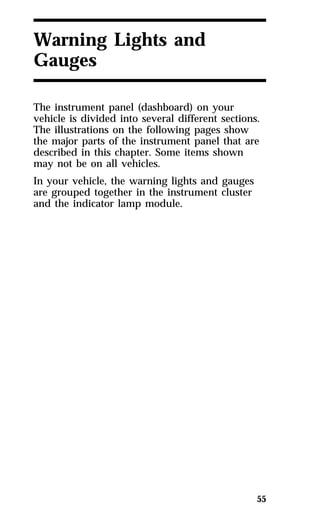
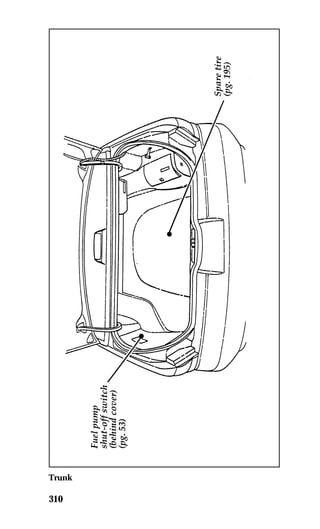
your vehicle. The switch is on the left side of the 
trunk. 
53 
The fuel pump shut-off switch 
RWARNING 
If you see or smell fuel, do not reset the 
switch or try to start your vehicle. Have 
all the passengers get out of the vehicle 
and call the local fire department or a 
towing service.
If your engine cranks but does not start after a 
collision or substantial jolt: 
1. Turn the ignition key to the OFF position. 
2. Check under the vehicle for leaking fuel. 
3. If you do not see or smell fuel, push the red 
54 
reset button down. If the button is already 
set, you may have a different mechanical 
problem. 
4. Turn the ignition key to the ON position for 
a few seconds, then turn it to the OFF 
position. 
5. Check under the vehicle again for leaking 
fuel. If you see or smell fuel, do not start 
your vehicle again. If you do not see or 
smell fuel, you can try to start your vehicle 
again. 
6. Check all vehicle warning lights before 
driving the vehicle. 
Pushing 
Vehicles with automatic transmissions cannot be 
started by pushing. Follow the directions under 
If Your Vehicle Needs a Jump-Start.
55 
Warning Lights and 
Gauges 
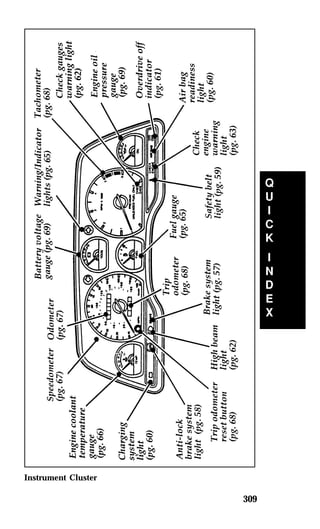
The instrument panel (dashboard) on your 
vehicle is divided into several different sections. 
The illustrations on the following pages show 
the major parts of the instrument panel that are 
described in this chapter. Some items shown 
may not be on all vehicles. 
In your vehicle, the warning lights and gauges 
are grouped together in the instrument cluster 
and the indicator lamp module.
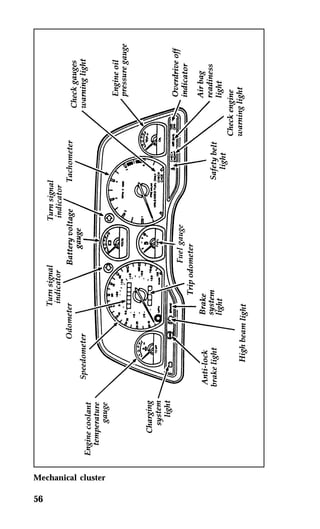
Mechanical cluster 
56
The Mechanical Cluster 
The following warning lights and gauges are on 
the mechanical cluster. All of the warning lights 
and gauges alert you to possible problems with 
your vehicle. Some of the lights listed are 
optional. The following sections detail what each 
of these indicators means. 
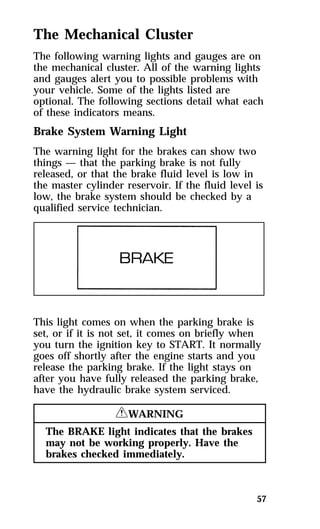
Brake System Warning Light 
The warning light for the brakes can show two 
things — that the parking brake is not fully 
released, or that the brake fluid level is low in 
the master cylinder reservoir. If the fluid level is 
low, the brake system should be checked by a 
qualified service technician. 
This light comes on when the parking brake is 
set, or if it is not set, it comes on briefly when 
you turn the ignition key to START. It normally 
goes off shortly after the engine starts and you 
release the parking brake. If the light stays on 
after you have fully released the parking brake, 
have the hydraulic brake system serviced. 
57 
RWARNING 
The BRAKE light indicates that the brakes 
may not be working properly. Have the 
brakes checked immediately.
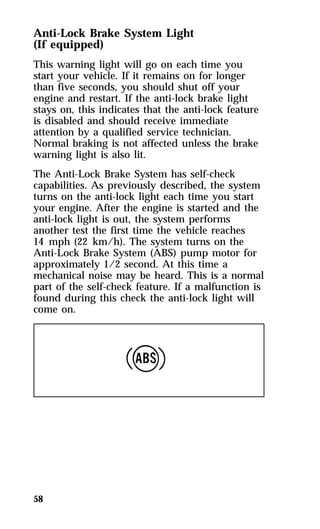
Anti-Lock Brake System Light 
(If equipped) 
This warning light will go on each time you 
start your vehicle. If it remains on for longer 
than five seconds, you should shut off your 
engine and restart. If the anti-lock brake light 
stays on, this indicates that the anti-lock feature 
is disabled and should receive immediate 
attention by a qualified service technician. 
Normal braking is not affected unless the brake 
warning light is also lit. 
The Anti-Lock Brake System has self-check 
capabilities. As previously described, the system 
turns on the anti-lock light each time you start 
your engine. After the engine is started and the 
anti-lock light is out, the system performs 
another test the first time the vehicle reaches 
14 mph (22 km/h). The system turns on the 
Anti-Lock Brake System (ABS) pump motor for 
approximately 1/2 second. At this time a 
mechanical noise may be heard. This is a normal 
part of the self-check feature. If a malfunction is 
found during this check the anti-lock light will 
come on. 
58
59 
RWARNING 
If the anti-lock brake system warning 
light remains on or comes on while 
driving, have the braking system checked 
by a qualified service technician as soon 
as possible. 
NOTE: If a fault occurs in the anti-lock 
system, and the brake warning light is 
not lit, the anti-lock system is disabled 
but normal brake function remains 
operational. 
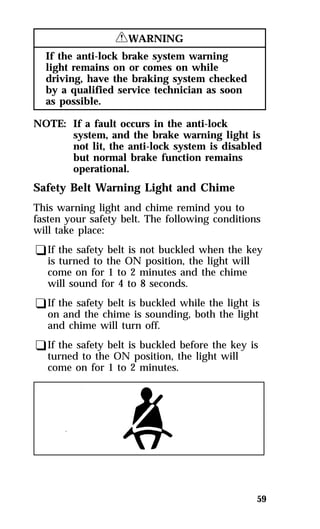
Safety Belt Warning Light and Chime 
This warning light and chime remind you to 
fasten your safety belt. The following conditions 
will take place: 
qIf the safety belt is not buckled when the key 
is turned to the ON position, the light will 
come on for 1 to 2 minutes and the chime 
will sound for 4 to 8 seconds. 
qIf the safety belt is buckled while the light is 
on and the chime is sounding, both the light 
and chime will turn off. 
qIf the safety belt is buckled before the key is 
turned to the ON position, the light will 
come on for 1 to 2 minutes.
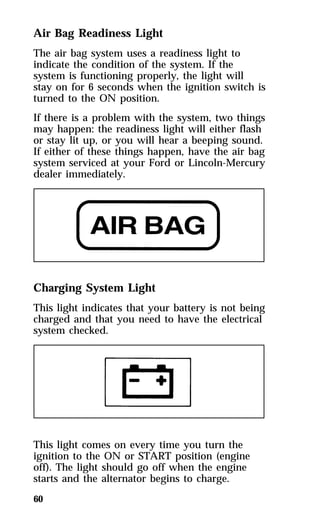
Air Bag Readiness Light 
The air bag system uses a readiness light to 
indicate the condition of the system. If the 
system is functioning properly, the light will 
stay on for 6 seconds when the ignition switch is 
turned to the ON position. 
If there is a problem with the system, two things 
may happen: the readiness light will either flash 
or stay lit up, or you will hear a beeping sound. 
If either of these things happen, have the air bag 
system serviced at your Ford or Lincoln-Mercury 
dealer immediately. 
Charging System Light 
This light indicates that your battery is not being 
charged and that you need to have the electrical 
system checked. 
This light comes on every time you turn the 
ignition to the ON or START position (engine 
off). The light should go off when the engine 
starts and the alternator begins to charge. 
60
61 
If the light stays on or comes on when the 
engine is running, have the electrical system 
checked as soon as possible. 
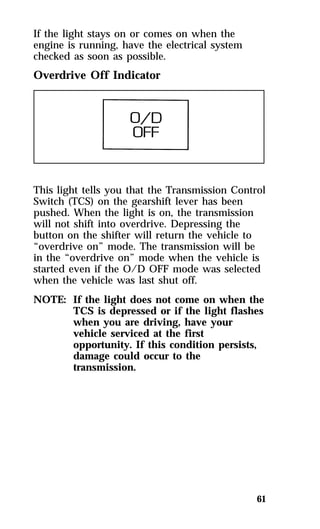
Overdrive Off Indicator 
This light tells you that the Transmission Control 
Switch (TCS) on the gearshift lever has been 
pushed. When the light is on, the transmission 
will not shift into overdrive. Depressing the 
button on the shifter will return the vehicle to 
“overdrive on” mode. The transmission will be 
in the “overdrive on” mode when the vehicle is 
started even if the O/D OFF mode was selected 
when the vehicle was last shut off. 
NOTE: If the light does not come on when the 
TCS is depressed or if the light flashes 
when you are driving, have your 
vehicle serviced at the first 
opportunity. If this condition persists, 
damage could occur to the 
transmission.
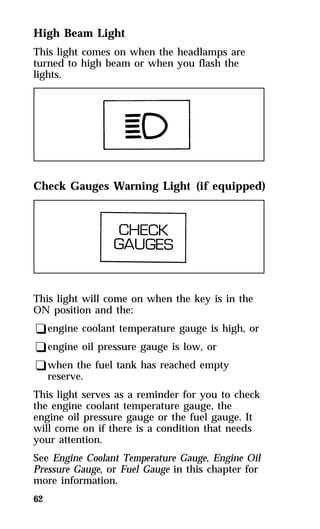
High Beam Light 
This light comes on when the headlamps are 
turned to high beam or when you flash the 
lights. 
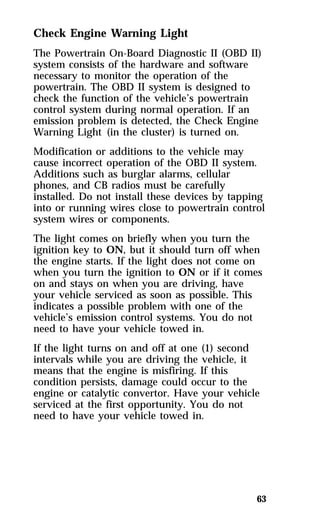
Check Gauges Warning Light (if equipped) 
This light will come on when the key is in the 
ON position and the: 
qengine coolant temperature gauge is high, or 
qengine oil pressure gauge is low, or 
qwhen the fuel tank has reached empty 
62 
reserve. 
This light serves as a reminder for you to check 
the engine coolant temperature gauge, the 
engine oil pressure gauge or the fuel gauge. It 
will come on if there is a condition that needs 
your attention. 
See Engine Coolant Temperature Gauge, Engine Oil 
Pressure Gauge, or Fuel Gauge in this chapter for 
more information.
Check Engine Warning Light 
The Powertrain On-Board Diagnostic II (OBD II) 
system consists of the hardware and software 
necessary to monitor the operation of the 
powertrain. The OBD II system is designed to 
check the function of the vehicle’s powertrain 
control system during normal operation. If an 
emission problem is detected, the Check Engine 
Warning Light (in the cluster) is turned on. 
Modification or additions to the vehicle may 
cause incorrect operation of the OBD II system. 
Additions such as burglar alarms, cellular 
phones, and CB radios must be carefully 
installed. Do not install these devices by tapping 
into or running wires close to powertrain control 
system wires or components. 
The light comes on briefly when you turn the 
ignition key to ON, but it should turn off when 
the engine starts. If the light does not come on 
when you turn the ignition to ON or if it comes 
on and stays on when you are driving, have 
your vehicle serviced as soon as possible. This 
indicates a possible problem with one of the 
vehicle’s emission control systems. You do not 
need to have your vehicle towed in. 
If the light turns on and off at one (1) second 
intervals while you are driving the vehicle, it 
means that the engine is misfiring. If this 
condition persists, damage could occur to the 
engine or catalytic convertor. Have your vehicle 
serviced at the first opportunity. You do not 
need to have your vehicle towed in. 
63
If the light turns on and off on rare occasions 
while you are driving, it means that a 
malfunction occurred and the condition corrected 
itself. 
An example of a condition which corrects itself 
occurs when an engine running out of fuel 
begins to misfire. In this case, the Check Engine 
Warning Light may turn on and will then set a 
Diagnostic Trouble Code indicating that the 
engine was misfiring while the last of the fuel 
was being consumed. After refueling, the Check 
Engine Warning Light will turn off after the 
vehicle has completed three consecutive warm 
up cycles without a misfire condition occurring. 
A warm up cycle consists of engine start from a 
cold condition (engine at ambient temperature) 
and running until the engine reaches normal 
operating temperature. 
On the fourth engine start up, the Check Engine 
Warning Light will turn off as soon as the 
engine begins to crank. It is not necessary to 
have the engine serviced. 
Under certain conditions, the Check Engine 
Warning Light may come on if the fuel cap is 
not properly installed. If the Check Engine 
Warning Light comes on and you suspect that 
the fuel cap is not properly installed, pull off the 
road as soon as it is safely possible and turn off 
the engine. Remove and replace the fuel cap, 
making sure it is properly seated. 
After completing the three consecutive warm up 
cycles and on the fourth engine start up, the 
Check Engine Warning Light should turn off. If 
the light does not go off after the fourth engine 
restart, have your vehicle serviced by your 
dealer or a qualified technician. 
64
65 
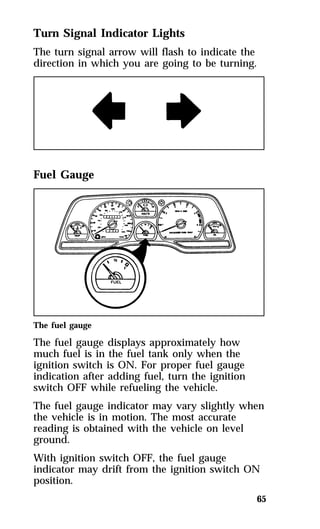
Turn Signal Indicator Lights 
The turn signal arrow will flash to indicate the 
direction in which you are going to be turning. 
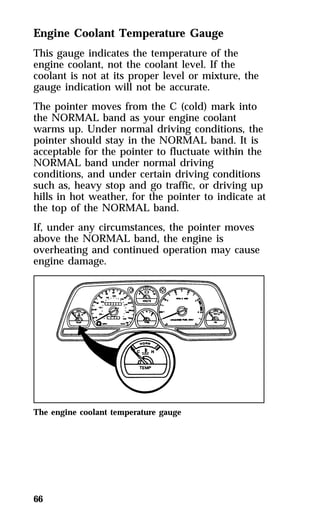
Fuel Gauge 
The fuel gauge 
The fuel gauge displays approximately how 
much fuel is in the fuel tank only when the 
ignition switch is ON. For proper fuel gauge 
indication after adding fuel, turn the ignition 
switch OFF while refueling the vehicle. 
The fuel gauge indicator may vary slightly when 
the vehicle is in motion. The most accurate 
reading is obtained with the vehicle on level 
ground. 
With ignition switch OFF, the fuel gauge 
indicator may drift from the ignition switch ON 
position.
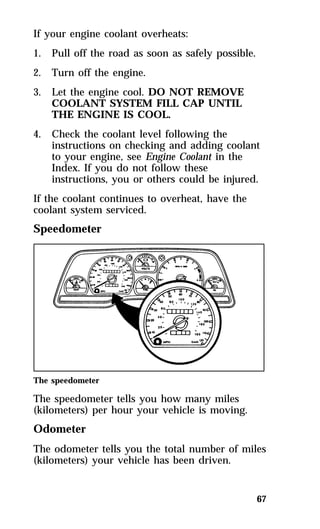
Engine Coolant Temperature Gauge 
This gauge indicates the temperature of the 
engine coolant, not the coolant level. If the 
coolant is not at its proper level or mixture, the 
gauge indication will not be accurate. 
The pointer moves from the C (cold) mark into 
the NORMAL band as your engine coolant 
warms up. Under normal driving conditions, the 
pointer should stay in the NORMAL band. It is 
acceptable for the pointer to fluctuate within the 
NORMAL band under normal driving 
conditions, and under certain driving conditions 
such as, heavy stop and go traffic, or driving up 
hills in hot weather, for the pointer to indicate at 
the top of the NORMAL band. 
If, under any circumstances, the pointer moves 
above the NORMAL band, the engine is 
overheating and continued operation may cause 
engine damage. 
The engine coolant temperature gauge 
66
67 
If your engine coolant overheats: 
1. Pull off the road as soon as safely possible. 
2. Turn off the engine. 
3. Let the engine cool. DO NOT REMOVE 
COOLANT SYSTEM FILL CAP UNTIL 
THE ENGINE IS COOL. 
4. Check the coolant level following the 
instructions on checking and adding coolant 
to your engine, see Engine Coolant in the 
Index. If you do not follow these 
instructions, you or others could be injured. 
If the coolant continues to overheat, have the 
coolant system serviced. 
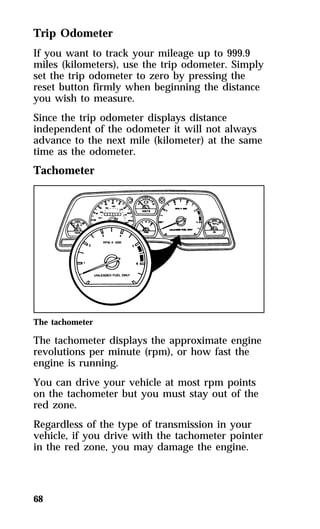
Speedometer 
The speedometer 
The speedometer tells you how many miles 
(kilometers) per hour your vehicle is moving. 
Odometer 
The odometer tells you the total number of miles 
(kilometers) your vehicle has been driven.
Trip Odometer 
If you want to track your mileage up to 999.9 
miles (kilometers), use the trip odometer. Simply 
set the trip odometer to zero by pressing the 
reset button firmly when beginning the distance 
you wish to measure. 
Since the trip odometer displays distance 
independent of the odometer it will not always 
advance to the next mile (kilometer) at the same 
time as the odometer. 
Tachometer 
The tachometer 
The tachometer displays the approximate engine 
revolutions per minute (rpm), or how fast the 
engine is running. 
You can drive your vehicle at most rpm points 
on the tachometer but you must stay out of the 
red zone. 
Regardless of the type of transmission in your 
vehicle, if you drive with the tachometer pointer 
in the red zone, you may damage the engine. 
68
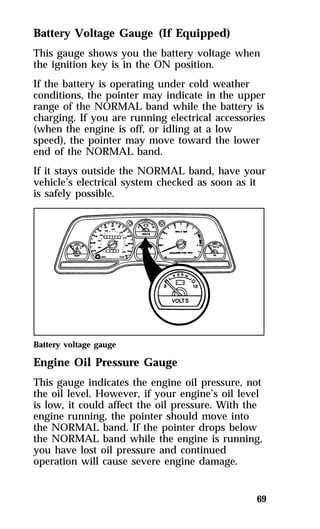
Battery Voltage Gauge (If Equipped) 
This gauge shows you the battery voltage when 
the ignition key is in the ON position. 
If the battery is operating under cold weather 
conditions, the pointer may indicate in the upper 
range of the NORMAL band while the battery is 
charging. If you are running electrical accessories 
(when the engine is off, or idling at a low 
speed), the pointer may move toward the lower 
end of the NORMAL band. 
If it stays outside the NORMAL band, have your 
vehicle’s electrical system checked as soon as it 
is safely possible. 
Battery voltage gauge 
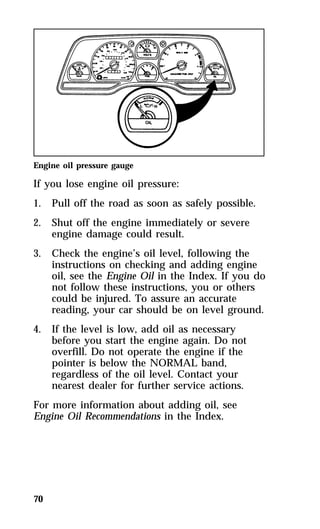
Engine Oil Pressure Gauge 
This gauge indicates the engine oil pressure, not 
the oil level. However, if your engine’s oil level 
is low, it could affect the oil pressure. With the 
engine running, the pointer should move into 
the NORMAL band. If the pointer drops below 
the NORMAL band while the engine is running, 
you have lost oil pressure and continued 
operation will cause severe engine damage. 
69
Engine oil pressure gauge 
If you lose engine oil pressure: 
1. Pull off the road as soon as safely possible. 
2. Shut off the engine immediately or severe 
70 
engine damage could result. 
3. Check the engine’s oil level, following the 
instructions on checking and adding engine 
oil, see the Engine Oil in the Index. If you do 
not follow these instructions, you or others 
could be injured. To assure an accurate 
reading, your car should be on level ground. 
4. If the level is low, add oil as necessary 
before you start the engine again. Do not 
overfill. Do not operate the engine if the 
pointer is below the NORMAL band, 
regardless of the oil level. Contact your 
nearest dealer for further service actions. 
For more information about adding oil, see 
Engine Oil Recommendations in the Index.
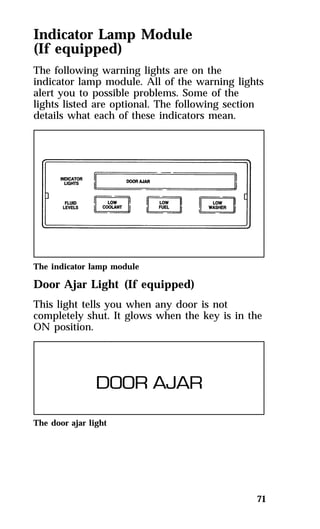
Indicator Lamp Module 
(If equipped) 
The following warning lights are on the 
indicator lamp module. All of the warning lights 
alert you to possible problems. Some of the 
lights listed are optional. The following section 
details what each of these indicators mean. 
The indicator lamp module 
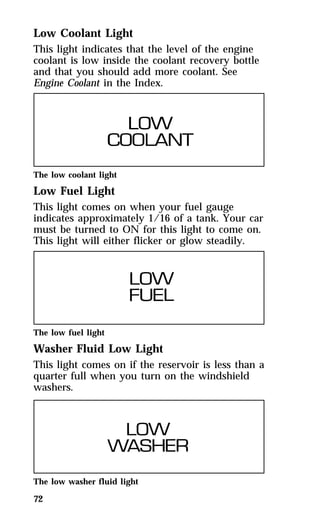
Door Ajar Light (If equipped) 
This light tells you when any door is not 
completely shut. It glows when the key is in the 
ON position. 
71 
The door ajar light
Low Coolant Light 
This light indicates that the level of the engine 
coolant is low inside the coolant recovery bottle 
and that you should add more coolant. See 
Engine Coolant in the Index. 
The low coolant light 
Low Fuel Light 
This light comes on when your fuel gauge 
indicates approximately 1/16 of a tank. Your car 
must be turned to ON for this light to come on. 
This light will either flicker or glow steadily. 
The low fuel light 
Washer Fluid Low Light 
This light comes on if the reservoir is less than a 
quarter full when you turn on the windshield 
washers. 
The low washer fluid light 
72
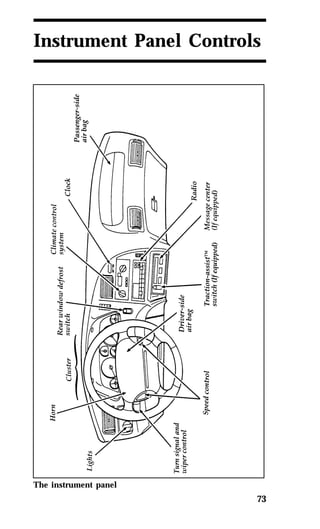
Instrument Panel Controls 
73 
The instrument panel
The main controls for the climate control system, 
clock, and radio are on the instrument panel. 
NOTE: Any cleaner or polish that increases the 
74 
gloss (shine) of the upper part of the 
instrument panel should be avoided. 
The dull finish in this area is to help 
protect the driver from undesirable 
windshield reflection. 
The Climate Control Systems 
Your vehicle has one of two different climate 
control systems. The two systems are: 
qa manual heating and air conditioning system 
qa semi-automatic temperature control 
system (if equipped) 
If you are not sure which system your vehicle 
has, see the diagrams on the following pages. 
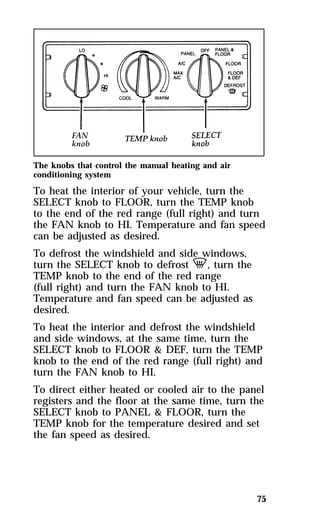
The Manual Heating and Air Conditioning 
System 
You can heat the inside of your vehicle, defrost 
the windshield, and turn on the air conditioning 
with the three knobs in the center of the 
instrument panel: 
qFAN 
qTEMP 
qSELECT
The knobs that control the manual heating and air 
conditioning system 
To heat the interior of your vehicle, turn the 
SELECT knob to FLOOR, turn the TEMP knob 
to the end of the red range (full right) and turn 
the FAN knob to HI. Temperature and fan speed 
can be adjusted as desired. 
To defrost the windshield and side windows, 
turn the SELECT knob to defrost V, turn the 
TEMP knob to the end of the red range 
(full right) and turn the FAN knob to HI. 
Temperature and fan speed can be adjusted as 
desired. 
To heat the interior and defrost the windshield 
and side windows, at the same time, turn the 
SELECT knob to FLOOR & DEF, turn the TEMP 
knob to the end of the red range (full right) and 
turn the FAN knob to HI. 
To direct either heated or cooled air to the panel 
registers and the floor at the same time, turn the 
SELECT knob to PANEL & FLOOR, turn the 
TEMP knob for the temperature desired and set 
the fan speed as desired. 
75
To cool your vehicle using outside air, turn the 
SELECT knob to A/C, turn the TEMP knob all 
the way to the end of the blue range (full left) 
and turn the FAN knob to the desired speed 
between LO and HI. A/C provides quieter 
system operation than MAX A/C, but it is not 
as efficient as MAX A/C which uses recirculated 
air. 
To ventilate your car with outside air, during 
mild weather, turn the SELECT knob to PANEL, 
turn the TEMP knob for the temperature desired 
and set the FAN knob to the speed desired. 
Under normal conditions, the SELECT knob 
should be left in any position other than MAX 
A/C or OFF when the vehicle is parked. This 
allows the vehicle to “breathe” through the 
outside air inlet duct. 
To cool your vehicle quickly in warm weather, 
turn the SELECT knob to MAX A/C, turn the 
TEMP knob all the way to the end of the blue 
range (full left) and turn the FAN knob to HI. 
MAX A/C uses recirculated air and is the most 
fuel efficient way to cool your vehicle and can 
also be used in heavy traffic to prevent exhaust 
fumes from entering the vehicle. MAX A/C can 
also be used in high humidity areas for more 
efficient operation. 
If the interior of your vehicle is very warm, 
drive for the first few minutes with the windows 
open. This forces most of the hot, stale air out of 
the vehicle and allows the air conditioning to 
work faster. 
76
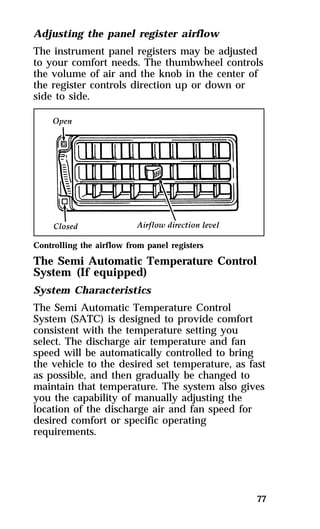
Adjusting the panel register airflow 
The instrument panel registers may be adjusted 
to your comfort needs. The thumbwheel controls 
the volume of air and the knob in the center of 
the register controls direction up or down or 
side to side. 
Controlling the airflow from panel registers 
The Semi Automatic Temperature Control 
System (If equipped) 
System Characteristics 
The Semi Automatic Temperature Control 
System (SATC) is designed to provide comfort 
consistent with the temperature setting you 
select. The discharge air temperature and fan 
speed will be automatically controlled to bring 
the vehicle to the desired set temperature, as fast 
as possible, and then gradually be changed to 
maintain that temperature. The system also gives 
you the capability of manually adjusting the 
location of the discharge air and fan speed for 
desired comfort or specific operating 
requirements. 
77
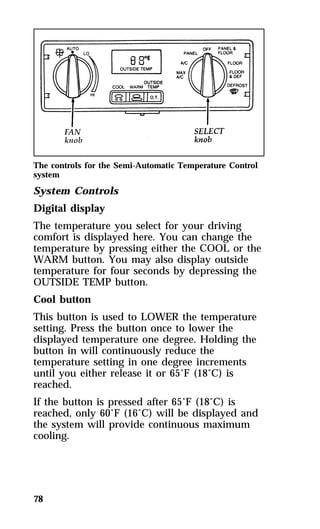
The controls for the Semi-Automatic Temperature Control 
system 
System Controls 
Digital display 
The temperature you select for your driving 
comfort is displayed here. You can change the 
temperature by pressing either the COOL or the 
WARM button. You may also display outside 
temperature for four seconds by depressing the 
OUTSIDE TEMP button. 
Cool button 
This button is used to LOWER the temperature 
setting. Press the button once to lower the 
displayed temperature one degree. Holding the 
button in will continuously reduce the 
temperature setting in one degree increments 
until you either release it or 65°F (18°C) is 
reached. 
If the button is pressed after 65°F (18°C) is 
reached, only 60°F (16°C) will be displayed and 
the system will provide continuous maximum 
cooling. 
78
Warm button 
This button is used to RAISE the temperature 
setting. Press the button once to raise the 
displayed temperature one degree. Holding the 
button in will continuously increase the 
temperature setting in one degree increments 
until you either release it or 85°F (29°C) is 
reached. 
If the button is pressed after 85°F (29°C) is 
reached, only 90°F (32°C) will be displayed and 
the system will provide continuous maximum 
heating. 
System Operation 
To heat the inside of your vehicle, turn the 
SELECT knob to FLOOR and turn the FAN 
knob to AUTO. The fan will remain off until the 
engine reaches operating temperature or until 
3-1/2 minutes have elapsed. As the interior of 
your vehicle warms up, the discharge air 
temperature and the fan speed will be 
automatically and gradually changed to maintain 
the set temperature. If you prefer a fixed fan 
speed, turn the fan speed switch to the desired 
setting. 
To defrost the windshield and side windows, 
turn the SELECT knob to Defrost V, turn the 
FAN knob to HI and set the temperature as 
necessary to clear the windshield. 
To direct either cooled or heated air to the panel 
registers and the floor at the same time, turn the 
SELECT knob to PANEL & FLOOR, push the 
COOL or WARM button for the desired 
temperature and set the FAN speed as desired. 
79
To cool your car quickly in warm weather, turn 
the SELECT knob to MAX A/C and turn the 
FAN knob to AUTO. As the vehicle interior 
cools down, the discharge air temperature and 
fan speed will automatically and gradually be 
changed to maintain the set temperature with 
airflow from the instrument panel registers. 
If the interior of your vehicle is very warm, 
drive for the first few minutes with the windows 
open. This will force the hot, stale air out and 
allow the air conditioning to work faster. 
To cool your vehicle with outside air, turn the 
SELECT knob to A/C and turn the FAN knob to 
AUTO or to a fixed speed setting as you desire. 
Cooling your vehicle in this manner provides a 
quieter system operation, but it will not cool as 
efficiently and is not as fuel efficient as MAX 
A/C which uses recirculated air. 
To ventilate your vehicle with outside air, turn 
the SELECT knob to PANEL and the FAN knob 
to AUTO. The fan will remain off until the 
engine is warm enough to provide heat. 
However, if the interior temperature is above the 
set temperature, the fan will turn on 
immediately. Temperature may be set as desired 
and FAN speed can be selected. 
A/C compressor override 
The A/C compressor can be disengaged for 
more economical driving. This can be done by 
turning the SELECT knob to PANEL. The A/C 
compressor is automatically engaged by the 
control in MAX A/C, NORM A/C, FLOOR & 
DEF, and DEFROST positions if the outside 
temperature is above 45°F (7°C). 
80
Rear Window Defroster 
(If equipped) 
(Standard in Canada) 
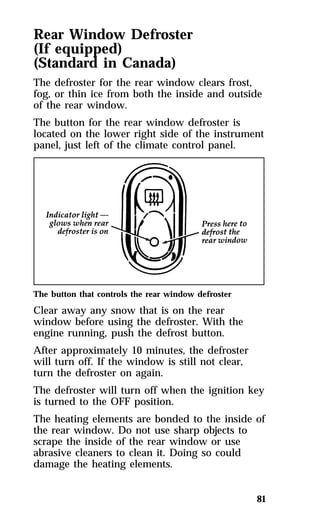
The defroster for the rear window clears frost, 
fog, or thin ice from both the inside and outside 
of the rear window. 
The button for the rear window defroster is 
located on the lower right side of the instrument 
panel, just left of the climate control panel. 
The button that controls the rear window defroster 
Clear away any snow that is on the rear 
window before using the defroster. With the 
engine running, push the defrost button. 
After approximately 10 minutes, the defroster 
will turn off. If the window is still not clear, 
turn the defroster on again. 
The defroster will turn off when the ignition key 
is turned to the OFF position. 
The heating elements are bonded to the inside of 
the rear window. Do not use sharp objects to 
scrape the inside of the rear window or use 
abrasive cleaners to clean it. Doing so could 
damage the heating elements. 
81
The Interior and Exterior Lights 
Daytime Running Light System 
(Canadian vehicles only) 
The Daytime Running Light (DRL) system turns 
the high beam headlamps on, with a reduced 
light output, when: 
qThe headlamp system is in the OFF position, 
and 
qThe vehicle is running, and 
qThe vehicle has a fully released parking 
brake. 
NOTE: If you have a vehicle with an 
82 
automatic lighting system, the DRL 
system is active until the automatic 
system turns on the headlamps. 
NOTE: The high beam indicator will not turn 
on in the flash-to-pass mode during 
nighttime driving. 
NOTE: You may notice that the lights flicker 
when the vehicle is turned on or off. 
This is a normal condition. 
RWARNING 
The Daytime Running Light (DRL) system 
will not illuminate the tail lamps and 
parking lamps. Turn on your headlamps 
at dusk. Failure to do so may result in a 
collision.
Turning On the Exterior Lights 
To turn on the headlamps, parking lamps, side 
markers, and tail lamps, use the rotary knob that 
is to the left of the steering wheel. 
The knob that controls the headlamps and parking lamps 
(shown with autolamp feature — other models similar) 
When you turn on the headlamps, the parking 
lamps, tail lamps, and side markers 
automatically turn on. But you can turn on the 
parking lamps, tail lamps, and side markers 
without turning on the headlamps. 
For more information about how the high beams 
work, refer to the Steering Column Controls 
chapter. 
83
Chime for headlamps on 
This chime sounds if the driver or any passenger 
door is open when the parking lamps or 
headlamps are on. The chime sounds until you 
close the door, turn off the lamps or turn the 
ignition to the ON position. 
Cleaning the Exterior Lamps 
Do not use dry paper towel, chemical solvents 
or abrasive cleaners to clean the lamps, as these 
may cause scratches or crack the lamps. 
Setting the Autolamp Delay System 
(If equipped) 
The autolamp sets the headlamps to turn on and 
off automatically. You can use the autolamp to: 
qturn on the lamps automatically at night 
qturn off the lamps automatically during 
daylight 
qkeep the lamps on for up to three minutes 
after you turn the key to OFF. 
The controls for the autolamp 
84
To set the autolamp: 
1. Make sure the headlamp knob is in the OFF 
85 
position. If the knob for the headlamps is 
ON, you cancel the autolamp. 
2. Turn the ignition key to ON or start your 
vehicle. 
3. Find the autolamp thumbwheel to the right 
of the panel dim thumbwheel. 
4. Turn the thumbwheel up to the beginning of 
the MAX position (within the DELAY range). 
5. The autolamp automatically turns the lamps 
on and off for you. 
Do not put any articles on top of the photocell 
that is located in the top left corner of the 
instrument panel. This photocell controls the 
autolamp. If you cover it, the photocell reacts as 
if it is nighttime, and the lamps turn on. 
To turn the autolamp off, move the thumbwheel 
back to OFF. 
You can set the autolamp so the lamps stay on 
for up to three minutes after you turn your 
vehicle off. 
To keep the lamps on after you leave your 
vehicle, turn the thumbwheel as far into the 
MAX range as you want. 
If you move the thumbwheel only slightly into 
the DELAY area, your lamps will stay on for 
only a moment after you turn your vehicle off. 
The further you move the thumbwheel into the 
DELAY area (toward the MAX position), the 
longer the lamps will stay on after you turn 
your vehicle off.
Lighting Up the Interior and Instrument 
Panel 
Manual operation 
With the light knob in the parking lamps or the 
headlamps position, you can brighten or dim the 
lights in the instrument panel. To do this, use 
the thumbwheel to the left of the steering wheel. 
This wheel also turns on the interior lights with 
the light knob on or off. 
The thumbwheel controls the light on the instrument panel 
and the interior light 
86
Using the Automatic Illuminated Entry 
System (If equipped) 
The interior lights turn on when you lift the 
outside door handle on either front door, when 
any button of the keyless entry system is pushed 
or when you press UNLOCK, TRUNK, or 
PANIC on a programmed remote entry 
transmitter if your vehicle is equipped with 
remote entry. 
These lights automatically turn off after 25 
seconds or when you turn the ignition key to 
ON or ACC. The inside lights will not turn off if 
your have turned them on manually or if a door 
is open. 
Tips on the illuminated entry system: 
qThe illuminated entry timer will not turn off 
the courtesy lamp if that lamp has been 
turned on manually or by the door switch. 
qOccasionally, you will need to clean the lens 
of the door lock assembly. Use Ford 
Multi-Purpose Cleaner Concentrate, a mild 
soap, or household ammonia and water 
solution. Apply with a soft cloth or cotton 
swab, followed by a clear water rinse. 
87
Turning on the Map and Reading Lamps 
Your vehicle has two map lamps for the 
passenger and the driver. To turn on the map 
lamps, push the switch next to each lamp. 
Map lamp (with optional moon roof) 
Front seat map and dome lamps (without optional moon 
roof) 
The dual beam map lamps are located on each 
side of the dome lamp. Each map lamp can be 
turned on by the switches on the lamp. 
88
Rear Seat Courtesy Lamps 
Your vehicle has rear seat courtesy lamps which 
are activated when the interior lights are turned 
on. These lamps are located on the quarter trim 
panels. 
Cleaning the Interior Lamps 
Your interior dome lamps and map lamps are 
plastic and should be cleaned with a mild 
detergent diluted in water. Rinse them with clear 
water. 
Clock 
89 
The digital clock 
1. To set the hour, press and hold the H 
button. When the desired hour appears, 
release the button. 
2. To set the minutes, press and hold the M 
button. When the desired minute appears, 
release the button.
Cellular Phone (If equipped) 
For information about the cellular phone in your 
vehicle, refer to the Cellular Phone User’s Manual 
provided with your phone. For further questions 
about your Ford or Lincoln-Mercury cellular 
phone, contact the Ford Cellular System at 
1-800-367-3013. In Canada contact your Ford 
Dealer. 
NOTE: It is recommended that you remove 
90 
your cellular phone antenna before 
entering a car wash. Unscrew the 
antenna from its base, located on the 
rear window. 
Cleaning the Instrument Panel Lens 
Clean the instrument panel lens with a soft cloth 
and a glass cleaner, such as Ford Ultra-Clear 
Spray Glass Cleaner, or equivalent. Do not use 
paper towel or any abrasive cleaner to clean the 
lens as these may cause scratches.
Steering Column Controls 
The controls on the steering column and wheel 
are designed to give you easy access to the 
controls while you are driving. 
The Turn Signal Lever 
You can use the turn signal lever on the left side 
of the steering column to: 
qoperate the turn signals 
qturn the high beams on/off 
qflash the lights 
qturn the windshield wipers and washer 
91 
on/off 
The turn signal lever 
Turn Signals 
Move the lever up to signal a right turn. Move 
it down to signal a left turn. The corresponding 
indicator light in the instrument cluster will 
flash.
If the turn signal stays on after you turn, move 
the lever back to the center (off) position. 
For lane changes, move the lever far enough to 
signal but not to latch. The lever will return to 
the off position when you release it. 
High Beams 
To turn on the high beams, turn the headlamp 
control knob to the headlamp ON position and 
push the turn signal lever away from you until 
it latches. When the high beams are ON, the 
high beam indicator light on the instrument 
panel comes on. 
To turn off the high beams, pull the lever 
toward you until it latches. The high beam 
indicator light turns off. 
Flashing the Lights 
To flash the headlamps, pull the lever toward 
you for a moment and then release it. The 
headlamps will flash whether the headlamp 
knob is in the on or off position. 
Windshield Wipers and Washer 
To turn on the windshield wipers, the ignition 
key must be turned to the ON or ACC position. 
Rotate the end of the lever away from you to 
activate the wipers. The first seven detents are 
interval wipe positions, the eighth detent is the 
LO position and the ninth detent is the HI 
position. 
To turn the wipers off, turn the knob toward 
you to the OFF position. 
92
Variable Interval Wipers 
In addition to two speed wipers, your vehicle 
has wipers that you can set to operate at 
varying intervals. For example, you can set the 
interval so they wipe less often when it drizzles 
or more often in heavier rain. 
The variable interval wiper on the turn signal lever 
To set the interval wipers, turn the knob at the 
end of the turn signal lever toward or away 
from you until the wipers are going at the 
desired interval. 
Windshield Washer 
To clean the windshield, push in the end of the 
wiper knob. For a constant spray, keep the knob 
pushed in. After you release the knob, the 
wipers operate for two to three cycles before 
turning off (if the wipers were OFF) or 
returning to HI, LO, or the interval setting 
selected. 
If the washer does not work, check the washer 
fluid level and fill it if it is low. See the Servicing 
Your Cougar chapter. If there is enough fluid, 
consult your nearest Ford or Lincoln-Mercury 
dealer. 
93
Do not try to clean the windshield when the 
washer fluid container is empty or activate the 
washers at any time for more than 15 seconds 
continuously. This could damage the washer 
pump system. 
94 
RWARNING 
In freezing weather, the washer solution 
may freeze on the windshield and obscure 
your vision. Always warm up the 
windshield with the defroster before you 
use the washer fluid. If you cannot see 
through the windshield clearly, it can 
increase the risk of being involved in a 
collision. 
For information about refilling the washer fluid 
or replacing your windshield wiper blades, see 
Windshield washer fluid and Wipers in the Index. 
Hazard Flasher 
To alert other drivers to hazardous situations, 
push in the hazard flasher on the top of the 
steering column. The same switch turns the 
flashers off. 
The flashers work whether your vehicle is 
running or not. The flashers work for up to two 
hours when the battery is fully charged and in 
good condition without draining the battery 
excessively. If the flashers run for longer than 
two hours or if the battery is not fully charged, 
the battery can be drained.
The control switch for the hazard flashers 
Horn 
To sound the horn, push the center pad area of 
the steering wheel. 
95 
The horn on the steering wheel
Tilt Steering 
96 
RWARNING 
Never adjust the steering wheel when the 
vehicle is moving. 
The lever to tilt the steering wheel 
To change the position of the steering wheel, 
pull the release lever on the column toward you. 
Tip the steering wheel to the desired position. 
Release the lever to lock the steering wheel in 
place.
Speed Control (If equipped) 
If your vehicle has speed control, you can 
automatically maintain a constant speed at or 
above 30 mph (50 km/h). 
Use of radio transmitting equipment that is not 
Federal Communications Commission (FCC) or 
in Canada the Canadian Radio and 
Telecommunications Commission (CRTC) 
approved may cause the speed control to 
malfunction. Therefore, use only properly 
installed FCC (CRTC in Canada) approved radio 
transmitting equipment in your vehicle. 
NOTE: When driving in hilly terrain, at high 
elevations, or when pulling a trailer, it 
may be desirable to drive with the 
transmission in the Overdrive off 
mode. This can be done by depressing 
the Transmission Control Switch on 
the transmission gear selection lever. 
Driving in this mode prevents the 
transmission from shifting excessively 
when ascending grades, and helps 
maintain speed when going down 
steep hills. 
NOTE: Do not shift to N (Neutral) when using 
97 
the speed control. This will cause the 
engine to overspeed. 
When driving uphill, especially with a heavy 
load, significant speed drops may occur. If the 
speed drops more than 10 mph (16 km/h) the 
automatic speed control will, by design, be 
suspended. Some vehicles may require 
temporary resumption of manual speed control 
while ascending steep grades in order to 
maintain the selected speed.
The speed control switches on the steering wheel 
To set the speed control: 
1. Press and release the ON switch. 
2. Accelerate to the desired speed above 
98 
30 mph (50 km/h) using the accelerator 
pedal. 
3. Press the SET ACCEL switch and release it 
immediately to set your speed. If you keep 
this switch pressed, your speed will continue 
to increase. 
4. Take your foot off the accelerator pedal. 
Your vehicle will maintain the speed you set. 
If you drive up or down a steep hill, your 
vehicle may momentarily slow down or speed 
up, even though the speed control is on. This is 
normal.
NOTE: If your speed increases above your set 
speed while driving in D (Drive) on a 
downhill grade, you may want to 
depress the Transmission Control 
Switch located on the shift lever to 
turn off overdrive to reduce vehicle 
speed. Speed control cannot reduce the 
vehicle speed if it goes above your set 
speed on a downhill grade. 
99 
RWARNING 
Do not use the speed control in heavy 
traffic or on roads that are winding, 
slippery, or unpaved. 
Accelerating With the Speed Control 
Operating 
You can use the accelerator pedal to speed up 
momentarily. When you take your foot off the 
accelerator, the vehicle will return to the set 
speed. 
Resetting the Speed Control 
To reset the speed control to a lower speed, use 
one of the following procedures: 
qCOAST — Press and hold the COAST switch. 
Release the switch when the vehicle slows 
down to the desired speed. 
qLightly tap the brake pedal. When the vehicle 
attains the desired speed, press the SET 
ACCEL switch and release it immediately. 
If vehicle speed is reduced below 30 mph 
(50 km/h) by any of the above methods, then 
you must manually accelerate to a speed over 
30 mph (50 km/h) and reset the system.
To reset the speed control to a higher speed, 
follow one of these procedures: 
qACCEL — Press and hold the SET ACCEL 
switch. Release the switch when the vehicle 
has accelerated to the desired speed. 
qDepress the accelerator pedal. When the 
vehicle attains the desired speed, press the 
SET ACCEL switch and release it 
immediately. 
Cancelling and Resuming a Set Speed 
If you press the brake pedal, speed control is 
suspended. You can return to the set speed by 
pressing the RESUME switch, as long as you did 
not press the OFF switch. You must be driving 
at least 30 mph (48 km/h). 
Your vehicle will gradually return to the 
previously set speed and then maintain it. 
To Turn Speed Control Off 
Press the OFF switch. 
Speed control is also turned OFF each time the 
vehicle ignition is shut off. 
100
101 
Features 
Your vehicle has a variety of features designed 
for your comfort, convenience and safety. Read 
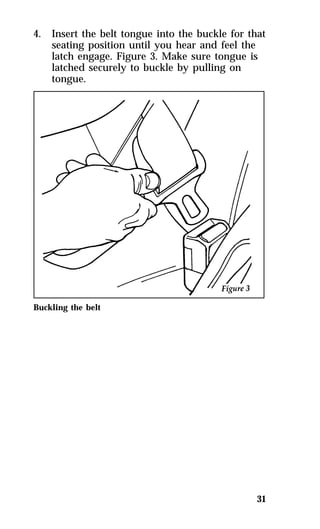
this chapter to find out about standard and 
optional features. 
Doors 
Anti-theft front door lock knobs 
Anti-theft lock knobs are designed to prevent 
unlocking the door by pulling up on the lock 
knob. To unlock and open the front door from 
inside the vehicle, pull on the inside door 
handle.
Power Door Locks (If equipped) 
If your vehicle has power door locks, the 
controls to lock the doors are on the trim panel 
of the front door. When you close the doors 
after you set the door locks, the doors remain 
locked. If the power mechanism fails, the manual 
door locks will override the power controls. 
Pulling on a front inside door handle will 
automatically override and release the front door 
lock. 
Power door locks on vehicles equipped with 
keyless entry will activate when the interior 
courtesy/dome lamps are turned on or off using 
the instrument panel dimmer or thumbwheel 
control. 
The power locks on the driver’s door 
102
Using the Illuminated Entry System 
(If equipped) 
The interior lights turn on when you lift the 
outside door handle on either front door when 
you press UNLOCK, TRUNK, or PANIC on a 
programmed remote entry transmitter if your 
vehicle is equipped with remote entry. 
These lights automatically turn off after 25 
seconds or when you turn the ignition key to 
ON or ACC. The inside lights will not turn off if 
you have turned them on manually or if a door 
is open. 
103
Anti-Theft Alarm System 
(If equipped) 
When armed, this system helps protect your 
vehicle against break-ins or theft. 
When an unauthorized entry occurs, the system 
triggers and will: 
qflash the headlamps, parking lamps, and 
alarm indicator lamp 
qhonk the horn 
qdisable the starting circuit to prevent the 
vehicle from being started 
NOTE: The factory installed Remote Entry 
104 
System has a PANIC feature that also 
chirps the vehicle horn and flashes the 
interior/exterior lamps when the 
PANIC button on the remote entry 
transmitter is pushed. The PANIC 
alarm and the Anti-Theft alarm are two 
separate features. Both the anti-theft 
alarm and the PANIC feature can be 
active at the same time.
105 
To tell the difference between a PANIC alarm 
and a triggered Anti-theft alarm: 
qonly the Anti-Theft alarm will cause the 
alarm indicator lamp (located in the center of 
the instrument panel) to flash on and off. 
qonly the Anti-Theft alarm will disable the 
start circuit so that the vehicle can not be 
started. 
qthe Anti-Theft alarm will not stop by pushing 
the PANIC button on the Remote Entry 
transmitter. 
For more information on the PANIC alarm, see 
Remote Entry System in the Index.
Arming the system 
To arm the system, do the following steps in 
sequence: 
1. Remove the key from the ignition. 
At this point, the anti-theft system automatically 
monitors the ignition keylock cylinder. If the 
lock cylinder is forcibly removed, the anti-theft 
alarm system will trigger. To arm the remaining 
portion of the system, follow steps 2-4. 
2. Open any door. The alarm indicator light 
106 
will start flashing to remind you to arm the 
system. 
3. Lock the doors by using the power door 
lock switch or by pressing the remote entry 
transmitter LOCK button. 
The alarm indicator will now glow steadily. 
4. Close all doors. The alarm indicator light 
will then remain on steadily for 
approximately 30 seconds and then go out. 
When the light goes out, the system is 
armed. 
NOTE: Be sure to close all doors completely. If 
not, the alarm indicator light will 
remain on. Remember, your anti-theft 
system is armed only after the alarm 
indicator light remains on steadily for 
approximately 30 seconds after the last 
door is closed, and then goes out.
107 
You can also arm the anti-theft system by 
following this sequence: 
1. Remove key from ignition. 
2. Close all of the doors. 
3. Press the remote entry transmitter LOCK 
button to lock the doors. The alarm indicator 
will come on for 30 seconds to show that the 
alarm is arming and then turn off to show 
that the alarm has been armed. 
The anti-theft system is designed to work with 
the factory installed remote entry system. It may 
not work with other remote entry systems.
Disarming an untriggered anti-theft system 
You can disarm the system by: 
qunlocking a door with the key (turn the key 
all the way to the end of travel or the system 
may not disarm. 
qusing the UNLOCK button of the remote 
entry transmitter 
qusing the keyless entry unlock code on the 
keypad 
qif remaining in the vehicle, turn the ignition 
switch to ON or ACC 
Triggering the alarm system 
The armed system will be triggered if: 
qany door is opened without disarming the 
system first (see previous paragraphs) 
qthe trunk lock cylinder is removed, or 
NOTE: You can open the trunk with your key 
108 
without setting off the alarm. 
qthe ignition key lock cylinder is forcibly 
removed from the steering column.
109 
Disarming a triggered system 
The alarm can be disarmed by: 
qunlocking a front door with the key 
qusing the UNLOCK button of the remote 
entry transmitter 
qusing the keyless entry unlock code 
NOTE: The flashing lights and honking horn 
will shut off automatically within 2 
minutes 45 seconds after the system is 
triggered. It will trigger again if 
another intrusion occurs. However, the 
starter circuit remains disabled until 
the system is disarmed.
Remote Entry System 
(If equipped) 
If your vehicle has the remote entry system, you 
can lock and unlock the vehicle doors and open 
the trunk without using a key. The remote also 
has a personal alarm feature. The buttons for the 
system are located on the hand held 
transmitter(s) that came with your vehicle. 
The system will work with up to four 
transmitters. Your vehicle came with two 
transmitters. Additional transmitters can be 
ordered from your dealer. 
The remote entry features only operate with the 
ignition in the OFF position. 
Remote entry transmitter 
110
Unlocking the doors and opening the trunk 
To unlock the driver’s door, press the UNLOCK 
button. 
To unlock the other doors, press the UNLOCK 
button a second time within five seconds of 
unlocking the driver’s door. 
To open the trunk, press the TRUNK button. 
Locking the doors 
To lock all the doors, press the LOCK button. 
If you would like a signal that the doors are 
being locked, press the LOCK button again 
within five seconds. The doors will lock again, 
the horn will beep and the low beam headlamps 
and tail lamps will flash. 
111
Activating the remote personal alarm 
If you wish to activate the remote personal 
alarm, press the PANIC button. This will honk 
the horn and flash the low beam headlamps and 
tail lamps for approximately two minutes and 
forty-five seconds. You can turn it OFF by 
pressing the PANIC button again or by turning 
the ignition key to the RUN position. 
When you use the remote entry UNLOCK, 
TRUNK or PANIC buttons, the illuminated entry 
system turns on the interior lights for 25 
seconds. You can turn these lights off with the 
LOCK button or by turning the ignition to the 
RUN position. The interior lights will not turn 
off if you have turned them on manually or if a 
door is open. 
Replacing the batteries 
The remote entry transmitter is powered by two 
coin type three-volt lithium 2016 
batteries (included) that should last for several 
years of normal use. If you notice a significant 
decrease in operating range, the batteries should 
be replaced. Replacement batteries can be 
purchased at most pharmacies, watch stores or 
at your Ford or Lincoln-Mercury dealer. 
112
113 
NOTE: The operating range of the remote 
entry system can also be affected by 
weather conditions (such as very cold 
temperatures) or structures around the 
vehicle (buildings, other vehicles, radio 
and TV towers, etc.). Typical operating 
range will allow you to be up to 33 
feet (10 meters) away from your 
vehicle. 
Replacing the batteries 
The transmitter can be snapped apart to replace 
the batteries by twisting a thin coin between the 
two halves of the transmitter. DO NOT TAKE 
THE FRONT PART OF THE TRANSMITTER 
APART. When installing the new batteries, be 
sure to place the positive (+) side down as 
marked. Snap the two halves back together. 
Replacement/additional transmitters 
In the event a transmitter is lost, return the 
remaining transmitters to your dealer for 
reprogramming of your remote entry system. 
This is necessary to prevent further unauthorized 
use of the lost transmitter. 
Additional transmitters may be purchased from 
your dealer (remote entry system will work with 
up to four transmitters). Return your existing 
transmitters to your dealer so the remote entry 
system can be reprogrammed with your new 
and existing transmitters.
THIS DEVICE COMPLIES WITH PART 15 OF 
THE FCC RULES. OPERATION IS SUBJECT 
TO THE FOLLOWING TWO CONDITIONS: 
(1) THIS DEVICE MAY NOT CAUSE 
HARMFUL INTERFERENCE, AND (2) THIS 
DEVICE MUST ACCEPT ANY 
INTERFERENCE RECEIVED, INCLUDING 
INTERFERENCE THAT MAY CAUSE 
UNDESIRED OPERATION. 
Windows 
Using the Power Windows 
Each door has a power control that opens and 
closes the window on that door. The driver’s 
door has a master control panel that operates the 
windows. 
Power windows can only be opened or closed 
when the ignition switch is in the ON or ACC 
position. 
114 
RWARNING 
Do not let children play with the power 
windows. They may seriously hurt 
themselves. Make sure occupants are clear 
of the window(s) before closing.
The master controls on the driver’s door 
Moon Roof (If equipped) 
You can move the moon roof back to open the 
glass panel, or you can tilt it up to ventilate the 
vehicle. There is also an intermediate position 
between closed and open which can reduce wind 
noise at speeds between 30 and 45 miles per 
hour (50 and 70 km/h). 
The rocker type switch is used to open and close 
the moon roof. You must press and hold the 
switch until the desired position is reached. At 
fully open, closed and intermediate positions, the 
motor will automatically turn off. Release the 
switch at this time to avoid motor damage. 
115
The switch for the moon roof 
To open the moon roof, press and hold the rear 
portion of the switch. The glass panel will move 
to the intermediate position and stop. If the rear 
of the switch is pressed again the glass panel 
will move to the full open position and stop. 
To close the moon roof, press and hold the front 
portion of the switch. The glass panel will move 
to the intermediate position and stop. Press and 
hold the front of the switch again and the panel 
will move to the fully closed position and stop. 
116
To tilt the moon roof into vent position when 
the glass panel is closed, press the front portion 
of the switch. 
To close from vent position, press and hold the 
rear portion of the switch. 
Occasionally wiping the outside guide rail covers 
of the moon roof with a clean cloth will help 
keep the moon roof working properly. 
117 
The moon roof 
RWARNING 
Do not let children play with the moon 
roof. They may seriously hurt themselves. 
Sliding Shade 
The moon roof has a sliding shade that you can 
manually open or close to block the sun when 
the glass panel is shut. 
To close the sliding shade, pull the shade toward 
the front of the vehicle. The shade automatically 
opens and locks when the moon roof is opened.
Seats 
Head Restraints 
If you use them properly, head restraints will 
help protect your head and neck in a collision. 
A head restraint helps protect you best if you 
position it behind your head and not behind 
your neck. 
Standard head restraints 
You can adjust the head restraints for your 
comfort and protection. 
Adjusting the head restraint 
Adjusting Manual Seats 
In the front seats, you can move the whole seat 
forward or backward or tilt the back of the seat 
forward or backward. 
To move the seats forward or backward: 
1. Find the adjustment bar underneath the front 
118 
part of the seat. 
2. Lift the bar to unlatch the seat. 
3. Move the seat to the desired position.
4. Release the bar to latch the seat in its new 
position. Make sure the seat locks securely in 
place. 
The front seat adjustment bar 
To recline the front manual seats: 
1. On the side of the seat, find the handle for 
119 
the recliner. 
2. Lift the handle up and hold it in place. 
3. Lean against the back of the seat and adjust 
it to the position you want. You can tilt the 
seat back or bring it forward. 
4. Release the handle to lock the seat in its new 
position. 
RWARNING 
Never adjust the driver’s seat or seatback 
when the vehicle is moving. 
RWARNING 
To reduce the risk of serious injury in a 
collision, always drive and ride with your 
seatback upright and the lap belt snug 
and low across the hips.
Seatback Recline 
Front seatback release levers 
It is not necessary to use the emergency seatback 
release lever for rear seat entry or exit. The 
seatback remains unlocked with normal usage 
and locks only during emergency stopping, upon 
impact, or on steep downhill grades. The inertia 
seatback latch will allow the seatback to rotate 
approximately 5° forward before it locks. The 
release is provided only to unlock the seatback 
when parked on steep downhill grades or after a 
collision. 
120 
RWARNING 
A seatback which is folded forward even 
a small degree may not lock properly in 
the event of a sudden stop or collision.
Using the Power Seats (If equipped) 
If your vehicle has power seats, you can adjust 
them in several directions. The controls are on 
the side of the seats. 
121 
The power controls on the driver’s seat 
RWARNING 
Do not pile cargo higher than the 
seatbacks to avoid injuring people in a 
collision or sudden stop.
Sport Seat 
Sport seat controls 
122
123 
Rear Seat Entry 
Entering the rear seat 
The rotating boot on the lap belt is designed to 
allow rear seat entry/exit. To enter the rear seat: 
1. Rotate the safety belt boot rearward. 
2. Enter the rear seat in front of the safety belt. 
3. Rotate the safety belt boot forward to allow 
use by the front seat passengers. 
Cleaning the Seats 
Leather and vinyl 
For routine cleaning, wipe the surface with a 
soft, damp cloth. For more thorough cleaning, 
wipe the surface with a leather and vinyl cleaner 
or a mild soap. 
Fabric 
Remove dust and loose dirt with a whisk broom 
or a vacuum cleaner. Remove fresh spots 
immediately. Follow the directions that come 
with the cleaner. 
NOTE: Before using any cleaner, test it on a 
small, hidden area of fabric. If the 
fabric’s color or texture is adversely 
affected by a particular cleaner, do not 
use it.
Mirrors 
You can adjust your rearview mirror in any 
direction. The special swivel bracket lets you 
move the mirror up or down and from side to 
side. 
124 
RWARNING 
Make sure you can see clearly through the 
rearview mirror at all times. Do not block 
your vision. If you cannot see through the 
mirror, it could result in a collision, 
injuring yourself and others. 
Adjusting the Dual Electric Remote 
Control Mirrors 
The switch for controlling the dual electric 
remote control mirrors is located on the driver’s 
door. 
Do not clean the housing or glass of any mirror 
with harsh abrasives, fuel or other 
petroleum-based cleaning products.
The mirror controls on the driver’s door 
To adjust the side mirrors: 
1. Find the control switch in the driver’s door 
125 
panel. 
2. Select the right or left mirror by moving the 
selector switch to R or L. 
3. Move the knob in the direction of the arrows 
for the direction you want to move the 
mirror. 
4. Return the selector switch to the middle 
position to keep the mirror in place.
The Right Side Convex Mirror 
The side view mirror on the right is a convex 
mirror. This mirror gives you a wider view of 
the lanes on your right and behind you. 
126 
RWARNING 
The side view mirror on the right makes 
objects appear smaller and farther away 
than they actually are. 
Sun Visors 
Turning on the Mirror Light on the Sun 
Visors (If equipped) 
To turn on the visor mirror light, lift the mirror 
cover. 
The mirror on the sun visor
Console 
Your vehicle has a full console. The full console 
has the features shown in the illustration below. 
127 
The features on the full console 
Storage Compartments 
In addition to the console, your vehicle may 
have several small storage compartments: 
qa glove compartment that locks. Use the 
round key to lock and unlock it. 
qtwo map pockets on the panels of the front 
doors. 
RWARNING 
Do not put objects on the ledge between 
the back seat and the rear window, as 
they can become dangerous projectiles and 
injure someone.
Trunk 
Opening the Trunk Manually 
The trunk in your vehicle gives you plenty of 
room for storage — 15.1 cubic feet (.42 cubic 
meters). 
To open and close the trunk from the outside: 
1. Insert the key into the lock on the trunk. 
2. Turn the key to the right until the trunk 
128 
opens. 
3. Remove the key before you close and lock 
the lid. 
4. Shut the trunk lid completely. 
Using the Remote Control for the 
Trunk (If equipped) 
With the ignition switch in the ON or ACC 
position, you can use the remote control under 
your console armrest to unlock and open the 
trunk. 
The trunk release button located under the armrest
Positive Location Floor Mat 
When installing or removing the driver’s side 
floor mat you must attach/detach the positive 
location grommet from the hook on the floor. 
The hook is just forward of the left hand track 
of the driver’s seat. 
129 
The positive location floor mat hook
Decklid Luggage Rack 
(If equipped) 
NOTE: The factory-installed luggage rack has a 
130 
load carrying capacity of 50 lbs. 
(23 kg.). Do not exceed this load limit 
or cause the vehicle to exceed the gross 
vehicle weight rating (GVWR), which 
is shown on the Safety Compliance 
Certification Label.
Electronic Sound Systems 
131 
Compact Disc Radio
Compact Disc Radio 
The Compact Disc Radio combines the Electronic 
Stereo Radio with the Ford Compact Disc Player. 
Using the Controls on Your New Compact 
Disc Radio 
Most of the features of this unit work for both 
radio and CD operation. Also, some of the knobs 
and buttons control several different functions, 
so be sure to read all of the operating 
instructions carefully. 
How to turn the radio on and off 
Press the “POWER” button to turn the radio on. 
Press it again to turn it off. 
How to adjust the volume 
Press the (+/s) side of the “VOL” button to 
increase/decrease the volume. Bars illuminate in 
the display to show the relative volume level. 
NOTE: If the volume level is set above a 
132 
certain listening level when the 
ignition switch is turned off, when the 
ignition switch is turned back on, the 
volume will come back to a “nominal” 
listening level. However, if the radio 
power is turned off (with the 
“POWER” button), the volume will 
remain in the position it was set at 
when radio power is switched back on. 
Selecting the AM or FM frequency band 
Push the “AM/FM” button to select the desired 
frequency band. When in the radio mode, 
pushing the button more than once will alternate 
between AM, FM1 and FM2. These functions are 
used with the station memory buttons described 
under How to tune radio stations.
How to tune radio stations 
There are four ways for you to tune in a 
particular station. You can manually locate the 
station using the “SCAN/TUNE” button, 
“SEEK” the station, “SCAN” to the station or 
select the station by using the memory buttons, 
which you can set to any desired frequency. 
These four methods are described below. 
qUsing the “SCAN/TUNE” button to manually 
tune 
You can change the frequency up or down 
one increment at a time (FM changes in 
increments of 200kHz; AM changes in 
increments of 10kHz) by first pressing the 
“SCAN/TUNE” button twice (display shows 
“TUNE”), then — within approximately five 
seconds —pressing and releasing either the 
top a or bottom b half of the “SEEK” 
button. To change frequencies quickly, press 
and hold down either the top or bottom half 
of the “SEEK” button. While you are 
manually tuning, the display will show a 
blinking “M”. 
Manual tuning adjusts your radio to any 
allowable broadcast frequency, whether or 
not a station is present on that frequency. 
(See All About Radio Frequencies in this 
section.) 
qUsing the “SEEK” function 
This feature on your radio allows you to 
automatically select listenable stations up or 
down the frequency band. Press the top a 
half of the “SEEK” button to select the next 
listenable station up the frequency band. 
Press the bottom b half of the button to 
select the next listenable station down the 
frequency band. By pressing and holding the 
button, listenable stations can be passed over 
to reach the desired station. 
133
qUsing the “SCAN/TUNE” button to scan 
radio stations 
Pressing the “SCAN/TUNE” button once 
enters the scan mode (display will indicate 
“SCN”). Pushing the top a half of the 
“SEEK” button will begin the scan mode up 
the frequency band, stopping on each 
listenable station for approximately five 
seconds. Pushing the bottom b half of the 
“SEEK” button will begin the scan mode 
down the frequency band, again stopping on 
each listenable station for approximately five 
seconds. 
To stop the scan mode on the presently 
sampled station press the “SCAN/TUNE” 
button again. 
qSetting the Station Memory Preset buttons 
134 
Your radio is equipped with 6 station 
memory buttons. These buttons can be used 
to select up to 6 preset AM stations and 12 
FM stations (6 in FM1 and 6 in FM2). 
Follow the easy steps below to set these buttons 
to the desired frequencies: 
1. Select a band, then select a frequency. 
2. Press one of the memory buttons and hold 
the button until the sound returns. That 
station is now held in memory on that 
button. 
3. Follow the two steps above for each station 
memory preset button you want to set.
135 
qUsing the Automatic Memory Load feature 
If no stations are in memory preset, you can 
activate the Auto Memory Load feature by 
pressing and holding the “AUTO PRESET” 
button for approximately three seconds. 
Auto Memory Load sets all memory buttons 
in AM, FM1 and FM2 sequentially by seeking 
out the first six strong stations for the 
respective band and storing them in memory 
buttons 1-5. (FM2 will store the second set of 
strong stations from the FM band.) 
With Auto Memory Store, you can 
continually set strong stations into your 
memory buttons without losing your existing 
memory presets, which is especially handy 
while traveling. Your radio will automatically 
set your memory buttons to the strong local 
stations so you don’t have to continually 
manually tune to existing stations. 
Activate Auto Memory Store by pushing the 
“AUTO PRESET” button once. Your radio 
will set the first five strong stations of the 
band you are in (AM, FM1 or FM2) into the 
memory buttons. The display will show 
“AUTO”, then run through the frequencies, 
stopping momentarily on the stations being 
set into the memory buttons. The radio is 
now in the “AUTO” mode and this display 
will show “AUTO” each time a preset is 
activated. 
NOTE: If there are fewer than five strong 
stations in the frequency band, the 
remaining unfilled buttons will store 
the last strong station detected on the 
band.
136 
After all stations have been filled, the radio 
will begin playing the station stored on 
memory button 1. 
To deactivate the Auto Memory Store mode 
and return to the manually-set memory 
button stations (or those stations set using 
Auto Memory Load), simply push the 
“AUTO PRESET” button. Display will show 
“AUTO” then “OFF”. The next time Auto 
Memory Store is activated on that band, the 
radio will store the next set of five strong 
stations. 
Adjusting the tone balance and speaker 
output of your radio 
qIncreasing or decreasing bass response 
Push the “AUDIO” button repeatedly until 
the display reads “BASS”. Push the top (+) 
side of the “VOLUME” button to increase 
bass (more “lows”), and push the bottom (–) 
side to decrease bass (less “lows”). 
qIncreasing or decreasing treble response 
Push the “AUDIO” button repeatedly until 
the display reads “TREB”. Push the top (+) 
side of the “VOLUME” button to increase 
treble (more “highs”), and push the bottom 
(–) side to decrease treble (less “highs”). 
qAdjusting speaker balance 
Balance control allows you to adjust the 
sound distribution between the right and left 
speakers. Push the “AUDIO” button 
repeatedly until the display reads “BAL”. 
Push the top (+) side of the “VOLUME” 
button to shift the sound to the right 
speakers, and push the bottom (–) side to 
shift the sound to the left speakers.
137 
qAdjusting speaker fader 
Fade control allows you to adjust the sound 
distribution between the front and rear 
speakers. Push the “AUDIO” button 
repeatedly until the display reads “FADE”. 
Push the top (+) side of the “VOLUME” 
button to shift the sound to the front 
speakers, and push the bottom (–) side to 
shift the sound to the rear speakers. 
NOTE: Illuminated bars in the display show 
relative levels of bass and treble, and 
positions of speaker balance and fader 
functions (left to right, front to rear). 
Using the Controls on Your New Compact 
Disc Player 
Your new Ford Compact Disc Player is capable 
of playing 12 cm or 8 cm discs, without an 
adapter! The Player operates when the power is 
on and a disc is inserted (label side up). Handle 
the disc by its edge only. (Be sure to read and 
follow all of the care and cleaning instructions 
under How To Take Care of and Clean Your CD 
Player and Discs. 
NOTE: If after you insert a disc, the disc is 
ejected and “ERROR” begins scrolling 
in the display, remove the disc and 
reinsert it right side up (label side up). 
The digital display on your CD player will 
either show the track (selection) number or the 
elapsed time. (The display mode can be selected 
by pressing the memory preset button #6.) 
Indicators for play b, stop X and compression 
on (“C”) are also in the display. (These features 
are described later.) 
Once a disc is inserted, operation of the CD 
player will override that of the radio.
NOTE: The volume, bass, treble, balance and 
138 
fader controls on the radio are also 
used with the CD player. Refer to 
earlier operating instructions on these 
controls. 
How to insert a disc and begin play 
Insert one disc, label side up into the disc 
opening. When inserted, the disc automatically 
loads into the unit and play starts at the 
beginning of the first track (selection). 
When the disc reaches the end, the disc player 
automatically returns to the beginning of the 
disc and resumes playing. 
How to change the track being played 
Press the top a side of the “SEEK” button to 
seek forward to the next track of the disc. If the 
button is held and the last track is reached, the 
disc player will automatically begin playing the 
last track of the disc. 
Press the bottom b side of the “SEEK” button 
to seek the previous track on the disc. 
NOTE: Once a disc is inserted, the disc 
opening is secured to prevent the 
accidental insertion of a second disc. 
NOTE: The CD player has heat protection 
circuitry to protect the laser diode. If 
the temperature of the player reaches 
167°F (75°C), the heat detection circuit 
will shut off the player and “TOO 
HOT” will scroll in the display for 
approximately five seconds (radio will 
resume playing). When the temperature 
returns to normal operating range, the 
CD player will again be operational.
How to stop and restart the CD player 
When a disc is loaded, the unit automatically 
enters the play mode and the play indicator a 
illuminates. To stop temporarily, press the 
“PLAY/STOP” button or the “AM/FM” button. 
The stop indicator X in the display illuminates 
and operation returns to the radio mode. To 
resume CD play, press the “PLAY/STOP” 
button once again. 
NOTE: If the ignition key is turned OFF 
during play and then is set to the ON 
or ACCESSORY position, the CD 
player will resume playing in the mode 
it was in when ignition was turned off. 
How to fast forward or reverse your CD 
player 
To quickly search for a particular point in a 
selection, press the “FF” button (to fast forward) 
or the “REV” button (to reverse). While either 
button is pressed, the disc goes forward or 
backward at two different speeds depending on 
how long the button is held down. (Pressing 
either button for more than approximately three 
seconds will speed up the process.) Release the 
button at the desired point (found by watching 
the elapsed playing time in the display or by 
listening to the sound during fast forward or 
reverse). When you have reached the beginning 
of track 1, the CD player will begin playing. 
When you have reached the end of the disc by 
keeping the fast forward button pressed, the 
display will show “END” and the player will go 
into pause mode. Push the “PLAY/STOP” 
button to begin playing the first track of the 
disc, press the “REV” button to back up from 
the end of the disc, or use the “SEEK” function 
to locate a desired track. 
139
Using the “SCAN” function 
Press the “SCAN/TUNE” button to enter the 
scan mode. Once in the scan mode, press the top 
a or bottom b half of the “SEEK” button to 
scan forward or reverse, respectively. The CD 
player will begin scanning the disc, stopping on 
each listenable track for approximately eight 
seconds. This continues until you press the 
“SCAN/TUNE” button a second time. While in 
the scan mode, the display shows the current 
sampled track number. 
Special features of your CD player 
qCompression 
The compression feature will bring soft and 
loud passages closer together for a more 
consistent listening level. 
To turn the compression on, press the 
“COMP” button. When on, the compression 
indicator (“C”) will appear in the display. 
Press the button again to turn off. 
qAutomatic Disc Storage 
140 
If the disc is ejected from the CD player but 
is not removed from the disc opening within 
approximately 10 seconds, the player will 
automatically reload the disc for storage, 
unless the disc is automatically ejected due to 
a “focus error” (disc inserted upside down). 
In this case, the disc will not be automatically 
reloaded. 
How to eject the disc 
Push the “EJECT” button to stop play, eject the 
disc and resume radio operation of your audio 
system. 
NOTE: You can eject the disc while the radio 
power and/or ignition is on or off.
141 
Electronic Stereo Radio with Cassette
Electronic Stereo Cassette Radio 
Using the Controls on Your New Radio 
How to turn the radio on and adjust the 
volume 
Press the “POWER” button to turn the radio on. 
Press it again to turn it off. 
Press the right (+) side of the “VOLUME” 
button to increase the volume. Press the left (–) 
side of the button to decrease the volume. 
Illuminated bars in the display show the relative 
volume level. 
NOTE: If the volume level is set above a 
142 
certain listening level when the 
ignition switch is turned off, when the 
ignition switch is turned back on, the 
volume will come back to a “nominal” 
listening level. However, if the radio 
power is turned off (with the 
“POWER” button), the volume will 
remain in the position it was set at 
when radio power is switched back on. 
Selecting the AM or FM frequency band 
Push the “AM/FM” button to select the desired 
frequency band or to stop/store cassette tape 
(when in cassette mode). Pushing the button 
more than once will alternate between AM, FM1 
and FM2. These functions are used with the 
station memory buttons described under How to 
tune radio stations. 
How to tune radio stations 
There are four ways for you to tune in to a 
particular station. You can manually locate the 
station by using the Automatic Music Search 
(“AMS”) button, “SEEK” the station, “SCAN” to 
the station or select the station by using the 
memory buttons, which you can set to any 
desired frequency.
qUsing the “AMS” function to manually tune 
your radio 
You can change the frequency up or down 
one increment at a time by first pressing the 
“AMS” button, (display shows “TUNE”) then 
pressing and releasing either the right a or 
left b side of the “SEEK” button. To change 
frequencies quickly, press and hold down 
either the right or left side of the “SEEK” 
button. 
Manual tuning adjusts your radio to any 
allowable broadcast frequency, whether or 
not a station is present on that frequency. 
(See All About Radio Frequencies in this 
section.) 
qUsing the “SEEK” function 
This feature on your radio allows you to 
automatically select listenable stations up or 
down the frequency band. Press the right 
(a) side of the “SEEK” button to select the 
next listenable station up the frequency band. 
Press the left (b) side of the button to select 
the next listenable station down the 
frequency band. By holding the button down, 
listenable stations can be passed over to reach 
the desired station. 
qUsing the “SCAN” function 
Press the “SCAN” button to enter the scan 
mode. The radio will begin scanning up the 
frequency band, stopping on each listenable 
station for approximately a five-second 
sampling. This continues until you press the 
“SCAN” button a second time. The display 
flashes “AM” or “FM.” 
143
qSetting the Station Memory Preset buttons 
144 
Your radio is equipped with 6 station 
memory buttons. These buttons can be used 
to select up to 6 preset AM stations and 12 
FM stations (6 in FM1 and 6 in FM2). 
Follow the easy steps below to set these buttons 
to the desired frequencies: 
1. Select a band, then select a frequency. 
2. Press one of the memory buttons and hold 
the button until the sound returns. That 
station is now held in memory on that 
button. 
3. Follow the two steps above for each station 
memory preset button you want to set. 
NOTE: If the vehicle’s battery is disconnected, 
the station memory preset buttons will 
need to be reset. 
Adjusting the tone balance and speaker 
output of your radio 
qIncreasing or decreasing bass response 
Push the “AUDIO” button repeatedly until 
the display reads “BASS.” Push the right (+) 
side of the “VOLUME” button to increase 
bass (more “lows”), and push the left (s) 
side to decrease bass (less “lows”). 
qIncreasing or decreasing treble response 
Push the “AUDIO” button repeatedly until 
the display reads “TREB.” Push the right (+) 
side of the “VOLUME” button to increase 
treble (more “highs”), and push the left (s) 
side to decrease treble (less “highs”).
145 
Speaker features and operation 
qAdjusting speaker balance 
Balance control allows you to adjust the 
sound distribution between the right and left 
speakers. Push the “AUDIO” button 
repeatedly until the display reads “BAL.” 
Push the right (+) side of the “VOLUME” 
button to shift the sound to the right 
speakers, and push the left (s) side to shift 
the sound to the left speakers. 
qAdjusting speaker fader 
Fade control allows you to adjust the sound 
distribution between the front and rear 
speakers. Push the “AUDIO” button 
repeatedly until the display reads “FADE.” 
Push the right (+) side of the “VOLUME” 
button to shift the sound to the front 
speakers, and push the left (s) side to shift 
the sound to the rear speakers. 
NOTE: Illuminated bars in the display show 
relative levels of bass and treble, and 
positions of speaker balance and fader 
functions (left to right, front to rear). 
Using the Controls of Your Cassette Tape 
Player 
How to insert a tape 
Insert a cassette (with the open edge to the 
right) firmly into the tape door opening, making 
sure the cassette is completely in and “seated.” 
How to locate a desired track on the tape 
NOTE: The tape track number indicated in the 
display does not necessarily correspond 
to the tape track or side number on the 
cassette label. It is used only to 
indicate when the tape mechanism 
reverses tracks.
NOTE: Depending on your vehicle, the display 
146 
of your radio may show arrows (g 
orh) or numerals (“1” or “2”) to 
indicate the direction of tape travel. In 
either case, at the end of the tape, the 
direction automatically reverses and 
plays the other side of the tape. 
qUsing the Automatic Music Search (“AMS”)(If 
your display shows numerals) 
Press and hold the “AMS” button (“AMS” 
will appear in the display). Then, push the 
left (h) button to rewind to the beginning 
of the current selection or press the right 
(g) button to fast forward to the beginning 
of the next selection. 
qFast forwarding the tape (if your display 
shows numerals) 
Push the right (g) button to fast forward 
the tape. 
qRewinding the tape (if your diplay shows 
numerals) 
Push the left (h) button to rewind the 
tape. 
qUsing the Automatic Music Search (“AMS”) 
(if your display shows arrows) 
Press and hold the “AMS” button. Then, 
push the appropriate fast-wind button, 
depending upon the direction of the tape 
travel arrow in the display. For example, if 
the tape travel arrow is pointing to the left, 
push the left (h) button to rewind to the 
beginning of the current selection. If the tape 
travel arrow is pointing to the right, press 
the right (g) button to fast forward to the 
beginning of the next selection.
147 
qFast forwarding the tape (if your display 
shows arrows) 
To fast forward the tape, press the fast-wind 
button with the arrows pointing in the same 
direction as indicated in the display. For 
example, if the tape travel arrow in the 
display is pointing to the left, press the left 
(h) button to fast forward the tape. To 
return to the play mode, press the opposite 
fast-wind button momentarily, until fast 
forward stops. 
qRewinding the tape (if your display shows 
arrows) 
To rewind the tape, press the fast-wind 
button with the arrows pointing in the 
opposite direction as indicated in the display. 
For example, if the tape travel arrow in the 
display is pointing to the left, press the right 
(g) button to rewind the tape. To return to 
the play mode, press the opposite fast-wind 
button momentarily, until rewind stops. 
qHow to change the side of the tape being 
played 
The alternate track (other side) of the tape 
can be selected at any time by pushing both 
fast-wind buttons (handg) at the 
same time.
How to eject the tape 
To stop the tape and eject the cassette, press the 
“EJECT” button. The radio will resume playing. 
Using the DolbyH B noise reduction feature 
NOTE: Noise reduction system manufactured 
148 
under license from Dolby Labs 
Licensing Corporation. “Dolby” and 
double-D symbol are trademarks of 
Dolby Laboratories Licensing 
Corporation. 
Push thekbutton to activate. Push again to 
deactivate. 
Tips on Caring for the Cassette Player and 
Tapes 
In order to keep your cassette tape player 
performing the way it was meant to, read and 
follow these simple precautions: 
qUsing a Ford Cassette Cleaning Cartridge to 
clean the tape player head after 10-12 hours 
of play will help maintain the best playback 
sound and proper tape operation. 
qOnly cassettes that are 90 minutes long or 
less should be used. Tapes longer than 90 
minutes are thinner and subject to breakage 
or may jam the tape player mechanism.
qProtect cassettes from exposure to direct 
sunlight, high humidity and extreme heat or 
cold. If they are exposed to extreme 
conditions, allow them to reach a moderate 
temperature before playing. 
qIf a tape is loose inside the cassette, tighten it 
before playing by putting your finger or a 
pencil into one of the holes and turning the 
hub until the tape is tight. 
qLoose labels on cassette tapes can become 
lodged in the mechanism. Remove any loose 
label material before inserting a cassette. 
qDo not leave a tape in the cassette tape 
player when not in use. High heat in the 
vehicle can cause the cassette to warp. 
149
High-Level Audio System 
150
High-Level Audio System 
Using the Controls on Your New Radio 
How to turn the radio on and off 
Press the “POWER” button to turn the radio on. 
Press it again to turn it off. 
How to adjust the volume 
Press the +/– side of the “VOLUME” button to 
increase/decrease volume. Bars illuminate in the 
display to show the relative volume level. 
NOTE: If the volume level is set above a 
certain listening level when the 
ignition switch is turned off, when the 
ignition switch is turned back on, the 
volume will come back to a “nominal” 
listening level. However, if the radio 
power is turned off (with the 
“POWER” button), the volume will 
remain in the position it was set at 
when radio power is switched back on. 
Selecting the AM or FM frequency band 
Push the “AM/FM” button to select the desired 
frequency band or to stop/store cassette tape 
(when in cassette mode). Pushing the button 
more than once will alternate between AM, FM1 
and FM2. These functions are used with the 
station memory buttons described under How to 
tune radio stations. 
151
How to tune radio stations 
There are four ways for you to tune in a 
particular station. You can manually locate the 
station using the “SCAN/TUNE” button, 
“SEEK” the station, “SCAN” to the station or 
select the station by using the memory buttons, 
which you can set to any desired frequency. 
These four methods are described below. 
qUsing the “TUNE” function 
You can change the frequency up or down 
one increment at a time (FM changes in 
increments of 200 kHz; AM changes in 
increments of 10 kHz) by first pressing the 
“SCAN/TUNE” button twice (display shows 
“TUNE”), then — within approximately five 
seconds — pressing and releasing either the 
right (a) or left (b) side of the “SEEK” 
button. To change frequencies quickly, press 
and hold down either the right or left side of 
the “SEEK” button. 
Manual tuning adjusts your radio to any 
allowable broadcast frequency, whether or 
not a station is present on that frequency. 
(See All About Radio Frequencies in this 
section.) 
qUsing the “SEEK” function 
152 
This feature on your radio allows you to 
automatically select listenable stations up or 
down the frequency band. Press the right 
(a) side of the “SEEK” button to select the 
next listenable station up the frequency band. 
Press the left (b) side of the button to select 
the next listenable station down the 
frequency band. By holding the button down, 
listenable stations can be passed over to reach 
the desired station.
153 
qUsing the “SCAN” function 
Pressing the “SCAN/TUNE” button once 
enters the scan mode (display will indicate 
“SCN”). Pushing the right (a) side of the 
“SEEK” button will begin the scan mode up 
the frequency band, stopping on each 
listenable station for approximately a 
five-second sampling. Pushing the left (b) 
side of the “SEEK” button will begin the scan 
mode down the frequency band, again 
stopping on each listenable station for 
approximately a five-second sampling. 
To stop the scan mode on the presently 
sampled station press the “SCAN/TUNE” 
button again. 
qSetting the Station Memory Preset buttons 
Your radio is equipped with 6 station 
memory buttons. These buttons can be used 
to select up to 6 preset AM stations and 12 
FM stations (6 in FM1 and 6 in FM2). 
Follow the easy steps below to set these buttons 
to the desired frequencies: 
1. Select a band, then select a frequency. 
2. Press one of the memory buttons and hold 
the button until the sound returns. That 
station is now held in memory on that 
button. 
3. Follow the two steps above for each station 
memory preset button you want to set.
qUsing the Automatic Memory Load feature 
154 
If no stations are in memory preset, you can 
activate the Auto Memory Load feature by 
pressing and holding the “AUTO PRESET” 
button for approximately three seconds. 
Auto Memory Load sets all memory buttons 
in AM, FM1 and FM2 sequentially by seeking 
out the first six strong stations for the 
respective band and storing them in memory 
buttons 1-5. (FM2 will store the second set of 
strong stations from the FM band.) 
With Auto Memory Store, you can 
continually set strong stations into your 
memory buttons without losing your existing 
memory presets, which is especially handy 
while traveling. Your radio will automatically 
set your memory buttons to the strong local 
stations so you don’t have to continually 
manually tune to existing stations. 
Activate Auto Memory Store by pushing the 
“AUTO PRESET” button once. Your radio 
will set the first five strong stations of the 
band you are in (AM, FM1 or FM2) into the 
memory buttons. The display will show 
“AUTO”, then run through the frequencies, 
stopping momentarily on the stations being 
set into the memory buttons. The radio is 
now in the “AUTO” mode and this display 
will show “AUTO” each time a preset is 
activated. 
NOTE: If there are less than five strong 
stations in the frequency band, the 
remaining unfilled buttons will store 
the last strong station detected on the 
band.
After all stations have been filled, the radio 
will begin playing the station stored on 
memory button 1. 
To deactivate the Auto Memory Store mode 
and return to the manually-set memory 
button stations (or those stations set using 
Auto Memory Load), simply push the 
“AUTO PRESET” button. Display will show 
“AUTO” then “OFF”. The next time Auto 
Memory Store is activated on that band, the 
radio will store the next set of five strong 
stations. 
155 
Adjusting the tone balance and speaker 
output of your radio 
qIncreasing or decreasing bass response 
Push the “AUDIO” button repeatedly until 
the display reads “BASS.” Push the right (+) 
side of the “VOLUME” button to increase 
bass (more “lows”), and push the left (s) 
side to decrease bass (less “lows”). 
qIncreasing or decreasing treble response 
Push the “AUDIO” button repeatedly until 
the display reads “TREB.” Push the right (+) 
side of the “VOLUME” button to increase 
treble (more “highs”), and push the left (s) 
side to decrease treble (less “highs”). 
qAdjusting speaker balance 
Balance control allows you to adjust the 
sound distribution between the right and left 
speakers. Push the “AUDIO” button 
repeatedly until the display reads “BAL.” 
Push the right (+) side of the “VOLUME” 
button to shift the sound to the right 
speakers, and push the left (s) side to shift 
the sound to the left speakers.
qAdjusting speaker fader 
156 
Fade control allows you to adjust the sound 
distribution between the front and rear 
speakers. Push the “AUDIO” button 
repeatedly until the display reads “FADE.” 
Push the right (+) side of the “VOLUME” 
button to shift the sound to the front 
speakers, and push the left (s) side to shift 
the sound to the rear speakers. 
NOTE: Illuminated bars in the display show 
relative levels of bass and treble, and 
positions of speaker balance and fader 
functions (left to right, front to rear). 
Using the Controls of Your Cassette Tape 
Player 
NOTE: Radio power must be on to use the 
cassette tape player or eject a tape. 
NOTE: Adjust the volume, treble, bass, balance 
and fader controls in the same manner 
as for radio stations. 
How to insert a tape 
Your cassette tape player is equipped with 
power loading. Once you insert a tape and push 
slightly (with the open edge to the right), the 
loading mechanism draws the tape the rest of 
the way in and play will begin after a 
momentary tape tightening process. Display 
indicates “M” (for metal/CrO2) while tape is 
playing. 
NOTE: A cassette tape can be loaded and 
stored with the ignition and radio 
power off.
How to locate a desired track on the tape 
There are four ways to quickly locate a desired 
selection on the tape. You can use the fast 
forward, rewind, “SEEK” or “SCAN” function. 
Following are brief descriptions of each. 
qFast forwarding the tape 
157 
To fast forward the tape, press the “FF” 
button. The radio will automatically begin 
playing until fast forward is manually 
stopped (by pushing the “PLAY PROG” 
button) or the end of the tape is reached. 
At the end of the tape, the direction 
automatically reverses and plays the other 
side of the tape. 
qFast rewinding the tape 
To rewind the tape, press the “REW” button. 
The radio will automatically begin playing 
when rewind is manually stopped (by 
pushing the “PLAY PROG” button) or the 
beginning of the tape is reached. 
qUsing the “SEEK” function with your cassette 
tape player 
While in the tape mode, push the right (a) 
side of the “SEEK” button to seek forward to 
the next selection on the tape. Push the left 
(b) side to seek the beginning of the current 
tape selection. 
NOTE: If you want to restart a currently 
playing tape selection, press the left 
(b) side of the “SEEK” button after 
approximately three seconds into the 
current selection. 
Whirling sprockets in the display (l) 
indicate the direction of tape travel.
qUsing the “SCAN” function with your 
cassette tape player 
Press the “SCAN/TUNE” button to enter the 
scan mode (display indicates “SCN”). 
Pushing the right (a) side of the “SEEK” 
button will begin the forward scan mode on 
the tape currently playing, stopping on each 
tape selection for approximately an 
eight-second sampling. 
Pushing the left (b) side of the “SEEK” 
button will begin the reverse scan mode, 
stopping on each previous tape selection for 
approximately an eight-second sampling. 
While scanning, the display indicates whirling 
sprockets plus an “S” (m). 
To stop the scan mode on the presently 
sampled tape selection press the 
“SCAN/TUNE” button again. 
qHow to change the side of the tape being 
played 
158 
The alternate side of the tape can be selected 
at any time by pressing the “PLAY/PROG” 
button. 
How to eject the tape 
To stop the tape and eject the cassette, press the 
“EJCT” button. The radio will resume playing if 
the radio power is on. The tape cartridge can be 
ejected with radio power (and/or ignition) on or 
off.
How to store the tape 
Press the “AM/FM” button to stop the tape 
player and resume radio play. The cassette will 
be stored in the tape player and the X symbol 
in the display will be lit until you push the 
“PLAY PROG” button to resume tape play. Fast 
forward and fast rewind can be used while the 
tape is in storage mode without interrupting 
radio play. 
Using the DolbyH B noise reduction feature 
NOTE: Noise reduction system manufactured 
159 
under license from Dolby Labs 
Licensing Corporation. “Dolby” and 
double-D symbol are trademarks of 
Dolby Laboratories Licensing 
Corporation. 
Push thekbutton to activate Dolby B Noise 
Reduction. Push again to deactivate. 
Tape error messages 
Your cassette tape player is equipped to 
diagnose certain problems you may experience. 
Error codes are as follows: 
Error 0 — Communication error between the 
radio controller and the tape controller. The 
cassette player will eject the tape. Insert the tape 
again. If the same error code appears, turn the 
ignition off, then back on again and insert the 
tape. 
Error 1 — Possible problem cartridge. The 
cassette tape player will eject the tape. Insert the 
tape again. If the same error code appears in the 
display, try a different cartridge.
Error 2 — Tape eject or load failure. Your 
cassette tape player will go into the pause mode. 
Push “EJCT” to eject the tape. If the tape doesn’t 
eject, refer the problem to qualified personnel for 
service. 
Tips on Caring for the Cassette Player and 
Tapes 
In order to keep your cassette tape player 
performing the way it was meant to, read and 
follow these simple precautions: 
qUsing a Ford Cassette Cleaning Cartridge to 
clean the tape player head after 10-12 hours 
of play will help maintain the best playback 
sound and proper tape operation. 
qOnly cassettes that are 90 minutes long or 
less should be used. Tapes longer than 90 
minutes are thinner and subject to breakage 
or may jam the tape player mechanism. 
qProtect cassettes from exposure to direct 
sunlight, high humidity and extreme heat or 
cold. If they are exposed to extreme 
conditions, allow them to reach a moderate 
temperature before playing. 
qLoose labels on cassette tapes can become 
lodged in the mechanism. Remove any loose 
label material before inserting cassette. 
qDo not leave a tape in the cassette tape 
player. High heat in the vehicle can cause the 
cassette to warp. 
160
Common Radio Reception Conditions 
Several conditions prevent FM reception from 
being completely clear and noise-free, such as 
the following: 
1. Distance/Strength 
The strength of the FM signal is directly related 
to the distance the signal must travel. The 
listenable range of an average FM signal is 
approximately 25 miles (40 kilometers). Beyond 
this distance, the radio is operating in a fringe 
area and the signal becomes weaker. 
NOTE: Always make sure your antenna 
(whether you have a power antenna or 
a manually adjustable antenna) is fully 
extended to the maximum length for 
proper reception. If your antenna is not 
fully extended, you may experience 
signal loss while traveling in fringe 
reception areas. 
2. Terrain 
The terrain (hilly, mountainous, tall buildings) of 
the area over which the signal travels may 
prevent the FM signal from being noise-free. 
If there is a building or large structure between 
the antenna and station, some of the signal 
“bends” around the building, but certain spots 
receive almost no signal. Moving out of the 
“shadow” of the structure will allow the station 
to return to normal. 
When the radio waves are reflected off objects or 
structures, the reflected signal cancels the normal 
signal, causing the antenna to pick up noise and 
distortion. Cancellation effects are most 
prominent in metropolitan areas, but also can 
become quite severe in hilly terrain and 
depressed roadways. 
161
To minimize these conditions, a stereo/mono 
blend circuit has been incorporated into this 
system. This feature automatically switches a 
weak stereo signal to a clearer monaural signal, 
which improves the quality of reception. 
Several sources of static are normal conditions 
on AM frequencies. These can be caused by 
power lines, electric fences, traffic lights and 
thunderstorms. 
Another reception phenomenon is Strong Signal 
Capture and Overload. This can occur when 
listening to a weak station and when passing 
another broadcast tower. The close station may 
capture the more distant station, although the 
displayed frequency does not change. While 
passing the tower, the station may switch back 
and forth a few times before returning to the 
original station. 
When several broadcast towers are present 
(common in metropolitan areas) several stations 
may overload the receiver, resulting in 
considerable station changing, mixing and 
distortion. 
Automatic gain control circuitry for both AM 
and FM bands has been incorporated into this 
system to reduce strong signal capture and 
overload. 
162
All About Radio Frequencies 
The Federal Communications Commission (FCC) 
establishes the frequencies that AM and FM 
radio stations may use for their broadcasts. The 
allowable frequencies are, AM: 530, 540...1600, 
1610 kHz in 10 kHz steps; FM: 87.9, 88.1...107.7, 
107.9 MHz in 0.2 MHz steps. 
Not all frequencies will be assigned to a given 
area. This radio will tune to each of these 
frequencies using MANUAL TUNE and no fine 
tuning is necessary as radio stations may not use 
other frequencies. 
Some FM radio stations advertise a 
“rounded-off” frequency which is not the 
frequency they actually broadcast on. For 
example, a radio station that is assigned a 
frequency of 98.7 MHz may call itself “Radio 99” 
even though 99.0 MHz is not an allowable FM 
broadcast frequency. 
163
Important Warranty and Service 
Information 
qWarranty 
Your sound system is warranted for three years 
or 36,000 miles (60,000 kilometers), whichever 
comes first. Consult your vehicle warranty 
booklet for further information. Ask your dealer 
for a copy of this limited warranty. 
qService 
At Ford Electronics, we stand behind our audio 
systems with a comprehensive service and repair 
program. If anything should go wrong with 
your Ford audio system, return to your dealer 
for service. There is a nationwide network of 
qualified Ford authorized repair centers to assist 
you. 
164
165 
Driving Your Cougar 
Driving with an Automatic 
Overdrive Transmission 
The gearshift lever is floor mounted. 
The automatic overdrive transmission operates 
very much like a regular automatic transmission, 
except it offers the extra overdrive feature. 
Putting Your Vehicle in Gear 
RWARNING 
Hold the brake pedal down while you 
move the gearshift lever from position to 
position. If you do not hold the brake 
pedal down, your vehicle may move 
unexpectedly and injure someone. 
To move the shifter out of P (Park), the ignition 
key must be turned to either the OFF or the ON 
position and the thumb button must be pushed 
in. This vehicle is also equipped with the brake 
shift interlock safety feature which prevents 
shifting the transmission out of the P (Park) 
position without the brake pedal being 
depressed if the key is in the ON position. 
To operate: 
1. Start the engine. 
2. Depress and hold the brake pedal. 
3. Move the gearshift lever out of P (Park).
Your vehicle is equipped with a Brake Shift 
Interlock safety feature. This feature prevents the 
gearshift from being moved from the P (Park) 
position until the brake pedal is depressed. This 
feature is active when the ignition is in the ON 
position. If the gearshift lever CANNOT be 
moved from P (Park) with the brake pedal 
depressed: 
1. Turn the engine off and remove the ignition 
166 
key. 
2. Apply parking brake. 
3. Reinsert the ignition key and turn clockwise 
to the first position (OFF). 
4. Depress the brake pedal, move the gearshift 
lever to N (Neutral) and start the engine. 
RWARNING 
DO NOT DRIVE YOUR VEHICLE UNTIL 
YOU VERIFY THAT THE BRAKELAMPS 
ARE WORKING. 
If you need to shift out of P (Park) by using the 
alternate procedure described above, it is 
possible that a fuse has blown and that your 
brakelamps may also not be functional. Please 
refer to the chapter titled Servicing Your Cougar 
in this Owner Guide for instructions on checking 
and replacing fuses. 
The console-mounted gearshift will lock in 
P (Park) when you turn the key to the LOCK 
position. When the gearshift is in any position 
except P (Park), the ignition key cannot be 
turned to LOCK or removed from the steering 
column. TO REMOVE THE KEY, the gearshift 
lever must be in P (Park).
The positions of the console-mounted gearshift 
Once the gearshift is secure in the desired 
position, release the brake pedal and use the 
accelerator as necessary. 
R (Reverse) 
With the gearshift in the R (Reverse) position, 
the vehicle will move backward. You should 
always come to a complete stop before shifting 
into or out of R (Reverse). 
N (Neutral) 
In N (Neutral), the wheels of the transmission 
are not locked. Your vehicle will roll freely, even 
on the slightest incline, unless the parking brake 
or brakes are on. 
167
Driving 
Your vehicle’s gearshift is console-mounted on the 
floor. The Transmission Control Switch (TCS) is 
located on the gearshift handle. The Transmission 
Control Indicator Light (O/D OFF) is located on 
the instrument panel. You can put the gearshift 
lever in any of the several positions. 
The OVERDRIVE OFF light is off (not 
illuminated) during normal vehicle operation. 
This allows the transmission to upshift and 
downshift from 1st through 4th gears. When the 
TCS is pressed, the Transmission Control 
Indicator Light will illuminate (O/D OFF) on the 
instrument panel. When this O/D OFF is 
illuminated the transmission will upshift and 
downshift from 1st through 3rd gears. 
If the O/D OFF light does not come “on” when 
the TCS is depressed or if the light “FLASHES” 
when you are driving, have your vehicle 
serviced at the first opportunity. If this condition 
persists, damage could occur to the transmission. 
To return the transmission to normal operation 
(1st through 4th gear) depress the TCS again. 
This switch may be used to cancel overdrive any 
time the vehicle is being driven. Each time your 
vehicle is started, the overdrive system will 
automatically be in the normal overdrive mode 
and the light will not be illuminated. 
When to use D (Overdrive) 
Overdrive is the usual driving position for an 
automatic overdrive transmission. It works the 
same way Drive works, automatically upshifting 
or downshifting as the vehicle speeds or slows. 
However, Overdrive also shifts into a fourth 
gear —an overdrive gear — when your vehicle 
cruises at an appropriate consistent speed for 
any length of time. This fourth gear will increase 
your fuel economy when you travel at cruising 
speeds. 
168
When to use D (Overdrive) — with 
transmission control switch activated (O/D 
OFF light illuminated) 
Overdrive may not be appropriate for certain 
terrain. If the transmission shifts back and forth 
between Third and Fourth gears while you are 
driving on hilly roads or if your vehicle does 
not have adequate power for climbing hills, 
depress the TCS. 
You can depress the TCS at any speed. 
When to use 2 (Second) 
Use 2 (Second) for start-up on slippery roads or 
to give you more engine braking to slow your 
vehicle on downgrades. 
When to use 1 (Low) 
Use 1 (Low) when driving down steep grades. It 
gives more engine braking to slow your vehicle 
than 2 (Second) on the downgrades. You can 
upshift from 1 (Low) to 2 (Second) or from 
1 (Low) to Overdrive at any speed. 
P (Park) 
Always come to a complete stop before you shift 
into P (Park). Make sure that the gearshift is 
securely latched in P (Park). This locks the 
transmission and prevents the rear wheels from 
rotating. 
169
170 
RWARNING 
Always set the parking brake fully and 
make sure that the gearshift is securely 
latched in P (Park). 
RWARNING 
Never leave your vehicle unattended 
while it is running. 
You can tell a console-mounted gearshift is 
securely latched in P (Park) if the lever is 
adjacent to the P (Park) and you cannot move it 
without pushing in the thumb button. 
Traction-Lok Axle (If equipped) 
This axle provides added traction on slippery 
surfaces, particularly when one wheel is on a 
poor traction surface. Under normal conditions 
the Traction-Lok axle functions as a standard 
rear axle. 
Extended use of other than matching size tires 
on a Traction-Lok rear axle could result in a 
permanent reduction in effectiveness. This loss of 
effectiveness does not affect normal driving and 
should not be noticeable to the driver. 
RWARNING 
To avoid injury, never run the engine 
with one wheel off the ground, such as 
when changing a tire.
Traction AssistTM (If equipped) 
Your vehicle may be equipped with the optional 
Traction AssistTM system. This system helps 
prevent wheel spin in order to improve tire 
traction and is an especially useful feature when 
you drive in hilly areas or on slippery, icy or 
snowy roads. 
Traction AssistTM works automatically by rapidly 
applying and releasing the brakes to prevent one 
or both of the rear drive wheels from spinning 
during acceleration. 
The Traction AssistTM system can be manually 
turned off, to allow wheelspin if you want, by 
pushing the TRACTION ASSIST. switch (located 
on the console) when the vehicle is not in the 
Traction AssistTM mode. The word “OFF” in the 
switch will light up to indicate the system is off. 
The Traction AssistTM system will automatically 
be on each time the engine is started. During 
ordinary driving, it is recommended to leave the 
system turned on. The Traction AssistTM system 
will then always be ready to operate when 
needed. 
171 
The Traction AssistTM switch
During the Traction AssistTM function, which 
most often occurs during low speed acceleration 
on slippery surfaces, a noise may be heard 
coming from the engine compartment. This noise 
is created by the ABS pump and is normal and 
may last for a few seconds during the 
acceleration of the vehicle. 
In general, this system improves your vehicle’s 
stability and acceleration performance when road 
conditions warrant. Traction AssistTM is fully 
effective up to approximately 25 mph 
(40 km/h). At 25 mph (40 km/h) the function 
begins to taper off until it no longer operates 
above 34 mph (55 km/h). 
If the Traction AssistTM system is cycled 
excessively, the system will shut down to 
prevent the rear brakes from overheating. 
During this shutdown period, the word OFF in 
the traction assist switch will be illuminated 
showing that the traction assist system is 
inoperative. A cooling down period is required 
to prevent damage to the rear brakes. This time 
period varies and depends on brake usage 
during the cooling down period. Anti-Lock 
braking is not affected and will function 
normally during the cool down period. 
NOTE: Traction-Lok axles are not an available 
172 
option on vehicles equipped with 
traction assist.
Steering Your Vehicle 
Your vehicle comes with power steering. Power 
steering uses energy from the engine to help 
steer your vehicle. 
If the amount of effort needed to steer your 
vehicle changes at a constant vehicle speed, have 
the power steering system checked. If the power 
steering system breaks down (or if the engine is 
turned off), you can steer the vehicle manually 
but it takes more effort. 
Never hold the steering wheel to the extreme 
right or left for more than five seconds if the 
engine is running. This can damage the power 
steering pump. 
Speed Sensitive Power Steering 
(If equipped) 
The steering system in 4.6L engine vehicles is 
speed sensitive. This means that the steering 
effort is light for parking and heavier for 
highway driving. However, if you have to 
swerve around an object or another vehicle, your 
steering will have full power assist. 
Brakes 
Applying the Brakes 
Braking non ABS models 
Your vehicle has power front disc brakes and 
rear drum brakes. Anti-lock disc brakes on all 
four wheels are optional. They adjust 
automatically as the brake pads or linings wear 
down. 
Apply the brake pedal gradually. Use the 
“squeeze” technique — push on the brake pedal 
with a steadily increasing force. This allows the 
wheels to continue to roll while you are slowing 
down, which lets you steer properly. 
173
On vehicles without anti-lock brakes, extreme 
braking can make the wheels lock and slide, 
possibly decreasing your control of the steering. 
If you lock the wheels, release the brake pedal 
and repeat the “squeeze” technique. 
Braking with ABS brakes 
On vehicles with anti-lock brakes, the wheels 
will not lock and slide when you press down 
hard on the brake pedal. The anti-lock brakes 
automatically start releasing and reapplying the 
front brakes independently and the rear brakes 
together whenever your wheels start to lock. Do 
not “pump” the brake pedal on vehicles 
equipped with anti-lock brakes. When this 
happens, you will feel the brake pedal pulse. 
This “pulse” may be an unfamiliar feeling but it 
is normal and indicates the ABS is working as 
designed. 
Do not drive with your foot resting on the brake 
pedal; you will wear out the linings and increase 
your vehicle’s stopping distance. Brake rotor 
damage may also eventually occur. 
NOTE: If you are driving down a long or 
174 
steep hill, shift to a lower gear and do 
not apply your brakes continuously. If 
you apply your brakes continuously, 
they may overheat and become less 
effective. 
Occasional brake squeal during light to moderate 
stops does not affect the function of the brake 
system and is normal. However, if the squeal 
becomes louder or more frequent, have your 
brakes inspected by your dealer or a qualified 
service technician.
Ford Motor Company has not found any 
detrimental effects of popular mobile radio 
transmitting equipment installed on vehicles 
with the anti-lock brake system, if the equipment 
is installed according to the manufacturer’s 
instructions. However, if mobile radio 
transmitting equipment is installed in your 
vehicle and, if either the anti-lock brake system 
cycles or the check anti-lock light comes on at 
any time other than right after you turn the key 
to ON or during a sudden stop, have your 
mobile radio dealer inspect the installation. 
Parking Brake 
The parking brake should be used whenever 
you park your vehicle. 
The parking brake pedal is suspended just below 
the bottom of the instrument panel to the left of 
the brake pedal. 
To set the parking brake while parking your 
vehicle, apply the brake pedal with your right 
foot and hold it while you push the parking 
brake down firmly with your left foot. The brake 
system warning light will glow. 
175 
The parking brake
176 
RWARNING 
Always set the parking brake fully and 
make sure that the gearshift is securely 
latched in P (Park). 
To release the parking brake, press down on the 
pedal until you hear a click. Lift your foot off 
the pedal. The brake is now released and will 
reset to lock the next time you press the pedal, 
located below the lower left corner of the 
instrument panel. The Brake System Warning 
Light will glow if the parking brake is not fully 
released when the engine is running. 
Always check the Brake Warning Light each 
time you start your engine. Driving with the 
parking brake on will cause the brakes to wear 
out quickly and will reduce the fuel economy. 
RWARNING 
If the parking brake is fully released, but 
the Brake System light remains on, have 
the brakes checked immediately. They 
may not be working properly. 
The parking brake system is designed for static 
parking only and is not designed to stop a 
moving vehicle, but you can use the parking 
brake to stop your vehicle in an emergency if 
the normal brakes fail. However, since the 
parking brake applies only the rear brakes, the 
stopping distance will increase greatly and the 
handling of your vehicle will be adversely 
affected.
Driving Under Special Conditions 
Tips for Safe Driving 
As with any new vehicle, yours may drive and 
handle differently from your previous vehicle. 
Use care until you become accustomed to its 
various features and driving characteristics. 
Operate your vehicle within reasonable limits. 
Sudden acceleration, deceleration, turning, or 
combinations of these maneuvers can cause a 
vehicle to behave differently than anticipated. 
Driving in Bad Weather 
Slippery roads 
Drive cautiously on wet or snowy roads: 
qDo not quickly move the steering wheel 
unless necessary. 
qDrive slower than you normally would. 
qDo not use speed control. 
qGive your vehicle more distance to stop. 
qPump the brake pedal steadily and evenly to 
avoid locking your wheels. (Does not apply 
to vehicles with anti-lock brakes.) 
qConsider using one of the lower gears. 
177 
RWARNING 
To avoid skidding and losing control on 
slippery roads, do not downshift into First 
(1) when you are moving faster than 
20 mph (32 km/h).
178 
RWARNING 
If your vehicle has speed control, do not 
use it on slippery roads. You could lose 
control of your vehicle and could injure 
someone. 
If your vehicle gets stuck (for example, in mud 
or snow), you may try to “rock” it out of the 
spot. Shift, in a steady rhythm, between forward 
and reverse gears. At the same time, press 
lightly on the accelerator. 
RWARNING 
Do not spin the wheels at over 35 mph 
(55 km/h). The tires may fail and injure a 
passenger or bystander. 
By moving the vehicle backward and forward, 
you may gain enough momentum to move out 
of the spot. Do not rock the vehicle for more 
than a few minutes. This may overheat the 
engine, damage the transmission, or damage the 
tires. If you are still stuck after a minute or two 
of rocking, call for a tow truck. 
High water 
Do not drive through flooded areas unless you 
are sure that the water is below the bottom of 
the wheel rims. 
If you must drive through high water, drive 
slowly. You may have limited traction or wet 
brakes, so allow extra stopping distance because 
your vehicle will not stop as quickly as usual. 
After you drive through the standing water, 
apply your brakes gently several times as your 
vehicle moves slowly. This helps to dry the 
brakes.
Driving With a Heavy Load 
There are limits to the amount of weight your 
vehicle can carry or tow. The total weight of 
your vehicle, plus the weight of the passengers 
and cargo, should never be more than the Gross 
Vehicle Weight Rating (GVWR). Also, the weight 
that your vehicle carries over the front axle and 
rear axle should never be more than the Gross 
Axle Weight Rating (GAWR) for the respective 
axle. 
You can find your vehicle’s GVWR and GAWR 
on the Safety Compliance Certification Label on 
the left front door lock facing or the door latch 
post pillar. 
The weight limits of your vehicle’s tires affect 
the GVWR or GAWR limitations. Usage of 
replacement tires with higher weight limit than 
originals does not increase GVWR or GAWR. 
Usage of lower capacity replacement tires may 
lower GVWR and GAWR limitations. 
179 
RWARNING 
If the GVWR or the GAWR specified on 
the Safety Compliance Certification Label 
is exceeded, your vehicle may be damaged 
or you may lose control and injure 
someone.
Limiting Your Vehicle’s Load 
The load that you add to your vehicle must not 
exceed the maximum load stated on the Safety 
Compliance Certification Decal attached to the 
left front door pillar. 
To figure the weight of your vehicle’s load, add 
the weights of: 
qthe driver and passengers 
qluggage and any other items that you put in 
your vehicle 
qthe tongue load of the loaded trailer 
qthe weight of any equipment that has been 
added to your vehicle since it was delivered 
to your dealer 
If you do not know the actual weights of these 
items, use the following procedure to figure the 
weight of a load: 
1. Weigh your vehicle without the driver, 
180 
passengers and luggage. You might take 
your vehicle to a shipping company or an 
inspection station for trucks. 
2. Then weigh your vehicle with the driver, 
passengers and luggage. 
3. Subtract the first reading from the second to 
figure the total weight of the load. 
After determining this load, you must also make 
sure that the total weight of your vehicle, plus 
the load it carries, is less than its GVWR. Also, 
make sure that the weight your vehicle carries 
over each axle is less than the GAWR for the 
respective axle.
If your vehicle exceeds the GVWR, remove cargo 
from your vehicle accordingly. If your vehicle 
exceeds the GAWR for either axle, shift the load 
or remove cargo accordingly. 
181 
RWARNING 
Improper distribution of your vehicle’s 
load or carrying weight in excess of the 
amount shown on the tire decal can cause 
rapid tire wear or loss of vehicle control. 
Trailer Towing 
Your vehicle does not come from the factory 
fully equipped to tow. No towing packages are 
available through Ford or Lincoln/Mercury 
dealers. 
Because towing a trailer puts extra strain on 
your vehicle, you must follow certain 
precautions for your safety and the good of your 
vehicle: 
qStay within the load limits for towing your 
vehicle. (See Trailer towing specifications in this 
chapter.) 
qCarefully and thoroughly prepare your 
vehicle for towing, making sure to use the 
right equipment and to attach it properly. 
(See Preparing to Tow in this chapter.) 
qUse extra caution when driving your vehicle 
while you tow. (See Driving while you tow in 
this chapter.) 
qService your vehicle more frequently if you 
tow a trailer. (See Servicing your vehicle if you 
tow in this chapter.)
Ten to 15% of the loaded trailer’s weight should 
be on the tongue. However, the tongue load 
should never exceed 10% of the maximum 
weight that your vehicle can safely tow. 
182 
RWARNING 
Do not tow a trailer when the temporary 
spare tire is being used. 
Your vehicle is classified as a light duty towing 
vehicle. The amount of weight that you can 
safely tow depends on the optional equipment 
on your vehicle. See the following chart. 
Trailer towing specifications 
Preparing to Tow 
For your safety and for the good of your 
vehicle, use the right equipment for the type of 
trailer you tow. Also, make sure that all towing 
equipment is properly attached to your vehicle. 
If you are not certain that you are using the 
right equipment in the proper manner, see your 
Ford or Lincoln-Mercury dealer. 
Do not use hitches that clamp onto your 
vehicle’s bumper. The bumper is not designed to 
bear the load. 
Always check the pressure in all your vehicle’s 
tires when preparing to tow (see inflation 
recommendation on the tire label).
Using the hitch 
Your vehicle uses a load carrying hitch. Because 
this type of hitch places the tongue load of a 
trailer on the rear wheels of your vehicle, you 
must distribute the load in your trailer so that 
only 10 to 15% of the total weight of the trailer 
is on the tongue. 
Tie down the load so that it does not shift and 
change the weight on the hitch. This will 
prevent damage to your vehicle and make your 
vehicle easier to handle. 
Connecting the safety chains 
Always attach the trailer’s safety chains to your 
vehicle. They help protect your trailer if the 
hitch breaks. 
To connect the trailer’s safety chains: 
1. Cross the chains under the trailer tongue 
and attach them to your vehicle’s frame or 
hook retainers. Never attach the safety 
chains to your vehicle’s bumper. The bumper 
is not designed to bear the weight of a 
trailer. 
183 
2. Make sure that you leave enough slack in 
the chains to allow you to turn corners. 
If you use a rental trailer, follow the instructions 
that the rental agency gives you.
Connecting the trailer’s brakes 
Electric brakes and manual, automatic, or 
surge-type hydraulic brakes are safe if you 
install them properly and adjust them according 
to the manufacturer’s instructions. Be sure that 
your trailer’s brakes meet local and federal 
regulations. 
If your vehicle is equipped with the optional 
trailer tow package, provisions have been made 
under the instrument panel for installation of an 
electronic brake controller. 
184 
RWARNING 
Do not connect a trailer’s hydraulic brake 
system directly to your vehicle’s brake 
system. Your vehicle may not have 
enough braking power and your chances 
of having a collision greatly increase. 
Connecting the trailer’s lights 
Do not connect a trailer’s lighting system 
wiring directly to your vehicle’s lighting system 
wiring. To get the proper equipment for 
hooking up your trailer’s lights, see your local 
trailer dealer and your Ford dealer. Be sure to 
follow their instructions carefully. 
If your vehicle is equipped with the optional 
trailer tow package, the proper lamp wiring and 
equipment has been installed at the factory. The 
trailer feed wire (supplied in a box in the 
luggage compartment) needs a connector 
compatible with your trailer prior to installation. 
If you do not install trailer lights correctly, you 
may cause damage to the vehicle’s lighting 
system.
Driving While You Tow 
Be especially careful when driving while you 
tow a trailer. Never drive faster than 45 mph 
(70 km/h) when you tow in hilly country on 
hot days. Also, anticipate stops so that you can 
brake gradually. 
If you tow in Overdrive while riding through 
hilly country, your vehicle may frequently shift 
between Overdrive and Third gears. To prevent 
your vehicle from shifting too much, depress the 
Transmission Control Switch (TCS). This will 
also give the engine more power going up hills 
and better engine braking going down hills. 
If you use the speed control while you are 
towing on very long, steep grades, the speed 
control may shut off. 
Servicing your vehicle if you tow 
If you tow a trailer for a long distance, your 
vehicle will need to be serviced more frequently 
than usual. Refer to the Maintenance Schedule and 
Record booklet for additional information. 
185
187 
Roadside Emergencies 
Jump-Starting Your Vehicle 
Your vehicle’s battery may die if you leave the 
lights on or any electrical equipment on after 
you turn the engine off. If this happens, you 
may be able to jump-start from a booster battery 
to start your vehicle. 
RWARNING 
The gases around the battery can explode 
if exposed to flames, sparks, or lit 
cigarettes. An explosion could result in 
injury or vehicle damage. 
RWARNING 
To protect yourself when charging a 
battery, always shield your face and eyes. 
Make sure that you can breathe fresh air. 
RWARNING 
Applying too much pressure on the ends 
when lifting a battery could cause acid to 
spill. Lift the battery with a carrier or 
with your hands on the opposite corners. 
RWARNING 
Batteries contain sulfuric acid which burns 
skin, eyes, and clothing.
If the acid touches someone’s skin, eyes, or 
clothing, immediately flush the area with water 
for at least 15 minutes. If someone swallows the 
acid, have him or her drink lots of milk or water 
first, then Milk of Magnesia, a beaten egg, or 
vegetable oil. Call a doctor immediately. 
To avoid damaging your vehicle or your battery, 
and to avoid injury to yourself, follow these 
directions for preparing your vehicle to jump-start 
and connecting the jumper cables in the order they 
are given. If in doubt, call for road service. 
Preparing Your Vehicle 
NOTE: also see label on battery. 
1. Your vehicle has a 12-volt starting system, so 
188 
you need to use a 12-volt jumper system. 
You will damage your starting motor, 
ignition system, and other electrical parts if 
you connect them to a 24-volt power supply 
(either two 12-volt batteries in series or a 
24-volt generator set). 
2. Do not disconnect the battery of the disabled 
vehicle. You could damage the vehicle’s 
electrical system. 
3. Park the booster vehicle close to the hood of 
the disabled vehicle. Make sure the vehicles 
do not touch each other. Set the parking 
brake on both vehicles and stay clear of the 
engine cooling fan and other moving parts. 
4. Check all battery terminals and remove any 
excessive corrosion before you attach the 
jumper cables. 
5. Turn on the heater fan in both vehicles. 
Turning on the fan helps protect the 
electrical system from voltage surges. Turn 
off all other switches and lights in both 
vehicles to prevent possible damage to either 
vehicle’s electrical systems.
Connecting the jumper cables 
1. Connect one end of the first jumper cable to 
the positive (+) terminal of the discharged 
battery. (You can connect either jumper cable 
to the positive (+) terminal, as long as you 
use the same cable for both positive 
terminals.) Most jumper cables have a red 
cable and a black cable. The red cable is 
generally used for the positive terminals and 
the black for the negative ones. 
189 
2. Connect the other end of the first cable to 
the positive (+) terminal of the booster 
battery. 
3. Connect one end of the second cable to the 
negative (s) terminal of the booster battery 
— NOT to the discharged battery. 
4. Connect the other end of that cable to a 
good metallic surface on the engine or frame 
of the disabled vehicle making sure it is 
clear of any rotating engine components. The 
following illustrations show where you can 
find a metallic surface. 
RWARNING 
Do not connect the end of the second 
cable to the negative (s) terminal of the 
battery to be jumped. A spark may cause 
an explosion of the gases that surround 
the battery.
The 3.8L SFI engine 
190
191 
The 4.6L SFI Engine
Jump-Starting 
1. Make sure that the jumper cables are not in 
192 
the way of moving engine parts, then start 
the booster vehicle. Run the engine at a 
moderate speed. 
2. Let the discharged battery charge for a few 
minutes and then start the disabled vehicle. 
It may take a couple of tries before the 
vehicle starts. If the vehicle does not start 
after several attempts, there may be a 
different problem. 
3. When both vehicles are running, let them 
idle for a few minutes to charge the 
discharged battery. 
Removing jumper cables 
1. Always remove the jumper cables in the 
reverse order. Remove the negative (s) end 
of the jumper cable from the metallic surface 
on the engine or frame of the disabled 
vehicle. 
2. Remove the negative (s) cable from the 
booster battery. 
3. Remove the positive (+) cable from the 
booster battery. 
4. Remove the other end of the positive (+) 
cable from the discharged battery. 
After the vehicle is started, let it idle for a while 
to let the engine “relearn” its idle conditions. 
Drive it around for a while with all electrical 
accessories turned off to let the battery recharge. 
You may need to use a battery charger to fully 
recharge the battery.
NOTE: If your vehicle is equipped with a 4.6L 
engine you will need to perform 
additional steps after your vehicle has 
been jump started. See Readiness for 
Inspection/Maintenance Testing in 
Servicing Your Vehicle chapter. 
Changing a Tire 
If you get a flat tire while you are driving, do 
not apply the brake heavily. Instead, gradually 
decrease the speed. Hold the steering wheel 
firmly and slowly move to a safe place on the 
side of the road. Park on a level spot, turn off 
the ignition, set the parking brake, and turn on 
the hazard flashers. 
The Temporary Spare Tire 
You have a high pressure temporary spare tire. 
This spare tire is smaller than a regular tire and 
is designed for emergency use only. Use it only 
when you get a flat tire and replace it as soon 
as you can. This spare tire is marked with the 
words “TEMPORARY USE ONLY” so that you 
can easily identify it. 
NOTE: Extended use of other than 
conventional spare tires on a 
Traction-Lok rear axle could result in a 
permanent reduction in effectiveness. 
This loss of effectiveness does not 
affect normal driving and should not 
be noticeable to the driver. 
193 
RWARNING 
If you use the temporary spare tire 
continuously or do not follow these 
precautions, the tire could fail, causing 
you to lose control of the vehicle, possibly 
injuring yourself or others.
When you drive with the temporary spare tire, 
DO NOT: 
qexceed 50 mph (80 km/h) under any 
circumstances. 
qload your vehicle so that it is heavier than 
the maximum vehicle load rating listed on 
the tire decal. 
qtow a trailer. 
quse tire chains on this tire. 
qtry to repair the temporary spare tire or 
remove it from its wheel. 
quse the wheel for any other type of vehicle. 
qdrive through an automatic car wash with 
this tire. Because the temporary spare tire is 
smaller than a conventional tire, it reduces 
the ground clearance. Your vehicle may get 
caught in the rails and it could be damaged. 
194
195 
Spare Tire Location 
The spare is stored in the trunk. 
The spare tire location 
To remove the spare tire: 
1. Remove the spare tire cover. 
2. Unscrew the wing-nut holding down the 
spare tire. 
NOTE: Wing-nut is not removable. 
3. Lift out the spare tire, jack, and lug wrench.
Preparing to Change the Tire 
1. Make sure that your vehicle will not move 
196 
or roll. Put the gearshift in P (Park). Set the 
parking brake and block the wheel that is 
diagonally opposite the tire that you are 
changing. 
When one of the back wheels is off the ground, 
the transmission alone will not prevent the 
vehicle from moving or slipping off the jack, 
even if the vehicle is in P (Park). To prevent the 
vehicle from moving when you change a tire, be 
sure the parking brake is set, then block the 
wheel (both directions) that is diagonally 
opposite (other side and end of the vehicle) to 
the tire being changed. 
RWARNING 
If the vehicle slips off the jack, you or 
someone else could be seriously injured. 
RWARNING 
To avoid injury, never run the engine 
with one wheel off the ground, such as 
when changing a tire. 
2. Get out the spare tire and jack. 
3. Remove any optional wheel covers or 
hubcaps with the tapered end of a wheel nut 
wrench. Insert the handle of the wrench and 
twist it against the inner wheel cover flange. 
For more about removing wheel covers, see 
the information later in this chapter.
197 
4. Loosen each wheel lug nut one-half turn 
counterclockwise, but do not remove them 
until the tire is raised off the ground. You 
should pull up on the handle rather than 
push to develop maximum force to loosen 
wheel lug nuts. See Anti-Theft Wheel Lug 
Nuts later in this chapter for information on 
removing anti-theft lug nuts. 
Removing and Replacing the Tire 
1. Find the underbody notches closest to the 
wheel to be removed. Center the jack 
between (2) underbody notches and turn the 
handle of the jack clockwise until the wheel 
is completely off the ground. 
RWARNING 
To lessen the risk of personal injury, do 
not put any part of your body under the 
vehicle while changing a tire. Do not start 
the engine when your vehicle is on the 
jack. The jack is only meant for changing 
the tire.
The improper lift point 
NOTE: Never use the differential housing as a 
198 
lift point.
199 
The notches for the jack 
2. Turn the jack handle clockwise until the 
wheel clears the ground. Remove the wheel 
lug nuts. 
3. Replace the flat tire with the spare tire, 
making sure that the air valve stem is facing 
outward. 
4. Reinstall the lug nuts, tightening until the 
wheel is snug against the hub. The beveled 
edges on the lug nuts face inward. Do not 
fully tighten the lug nuts until you lower the 
vehicle. If you do, you could force the 
vehicle off the jack. 
5. Lower the vehicle by turning the jack handle 
counterclockwise.
6. Remove the jack and fully tighten the lug 
200 
nuts in the order shown in the following 
illustration. As soon as possible, have your 
dealer or a qualified service technician check 
the lug nuts for proper torque specifications. 
The lug nuts on the wheel 
7. Place any wheel covers and ornaments in the 
trunk. 
8. Put the tire, jack, and wrench away. Make 
sure the jack is securely fastened so it does 
not rattle when you drive. 
9. Unblock the wheels. 
Aluminum Road Wheel Ornaments 
(If equipped) 
To remove the ornament, stick the tapered end 
of the jack handle between the ornament and 
wheel and pry off the ornament. 
To replace the ornament, stick one side of the 
ornament into the center of the wheel and strike 
the other side with the palm of your hand.
201 
Center Wheel Cover 
To remove the wheel cover: 
1. Pry the center ornament from the wheel 
cover using the tapered end of the jack 
handle. Do not use a screwdriver or any 
other tool. If you do, you may damage the 
cover. The wheel, with the wheel cover still 
attached, may now be removed from the 
vehicle by removing the five lug nuts. 
2. If the tire needs to be removed from the 
wheel, remove the five screws, using a 
Phillips head screwdriver. Then pull the 
wheel cover off the wheel. 
The center attachment wheel cover 
To replace the wheel cover: 
1. Place the tire valve stem hole in the wheel 
cover over the tire valve stem. Align the 
holes in the wheel cover mounting pad with 
the center holes in the metal inserts. Install 
and tighten the five screws.
2. Align the legs of the ornament with the slots 
202 
on the wheel cover. Strike the ornament with 
the palm of your hand. 
Anti-Theft Wheel Lug Nuts (If equipped) 
If your vehicle has this option, one of the lug 
nuts on each wheel locks and must be unlocked 
with a special key. The key and registration card 
are attached to the lug wrench and stored with 
the spare tire. If you lose the key, send the 
registration card to the manufacturer (not the 
dealer) to get a replacement key. 
NOTE: If entire lug wrench/lug nut key 
assembly is lost, see your nearest Ford 
or Lincoln-Mercury dealer who has 
access to a master set of keys. 
DO NOT USE A POWER IMPACT WRENCH 
ON THE LUG NUT KEY. 
The anti-theft lug nut and key 
Removing the anti-theft lug nut 
Insert the key over the locking lug nut. Make 
sure that you hold the key square to the lug nut. 
If you hold the key on an angle, you may 
damage the key and the lug nut. 
Place the lug nut wrench over the lug nut key 
and apply pressure on the key with the wrench. 
Turn the wrench in a counterclockwise direction 
to remove the lug nut.
Replacing the anti-theft lug nut 
Insert the key over the locking lug nut. Place the 
lug nut wrench over the lug nut key and, while 
applying pressure on the key, install the lug nut. 
If the Engine Cranks But Does 
Not Start or Does Not Start After 
a Collision 
The Fuel Pump Shut-off Switch 
If the engine cranks but does not start or if you 
have had a collision, the fuel pump shut-off 
switch may have been triggered. The shut-off 
switch is a device that stops the fuel pump 
when your vehicle has been involved in a 
substantial jolt. 
For information on how to check and reset the 
fuel pump shut-off switch, see Fuel pump shut-off 
switch in the Index. 
Towing Your Vehicle 
If you need to have your vehicle towed, contact 
a professional towing service or, if you are a 
member, your roadside assistance center. 
Recommended towing options include wheel lift 
towing or flat bed towing. 
203
When calling for a tow truck, tell the operator 
what kind of vehicle you have. A towing 
manual is available from Ford Motor Company 
for all authorized tow truck operators. Have 
your tow truck driver refer to this manual for 
the proper hook-up and towing procedures for 
your vehicle. 
204
205 
Customer Assistance 
Roadside Assistance 
Ford Motor Company has set up a 24-hour, 
seven-day-a-week hotline with trained operators 
that put you in touch with the help you need if 
you experience a problem with your vehicle. 
This complimentary service is provided to you 
throughout your warranty period of 3 
years/36,000 miles (3 years/60,000 km), 
whichever comes first. To purchase Roadside 
Assistance coverages beyond this period, 
through Ford Auto Club, contact your Ford or 
Lincoln-Mercury dealer (not available in 
Canada). 
Roadside Assistance will cover the following: 
qMount your spare if you have a flat tire. 
qJump-start your battery if it is dead. 
qUnlock your vehicle if you are locked out. 
qBring you fuel if you run out. 
qTow your vehicle if you are stranded. Even 
non-warranty related tows, like accidents or 
getting stuck in mud or snow, are covered 
(some exclusions apply, such as impound 
towing and repossession).
How to use Roadside Assistance 
Your Roadside Assistance identification card can 
be found in the Owner Guide portfolio in your 
glove compartment. Complete the card and place 
it in your wallet for quick reference. 
To receive roadside assistance in the United 
States call 1-800-241-FORD (in Canada call 
1-800-665-2006). 
Should you need to arrange for roadside 
assistance yourself, Ford Motor Company will 
reimburse the reasonable cost. To obtain 
information about reimbursement call 
1-800-241-FORD (in Canada call 1-800-665-2006). 
If You Have a Service Problem 
Ford Motor Company has authorized Ford and 
Lincoln-Mercury dealerships that can service 
your vehicle for you. This chapter tells you how 
to get service or maintenance for your vehicle. 
206
Service/Maintenance Concerns 
(U.S. or Canada) 
Ford recommends taking your vehicle to your 
selling dealer who wants to ensure your 
continued satisfaction. You may, however, take 
your vehicle to any authorized Ford or 
Lincoln-Mercury dealer. In most cases, your 
dealer will be able to resolve your concern. 
If you are not satisfied with the service you 
received from your dealership’s service 
department, talk to the service manager at the 
dealership, or if you still are not satisfied, talk to 
the owner or general manager of the dealership. 
In most cases, you will have your concern 
resolved at this level. 
If you are away from home when your vehicle 
needs to be serviced, or if you need more help 
than the dealer gave you, contact the Ford 
Customer Assistance Center to find an 
authorized dealership that may be able to help. 
207
In the U.S., contact: 
If you live in Canada and have any questions or 
concerns that the dealership cannot answer, 
contact the Customer Assistance Centre. 
Please have the following information available 
when contacting Ford Customer Assistance: 
qyour telephone number (both business and 
home) 
qthe name of the dealer and the city where the 
dealership is located 
qthe year and make of your vehicle 
qthe date purchased 
qthe current mileage on your vehicle 
qyour Vehicle Identification Number (VIN) 
listed on your owner card and/or your 
vehicle ownership license 
208
Vehicle Identification Number (VIN/Serial Number) 
If you still have a service or product complaint, 
you may wish to contact the Dispute Settlement 
Board (U.S. only) or the Canadian Motor Vehicle 
Arbitration Plan (CAMVAP) in Canada. 
The Dispute Settlement Board 
(U.S. Only) 
The Dispute Settlement Board is a voluntary, 
independent dispute-settlement program 
available free to owners or lessees of qualifying 
Ford Motor Company vehicles. 
The Dispute Settlement Board may not be 
available in all states. Ford Motor Company 
reserves the right to change eligibility 
limitations, modify procedures and/or to 
discontinue this process at any time without 
notice and without incurring obligations. 
What Kind of Cases Does the Board 
Review? 
The Board reviews all product performance and 
service complaints on Ford, Mercury and Lincoln 
Cars and Ford and Mercury Light Trucks under 
warranty that have not been resolved by a 
dealer or Ford Motor Company. 
The Board does not review issues involving: 
qA non-Ford product 
qA non-Ford dealership 
209
qA vehicle sales transaction 
qA request for reimbursement of consequential 
expenses unless incidental to a service or 
product complaint being reviewed 
qItems not covered by your warranty 
qAlleged liability claims 
qProperty damage where such damage is 
significant when compared to the economic 
loss alleged under the warranty dispute 
qCases currently in litigation 
qVehicles not used primarily for personal, 
family, or household purposes 
NOTE: Complaints involving vehicles on 
210 
which applicable express written new 
vehicle warranties have expired at 
receipt of your application are not 
eligible. Eligibility may differ 
according to state law. For example, see 
the unique brochure for California 
purchasers/lessees. 
How Does the Board Work? 
The Board has four members: 
qthree consumer representatives 
qa Ford or Lincoln-Mercury dealer 
Consumer candidates for Board membership are 
recruited and trained by an independent 
consulting firm. Dealers are chosen because of 
their business leadership qualities.
If the involved vehicle is within 36 months and 
36,000 miles of the date of delivery (warranty 
start date), you have a right to make an oral 
presentation before the Board by indicating your 
choice on the application. Also, oral 
presentations may be requested by the Board. A 
decision is made by the Board by simple 
majority vote. 
Board members review all the materials related 
to each complaint and, based on the available 
information, arrive at a fair and impartial 
decision. Decisions are based on the written 
statements and any oral presentations made by 
each of the involved parties. 
Because the Board usually meets only once a 
month, some cases will take longer than 30 days 
to be reviewed. The Board will make every 
effort to resolve each case within 40 days after it 
receives the customer application form. 
After your case has been reviewed, the Board 
will mail you its decision in writing. It will also 
provide you with a form to indicate your 
acceptance or rejection of an award decision. The 
decisions of the Board are binding on the dealer 
and Ford, but customers may have other options 
available to them under state or federal law. 
The decisions of the Board, however, may be 
introduced into evidence by any party in 
subsequent legal proceedings that may be 
initiated. 
How Do You Contact the Board? 
Write to the Board at the following address to 
request a brochure/application. You will be sent 
a brochure and a one-page customer application 
form. The form should be completed and mailed 
to the same address. 
211
What is the Review Process? 
Your application will be reviewed and if it is 
determined to be eligible, you will receive an 
acknowledgment indicating the file number 
assigned to your application and the local Board 
address. At the same time, your dealer and Ford 
Motor Company representative are asked to 
submit statements. 
To review your case properly, the Board needs 
the following information: 
qlegible copies of all documents and 
maintenance or repair orders that relate to 
the case 
qthe year, make, model, and vehicle 
identification number 
qthe date you bought your vehicle 
qthe date of repair and the mileage at the time 
of repair 
qthe current mileage 
qthe name of the dealer who sold you the 
vehicle or who serviced your vehicle 
qa brief description of your unresolved 
complaint 
212
qa brief summary of actions that were taken 
with the dealer and Ford Motor Company 
qthe names (if known) of all people you 
contacted at the dealership 
qa description of the action you want done to 
resolve your concern. 
Should your application NOT qualify for review, 
an explanation will be mailed to you. 
Reporting Safety Defects 
(U.S. Only) 
If you believe that your vehicle has a defect 
which could cause a crash or could cause injury 
or death, you should immediately inform the 
National Highway Traffic Safety Administration 
(NHTSA) in addition to notifying Ford Motor 
Company. 
If NHTSA receives similar complaints, it may 
open an investigation, and if it finds that a 
safety defect exists in a group of vehicles, it may 
order a recall and remedy campaign. However, 
NHTSA cannot become involved in individual 
problems between you, your dealer, or Ford 
Motor Company. 
To contact NHTSA, you may either call the Auto 
Safety Hotline toll-free at 1-800-424-9393 (or 
366-0123 in the Washington, D.C. area) or write 
to: NHTSA, U.S. Department of Transportation, 
400 Seventh Street, Washington D.C. 20590. You 
can also obtain other information about motor 
vehicle safety from the Hotline. 
213
Ford of Canada Customer 
Assistance 
Ford Motor Company of Canada, Limited 
If you live in Canada and have any questions or 
concerns that the dealership cannot answer, 
contact the Customer Assistance Centre. 
Canadian Motor Vehicle Arbitration Plan 
(CAMVAP) 
If a specific item of concern arises, where a 
solution cannot be reached between a vehicle 
owner, Ford of Canada, and/or one of its 
dealers (that all parties can agree upon), the 
owner may wish to use the services offered by 
the Canadian Motor Vehicle Arbitration Plan 
(CAMVAP). 
CAMVAP uses the services of Provincial 
Administrators to assist consumers in scheduling 
and preparing for their arbitration hearings. 
However, before you can proceed with 
CAMVAP you must follow your manufacturer’s 
dispute resolution process as outlined under 
“Service/Maintenance Concerns (U.S. or 
Canada)” earlier in this chapter. 
214
Consumers wishing to obtain further information 
about the program can obtain an information 
booklet from your dealer or contact the 
Provincial Administrator, Canadian Motor 
Vehicle Arbitration Plan, at the address or 
telephone number shown below. 
O & P Services 
595 Bay Street — Suite 300 
Toronto, Ontario 
M5G 2C2 
Telephone 1 (800) 207-0685 
This plan is not available in the province of 
Quebec. 
Getting Help Outside the U.S. 
and Canada 
Before you export your vehicle to a foreign 
country, contact the appropriate foreign embassy 
or consulate to make sure local regulations do 
not prevent you from registering your vehicle. 
Officials at the embassy can also help you decide 
whether you should import your vehicle to that 
country. 
Officials at the embassy or consulate can tell you 
where to get unleaded fuel. If you cannot get 
unleaded fuel or can get only fuel with an 
anti-knock index that is lower than your vehicle 
needs, contact a district or owner relations office 
before you leave the U.S. or Canada. 
Use of leaded fuel in your vehicle without a 
proper conversion may damage the effectiveness 
of your emissions control system and may cause 
engine knocking or serious engine damage. Ford 
Motor Company is not responsible for any 
damage that is caused by use of improper fuel. 
You may also have difficulty importing your 
vehicle back into the U.S. if you use leaded fuel. 
215
If your vehicle must be serviced while you are 
traveling or living in Central or South America, 
the Caribbean, or the Middle East, contact the 
nearest Ford dealership. If the dealership cannot 
help you, write to: 
If you are in other foreign countries, contact the 
nearest Ford dealership. If the dealership cannot 
help you, they can direct you to the appropriate 
Ford affiliate office. 
If you buy your vehicle in North America and 
then relocate outside of the U.S. or Canada, 
register your Vehicle Identification Number and 
new address with Ford Motor Company Export 
Operations. 
216
217 
Accessories 
Ford Accessories for Your Vehicle 
Ford has many fine products available from 
your dealer to clean your vehicle and protect its 
finishes. For best results, use the following, or 
products of equivalent quality:
A wide selection of accessories is available 
through your local authorized dealer. These fine 
accessories have been engineered specifically to 
fulfill your automotive needs. They are custom 
designed to complement the style and 
aerodynamic appearance of your Ford-built 
vehicle. In addition, each accessory is made from 
high quality materials and meets or exceeds 
Ford’s rigid engineering and safety specifications. 
That is why Ford brand accessories are 
warranted for up to 3 years or 36,000 miles 
(60,000 km), whichever comes first. See your 
dealer for complete warranty information and 
accessory availability. 
Safety, Comfort, and Convenience 
218
NOTE: When adding accessories, equipment, 
passengers, and luggage to your 
vehicle, do not exceed the total weight 
capacity of the vehicle or of the front 
or rear axle (GVWR, GAWR as shown 
on the Safety Compliance Certification 
Label). Consult your dealer for specific 
weight information. 
219 
NOTE: The Federal Communications 
Commission (FCC) or in Canada the 
Canadian Radio Telecommunications 
Commission (CRTC) regulates the use 
of mobile communications systems — 
such as two-way radios, telephones, 
and theft alarms — that are equipped 
with radio transmitters. Any such 
equipment installed in your vehicle 
should comply with FCC regulation 
and should be installed only by a 
qualified technician.
NOTE: Mobile communications systems may 
220 
harm the operation of your vehicle, 
particularly if they are not properly 
designed for automotive use or are not 
properly installed. For example, when 
operated, such systems may cause the 
engine to stumble or stall. In addition, 
such systems may themselves be 
damaged or their operation affected by 
operating your vehicle. (Citizens band 
[CB] transceivers, garage door openers, 
and other transmitters whose power 
output is 5 watts or less will not 
ordinarily affect your vehicle’s 
operation.) 
NOTE: Because we have no control over the 
installation, design, or manufacture of 
such systems, Ford cannot assume 
responsibility for any adverse effects or 
damage that may result if you use this 
equipment.
222
223
224
225
227 
Servicing Your Cougar 
Service Made Easy 
Ford has two goals for servicing your vehicle. 
1. When we can, we design parts that do not 
need to be serviced. 
2. We want to make servicing your vehicle as 
easy as possible. To help you: 
qWe highlight do-it-yourself items in yellow in 
the engine compartment so that you can find 
them easily. 
qWhen possible, we design parts — such as 
the headlamp bulbs — that can be replaced 
without tools. 
qWe give you a Maintenance Schedule that 
makes tracking routine service for your 
vehicle easy. The maintenance schedule is 
located in the Maintenance Schedule and Record 
booklet. 
This chapter tells you about the basic parts that 
you need to check and service regularly. 
If your vehicle needs professional servicing, your 
dealership can provide the parts and service 
required. Check your Warranty Information Booklet 
to find out which parts and services are covered. 
Also see the Customer Assistance chapter of this 
Owner Guide.
Ford Motor Company recommends that the 
Owner Maintenance Checks listed in the 
Maintenance Schedule and Record booklet be 
performed for the proper operation of your 
vehicle. In addition to the conditions listed in 
the Owner Maintenance Checklist, be alert for any 
unusual noise, vibration, or other indication that 
your vehicle may need service. If you do notice 
something unusual, see that your vehicle is 
serviced promptly. 
Use only recommended fuels, lubricants, fluids, 
and service parts conforming to Ford 
specifications. Motorcraft parts are designed and 
built to provide the best performance in your 
vehicle. Using these parts for replacement is 
your assurance that Ford-built quality stays in 
your vehicle. 
NOTE: Always dispose of used automotive 
228 
fluids in a responsible manner. Follow 
your community’s standards for 
disposing of these types of fluids. Call 
your local recycling center to find out 
about recycling automotive fluids. 
Precautions When Servicing Your 
Vehicle 
Be especially careful when inspecting or 
servicing your vehicle. Here are some general 
precautions for your safety: 
qDo not work on a hot engine. The engine 
cooling fan may come on unexpectedly. 
Always turn the engine off and let it cool.
229 
RWARNING 
The cooling fan is automatic and may 
come on at any time. Always disconnect 
the negative terminal of the battery before 
working near the fan. 
qIf you must work with the engine running, 
avoid wearing loose clothing or jewelry that 
could get caught in moving parts. Take 
appropriate precautions with long hair. 
qDo not work on a vehicle in an enclosed 
space with the engine running, unless you are 
sure you have enough ventilation. 
qNever get under a vehicle while it is 
supported by a jack only. If you must work 
under a vehicle, use safety stands. 
qKeep all lit cigarettes and other smoking 
materials away from the battery and all 
fuel-related parts. 
If you disconnect the battery, the engine must 
“relearn” its idle conditions before your vehicle 
will drive properly. To find out how the engine 
does this, see Battery in this chapter. 
Working with the engine off: 
1. Set the parking brake fully and make sure 
that the gearshift is securely latched in 
P (Park). 
2. Remove the key from the ignition after you 
turn the engine off. 
3. Block the wheels. This will prevent your 
vehicle from moving unexpectedly.
Working with the engine on: 
1. Set the parking brake fully and make sure 
230 
that the gearshift is securely latched in 
P (Park). 
2. Block the wheels. This will prevent your 
vehicle from moving unexpectedly. 
RWARNING 
Do not start your engine with the air 
cleaner removed and do not remove it 
while the engine is running. 
Opening the Hood 
1. Inside the vehicle, pull the hood release 
located under the lower left corner of the 
instrument panel. 
2. Go around to the front of the vehicle, and 
release the auxiliary catch that is located 
under the front edge of the hood at the 
center of the vehicle. 
The auxiliary catch under the front edge of the hood 
3. Lift the hood until the counterbalanced 
hinges hold it open.
Whenever you close the hood, latch it securely. 
NOTE: Apply lubricant to the hood latch at 
six-month intervals to maintain smooth 
and trouble-free operation. 
Engine Compartment 
Your vehicle has one of these types of engines: 
qa 4.6 liter SFI engine 
qa 3.8 liter SFI engine 
The following pages show diagrams of each 
engine type and where to find items that you 
should regularly service. 
231
A 3.8 liter SFI engine 
232
233 
A 4.6 liter SFI engine
Cleaning the Engine 
A clean engine is more efficient because a 
buildup of grease and dirt acts as an insulator, 
keeping the engine warmer than usual. 
qExtreme care must be used if a power washer 
is used to clean the engine. The high pressure 
fluid could penetrate sealed parts and 
assemblies causing damage or malfunctions. 
qIn order to avoid possible cracking of the 
engine block or fuel injection pump, do not 
spray a hot engine or injection pump with 
cold water. 
qThe alternator, distributor and air intake must 
be covered. Covering these components will 
help prevent water damage. 
qNever wash or rinse the engine while it is 
running. Water getting into the engine may 
cause internal damage. 
Filling the Fuel Tank 
The fuel door is outside the car on the passenger 
side near the back. To fill the fuel tank: 
1. After opening the fuel filler door, remove 
234 
the cap carefully and slowly by turning it 
counterclockwise 1/2 to 3/4 turn. 
RWARNING 
The fuel system may be under pressure. If 
the fuel cap is venting vapor or if you 
hear a hissing sound while disengaging 
the fuel cap, wait until it stops before 
completely removing the cap. Otherwise, 
fuel may spray out and injure you or 
others.
235 
2. Put the nozzle all the way inside the fuel 
filler pipe before pumping the fuel. 
NOTE: If you spill any fuel on the body of 
your vehicle, clean it off immediately. 
The fuel may dull or soften the paint 
if you do not wash it off. 
3. Replace the fuel cap completely when you 
are finished. Turn it clockwise 1/4 turn until 
it is tight. It will click when it is fully 
tightened. 
4. Push the fuel door closed. 
RWARNING 
If you lose the fuel cap, replace it with a 
Motorcraft or equivalent fuel cap. If you 
do not use the proper fuel cap, the 
pressure in the fuel tank can damage the 
fuel system or cause it to work improperly 
in a collision, endangering you and your 
passengers. 
NOTE: If you replace your fuel cap with an 
aftermarket fuel filler cap, the customer 
warranty may be void for any damage 
to the fuel tank and/or fuel system. 
Choosing the Right Fuel 
Use only UNLEADED FUEL in your vehicle. 
Using leaded fuel is prohibited by federal law. 
Your warranty may not apply if your vehicle is 
damaged because you used the wrong fuel. 
Using a high-quality fuel makes your vehicle 
more responsive and maintain its good fuel 
economy and emissions. It should not be 
necessary to add any aftermarket products to 
your fuel tank if you continue to use a 
high-quality fuel.
Octane recommendations 
Your engine is designed to use fuel with an 
octane rating of 87. In most cases it is not 
necessary to use a fuel with an octane rating 
higher than 87. At service stations, the octane 
rating is displayed in a label on the pumps. 
Using a fuel with a lower octane rating can 
cause persistent and heavy knocking, which can 
damage the engine. 
Do not be concerned if your vehicle sometimes 
knocks lightly when you drive up a hill or when 
you accelerate. However, see your dealer or a 
qualified service technician if persistent heavy 
knocking occurs because this can damage the 
engine. 
If your vehicle has problems with starting, rough 
idle or hesitation problems when the engine is 
cold, it may be caused by fuel with low 
volatility. Try a different brand of fuel. If the 
condition persists, see your dealer or a qualified 
service technician. 
Gasolines for clean air 
Fuels in certain areas of the country are required 
to contain oxygenates to improve air quality. 
Common oxygenates are ethanol or grain alcohol 
(blended at no more than 10%), methanol or 
wood alcohol (blended at no more than 5% with 
cosolvents and additives), and MTBE or methyl 
tertiary butyl ether (blended at no more than 
15%). 
236
Reformulated gasoline is also required in certain 
areas of the U.S. These fuels are designed to 
further reduce emissions from your vehicle. 
Generally, you should not experience difficulties 
operating your vehicle on fuels containing 
oxygenates. We encourage you to use these 
fuels. 
Safety Information Relating to Automotive 
Fuels 
237 
RWARNING 
Automotive fuels can cause serious injury 
or death if misused or mishandled. To 
minimize the risk that you will be 
injured, please read the following 
information carefully and observe the 
recommended precautions. 
qTurn vehicle off when refueling 
qDo not smoke when refueling. Fuels are 
extremely flammable. 
qDo not siphon any fuel by mouth. 
RWARNING 
Gasoline or gasoline blended with 
methanol can cause blindness and 
possible death when swallowed. If any 
fuel is swallowed, call a physician or 
poison control center immediately. 
qAvoid breathing vapors while refueling. 
qIf fuel is splashed on the skin, wash with 
soap and water. 
qIf fuel is splashed in the eyes, remove contact 
lenses (if worn), flush with water for 15 
minutes, and seek medical attention.
Gasoline and gasoline blends may contain small 
amounts of carcinogens, such as benzene. 
Long-term exposure to unleaded gasoline vapors 
has caused cancer in laboratory animals. 
If you are taking the medication “Antabuse” or 
other forms of disulfiram for the treatment of 
alcoholism, vapor or skin contact with a 
gasoline-methanol blend may cause the same 
kind of adverse reaction as drinking an alcoholic 
beverage. In sensitive individuals, serious 
personal injury or sickness could result. Consult 
a physician promptly if you experience an 
adverse reaction. 
Running Out of Fuel 
NOTE: Avoid running out of fuel because this 
238 
situation may have an adverse effect on 
modern powertrain components. 
You may need to crank the engine several times 
before the fuel system starts to pump fuel from 
the tank to the engine. 
Calculating Fuel Economy 
Fuel economy is an estimate of the efficiency of 
your vehicle, and can be calculated as Miles Per 
Gallon (MPG) or Liters Per 100 Kilometers 
(L/100K). 
Do not calculate fuel economy during your 
vehicle’s break-in period. This would not be an 
accurate estimate of how much fuel your vehicle 
will normally use. 
To calculate fuel economy: 
1. Fill the fuel tank completely and record the 
initial odometer reading. 
2. Every time you buy fuel, record the 
amount (in gallons or liters) purchased.
3. After at least 3-5 tankfuls, fill the fuel tank 
239 
and record the final odometer reading. 
4. Use these equations to calculate your fuel 
economy: 
qEnglish: MPG = (Total miles driven) V 
(gallons used) 
qMetric: L/100k = (liters used) V (100 
kilometers) 
Comparisons With EPA Estimates 
EPA fuel economy figures are obtained from 
laboratory tests under simulated road conditions 
and may not reflect the actual conditions you 
experience or your style of driving. The EPA 
fuel economy estimate is not a guarantee that 
you will achieve the fuel economy shown. 
The following decrease fuel economy: 
qLack of regular, scheduled maintenance 
qRapid acceleration and excessive speed 
qDriving with your foot on the brake 
qSudden stops 
qExtended engine idling 
qUsing speed control in hilly terrain 
qExtended use of the A/C, defroster, rear 
window defroster and other accessories 
qUnderinflated tires 
qHeavy loads 
qAftermarket add-ons such as bike, ski or 
luggage racks, bug deflectors, etc.
Self-Service Pointers 
If you choose to do your own fueling, you 
should also perform a few simple maintenance 
routines. This extra effort will save you 
additional money and contribute to the driving 
efficiency of your vehicle. 
The following procedures require only a tire 
gauge, a rag, an oil can spout and windshield 
washer fluid. 
qCheck the engine oil at every refueling stop 
qClean the windshield, outside mirrors and 
headlights 
qCheck windshield washer fluid 
qCheck tires for excessive wear or worn edges 
qCheck the tire pressure at least monthly 
Engine Oil Recommendations 
We recommend using Motorcraft oil or an 
equivalent oil meeting Ford Specification 
ESE-M2C153-E and displaying the American 
Petroleum Institute CERTIFICATION MARK on 
the front of the container. 
The API Certification Mark 
240
Never use: 
q“Non-Detergent” oils 
qOils labeled API SA, SB, SC, SD, SE, SF or SG 
qAdditional engine oil additives, oil treatments 
241 
or engine treatments 
Engine oils with an SAE 5W-30 viscosity are 
PREFERRED for your vehicle. They provide the 
best engine performance, fuel economy and 
engine protection for all climates down to -15°F 
(-25°C). 
Synthetic engine oils which are CERTIFIED and 
of the preferred viscosity may be used in your 
engine. The engine oil and oil filter must still be 
changed according to the maintenance schedule. 
Checking and Adding Engine Oil 
Since the proper amount of engine oil is 
important for safe engine operation, check the oil 
using the dipstick each time you put fuel in 
your vehicle. Remember the engine must be off, 
the oil must be warm and the vehicle must be 
parked on level ground. 
Checking the engine oil level: 
1. Turn the engine off after it has warmed up 
and allow a few minutes for the engine oil 
to drain back into the oil pan. 
2. Set the parking brake, making sure the 
gearshift is securely latched in P (Park). 
3. Open the hood. Protect yourself from engine 
heat. 
4. Locate the engine oil dipstick (highlighted in 
yellow) and carefully pull it out of the 
engine.
5. Wipe the dipstick clean and put it back into 
242 
position, making sure it is fully seated. 
Engine oil dipstick — 4.6 liter engines 
Engine oil dipstick — 3.8 liter engines 
6. Carefully, pull the dipstick out again. If the 
oil level is below the “ADD 1 QT” line, add 
engine oil as necessary. If the oil level is 
beyond the letter “F” in Full, engine damage 
or high oil consumption may occur and 
some oil must be removed from the engine. 
7. Put the dipstick back in and make sure it is 
fully seated. 
It may be necessary to add some oil between oil 
changes. Make sure you use a CERTIFIED 
engine oil of the preferred viscosity. Your 
vehicle’s warranty coverage may not apply if 
engine damage is caused by the use of improper 
engine oil. 
Add engine oil through the oil filler cap 
highlighted in yellow. To add oil, remove the 
filler cap and use a funnel to pour oil into the 
opening. Be careful not to overfill the engine. 
Recheck the oil level after you finish adding oil.
Changing the Engine Oil and the Oil Filter 
Change the engine oil and oil filter per the 
following, whichever occurs first. 
243 
Refer to the Maintenance Schedule and Record 
booklet for additional information. 
NOTE: Always dispose of used automotive 
fluids in a responsible manner. Follow 
your community’s standards for 
disposing of these types of fluids. Call 
your local recycling center to find out 
about recycling automotive fluids. 
RWARNING 
Continuous contact with USED motor oil 
has caused cancer in laboratory mice. 
Protect your skin by washing with soap and 
water.
Engine Coolant 
Checking the Engine Coolant 
NOTE: Be sure to read and understand 
244 
Precautions When Servicing Your 
Vehicle at the beginning of this chapter. 
RWARNING 
The cooling fan is automatic and may 
come on at any time. Always disconnect 
the negative terminal of the battery before 
working near the fan. 
Your vehicle’s coolant protects your engine from 
overheating in the summer and from freezing in 
the winter. Check the level of the coolant at least 
once a month. Simply look at the engine coolant 
reservoir located in the engine compartment. To 
locate the reservoir, see the diagram of your 
vehicle’s engine under Engine Type, in this 
chapter. 
The coolant additives also protect the entire 
cooling system from internal passageway 
corrosion and these additives lubricate the water 
pump. The coolant should be serviced as noted 
in the Maintenance Schedule and Record booklet.
The engine coolant recovery reservoir 
Checking hoses 
Inspect all engine and heater system hoses and 
hose connections for deterioration, leaks, and 
loose hose clamps as specified in the Maintenance 
Schedule and Record booklet. Repair or replace 
with Motorcraft hoses or equivalent as necessary. 
Adding engine coolant 
245 
RWARNING 
Do not put engine coolant in the container 
for the windshield washer fluid. 
If sprayed to clean the glass, engine coolant or 
antifreeze could make it difficult to see through 
the windshield.
246 
RWARNING 
Never remove the radiator cap or vent 
plug while the engine is running or hot. 
Follow these steps to avoid personal injury that 
can be caused by escaping steam or engine 
coolant. 
1. Before you remove the cap, turn the engine 
off and let it cool. Even when the engine is 
cool, be careful when you remove the 
radiator cap or vent plug. 
2. When the engine is cool, wrap a thick towel 
around the cap and turn it slowly 
counterclockwise to unscrew. 
3. Step back while the pressure releases. 
4. When you are sure that all the pressure has 
been released, use the cloth to press the cap 
down, turn it, and remove it. 
5. Stand away from the radiator opening. Hot 
steam may blow out or hot engine coolant 
may even splash out. 
To find out how much engine coolant mixture 
your vehicle’s coolant system can hold, see Refill 
capacities for fluids in the Index. 
Add engine coolant only to the recovery 
reservoir. If the coolant level is low, add a 50/50 
or appropriate mixture of water and the type of 
engine coolant that Ford specifies. You may add 
water by itself only in an emergency, but you 
should replace it with a 50/50 or appropriate 
mixture as soon as possible. 
Have your dealer check the engine cooling 
system for leaks if you have to add more than a 
quart (liter) of engine coolant more than once a 
month.
Ford Premium Cooling System Fluid is an 
optimized formula that will protect all metals 
and rubber elastomers used in Ford engines for 
four years or 50,000 miles (80,000 km). It is not 
necessary and not recommended to use 
supplemental coolant additives in your gasoline 
powered vehicle. These additives may harm 
your engine cooling system. Follow the 
recommended service interval for changing your 
engine coolant. 
NOTE: When you change or add engine 
coolant, it is important to maintain 
your engine coolant concentration 
between 40% (-11°F [-24°C]) and 60% 
(-62°F [-52°C]), depending on your local 
climate conditions. Below 40% you will 
lose freeze protection and above 60% 
your engine may overheat on a warm 
day. 
247 
NOTE: The use of an improper coolant may 
void your warranty for the engine 
cooling system. Use only a premium 
nationally recognized brand name 
engine coolant. Do not use alcohol, 
methanol antifreeze or engine coolant 
mixed with alcohol or methanol 
antifreeze. If you do not use the proper 
coolant, the aluminum radiator on your 
vehicle will corrode. 
Ford Motor Company expressly authorizes the 
Ford Rotunda engine coolant recycling process 
and chemicals. Use only Ford Rotunda recycled 
engine coolant or an equivalent recycled engine 
coolant that is certified by the supplier to meet 
Ford specification ESE-M97B44-A.
NOTE: Always dispose of used automotive 
248 
fluids in a responsible manner. Follow 
your community’s standards for 
disposing of these types of fluids. Call 
your local recycling center to find out 
about recycling automotive fluids. 
Use Ford Premium Cooling System Fluid 
E2FZ-19549-AA (in Canada, Motorcraft CXC-8-B) 
or an equivalent engine coolant that meets Ford 
Specification ESE-M97B44-A. 
Leave the engine coolant in all year. Make sure 
that the coolant will not freeze at the 
temperature level in which you drive during 
winter months. Keep a mixture of engine coolant 
in your engine that has a protection rating of at 
least -34°F (-37°C), or whatever protection rating 
is appropriate for the climate in which you live. 
Engine coolant drain and flush 
Proper procedures for a complete coolant drain 
and flush of the cooling system can be found in 
the Car Service Manual. Following these 
recommended procedures will ensure that the 
specified coolant level and a 50/50 or 
appropriate mixture of coolant and water is 
maintained. 
Engine coolant refill procedure 
When the entire cooling system is drained and 
refilled, the following procedure should be used 
to ensure a complete fill: 
NOTE: It is imperative the following 
procedure be adhered to. Failure to do 
so could result in damage to your 
engine.
249 
3.8L engine only 
qOpen the vent plug. 
qRemove coolant recovery reservoir cap. 
qRemove radiator pressure cap. 
qWith the engine off and cool, add a 50/50 
mixture of recommended cooling system fluid 
and water to the radiator until full, then add 
to the reservoir until the reservoir is at the 
FULL-HOT level. 
qClose the vent plug. 
qReinstall the coolant recovery reservoir cap 
by installing the cap to the fully installed 
position. 
qReinstall the pressure cap to the pressure 
relief position by installing the cap to the 
fully installed position, and then backing off 
to the first stop. 
qStart and idle engine until the radiator upper 
hose is warm (this indicates the thermostat is 
open and coolant is flowing through the 
entire system). 
qImmediately shut off engine. Cover cap 
completely with a thick cloth and cautiously 
remove radiator pressure cap and add a 
50/50 mixture of recommended coolant and 
water until system is full. 
qReinstall the radiator cap securely. 
qRemove the cap from the engine coolant 
recovery reservoir and add a 50/50 mixture 
of recommended cooling system fluid and 
water to the FULL-HOT mark on the engine 
coolant recovery reservoir. Check that 
reservoir hose is not kinked. 
qReinstall the reservoir cap.
qCheck for leaks at the draincock, block plug 
and vent plug. 
qRecheck the engine coolant level, using the 
recommended procedure, after one or two 
occasions of vehicle use. 
4.6L engine only 
qWith the engine OFF and cool, remove the 
pressure cap, located on the coolant reservoir. 
Remove the heater hose and clamp, located 
on the rear of the intake manifold. 
qAdd a 50/50 mixture of specified coolant and 
water to the coolant reservoir. Refer to Refill 
Capacities later in this chapter for the correct 
amount. Add coolant to the reservoir until 
the coolant continuously flows out of the tube 
in the rear of engine. Reattach hose and 
secure clamp. 
qContinue to fill the reservoir until the coolant 
is at the FULL COLD level. 
qReinstall the pressure cap to the fully 
installed position. 
qStart and idle the engine until the radiator 
upper hose is warm (this indicates the 
thermostat is open and coolant is flowing 
through the entire system). 
qImmediately shut off the engine and let cool. 
Cautiously remove the pressure relief cap and 
add a 50/50 mixture of specified coolant and 
water until the coolant is at the COLD FILL 
level in the coolant reservoir. 
qReinstall the pressure cap securely. 
250
qCheck for leaks at the draincock. 
qRecheck the engine coolant level, using the 
recommended procedure, after one or two 
occasions of vehicle use. 
Battery 
Your vehicle may have a Motorcraft 
maintenance-free battery. When the original 
equipment battery is replaced under warranty, it 
may be replaced by a Motorcraft 
Low-Maintenance Battery. 
The Low-Maintenance Battery has removable 
vent caps for checking the electrolyte level and 
for adding water, if necessary. The electrolyte 
level should be checked at least every 24 months 
or 24,000 miles (40 000 km) in temperatures up 
to 90°F (32°C) and more often in temperatures 
above 90°F (32°C). Keep the electrolyte level in 
each cell up to the level indicator. Do not 
overfill. 
If the level gets low, you can add tap water to 
the battery, provided the water isn’t hard or 
doesn’t have a high mineral or alkali content. 
However, if possible you should refill the battery 
with distilled water. If the battery needs water 
quite often, have the charging system checked 
for a possible malfunction. 
251
Help Us Protect Our Environment 
Ford Motor Company strongly recommends that 
used lead-acid batteries be returned to an 
authorized recycling facility for disposal. 
Battery recycling symbol 
Because your vehicle’s engine is electronically 
controlled by a computer, some control 
conditions are maintained by power from the 
battery. If you ever disconnect the battery or 
install a new battery, you must allow the 
computer to “relearn” its idle conditions before 
your vehicle will drive properly. To let the 
engine do this, put the gearshift in P (Park), turn 
off all the accessories, and start the vehicle. Let 
the engine idle for at least one minute. (Engine 
must be warm in order to “learn.”) Also, allow 
approximately 10 miles (16 km) of stop and go 
traffic for your vehicle’s engine to completely 
“relearn” its idle. 
NOTE: If your vehicle is equipped with a 4.6L 
252 
engine you will need to perform 
additional steps after the battery has 
been disconnected, jump started or 
replaced. See Readiness for 
Inspection/Maintenance Testing in 
Servicing Your Vehicle chapter.
Windshield Washer Fluid and 
Wipers 
Washer Fluid 
Check the level of the windshield washer fluid 
periodically, or when the optional lamp indicates 
low fluid. The reservoir for washer fluid is 
located on the driver’s side of the engine 
compartment. Visual inspection can determine if 
the washer fluid is adequate. Do not operate the 
washer when the reservoir is empty. 
253 
The reservoir for the windshield washer fluid 
RWARNING 
Do not put windshield washer fluid in the 
container for the engine coolant. 
Use specially formulated windshield washer 
fluid rather than plain water, because specially 
formulated washer fluids contain additives that 
dissolve road grime. For safety reasons, washer 
fluids containing an appropriate antifreeze such 
as methanol should be used in freezing weather 
(temperatures below 32°F [0°C]). State or local 
regulations on Volatile Organic Compounds 
(VOC’s) may restrict use of the most common 
antifreeze, methanol. Washer fluids containing
non-methanol antifreeze agents should be used 
only if they provide cold weather protection 
without damaging the vehicle’s paint finish, 
wiper blades, and windshield washer system. 
Wiper Blades 
Check the windshield wiper blades at least twice 
a year. Also check them whenever they seem 
less effective than usual. Substances such as tree 
sap and some hot wax treatments used by 
commercial car washes reduce the effectiveness 
of wiper blades. 
If the blades do not wipe properly, clean both 
the windshield and the wiper blades. Use 
undiluted windshield washer solution or a mild 
detergent. Rinse thoroughly with clear water. Do 
not use fuel, kerosene, paint thinner, or other 
solvents to clean your wiper blades. These will 
damage your blades. 
To make reaching the wiper blades easy, simply 
turn the ignition to the ACC position and turn 
your wipers on. Wait for them to reach a 
vertical position and turn the ignition to the OFF 
position. Do not move the wipers manually. 
Manually moving the wipers across the 
windshield may damage them. 
Wiper blade replacement 
If the wiper blades still do not work properly 
after you clean them, you may need to replace 
the wiper blade assembly or the blade element. 
When replacing the wiper blade assembly, blade 
refill, or wiper arm always use a Motorcraft part 
or equivalent. To replace the blades, follow the 
instructions that come with them. 
254
Tires 
Look at your tires each time you fill your fuel 
tank. If one tire looks lower than the others, 
check the pressure in all of them. Always follow 
these precautions: 
qKeep your tires inflated to the recommended 
pressures. 
qStay within the recommended load limits (see 
Load limits in the Index). 
qMake sure the weight of your load is evenly 
distributed. 
qDrive at safe speeds. 
If you do not take these precautions, your tires 
may fail or go flat. 
Ford Motor Company recommends obeying 
posted speed limits. 
255 
RWARNING 
Driving too fast for conditions creates the 
possibility of loss of vehicle control. 
Driving at very high speeds for extended 
periods of time may result in damage to 
vehicle components. 
At least once a month, check the pressure in all 
your vehicle’s tires, including the spare. Use an 
accurate tire pressure gauge. Check the tire 
pressure when tires are cold, after the vehicle 
has been parked for at least one hour or has 
been driven less than 3 miles (5 km). You can 
find proper cold pressure and load limits of 
recommended size tires on the Safety 
Compliance Certification Label.
256 
RWARNING 
Improperly inflated tires can affect vehicle 
handling and can fail suddenly, possibly 
resulting in loss of vehicle control. 
Tire Rotation 
Because your vehicle’s front and rear tires 
perform different jobs, they often wear 
differently. To make sure your tires wear evenly 
and last longer, rotate them as indicated in the 
following diagram. 
For tire rotation intervals, see the Maintenance 
Schedule. If you notice that the tires wear 
unevenly, have them checked. 
Rotating the tires
Replacing the Tires 
Replace any tires that show wear bands. When 
your tire shows a wear band, it has only 
1/16 inch (2 mm) of tread left. 
A worn-out tire 
Because your vehicle’s tires may wear unevenly, 
you may need to replace them before a wear 
band appears across the entire tread. Some spots 
wear more heavily than others. 
257 
RWARNING 
When replacing full size tires, never mix 
radial, bias-belted, or bias-type tires. Use 
only the tire sizes that are listed on the 
tire pressure decal. Make sure that all tires 
are the same size, speed rating, and 
load-carrying capacity. Use only the tire 
combinations recommended on the decal. 
If you do not follow these precautions, 
your vehicle may not drive properly and 
safely. 
Tires that are larger or smaller than your 
vehicle’s original tires may also affect the 
accuracy of your speedometer.
Information About Tire Quality Grades 
New vehicles are fitted with tires that have their 
Tire Quality Grade (described below) molded 
into the tire’s sidewall. These Tire Quality 
Grades are determined by standards that the 
United States Department of Transportation has 
set. 
Tire Quality Grades apply to new pneumatic 
tires for use on passenger cars. They do not 
apply to deep tread, winter-type snow tires, 
space-saver or temporary use spare tires, tires 
with nominal rim diameters of 10 to 12 inches or 
limited production tires as defined in Title 49 
Code of Federal Regulations Part 575.104(c)(2). 
U.S. Department of Transportation — Tire 
quality grades: The U.S. Department of 
Transportation requires Ford to give you the 
following information about tire grades exactly 
as the government has written it. 
Treadwear 
The treadwear grade is a comparative rating 
based on the wear rate of the tire when tested 
under controlled conditions on a specified 
government test course. For example, a tire 
graded 150 would wear one and one-half (1 1/2) 
times as well on the government course as a tire 
graded 100. The relative performance of tires 
depends upon the actual conditions of their use, 
however, and may depart significantly from the 
norm due to variations in driving habits, service 
practices and differences in road characteristics 
and climate. 
258
Traction A B C 
The traction grades, from highest to lowest, are 
A, B, and C, and they represent the tire’s ability 
to stop on wet pavement as measured under 
controlled conditions on specified government 
test surfaces of asphalt and concrete. A tire 
marked C may have poor traction performance. 
Warning: The traction grade assigned to this tire 
is based on braking (straightahead) traction tests 
and does not include cornering (turning) 
traction. 
Temperature A B C 
The temperature grades are A (the highest), B, 
and C, representing the tire’s resistance to the 
generation of heat and its ability to dissipate 
heat when tested under controlled conditions on 
a specified indoor laboratory test wheel. 
Sustained high temperature can cause the 
material of the tire to degenerate and reduce tire 
life, and excessive temperature can lead to 
sudden tire failure. The grade C corresponds to 
a level of performance which all passenger car 
tires must meet under the Federal Motor Vehicle 
Safety Standard No. 109. Grades B and A 
represent higher levels of performance on the 
laboratory test wheel than the minimum 
required by law. Warning: The temperature 
grade for this tire is established for a tire that is 
properly inflated and not overloaded. Excessive 
speed, underinflation, or excessive loading, either 
separately or in combination, can cause heat 
buildup and possible tire failure. 
259
Snow Tires and Chains 
The tires on your vehicle have all-weather treads 
that provide traction in rain or snow. However, 
during the winter months in some climates, you 
may need to use snow tires and occasionally 
chains for your tires. 
260 
RWARNING 
Snow tires must be the same size and 
grade as the tires you currently have on 
your vehicle. 
Use chains on the tires only in an emergency or 
if the law requires them where you live. If you 
choose to use chains on your vehicle’s tires, be 
aware of the following: 
qMake sure the chains are the right size for 
your tires. Use only SAE Class “S” chains. 
Other types may damage your vehicle. 
qPut the chains on tightly with the ends held 
down securely. Verify that no chain touches 
any wiring, brake lines, or fuel lines. Follow 
the chain manufacturer’s instructions. 
qDrive slowly. If you can hear the chains rub 
or bang against your vehicle, stop the vehicle 
and tighten the chains. If you continue to 
hear the chains rub or bang against your 
vehicle, remove the chains to prevent damage 
to your vehicle. 
qAvoid fully loading your vehicle if possible. 
qRemove tire chains at the first opportunity 
after using them on snow and ice. Do not use 
the chains on dry roads.
Cleaning the Wheels 
Wash the wheels with the same detergent you 
use to wash your vehicle’s body. Do not use 
acid-based wheel cleaners, steel wool, abrasives, 
fuel, or strong detergents. These substances will 
damage protective coatings. Use tar and road oil 
remover to remove grease and tar. 
NOTE: Before going to a car wash, find out if 
261 
the brushes are abrasive. 
Automatic Transmission Fluid 
Under normal circumstances, you do not need to 
check the fluid level of the transmission, since 
your vehicle does not use up transmission fluid. 
Refer to the Maintenance Schedule and Record 
booklet for replacement intervals. However, if 
the transmission is not working properly — for 
instance, the transmission may slip or shift 
slowly, or you may notice some sign of fluid 
leakage — the fluid level should be checked. 
Checking the Automatic Transmission 
Fluid 
It is preferable to check the transmission fluid 
level at normal operating temperature 
150°F-170°F (66°C-77°C), after approximately 
20 miles (30 km) of driving. However, if 
necessary, you can check the fluid level without 
having to drive 20 miles (30 km) to obtain a 
normal operating temperature if outside 
temperatures are above 50°F (10°C). 
With the vehicle on a level surface, start the 
engine and, while fully applying the brake 
pedal, move the transmission shift selector 
through all of the gear ranges allowing sufficient 
time for each position to engage. Securely latch 
the transmission shift selector in the P (Park) 
position, fully set the parking brake and leave 
the engine running.
NOTE: Your vehicle should not be driven if 
262 
the fluid level is below the low cold 
reading on the dipstick. 
Wipe off the dipstick cap, pull the dipstick out 
and wipe the indicator end clean. Put the 
dipstick back into the filler tube and make sure 
it is fully seated. Pull the dipstick out and read 
the fluid level. 
When checking fluid at normal operating 
temperature 150°F-170°F (66°C-77°C), the fluid 
level should be within the hot notched area on 
the dipstick. When the vehicle has not been 
driven, and outside temperatures are above 68°F 
(20°C), the fluid levels should be between the 
hot notch and the tip of the dipstick. 
NOTE: If the vehicle has been operated for an 
extended period at high speeds or in 
city traffic during hot weather, or 
pulling a trailer, the vehicle should be 
turned off for about 30 minutes to 
allow the fluid to cool before checking. 
Adding Automatic Transmission Fluid 
Before adding any fluid, be sure that the correct 
type will be used. Use only MERCONH fluid. 
Add fluid in 1/2 pint (.25L) increments through 
the filler tube to bring the level to the correct 
area on the dipstick. DO NOT OVERFILL. If the 
level is above the top hole on the dipstick, 
excess fluid should be removed by a qualified 
technician. 
NOTE: Always dispose of used automotive 
fluids in a responsible manner. Follow 
your community’s standards for 
disposing of these types of fluids. Call 
your local recycling center to find out 
about recycling automotive fluids.
Detail of the automatic transmission dipstick 
Brake Fluid 
Under normal circumstances, your vehicle 
should not use up brake fluid rapidly. However, 
expect the level of the brake fluid to slowly fall 
as you put more mileage on your vehicle and 
the brake lining wears. 
Check the brake fluid at each scheduled engine 
oil change or at least once a year. You can do 
this by looking at the fluid level in the plastic 
reservoir on the master cylinder. Also, see label 
on reservoir cap. (To locate the master cylinder, 
see The Engine Types in the Index.) The fluid 
level should be between the MIN and MAX 
marks. 
263 
RWARNING 
Brake fluid is toxic. 
If brake fluid contacts eyes, flush eyes with 
running water for 15 minutes. Get medical 
attention if irritation persists. If taken internally, 
drink water and induce vomiting. Get medical 
attention immediately.
If the fluid is low, carefully clean and remove 
the cap from the reservoir. Fill the reservoir to 
the MAX line with Ford High Performance 
DOT 3 Brake Fluid C6AZ-19542-AA, 
C6AZ-19542-BA, or equivalent DOT 3 fluid 
meeting Ford specification ESA-M6C25-A. 
264 
RWARNING 
If you use a brake fluid that is not 
DOT 3, you will cause permanent damage 
to your brakes. 
Do not fill the reservoir above the MAX line. 
The brake system fluid reservoir 
If you find that the fluid level is excessively low 
— below the seam or ridge on the outside of the 
plastic reservoir — have the brake system 
inspected. 
RWARNING 
Do not let the reservoir for the master 
cylinder run dry. This may cause the 
brakes to fail.
265 
The anti-lock brake system fluid reservoir 
Power Steering Fluid 
Check the level of the power steering fluid at 
least twice a year (i.e., every Spring and Fall). 
Checking and Adding Power Steering 
Fluid 
3.8L SFI engine 
1. Start the engine and let it run until the 
power steering fluid reaches normal 
operating temperature. The power steering 
fluid will be at the right temperature when 
the engine coolant temperature gauge in the 
instrument cluster is near the center of the 
NORMAL operating temperature range. 
2. While the engine idles, turn the steering 
wheel back and forth several times. Make 
sure that the cap assembly is installed at this 
time.
3. Turn the engine off. 
4. Check the fluid level on the dipstick (which 
266 
is highlighted in yellow in your vehicle). The 
fluid level should be between the arrows in 
the FULL HOT range, which is marked on 
the side of the dipstick, opposite the side 
marked FULL COLD. Do not add fluid if the 
level is within the FULL HOT range. 
5. If the power steering fluid is low, add fluid 
in small amounts, continuously checking the 
level, until you reach the FULL HOT range. 
Do not overfill. 
6. When you are finished, put the dipstick back 
in and make sure that it fits snugly. 
The dipstick for power steering fluid
Use only power steering fluid that meets Ford 
Specification ESW-M2C33-F, such as Ford 
Premium Power Steering Fluid, E6AZ-19582-AA 
or is an equivalent Type F Automatic 
Transmission Fluid with a Ford registration 
number (an 8-digit number beginning with “2P” 
printed on the fluid container). 
If the power steering fluid is low, do not drive 
your vehicle for a long period of time before 
adding fluid. This can damage the power 
steering pump. 
If you check the power steering fluid when it is 
cold, make sure that the fluid reaches the FULL 
COLD range on the dipstick. The reading will 
only be accurate if the fluid temperature is 
approximately 50 to 85°F (10 to 30°C). 
4.6L SFI engine 
1. Check the fluid level when the system is 
COLD (allow at least one half hour after 
driving for the power steering fluid to cool). 
2. Locate the power steering reservoir mounted 
267 
to the front upper left-hand corner of the 
engine. 
3. Visually verify that the fluid level is above 
the MIN line adjacent to the reservoir “sight 
window.” 
4. If the power steering fluid is below the MIN 
line, remove the cap and add fluid in small 
amounts until the level is between the MIN 
and MAX lines. 
5. Reinstall the reservoir cap.
Fluid level for power steering 
Use only power steering fluid that meets Ford’s 
Specification ESW-M2C33-F, such as Ford 
Premium Power Steering Fluid, E6AZ-19582-AA 
or an equivalent Type F Automatic Transmission 
Fluid with a Ford registration number (an 8-digit 
number beginning with “2P” printed on the 
fluid container). 
NOTE: If the power steering fluid is low, do 
268 
not drive your vehicle for a long 
period of time before adding fluid. 
This can damage the power steering 
pump.
Fuses, High Current Fuses and 
Circuit Breakers 
Fuses (conventional and high current) and circuit 
breakers protect your vehicle’s wiring system 
from overloading. If electrical parts in your 
vehicle are not working, the system may have 
been overloaded and blown a fuse or tripped a 
circuit breaker. Before you replace or repair any 
electrical parts, check the appropriate fuses 
(conventional and high current) or circuit 
breakers. 
The following charts tell you which fuses or 
circuit breakers protect the wiring for each 
electrical part of your vehicle. If a fuse blows or 
a circuit breaker opens a circuit, all the parts of 
your vehicle that use that circuit will not work. 
Once you have determined which fuses or circuit 
breakers to check, follow the procedures under 
Checking and replacing fuses or Checking and 
replacing circuit breakers in this chapter. 
269
The instrument panel fuse panel location 
The instrument panel fuse panel 
270
271 
The Instrument Panel Fuses, Circuit 
Breakers and Relays
272
273
High Current Fuses 
High current fuses are circuit protectors that are 
part of the wiring harness for some electrical 
equipment. These, like fuses, open when the 
circuit load exceeds their amperage rating. High 
current fuses may be purchased from your Ford 
or Lincoln-Mercury dealer. 
The high current fuse panel is located in the 
engine compartment on the left-hand fender 
apron. 
274 
RWARNING 
Always disconnect the battery before 
servicing high current fuses. 
Ford recommends that high current fuses be 
replaced by a qualified technician. 
The high current fuse panel location
275 
The high current fuse panel
The high current fuses and relays 
276
Checking and Replacing Fuses 
If you need to check a fuse, follow these steps: 
1. Find the fuse panel underneath the 
instrument panel, to the left of the steering 
column. 
277 
2. Check the fuse to see if it is blown. Look 
through the clear side of the fuse to see if 
the metal wire inside is separated. If it is, 
the fuse should be replaced. 
The side view of a fuse 
3. Replace the fuse with one that has the right 
amperage rating. (See the following chart.) 
To remove the fuse use the pulling tool 
attached to the inside cover of the fuse 
panel. There are also four spare fuses 
attached to the cover.
278 
RWARNING 
Always replace a fuse with one that has 
the specified amperage rating. Using a 
fuse with a higher amperage rating can 
cause severe wire damage and could start 
a fire. 
4. Close the cover. 
Even after you replace a fuse, it will continue to 
blow if you do not find what caused the 
overload. If the fuse continues to blow, have 
your electrical system checked. 
Circuit Breakers 
If you need to check a circuit breaker that is on 
the fuse panel, see Checking and replacing fuses in 
this chapter to find out how to locate the fuse 
panel. 
Circuit breakers will reset themselves and allow 
the electrical parts to work again once the 
overload on the circuit is removed. If the circuit 
breakers continue to cut off electricity, have your 
vehicle’s electrical system checked. 
Diagnostic equipment is needed to check circuit 
breakers. Refer to the manufacturer’s 
instructions.
If you replace a circuit breaker, use one with the 
same amperage rating. To remove a circuit 
breaker mounted in the fuse panel, grip it with 
your finger and thumb and pull it straight out 
of its socket. 
Lights and Bulb Replacement 
It is a good idea to check the operation of the 
following lights frequently: 
qheadlamps 
qtail lamps 
qbrakelamps 
qhazard flasher 
qhigh-mount brakelamp 
qturn signals 
qlicense plate lamp 
The alignment of your headlamps should be 
checked if: 
qoncoming motorists frequently signal you to 
turn off your vehicle’s high beams when you 
do not have the high beams on 
qthe headlamps do not seem to give you 
enough light to see clearly at night 
qthe headlamp beams are pointed substantially 
away from a position slightly down and to 
the right 
279
Headlamp Bulb 
The headlamps on your vehicle use replaceable 
bulbs. When the lamp burns out, simply replace 
the bulb, rather than the whole lamp. 
280 
RWARNING 
Handle a halogen headlamp bulb carefully 
and keep out of children’s reach. Grasp 
the bulb only by its plastic base and do 
not touch the glass. The oil from your 
hand could cause the bulb to break the 
next time the headlamps are operated. 
Do not remove the burned-out bulb unless you 
can immediately replace it with a new one. If a 
bulb is removed for an extended period of time, 
contaminants may enter the headlamp housing 
and affect its performance. 
Parts of a headlamp
281 
Removing the headlamp bulb 
1. Make sure that the headlamp switch is in 
the OFF position. 
2. Lift the hood and find the bulb in the 
headlamp socket. 
3. Remove the electrical connector from the 
bulb by grasping the wire with a quick pull 
rearward. 
4. Remove the retaining ring by turning it 1/8 
of a turn to free it from the socket. Then 
slide the ring off the plastic base. Keep the 
ring. You must use it again to hold the new 
bulb in place. 
Installing the headlamp bulb 
1. With the flat side of the bulb’s plastic base 
facing upward, insert the glass end of the 
bulb into the socket. You may need to turn 
the bulb left or right to line up the grooves 
in the plastic base with the tabs in the 
socket. When the grooves are aligned, push 
the bulb into the socket until the plastic base 
contacts the rear of the socket. 
2. Slip the bulb retaining ring over the plastic 
base until it contacts the rear of the socket. 
Lock the ring into the socket by rotating it 
clockwise until you feel a “stop”. 
3. Push the electrical connector into the rear of 
the plastic base until it snaps, locking it into 
position. 
4. Turn the headlamps on and make sure that 
they work properly. If the headlamp was 
correctly aligned before you changed the 
bulb, you should not need to align it again.
High-Mount Brakelamp Bulbs 
Your vehicle has a brakelamp mounted in the 
rear window, called a high-mount brakelamp. 
You may need to remove this lamp at times to 
replace the brakelamp bulb or to clean the rear 
window. 
Parts of the high-mount brakelamp 
282
To remove the high-mount brakelamp: 
1. Slide the trim cover toward the front of the 
283 
vehicle to disengage the retaining clips. 
2. Twist the socket counterclockwise and 
remove from lamp. 
3. Pull bulb out of socket. 
4. Remove the retaining screw. 
5. Lift the lamp above the carpet and slide 
away from the rear window. 
6. Replace the burned out bulbs. 
To install the high-mount brakelamp: 
1. Slide the lamp into slots, toward the rear 
window. 
2. Install the screw. 
3. Push bulb into the socket. 
4. Install the bulb and socket into the lamp and 
twist socket clockwise until it locks. 
5. Slide the trim cover toward rear of vehicle 
to engage the retaining clips.
Using the Right Bulbs 
284
Emission Control System 
Your vehicle is equipped with a catalytic 
converter which enables your vehicle to comply 
with applicable exhaust emission requirements. 
285 
RWARNING 
Exhaust leaks may result in the entry of 
harmful and potentially lethal fumes into 
the passenger compartment. Under 
extreme conditions excessive exhaust 
temperatures could damage the fuel 
system, the interior floor covering, or 
other vehicle components, possibly 
causing a fire. 
To make sure that the catalytic converter and the 
other emission control parts continue to work 
properly: 
qUse only unleaded fuel. 
qAvoid running out of fuel. 
qDo not turn off the ignition while your 
vehicle is moving, especially at high speeds. 
qDo not push start your vehicle. 
qHave the services listed in the Maintenance 
Schedule and Record booklet performed 
according to the specified schedule. The 
scheduled maintenance services are required 
because they are considered essential to the 
life and performance of your vehicle and to 
its emissions system.
In general, maintenance, replacement, or service 
of the emissions control devices or systems in 
your new Ford Motor Company vehicle or 
engine may be performed at your expense by 
any automotive repair establishment or 
individual using automotive parts equivalent to 
those which your vehicle or engine was 
originally equipped. 
Ford strongly recommends the use of genuine 
Ford replacement parts. If other than Ford or 
Motorcraft parts or Ford authorized 
remanufactured parts are used for maintenance 
replacements or for the service of components 
affecting emissions control, such non-Ford parts 
should be equivalent to genuine Ford Motor 
Company parts in performance and durability. It 
is the owner’s responsibility to determine the 
equivalency of such parts. Please consult your 
warranty booklet for complete warranty 
information. 
286 
RWARNING 
Do not park, idle, or drive your vehicle in 
dry grass or other dry ground cover. The 
emission system heats up the engine 
compartment and exhaust system, which 
can start a fire. 
Watch for fluid leaks, strange odors, smoke, loss 
of oil pressure, the charge warning light, the 
check engine light, or the temperature warning 
light. These sometimes indicate that the emission 
system is not working properly. 
Do not make any unauthorized changes to your 
vehicle or engine. Changes that cause more 
unburned fuel to reach the exhaust system can 
increase the temperature of the engine or 
exhaust system.
By law, anyone who manufactures, repairs, 
services, sells, leases, trades vehicles, or 
supervises a fleet of vehicles is not permitted to 
intentionally remove an emission control device 
or prevent it from working. In some of the 
United States and in Canada, vehicle owners 
may be liable if their emission control device is 
removed or is prevented from working. 
Never use a metal exhaust collector when you 
service your vehicle. If the metal collector 
contacts any of your vehicle’s plastic trim or 
bumper parts they could melt or deform. 
Do not drive your vehicle if it does not operate 
properly. See your dealer if the engine runs on 
for more than five seconds after you shut it off 
or if it misfires, surges, stalls, or backfires. 
Information about your vehicle’s emission 
control system is on the Vehicle Emission 
Control Information decal located on or near the 
engine. This decal identifies engine displacement 
and gives some tune-up specifications. 
Readiness for Inspection/Maintenance 
Testing 
In some localities it may become a legal 
requirement to pass an 
Inspection/Maintenance (I/M) test of the 
On-Board Diagnostic (OBD) II system. If the 
vehicle’s powertrain system or its battery has 
just been serviced, the OBD II system is reset to 
a not ready for I/M testing condition. To 
prepare for I/M testing, the law specifies a 
“need for additional mixed city and highway 
driving to complete the check” of the OBD II 
system. As soon as all of the OBD II system 
checks are successfully completed, the OBD II 
system is set to the ready condition. The amount 
of driving required to reach the ready condition 
287
varies with individual driving patterns. To 
complete this requirement in the minimum 
amount of time, refer to the OBD II Drive Cycle 
defined below. If the vehicle owner cannot or 
does not want to do the additional driving 
required by law, a service center can perform 
this drive cycle as it would any other type of 
repair work. 
OBD II Drive Cycle 
The following steps must be run in the order 
shown. If steps 2 thru 9 are interrupted, repeat 
the preceding step. Any safe driving mode is 
acceptable between steps. 
Always drive vehicle in safe manner according 
to traffic conditions and obey all traffic laws. 
The engine must be warmed up and at 
operating temperature before proceeding with 
the drive modes of the following OBD II Drive 
Cycle. 
1. Start the engine. Drive or idle (in neutral) 
288 
the vehicle for 4 minutes. 
2. Idle the vehicle in drive for 40 seconds. 
3. Accelerate the vehicle to 45 mph (72 km/h) 
at 1/4 to 1/2 throttle for 10 seconds. 
4. Drive the vehicle with a steady throttle at 
45 mph (72 km/h) for 30 seconds. 
5. Idle the vehicle in drive for 40 seconds.
6. Continue to drive the vehicle in city traffic at 
speeds between 25 and 40 mph 
(40-64 km/h) for 15 minutes. During the 15 
minute drive cycle the following modes must 
be achieved: 
a. at least 5 stop and idle modes at 10 
289 
seconds each 
b. acceleration from idles at 1/4 to 1/2 
throttle position, and 
c. choose 3 different speeds to do 1.5 
minute steady state throttle drives. 
7. Accelerate the vehicle up to between 45 and 
60 mph (72-97 km/h). This should take 
approximately 5 minutes. 
8. Drive vehicle and hold the throttle steady at 
the selected speed between 45 and 60 mph 
(72-97 km/h) for approximately 5 minutes. 
9. Drive the vehicle for 5 minutes at varying 
speeds between 45 and 60 mph 
(72-97 km/h). 
10. Bring the vehicle back to idle. Idle in drive 
for 40 seconds. 
11. OBD II drive cycle has been completed. 
Vehicle can be turned off when convenient.
Refill Capacities, Motorcraft Parts, 
and Lubricant Specifications 
Refill Capacities 
NOTE: Rear axle lube quantities must be 
290 
replaced every 100,000 miles 
(160,000 km) or if the axle has been 
submerged in water. Otherwise, the 
lube should not be checked or changed 
unless a leak is suspected or repair 
required.
291 
Motorcraft Parts 
If a spark plug is removed for examination, it 
must be reinstalled in the same cylinder. 
For 3.8L engines: 
Cylinders #1, #2, #3 have an EG suffix. 
Cylinders #4, #5, #6 have an E suffix. 
For 4.6L (2V) engines: 
Cylinders #1, #2, #3, #4 have a PG suffix. 
Cylinders #5, #6, #7, #8 have a P suffix. 
If a spark plug needs to be replaced, use only 
spark plugs with the service number suffix letter 
as shown on the engine decal.
Lubricant Specifications 
292
293 
NOTE: Rear axle lube quantities must be 
replaced every 100,000 miles 
(160,000 km) or if the axle has been 
submerged in water. Otherwise, the 
lube should not be checked or changed 
unless a leak is suspected or repair 
required. 
Vehicle Storage 
Maintenance Tips 
If you plan on storing your vehicle for an 
extended period of time (60 days or more), refer 
to the following maintenance recommendations 
to ensure your vehicle stays in good operating 
condition. 
General 
qStore all vehicles in a dry, ventilated place. 
qProtect from sunlight, if possible. 
qIf vehicles are stored outside, they require 
regular maintenance to protect against rust 
and damage.
Body 
qWash vehicle thoroughly to remove dirt, 
grease, oil, tar or mud from exterior surfaces, 
rear wheel housing and underside of front 
fenders. 
qPeriodically wash vehicles stored in exposed 
locations. 
qTouch-up raw or primed metal to prevent 
rust. 
qCover chrome and stainless steel parts with a 
thick coat of auto wax to prevent 
discoloration. Re-wax as necessary when the 
vehicle is washed. 
qLubricate all hood, door and trunk lid hinges 
and latches with a light grade oil. 
qCover interior soft trim to prevent fading. 
qKeep all rubber parts free from oil and 
solvents. 
Engine 
qStart engine every 15 days. Run at fast idle 
until it reaches normal operating temperature. 
qWith your foot on the brake, shift through all 
the gears while the engine is running. 
Fuel system 
qFill fuel tank with high-quality unleaded fuel 
294 
until the first automatic shutoff of the fuel 
pump nozzle. 
NOTE: During extended periods of vehicle 
storage (60 days or more), fuel may 
deteriorate due to oxidation. This can 
damage rubber and other polymers in 
the fuel system and may also clog 
small orifices.
Ford Gas Stabilizer should be added whenever 
actual or expected storage periods exceed 60 
days. Follow the instructions on the label. The 
vehicle should then be operated at idle speed to 
circulate the additive throughout the fuel system. 
Cooling system 
qProtect against freezing temperatures. 
Battery 
qCheck and recharge as necessary. 
qKeep connections clean and covered with a 
light coat of grease. 
qIf storing your vehicle for more than 30 days 
without recharging the battery, it may be 
advisable to disconnect the battery cables to 
ensure battery charge is maintained for quick 
starting. 
NOTE: If battery cables are disconnected, it 
295 
will be necessary to reset memory 
features. 
Brakes 
qMake sure brakes and parking brake are fully 
released.
Tires 
qMaintain recommended air pressure. 
Miscellaneous 
qMake sure all linkages, cables, levers and 
clevis pins under vehicle are covered with 
grease to prevent rust. 
qMove vehicles at least 25 feet (8 m) every 15 
days to lubricate working parts and prevent 
corrosion. 
296
297
303 
Label Locations
Front Exterior View 
304
305 
Rear Exterior View
Entrance View 
306
307 
Driver’s Door
Instrument Panel 
308
309 
Instrument Cluster
Trunk 
310
311 
3.8L Engine Compartment
4.6L Engine Compartment 
312
. . . . 58 
. . . . 45 
. . . 241 
Index 313 
system 
. . . . 18 
. . . . 25 
. . . . 18 
. . . . 60 
. . . . 21 
. . . . 19 
. . . . 25 
. . . . 18 
. . . 231 
. . . . 74 
. . . . 77 
. . . 112 
. . . 244 
. . . 174 
. . . 173 
. . . . 58 
. . . 202 
. . . 106 
. . . 104 
. . . 108 
. . . 109 
. . . 108 
. . . 205
. . 131 
. . . 84 
. . 165 
. . 262 
. . 261 
. . 290 
. . 292 
. . 170 
. . 167 
. . . 3 
. . 187 
. . . 60 
. . 252 
. . 251 
. . 187 
. . 251 
. . 252 
. . 291 
. . . 69 
. . 295 
. . . 57 
. . 292 
. . 284 
. . 282 
. . 173 
. . 174 
. . . 58 
. . 173 
. . . 57
. . . 263 
. . . 290 
. . . 292 
. . . 173 
. . . . 4 
. . . 174 
. . . 175 
. . . 184 
. . . 295 
. . . 166 
. . . . 4 
. . . 280 
. . . 284 
. . . 214 
. . . 214 
. . . 290 
. . . . 51 
. . . . 27 
. 141, 150 
. . . 285 
system) . 131 
. . . 260 
. . . 193 
. . . . 69 
. . . . 60 
. . . . 25 
. . . . 43 
. . . . 27 
. . 20, 27 
. . . . 29 
. . . . 29 
. . . . 35 
. . . . 42 
Index 315
. . . 46 
. . . 59 
. . 278 
. . 269 
. . . 6 
. . 234 
. . . 5 
. . . 84 
. . 123 
. . . 84 
. . . 74 
. . . 90 
. . . 89 
. . 124 
. . . 6 
. . . 6 
. . . 6 
. . . 18 
. . . 84 
. . 123 
. . . 5 
. . 261 
. 74, 77 
. 74, 77 
. . . 89 
. . . 48 
. . 132 
. . 127 
. . 244 
. . 248 
. . 295
continued) 
. . . 246 
. . . 290 
. . . 248 
. . . 292 
. . . . 66 
. . . 228 
. . . . 97 
. . . 208 
. . . 208 
. . . . 73 
. . . . 82 
. . . . 81 
. . 75, 79 
. . . 262 
. . . 209 
. . . . 71 
. . . 292 
. . . 177 
. . . 179 
. . . 178 
. . . 177 
. . . 181 
. . . 278 
. . . 269 
. . . . 45 
. . . 161 
. 133, 152 
. . . 164 
Index 317
. . 142 
. . 205 
. . 187 
. . 187 
. . 203 
. . 175 
. . 285 
. . . 63 
. . . 49 
. . . 47 
. . . 53 
. . . 47 
. . 231 
. . . 48 
. . . 53 
. . 294 
. . . 50 
. . 244 
. . 245 
. . 248 
. . . 72 
. . 295 
. . 246 
. . 244 
. . 290 
. . 292 
. . . 66 
. . . 66 
. . 228 
. . 243 
. . 241 
. . 241 
. . 243
. . . . 69 
. . . 291 
. . . 290 
. . . 292 
. . . 241 
. . . . 5 
. . . 241 
. . . 103 
. . . 110 
. . . . 51 
. . . . 4 
. . . 163 
. . . . 94 
. . . . 92 
. . . 193 
. . . 129 
. . . 290 
. . . 208 
. . . 209 
. . . . 4 
. . . 214 
. . . 214 
. . . 215 
. . . . 3 
. . . 290 
. . . 234 
. . . 291 
. . . . 65 
. . . . 72 
. . . 294 
. . . 234 
Index 319
. . 291 
. . . 65 
after a 
. . . 53 
. . 274 
. . 275 
. . 269 
. . 271 
. . 277 
. . 278 
. . 234 
. . 235 
. . . 66 
. . . 69 
. . . 65 
. . . 62 
. . . 67 
. . . 67 
. . . 68 
. . . 68 
. . 180 
. . 179 
. . 179 
. . 165 
. . 167 
. . 165 
. . 166
. . . 180 
. . . 179 
. . . 179 
. . . . 94 
. . . . 84 
. . . 284 
. . . 279 
. . . . 84 
. . . . 82 
. . . . 92 
. . . . 92 
. . . 279 
. . . . 83 
. . . 118 
Index 321 
conditioning 
. . . . 74 
. . . . 77 
. . . . 62 
. . . 282 
. . . 283 
. . . 183 
. . . 230 
. . . 292 
. . . 230 
. . . . 95 
. . . 245
. . 208 
. . 252 
. . . 49 
. . . 46 
. . . 45 
. . . 46 
. . . 71 
. . . 27 
. . . 56 
. . . 90 
. . . 86 
. . . 73 
. . . 93 
. . 197 
. . 199 
. . 189 
. . 192 
. . . 46 
. . . 45 
. . . 46 
. . . 46
chart . . 284 
. . . 279 
. . . . 89 
. . . . 82 
. . . . 88 
. . . . 92 
. . . . 94 
. . . . 83 
. . . . 92 
. . . 282 
. . . 103 
. . . 126 
. . . . 86 
. . . . 88 
. . . 279 
. . . 184 
signal) . . . 91 
. . . . 16 
. . . . 60 
. . . . 58 
. . . . 57 
. . . . 60 
. . . . 63 
. . . . 62 
. . . . 71 
. . . . 62 
. . . . 72 
. . 62, 72 
. . . . 72 
. . . . 61 
. . . . 59 
. . . . 65 
Index 323
. . 179 
. . 179 
. . 181 
. . 292 
. . 128 
. . 202 
. . 200 
. . 227 
. . 127 
. . 263 
. . 124 
. . 124 
. . 126 
. . 115 
. . 291 
. . 213 
. . . 67 
. . . 68 
. . 291 
. . 240 
. . 241 
. . 287 
. . 168
. . . 112 
. . . 175 
. . . . 57 
. . . 291 
. . . 291 
. . . . 90 
. . . 269 
. . . 101 
. . . 102 
. . . 124 
. . . 115 
. . . 121 
. . . 114 
. . . 266 
. . . 173 
. . . 265 
. . . 290 
. . . 292 
. . . 131 
. . . . 81 
. . . 290 
. . . 269 
. . . 128 
. . . 111 
. . . 111 
. . . 112 
transmitters . . 113 
. . . 112 
Index 325
. . . 7 
. . . 25 
. . 118 
. . . 25 
. . 205 
. . 187 
. . 256 
. . 177 
. . . 7 
. . 183 
. . 213 
10, 12, 16 
. . . 10 
. . . 16 
. . . 18 
. . . 17 
. . . 25 
. . . 25 
. . . 14 
. . . 17 
. . . 59 
. . . 20 
. . . 27 
. . . 29 
. . . 42 
. . . 29 
. . . 35 
. . . 27 
. . 118 
. . 121 
. . . 27 
. . 123
. . . 118 
. . . 123 
. . . 120 
. . . 122 
. . . 208 
. . . 207 
when 
. . . 228 
. . . 166 
. . . 124 
. . . 115 
. . . 260 
. . . 196 
. . . 195 
. . . 195 
. . . 193 
. . . 291 
. . . 292 
. . . . 99 
. . . 100 
. . . . 99 
. . . 100 
. . . 100 
. . . 185 
. . . . 67 
. . . . 47 
. . . . 48 
. . . . 53 
. . . . 48 
. . . 173 
. . . . 95 
. . . . 45 
. . . . 97 
. . . . 96 
Index 327
. . 127 
. . 127 
. . 293 
. . 126 
. . . 60 
. . . 18 
. . . 68 
. . 284 
. . . 84 
. . . 74 
. . . 27 
. . . 96 
. . 193 
. . 255 
. . 261 
. . 257 
. . 256 
. . 260 
. . 296 
. . 258 
. . 258 
. . 257 
. . 181 
. . 203 
. . 171 
. . 170 
. . 182 
. . 183 
. . 185 
. . 184 
. . 184
. . . 165 
. . . 261 
. . . 290 
. . . 292 
. . . 168 
. . . 110 
. . . . 68 
. . . 128 
. . . 128 
. . . 111 
. . . 287 
. . . . 65 
. . . . 91 
. . . 243 
. . . 126 
. . . . 93 
Information) 
. . . 287 
. . . 208 
. . . 179 
. . . 180 
. . . 293 
. . 76, 80 
. . . 241 
. . . 126 
Index 329
. . . 48 
. . . 46 
. . . 59 
. . 164 
. . . 3 
. . 253 
. . . 72 
. . 179 
. . 202 
. . 261 
. . 201 
. . 255 
. . 200 
. . 114 
. . . 81 
. . 253 
. . 254 
. . . 72 
. . . 92 
. . 253 
. . 253
Service Station 
Information 
332

96 cougar

  • 1.
    1 Introductory Information Ford’s Commitment to You Our Guiding Principles qQuality comes first. For your satisfaction, the quality of our products and services must be our number one priority. qYou are the focus of everything we do. Our work must be done with you in mind, providing better products and services than our competition. qContinuous improvement is essential to our success. We must strive for excellence in everything we do: in our products — in their safety and value — and in our services, our human relations, our competitiveness, and our profitability. qEmployee involvement is our way of life. We are a team. We must treat one another with trust and respect. qDealers and suppliers are our partners. We must maintain mutually beneficial relationships with dealers, suppliers, and our other business associates. qIntegrity is never compromised. Our conduct worldwide must be pursued in a manner that is socially responsible and commands respect for its integrity and for its positive contributions to society.
  • 2.
    Things to KnowAbout Using This Guide Congratulations on the purchase of your new vehicle. This guide has information about the equipment and the options for your new vehicle. You may not have bought all of the options available to you. If you do not know which information applies to your vehicle, talk to your dealer. This guide describes equipment and gives specifications for equipment that was in effect when this guide was approved for printing. Ford may discontinue models or change specifications or design without any notice and without incurring obligation. NOTES and WARNINGS NOTES give you additional information about the subject matter you are referencing. WARNINGS remind you to be especially careful in those areas where carelessness can cause damage to your vehicle or personal injury to yourself, your passengers or other people. Please read all WARNINGS carefully. 2 RWARNING Finding Information in This Guide After you have read this guide once, you will probably return to it when you have a specific question or need additional information. To help you find specific information quickly, you can use the Quick Index or the Index.
  • 3.
    The Quick Indexat the end of the book provides a page number following each item which indicates where detailed information can be found. To use the Index, turn to the back of the book and search in the alphabetical listing for the word that best describes the information you need. If the word you chose is not listed, think of other related words and look them up. We have designed the Index so that you can find information under a technical term. Canadian Owners — French Version French Owner Guides can be obtained from your dealer or by writing to Ford Motor Company of Canada, Limited, Service Publications, P.O. Box 1580, Station B, Mississauga, Ontario L4Y 4G3. Your Maintenance Schedule and Record Booklet The Maintenance Schedule and Record booklet lists the services that are most important for keeping your vehicle in good condition. A record log is also provided to help you keep track of all services performed. About the Warranties Your vehicle is covered by three types of warranties: Basic Vehicle Warranty, Extended Warranties on certain parts, and Emissions Warranties. Read your Warranty Information Booklet carefully to find out about your vehicle’s warranties and your basic rights and responsibilities. 3
  • 4.
    If you loseyour Warranty Information Booklet, you can get a new one free of charge. Contact any Ford or Lincoln-Mercury dealer, or refer to the addresses and phone numbers on the first page of this owner guide. Buying a Ford Extended Service Plan If you bought your vehicle in the U.S., you can buy a Ford Extended Service Plan for your vehicle. This optional contract provides service protection for a longer period of time than the basic warranty that comes with your vehicle. You do not have to buy this option when you buy your vehicle. However, your option to purchase the Ford Extended Service Plan runs out after 18 months or 18,000 miles. See your dealer for more details about the Ford Extended Service Plan. If you purchased a Canadian vehicle and did not take advantage of the Ford Extended Service Plan at the time of purchase, you may still be eligible. See your dealer for the details. Breaking Your Vehicle In Your new vehicle goes through an adjustment or break-in period during the first 1,000 miles (1,600 km) that you drive it. During the break-in period, you need to pay careful attention to how you drive your vehicle. qAvoid sudden stops. Because your vehicle 4 has new brake linings, you should take these steps: —Watch traffic carefully so that you can anticipate when to stop. —Begin braking well in advance. —Apply the brakes gradually.
  • 5.
    The break-in periodfor new brake linings lasts for 100 miles (160 km) of city driving or 1,000 miles (1,600 km) of highway driving. qUse only the type of engine oil that Ford recommends. See Engine oil recommendations in the Index. Do not use special “break-in” oils. Your vehicle is equipped with an Electronic Powertrain Control Module that limits engine and/or vehicle speeds with a cut-out mode to promote durability. Cleaning the Outside of Your Vehicle Pollen, bird droppings and tree sap can damage the paint, especially in hot weather. Wash your vehicle as often as necessary to keep it clean. Take similar precautions if your vehicle is exposed to chemical industrial fallout. Paint damage resulting from fallout is not related to a defect in paint materials or workmanship and therefore is not covered by warranty. Ford, however, believes that continual improvement in customer satisfaction is a high priority. For this reason, Ford has authorized its dealers to repair, at no charge to the owner, the surfaces of new vehicles damaged by environmental fallout within 12 months or 12,000 miles (20,000 km) of purchase, whichever comes first. Customers may be required to bring their vehicle in for inspection by a Ford representative. 5
  • 6.
    Washing and PolishingYour Vehicle Wash the outside of your vehicle, including the underside, with a mild detergent. DO NOT: qWash your vehicle with hot water qWash your vehicle while it sits in direct sunlight qWash your vehicle while the body is hot Polish your vehicle to remove harmful deposits and protect the finish. Cleaning Chrome and Aluminum Parts Wash chrome and aluminum parts with a mild detergent. Do not use steel wool, abrasive cleaners, fuel, or strong detergents. Cleaning Plastic Parts Some of your vehicle’s exterior trim parts are plastic. Clean with a tar and road oil remover if necessary. Use a vinyl cleaner for routine cleaning. Do not clean plastic parts with thinners, solvents or petroleum-based cleaners. If you have your vehicle rustproofed, remove oversprayed rustproofing with a tar and road oil remover. If rustproofing is not removed from plastic and rubber parts, it can cause deterioration. 6
  • 7.
    7 Safety Restraints Important Safety Belt Information The use of safety belts helps to restrain you and your passengers in case of a collision. In most states and in Canada the law requires their use. Safety belts provide best restraint when: qthe seatback is upright qthe occupant is sitting upright (not slouched) qthe lap belt is snug and low on the hips qthe shoulder belt is snug against the chest qthe knees are straight forward To help you remember to fasten your safety belt, a warning light may come on and a chime may sound. See Safety Belt Warning Light and Chime in the Warning Lights and Gauges chapter. See the following sections in this chapter for directions on how to properly use these safety belts. Also see Safety Restraints for Children in this chapter for special instructions about using safety belts for children. RWARNING Make sure that you and your passengers wear safety belts. Always drive and ride with your seatback upright and the lap belt snug and low across the hips.
  • 8.
    8 RWARNING Neverwear the shoulder belt under the arm. Never swing it around the neck over the inside shoulder. Never use a single belt for more than one person or across more than one seating position. Each seating position in your vehicle has a specific safety belt assembly which is made up of one buckle and one tongue that are designed to be used as a pair. Failure to follow these precautions could increase the risk and/or severity of injury in a collision. RWARNING Ford recommends that all safety belt assemblies and attaching hardware should be inspected by a qualified technician after any collision. Safety belt assemblies not in use during a collision should also be inspected and replaced if either damage or improper operation is noted. RWARNING To reduce the risk of serious injury in a collision, children should always ride with the seatback upright. RWARNING Never let a passenger hold a child on his or her lap while the vehicle is moving. The passenger cannot protect the child from injury in a collision. Lock the doors of your vehicle before driving to lessen the risk of the door coming open in a collision.
  • 9.
    Combination Lap andShoulder Belts While your vehicle is in motion, the combination lap and shoulder belt adjusts to your movement. However, if you brake hard, corner hard or if your vehicle receives an impact of 5 mph (8 km/h) or more, the lap and shoulder belt locks and helps reduce your forward movement. After you get into your vehicle, close the door and lock it. Then adjust the seat to the position that suits you best. To fasten the belt, pull the lap/shoulder belt from the retractor so that the shoulder portion of the belt crosses your shoulder and chest. Be sure the belt is not twisted. If it is, remove the twist. Insert the belt tongue into the proper buckle until you hear a snap and feel it latch. Make sure the tongue is securely fastened in the buckle. Fastening the front seat combination lap and shoulder belt 9
  • 10.
    Fastening the rearseat combination lap and shoulder belt NOTE: Be sure to read and understand 10 Important Safety Belt Information at the beginning of this chapter. Safety Belts for the Front Passenger Outboard Seating Positions Your vehicle is equipped with a dual locking mode retractor on the shoulder belt portion of the combination lap/shoulder safety belt for front seat passengers and a locking “cinch tongue” for rear outboard passengers. Dual locking mode retractors operate in two ways: Vehicle sensitive (emergency) locking mode In this operating mode, the shoulder belt retractor will allow the occupant freedom of movement, locking tight only on hard braking, hard cornering or impacts of approximately 5 mph (8 km/h) or more. The retractor can also be made to lock by pulling/jerking on the belt. Automatic locking mode In this operating mode, the shoulder belt retractor will be automatically locked and remain locked when the combination lap/shoulder
  • 11.
    safety belt isbuckled, and does not allow the occupant freedom of movement. This mode provides the following: qA tight lap/shoulder belt fit on the occupant. qChild seat or infant carrier installation 11 restraint. RWARNING Never install a rear-facing child seat or infant carrier in the right front passenger seat. This mode must be used when installing a child safety seat on the front passenger seat and rear outboard seats where dual locking retractors are provided. To switch the retractor from the emergency locking mode to the automatic locking mode, perform the following steps: 1. Buckle the lap/shoulder combination belt. 2. Grasp the shoulder portion of the belt and pull downward until all of the belt is extracted, and when allowed to retract, a clicking sound will be heard. At this time, the belt retractor is in the automatic locking mode (child restraint mode). 3. A clicking sound will contnue to be heard as the belt is allowed to retract. NOTE: When the combination lap/shoulder belt is unbuckled and allowed to retract completely, the retractor will switch back to the vehicle sensitive (emergency) locking mode. See the detailed instructions under Safety Seats for Children in this chapter.
  • 12.
    Safety Belts withLocking Cinch Tongue for Rear Outboard Seating Positions Your vehicle is equipped with safety seat belts containing a cinch tongue at the rear outboard seating positions. The locking cinch tongue will slide up and down the belt webbing when the belt is in the stowed position or while putting seat belts on. When the locking cinch tongue of the lap/shoulder combination seat belt is latched into the buckle, the cinch tongue will allow the lap portion to become shorter, but locks the webbing in place to restrict it from becoming longer. Before you can reach and latch a combination lap and shoulder belt having a cinch tongue into the buckle, you may have to lengthen the lap belt portion of it. To lengthen the lap belt, pull some webbing out of the shoulder belt retractor. While holding the webbing below the tongue, grasp the tip (metal portion) of the tongue so that it is parallel to the webbing and slide the tongue upward. Provide enough lap belt length so that the tongue can reach the buckle. NOTE: If you grasp the tongue by the tongue 12 cover to lengthen the belt, the tongue cover will grab the webbing, making it difficult to slide.
  • 13.
    Adjusting the cinchtongue rear combination lap and shoulder belt To fasten a cinch tongue, pull the combination lap and shoulder belt from the retractor so that the shoulder belt portion of the safety belt crosses your shoulder and chest. Be sure the belt is not twisted. If the belt is twisted remove the twist. Insert the belt tongue into the proper buckle for your seating position until you hear a snap and feel it latch. Make sure the tongue is securely fastened to the buckle by pulling on the tongue. 13 RWARNING The lap belts should fit snugly and as low as possible around the hips, not around the waist.
  • 14.
    14 RWARNING Allfront and rear seat outboard occupants (including pregnant women) should wear lap and shoulder belts, for optimum protection in a collision. RWARNING Failure to follow these precautions could increase the risk and/or severity of injury in a collision. 1) Use the shoulder belt on the outside shoulder only. Never wear the shoulder belt under the arm. 2) Never swing it around your neck over the inside shoulder. 3) Never use a single belt for more than one person. Due to folding rear seats, sometimes the buckles and tongues toward the center of the vehicle may be hidden by the rear edge of the seat cushion. Pull them out so they will be accessible. While you are fastened in the seat belt, the combination lap/shoulder belt with a cinch tongue adjusts to your movement. However, if you brake hard, turn hard, or if your vehicle receives an impact of 5 mph (8 km/h) or more, the safety belt will become locked and help reduce your forward movement.
  • 15.
    15 To unfastenall the belts: 1. Push the release button on the end of the buckle. This allows the tongue to unlatch from the buckle. Unfastening the front outboard lap/shoulder belts Unfastening the rear outboard lap/shoulder belts 2. While the belt retracts, guide the tongue to its stowed position. If you do not guide the tongue, it may strike you or part of the vehicle.
  • 16.
    Lap Belts —Rear Center Seating Positions The lap belt in the center of the rear seat does not adjust automatically. You must adjust it to fit snugly and as low as possible around your hips. Do not wear it around your waist. Pull the belt across your hips and insert the tongue into the correct buckle on your seat until you hear a snap and feel it lock. Make sure the buckle is securely fastened. If you need to lengthen the belt, unfasten it and tip the belt tongue at a right angle to the belt. Pull the belt tongue over your lap until it reaches the buckle. If you need to shorten the belt, pull on the loose end of the webbing until the belt fits snugly. To unfasten the belt, push the release button on the buckle. This allows the tongue to unlatch from the buckle. Because the center lap belt does not have a retractor, it should be shortened and fastened when not in use. Unfastening center rear seat lap belt 16
  • 17.
    Safety Belt ExtensionAssembly For some people, the safety belt may be too short even when it is fully extended. You can add about eight inches (20 cm) to the belt length with a safety belt extension assembly (part number 611C22). Safety belt extensions are available at no cost from your dealer. 17 RWARNING Failure to follow these instructions will affect the performance of the safety belts and increase the risk of personal injury. Use only extensions manufactured by the same supplier as the safety belt. Manufacturer identification is located at the end of the webbing on the label. Also, use the safety belt extension only if the safety belt is too short for you when fully extended. Do not use extension to change the fit of the shoulder belt across the torso. Safety Belt Maintenance Check the safety belt systems periodically to make sure that they work properly and are not damaged. All safety belt assemblies, including retractors, buckles, front seat belt buckle support assemblies (slide bar) (if equipped), child safety seat tether bracket assemblies (if equipped), and attaching hardware, should be inspected after any collision. Ford recommends that all safety belt assemblies used in vehicles involved in a collision be replaced. However, if the collision was minor and a qualified technician finds that the belts do not show damage and continue to operate properly, they do not need to be replaced. Safety belt assemblies not in use
  • 18.
    during a collisionshould also be inspected and replaced if either damage or improper operation is noted. Cleaning the Safety Belts Clean the safety belts with any mild soap solution that is recommended for cleaning upholstery or carpets. Do not bleach or dye the belt webbing because this may weaken it. Air Bag Supplemental Restraint System (SRS) The driver and right front passenger air bags are Supplemental Restraint Systems (SRS), provided at these seating positions in addition to the lap/shoulder belt, and are designed to supplement the protection provided to properly belted occupants in moderate to severe frontal collisions. The supplemental air bag system does not provide restraint to the lower body. The Importance of Wearing Safety Belts 18 RWARNING Safety belts must be worn by all vehicle occupants to be properly restrained and help reduce the risk of injury in a collision. RWARNING All occupants of the vehicle, including the driver, should always wear their safety belts, even when an air bag Supplemental Restraint System is provided.
  • 19.
    19 There arefour very important reasons to use safety belts even with an air bag system. Use your safety belts to: qhelp keep you in the proper position (away from the air bag) when it inflates qreduce the risk of harm in rollover, side or rear impact collisions, because an air bag is not designed to inflate in such situations qreduce the risk of harm in frontal collisions that are not severe enough to activate the supplemental air bag qreduce the risk of being thrown from your vehicle The Importance of Being Properly Seated In a collision, the air bag must inflate extremely fast to help provide additional protection for you. In order to do this, the air bag must inflate with considerable force. If you are not seated in a normal riding position with your back against the seatback, the air bag may not protect you properly and could possibly hurt you as it inflates. RWARNING If a passenger is not properly seated and restrained, an inflating air bag could cause serious injury. RWARNING Rear-facing infant seats should never be placed in the front seat.
  • 20.
    In rear-facing infantseats, the infant’s head is closer to the air bag. The force of the rapidly inflating air bag could push the top of the rear-facing seat against the vehicle seatback, center console (if so equipped), or center armrests (if so equipped). REAR-FACING INFANT SEATS MUST ALWAYS BE SECURED IN THE REAR SEAT, and other child safety seats and infant seats should be secured in the rear seat whenever possible. Your vehicle is equipped with a right front passenger air bag. Air bags deploy with great force, faster than the blink of an eye. Front passengers, especially children and small adults, must never sit on the front edge of the seat, stand near the glove compartment of the instrument panel, or lean over near the air bag cover when the vehicle is moving. All occupants should sit with their backs against the seatback, move the seat to the most rearward position if possible and use the safety belts. Children weighing less than 40 lbs. (18 kg) always should use child or infant seats. 20 RWARNING When using forward-facing child seats move the passenger seat as far back from the instrument panel as possible. NEVER SECURE REAR-FACING INFANT SEATS IN THE FRONT SEAT. THE FORCE OF THE RAPIDLY INFLATING PASSENGER AIR BAG COULD PUSH THE TOP OF THE REAR-FACING SEAT AGAINST THE VEHICLE SEATBACK OR CENTER CONSOLE/ARMRESTS. REAR-FACING INFANT SEATS MUST ALWAYS BE PLACED IN THE REAR SEAT.
  • 21.
    21 RWARNING Donot place objects or mount equipment on or near the air bag cover on the steering wheel or in front seat areas that may come in contact with a deploying air bag. Failure to follow this instruction may increase the risk of personal injury in the event of a collision. For additional important safety information on the proper use of seat belts, child seats, and infant seats, please read the other sections of this part of the Owner Guide, especially sections entitled Safety Belts for Children and Safety Seats for Children. For further information about the proper mounting of equipment in the front seat of this vehicle, please refer to Ford’s brochure entitled Some Important Information About Air Bag Supplemental Restraint System which can be obtained by calling Helm Inc. at 1-800-782-4356. Ask for brochure FPS-8602. How the Air Bag Supplemental Restraint System Operates The driver air bag is in the center of the steering wheel. The right front passenger seat air bag is in the upper right hand section of the instrument panel ledge above the glove compartment. Both air bags are designed to stay out of sight until they are activated.
  • 22.
    The location ofthe air bag and warning labels If a collision occurs, the sensors sense the severity of the impact and activates the air bags if necessary. The air bag system is designed to deploy in frontal and front-angled collisions more severe than hitting a parked vehicle (of similar size and weight) head-on at about 28 mph (45 km/h). Because the system senses the crash severity rather than vehicle speed, some frontal collisions at speeds above 28 mph (45 km/h) will not inflate the air bag. The whole inflation and deflation process takes place in a matter of seconds. 22
  • 23.
    23 RWARNING Airbag system components get hot after inflation. Do not touch them after inflation. Inflated driver side air bag
  • 24.
    Inflated right frontpassenger side air bag 24 RWARNING If the air bag is inflated, THE AIR BAG WILL NOT FUNCTION AGAIN AND MUST BE REPLACED IMMEDIATELY. If the air bag is not replaced, the unrepaired area will increase the risk of injury in a collision. The air bag system uses a readiness light and a tone to indicate the condition of the system. The readiness light is in the instrument cluster. When you turn the ignition to the ON position, this light will illuminate for approximately six (6) seconds and then turn off. This indicates that the system is operating normally. NOTE: Maintenance of the air bag system is not required.
  • 25.
    A problem withthe system is indicated by one or more of the following: qthe readiness light will either flash or stay lit, or qit will not light immediately after the ignition is turned on, or qa group of five beeps will be heard. If any of these things happen, have the air bag system serviced at your Ford or Lincoln-Mercury dealer immediately. Unless serviced, the air bag supplemental restraint system may not function properly in the event of a collision. 25 RWARNING Do not attempt to service, repair, or modify the Air Bag Supplemental Restraint System or its fuses. See your Ford or Lincoln-Mercury dealer. Disposal of air bags or air bag equipped vehicles For disposal of air bags or air bag equipped vehicles, see your local Ford or Lincoln-Mercury dealer. Air bags MUST be disposed of by qualified personnel. Safety Restraints for Children In the U.S. and Canada, you are required by law to use safety restraints for children. If small children ride in your vehicle — this generally includes children who are four years old or younger and who weigh 40 pounds (18 kg) or less — you must put them in safety seats that are made specially for children. Safety belts alone do not provide maximum protection for these children. Check your local and state laws for specific requirements.
  • 26.
    26 RWARNING Neverlet a passenger hold a child on his or her lap while the vehicle is moving. The passenger cannot protect the child from injury in a collision. RWARNING Passengers should not be allowed to ride in the cargo area. Persons not riding in a seat with a fastened seat belt are much more likely to suffer serious injury in a collision. Cargo should always be secured to prevent it from shifting and causing damage to the vehicle or harm to passengers. When possible, put children in the rear seat of your vehicle. Accident statistics suggest that children are safer when properly restrained in the rear seating positions than in the front seating positions. RWARNING Carefully follow all of the manufacturer’s instructions included with the safety seat you put in your vehicle. If you do not install and use the safety seat properly, the child may be injured in a sudden stop or collision. RWARNING Safety belts and seats can become hot in a vehicle that has been closed up in sunny weather; they could burn a small child. Check seat covers and buckles before you place a child anywhere near them.
  • 27.
    27 RWARNING Neverleave a child unattended in your vehicle. RWARNING When using forward-facing child seats move the passenger seat as far back from the instrument panel as possible. NEVER SECURE REAR-FACING INFANT SEATS IN THE FRONT SEAT. Safety Seats for Children Use a safety seat that is recommended for the size and weight of the child. Always follow the safety seat manufacturer’s instructions when installing and using the safety seat. Ford recommends the use of a child safety seat having a top tether strap. Install the child safety seat in a seating position which is capable of providing a tether anchorage. For more information on top tether straps see your Ford or Lincoln-Mercury dealer. When installing a child safety seat, be sure to use the correct safety belt buckle for that seating position, and make sure the tongue is securely fastened in the buckle. Children weighing less than 40 lbs. (18 kg) should use child or infant seats. Forward facing child seats must have the passenger seat moved as far back from the instrument panel as possible.
  • 28.
    28 RWARNING REAR-FACINGINFANT SEATS SHOULD NEVER BE USED IN THE FRONT SEAT. REAR-FACING INFANT SEATS MUST ALWAYS BE PLACED IN THE REAR SEAT. Failure to follow these instructions could result in serious injury. All child restraint systems are designed to be secured in vehicle seats by lap belts or by the lap portion of a lap-shoulder belt. RWARNING If you do not properly secure the safety seat, the child occupying the seat may be injured during a collision or sudden stop. An unsecured safety seat could also injure other passengers. RWARNING Carefully follow all of the manufacturer’s instructions included with the safety seat you put in your vehicle. If you do not install and use the safety seat properly, the child may be injured in a sudden stop or collision. RWARNING Always keep the buckle release button pointing upward and away from the child seat, with the tongue between the child seat and the release button as shown in the following illustration.
  • 29.
    Installing Safety Seatsin the Front Outboard Passenger Seating Position For seating positions equipped with a dual locking mode retractor, use the following procedure. If you choose to install a child safety seat or infant carrier in the front seating positions, move vehicle seat as far back as possible. 1. Position the child seat in the center of the 29 passenger seat. 2. Pull down on shoulder belt, then grasp shoulder belt and lap belt together. Figure 1.
  • 30.
    3. While holdingthe shoulder and lap belt 30 portions together, route the tongue through the child seat according to the child seat manufacturer’s instructions. See Figure 2. Be sure that the belt webbing is not twisted. Routing the lap/shoulder belt
  • 31.
    4. Insert thebelt tongue into the buckle for that seating position until you hear and feel the latch engage. Figure 3. Make sure tongue is latched securely to buckle by pulling on tongue. 31 Buckling the belt
  • 32.
    5. Grasp theshoulder portion of the belt and 32 pull downward until all of the belt is extracted and a click is heard. At this time, the retractor is in the automatic locking mode (child seat restraint mode). Figure 4. NOTE: The dual-locking mode retractor must be in the automatic locking mode to properly restrain a child. Setting the retractor to automatic locking mode 6. Allow the belt to retract. Pull up on the shoulder webbing. A clicking sound will be heard as the belt retracts. This indicates the retractor is in the automatic locking mode. Push down on the child seat while you pull up on the belt to remove any slack in the belt. Figures 5 and 6.
  • 33.
  • 34.
    7. Before placingthe child in the child seat, 34 forcibly tilt the seat from side to side, and tug it forward to make sure that the seat is securely held in place, Figure 7. Checking that the seat is secure 8. Double check that the retractor is in the automatic locking mode. Try to pull more belt out of the retractor. If you cannot, the belt is in the automatic locking mode, Figure 8.
  • 35.
    35 Checking theretractor 9. Check to make sure that the child seat is properly secured prior to each use. If the retractor is not locked, repeat steps 4 through 7. Installing Child Safety Seats in the Rear Outboard Seating Positions Your rear outboard seating positions are equipped with a cinch tongue on the safety belts. Use the following procedure for installing a child safety seat in these locations. 1. Grasp the belt webbing below the tongue and pull as much of the belt out of the retractor as possible. Hold the belt out. See Figure 1.
  • 36.
    NOTE: The beltwebbing below the tongue is 36 the lap belt portion of the combination lap/shoulder belt, and the belt webbing above the tongue is the shoulder belt portion of the combination lap/shoulder belt. 2. With your other hand, grasp the tip (metal portion) of the tongue (not the cover) and slide the tongue up the webbing as far as it will go. See Figure 1. Release the tongue, but do not let go of the lap portion of the belt webbing. 3. While still holding the belt webbing below the tongue in one hand, use your other hand to grasp the tip (metal portion) of the tongue and belt webbing together, and again pull out as much of the belt as possible. Then, let go of the lap portion of the belt webbing.
  • 37.
    37 4. Whileholding the shoulder and lap belt portions together, route the tongue and webbing through the child seat according to the child seat manufacturer’s instructions. See Figure 2. Be sure that the belt webbing is not twisted.
  • 38.
    5. Insert thebelt tongue into the proper buckle 38 for that seating position until you hear a snap and feel it latch. Make sure the tongue is securely latched to the buckle by pulling on the tongue. See Figure 3.
  • 39.
    6. Push downon the child seat and pull up on 39 the shoulder belt portion to tighten the lap belt portion of the combination lap and shoulder belt. See Figure 4.
  • 40.
    7. Grasp beltclose to child seat and pull on the 40 shoulder belt portion of the combination lap/shoulder belt, then allow the belt to retract and remove all slack to securely tighten the child safety seat in the vehicle. See Figure 5. 8. Before placing the child into the child seat, forcibly tilt the child seat from side-to-side and in forward directions to make sure that the seat is held securely in place. See Figures 6 and 7. If the child seat moves excessively, repeat steps 6 through 8, or properly install the child seat in a different seating position.
  • 41.
  • 42.
    9. Check fromtime to time to be sure that 42 there is no slack in the lap/shoulder belt. The shoulder belt must be snug to keep the lap belt tight during a collision. Installing a Child Safety Seat at the Rear Center Seating Position with Adjustable Lap Belt 1. Lengthen the lap belt. To lengthen the belt, hold the tongue so that its bottom is perpendicular to the direction of webbing while sliding the tongue up the webbing. 2. Place the child safety seat in the center seating position. 3. Route the tongue and webbing through the child seat according to the child seat manufacturer’s instructions. 4. Insert the belt tongue into the proper buckle for the center seating position until you hear a snap and feel it latch. Make sure the tongue is securely fastened to the buckle by pulling on tongue. 5. Push down on the child seat while pulling on the loose end of the lap belt webbing to tighten the belt. 6. Before placing the child into child seat, forcibly tilt the child seat from side-to-side and in forward direction to ensure that the seat is held securely in place. If the child seat moves excessively, repeat steps 5 through 6, or properly install the child seat in a different position.
  • 43.
    Safety Belts forChildren Children who are too large for child safety seats should always wear safety belts. (See instructions with your child seat, or contact its manufacturer, to determine maximum size of child that will safely fit in the seat.) 43 RWARNING If safety belts are not properly worn and adjusted as described, the risk of serious injury to the child in a collision will be much greater. If the shoulder belt portion of one of the lap and shoulder belts can be positioned so that it does not cross or rest in front of the child’s face or neck, the child should wear the lap and shoulder belt. Moving the child closer to the center of the vehicle may help provide a good shoulder belt fit. RWARNING If the shoulder belt cannot be properly positioned, the child should sit in the center rear seat and use the lap belt.
  • 44.
    To improve thefit of lap and shoulder belts on children who have outgrown child safety seats, Ford recommends use of a belt-positioning booster seat that is labelled as conforming to all Federal motor vehicle safety standards. Belt-positioning booster seats raise the child and provide a shorter, firmer seating cushion that encourages safer seating posture and better fit of lap and shoulder belts on the child. A belt-positioning booster should be used if the shoulder belt rests in front of the child’s face or neck, or if the lap belt does not fit snugly on both thighs, or if the thighs are too short to let the child sit all the way back on the seat cushion when the lower legs hang over the edge of the seat cushion. You may wish to discuss the specific needs of your child with your pediatrician. 44 RWARNING Do not use a belt-positioning booster with a lap-only belt. Lap belts and the lap belt portion of lap and shoulder belts should always be worn snugly and below the hips, touching the child’s thighs. RWARNING To reduce the risk of serious injury in a collision, children should always ride with the seatback upright.
  • 45.
    45 Starting YourCougar Ignition Understanding the Positions of the Ignition The positions of the key in the ignition ACCESSORY allows some of your vehicle’s electrical accessories such as the radio and the windshield wipers to operate while the engine is not running. LOCK locks the steering wheel. It also locks the automatic transmission gearshift lever. LOCK is the only position that allows you to remove the key. The LOCK feature helps to protect your vehicle from theft. OFF allows you to shut off the engine and all accessories without locking the steering wheel or the automatic transmission gearshift lever. ON allows you to test your vehicle’s warning lights (except the brake system warning light) to make sure they work before you start the engine. The key returns to the ON position once the engine is started and remains in this position while the engine runs.
  • 46.
    START cranks theengine. Release the key once the engine starts so that you do not damage the starter. The key should return to ON when you release it. The START position also allows you to test the brake warning light. Removing the Key From the Ignition 1. Put the gearshift in P (Park). 2. Set the parking brake fully. 3. Turn the ignition key to LOCK. 4. Remove the key. NOTE: The automatic transmission gearshift 46 must be in P (Park) to move the key to the lock position. If the key is stuck in the LOCK position, move the steering wheel left or right until the key turns freely. If the driver’s door is open while the key is still in the ignition, a warning chime sounds. RWARNING Always set the parking brake fully and make sure that the gearshift is securely latched in P (Park). RWARNING Do not leave children, unreliable adults, or pets alone in your vehicle. They could accidentally injure themselves or others through inadvertent operation of the vehicle. Further, on hot, sunny days, temperatures in a closed vehicle could quickly become high enough to cause severe and possibly fatal injuries to people as well as animals.
  • 47.
    Fuel-Injected Engines Whenstarting a fuel-injected engine, the most important thing to remember is to avoid pressing down on the accelerator before or during starting. Only use the accelerator when you have problems getting your vehicle started. See Starting Your Engine in this chapter for details about when to use the accelerator while you start your vehicle. Starting Your Vehicle Preparing to Start Your Vehicle 47 RWARNING Do not start your vehicle in a closed garage or other enclosed area. Never sit in a stopped vehicle for more than a short period of time with the engine running. Exhaust fumes are toxic. See Guarding Against Exhaust Fumes in this chapter for more instructions. Before you start your vehicle, do the following: 1. Make sure you and all your passengers buckle your safety belts. See Safety Restraints in the Index for more details. 2. Make sure the headlamps and other accessories are turned off when starting. 3. Make sure that the gearshift is in P (Park) and the parking brake is set before you turn the key. Before you start your vehicle, you should test the warning lights on the instrument panel to make sure that they work. Refer to the Warning Lights and Gauges chapter.
  • 48.
    Starting Your Engine To start your engine: 1. Follow the steps under Preparing to Start 48 Your Vehicle at the beginning of this section. 2. Turn the ignition key to the ON position. 3. DO NOT depress the accelerator pedal when starting your engine. DO NOT use the accelerator while the vehicle is parked. 4. Turn the key to the START position (cranking) until the engine starts. Allow the key to return to the ON position after the engine has started. If you have difficulty in turning the key, rotate the steering wheel slightly because it may be binding. For a cold engine: qAt temperatures 10°F (-12°C) and below: If the engine does not start in fifteen (15) seconds on the first try, turn the key to OFF, wait approximately ten (10) seconds so you do not flood the engine, then try again. qAt temperatures above 10°F (-12°C): If the engine does not start in five (5) seconds on the first try, turn the key to OFF, wait approximately ten (10) seconds so you do not flood the engine, then try again. For a warm engine: qDo not hold the key in the START position for more than five (5) seconds at a time. If the engine does not start within five (5) seconds on the first try, turn the key to the OFF position. Wait a few seconds after the starter stops, then try again.
  • 49.
    Whenever you startyour vehicle, release the key as soon as the engine starts. Excessive cranking could damage the starter or flood the engine. After you start the engine, let it idle for a few seconds. Keep your foot on the brake pedal and put the gearshift lever in gear. Release the parking brake. Slowly release the brake pedal and drive away in the normal manner. NOTE: Your vehicle has an interlock that 49 prevents you from shifting out of P (Park) unless your foot is on the brake pedal. If the engine does not start after two attempts: 1. Turn the ignition key to the OFF position. 2. Press the accelerator all the way to the floor and hold it. 3. Turn the ignition key to the START position. 4. Release the ignition key when the engine starts. 5. Release the accelerator gradually as the engine speeds up. Then drive away in the normal manner. If the engine still does not start, the fuel pump shut-off switch may have been triggered. For directions on how to reset the switch see Fuel Pump Shut-Off Switch later in this chapter. A computer system controls the engine’s idle speed. When you start your vehicle, the engine’s idle speed normally runs higher than when it’s warmed up. These faster engine speeds will make your vehicle move slightly faster than its normal idle speed. It should, however, slow down after a short time. If it does not, have the idle speed checked.
  • 50.
    If the engineidle speed does not slow down automatically, do not allow your vehicle to idle for more than 10 minutes. Have the vehicle checked. 50 RWARNING Extended idling at high engine speeds can produce very high temperatures in the engine and exhaust system, creating the risk of fire or other damage. RWARNING Do not park, idle, or drive your vehicle in dry grass or other dry ground cover. The emission system heats up the engine compartment and exhaust system, which can start a fire. If you consistently start your vehicle in subzero temperatures, use an engine block heater (if your vehicle has this option). Engine Block Heater (If equipped) Engine block heaters are strongly recommended if you live in a region where temperatures reach -10°F (-23°C) or below. An engine block heater warms the engine coolant, which improves starting, warms up the engine faster, and allows the heater-defrost system to respond quickly. To turn the heater on, simply plug it into a grounded 110-volt outlet. Ford recommends that you use a 110-volt circuit that is protected by a ground fault circuit interrupter.
  • 51.
    51 RWARNING Toprevent electrical shock, do not use your heater with ungrounded electrical systems or two-pronged (cheater) adapters. For best results, plug the heater in at least three hours before you start your vehicle. Using the heater for longer than three hours will not damage the engine, so you can plug it in at night to start your vehicle the following morning. NOTE: Be sure to disconnect the engine block heater before driving your vehicle. Guarding Against Exhaust Fumes Carbon monoxide, although colorless and odorless, is present in exhaust fumes. Take precautions to avoid its dangerous effects. RWARNING Do not start your vehicle in a closed garage or other enclosed area. Never sit in a stopped vehicle for more than a short period of time with the engine running. Exhaust fumes are toxic. See Guarding Against Exhaust Fumes in this chapter for more instructions. RWARNING If you smell exhaust fumes inside your vehicle, have your dealer inspect your vehicle immediately. Do not drive if you smell exhaust fumes.
  • 52.
    Have the exhaustand body ventilation systems checked whenever: qyour vehicle is raised for service qthe sound of the exhaust system changes qyour vehicle has been damaged in a collision Improve your ventilation by keeping all air inlet vents clear of snow, leaves, and other debris. If the engine is idling while you are stopped in an open area for long periods of time, open the windows at least one inch (2.5 cm). Also, the heating or air conditioning system should be set to any function except MAX A/C or AUTO. qIf you use the heater, set the fan speed on MEDIUM or HIGH with the function control on any position except OFF and the temperature control at any desired position. qIf you use the air conditioner, set the fan speed on MEDIUM or HIGH with the function control on any position except OFF or MAX and the temperature control at any desired position. 52
  • 53.
    If the EngineCranks but Does Not Start or Does Not Start After a Collision Fuel Pump Shut-off Switch If the engine cranks but does not start or does not start after a collision, the fuel pump shut-off switch may have been triggered. The shut-off switch is a device intended to stop the fuel pump when your vehicle has been involved in a substantial jolt. Once the shut-off switch is triggered, you must reset the switch by hand before you can start your vehicle. The switch is on the left side of the trunk. 53 The fuel pump shut-off switch RWARNING If you see or smell fuel, do not reset the switch or try to start your vehicle. Have all the passengers get out of the vehicle and call the local fire department or a towing service.
  • 54.
    If your enginecranks but does not start after a collision or substantial jolt: 1. Turn the ignition key to the OFF position. 2. Check under the vehicle for leaking fuel. 3. If you do not see or smell fuel, push the red 54 reset button down. If the button is already set, you may have a different mechanical problem. 4. Turn the ignition key to the ON position for a few seconds, then turn it to the OFF position. 5. Check under the vehicle again for leaking fuel. If you see or smell fuel, do not start your vehicle again. If you do not see or smell fuel, you can try to start your vehicle again. 6. Check all vehicle warning lights before driving the vehicle. Pushing Vehicles with automatic transmissions cannot be started by pushing. Follow the directions under If Your Vehicle Needs a Jump-Start.
  • 55.
    55 Warning Lightsand Gauges The instrument panel (dashboard) on your vehicle is divided into several different sections. The illustrations on the following pages show the major parts of the instrument panel that are described in this chapter. Some items shown may not be on all vehicles. In your vehicle, the warning lights and gauges are grouped together in the instrument cluster and the indicator lamp module.
  • 56.
  • 57.
    The Mechanical Cluster The following warning lights and gauges are on the mechanical cluster. All of the warning lights and gauges alert you to possible problems with your vehicle. Some of the lights listed are optional. The following sections detail what each of these indicators means. Brake System Warning Light The warning light for the brakes can show two things — that the parking brake is not fully released, or that the brake fluid level is low in the master cylinder reservoir. If the fluid level is low, the brake system should be checked by a qualified service technician. This light comes on when the parking brake is set, or if it is not set, it comes on briefly when you turn the ignition key to START. It normally goes off shortly after the engine starts and you release the parking brake. If the light stays on after you have fully released the parking brake, have the hydraulic brake system serviced. 57 RWARNING The BRAKE light indicates that the brakes may not be working properly. Have the brakes checked immediately.
  • 58.
    Anti-Lock Brake SystemLight (If equipped) This warning light will go on each time you start your vehicle. If it remains on for longer than five seconds, you should shut off your engine and restart. If the anti-lock brake light stays on, this indicates that the anti-lock feature is disabled and should receive immediate attention by a qualified service technician. Normal braking is not affected unless the brake warning light is also lit. The Anti-Lock Brake System has self-check capabilities. As previously described, the system turns on the anti-lock light each time you start your engine. After the engine is started and the anti-lock light is out, the system performs another test the first time the vehicle reaches 14 mph (22 km/h). The system turns on the Anti-Lock Brake System (ABS) pump motor for approximately 1/2 second. At this time a mechanical noise may be heard. This is a normal part of the self-check feature. If a malfunction is found during this check the anti-lock light will come on. 58
  • 59.
    59 RWARNING Ifthe anti-lock brake system warning light remains on or comes on while driving, have the braking system checked by a qualified service technician as soon as possible. NOTE: If a fault occurs in the anti-lock system, and the brake warning light is not lit, the anti-lock system is disabled but normal brake function remains operational. Safety Belt Warning Light and Chime This warning light and chime remind you to fasten your safety belt. The following conditions will take place: qIf the safety belt is not buckled when the key is turned to the ON position, the light will come on for 1 to 2 minutes and the chime will sound for 4 to 8 seconds. qIf the safety belt is buckled while the light is on and the chime is sounding, both the light and chime will turn off. qIf the safety belt is buckled before the key is turned to the ON position, the light will come on for 1 to 2 minutes.
  • 60.
    Air Bag ReadinessLight The air bag system uses a readiness light to indicate the condition of the system. If the system is functioning properly, the light will stay on for 6 seconds when the ignition switch is turned to the ON position. If there is a problem with the system, two things may happen: the readiness light will either flash or stay lit up, or you will hear a beeping sound. If either of these things happen, have the air bag system serviced at your Ford or Lincoln-Mercury dealer immediately. Charging System Light This light indicates that your battery is not being charged and that you need to have the electrical system checked. This light comes on every time you turn the ignition to the ON or START position (engine off). The light should go off when the engine starts and the alternator begins to charge. 60
  • 61.
    61 If thelight stays on or comes on when the engine is running, have the electrical system checked as soon as possible. Overdrive Off Indicator This light tells you that the Transmission Control Switch (TCS) on the gearshift lever has been pushed. When the light is on, the transmission will not shift into overdrive. Depressing the button on the shifter will return the vehicle to “overdrive on” mode. The transmission will be in the “overdrive on” mode when the vehicle is started even if the O/D OFF mode was selected when the vehicle was last shut off. NOTE: If the light does not come on when the TCS is depressed or if the light flashes when you are driving, have your vehicle serviced at the first opportunity. If this condition persists, damage could occur to the transmission.
  • 62.
    High Beam Light This light comes on when the headlamps are turned to high beam or when you flash the lights. Check Gauges Warning Light (if equipped) This light will come on when the key is in the ON position and the: qengine coolant temperature gauge is high, or qengine oil pressure gauge is low, or qwhen the fuel tank has reached empty 62 reserve. This light serves as a reminder for you to check the engine coolant temperature gauge, the engine oil pressure gauge or the fuel gauge. It will come on if there is a condition that needs your attention. See Engine Coolant Temperature Gauge, Engine Oil Pressure Gauge, or Fuel Gauge in this chapter for more information.
  • 63.
    Check Engine WarningLight The Powertrain On-Board Diagnostic II (OBD II) system consists of the hardware and software necessary to monitor the operation of the powertrain. The OBD II system is designed to check the function of the vehicle’s powertrain control system during normal operation. If an emission problem is detected, the Check Engine Warning Light (in the cluster) is turned on. Modification or additions to the vehicle may cause incorrect operation of the OBD II system. Additions such as burglar alarms, cellular phones, and CB radios must be carefully installed. Do not install these devices by tapping into or running wires close to powertrain control system wires or components. The light comes on briefly when you turn the ignition key to ON, but it should turn off when the engine starts. If the light does not come on when you turn the ignition to ON or if it comes on and stays on when you are driving, have your vehicle serviced as soon as possible. This indicates a possible problem with one of the vehicle’s emission control systems. You do not need to have your vehicle towed in. If the light turns on and off at one (1) second intervals while you are driving the vehicle, it means that the engine is misfiring. If this condition persists, damage could occur to the engine or catalytic convertor. Have your vehicle serviced at the first opportunity. You do not need to have your vehicle towed in. 63
  • 64.
    If the lightturns on and off on rare occasions while you are driving, it means that a malfunction occurred and the condition corrected itself. An example of a condition which corrects itself occurs when an engine running out of fuel begins to misfire. In this case, the Check Engine Warning Light may turn on and will then set a Diagnostic Trouble Code indicating that the engine was misfiring while the last of the fuel was being consumed. After refueling, the Check Engine Warning Light will turn off after the vehicle has completed three consecutive warm up cycles without a misfire condition occurring. A warm up cycle consists of engine start from a cold condition (engine at ambient temperature) and running until the engine reaches normal operating temperature. On the fourth engine start up, the Check Engine Warning Light will turn off as soon as the engine begins to crank. It is not necessary to have the engine serviced. Under certain conditions, the Check Engine Warning Light may come on if the fuel cap is not properly installed. If the Check Engine Warning Light comes on and you suspect that the fuel cap is not properly installed, pull off the road as soon as it is safely possible and turn off the engine. Remove and replace the fuel cap, making sure it is properly seated. After completing the three consecutive warm up cycles and on the fourth engine start up, the Check Engine Warning Light should turn off. If the light does not go off after the fourth engine restart, have your vehicle serviced by your dealer or a qualified technician. 64
  • 65.
    65 Turn SignalIndicator Lights The turn signal arrow will flash to indicate the direction in which you are going to be turning. Fuel Gauge The fuel gauge The fuel gauge displays approximately how much fuel is in the fuel tank only when the ignition switch is ON. For proper fuel gauge indication after adding fuel, turn the ignition switch OFF while refueling the vehicle. The fuel gauge indicator may vary slightly when the vehicle is in motion. The most accurate reading is obtained with the vehicle on level ground. With ignition switch OFF, the fuel gauge indicator may drift from the ignition switch ON position.
  • 66.
    Engine Coolant TemperatureGauge This gauge indicates the temperature of the engine coolant, not the coolant level. If the coolant is not at its proper level or mixture, the gauge indication will not be accurate. The pointer moves from the C (cold) mark into the NORMAL band as your engine coolant warms up. Under normal driving conditions, the pointer should stay in the NORMAL band. It is acceptable for the pointer to fluctuate within the NORMAL band under normal driving conditions, and under certain driving conditions such as, heavy stop and go traffic, or driving up hills in hot weather, for the pointer to indicate at the top of the NORMAL band. If, under any circumstances, the pointer moves above the NORMAL band, the engine is overheating and continued operation may cause engine damage. The engine coolant temperature gauge 66
  • 67.
    67 If yourengine coolant overheats: 1. Pull off the road as soon as safely possible. 2. Turn off the engine. 3. Let the engine cool. DO NOT REMOVE COOLANT SYSTEM FILL CAP UNTIL THE ENGINE IS COOL. 4. Check the coolant level following the instructions on checking and adding coolant to your engine, see Engine Coolant in the Index. If you do not follow these instructions, you or others could be injured. If the coolant continues to overheat, have the coolant system serviced. Speedometer The speedometer The speedometer tells you how many miles (kilometers) per hour your vehicle is moving. Odometer The odometer tells you the total number of miles (kilometers) your vehicle has been driven.
  • 68.
    Trip Odometer Ifyou want to track your mileage up to 999.9 miles (kilometers), use the trip odometer. Simply set the trip odometer to zero by pressing the reset button firmly when beginning the distance you wish to measure. Since the trip odometer displays distance independent of the odometer it will not always advance to the next mile (kilometer) at the same time as the odometer. Tachometer The tachometer The tachometer displays the approximate engine revolutions per minute (rpm), or how fast the engine is running. You can drive your vehicle at most rpm points on the tachometer but you must stay out of the red zone. Regardless of the type of transmission in your vehicle, if you drive with the tachometer pointer in the red zone, you may damage the engine. 68
  • 69.
    Battery Voltage Gauge(If Equipped) This gauge shows you the battery voltage when the ignition key is in the ON position. If the battery is operating under cold weather conditions, the pointer may indicate in the upper range of the NORMAL band while the battery is charging. If you are running electrical accessories (when the engine is off, or idling at a low speed), the pointer may move toward the lower end of the NORMAL band. If it stays outside the NORMAL band, have your vehicle’s electrical system checked as soon as it is safely possible. Battery voltage gauge Engine Oil Pressure Gauge This gauge indicates the engine oil pressure, not the oil level. However, if your engine’s oil level is low, it could affect the oil pressure. With the engine running, the pointer should move into the NORMAL band. If the pointer drops below the NORMAL band while the engine is running, you have lost oil pressure and continued operation will cause severe engine damage. 69
  • 70.
    Engine oil pressuregauge If you lose engine oil pressure: 1. Pull off the road as soon as safely possible. 2. Shut off the engine immediately or severe 70 engine damage could result. 3. Check the engine’s oil level, following the instructions on checking and adding engine oil, see the Engine Oil in the Index. If you do not follow these instructions, you or others could be injured. To assure an accurate reading, your car should be on level ground. 4. If the level is low, add oil as necessary before you start the engine again. Do not overfill. Do not operate the engine if the pointer is below the NORMAL band, regardless of the oil level. Contact your nearest dealer for further service actions. For more information about adding oil, see Engine Oil Recommendations in the Index.
  • 71.
    Indicator Lamp Module (If equipped) The following warning lights are on the indicator lamp module. All of the warning lights alert you to possible problems. Some of the lights listed are optional. The following section details what each of these indicators mean. The indicator lamp module Door Ajar Light (If equipped) This light tells you when any door is not completely shut. It glows when the key is in the ON position. 71 The door ajar light
  • 72.
    Low Coolant Light This light indicates that the level of the engine coolant is low inside the coolant recovery bottle and that you should add more coolant. See Engine Coolant in the Index. The low coolant light Low Fuel Light This light comes on when your fuel gauge indicates approximately 1/16 of a tank. Your car must be turned to ON for this light to come on. This light will either flicker or glow steadily. The low fuel light Washer Fluid Low Light This light comes on if the reservoir is less than a quarter full when you turn on the windshield washers. The low washer fluid light 72
  • 73.
    Instrument Panel Controls 73 The instrument panel
  • 74.
    The main controlsfor the climate control system, clock, and radio are on the instrument panel. NOTE: Any cleaner or polish that increases the 74 gloss (shine) of the upper part of the instrument panel should be avoided. The dull finish in this area is to help protect the driver from undesirable windshield reflection. The Climate Control Systems Your vehicle has one of two different climate control systems. The two systems are: qa manual heating and air conditioning system qa semi-automatic temperature control system (if equipped) If you are not sure which system your vehicle has, see the diagrams on the following pages. The Manual Heating and Air Conditioning System You can heat the inside of your vehicle, defrost the windshield, and turn on the air conditioning with the three knobs in the center of the instrument panel: qFAN qTEMP qSELECT
  • 75.
    The knobs thatcontrol the manual heating and air conditioning system To heat the interior of your vehicle, turn the SELECT knob to FLOOR, turn the TEMP knob to the end of the red range (full right) and turn the FAN knob to HI. Temperature and fan speed can be adjusted as desired. To defrost the windshield and side windows, turn the SELECT knob to defrost V, turn the TEMP knob to the end of the red range (full right) and turn the FAN knob to HI. Temperature and fan speed can be adjusted as desired. To heat the interior and defrost the windshield and side windows, at the same time, turn the SELECT knob to FLOOR & DEF, turn the TEMP knob to the end of the red range (full right) and turn the FAN knob to HI. To direct either heated or cooled air to the panel registers and the floor at the same time, turn the SELECT knob to PANEL & FLOOR, turn the TEMP knob for the temperature desired and set the fan speed as desired. 75
  • 76.
    To cool yourvehicle using outside air, turn the SELECT knob to A/C, turn the TEMP knob all the way to the end of the blue range (full left) and turn the FAN knob to the desired speed between LO and HI. A/C provides quieter system operation than MAX A/C, but it is not as efficient as MAX A/C which uses recirculated air. To ventilate your car with outside air, during mild weather, turn the SELECT knob to PANEL, turn the TEMP knob for the temperature desired and set the FAN knob to the speed desired. Under normal conditions, the SELECT knob should be left in any position other than MAX A/C or OFF when the vehicle is parked. This allows the vehicle to “breathe” through the outside air inlet duct. To cool your vehicle quickly in warm weather, turn the SELECT knob to MAX A/C, turn the TEMP knob all the way to the end of the blue range (full left) and turn the FAN knob to HI. MAX A/C uses recirculated air and is the most fuel efficient way to cool your vehicle and can also be used in heavy traffic to prevent exhaust fumes from entering the vehicle. MAX A/C can also be used in high humidity areas for more efficient operation. If the interior of your vehicle is very warm, drive for the first few minutes with the windows open. This forces most of the hot, stale air out of the vehicle and allows the air conditioning to work faster. 76
  • 77.
    Adjusting the panelregister airflow The instrument panel registers may be adjusted to your comfort needs. The thumbwheel controls the volume of air and the knob in the center of the register controls direction up or down or side to side. Controlling the airflow from panel registers The Semi Automatic Temperature Control System (If equipped) System Characteristics The Semi Automatic Temperature Control System (SATC) is designed to provide comfort consistent with the temperature setting you select. The discharge air temperature and fan speed will be automatically controlled to bring the vehicle to the desired set temperature, as fast as possible, and then gradually be changed to maintain that temperature. The system also gives you the capability of manually adjusting the location of the discharge air and fan speed for desired comfort or specific operating requirements. 77
  • 78.
    The controls forthe Semi-Automatic Temperature Control system System Controls Digital display The temperature you select for your driving comfort is displayed here. You can change the temperature by pressing either the COOL or the WARM button. You may also display outside temperature for four seconds by depressing the OUTSIDE TEMP button. Cool button This button is used to LOWER the temperature setting. Press the button once to lower the displayed temperature one degree. Holding the button in will continuously reduce the temperature setting in one degree increments until you either release it or 65°F (18°C) is reached. If the button is pressed after 65°F (18°C) is reached, only 60°F (16°C) will be displayed and the system will provide continuous maximum cooling. 78
  • 79.
    Warm button Thisbutton is used to RAISE the temperature setting. Press the button once to raise the displayed temperature one degree. Holding the button in will continuously increase the temperature setting in one degree increments until you either release it or 85°F (29°C) is reached. If the button is pressed after 85°F (29°C) is reached, only 90°F (32°C) will be displayed and the system will provide continuous maximum heating. System Operation To heat the inside of your vehicle, turn the SELECT knob to FLOOR and turn the FAN knob to AUTO. The fan will remain off until the engine reaches operating temperature or until 3-1/2 minutes have elapsed. As the interior of your vehicle warms up, the discharge air temperature and the fan speed will be automatically and gradually changed to maintain the set temperature. If you prefer a fixed fan speed, turn the fan speed switch to the desired setting. To defrost the windshield and side windows, turn the SELECT knob to Defrost V, turn the FAN knob to HI and set the temperature as necessary to clear the windshield. To direct either cooled or heated air to the panel registers and the floor at the same time, turn the SELECT knob to PANEL & FLOOR, push the COOL or WARM button for the desired temperature and set the FAN speed as desired. 79
  • 80.
    To cool yourcar quickly in warm weather, turn the SELECT knob to MAX A/C and turn the FAN knob to AUTO. As the vehicle interior cools down, the discharge air temperature and fan speed will automatically and gradually be changed to maintain the set temperature with airflow from the instrument panel registers. If the interior of your vehicle is very warm, drive for the first few minutes with the windows open. This will force the hot, stale air out and allow the air conditioning to work faster. To cool your vehicle with outside air, turn the SELECT knob to A/C and turn the FAN knob to AUTO or to a fixed speed setting as you desire. Cooling your vehicle in this manner provides a quieter system operation, but it will not cool as efficiently and is not as fuel efficient as MAX A/C which uses recirculated air. To ventilate your vehicle with outside air, turn the SELECT knob to PANEL and the FAN knob to AUTO. The fan will remain off until the engine is warm enough to provide heat. However, if the interior temperature is above the set temperature, the fan will turn on immediately. Temperature may be set as desired and FAN speed can be selected. A/C compressor override The A/C compressor can be disengaged for more economical driving. This can be done by turning the SELECT knob to PANEL. The A/C compressor is automatically engaged by the control in MAX A/C, NORM A/C, FLOOR & DEF, and DEFROST positions if the outside temperature is above 45°F (7°C). 80
  • 81.
    Rear Window Defroster (If equipped) (Standard in Canada) The defroster for the rear window clears frost, fog, or thin ice from both the inside and outside of the rear window. The button for the rear window defroster is located on the lower right side of the instrument panel, just left of the climate control panel. The button that controls the rear window defroster Clear away any snow that is on the rear window before using the defroster. With the engine running, push the defrost button. After approximately 10 minutes, the defroster will turn off. If the window is still not clear, turn the defroster on again. The defroster will turn off when the ignition key is turned to the OFF position. The heating elements are bonded to the inside of the rear window. Do not use sharp objects to scrape the inside of the rear window or use abrasive cleaners to clean it. Doing so could damage the heating elements. 81
  • 82.
    The Interior andExterior Lights Daytime Running Light System (Canadian vehicles only) The Daytime Running Light (DRL) system turns the high beam headlamps on, with a reduced light output, when: qThe headlamp system is in the OFF position, and qThe vehicle is running, and qThe vehicle has a fully released parking brake. NOTE: If you have a vehicle with an 82 automatic lighting system, the DRL system is active until the automatic system turns on the headlamps. NOTE: The high beam indicator will not turn on in the flash-to-pass mode during nighttime driving. NOTE: You may notice that the lights flicker when the vehicle is turned on or off. This is a normal condition. RWARNING The Daytime Running Light (DRL) system will not illuminate the tail lamps and parking lamps. Turn on your headlamps at dusk. Failure to do so may result in a collision.
  • 83.
    Turning On theExterior Lights To turn on the headlamps, parking lamps, side markers, and tail lamps, use the rotary knob that is to the left of the steering wheel. The knob that controls the headlamps and parking lamps (shown with autolamp feature — other models similar) When you turn on the headlamps, the parking lamps, tail lamps, and side markers automatically turn on. But you can turn on the parking lamps, tail lamps, and side markers without turning on the headlamps. For more information about how the high beams work, refer to the Steering Column Controls chapter. 83
  • 84.
    Chime for headlampson This chime sounds if the driver or any passenger door is open when the parking lamps or headlamps are on. The chime sounds until you close the door, turn off the lamps or turn the ignition to the ON position. Cleaning the Exterior Lamps Do not use dry paper towel, chemical solvents or abrasive cleaners to clean the lamps, as these may cause scratches or crack the lamps. Setting the Autolamp Delay System (If equipped) The autolamp sets the headlamps to turn on and off automatically. You can use the autolamp to: qturn on the lamps automatically at night qturn off the lamps automatically during daylight qkeep the lamps on for up to three minutes after you turn the key to OFF. The controls for the autolamp 84
  • 85.
    To set theautolamp: 1. Make sure the headlamp knob is in the OFF 85 position. If the knob for the headlamps is ON, you cancel the autolamp. 2. Turn the ignition key to ON or start your vehicle. 3. Find the autolamp thumbwheel to the right of the panel dim thumbwheel. 4. Turn the thumbwheel up to the beginning of the MAX position (within the DELAY range). 5. The autolamp automatically turns the lamps on and off for you. Do not put any articles on top of the photocell that is located in the top left corner of the instrument panel. This photocell controls the autolamp. If you cover it, the photocell reacts as if it is nighttime, and the lamps turn on. To turn the autolamp off, move the thumbwheel back to OFF. You can set the autolamp so the lamps stay on for up to three minutes after you turn your vehicle off. To keep the lamps on after you leave your vehicle, turn the thumbwheel as far into the MAX range as you want. If you move the thumbwheel only slightly into the DELAY area, your lamps will stay on for only a moment after you turn your vehicle off. The further you move the thumbwheel into the DELAY area (toward the MAX position), the longer the lamps will stay on after you turn your vehicle off.
  • 86.
    Lighting Up theInterior and Instrument Panel Manual operation With the light knob in the parking lamps or the headlamps position, you can brighten or dim the lights in the instrument panel. To do this, use the thumbwheel to the left of the steering wheel. This wheel also turns on the interior lights with the light knob on or off. The thumbwheel controls the light on the instrument panel and the interior light 86
  • 87.
    Using the AutomaticIlluminated Entry System (If equipped) The interior lights turn on when you lift the outside door handle on either front door, when any button of the keyless entry system is pushed or when you press UNLOCK, TRUNK, or PANIC on a programmed remote entry transmitter if your vehicle is equipped with remote entry. These lights automatically turn off after 25 seconds or when you turn the ignition key to ON or ACC. The inside lights will not turn off if your have turned them on manually or if a door is open. Tips on the illuminated entry system: qThe illuminated entry timer will not turn off the courtesy lamp if that lamp has been turned on manually or by the door switch. qOccasionally, you will need to clean the lens of the door lock assembly. Use Ford Multi-Purpose Cleaner Concentrate, a mild soap, or household ammonia and water solution. Apply with a soft cloth or cotton swab, followed by a clear water rinse. 87
  • 88.
    Turning on theMap and Reading Lamps Your vehicle has two map lamps for the passenger and the driver. To turn on the map lamps, push the switch next to each lamp. Map lamp (with optional moon roof) Front seat map and dome lamps (without optional moon roof) The dual beam map lamps are located on each side of the dome lamp. Each map lamp can be turned on by the switches on the lamp. 88
  • 89.
    Rear Seat CourtesyLamps Your vehicle has rear seat courtesy lamps which are activated when the interior lights are turned on. These lamps are located on the quarter trim panels. Cleaning the Interior Lamps Your interior dome lamps and map lamps are plastic and should be cleaned with a mild detergent diluted in water. Rinse them with clear water. Clock 89 The digital clock 1. To set the hour, press and hold the H button. When the desired hour appears, release the button. 2. To set the minutes, press and hold the M button. When the desired minute appears, release the button.
  • 90.
    Cellular Phone (Ifequipped) For information about the cellular phone in your vehicle, refer to the Cellular Phone User’s Manual provided with your phone. For further questions about your Ford or Lincoln-Mercury cellular phone, contact the Ford Cellular System at 1-800-367-3013. In Canada contact your Ford Dealer. NOTE: It is recommended that you remove 90 your cellular phone antenna before entering a car wash. Unscrew the antenna from its base, located on the rear window. Cleaning the Instrument Panel Lens Clean the instrument panel lens with a soft cloth and a glass cleaner, such as Ford Ultra-Clear Spray Glass Cleaner, or equivalent. Do not use paper towel or any abrasive cleaner to clean the lens as these may cause scratches.
  • 91.
    Steering Column Controls The controls on the steering column and wheel are designed to give you easy access to the controls while you are driving. The Turn Signal Lever You can use the turn signal lever on the left side of the steering column to: qoperate the turn signals qturn the high beams on/off qflash the lights qturn the windshield wipers and washer 91 on/off The turn signal lever Turn Signals Move the lever up to signal a right turn. Move it down to signal a left turn. The corresponding indicator light in the instrument cluster will flash.
  • 92.
    If the turnsignal stays on after you turn, move the lever back to the center (off) position. For lane changes, move the lever far enough to signal but not to latch. The lever will return to the off position when you release it. High Beams To turn on the high beams, turn the headlamp control knob to the headlamp ON position and push the turn signal lever away from you until it latches. When the high beams are ON, the high beam indicator light on the instrument panel comes on. To turn off the high beams, pull the lever toward you until it latches. The high beam indicator light turns off. Flashing the Lights To flash the headlamps, pull the lever toward you for a moment and then release it. The headlamps will flash whether the headlamp knob is in the on or off position. Windshield Wipers and Washer To turn on the windshield wipers, the ignition key must be turned to the ON or ACC position. Rotate the end of the lever away from you to activate the wipers. The first seven detents are interval wipe positions, the eighth detent is the LO position and the ninth detent is the HI position. To turn the wipers off, turn the knob toward you to the OFF position. 92
  • 93.
    Variable Interval Wipers In addition to two speed wipers, your vehicle has wipers that you can set to operate at varying intervals. For example, you can set the interval so they wipe less often when it drizzles or more often in heavier rain. The variable interval wiper on the turn signal lever To set the interval wipers, turn the knob at the end of the turn signal lever toward or away from you until the wipers are going at the desired interval. Windshield Washer To clean the windshield, push in the end of the wiper knob. For a constant spray, keep the knob pushed in. After you release the knob, the wipers operate for two to three cycles before turning off (if the wipers were OFF) or returning to HI, LO, or the interval setting selected. If the washer does not work, check the washer fluid level and fill it if it is low. See the Servicing Your Cougar chapter. If there is enough fluid, consult your nearest Ford or Lincoln-Mercury dealer. 93
  • 94.
    Do not tryto clean the windshield when the washer fluid container is empty or activate the washers at any time for more than 15 seconds continuously. This could damage the washer pump system. 94 RWARNING In freezing weather, the washer solution may freeze on the windshield and obscure your vision. Always warm up the windshield with the defroster before you use the washer fluid. If you cannot see through the windshield clearly, it can increase the risk of being involved in a collision. For information about refilling the washer fluid or replacing your windshield wiper blades, see Windshield washer fluid and Wipers in the Index. Hazard Flasher To alert other drivers to hazardous situations, push in the hazard flasher on the top of the steering column. The same switch turns the flashers off. The flashers work whether your vehicle is running or not. The flashers work for up to two hours when the battery is fully charged and in good condition without draining the battery excessively. If the flashers run for longer than two hours or if the battery is not fully charged, the battery can be drained.
  • 95.
    The control switchfor the hazard flashers Horn To sound the horn, push the center pad area of the steering wheel. 95 The horn on the steering wheel
  • 96.
    Tilt Steering 96 RWARNING Never adjust the steering wheel when the vehicle is moving. The lever to tilt the steering wheel To change the position of the steering wheel, pull the release lever on the column toward you. Tip the steering wheel to the desired position. Release the lever to lock the steering wheel in place.
  • 97.
    Speed Control (Ifequipped) If your vehicle has speed control, you can automatically maintain a constant speed at or above 30 mph (50 km/h). Use of radio transmitting equipment that is not Federal Communications Commission (FCC) or in Canada the Canadian Radio and Telecommunications Commission (CRTC) approved may cause the speed control to malfunction. Therefore, use only properly installed FCC (CRTC in Canada) approved radio transmitting equipment in your vehicle. NOTE: When driving in hilly terrain, at high elevations, or when pulling a trailer, it may be desirable to drive with the transmission in the Overdrive off mode. This can be done by depressing the Transmission Control Switch on the transmission gear selection lever. Driving in this mode prevents the transmission from shifting excessively when ascending grades, and helps maintain speed when going down steep hills. NOTE: Do not shift to N (Neutral) when using 97 the speed control. This will cause the engine to overspeed. When driving uphill, especially with a heavy load, significant speed drops may occur. If the speed drops more than 10 mph (16 km/h) the automatic speed control will, by design, be suspended. Some vehicles may require temporary resumption of manual speed control while ascending steep grades in order to maintain the selected speed.
  • 98.
    The speed controlswitches on the steering wheel To set the speed control: 1. Press and release the ON switch. 2. Accelerate to the desired speed above 98 30 mph (50 km/h) using the accelerator pedal. 3. Press the SET ACCEL switch and release it immediately to set your speed. If you keep this switch pressed, your speed will continue to increase. 4. Take your foot off the accelerator pedal. Your vehicle will maintain the speed you set. If you drive up or down a steep hill, your vehicle may momentarily slow down or speed up, even though the speed control is on. This is normal.
  • 99.
    NOTE: If yourspeed increases above your set speed while driving in D (Drive) on a downhill grade, you may want to depress the Transmission Control Switch located on the shift lever to turn off overdrive to reduce vehicle speed. Speed control cannot reduce the vehicle speed if it goes above your set speed on a downhill grade. 99 RWARNING Do not use the speed control in heavy traffic or on roads that are winding, slippery, or unpaved. Accelerating With the Speed Control Operating You can use the accelerator pedal to speed up momentarily. When you take your foot off the accelerator, the vehicle will return to the set speed. Resetting the Speed Control To reset the speed control to a lower speed, use one of the following procedures: qCOAST — Press and hold the COAST switch. Release the switch when the vehicle slows down to the desired speed. qLightly tap the brake pedal. When the vehicle attains the desired speed, press the SET ACCEL switch and release it immediately. If vehicle speed is reduced below 30 mph (50 km/h) by any of the above methods, then you must manually accelerate to a speed over 30 mph (50 km/h) and reset the system.
  • 100.
    To reset thespeed control to a higher speed, follow one of these procedures: qACCEL — Press and hold the SET ACCEL switch. Release the switch when the vehicle has accelerated to the desired speed. qDepress the accelerator pedal. When the vehicle attains the desired speed, press the SET ACCEL switch and release it immediately. Cancelling and Resuming a Set Speed If you press the brake pedal, speed control is suspended. You can return to the set speed by pressing the RESUME switch, as long as you did not press the OFF switch. You must be driving at least 30 mph (48 km/h). Your vehicle will gradually return to the previously set speed and then maintain it. To Turn Speed Control Off Press the OFF switch. Speed control is also turned OFF each time the vehicle ignition is shut off. 100
  • 101.
    101 Features Yourvehicle has a variety of features designed for your comfort, convenience and safety. Read this chapter to find out about standard and optional features. Doors Anti-theft front door lock knobs Anti-theft lock knobs are designed to prevent unlocking the door by pulling up on the lock knob. To unlock and open the front door from inside the vehicle, pull on the inside door handle.
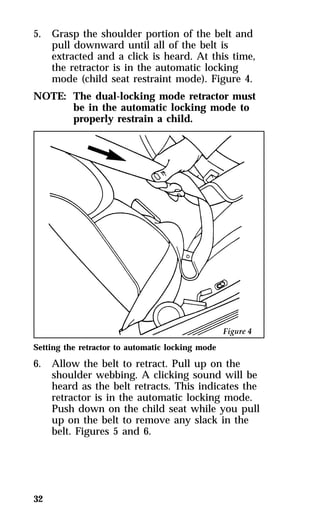
  • 102.
    Power Door Locks(If equipped) If your vehicle has power door locks, the controls to lock the doors are on the trim panel of the front door. When you close the doors after you set the door locks, the doors remain locked. If the power mechanism fails, the manual door locks will override the power controls. Pulling on a front inside door handle will automatically override and release the front door lock. Power door locks on vehicles equipped with keyless entry will activate when the interior courtesy/dome lamps are turned on or off using the instrument panel dimmer or thumbwheel control. The power locks on the driver’s door 102
  • 103.
    Using the IlluminatedEntry System (If equipped) The interior lights turn on when you lift the outside door handle on either front door when you press UNLOCK, TRUNK, or PANIC on a programmed remote entry transmitter if your vehicle is equipped with remote entry. These lights automatically turn off after 25 seconds or when you turn the ignition key to ON or ACC. The inside lights will not turn off if you have turned them on manually or if a door is open. 103
  • 104.
    Anti-Theft Alarm System (If equipped) When armed, this system helps protect your vehicle against break-ins or theft. When an unauthorized entry occurs, the system triggers and will: qflash the headlamps, parking lamps, and alarm indicator lamp qhonk the horn qdisable the starting circuit to prevent the vehicle from being started NOTE: The factory installed Remote Entry 104 System has a PANIC feature that also chirps the vehicle horn and flashes the interior/exterior lamps when the PANIC button on the remote entry transmitter is pushed. The PANIC alarm and the Anti-Theft alarm are two separate features. Both the anti-theft alarm and the PANIC feature can be active at the same time.
  • 105.
    105 To tellthe difference between a PANIC alarm and a triggered Anti-theft alarm: qonly the Anti-Theft alarm will cause the alarm indicator lamp (located in the center of the instrument panel) to flash on and off. qonly the Anti-Theft alarm will disable the start circuit so that the vehicle can not be started. qthe Anti-Theft alarm will not stop by pushing the PANIC button on the Remote Entry transmitter. For more information on the PANIC alarm, see Remote Entry System in the Index.
  • 106.
    Arming the system To arm the system, do the following steps in sequence: 1. Remove the key from the ignition. At this point, the anti-theft system automatically monitors the ignition keylock cylinder. If the lock cylinder is forcibly removed, the anti-theft alarm system will trigger. To arm the remaining portion of the system, follow steps 2-4. 2. Open any door. The alarm indicator light 106 will start flashing to remind you to arm the system. 3. Lock the doors by using the power door lock switch or by pressing the remote entry transmitter LOCK button. The alarm indicator will now glow steadily. 4. Close all doors. The alarm indicator light will then remain on steadily for approximately 30 seconds and then go out. When the light goes out, the system is armed. NOTE: Be sure to close all doors completely. If not, the alarm indicator light will remain on. Remember, your anti-theft system is armed only after the alarm indicator light remains on steadily for approximately 30 seconds after the last door is closed, and then goes out.
  • 107.
    107 You canalso arm the anti-theft system by following this sequence: 1. Remove key from ignition. 2. Close all of the doors. 3. Press the remote entry transmitter LOCK button to lock the doors. The alarm indicator will come on for 30 seconds to show that the alarm is arming and then turn off to show that the alarm has been armed. The anti-theft system is designed to work with the factory installed remote entry system. It may not work with other remote entry systems.
  • 108.
    Disarming an untriggeredanti-theft system You can disarm the system by: qunlocking a door with the key (turn the key all the way to the end of travel or the system may not disarm. qusing the UNLOCK button of the remote entry transmitter qusing the keyless entry unlock code on the keypad qif remaining in the vehicle, turn the ignition switch to ON or ACC Triggering the alarm system The armed system will be triggered if: qany door is opened without disarming the system first (see previous paragraphs) qthe trunk lock cylinder is removed, or NOTE: You can open the trunk with your key 108 without setting off the alarm. qthe ignition key lock cylinder is forcibly removed from the steering column.
  • 109.
    109 Disarming atriggered system The alarm can be disarmed by: qunlocking a front door with the key qusing the UNLOCK button of the remote entry transmitter qusing the keyless entry unlock code NOTE: The flashing lights and honking horn will shut off automatically within 2 minutes 45 seconds after the system is triggered. It will trigger again if another intrusion occurs. However, the starter circuit remains disabled until the system is disarmed.
  • 110.
    Remote Entry System (If equipped) If your vehicle has the remote entry system, you can lock and unlock the vehicle doors and open the trunk without using a key. The remote also has a personal alarm feature. The buttons for the system are located on the hand held transmitter(s) that came with your vehicle. The system will work with up to four transmitters. Your vehicle came with two transmitters. Additional transmitters can be ordered from your dealer. The remote entry features only operate with the ignition in the OFF position. Remote entry transmitter 110
  • 111.
    Unlocking the doorsand opening the trunk To unlock the driver’s door, press the UNLOCK button. To unlock the other doors, press the UNLOCK button a second time within five seconds of unlocking the driver’s door. To open the trunk, press the TRUNK button. Locking the doors To lock all the doors, press the LOCK button. If you would like a signal that the doors are being locked, press the LOCK button again within five seconds. The doors will lock again, the horn will beep and the low beam headlamps and tail lamps will flash. 111
  • 112.
    Activating the remotepersonal alarm If you wish to activate the remote personal alarm, press the PANIC button. This will honk the horn and flash the low beam headlamps and tail lamps for approximately two minutes and forty-five seconds. You can turn it OFF by pressing the PANIC button again or by turning the ignition key to the RUN position. When you use the remote entry UNLOCK, TRUNK or PANIC buttons, the illuminated entry system turns on the interior lights for 25 seconds. You can turn these lights off with the LOCK button or by turning the ignition to the RUN position. The interior lights will not turn off if you have turned them on manually or if a door is open. Replacing the batteries The remote entry transmitter is powered by two coin type three-volt lithium 2016 batteries (included) that should last for several years of normal use. If you notice a significant decrease in operating range, the batteries should be replaced. Replacement batteries can be purchased at most pharmacies, watch stores or at your Ford or Lincoln-Mercury dealer. 112
  • 113.
    113 NOTE: Theoperating range of the remote entry system can also be affected by weather conditions (such as very cold temperatures) or structures around the vehicle (buildings, other vehicles, radio and TV towers, etc.). Typical operating range will allow you to be up to 33 feet (10 meters) away from your vehicle. Replacing the batteries The transmitter can be snapped apart to replace the batteries by twisting a thin coin between the two halves of the transmitter. DO NOT TAKE THE FRONT PART OF THE TRANSMITTER APART. When installing the new batteries, be sure to place the positive (+) side down as marked. Snap the two halves back together. Replacement/additional transmitters In the event a transmitter is lost, return the remaining transmitters to your dealer for reprogramming of your remote entry system. This is necessary to prevent further unauthorized use of the lost transmitter. Additional transmitters may be purchased from your dealer (remote entry system will work with up to four transmitters). Return your existing transmitters to your dealer so the remote entry system can be reprogrammed with your new and existing transmitters.
  • 114.
    THIS DEVICE COMPLIESWITH PART 15 OF THE FCC RULES. OPERATION IS SUBJECT TO THE FOLLOWING TWO CONDITIONS: (1) THIS DEVICE MAY NOT CAUSE HARMFUL INTERFERENCE, AND (2) THIS DEVICE MUST ACCEPT ANY INTERFERENCE RECEIVED, INCLUDING INTERFERENCE THAT MAY CAUSE UNDESIRED OPERATION. Windows Using the Power Windows Each door has a power control that opens and closes the window on that door. The driver’s door has a master control panel that operates the windows. Power windows can only be opened or closed when the ignition switch is in the ON or ACC position. 114 RWARNING Do not let children play with the power windows. They may seriously hurt themselves. Make sure occupants are clear of the window(s) before closing.
  • 115.
    The master controlson the driver’s door Moon Roof (If equipped) You can move the moon roof back to open the glass panel, or you can tilt it up to ventilate the vehicle. There is also an intermediate position between closed and open which can reduce wind noise at speeds between 30 and 45 miles per hour (50 and 70 km/h). The rocker type switch is used to open and close the moon roof. You must press and hold the switch until the desired position is reached. At fully open, closed and intermediate positions, the motor will automatically turn off. Release the switch at this time to avoid motor damage. 115
  • 116.
    The switch forthe moon roof To open the moon roof, press and hold the rear portion of the switch. The glass panel will move to the intermediate position and stop. If the rear of the switch is pressed again the glass panel will move to the full open position and stop. To close the moon roof, press and hold the front portion of the switch. The glass panel will move to the intermediate position and stop. Press and hold the front of the switch again and the panel will move to the fully closed position and stop. 116
  • 117.
    To tilt themoon roof into vent position when the glass panel is closed, press the front portion of the switch. To close from vent position, press and hold the rear portion of the switch. Occasionally wiping the outside guide rail covers of the moon roof with a clean cloth will help keep the moon roof working properly. 117 The moon roof RWARNING Do not let children play with the moon roof. They may seriously hurt themselves. Sliding Shade The moon roof has a sliding shade that you can manually open or close to block the sun when the glass panel is shut. To close the sliding shade, pull the shade toward the front of the vehicle. The shade automatically opens and locks when the moon roof is opened.
  • 118.
    Seats Head Restraints If you use them properly, head restraints will help protect your head and neck in a collision. A head restraint helps protect you best if you position it behind your head and not behind your neck. Standard head restraints You can adjust the head restraints for your comfort and protection. Adjusting the head restraint Adjusting Manual Seats In the front seats, you can move the whole seat forward or backward or tilt the back of the seat forward or backward. To move the seats forward or backward: 1. Find the adjustment bar underneath the front 118 part of the seat. 2. Lift the bar to unlatch the seat. 3. Move the seat to the desired position.
  • 119.
    4. Release thebar to latch the seat in its new position. Make sure the seat locks securely in place. The front seat adjustment bar To recline the front manual seats: 1. On the side of the seat, find the handle for 119 the recliner. 2. Lift the handle up and hold it in place. 3. Lean against the back of the seat and adjust it to the position you want. You can tilt the seat back or bring it forward. 4. Release the handle to lock the seat in its new position. RWARNING Never adjust the driver’s seat or seatback when the vehicle is moving. RWARNING To reduce the risk of serious injury in a collision, always drive and ride with your seatback upright and the lap belt snug and low across the hips.
  • 120.
    Seatback Recline Frontseatback release levers It is not necessary to use the emergency seatback release lever for rear seat entry or exit. The seatback remains unlocked with normal usage and locks only during emergency stopping, upon impact, or on steep downhill grades. The inertia seatback latch will allow the seatback to rotate approximately 5° forward before it locks. The release is provided only to unlock the seatback when parked on steep downhill grades or after a collision. 120 RWARNING A seatback which is folded forward even a small degree may not lock properly in the event of a sudden stop or collision.
  • 121.
    Using the PowerSeats (If equipped) If your vehicle has power seats, you can adjust them in several directions. The controls are on the side of the seats. 121 The power controls on the driver’s seat RWARNING Do not pile cargo higher than the seatbacks to avoid injuring people in a collision or sudden stop.
  • 122.
    Sport Seat Sportseat controls 122
  • 123.
    123 Rear SeatEntry Entering the rear seat The rotating boot on the lap belt is designed to allow rear seat entry/exit. To enter the rear seat: 1. Rotate the safety belt boot rearward. 2. Enter the rear seat in front of the safety belt. 3. Rotate the safety belt boot forward to allow use by the front seat passengers. Cleaning the Seats Leather and vinyl For routine cleaning, wipe the surface with a soft, damp cloth. For more thorough cleaning, wipe the surface with a leather and vinyl cleaner or a mild soap. Fabric Remove dust and loose dirt with a whisk broom or a vacuum cleaner. Remove fresh spots immediately. Follow the directions that come with the cleaner. NOTE: Before using any cleaner, test it on a small, hidden area of fabric. If the fabric’s color or texture is adversely affected by a particular cleaner, do not use it.
  • 124.
    Mirrors You canadjust your rearview mirror in any direction. The special swivel bracket lets you move the mirror up or down and from side to side. 124 RWARNING Make sure you can see clearly through the rearview mirror at all times. Do not block your vision. If you cannot see through the mirror, it could result in a collision, injuring yourself and others. Adjusting the Dual Electric Remote Control Mirrors The switch for controlling the dual electric remote control mirrors is located on the driver’s door. Do not clean the housing or glass of any mirror with harsh abrasives, fuel or other petroleum-based cleaning products.
  • 125.
    The mirror controlson the driver’s door To adjust the side mirrors: 1. Find the control switch in the driver’s door 125 panel. 2. Select the right or left mirror by moving the selector switch to R or L. 3. Move the knob in the direction of the arrows for the direction you want to move the mirror. 4. Return the selector switch to the middle position to keep the mirror in place.
  • 126.
    The Right SideConvex Mirror The side view mirror on the right is a convex mirror. This mirror gives you a wider view of the lanes on your right and behind you. 126 RWARNING The side view mirror on the right makes objects appear smaller and farther away than they actually are. Sun Visors Turning on the Mirror Light on the Sun Visors (If equipped) To turn on the visor mirror light, lift the mirror cover. The mirror on the sun visor
  • 127.
    Console Your vehiclehas a full console. The full console has the features shown in the illustration below. 127 The features on the full console Storage Compartments In addition to the console, your vehicle may have several small storage compartments: qa glove compartment that locks. Use the round key to lock and unlock it. qtwo map pockets on the panels of the front doors. RWARNING Do not put objects on the ledge between the back seat and the rear window, as they can become dangerous projectiles and injure someone.
  • 128.
    Trunk Opening theTrunk Manually The trunk in your vehicle gives you plenty of room for storage — 15.1 cubic feet (.42 cubic meters). To open and close the trunk from the outside: 1. Insert the key into the lock on the trunk. 2. Turn the key to the right until the trunk 128 opens. 3. Remove the key before you close and lock the lid. 4. Shut the trunk lid completely. Using the Remote Control for the Trunk (If equipped) With the ignition switch in the ON or ACC position, you can use the remote control under your console armrest to unlock and open the trunk. The trunk release button located under the armrest
  • 129.
    Positive Location FloorMat When installing or removing the driver’s side floor mat you must attach/detach the positive location grommet from the hook on the floor. The hook is just forward of the left hand track of the driver’s seat. 129 The positive location floor mat hook
  • 130.
    Decklid Luggage Rack (If equipped) NOTE: The factory-installed luggage rack has a 130 load carrying capacity of 50 lbs. (23 kg.). Do not exceed this load limit or cause the vehicle to exceed the gross vehicle weight rating (GVWR), which is shown on the Safety Compliance Certification Label.
  • 131.
    Electronic Sound Systems 131 Compact Disc Radio
  • 132.
    Compact Disc Radio The Compact Disc Radio combines the Electronic Stereo Radio with the Ford Compact Disc Player. Using the Controls on Your New Compact Disc Radio Most of the features of this unit work for both radio and CD operation. Also, some of the knobs and buttons control several different functions, so be sure to read all of the operating instructions carefully. How to turn the radio on and off Press the “POWER” button to turn the radio on. Press it again to turn it off. How to adjust the volume Press the (+/s) side of the “VOL” button to increase/decrease the volume. Bars illuminate in the display to show the relative volume level. NOTE: If the volume level is set above a 132 certain listening level when the ignition switch is turned off, when the ignition switch is turned back on, the volume will come back to a “nominal” listening level. However, if the radio power is turned off (with the “POWER” button), the volume will remain in the position it was set at when radio power is switched back on. Selecting the AM or FM frequency band Push the “AM/FM” button to select the desired frequency band. When in the radio mode, pushing the button more than once will alternate between AM, FM1 and FM2. These functions are used with the station memory buttons described under How to tune radio stations.
  • 133.
    How to tuneradio stations There are four ways for you to tune in a particular station. You can manually locate the station using the “SCAN/TUNE” button, “SEEK” the station, “SCAN” to the station or select the station by using the memory buttons, which you can set to any desired frequency. These four methods are described below. qUsing the “SCAN/TUNE” button to manually tune You can change the frequency up or down one increment at a time (FM changes in increments of 200kHz; AM changes in increments of 10kHz) by first pressing the “SCAN/TUNE” button twice (display shows “TUNE”), then — within approximately five seconds —pressing and releasing either the top a or bottom b half of the “SEEK” button. To change frequencies quickly, press and hold down either the top or bottom half of the “SEEK” button. While you are manually tuning, the display will show a blinking “M”. Manual tuning adjusts your radio to any allowable broadcast frequency, whether or not a station is present on that frequency. (See All About Radio Frequencies in this section.) qUsing the “SEEK” function This feature on your radio allows you to automatically select listenable stations up or down the frequency band. Press the top a half of the “SEEK” button to select the next listenable station up the frequency band. Press the bottom b half of the button to select the next listenable station down the frequency band. By pressing and holding the button, listenable stations can be passed over to reach the desired station. 133
  • 134.
    qUsing the “SCAN/TUNE”button to scan radio stations Pressing the “SCAN/TUNE” button once enters the scan mode (display will indicate “SCN”). Pushing the top a half of the “SEEK” button will begin the scan mode up the frequency band, stopping on each listenable station for approximately five seconds. Pushing the bottom b half of the “SEEK” button will begin the scan mode down the frequency band, again stopping on each listenable station for approximately five seconds. To stop the scan mode on the presently sampled station press the “SCAN/TUNE” button again. qSetting the Station Memory Preset buttons 134 Your radio is equipped with 6 station memory buttons. These buttons can be used to select up to 6 preset AM stations and 12 FM stations (6 in FM1 and 6 in FM2). Follow the easy steps below to set these buttons to the desired frequencies: 1. Select a band, then select a frequency. 2. Press one of the memory buttons and hold the button until the sound returns. That station is now held in memory on that button. 3. Follow the two steps above for each station memory preset button you want to set.
  • 135.
    135 qUsing theAutomatic Memory Load feature If no stations are in memory preset, you can activate the Auto Memory Load feature by pressing and holding the “AUTO PRESET” button for approximately three seconds. Auto Memory Load sets all memory buttons in AM, FM1 and FM2 sequentially by seeking out the first six strong stations for the respective band and storing them in memory buttons 1-5. (FM2 will store the second set of strong stations from the FM band.) With Auto Memory Store, you can continually set strong stations into your memory buttons without losing your existing memory presets, which is especially handy while traveling. Your radio will automatically set your memory buttons to the strong local stations so you don’t have to continually manually tune to existing stations. Activate Auto Memory Store by pushing the “AUTO PRESET” button once. Your radio will set the first five strong stations of the band you are in (AM, FM1 or FM2) into the memory buttons. The display will show “AUTO”, then run through the frequencies, stopping momentarily on the stations being set into the memory buttons. The radio is now in the “AUTO” mode and this display will show “AUTO” each time a preset is activated. NOTE: If there are fewer than five strong stations in the frequency band, the remaining unfilled buttons will store the last strong station detected on the band.
  • 136.
    136 After allstations have been filled, the radio will begin playing the station stored on memory button 1. To deactivate the Auto Memory Store mode and return to the manually-set memory button stations (or those stations set using Auto Memory Load), simply push the “AUTO PRESET” button. Display will show “AUTO” then “OFF”. The next time Auto Memory Store is activated on that band, the radio will store the next set of five strong stations. Adjusting the tone balance and speaker output of your radio qIncreasing or decreasing bass response Push the “AUDIO” button repeatedly until the display reads “BASS”. Push the top (+) side of the “VOLUME” button to increase bass (more “lows”), and push the bottom (–) side to decrease bass (less “lows”). qIncreasing or decreasing treble response Push the “AUDIO” button repeatedly until the display reads “TREB”. Push the top (+) side of the “VOLUME” button to increase treble (more “highs”), and push the bottom (–) side to decrease treble (less “highs”). qAdjusting speaker balance Balance control allows you to adjust the sound distribution between the right and left speakers. Push the “AUDIO” button repeatedly until the display reads “BAL”. Push the top (+) side of the “VOLUME” button to shift the sound to the right speakers, and push the bottom (–) side to shift the sound to the left speakers.
  • 137.
    137 qAdjusting speakerfader Fade control allows you to adjust the sound distribution between the front and rear speakers. Push the “AUDIO” button repeatedly until the display reads “FADE”. Push the top (+) side of the “VOLUME” button to shift the sound to the front speakers, and push the bottom (–) side to shift the sound to the rear speakers. NOTE: Illuminated bars in the display show relative levels of bass and treble, and positions of speaker balance and fader functions (left to right, front to rear). Using the Controls on Your New Compact Disc Player Your new Ford Compact Disc Player is capable of playing 12 cm or 8 cm discs, without an adapter! The Player operates when the power is on and a disc is inserted (label side up). Handle the disc by its edge only. (Be sure to read and follow all of the care and cleaning instructions under How To Take Care of and Clean Your CD Player and Discs. NOTE: If after you insert a disc, the disc is ejected and “ERROR” begins scrolling in the display, remove the disc and reinsert it right side up (label side up). The digital display on your CD player will either show the track (selection) number or the elapsed time. (The display mode can be selected by pressing the memory preset button #6.) Indicators for play b, stop X and compression on (“C”) are also in the display. (These features are described later.) Once a disc is inserted, operation of the CD player will override that of the radio.
  • 138.
    NOTE: The volume,bass, treble, balance and 138 fader controls on the radio are also used with the CD player. Refer to earlier operating instructions on these controls. How to insert a disc and begin play Insert one disc, label side up into the disc opening. When inserted, the disc automatically loads into the unit and play starts at the beginning of the first track (selection). When the disc reaches the end, the disc player automatically returns to the beginning of the disc and resumes playing. How to change the track being played Press the top a side of the “SEEK” button to seek forward to the next track of the disc. If the button is held and the last track is reached, the disc player will automatically begin playing the last track of the disc. Press the bottom b side of the “SEEK” button to seek the previous track on the disc. NOTE: Once a disc is inserted, the disc opening is secured to prevent the accidental insertion of a second disc. NOTE: The CD player has heat protection circuitry to protect the laser diode. If the temperature of the player reaches 167°F (75°C), the heat detection circuit will shut off the player and “TOO HOT” will scroll in the display for approximately five seconds (radio will resume playing). When the temperature returns to normal operating range, the CD player will again be operational.
  • 139.
    How to stopand restart the CD player When a disc is loaded, the unit automatically enters the play mode and the play indicator a illuminates. To stop temporarily, press the “PLAY/STOP” button or the “AM/FM” button. The stop indicator X in the display illuminates and operation returns to the radio mode. To resume CD play, press the “PLAY/STOP” button once again. NOTE: If the ignition key is turned OFF during play and then is set to the ON or ACCESSORY position, the CD player will resume playing in the mode it was in when ignition was turned off. How to fast forward or reverse your CD player To quickly search for a particular point in a selection, press the “FF” button (to fast forward) or the “REV” button (to reverse). While either button is pressed, the disc goes forward or backward at two different speeds depending on how long the button is held down. (Pressing either button for more than approximately three seconds will speed up the process.) Release the button at the desired point (found by watching the elapsed playing time in the display or by listening to the sound during fast forward or reverse). When you have reached the beginning of track 1, the CD player will begin playing. When you have reached the end of the disc by keeping the fast forward button pressed, the display will show “END” and the player will go into pause mode. Push the “PLAY/STOP” button to begin playing the first track of the disc, press the “REV” button to back up from the end of the disc, or use the “SEEK” function to locate a desired track. 139
  • 140.
    Using the “SCAN”function Press the “SCAN/TUNE” button to enter the scan mode. Once in the scan mode, press the top a or bottom b half of the “SEEK” button to scan forward or reverse, respectively. The CD player will begin scanning the disc, stopping on each listenable track for approximately eight seconds. This continues until you press the “SCAN/TUNE” button a second time. While in the scan mode, the display shows the current sampled track number. Special features of your CD player qCompression The compression feature will bring soft and loud passages closer together for a more consistent listening level. To turn the compression on, press the “COMP” button. When on, the compression indicator (“C”) will appear in the display. Press the button again to turn off. qAutomatic Disc Storage 140 If the disc is ejected from the CD player but is not removed from the disc opening within approximately 10 seconds, the player will automatically reload the disc for storage, unless the disc is automatically ejected due to a “focus error” (disc inserted upside down). In this case, the disc will not be automatically reloaded. How to eject the disc Push the “EJECT” button to stop play, eject the disc and resume radio operation of your audio system. NOTE: You can eject the disc while the radio power and/or ignition is on or off.
  • 141.
    141 Electronic StereoRadio with Cassette
  • 142.
    Electronic Stereo CassetteRadio Using the Controls on Your New Radio How to turn the radio on and adjust the volume Press the “POWER” button to turn the radio on. Press it again to turn it off. Press the right (+) side of the “VOLUME” button to increase the volume. Press the left (–) side of the button to decrease the volume. Illuminated bars in the display show the relative volume level. NOTE: If the volume level is set above a 142 certain listening level when the ignition switch is turned off, when the ignition switch is turned back on, the volume will come back to a “nominal” listening level. However, if the radio power is turned off (with the “POWER” button), the volume will remain in the position it was set at when radio power is switched back on. Selecting the AM or FM frequency band Push the “AM/FM” button to select the desired frequency band or to stop/store cassette tape (when in cassette mode). Pushing the button more than once will alternate between AM, FM1 and FM2. These functions are used with the station memory buttons described under How to tune radio stations. How to tune radio stations There are four ways for you to tune in to a particular station. You can manually locate the station by using the Automatic Music Search (“AMS”) button, “SEEK” the station, “SCAN” to the station or select the station by using the memory buttons, which you can set to any desired frequency.
  • 143.
    qUsing the “AMS”function to manually tune your radio You can change the frequency up or down one increment at a time by first pressing the “AMS” button, (display shows “TUNE”) then pressing and releasing either the right a or left b side of the “SEEK” button. To change frequencies quickly, press and hold down either the right or left side of the “SEEK” button. Manual tuning adjusts your radio to any allowable broadcast frequency, whether or not a station is present on that frequency. (See All About Radio Frequencies in this section.) qUsing the “SEEK” function This feature on your radio allows you to automatically select listenable stations up or down the frequency band. Press the right (a) side of the “SEEK” button to select the next listenable station up the frequency band. Press the left (b) side of the button to select the next listenable station down the frequency band. By holding the button down, listenable stations can be passed over to reach the desired station. qUsing the “SCAN” function Press the “SCAN” button to enter the scan mode. The radio will begin scanning up the frequency band, stopping on each listenable station for approximately a five-second sampling. This continues until you press the “SCAN” button a second time. The display flashes “AM” or “FM.” 143
  • 144.
    qSetting the StationMemory Preset buttons 144 Your radio is equipped with 6 station memory buttons. These buttons can be used to select up to 6 preset AM stations and 12 FM stations (6 in FM1 and 6 in FM2). Follow the easy steps below to set these buttons to the desired frequencies: 1. Select a band, then select a frequency. 2. Press one of the memory buttons and hold the button until the sound returns. That station is now held in memory on that button. 3. Follow the two steps above for each station memory preset button you want to set. NOTE: If the vehicle’s battery is disconnected, the station memory preset buttons will need to be reset. Adjusting the tone balance and speaker output of your radio qIncreasing or decreasing bass response Push the “AUDIO” button repeatedly until the display reads “BASS.” Push the right (+) side of the “VOLUME” button to increase bass (more “lows”), and push the left (s) side to decrease bass (less “lows”). qIncreasing or decreasing treble response Push the “AUDIO” button repeatedly until the display reads “TREB.” Push the right (+) side of the “VOLUME” button to increase treble (more “highs”), and push the left (s) side to decrease treble (less “highs”).
  • 145.
    145 Speaker featuresand operation qAdjusting speaker balance Balance control allows you to adjust the sound distribution between the right and left speakers. Push the “AUDIO” button repeatedly until the display reads “BAL.” Push the right (+) side of the “VOLUME” button to shift the sound to the right speakers, and push the left (s) side to shift the sound to the left speakers. qAdjusting speaker fader Fade control allows you to adjust the sound distribution between the front and rear speakers. Push the “AUDIO” button repeatedly until the display reads “FADE.” Push the right (+) side of the “VOLUME” button to shift the sound to the front speakers, and push the left (s) side to shift the sound to the rear speakers. NOTE: Illuminated bars in the display show relative levels of bass and treble, and positions of speaker balance and fader functions (left to right, front to rear). Using the Controls of Your Cassette Tape Player How to insert a tape Insert a cassette (with the open edge to the right) firmly into the tape door opening, making sure the cassette is completely in and “seated.” How to locate a desired track on the tape NOTE: The tape track number indicated in the display does not necessarily correspond to the tape track or side number on the cassette label. It is used only to indicate when the tape mechanism reverses tracks.
  • 146.
    NOTE: Depending onyour vehicle, the display 146 of your radio may show arrows (g orh) or numerals (“1” or “2”) to indicate the direction of tape travel. In either case, at the end of the tape, the direction automatically reverses and plays the other side of the tape. qUsing the Automatic Music Search (“AMS”)(If your display shows numerals) Press and hold the “AMS” button (“AMS” will appear in the display). Then, push the left (h) button to rewind to the beginning of the current selection or press the right (g) button to fast forward to the beginning of the next selection. qFast forwarding the tape (if your display shows numerals) Push the right (g) button to fast forward the tape. qRewinding the tape (if your diplay shows numerals) Push the left (h) button to rewind the tape. qUsing the Automatic Music Search (“AMS”) (if your display shows arrows) Press and hold the “AMS” button. Then, push the appropriate fast-wind button, depending upon the direction of the tape travel arrow in the display. For example, if the tape travel arrow is pointing to the left, push the left (h) button to rewind to the beginning of the current selection. If the tape travel arrow is pointing to the right, press the right (g) button to fast forward to the beginning of the next selection.
  • 147.
    147 qFast forwardingthe tape (if your display shows arrows) To fast forward the tape, press the fast-wind button with the arrows pointing in the same direction as indicated in the display. For example, if the tape travel arrow in the display is pointing to the left, press the left (h) button to fast forward the tape. To return to the play mode, press the opposite fast-wind button momentarily, until fast forward stops. qRewinding the tape (if your display shows arrows) To rewind the tape, press the fast-wind button with the arrows pointing in the opposite direction as indicated in the display. For example, if the tape travel arrow in the display is pointing to the left, press the right (g) button to rewind the tape. To return to the play mode, press the opposite fast-wind button momentarily, until rewind stops. qHow to change the side of the tape being played The alternate track (other side) of the tape can be selected at any time by pushing both fast-wind buttons (handg) at the same time.
  • 148.
    How to ejectthe tape To stop the tape and eject the cassette, press the “EJECT” button. The radio will resume playing. Using the DolbyH B noise reduction feature NOTE: Noise reduction system manufactured 148 under license from Dolby Labs Licensing Corporation. “Dolby” and double-D symbol are trademarks of Dolby Laboratories Licensing Corporation. Push thekbutton to activate. Push again to deactivate. Tips on Caring for the Cassette Player and Tapes In order to keep your cassette tape player performing the way it was meant to, read and follow these simple precautions: qUsing a Ford Cassette Cleaning Cartridge to clean the tape player head after 10-12 hours of play will help maintain the best playback sound and proper tape operation. qOnly cassettes that are 90 minutes long or less should be used. Tapes longer than 90 minutes are thinner and subject to breakage or may jam the tape player mechanism.
  • 149.
    qProtect cassettes fromexposure to direct sunlight, high humidity and extreme heat or cold. If they are exposed to extreme conditions, allow them to reach a moderate temperature before playing. qIf a tape is loose inside the cassette, tighten it before playing by putting your finger or a pencil into one of the holes and turning the hub until the tape is tight. qLoose labels on cassette tapes can become lodged in the mechanism. Remove any loose label material before inserting a cassette. qDo not leave a tape in the cassette tape player when not in use. High heat in the vehicle can cause the cassette to warp. 149
  • 150.
  • 151.
    High-Level Audio System Using the Controls on Your New Radio How to turn the radio on and off Press the “POWER” button to turn the radio on. Press it again to turn it off. How to adjust the volume Press the +/– side of the “VOLUME” button to increase/decrease volume. Bars illuminate in the display to show the relative volume level. NOTE: If the volume level is set above a certain listening level when the ignition switch is turned off, when the ignition switch is turned back on, the volume will come back to a “nominal” listening level. However, if the radio power is turned off (with the “POWER” button), the volume will remain in the position it was set at when radio power is switched back on. Selecting the AM or FM frequency band Push the “AM/FM” button to select the desired frequency band or to stop/store cassette tape (when in cassette mode). Pushing the button more than once will alternate between AM, FM1 and FM2. These functions are used with the station memory buttons described under How to tune radio stations. 151
  • 152.
    How to tuneradio stations There are four ways for you to tune in a particular station. You can manually locate the station using the “SCAN/TUNE” button, “SEEK” the station, “SCAN” to the station or select the station by using the memory buttons, which you can set to any desired frequency. These four methods are described below. qUsing the “TUNE” function You can change the frequency up or down one increment at a time (FM changes in increments of 200 kHz; AM changes in increments of 10 kHz) by first pressing the “SCAN/TUNE” button twice (display shows “TUNE”), then — within approximately five seconds — pressing and releasing either the right (a) or left (b) side of the “SEEK” button. To change frequencies quickly, press and hold down either the right or left side of the “SEEK” button. Manual tuning adjusts your radio to any allowable broadcast frequency, whether or not a station is present on that frequency. (See All About Radio Frequencies in this section.) qUsing the “SEEK” function 152 This feature on your radio allows you to automatically select listenable stations up or down the frequency band. Press the right (a) side of the “SEEK” button to select the next listenable station up the frequency band. Press the left (b) side of the button to select the next listenable station down the frequency band. By holding the button down, listenable stations can be passed over to reach the desired station.
  • 153.
    153 qUsing the“SCAN” function Pressing the “SCAN/TUNE” button once enters the scan mode (display will indicate “SCN”). Pushing the right (a) side of the “SEEK” button will begin the scan mode up the frequency band, stopping on each listenable station for approximately a five-second sampling. Pushing the left (b) side of the “SEEK” button will begin the scan mode down the frequency band, again stopping on each listenable station for approximately a five-second sampling. To stop the scan mode on the presently sampled station press the “SCAN/TUNE” button again. qSetting the Station Memory Preset buttons Your radio is equipped with 6 station memory buttons. These buttons can be used to select up to 6 preset AM stations and 12 FM stations (6 in FM1 and 6 in FM2). Follow the easy steps below to set these buttons to the desired frequencies: 1. Select a band, then select a frequency. 2. Press one of the memory buttons and hold the button until the sound returns. That station is now held in memory on that button. 3. Follow the two steps above for each station memory preset button you want to set.
  • 154.
    qUsing the AutomaticMemory Load feature 154 If no stations are in memory preset, you can activate the Auto Memory Load feature by pressing and holding the “AUTO PRESET” button for approximately three seconds. Auto Memory Load sets all memory buttons in AM, FM1 and FM2 sequentially by seeking out the first six strong stations for the respective band and storing them in memory buttons 1-5. (FM2 will store the second set of strong stations from the FM band.) With Auto Memory Store, you can continually set strong stations into your memory buttons without losing your existing memory presets, which is especially handy while traveling. Your radio will automatically set your memory buttons to the strong local stations so you don’t have to continually manually tune to existing stations. Activate Auto Memory Store by pushing the “AUTO PRESET” button once. Your radio will set the first five strong stations of the band you are in (AM, FM1 or FM2) into the memory buttons. The display will show “AUTO”, then run through the frequencies, stopping momentarily on the stations being set into the memory buttons. The radio is now in the “AUTO” mode and this display will show “AUTO” each time a preset is activated. NOTE: If there are less than five strong stations in the frequency band, the remaining unfilled buttons will store the last strong station detected on the band.
  • 155.
    After all stationshave been filled, the radio will begin playing the station stored on memory button 1. To deactivate the Auto Memory Store mode and return to the manually-set memory button stations (or those stations set using Auto Memory Load), simply push the “AUTO PRESET” button. Display will show “AUTO” then “OFF”. The next time Auto Memory Store is activated on that band, the radio will store the next set of five strong stations. 155 Adjusting the tone balance and speaker output of your radio qIncreasing or decreasing bass response Push the “AUDIO” button repeatedly until the display reads “BASS.” Push the right (+) side of the “VOLUME” button to increase bass (more “lows”), and push the left (s) side to decrease bass (less “lows”). qIncreasing or decreasing treble response Push the “AUDIO” button repeatedly until the display reads “TREB.” Push the right (+) side of the “VOLUME” button to increase treble (more “highs”), and push the left (s) side to decrease treble (less “highs”). qAdjusting speaker balance Balance control allows you to adjust the sound distribution between the right and left speakers. Push the “AUDIO” button repeatedly until the display reads “BAL.” Push the right (+) side of the “VOLUME” button to shift the sound to the right speakers, and push the left (s) side to shift the sound to the left speakers.
  • 156.
    qAdjusting speaker fader 156 Fade control allows you to adjust the sound distribution between the front and rear speakers. Push the “AUDIO” button repeatedly until the display reads “FADE.” Push the right (+) side of the “VOLUME” button to shift the sound to the front speakers, and push the left (s) side to shift the sound to the rear speakers. NOTE: Illuminated bars in the display show relative levels of bass and treble, and positions of speaker balance and fader functions (left to right, front to rear). Using the Controls of Your Cassette Tape Player NOTE: Radio power must be on to use the cassette tape player or eject a tape. NOTE: Adjust the volume, treble, bass, balance and fader controls in the same manner as for radio stations. How to insert a tape Your cassette tape player is equipped with power loading. Once you insert a tape and push slightly (with the open edge to the right), the loading mechanism draws the tape the rest of the way in and play will begin after a momentary tape tightening process. Display indicates “M” (for metal/CrO2) while tape is playing. NOTE: A cassette tape can be loaded and stored with the ignition and radio power off.
  • 157.
    How to locatea desired track on the tape There are four ways to quickly locate a desired selection on the tape. You can use the fast forward, rewind, “SEEK” or “SCAN” function. Following are brief descriptions of each. qFast forwarding the tape 157 To fast forward the tape, press the “FF” button. The radio will automatically begin playing until fast forward is manually stopped (by pushing the “PLAY PROG” button) or the end of the tape is reached. At the end of the tape, the direction automatically reverses and plays the other side of the tape. qFast rewinding the tape To rewind the tape, press the “REW” button. The radio will automatically begin playing when rewind is manually stopped (by pushing the “PLAY PROG” button) or the beginning of the tape is reached. qUsing the “SEEK” function with your cassette tape player While in the tape mode, push the right (a) side of the “SEEK” button to seek forward to the next selection on the tape. Push the left (b) side to seek the beginning of the current tape selection. NOTE: If you want to restart a currently playing tape selection, press the left (b) side of the “SEEK” button after approximately three seconds into the current selection. Whirling sprockets in the display (l) indicate the direction of tape travel.
  • 158.
    qUsing the “SCAN”function with your cassette tape player Press the “SCAN/TUNE” button to enter the scan mode (display indicates “SCN”). Pushing the right (a) side of the “SEEK” button will begin the forward scan mode on the tape currently playing, stopping on each tape selection for approximately an eight-second sampling. Pushing the left (b) side of the “SEEK” button will begin the reverse scan mode, stopping on each previous tape selection for approximately an eight-second sampling. While scanning, the display indicates whirling sprockets plus an “S” (m). To stop the scan mode on the presently sampled tape selection press the “SCAN/TUNE” button again. qHow to change the side of the tape being played 158 The alternate side of the tape can be selected at any time by pressing the “PLAY/PROG” button. How to eject the tape To stop the tape and eject the cassette, press the “EJCT” button. The radio will resume playing if the radio power is on. The tape cartridge can be ejected with radio power (and/or ignition) on or off.
  • 159.
    How to storethe tape Press the “AM/FM” button to stop the tape player and resume radio play. The cassette will be stored in the tape player and the X symbol in the display will be lit until you push the “PLAY PROG” button to resume tape play. Fast forward and fast rewind can be used while the tape is in storage mode without interrupting radio play. Using the DolbyH B noise reduction feature NOTE: Noise reduction system manufactured 159 under license from Dolby Labs Licensing Corporation. “Dolby” and double-D symbol are trademarks of Dolby Laboratories Licensing Corporation. Push thekbutton to activate Dolby B Noise Reduction. Push again to deactivate. Tape error messages Your cassette tape player is equipped to diagnose certain problems you may experience. Error codes are as follows: Error 0 — Communication error between the radio controller and the tape controller. The cassette player will eject the tape. Insert the tape again. If the same error code appears, turn the ignition off, then back on again and insert the tape. Error 1 — Possible problem cartridge. The cassette tape player will eject the tape. Insert the tape again. If the same error code appears in the display, try a different cartridge.
  • 160.
    Error 2 —Tape eject or load failure. Your cassette tape player will go into the pause mode. Push “EJCT” to eject the tape. If the tape doesn’t eject, refer the problem to qualified personnel for service. Tips on Caring for the Cassette Player and Tapes In order to keep your cassette tape player performing the way it was meant to, read and follow these simple precautions: qUsing a Ford Cassette Cleaning Cartridge to clean the tape player head after 10-12 hours of play will help maintain the best playback sound and proper tape operation. qOnly cassettes that are 90 minutes long or less should be used. Tapes longer than 90 minutes are thinner and subject to breakage or may jam the tape player mechanism. qProtect cassettes from exposure to direct sunlight, high humidity and extreme heat or cold. If they are exposed to extreme conditions, allow them to reach a moderate temperature before playing. qLoose labels on cassette tapes can become lodged in the mechanism. Remove any loose label material before inserting cassette. qDo not leave a tape in the cassette tape player. High heat in the vehicle can cause the cassette to warp. 160
  • 161.
    Common Radio ReceptionConditions Several conditions prevent FM reception from being completely clear and noise-free, such as the following: 1. Distance/Strength The strength of the FM signal is directly related to the distance the signal must travel. The listenable range of an average FM signal is approximately 25 miles (40 kilometers). Beyond this distance, the radio is operating in a fringe area and the signal becomes weaker. NOTE: Always make sure your antenna (whether you have a power antenna or a manually adjustable antenna) is fully extended to the maximum length for proper reception. If your antenna is not fully extended, you may experience signal loss while traveling in fringe reception areas. 2. Terrain The terrain (hilly, mountainous, tall buildings) of the area over which the signal travels may prevent the FM signal from being noise-free. If there is a building or large structure between the antenna and station, some of the signal “bends” around the building, but certain spots receive almost no signal. Moving out of the “shadow” of the structure will allow the station to return to normal. When the radio waves are reflected off objects or structures, the reflected signal cancels the normal signal, causing the antenna to pick up noise and distortion. Cancellation effects are most prominent in metropolitan areas, but also can become quite severe in hilly terrain and depressed roadways. 161
  • 162.
    To minimize theseconditions, a stereo/mono blend circuit has been incorporated into this system. This feature automatically switches a weak stereo signal to a clearer monaural signal, which improves the quality of reception. Several sources of static are normal conditions on AM frequencies. These can be caused by power lines, electric fences, traffic lights and thunderstorms. Another reception phenomenon is Strong Signal Capture and Overload. This can occur when listening to a weak station and when passing another broadcast tower. The close station may capture the more distant station, although the displayed frequency does not change. While passing the tower, the station may switch back and forth a few times before returning to the original station. When several broadcast towers are present (common in metropolitan areas) several stations may overload the receiver, resulting in considerable station changing, mixing and distortion. Automatic gain control circuitry for both AM and FM bands has been incorporated into this system to reduce strong signal capture and overload. 162
  • 163.
    All About RadioFrequencies The Federal Communications Commission (FCC) establishes the frequencies that AM and FM radio stations may use for their broadcasts. The allowable frequencies are, AM: 530, 540...1600, 1610 kHz in 10 kHz steps; FM: 87.9, 88.1...107.7, 107.9 MHz in 0.2 MHz steps. Not all frequencies will be assigned to a given area. This radio will tune to each of these frequencies using MANUAL TUNE and no fine tuning is necessary as radio stations may not use other frequencies. Some FM radio stations advertise a “rounded-off” frequency which is not the frequency they actually broadcast on. For example, a radio station that is assigned a frequency of 98.7 MHz may call itself “Radio 99” even though 99.0 MHz is not an allowable FM broadcast frequency. 163
  • 164.
    Important Warranty andService Information qWarranty Your sound system is warranted for three years or 36,000 miles (60,000 kilometers), whichever comes first. Consult your vehicle warranty booklet for further information. Ask your dealer for a copy of this limited warranty. qService At Ford Electronics, we stand behind our audio systems with a comprehensive service and repair program. If anything should go wrong with your Ford audio system, return to your dealer for service. There is a nationwide network of qualified Ford authorized repair centers to assist you. 164
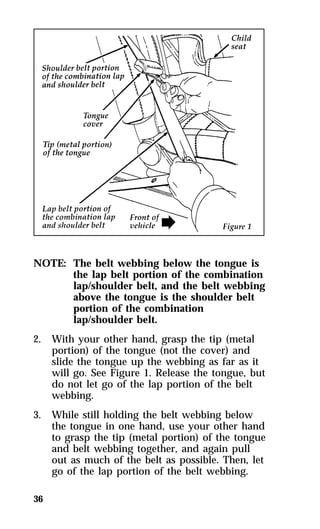
  • 165.
    165 Driving YourCougar Driving with an Automatic Overdrive Transmission The gearshift lever is floor mounted. The automatic overdrive transmission operates very much like a regular automatic transmission, except it offers the extra overdrive feature. Putting Your Vehicle in Gear RWARNING Hold the brake pedal down while you move the gearshift lever from position to position. If you do not hold the brake pedal down, your vehicle may move unexpectedly and injure someone. To move the shifter out of P (Park), the ignition key must be turned to either the OFF or the ON position and the thumb button must be pushed in. This vehicle is also equipped with the brake shift interlock safety feature which prevents shifting the transmission out of the P (Park) position without the brake pedal being depressed if the key is in the ON position. To operate: 1. Start the engine. 2. Depress and hold the brake pedal. 3. Move the gearshift lever out of P (Park).
  • 166.
    Your vehicle isequipped with a Brake Shift Interlock safety feature. This feature prevents the gearshift from being moved from the P (Park) position until the brake pedal is depressed. This feature is active when the ignition is in the ON position. If the gearshift lever CANNOT be moved from P (Park) with the brake pedal depressed: 1. Turn the engine off and remove the ignition 166 key. 2. Apply parking brake. 3. Reinsert the ignition key and turn clockwise to the first position (OFF). 4. Depress the brake pedal, move the gearshift lever to N (Neutral) and start the engine. RWARNING DO NOT DRIVE YOUR VEHICLE UNTIL YOU VERIFY THAT THE BRAKELAMPS ARE WORKING. If you need to shift out of P (Park) by using the alternate procedure described above, it is possible that a fuse has blown and that your brakelamps may also not be functional. Please refer to the chapter titled Servicing Your Cougar in this Owner Guide for instructions on checking and replacing fuses. The console-mounted gearshift will lock in P (Park) when you turn the key to the LOCK position. When the gearshift is in any position except P (Park), the ignition key cannot be turned to LOCK or removed from the steering column. TO REMOVE THE KEY, the gearshift lever must be in P (Park).
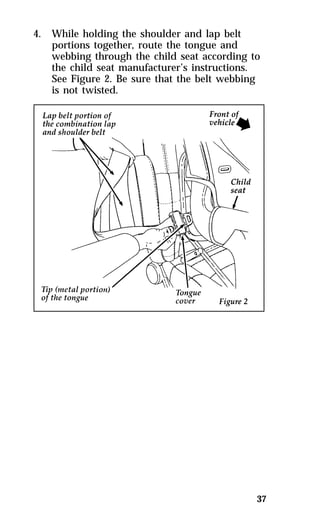
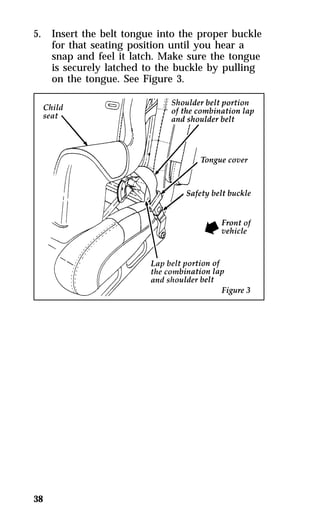
  • 167.
    The positions ofthe console-mounted gearshift Once the gearshift is secure in the desired position, release the brake pedal and use the accelerator as necessary. R (Reverse) With the gearshift in the R (Reverse) position, the vehicle will move backward. You should always come to a complete stop before shifting into or out of R (Reverse). N (Neutral) In N (Neutral), the wheels of the transmission are not locked. Your vehicle will roll freely, even on the slightest incline, unless the parking brake or brakes are on. 167
  • 168.
    Driving Your vehicle’sgearshift is console-mounted on the floor. The Transmission Control Switch (TCS) is located on the gearshift handle. The Transmission Control Indicator Light (O/D OFF) is located on the instrument panel. You can put the gearshift lever in any of the several positions. The OVERDRIVE OFF light is off (not illuminated) during normal vehicle operation. This allows the transmission to upshift and downshift from 1st through 4th gears. When the TCS is pressed, the Transmission Control Indicator Light will illuminate (O/D OFF) on the instrument panel. When this O/D OFF is illuminated the transmission will upshift and downshift from 1st through 3rd gears. If the O/D OFF light does not come “on” when the TCS is depressed or if the light “FLASHES” when you are driving, have your vehicle serviced at the first opportunity. If this condition persists, damage could occur to the transmission. To return the transmission to normal operation (1st through 4th gear) depress the TCS again. This switch may be used to cancel overdrive any time the vehicle is being driven. Each time your vehicle is started, the overdrive system will automatically be in the normal overdrive mode and the light will not be illuminated. When to use D (Overdrive) Overdrive is the usual driving position for an automatic overdrive transmission. It works the same way Drive works, automatically upshifting or downshifting as the vehicle speeds or slows. However, Overdrive also shifts into a fourth gear —an overdrive gear — when your vehicle cruises at an appropriate consistent speed for any length of time. This fourth gear will increase your fuel economy when you travel at cruising speeds. 168
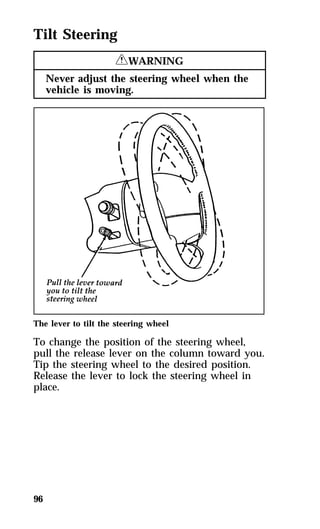
  • 169.
    When to useD (Overdrive) — with transmission control switch activated (O/D OFF light illuminated) Overdrive may not be appropriate for certain terrain. If the transmission shifts back and forth between Third and Fourth gears while you are driving on hilly roads or if your vehicle does not have adequate power for climbing hills, depress the TCS. You can depress the TCS at any speed. When to use 2 (Second) Use 2 (Second) for start-up on slippery roads or to give you more engine braking to slow your vehicle on downgrades. When to use 1 (Low) Use 1 (Low) when driving down steep grades. It gives more engine braking to slow your vehicle than 2 (Second) on the downgrades. You can upshift from 1 (Low) to 2 (Second) or from 1 (Low) to Overdrive at any speed. P (Park) Always come to a complete stop before you shift into P (Park). Make sure that the gearshift is securely latched in P (Park). This locks the transmission and prevents the rear wheels from rotating. 169
  • 170.
    170 RWARNING Alwaysset the parking brake fully and make sure that the gearshift is securely latched in P (Park). RWARNING Never leave your vehicle unattended while it is running. You can tell a console-mounted gearshift is securely latched in P (Park) if the lever is adjacent to the P (Park) and you cannot move it without pushing in the thumb button. Traction-Lok Axle (If equipped) This axle provides added traction on slippery surfaces, particularly when one wheel is on a poor traction surface. Under normal conditions the Traction-Lok axle functions as a standard rear axle. Extended use of other than matching size tires on a Traction-Lok rear axle could result in a permanent reduction in effectiveness. This loss of effectiveness does not affect normal driving and should not be noticeable to the driver. RWARNING To avoid injury, never run the engine with one wheel off the ground, such as when changing a tire.
  • 171.
    Traction AssistTM (Ifequipped) Your vehicle may be equipped with the optional Traction AssistTM system. This system helps prevent wheel spin in order to improve tire traction and is an especially useful feature when you drive in hilly areas or on slippery, icy or snowy roads. Traction AssistTM works automatically by rapidly applying and releasing the brakes to prevent one or both of the rear drive wheels from spinning during acceleration. The Traction AssistTM system can be manually turned off, to allow wheelspin if you want, by pushing the TRACTION ASSIST. switch (located on the console) when the vehicle is not in the Traction AssistTM mode. The word “OFF” in the switch will light up to indicate the system is off. The Traction AssistTM system will automatically be on each time the engine is started. During ordinary driving, it is recommended to leave the system turned on. The Traction AssistTM system will then always be ready to operate when needed. 171 The Traction AssistTM switch
  • 172.
    During the TractionAssistTM function, which most often occurs during low speed acceleration on slippery surfaces, a noise may be heard coming from the engine compartment. This noise is created by the ABS pump and is normal and may last for a few seconds during the acceleration of the vehicle. In general, this system improves your vehicle’s stability and acceleration performance when road conditions warrant. Traction AssistTM is fully effective up to approximately 25 mph (40 km/h). At 25 mph (40 km/h) the function begins to taper off until it no longer operates above 34 mph (55 km/h). If the Traction AssistTM system is cycled excessively, the system will shut down to prevent the rear brakes from overheating. During this shutdown period, the word OFF in the traction assist switch will be illuminated showing that the traction assist system is inoperative. A cooling down period is required to prevent damage to the rear brakes. This time period varies and depends on brake usage during the cooling down period. Anti-Lock braking is not affected and will function normally during the cool down period. NOTE: Traction-Lok axles are not an available 172 option on vehicles equipped with traction assist.
  • 173.
    Steering Your Vehicle Your vehicle comes with power steering. Power steering uses energy from the engine to help steer your vehicle. If the amount of effort needed to steer your vehicle changes at a constant vehicle speed, have the power steering system checked. If the power steering system breaks down (or if the engine is turned off), you can steer the vehicle manually but it takes more effort. Never hold the steering wheel to the extreme right or left for more than five seconds if the engine is running. This can damage the power steering pump. Speed Sensitive Power Steering (If equipped) The steering system in 4.6L engine vehicles is speed sensitive. This means that the steering effort is light for parking and heavier for highway driving. However, if you have to swerve around an object or another vehicle, your steering will have full power assist. Brakes Applying the Brakes Braking non ABS models Your vehicle has power front disc brakes and rear drum brakes. Anti-lock disc brakes on all four wheels are optional. They adjust automatically as the brake pads or linings wear down. Apply the brake pedal gradually. Use the “squeeze” technique — push on the brake pedal with a steadily increasing force. This allows the wheels to continue to roll while you are slowing down, which lets you steer properly. 173
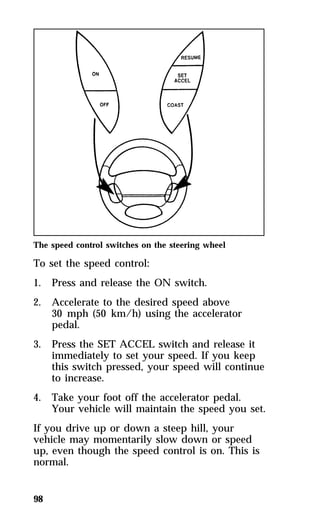
  • 174.
    On vehicles withoutanti-lock brakes, extreme braking can make the wheels lock and slide, possibly decreasing your control of the steering. If you lock the wheels, release the brake pedal and repeat the “squeeze” technique. Braking with ABS brakes On vehicles with anti-lock brakes, the wheels will not lock and slide when you press down hard on the brake pedal. The anti-lock brakes automatically start releasing and reapplying the front brakes independently and the rear brakes together whenever your wheels start to lock. Do not “pump” the brake pedal on vehicles equipped with anti-lock brakes. When this happens, you will feel the brake pedal pulse. This “pulse” may be an unfamiliar feeling but it is normal and indicates the ABS is working as designed. Do not drive with your foot resting on the brake pedal; you will wear out the linings and increase your vehicle’s stopping distance. Brake rotor damage may also eventually occur. NOTE: If you are driving down a long or 174 steep hill, shift to a lower gear and do not apply your brakes continuously. If you apply your brakes continuously, they may overheat and become less effective. Occasional brake squeal during light to moderate stops does not affect the function of the brake system and is normal. However, if the squeal becomes louder or more frequent, have your brakes inspected by your dealer or a qualified service technician.
  • 175.
    Ford Motor Companyhas not found any detrimental effects of popular mobile radio transmitting equipment installed on vehicles with the anti-lock brake system, if the equipment is installed according to the manufacturer’s instructions. However, if mobile radio transmitting equipment is installed in your vehicle and, if either the anti-lock brake system cycles or the check anti-lock light comes on at any time other than right after you turn the key to ON or during a sudden stop, have your mobile radio dealer inspect the installation. Parking Brake The parking brake should be used whenever you park your vehicle. The parking brake pedal is suspended just below the bottom of the instrument panel to the left of the brake pedal. To set the parking brake while parking your vehicle, apply the brake pedal with your right foot and hold it while you push the parking brake down firmly with your left foot. The brake system warning light will glow. 175 The parking brake
  • 176.
    176 RWARNING Alwaysset the parking brake fully and make sure that the gearshift is securely latched in P (Park). To release the parking brake, press down on the pedal until you hear a click. Lift your foot off the pedal. The brake is now released and will reset to lock the next time you press the pedal, located below the lower left corner of the instrument panel. The Brake System Warning Light will glow if the parking brake is not fully released when the engine is running. Always check the Brake Warning Light each time you start your engine. Driving with the parking brake on will cause the brakes to wear out quickly and will reduce the fuel economy. RWARNING If the parking brake is fully released, but the Brake System light remains on, have the brakes checked immediately. They may not be working properly. The parking brake system is designed for static parking only and is not designed to stop a moving vehicle, but you can use the parking brake to stop your vehicle in an emergency if the normal brakes fail. However, since the parking brake applies only the rear brakes, the stopping distance will increase greatly and the handling of your vehicle will be adversely affected.
  • 177.
    Driving Under SpecialConditions Tips for Safe Driving As with any new vehicle, yours may drive and handle differently from your previous vehicle. Use care until you become accustomed to its various features and driving characteristics. Operate your vehicle within reasonable limits. Sudden acceleration, deceleration, turning, or combinations of these maneuvers can cause a vehicle to behave differently than anticipated. Driving in Bad Weather Slippery roads Drive cautiously on wet or snowy roads: qDo not quickly move the steering wheel unless necessary. qDrive slower than you normally would. qDo not use speed control. qGive your vehicle more distance to stop. qPump the brake pedal steadily and evenly to avoid locking your wheels. (Does not apply to vehicles with anti-lock brakes.) qConsider using one of the lower gears. 177 RWARNING To avoid skidding and losing control on slippery roads, do not downshift into First (1) when you are moving faster than 20 mph (32 km/h).
  • 178.
    178 RWARNING Ifyour vehicle has speed control, do not use it on slippery roads. You could lose control of your vehicle and could injure someone. If your vehicle gets stuck (for example, in mud or snow), you may try to “rock” it out of the spot. Shift, in a steady rhythm, between forward and reverse gears. At the same time, press lightly on the accelerator. RWARNING Do not spin the wheels at over 35 mph (55 km/h). The tires may fail and injure a passenger or bystander. By moving the vehicle backward and forward, you may gain enough momentum to move out of the spot. Do not rock the vehicle for more than a few minutes. This may overheat the engine, damage the transmission, or damage the tires. If you are still stuck after a minute or two of rocking, call for a tow truck. High water Do not drive through flooded areas unless you are sure that the water is below the bottom of the wheel rims. If you must drive through high water, drive slowly. You may have limited traction or wet brakes, so allow extra stopping distance because your vehicle will not stop as quickly as usual. After you drive through the standing water, apply your brakes gently several times as your vehicle moves slowly. This helps to dry the brakes.
  • 179.
    Driving With aHeavy Load There are limits to the amount of weight your vehicle can carry or tow. The total weight of your vehicle, plus the weight of the passengers and cargo, should never be more than the Gross Vehicle Weight Rating (GVWR). Also, the weight that your vehicle carries over the front axle and rear axle should never be more than the Gross Axle Weight Rating (GAWR) for the respective axle. You can find your vehicle’s GVWR and GAWR on the Safety Compliance Certification Label on the left front door lock facing or the door latch post pillar. The weight limits of your vehicle’s tires affect the GVWR or GAWR limitations. Usage of replacement tires with higher weight limit than originals does not increase GVWR or GAWR. Usage of lower capacity replacement tires may lower GVWR and GAWR limitations. 179 RWARNING If the GVWR or the GAWR specified on the Safety Compliance Certification Label is exceeded, your vehicle may be damaged or you may lose control and injure someone.
  • 180.
    Limiting Your Vehicle’sLoad The load that you add to your vehicle must not exceed the maximum load stated on the Safety Compliance Certification Decal attached to the left front door pillar. To figure the weight of your vehicle’s load, add the weights of: qthe driver and passengers qluggage and any other items that you put in your vehicle qthe tongue load of the loaded trailer qthe weight of any equipment that has been added to your vehicle since it was delivered to your dealer If you do not know the actual weights of these items, use the following procedure to figure the weight of a load: 1. Weigh your vehicle without the driver, 180 passengers and luggage. You might take your vehicle to a shipping company or an inspection station for trucks. 2. Then weigh your vehicle with the driver, passengers and luggage. 3. Subtract the first reading from the second to figure the total weight of the load. After determining this load, you must also make sure that the total weight of your vehicle, plus the load it carries, is less than its GVWR. Also, make sure that the weight your vehicle carries over each axle is less than the GAWR for the respective axle.
  • 181.
    If your vehicleexceeds the GVWR, remove cargo from your vehicle accordingly. If your vehicle exceeds the GAWR for either axle, shift the load or remove cargo accordingly. 181 RWARNING Improper distribution of your vehicle’s load or carrying weight in excess of the amount shown on the tire decal can cause rapid tire wear or loss of vehicle control. Trailer Towing Your vehicle does not come from the factory fully equipped to tow. No towing packages are available through Ford or Lincoln/Mercury dealers. Because towing a trailer puts extra strain on your vehicle, you must follow certain precautions for your safety and the good of your vehicle: qStay within the load limits for towing your vehicle. (See Trailer towing specifications in this chapter.) qCarefully and thoroughly prepare your vehicle for towing, making sure to use the right equipment and to attach it properly. (See Preparing to Tow in this chapter.) qUse extra caution when driving your vehicle while you tow. (See Driving while you tow in this chapter.) qService your vehicle more frequently if you tow a trailer. (See Servicing your vehicle if you tow in this chapter.)
  • 182.
    Ten to 15%of the loaded trailer’s weight should be on the tongue. However, the tongue load should never exceed 10% of the maximum weight that your vehicle can safely tow. 182 RWARNING Do not tow a trailer when the temporary spare tire is being used. Your vehicle is classified as a light duty towing vehicle. The amount of weight that you can safely tow depends on the optional equipment on your vehicle. See the following chart. Trailer towing specifications Preparing to Tow For your safety and for the good of your vehicle, use the right equipment for the type of trailer you tow. Also, make sure that all towing equipment is properly attached to your vehicle. If you are not certain that you are using the right equipment in the proper manner, see your Ford or Lincoln-Mercury dealer. Do not use hitches that clamp onto your vehicle’s bumper. The bumper is not designed to bear the load. Always check the pressure in all your vehicle’s tires when preparing to tow (see inflation recommendation on the tire label).
  • 183.
    Using the hitch Your vehicle uses a load carrying hitch. Because this type of hitch places the tongue load of a trailer on the rear wheels of your vehicle, you must distribute the load in your trailer so that only 10 to 15% of the total weight of the trailer is on the tongue. Tie down the load so that it does not shift and change the weight on the hitch. This will prevent damage to your vehicle and make your vehicle easier to handle. Connecting the safety chains Always attach the trailer’s safety chains to your vehicle. They help protect your trailer if the hitch breaks. To connect the trailer’s safety chains: 1. Cross the chains under the trailer tongue and attach them to your vehicle’s frame or hook retainers. Never attach the safety chains to your vehicle’s bumper. The bumper is not designed to bear the weight of a trailer. 183 2. Make sure that you leave enough slack in the chains to allow you to turn corners. If you use a rental trailer, follow the instructions that the rental agency gives you.
  • 184.
    Connecting the trailer’sbrakes Electric brakes and manual, automatic, or surge-type hydraulic brakes are safe if you install them properly and adjust them according to the manufacturer’s instructions. Be sure that your trailer’s brakes meet local and federal regulations. If your vehicle is equipped with the optional trailer tow package, provisions have been made under the instrument panel for installation of an electronic brake controller. 184 RWARNING Do not connect a trailer’s hydraulic brake system directly to your vehicle’s brake system. Your vehicle may not have enough braking power and your chances of having a collision greatly increase. Connecting the trailer’s lights Do not connect a trailer’s lighting system wiring directly to your vehicle’s lighting system wiring. To get the proper equipment for hooking up your trailer’s lights, see your local trailer dealer and your Ford dealer. Be sure to follow their instructions carefully. If your vehicle is equipped with the optional trailer tow package, the proper lamp wiring and equipment has been installed at the factory. The trailer feed wire (supplied in a box in the luggage compartment) needs a connector compatible with your trailer prior to installation. If you do not install trailer lights correctly, you may cause damage to the vehicle’s lighting system.
  • 185.
    Driving While YouTow Be especially careful when driving while you tow a trailer. Never drive faster than 45 mph (70 km/h) when you tow in hilly country on hot days. Also, anticipate stops so that you can brake gradually. If you tow in Overdrive while riding through hilly country, your vehicle may frequently shift between Overdrive and Third gears. To prevent your vehicle from shifting too much, depress the Transmission Control Switch (TCS). This will also give the engine more power going up hills and better engine braking going down hills. If you use the speed control while you are towing on very long, steep grades, the speed control may shut off. Servicing your vehicle if you tow If you tow a trailer for a long distance, your vehicle will need to be serviced more frequently than usual. Refer to the Maintenance Schedule and Record booklet for additional information. 185
  • 186.
    187 Roadside Emergencies Jump-Starting Your Vehicle Your vehicle’s battery may die if you leave the lights on or any electrical equipment on after you turn the engine off. If this happens, you may be able to jump-start from a booster battery to start your vehicle. RWARNING The gases around the battery can explode if exposed to flames, sparks, or lit cigarettes. An explosion could result in injury or vehicle damage. RWARNING To protect yourself when charging a battery, always shield your face and eyes. Make sure that you can breathe fresh air. RWARNING Applying too much pressure on the ends when lifting a battery could cause acid to spill. Lift the battery with a carrier or with your hands on the opposite corners. RWARNING Batteries contain sulfuric acid which burns skin, eyes, and clothing.
  • 187.
    If the acidtouches someone’s skin, eyes, or clothing, immediately flush the area with water for at least 15 minutes. If someone swallows the acid, have him or her drink lots of milk or water first, then Milk of Magnesia, a beaten egg, or vegetable oil. Call a doctor immediately. To avoid damaging your vehicle or your battery, and to avoid injury to yourself, follow these directions for preparing your vehicle to jump-start and connecting the jumper cables in the order they are given. If in doubt, call for road service. Preparing Your Vehicle NOTE: also see label on battery. 1. Your vehicle has a 12-volt starting system, so 188 you need to use a 12-volt jumper system. You will damage your starting motor, ignition system, and other electrical parts if you connect them to a 24-volt power supply (either two 12-volt batteries in series or a 24-volt generator set). 2. Do not disconnect the battery of the disabled vehicle. You could damage the vehicle’s electrical system. 3. Park the booster vehicle close to the hood of the disabled vehicle. Make sure the vehicles do not touch each other. Set the parking brake on both vehicles and stay clear of the engine cooling fan and other moving parts. 4. Check all battery terminals and remove any excessive corrosion before you attach the jumper cables. 5. Turn on the heater fan in both vehicles. Turning on the fan helps protect the electrical system from voltage surges. Turn off all other switches and lights in both vehicles to prevent possible damage to either vehicle’s electrical systems.
  • 188.
    Connecting the jumpercables 1. Connect one end of the first jumper cable to the positive (+) terminal of the discharged battery. (You can connect either jumper cable to the positive (+) terminal, as long as you use the same cable for both positive terminals.) Most jumper cables have a red cable and a black cable. The red cable is generally used for the positive terminals and the black for the negative ones. 189 2. Connect the other end of the first cable to the positive (+) terminal of the booster battery. 3. Connect one end of the second cable to the negative (s) terminal of the booster battery — NOT to the discharged battery. 4. Connect the other end of that cable to a good metallic surface on the engine or frame of the disabled vehicle making sure it is clear of any rotating engine components. The following illustrations show where you can find a metallic surface. RWARNING Do not connect the end of the second cable to the negative (s) terminal of the battery to be jumped. A spark may cause an explosion of the gases that surround the battery.
  • 189.
    The 3.8L SFIengine 190
  • 190.
    191 The 4.6LSFI Engine
  • 191.
    Jump-Starting 1. Makesure that the jumper cables are not in 192 the way of moving engine parts, then start the booster vehicle. Run the engine at a moderate speed. 2. Let the discharged battery charge for a few minutes and then start the disabled vehicle. It may take a couple of tries before the vehicle starts. If the vehicle does not start after several attempts, there may be a different problem. 3. When both vehicles are running, let them idle for a few minutes to charge the discharged battery. Removing jumper cables 1. Always remove the jumper cables in the reverse order. Remove the negative (s) end of the jumper cable from the metallic surface on the engine or frame of the disabled vehicle. 2. Remove the negative (s) cable from the booster battery. 3. Remove the positive (+) cable from the booster battery. 4. Remove the other end of the positive (+) cable from the discharged battery. After the vehicle is started, let it idle for a while to let the engine “relearn” its idle conditions. Drive it around for a while with all electrical accessories turned off to let the battery recharge. You may need to use a battery charger to fully recharge the battery.
  • 192.
    NOTE: If yourvehicle is equipped with a 4.6L engine you will need to perform additional steps after your vehicle has been jump started. See Readiness for Inspection/Maintenance Testing in Servicing Your Vehicle chapter. Changing a Tire If you get a flat tire while you are driving, do not apply the brake heavily. Instead, gradually decrease the speed. Hold the steering wheel firmly and slowly move to a safe place on the side of the road. Park on a level spot, turn off the ignition, set the parking brake, and turn on the hazard flashers. The Temporary Spare Tire You have a high pressure temporary spare tire. This spare tire is smaller than a regular tire and is designed for emergency use only. Use it only when you get a flat tire and replace it as soon as you can. This spare tire is marked with the words “TEMPORARY USE ONLY” so that you can easily identify it. NOTE: Extended use of other than conventional spare tires on a Traction-Lok rear axle could result in a permanent reduction in effectiveness. This loss of effectiveness does not affect normal driving and should not be noticeable to the driver. 193 RWARNING If you use the temporary spare tire continuously or do not follow these precautions, the tire could fail, causing you to lose control of the vehicle, possibly injuring yourself or others.
  • 193.
    When you drivewith the temporary spare tire, DO NOT: qexceed 50 mph (80 km/h) under any circumstances. qload your vehicle so that it is heavier than the maximum vehicle load rating listed on the tire decal. qtow a trailer. quse tire chains on this tire. qtry to repair the temporary spare tire or remove it from its wheel. quse the wheel for any other type of vehicle. qdrive through an automatic car wash with this tire. Because the temporary spare tire is smaller than a conventional tire, it reduces the ground clearance. Your vehicle may get caught in the rails and it could be damaged. 194
  • 194.
    195 Spare TireLocation The spare is stored in the trunk. The spare tire location To remove the spare tire: 1. Remove the spare tire cover. 2. Unscrew the wing-nut holding down the spare tire. NOTE: Wing-nut is not removable. 3. Lift out the spare tire, jack, and lug wrench.
  • 195.
    Preparing to Changethe Tire 1. Make sure that your vehicle will not move 196 or roll. Put the gearshift in P (Park). Set the parking brake and block the wheel that is diagonally opposite the tire that you are changing. When one of the back wheels is off the ground, the transmission alone will not prevent the vehicle from moving or slipping off the jack, even if the vehicle is in P (Park). To prevent the vehicle from moving when you change a tire, be sure the parking brake is set, then block the wheel (both directions) that is diagonally opposite (other side and end of the vehicle) to the tire being changed. RWARNING If the vehicle slips off the jack, you or someone else could be seriously injured. RWARNING To avoid injury, never run the engine with one wheel off the ground, such as when changing a tire. 2. Get out the spare tire and jack. 3. Remove any optional wheel covers or hubcaps with the tapered end of a wheel nut wrench. Insert the handle of the wrench and twist it against the inner wheel cover flange. For more about removing wheel covers, see the information later in this chapter.
  • 196.
    197 4. Looseneach wheel lug nut one-half turn counterclockwise, but do not remove them until the tire is raised off the ground. You should pull up on the handle rather than push to develop maximum force to loosen wheel lug nuts. See Anti-Theft Wheel Lug Nuts later in this chapter for information on removing anti-theft lug nuts. Removing and Replacing the Tire 1. Find the underbody notches closest to the wheel to be removed. Center the jack between (2) underbody notches and turn the handle of the jack clockwise until the wheel is completely off the ground. RWARNING To lessen the risk of personal injury, do not put any part of your body under the vehicle while changing a tire. Do not start the engine when your vehicle is on the jack. The jack is only meant for changing the tire.
  • 197.
    The improper liftpoint NOTE: Never use the differential housing as a 198 lift point.
  • 198.
    199 The notchesfor the jack 2. Turn the jack handle clockwise until the wheel clears the ground. Remove the wheel lug nuts. 3. Replace the flat tire with the spare tire, making sure that the air valve stem is facing outward. 4. Reinstall the lug nuts, tightening until the wheel is snug against the hub. The beveled edges on the lug nuts face inward. Do not fully tighten the lug nuts until you lower the vehicle. If you do, you could force the vehicle off the jack. 5. Lower the vehicle by turning the jack handle counterclockwise.
  • 199.
    6. Remove thejack and fully tighten the lug 200 nuts in the order shown in the following illustration. As soon as possible, have your dealer or a qualified service technician check the lug nuts for proper torque specifications. The lug nuts on the wheel 7. Place any wheel covers and ornaments in the trunk. 8. Put the tire, jack, and wrench away. Make sure the jack is securely fastened so it does not rattle when you drive. 9. Unblock the wheels. Aluminum Road Wheel Ornaments (If equipped) To remove the ornament, stick the tapered end of the jack handle between the ornament and wheel and pry off the ornament. To replace the ornament, stick one side of the ornament into the center of the wheel and strike the other side with the palm of your hand.
  • 200.
    201 Center WheelCover To remove the wheel cover: 1. Pry the center ornament from the wheel cover using the tapered end of the jack handle. Do not use a screwdriver or any other tool. If you do, you may damage the cover. The wheel, with the wheel cover still attached, may now be removed from the vehicle by removing the five lug nuts. 2. If the tire needs to be removed from the wheel, remove the five screws, using a Phillips head screwdriver. Then pull the wheel cover off the wheel. The center attachment wheel cover To replace the wheel cover: 1. Place the tire valve stem hole in the wheel cover over the tire valve stem. Align the holes in the wheel cover mounting pad with the center holes in the metal inserts. Install and tighten the five screws.
  • 201.
    2. Align thelegs of the ornament with the slots 202 on the wheel cover. Strike the ornament with the palm of your hand. Anti-Theft Wheel Lug Nuts (If equipped) If your vehicle has this option, one of the lug nuts on each wheel locks and must be unlocked with a special key. The key and registration card are attached to the lug wrench and stored with the spare tire. If you lose the key, send the registration card to the manufacturer (not the dealer) to get a replacement key. NOTE: If entire lug wrench/lug nut key assembly is lost, see your nearest Ford or Lincoln-Mercury dealer who has access to a master set of keys. DO NOT USE A POWER IMPACT WRENCH ON THE LUG NUT KEY. The anti-theft lug nut and key Removing the anti-theft lug nut Insert the key over the locking lug nut. Make sure that you hold the key square to the lug nut. If you hold the key on an angle, you may damage the key and the lug nut. Place the lug nut wrench over the lug nut key and apply pressure on the key with the wrench. Turn the wrench in a counterclockwise direction to remove the lug nut.
  • 202.
    Replacing the anti-theftlug nut Insert the key over the locking lug nut. Place the lug nut wrench over the lug nut key and, while applying pressure on the key, install the lug nut. If the Engine Cranks But Does Not Start or Does Not Start After a Collision The Fuel Pump Shut-off Switch If the engine cranks but does not start or if you have had a collision, the fuel pump shut-off switch may have been triggered. The shut-off switch is a device that stops the fuel pump when your vehicle has been involved in a substantial jolt. For information on how to check and reset the fuel pump shut-off switch, see Fuel pump shut-off switch in the Index. Towing Your Vehicle If you need to have your vehicle towed, contact a professional towing service or, if you are a member, your roadside assistance center. Recommended towing options include wheel lift towing or flat bed towing. 203
  • 203.
    When calling fora tow truck, tell the operator what kind of vehicle you have. A towing manual is available from Ford Motor Company for all authorized tow truck operators. Have your tow truck driver refer to this manual for the proper hook-up and towing procedures for your vehicle. 204
  • 204.
    205 Customer Assistance Roadside Assistance Ford Motor Company has set up a 24-hour, seven-day-a-week hotline with trained operators that put you in touch with the help you need if you experience a problem with your vehicle. This complimentary service is provided to you throughout your warranty period of 3 years/36,000 miles (3 years/60,000 km), whichever comes first. To purchase Roadside Assistance coverages beyond this period, through Ford Auto Club, contact your Ford or Lincoln-Mercury dealer (not available in Canada). Roadside Assistance will cover the following: qMount your spare if you have a flat tire. qJump-start your battery if it is dead. qUnlock your vehicle if you are locked out. qBring you fuel if you run out. qTow your vehicle if you are stranded. Even non-warranty related tows, like accidents or getting stuck in mud or snow, are covered (some exclusions apply, such as impound towing and repossession).
  • 205.
    How to useRoadside Assistance Your Roadside Assistance identification card can be found in the Owner Guide portfolio in your glove compartment. Complete the card and place it in your wallet for quick reference. To receive roadside assistance in the United States call 1-800-241-FORD (in Canada call 1-800-665-2006). Should you need to arrange for roadside assistance yourself, Ford Motor Company will reimburse the reasonable cost. To obtain information about reimbursement call 1-800-241-FORD (in Canada call 1-800-665-2006). If You Have a Service Problem Ford Motor Company has authorized Ford and Lincoln-Mercury dealerships that can service your vehicle for you. This chapter tells you how to get service or maintenance for your vehicle. 206
  • 206.
    Service/Maintenance Concerns (U.S.or Canada) Ford recommends taking your vehicle to your selling dealer who wants to ensure your continued satisfaction. You may, however, take your vehicle to any authorized Ford or Lincoln-Mercury dealer. In most cases, your dealer will be able to resolve your concern. If you are not satisfied with the service you received from your dealership’s service department, talk to the service manager at the dealership, or if you still are not satisfied, talk to the owner or general manager of the dealership. In most cases, you will have your concern resolved at this level. If you are away from home when your vehicle needs to be serviced, or if you need more help than the dealer gave you, contact the Ford Customer Assistance Center to find an authorized dealership that may be able to help. 207
  • 207.
    In the U.S.,contact: If you live in Canada and have any questions or concerns that the dealership cannot answer, contact the Customer Assistance Centre. Please have the following information available when contacting Ford Customer Assistance: qyour telephone number (both business and home) qthe name of the dealer and the city where the dealership is located qthe year and make of your vehicle qthe date purchased qthe current mileage on your vehicle qyour Vehicle Identification Number (VIN) listed on your owner card and/or your vehicle ownership license 208
  • 208.
    Vehicle Identification Number(VIN/Serial Number) If you still have a service or product complaint, you may wish to contact the Dispute Settlement Board (U.S. only) or the Canadian Motor Vehicle Arbitration Plan (CAMVAP) in Canada. The Dispute Settlement Board (U.S. Only) The Dispute Settlement Board is a voluntary, independent dispute-settlement program available free to owners or lessees of qualifying Ford Motor Company vehicles. The Dispute Settlement Board may not be available in all states. Ford Motor Company reserves the right to change eligibility limitations, modify procedures and/or to discontinue this process at any time without notice and without incurring obligations. What Kind of Cases Does the Board Review? The Board reviews all product performance and service complaints on Ford, Mercury and Lincoln Cars and Ford and Mercury Light Trucks under warranty that have not been resolved by a dealer or Ford Motor Company. The Board does not review issues involving: qA non-Ford product qA non-Ford dealership 209
  • 209.
    qA vehicle salestransaction qA request for reimbursement of consequential expenses unless incidental to a service or product complaint being reviewed qItems not covered by your warranty qAlleged liability claims qProperty damage where such damage is significant when compared to the economic loss alleged under the warranty dispute qCases currently in litigation qVehicles not used primarily for personal, family, or household purposes NOTE: Complaints involving vehicles on 210 which applicable express written new vehicle warranties have expired at receipt of your application are not eligible. Eligibility may differ according to state law. For example, see the unique brochure for California purchasers/lessees. How Does the Board Work? The Board has four members: qthree consumer representatives qa Ford or Lincoln-Mercury dealer Consumer candidates for Board membership are recruited and trained by an independent consulting firm. Dealers are chosen because of their business leadership qualities.
  • 210.
    If the involvedvehicle is within 36 months and 36,000 miles of the date of delivery (warranty start date), you have a right to make an oral presentation before the Board by indicating your choice on the application. Also, oral presentations may be requested by the Board. A decision is made by the Board by simple majority vote. Board members review all the materials related to each complaint and, based on the available information, arrive at a fair and impartial decision. Decisions are based on the written statements and any oral presentations made by each of the involved parties. Because the Board usually meets only once a month, some cases will take longer than 30 days to be reviewed. The Board will make every effort to resolve each case within 40 days after it receives the customer application form. After your case has been reviewed, the Board will mail you its decision in writing. It will also provide you with a form to indicate your acceptance or rejection of an award decision. The decisions of the Board are binding on the dealer and Ford, but customers may have other options available to them under state or federal law. The decisions of the Board, however, may be introduced into evidence by any party in subsequent legal proceedings that may be initiated. How Do You Contact the Board? Write to the Board at the following address to request a brochure/application. You will be sent a brochure and a one-page customer application form. The form should be completed and mailed to the same address. 211
  • 211.
    What is theReview Process? Your application will be reviewed and if it is determined to be eligible, you will receive an acknowledgment indicating the file number assigned to your application and the local Board address. At the same time, your dealer and Ford Motor Company representative are asked to submit statements. To review your case properly, the Board needs the following information: qlegible copies of all documents and maintenance or repair orders that relate to the case qthe year, make, model, and vehicle identification number qthe date you bought your vehicle qthe date of repair and the mileage at the time of repair qthe current mileage qthe name of the dealer who sold you the vehicle or who serviced your vehicle qa brief description of your unresolved complaint 212
  • 212.
    qa brief summaryof actions that were taken with the dealer and Ford Motor Company qthe names (if known) of all people you contacted at the dealership qa description of the action you want done to resolve your concern. Should your application NOT qualify for review, an explanation will be mailed to you. Reporting Safety Defects (U.S. Only) If you believe that your vehicle has a defect which could cause a crash or could cause injury or death, you should immediately inform the National Highway Traffic Safety Administration (NHTSA) in addition to notifying Ford Motor Company. If NHTSA receives similar complaints, it may open an investigation, and if it finds that a safety defect exists in a group of vehicles, it may order a recall and remedy campaign. However, NHTSA cannot become involved in individual problems between you, your dealer, or Ford Motor Company. To contact NHTSA, you may either call the Auto Safety Hotline toll-free at 1-800-424-9393 (or 366-0123 in the Washington, D.C. area) or write to: NHTSA, U.S. Department of Transportation, 400 Seventh Street, Washington D.C. 20590. You can also obtain other information about motor vehicle safety from the Hotline. 213
  • 213.
    Ford of CanadaCustomer Assistance Ford Motor Company of Canada, Limited If you live in Canada and have any questions or concerns that the dealership cannot answer, contact the Customer Assistance Centre. Canadian Motor Vehicle Arbitration Plan (CAMVAP) If a specific item of concern arises, where a solution cannot be reached between a vehicle owner, Ford of Canada, and/or one of its dealers (that all parties can agree upon), the owner may wish to use the services offered by the Canadian Motor Vehicle Arbitration Plan (CAMVAP). CAMVAP uses the services of Provincial Administrators to assist consumers in scheduling and preparing for their arbitration hearings. However, before you can proceed with CAMVAP you must follow your manufacturer’s dispute resolution process as outlined under “Service/Maintenance Concerns (U.S. or Canada)” earlier in this chapter. 214
  • 214.
    Consumers wishing toobtain further information about the program can obtain an information booklet from your dealer or contact the Provincial Administrator, Canadian Motor Vehicle Arbitration Plan, at the address or telephone number shown below. O & P Services 595 Bay Street — Suite 300 Toronto, Ontario M5G 2C2 Telephone 1 (800) 207-0685 This plan is not available in the province of Quebec. Getting Help Outside the U.S. and Canada Before you export your vehicle to a foreign country, contact the appropriate foreign embassy or consulate to make sure local regulations do not prevent you from registering your vehicle. Officials at the embassy can also help you decide whether you should import your vehicle to that country. Officials at the embassy or consulate can tell you where to get unleaded fuel. If you cannot get unleaded fuel or can get only fuel with an anti-knock index that is lower than your vehicle needs, contact a district or owner relations office before you leave the U.S. or Canada. Use of leaded fuel in your vehicle without a proper conversion may damage the effectiveness of your emissions control system and may cause engine knocking or serious engine damage. Ford Motor Company is not responsible for any damage that is caused by use of improper fuel. You may also have difficulty importing your vehicle back into the U.S. if you use leaded fuel. 215
  • 215.
    If your vehiclemust be serviced while you are traveling or living in Central or South America, the Caribbean, or the Middle East, contact the nearest Ford dealership. If the dealership cannot help you, write to: If you are in other foreign countries, contact the nearest Ford dealership. If the dealership cannot help you, they can direct you to the appropriate Ford affiliate office. If you buy your vehicle in North America and then relocate outside of the U.S. or Canada, register your Vehicle Identification Number and new address with Ford Motor Company Export Operations. 216
  • 216.
    217 Accessories FordAccessories for Your Vehicle Ford has many fine products available from your dealer to clean your vehicle and protect its finishes. For best results, use the following, or products of equivalent quality:
  • 217.
    A wide selectionof accessories is available through your local authorized dealer. These fine accessories have been engineered specifically to fulfill your automotive needs. They are custom designed to complement the style and aerodynamic appearance of your Ford-built vehicle. In addition, each accessory is made from high quality materials and meets or exceeds Ford’s rigid engineering and safety specifications. That is why Ford brand accessories are warranted for up to 3 years or 36,000 miles (60,000 km), whichever comes first. See your dealer for complete warranty information and accessory availability. Safety, Comfort, and Convenience 218
  • 218.
    NOTE: When addingaccessories, equipment, passengers, and luggage to your vehicle, do not exceed the total weight capacity of the vehicle or of the front or rear axle (GVWR, GAWR as shown on the Safety Compliance Certification Label). Consult your dealer for specific weight information. 219 NOTE: The Federal Communications Commission (FCC) or in Canada the Canadian Radio Telecommunications Commission (CRTC) regulates the use of mobile communications systems — such as two-way radios, telephones, and theft alarms — that are equipped with radio transmitters. Any such equipment installed in your vehicle should comply with FCC regulation and should be installed only by a qualified technician.
  • 219.
    NOTE: Mobile communicationssystems may 220 harm the operation of your vehicle, particularly if they are not properly designed for automotive use or are not properly installed. For example, when operated, such systems may cause the engine to stumble or stall. In addition, such systems may themselves be damaged or their operation affected by operating your vehicle. (Citizens band [CB] transceivers, garage door openers, and other transmitters whose power output is 5 watts or less will not ordinarily affect your vehicle’s operation.) NOTE: Because we have no control over the installation, design, or manufacture of such systems, Ford cannot assume responsibility for any adverse effects or damage that may result if you use this equipment.
  • 220.
  • 221.
  • 222.
  • 223.
  • 224.
    227 Servicing YourCougar Service Made Easy Ford has two goals for servicing your vehicle. 1. When we can, we design parts that do not need to be serviced. 2. We want to make servicing your vehicle as easy as possible. To help you: qWe highlight do-it-yourself items in yellow in the engine compartment so that you can find them easily. qWhen possible, we design parts — such as the headlamp bulbs — that can be replaced without tools. qWe give you a Maintenance Schedule that makes tracking routine service for your vehicle easy. The maintenance schedule is located in the Maintenance Schedule and Record booklet. This chapter tells you about the basic parts that you need to check and service regularly. If your vehicle needs professional servicing, your dealership can provide the parts and service required. Check your Warranty Information Booklet to find out which parts and services are covered. Also see the Customer Assistance chapter of this Owner Guide.
  • 225.
    Ford Motor Companyrecommends that the Owner Maintenance Checks listed in the Maintenance Schedule and Record booklet be performed for the proper operation of your vehicle. In addition to the conditions listed in the Owner Maintenance Checklist, be alert for any unusual noise, vibration, or other indication that your vehicle may need service. If you do notice something unusual, see that your vehicle is serviced promptly. Use only recommended fuels, lubricants, fluids, and service parts conforming to Ford specifications. Motorcraft parts are designed and built to provide the best performance in your vehicle. Using these parts for replacement is your assurance that Ford-built quality stays in your vehicle. NOTE: Always dispose of used automotive 228 fluids in a responsible manner. Follow your community’s standards for disposing of these types of fluids. Call your local recycling center to find out about recycling automotive fluids. Precautions When Servicing Your Vehicle Be especially careful when inspecting or servicing your vehicle. Here are some general precautions for your safety: qDo not work on a hot engine. The engine cooling fan may come on unexpectedly. Always turn the engine off and let it cool.
  • 226.
    229 RWARNING Thecooling fan is automatic and may come on at any time. Always disconnect the negative terminal of the battery before working near the fan. qIf you must work with the engine running, avoid wearing loose clothing or jewelry that could get caught in moving parts. Take appropriate precautions with long hair. qDo not work on a vehicle in an enclosed space with the engine running, unless you are sure you have enough ventilation. qNever get under a vehicle while it is supported by a jack only. If you must work under a vehicle, use safety stands. qKeep all lit cigarettes and other smoking materials away from the battery and all fuel-related parts. If you disconnect the battery, the engine must “relearn” its idle conditions before your vehicle will drive properly. To find out how the engine does this, see Battery in this chapter. Working with the engine off: 1. Set the parking brake fully and make sure that the gearshift is securely latched in P (Park). 2. Remove the key from the ignition after you turn the engine off. 3. Block the wheels. This will prevent your vehicle from moving unexpectedly.
  • 227.
    Working with theengine on: 1. Set the parking brake fully and make sure 230 that the gearshift is securely latched in P (Park). 2. Block the wheels. This will prevent your vehicle from moving unexpectedly. RWARNING Do not start your engine with the air cleaner removed and do not remove it while the engine is running. Opening the Hood 1. Inside the vehicle, pull the hood release located under the lower left corner of the instrument panel. 2. Go around to the front of the vehicle, and release the auxiliary catch that is located under the front edge of the hood at the center of the vehicle. The auxiliary catch under the front edge of the hood 3. Lift the hood until the counterbalanced hinges hold it open.
  • 228.
    Whenever you closethe hood, latch it securely. NOTE: Apply lubricant to the hood latch at six-month intervals to maintain smooth and trouble-free operation. Engine Compartment Your vehicle has one of these types of engines: qa 4.6 liter SFI engine qa 3.8 liter SFI engine The following pages show diagrams of each engine type and where to find items that you should regularly service. 231
  • 229.
    A 3.8 literSFI engine 232
  • 230.
    233 A 4.6liter SFI engine
  • 231.
    Cleaning the Engine A clean engine is more efficient because a buildup of grease and dirt acts as an insulator, keeping the engine warmer than usual. qExtreme care must be used if a power washer is used to clean the engine. The high pressure fluid could penetrate sealed parts and assemblies causing damage or malfunctions. qIn order to avoid possible cracking of the engine block or fuel injection pump, do not spray a hot engine or injection pump with cold water. qThe alternator, distributor and air intake must be covered. Covering these components will help prevent water damage. qNever wash or rinse the engine while it is running. Water getting into the engine may cause internal damage. Filling the Fuel Tank The fuel door is outside the car on the passenger side near the back. To fill the fuel tank: 1. After opening the fuel filler door, remove 234 the cap carefully and slowly by turning it counterclockwise 1/2 to 3/4 turn. RWARNING The fuel system may be under pressure. If the fuel cap is venting vapor or if you hear a hissing sound while disengaging the fuel cap, wait until it stops before completely removing the cap. Otherwise, fuel may spray out and injure you or others.
  • 232.
    235 2. Putthe nozzle all the way inside the fuel filler pipe before pumping the fuel. NOTE: If you spill any fuel on the body of your vehicle, clean it off immediately. The fuel may dull or soften the paint if you do not wash it off. 3. Replace the fuel cap completely when you are finished. Turn it clockwise 1/4 turn until it is tight. It will click when it is fully tightened. 4. Push the fuel door closed. RWARNING If you lose the fuel cap, replace it with a Motorcraft or equivalent fuel cap. If you do not use the proper fuel cap, the pressure in the fuel tank can damage the fuel system or cause it to work improperly in a collision, endangering you and your passengers. NOTE: If you replace your fuel cap with an aftermarket fuel filler cap, the customer warranty may be void for any damage to the fuel tank and/or fuel system. Choosing the Right Fuel Use only UNLEADED FUEL in your vehicle. Using leaded fuel is prohibited by federal law. Your warranty may not apply if your vehicle is damaged because you used the wrong fuel. Using a high-quality fuel makes your vehicle more responsive and maintain its good fuel economy and emissions. It should not be necessary to add any aftermarket products to your fuel tank if you continue to use a high-quality fuel.
  • 233.
    Octane recommendations Yourengine is designed to use fuel with an octane rating of 87. In most cases it is not necessary to use a fuel with an octane rating higher than 87. At service stations, the octane rating is displayed in a label on the pumps. Using a fuel with a lower octane rating can cause persistent and heavy knocking, which can damage the engine. Do not be concerned if your vehicle sometimes knocks lightly when you drive up a hill or when you accelerate. However, see your dealer or a qualified service technician if persistent heavy knocking occurs because this can damage the engine. If your vehicle has problems with starting, rough idle or hesitation problems when the engine is cold, it may be caused by fuel with low volatility. Try a different brand of fuel. If the condition persists, see your dealer or a qualified service technician. Gasolines for clean air Fuels in certain areas of the country are required to contain oxygenates to improve air quality. Common oxygenates are ethanol or grain alcohol (blended at no more than 10%), methanol or wood alcohol (blended at no more than 5% with cosolvents and additives), and MTBE or methyl tertiary butyl ether (blended at no more than 15%). 236
  • 234.
    Reformulated gasoline isalso required in certain areas of the U.S. These fuels are designed to further reduce emissions from your vehicle. Generally, you should not experience difficulties operating your vehicle on fuels containing oxygenates. We encourage you to use these fuels. Safety Information Relating to Automotive Fuels 237 RWARNING Automotive fuels can cause serious injury or death if misused or mishandled. To minimize the risk that you will be injured, please read the following information carefully and observe the recommended precautions. qTurn vehicle off when refueling qDo not smoke when refueling. Fuels are extremely flammable. qDo not siphon any fuel by mouth. RWARNING Gasoline or gasoline blended with methanol can cause blindness and possible death when swallowed. If any fuel is swallowed, call a physician or poison control center immediately. qAvoid breathing vapors while refueling. qIf fuel is splashed on the skin, wash with soap and water. qIf fuel is splashed in the eyes, remove contact lenses (if worn), flush with water for 15 minutes, and seek medical attention.
  • 235.
    Gasoline and gasolineblends may contain small amounts of carcinogens, such as benzene. Long-term exposure to unleaded gasoline vapors has caused cancer in laboratory animals. If you are taking the medication “Antabuse” or other forms of disulfiram for the treatment of alcoholism, vapor or skin contact with a gasoline-methanol blend may cause the same kind of adverse reaction as drinking an alcoholic beverage. In sensitive individuals, serious personal injury or sickness could result. Consult a physician promptly if you experience an adverse reaction. Running Out of Fuel NOTE: Avoid running out of fuel because this 238 situation may have an adverse effect on modern powertrain components. You may need to crank the engine several times before the fuel system starts to pump fuel from the tank to the engine. Calculating Fuel Economy Fuel economy is an estimate of the efficiency of your vehicle, and can be calculated as Miles Per Gallon (MPG) or Liters Per 100 Kilometers (L/100K). Do not calculate fuel economy during your vehicle’s break-in period. This would not be an accurate estimate of how much fuel your vehicle will normally use. To calculate fuel economy: 1. Fill the fuel tank completely and record the initial odometer reading. 2. Every time you buy fuel, record the amount (in gallons or liters) purchased.
  • 236.
    3. After atleast 3-5 tankfuls, fill the fuel tank 239 and record the final odometer reading. 4. Use these equations to calculate your fuel economy: qEnglish: MPG = (Total miles driven) V (gallons used) qMetric: L/100k = (liters used) V (100 kilometers) Comparisons With EPA Estimates EPA fuel economy figures are obtained from laboratory tests under simulated road conditions and may not reflect the actual conditions you experience or your style of driving. The EPA fuel economy estimate is not a guarantee that you will achieve the fuel economy shown. The following decrease fuel economy: qLack of regular, scheduled maintenance qRapid acceleration and excessive speed qDriving with your foot on the brake qSudden stops qExtended engine idling qUsing speed control in hilly terrain qExtended use of the A/C, defroster, rear window defroster and other accessories qUnderinflated tires qHeavy loads qAftermarket add-ons such as bike, ski or luggage racks, bug deflectors, etc.
  • 237.
    Self-Service Pointers Ifyou choose to do your own fueling, you should also perform a few simple maintenance routines. This extra effort will save you additional money and contribute to the driving efficiency of your vehicle. The following procedures require only a tire gauge, a rag, an oil can spout and windshield washer fluid. qCheck the engine oil at every refueling stop qClean the windshield, outside mirrors and headlights qCheck windshield washer fluid qCheck tires for excessive wear or worn edges qCheck the tire pressure at least monthly Engine Oil Recommendations We recommend using Motorcraft oil or an equivalent oil meeting Ford Specification ESE-M2C153-E and displaying the American Petroleum Institute CERTIFICATION MARK on the front of the container. The API Certification Mark 240
  • 238.
    Never use: q“Non-Detergent”oils qOils labeled API SA, SB, SC, SD, SE, SF or SG qAdditional engine oil additives, oil treatments 241 or engine treatments Engine oils with an SAE 5W-30 viscosity are PREFERRED for your vehicle. They provide the best engine performance, fuel economy and engine protection for all climates down to -15°F (-25°C). Synthetic engine oils which are CERTIFIED and of the preferred viscosity may be used in your engine. The engine oil and oil filter must still be changed according to the maintenance schedule. Checking and Adding Engine Oil Since the proper amount of engine oil is important for safe engine operation, check the oil using the dipstick each time you put fuel in your vehicle. Remember the engine must be off, the oil must be warm and the vehicle must be parked on level ground. Checking the engine oil level: 1. Turn the engine off after it has warmed up and allow a few minutes for the engine oil to drain back into the oil pan. 2. Set the parking brake, making sure the gearshift is securely latched in P (Park). 3. Open the hood. Protect yourself from engine heat. 4. Locate the engine oil dipstick (highlighted in yellow) and carefully pull it out of the engine.
  • 239.
    5. Wipe thedipstick clean and put it back into 242 position, making sure it is fully seated. Engine oil dipstick — 4.6 liter engines Engine oil dipstick — 3.8 liter engines 6. Carefully, pull the dipstick out again. If the oil level is below the “ADD 1 QT” line, add engine oil as necessary. If the oil level is beyond the letter “F” in Full, engine damage or high oil consumption may occur and some oil must be removed from the engine. 7. Put the dipstick back in and make sure it is fully seated. It may be necessary to add some oil between oil changes. Make sure you use a CERTIFIED engine oil of the preferred viscosity. Your vehicle’s warranty coverage may not apply if engine damage is caused by the use of improper engine oil. Add engine oil through the oil filler cap highlighted in yellow. To add oil, remove the filler cap and use a funnel to pour oil into the opening. Be careful not to overfill the engine. Recheck the oil level after you finish adding oil.
  • 240.
    Changing the EngineOil and the Oil Filter Change the engine oil and oil filter per the following, whichever occurs first. 243 Refer to the Maintenance Schedule and Record booklet for additional information. NOTE: Always dispose of used automotive fluids in a responsible manner. Follow your community’s standards for disposing of these types of fluids. Call your local recycling center to find out about recycling automotive fluids. RWARNING Continuous contact with USED motor oil has caused cancer in laboratory mice. Protect your skin by washing with soap and water.
  • 241.
    Engine Coolant Checkingthe Engine Coolant NOTE: Be sure to read and understand 244 Precautions When Servicing Your Vehicle at the beginning of this chapter. RWARNING The cooling fan is automatic and may come on at any time. Always disconnect the negative terminal of the battery before working near the fan. Your vehicle’s coolant protects your engine from overheating in the summer and from freezing in the winter. Check the level of the coolant at least once a month. Simply look at the engine coolant reservoir located in the engine compartment. To locate the reservoir, see the diagram of your vehicle’s engine under Engine Type, in this chapter. The coolant additives also protect the entire cooling system from internal passageway corrosion and these additives lubricate the water pump. The coolant should be serviced as noted in the Maintenance Schedule and Record booklet.
  • 242.
    The engine coolantrecovery reservoir Checking hoses Inspect all engine and heater system hoses and hose connections for deterioration, leaks, and loose hose clamps as specified in the Maintenance Schedule and Record booklet. Repair or replace with Motorcraft hoses or equivalent as necessary. Adding engine coolant 245 RWARNING Do not put engine coolant in the container for the windshield washer fluid. If sprayed to clean the glass, engine coolant or antifreeze could make it difficult to see through the windshield.
  • 243.
    246 RWARNING Neverremove the radiator cap or vent plug while the engine is running or hot. Follow these steps to avoid personal injury that can be caused by escaping steam or engine coolant. 1. Before you remove the cap, turn the engine off and let it cool. Even when the engine is cool, be careful when you remove the radiator cap or vent plug. 2. When the engine is cool, wrap a thick towel around the cap and turn it slowly counterclockwise to unscrew. 3. Step back while the pressure releases. 4. When you are sure that all the pressure has been released, use the cloth to press the cap down, turn it, and remove it. 5. Stand away from the radiator opening. Hot steam may blow out or hot engine coolant may even splash out. To find out how much engine coolant mixture your vehicle’s coolant system can hold, see Refill capacities for fluids in the Index. Add engine coolant only to the recovery reservoir. If the coolant level is low, add a 50/50 or appropriate mixture of water and the type of engine coolant that Ford specifies. You may add water by itself only in an emergency, but you should replace it with a 50/50 or appropriate mixture as soon as possible. Have your dealer check the engine cooling system for leaks if you have to add more than a quart (liter) of engine coolant more than once a month.
  • 244.
    Ford Premium CoolingSystem Fluid is an optimized formula that will protect all metals and rubber elastomers used in Ford engines for four years or 50,000 miles (80,000 km). It is not necessary and not recommended to use supplemental coolant additives in your gasoline powered vehicle. These additives may harm your engine cooling system. Follow the recommended service interval for changing your engine coolant. NOTE: When you change or add engine coolant, it is important to maintain your engine coolant concentration between 40% (-11°F [-24°C]) and 60% (-62°F [-52°C]), depending on your local climate conditions. Below 40% you will lose freeze protection and above 60% your engine may overheat on a warm day. 247 NOTE: The use of an improper coolant may void your warranty for the engine cooling system. Use only a premium nationally recognized brand name engine coolant. Do not use alcohol, methanol antifreeze or engine coolant mixed with alcohol or methanol antifreeze. If you do not use the proper coolant, the aluminum radiator on your vehicle will corrode. Ford Motor Company expressly authorizes the Ford Rotunda engine coolant recycling process and chemicals. Use only Ford Rotunda recycled engine coolant or an equivalent recycled engine coolant that is certified by the supplier to meet Ford specification ESE-M97B44-A.
  • 245.
    NOTE: Always disposeof used automotive 248 fluids in a responsible manner. Follow your community’s standards for disposing of these types of fluids. Call your local recycling center to find out about recycling automotive fluids. Use Ford Premium Cooling System Fluid E2FZ-19549-AA (in Canada, Motorcraft CXC-8-B) or an equivalent engine coolant that meets Ford Specification ESE-M97B44-A. Leave the engine coolant in all year. Make sure that the coolant will not freeze at the temperature level in which you drive during winter months. Keep a mixture of engine coolant in your engine that has a protection rating of at least -34°F (-37°C), or whatever protection rating is appropriate for the climate in which you live. Engine coolant drain and flush Proper procedures for a complete coolant drain and flush of the cooling system can be found in the Car Service Manual. Following these recommended procedures will ensure that the specified coolant level and a 50/50 or appropriate mixture of coolant and water is maintained. Engine coolant refill procedure When the entire cooling system is drained and refilled, the following procedure should be used to ensure a complete fill: NOTE: It is imperative the following procedure be adhered to. Failure to do so could result in damage to your engine.
  • 246.
    249 3.8L engineonly qOpen the vent plug. qRemove coolant recovery reservoir cap. qRemove radiator pressure cap. qWith the engine off and cool, add a 50/50 mixture of recommended cooling system fluid and water to the radiator until full, then add to the reservoir until the reservoir is at the FULL-HOT level. qClose the vent plug. qReinstall the coolant recovery reservoir cap by installing the cap to the fully installed position. qReinstall the pressure cap to the pressure relief position by installing the cap to the fully installed position, and then backing off to the first stop. qStart and idle engine until the radiator upper hose is warm (this indicates the thermostat is open and coolant is flowing through the entire system). qImmediately shut off engine. Cover cap completely with a thick cloth and cautiously remove radiator pressure cap and add a 50/50 mixture of recommended coolant and water until system is full. qReinstall the radiator cap securely. qRemove the cap from the engine coolant recovery reservoir and add a 50/50 mixture of recommended cooling system fluid and water to the FULL-HOT mark on the engine coolant recovery reservoir. Check that reservoir hose is not kinked. qReinstall the reservoir cap.
  • 247.
    qCheck for leaksat the draincock, block plug and vent plug. qRecheck the engine coolant level, using the recommended procedure, after one or two occasions of vehicle use. 4.6L engine only qWith the engine OFF and cool, remove the pressure cap, located on the coolant reservoir. Remove the heater hose and clamp, located on the rear of the intake manifold. qAdd a 50/50 mixture of specified coolant and water to the coolant reservoir. Refer to Refill Capacities later in this chapter for the correct amount. Add coolant to the reservoir until the coolant continuously flows out of the tube in the rear of engine. Reattach hose and secure clamp. qContinue to fill the reservoir until the coolant is at the FULL COLD level. qReinstall the pressure cap to the fully installed position. qStart and idle the engine until the radiator upper hose is warm (this indicates the thermostat is open and coolant is flowing through the entire system). qImmediately shut off the engine and let cool. Cautiously remove the pressure relief cap and add a 50/50 mixture of specified coolant and water until the coolant is at the COLD FILL level in the coolant reservoir. qReinstall the pressure cap securely. 250
  • 248.
    qCheck for leaksat the draincock. qRecheck the engine coolant level, using the recommended procedure, after one or two occasions of vehicle use. Battery Your vehicle may have a Motorcraft maintenance-free battery. When the original equipment battery is replaced under warranty, it may be replaced by a Motorcraft Low-Maintenance Battery. The Low-Maintenance Battery has removable vent caps for checking the electrolyte level and for adding water, if necessary. The electrolyte level should be checked at least every 24 months or 24,000 miles (40 000 km) in temperatures up to 90°F (32°C) and more often in temperatures above 90°F (32°C). Keep the electrolyte level in each cell up to the level indicator. Do not overfill. If the level gets low, you can add tap water to the battery, provided the water isn’t hard or doesn’t have a high mineral or alkali content. However, if possible you should refill the battery with distilled water. If the battery needs water quite often, have the charging system checked for a possible malfunction. 251
  • 249.
    Help Us ProtectOur Environment Ford Motor Company strongly recommends that used lead-acid batteries be returned to an authorized recycling facility for disposal. Battery recycling symbol Because your vehicle’s engine is electronically controlled by a computer, some control conditions are maintained by power from the battery. If you ever disconnect the battery or install a new battery, you must allow the computer to “relearn” its idle conditions before your vehicle will drive properly. To let the engine do this, put the gearshift in P (Park), turn off all the accessories, and start the vehicle. Let the engine idle for at least one minute. (Engine must be warm in order to “learn.”) Also, allow approximately 10 miles (16 km) of stop and go traffic for your vehicle’s engine to completely “relearn” its idle. NOTE: If your vehicle is equipped with a 4.6L 252 engine you will need to perform additional steps after the battery has been disconnected, jump started or replaced. See Readiness for Inspection/Maintenance Testing in Servicing Your Vehicle chapter.
  • 250.
    Windshield Washer Fluidand Wipers Washer Fluid Check the level of the windshield washer fluid periodically, or when the optional lamp indicates low fluid. The reservoir for washer fluid is located on the driver’s side of the engine compartment. Visual inspection can determine if the washer fluid is adequate. Do not operate the washer when the reservoir is empty. 253 The reservoir for the windshield washer fluid RWARNING Do not put windshield washer fluid in the container for the engine coolant. Use specially formulated windshield washer fluid rather than plain water, because specially formulated washer fluids contain additives that dissolve road grime. For safety reasons, washer fluids containing an appropriate antifreeze such as methanol should be used in freezing weather (temperatures below 32°F [0°C]). State or local regulations on Volatile Organic Compounds (VOC’s) may restrict use of the most common antifreeze, methanol. Washer fluids containing
  • 251.
    non-methanol antifreeze agentsshould be used only if they provide cold weather protection without damaging the vehicle’s paint finish, wiper blades, and windshield washer system. Wiper Blades Check the windshield wiper blades at least twice a year. Also check them whenever they seem less effective than usual. Substances such as tree sap and some hot wax treatments used by commercial car washes reduce the effectiveness of wiper blades. If the blades do not wipe properly, clean both the windshield and the wiper blades. Use undiluted windshield washer solution or a mild detergent. Rinse thoroughly with clear water. Do not use fuel, kerosene, paint thinner, or other solvents to clean your wiper blades. These will damage your blades. To make reaching the wiper blades easy, simply turn the ignition to the ACC position and turn your wipers on. Wait for them to reach a vertical position and turn the ignition to the OFF position. Do not move the wipers manually. Manually moving the wipers across the windshield may damage them. Wiper blade replacement If the wiper blades still do not work properly after you clean them, you may need to replace the wiper blade assembly or the blade element. When replacing the wiper blade assembly, blade refill, or wiper arm always use a Motorcraft part or equivalent. To replace the blades, follow the instructions that come with them. 254
  • 252.
    Tires Look atyour tires each time you fill your fuel tank. If one tire looks lower than the others, check the pressure in all of them. Always follow these precautions: qKeep your tires inflated to the recommended pressures. qStay within the recommended load limits (see Load limits in the Index). qMake sure the weight of your load is evenly distributed. qDrive at safe speeds. If you do not take these precautions, your tires may fail or go flat. Ford Motor Company recommends obeying posted speed limits. 255 RWARNING Driving too fast for conditions creates the possibility of loss of vehicle control. Driving at very high speeds for extended periods of time may result in damage to vehicle components. At least once a month, check the pressure in all your vehicle’s tires, including the spare. Use an accurate tire pressure gauge. Check the tire pressure when tires are cold, after the vehicle has been parked for at least one hour or has been driven less than 3 miles (5 km). You can find proper cold pressure and load limits of recommended size tires on the Safety Compliance Certification Label.
  • 253.
    256 RWARNING Improperlyinflated tires can affect vehicle handling and can fail suddenly, possibly resulting in loss of vehicle control. Tire Rotation Because your vehicle’s front and rear tires perform different jobs, they often wear differently. To make sure your tires wear evenly and last longer, rotate them as indicated in the following diagram. For tire rotation intervals, see the Maintenance Schedule. If you notice that the tires wear unevenly, have them checked. Rotating the tires
  • 254.
    Replacing the Tires Replace any tires that show wear bands. When your tire shows a wear band, it has only 1/16 inch (2 mm) of tread left. A worn-out tire Because your vehicle’s tires may wear unevenly, you may need to replace them before a wear band appears across the entire tread. Some spots wear more heavily than others. 257 RWARNING When replacing full size tires, never mix radial, bias-belted, or bias-type tires. Use only the tire sizes that are listed on the tire pressure decal. Make sure that all tires are the same size, speed rating, and load-carrying capacity. Use only the tire combinations recommended on the decal. If you do not follow these precautions, your vehicle may not drive properly and safely. Tires that are larger or smaller than your vehicle’s original tires may also affect the accuracy of your speedometer.
  • 255.
    Information About TireQuality Grades New vehicles are fitted with tires that have their Tire Quality Grade (described below) molded into the tire’s sidewall. These Tire Quality Grades are determined by standards that the United States Department of Transportation has set. Tire Quality Grades apply to new pneumatic tires for use on passenger cars. They do not apply to deep tread, winter-type snow tires, space-saver or temporary use spare tires, tires with nominal rim diameters of 10 to 12 inches or limited production tires as defined in Title 49 Code of Federal Regulations Part 575.104(c)(2). U.S. Department of Transportation — Tire quality grades: The U.S. Department of Transportation requires Ford to give you the following information about tire grades exactly as the government has written it. Treadwear The treadwear grade is a comparative rating based on the wear rate of the tire when tested under controlled conditions on a specified government test course. For example, a tire graded 150 would wear one and one-half (1 1/2) times as well on the government course as a tire graded 100. The relative performance of tires depends upon the actual conditions of their use, however, and may depart significantly from the norm due to variations in driving habits, service practices and differences in road characteristics and climate. 258
  • 256.
    Traction A BC The traction grades, from highest to lowest, are A, B, and C, and they represent the tire’s ability to stop on wet pavement as measured under controlled conditions on specified government test surfaces of asphalt and concrete. A tire marked C may have poor traction performance. Warning: The traction grade assigned to this tire is based on braking (straightahead) traction tests and does not include cornering (turning) traction. Temperature A B C The temperature grades are A (the highest), B, and C, representing the tire’s resistance to the generation of heat and its ability to dissipate heat when tested under controlled conditions on a specified indoor laboratory test wheel. Sustained high temperature can cause the material of the tire to degenerate and reduce tire life, and excessive temperature can lead to sudden tire failure. The grade C corresponds to a level of performance which all passenger car tires must meet under the Federal Motor Vehicle Safety Standard No. 109. Grades B and A represent higher levels of performance on the laboratory test wheel than the minimum required by law. Warning: The temperature grade for this tire is established for a tire that is properly inflated and not overloaded. Excessive speed, underinflation, or excessive loading, either separately or in combination, can cause heat buildup and possible tire failure. 259
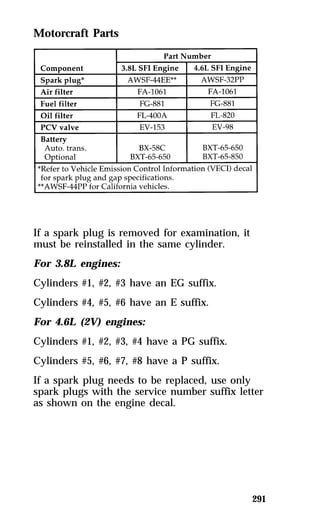
  • 257.
    Snow Tires andChains The tires on your vehicle have all-weather treads that provide traction in rain or snow. However, during the winter months in some climates, you may need to use snow tires and occasionally chains for your tires. 260 RWARNING Snow tires must be the same size and grade as the tires you currently have on your vehicle. Use chains on the tires only in an emergency or if the law requires them where you live. If you choose to use chains on your vehicle’s tires, be aware of the following: qMake sure the chains are the right size for your tires. Use only SAE Class “S” chains. Other types may damage your vehicle. qPut the chains on tightly with the ends held down securely. Verify that no chain touches any wiring, brake lines, or fuel lines. Follow the chain manufacturer’s instructions. qDrive slowly. If you can hear the chains rub or bang against your vehicle, stop the vehicle and tighten the chains. If you continue to hear the chains rub or bang against your vehicle, remove the chains to prevent damage to your vehicle. qAvoid fully loading your vehicle if possible. qRemove tire chains at the first opportunity after using them on snow and ice. Do not use the chains on dry roads.
  • 258.
    Cleaning the Wheels Wash the wheels with the same detergent you use to wash your vehicle’s body. Do not use acid-based wheel cleaners, steel wool, abrasives, fuel, or strong detergents. These substances will damage protective coatings. Use tar and road oil remover to remove grease and tar. NOTE: Before going to a car wash, find out if 261 the brushes are abrasive. Automatic Transmission Fluid Under normal circumstances, you do not need to check the fluid level of the transmission, since your vehicle does not use up transmission fluid. Refer to the Maintenance Schedule and Record booklet for replacement intervals. However, if the transmission is not working properly — for instance, the transmission may slip or shift slowly, or you may notice some sign of fluid leakage — the fluid level should be checked. Checking the Automatic Transmission Fluid It is preferable to check the transmission fluid level at normal operating temperature 150°F-170°F (66°C-77°C), after approximately 20 miles (30 km) of driving. However, if necessary, you can check the fluid level without having to drive 20 miles (30 km) to obtain a normal operating temperature if outside temperatures are above 50°F (10°C). With the vehicle on a level surface, start the engine and, while fully applying the brake pedal, move the transmission shift selector through all of the gear ranges allowing sufficient time for each position to engage. Securely latch the transmission shift selector in the P (Park) position, fully set the parking brake and leave the engine running.
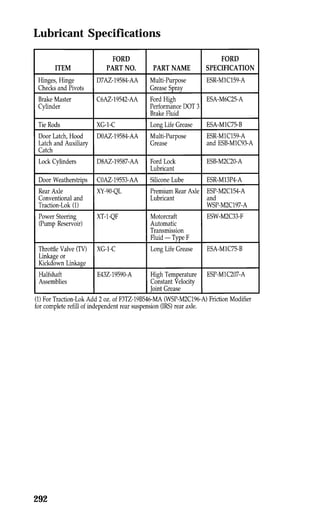
  • 259.
    NOTE: Your vehicleshould not be driven if 262 the fluid level is below the low cold reading on the dipstick. Wipe off the dipstick cap, pull the dipstick out and wipe the indicator end clean. Put the dipstick back into the filler tube and make sure it is fully seated. Pull the dipstick out and read the fluid level. When checking fluid at normal operating temperature 150°F-170°F (66°C-77°C), the fluid level should be within the hot notched area on the dipstick. When the vehicle has not been driven, and outside temperatures are above 68°F (20°C), the fluid levels should be between the hot notch and the tip of the dipstick. NOTE: If the vehicle has been operated for an extended period at high speeds or in city traffic during hot weather, or pulling a trailer, the vehicle should be turned off for about 30 minutes to allow the fluid to cool before checking. Adding Automatic Transmission Fluid Before adding any fluid, be sure that the correct type will be used. Use only MERCONH fluid. Add fluid in 1/2 pint (.25L) increments through the filler tube to bring the level to the correct area on the dipstick. DO NOT OVERFILL. If the level is above the top hole on the dipstick, excess fluid should be removed by a qualified technician. NOTE: Always dispose of used automotive fluids in a responsible manner. Follow your community’s standards for disposing of these types of fluids. Call your local recycling center to find out about recycling automotive fluids.
  • 260.
    Detail of theautomatic transmission dipstick Brake Fluid Under normal circumstances, your vehicle should not use up brake fluid rapidly. However, expect the level of the brake fluid to slowly fall as you put more mileage on your vehicle and the brake lining wears. Check the brake fluid at each scheduled engine oil change or at least once a year. You can do this by looking at the fluid level in the plastic reservoir on the master cylinder. Also, see label on reservoir cap. (To locate the master cylinder, see The Engine Types in the Index.) The fluid level should be between the MIN and MAX marks. 263 RWARNING Brake fluid is toxic. If brake fluid contacts eyes, flush eyes with running water for 15 minutes. Get medical attention if irritation persists. If taken internally, drink water and induce vomiting. Get medical attention immediately.
  • 261.
    If the fluidis low, carefully clean and remove the cap from the reservoir. Fill the reservoir to the MAX line with Ford High Performance DOT 3 Brake Fluid C6AZ-19542-AA, C6AZ-19542-BA, or equivalent DOT 3 fluid meeting Ford specification ESA-M6C25-A. 264 RWARNING If you use a brake fluid that is not DOT 3, you will cause permanent damage to your brakes. Do not fill the reservoir above the MAX line. The brake system fluid reservoir If you find that the fluid level is excessively low — below the seam or ridge on the outside of the plastic reservoir — have the brake system inspected. RWARNING Do not let the reservoir for the master cylinder run dry. This may cause the brakes to fail.
  • 262.
    265 The anti-lockbrake system fluid reservoir Power Steering Fluid Check the level of the power steering fluid at least twice a year (i.e., every Spring and Fall). Checking and Adding Power Steering Fluid 3.8L SFI engine 1. Start the engine and let it run until the power steering fluid reaches normal operating temperature. The power steering fluid will be at the right temperature when the engine coolant temperature gauge in the instrument cluster is near the center of the NORMAL operating temperature range. 2. While the engine idles, turn the steering wheel back and forth several times. Make sure that the cap assembly is installed at this time.
  • 263.
    3. Turn theengine off. 4. Check the fluid level on the dipstick (which 266 is highlighted in yellow in your vehicle). The fluid level should be between the arrows in the FULL HOT range, which is marked on the side of the dipstick, opposite the side marked FULL COLD. Do not add fluid if the level is within the FULL HOT range. 5. If the power steering fluid is low, add fluid in small amounts, continuously checking the level, until you reach the FULL HOT range. Do not overfill. 6. When you are finished, put the dipstick back in and make sure that it fits snugly. The dipstick for power steering fluid
  • 264.
    Use only powersteering fluid that meets Ford Specification ESW-M2C33-F, such as Ford Premium Power Steering Fluid, E6AZ-19582-AA or is an equivalent Type F Automatic Transmission Fluid with a Ford registration number (an 8-digit number beginning with “2P” printed on the fluid container). If the power steering fluid is low, do not drive your vehicle for a long period of time before adding fluid. This can damage the power steering pump. If you check the power steering fluid when it is cold, make sure that the fluid reaches the FULL COLD range on the dipstick. The reading will only be accurate if the fluid temperature is approximately 50 to 85°F (10 to 30°C). 4.6L SFI engine 1. Check the fluid level when the system is COLD (allow at least one half hour after driving for the power steering fluid to cool). 2. Locate the power steering reservoir mounted 267 to the front upper left-hand corner of the engine. 3. Visually verify that the fluid level is above the MIN line adjacent to the reservoir “sight window.” 4. If the power steering fluid is below the MIN line, remove the cap and add fluid in small amounts until the level is between the MIN and MAX lines. 5. Reinstall the reservoir cap.
  • 265.
    Fluid level forpower steering Use only power steering fluid that meets Ford’s Specification ESW-M2C33-F, such as Ford Premium Power Steering Fluid, E6AZ-19582-AA or an equivalent Type F Automatic Transmission Fluid with a Ford registration number (an 8-digit number beginning with “2P” printed on the fluid container). NOTE: If the power steering fluid is low, do 268 not drive your vehicle for a long period of time before adding fluid. This can damage the power steering pump.
  • 266.
    Fuses, High CurrentFuses and Circuit Breakers Fuses (conventional and high current) and circuit breakers protect your vehicle’s wiring system from overloading. If electrical parts in your vehicle are not working, the system may have been overloaded and blown a fuse or tripped a circuit breaker. Before you replace or repair any electrical parts, check the appropriate fuses (conventional and high current) or circuit breakers. The following charts tell you which fuses or circuit breakers protect the wiring for each electrical part of your vehicle. If a fuse blows or a circuit breaker opens a circuit, all the parts of your vehicle that use that circuit will not work. Once you have determined which fuses or circuit breakers to check, follow the procedures under Checking and replacing fuses or Checking and replacing circuit breakers in this chapter. 269
  • 267.
    The instrument panelfuse panel location The instrument panel fuse panel 270
  • 268.
    271 The InstrumentPanel Fuses, Circuit Breakers and Relays
  • 269.
  • 270.
  • 271.
    High Current Fuses High current fuses are circuit protectors that are part of the wiring harness for some electrical equipment. These, like fuses, open when the circuit load exceeds their amperage rating. High current fuses may be purchased from your Ford or Lincoln-Mercury dealer. The high current fuse panel is located in the engine compartment on the left-hand fender apron. 274 RWARNING Always disconnect the battery before servicing high current fuses. Ford recommends that high current fuses be replaced by a qualified technician. The high current fuse panel location
  • 272.
    275 The highcurrent fuse panel
  • 273.
    The high currentfuses and relays 276
  • 274.
    Checking and ReplacingFuses If you need to check a fuse, follow these steps: 1. Find the fuse panel underneath the instrument panel, to the left of the steering column. 277 2. Check the fuse to see if it is blown. Look through the clear side of the fuse to see if the metal wire inside is separated. If it is, the fuse should be replaced. The side view of a fuse 3. Replace the fuse with one that has the right amperage rating. (See the following chart.) To remove the fuse use the pulling tool attached to the inside cover of the fuse panel. There are also four spare fuses attached to the cover.
  • 275.
    278 RWARNING Alwaysreplace a fuse with one that has the specified amperage rating. Using a fuse with a higher amperage rating can cause severe wire damage and could start a fire. 4. Close the cover. Even after you replace a fuse, it will continue to blow if you do not find what caused the overload. If the fuse continues to blow, have your electrical system checked. Circuit Breakers If you need to check a circuit breaker that is on the fuse panel, see Checking and replacing fuses in this chapter to find out how to locate the fuse panel. Circuit breakers will reset themselves and allow the electrical parts to work again once the overload on the circuit is removed. If the circuit breakers continue to cut off electricity, have your vehicle’s electrical system checked. Diagnostic equipment is needed to check circuit breakers. Refer to the manufacturer’s instructions.
  • 276.
    If you replacea circuit breaker, use one with the same amperage rating. To remove a circuit breaker mounted in the fuse panel, grip it with your finger and thumb and pull it straight out of its socket. Lights and Bulb Replacement It is a good idea to check the operation of the following lights frequently: qheadlamps qtail lamps qbrakelamps qhazard flasher qhigh-mount brakelamp qturn signals qlicense plate lamp The alignment of your headlamps should be checked if: qoncoming motorists frequently signal you to turn off your vehicle’s high beams when you do not have the high beams on qthe headlamps do not seem to give you enough light to see clearly at night qthe headlamp beams are pointed substantially away from a position slightly down and to the right 279
  • 277.
    Headlamp Bulb Theheadlamps on your vehicle use replaceable bulbs. When the lamp burns out, simply replace the bulb, rather than the whole lamp. 280 RWARNING Handle a halogen headlamp bulb carefully and keep out of children’s reach. Grasp the bulb only by its plastic base and do not touch the glass. The oil from your hand could cause the bulb to break the next time the headlamps are operated. Do not remove the burned-out bulb unless you can immediately replace it with a new one. If a bulb is removed for an extended period of time, contaminants may enter the headlamp housing and affect its performance. Parts of a headlamp
  • 278.
    281 Removing theheadlamp bulb 1. Make sure that the headlamp switch is in the OFF position. 2. Lift the hood and find the bulb in the headlamp socket. 3. Remove the electrical connector from the bulb by grasping the wire with a quick pull rearward. 4. Remove the retaining ring by turning it 1/8 of a turn to free it from the socket. Then slide the ring off the plastic base. Keep the ring. You must use it again to hold the new bulb in place. Installing the headlamp bulb 1. With the flat side of the bulb’s plastic base facing upward, insert the glass end of the bulb into the socket. You may need to turn the bulb left or right to line up the grooves in the plastic base with the tabs in the socket. When the grooves are aligned, push the bulb into the socket until the plastic base contacts the rear of the socket. 2. Slip the bulb retaining ring over the plastic base until it contacts the rear of the socket. Lock the ring into the socket by rotating it clockwise until you feel a “stop”. 3. Push the electrical connector into the rear of the plastic base until it snaps, locking it into position. 4. Turn the headlamps on and make sure that they work properly. If the headlamp was correctly aligned before you changed the bulb, you should not need to align it again.
  • 279.
    High-Mount Brakelamp Bulbs Your vehicle has a brakelamp mounted in the rear window, called a high-mount brakelamp. You may need to remove this lamp at times to replace the brakelamp bulb or to clean the rear window. Parts of the high-mount brakelamp 282
  • 280.
    To remove thehigh-mount brakelamp: 1. Slide the trim cover toward the front of the 283 vehicle to disengage the retaining clips. 2. Twist the socket counterclockwise and remove from lamp. 3. Pull bulb out of socket. 4. Remove the retaining screw. 5. Lift the lamp above the carpet and slide away from the rear window. 6. Replace the burned out bulbs. To install the high-mount brakelamp: 1. Slide the lamp into slots, toward the rear window. 2. Install the screw. 3. Push bulb into the socket. 4. Install the bulb and socket into the lamp and twist socket clockwise until it locks. 5. Slide the trim cover toward rear of vehicle to engage the retaining clips.
  • 281.
    Using the RightBulbs 284
  • 282.
    Emission Control System Your vehicle is equipped with a catalytic converter which enables your vehicle to comply with applicable exhaust emission requirements. 285 RWARNING Exhaust leaks may result in the entry of harmful and potentially lethal fumes into the passenger compartment. Under extreme conditions excessive exhaust temperatures could damage the fuel system, the interior floor covering, or other vehicle components, possibly causing a fire. To make sure that the catalytic converter and the other emission control parts continue to work properly: qUse only unleaded fuel. qAvoid running out of fuel. qDo not turn off the ignition while your vehicle is moving, especially at high speeds. qDo not push start your vehicle. qHave the services listed in the Maintenance Schedule and Record booklet performed according to the specified schedule. The scheduled maintenance services are required because they are considered essential to the life and performance of your vehicle and to its emissions system.
  • 283.
    In general, maintenance,replacement, or service of the emissions control devices or systems in your new Ford Motor Company vehicle or engine may be performed at your expense by any automotive repair establishment or individual using automotive parts equivalent to those which your vehicle or engine was originally equipped. Ford strongly recommends the use of genuine Ford replacement parts. If other than Ford or Motorcraft parts or Ford authorized remanufactured parts are used for maintenance replacements or for the service of components affecting emissions control, such non-Ford parts should be equivalent to genuine Ford Motor Company parts in performance and durability. It is the owner’s responsibility to determine the equivalency of such parts. Please consult your warranty booklet for complete warranty information. 286 RWARNING Do not park, idle, or drive your vehicle in dry grass or other dry ground cover. The emission system heats up the engine compartment and exhaust system, which can start a fire. Watch for fluid leaks, strange odors, smoke, loss of oil pressure, the charge warning light, the check engine light, or the temperature warning light. These sometimes indicate that the emission system is not working properly. Do not make any unauthorized changes to your vehicle or engine. Changes that cause more unburned fuel to reach the exhaust system can increase the temperature of the engine or exhaust system.
  • 284.
    By law, anyonewho manufactures, repairs, services, sells, leases, trades vehicles, or supervises a fleet of vehicles is not permitted to intentionally remove an emission control device or prevent it from working. In some of the United States and in Canada, vehicle owners may be liable if their emission control device is removed or is prevented from working. Never use a metal exhaust collector when you service your vehicle. If the metal collector contacts any of your vehicle’s plastic trim or bumper parts they could melt or deform. Do not drive your vehicle if it does not operate properly. See your dealer if the engine runs on for more than five seconds after you shut it off or if it misfires, surges, stalls, or backfires. Information about your vehicle’s emission control system is on the Vehicle Emission Control Information decal located on or near the engine. This decal identifies engine displacement and gives some tune-up specifications. Readiness for Inspection/Maintenance Testing In some localities it may become a legal requirement to pass an Inspection/Maintenance (I/M) test of the On-Board Diagnostic (OBD) II system. If the vehicle’s powertrain system or its battery has just been serviced, the OBD II system is reset to a not ready for I/M testing condition. To prepare for I/M testing, the law specifies a “need for additional mixed city and highway driving to complete the check” of the OBD II system. As soon as all of the OBD II system checks are successfully completed, the OBD II system is set to the ready condition. The amount of driving required to reach the ready condition 287
  • 285.
    varies with individualdriving patterns. To complete this requirement in the minimum amount of time, refer to the OBD II Drive Cycle defined below. If the vehicle owner cannot or does not want to do the additional driving required by law, a service center can perform this drive cycle as it would any other type of repair work. OBD II Drive Cycle The following steps must be run in the order shown. If steps 2 thru 9 are interrupted, repeat the preceding step. Any safe driving mode is acceptable between steps. Always drive vehicle in safe manner according to traffic conditions and obey all traffic laws. The engine must be warmed up and at operating temperature before proceeding with the drive modes of the following OBD II Drive Cycle. 1. Start the engine. Drive or idle (in neutral) 288 the vehicle for 4 minutes. 2. Idle the vehicle in drive for 40 seconds. 3. Accelerate the vehicle to 45 mph (72 km/h) at 1/4 to 1/2 throttle for 10 seconds. 4. Drive the vehicle with a steady throttle at 45 mph (72 km/h) for 30 seconds. 5. Idle the vehicle in drive for 40 seconds.
  • 286.
    6. Continue todrive the vehicle in city traffic at speeds between 25 and 40 mph (40-64 km/h) for 15 minutes. During the 15 minute drive cycle the following modes must be achieved: a. at least 5 stop and idle modes at 10 289 seconds each b. acceleration from idles at 1/4 to 1/2 throttle position, and c. choose 3 different speeds to do 1.5 minute steady state throttle drives. 7. Accelerate the vehicle up to between 45 and 60 mph (72-97 km/h). This should take approximately 5 minutes. 8. Drive vehicle and hold the throttle steady at the selected speed between 45 and 60 mph (72-97 km/h) for approximately 5 minutes. 9. Drive the vehicle for 5 minutes at varying speeds between 45 and 60 mph (72-97 km/h). 10. Bring the vehicle back to idle. Idle in drive for 40 seconds. 11. OBD II drive cycle has been completed. Vehicle can be turned off when convenient.
  • 287.
    Refill Capacities, MotorcraftParts, and Lubricant Specifications Refill Capacities NOTE: Rear axle lube quantities must be 290 replaced every 100,000 miles (160,000 km) or if the axle has been submerged in water. Otherwise, the lube should not be checked or changed unless a leak is suspected or repair required.
  • 288.
    291 Motorcraft Parts If a spark plug is removed for examination, it must be reinstalled in the same cylinder. For 3.8L engines: Cylinders #1, #2, #3 have an EG suffix. Cylinders #4, #5, #6 have an E suffix. For 4.6L (2V) engines: Cylinders #1, #2, #3, #4 have a PG suffix. Cylinders #5, #6, #7, #8 have a P suffix. If a spark plug needs to be replaced, use only spark plugs with the service number suffix letter as shown on the engine decal.
  • 289.
  • 290.
    293 NOTE: Rearaxle lube quantities must be replaced every 100,000 miles (160,000 km) or if the axle has been submerged in water. Otherwise, the lube should not be checked or changed unless a leak is suspected or repair required. Vehicle Storage Maintenance Tips If you plan on storing your vehicle for an extended period of time (60 days or more), refer to the following maintenance recommendations to ensure your vehicle stays in good operating condition. General qStore all vehicles in a dry, ventilated place. qProtect from sunlight, if possible. qIf vehicles are stored outside, they require regular maintenance to protect against rust and damage.
  • 291.
    Body qWash vehiclethoroughly to remove dirt, grease, oil, tar or mud from exterior surfaces, rear wheel housing and underside of front fenders. qPeriodically wash vehicles stored in exposed locations. qTouch-up raw or primed metal to prevent rust. qCover chrome and stainless steel parts with a thick coat of auto wax to prevent discoloration. Re-wax as necessary when the vehicle is washed. qLubricate all hood, door and trunk lid hinges and latches with a light grade oil. qCover interior soft trim to prevent fading. qKeep all rubber parts free from oil and solvents. Engine qStart engine every 15 days. Run at fast idle until it reaches normal operating temperature. qWith your foot on the brake, shift through all the gears while the engine is running. Fuel system qFill fuel tank with high-quality unleaded fuel 294 until the first automatic shutoff of the fuel pump nozzle. NOTE: During extended periods of vehicle storage (60 days or more), fuel may deteriorate due to oxidation. This can damage rubber and other polymers in the fuel system and may also clog small orifices.
  • 292.
    Ford Gas Stabilizershould be added whenever actual or expected storage periods exceed 60 days. Follow the instructions on the label. The vehicle should then be operated at idle speed to circulate the additive throughout the fuel system. Cooling system qProtect against freezing temperatures. Battery qCheck and recharge as necessary. qKeep connections clean and covered with a light coat of grease. qIf storing your vehicle for more than 30 days without recharging the battery, it may be advisable to disconnect the battery cables to ensure battery charge is maintained for quick starting. NOTE: If battery cables are disconnected, it 295 will be necessary to reset memory features. Brakes qMake sure brakes and parking brake are fully released.
  • 293.
    Tires qMaintain recommendedair pressure. Miscellaneous qMake sure all linkages, cables, levers and clevis pins under vehicle are covered with grease to prevent rust. qMove vehicles at least 25 feet (8 m) every 15 days to lubricate working parts and prevent corrosion. 296
  • 294.
  • 295.
  • 296.
  • 297.
  • 298.
  • 299.
  • 300.
  • 301.
  • 302.
  • 303.
    311 3.8L EngineCompartment
  • 304.
  • 305.
    . . .. 58 . . . . 45 . . . 241 Index 313 system . . . . 18 . . . . 25 . . . . 18 . . . . 60 . . . . 21 . . . . 19 . . . . 25 . . . . 18 . . . 231 . . . . 74 . . . . 77 . . . 112 . . . 244 . . . 174 . . . 173 . . . . 58 . . . 202 . . . 106 . . . 104 . . . 108 . . . 109 . . . 108 . . . 205
  • 306.
    . . 131 . . . 84 . . 165 . . 262 . . 261 . . 290 . . 292 . . 170 . . 167 . . . 3 . . 187 . . . 60 . . 252 . . 251 . . 187 . . 251 . . 252 . . 291 . . . 69 . . 295 . . . 57 . . 292 . . 284 . . 282 . . 173 . . 174 . . . 58 . . 173 . . . 57
  • 307.
    . . .263 . . . 290 . . . 292 . . . 173 . . . . 4 . . . 174 . . . 175 . . . 184 . . . 295 . . . 166 . . . . 4 . . . 280 . . . 284 . . . 214 . . . 214 . . . 290 . . . . 51 . . . . 27 . 141, 150 . . . 285 system) . 131 . . . 260 . . . 193 . . . . 69 . . . . 60 . . . . 25 . . . . 43 . . . . 27 . . 20, 27 . . . . 29 . . . . 29 . . . . 35 . . . . 42 Index 315
  • 308.
    . . .46 . . . 59 . . 278 . . 269 . . . 6 . . 234 . . . 5 . . . 84 . . 123 . . . 84 . . . 74 . . . 90 . . . 89 . . 124 . . . 6 . . . 6 . . . 6 . . . 18 . . . 84 . . 123 . . . 5 . . 261 . 74, 77 . 74, 77 . . . 89 . . . 48 . . 132 . . 127 . . 244 . . 248 . . 295
  • 309.
    continued) . .. 246 . . . 290 . . . 248 . . . 292 . . . . 66 . . . 228 . . . . 97 . . . 208 . . . 208 . . . . 73 . . . . 82 . . . . 81 . . 75, 79 . . . 262 . . . 209 . . . . 71 . . . 292 . . . 177 . . . 179 . . . 178 . . . 177 . . . 181 . . . 278 . . . 269 . . . . 45 . . . 161 . 133, 152 . . . 164 Index 317
  • 310.
    . . 142 . . 205 . . 187 . . 187 . . 203 . . 175 . . 285 . . . 63 . . . 49 . . . 47 . . . 53 . . . 47 . . 231 . . . 48 . . . 53 . . 294 . . . 50 . . 244 . . 245 . . 248 . . . 72 . . 295 . . 246 . . 244 . . 290 . . 292 . . . 66 . . . 66 . . 228 . . 243 . . 241 . . 241 . . 243
  • 311.
    . . .. 69 . . . 291 . . . 290 . . . 292 . . . 241 . . . . 5 . . . 241 . . . 103 . . . 110 . . . . 51 . . . . 4 . . . 163 . . . . 94 . . . . 92 . . . 193 . . . 129 . . . 290 . . . 208 . . . 209 . . . . 4 . . . 214 . . . 214 . . . 215 . . . . 3 . . . 290 . . . 234 . . . 291 . . . . 65 . . . . 72 . . . 294 . . . 234 Index 319
  • 312.
    . . 291 . . . 65 after a . . . 53 . . 274 . . 275 . . 269 . . 271 . . 277 . . 278 . . 234 . . 235 . . . 66 . . . 69 . . . 65 . . . 62 . . . 67 . . . 67 . . . 68 . . . 68 . . 180 . . 179 . . 179 . . 165 . . 167 . . 165 . . 166
  • 313.
    . . .180 . . . 179 . . . 179 . . . . 94 . . . . 84 . . . 284 . . . 279 . . . . 84 . . . . 82 . . . . 92 . . . . 92 . . . 279 . . . . 83 . . . 118 Index 321 conditioning . . . . 74 . . . . 77 . . . . 62 . . . 282 . . . 283 . . . 183 . . . 230 . . . 292 . . . 230 . . . . 95 . . . 245
  • 314.
    . . 208 . . 252 . . . 49 . . . 46 . . . 45 . . . 46 . . . 71 . . . 27 . . . 56 . . . 90 . . . 86 . . . 73 . . . 93 . . 197 . . 199 . . 189 . . 192 . . . 46 . . . 45 . . . 46 . . . 46
  • 315.
    chart . .284 . . . 279 . . . . 89 . . . . 82 . . . . 88 . . . . 92 . . . . 94 . . . . 83 . . . . 92 . . . 282 . . . 103 . . . 126 . . . . 86 . . . . 88 . . . 279 . . . 184 signal) . . . 91 . . . . 16 . . . . 60 . . . . 58 . . . . 57 . . . . 60 . . . . 63 . . . . 62 . . . . 71 . . . . 62 . . . . 72 . . 62, 72 . . . . 72 . . . . 61 . . . . 59 . . . . 65 Index 323
  • 316.
    . . 179 . . 179 . . 181 . . 292 . . 128 . . 202 . . 200 . . 227 . . 127 . . 263 . . 124 . . 124 . . 126 . . 115 . . 291 . . 213 . . . 67 . . . 68 . . 291 . . 240 . . 241 . . 287 . . 168
  • 317.
    . . .112 . . . 175 . . . . 57 . . . 291 . . . 291 . . . . 90 . . . 269 . . . 101 . . . 102 . . . 124 . . . 115 . . . 121 . . . 114 . . . 266 . . . 173 . . . 265 . . . 290 . . . 292 . . . 131 . . . . 81 . . . 290 . . . 269 . . . 128 . . . 111 . . . 111 . . . 112 transmitters . . 113 . . . 112 Index 325
  • 318.
    . . .7 . . . 25 . . 118 . . . 25 . . 205 . . 187 . . 256 . . 177 . . . 7 . . 183 . . 213 10, 12, 16 . . . 10 . . . 16 . . . 18 . . . 17 . . . 25 . . . 25 . . . 14 . . . 17 . . . 59 . . . 20 . . . 27 . . . 29 . . . 42 . . . 29 . . . 35 . . . 27 . . 118 . . 121 . . . 27 . . 123
  • 319.
    . . .118 . . . 123 . . . 120 . . . 122 . . . 208 . . . 207 when . . . 228 . . . 166 . . . 124 . . . 115 . . . 260 . . . 196 . . . 195 . . . 195 . . . 193 . . . 291 . . . 292 . . . . 99 . . . 100 . . . . 99 . . . 100 . . . 100 . . . 185 . . . . 67 . . . . 47 . . . . 48 . . . . 53 . . . . 48 . . . 173 . . . . 95 . . . . 45 . . . . 97 . . . . 96 Index 327
  • 320.
    . . 127 . . 127 . . 293 . . 126 . . . 60 . . . 18 . . . 68 . . 284 . . . 84 . . . 74 . . . 27 . . . 96 . . 193 . . 255 . . 261 . . 257 . . 256 . . 260 . . 296 . . 258 . . 258 . . 257 . . 181 . . 203 . . 171 . . 170 . . 182 . . 183 . . 185 . . 184 . . 184
  • 321.
    . . .165 . . . 261 . . . 290 . . . 292 . . . 168 . . . 110 . . . . 68 . . . 128 . . . 128 . . . 111 . . . 287 . . . . 65 . . . . 91 . . . 243 . . . 126 . . . . 93 Information) . . . 287 . . . 208 . . . 179 . . . 180 . . . 293 . . 76, 80 . . . 241 . . . 126 Index 329
  • 322.
    . . .48 . . . 46 . . . 59 . . 164 . . . 3 . . 253 . . . 72 . . 179 . . 202 . . 261 . . 201 . . 255 . . 200 . . 114 . . . 81 . . 253 . . 254 . . . 72 . . . 92 . . 253 . . 253
  • 323.