Windchill Change Management
Content
❖ Change Management Process Overview
❖ Change Objects
❖ Roles in the Change Process
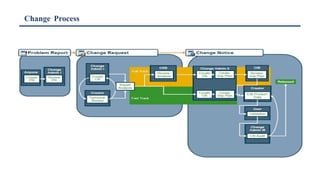
❖ Change Process
❖ Identify Need Process Overview
❖ Creating Problem Reports
❖ Change Requests
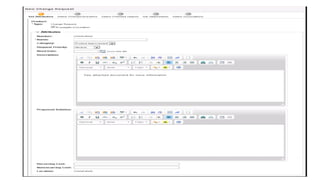
❖ Creating Change Requests
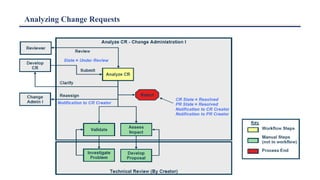
❖ Analyzing Change Requests
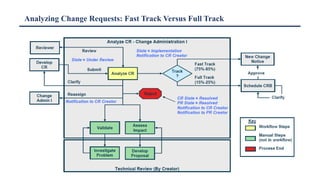
❖ Analyzing Change Requests: Fast Track Versus Full Track
❖ Change Notices
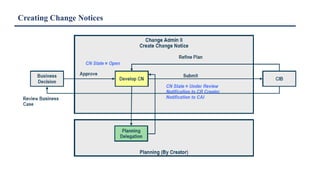
❖ Creating Change Notices
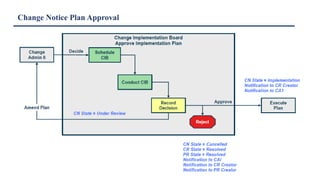
❖ Change Notice Plan Approval
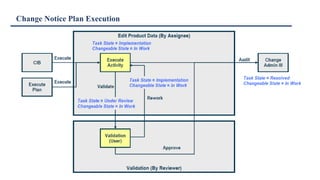
❖ Change Notice Plan Execution
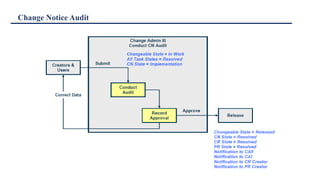
❖ Change Notice Audit
❖ Resolving the Process
❖ Monitoring Change: Reports
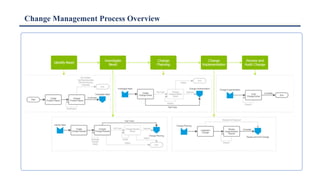
Change Management Process Overview
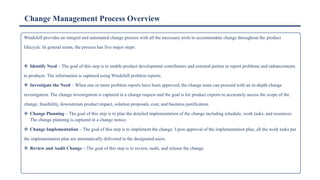
Windchill provides an integral and automated change process with all the necessary tools to accommodate change throughout the product
lifecycle. In general terms, the process has five major steps:
❖ Identify Need – The goal of this step is to enable product development contributors and external parties to report problems and enhancements
to products. The information is captured using Windchill problem reports.
❖ Investigate the Need – When one or more problem reports have been approved, the change team can proceed with an in-depth change
investigation. The change investigation is captured in a change request and the goal is for product experts to accurately assess the scope of the
change, feasibility, downstream product impact, solution proposals, cost, and business justification.
❖ Change Planning – The goal of this step is to plan the detailed implementation of the change including schedule, work tasks, and resources.
The change planning is captured in a change notice.
❖ Change Implementation – The goal of this step is to implement the change. Upon approval of the implementation plan, all the work tasks per
the implementation plan are automatically delivered to the designated users.
❖ Review and Audit Change – The goal of this step is to review, audit, and release the change.
Windchill Change Objects
Items such as problem reports, change requests, change notices, and variances become integral to the life and structure of the product model.
These items capture the information that is routed through the change process.
➢ Problem Report – Can be completed by anyone suggesting a change or reporting a problem with a product/part. Typically, problem reports are
used to document problems submitted in testing, in the field, or by customers.
➢ Change Request – Can be used to gather common problem reports and submit a formal request for a change. A change request can be initiated
without any problem reports.
➢ Change Notice – Can be used to assign tasks that complete the implementation plan and implement the changes.
➢ Variance – An authorization to depart from the designed configuration for a specific number of units or for a specified time period. Variances
consist of deviations and waivers. A deviation is a planned departure from the as-designed configuration before the part is built. A waiver is a
written acceptance of nonconformance.
Roles in the Change Process
The following are the out-of-the-box roles for the change process, but your administrators can easily configure the change process
roles to match your organization’s requirements:
❖ Change Review Board – Reviews and either approves, denies, or requests further investigation of a change request.
❖ Change Implementation Board – Reviews and either approves or denies the implementation plan included in the change
notice.
❖ Change Admin I – The first change administrator screens the problem reports, reviews the change request, collects impact
information, and communicates the decision to reject the change or implement it. Change Admin I also creates the change
requests from unresolved problem reports.
❖ Change Admin II – The second change administrator is responsible for creating the implementation plan captured in the
change notice.
❖ Change Admin III – The third change administrator acts as an auditor of all of the material related to a change, ensuring that
all resulting documentation is clear, concise, and valid.
Change Process
Identify Need Process Overview
The Identify Need step involves the development and analysis of the problem report.
The primary role for this segment of the change process is the Change Admin I (CA I). Once the problem report creator has completed
documenting the problem, he or she can submit it. This changes the report state to Under Review and delivers it to the CA I for review. The CA I
must then analyse the problem report to confirm that the problem report is valid.
The CA I can choose to confirm the problem report and advance it for change request creation, they can reject the problem report as an unsuitable
idea, or they can send it to the problem report author for more clarification.
If confirmed, the problem report is promoted to the Accepted state; if it is a duplicate or is rejected, it is promoted to the Resolved state. Any
problem report that is resolved by closing, sends an e-mail notification to the creator of the problem report with the appropriate justification.
Creating Problem Reports
While the entire change process may be involved, most users engage in only a few stages. The one task that every user (with appropriate
permissions) can do is submit a problem report.
To submit a problem report:
• First, create a problem report by selecting New > New Problem Report from
an object’s Actions drop-down menu. This automatically ]associates that object to it.
• Then supply the problem details, identifying the problem and assigning a priority.
• Next, associate any other affected end items.
• You can also associate any attachments that you wish to include.
• Also, you can associate any reference process and objects.
• Finally, submit it.
The purpose of the problem report is to describe a product problem .
or suggest a product enhancement. It can be created by a wide group
of people within the company or by the extended enterprise, including suppliers and customers. Problem reports are optional.
The Change Admin responsible for this can then evaluate, collect, and resolve multiple problems and/or suggestions through the formal change
process.
Change Requests
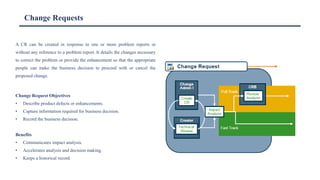
A CR can be created in response to one or more problem reports or
without any reference to a problem report. It details the changes necessary
to correct the problem or provide the enhancement so that the appropriate
people can make the business decision to proceed with or cancel the
proposed change.
Change Request Objectives
• Describe product defects or enhancements.
• Capture information required for business decision.
• Record the business decision.
Benefits
• Communicates impact analysis.
• Accelerates analysis and decision making.
• Keeps a historical record.
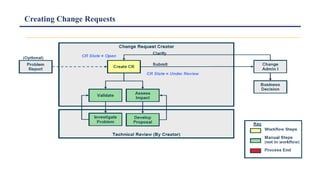
Creating Change Requests
Analyzing Change Requests
Analyzing Change Requests: Fast Track Versus Full Track
Change Notices
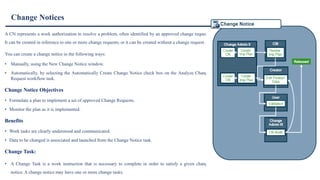
A CN represents a work authorization to resolve a problem, often identified by an approved change request.
It can be created in reference to one or more change requests, or it can be created without a change request.
You can create a change notice in the following ways:
• Manually, using the New Change Notice window.
• Automatically, by selecting the Automatically Create Change Notice check box on the Analyze Change
Request workflow task.
Change Notice Objectives
• Formulate a plan to implement a set of approved Change Requests.
• Monitor the plan as it is implemented.
Benefits
• Work tasks are clearly understood and communicated.
• Data to be changed is associated and launched from the Change Notice task.
Change Task:
• A Change Task is a work instruction that is necessary to complete in order to satisfy a given change
notice. A change notice may have one or more change tasks.
Creating Change Notices
Change Notice Plan Approval
Change Notice Plan Execution
Change Notice Audit
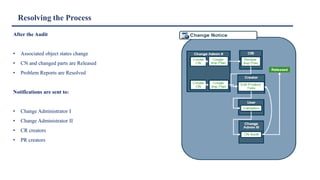
Resolving the Process
After the Audit
• Associated object states change
• CN and changed parts are Released
• Problem Reports are Resolved
Notifications are sent to:
• Change Administrator I
• Change Administrator II
• CR creators
• PR creators
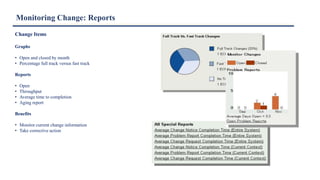
Monitoring Change: Reports
Change Items
Graphs
• Open and closed by month
• Percentage full track versus fast track
Reports
• Open
• Throughput
• Average time to completion
• Aging report
Benefits
• Monitor current change information
• Take corrective action
Q&A

9 Trng6_Change_Management_CIT.pdf

  • 1.
  • 2.
    Content ❖ Change ManagementProcess Overview ❖ Change Objects ❖ Roles in the Change Process ❖ Change Process ❖ Identify Need Process Overview ❖ Creating Problem Reports ❖ Change Requests ❖ Creating Change Requests ❖ Analyzing Change Requests ❖ Analyzing Change Requests: Fast Track Versus Full Track ❖ Change Notices ❖ Creating Change Notices ❖ Change Notice Plan Approval ❖ Change Notice Plan Execution ❖ Change Notice Audit ❖ Resolving the Process ❖ Monitoring Change: Reports
  • 3.
  • 4.
    Change Management ProcessOverview Windchill provides an integral and automated change process with all the necessary tools to accommodate change throughout the product lifecycle. In general terms, the process has five major steps: ❖ Identify Need – The goal of this step is to enable product development contributors and external parties to report problems and enhancements to products. The information is captured using Windchill problem reports. ❖ Investigate the Need – When one or more problem reports have been approved, the change team can proceed with an in-depth change investigation. The change investigation is captured in a change request and the goal is for product experts to accurately assess the scope of the change, feasibility, downstream product impact, solution proposals, cost, and business justification. ❖ Change Planning – The goal of this step is to plan the detailed implementation of the change including schedule, work tasks, and resources. The change planning is captured in a change notice. ❖ Change Implementation – The goal of this step is to implement the change. Upon approval of the implementation plan, all the work tasks per the implementation plan are automatically delivered to the designated users. ❖ Review and Audit Change – The goal of this step is to review, audit, and release the change.
  • 5.
    Windchill Change Objects Itemssuch as problem reports, change requests, change notices, and variances become integral to the life and structure of the product model. These items capture the information that is routed through the change process. ➢ Problem Report – Can be completed by anyone suggesting a change or reporting a problem with a product/part. Typically, problem reports are used to document problems submitted in testing, in the field, or by customers. ➢ Change Request – Can be used to gather common problem reports and submit a formal request for a change. A change request can be initiated without any problem reports. ➢ Change Notice – Can be used to assign tasks that complete the implementation plan and implement the changes. ➢ Variance – An authorization to depart from the designed configuration for a specific number of units or for a specified time period. Variances consist of deviations and waivers. A deviation is a planned departure from the as-designed configuration before the part is built. A waiver is a written acceptance of nonconformance.
  • 6.
    Roles in theChange Process The following are the out-of-the-box roles for the change process, but your administrators can easily configure the change process roles to match your organization’s requirements: ❖ Change Review Board – Reviews and either approves, denies, or requests further investigation of a change request. ❖ Change Implementation Board – Reviews and either approves or denies the implementation plan included in the change notice. ❖ Change Admin I – The first change administrator screens the problem reports, reviews the change request, collects impact information, and communicates the decision to reject the change or implement it. Change Admin I also creates the change requests from unresolved problem reports. ❖ Change Admin II – The second change administrator is responsible for creating the implementation plan captured in the change notice. ❖ Change Admin III – The third change administrator acts as an auditor of all of the material related to a change, ensuring that all resulting documentation is clear, concise, and valid.
  • 7.
  • 8.
    Identify Need ProcessOverview The Identify Need step involves the development and analysis of the problem report. The primary role for this segment of the change process is the Change Admin I (CA I). Once the problem report creator has completed documenting the problem, he or she can submit it. This changes the report state to Under Review and delivers it to the CA I for review. The CA I must then analyse the problem report to confirm that the problem report is valid. The CA I can choose to confirm the problem report and advance it for change request creation, they can reject the problem report as an unsuitable idea, or they can send it to the problem report author for more clarification. If confirmed, the problem report is promoted to the Accepted state; if it is a duplicate or is rejected, it is promoted to the Resolved state. Any problem report that is resolved by closing, sends an e-mail notification to the creator of the problem report with the appropriate justification.
  • 9.
    Creating Problem Reports Whilethe entire change process may be involved, most users engage in only a few stages. The one task that every user (with appropriate permissions) can do is submit a problem report. To submit a problem report: • First, create a problem report by selecting New > New Problem Report from an object’s Actions drop-down menu. This automatically ]associates that object to it. • Then supply the problem details, identifying the problem and assigning a priority. • Next, associate any other affected end items. • You can also associate any attachments that you wish to include. • Also, you can associate any reference process and objects. • Finally, submit it. The purpose of the problem report is to describe a product problem . or suggest a product enhancement. It can be created by a wide group of people within the company or by the extended enterprise, including suppliers and customers. Problem reports are optional. The Change Admin responsible for this can then evaluate, collect, and resolve multiple problems and/or suggestions through the formal change process.
  • 10.
    Change Requests A CRcan be created in response to one or more problem reports or without any reference to a problem report. It details the changes necessary to correct the problem or provide the enhancement so that the appropriate people can make the business decision to proceed with or cancel the proposed change. Change Request Objectives • Describe product defects or enhancements. • Capture information required for business decision. • Record the business decision. Benefits • Communicates impact analysis. • Accelerates analysis and decision making. • Keeps a historical record.
  • 11.
  • 13.
  • 14.
    Analyzing Change Requests:Fast Track Versus Full Track
  • 15.
    Change Notices A CNrepresents a work authorization to resolve a problem, often identified by an approved change request. It can be created in reference to one or more change requests, or it can be created without a change request. You can create a change notice in the following ways: • Manually, using the New Change Notice window. • Automatically, by selecting the Automatically Create Change Notice check box on the Analyze Change Request workflow task. Change Notice Objectives • Formulate a plan to implement a set of approved Change Requests. • Monitor the plan as it is implemented. Benefits • Work tasks are clearly understood and communicated. • Data to be changed is associated and launched from the Change Notice task. Change Task: • A Change Task is a work instruction that is necessary to complete in order to satisfy a given change notice. A change notice may have one or more change tasks.
  • 16.
  • 17.
  • 18.
  • 19.
  • 20.
    Resolving the Process Afterthe Audit • Associated object states change • CN and changed parts are Released • Problem Reports are Resolved Notifications are sent to: • Change Administrator I • Change Administrator II • CR creators • PR creators
  • 21.
    Monitoring Change: Reports ChangeItems Graphs • Open and closed by month • Percentage full track versus fast track Reports • Open • Throughput • Average time to completion • Aging report Benefits • Monitor current change information • Take corrective action
  • 22.