5 Steps to
Better Social Password Security
Poor Password
Management is
Risky
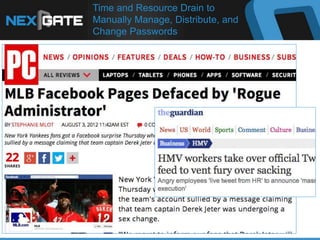
Time and Resource Drain to
Manually Manage, Distribute, and
Change Passwords
Social Teams Often Manually Reset
20-100 Passwords Per Week
Password Disorganization Creates Unnecessary
Complexity and Drains Team Resources
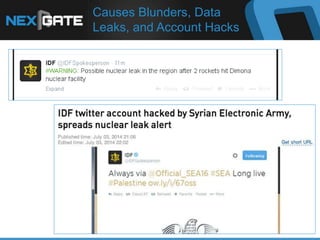
Causes Blunders, Data
Leaks, and Account Hacks
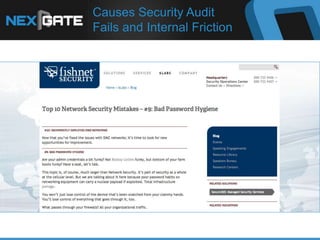
Causes Security Audit
Fails and Internal Friction
Here are 5 Steps to
Better Social Password Security
From the leader in
Social Media Brand Protection
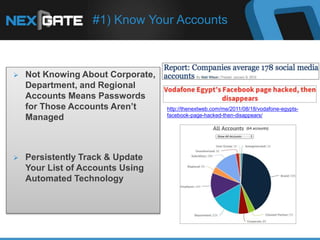
#1) Know Your Accounts
 Not Knowing About Corporate,
Department, and Regional
Accounts Means Passwords
for Those Accounts Aren’t
Managed
 Persistently Track & Update
Your List of Accounts Using
Automated Technology
http://thenextweb.com/me/2011/08/18/vodafone-egypts-
facebook-page-hacked-then-disappears/
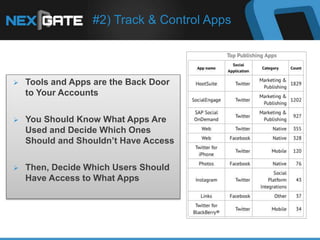
#2) Track & Control Apps
 Tools and Apps are the Back Door
to Your Accounts
 You Should Know What Apps Are
Used and Decide Which Ones
Should and Shouldn’t Have Access
 Then, Decide Which Users Should
Have Access to What Apps
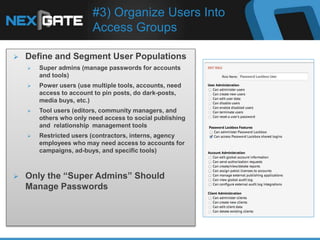
#3) Organize Users Into
Access Groups
 Define and Segment User Populations
 Super admins (manage passwords for accounts
and tools)
 Power users (use multiple tools, accounts, need
access to account to pin posts, do dark-posts,
media buys, etc.)
 Tool users (editors, community managers, and
others who only need access to social publishing
and relationship management tools
 Restricted users (contractors, interns, agency
employees who may need access to accounts for
campaigns, ad-buys, and specific tools)
 Only the “Super Admins” Should
Manage Passwords
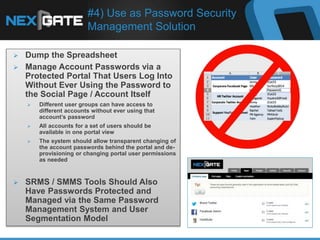
#4) Use as Password Security
Management Solution
 Dump the Spreadsheet
 Manage Account Passwords via a
Protected Portal That Users Log Into
Without Ever Using the Password to
the Social Page / Account Itself
 Different user groups can have access to
different accounts without ever using that
account’s password
 All accounts for a set of users should be
available in one portal view
 The system should allow transparent changing of
the account passwords behind the portal and de-
provisioning or changing portal user permissions
as needed
 SRMS / SMMS Tools Should Also
Have Passwords Protected and
Managed via the Same Password
Management System and User
Segmentation Model
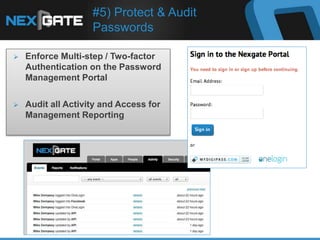
#5) Protect & Audit
Passwords
 Enforce Multi-step / Two-factor
Authentication on the Password
Management Portal
 Audit all Activity and Access for
Management Reporting
Summary
① Know Your Accounts
② Control Access to Apps & Tools
③ Organize User Groups
④ Use a Password Security
Management System
⑤ Enforce and Audit Password
Security
5 Steps to Protecting Social Passwords

5 Steps to Protecting Social Passwords

  • 1.
    5 Steps to BetterSocial Password Security
  • 2.
  • 3.
    Time and ResourceDrain to Manually Manage, Distribute, and Change Passwords
  • 4.
    Social Teams OftenManually Reset 20-100 Passwords Per Week Password Disorganization Creates Unnecessary Complexity and Drains Team Resources
  • 5.
  • 6.
    Causes Security Audit Failsand Internal Friction
  • 7.
    Here are 5Steps to Better Social Password Security From the leader in Social Media Brand Protection
  • 8.
    #1) Know YourAccounts  Not Knowing About Corporate, Department, and Regional Accounts Means Passwords for Those Accounts Aren’t Managed  Persistently Track & Update Your List of Accounts Using Automated Technology http://thenextweb.com/me/2011/08/18/vodafone-egypts- facebook-page-hacked-then-disappears/
  • 9.
    #2) Track &Control Apps  Tools and Apps are the Back Door to Your Accounts  You Should Know What Apps Are Used and Decide Which Ones Should and Shouldn’t Have Access  Then, Decide Which Users Should Have Access to What Apps
  • 10.
    #3) Organize UsersInto Access Groups  Define and Segment User Populations  Super admins (manage passwords for accounts and tools)  Power users (use multiple tools, accounts, need access to account to pin posts, do dark-posts, media buys, etc.)  Tool users (editors, community managers, and others who only need access to social publishing and relationship management tools  Restricted users (contractors, interns, agency employees who may need access to accounts for campaigns, ad-buys, and specific tools)  Only the “Super Admins” Should Manage Passwords
  • 11.
    #4) Use asPassword Security Management Solution  Dump the Spreadsheet  Manage Account Passwords via a Protected Portal That Users Log Into Without Ever Using the Password to the Social Page / Account Itself  Different user groups can have access to different accounts without ever using that account’s password  All accounts for a set of users should be available in one portal view  The system should allow transparent changing of the account passwords behind the portal and de- provisioning or changing portal user permissions as needed  SRMS / SMMS Tools Should Also Have Passwords Protected and Managed via the Same Password Management System and User Segmentation Model
  • 12.
    #5) Protect &Audit Passwords  Enforce Multi-step / Two-factor Authentication on the Password Management Portal  Audit all Activity and Access for Management Reporting
  • 13.
    Summary ① Know YourAccounts ② Control Access to Apps & Tools ③ Organize User Groups ④ Use a Password Security Management System ⑤ Enforce and Audit Password Security