Pre-Production
Josh Palmer
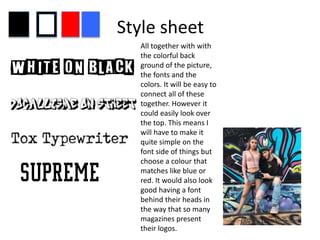
Style sheet
All together with with
the colorful back
ground of the picture,
the fonts and the
colors. It will be easy to
connect all of these
together. However it
could easily look over
the top. This means I
will have to make it
quite simple on the
font side of things but
choose a colour that
matches like blue or
red. It would also look
good having a font
behind their heads in
the way that so many
magazines present
their logos.
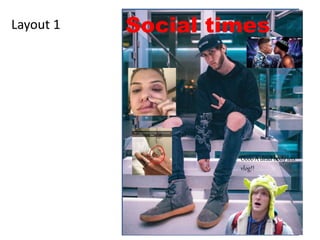
Layout 1 Social times
Oooo A dead body lets
vlog!!
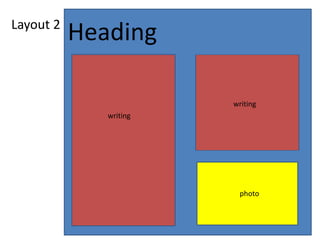
Layout 2
Heading
writing
writing
photo
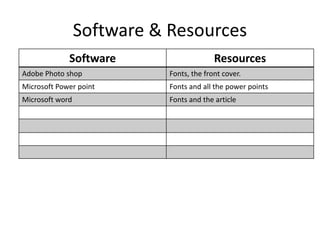
Software & Resources
Software Resources
Adobe Photo shop Fonts, the front cover.
Microsoft Power point Fonts and all the power points
Microsoft word Fonts and the article
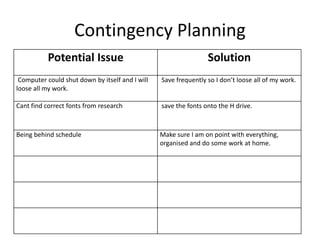
Contingency Planning
Potential Issue Solution
Computer could shut down by itself and I will
loose all my work.
Save frequently so I don’t loose all of my work.
Cant find correct fonts from research save the fonts onto the H drive.
Being behind schedule Make sure I am on point with everything,
organised and do some work at home.
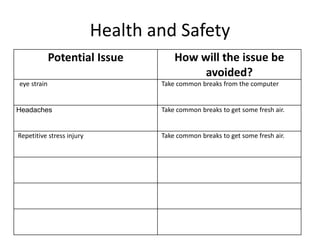
Health and Safety
Potential Issue How will the issue be
avoided?
eye strain Take common breaks from the computer
Headaches Take common breaks to get some fresh air.
Repetitive stress injury Take common breaks to get some fresh air.
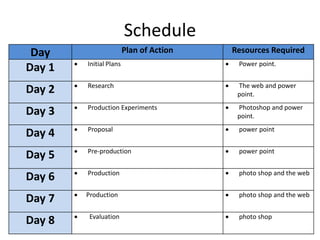
Schedule
Day Plan of Action Resources Required
Day 1  Initial Plans  Power point.
Day 2  Research  The web and power
point.
Day 3  Production Experiments  Photoshop and power
point.
Day 4  Proposal  power point
Day 5  Pre-production  power point
Day 6  Production  photo shop and the web
Day 7  Production  photo shop and the web
Day 8  Evaluation  photo shop

5. pre production

  • 1.
  • 2.
    Style sheet All togetherwith with the colorful back ground of the picture, the fonts and the colors. It will be easy to connect all of these together. However it could easily look over the top. This means I will have to make it quite simple on the font side of things but choose a colour that matches like blue or red. It would also look good having a font behind their heads in the way that so many magazines present their logos.
  • 3.
    Layout 1 Socialtimes Oooo A dead body lets vlog!!
  • 4.
  • 5.
    Software & Resources SoftwareResources Adobe Photo shop Fonts, the front cover. Microsoft Power point Fonts and all the power points Microsoft word Fonts and the article
  • 6.
    Contingency Planning Potential IssueSolution Computer could shut down by itself and I will loose all my work. Save frequently so I don’t loose all of my work. Cant find correct fonts from research save the fonts onto the H drive. Being behind schedule Make sure I am on point with everything, organised and do some work at home.
  • 7.
    Health and Safety PotentialIssue How will the issue be avoided? eye strain Take common breaks from the computer Headaches Take common breaks to get some fresh air. Repetitive stress injury Take common breaks to get some fresh air.
  • 8.
    Schedule Day Plan ofAction Resources Required Day 1  Initial Plans  Power point. Day 2  Research  The web and power point. Day 3  Production Experiments  Photoshop and power point. Day 4  Proposal  power point Day 5  Pre-production  power point Day 6  Production  photo shop and the web Day 7  Production  photo shop and the web Day 8  Evaluation  photo shop

Editor's Notes

  • #3 Explore colours, fonts and image styles similar to what you want to produce. Discuss all three elements in relation to why you chose them and where you may use them in your project. Go over as many pages as you need to
  • #4 Mock up of a potential design using the colours and fonts established in your style sheet and sourced images
  • #5 Mock up of a potential design using the colours and fonts established in your style sheet and sourced images