POST ,, BBIIOOSS ,, CCMMOOSS
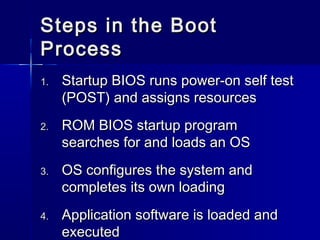
SStteeppss iinn tthhee BBoooott 
PPrroocceessss 
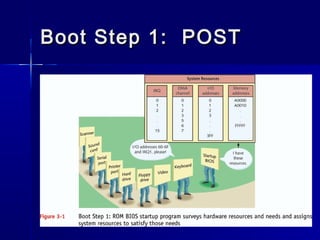
11.. SSttaarrttuupp BBIIOOSS rruunnss ppoowweerr--oonn sseellff tteesstt 
((PPOOSSTT)) aanndd aassssiiggnnss rreessoouurrcceess 
22.. RROOMM BBIIOOSS ssttaarrttuupp pprrooggrraamm 
sseeaarrcchheess ffoorr aanndd llooaaddss aann OOSS 
33.. OOSS ccoonnffiigguurreess tthhee ssyysstteemm aanndd 
ccoommpplleetteess iittss oowwnn llooaaddiinngg 
44.. AApppplliiccaattiioonn ssooffttwwaarree iiss llooaaddeedd aanndd 
eexxeeccuutteedd
BBoooott SStteepp 11:: PPOOSSTT
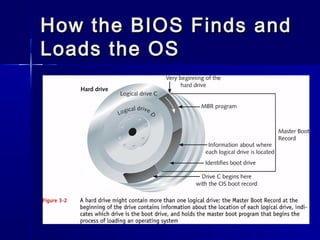
How tthhee BBIIOOSS FFiinnddss aanndd 
LLooaaddss tthhee OOSS
How tthhee BBIIOOSS FFiinnddss aanndd 
LLooaaddss tthhee OOSS ((ccoonnttiinnuueedd)) 
 BBIIOOSS eexxeeccuutteess MMBBRR pprrooggrraamm 
– TTuurrnnss ttoo ppaarrttiittiioonn ttaabbllee ttoo ffiinndd OOSS bboooott 
rreeccoorrdd 
 PPrrooggrraamm iinn OOSS bboooott rreeccoorrdd aatttteemmppttss ttoo 
ffiinndd aa bboooott llooaaddeerr pprrooggrraamm ffoorr OOSS 
– NNttllddrr ((WWiinnddoowwss NNTT//22000000//XXPP)) 
– IIoo..ssyyss ((WWiinnddoowwss 99xx))
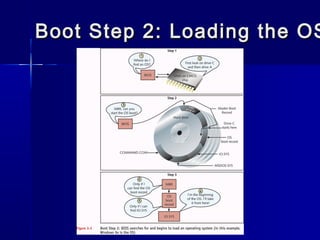
Boot Step 22:: LLooaaddiinngg tthhee OOSS
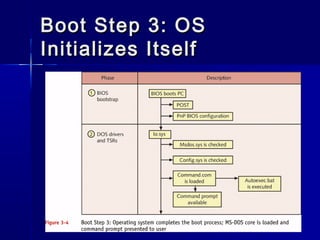
BBoooott SStteepp 33:: OOSS 
IInniittiiaalliizzeess IIttsseellff
BIOS 
 Called basic input/output services (BIOS) 
 Programming loaded into memory that 
teaches the CPU about a particular device 
 Perfect place to store the support 
programming is on the motherboard 
– On a special type of device called a read-only 
memory (ROM) chip
RROOMM 
EXAM TIP Programs stored on ROM 
chips—Flash or any other kind of 
ROM chip—are known collectively as 
firmware, as opposed to programs 
stored on erasable media that are 
collectively called software. 
 ROM chip stores programs exactly like RAM 
 Differs from RAM in two important ways 
– ROM chips are non-volatile 
 Meaning that the information stored on ROM isn’t erased 
when the computer is turned off 
– Second, traditional ROM chips are read-only, 
 Meaning that once a program is stored on one, it can’t be 
changed 
 Modern motherboards use a type of ROM called 
– Flash ROM that differs from traditional ROM in that you 
can update and change the contents through a very 
specific process called “flashing the ROM
CMOS 
 Separate memory chip, called the 
complementary metal-oxide 
semiconductor (CMOS) chip 
 Stores the information that describes 
specific device parameters 
 CMOS also acts as a clock to keep the 
current date and time
CCMMOOSS 
 SSeettttiinngg ssttaarrttuupp ppaasssswwoorrddss iinn CCMMOOSS 
 CCaatteeggoorriieess ooff CCMMOOSS sseettttiinnggss 
– SSttaannddaarrdd 
– BBIIOOSS FFeeaattuurreess MMeennuu 
– AAddvvaanncceedd CChhiipp SSeett SSeettuupp 
– PPoowweerr MMaannaaggeemmeenntt MMeennuu 
– IIDDEE HHDDDD AAuuttoo--ddeetteecctt 
– HHaarrddwwaarree DDeevviiccee SSeettttiinnggss
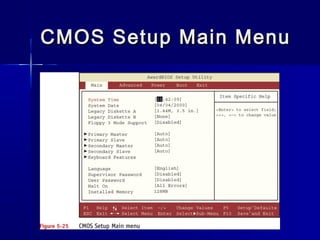
CMOS SSeettuupp MMaaiinn MMeennuu
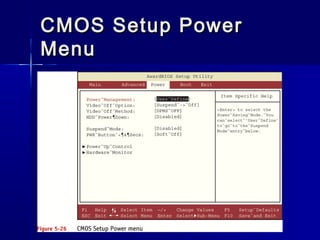
CCMMOOSS SSeettuupp PPoowweerr 
MMeennuu
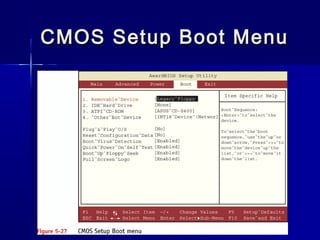
CMOS SSeettuupp BBoooott MMeennuu
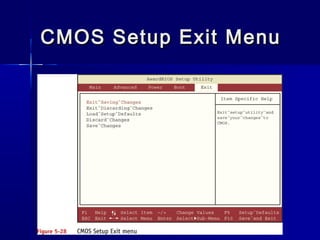
CMOS SSeettuupp EExxiitt MMeennuu
Battery PPoowweerr ttoo CCMMOOSS 
MMeemmoorryy 
 TTyyppeess ooff CCMMOOSS bbaatttteerriieess 
– 33..66VV lliitthhiiuumm bbaatttteerryy wwiitthh aa ffoouurr--ppiinn 
ccoonnnneeccttoorr;; ccoonnnneeccttss wwiitthh aa VVeellccrroo ssttrriipp 
– 44..55VV aallkkaalliinnee bbaatttteerryy wwiitthh aa ffoouurr--ppiinn 
ccoonnnneeccttoorr;; ccoonnnneeccttss wwiitthh aa VVeellccrroo ssttrriipp 
– 33..66VV bbaarrrreell--ssttyyllee bbaatttteerryy wwiitthh aa ttwwoo--ppiinn 
ccoonnnneeccttoorr;; ssoollddeerreedd oonn 
– 33VV lliitthhiiuumm ccooiinn--cceellll bbaatttteerryy –– CCRR 22003322 
((mmoosstt ccoommmmoonn))
Battery PPoowweerr ttoo CCMMOOSS 
MMeemmoorryy 
 TTyyppeess ooff CCMMOOSS bbaatttteerriieess 
– 33..66VV lliitthhiiuumm bbaatttteerryy wwiitthh aa ffoouurr--ppiinn 
ccoonnnneeccttoorr;; ccoonnnneeccttss wwiitthh aa VVeellccrroo ssttrriipp 
– 44..55VV aallkkaalliinnee bbaatttteerryy wwiitthh aa ffoouurr--ppiinn 
ccoonnnneeccttoorr;; ccoonnnneeccttss wwiitthh aa VVeellccrroo ssttrriipp 
– 33..66VV bbaarrrreell--ssttyyllee bbaatttteerryy wwiitthh aa ttwwoo--ppiinn 
ccoonnnneeccttoorr;; ssoollddeerreedd oonn 
– 33VV lliitthhiiuumm ccooiinn--cceellll bbaatttteerryy –– CCRR 22003322 
((mmoosstt ccoommmmoonn))
Protecting DDooccuummeennttaattiioonn 
aanndd CCoonnffiigguurraattiioonn 
SSeettttiinnggss 
 KKeeeepp uupp--ttoo--ddaattee wwrriitttteenn rreeccoorrddss ooff 
CCMMOOSS sseettttiinnggss,, hhaarrddwwaarree aanndd 
ssooffttwwaarree iinnssttaalllleedd,, aanndd nneettwwoorrkk 
sseettttiinnggss 
 KKeeeepp wweellll--llaabbeelleedd ddooccuummeennttaattiioonn iinn aa 
ssaaffee ppllaaccee 
 CCaann aallssoo ssaavvee aanndd rreessttoorree CCMMOOSS 
sseettttiinnggss uussiinngg tthhiirrdd--ppaarrttyy uuttiilliittyy 
ssooffttwwaarree
Device Drivers 
 Every piece of hardware in your computer 
needs some kind of programming that tells 
the CPU how to talk to that device 
 Device Driver is a file stored on the PC’s 
hard drive that contains all the commands 
necessary to talk to whatever device it was 
written to support 
 All operating systems employ a method of 
loading these device drivers into RAM every 
time the system boots
Device Drivers 
 Device drivers come in 2 ways 
 Build into the OS 
 With the device when you buy it 
– When you buy a sound card, for example, 
it comes with a CD-ROM that holds all the 
necessary device drivers
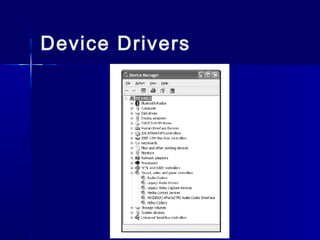
Device Drivers 
 Device Manager, you can manually 
change or remove the drivers for any 
particular device 
 Access the Device Manager by 
opening the System applet in the 
Control Panel; then select the 
Hardware tab and click the Device 
Manager button
Device Drivers
Power-On Self Test 
(POST) 
 Computer is turned on or reset, it initiates a special program, 
also 
– Stored on the system ROM chip, 
– Called the power-on self test (POST). 
– The POST program checks out the system every time the 
computer boots. 
 To perform this check, the POST 
– Sends out a standard command that says to all the devices, 
“Check yourselves out!” 
– All the standard devices in the computer then run their own 
internal diagnostic 
– The POST doesn’t specify what they must check. 
– The quality of the diagnostic is up to the people who made that 
particular device.
Power-On Self Test 
(POST) 
 Device — keyboard controller chip runs its 
diagnostic and determines that it is not working 
properly 
 So how does the computer tell the human in front of 
the PC? 
 PCs convey POST information to you in two ways: 
– Beep codes 
– Text messages
The Beep Codes 
 A series of beeps—called beep codes 
—if anything went wrong 
– For bad or missing video : 
 One long beep followed by three short beeps 
 End of a successful POST, the PC will 
produce one or two short beeps, 
simply to inform you that all is well
Text Errors 
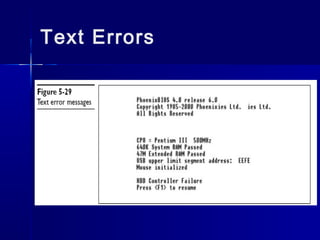
 Any POST errors will display on the 
screen as a text error 
 Text error, the problem is usually, but 
not always, self-explanatory 
 Far more useful than beep errors 
because you can simply read the 
screen to determine the bad device
Text Errors
POST Cards 
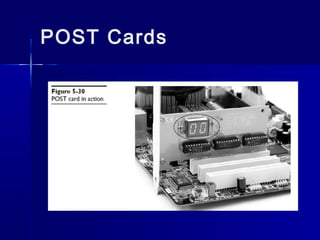
 POST cards are simple cards that snap into 
an expansion slot on your system. A small, 
two-character light-emitting diode (LED) 
readout on the card indicates what device 
the POST is currently testing 
 PC to act dead—no beeps and nothing on 
the screen 
– POST card, to monitor the POST and identify 
which piece of hardware is causing the trouble
POST Cards
Losing CMOS Settings 
 CMOS needs a continuous trickle charge to 
retain its data 
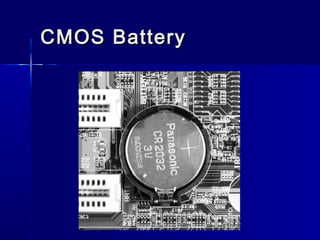
 Motherboards use some type of battery, 
usually a coin battery like those used in 
wrist watches, to give the CMOS the charge 
it needs when the computer is turned off 
 This battery also keeps track of the date and 
time when the PC is turned off
CCMMOOSS BBaatttteerryy
Losing CMOS Settings 
 Few examples of errors that point to 
lost CMOS information: 
– CMOS configuration mismatch 
– CMOS date/time not set 
– No boot device available 
– CMOS battery state low
Losing CMOS Settings 
 Common reasons for losing CMOS data: 
– Pulling and inserting cards 
– Touching the motherboard 
– Dropping something on the motherboard 
– Dirt on the motherboard 
– Faulty power supplies 
– Electrical surges 
– Chip creep 
PCs run, the components inside get warm. When a PC is turned off, the 
components cool off. This cycling of hot and cold causes the chips to 
expand and contract in their mounts. While the chip designers account 
for this, in some extreme cases this thermal expansion and contraction 
will cause a chip to work out of its mount and cause a failure called 
chip creep
Clearing CMOS 
 When someone sets a CMOS 
password and then forgets the 
password 
 All motherboards have a clear CMOS 
jumper
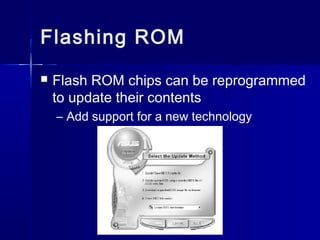
Flashing ROM 
 Flash ROM chips can be reprogrammed 
to update their contents 
– Add support for a new technology

5 post , bios , cmos

  • 1.
    POST ,, BBIIOOSS,, CCMMOOSS
  • 2.
    SStteeppss iinn tthheeBBoooott PPrroocceessss 11.. SSttaarrttuupp BBIIOOSS rruunnss ppoowweerr--oonn sseellff tteesstt ((PPOOSSTT)) aanndd aassssiiggnnss rreessoouurrcceess 22.. RROOMM BBIIOOSS ssttaarrttuupp pprrooggrraamm sseeaarrcchheess ffoorr aanndd llooaaddss aann OOSS 33.. OOSS ccoonnffiigguurreess tthhee ssyysstteemm aanndd ccoommpplleetteess iittss oowwnn llooaaddiinngg 44.. AApppplliiccaattiioonn ssooffttwwaarree iiss llooaaddeedd aanndd eexxeeccuutteedd
  • 3.
  • 4.
    How tthhee BBIIOOSSFFiinnddss aanndd LLooaaddss tthhee OOSS
  • 5.
    How tthhee BBIIOOSSFFiinnddss aanndd LLooaaddss tthhee OOSS ((ccoonnttiinnuueedd))  BBIIOOSS eexxeeccuutteess MMBBRR pprrooggrraamm – TTuurrnnss ttoo ppaarrttiittiioonn ttaabbllee ttoo ffiinndd OOSS bboooott rreeccoorrdd  PPrrooggrraamm iinn OOSS bboooott rreeccoorrdd aatttteemmppttss ttoo ffiinndd aa bboooott llooaaddeerr pprrooggrraamm ffoorr OOSS – NNttllddrr ((WWiinnddoowwss NNTT//22000000//XXPP)) – IIoo..ssyyss ((WWiinnddoowwss 99xx))
  • 6.
    Boot Step 22::LLooaaddiinngg tthhee OOSS
  • 7.
    BBoooott SStteepp 33::OOSS IInniittiiaalliizzeess IIttsseellff
  • 8.
    BIOS  Calledbasic input/output services (BIOS)  Programming loaded into memory that teaches the CPU about a particular device  Perfect place to store the support programming is on the motherboard – On a special type of device called a read-only memory (ROM) chip
  • 9.
    RROOMM EXAM TIPPrograms stored on ROM chips—Flash or any other kind of ROM chip—are known collectively as firmware, as opposed to programs stored on erasable media that are collectively called software.  ROM chip stores programs exactly like RAM  Differs from RAM in two important ways – ROM chips are non-volatile  Meaning that the information stored on ROM isn’t erased when the computer is turned off – Second, traditional ROM chips are read-only,  Meaning that once a program is stored on one, it can’t be changed  Modern motherboards use a type of ROM called – Flash ROM that differs from traditional ROM in that you can update and change the contents through a very specific process called “flashing the ROM
  • 10.
    CMOS  Separatememory chip, called the complementary metal-oxide semiconductor (CMOS) chip  Stores the information that describes specific device parameters  CMOS also acts as a clock to keep the current date and time
  • 11.
    CCMMOOSS  SSeettttiinnggssttaarrttuupp ppaasssswwoorrddss iinn CCMMOOSS  CCaatteeggoorriieess ooff CCMMOOSS sseettttiinnggss – SSttaannddaarrdd – BBIIOOSS FFeeaattuurreess MMeennuu – AAddvvaanncceedd CChhiipp SSeett SSeettuupp – PPoowweerr MMaannaaggeemmeenntt MMeennuu – IIDDEE HHDDDD AAuuttoo--ddeetteecctt – HHaarrddwwaarree DDeevviiccee SSeettttiinnggss
  • 12.
  • 13.
  • 14.
  • 15.
  • 16.
    Battery PPoowweerr ttooCCMMOOSS MMeemmoorryy  TTyyppeess ooff CCMMOOSS bbaatttteerriieess – 33..66VV lliitthhiiuumm bbaatttteerryy wwiitthh aa ffoouurr--ppiinn ccoonnnneeccttoorr;; ccoonnnneeccttss wwiitthh aa VVeellccrroo ssttrriipp – 44..55VV aallkkaalliinnee bbaatttteerryy wwiitthh aa ffoouurr--ppiinn ccoonnnneeccttoorr;; ccoonnnneeccttss wwiitthh aa VVeellccrroo ssttrriipp – 33..66VV bbaarrrreell--ssttyyllee bbaatttteerryy wwiitthh aa ttwwoo--ppiinn ccoonnnneeccttoorr;; ssoollddeerreedd oonn – 33VV lliitthhiiuumm ccooiinn--cceellll bbaatttteerryy –– CCRR 22003322 ((mmoosstt ccoommmmoonn))
  • 17.
    Battery PPoowweerr ttooCCMMOOSS MMeemmoorryy  TTyyppeess ooff CCMMOOSS bbaatttteerriieess – 33..66VV lliitthhiiuumm bbaatttteerryy wwiitthh aa ffoouurr--ppiinn ccoonnnneeccttoorr;; ccoonnnneeccttss wwiitthh aa VVeellccrroo ssttrriipp – 44..55VV aallkkaalliinnee bbaatttteerryy wwiitthh aa ffoouurr--ppiinn ccoonnnneeccttoorr;; ccoonnnneeccttss wwiitthh aa VVeellccrroo ssttrriipp – 33..66VV bbaarrrreell--ssttyyllee bbaatttteerryy wwiitthh aa ttwwoo--ppiinn ccoonnnneeccttoorr;; ssoollddeerreedd oonn – 33VV lliitthhiiuumm ccooiinn--cceellll bbaatttteerryy –– CCRR 22003322 ((mmoosstt ccoommmmoonn))
  • 18.
    Protecting DDooccuummeennttaattiioonn aannddCCoonnffiigguurraattiioonn SSeettttiinnggss  KKeeeepp uupp--ttoo--ddaattee wwrriitttteenn rreeccoorrddss ooff CCMMOOSS sseettttiinnggss,, hhaarrddwwaarree aanndd ssooffttwwaarree iinnssttaalllleedd,, aanndd nneettwwoorrkk sseettttiinnggss  KKeeeepp wweellll--llaabbeelleedd ddooccuummeennttaattiioonn iinn aa ssaaffee ppllaaccee  CCaann aallssoo ssaavvee aanndd rreessttoorree CCMMOOSS sseettttiinnggss uussiinngg tthhiirrdd--ppaarrttyy uuttiilliittyy ssooffttwwaarree
  • 19.
    Device Drivers Every piece of hardware in your computer needs some kind of programming that tells the CPU how to talk to that device  Device Driver is a file stored on the PC’s hard drive that contains all the commands necessary to talk to whatever device it was written to support  All operating systems employ a method of loading these device drivers into RAM every time the system boots
  • 20.
    Device Drivers Device drivers come in 2 ways  Build into the OS  With the device when you buy it – When you buy a sound card, for example, it comes with a CD-ROM that holds all the necessary device drivers
  • 21.
    Device Drivers Device Manager, you can manually change or remove the drivers for any particular device  Access the Device Manager by opening the System applet in the Control Panel; then select the Hardware tab and click the Device Manager button
  • 22.
  • 23.
    Power-On Self Test (POST)  Computer is turned on or reset, it initiates a special program, also – Stored on the system ROM chip, – Called the power-on self test (POST). – The POST program checks out the system every time the computer boots.  To perform this check, the POST – Sends out a standard command that says to all the devices, “Check yourselves out!” – All the standard devices in the computer then run their own internal diagnostic – The POST doesn’t specify what they must check. – The quality of the diagnostic is up to the people who made that particular device.
  • 24.
    Power-On Self Test (POST)  Device — keyboard controller chip runs its diagnostic and determines that it is not working properly  So how does the computer tell the human in front of the PC?  PCs convey POST information to you in two ways: – Beep codes – Text messages
  • 25.
    The Beep Codes  A series of beeps—called beep codes —if anything went wrong – For bad or missing video :  One long beep followed by three short beeps  End of a successful POST, the PC will produce one or two short beeps, simply to inform you that all is well
  • 26.
    Text Errors Any POST errors will display on the screen as a text error  Text error, the problem is usually, but not always, self-explanatory  Far more useful than beep errors because you can simply read the screen to determine the bad device
  • 27.
  • 28.
    POST Cards POST cards are simple cards that snap into an expansion slot on your system. A small, two-character light-emitting diode (LED) readout on the card indicates what device the POST is currently testing  PC to act dead—no beeps and nothing on the screen – POST card, to monitor the POST and identify which piece of hardware is causing the trouble
  • 29.
  • 30.
    Losing CMOS Settings  CMOS needs a continuous trickle charge to retain its data  Motherboards use some type of battery, usually a coin battery like those used in wrist watches, to give the CMOS the charge it needs when the computer is turned off  This battery also keeps track of the date and time when the PC is turned off
  • 31.
  • 32.
    Losing CMOS Settings  Few examples of errors that point to lost CMOS information: – CMOS configuration mismatch – CMOS date/time not set – No boot device available – CMOS battery state low
  • 33.
    Losing CMOS Settings  Common reasons for losing CMOS data: – Pulling and inserting cards – Touching the motherboard – Dropping something on the motherboard – Dirt on the motherboard – Faulty power supplies – Electrical surges – Chip creep PCs run, the components inside get warm. When a PC is turned off, the components cool off. This cycling of hot and cold causes the chips to expand and contract in their mounts. While the chip designers account for this, in some extreme cases this thermal expansion and contraction will cause a chip to work out of its mount and cause a failure called chip creep
  • 34.
    Clearing CMOS When someone sets a CMOS password and then forgets the password  All motherboards have a clear CMOS jumper
  • 35.
    Flashing ROM Flash ROM chips can be reprogrammed to update their contents – Add support for a new technology