Basic Input output System
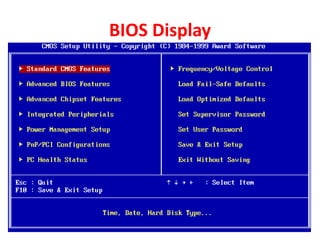
BIOS Display
Introduction
• BIOS cheap is made of CMOS (Complementary Metal Oxide
Semiconductor)
• It used to detect all the components of computer or device/parts
connected in to the computer.
• Inside the ROM, it has BIOS software and it can not be change by
users.
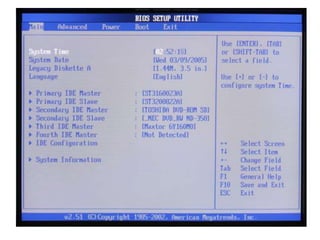
• Through setup utility we can change some options of the BIOS
software.
• Normally to get inside BIOS is delete key and the following keys also
used to get inside BIOS according to BIOS software.
– INTEL Motherboard - F1, F2
– IBM SYTEM - F1
– Compaq - F10
BIOS Software Company
• AWARD
• IBM
• INTEL
• AMIBIOS
Booting steps of Computer
• Power on
It starts the process by covering the system on, sending current there are no problems &
drive device. Assigning there are no problems with the power supply a especial wire called
power good signal wire is charged and inform CPU to get up. The CPU than communication
with the system ROM and starts the power on.
or
Switch on the computer to process CPU for next process.
• POST (Power on self test)
– The post is nothing but power on self test, a computer literally discover & rediscover itself every time
it powers up during this process computer parts test them self to know weather they are getting
proper power supply or not.
– During the post the system BIOS communicate with all essential Hardware & takes them to identify
them self. If any device fails to follow this identification routine it informs back to BIOS that it is
facing problem than BIOS problem error codes called post error codes.
– After run (alert) the CPU, it test itself (self test) the devices inside the computer is called post.
– During detecting other devices, it will give error message on beep code or numeric error code, if
some problems on any device.
– POST ERROR CODES
• BEEP ERROR CODES
• TEST ERROR CODES
• NUMERIC POST
SOME BIOS ERROR
• Beep error code
– Beep error codes are serried of beeps produced by BIOS to indicate
some post problems, usually beep codes are produced in care system
fails to display error on screen the main disadvantage of beep error
codes that they are not same, it varied according PC BIOS
manufactures.
• Numeric & Text Code
– Post may also display numeric test error including the nature of
Hardware problems. Numeric error code are same what standardized
into certain numeric code error for . Eg: numeric codes error 100-199
indicates a mother board error.
• Text error code
– If post get an error message from any devices BIOS can represent
there errors in dire at errors statement, for eg: system may display
error like floppy drive fails or key board error.
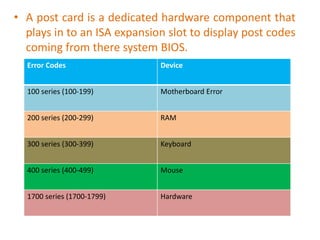
• A post card is a dedicated hardware component that
plays in to an ISA expansion slot to display post codes
coming from there system BIOS.
Error Codes Device
100 series (100-199) Motherboard Error
200 series (200-299) RAM
300 series (300-399) Keyboard
400 series (400-499) Mouse
1700 series (1700-1799) Hardware
Sudarshan Pulami
Computer Trainer
ToT 9

BIOS

  • 1.
  • 2.
  • 4.
    Introduction • BIOS cheapis made of CMOS (Complementary Metal Oxide Semiconductor) • It used to detect all the components of computer or device/parts connected in to the computer. • Inside the ROM, it has BIOS software and it can not be change by users. • Through setup utility we can change some options of the BIOS software. • Normally to get inside BIOS is delete key and the following keys also used to get inside BIOS according to BIOS software. – INTEL Motherboard - F1, F2 – IBM SYTEM - F1 – Compaq - F10
  • 5.
    BIOS Software Company •AWARD • IBM • INTEL • AMIBIOS
  • 6.
    Booting steps ofComputer • Power on It starts the process by covering the system on, sending current there are no problems & drive device. Assigning there are no problems with the power supply a especial wire called power good signal wire is charged and inform CPU to get up. The CPU than communication with the system ROM and starts the power on. or Switch on the computer to process CPU for next process. • POST (Power on self test) – The post is nothing but power on self test, a computer literally discover & rediscover itself every time it powers up during this process computer parts test them self to know weather they are getting proper power supply or not. – During the post the system BIOS communicate with all essential Hardware & takes them to identify them self. If any device fails to follow this identification routine it informs back to BIOS that it is facing problem than BIOS problem error codes called post error codes. – After run (alert) the CPU, it test itself (self test) the devices inside the computer is called post. – During detecting other devices, it will give error message on beep code or numeric error code, if some problems on any device. – POST ERROR CODES • BEEP ERROR CODES • TEST ERROR CODES • NUMERIC POST
  • 7.
    SOME BIOS ERROR •Beep error code – Beep error codes are serried of beeps produced by BIOS to indicate some post problems, usually beep codes are produced in care system fails to display error on screen the main disadvantage of beep error codes that they are not same, it varied according PC BIOS manufactures. • Numeric & Text Code – Post may also display numeric test error including the nature of Hardware problems. Numeric error code are same what standardized into certain numeric code error for . Eg: numeric codes error 100-199 indicates a mother board error. • Text error code – If post get an error message from any devices BIOS can represent there errors in dire at errors statement, for eg: system may display error like floppy drive fails or key board error.
  • 8.
    • A postcard is a dedicated hardware component that plays in to an ISA expansion slot to display post codes coming from there system BIOS. Error Codes Device 100 series (100-199) Motherboard Error 200 series (200-299) RAM 300 series (300-399) Keyboard 400 series (400-499) Mouse 1700 series (1700-1799) Hardware
  • 9.