Mobile Application Development Course Code: 4351604
GTU - COGC-2023 Curriculum
Page 1 of 10
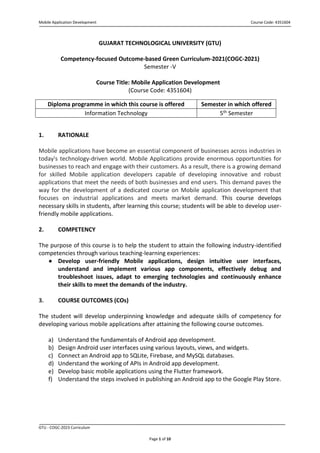
GUJARAT TECHNOLOGICAL UNIVERSITY (GTU)
Competency-focused Outcome-based Green Curriculum-2021(COGC-2021)
Semester -V
Course Title: Mobile Application Development
(Course Code: 4351604)
Diploma programme in which this course is offered Semester in which offered
Information Technology 5th Semester
1. RATIONALE
Mobile applications have become an essential component of businesses across industries in
today's technology-driven world. Mobile Applications provide enormous opportunities for
businesses to reach and engage with their customers. As a result, there is a growing demand
for skilled Mobile application developers capable of developing innovative and robust
applications that meet the needs of both businesses and end users. This demand paves the
way for the development of a dedicated course on Mobile application development that
focuses on industrial applications and meets market demand. This course develops
necessary skills in students, after learning this course; students will be able to develop user-
friendly mobile applications.
2. COMPETENCY
The purpose of this course is to help the student to attain the following industry-identified
competencies through various teaching-learning experiences:
● Develop user-friendly Mobile applications, design intuitive user interfaces,
understand and implement various app components, effectively debug and
troubleshoot issues, adapt to emerging technologies and continuously enhance
their skills to meet the demands of the industry.
3. COURSE OUTCOMES (COs)
The student will develop underpinning knowledge and adequate skills of competency for
developing various mobile applications after attaining the following course outcomes.
a) Understand the fundamentals of Android app development.
b) Design Android user interfaces using various layouts, views, and widgets.
c) Connect an Android app to SQLite, Firebase, and MySQL databases.
d) Understand the working of APIs in Android app development.
e) Develop basic mobile applications using the Flutter framework.
f) Understand the steps involved in publishing an Android app to the Google Play Store.
Mobile Application Development Course Code: 4351604
GTU - COGC-2023 Curriculum
Page 2 of 10
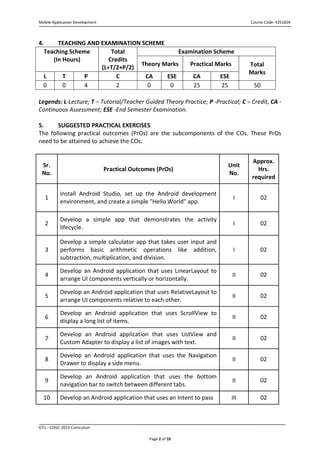
4. TEACHING AND EXAMINATION SCHEME
Teaching Scheme
(In Hours)
Total
Credits
(L+T/2+P/2)
Examination Scheme
Theory Marks Practical Marks Total
Marks
L T P C CA ESE CA ESE
0 0 4 2 0 0 25 25 50
Legends: L-Lecture; T – Tutorial/Teacher Guided Theory Practice; P -Practical; C – Credit, CA -
Continuous Assessment; ESE -End Semester Examination.
5. SUGGESTED PRACTICAL EXERCISES
The following practical outcomes (PrOs) are the subcomponents of the COs. These PrOs
need to be attained to achieve the COs.
Sr.
No.
Practical Outcomes (PrOs)
Unit
No.
Approx.
Hrs.
required
1
Install Android Studio, set up the Android development
environment, and create a simple "Hello World" app.
I 02
2
Develop a simple app that demonstrates the activity
lifecycle.
I 02
3
Develop a simple calculator app that takes user input and
performs basic arithmetic operations like addition,
subtraction, multiplication, and division.
I 02
4
Develop an Android application that uses LinearLayout to
arrange UI components vertically or horizontally.
II 02
5
Develop an Android application that uses RelativeLayout to
arrange UI components relative to each other.
II 02
6
Develop an Android application that uses ScrollView to
display a long list of items.
II 02
7
Develop an Android application that uses ListView and
Custom Adapter to display a list of images with text.
II 02
8
Develop an Android application that uses the Navigation
Drawer to display a side menu.
II 02
9
Develop an Android application that uses the bottom
navigation bar to switch between different tabs.
II 02
10 Develop an Android application that uses an Intent to pass III 02
Mobile Application Development Course Code: 4351604
GTU - COGC-2023 Curriculum
Page 3 of 10
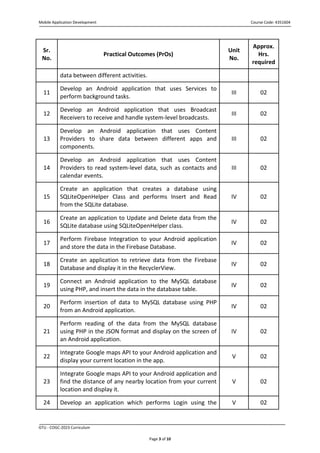
Sr.
No.
Practical Outcomes (PrOs)
Unit
No.
Approx.
Hrs.
required
data between different activities.
11
Develop an Android application that uses Services to
perform background tasks.
III 02
12
Develop an Android application that uses Broadcast
Receivers to receive and handle system-level broadcasts.
III 02
13
Develop an Android application that uses Content
Providers to share data between different apps and
components.
III 02
14
Develop an Android application that uses Content
Providers to read system-level data, such as contacts and
calendar events.
III 02
15
Create an application that creates a database using
SQLiteOpenHelper Class and performs Insert and Read
from the SQLite database.
IV 02
16
Create an application to Update and Delete data from the
SQLite database using SQLiteOpenHelper class.
IV 02
17
Perform Firebase Integration to your Android application
and store the data in the Firebase Database.
IV 02
18
Create an application to retrieve data from the Firebase
Database and display it in the RecyclerView.
IV 02
19
Connect an Android application to the MySQL database
using PHP, and insert the data in the database table.
IV 02
20
Perform insertion of data to MySQL database using PHP
from an Android application.
IV 02
21
Perform reading of the data from the MySQL database
using PHP in the JSON format and display on the screen of
an Android application.
IV 02
22
Integrate Google maps API to your Android application and
display your current location in the app.
V 02
23
Integrate Google maps API to your Android application and
find the distance of any nearby location from your current
location and display it.
V 02
24 Develop an application which performs Login using the V 02
Mobile Application Development Course Code: 4351604
GTU - COGC-2023 Curriculum
Page 4 of 10
Sr.
No.
Practical Outcomes (PrOs)
Unit
No.
Approx.
Hrs.
required
Google account of the user.
25
Install Flutter SDK, configure the development environment
and display “Hello World” in the centre of the screen.
VI 02
26
Develop a Flutter app to get two numbers from the user
and display addition on the screen after clicking a button.
VI 02
27
Develop a Flutter app for Login using static data. If the User
ID and Password are correct then clicking a login button
should open a new screen showing Username at the center
of the new screen.
VI 02
28
Demonstrate publishing an Android app on the Google Play
Store following the policies and guidelines.
VII 02
Note
i. More Practical Exercises can be designed and offered by the respective course faculty to
develop the industry-relevant skills/outcomes to match the COs. The above table is only a
suggestive list.
ii. Faculty can suggest students to develop a complete mobile application performing the
practicals as listed above. Functionalities can be selected such that after completing the
app, all the PrOs listed above can be achieved.
iii. The following are some sample ‘Process’ and ‘Product’ related skills (more may be
added/deleted depending on the course) that occur in the above listed Practical Exercises
of this course required which are embedded in the COs and ultimately the competency.
S.
No.
Sample Performance Indicators for the PrOs Weightage in %
1 User Interface Design. 20
2 Coding methodology. 30
3 Testing and debugging of the program. 20
4 Correctness of the program. 20
5 Submission within the time limit. 10
Total 100
Mobile Application Development Course Code: 4351604
GTU - COGC-2023 Curriculum
Page 5 of 10
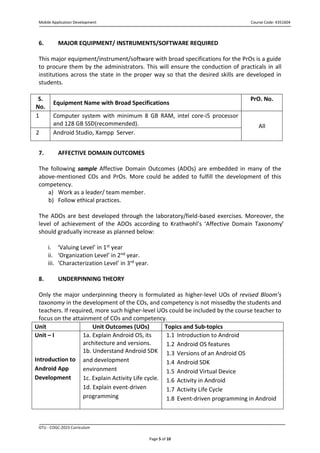
6. MAJOR EQUIPMENT/ INSTRUMENTS/SOFTWARE REQUIRED
This major equipment/instrument/software with broad specifications for the PrOs is a guide
to procure them by the administrators. This will ensure the conduction of practicals in all
institutions across the state in the proper way so that the desired skills are developed in
students.
S.
No.
Equipment Name with Broad Specifications
PrO. No.
1 Computer system with minimum 8 GB RAM, intel core-i5 processor
and 128 GB SSD(recommended). All
2 Android Studio, Xampp Server.
7. AFFECTIVE DOMAIN OUTCOMES
The following sample Affective Domain Outcomes (ADOs) are embedded in many of the
above-mentioned COs and PrOs. More could be added to fulfill the development of this
competency.
a) Work as a leader/ team member.
b) Follow ethical practices.
The ADOs are best developed through the laboratory/field-based exercises. Moreover, the
level of achievement of the ADOs according to Krathwohl’s ‘Affective Domain Taxonomy’
should gradually increase as planned below:
i. ‘Valuing Level’ in 1st year
ii. ‘Organization Level’ in 2nd year.
iii. ‘Characterization Level’ in 3rd year.
8. UNDERPINNING THEORY
Only the major underpinning theory is formulated as higher-level UOs of revised Bloom’s
taxonomy in the development of the COs, and competency is not missedby the students and
teachers. If required, more such higher-level UOs could be included by the course teacher to
focus on the attainment of COs and competency.
Unit Unit Outcomes (UOs) Topics and Sub-topics
Unit – I
Introduction to
Android App
Development
1a. Explain Android OS, its
architecture and versions.
1b. Understand Android SDK
and development
environment
1c. Explain Activity Life cycle.
1d. Explain event-driven
programming
1.1 Introduction to Android
1.2 Android OS features
1.3 Versions of an Android OS
1.4 Android SDK
1.5 Android Virtual Device
1.6 Activity in Android
1.7 Activity Life Cycle
1.8 Event-driven programming in Android
Mobile Application Development Course Code: 4351604
GTU - COGC-2023 Curriculum
Page 6 of 10
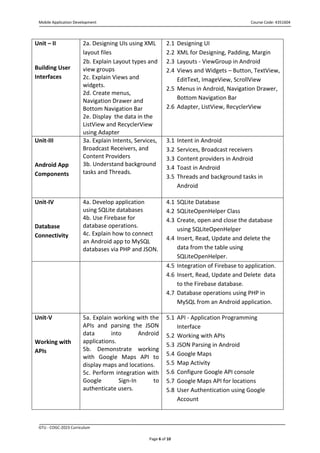
Unit – II
Building User
Interfaces
2a. Designing UIs using XML
layout files
2b. Explain Layout types and
view groups
2c. Explain Views and
widgets.
2d. Create menus,
Navigation Drawer and
Bottom Navigation Bar
2e. Display the data in the
ListView and RecyclerView
using Adapter
2.1 Designing UI
2.2 XML for Designing, Padding, Margin
2.3 Layouts - ViewGroup in Android
2.4 Views and Widgets – Button, TextView,
EditText, ImageView, ScrollView
2.5 Menus in Android, Navigation Drawer,
Bottom Navigation Bar
2.6 Adapter, ListView, RecyclerView
Unit-III
Android App
Components
3a. Explain Intents, Services,
Broadcast Receivers, and
Content Providers
3b. Understand background
tasks and Threads.
3.1 Intent in Android
3.2 Services, Broadcast receivers
3.3 Content providers in Android
3.4 Toast in Android
3.5 Threads and background tasks in
Android
Unit-IV
Database
Connectivity
4a. Develop application
using SQLite databases
4b. Use Firebase for
database operations.
4c. Explain how to connect
an Android app to MySQL
databases via PHP and JSON.
4.1 SQLite Database
4.2 SQLiteOpenHelper Class
4.3 Create, open and close the database
using SQLiteOpenHelper
4.4 Insert, Read, Update and delete the
data from the table using
SQLiteOpenHelper.
4.5 Integration of Firebase to application.
4.6 Insert, Read, Update and Delete data
to the Firebase database.
4.7 Database operations using PHP in
MySQL from an Android application.
Unit-V
Working with
APIs
5a. Explain working with the
APIs and parsing the JSON
data into Android
applications.
5b. Demonstrate working
with Google Maps API to
display maps and locations.
5c. Perform integration with
Google Sign-In to
authenticate users.
5.1 API - Application Programming
Interface
5.2 Working with APIs
5.3 JSON Parsing in Android
5.4 Google Maps
5.5 Map Activity
5.6 Configure Google API console
5.7 Google Maps API for locations
5.8 User Authentication using Google
Account
Mobile Application Development Course Code: 4351604
GTU - COGC-2023 Curriculum
Page 7 of 10
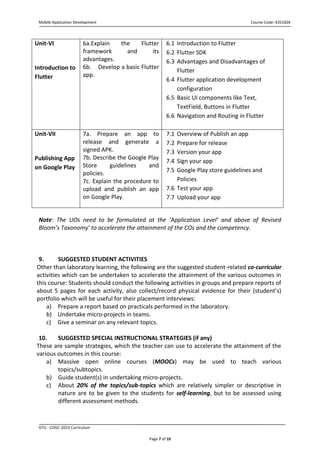
Unit-VI
Introduction to
Flutter
6a.Explain the Flutter
framework and its
advantages.
6b. Develop a basic Flutter
app.
6.1 Introduction to Flutter
6.2 Flutter SDK
6.3 Advantages and Disadvantages of
Flutter
6.4 Flutter application development
configuration
6.5 Basic UI components like Text,
TextField, Buttons in Flutter
6.6 Navigation and Routing in Flutter
Unit-VII
Publishing App
on Google Play
7a. Prepare an app to
release and generate a
signed APK.
7b. Describe the Google Play
Store guidelines and
policies.
7c. Explain the procedure to
upload and publish an app
on Google Play.
7.1 Overview of Publish an app
7.2 Prepare for release
7.3 Version your app
7.4 Sign your app
7.5 Google Play store guidelines and
Policies
7.6 Test your app
7.7 Upload your app
Note: The UOs need to be formulated at the ‘Application Level’ and above of Revised
Bloom’s Taxonomy’ to accelerate the attainment of the COs and the competency.
9. SUGGESTED STUDENT ACTIVITIES
Other than laboratory learning, the following are the suggested student-related co-curricular
activities which can be undertaken to accelerate the attainment of the various outcomes in
this course: Students should conduct the following activities in groups and prepare reports of
about 5 pages for each activity, also collect/record physical evidence for their (student’s)
portfolio which will be useful for their placement interviews:
a) Prepare a report based on practicals performed in the laboratory.
b) Undertake micro-projects in teams.
c) Give a seminar on any relevant topics.
10. SUGGESTED SPECIAL INSTRUCTIONAL STRATEGIES (if any)
These are sample strategies, which the teacher can use to accelerate the attainment of the
various outcomes in this course:
a) Massive open online courses (MOOCs) may be used to teach various
topics/subtopics.
b) Guide student(s) in undertaking micro-projects.
c) About 20% of the topics/sub-topics which are relatively simpler or descriptive in
nature are to be given to the students for self-learning, but to be assessed using
different assessment methods.
Mobile Application Development Course Code: 4351604
GTU - COGC-2023 Curriculum
Page 8 of 10
d) For Practicals, Faculty can suggest students to develop a complete mobile application
performing all the practicals listed in Section 5.
e) With respect to section No.9, teachers need to ensure to create opportunities and
provisions for co-curricular activities.
f) Guide students on how to address issues of society, environment and sustainability
using the knowledge of this course.
g) More focus should be given on practical work which will be carried out in laboratory
sessions. If possible, some theory sessions may be conducted in labs so that theory
and practical can go hand in hand.
h) Arrange a Mobile application development/UI development competition by making
groups of a maximum of three students each and award the winning group.
11. SUGGESTED MICRO-PROJECTS
Only one micro-project is planned to be undertaken by a student that needs to be assigned
to him/her in the beginning of the semester. In the first four semesters, the micro-project is
group-based. However, in the fifth and sixth semesters, it should preferably be individually
undertaken to build up the skill and confidence in every student to become a problem solver
so that s/he contributes to the projects of the industry. In special situations where groups
have to be formed for micro-projects, the number of students in the group should not
exceed Four.
The micro-project could be industry application based, internet-based, workshop-
based, laboratory-based or field-based. Each micro-project should encompass two or more
COs which are in fact, an integration of PrOs, UOs and ADOs. Each student will have to
maintain a dated work diary consisting of individual contributions in the project work and
give a seminar presentation of it before submission. The total duration of the micro-project
should not be less than 16 (sixteen) student engagement hours during the course. The
student ought to submit a micro-project by the end of the semester to develop the industry-
oriented COs.
A suggestive list of micro-projects is given here. This has to match the competency and the
COs. Similar micro-projects could be added by the concerned course faculty:
Case Study 1: Develop a Mobile Application to manage and store students’ data with the
following functionalities:
1. Registration
2. Login
3. Search details by student enrollment no
4. Update and delete the data
Case Study 2: Develop a Mobile Application to buy and sell products with the following
functionality:
1. Registration and Login
2. Add Product by Seller
3. View Orders by Seller
4. View Products by Buyer
5. Order Products by Buyer
Mobile Application Development Course Code: 4351604
GTU - COGC-2023 Curriculum
Page 9 of 10
12. SUGGESTED LEARNING RESOURCES
S.
No.
Title of Book
Author Publication with place, year and
ISBN
1 Head First Android
Development
Dawn Griffiths,
David Griffiths
O
'
aeilly ledia
,
cnc
.
,
ISBN: 9781492076476
2 Android Programming
for Beginners
John Horton Ingram short title
ISBN-10:1789538505
3 Flutter and Dart
Cookbook
Richard Rose Shroff/O'Reilly,Navi Mumbai
ISBN: 9789355422446
13. SOFTWARE/LEARNING WEBSITES
▪ Android Development Kit: https://developer.android.com
▪ https://flutter.dev/
▪ https://developers.google.com/apis-explorer
▪ https://onlinecourses.swayam2.ac.in/nou21_ge41/preview
▪ https://www.javatpoint.com/android-tutorial
▪ https://www.tutorialspoint.com/android/index.htm
▪ https://www.geeksforgeeks.org/android-tutorial/
▪ https://play.google.com/console/about/
14. PO-COMPETENCY-CO MAPPING
Semester V Mobile Application Development (Course Code:4351604)
POs and PSOs
Competency
& Course Outcomes
PO 1
Basic &
Discipline
specific
knowledge
PO 2
Problem
Analysis
PO 3
Design/
developme
nt of
solutions
PO 4
Engineering
Tools,
Experimentati
on And
Testing
PO 5
Engineering
practices for
society,
sustainability &
environment
PO 6
Project
Manageme
nt
PO 7
Life-
long
learnin
g
Competency
Develop user-friendly Mobile applications, design intuitive user interfaces, understand and implement
various app components, effectively debug and troubleshoot issues, adapt to emerging technologies
and continuously enhance their skills to meet the demands of the industry.
Course Outcomes
a) Understand the
fundamentals of Android
app development.
2 - - 1 2 - 1
b) Design Android user
interfaces using various
layouts, views, and
widgets.
2 2 3 2 - - -
Mobile Application Development Course Code: 4351604
GTU - COGC-2023 Curriculum
Page 10 of 10
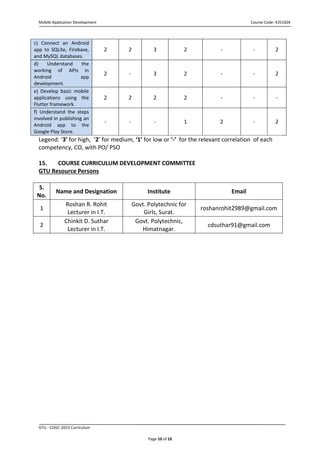
c) Connect an Android
app to SQLite, Firebase,
and MySQL databases.
2 2 3 2 - - 2
d) Understand the
working of APIs in
Android app
development.
2 - 3 2 - - 2
e) Develop basic mobile
applications using the
Flutter framework.
2 2 2 2 - - -
f) Understand the steps
involved in publishing an
Android app to the
Google Play Store.
- - - 1 2 - 2
Legend: ‘3’ for high, ‘2’ for medium, ‘1’ for low or ‘-’ for the relevant correlation of each
competency, CO, with PO/ PSO
15. COURSE CURRICULUM DEVELOPMENT COMMITTEE
GTU Resource Persons
S.
No.
Name and Designation Institute Email
1
Roshan R. Rohit
Lecturer in I.T.
Govt. Polytechnic for
Girls, Surat.
roshanrohit2989@gmail.com
2
Chinkit D. Suthar
Lecturer in I.T.
Govt. Polytechnic,
Himatnagar.
cdsuthar91@gmail.com

4351604.pdf

  • 1.
    Mobile Application DevelopmentCourse Code: 4351604 GTU - COGC-2023 Curriculum Page 1 of 10 GUJARAT TECHNOLOGICAL UNIVERSITY (GTU) Competency-focused Outcome-based Green Curriculum-2021(COGC-2021) Semester -V Course Title: Mobile Application Development (Course Code: 4351604) Diploma programme in which this course is offered Semester in which offered Information Technology 5th Semester 1. RATIONALE Mobile applications have become an essential component of businesses across industries in today's technology-driven world. Mobile Applications provide enormous opportunities for businesses to reach and engage with their customers. As a result, there is a growing demand for skilled Mobile application developers capable of developing innovative and robust applications that meet the needs of both businesses and end users. This demand paves the way for the development of a dedicated course on Mobile application development that focuses on industrial applications and meets market demand. This course develops necessary skills in students, after learning this course; students will be able to develop user- friendly mobile applications. 2. COMPETENCY The purpose of this course is to help the student to attain the following industry-identified competencies through various teaching-learning experiences: ● Develop user-friendly Mobile applications, design intuitive user interfaces, understand and implement various app components, effectively debug and troubleshoot issues, adapt to emerging technologies and continuously enhance their skills to meet the demands of the industry. 3. COURSE OUTCOMES (COs) The student will develop underpinning knowledge and adequate skills of competency for developing various mobile applications after attaining the following course outcomes. a) Understand the fundamentals of Android app development. b) Design Android user interfaces using various layouts, views, and widgets. c) Connect an Android app to SQLite, Firebase, and MySQL databases. d) Understand the working of APIs in Android app development. e) Develop basic mobile applications using the Flutter framework. f) Understand the steps involved in publishing an Android app to the Google Play Store.
  • 2.
    Mobile Application DevelopmentCourse Code: 4351604 GTU - COGC-2023 Curriculum Page 2 of 10 4. TEACHING AND EXAMINATION SCHEME Teaching Scheme (In Hours) Total Credits (L+T/2+P/2) Examination Scheme Theory Marks Practical Marks Total Marks L T P C CA ESE CA ESE 0 0 4 2 0 0 25 25 50 Legends: L-Lecture; T – Tutorial/Teacher Guided Theory Practice; P -Practical; C – Credit, CA - Continuous Assessment; ESE -End Semester Examination. 5. SUGGESTED PRACTICAL EXERCISES The following practical outcomes (PrOs) are the subcomponents of the COs. These PrOs need to be attained to achieve the COs. Sr. No. Practical Outcomes (PrOs) Unit No. Approx. Hrs. required 1 Install Android Studio, set up the Android development environment, and create a simple "Hello World" app. I 02 2 Develop a simple app that demonstrates the activity lifecycle. I 02 3 Develop a simple calculator app that takes user input and performs basic arithmetic operations like addition, subtraction, multiplication, and division. I 02 4 Develop an Android application that uses LinearLayout to arrange UI components vertically or horizontally. II 02 5 Develop an Android application that uses RelativeLayout to arrange UI components relative to each other. II 02 6 Develop an Android application that uses ScrollView to display a long list of items. II 02 7 Develop an Android application that uses ListView and Custom Adapter to display a list of images with text. II 02 8 Develop an Android application that uses the Navigation Drawer to display a side menu. II 02 9 Develop an Android application that uses the bottom navigation bar to switch between different tabs. II 02 10 Develop an Android application that uses an Intent to pass III 02
  • 3.
    Mobile Application DevelopmentCourse Code: 4351604 GTU - COGC-2023 Curriculum Page 3 of 10 Sr. No. Practical Outcomes (PrOs) Unit No. Approx. Hrs. required data between different activities. 11 Develop an Android application that uses Services to perform background tasks. III 02 12 Develop an Android application that uses Broadcast Receivers to receive and handle system-level broadcasts. III 02 13 Develop an Android application that uses Content Providers to share data between different apps and components. III 02 14 Develop an Android application that uses Content Providers to read system-level data, such as contacts and calendar events. III 02 15 Create an application that creates a database using SQLiteOpenHelper Class and performs Insert and Read from the SQLite database. IV 02 16 Create an application to Update and Delete data from the SQLite database using SQLiteOpenHelper class. IV 02 17 Perform Firebase Integration to your Android application and store the data in the Firebase Database. IV 02 18 Create an application to retrieve data from the Firebase Database and display it in the RecyclerView. IV 02 19 Connect an Android application to the MySQL database using PHP, and insert the data in the database table. IV 02 20 Perform insertion of data to MySQL database using PHP from an Android application. IV 02 21 Perform reading of the data from the MySQL database using PHP in the JSON format and display on the screen of an Android application. IV 02 22 Integrate Google maps API to your Android application and display your current location in the app. V 02 23 Integrate Google maps API to your Android application and find the distance of any nearby location from your current location and display it. V 02 24 Develop an application which performs Login using the V 02
  • 4.
    Mobile Application DevelopmentCourse Code: 4351604 GTU - COGC-2023 Curriculum Page 4 of 10 Sr. No. Practical Outcomes (PrOs) Unit No. Approx. Hrs. required Google account of the user. 25 Install Flutter SDK, configure the development environment and display “Hello World” in the centre of the screen. VI 02 26 Develop a Flutter app to get two numbers from the user and display addition on the screen after clicking a button. VI 02 27 Develop a Flutter app for Login using static data. If the User ID and Password are correct then clicking a login button should open a new screen showing Username at the center of the new screen. VI 02 28 Demonstrate publishing an Android app on the Google Play Store following the policies and guidelines. VII 02 Note i. More Practical Exercises can be designed and offered by the respective course faculty to develop the industry-relevant skills/outcomes to match the COs. The above table is only a suggestive list. ii. Faculty can suggest students to develop a complete mobile application performing the practicals as listed above. Functionalities can be selected such that after completing the app, all the PrOs listed above can be achieved. iii. The following are some sample ‘Process’ and ‘Product’ related skills (more may be added/deleted depending on the course) that occur in the above listed Practical Exercises of this course required which are embedded in the COs and ultimately the competency. S. No. Sample Performance Indicators for the PrOs Weightage in % 1 User Interface Design. 20 2 Coding methodology. 30 3 Testing and debugging of the program. 20 4 Correctness of the program. 20 5 Submission within the time limit. 10 Total 100
  • 5.
    Mobile Application DevelopmentCourse Code: 4351604 GTU - COGC-2023 Curriculum Page 5 of 10 6. MAJOR EQUIPMENT/ INSTRUMENTS/SOFTWARE REQUIRED This major equipment/instrument/software with broad specifications for the PrOs is a guide to procure them by the administrators. This will ensure the conduction of practicals in all institutions across the state in the proper way so that the desired skills are developed in students. S. No. Equipment Name with Broad Specifications PrO. No. 1 Computer system with minimum 8 GB RAM, intel core-i5 processor and 128 GB SSD(recommended). All 2 Android Studio, Xampp Server. 7. AFFECTIVE DOMAIN OUTCOMES The following sample Affective Domain Outcomes (ADOs) are embedded in many of the above-mentioned COs and PrOs. More could be added to fulfill the development of this competency. a) Work as a leader/ team member. b) Follow ethical practices. The ADOs are best developed through the laboratory/field-based exercises. Moreover, the level of achievement of the ADOs according to Krathwohl’s ‘Affective Domain Taxonomy’ should gradually increase as planned below: i. ‘Valuing Level’ in 1st year ii. ‘Organization Level’ in 2nd year. iii. ‘Characterization Level’ in 3rd year. 8. UNDERPINNING THEORY Only the major underpinning theory is formulated as higher-level UOs of revised Bloom’s taxonomy in the development of the COs, and competency is not missedby the students and teachers. If required, more such higher-level UOs could be included by the course teacher to focus on the attainment of COs and competency. Unit Unit Outcomes (UOs) Topics and Sub-topics Unit – I Introduction to Android App Development 1a. Explain Android OS, its architecture and versions. 1b. Understand Android SDK and development environment 1c. Explain Activity Life cycle. 1d. Explain event-driven programming 1.1 Introduction to Android 1.2 Android OS features 1.3 Versions of an Android OS 1.4 Android SDK 1.5 Android Virtual Device 1.6 Activity in Android 1.7 Activity Life Cycle 1.8 Event-driven programming in Android
  • 6.
    Mobile Application DevelopmentCourse Code: 4351604 GTU - COGC-2023 Curriculum Page 6 of 10 Unit – II Building User Interfaces 2a. Designing UIs using XML layout files 2b. Explain Layout types and view groups 2c. Explain Views and widgets. 2d. Create menus, Navigation Drawer and Bottom Navigation Bar 2e. Display the data in the ListView and RecyclerView using Adapter 2.1 Designing UI 2.2 XML for Designing, Padding, Margin 2.3 Layouts - ViewGroup in Android 2.4 Views and Widgets – Button, TextView, EditText, ImageView, ScrollView 2.5 Menus in Android, Navigation Drawer, Bottom Navigation Bar 2.6 Adapter, ListView, RecyclerView Unit-III Android App Components 3a. Explain Intents, Services, Broadcast Receivers, and Content Providers 3b. Understand background tasks and Threads. 3.1 Intent in Android 3.2 Services, Broadcast receivers 3.3 Content providers in Android 3.4 Toast in Android 3.5 Threads and background tasks in Android Unit-IV Database Connectivity 4a. Develop application using SQLite databases 4b. Use Firebase for database operations. 4c. Explain how to connect an Android app to MySQL databases via PHP and JSON. 4.1 SQLite Database 4.2 SQLiteOpenHelper Class 4.3 Create, open and close the database using SQLiteOpenHelper 4.4 Insert, Read, Update and delete the data from the table using SQLiteOpenHelper. 4.5 Integration of Firebase to application. 4.6 Insert, Read, Update and Delete data to the Firebase database. 4.7 Database operations using PHP in MySQL from an Android application. Unit-V Working with APIs 5a. Explain working with the APIs and parsing the JSON data into Android applications. 5b. Demonstrate working with Google Maps API to display maps and locations. 5c. Perform integration with Google Sign-In to authenticate users. 5.1 API - Application Programming Interface 5.2 Working with APIs 5.3 JSON Parsing in Android 5.4 Google Maps 5.5 Map Activity 5.6 Configure Google API console 5.7 Google Maps API for locations 5.8 User Authentication using Google Account
  • 7.
    Mobile Application DevelopmentCourse Code: 4351604 GTU - COGC-2023 Curriculum Page 7 of 10 Unit-VI Introduction to Flutter 6a.Explain the Flutter framework and its advantages. 6b. Develop a basic Flutter app. 6.1 Introduction to Flutter 6.2 Flutter SDK 6.3 Advantages and Disadvantages of Flutter 6.4 Flutter application development configuration 6.5 Basic UI components like Text, TextField, Buttons in Flutter 6.6 Navigation and Routing in Flutter Unit-VII Publishing App on Google Play 7a. Prepare an app to release and generate a signed APK. 7b. Describe the Google Play Store guidelines and policies. 7c. Explain the procedure to upload and publish an app on Google Play. 7.1 Overview of Publish an app 7.2 Prepare for release 7.3 Version your app 7.4 Sign your app 7.5 Google Play store guidelines and Policies 7.6 Test your app 7.7 Upload your app Note: The UOs need to be formulated at the ‘Application Level’ and above of Revised Bloom’s Taxonomy’ to accelerate the attainment of the COs and the competency. 9. SUGGESTED STUDENT ACTIVITIES Other than laboratory learning, the following are the suggested student-related co-curricular activities which can be undertaken to accelerate the attainment of the various outcomes in this course: Students should conduct the following activities in groups and prepare reports of about 5 pages for each activity, also collect/record physical evidence for their (student’s) portfolio which will be useful for their placement interviews: a) Prepare a report based on practicals performed in the laboratory. b) Undertake micro-projects in teams. c) Give a seminar on any relevant topics. 10. SUGGESTED SPECIAL INSTRUCTIONAL STRATEGIES (if any) These are sample strategies, which the teacher can use to accelerate the attainment of the various outcomes in this course: a) Massive open online courses (MOOCs) may be used to teach various topics/subtopics. b) Guide student(s) in undertaking micro-projects. c) About 20% of the topics/sub-topics which are relatively simpler or descriptive in nature are to be given to the students for self-learning, but to be assessed using different assessment methods.
  • 8.
    Mobile Application DevelopmentCourse Code: 4351604 GTU - COGC-2023 Curriculum Page 8 of 10 d) For Practicals, Faculty can suggest students to develop a complete mobile application performing all the practicals listed in Section 5. e) With respect to section No.9, teachers need to ensure to create opportunities and provisions for co-curricular activities. f) Guide students on how to address issues of society, environment and sustainability using the knowledge of this course. g) More focus should be given on practical work which will be carried out in laboratory sessions. If possible, some theory sessions may be conducted in labs so that theory and practical can go hand in hand. h) Arrange a Mobile application development/UI development competition by making groups of a maximum of three students each and award the winning group. 11. SUGGESTED MICRO-PROJECTS Only one micro-project is planned to be undertaken by a student that needs to be assigned to him/her in the beginning of the semester. In the first four semesters, the micro-project is group-based. However, in the fifth and sixth semesters, it should preferably be individually undertaken to build up the skill and confidence in every student to become a problem solver so that s/he contributes to the projects of the industry. In special situations where groups have to be formed for micro-projects, the number of students in the group should not exceed Four. The micro-project could be industry application based, internet-based, workshop- based, laboratory-based or field-based. Each micro-project should encompass two or more COs which are in fact, an integration of PrOs, UOs and ADOs. Each student will have to maintain a dated work diary consisting of individual contributions in the project work and give a seminar presentation of it before submission. The total duration of the micro-project should not be less than 16 (sixteen) student engagement hours during the course. The student ought to submit a micro-project by the end of the semester to develop the industry- oriented COs. A suggestive list of micro-projects is given here. This has to match the competency and the COs. Similar micro-projects could be added by the concerned course faculty: Case Study 1: Develop a Mobile Application to manage and store students’ data with the following functionalities: 1. Registration 2. Login 3. Search details by student enrollment no 4. Update and delete the data Case Study 2: Develop a Mobile Application to buy and sell products with the following functionality: 1. Registration and Login 2. Add Product by Seller 3. View Orders by Seller 4. View Products by Buyer 5. Order Products by Buyer
  • 9.
    Mobile Application DevelopmentCourse Code: 4351604 GTU - COGC-2023 Curriculum Page 9 of 10 12. SUGGESTED LEARNING RESOURCES S. No. Title of Book Author Publication with place, year and ISBN 1 Head First Android Development Dawn Griffiths, David Griffiths O ' aeilly ledia , cnc . , ISBN: 9781492076476 2 Android Programming for Beginners John Horton Ingram short title ISBN-10:1789538505 3 Flutter and Dart Cookbook Richard Rose Shroff/O'Reilly,Navi Mumbai ISBN: 9789355422446 13. SOFTWARE/LEARNING WEBSITES ▪ Android Development Kit: https://developer.android.com ▪ https://flutter.dev/ ▪ https://developers.google.com/apis-explorer ▪ https://onlinecourses.swayam2.ac.in/nou21_ge41/preview ▪ https://www.javatpoint.com/android-tutorial ▪ https://www.tutorialspoint.com/android/index.htm ▪ https://www.geeksforgeeks.org/android-tutorial/ ▪ https://play.google.com/console/about/ 14. PO-COMPETENCY-CO MAPPING Semester V Mobile Application Development (Course Code:4351604) POs and PSOs Competency & Course Outcomes PO 1 Basic & Discipline specific knowledge PO 2 Problem Analysis PO 3 Design/ developme nt of solutions PO 4 Engineering Tools, Experimentati on And Testing PO 5 Engineering practices for society, sustainability & environment PO 6 Project Manageme nt PO 7 Life- long learnin g Competency Develop user-friendly Mobile applications, design intuitive user interfaces, understand and implement various app components, effectively debug and troubleshoot issues, adapt to emerging technologies and continuously enhance their skills to meet the demands of the industry. Course Outcomes a) Understand the fundamentals of Android app development. 2 - - 1 2 - 1 b) Design Android user interfaces using various layouts, views, and widgets. 2 2 3 2 - - -
  • 10.
    Mobile Application DevelopmentCourse Code: 4351604 GTU - COGC-2023 Curriculum Page 10 of 10 c) Connect an Android app to SQLite, Firebase, and MySQL databases. 2 2 3 2 - - 2 d) Understand the working of APIs in Android app development. 2 - 3 2 - - 2 e) Develop basic mobile applications using the Flutter framework. 2 2 2 2 - - - f) Understand the steps involved in publishing an Android app to the Google Play Store. - - - 1 2 - 2 Legend: ‘3’ for high, ‘2’ for medium, ‘1’ for low or ‘-’ for the relevant correlation of each competency, CO, with PO/ PSO 15. COURSE CURRICULUM DEVELOPMENT COMMITTEE GTU Resource Persons S. No. Name and Designation Institute Email 1 Roshan R. Rohit Lecturer in I.T. Govt. Polytechnic for Girls, Surat. roshanrohit2989@gmail.com 2 Chinkit D. Suthar Lecturer in I.T. Govt. Polytechnic, Himatnagar. cdsuthar91@gmail.com