Mathematics for
Computing
Dr. M H B Ariyaratne
https://goo.gl/bmAhX6
Binary Numbers
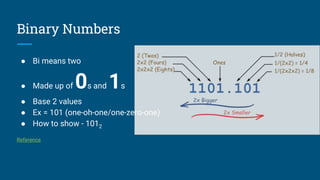
● Bi means two
● Made up of 0s and 1s
● Base 2 values
● Ex = 101 (one-oh-one/one-zero-one)
● How to show - 1012
Reference
Binary Numbers (Mixed Numbers)
Example: 10.1
The "10" means 2 in decimal,
The ".1" means half,
So "10.1" in binary is 2.5 in decimal
Bit
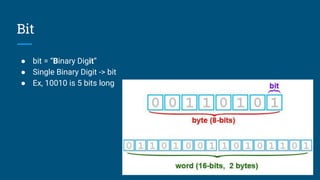
● bit = “Binary Digit”
● Single Binary Digit -> bit
● Ex, 10010 is 5 bits long
Bytes
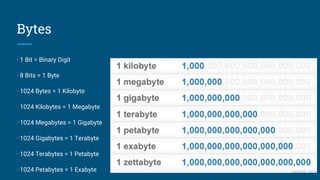
· 1 Bit = Binary Digit
· 8 Bits = 1 Byte
· 1024 Bytes = 1 Kilobyte
· 1024 Kilobytes = 1 Megabyte
· 1024 Megabytes = 1 Gigabyte
· 1024 Gigabytes = 1 Terabyte
· 1024 Terabytes = 1 Petabyte
· 1024 Petabytes = 1 Exabyte
Binary to Decimal (Whole Numbers)
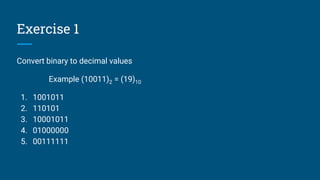
Exercise 1
Convert binary to decimal values
Example (10011)2 = (19)10
1. 1001011
2. 110101
3. 10001011
4. 01000000
5. 00111111
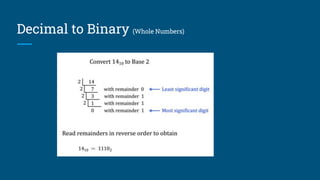
Decimal to Binary (Whole Numbers)
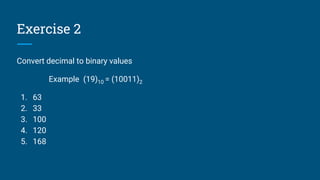
Exercise 2
Convert decimal to binary values
Example (19)10 = (10011)2
1. 63
2. 33
3. 100
4. 120
5. 168
Decimal to Binary (Fraction Numbers)
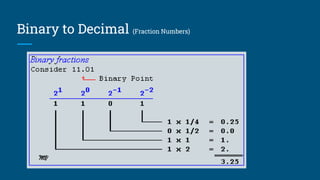
Binary to Decimal (Fraction Numbers)
Exercise 3
Convert decimal to binary values
Example (0.435)10 = (0.01101)2
1. 0.63
2. 0.435
3. 4.1
4. 8.64
5. 2.531
Exercise 4
Convert binary to decimal values
Example (0.10010)2 = (0.5625)10
1. 0.1
2. 0.1001
3. 0.111
4. 1.001
5. 11.11
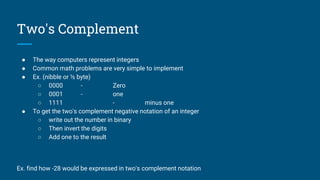
Two's Complement
● The way computers represent integers
● Common math problems are very simple to implement
● Ex. (nibble or ½ byte)
○ 0000 - Zero
○ 0001 - one
○ 1111 - minus one
● To get the two's complement negative notation of an integer
○ write out the number in binary
○ Then invert the digits
○ Add one to the result
Ex. find how -28 would be expressed in two's complement notation
Two’s Complement
Thank you

4. mathematics for computing

  • 1.
    Mathematics for Computing Dr. MH B Ariyaratne https://goo.gl/bmAhX6
  • 2.
    Binary Numbers ● Bimeans two ● Made up of 0s and 1s ● Base 2 values ● Ex = 101 (one-oh-one/one-zero-one) ● How to show - 1012 Reference
  • 3.
    Binary Numbers (MixedNumbers) Example: 10.1 The "10" means 2 in decimal, The ".1" means half, So "10.1" in binary is 2.5 in decimal
  • 4.
    Bit ● bit =“Binary Digit” ● Single Binary Digit -> bit ● Ex, 10010 is 5 bits long
  • 5.
    Bytes · 1 Bit= Binary Digit · 8 Bits = 1 Byte · 1024 Bytes = 1 Kilobyte · 1024 Kilobytes = 1 Megabyte · 1024 Megabytes = 1 Gigabyte · 1024 Gigabytes = 1 Terabyte · 1024 Terabytes = 1 Petabyte · 1024 Petabytes = 1 Exabyte
  • 6.
    Binary to Decimal(Whole Numbers)
  • 7.
    Exercise 1 Convert binaryto decimal values Example (10011)2 = (19)10 1. 1001011 2. 110101 3. 10001011 4. 01000000 5. 00111111
  • 8.
    Decimal to Binary(Whole Numbers)
  • 9.
    Exercise 2 Convert decimalto binary values Example (19)10 = (10011)2 1. 63 2. 33 3. 100 4. 120 5. 168
  • 10.
    Decimal to Binary(Fraction Numbers)
  • 11.
    Binary to Decimal(Fraction Numbers)
  • 12.
    Exercise 3 Convert decimalto binary values Example (0.435)10 = (0.01101)2 1. 0.63 2. 0.435 3. 4.1 4. 8.64 5. 2.531
  • 13.
    Exercise 4 Convert binaryto decimal values Example (0.10010)2 = (0.5625)10 1. 0.1 2. 0.1001 3. 0.111 4. 1.001 5. 11.11
  • 14.
    Two's Complement ● Theway computers represent integers ● Common math problems are very simple to implement ● Ex. (nibble or ½ byte) ○ 0000 - Zero ○ 0001 - one ○ 1111 - minus one ● To get the two's complement negative notation of an integer ○ write out the number in binary ○ Then invert the digits ○ Add one to the result Ex. find how -28 would be expressed in two's complement notation
  • 15.
  • 16.