Download free for 30 days
Sign in
Upload
Language (EN)
Support
Business
Mobile
Social Media
Marketing
Technology
Art & Photos
Career
Design
Education
Presentations & Public Speaking
Government & Nonprofit
Healthcare
Internet
Law
Leadership & Management
Automotive
Engineering
Software
Recruiting & HR
Retail
Sales
Services
Science
Small Business & Entrepreneurship
Food
Environment
Economy & Finance
Data & Analytics
Investor Relations
Sports
Spiritual
News & Politics
Travel
Self Improvement
Real Estate
Entertainment & Humor
Health & Medicine
Devices & Hardware
Lifestyle
Change Language
Language
English
Español
Português
Français
Deutsche
Cancel
Save
EN
Uploaded by
ted-xu
466 views
4, grep
AI-enhanced description
grep命令用于查找匹配指定模式的行,支持多种输入来源如文件和标准输入。常用选项包括忽略大小写、仅显示匹配行数等,用户可根据需求进行配置。执行完成后,grep会设置退出状态码以指示匹配结果。
Read more
1
Save
Share
Embed
Embed presentation
1
/ 8
2
/ 8
3
/ 8
4
/ 8
5
/ 8
6
/ 8
7
/ 8
8
/ 8
More Related Content
PDF
Tcpdump的使用简介
by
lifeibo
PDF
Command line 初級寶典
by
Tom Chen
PPTX
Windbg入门
by
晓锋 陈
KEY
Golang
by
popeast
PDF
C python 原始碼解析 投影片
by
kao kuo-tung
PDF
A brief introduction to Python
by
bugway
PPTX
Golangintro
by
理 傅
PDF
Linq 入门
by
greenerycn
Tcpdump的使用简介
by
lifeibo
Command line 初級寶典
by
Tom Chen
Windbg入门
by
晓锋 陈
Golang
by
popeast
C python 原始碼解析 投影片
by
kao kuo-tung
A brief introduction to Python
by
bugway
Golangintro
by
理 傅
Linq 入门
by
greenerycn
Viewers also liked
PPTX
7, reusing classes
by
ted-xu
PPTX
Handleiding Forecast Solution Shared
by
Daan Blinde
PDF
Harsh Pershad (Innovate UK) presenting 'Funding Opportunities from Innovate U...
by
UK Carbon Capture and Storage Research Centre
PPT
01 Gedda Jfk2009
by
Pierre Trudelle
PPTX
Copia de experiencia de aula
by
olguita1975
PPT
Informatie, Middel Voor Gezonde Sturing
by
Daan Blinde
PPTX
2, object oriented programming
by
ted-xu
DOC
cv
by
SRIJAN ROY
PDF
Каталог Bravolli
by
Grigory Grigorev
PPT
Master Genzyme Presentation
by
engelske
PDF
Formation Gestalt IFFP 2017
by
Institut Français de Formation Psychocorporelle
PDF
Seo in raipur
by
Deepak Nagraj
PDF
три дерева - Three Trees
by
Freekidstories
PPTX
Welcome To Deep Tissue Massage
by
William Burton LMT CMCE
7, reusing classes
by
ted-xu
Handleiding Forecast Solution Shared
by
Daan Blinde
Harsh Pershad (Innovate UK) presenting 'Funding Opportunities from Innovate U...
by
UK Carbon Capture and Storage Research Centre
01 Gedda Jfk2009
by
Pierre Trudelle
Copia de experiencia de aula
by
olguita1975
Informatie, Middel Voor Gezonde Sturing
by
Daan Blinde
2, object oriented programming
by
ted-xu
cv
by
SRIJAN ROY
Каталог Bravolli
by
Grigory Grigorev
Master Genzyme Presentation
by
engelske
Formation Gestalt IFFP 2017
by
Institut Français de Formation Psychocorporelle
Seo in raipur
by
Deepak Nagraj
три дерева - Three Trees
by
Freekidstories
Welcome To Deep Tissue Massage
by
William Burton LMT CMCE
Similar to 4, grep
DOC
Unix常用命令
by
tony2yy_fish
PPTX
sed -- A programmer's perspective
by
Li Ding
PPT
Linux常用命令与工具简介
by
weihe
DOC
Unix常用命令 1
by
tony2yy_fish
PPT
如何学习Bash Shell
by
LI Daobing
PPT
Log analytics
by
itseo
PPT
常用Mac/Linux命令分享
by
Yihua Huang
PDF
Using Shell & Mastering Shell
by
Jiyee Sheng
PDF
Introduce to Linux command line
by
Wen Liao
PDF
Linux command tutorial
by
朋 陈
PPTX
Bash shell script 教學
by
Ming-Sian Lin
PPT
Shell脚本
by
bj
PDF
Bash入门基础篇
by
Zhiyao Pan
PPTX
6, awk
by
ted-xu
PPTX
5, sed
by
ted-xu
PPTX
2, bash synax simplified
by
ted-xu
PPTX
Linux常用命令
by
Tony Deng
DOC
Sed 命令详解
by
climbtop
PPT
第9章 Shell 編程
by
kidmany2001
Unix常用命令
by
tony2yy_fish
sed -- A programmer's perspective
by
Li Ding
Linux常用命令与工具简介
by
weihe
Unix常用命令 1
by
tony2yy_fish
如何学习Bash Shell
by
LI Daobing
Log analytics
by
itseo
常用Mac/Linux命令分享
by
Yihua Huang
Using Shell & Mastering Shell
by
Jiyee Sheng
Introduce to Linux command line
by
Wen Liao
Linux command tutorial
by
朋 陈
Bash shell script 教學
by
Ming-Sian Lin
Shell脚本
by
bj
Bash入门基础篇
by
Zhiyao Pan
6, awk
by
ted-xu
5, sed
by
ted-xu
2, bash synax simplified
by
ted-xu
Linux常用命令
by
Tony Deng
Sed 命令详解
by
climbtop
第9章 Shell 編程
by
kidmany2001
More from ted-xu
PPTX
11, OCP - awr & alert system
by
ted-xu
PPTX
10, OCP - flashback
by
ted-xu
PPTX
9, OCP - restore and recovery with rman
by
ted-xu
PPTX
8, OCP - backup with rman
by
ted-xu
PPTX
7, OCP - configure database for backup and recovery
by
ted-xu
PPTX
6, OCP - oracle security
by
ted-xu
PPTX
5, OCP - oracle storage
by
ted-xu
PPTX
4, OCP - oracle networking
by
ted-xu
PPTX
3, OCP - instance management
by
ted-xu
PPTX
2, OCP - installing and creating a database
by
ted-xu
PPTX
1, OCP - architecture intro
by
ted-xu
PPTX
12, OCP - performance tuning
by
ted-xu
PPTX
7, business event system
by
ted-xu
PPTX
6, workflow miscellaneous
by
ted-xu
PPTX
5, workflow function activity
by
ted-xu
PPTX
4, workflow tables & api
by
ted-xu
PPTX
3, workflow in ebs
by
ted-xu
PPTX
2, a simple workflow
by
ted-xu
PPTX
1, workflow intro
by
ted-xu
PPTX
8, bes tables & api
by
ted-xu
11, OCP - awr & alert system
by
ted-xu
10, OCP - flashback
by
ted-xu
9, OCP - restore and recovery with rman
by
ted-xu
8, OCP - backup with rman
by
ted-xu
7, OCP - configure database for backup and recovery
by
ted-xu
6, OCP - oracle security
by
ted-xu
5, OCP - oracle storage
by
ted-xu
4, OCP - oracle networking
by
ted-xu
3, OCP - instance management
by
ted-xu
2, OCP - installing and creating a database
by
ted-xu
1, OCP - architecture intro
by
ted-xu
12, OCP - performance tuning
by
ted-xu
7, business event system
by
ted-xu
6, workflow miscellaneous
by
ted-xu
5, workflow function activity
by
ted-xu
4, workflow tables & api
by
ted-xu
3, workflow in ebs
by
ted-xu
2, a simple workflow
by
ted-xu
1, workflow intro
by
ted-xu
8, bes tables & api
by
ted-xu
4, grep
1.
grep
2.
Agenda
3.
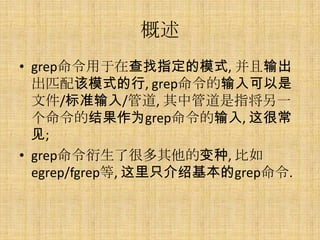
概述 • grep命令用于在查找指定的模式, 并且输出
出匹配该模式的行, grep命令的输入可以是 文件/标准输入/管道, 其中管道是指将另一 个命令的结果作为grep命令的输入, 这很常 见; • grep命令衍生了很多其他的变种, 比如 egrep/fgrep等, 这里只介绍基本的grep命令.
4.
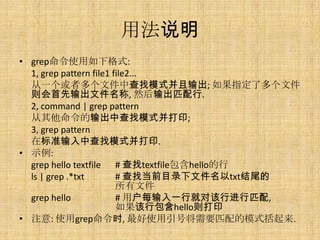
用法说明 • grep命令使用如下格式:
1, grep pattern file1 file2... 从一个或者多个文件中查找模式并且输出; 如果指定了多个文件 则会首先输出文件名称, 然后输出匹配行. 2, command | grep pattern 从其他命令的输出中查找模式并打印; 3, grep pattern 在标准输入中查找模式并打印. • 示例: grep hello textfile # 查找textfile包含hello的行 ls | grep .*txt # 查找当前目录下文件名以txt结尾的 所有文件 grep hello # 用户每输入一行就对该行进行匹配, 如果该行包含hello则打印 • 注意: 使用grep命令时, 最好使用引号将需要匹配的模式括起来.
5.
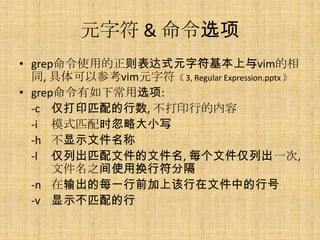
元字符 & 命令选项 •
grep命令使用的正则表达式元字符基本上与vim的相 同, 具体可以参考vim元字符《 3, Regular Expression.pptx 》 • grep命令有如下常用选项: -c 仅打印匹配的行数, 不打印行的内容 -i 模式匹配时忽略大小写 -h 不显示文件名称 -l 仅列出匹配文件的文件名, 每个文件仅列出一次, 文件名之间使用换行符分隔 -n 在输出的每一行前加上该行在文件中的行号 -v 显示不匹配的行
6.
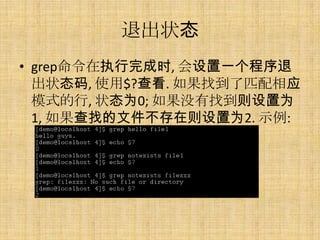
退出状态 • grep命令在执行完成时, 会设置一个程序退
出状态码, 使用$?查看. 如果找到了匹配相应 模式的行, 状态为0; 如果没有找到则设置为 1, 如果查找的文件不存在则设置为2. 示例:
7.
用法示例 • 示例:
grep ‘<Tom>’ file # 输出包含单词Tom的行 grep ‘Tom Savage’ file # 输出包含Tom Savage的行 grep ‘^Tommy’ file # 输出以Tommy开头的行 grep ‘.bak$’ file # 输出以.bak结尾的行 grep ‘[Pp]yramid’ * # 输出当前目录所有文件包含 Pyramid或pyramid的行 grep ‘[A-Z]’ file # 输出至少包含一个大小字母的行 grep ‘[0-9]’ file # 输出至少包含一个数字字符的行 grep -v ‘Mary’ file # 输出所有不包含Mary的行 grep -i ‘sam’ file # 输出包含sam的行, 不区分大小写 grep -l ‘Dear Boss’ * # 列出所有包含Dear Boss的文件名 grep -n ‘Tom’ file # 输出包含Tom的行, 并加上行号 grep “$name” file # 展开变量name的值, 然后输出所有 包含该值的行 ps -ef | grep ‘^ *user1’ # 查找user1用户的进程
8.
END



![用法示例
• 示例:
grep ‘<Tom>’ file # 输出包含单词Tom的行
grep ‘Tom Savage’ file # 输出包含Tom Savage的行
grep ‘^Tommy’ file # 输出以Tommy开头的行
grep ‘.bak$’ file # 输出以.bak结尾的行
grep ‘[Pp]yramid’ * # 输出当前目录所有文件包含
Pyramid或pyramid的行
grep ‘[A-Z]’ file # 输出至少包含一个大小字母的行
grep ‘[0-9]’ file # 输出至少包含一个数字字符的行
grep -v ‘Mary’ file # 输出所有不包含Mary的行
grep -i ‘sam’ file # 输出包含sam的行, 不区分大小写
grep -l ‘Dear Boss’ * # 列出所有包含Dear Boss的文件名
grep -n ‘Tom’ file # 输出包含Tom的行, 并加上行号
grep “$name” file # 展开变量name的值, 然后输出所有
包含该值的行
ps -ef | grep ‘^ *user1’ # 查找user1用户的进程](https://image.slidesharecdn.com/4grep-130123011548-phpapp02/85/4-grep-7-320.jpg)