3RD Grade
GEOMETRY
By: Hannah Dunlevy
Outline of Presentation
- Introduction/Definition of Geometry
- Video Representation of Geometry
- Article about 3rd Grade Geometry
- Diagram of Geometry
- Smart Notebook Geometry Lesson
- Geometry Quiz
- Mini Reflection
Intro of Geometry/Definition of Geometry
➢ Geometry - the branch of mathematics concerned with the properties and relations of points, lines,
surfaces, solids, and higher dimensional analogs.
➢ 3rd Grade Geometry includes…
REASON WITH SHAPES AND ATTRIBUTES →
CCSS.Math.Content.3.G.A.1 -- Understand that shapes in different categories (e.g., rhombuses, rectangles, and others)
may share attributes (e.g., having four sides), and that the shared attributes can define a larger category (e.g.,
quadrilaterals). Recognize rhombuses, rectangles, and squares as examples of quadrilaterals, and draw examples of
quadrilaterals that do not belong to any of these subcategories. (Categorize different types of shapes (squares,
rectangles, rhombuses, etc.) -- distinguish between types of shapes and be able to know how to label and group them
based off of their attributes.)
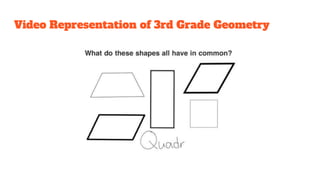
Video Representation of 3rd Grade Geometry
Article - 3rd Grade Geometry
LINK: https://www.scholastic.com/teachers/blog-posts/genia-connell/five-ways-make-
geometry-memorable/
● This article demonstrates five ways to make geometry memorable when teaching the
subject to young 3rd grade students because they can get lose focus/interest of the
topic quickly if there is no reason to stay engaged. This article states 5 ways in which
an educator can implement geometry in a 3rd grade classroom in a fun way!!
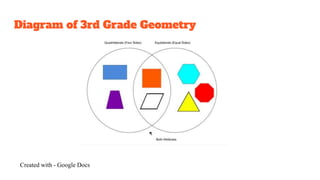
Diagram of 3rd Grade Geometry
Created with - Google Docs
Smart Notebook Geometry Lesson
LINK:
http://express.smarttech.com/?url=http%3A%2F%2Fexchangedownloads.smarttech.com%
2Fpublic%2Fcontent%2F49%2F4975799b-7e92-41e3-97e3-
7dcc61278bf0%2F3.G.A.1%2520Geometry%2520wars.notebook#
● This lesson is called, “Geometry Wars” - it can be used to assess the students
progress on how much information they have retained regarding distinguishing
shapes by their attributes in geometry. This is not only a lesson, but a fun interactive
game for the kids!
KAHOOT! Geometry Quiz
GAME LINK:
https://play.kahoot.it/#/k/edeb700b-4d30-472f-afdd-6ef20b838a85
● Play this game with the students for a review of all the different geometry concepts
they have learned! Check for their understanding - it can be used as a tool for
assessment or just a fun end of the lesson activity to do!
MINI reflection
❖ What are the benefits and/or challenges of using presentation platforms like Google
Slides?
Google Slides has several benefits and challenges to it, like any technological tool. Google Slides allows
for the teachers and students to present their ideas or concepts to the class in a timely and organized manner,
allowing room for creativity for the presentation style. Having that as a benefit, it is also sometimes
challenging when you use Google Slides and its the only presentation platform you use because then the
lessons and information you are presenting end up very cut and dry, however with creativity and using other
platforms along the side, you most likely won’t run into that problem! Google Slides allows for the student or
the teacher to share their own personal ideas in a summary format by creating numerous slides in a manner
where almost everyone can comprehend based off of Google Slides presentation elements. Overall, Google
Slides and many other presentation platforms pose risks but if you learn how to use the platform ahead of
time, they will be some of the best tools for you in and outside of the classroom.

3rd grade geometry

  • 1.
  • 2.
    Outline of Presentation -Introduction/Definition of Geometry - Video Representation of Geometry - Article about 3rd Grade Geometry - Diagram of Geometry - Smart Notebook Geometry Lesson - Geometry Quiz - Mini Reflection
  • 3.
    Intro of Geometry/Definitionof Geometry ➢ Geometry - the branch of mathematics concerned with the properties and relations of points, lines, surfaces, solids, and higher dimensional analogs. ➢ 3rd Grade Geometry includes… REASON WITH SHAPES AND ATTRIBUTES → CCSS.Math.Content.3.G.A.1 -- Understand that shapes in different categories (e.g., rhombuses, rectangles, and others) may share attributes (e.g., having four sides), and that the shared attributes can define a larger category (e.g., quadrilaterals). Recognize rhombuses, rectangles, and squares as examples of quadrilaterals, and draw examples of quadrilaterals that do not belong to any of these subcategories. (Categorize different types of shapes (squares, rectangles, rhombuses, etc.) -- distinguish between types of shapes and be able to know how to label and group them based off of their attributes.)
  • 4.
    Video Representation of3rd Grade Geometry
  • 5.
    Article - 3rdGrade Geometry LINK: https://www.scholastic.com/teachers/blog-posts/genia-connell/five-ways-make- geometry-memorable/ ● This article demonstrates five ways to make geometry memorable when teaching the subject to young 3rd grade students because they can get lose focus/interest of the topic quickly if there is no reason to stay engaged. This article states 5 ways in which an educator can implement geometry in a 3rd grade classroom in a fun way!!
  • 6.
    Diagram of 3rdGrade Geometry Created with - Google Docs
  • 7.
    Smart Notebook GeometryLesson LINK: http://express.smarttech.com/?url=http%3A%2F%2Fexchangedownloads.smarttech.com% 2Fpublic%2Fcontent%2F49%2F4975799b-7e92-41e3-97e3- 7dcc61278bf0%2F3.G.A.1%2520Geometry%2520wars.notebook# ● This lesson is called, “Geometry Wars” - it can be used to assess the students progress on how much information they have retained regarding distinguishing shapes by their attributes in geometry. This is not only a lesson, but a fun interactive game for the kids!
  • 8.
    KAHOOT! Geometry Quiz GAMELINK: https://play.kahoot.it/#/k/edeb700b-4d30-472f-afdd-6ef20b838a85 ● Play this game with the students for a review of all the different geometry concepts they have learned! Check for their understanding - it can be used as a tool for assessment or just a fun end of the lesson activity to do!
  • 9.
    MINI reflection ❖ Whatare the benefits and/or challenges of using presentation platforms like Google Slides? Google Slides has several benefits and challenges to it, like any technological tool. Google Slides allows for the teachers and students to present their ideas or concepts to the class in a timely and organized manner, allowing room for creativity for the presentation style. Having that as a benefit, it is also sometimes challenging when you use Google Slides and its the only presentation platform you use because then the lessons and information you are presenting end up very cut and dry, however with creativity and using other platforms along the side, you most likely won’t run into that problem! Google Slides allows for the student or the teacher to share their own personal ideas in a summary format by creating numerous slides in a manner where almost everyone can comprehend based off of Google Slides presentation elements. Overall, Google Slides and many other presentation platforms pose risks but if you learn how to use the platform ahead of time, they will be some of the best tools for you in and outside of the classroom.