.Net 3.5
           -Prabhakaran
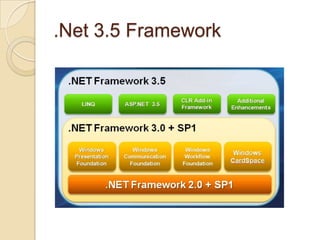
.Net 3.5 Framework
What is new in 3.5 C#?
   Implicitly Typed Local Variables
   Automatic Properties
   Object Initializer
   Collection Initializers
   Extension Methods
   Lambda Expressions
   Query Syntax
   Anonymous Types
   Expression Trees
Implicitly Typed Local Variables

Examples:
  var i = 5;
  var s = "Hello";
  var d = 1.0;
  var numbers = new int[] {1, 2, 3};
  var orders = new Dictionary<int,Order>();

Are equivalent to:
  int i = 5;
  string s = "Hello";
  double d = 1.0;
  int[] numbers = new int[] {1, 2, 3};
  Dictionary<int,Order> orders = new
  Dictionary<int,Order>();

Errors:
   var x;           // Error, no initializer to infer type from
   var y = {1, 2, 3};          // Error, collection initializer not
   permitted
   var z = null;               // Error, null type not permitted
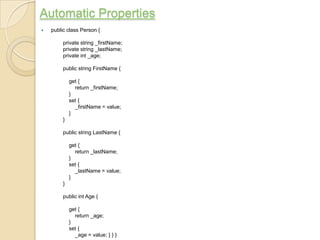
Automatic Properties
   public class Person {

         private string _firstName;
         private string _lastName;
         private int _age;

         public string FirstName {

             get {
               return _firstName;
             }
             set {
               _firstName = value;
             }
         }

         public string LastName {

             get {
               return _lastName;
             }
             set {
               _lastName = value;
             }
         }

         public int Age {

             get {
               return _age;
             }
             set {
               _age = value; } } }
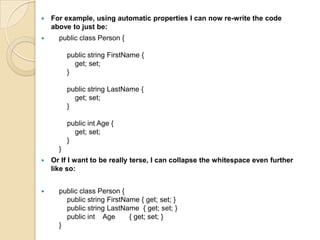
   For example, using automatic properties I can now re-write the code
    above to just be:
     public class Person {

          public string FirstName {
            get; set;
          }

          public string LastName {
            get; set;
          }

          public int Age {
            get; set;
          }
      }
   Or If I want to be really terse, I can collapse the whitespace even further
    like so:


     public class Person {
        public string FirstName { get; set; }
        public string LastName { get; set; }
        public int Age       { get; set; }
      }
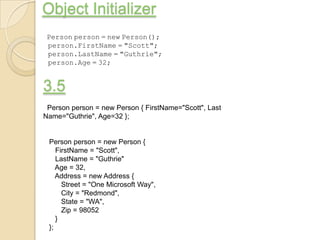
Object Initializer
 Person person = new Person();
 person.FirstName = "Scott";
 person.LastName = "Guthrie";
 person.Age = 32;


3.5
 Person person = new Person { FirstName="Scott", Last
Name="Guthrie", Age=32 };


 Person person = new Person {
    FirstName = "Scott",
    LastName = "Guthrie"
    Age = 32,
    Address = new Address {
      Street = "One Microsoft Way",
      City = "Redmond",
      State = "WA",
      Zip = 98052
    }
 };
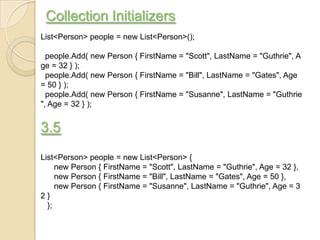
Collection Initializers
List<Person> people = new List<Person>();

  people.Add( new Person { FirstName = "Scott", LastName = "Guthrie", A
ge = 32 } );
  people.Add( new Person { FirstName = "Bill", LastName = "Gates", Age
= 50 } );
  people.Add( new Person { FirstName = "Susanne", LastName = "Guthrie
", Age = 32 } );


3.5
List<Person> people = new List<Person> {
     new Person { FirstName = "Scott", LastName = "Guthrie", Age = 32 },
     new Person { FirstName = "Bill", LastName = "Gates", Age = 50 },
     new Person { FirstName = "Susanne", LastName = "Guthrie", Age = 3
2}
  };
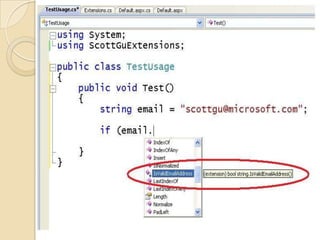
Extension Methods
Extension methods allow developers to add new methods to the public contract of an
existing CLR type, without having to sub-class it or recompile the original type.

Example:
string email = Request.QueryString["email"];

if ( EmailValidator.IsValid(email) ) {

}

3.5
string email = Request.QueryString["email"];
if ( email.IsValidEmailAddress() ) {
}


public static class ScottGuExtensions
{
  public static bool IsValidEmailAddress(this string s)
  {
     Regex regex = new Regex(@"^[w-.]+@([w-]+.)+[w-]{2,4}$");
     return regex.IsMatch(s);
  }
}
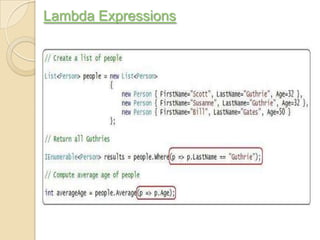
Lambda Expressions
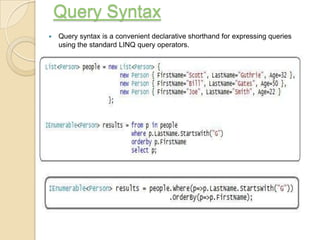
Query Syntax
   Query syntax is a convenient declarative shorthand for expressing queries
    using the standard LINQ query operators.
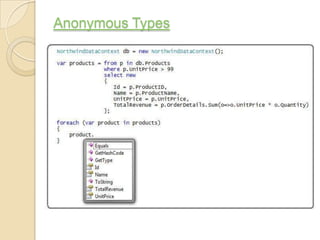
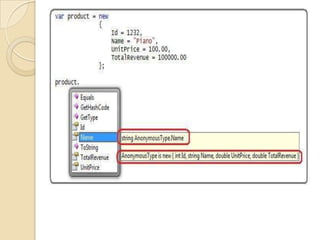
Anonymous Types
C# 3.5 Features

C# 3.5 Features

  • 1.
    .Net 3.5 -Prabhakaran
  • 2.
  • 3.
    What is newin 3.5 C#?  Implicitly Typed Local Variables  Automatic Properties  Object Initializer  Collection Initializers  Extension Methods  Lambda Expressions  Query Syntax  Anonymous Types  Expression Trees
  • 4.
    Implicitly Typed LocalVariables Examples: var i = 5; var s = "Hello"; var d = 1.0; var numbers = new int[] {1, 2, 3}; var orders = new Dictionary<int,Order>(); Are equivalent to: int i = 5; string s = "Hello"; double d = 1.0; int[] numbers = new int[] {1, 2, 3}; Dictionary<int,Order> orders = new Dictionary<int,Order>(); Errors: var x; // Error, no initializer to infer type from var y = {1, 2, 3}; // Error, collection initializer not permitted var z = null; // Error, null type not permitted
  • 5.
    Automatic Properties  public class Person { private string _firstName; private string _lastName; private int _age; public string FirstName { get { return _firstName; } set { _firstName = value; } } public string LastName { get { return _lastName; } set { _lastName = value; } } public int Age { get { return _age; } set { _age = value; } } }
  • 6.
    For example, using automatic properties I can now re-write the code above to just be:  public class Person { public string FirstName { get; set; } public string LastName { get; set; } public int Age { get; set; } }  Or If I want to be really terse, I can collapse the whitespace even further like so:  public class Person { public string FirstName { get; set; } public string LastName { get; set; } public int Age { get; set; } }
  • 7.
    Object Initializer Personperson = new Person(); person.FirstName = "Scott"; person.LastName = "Guthrie"; person.Age = 32; 3.5 Person person = new Person { FirstName="Scott", Last Name="Guthrie", Age=32 }; Person person = new Person { FirstName = "Scott", LastName = "Guthrie" Age = 32, Address = new Address { Street = "One Microsoft Way", City = "Redmond", State = "WA", Zip = 98052 } };
  • 8.
    Collection Initializers List<Person> people= new List<Person>(); people.Add( new Person { FirstName = "Scott", LastName = "Guthrie", A ge = 32 } ); people.Add( new Person { FirstName = "Bill", LastName = "Gates", Age = 50 } ); people.Add( new Person { FirstName = "Susanne", LastName = "Guthrie ", Age = 32 } ); 3.5 List<Person> people = new List<Person> { new Person { FirstName = "Scott", LastName = "Guthrie", Age = 32 }, new Person { FirstName = "Bill", LastName = "Gates", Age = 50 }, new Person { FirstName = "Susanne", LastName = "Guthrie", Age = 3 2} };
  • 9.
    Extension Methods Extension methodsallow developers to add new methods to the public contract of an existing CLR type, without having to sub-class it or recompile the original type. Example: string email = Request.QueryString["email"]; if ( EmailValidator.IsValid(email) ) { } 3.5 string email = Request.QueryString["email"]; if ( email.IsValidEmailAddress() ) { } public static class ScottGuExtensions { public static bool IsValidEmailAddress(this string s) { Regex regex = new Regex(@"^[w-.]+@([w-]+.)+[w-]{2,4}$"); return regex.IsMatch(s); } }
  • 11.
  • 12.
    Query Syntax  Query syntax is a convenient declarative shorthand for expressing queries using the standard LINQ query operators.
  • 13.