AutoCAD Basic TOOLS and COMMANDS
Drafting
&
CAD
Technology
Major
for
college
DRAWING AND
MODIFYING
COMMANDS
Drafting
&
CAD
Technology
Major
for
college
DRAW
Drafting
&
CAD
Technology
Major
for
college
Drafting
&
CAD
Technology
Major
for
college
DRAW COMMANDS
Drafting
&
CAD
Technology
Major
for
college
COMMANDS
SHORTCUT
KEYS
DESCRIPTION
A. Linear Commands
LINE L
Draws individual or multiple line segments by picking
several random points.
POLYLINE PL
Creates a 2D polyline, a single object that is composed of line
and arc segments.
(A 2D polyline is a connected sequence of segments created as
a single planar object. You can create straight line segments,
arc segments, or a combination of the two.)
MLINE ML
Creates multiple parallel lines.
Use MLSTYLE command to change the Multiline Style settings.
DRAW COMMANDS
Drafting
&
CAD
Technology
Major
for
college
COMMANDS
SHORTCUT
KEYS
DESCRIPTION
A. Linear Commands
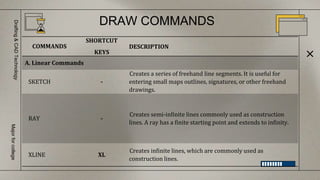
SKETCH -
Creates a series of freehand line segments. It is useful for
entering small maps outlines, signatures, or other freehand
drawings.
RAY -
Creates semi-infinite lines commonly used as construction
lines. A ray has a finite starting point and extends to infinity.
XLINE XL
Creates infinite lines, which are commonly used as
construction lines.
DRAW COMMANDS
Drafting
&
CAD
Technology
Major
for
college
COMMANDS
SHORTCUT
KEYS
DESCRIPTION
B. Curve Commands
CIRCLE C Constructs circles of specified radius or diameter.
ELLIPSE EL Creates an ellipse or an elliptical arc.
SPLINE SPL
Creates a smooth curve that passes through or near a set of fit
points, or that is defined by the vertices in a control frame.
DRAW COMMANDS
Drafting
&
CAD
Technology
Major
for
college
COMMANDS
SHORTCUT
KEYS
DESCRIPTION
B. Curve Commands
ARC A Creates an arc, default direction is counterclockwise.
DONUT DO Close polyline composed of wide arc segments.
REVCLOUD -
Creates a polyline of sequential arcs to form a cloud-shaped
object.
DRAW COMMANDS
Drafting
&
CAD
Technology
Major
for
college
COMMANDS
SHORTCUT
KEYS
DESCRIPTION
C. Special Commands
RECTANGLE REC Draws rectangular object.
POLYGON POL
Draws 2D with 3 to 1024 sides. All sides are equal and
equidistant from the center.
HATCH H
Fills an enclosed area or selected objects with a hatch pattern,
solid fill, or gradient fill. A hatch pattern acts as one unit,
unless when it is exploded.
MODIFY
Drafting
&
CAD
Technology
Major
for
college
MODIFY COMMANDS
Drafting
&
CAD
Technology
Major
for
college
COMMANDS
SHORTCUT
KEYS
DESCRIPTION
A. Commands to Duplicate Object/s
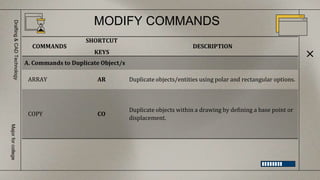
ARRAY AR Duplicate objects/entities using polar and rectangular options.
COPY CO
Duplicate objects within a drawing by defining a base point or
displacement.
MODIFY COMMANDS
Drafting
&
CAD
Technology
Major
for
college
COMMANDS
SHORTCUT
KEYS
DESCRIPTION
A. Commands to Duplicate Object/s
OFFSET O
Copy objects that are similar and parallel to existing entities at
a specified distance or through point.
MIRROR MI Create a reverse image of selected objects.
MODIFY COMMANDS
Drafting
&
CAD
Technology
Major
for
college
COMMANDS
SHORTCUT
KEYS
DESCRIPTION
B. Commands to Modify Object/s Orientation
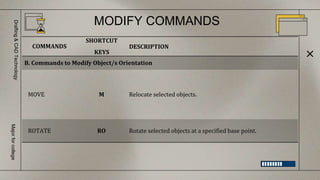
MOVE M Relocate selected objects.
ROTATE RO Rotate selected objects at a specified base point.
MODIFY COMMANDS
Drafting
&
CAD
Technology
Major
for
college
COMMANDS
SHORTCUT
KEYS
DESCRIPTION
C. Commands to Resize Object/s
SCALE SC Shrink or enlarge selected objects.
STRETCH S Resize selected portion of objects by using crossing window.
MODIFY COMMANDS
Drafting
&
CAD
Technology
Major
for
college
COMMANDS
SHORTCUT
KEYS
DESCRIPTION
D. Commands to Clean Corners
FILLET F Round or clean the edges of two selected.
CHAMFER CHA Allows you to draw an angled corner between two lines.
MODIFY COMMANDS
Drafting
&
CAD
Technology
Major
for
college
COMMANDS
SHORTCUT
KEYS
DESCRIPTION
E. Other Modify Commands
TRIM TR Cut objects from a specified cutting edge.
EXTEND EX Lengthen lines and curves up to a specified boundary.
BREAK BR Remove parts of objects.
MODIFY COMMANDS
Drafting
&
CAD
Technology
Major
for
college
COMMANDS
SHORTCUT
KEYS
DESCRIPTION
E. Other Modify Commands
JOIN J
Create one line, arc, elliptical arc, polyline or spline from
multiple like objects.
EXPLODE X Breaks a compound object into its component objects.
MATCHPROP MA Applies the properties of a selected object to other objects.
A. Command to edit polylines and splines: PEDIT, EXPLODE and
SPLINEDIT
B. Command to change position of endpoints: TRIM, EXTEND,
LENGTHEN, JOIN and GRIP
C. Command to mark /measure linear and curve: POINT, DIVIDE
and DISTANCE
D. Use of grips: STRETCH, MOVE, ROTATE, COPY, SCALE and MIRROR
E. Deleting and undeleting objects: ERASE, OOPS, UNDO and
REDO/MREDO
EDITING DRAW AND MODIFY COMMANDS
Drafting
&
CAD
Technology
Major
for
college
OTHER COMMANDS
FOR EDITING OBJECTS
Drafting
&
CAD
Technology
Major
for
college
OTHER COMMANDS FOR EDITING OBJECTS
Drafting
&
CAD
Technology
Major
for
college
COMMANDS
SHORTCUT
KEYS
DESCRIPTION
LENGTHEN LEN
Command to lengthen/shorten some linear and curves. Lengthen is
an alternative to using TRIM or EXTEND
Options:
Delta - changes the length of an object by a specified increment
Percent - sets the length of an object by a specified percentage of
its total length.
Total - sets the length of a selected object by specifying the total
absolute length from the fixed endpoint.
Dynamic - turns on Dynamic Dragging mode. You change
the length of a selected object by dragging one of its endpoints.
OTHER COMMANDS FOR EDITING OBJECTS
Drafting
&
CAD
Technology
Major
for
college
COMMANDS
SHORTCUT
KEYS
DESCRIPTION
POINT PO
Create a point objects. Points can act as nodes to which you
can snap objects.
DDPTYPE - modifies point size and style.
DISTANCE DI Measures the distance and angle between two points.
ERASE E
Erase objects from a drawing. ( or Select object/s and press
DELETE button on your keyboard)
ACTIVITY
Drafting
&
CAD
Technology
Major
for
college
Direction: Use different commands to create
different shapes and lines in AutoCAD.
Dimensioning, Leader Line and
Other Inquiry Commands
Drafting
&
CAD
Technology
Major
for
college
Drafting
&
CAD
Technology
Major
for
college
DIMENSIONS - are visual representation to describe the size and
location of each member of a structure. AutoCAD provides many
ways to dimensions. You can create dimensions for a wide variety
of object shapes in many different orientations.
Drafting
&
CAD
Technology
Major
for
college
A dimension style is a named collection of dimension settings that control
the appearance of dimensions. You create dimension styles to specify
the format of dimensions quickly, and to ensure that dimensions
conform to standards.
DIMENSION STYLES
CREATING A
TEXT
Drafting
&
CAD
Technology
Major
for
college
Drafting
&
CAD
Technology
Major
for
college
TEXT is used to label the various components of your drawing and to
create the necessary shop or field noted for fabrication and
construction of your design. It can be compressed, stretched, inclined,
mirrored, or drawn in a vertical column by applying a style.
Types of Text Command
Drafting
&
CAD
Technology
Major
for
college
1. MTEXT (T, MT) creates several paragraphs of text as a single
multiline text (MTEXT) object. With the built-in editor, you can
format the text appearance, colors, spacing, justification, style,
heigh, width, boundaries and other text attributes.
Guide in using MTEXT Command:
A. Command MTEXT (T, MT) (enter)
B. Pick two (2) points at the drawing area.
C. A TEXT EDITOR will appear.
Types of Text Command
Drafting
&
CAD
Technology
Major
for
college
Guide in using TEXT EDITOR:
1. Font style
2. Height
3. Text color
4. Justification (left, right, center or middle)
5. Close Text Editor
Types of Text Command
Drafting
&
CAD
Technology
Major
for
college
2. TEXT or DTEXT (DT) creates a single-line text object. Using
TEXT or DTEXT you can create one or more lines of text, where
each text line is an independent object that you can move,
format, or otherwise modify.
Types of Text Command
Drafting
&
CAD
Technology
Major
for
college
Guide in using DTEXT Command:
A. Command TEXT or DTEXT or DT (enter) (Note: if you don’t want
to change the
Justification and Style of the text proceed to step D.)
Select or type JUSTIFY (J) to change text justification (optional)
C. elect or type STYLE (S) to change text style (optional)
D. Pick a point
E. Type the text height (ex. 12 )
F. Type the rotation of the text. (ex. 0 )
JUSTIFY controls the justification of the text.
Enter an option
[Align/Fit/Center/Middle/Right/TL/TC/TR/ML/MC/MR
/BL/BC/BR]:
Types of Text Command
Drafting
&
CAD
Technology
Major
for
college
3. ARC ALIGNED TEXT (ARCTEXT) creates an arc aligned text
object that follows the curve of a selected arc.
Guide in using ARCTEXT:
1. Draw an ARC. (Note: you cannot use ARCTEXT command without
an arc)
2. Then command ARCTEXT.
3. And click the arc that you have created. (See Figure 14
to edit ArcAlignedText Workshop)
Types of Text Command
Drafting
&
CAD
Technology
Major
for
college
ACTIVITY
Drafting
&
CAD
Technology
Major
for
college
Direction: Based on the image on the monitor,
create four different arc text.
BORDERS
Drafting
&
CAD
Technology
Major
for
college
ACTIVITY
Drafting
&
CAD
Technology
Major
for
college
Direction: Plot and print your drawings on an
A4-size piece of paper.

2_CAD COMMANDS.pptx

Editor's Notes

  • #22 Point=pt open nodes on osnap
  • #25 DIMENSIONING is the process of adding measurement annotation to a drawing.
  • #26 Command: DIMSTYLE or D (enter) The Dimension Style Manager is displayed. - Creates new styles, sets the current style, modifies styles, sets overrides on the current style, and compares styles.