


2400 / 2420 / 2450
Performance Drives
Guide to Installation,
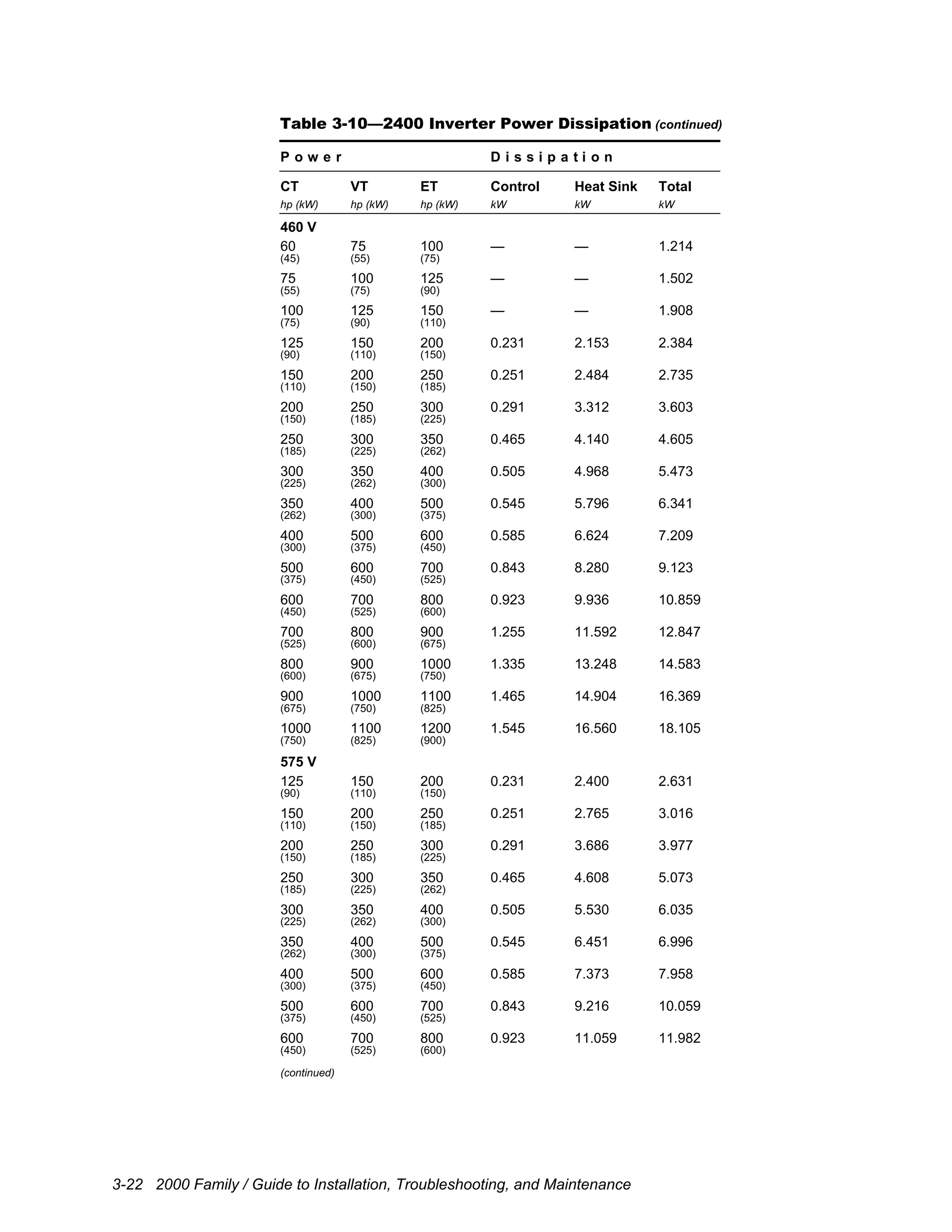
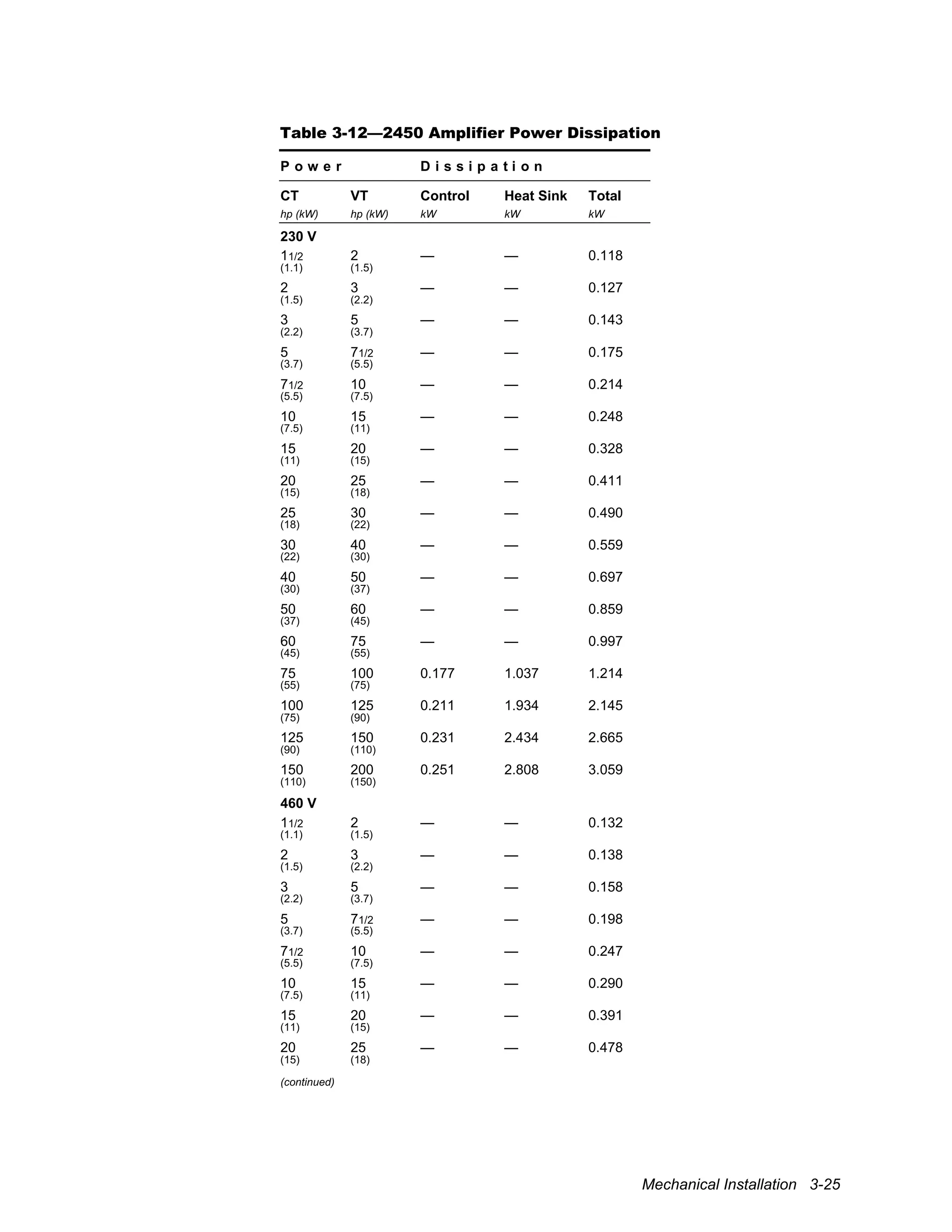
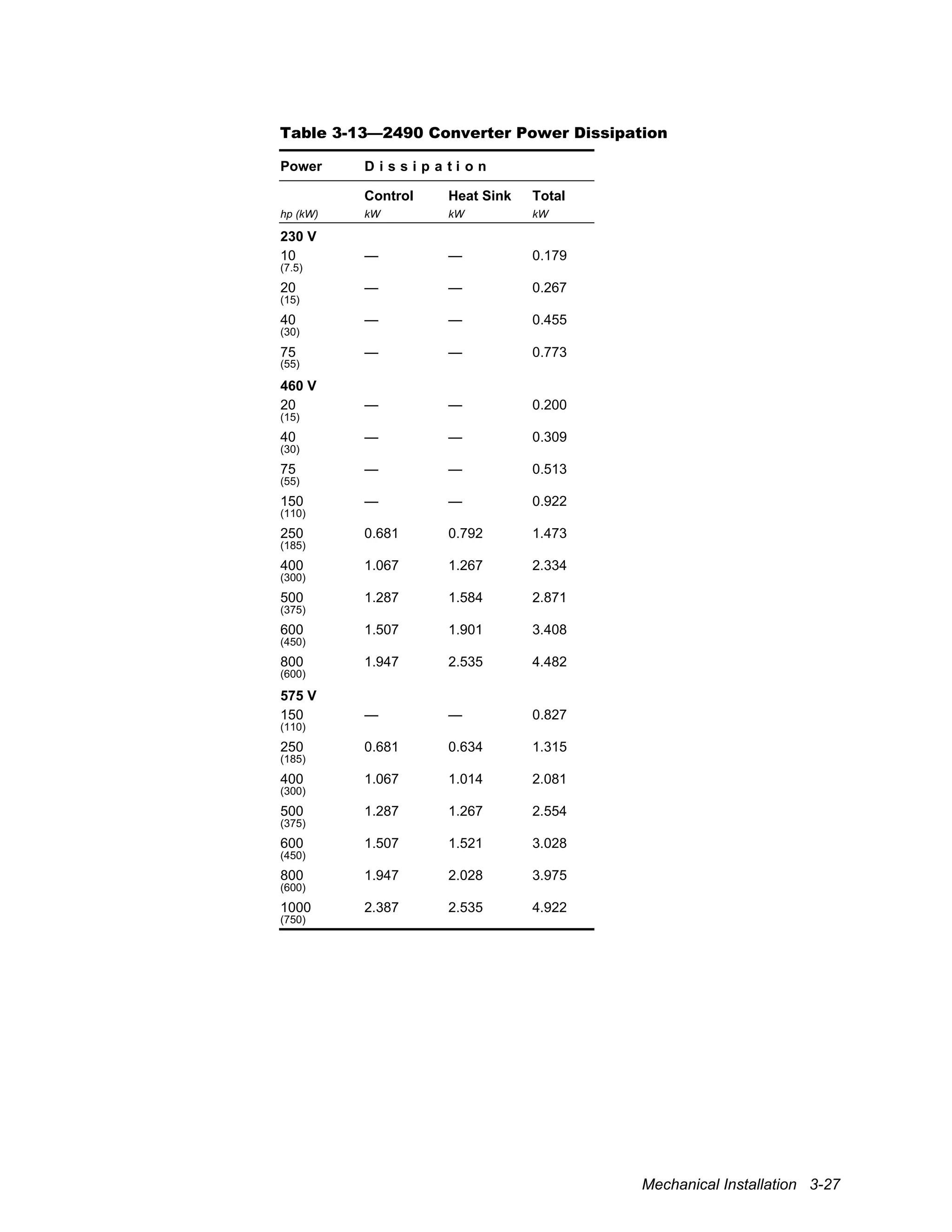
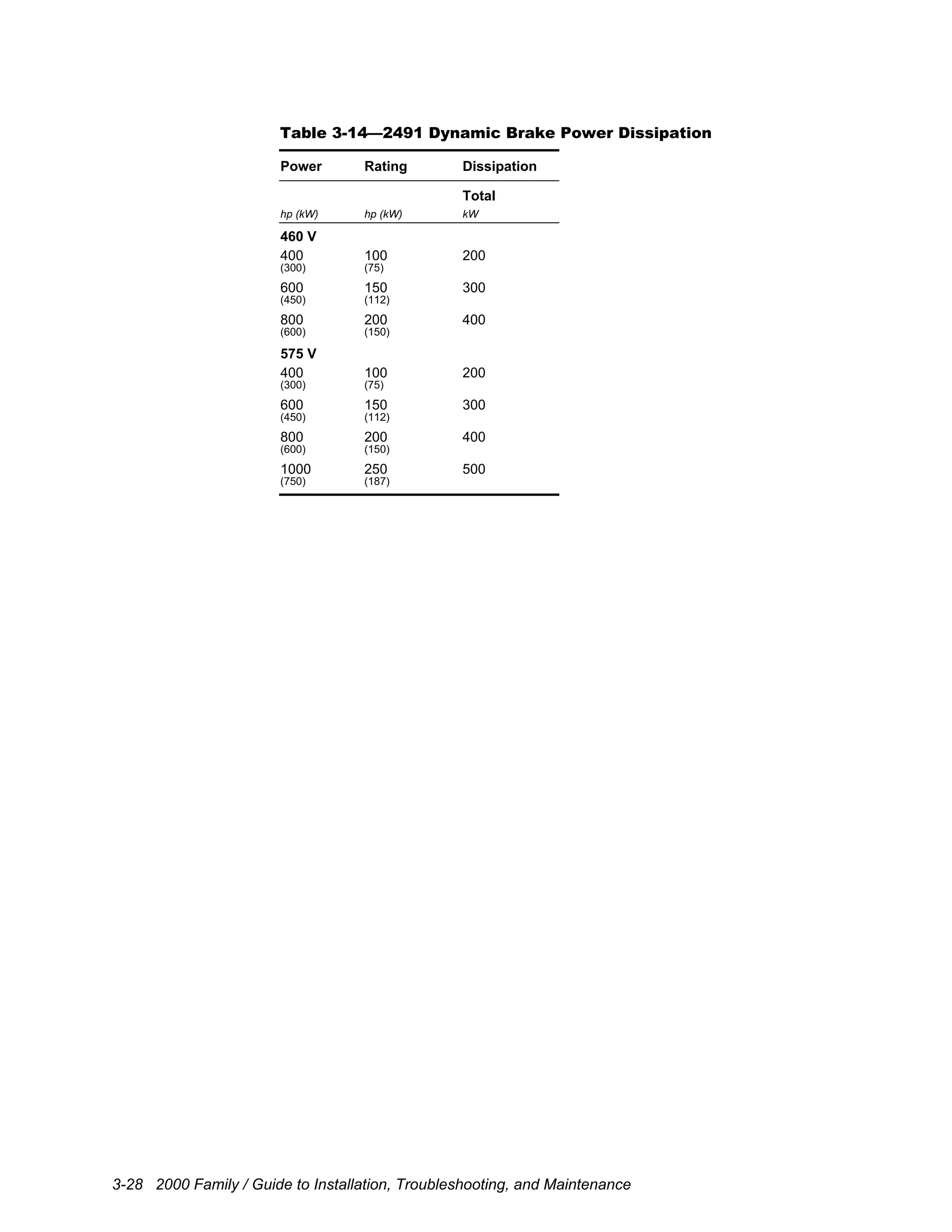
Troubleshooting,
and Maintenance
11/2 to 1300 hp
(1.1 to 975 kW)
Notices
Copyright © 2002 by UNICO, Incorporated.
All rights reserved. No part of this publication may be copied, reproduced, or reduced to
any electronic media or machine-readable format without the prior written permission of
UNICO, Inc.
The information contained in this manual is considered accurate to the best knowledge of
the supplier at the time of publication. The manufacturer, however, assumes no liability for
errors that may exist. The supplier reserves the right to change data and specifications
without notice.
All trade designations are provided without reference to the rights of their respective
owners.
Printed in the United States of America.
110318 ECL 001
2000.40–01 2/02
Safety Information
Table of Contents
Safety Information......................................................................................................i
Overview ................................................................................................................................... i
Conventions Used ..................................................................................................................... i
General Precautions ................................................................................................................. ii
Installation Precautions...........................................................................................................iii
Application Precautions.......................................................................................................... iv
Service Precautions.................................................................................................................. v
1 About the Manual........................................................................................1-1
1.1 Overview...................................................................................................................1-1
1.2 Contents ....................................................................................................................1-1
1.2.1 Intended Audience....................................................................................................1-2
2 Product Overview .......................................................................................2-1
2.1 Overview...................................................................................................................2-1
2.2 Unpacking.................................................................................................................2-1
2.2.1 Verify delivery..........................................................................................................2-2
2.2.2 Inspect for damage....................................................................................................2-2
2.2.3 Storage/Transportation .............................................................................................2-2
2.2.4 Nameplate Identification ..........................................................................................2-3
2.3 Family Overview ......................................................................................................2-5
2.3.1 Features.....................................................................................................................2-6
2.3.2 Drive Architecture ....................................................................................................2-8
2.4 Specifications..........................................................................................................2-12
3 Mechanical Installation ..............................................................................3-1
3.1 Overview...................................................................................................................3-1
3.2 Forms.........................................................................................................................3-1
3.3 Installation Site Considerations................................................................................3-1
3.3.1 Enclosure ..................................................................................................................3-1
3.3.2 Operating Environment ............................................................................................3-1
3.3.3 Cooling .....................................................................................................................3-2
3.4 Layout Considerations..............................................................................................3-4
3.4.1 Dimensions and Weights..........................................................................................3-4
3.4.2 Space Requirements .................................................................................................3-4
3.4.3 Arrangement and Orientation...................................................................................3-4
3.4.4 Cable Routing ...........................................................................................................3-5
3.5 Installation Procedure...............................................................................................3-6
3.5.1 Flush Mounting (all forms) ......................................................................................3-6
3.5.2 Foot Mounting (Forms 5
, 6
, and 7
) ...................................................................3-6
3.5.3 Flange Mounting (Forms 5
, 6
, and 7
)................................................................3-7
3.5.4 Bus and Ground Bars (Forms 5
, 6
, and 7
).........................................................3-7
2000 Family / Guide to Installation, Troubleshooting, and Maintenance
4 Electrical Installation..................................................................................4-1
4.1 Overview...................................................................................................................4-1
4.2 Wiring Standards and Codes....................................................................................4-1
4.3 Insulation Tests.........................................................................................................4-1
4.4 Ground Connections.................................................................................................4-2
4.4.1 Ground the Drive Units ............................................................................................4-2
4.4.2 Ground the Power Supply ........................................................................................4-3
4.4.3 Ground the Isolation Transformer............................................................................4-3
4.4.4 Ground the Motor and Transducer...........................................................................4-3
4.4.5 Ground the 115 V AC Supply..................................................................................4-3
4.4.6 Connect the Control Grounds...................................................................................4-3
4.5 Input Power Supply Connections (2420 and 2490).................................................4-4
4.5.1 Power Source Conditioning .....................................................................................4-5
4.5.2 Connect the Power Supply .......................................................................................4-6
4.5.3 Input Protection.........................................................................................................4-6
4.6 Motor Connections (2400, 2420, and 2450)............................................................4-8
4.6.1 Motor Field Power Supply (2450 only)...................................................................4-8
4.7 Dynamic Braking Connections (2420, 2490, and 2491).........................................4-9
4.7.1 Dynamic Braking Resistor .......................................................................................4-9
4.7.2 Fiber-Optic Interface (2491 only)..........................................................................4-10
4.8 DC Bus Connections (all units)..............................................................................4-10
4.8.1 Bus Discharge Circuit.............................................................................................4-11
4.9 115 V AC Power Supply Connections (all units except 2493).............................4-16
4.10 Converter Interface Connections............................................................................4-20
4.11 Control Module Connections .................................................................................4-36
4.11.1 Wiring Precautions .................................................................................................4-36
4.11.2 Asynchronous Serial Connections .........................................................................4-41
4.11.3 Synchronous Serial Interface (SSI) Connections ..................................................4-43
4.11.4 Real-Time Clock Connections ...............................................................................4-45
4.11.5 Analog I/O Connections.........................................................................................4-46
4.11.6 Digital I/O Connections..........................................................................................4-47
4.11.7 Incremental Encoder Interface Connections (Expandable Control Module) .......4-50
4.12 Feedback Modules..................................................................................................4-51
4.12.1 Incremental Encoder (5 V / 317685 and 15 V / 320106)......................................4-51
4.12.2 Incremental Encoder with Repeater (5 V / 317241)..............................................4-51
4.12.3 Serial Sincos Encoder Interface Modules (Asynchronous / 320448 and
Synchronous / 322173)...........................................................................................4-55
4.12.4 Resolver Interface Modules....................................................................................4-56
4.12.5 Serial Absolute Encoder Interface (321849) .........................................................4-58
4.12.6 Analog Interface Module (319354)........................................................................4-59
4.13 Communication Modules .......................................................................................4-61
4.13.1 Serial Communication Module (318826) ..............................................................4-61
4.13.2 Fiber-Optic Communication Module (318816).....................................................4-63
4.13.3 Remote I/O Communication Module (317848).....................................................4-65
4.13.4 Modbus®
Plus Communication Module (319788) ................................................4-67
4.13.5 ControlNet™
Communication Module (321812)...................................................4-68
4.13.6 Profibus Communication Module (321560)..........................................................4-70
4.13.7 Ethernet Communication Module (321228)..........................................................4-72
Safety Information
5 Troubleshooting/Maintenance..................................................................5-1
5.1 Overview...................................................................................................................5-1
5.2 Troubleshooting........................................................................................................5-1
5.2.1 Theory of Operation .................................................................................................5-1
5.2.2 Rectifier Checking Procedure (2420 and 2490) ....................................................5-14
5.2.3 Transistor Checking Procedure (2400 and 2420)..................................................5-16
5.3 Maintenance............................................................................................................5-18
5.3.1 Working Life...........................................................................................................5-18
5.3.2 Battery Life.............................................................................................................5-18
5.3.3 Disposal...................................................................................................................5-18
5.3.4 Spare Parts ..............................................................................................................5-18
2000 Family / Guide to Installation, Troubleshooting, and Maintenance
Safety Information i
Safety Information
Overview
This section states important safety information that must be followed when installing,
operating, and servicing drive units from the 2000 family. Study this information
carefully before working on or with the units. Failure to follow these instructions may
lead to personal injury, death, or damage to the units, motors, or driven equipment.
Additional safety instructions specific to the application software can be found in the
application documentation. Please study and follow those instructions as well.
Conventions Used
The following notation convention is used throughout this manual to indicate information
important to personal safety or machine hazards.
!
Attention
Identifies information about practices or circumstances that can lead to
personal injury or death, property damage, or economic loss.
ii 2000 Family / Guide to Installation, Troubleshooting, and Maintenance
General Precautions
!
Attention
Only qualified personnel with the proper skills, instruction, and familiarity
with the drive units and their applications should install, start up, operate,
troubleshoot, and maintain a drive system. You must be familiar with the
electrical and mechanical components of the system to perform the
procedures outlined in this manual. Failure to comply may result in
personal injury, death, and/or equipment damage.
!
Attention
Failure to take proper precautions for electrical hazard could cause injury or
death.
!
Attention
Failure to follow industry safety standards and instructions in this manual
could damage drive units and void the manufacturer’s warranty.
!
Attention
Drive units may be sensitive to electrostatic discharge. Static precautions
are required when servicing or repairing a unit.
!
Attention
If an aluminum electrolytic capacitor in a drive unit fails from a build-up of
internal pressure, a safety vent will operate, spraying electrolyte vapor from
the capacitor. If a capacitor vents, avoid contact with the liquid, avoid
inhaling the vapors, and ventilate the area. If your skin comes in contact
with the electrolyte, flush it immediately with cold water. If electrolyte gets
in your eyes, immediately remove any contact lenses and flush the open
eyes with plenty of clean water. If electrolyte is ingested, dilute it by
drinking warm water and seek immediate medical attention.
!
Attention
Equipment is intended for fixed, permanent connection to earthed three-
phase supply mains. Use of EMC filters along with the equipment will
increase leakage current in the protective conductor and may affect
compatibility with residual-current-operated protective devices.
Safety Information iii
Installation Precautions
!
Attention
An incorrectly installed or operated drive unit can result in damage to the
equipment it controls. Make certain installation and operating specifications
are followed.
!
Attention
To provide protection against electrical shock, drive units must be mounted
in an enclosure meeting at least the requirements of Protective Type IP20
(or NEMA equivalent) according to EN60529 and with top surfaces
meeting at least the requirements of IP40 (or NEMA equivalent). It is
recommended that a key or tool be required to open the enclosure and that
enclosure doors be interlocked with the electrical supply disconnect.
!
Attention
The drive units and associated equipment must be properly earth grounded.
!
Attention
Any site insulation tests must be performed before making electrical
connections to the drive units.
!
Attention
Drive units are not equipped with supply-disconnecting devices. An
external supply-disconnecting device must be provided to isolate incoming
electrical supplies during installation and maintenance work. This device
should comply with the requirements of EN 60204-1 as well as all
applicable national and local regulations.
iv 2000 Family / Guide to Installation, Troubleshooting, and Maintenance
Application Precautions
!
Attention
Emergency stop devices shall be located at each operator control station and
at other operating stations where emergency stop may be required. Control
inputs and keypad motor-control functions do not generate an emergency
stop of the motor and do not remove power that can cause hazardous
conditions. Regardless of the operating state, a drive unit’s output terminals
may be at dangerous voltage levels whenever input power is applied and the
bus is charged.
!
Attention
Drive unit functionality depends upon the application software installed.
Some application software offers automatic restart functions that allow the
unit to reset and resume operation after a fault. These functions must not be
enabled when hazardous conditions might arise from such action. Certain
features may present additional hazardous situations. Refer to the associated
application documentation for further safety information.
Safety Information v
Service Precautions
!
Attention
Always disconnect and lock out all electrical supplies before working on a
drive unit or associated equipment. Do this before touching any electrical or
mechanical components.
!
Attention
High voltage may be present even when all electrical power supplies are
disconnected. After switching off electrical power, wait at least 15 minutes
for bus circuit capacitors to discharge before working on the unit or
associated equipment. Use an appropriate voltmeter to further verify that
capacitors are discharged before beginning work. Do not rely exclusively
on bus voltage indicators. Dangerous voltage levels may remain even when
the indicators are off.
!
Attention
High voltage may be present at the motor output terminals (U, V, W)
whenever input power is applied, regardless of whether the motor is
moving or not.
!
Attention
Before energizing the motor, verify that there are no loose components
associated with the drive train and that motor motion will not result in
injury or damage to the equipment.
Safe Service Practices
Follow industry-recognized safety procedures:
• Use only one hand to hold test equipment probes
• Wear approved eye protection
• Stand on insulated material
• Use an isolated oscilloscope
• Keep unnecessary personnel out of the work area
• Never leave a drive cabinet open or unattended
vi 2000 Family / Guide to Installation, Troubleshooting, and Maintenance
About the Manual 1-1
1 About the Manual
1.1 Overview
This chapter describes the contents and intended audience of this document.
1.2 Contents
The manual provides the instructions and technical information necessary to install and
maintain the hardware from UNICO’s 2000 family of drives. Specifically, the manual
pertains to the units listed in Table 1-1.
Table 1-1—2000 Family
Model Description
2400 Modular AC Inverter
2420 Integrated AC Drive
2450 Modular DC Amplifier
2490 Modular Converter
2491 Dynamic Brake
2493 Capacitor Bank
What’s covered
• Safety Instructions, discusses safety hazards and procedures important to anyone
working with the drive units
• Chapter 2, Product Overview, tells how to receive drive units and provides an
overview of their architecture, features, and specifications
• Chapter 3, Mechanical Installation, provides instructions on physically installing
drive units
• Chapter 4, Electrical Installation, explains how to make electrical connections
• Chapter 5, Troubleshooting/Maintenance, covers basic hardware troubleshooting
and maintenance and lists field-replaceable components
What’s not covered
This manual does not address aspects of the drive units that depend upon application
software. Please refer to the application documentation for the following:
• Application-specific control signal wiring and definitions
• Operator interface instructions
• Start-up procedure
• Detailed description of features and modes of operation
• Parameter descriptions
• Detailed fault identification and troubleshooting
This manual is not intended to provide in-depth service instructions. For service beyond
that described in this manual, please contact UNICO or your representative.
1-2 2000 Family / Guide to Installation, Troubleshooting, and Maintenance
1.2.1 Intended Audience
The manual is intended for anyone who will be installing, operating, or maintaining drive
units. Installation should be performed by qualified electrical personnel to ensure that
correct electrical practices and applicable electrical codes are applied.
The audience is expected to have a basic knowledge of physical and electrical
fundamentals, electrical wiring practices and components, and electrical schematics.
Follow instructions
You can prevent injury and damage to the drive units or equipment by carefully
following the procedures outlined in this manual.
Follow regulations
All electrical work should conform to the National Electrical Code as well as all state and
local government regulations. Please familiarize yourself with these regulations.
Read both manuals first
Read both this manual and the application manual entirely before installing drive units.
Product Overview 2-1
2 Product Overview
2.1 Overview
This chapter provides an overview of the 2000 family of drives. The 2000 family consists
of both modular drives, which are made up of separate converter and either inverter or
amplifier sections, as well as integrated drives that combine those sections. The term
unit refers to any of these modular or integrated components. The chapter provides
instructions on unpacking, identifying, storing, and transporting drive units and
familiarizes the user with their basic features, architecture, and specifications.
2.2 Unpacking
After opening the package, you should verify delivery and inspect all drive units before
installing, storing, or transporting them.
When unpacking a drive unit, remove any screws that may be securing the unit to its
shipping supports. Two or more people are required to safely lift the unit from its
packaging.
!
Attention
Drive units may weigh a considerable amount. To avoid the risk of personal
injury and/or product damage, two or more people should work in unison
when lifting and maneuvering the unit. Follow industry-prescribed safe-
lifting practices at all times.
!
Attention
Do not lift a unit by its cover, even when it is secured by retaining screws.
The cover is not intended to support the weight of the unit. Always rest the
unit on its back, never face down or on its side.
2-2 2000 Family / Guide to Installation, Troubleshooting, and Maintenance
2.2.1 Verify delivery
Check that you received the drive unit that was ordered as well as any options or
accessories. You should receive two manuals (this installation guide and an application
guide) with your order. Contact your supplier regarding any discrepancies.
2.2.2 Inspect for damage
Inspect the drive unit for any damage that may have occurred during shipment. Remove
the cover and visually examine the insides for obvious problems. If damage is found, do
not operate the unit. Report the problem immediately to the supplier.
2.2.3 Storage/Transportation
If the drive unit must be stored or transported to another location before installation,
check that the ambient conditions are acceptable according to Table 2-1. Choose a
storage location that is clean, dry, and noncorrosive. Repack and store the unit in its
original packaging.
Table 2-1—Storage/Transportation Environment Specifications
Temperature: –13° to 158° F (–25° to 70° C)
Relative humidity: 5% to 95%, noncondensing
Air pressure: 20.67" to 31.30" (70 to 106 kPa)
Product Overview 2-3
2.2.4 Nameplate Identification
Each unit is labeled with an identification label that indicates its part number, serial
number, and input/output ratings. Sample identification labels are shown in Figure 2-1
through Figure 2-4. Expanded model numbers, similar to those shown in Figure 2-5
through Figure 2-8, are often used in ordering. The expanded model number encodes the
type of unit and its configuration, including voltage, power, overload, control type,
feedback and packaging options, and application software.
Figure 2-1—Modular AC Inverter Identification Label
Figure 2-2—Integrated AC Drive Identification Label
Figure 2-3—Modular DC Amplifier Identification Label
Figure 2-4—Modular Converter Identification Label
2-4 2000 Family / Guide to Installation, Troubleshooting, and Maintenance
Figure 2-5—Modular AC Inverter Model Number
001
002
003
005
007
010
015
020
025
030
040
050
060
075
100
125
150
200
250
300
350
400
500
600
700
800
900
10X
11X
12X
13X
Package
230
460
575
FXX = special feedback
F00 = no (additional) feedback
F01 = 5 V incremental encoder
F02 = 5 V incremental encoder w/repeater
F03 = 4 V in/2 V out, 5 kHz resolver
F04 = 4 V in/2 V out, 5 kHz dual resolver
F05 = serial absolute encoder
F06 = 15 V incremental encoder
F07 = 5 V serial sincos encoder
F08 = 12 V serial sincos encoder
F09 = 2-input/2-output analog interface
F10 = 4 V in/4 V out, 5 kHz resolver
F11 = 4 V in/4 V out, 5 kHz dual resolver
Voltage Power Overload Control
2400
Feedback Module(s)
C = constant torque
(150% overload)
V = variable torque
(120% overload)
E = extended torque
(110% overload)
Software
CXX = special control
S = standard 40 MHz control
E = expandable 40 MHz control
D = dual 40 MHz control
00 = no optional communication
01 = w/serial communication
02 = w/fiber-optic communication
03 = w/Remote I/O communication
04 = w/Modbus Plus communication
05 = w/ControlNet communication
06 = w/Profibus communication
07 = w/Ethernet communication
C00 = flange-mounted enclosed chassis
C01 = foot-mounted enclosed chassis
Pxx = package enclosure
x00 = enclosure only
x10 = w/option package 10
x11 = w/option package 11
x12 = w/option package 12
x20 = w/option package 20
x21 = w/option package 21
x22 = w/option package 22
x50 = w/option package 50
x51 = w/option package 51
x52 = w/option package 52
x53 = w/option package 53
Figure 2-6—Integrated AC Drive Model Number
001
002
003
005
007
010
015
020
025
030
040
050
060
Package
230
460
Voltage Power Overload Control
2420
Feedback Module(s)
C = constant torque
(150% overload)
V = variable torque
(120% overload)
Software
CXX = special control
S = standard 40 MHz control
E = expandable 40 MHz control
D = dual 40 MHz control
00 = no optional communication
01 = w/serial communication
02 = w/fiber-optic communication
03 = w/Remote I/O communication
04 = w/Modbus Plus communication
05 = w/ControlNet communication
06 = w/Profibus communication
07 = w/Ethernet communication
FXX = special feedback
F00 = no (additional) feedback
F01 = 5 V incremental encoder
F02 = 5 V incremental encoder w/repeater
F03 = 4 V in/2 V out, 5 kHz resolver
F04 = 4 V in/2 V out, 5 kHz dual resolver
F05 = serial absolute encoder
F06 = 15 V incremental encoder
F07 = 5 V serial sincos encoder
F08 = 12 V serial sincos encoder
F09 = 2-input/2-output analog interface
C00 = flange-mounted enclosed chassis
Pxx = package enclosure
Dxx = desk enclosure
x00 = enclosure only
x10 = w/option package 10
x11 = w/option package 11
x12 = w/option package 12
x20 = w/option package 20
x21 = w/option package 21
x22 = w/option package 22
F10 = 4 V in/4 V out, 5 kHz resolver
F11 = 4 V in/4 V out, 5 kHz dual resolver
Figure 2-7—Modular DC Amplifier Model Number
001
002
003
005
007
010
015
020
025
030
040
050
060
075
125
100
150
200
250
300
350
400
500
600
700
800
900
Package
230
460
Voltage Power Overload Control
2450
Feedback Module(s)
C = constant torque
(150% overload)
V = variable torque
(120% overload)
Software
CXX = special control
S = standard 40 MHz control
E = expandable 40 MHz control
D = dual 40 MHz control
00 = no optional communication
01 = w/serial communication
02 = w/fiber-optic communication
03 = w/Remote I/O communication
04 = w/Modbus Plus communication
05 = w/ControlNet communication
06 = w/Profibus communication
07 = w/Ethernet communication
FXX
F00 = no (additional) feedback
F01 = 5 V incremental encoder
F02 = 5 V incremental encoder w/repeater
F03 = 4 V in/2 V out, 5 kHz resolver
F04 = 4 V in/2 V out, 5 kHz dual resolver
F05 = serial absolute encoder
F06 = 15 V incremental encoder
F07 = 5 V serial sincos encoder
F08 = 12 V serial sincos encoder
F09 = 2-input/2-output analog interface
F10 = 4 V in/4 V out, 5 kHz resolver
F11 = 4 V in/4 V out, 5 kHz dual resolver
C00 = flange-mounted enclosed chassis
C01 = foot-mounted enclosed chassis
Pxx = package enclosure
x00 = enclosure only
x10 = w/option package 10
x11 = w/option package 11
x12 = w/option package 12
x20 = w/option package 20
x21 = w/option package 21
x22 = w/option package 22
Product Overview 2-5
Figure 2-8—Modular Converter Model Number
010
020
040
075
150
250
400
500
600
800
10X
230
460
575
Voltage Power Type
2490
C = converter w/o dynamic braking
B = converter w/dynamic braking
2.3 Family Overview
The 2000 family of performance drives provides digital control of AC induction, AC
synchronous, brushless servo, and DC industrial motors. The drives combine the latest
insulated-gate-bipolar-transistor (IGBT), pulse-width modulation (PWM), and digital
signal processor (DSP) technologies with digital-current-regulator (DCR) or digital-
space-vector (DSV) control to deliver optimum motor performance, complete
programmability, and simplicity of operation.
The family is comprised of the 2490 modular converters, the 2400 modular AC inverters,
the 2420 integrated AC drives, and the 2450 modular DC amplifiers. The drive family
shares a common architecture that provides a high degree of internal consistency. By
combining this core drive topology in a variety of combinations, the 2000 family
furnishes flexible, efficient, and cost-effective solutions to a variety of application needs.
Single converters can be used to power multiple AC inverters and/or DC amplifiers using
a common bus that allows power to be recirculated between units. Modular inverters can
be used in a back-to-back configuration as a regenerative drive. Table 2-2 summarizes the
various models within the family.
Table 2-2—2000 Family Summary
Model Description
Input
Voltages
Power
Range
2400 Modular AC Inverter 310/510/620/780 V DC 11/2-1300 hp
2420 Integrated AC Drive 230/380/460 V AC 11/2-60 hp
2450 Modular DC Amplifier 310/510/620 V DC 11/2-900 hp
2490 Modular Converter 230/380/460/575 V AC 10-1000 hp
The 2000 family of drives provides several methods of handling regenerative energy
produced by overhauling loads or decelerating large inertias. The common-bus
architecture allows regenerated energy to recirculate to motoring drives that share the bus
connection. Dynamic brake devices are incorporated into the 2490 converters and 2420
drives. Separate 2491 dynamic braking units are available for high-power drives.
Optional 2493 capacitor bank units are available for storing and recirculating regenerated
energy from cyclic operation of inertial loads.
The 2490 converters and 2420 drives incorporate a link choke to reduce line harmonic
currents. Higher-power 2490 units provide optional six-pulse (three-phase) or twelve-
pulse (six-phase) connections to meet power quality requirements. The use of 2400
inverters in a regenerative configuration provides near-unity power factor at all loads and
speeds.
2-6 2000 Family / Guide to Installation, Troubleshooting, and Maintenance
2.3.1 Features
Motor-Independent Design
A unique design incorporating a proprietary digital current regulator and a state-of-the-art
controller allows the 2000 family of drives to operate any AC induction, AC
synchronous, brushless servo, or DC industrial motor without the current-loop setup
required by conventional drives. Digital space vector control can be selected for reduced
motor noise and low current ripple.
Application Flexibility
The 2000 family is extremely flexible and can accommodate a wide range of servo
applications. It can be configured to control torque, velocity, or position in applications
requiring either constant-, variable-, or extended-torque. Extensive controller options
enable the analog and digital I/O, feedback, and serial communication capabilities of the
drive to be tailored to the requirements of the application.
Auto Tuning
Once routine electrical connections have been made, simple-to-use auto-tuning features
adjust virtually all motor and inertial parameters to the given motor and connected load.
Simply enter a few values from the motor nameplate, and the advanced setup routines do
the rest. The drive is completely tuned within minutes.
Modular Design
The modular bus design of the 2000 family provides space, cost, and energy savings in
many applications. A drive system incorporates a separate 2490 converter unit that
rectifies incoming AC power to provide a common DC bus. The converter is comprised
of a full-wave diode or SCR bridge, a link choke, a bus-charging circuit, a dynamic
braking circuit, and a capacitor bank. The 2400 AC inverters and 2450 DC amplifiers
consist of IGBT-based, four-quadrant PWM amplifiers that operate from the DC bus of
the converter unit. High-power 2400 AC inverters are comprised of three separate poles,
while 2450 DC amplifiers consist of two separate poles.
Energy Savings
Multiple 2400 AC inverters and 2450 DC amplifiers can be operated from a single 2490
converter unit. This allows applications that naturally share regenerative energy, such as
an uncoiler and recoiler, to reuse the energy, rather than dissipate it as heat through
resistors. A much smaller converter is therefore needed than would be required using two
integrated drives. Alternately, an inverter can be used in place of the converter to
regenerate power to the line. In cyclic applications, an optional capacitor bank can be
used to store regenerated energy and to return stored energy to the load.
Power Quality
The 2000 family drives incorporate built-in link chokes that provide near-unity overall
power factor and low harmonic line currents at all motor speeds. High-power units also
offer a six-phase (twelve-pulse) configuration for further minimizing line harmonics in
critical applications. When a regenerative inverter is used in place of the converter, a
unity power factor is achieved and virtually all harmonic currents are eliminated.
Product Overview 2-7
Application-Specific Software
Application software determines the specific features and operation of a drive. A wide
variety of general-purpose and application-engineered software options enables each
drive to be tailored to specific customer requirements. Software is available for such
applications as test stands, elevators, press feeders, winders, rotary cutoffs, spindles,
flying cutoffs, and wire drawing, to name a few. Further customization is possible with
many programs using UEdit™
, a Windows-based programming tool that allows users to
extend an application using ladder diagrams and function blocks.
Optically Isolated Digital I/O
All digital inputs and outputs are optically isolated. Depending upon the controller, as
many as 32 individually isolated digital I/O are provided, each of which can be
programmed by the application to be an input or output. The voltage of each can be
chosen from a wide range of AC and DC values.
Transducer/Transducerless Design
The 2000 family drives can operate with or without a feedback transducer. An
incremental encoder is typically used for feedback, although absolute encoders, resolvers,
and serial sincos encoders are also supported. Transducerless operation is offered for less
demanding velocity-loop applications.
Serial Communications
Each drive includes a synchronous serial port for drive coordination and an asynchronous
serial port for general-purpose communication with process controllers, communication
networks, programmable controllers, and personal computers. Optional modules provide
connection to Remote I/O, ControlNet, Profibus, Modbus Plus, and Ethernet
communication networks.
Multiaxis Operation
Built-in synchronous communication channels allow drives to provide precisely
coordinated torque, velocity, and/or position control. A master clock line is used to
synchronize the sampling of data across the entire multidrive system.
Digital Setup, Easy Operation
A keypad and liquid crystal display provide a simple interface for setting and viewing
operating parameters and diagnostics. All controller settings are made digitally through
the keypad for precision and repeatability. Readouts and fault messages are displayed in
plain language.
2-8 2000 Family / Guide to Installation, Troubleshooting, and Maintenance
2.3.2 Drive Architecture
The general function of the drive is to convert a fixed voltage and frequency from an
electrical power source into a variable voltage and frequency for controlling a three-phase
AC motor or into variable field and armature voltages for controlling a DC motor.
Drives generally use an input section that handles power flow between an AC line and a
DC bus in addition to an output section that controls power flow between the DC bus and
an AC or DC motor. The input section of a drive can be either a rectifier or an inverter.
The rectifier provides a one-way flow of power from the AC line to the DC bus, while an
inverter allows power to flow in both directions.
The 2400 and 2450 drives are constructed as modular units with separate input (rectifier
or inverter) and output (inverter or amplifier) sections. The 2420 AC drives are
constructed as stand-alone integrated units that combine input (rectifier) and output
(inverter) sections. Nonregenerative drives use a 2490 converter to provide a rectified DC
bus to power one or more 2400 AC inverters or 2450 DC amplifiers. Line-regenerative
drives use a 2400 AC inverter to provide the power flow between the line and the DC bus
for one ore more 2400 AC inverters. The basic architecture of nonregenerative and line-
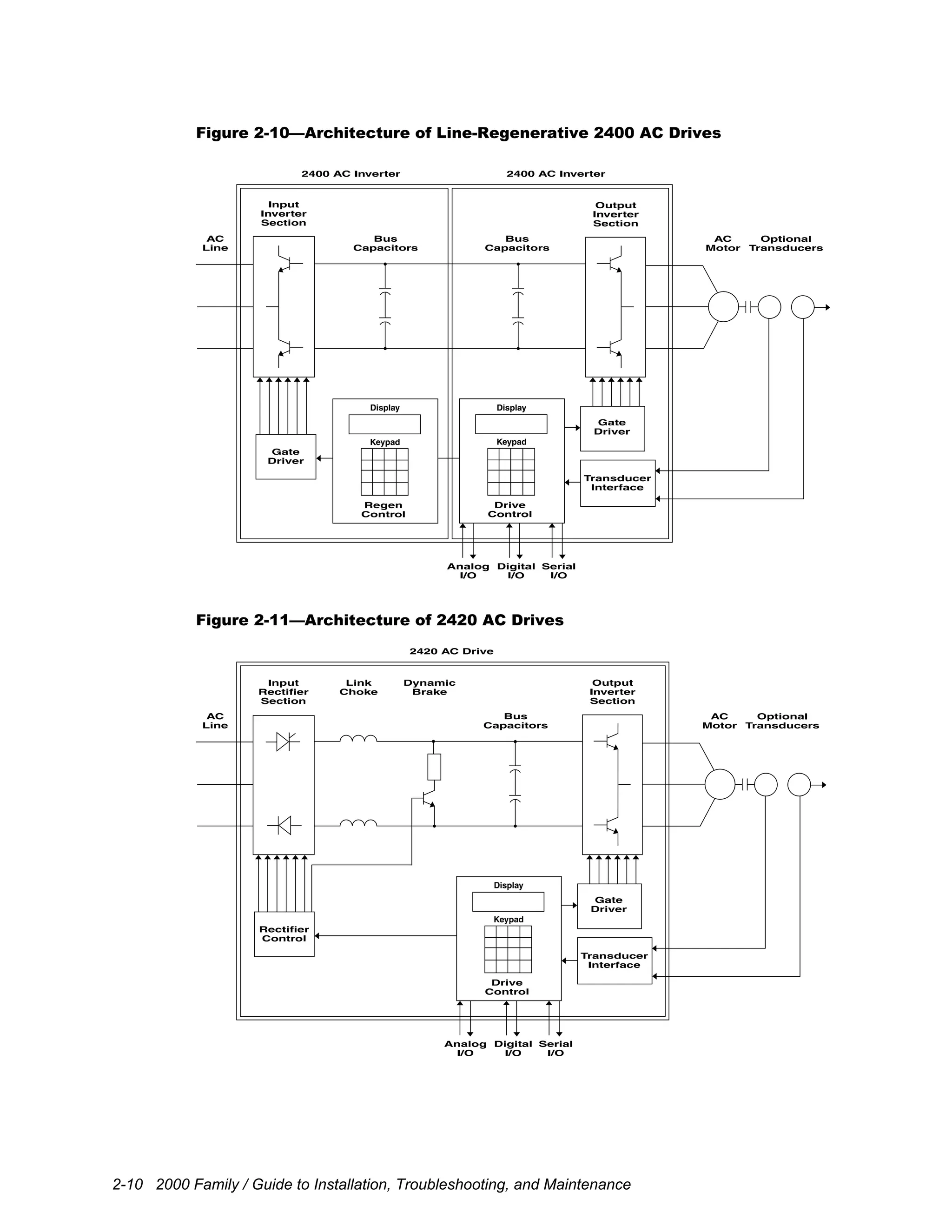
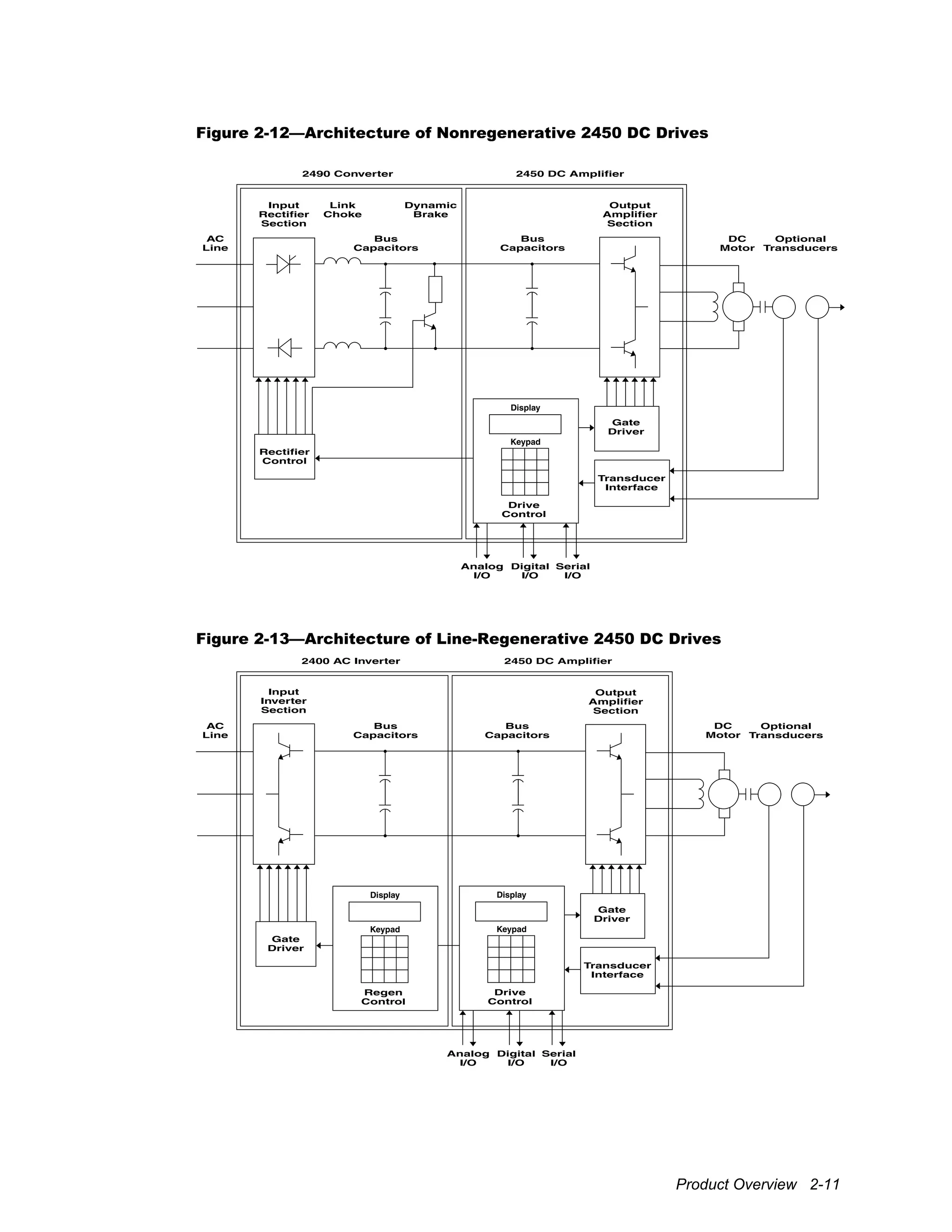
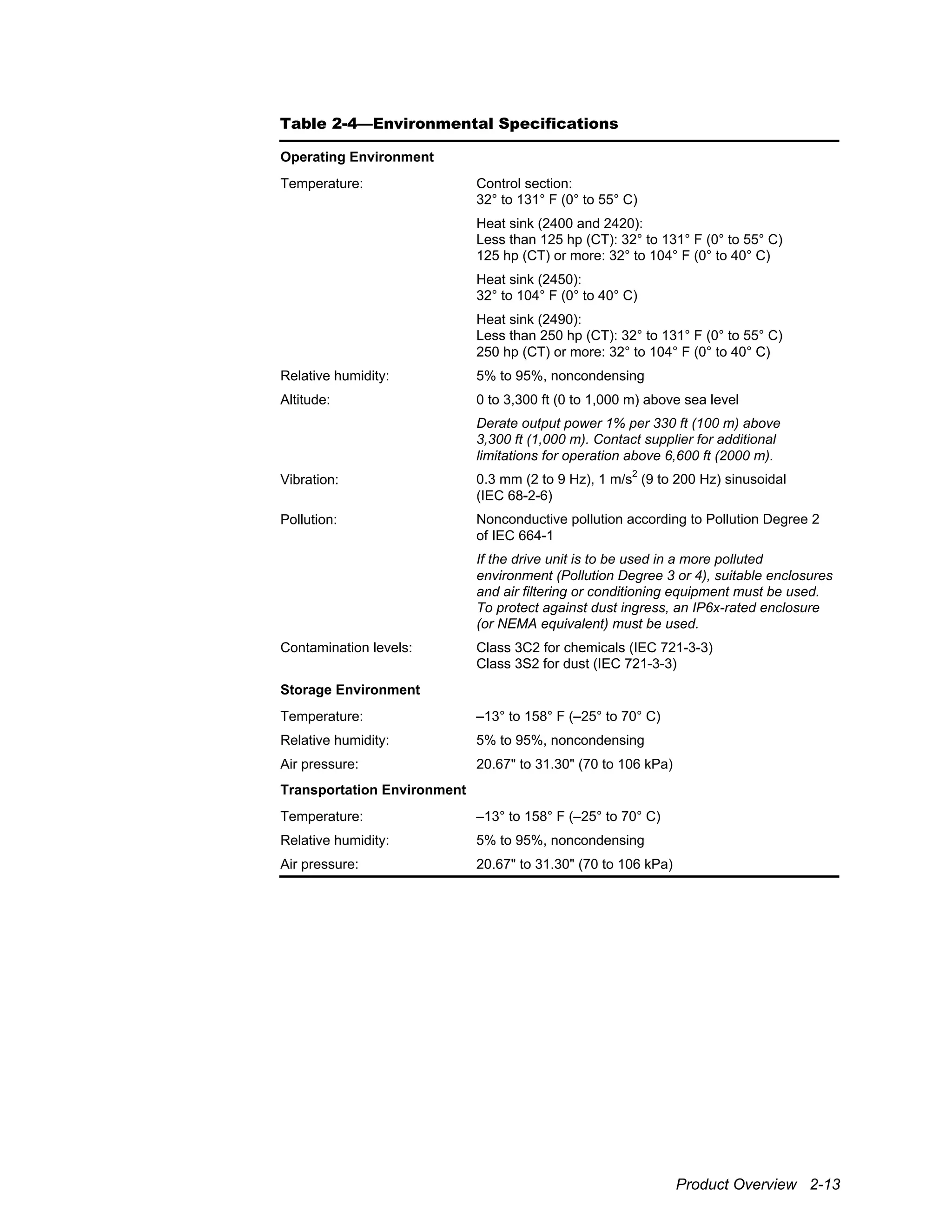
regenerative AC and DC drives is shown in Figure 2-9 through Figure 2-13.
The modular construction of the 2000 family allows a single rectifier or inverter to feed a
common DC bus. This common-bus architecture minimizes input power requirements by
allowing motoring and braking power to circulate between drives. Large inverter and
amplifier units are themselves modular for ease of handling. The 2420 combines a
rectifier and inverter into a stand-alone drive intended for motoring-type loads. The 2420
can also furnish the bus for a limited drive system of 2400 inverter units.
An input rectifier section is used on the nonregenerative 2400, 2420, and 2450 drives to
convert the fixed AC line voltage into a DC bus voltage. The rectifier section for the
2400 and 2450 drives is provided by a separate 2490 converter. Low-power drives use a
diode rectifier and resistors to charge the bus capacitors, which is then bypassed by a
contact once the bus is up to full voltage. High-power drives use silicon-controlled
rectifiers (SCRs) to control the charging of the bus capacitors. High-power drives provide
for optional twelve-pulse (six-phase) connection of the input to reduce harmonic currents.
A rectifier control coordinates the charging of the bus and operation of a dynamic brake
device.
A link choke and bus capacitors used in nonregenerative configurations form a filter that
smoothes the output of the rectifier section into a steady DC voltage. An optional
dynamic brake device allows regenerative energy from the load to be dissipated in an
external resistor when the drive is braking.
An input inverter section used in line-regenerative applications regulates power flow
between the AC line and DC bus. The input inverter uses an insulated gate bipolar
transistor (IGBT) bridge to rectify the AC line voltage into a DC bus voltage. This
section also regenerates energy from the DC bus to the AC line when the drive is braking.
In 2400 inverters and 2420 drives, an output inverter section consisting of six insulated
gate bipolar transistors (IGBTs) is used to power an AC motor. This section can produce
sine-wave motor voltages and currents of any desired amplitude by rapidly switching the
IGBTs using a technique called pulse-width modulation (PWM). In 2450 amplifiers, an
output amplifier section consisting of six IGBTs uses PWM operation to produce the
Product Overview 2-9
variable field and armature voltage needed for control of DC motors. A gate driver is
used to pass switching signals from the drive controller to the IGBTs.
Overall operation of the unit is regulated by a drive control that incorporates a digital
signal processor (DSP) and a digital current regulator (DCR) or digital space vector
(DSV) control. This high-speed digital control uses both voltage and current feedback to
regulate the output to the motor. A variety of optional feedback interface modules are
available to provide closed-loop control of motor velocity and/or position. Various serial
communication interfaces are also available that provide interfaces for popular serial
communication protocols.
A standard controller provides a cost-effective solution for simple applications with
limited I/O requirements. An expandable controller is used in applications that require
multiple transducers and/or expanded digital I/O capacity. A dual controller uses tandem
digital signal processors (DSPs) to provide high frequency and bandwidth operation.
A keypad and display on the control module provide access to operating and setup
parameters. The control module also provides analog and digital inputs that can be used
as input to and output from the drive. Serial communication channels are also available
for connecting drives to process controllers, communication networks, programmable
controllers, or personal computers.
Figure 2-9—Architecture of Nonregenerative 2400 AC Drives
Input
Rectifier
Section
2490 Converter 2400 AC Inverter
Rectifier
Control
Drive
Control
Analog
I/O
Digital
I/O
Serial
I/O
Gate
Driver
Transducer
Interface
Link
Choke
Dynamic
Brake
Output
Inverter
Section
AC
Motor
Optional
Transducers
Bus
Capacitors
Bus
Capacitors
AC
Line
Display
Keypad
2-10 2000 Family / Guide to Installation, Troubleshooting, and Maintenance
Figure 2-10—Architecture of Line-Regenerative 2400 AC Drives
Input
Inverter
Section
2400 AC Inverter 2400 AC Inverter
Gate
Driver
Drive
Control
Analog
I/O
Digital
I/O
Serial
I/O
Gate
Driver
Transducer
Interface
Output
Inverter
Section
AC
Motor
Optional
Transducers
Bus
Capacitors
Bus
Capacitors
AC
Line
Display
Keypad
Regen
Control
Display
Keypad
Figure 2-11—Architecture of 2420 AC Drives
Input
Rectifier
Section
2420 AC Drive
Rectifier
Control
Drive
Control
Analog
I/O
Digital
I/O
Serial
I/O
Gate
Driver
Transducer
Interface
Link
Choke
Dynamic
Brake
Output
Inverter
Section
AC
Motor
Optional
Transducers
Bus
Capacitors
AC
Line
Display
Keypad
Product Overview 2-11
Figure 2-12—Architecture of Nonregenerative 2450 DC Drives
Input
Rectifier
Section
2490 Converter 2450 DC Amplifier
Rectifier
Control
Drive
Control
Analog
I/O
Digital
I/O
Serial
I/O
Gate
Driver
Transducer
Interface
Link
Choke
Dynamic
Brake
Output
Amplifier
Section
DC
Motor
Optional
Transducers
Bus
Capacitors
Bus
Capacitors
AC
Line
Display
Keypad
Figure 2-13—Architecture of Line-Regenerative 2450 DC Drives
Input
Inverter
Section
2400 AC Inverter 2450 DC Amplifier
Gate
Driver
Drive
Control
Analog
I/O
Digital
I/O
Serial
I/O
Gate
Driver
Transducer
Interface
Output
Amplifier
Section
Optional
Transducers
Bus
Capacitors
Bus
Capacitors
AC
Line
Display
Keypad
Regen
Control
Display
Keypad
DC
Motor
2-12 2000 Family / Guide to Installation, Troubleshooting, and Maintenance
2.4 Specifications
Detailed drive unit specifications are provided in Table 2-3 through Table 2-24 below.
Table 2-3—Electrical Specifications
Input Supply
Line voltage: 200 to 240 V AC, three- or six-phase
380 to 480 V AC, three- or six-phase
500 to 600 V AC, three- or six-phase (2400)
(Six-phase input available only with 2490 230 V AC 75 hp
and 460/575 V AC 150 hp and above)
Phase-sequence insensitive
Overvoltage Category III (IEC 664-1)
Voltage tolerance: –10% of minimum, +10% of maximum
Imbalance: Maximum ±3% of nominal input voltage
Frequency: 47 to 63 Hz
Power factor: Displacement:
1.00 at all loads and speeds
Overall:
0.94 at rated load (2420 and 2490)
0.98 at rated load (line-regenerative 2400)
Output Rating
Voltage: Zero to input supply voltage, three-phase (2400 and 2420)
Zero to ±135% of input supply voltage, DC (2450)
Frequency (2400 and 2420): Zero to 120 Hz without transducer
Zero to 480 Hz with transducer
Switching frequency: Programmable from 2.0 to 12.0 kHz
Service Conditions
Efficiency: 97% nominal at rated switching frequency
Torque Overload (1 min) Maximum
Constant 150% of rated 200% of rated
Variable 120% to 150%
of rated, depending
upon selected mode
of operation (2400
and 2420)
120% of rated (2450)
140% to 160% of
rated
Overload current:
Extended
(2400)
110% of rated 120% to 140% of
rated
Product Overview 2-13
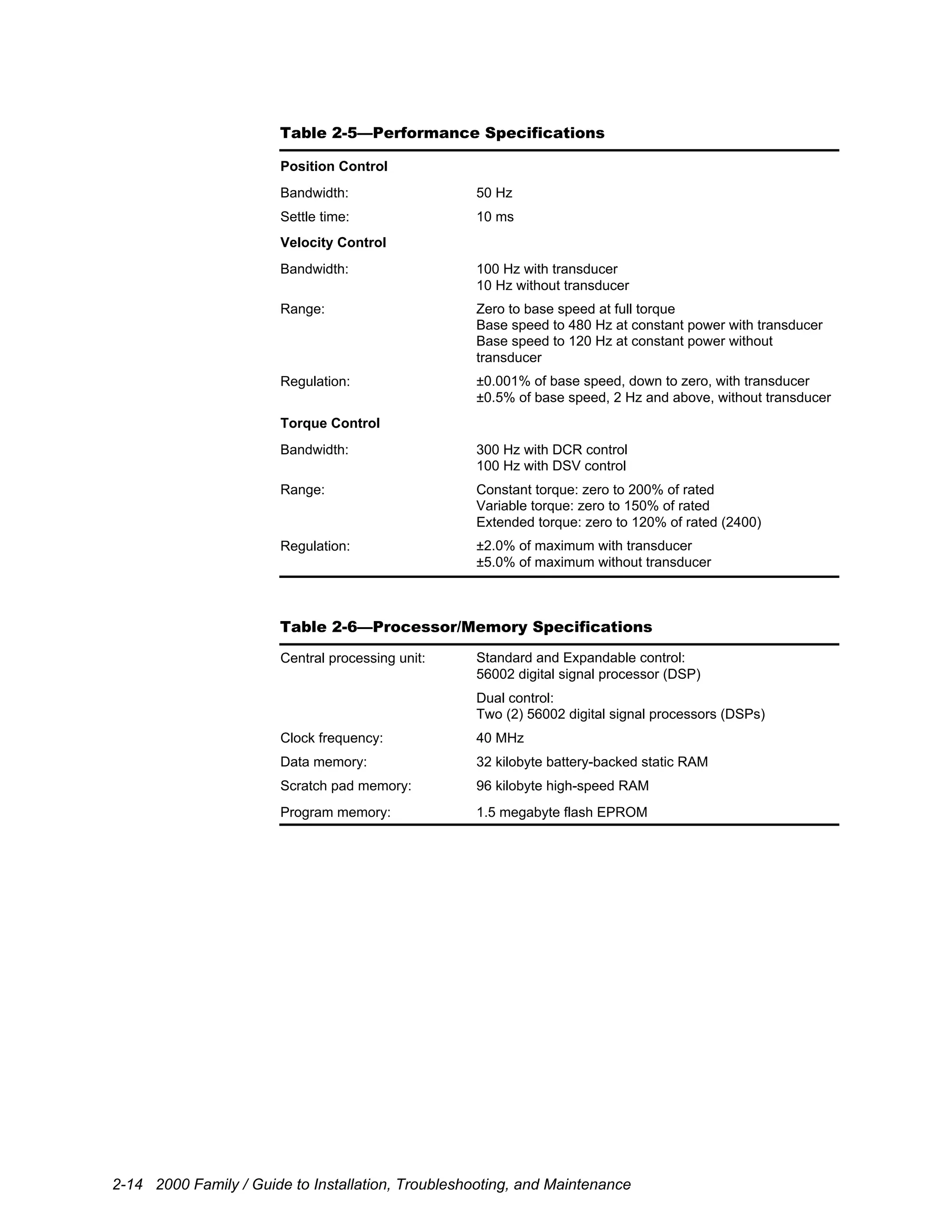
Table 2-4—Environmental Specifications
Operating Environment
Control section:
32° to 131° F (0° to 55° C)
Heat sink (2400 and 2420):
Less than 125 hp (CT): 32° to 131° F (0° to 55° C)
125 hp (CT) or more: 32° to 104° F (0° to 40° C)
Heat sink (2450):
32° to 104° F (0° to 40° C)
Temperature:
Heat sink (2490):
Less than 250 hp (CT): 32° to 131° F (0° to 55° C)
250 hp (CT) or more: 32° to 104° F (0° to 40° C)
Relative humidity: 5% to 95%, noncondensing
Altitude: 0 to 3,300 ft (0 to 1,000 m) above sea level
Derate output power 1% per 330 ft (100 m) above
3,300 ft (1,000 m). Contact supplier for additional
limitations for operation above 6,600 ft (2000 m).
Vibration: 0.3 mm (2 to 9 Hz), 1 m/s
2
(9 to 200 Hz) sinusoidal
(IEC 68-2-6)
Pollution: Nonconductive pollution according to Pollution Degree 2
of IEC 664-1
If the drive unit is to be used in a more polluted
environment (Pollution Degree 3 or 4), suitable enclosures
and air filtering or conditioning equipment must be used.
To protect against dust ingress, an IP6x-rated enclosure
(or NEMA equivalent) must be used.
Contamination levels: Class 3C2 for chemicals (IEC 721-3-3)
Class 3S2 for dust (IEC 721-3-3)
Storage Environment
Temperature: –13° to 158° F (–25° to 70° C)
Relative humidity: 5% to 95%, noncondensing
Air pressure: 20.67" to 31.30" (70 to 106 kPa)
Transportation Environment
Temperature: –13° to 158° F (–25° to 70° C)
Relative humidity: 5% to 95%, noncondensing
Air pressure: 20.67" to 31.30" (70 to 106 kPa)
2-14 2000 Family / Guide to Installation, Troubleshooting, and Maintenance
Table 2-5—Performance Specifications
Position Control
Bandwidth: 50 Hz
Settle time: 10 ms
Velocity Control
Bandwidth: 100 Hz with transducer
10 Hz without transducer
Range: Zero to base speed at full torque
Base speed to 480 Hz at constant power with transducer
Base speed to 120 Hz at constant power without
transducer
Regulation: ±0.001% of base speed, down to zero, with transducer
±0.5% of base speed, 2 Hz and above, without transducer
Torque Control
Bandwidth: 300 Hz with DCR control
100 Hz with DSV control
Range: Constant torque: zero to 200% of rated
Variable torque: zero to 150% of rated
Extended torque: zero to 120% of rated (2400)
Regulation: ±2.0% of maximum with transducer
±5.0% of maximum without transducer
Table 2-6—Processor/Memory Specifications
Standard and Expandable control:
56002 digital signal processor (DSP)
Central processing unit:
Dual control:
Two (2) 56002 digital signal processors (DSPs)
Clock frequency: 40 MHz
Data memory: 32 kilobyte battery-backed static RAM
Scratch pad memory: 96 kilobyte high-speed RAM
Program memory: 1.5 megabyte flash EPROM
Product Overview 2-15
Table 2-7—Input/Output Specifications
Analog
Three (3) 12-bit analog inputs (±10 V DC or 0 to 20 mA)Inputs:
Optional Analog Interface Module:
Two (2) 16-bit analog inputs (±10 V DC)
Two (2) 12-bit analog outputs (±10 V DC)Outputs:
Optional Analog Interface Module:
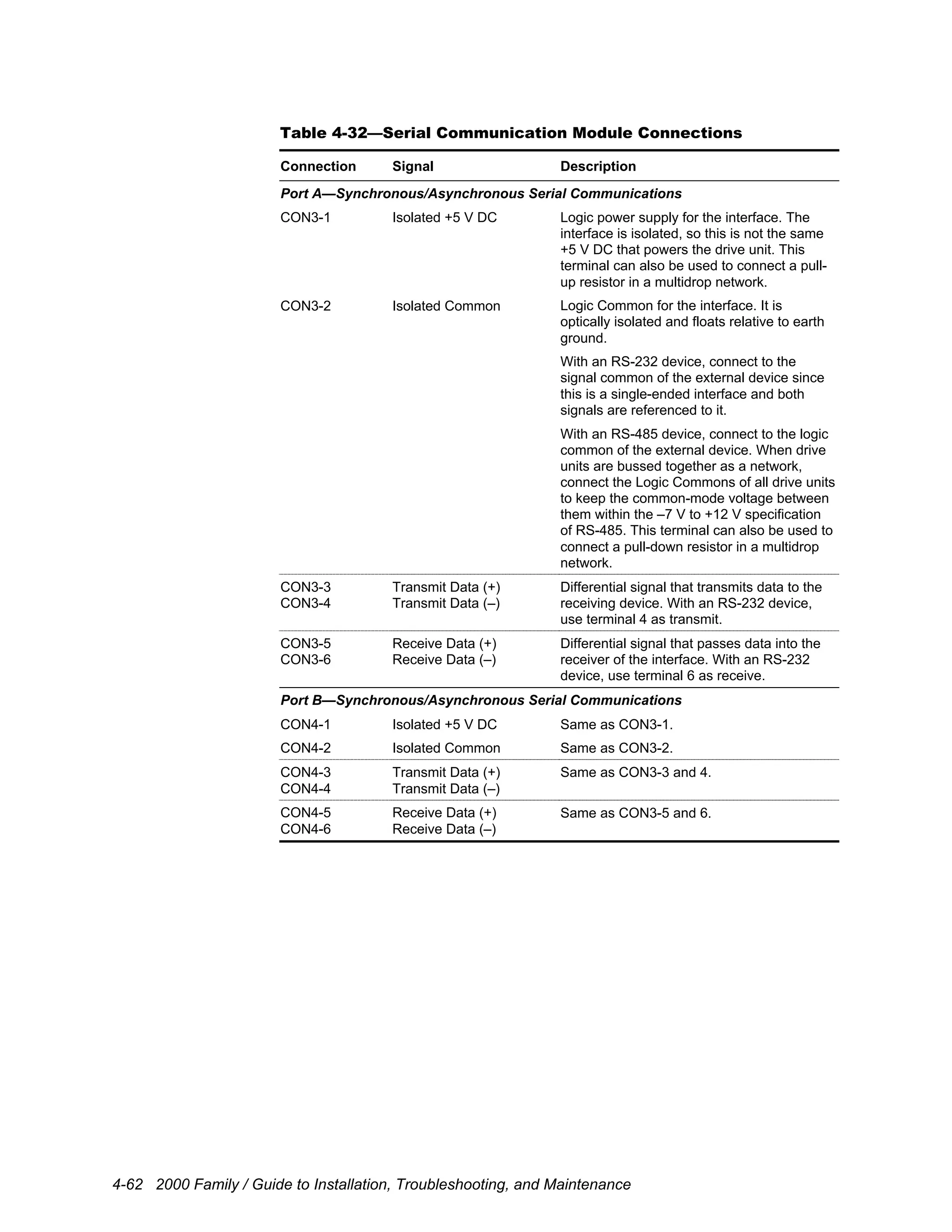
Two (2) 16-bit analog outputs (±10 V DC)
Digital
Inputs: Expandable control:
Two (2) programmable isolated inputs
Outputs: Two (2) programmable contact outputs
(Form A contacts rated 250 V AC @ 5 A)
Standard control:
Eight (8) optional isolated I/O points
Configurable I/O:
Expandable or Dual control:
16 or 32 optional isolated I/O points
Table 2-8—Serial Communication Specifications
Asynchronous
Port: RS-232/422/485, isolated
Baud rate: Application dependent (up to 57.6 kbaud)
Protocol: Application dependent
Synchronous
Port: RS-422/485 for high-speed drive command
Channels: Clock synchronization and data channels
Baud rate: Application dependent (up to 1 Mbaud)
Communication Modules
Provision: One (1) optional communication module provision
Serial Communication Module:
Two (2) RS-232/422/485 synchronous/asynchronous ports
Fiber-Optic Communication Module:
One (1) fiber-optic synchronous/asynchronous port
One (1) RS-232/422/485 synchronous/asynchronous port
Remote I/O Communication Module:
Two (2) Remote I/O interfaces
Modbus
®
Plus Communication Module:
One (1) Modbus
®
Plus interface
ControlNet
™
Communication Module:
One (1) ControlNet
™
interface
Profibus Communication Module:
One (1) Profibus DP interface
Modules:
Ethernet Communication Module:
One (1) Ethernet interface
2-16 2000 Family / Guide to Installation, Troubleshooting, and Maintenance
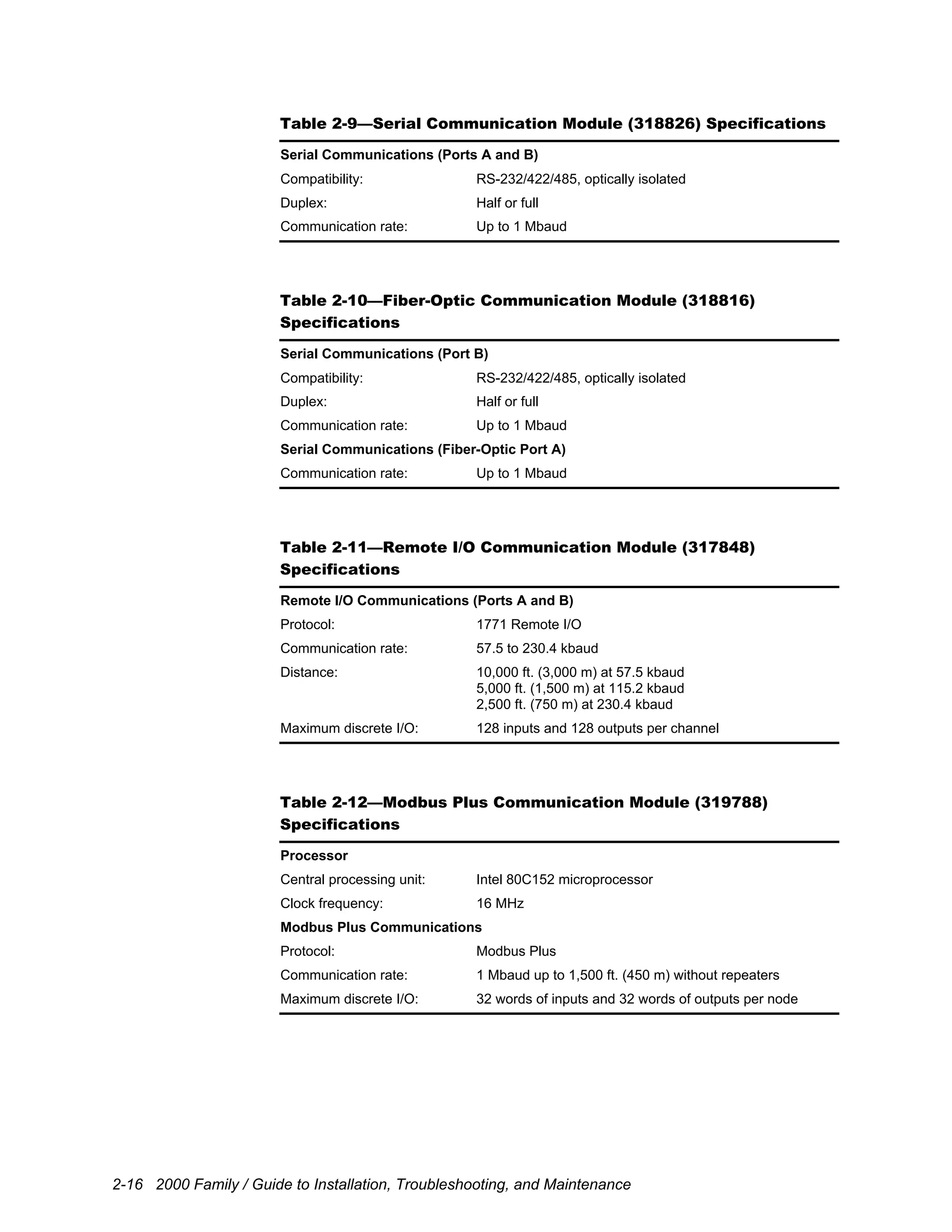
Table 2-9—Serial Communication Module (318826) Specifications
Serial Communications (Ports A and B)
Compatibility: RS-232/422/485, optically isolated
Duplex: Half or full
Communication rate: Up to 1 Mbaud
Table 2-10—Fiber-Optic Communication Module (318816)
Specifications
Serial Communications (Port B)
Compatibility: RS-232/422/485, optically isolated
Duplex: Half or full
Communication rate: Up to 1 Mbaud
Serial Communications (Fiber-Optic Port A)
Communication rate: Up to 1 Mbaud
Table 2-11—Remote I/O Communication Module (317848)
Specifications
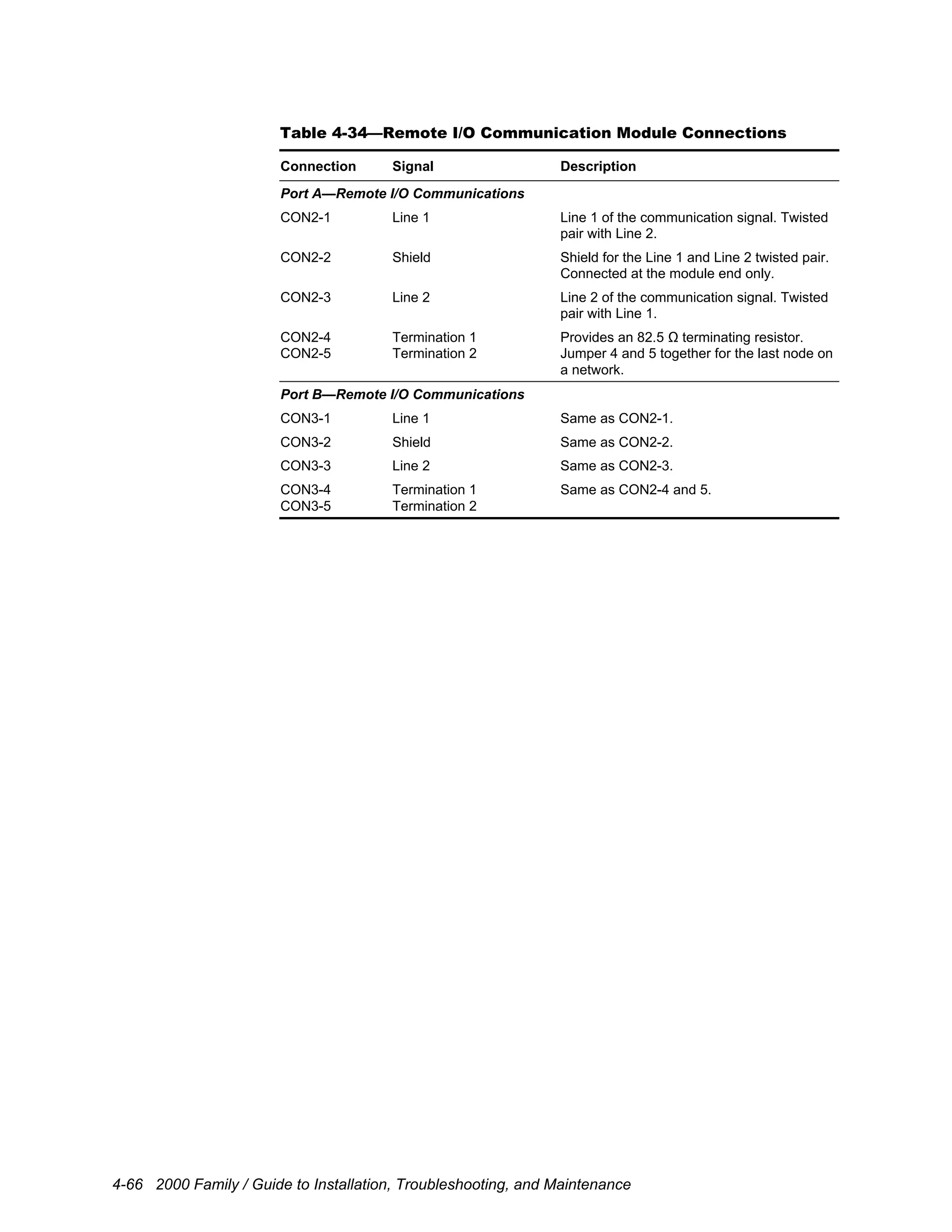
Remote I/O Communications (Ports A and B)
Protocol: 1771 Remote I/O
Communication rate: 57.5 to 230.4 kbaud
Distance: 10,000 ft. (3,000 m) at 57.5 kbaud
5,000 ft. (1,500 m) at 115.2 kbaud
2,500 ft. (750 m) at 230.4 kbaud
Maximum discrete I/O: 128 inputs and 128 outputs per channel
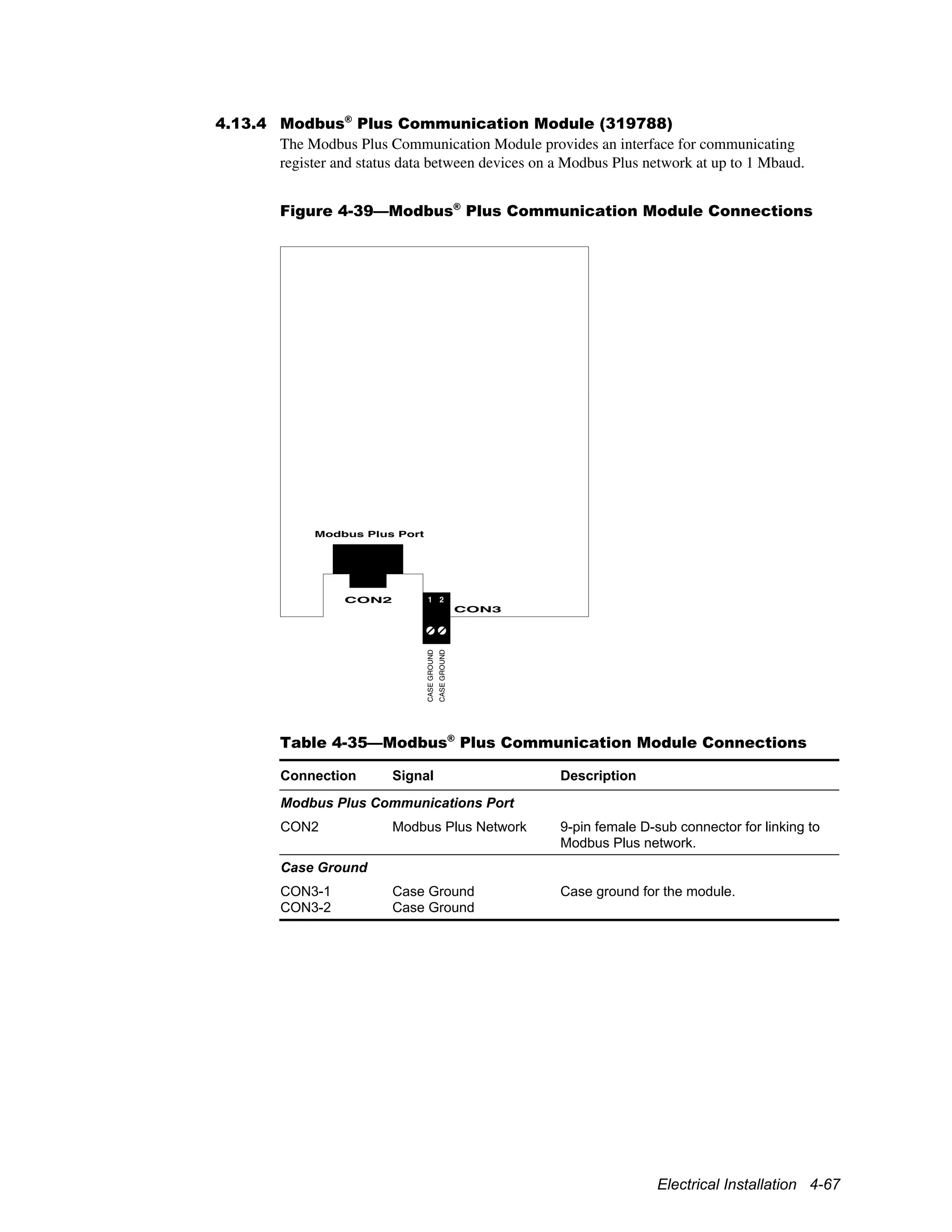
Table 2-12—Modbus Plus Communication Module (319788)
Specifications
Processor
Central processing unit: Intel 80C152 microprocessor
Clock frequency: 16 MHz
Modbus Plus Communications
Protocol: Modbus Plus
Communication rate: 1 Mbaud up to 1,500 ft. (450 m) without repeaters
Maximum discrete I/O: 32 words of inputs and 32 words of outputs per node
Product Overview 2-17
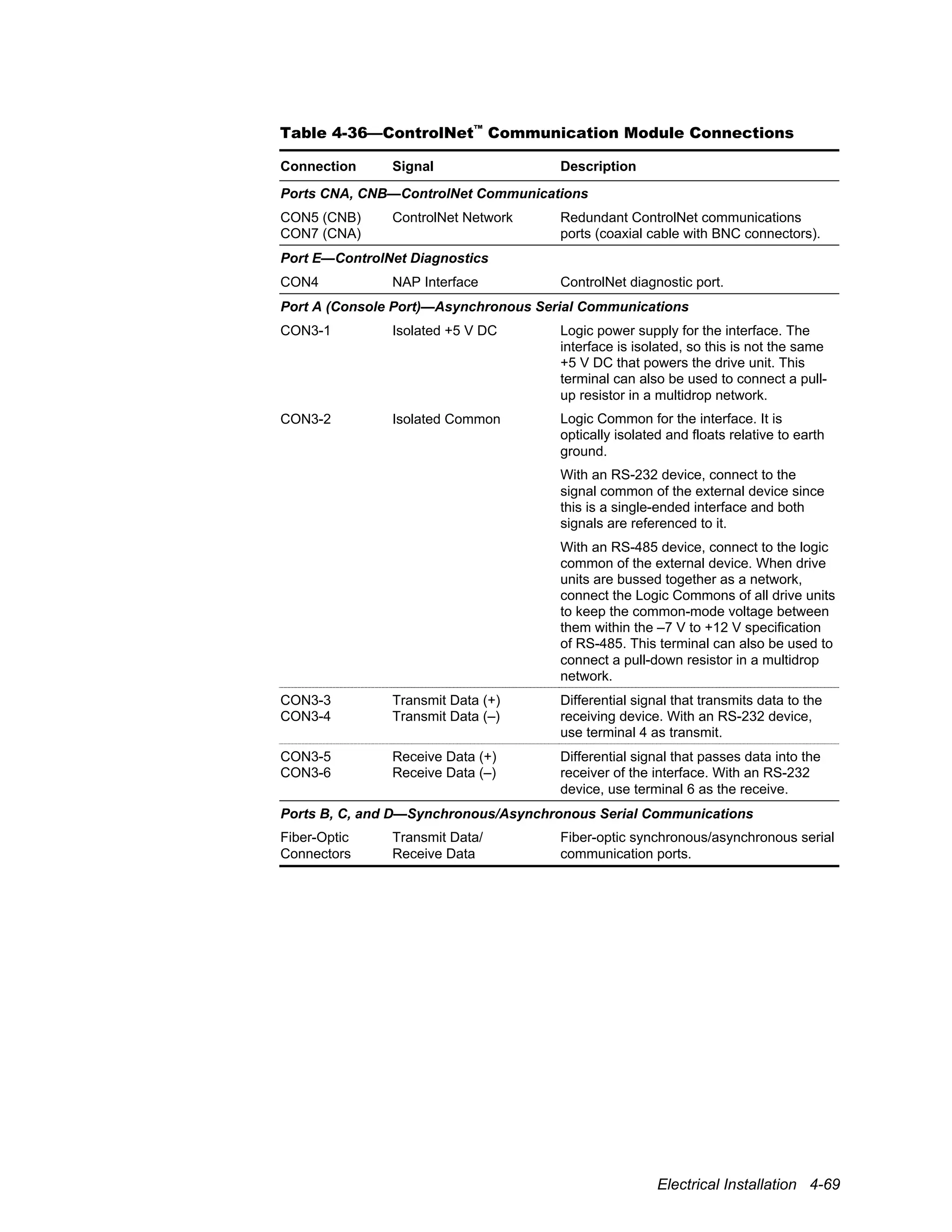
Table 2-13—ControlNet™
Communication Module (321812)
Specifications
Processor
Central processing unit: Motorola 68360 microprocessor
Clock frequency: 33 MHz
Memory
Data memory: 1 megabyte battery-backed static RAM
Scratch pad memory: 512 kilobyte high-speed RAM
Program memory: 2 megabyte flash EPROM
ControlNet Communications (Ports CNA and CNB)
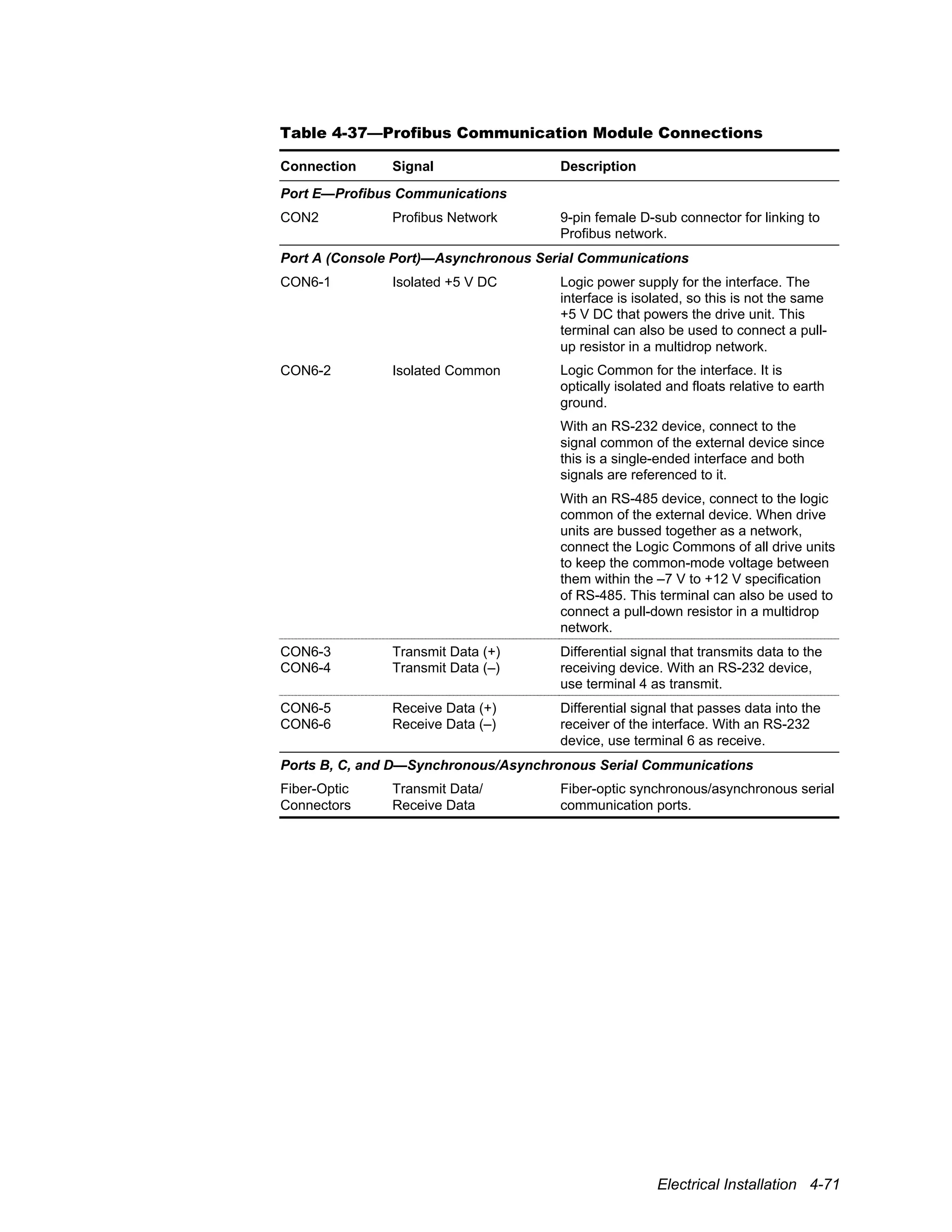
Communication rate: 5 Mbaud
Distance: To 3,300 ft. (1,000 m) with two nodes (without repeaters)
Number of nodes: 99 maximum addressable, 48 without a repeater
Serial Communications (Port A)
Compatibility: RS-232/422/485, optically isolated
Duplex: Half or full
Communication rate: Console port: 300 to 115.2 kbaud
Serial Communications (Fiber-Optic Ports B, C and D)
Communication rate: 300 to 1 Mbaud
Table 2-14—Profibus Communication Module (321560)
Specifications
Processor
Central processing unit: Motorola 68360 microprocessor
Clock frequency: 33 MHz
Memory
Data memory: 1 megabyte battery-backed static RAM
Scratch pad memory: 2 megabyte high-speed RAM
Program memory: 2 megabyte flash EPROM
Profibus Communications (Port E)
Communication rate: Up to 12 Mbaud
Distance: 3,300 ft. (1,000 m) at 187.5 kbaud
660 ft. (200 m) at 1.5 Mbaud
330 ft. (100 m) at 3 to 12 Mbaud
Number of nodes: 126 maximum addressable
Serial Communications / Console Port (A)
Compatibility: RS-232/422/485, optically isolated
Duplex: Half or full
Communication rate: Console port: 300 to 115.2 kbaud
Serial Communications / Fiber-Optic Ports (B, C and D)
Communication rate: 300 to 1 Mbaud
2-18 2000 Family / Guide to Installation, Troubleshooting, and Maintenance
Table 2-15—Ethernet Communication Module (321228)
Specifications
Processor
Central processing unit: Motorola 68360 microprocessor
Clock frequency: 33 MHz
Memory
Data memory: 1 megabyte battery-backed static RAM
Scratch pad memory: 2 megabyte high-speed RAM
Program memory: 2 megabyte flash EPROM
Ethernet Communications (Port E)
Communication rate: 10 Mbaud
Distance: To 330 ft. (100 m) with two nodes (without repeaters)
Node addressing: 1.0.0.1 to 126.255.255.254
Serial Communications / Console Port (A)
Compatibility: RS-232/422/485, optically isolated
Duplex: Half or full
Communication rate: Console port: 300 to 115.2 kbaud
Serial Communications / Fiber-Optic Ports (B, C and D)
Communication rate: 300 to 1 Mbaud
Table 2-16—Feedback Interface Specifications
Built-in interface: Expandable or Dual control:
One (1) incremental encoder interface
Standard control:
One (1) optional feedback module provision
Provision(s):
Expandable or Dual control:
Two (2) optional feedback module provisions
5 V incremental encoder interface
5 V incremental encoder interface with repeater
4 V resolver interface
4 V dual resolver interface
2 V resolver interface
2 V dual resolver interface
Serial absolute encoder interface
15 V incremental encoder interface
Asynchronous serial sincos encoder interface
Synchronous serial sincos encoder interface
Modules:
2-input/2-output analog interface
Product Overview 2-19
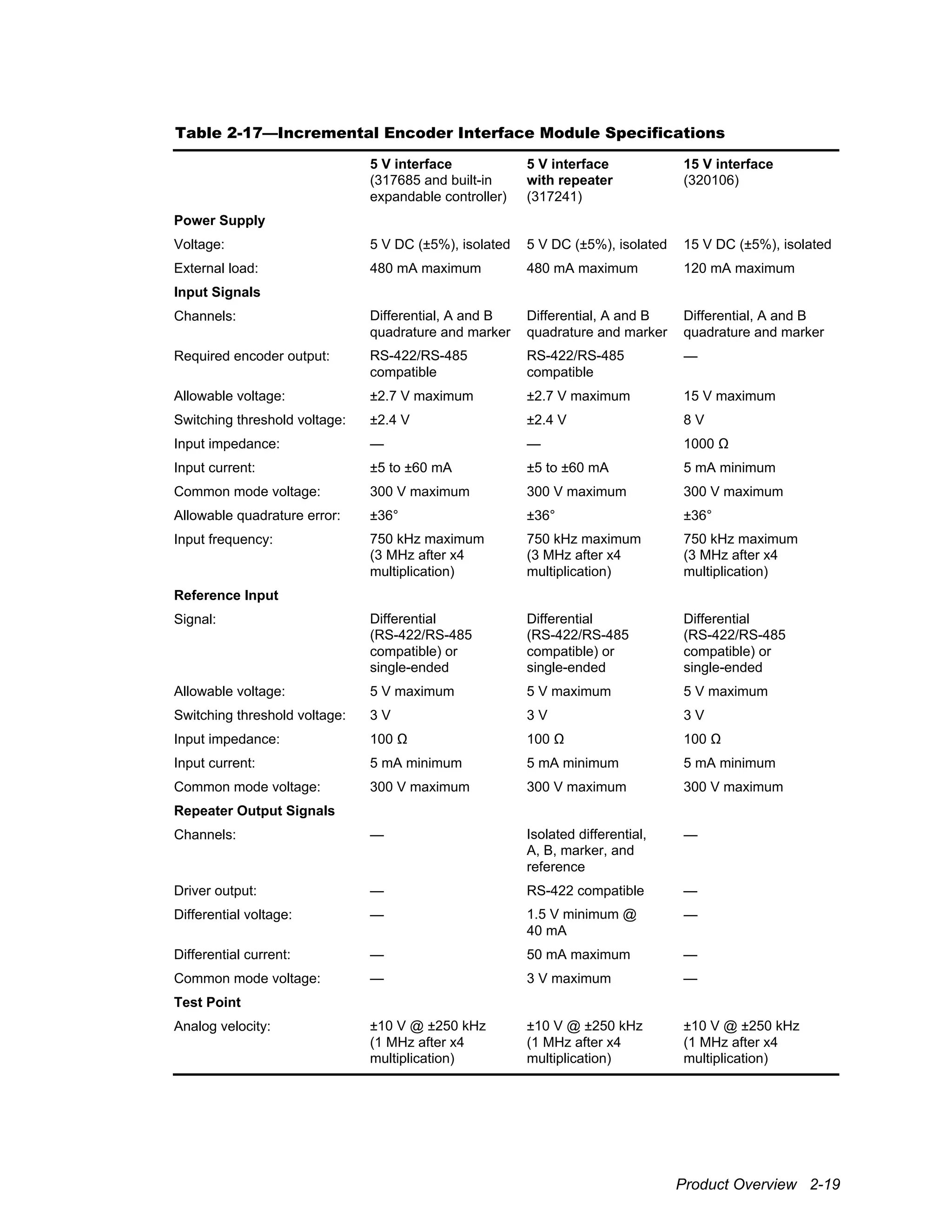
Table 2-17—Incremental Encoder Interface Module Specifications
5 V interface
(317685 and built-in
expandable controller)
5 V interface
with repeater
(317241)
15 V interface
(320106)
Power Supply
Voltage: 5 V DC (±5%), isolated 5 V DC (±5%), isolated 15 V DC (±5%), isolated
External load: 480 mA maximum 480 mA maximum 120 mA maximum
Input Signals
Channels: Differential, A and B
quadrature and marker
Differential, A and B
quadrature and marker
Differential, A and B
quadrature and marker
Required encoder output: RS-422/RS-485
compatible
RS-422/RS-485
compatible
—
Allowable voltage: ±2.7 V maximum ±2.7 V maximum 15 V maximum
Switching threshold voltage: ±2.4 V ±2.4 V 8 V
Input impedance: — — 1000 Ω
Input current: ±5 to ±60 mA ±5 to ±60 mA 5 mA minimum
Common mode voltage: 300 V maximum 300 V maximum 300 V maximum
Allowable quadrature error: ±36° ±36° ±36°
Input frequency: 750 kHz maximum
(3 MHz after x4
multiplication)
750 kHz maximum
(3 MHz after x4
multiplication)
750 kHz maximum
(3 MHz after x4
multiplication)
Reference Input
Signal: Differential
(RS-422/RS-485
compatible) or
single-ended
Differential
(RS-422/RS-485
compatible) or
single-ended
Differential
(RS-422/RS-485
compatible) or
single-ended
Allowable voltage: 5 V maximum 5 V maximum 5 V maximum
Switching threshold voltage: 3 V 3 V 3 V
Input impedance: 100 Ω 100 Ω 100 Ω
Input current: 5 mA minimum 5 mA minimum 5 mA minimum
Common mode voltage: 300 V maximum 300 V maximum 300 V maximum
Repeater Output Signals
Channels: — Isolated differential,
A, B, marker, and
reference
—
Driver output: — RS-422 compatible —
Differential voltage: — 1.5 V minimum @
40 mA
—
Differential current: — 50 mA maximum —
Common mode voltage: — 3 V maximum —
Test Point
Analog velocity: ±10 V @ ±250 kHz
(1 MHz after x4
multiplication)
±10 V @ ±250 kHz
(1 MHz after x4
multiplication)
±10 V @ ±250 kHz
(1 MHz after x4
multiplication)
2-20 2000 Family / Guide to Installation, Troubleshooting, and Maintenance
Table 2-18—Serial Sincos Encoder Interface Module Specifications
Asynchronous
(320448)
Synchronous
(322173)
Power Supply
Voltage: 12 V DC (±5%), isolated 12 V DC (±5%), isolated
External load: 100 mA maximum 100 mA maximum
Sine/Cosine Input Signals
Channels: Differential analog input Differential analog input
Amplitude: 1 V (±10%) peak-to-peak 1 V (±10%) peak-to-peak
Offset voltage: 3.0 V DC maximum 3.0 V DC maximum
Frequency: 256 kHz maximum 256 kHz maximum
Input impedance: 124 Ω 124 Ω
Serial Communications
Type: Asynchronous Synchronous
Signal: RS-485, optically isolated
(data)
RS-485, optically isolated
(clock and data)
Baud rate: 9600 2 Mbaud maximum
Terminating impedance: 134 Ω 134 Ω
Driver source impedance: 20 Ω 20 Ω
Protocol: HIPERFACE
®
EnDat
®
Table 2-19—Resolver Interface Module Specifications
4 V Single
(320176)
2 V Single
(322195)
4 V Dual
(320315)
2 V Dual
(322197)
Reference Output
Frequency: 5 kHz 5 kHz 5 kHz 5 kHz
Amplitude: 4 Vrms 2 Vrms 4 Vrms 2 Vrms
Feedback Input
Sine/cosine amplitude: 2 Vrms 2 Vrms 2 Vrms 2 Vrms
Transformation ratio: 0.5 1.0 0.5 1.0
Low-speed:
14-bit
Low-speed:
14-bit
Resolution 10- to 16-bit,
programmable
10- to 16-bit,
programmable
High-speed:
10- to 16-bit,
programmable
High-speed:
10- to 16-bit,
programmable
Resolution Speed
10-bit 50,000 rpm
12-bit 12,000 rpm
14-bit 3,000 rpm
Maximum
Recommended Speed
16-bit 800 rpm
Product Overview 2-21
Table 2-20—Serial Absolute Encoder Module (321849)
Specifications
Power Supply
Voltage: 15 V DC (±5%), isolated
External load: 120 mA maximum
Synchronous Serial Communications
Clock and data: RS-485, optically isolated
Baud rate: 125, 250, 500, or 1000 kbaud, programmable
Terminating impedance: 120 Ω
Packet: 24- or 25-bit, selectable
Table 2-21—Analog Interface Module Specifications (319354)
Analog Inputs
Channels: Two differential channels
Resolution: 16-bit
Input range: 0 to ±10 V
0 to 20 mA with external 500 Ω differential resistor
Input impedance: 400 kΩ (0 to ±10 V)
500 Ω (0 to 20 mA)
Common mode voltage: 12 V maximum
Analog Outputs
Channels: Two channels
Resolution: 16-bit
Output range: ±10 V
Maximum output: 10 mA
Output impedance: 100 Ω
Table 2-22—Protection Specifications
• Ground fault
• Motor phase-to-phase short circuit
• DC bus overvoltage
• DC bus undervoltage
• Instantaneous overcurrent
• Motor overload
• Heat sink overtemperature
• Power transistor fault
• Control undervoltage
• Memory malfunction
• Processor not running fault
Refer to the application documentation for additional protective features.
2-22 2000 Family / Guide to Installation, Troubleshooting, and Maintenance
Table 2-23—Product Range
A p p l i c a t i o nInput
Voltage Constant-Torque Variable-Torque Extended-Torque
2400
230 V AC 11/2-75 hp 2-100 hp —
(1.1-55 kW) (1.5-75 kW)
380 V AC 11/2-1000 hp 2-1100 hp —
(1.1-750 kW) (1.5-825 kW)
460 V AC 11/2-1000 hp 2-1100 hp 25-1200 hp
(1.1-750 kW) (1.5-825 kW) (18-900 kW)
575 V AC 125-1100 hp 150-1200 hp 200-1300 hp
(90-825 kW) (110-900 kW) (150-975 kW)
2420
230 V AC 11/2-25 hp 2-30 hp —
(1.1-18 kW) (1.5-22 kW)
380 V AC 11/2-50 hp 2-60 hp —
(1.1-37 kW) (1.5-45 kW)
460 V AC 11/2-50 hp 2-60 hp —
(1.1-37 kW) (1.5-45 kW)
2450
230 V AC 11/2-150 hp 2-200 hp —
(1.1-110 kW) (1.5-150 kW)
380 V AC 11/2-800 hp 2-900 hp —
(1.1-600 kW) (1.5-675 kW)
460 V AC 11/2-800 hp 2-900 hp —
(1.1-600 kW) (1.5-675 kW)
Product Overview 2-23
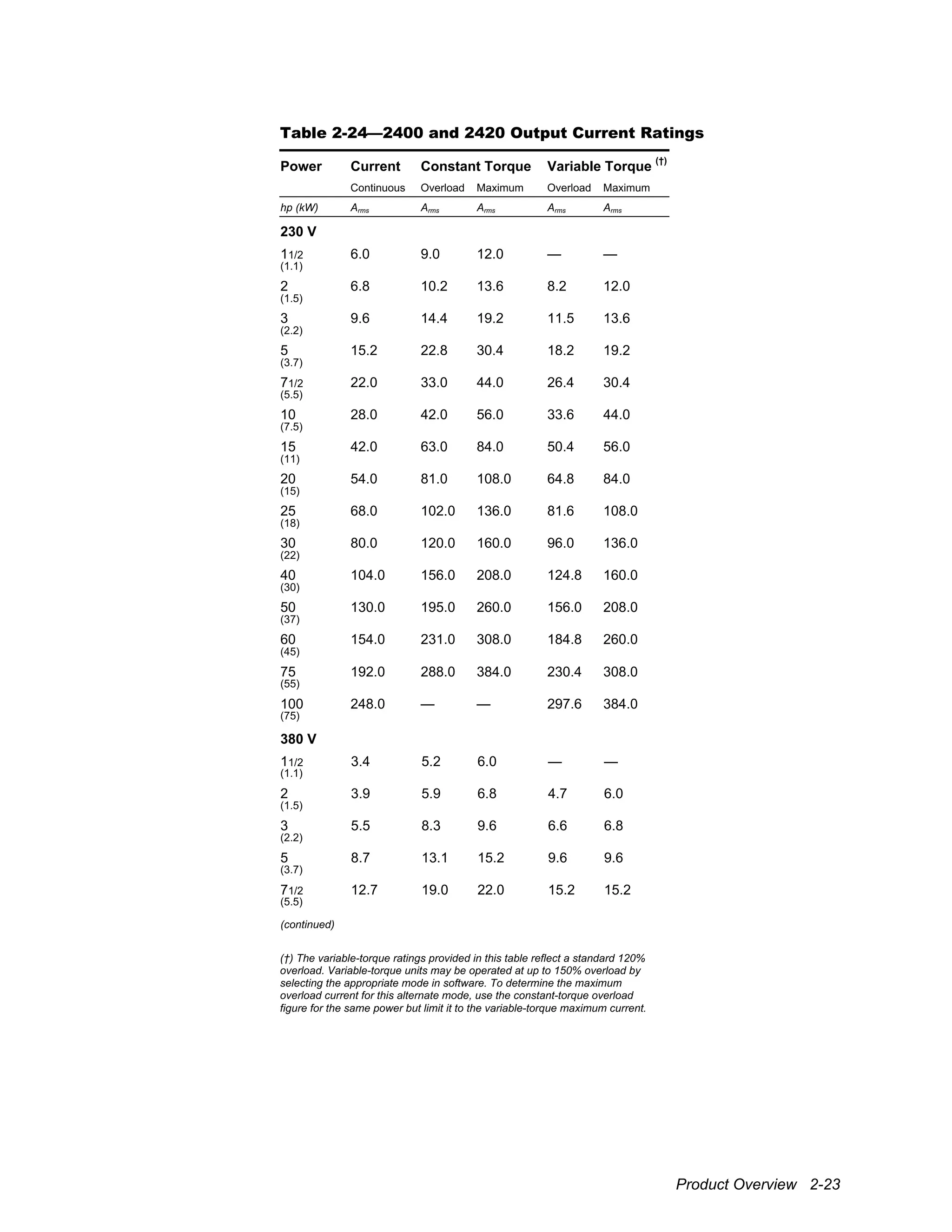
Table 2-24—2400 and 2420 Output Current Ratings
Power Current Constant Torque Variable Torque
(†)
Continuous Overload Maximum Overload Maximum
hp (kW) Arms Arms Arms Arms Arms
230 V
11/2 6.0 9.0 12.0 — —
(1.1)
2 6.8 10.2 13.6 8.2 12.0
(1.5)
3 9.6 14.4 19.2 11.5 13.6
(2.2)
5 15.2 22.8 30.4 18.2 19.2
(3.7)
71/2 22.0 33.0 44.0 26.4 30.4
(5.5)
10 28.0 42.0 56.0 33.6 44.0
(7.5)
15 42.0 63.0 84.0 50.4 56.0
(11)
20 54.0 81.0 108.0 64.8 84.0
(15)
25 68.0 102.0 136.0 81.6 108.0
(18)
30 80.0 120.0 160.0 96.0 136.0
(22)
40 104.0 156.0 208.0 124.8 160.0
(30)
50 130.0 195.0 260.0 156.0 208.0
(37)
60 154.0 231.0 308.0 184.8 260.0
(45)
75 192.0 288.0 384.0 230.4 308.0
(55)
100 248.0 — — 297.6 384.0
(75)
380 V
11/2 3.4 5.2 6.0 — —
(1.1)
2 3.9 5.9 6.8 4.7 6.0
(1.5)
3 5.5 8.3 9.6 6.6 6.8
(2.2)
5 8.7 13.1 15.2 9.6 9.6
(3.7)
71/2 12.7 19.0 22.0 15.2 15.2
(5.5)
(continued)
(†) The variable-torque ratings provided in this table reflect a standard 120%
overload. Variable-torque units may be operated at up to 150% overload by
selecting the appropriate mode in software. To determine the maximum
overload current for this alternate mode, use the constant-torque overload
figure for the same power but limit it to the variable-torque maximum current.
2-24 2000 Family / Guide to Installation, Troubleshooting, and Maintenance
Table 2-24—2400 and 2420 Output Current Ratings (continued)
Power Current Constant Torque Variable Torque
(†)
Continuous Overload Maximum Overload Maximum
hp (kW) Arms Arms Arms Arms Arms
380 V
10 16.1 24.2 28.0 19.3 22.0
(7.5)
15 24.2 36.2 42.0 28.0 28.0
(11)
20 31.1 46.6 54.0 37.3 42.0
(15)
25 39.1 58.7 68.0 46.9 54.0
(18)
30 46.0 69.0 80.0 55.2 68.0
(22)
40 59.8 89.7 104.0 71.8 80.0
(30)
50 74.8 112.1 130.0 89.7 104.0
(37)
60 88.6 132.8 154.0 106.3 130.0
(45)
75 110.4 165.6 192.0 132.5 154.0
(55)
100 142.6 213.9 248.0 171.1 192.0
(75)
125 179.4 269.1 312.0 215.3 248.0
(90)
150 207.0 310.5 360.0 248.4 312.0
(110)
200 276.0 414.0 480.0 331.2 360.0
(150)
250 345.0 517.5 600.0 414.0 480.0
(185)
300 414.0 621.0 720.0 496.8 600.0
(225)
350 483.0 724.5 840.0 579.6 720.0
(262)
400 552.0 828.0 960.0 662.4 840.0
(300)
500 690.0 1035.0 1200.0 828.0 960.0
(375)
600 828.0 1242.0 1440.0 993.6 1080.0
(450)
700 966.0 1449.0 1680.0 1159.2 1440.0
(525)
800 1104.0 1656.0 1920.0 1324.8 1680.0
(600)
900 1242.0 1863.0 2160.0 1490.4 1920.0
(675)
1000 1380.0 2070.0 2400.0 1656.0 2160.0
(750)
1100 1518.0 — — 1821.6 2400.0
(825)
(continued)
Product Overview 2-25
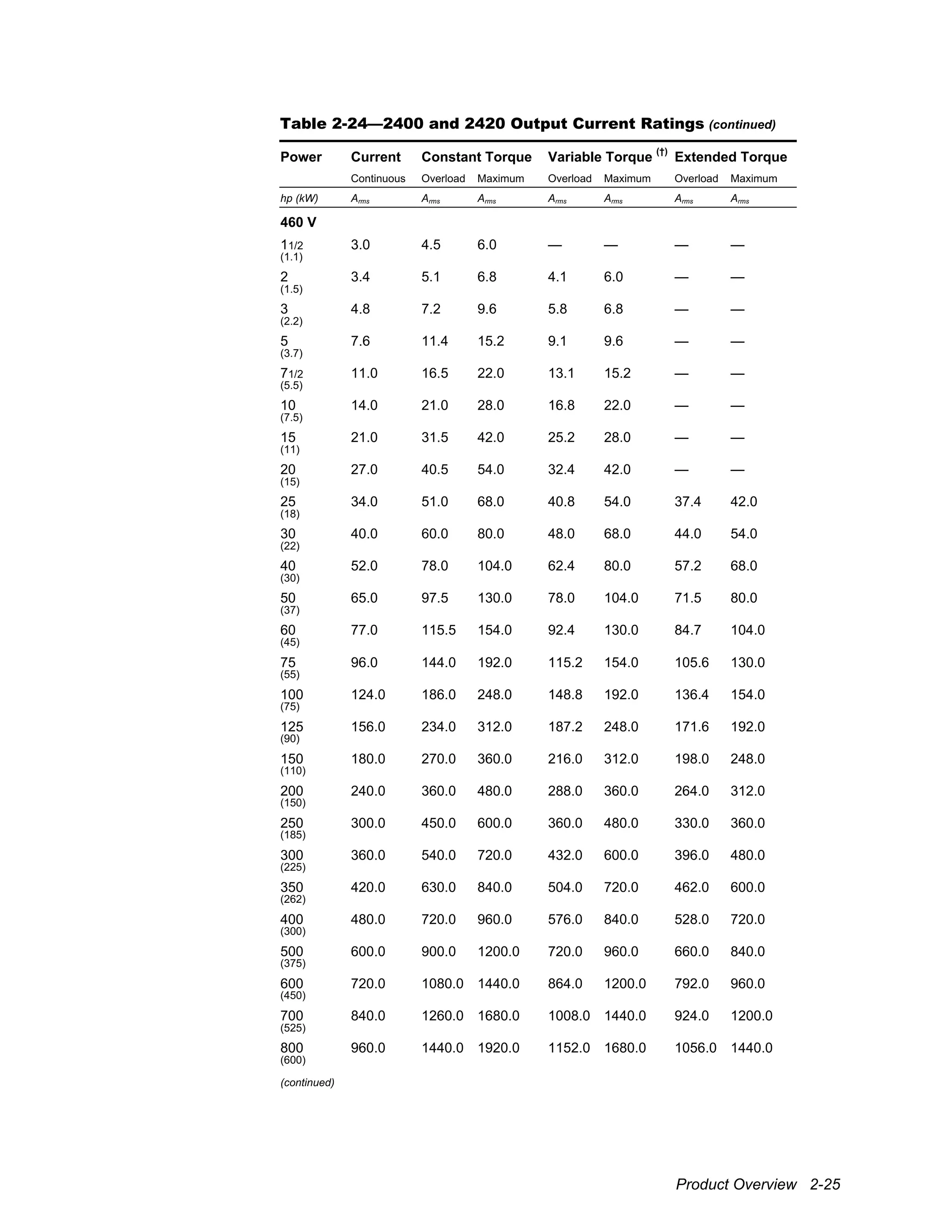
Table 2-24—2400 and 2420 Output Current Ratings (continued)
Power Current Constant Torque Variable Torque
(†)
Extended Torque
Continuous Overload Maximum Overload Maximum Overload Maximum
hp (kW) Arms Arms Arms Arms Arms Arms Arms
460 V
11/2 3.0 4.5 6.0 — — — —
(1.1)
2 3.4 5.1 6.8 4.1 6.0 — —
(1.5)
3 4.8 7.2 9.6 5.8 6.8 — —
(2.2)
5 7.6 11.4 15.2 9.1 9.6 — —
(3.7)
71/2 11.0 16.5 22.0 13.1 15.2 — —
(5.5)
10 14.0 21.0 28.0 16.8 22.0 — —
(7.5)
15 21.0 31.5 42.0 25.2 28.0 — —
(11)
20 27.0 40.5 54.0 32.4 42.0 — —
(15)
25 34.0 51.0 68.0 40.8 54.0 37.4 42.0
(18)
30 40.0 60.0 80.0 48.0 68.0 44.0 54.0
(22)
40 52.0 78.0 104.0 62.4 80.0 57.2 68.0
(30)
50 65.0 97.5 130.0 78.0 104.0 71.5 80.0
(37)
60 77.0 115.5 154.0 92.4 130.0 84.7 104.0
(45)
75 96.0 144.0 192.0 115.2 154.0 105.6 130.0
(55)
100 124.0 186.0 248.0 148.8 192.0 136.4 154.0
(75)
125 156.0 234.0 312.0 187.2 248.0 171.6 192.0
(90)
150 180.0 270.0 360.0 216.0 312.0 198.0 248.0
(110)
200 240.0 360.0 480.0 288.0 360.0 264.0 312.0
(150)
250 300.0 450.0 600.0 360.0 480.0 330.0 360.0
(185)
300 360.0 540.0 720.0 432.0 600.0 396.0 480.0
(225)
350 420.0 630.0 840.0 504.0 720.0 462.0 600.0
(262)
400 480.0 720.0 960.0 576.0 840.0 528.0 720.0
(300)
500 600.0 900.0 1200.0 720.0 960.0 660.0 840.0
(375)
600 720.0 1080.0 1440.0 864.0 1200.0 792.0 960.0
(450)
700 840.0 1260.0 1680.0 1008.0 1440.0 924.0 1200.0
(525)
800 960.0 1440.0 1920.0 1152.0 1680.0 1056.0 1440.0
(600)
(continued)
2-26 2000 Family / Guide to Installation, Troubleshooting, and Maintenance
Table 2-24—2400 and 2420 Output Current Ratings (continued)
Power Current Constant Torque Variable Torque
(†)
Extended Torque
Continuous Overload Maximum Overload Maximum Overload Maximum
hp (kW) Arms Arms Arms Arms Arms Arms Arms
460 V
900 1080.0 1620.0 2160.0 1296.0 1920.0 1188.0 1680.0
(675)
1000 1200.0 1800.0 2400.0 1440.0 2160.0 1320.0 1920.0
(750)
1100 1320.0 — — 1584.0 2400.0 1452.0 2160.0
(825)
1200 1440.0 — — — — 1584.0 2400.0
(900)
575 V
125 125.0 187.5 250.0 150.0 198.0 137.5 154.0
(90)
150 144.0 216.0 288.0 172.8 250.0 158.4 198.0
(110)
200 192.0 288.0 384.0 230.4 288.0 211.2 250.0
(150)
250 240.0 360.0 480.0 288.0 384.0 264.0 288.0
(185)
300 288.0 432.0 576.0 345.6 480.0 316.8 384.0
(225)
350 336.0 504.0 672.0 403.2 576.0 369.6 480.0
(262)
400 384.0 576.0 768.0 460.8 672.0 422.4 576.0
(300)
500 480.0 720.0 960.0 576.0 768.0 528.0 672.0
(375)
600 576.0 864.0 1152.0 691.2 960.0 633.6 768.0
(450)
700 672.0 1008.0 1344.0 806.4 1152.0 739.2 960.0
(525)
800 768.0 1152.0 1536.0 921.6 1344.0 844.8 1152.0
(600)
900 864.0 1296.0 1728.0 1036.8 1536.0 950.4 1344.0
(675)
1000 960.0 1440.0 1920.0 1152.0 1728.0 1056.0 1536.0
(750)
1100 1056.0 1584.0 2112.0 1267.2 1920.0 1161.6 1728.0
(825)
1200 1152.0 — — 1382.4 2112.0 1267.2 1920.0
(900)
1300 1248.0 — — — — 1372.8 2112.0
(975)
Product Overview 2-27
Table 2-25—2450 Output Current Ratings
Power Current Constant Torque Variable Torque
Continuous Overload Maximum Overload Maximum
hp (kW) Adc Adc Adc Adc Adc
230 V
11/2 6.6 9.9 13.2 — —
(1.1)
2 8.5 12.8 17.0 10.2 13.2
(1.5)
3 12.2 18.3 24.4 14.6 17.0
(2.2)
5 20.0 30.0 40.0 24.0 24.4
(3.7)
71/2 29.0 43.5 58.0 34.8 40.0
(5.5)
10 38.0 57.0 76.0 45.6 58.0
(7.5)
15 55.0 82.5 110.0 66.0 76.0
(11)
20 72.0 108.0 144.0 86.4 110.0
(15)
25 89.0 133.5 178.0 106.8 144.0
(18)
30 106.0 159.0 212.0 127.2 178.0
(22)
40 140.0 210.0 280.0 168.0 212.0
(30)
50 173.0 259.5 346.0 207.6 280.0
(37)
60 206.0 309.0 412.0 247.2 346.0
(45)
75 255.0 382.5 510.0 306.0 412.0
(55)
100 341.0 511.5 682.0 409.2 510.0
(75)
125 425.0 637.5 850.0 510.0 682.0
(90)
150 506.0 759.0 1012.0 607.2 850.0
(110)
200 675.0 — — 810.0 1012.0
(150)
(continued)
2-28 2000 Family / Guide to Installation, Troubleshooting, and Maintenance
Table 2-25—2450 Output Current Ratings (continued)
Power Current Constant Torque Variable Torque
Continuous Overload Maximum Overload Maximum
hp (kW) Arms Arms Arms Arms Arms
460 V
11/2 2.7 4.1 5.4 — —
(1.1)
2 3.6 5.4 7.2 4.3 5.4
(1.5)
3 5.4 8.1 10.8 6.5 7.2
(2.2)
5 9.0 13.5 18.0 10.8 10.8
(3.7)
71/2 13.6 20.4 27.2 16.3 18.0
(5.5)
10 18.0 27.0 36.0 21.6 27.2
(7.5)
15 27.0 40.5 54.0 32.4 36.0
(11)
20 34.0 51.0 68.0 40.8 54.0
(15)
25 43.0 64.5 86.0 51.6 68.0
(18)
30 51.0 76.5 102.0 61.2 86.0
(22)
40 67.0 100.5 134.0 80.4 102.0
(30)
50 83.0 124.5 166.0 99.6 134.0
(37)
60 99.0 148.5 198.0 118.8 166.0
(45)
75 123.0 184.5 246.0 147.6 198.0
(55)
100 164.0 246.0 328.0 196.8 246.0
(75)
125 205.0 307.5 410.0 246.0 328.0
(90)
150 246.0 369.0 492.0 295.2 410.0
(110)
200 328.0 492.0 656.0 393.6 492.0
(150)
250 410.0 615.0 820.0 492.0 656.0
(185)
300 492.0 738.0 984.0 590.4 820.0
(225)
350 574.0 861.0 1148.0 688.8 984.0
(262)
400 656.0 984.0 1312.0 787.2 1148.0
(300)
500 820.0 1230.0 1640.0 984.0 1312.0
(375)
600 984.0 1476.0 1968.0 1180.8 1640.0
(450)
700 1148.0 1722.0 2296.0 1377.6 1968.0
(525)
800 1312.0 1968.0 2624.0 1574.4 2296.0
(600)
900 1476.0 — — 1771.2 2624.0
(675)
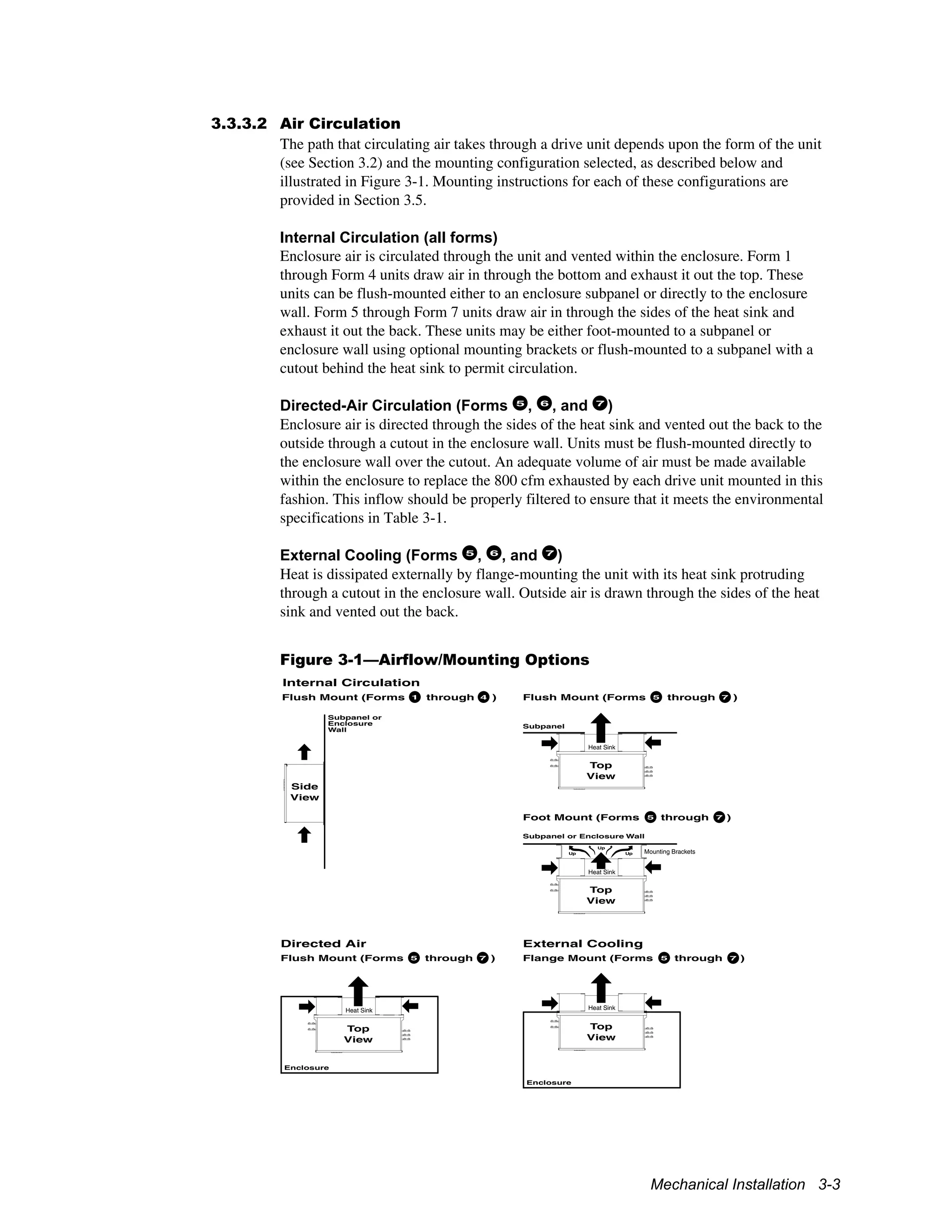
Mechanical Installation 3-1
3 Mechanical Installation
3.1 Overview
Proper mechanical installation of drive units is essential for safe, reliable operation and to
simplify electrical wiring and maintenance. This chapter provides information and
instructions for determining the best mounting location, selecting an enclosure, planning
a layout, and installing the units.
3.2 Forms
Drive units are classified into seven different forms according to their physical size and
configuration. Form 1 through Form 5 units are individual components, while Form 6 and
7 units are comprised of multiple pole sections that function together as a single unit.
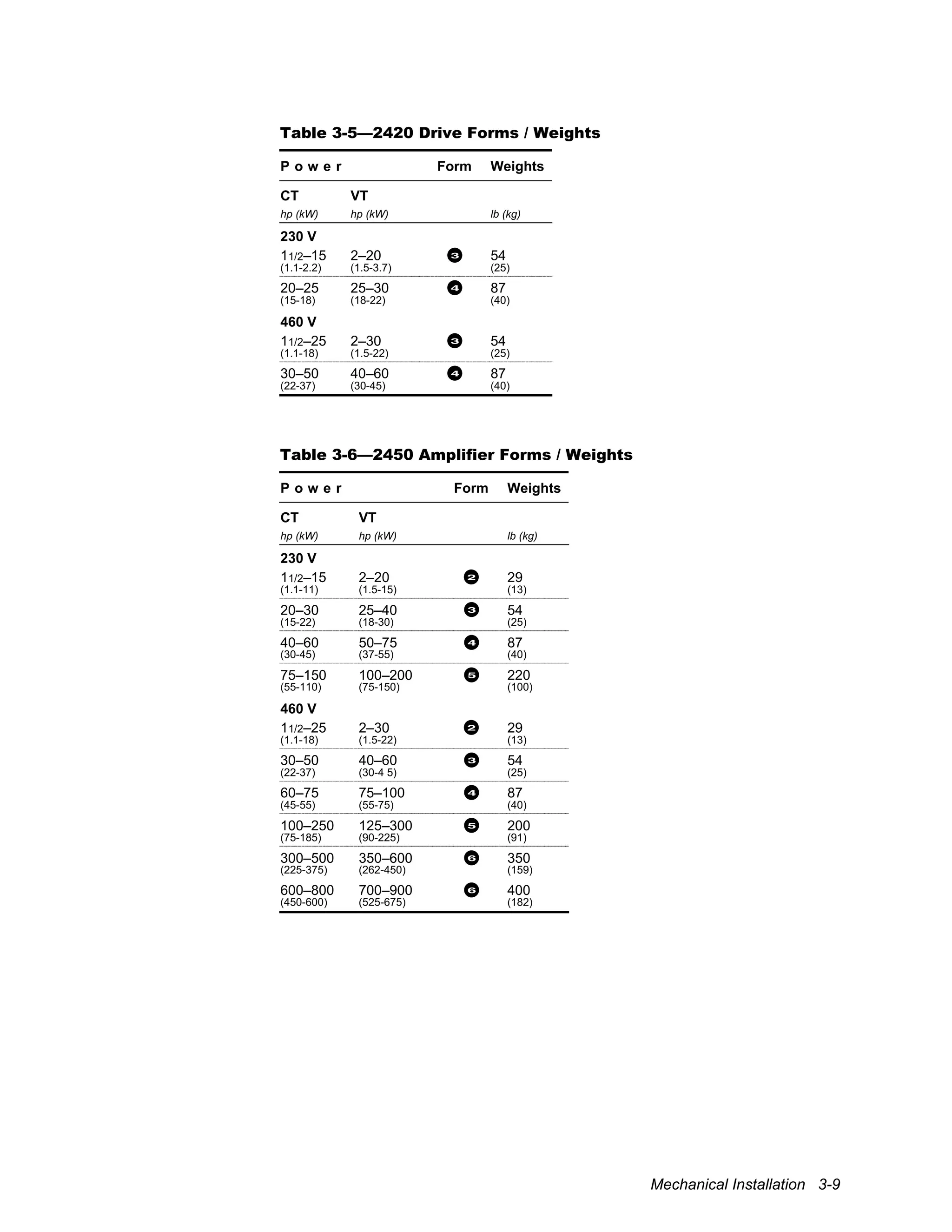
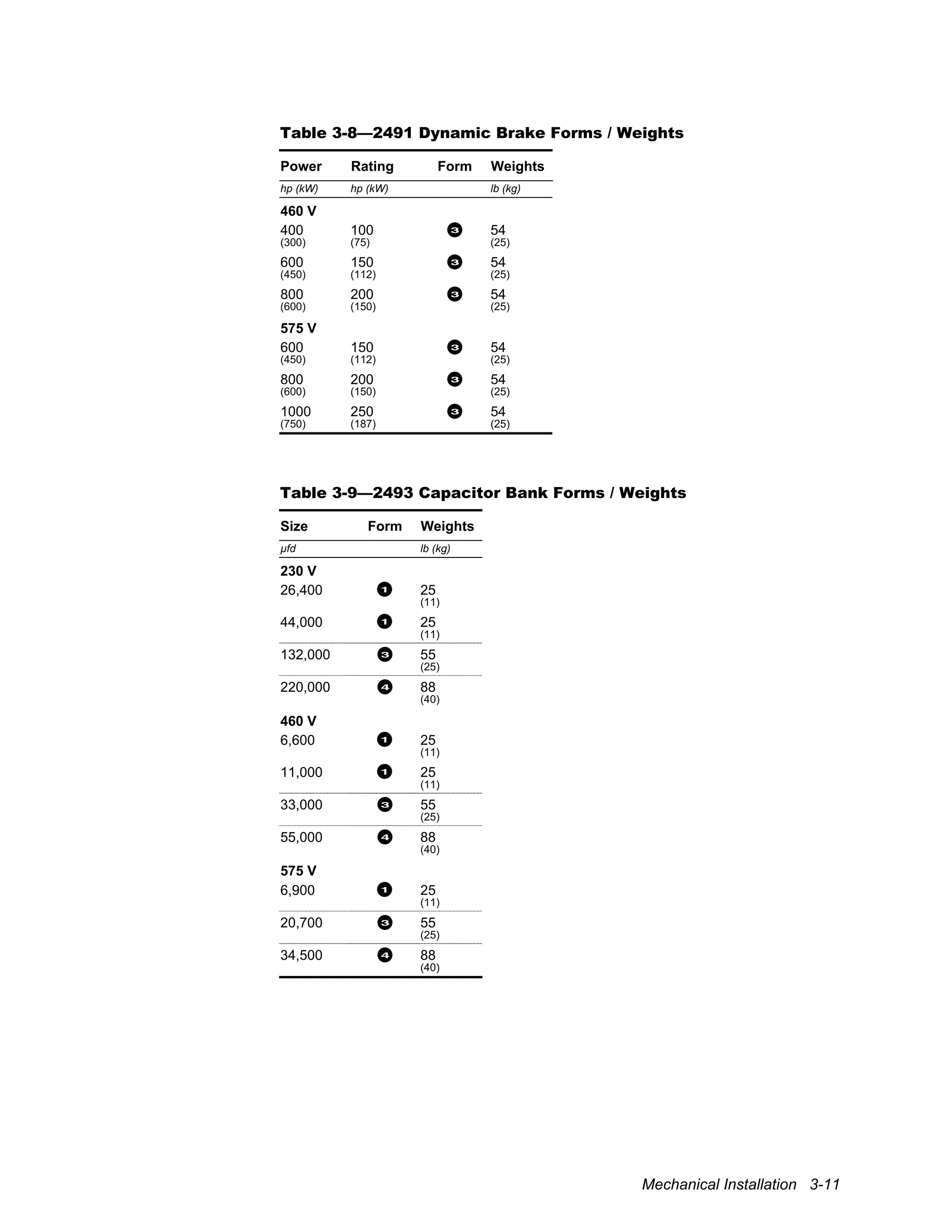
Refer to Table 3-4 through Table 3-9, beginning on page 3-8, to determine the form of a
unit based upon its voltage, torque, and power ratings.
3.3 Installation Site Considerations
It is important to choose a mounting location that protects drive units from harmful
environmental conditions while, at the same time, safeguarding personnel from the
dangerous voltages of the drive system.
3.3.1 Enclosure
Drive units may be ordered either as stand-alone components or as part of a packaged
drive system incorporating additional elements within an enclosure. When ordered as
stand-alone components, the units are supplied as enclosed chassis (IP00) that must be
mounted inside an enclosure for safety.
!
Attention
To provide protection against electrical shock, drive units must be mounted
in an enclosure meeting at least the requirements of Protective Type IP20
(or NEMA equivalent) according to EN60529 and with top surfaces
meeting at least the requirements of IP40 (or NEMA equivalent). It is
recommended that a key or tool be required to open the enclosure and that
enclosure doors be interlocked with the electrical supply disconnect.
3.3.2 Operating Environment
Drive units should be mounted in an environment that is free from corrosive and volatile
vapors, dust and particles, mechanical shock, excessive vibration, water or excessive
moisture, and temperature extremes. Table 3-1 specifies the required ambient operating
conditions.
3-2 2000 Family / Guide to Installation, Troubleshooting, and Maintenance
Table 3-1—Operating Environment Specifications
Control section:
32° to 131° F (0° to 55° C)
Temperature:
Heat sink:
Less than 125 hp (CT): 32° to 131° F (0° to 55° C)
125 hp (CT) or more: 32° to 104° F (0° to 40° C)
Relative humidity: 5% to 95%, noncondensing
Altitude: 0 to 3,300 ft (0 to 1,000 m) above sea level
Derate output power 1% per 330 ft (100 m) above
3,300 ft (1,000 m). Contact supplier for additional
limitations for operation above 6,600 ft (2000 m).
Vibration: 0.3 mm (2 to 9 Hz), 1 m/s
2
(9 to 200 Hz) sinusoidal
(IEC 68-2-6)
Pollution: Nonconductive pollution according to Pollution Degree 2
of IEC 664-1
If the drive unit is to be used in a more polluted
environment (Pollution Degree 3 or 4), suitable enclosures
and air filtering or conditioning equipment must be used.
To protect against dust ingress, an IP6x-rated enclosure
(or NEMA equivalent) must be used.
Contamination levels: Class 3C2 for chemicals (IEC 721-3-3)
Class 3S2 for dust (IEC 721-3-3)
3.3.3 Cooling
Thermal management techniques may be necessary to keep drive units operating within
required temperature specifications, particularly when units are installed within confined
spaces. Units cool themselves using fans that circulate air across a heat sink. Form 5, 6,
and 7 inverter or amplifier units also have separate fans for cooling the control section
above the heat sink. On larger units, a choice of mounting configurations provides
flexibility in selecting a cooling method. Additional ventilating or cooling equipment
may be required.
3.3.3.1 Thermal Load
The total power dissipated by each drive unit is given in Table 3-10 through Table 3-14 at
the end of this chapter. For Form 5 through Form 7 units, where the heat sink can be
mounted externally to the enclosure, dissipation figures are also provided for the control
section and heat sink independently. Use this information, in conjunction with the
enclosure manufacturer’s recommendations, to size the enclosure and to determine
cooling airflow requirements. Power dissipation of units operating on 380 V power lines
is the same as that listed for 460 V.
Mechanical Installation 3-3
3.3.3.2 Air Circulation
The path that circulating air takes through a drive unit depends upon the form of the unit
(see Section 3.2) and the mounting configuration selected, as described below and
illustrated in Figure 3-1. Mounting instructions for each of these configurations are
provided in Section 3.5.
Internal Circulation (all forms)
Enclosure air is circulated through the unit and vented within the enclosure. Form 1
through Form 4 units draw air in through the bottom and exhaust it out the top. These
units can be flush-mounted either to an enclosure subpanel or directly to the enclosure
wall. Form 5 through Form 7 units draw air in through the sides of the heat sink and
exhaust it out the back. These units may be either foot-mounted to a subpanel or
enclosure wall using optional mounting brackets or flush-mounted to a subpanel with a
cutout behind the heat sink to permit circulation.
Directed-Air Circulation (Forms 5
, 6
, and 7
)
Enclosure air is directed through the sides of the heat sink and vented out the back to the
outside through a cutout in the enclosure wall. Units must be flush-mounted directly to
the enclosure wall over the cutout. An adequate volume of air must be made available
within the enclosure to replace the 800 cfm exhausted by each drive unit mounted in this
fashion. This inflow should be properly filtered to ensure that it meets the environmental
specifications in Table 3-1.
External Cooling (Forms 5
, 6
, and 7
)
Heat is dissipated externally by flange-mounting the unit with its heat sink protruding
through a cutout in the enclosure wall. Outside air is drawn through the sides of the heat
sink and vented out the back.
Figure 3-1—Airflow/Mounting Options
Internal Circulation
Directed Air
Flush Mount (Forms 5 through 7 )5 7
Top
View
Subpanel
Top
View
Subpanel or Enclosure Wall
Up
Up
Up
Foot Mount (Forms 5 through 7 )5 7
External Cooling
Flange Mount (Forms 5 through 7 )5 7
Top
View
Enclosure
Heat Sink
Heat Sink
Mounting Brackets
Heat Sink
Top
View
Heat Sink
Enclosure
Side
View
Subpanel or
Enclosure
Wall
Flush Mount (Forms 5 through 7 )1 4
3-4 2000 Family / Guide to Installation, Troubleshooting, and Maintenance
3.4 Layout Considerations
The following information should be considered when planning a mechanical layout.
3.4.1 Dimensions and Weights
The physical dimensions of each unit are provided beginning on page 3-12 in Figure 3-3
through Figure 3-6. Approximate unit weights are given in Table 3-4 through Table 3-9
beginning on page 3-8.
!
Attention
Make certain that the mounting surface is strong enough to support the
weight of all components to be mounted on it.
3.4.2 Space Requirements
Sufficient space must be provided around each drive unit for heat dissipation, access to
electrical connections, and maintenance. Recommended clearances above and below,
between, and behind units are indicated in Table 3-2. Depending upon the application,
additional horizontal clearance may be required between Form 5 units to accommodate
the bending radius of wires connected to the external terminal bars. Be sure to also leave
enough clearance for removing and replacing the cover during installation and servicing.
Metal bus and ground bars used to interconnect Form 5, 6, and 7 units dictate the vertical
spacing between units. If these bars are used, care must be taken when flush- or flange-
mounting such units to stay within the specified vertical tolerance. When units are foot-
mounted, mounting brackets automatically ensure correct vertical spacing.
Table 3-2—Mounting Clearances
Form Vertical Horizontal Behind
in (mm) in (mm) in (mm)
1
, 2
, 3
, and 4 12.00" or more 0.30" or more —
(305) (8)
5
, 6
, and 7
0.75" ± 0.13" 12.00" or more 4.00" or more
(19) (305) (102)
3.4.3 Arrangement and Orientation
Drive units must be mounted upright (so that the cover label reads correctly) to permit
proper cooling airflow. Under no circumstances should units be installed upside down or
on their sides in an attempt to change the direction of airflow or to facilitate wiring.
Position 2400, 2420, and 2450 units so that their keypad/displays can be accessed
comfortably by the operator. The average adult is 5' 6" (168 cm) tall, so mount
accordingly if possible.
Drive units should be arranged to economize space and simplify wiring. Figure 3-2 shows
typical arrangements for multiple units sharing a common bus and for multisection units.
Any practical configuration that satisfies clearance requirements may be used, however.
Mechanical Installation 3-5
Forms 1
, 2
, 3
, and 4
When multiple Form 1 through 4 units share a common bus, they are normally arranged
horizontally with the inverters or amplifiers to the left of the converter and the capacitor
bank unit to the right. If units are mounted in more than one row, be certain to maintain
proper vertical clearance between rows for cooling airflow.
Form 5
When multiple Form 5 units share a common bus, they are normally mounted in a
column with the converter unit below the inverter or amplifier units.
Forms 6
and 7
Form 6 and 7 units are multisection units comprised of two and three pole sections,
respectively, stacked in a column. Bus and ground bars join the pole sections and dictate
the vertical arrangement. The converter unit is usually located to the right of the column.
Figure 3-2—Typical Mounting Schemes
2490
Forms 1 to 4
Multiple Units Sharing Bus
1 4
Form 5
Multiple Units Sharing Bus
5
5
5
5
5
7
5
6
Form 6 Amplifier
with Form 5 Converter
6
5
Form 7 Inverter
with Form 5 Converter
7
5
2400/2450 2490 Cap
Bank
2400/
2450
2400/
2450
2490
2490
2450
2400
12234
3.4.4 Cable Routing
Separate electrical conduits are required for incoming power, output to the motor,
and control wiring.
3-6 2000 Family / Guide to Installation, Troubleshooting, and Maintenance
3.5 Installation Procedure
Drive units are provided as flush-mountable enclosed chassis (IP00) for mounting inside
an enclosure. Form 5, 6, and 7 units may also be foot- or flange-mounted. Figure 3-3
through Figure 3-9, beginning on page 3-12, provide the physical dimensions and
mechanical layouts of the units. Refer to these figures when planning your layout.
!
Attention
Make certain that the mounting surface is secure before mounting the drive
unit(s). Equipment damage could result from an improperly mounted unit.
!
Attention
Exercise care during installation to prevent metal shavings, conduit
knockouts, and other debris from falling into the unit(s). Personal injury
and/or equipment damage could result.
!
Attention
Drive units may weigh a considerable amount. To avoid the risk of personal
injury and/or damage to the equipment, two or more people should work in
unison when lifting and maneuvering a unit. Follow industry-prescribed
safe-lifting practices at all times.
!
Attention
Do not lift a unit by its cover, even when it is secured by retaining screws.
The cover is not intended to support the weight of the unit. Always rest the
unit on its back, never face down or on its side.
3.5.1 Flush Mounting (all forms)
All units may be flush mounted to a subpanel inside an enclosure or directly to an
enclosure wall. Form 5, 6, and 7 units require a cutout in the panel or enclosure wall to
allow air to vent out the back. Refer to Figure 3-7. Allow clearance behind the cutout for
airflow as recommended in Table 3-2.
Mount Form 1 through Form 4 units according to Figure 3-3 using four 1/4" (6 mm) bolts
or studs. Mount Form 5, 6, and 7 units according to Figure 3-7 using at least six 5/16" (8
mm) bolts or studs. Rest the bottom mounting slots on the bolts or studs while securing
the top.
3.5.2 Foot Mounting (Forms 5
, 6
, and 7
)
Form 5, 6, and 7 units may be foot-mounted to a subpanel inside an enclosure or directly
to an enclosure wall using optional foot-mounting brackets. These brackets position the
heat sink the required distance from the mounting surface while forming a vertical
channel for conveying exhausted air. They also greatly simplify mounting since they
provide the proper interunit spacing.
Select the appropriate single-, double-, or triple-unit brackets from Table 3-3 according to
the number of units to be mounted in a column. Mounting kits contain a pair of brackets.
Refer to Figure 3-8 for mounting bracket hole and stud locations. Attach the brackets first
Mechanical Installation 3-7
to the mounting surface using 5/16" (8 mm) bolts or studs, then mount the drive unit to the
protruding 5/16"–18 x 3/4" studs.
Table 3-3—Foot-Mounting Brackets
Mounting Kit
Part Number
Single-Bracket
Part Number
Description
709628 110156 Single-unit mounting bracket
709629 110145 Double-unit mounting bracket
709630 110188 Triple-unit mounting bracket
3.5.3 Flange Mounting (Forms 5
, 6
, and 7
)
Form 5, 6, and 7 units can be flange-mounted with their heat sinks extending through a
cutout in the enclosure wall. Units are designed to provide NEMA 4 (IP66) integrity
when flange-mounted inside a suitable NEMA 4 enclosure using a 322607 gasket. Refer
to Figure 3-9 for hole locations and cutout dimensions. Allow the recommended
clearance behind the heat sink for airflow (see Table 3-2).
To flange-mount a unit, first remove the fan shrouds by removing the six hex-head
screws attaching each shroud to the underside of the heat sink. Pull the shrouds out far
enough to disconnect the electrical connectors, then remove the shrouds completely.
Mount the gasket to the inside of the enclosure. Push the heat sink through the cutout in
the enclosure wall, then attach the unit to the enclosure wall using sixteen #10 (5 mm)
studs through the holes in the heat sink flange. The corner studs of each unit must pass
through the console; others may be welded. From outside the enclosure, reconnect the
electrical connectors in any order. Route the wires away from the fan blades, making
certain that they will not be pinched by the fan shrouds, then reattach both fan shrouds.
3.5.4 Bus and Ground Bars (Forms 5
, 6
, and 7
)
Metal bus bars and ground bars are provided with Form 6 and 7 units for interconnecting
separate poles. They are optionally available for interconnecting multiple Form 5 units
and are recommended for wiring simplicity and integrity. Bus and ground bars must be
installed after the drive units have been mounted.
Form 5 units have external bus connections on the left side. For each pair of neighboring
units, install a 110019 bus bar between the B+ terminals (located near the top of each unit
and close to the heat sink) and another between the B– terminals (located near the bottom
of each unit and away from the heat sink). Refer to Figure 3-10.
Form 6 and 7 units have internal bus connections. For each pair of neighboring units,
install a 109503 bus bar with attached insulator between the B+ bus plates (located along
the left side of the units) and another between the B– bus plates (located along the right
side of the units). Refer to Figure 3-11. Access is tight, so use a 3/8" speed wrench and be
careful not to drop hardware into the unit. Mount the outer bars before the inner bars. To
install the B– bus bar in the top pole unit, first remove the bar jumpering the B– terminals
to the bus.
For each pair of units, install two ground bars (108123), one on each side, connecting the
bottom ground holes of one unit (located on the sides of the heat sink flange) with the top
ground holes of the next unit. Use two 1/4"-20 screws with washers and locking washers
for each bar. Refer to Figure 3-10 or Figure 3-11.
3-8 2000 Family / Guide to Installation, Troubleshooting, and Maintenance
Table 3-4—2400 Inverter Forms / Weights
P o w e r Form Weights
CT VT ET
hp (kW) hp (kW) hp (kW) lb (kg)
230 V
11/2–15 2–20 — 2 29
(1.1-11) (1.5-15) (13)
20–40 25–50 — 3 54
(15-30) (18-37) (25)
50–75 60–100 — 4 87
(37-55) (45-75) (40)
460 V
11/2–25 2–30 25–40 2 29
(1.1-18) (1.5-22) (18-30) (13)
30–60 40–75 50–100 3 54
(22-45) (30-55) (37-75) (25)
75–100 100–125 125–150 4 87
(55-75) (75-90) (90-110) (40)
125–250 150–300 200–350 5 200
(90-185) (110-225) (150-262) (91)
300–400 350–500 400–600 5 220
(225-300) (262-375) (300-450) (100)
500–600 600–700 700–800 7 490
(375-450) (450-525) (525-600) (223)
700–1000 800–1100 900–1200 7 550
(525-750) (600-825) (675-900) (250)
575 V
125–250 150–300 200–350 5 200
(90-185) (110-225) (150-262) (91)
300–400 350–500 400–600 5 220
(225-300) (262-375) (300-450) (100)
500–600 600–700 700–800 7 490
(375-450) (450-525) (525-600) (223)
700–1100 800–1200 900–1300 7 550
(525-825) (600-900) (675-975) (250)
Mechanical Installation 3-9
Table 3-5—2420 Drive Forms / Weights
P o w e r Form Weights
CT VT
hp (kW) hp (kW) lb (kg)
230 V
11/2–15 2–20 3 54
(1.1-2.2) (1.5-3.7) (25)
20–25 25–30 4 87
(15-18) (18-22) (40)
460 V
11/2–25 2–30 3 54
(1.1-18) (1.5-22) (25)
30–50 40–60 4 87
(22-37) (30-45) (40)
Table 3-6—2450 Amplifier Forms / Weights
P o w e r Form Weights
CT VT
hp (kW) hp (kW) lb (kg)
230 V
11/2–15 2–20 2 29
(1.1-11) (1.5-15) (13)
20–30 25–40 3 54
(15-22) (18-30) (25)
40–60 50–75 4 87
(30-45) (37-55) (40)
75–150 100–200 5 220
(55-110) (75-150) (100)
460 V
11/2–25 2–30 2 29
(1.1-18) (1.5-22) (13)
30–50 40–60 3 54
(22-37) (30-4 5) (25)
60–75 75–100 4 87
(45-55) (55-75) (40)
100–250 125–300 5 200
(75-185) (90-225) (91)
300–500 350–600 6 350
(225-375) (262-450) (159)
600–800 700–900 6 400
(450-600) (525-675) (182)
3-10 2000 Family / Guide to Installation, Troubleshooting, and Maintenance
Table 3-7—2490 Converter Forms / Weights
Power Form Weights
hp (kW) lb (kg)
230 V
10–20 2 36
(7.5-15) (16)
40 3 65
(30) (30)
75 4 87
(55) (40)
460 V
20 2 36
(15) (16)
40 2 39
(30) (18)
75 3 70
(55) (32)
150 4 87
(110) (40)
250 5 157
(185) (71)
400–800 5 180
(300-600) (82)
575 V
150 4 87
(110) (40)
250 5 157
(185) (71)
400–1000 5 180
(300-750) (82)
Mechanical Installation 3-11
Table 3-8—2491 Dynamic Brake Forms / Weights
Power Rating Form Weights
hp (kW) hp (kW) lb (kg)
460 V
400 100 3 54
(300) (75) (25)
600 150 3 54
(450) (112) (25)
800 200 3 54
(600) (150) (25)
575 V
600 150 3 54
(450) (112) (25)
800 200 3 54
(600) (150) (25)
1000 250 3 54
(750) (187) (25)
Table 3-9—2493 Capacitor Bank Forms / Weights
Size Form Weights
µfd lb (kg)
230 V
26,400 1 25
(11)
44,000 1 25
(11)
132,000 3 55
(25)
220,000 4 88
(40)
460 V
6,600 1 25
(11)
11,000 1 25
(11)
33,000 3 55
(25)
55,000 4 88
(40)
575 V
6,900 1 25
(11)
20,700 3 55
(25)
34,500 4 88
(40)
3-12 2000 Family / Guide to Installation, Troubleshooting, and Maintenance
Figure 3-3—Physical and Mounting Dimensions (Forms 1
, 2
, 3
, and 4
)
MOUNTING
Four (4) slots 0.31" (8 mm) x 0.50" (13 mm)
Use 1/4" (6 mm) bolts or studs
≈4.00"
(102 mm)
≈4.25"
(108 mm)
18.00"
(457 mm)
0.75"
(19 mm)
17.25"
(438 mm)
(Keypad/display on
2400, 2420, and
2450 only)
Form
2.00"
(51 mm)
3.50"
(89 mm)
9.50"
(241 mm)
13.50"
(343 mm)
1.19"
(30 mm)
4.50"
(114 mm)
9.50"
(241 mm)
2.19"
(56 mm)
1.19"
(30 mm)
2.19"
(56 mm)
4.38"
(111 mm)
7.88"
(200 mm)
11.88"
(302 mm)
17.88"
(454 mm)
1
2
3
4
Form
1
2
3
4
11.38"
(289 mm)
Optional I/O bracket 108-244
for 16-bit fanning strip
Optional I/O bracket 109-609
for 32-bit fanning strip
Mechanical Installation 3-13
Figure 3-4—Physical Dimensions (Forms 5
)
16.03"
(407 mm)
10.91"
(277 mm)
22.13"
(562 mm)
≈19.88"
(505 mm)
≈2.38"
(60 mm)
22.13"
(562 mm)
≈19.88"
(505 mm)
≈2.38"
(60 mm)
≈2.50"
(64 mm)
≈6.05"
(154 mm)
≈2.25"
(57 mm)
≈3.25"
(83 mm)
≈5.50"
(140 mm)
≈9.50"
(241 mm)
≈9.93"
(252 mm)
≈11.18"
(284 mm)
≈12.43"
(316 mm)
≈9.93"
(265 mm)
≈11.18"
(291 mm)
≈12.45"
(316 mm)
≈11.63"
(295 mm)
≈17.75"
(451 mm)
26.00"
(660 mm)
25.13"
(638 mm)
26.00"
(660 mm)
25.13"
(638 mm)
≈29.88"
(759 mm)
≈2.50"
(64 mm)
2.63"
(67 mm)
≈2.00"
(51 mm)
≈29.62"
(752 mm)
12.38"
(314 mm)
5.12"
(130 mm)
7.57"
(192 mm)
Left Side Right SideFront
2400 Inverter / 2450 Amplifier
2490 Converter
9.32"
(237 mm)
9.32"
(237 mm)
15.93"
(405 mm)
10.81"
(275 mm)
5.12"
(130 mm)
7.57"
(192 mm)
≈5.50"
(140 mm)
≈11.75"
(298 mm)
≈17.75"
(451 mm)
TERMINAL POSITIONS MAY VARY
ONLY ON
2400 UNITS
3-14 2000 Family / Guide to Installation, Troubleshooting, and Maintenance
Figure 3-5—Physical Dimensions (Forms 6
)
≈12.18"
(309 mm)
16.03"
(407 mm)
≈48.63"
(1235 mm)
44.88"
(1140 mm)
0.00"
(0mm)
≈0.56"
(14mm)
≈4.31"
(109mm)
≈17.44"
(443mm)
≈25.44"
(646mm)
26.00"
(660mm)
22.75"
(578 mm)
22.13"
(562 mm)
≈17.13"
(435 mm)
0.00"
(0 mm)
26.00"
(660 mm)
≈27.88"
(708 mm)
9.44"
(240 mm)
25.13"
(638 mm)
≈39.88"
(1013 mm)
≈8.44"
(214 mm)
Left Side Front Right Side
TERMINAL POSITIONS MAY VARY
5.12"
(130 mm)
10.91"
(277 mm)
≈6.05"
(154 mm) ≈3.25"
(83 mm)
Mechanical Installation 3-15
Figure 3-6—Physical Dimensions (Forms 7
)
≈12.18"
(309 mm)
16.03"
(407 mm)
≈71.32"
(1812 mm)
67.57"
(1716 mm)
0.00"
(0mm)
≈0.56"
(14mm)
≈4.31"
(109mm)
≈17.44"
(443mm)
≈25.44"
(646mm)
26.00"
(660mm)
45.43"
(1154 mm)
44.81"
(1138 mm)
≈39.81"
(1011 mm)
22.68"
(576 mm)
22.13"
(562 mm)
0.00"
(0 mm)
26.00"
(660 mm)
≈27.88"
(708 mm)
9.44"
(240 mm)
25.13"
(638 mm)
≈17.13"
(435 mm)
≈62.57"
(1589 mm)
≈8.44"
(214 mm)
Left Side Front Right Side
TERMINAL POSITIONS MAY VARY
5.12"
(130 mm)
10.91"
(277 mm)
≈6.05"
(154 mm) ≈3.25"
(83 mm)
3-16 2000 Family / Guide to Installation, Troubleshooting, and Maintenance
Figure 3-7—Flush-Mounting Dimensions (Forms 5
, 6
, and 7
)
Rear
(symmetrical)
Cutout
(symmetrical)
26.00"
(660 mm)
25.24"
(641 mm)
12.64"
(321 mm)
6.30"
(160 mm)
6.30"
(160 mm)
5.50"
(140 mm)
5.00"
(127 mm)
11.00"
(279 mm)
11.00"
(279 mm)
22.00"
(559 mm)
5.00"
(127 mm)
5.50"
(140 mm)
67.50"
(1715 mm)
45.50"
(1156 mm)
0.38"
(10mm)
0.00"
(0mm)
6.00"
(152mm)
8.00"
(203mm)
18.01"
(457mm)
20.01"
(508mm)
26.00"
(660mm)
6.68"
(170mm)
19.32"
(491mm)
25.62"
(651mm)
(optional)
(optional)
(optional)
(optional)
5.50"
(140 mm)
0.75"
(19 mm)
5.00"
(127 mm)
11.00"
(279 mm)
11.00"
(279 mm)
22.00"
(559 mm)
5.00"
(127 mm)
5.50"
(140 mm)
44.75"
(1137 mm)
22.75"
(578 mm)
(optional)
(optional)
(optional)
(optional)
5.50"
(140 mm)
5.00"
(127 mm)
11.00"
(279 mm)
11.00"
(279 mm)
22.00"
(559 mm)
5.00"
(127 mm)
5.50"
(140 mm)
22.00"
(559 mm)
0.00"
(0 mm)
(optional)
(optional)
(optional)
(optional)
(optional)(optional)
HEAT SINK
8.00"
(203 mm)
10.00"
(254 mm)
1.00"
(25 mm)
20.00"
(508 mm)
1.00"
(25 mm)
20.00"
(508 mm)
1.00"
(25 mm)
20.00"
(508 mm)
0.75"
(19 mm)
1.75"
(44 mm)
1.75"
(44 mm)
Unit #3
CUTOUT
Unit #2
CUTOUT
Unit #1
Unit #3
Unit #2
Unit #1
CUTOUT
21.50"
(546 mm)
16.00"
(406 mm)
11.00"
(279 mm)
6.00"
(152 mm)
0.50"
(13 mm)
44.25"
(1124 mm)
38.75"
(984 mm)
33.75"
(857 mm)
28.75"
(730 mm)
23.25"
(591 mm)
67.00"
(1702 mm)
61.50"
(1562 mm)
56.50"
(1435 mm)
51.50"
(1308 mm)
46.00"
(1168 mm)
MOUNTING
Ten (10) holes and slotted holes
0.38" (10 mm) and four (4) optional slots
0.38" (10 mm) x 1.00" (25 mm) each unit
Use 5/16" (8 mm) bolts or studs
Mechanical Installation 3-17
Figure 3-8—Foot-Mounting Bracket Dimensions
24.00"
(610 mm)
0.00"
(0 mm)
0.00"
(0 mm)0.00"
(0 mm)
0.81"
(21 mm)
1.63"
(41 mm)
0.00"
(0 mm)
0.81"
(21 mm)
1.63"
(41 mm)
0.00"
(0 mm)
0.81"
(21 mm)
1.63"
(41 mm)
4.00"
(102 mm)
0.00"
(0 mm)
4.00"
(102 mm)
22.50"
(572 mm)
12.00"
(305 mm)
1.50"
(38 mm)
23.38"
(594 mm)
24.25"
(616 mm)
23.38"
(572 mm)
34.75"
(883 mm)
45.25"
(1149 mm)
12.00"
(305 mm)
1.50"
(38 mm)
Side View
Drive Unit
Mounting
Panel
Mounting
Side View
Drive Unit
Mounting
Panel
Mounting
Side View
Drive Unit
Mounting
Panel
Mounting
End View
End View
Double-Unit Bracket (110-145)
Single-Unit Bracket (110-156) Triple-Unit Bracket (110-188)
End View
3/8" (9 mm) dia. holes
5/16"–18 x 3/4" studs
3/8" (9 mm) dia. holes
5/16"–18 x 3/4" studs
0.00"
(0 mm)
46.75"
(1187 mm)
23.38"
(594 mm)
34.75"
(883 mm)
46.13"
(1172 mm)
47.00"
(1194 mm)
45.25"
(1149 mm)
24.25"
(616 mm)
22.50"
(572 mm)
57.50"
(1461 mm)
68.00"
(1727 mm)
12.00"
(305 mm)
1.50"
(38 mm)
0.00"
(0 mm)
69.50"
(1765 mm)
0.00"
(0 mm)
4.00"
(102 mm)
3-18 2000 Family / Guide to Installation, Troubleshooting, and Maintenance
Figure 3-9—Flange-Mounting and Cutout Dimensions
Unit #1
Unit #2
Unit #3
6.31"
(160 mm)
67.50"
(1715 mm)
45.88"
(1165 mm)
22.00"
(559 mm)
22.75"
(578 mm)
44.75"
(1137 mm)
45.50"
(1156 mm)
61.82"
(1570 mm)
66.85"
(1698 mm)
56.50"
(1435 mm)
51.19"
(1300 mm)
46.15"
(1172 mm)
39.07"
(992 mm)
44.10"
(1120 mm)
33.75"
(857 mm)
28.44"
(722 mm)
16.32"
(415 mm)
21.35"
(542 mm)
23.40"
(594 mm)
23.13"
(588 mm)
0.00"
(0 mm)
0.38"
(10 mm)
21.62"
(549 mm)
44.37"
(1127 mm)
67.12"
(1705 mm)
23.75"
(603 mm)
46.50"
(1181 mm)
47.25"
(1200 mm)
11.00"
(279 mm)
5.69"
(145 mm)
0.65"
(17 mm)
1.00"
(25 mm)
21.00"
(533 mm)
43.75"
(1111 mm)
66.50"
(1689 mm)
6.31"
(160 mm)
5.03"
(128 mm)
5.04"
(128 mm)
5.32"
(135 mm)
5.31"
(135 mm)
5.03"
(128 mm)
0.75"
(19 mm)
0.75"
(19 mm)
5.04"
(128 mm)
5.32"
(135 mm)
5.31"
(135 mm)
5.03"
(128 mm)
5.04"
(128 mm)
5.32"
(135 mm)
5.31"
(135 mm)
3.00"
(76mm)
6.69"
(170mm)
13.00"
(330mm)
19.32"
(491mm)
23.00"
(584mm)
25.63"
(651mm)
24.25"
(616mm)
0.38"
(10mm)
1.75"
(44mm)
0.00"
(0mm)
26.00"
(660mm)
6.31"
(160 mm)
6.32"
(161 mm)
CUTOUTS
CUTOUTS
CUTOUTS
24.50"
(622 mm)
1.75"
(44 mm)
Rear
(symmetrical)
1/2" (13 mm) dia.
MOUNTING
Sixteen (16) 0.34" (8 mm) holes each unit
Use #10 (5 mm) studs
1/2" (13 mm) dia.
1/2" (13 mm) dia.
Mechanical Installation 3-19
Figure 3-10—Bus and Ground Bars (Form 5
)
GROUND BAR
GROUND BAR
GROUND BAR
GROUND BAR
BUS BAR
BUS BAR
BUS BAR
BUS BAR
Left Side
B+
B–
Front
Use two (2) 1/4"-20
screws each bar
GROUND BAR
GROUND BAR
3-20 2000 Family / Guide to Installation, Troubleshooting, and Maintenance
Figure 3-11—Bus and Ground Bars (Forms 6
and 7
)
Left Side Front
B+ B–
GROUND BAR
GROUND BAR
GROUND BAR
GROUND BAR
BUS BAR BUS BARS
BUS BAR
GROUND BAR
GROUND BAR
Use two (2) 1/4"-20
screws each bar
Mechanical Installation 3-21
Table 3-10—2400 Inverter Power Dissipation
P o w e r D i s s i p a t i o n
CT VT ET Control Heat Sink Total
hp (kW) hp (kW) hp (kW) kW kW kW
230 V
11/2 2 — — — 0.137
(1.1) (1.5)
2 3 — — — 0.144
(1.5) (2.2)
3 5 — — — 0.166
(2.2) (3.7)
5 71/2 — — — 0.212
(3.7) (5.5)
71/2 10 — — — 0.267
(5.5) (7.5)
10 15 — — — 0.315
(7.5) (11)
15 20 — — — 0.429
(11) (15)
20 25 — — — 0.540
(15) (18)
25 30 — — — 0.653
(18) (22)
30 40 — — — 0.751
(22) (30)
40 50 — — — 0.946
(30) (37)
50 60 — — — 1.171
(37) (45)
60 75 — — — 1.366
(45) (55)
75 100 — — — 1.675
(55) (75)
460 V
11/2 2 — — — 0.132
(1.1) (1.5)
2 3 — — — 0.138
(1.5) (2.2)
3 5 — — — 0.158
(2.2) (3.7)
5 71/2 — — — 0.198
(3.7) (5.5)
71/2 10 — — — 0.247
(5.5) (7.5)
10 15 — — — 0.290
(7.5) (11)
15 20 25 — — 0.391
(11) (15) (18)
20 25 30 — — 0.478
(15) (18) (22)
25 30 40 — — 0.578
(18) (22) (30)
30 40 50 — — 0.679
(22) (30) (37)
40 50 60 — — 0.853
(30) (37) (45)
50 60 75 — — 1.040
(37) (45) (55)
(continued)
3-22 2000 Family / Guide to Installation, Troubleshooting, and Maintenance
Table 3-10—2400 Inverter Power Dissipation (continued)
P o w e r D i s s i p a t i o n
CT VT ET Control Heat Sink Total
hp (kW) hp (kW) hp (kW) kW kW kW
460 V
60 75 100 — — 1.214
(45) (55) (75)
75 100 125 — — 1.502
(55) (75) (90)
100 125 150 — — 1.908
(75) (90) (110)
125 150 200 0.231 2.153 2.384
(90) (110) (150)
150 200 250 0.251 2.484 2.735
(110) (150) (185)
200 250 300 0.291 3.312 3.603
(150) (185) (225)
250 300 350 0.465 4.140 4.605
(185) (225) (262)
300 350 400 0.505 4.968 5.473
(225) (262) (300)
350 400 500 0.545 5.796 6.341
(262) (300) (375)
400 500 600 0.585 6.624 7.209
(300) (375) (450)
500 600 700 0.843 8.280 9.123
(375) (450) (525)
600 700 800 0.923 9.936 10.859
(450) (525) (600)
700 800 900 1.255 11.592 12.847
(525) (600) (675)
800 900 1000 1.335 13.248 14.583
(600) (675) (750)
900 1000 1100 1.465 14.904 16.369
(675) (750) (825)
1000 1100 1200 1.545 16.560 18.105
(750) (825) (900)
575 V
125 150 200 0.231 2.400 2.631
(90) (110) (150)
150 200 250 0.251 2.765 3.016
(110) (150) (185)
200 250 300 0.291 3.686 3.977
(150) (185) (225)
250 300 350 0.465 4.608 5.073
(185) (225) (262)
300 350 400 0.505 5.530 6.035
(225) (262) (300)
350 400 500 0.545 6.451 6.996
(262) (300) (375)
400 500 600 0.585 7.373 7.958
(300) (375) (450)
500 600 700 0.843 9.216 10.059
(375) (450) (525)
600 700 800 0.923 11.059 11.982
(450) (525) (600)
(continued)
Mechanical Installation 3-23
Table 3-10—2400 Inverter Power Dissipation (continued)
P o w e r D i s s i p a t i o n
CT VT ET Control Heat Sink Total
hp (kW) hp (kW) hp (kW) kW kW kW
575 V
700 800 900 1.255 12.902 14.157
(525) (600) (675)
800 900 1000 1.335 14.746 16.081
(600) (675) (750)
900 1000 1100 1.465 16.589 18.054
(675) (750) (825)
1000 1100 1200 1.545 18.432 19.977
(750) (825) (900)
1100 1200 1300 1.625 20.275 21.900
(825) (900) (975)
3-24 2000 Family / Guide to Installation, Troubleshooting, and Maintenance
Table 3-11—2420 Power Dissipation
P o w e r Dissipation
CT VT Total
hp (kW) hp (kW) kW
230 V
11/2 2 0.167
(1.1) (1.5)
2 3 0.177
(1.5) (2.2)
3 5 0.209
(2.2) (3.7)
5 71/2 0.272
(3.7) (5.5)
71/2 10 0.350
(5.5) (7.5)
10 15 0.420
(7.5) (11)
15 20 0.578
(11) (15)
20 25 0.733
(15) (18)
25 30 0.891
(18) (22)
460 V
11/2 2 0.155
(1.1) (1.5)
2 3 0.163
(1.5) (2.2)
3 5 0.189
(2.2) (3.7)
5 71/2 0.241
(3.7) (5.5)
71/2 10 0.304
(5.5) (7.5)
10 15 0.360
(7.5) (11)
15 20 0.489
(11) (15)
20 25 0.603
(15) (18)
25 30 0.732
(18) (22)
30 40 0.859
(22) (30)
40 50 1.087
(30) (37)
50 60 1.329
(37) (45)
Mechanical Installation 3-25
Table 3-12—2450 Amplifier Power Dissipation
P o w e r D i s s i p a t i o n
CT VT Control Heat Sink Total
hp (kW) hp (kW) kW kW kW
230 V
11/2 2 — — 0.118
(1.1) (1.5)
2 3 — — 0.127
(1.5) (2.2)
3 5 — — 0.143
(2.2) (3.7)
5 71/2 — — 0.175
(3.7) (5.5)
71/2 10 — — 0.214
(5.5) (7.5)
10 15 — — 0.248
(7.5) (11)
15 20 — — 0.328
(11) (15)
20 25 — — 0.411
(15) (18)
25 30 — — 0.490
(18) (22)
30 40 — — 0.559
(22) (30)
40 50 — — 0.697
(30) (37)
50 60 — — 0.859
(37) (45)
60 75 — — 0.997
(45) (55)
75 100 0.177 1.037 1.214
(55) (75)
100 125 0.211 1.934 2.145
(75) (90)
125 150 0.231 2.434 2.665
(90) (110)
150 200 0.251 2.808 3.059
(110) (150)
460 V
11/2 2 — — 0.132
(1.1) (1.5)
2 3 — — 0.138
(1.5) (2.2)
3 5 — — 0.158
(2.2) (3.7)
5 71/2 — — 0.198
(3.7) (5.5)
71/2 10 — — 0.247
(5.5) (7.5)
10 15 — — 0.290
(7.5) (11)
15 20 — — 0.391
(11) (15)
20 25 — — 0.478
(15) (18)
(continued)
3-26 2000 Family / Guide to Installation, Troubleshooting, and Maintenance
Table 3-12—2450 Amplifier Power Dissipation (continued)
P o w e r D i s s i p a t i o n
CT VT Control Heat Sink Total
hp (kW) hp (kW) kW kW kW
460 V
25 30 — — 0.578
(18) (22)
30 40 — — 0.679
(22) (30)
40 50 — — 0.853
(30) (37)
50 60 — — 1.040
(37) (45)
60 75 — — 1.214
(45) (55)
75 100 — — 1.502
(55) (75)
100 125 0.197 1.711 1.908
(75) (90)
125 150 0.231 2.153 2.384
(90) (110)
150 200 0.251 2.484 2.735
(110) (150)
200 250 0.291 3.312 3.603
(150) (185)
250 300 0.465 4.140 4.605
(185) (225)
300 350 0.505 4.968 5.473
(225) (262)
350 400 0.545 5.796 6.341
(262) (300)
400 500 0.585 6.624 7.209
(300) (375)
500 600 0.843 8.280 9.123
(375) (450)
600 700 0.923 9.936 10.859
(450) (525)
700 800 1.255 11.592 12.847
(525) (600)
800 900 1.335 13.248 14.583
(600) (675)
Mechanical Installation 3-27
Table 3-13—2490 Converter Power Dissipation
Power D i s s i p a t i o n
Control Heat Sink Total
hp (kW) kW kW kW
230 V
10 — — 0.179
(7.5)
20 — — 0.267
(15)
40 — — 0.455
(30)
75 — — 0.773
(55)
460 V
20 — — 0.200
(15)
40 — — 0.309
(30)
75 — — 0.513
(55)
150 — — 0.922
(110)
250 0.681 0.792 1.473
(185)
400 1.067 1.267 2.334
(300)
500 1.287 1.584 2.871
(375)
600 1.507 1.901 3.408
(450)
800 1.947 2.535 4.482
(600)
575 V
150 — — 0.827
(110)
250 0.681 0.634 1.315
(185)
400 1.067 1.014 2.081
(300)
500 1.287 1.267 2.554
(375)
600 1.507 1.521 3.028
(450)
800 1.947 2.028 3.975
(600)
1000 2.387 2.535 4.922
(750)
3-28 2000 Family / Guide to Installation, Troubleshooting, and Maintenance
Table 3-14—2491 Dynamic Brake Power Dissipation
Power Rating Dissipation
Total
hp (kW) hp (kW) kW
460 V
400 100 200
(300) (75)
600 150 300
(450) (112)
800 200 400
(600) (150)
575 V
400 100 200
(300) (75)
600 150 300
(450) (112)
800 200 400
(600) (150)
1000 250 500
(750) (187)
Electrical Installation 4-1
4 Electrical Installation
4.1 Overview
This chapter explains the electrical installation of drive units. It covers grounding, input
and control power, motor output, dynamic braking, and basic control connections. Since
control signals vary from application to application, refer to the appropriate software
documentation for specific wiring instructions.
4.2 Wiring Standards and Codes
The installation crew is responsible for following the wiring plan produced by the design
engineer for the specific application. All wiring must conform to applicable local and
national codes.
!
Attention
The supplier cannot assume responsibility for compliance or
noncompliance to any code governing the proper installation of this unit.
The following information is intended only as a guide for proper
installation. All wiring must conform to the National Electrical Code
(NEC), described in publication NFPA No. 70. Local codes may overrule
this information.
4.3 Insulation Tests
Any site insulation tests must be performed before making electrical connections to the
drive units. These tests should conform to all applicable national and local codes. A
suggested procedure for checking installation insulation is outlined below.
!
Attention
Before performing the insulation tests, make certain that drive units are
disconnected from the input power (R, S, T or R1, R2, S1, S2, T1, T2).
Also verify that the motor cable is disconnected from the output terminals
(U, V, W) and from the motor.
• Measure the insulation resistance of the motor between the phases and between
each phase and protective ground. The voltage range of the meter must be at least
equal to the line voltage but not higher than 1,000 V. The insulation resistance
must be greater than 1 MΩ.
• Measure the insulation resistance of the motor cable between the phases and
between each phase and protective ground. The insulation resistance must be
greater than 1 MΩ.
4-2 2000 Family / Guide to Installation, Troubleshooting, and Maintenance
4.4 Ground Connections
Proper grounding procedures are essential to the safe, successful operation of the drive
system. Careful attention to these procedures can prevent electrical noise from disrupting
operation.
The drive system, power supply, motor, and control circuits should all share a common
earth ground, as shown in Figure 4-1. Ground connection terminal specifications are
provided in Table 4-8 through Table 4-13 beginning on page 4-23. All wires should be
copper with a rating of 167° F (75° C) or higher.
PE
Ground terminal designation
Ground terminals are designated by the IEC symbol at left, by PE
(protective earth), or both. Such terminals are internally connected and tied
to the chassis. They are intended for connecting both the protective earth
ground electrode as well as any external protective grounding conductors.
Figure 4-1—Typical Ground Connections
External Servo
Controller
2400/2450/
2491/2493
2490
Isolation
Transformer
PEPE
Motor
Transducer
Case
Ground
Case
Grounds
XO
Logic
Common
Logic
Commons
Logic
Commons
Converter
Interface 115 V AC
Converter
Interface 115 V AC
Ground Bus Bar
PE
1 2 3 4 5 1 2 3 4 51 2 3 4 1 2 3 4
4.4.1 Ground the Drive Units
Connect the case grounds (PE) of the various system components to the star grounding
bus of the cabinet. A grounding electrode conductor or bonding jumper must be
connected from the star grounding bus to either a grounding electrode buried in the earth
or a suitable plant ground with solid connections to earth ground. Refer to Publication
NFPA No. 70, Article 250, and to the IEEE “greenbook” for details on grounding and
grounding electrodes.
Electrical Installation 4-3
Forms 1
, 2
, 3
, and 4
The PE connection on Form 1 through 4 units is made to studs at the top of the unit.
Form 5
, 6
, and 7
The external PE connection on Form 5 through 7 units is made to the top or bottom
ground hole on the side of the heat sink flange using a 1/4"-20 screw. Metal ground bars
for interconnecting multiple poles are provided with Form 6 and 7 units and are optional
with multiple Form 5 units. These bars are installed when the drive is mounted (see
Section 3.5.4).
4.4.2 Ground the Power Supply
For maximum ground fault protection, the incoming line power supply must be earth
grounded according to Figure 4-2. It is recommended that a three-phase supply be
configured as a wye with a grounded neutral. A grounded delta configuration is also
acceptable. Drive units will operate from an open delta, but with reduced ground fault
protection. With a six-phase supply, phases R1, S1, and T1 should be configured as a
wye with a grounded neutral while phases R2, S2, and T2 should be configured as an
open delta.
Figure 4-2—Input Power Supply Grounding
R
Recommended
Three-Phase Input Six-Phase Input
S
T
PE
R
S
Acceptable
T
PE
R1
S1
T1
PE
R2
S2
T2
4.4.3 Ground the Isolation Transformer
If an isolation transformer is used, connect the neutral of the transformer to the star
grounding bus of the cabinet.
4.4.4 Ground the Motor and Transducer
The motor case and transducer case, if present, must also be connected to the star
grounding bus of the cabinet. To minimize electrical noise emissions, it is recommended
that a ground lead from the motor case either return with the motor leads to the PE
connection of 2400, 2420, and 2450 units.
4.4.5 Ground the 115 V AC Supply
Connect the neutral line of the 115 V AC power supply to the star grounding bus of
the cabinet.
4.4.6 Connect the Control Grounds
Connect the logic commons of the various low-voltage control circuits and any external
control circuits to the star grounding bus of the cabinet. The Logic Common connections
of the drive units are made at the Converter Interface and 115 V AC terminal blocks.
Refer to Sections 4.9 and 4.10 for further information.
4-4 2000 Family / Guide to Installation, Troubleshooting, and Maintenance
4.5 Input Power Supply Connections (2420 and 2490)
The 2420 and 2490 drive units must be connected to an AC input power supply. These
units are suitable for use on a circuit capable of delivering a maximum of 200,000 Arms
symmetrical, 300 V or 600 V maximum, when used with the AC input line fuses
specified in Table 4-14 and Table 4-15.
!
Attention
• Do not supply input voltages higher than that specified. Higher input
voltages may damage the drive unit.
• Input power (R, S, T or R1, R2, S1, S2, T1, T2) should be able to
supply at least 1.5 times the capacity of the drive unit.
• Do not connect supply input voltage (R, S, T or R1, R2, S1, S2, T1,
T2) to output terminals (U, V, W).
• Do not use power factor correction capacitors on the input or the
output.
• Do not run or stop the drive by applying and removing power. Use
only the keypad, digital inputs, or serial commands to operate.
• Do not perform the Megger test.
!
Attention
Drive units are not equipped with supply-disconnecting devices. An
external supply-disconnecting device must be provided to isolate incoming
electrical supplies during installation and maintenance work. This device
should comply with the requirements of EN 60204-1 as well as all
applicable national and local regulations.
!
Attention
High voltage may be present even when all electrical power supplies are
disconnected. After switching off electrical power, wait at least 15 minutes
for bus circuit capacitors to discharge before working on the unit or
associated equipment. Use an appropriate voltmeter to further verify that
capacitors are discharged before beginning work. Do not rely exclusively
on bus voltage indicators. Dangerous voltage levels may remain even when
the indicators are off.
Electrical Installation 4-5
4.5.1 Power Source Conditioning
The use of an AC line reactor and/or isolation transformer is recommended under certain
circumstances. The 2420 and 2490 drive units are designed for direct connection to AC
lines of the correct voltage and impedance. Use the rules that follow to determine
whether an isolation transformer or line reactor is required. Refer to Table 4-16 on page
4-31 for isolation transformer sizing specifications and Table 4-17 on page 4-32 for line
reactor sizing specifications. You may purchase these options directly from UNICO or
from your value-added reseller. Contact your representative or the factory directly for
more information.
Impedance mismatch
Input lines must have a minimum impedance of 1% relative to the rated input kVA of the
2420 or 2490 drive unit (assume the horsepower rating of the unit is approximately equal
to its kVA rating). If the line has a lower impedance, a line reactor or isolation
transformer must be added ahead of the unit to increase line impedance. If line
impedance is too low, transient voltage spikes or interruptions can create excessive
current spikes that may cause nuisance input fuse blowing and may damage the unit.
Generally, if the kVA capacity of the AC line is greater than four times the rated power
of the motor (in horsepower), an isolation transformer or AC line reactor should be used.
No neutral or referenced phase
If the AC input power system does not have a neutral or one phase referenced to ground,
an isolation transformer with the neutral of the secondary grounded is highly
recommended. If the line-to-ground voltages on any phase exceed 125% of the nominal
line-to-line voltage, an isolation transformer with the neutral of the secondary grounded
is always required.
Transient power interruptions or voltage spikes
If the AC line frequency experiences transient power interruptions or significant voltage
spikes, an isolation transformer or AC line reactor must be installed. Drive units can be
damaged by extreme voltage and current spikes.
Power factor correction capacitors
If the AC line supplying the drive system has power factor correction capacitors that are
switched in and out, an isolation transformer or AC line reactor must be installed between
the drive unit and the capacitors. Drive units can be damaged by the extreme voltage and
current spikes caused by capacitor switching. If the capacitors are permanently connected
and not switched, the guideline for impedance mismatch applies.
4-6 2000 Family / Guide to Installation, Troubleshooting, and Maintenance
4.5.2 Connect the Power Supply
Depending upon the model and power rating, a drive unit may accept either a three-phase
input for six-pulse operation or a six-phase input for 12-pulse operation. Units are phase-
sequence insensitive, so the input leads may be connected in any order. Input connection
terminal specifications are provided in Table 4-8 through Table 4-13 beginning on page
4-23. All wires should be copper with a rating of 167° F (75° C) or higher. Make certain
AC power inputs are routed separately from control signals.
2420 and 2490 (Forms 2
and 3
)
These units accept a three-phase input. Connect the power supply leads to R, S, and T as
shown in Figure 4-3.
2490 (Forms 4
and 5
)
These units accept either a three- or six-phase input. For a three-phase input, connect the
power supply leads to the jumper bars between R1 and R2, S1 and S2, and T1 and T2
according to Figure 4-3. For a six-phase input, remove the jumper bars and connect the
power supply leads directly to R1, R2, S1, S2, T1, and T2 as shown in Figure 4-4.
4.5.3 Input Protection
The drive system must be protected from short circuits using either a circuit breaker or
fusing.
Fuses are not supplied and must be provided externally to the 2420 and 2490 units.
Fuse recommendations and specifications are provided beginning on page 4-28 in Table
4-14 (2420 drive) and Table 4-15 (2490 converter). Select fuses according to the power
of the application, not necessarily according to the drive rating. For example, a drive
rated 40 hp CT can also be applied at 50 hp VT or 60 hp ET, depending upon the
overload requirements of the application. The nominal ratings of the drive can be found
on the rating label. Fuse recommendations for the 2490 differ for three- and six-phase
configurations. The recommended fuse ratings for the six-phase (twelve-pulse)
connections are 60% of those listed for the three-phase (six-pulse) connection in
Table 4-15.
Fuses from other manufacturers may be used as long as they meet the specifications
given. Semiconductor fuses provide the highest level of protection and are recommended.
UL-listed drive units must use UL-recognized fuses under category JFHR2. For help in
locating additional UL-recognized fuse manufacturers, please contact the factory.
If a circuit breaker is to be used, refer to Table 4-14 and Table 4-15 to determine the
proper current rating using the input current and applying a margin of approximately
33%. You may purchase a circuit breaker directly from UNICO or from your value-added
reseller. Contact your representative or the factory directly for more information.
Electrical Installation 4-7
Figure 4-3—Three-Phase (Six-Pulse) Input Connections
S T
PE
Fuses
(customer supplied)
Transformer or
Line Reactor
(optional)
Three-Phase
AC Line Input
Fuses
(customer supplied)
Transformer or
Line Reactor
(optional)
Three-Phase
AC Line Input
R
2420
2490
PE
PE
R1
PE
R2
S1
S2
T1
T2
2 3
Forms 4 5
R1
R2
2490
Forms
Figure 4-4—Six-Phase (12-Pulse) Input Connections
2490
4 5
Forms
Transformer
PE
Fuses
(customer supplied)
Six-Phase AC Line Input
R1
PE
R2
S1
S2
T1
T2
Remove jumper bar
R1
R2
4-8 2000 Family / Guide to Installation, Troubleshooting, and Maintenance
4.6 Motor Connections (2400, 2420, and 2450)
Each 2400, 2420, and 2450 drive unit can operate a single motor. Connect AC motor
leads to terminals U, V, and W on 2400 and 2420 units. Connect DC motor leads to
terminals A1 and A2 on 2450 units. These terminals are located at the top of Form 2
through 4 units, along the right side of Form 5 units, and on the left side of Form 6 and 7
units. Refer to Figure 4-5. Motor output terminal specifications are provided in Table 4-8
through Table 4-13 beginning on page 4-23. All wires should be copper with a rating of
167° F (75° C) or higher. Use of a metal-jacketed motor cable is recommended to
minimize noise emissions. Refer to Table 2-24 or Table 2-25 to determine the output
current rating of a drive unit.
If the motor has a transducer, the motor leads may be connected in any order and the
controller will determine the correct phasing accordingly. If the motor does not have a
transducer, you may have to rephase it during start-up. Refer to the application
documentation for further information.
Care must be exercised to minimize the electrical noise interference caused by high-
frequency voltage switching on these connections. Make certain that motor outputs are
routed separately from both control signals and AC input power and that control signals
are appropriately shielded.
4.6.1 Motor Field Power Supply (2450 only)
Form 2 through 5 2450 amplifier units have an internal power supply for energizing the
DC motor field. Form 6 units require an external field supply. Stand-alone supplies are
available directly from UNICO or from your value-added reseller. Contact your
representative or the factory directly for more information.
Connect the field windings to the F1 and F2 terminals located at the top of Form 2
through 5 units as shown in Figure 4-5. Field power supply terminal specifications are
provided in Table 4-10 on page 4-25. All wires should be copper with a rating of 167° F
(75° C) or higher.
Figure 4-5—Motor Connections
V WU
2400/2420
PE
AC
Motor
F2F1 A2A1
2450
PE
DC
Motor
Field
(External supply
required with
Form 6)
2 3 4 5
Forms
Electrical Installation 4-9
4.7 Dynamic Braking Connections (2420, 2490, and 2491)
Dynamic braking control is included with 2420 drives and is optional with 2490
converters. Converters rated 400 hp or more require a 2491 dynamic braking unit that
mounts separately from the converter. Braking units have maximum continuous ratings of
25% of the rating of the associated converters. Refer to Table 4-18 on page 4-35 for
dynamic braking module specifications.
Figure 4-6—Dynamic Brake Connections
D+ D-
2420/2490/2491
Braking
Resistor
Optional
4.7.1 Dynamic Braking Resistor
Dynamic braking resistors are available from the factory or you may supply your own.
Resistors are sized to give a braking torque of either 150% or 200% of rated torque with a
capacity of 5%, 10%, or 20% of the associated converter power rating. Consult the
factory for other combinations. Refer to Table 4-18 on page 4-35 for dynamic braking
resistor sizing.
Connect the power resistor to the D+ and D– terminals at the top of either the 2420, 2490,
or 2491 unit as shown in Figure 4-6. Dynamic braking terminal specifications are
provided in Table 4-8 through Table 4-13 beginning on page 4-23. All wires should be
copper with a rating of 167° F (75° C) or higher.
!
Attention
The braking resistor should be mounted in a well-ventilated area. Avoid
placing it in a location where heat could cause injury or property damage.
The resistor should be housed in a metal enclosure to shield neighboring
equipment from electromagnetic emissions. If it is mounted outside of the
enclosure, a guard should be constructed to prevent accidental contact.
!
Attention
Do not connect any kind of power supply to the dynamic braking resistor
terminals. Do not connect a resistor rated less than specified.
4-10 2000 Family / Guide to Installation, Troubleshooting, and Maintenance
4.7.2 Fiber-Optic Interface (2491 only)
The 2491 dynamic brake unit is provided with a fiber-optic cable for interfacing with the
converter unit. The cable is preconnected to the dynamic brake Gate Drive Module and
hangs out of the bottom of the unit. Plug the free end of the cable into the Charging
Control Module as shown in Figure 4-7.
Figure 4-7—Dynamic Brake Unit Fiber-Optic Interface Connection
2490
Fiber-Optic
Cable
2491
Charging
Control
Module
Gray
Blue
Table 4-1—Dynamic Brake Unit Fiber-Optic Interface Connection
Connection Signal Description
Blue fiber-optic
connector
IGBT Not Faulted Fiber-optic signal from the Gate Drive
module of the braking unit. Lit during normal
operation, dark when the dynamic braking
IGBT has faulted.
Gray fiber-optic
connector
IGBT Enable Fiber-optic signal from the Charging Control
Module of the converter. Lit when the
dynamic braking IGBT is enabled, dark when
it is disabled.
4.8 DC Bus Connections (all units)
A 2490 converter unit supplies the DC bus that powers a modular drive system. In some
cases, a 2420 drive may also furnish the bus for a limited 2400 drive system. Connect
each 2400, 2450, 2491, and 2493 drive unit within the system in parallel with this bus
using the B+ and B– terminals, as shown in Figure 4-8. Bus terminals are located inside
the top of Form 1 through Form 4 units, on the left-hand side of Form 5 units, and
externally at the top of Form 6 and 7 units. Bus terminal specifications are provided in
Table 4-8 through Table 4-13 beginning on page 4-23. Use the bus current information
listed in Table 4-3 to determine proper wire sizing. Nominal bus voltages are provided in
Table 4-2. All wires should be copper with a rating of 167° F (75° C) or higher.
External bus bars may be used in lieu of wires to mechanically interconnect multiple
Form 5 units, and internal bus bars are used to interconnect the poles of Form 6 and 7
units. These bars should already have been installed during mechanical installation, as
described in Section 3.5.4.
Electrical Installation 4-11
Table 4-2—Nominal Bus Voltages
Input Power Bus Voltage
230 V AC 311 V DC
460 V AC 621 V DC
575 V AC 776 V DC
4.8.1 Bus Discharge Circuit
A resistor can be added to more quickly discharge the DC bus after power has been
removed. A normally closed contact is placed in series with the resistor, and the complete
circuit is connected in parallel with the bus. This circuit must be interlocked such that the
coil is energized and the contact opened whenever line power is applied. Connect the
discharge circuit to the B+ and B– terminals of the 2490 converter or 2420 drive as
shown in Figure 4-8.
!
Attention
If power to the drive system is going to be cycled on and off frequently, the
resistor may overheat. Be sure to size the resistor carefully. Consult the
factory for sizing assistance.
!
Attention
The discharge resistor should be mounted in a well-ventilated area. Avoid
placing it in a location where heat could cause injury or property damage.
The resistor should be housed in a metal enclosure to shield neighboring
equipment from electromagnetic emissions. If it is mounted outside of the
enclosure, a guard should be constructed to prevent accidental contact.
Figure 4-8—DC Bus Connections
2400/2450
2491/2493
B+ B-
2490/2420
B+ B-
ResistorContactor
Optional Bus Discharge Circuit
To Other
Drive Units
4-12 2000 Family / Guide to Installation, Troubleshooting, and Maintenance
Table 4-3—DC Bus Currents
Power 2400
2450
2490
2420
hp (kW) Adc Adc
230 V
11/2 5.1 4.3
(1.1)
2 6.3 5.3
(1.5)
3 9.1 7.7
(2.2)
5 14.9 12.5
(3.7)
71/2 21.9 18.5
(5.5)
10 28.5 24.1
(7.5)
15 42.8 36.1
(11)
20 56.0 47.3
(15)
25 70.3 59.3
(18)
30 83.5 70.5
(22)
40 109.9 —
(30)
50 137.4 —
(37)
60 163.8 —
(45)
75 204.5 —
(55)
100 268.4 —
(75)
125 336.6 —
(90)
150 396.0 —
(110)
200 528.0 —
(150)
(continued)
Electrical Installation 4-13
Table 4-3—DC Bus Currents (continued)
Power 2400
2450
2420 Power 2400
2450
2420
hp (kW) Adc Adc hp (kW) Adc Adc
380 V
11/2 3.1 2.5 125 203.7 —
(1.1) (90)
2 3.8 3.1 150 239.7 —
(1.5) (110)
3 5.6 4.4 200 319.6 —
(2.2) (150)
5 9.0 7.2 250 399.5 —
(3.7) (185)
71/2 13.2 10.6 300 479.3 —
(5.5) (225)
10 17.3 13.8 350 559.3 —
(7.5) (262)
15 25.9 20.8 400 639.2 —
(11) (300)
20 33.9 27.2 500 798.9 —
(15) (375)
25 42.5 34.1 600 958.9 —
(18) (450)
30 50.5 40.5 700 1118.6 —
(22) (525)
40 66.6 53.4 800 1278.4 —
(30) (600)
50 83.2 66.7 900 1438.2 —
(37) (675)
60 99.1 79.5 1000 1598.0 —
(45) (750)
75 123.8 — 1100 1757.8 —
(55) (825)
100 162.5 —
(75)
(continued)
Bus currents for 2490 units operating at 380 V are the same as 460 V, but the
available power is derated to 0.826 times rated.
4-14 2000 Family / Guide to Installation, Troubleshooting, and Maintenance
Table 4-3—DC Bus Currents (continued)
Power 2400
2450
2490
2420 Power 2400
2450
2490
2420
hp (kW) Adc Adc hp (kW) Adc Adc
460 V
11/2 2.6 2.2 125 168.3 —
(1.1) (90)
2 3.1 2.7 150 198.0 —
(1.5) (110)
3 4.6 3.9 200 264.0 —
(2.2) (150)
5 7.4 6.3 250 330.0 —
(3.7) (185)
71/2 10.9 9.2 300 396.0 —
(5.5) (225)
10 14.3 12.0 350 462.0 —
(7.5) (262)
15 21.4 18.1 400 528.0 —
(11) (300)
20 28.0 23.6 500 660.0 —
(15) (375)
25 35.1 29.7 600 792.1 —
(18) (450)
30 41.7 35.2 700 924.1 —
(22) (525)
40 55.0 46.4 800 1056.1 —
(30) (600)
50 68.7 58.0 900 1188.1 —
(37) (675)
60 81.9 69.2 1000 1320.1 —
(45) (750)
75 102.3 — 1100 1452.1 —
(55) (825)
100 134.2 — 1200 1584.1 —
(75) (900)
(continued)
Electrical Installation 4-15
Table 4-3—DC Bus Currents (continued)
Power 2400
2490
hp (kW) Adc
575 V
125 134.7
(90)
150 158.4
(110)
200 211.2
(150)
250 264.0
(185)
300 316.8
(225)
350 369.6
(262)
400 422.4
(300)
500 528.0
(375)
600 633.6
(450)
700 739.3
(525)
800 844.9
(600)
900 950.9
(675)
1000 1056.1
(750)
1100 1161.7
(825)
1200 1267.3
(900)
1300 1372.9
(975)
4-16 2000 Family / Guide to Installation, Troubleshooting, and Maintenance
4.9 115 V AC Power Supply Connections (all units except 2493)
External 115 V AC power is required to operate the fans and/or control modules of all
drive units except the 2493 capacitor bank. Separate connections are provided for each. It
is recommended that a filtered power supply be used for control power, while an
unfiltered source is sufficient for the fans.
Connect each unit as shown in Figure 4-9. The terminal block is located beneath Form 2
through 4 units on the front right-hand side and on the left sidewall of Form 5, 6, and 7
pole units. With pole units, control power terminals are only provided for the unit with a
controller (the W pole of an AC inverter or the A2 pole of a DC amplifier). Terminal
specifications are given in Table 4-5. Current requirements are listed in Table 4-6.
Figure 4-9—115 V AC Power Supply Connections
1 2 3 4
FANS(HOT)
FANS(NEUTRAL)
CONTROL(HOT)
CONTROL(NEUTRAL)
Filtered
115 V AC
115 V AC
115 V AC
Forms 5 and 7
("W" or "A2" pole) (other poles)
6 7Forms 5 and 71 5
Filtered
115 V AC
12
FANS (HOT)
FANS (NEUTRAL)
115 V AC
1234
FANS (HOT)
FANS (NEUTRAL)
CONTROL (HOT)
CONTROL (NEUTRAL)
Table 4-4—115 V AC Power Supply Connections
Terminal Signal Description
1
2
Fans (hot)
Fans (neutral)
115 V AC power for fans.
3
4
Control (hot)
Control (neutral)
115 V AC power for control modules.
Table 4-5—115 V AC and Converter Interface
Terminal Specifications
Connector Acceptable
Wire Sizes
Tightening
Torque
AWG (mm
2
) in•lb (Nm)
12 to 24 4.4 to 5.3Converter Interface
(3.3-0.21) (0.50-0.60)
115 V AC 12 to 24 4.4 to 5.3
(3.3-0.21) (0.50-0.60)
Electrical Installation 4-17
Table 4-6—115 V AC Power Supply Currents
P o w e r 2400 / 2450 2420 2490
CT VT Control Fans Control Fans Control Fans
hp (kW) hp (kW) Adc Adc Adc Adc Adc Adc
230 V
11/2 2 0.65 0.12 0.65 0.24 — —
(1.1) (1.5)
2 3 0.65 0.12 0.65 0.24 — —
(1.5) (2.2)
3 5 0.65 0.12 0.65 0.24 — —
(2.2) (3.7)
5 71/2 0.65 0.12 0.65 0.24 — —
(3.7) (5.5)
71/2 10 0.65 0.12 0.65 0.24 — —
(5.5) (7.5)
10 15 0.65 0.12 0.65 0.24 0.65 0.12
(7.5) (11)
15 20 0.65 0.12 0.65 0.24 — —
(11) (15)
20 25 0.65 0.24 0.65 0.37 0.65 0.12
(15) (18)
25 30 0.65 0.24 0.65 0.37 — —
(18) (22)
30 40 0.65 0.24 — — — —
(22) (30)
40 50 0.65 0.24 — — 0.65 0.24
(30) (37)
50 60 0.65 0.37 — — — —
(37) (45)
60 75 0.65 0.37 — — — —
(45) (55)
75 100 0.65 0.37 — — 0.65 0.37
(55) (75)
100 125 0.65 0.49 — — — —
(75) (90)
125 150 0.65 0.49 — — — —
(90) (110)
150 200 0.65 0.49 — — — —
(110) (150)
(continued)
4-18 2000 Family / Guide to Installation, Troubleshooting, and Maintenance
Table 4-6—115 V AC Power Supply Currents (continued)
P o w e r 2400 / 2450 2420 2490
CT VT ET Control Fans Control Fans Control Fans
hp (kW) hp (kW) hp (kW) Adc Adc Adc Adc Adc Adc
460 V
11/2 2 — 0.65 0.12 0.65 0.24 — —
(1.1) (1.5)
2 3 — 0.65 0.12 0.65 0.24 — —
(1.5) (2.2)
3 5 — 0.65 0.12 0.65 0.24 — —
(2.2) (3.7)
5 71/2 — 0.65 0.12 0.65 0.24 — —
(3.7) (5.5)
71/2 10 — 0.65 0.12 0.65 0.24 — —
(5.5) (7.5)
10 15 — 0.65 0.12 0.65 0.24 — —
(7.5) (11)
15 20 25 0.65 0.12 0.65 0.24 — —
(11) (15) (18)
20 25 30 0.65 0.12 0.65 0.24 0.65 0.12
(15) (18) (22)
25 30 40 0.65 0.12 0.65 0.24 — —
(18) (22) (30)
30 40 50 0.65 0.24 0.65 0.37 — —
(22) (30) (37)
40 50 60 0.65 0.24 0.65 0.37 0.65 0.12
(30) (37) (45)
50 60 75 0.65 0.24 0.65 0.37 — —
(37) (45) (55)
60 75 100 0.65 0.24 — — — —
(45) (55) (75)
75 100 125 0.65 0.37 — — 0.65 0.24
(55) (75) (90)
100 125 150 0.65 0.37 — — — —
(75) (90) (110)
125 150 200 0.65 0.49 — — — —
(90) (110) (150)
150 200 250 0.65 0.49 — — 0.65 0.37
(110) (150) (185)
200 250 300 0.65 0.49 — — — —
(150) (185) (225)
250 300 350 1.09 1.22 — — 0.65 0.49
(185) (225) (262)
300 350 400 1.09 1.22 — — — —
(225) (262) (300)
350 400 500 1.09 1.22 — — — —
(262) (300) (375)
400 500 600 1.09 1.22 — — 0.65 0.97
(300) (375) (450)
500 600 700 2.39 1.46 — — 0.65 0.97
(375) (450) (525)
600 700 800 2.39 1.46 — — 0.65 0.97
(450) (525) (600)
700 800 900 2.39 3.65 — — — —
(525) (600) (675)
800 900 1000 2.39 3.65 — — 0.65 0.97
(600) (675) (750)
900 1000 1100 2.83 3.65 — — — —
(675) (750) (825)
1000 1100 1200 2.83 3.65 — — — —
(750) (825) (900)
(continued)
Electrical Installation 4-19
Table 4-6—115 V AC Power Supply Currents (continued)
P o w e r 2400 2490
CT VT ET Control Fans Control Fans
hp (kW) hp (kW) hp (kW) Adc Adc Adc Adc
575 V
125 150 200 0.65 0.49 — —
(90) (110) (150)
150 200 250 0.65 0.49 0.65 0.37
(110) (150) (185)
200 250 300 0.65 0.49 — —
(150) (185) (225)
250 300 350 1.09 1.22 0.65 0.49
(185) (225) (262)
300 350 400 1.09 1.22 — —
(225) (262) (300)
350 400 500 1.09 1.22 — —
(262) (300) (375)
400 500 600 1.09 1.22 0.65 0.97
(300) (375) (450)
500 600 700 2.39 1.46 0.65 0.97
(375) (450) (525)
600 700 800 2.39 1.46 0.65 0.97
(450) (525) (600)
700 800 900 2.39 3.65 — —
(525) (600) (675)
800 900 1000 2.39 3.65 0.65 0.97
(600) (675) (750)
900 1000 1100 2.83 3.65 — —
(675) (750) (825)
1000 1100 1200 2.83 3.65 0.65 0.97
(750) (825) (900)
1100 1200 1300 2.83 3.65 — —
(825) (900) (975)
4-20 2000 Family / Guide to Installation, Troubleshooting, and Maintenance
4.10 Converter Interface Connections
The 2490 converter unit communicates its fault conditions with the inverters or amplifiers
it powers using the converter interface connection. The interface also coordinates the
resetting of those faults from the individual controllers. A converter interface is also
provided on the 2420 drive for systems in which the drive is used to power additional
2400 units.
Connect the converter interface signals from the 2490 or 2420 unit to each 2400 inverter
or 2450 amplifier operating from the same bus, as shown in Figure 4-10. The terminal
block is located beneath Form 1 through 4 units on the left-hand side and on the left
sidewall of Form 5, 6, and 7 units. With Form 6 and 7 pole units, only the pole with a
controller has the connection. Terminal specifications are given in Table 4-5.
Figure 4-10—Converter Interface Connections
1 2 3 4 5
FAULTRESET+
FAULTRESET–
FAULTSTATUS+
FAULTSTATUS–
LOGICCOM
1 2 3 4 5
FAULTRESET+
FAULTRESET–
FAULTSTATUS+
FAULTSTATUS–
LOGICCOM
2400/2450
2491/2493 2490/2420
PE
Table 4-7—Converter Interface Connections
Terminal Signal Description
1
2
Not Fault Reset (+)
Not Fault Reset (–)
Differential fault reset signal from the inverter or
amplifier controller(s). The signal goes low to
reset the converter and is low while the motor
is on.
3
4
Fault Status (+)
Fault Status (–)
Differential fault status signal from converter that
informs the inverter or amplifier controller(s) that
the converter has faulted.
5 Logic Common Logic Common
Electrical Installation 4-21
Figure 4-11—2400 Connections (Form 5
)
Left Side Right SideFront
B+
115 V AC
Supply
B–
U
V
W
Converter
Interface
Figure 4-12—2400 Connections (Form 7
)
Left Side Front
B+
W
Ground Bar
Ground Bar
Bus
Bars
V
U
B–
115 V AC
Supply
115 V AC
Supply
115 V AC
Supply
Converter
Interface
4-22 2000 Family / Guide to Installation, Troubleshooting, and Maintenance
Figure 4-13—2450 Connection Locations (Form 5
)
Left Side Right SideFront
B+
B–
A1
A2
Converter
Interface
Figure 4-14—2450 Connection Locations (Form 6
)
Left Side
B+
A2
Front
Ground Bar
Bus
Bars
B–
A1
115 V AC
Supply
Converter
Interface
115 V AC
Supply
Figure 4-15—2490 Connection Locations (Form 5
)
Left Side Right SideFront
B+
D+
D–
B–
R1
S1
T1
R2
S2
T2
115 V AC
Supply
Converter
Interface
Electrical Installation 4-23
Table 4-8—2400 Ground and Power Terminal Specifications
P o w e r T e r m i n a l
Ground Motor Output DC Bus
(PE) (U, V, W) (B+, B–)
CT VT ET
Acceptable
Wire Sizes
Tightening
Torque
Acceptable
Wire Sizes
Tightening
Torque
Acceptable
Wire Sizes
Tightening
Torque
hp (kW) hp (kW) hp (kW) AWG (mm
2
) in•lb (Nm) AWG (mm
2
) in•lb (Nm) AWG (mm
2
) in•lb (Nm)
230 V
11/2–15 2–20 — #10-32 x 27 6 to 18 45 to 35 5/16"-18 x 120
(1.1-11) (1.5-15) 3/4" stud (3.1) (13-0.82) (5.1-4.0) 1" stud (14)
20-40 25–50 — 1/4"-20 x 58 6 to 18 45 to 35 5/16"-18 x 120
(15-30) (18-37) 1" stud (6.6) (13-0.82) (5.1-4.0) 1" stud (14)
50–75 60–100 — 5/16"-18 x 120 5/16"-18 x 120 5/16"-18 x 120
(37-55) (45-75) 1" stud (14) 1" stud (14) 13/4" stud (14)
460 V
11/2–25 2–30 25–40 #10-32 x 27 6 to 18 45 to 35 5/16"-18 x 120
(1.1-18) (1.5-22) (18-30) 3/4" stud (3.1) (13-0.82) (5.1-4.0) 1" stud (14)
30–50 40–60 50–75 1/4"-20 x 58 6 to 18 45 to 35 5/16"-18 x 120
(22-37) (30-45) (37-55) 1" stud (6.6) (13-0.82) (5.1-4.0) 1" stud (14)
60 75 100 1/4"-20 x 58 8 to 22 13 to 16 5/16"-18 x 120
(45) (55) (75) 1" stud (6.6) (8.3-0.33) (1.5-1.8) 1" stud (14)
75–100 100–125 125–150 5/16"-18 x 120 5/16"-18 x 120 5/16"-18 x 120
(55-75) (75-90) (90-110) 1" stud (14) 1" stud (14) 13/4" stud (14)
125–400 150–500 200–600 1/4"-20 108 5/16"-18 x 216 5/16"-18 x 216
(90-300) (110-375) (150-450) screws (†) (12) 1" bolts (24) 1" bolts (†) (24)
500–1000 600–1100 700–1200 1/4"-20 108 5/16"-18 x 216 5/16"-18 x 216
(375-750) (450-825) (525-900) screws (†) (12) 1" bolts (24) 1" bolts (24)
575 V
125–400 150–500 200–600 1/4"-20 108 5/16"-18 x 216 5/16"-18 x 216
(90-300) (110-375) (150-450) screws (†) (12) 1" bolts (24) 1" bolts (†) (24)
500–1100 600–1200 700–1300 1/4"-20 108 5/16"-18 x 216 5/16"-18 x 216
(375-825) (450-900) (525-975) screws (†) (12) 1" bolts (24) 1" bolts (24)
(†) Ground and/or bus bars may be used instead of wires to interconnect multiple units or poles.
4-24 2000 Family / Guide to Installation, Troubleshooting, and Maintenance
Table 4-9—2420 Ground and Power Terminal Specifications
P o w e r T e r m i n a l
Ground AC Line Input Motor Output DC Bus Dynamic Braking
(PE) (R, S, T) (U, V, W) (B+, B–) (D+, D–)
CT VT
Acceptable
Wire Sizes
Tightening
Torque
Acceptable
Wire Sizes
Tightening
Torque
Acceptable
Wire Sizes
Tightening
Torque
Acceptable
Wire Sizes
Tightening
Torque
Acceptable
Wire Sizes
Tightening
Torque
hp (kW) hp (kW) AWG (mm
2
) in•lb (Nm) AWG (mm
2
) in•lb (Nm) AWG (mm
2
) in•lb (Nm) AWG (mm
2
) in•lb (Nm) AWG (mm
2
) in•lb (Nm)
230 V
11/2–15 2–20 1/4"-20 x 58 6 to 18 45 to 35 6 to 18 45 to 35 8 to 18 30 8 to 18 30
(1.1-11) (1.5-15) 1" stud (6.6) (13-0.82) (5.1-4.0) (13-0.82) (5.1-4.0) (8.3-0.82) (3.4) (8.3-0.82) (3.4)
20–25 25–30 1/4"-20 x 58 6 to 18 20 6 to 18 20 6 to 18 20 6 to 18 20
(15-18) (18-22) 1" stud (6.6) (13-0.82) (2.3) (13-0.82) (2.3) (13-0.82) (2.3) (13-0.82) (2.3)
460 V
11/2–25 2–30 1/4"-20 x 58 6 to 18 45 to 35 6 to 18 45 to 35 8 to 18 30 8 to 18 30
(1.1-18) (1.5-22) 1" stud (6.6) (13-0.82) (5.1-4.0) (13-0.82) (5.1-4.0) (8.3-0.82) (3.4) (8.3-0.82) (3.4)
30–50 40–60 1/4"-20 x 58 6 to 18 20 6 to 18 20 6 to 18 20 6 to 18 20
(22-37) (30-45) 1" stud (6.6) (13-0.82) (2.3) (13-0.82) (2.3) (13-0.82) (2.3) (13-0.82) (2.3)
Electrical Installation 4-25
Table 4-10—2450 Ground and Power Terminal Specifications
P o w e r T e r m i n a l
Ground Motor Output Field Supply DC Bus
(PE) (A1, A2) (F1, F2) (B+, B–)
CT VT
Acceptable
Wire Sizes
Tightening
Torque
Acceptable
Wire Sizes
Tightening
Torque
Acceptable
Wire Sizes
Tightening
Torque
Acceptable
Wire Sizes
Tightening
Torque
hp (kW) hp (kW) AWG (mm
2
) in•lb (Nm) AWG (mm
2
) in•lb (Nm) AWG (mm
2
) in•lb (Nm) AWG (mm
2
) in•lb (Nm)
230 V
11/2–15 2–20 #10-32 x 27 8 to 22 13 to 16 8 to 22 13 to 16 5/16"-18 x 120
(1.1-11) (1.5-15) 3/4" stud (3.1) (8.3-0.33) (1.5-1.8) (8.3-0.33) (1.5-1.8) 1" stud (14)
20–30 25–40 1/4"-20 x 58 6 to 18 20 6 to 18 20 5/16"-18 x 120
(15-22) (18-30) 1" stud (6.6) (13-0.82) (2.3) (13-0.82) (2.3) 1" stud (14)
40–60 50–75 5/16"-18 x 120 5/16"-18 x 120 5/16"-18 x 120 5/16"-18 x 120
(30-45) (37-55) 1" stud (14) 1" stud (14) 1" stud (14) 13/4" stud (14)
75–150 100–200 1/4"-20 108 5/16"-18 x 216 5/16"-18 x 216 8 to 22 (†) 13 to 16
(55-110) (75-150) screws (†) (12) 1" bolts (24) 1" bolts (24) (8.3-0.33) (1.5-1.8)
460 V
11/2–20 2–25 #10-32 x 27 8 to 22 13 to 16 8 to 22 13 to 16 5/16"-18 x 120
(1.1-15) (1.5-18) 3/4" stud (3.1) (8.3-0.33) (1.5-1.8) (8.3-0.33) (1.5-1.8) 1" stud (14)
30–50 40–60 1/4"-20 x 58 6 to 18 20 6 to 18 20 5/16"-18 x 120
(22-37) (30-45) 1" stud (6.6) (13-0.82) (2.3) (13-0.82) (2.3) 1" stud (14)
60–75 75–100 5/16"-18 x 120 5/16"-18 x 120 5/16"-18 x 120 5/16"-18 x 120
(45-55) (55-75) 1" stud (14) 1" stud (14) 1" stud (14) 13/4" stud (14)
100–250 125–300 1/4"-20 108 5/16"-18 x 216 5/16"-18 x 216 8 to 22 (†) 13 to 16
(75-185) (90-225) screws (†) (12) 1" bolts (24) 1" bolts (24) (8.3-0.33) (1.5-1.8)
300–800 350–900 1/4"-20 108 5/16"-18 x 216 5/16"-18 x 216 — —
(225-600) (262-675) screws (†) (12) 1" bolts (24) 1" bolts (24)
(†) Ground and/or bus bars may be used instead of wires to interconnect multiple units or poles.
4-26 2000 Family / Guide to Installation, Troubleshooting, and Maintenance
Table 4-11—2490 Ground and Power Terminal Specifications
Power T e r m i n a l
Ground AC Line Input DC Bus Dynamic Braking
(PE) (R, S, T or R1, R2,
S1, S2, T1, T2)
(B+, B–) (D+, D–)
Acceptable
Wire Sizes
Tightening
Torque
Acceptable
Wire Sizes
Tightening
Torque
Acceptable
Wire Sizes
Tightening
Torque
Acceptable
Wire Sizes
Tightening
Torque
hp (kW) AWG (mm
2
) in•lb (Nm) AWG (mm
2
) in•lb (Nm) AWG (mm
2
) in•lb (Nm) AWG (mm
2
) in•lb (Nm)
230 V
10–20 #10-32 x 27 5/16"-18 x 120 8 to 18 30 8 to 18 30
(7.5-15) 3/4" stud (3.1) 1" stud (14) (8.3-0.82) (3.4) (8.3-0.82) (3.4)
40 1/4"-20 x 58 5/16"-18 x 120 5/16"-18 x 120 5/16"-18 x 120
(30) 1" stud (6.6) 1" stud (14) 13/4" stud (14) 1" stud (14)
75 1/4"-20 x 58 5/16"-18 x 120 5/16"-18 x 120 5/16"-18 x 120
(55) 1" stud (6.6) 1" stud (14) 1" stud (14) 1" stud (14)
460 V
20–40 #10-32 x 27 5/16"-18 x 120 8 to 18 30 8 to 18 30
(15-30) 3/4" stud (3.1) 1" stud (14) (8.3-0.82) (3.4) (8.3-0.82) (3.4)
75–150 1/4"-20 x 58 5/16"-18 x 120 5/16"-18 x 120 5/16"-18 x 120
(55-110) 1" stud (6.6) 1" stud (14) 1" stud (14) 1" stud (14)
250–800 1/4"-20 108 5/16"-18 x 216 5/16"-18 x 216 5/16"-18 x 120
(185-600) screws (†) (12) 1" bolts (24) 1" bolts (†) (24) 1" stud (14)
575 V
150 1/4"-20 x 58 5/16"-18 x 120 5/16"-18 x 120 5/16"-18 x 120
(110) 1" stud (6.6) 1" stud (14) 1" stud (14) 1" stud (14)
250–1000 1/4"-20 108 5/16"-18 x 216 5/16"-18 x 216 5/16"-18 x 120
(185-750) screws (†) (12) 1" bolts (24) 1" bolts (†) (24) 1" stud (14)
(†) Ground and/or bus bars may be used instead of wires to interconnect multiple units or poles.
Electrical Installation 4-27
Table 4-12—2491 Ground and Power Terminal Specifications
Power Rating T e r m i n a l
Ground DC Bus Dynamic Braking
(PE) (B+, B–) (D+, D–)
Acceptable
Wire Sizes
Tightening
Torque
Acceptable
Wire Sizes
Tightening
Torque
Acceptable
Wire Sizes
Tightening
Torque
hp (kW) hp (kW) AWG (mm
2
) in•lb (Nm) AWG (mm
2
) in•lb (Nm) AWG (mm
2
) in•lb (Nm)
460 V
400–800 100–200 1/4"-20 x 58 5/16"-18 x 120 5/16"-18 x 120
(300-600) (75-150) 1" stud (6.6) 1" stud (14) 1" stud (14)
575 V
600–1000 150–250 1/4"-20 x 58 5/16"-18 x 120 5/16"-18 x 120
(450-750) (112-187) 1" stud (6.6) 1" stud (14) 1" stud (14)
Table 4-13—2493 Ground and Power Terminal Specifications
S i z e T e r m i n a l
Ground DC Bus
(PE) (B+, B–)
Acceptable
Wire Sizes
Tightening
Torque
Acceptable
Wire Sizes
Tightening
Torque
µfd AWG (mm
2
) in•lb (Nm) AWG (mm
2
) in•lb (Nm)
230 V
26,400 #10-32 x 27 5/16"-18 x 120
44,000 3/4" stud (3.1) 13/4" stud (14)
132,000 1/4"-20 x 58 5/16"-18 x 120
220,000 1" stud (6.6) 13/4" stud (14)
460 V
6,600 #10-32 x 27 5/16"-18 x 120
11,000 3/4" stud (3.1) 13/4" stud (14)
33,000 1/4"-20 x 58 5/16"-18 x 120
55,000 1" stud (6.6) 13/4" stud (14)
575 V
6,900 #10-32 x 27 5/16"-18 x 120
3/4" stud (3.1) 13/4" stud (14)
20,700 1/4"-20 x 58 5/16"-18 x 120
34,500 1" stud (6.6) 13/4" stud (14)
4-28 2000 Family / Guide to Installation, Troubleshooting, and Maintenance
Table 4-14—2420 Fuse Specifications
Rated
Power
Input
Current
Fuse
Current
Fuse
Voltage
Recommended Fuse
hp (kW) Arms Arms Vrms Manufacturer Part Number
230 V
11/2 4.3 10 250 Bussman FWX 10A14F
(1.1)
2 5.3 10 250 Bussman FWX 10A14F
(1.5)
3 7.7 10 250 Bussman FWX 10A14F
(2.2)
5 12.5 15 250 Bussman FWX 15A14F
(3.7)
71/2 18.5 25 250 Bussman FWX 25A14F
(5.5)
10 24.1 30 250 Bussman FWX 30A14F
(7.5)
15 36.1 50 250 Bussman FWX 50A
(11)
20 47.3 60 250 Bussman FWX 60A
(15)
25 59.3 80 250 Bussman FWX 80A
(18)
30 70.5 90 250 Bussman FWX 90A
(22)
380 V
11/2 2.5 3 500 Bussman FWH 3A14F
(1.1)
2 3.1 4 500 Bussman FWH 4A14F
(1.5)
3 4.4 6 500 Bussman FWH 6A14F
(2.2)
5 7.2 10 500 Bussman FWH 10A14F
(3.7)
71/2 10.6 15 500 Bussman FWH 15A14F
(5.5)
10 13.8 20 500 Bussman FWH 20A14F
(7.5)
15 20.8 25 500 Bussman FWH 25A14F
(11)
20 27.2 35 500 Bussman FWH 35B
(15)
25 34.1 45 500 Bussman FWH 45B
(18)
30 40.5 50 500 Bussman FWH 50B
(22)
40 53.4 70 500 Bussman FWH 70B
(30)
50 66.7 90 500 Bussman FWH 90B
(37)
60 79.5 100 500 Bussman FWH 100B
(45)
(continued)
Electrical Installation 4-29
Table 4-14—2420 Fuse Specifications (continued)
Rated
Power
Input
Current
Fuse
Current
Fuse
Voltage
Recommended Fuse
hp (kW) Arms Arms Vrms Manufacturer Part Number
460 V
hp (kW)
11/2 2.2 3 500 Bussman FWH 3A14F
(1.1)
2 2.7 4 500 Bussman FWH 4A14F
(1.5)
3 3.9 5 500 Bussman FWH 5A14F
(2.2)
5 6.3 10 500 Bussman FWH 10A14F
(3.7)
71/2 9.2 12 500 Bussman FWH 12A14F
(5.5)
10 12.0 15 500 Bussman FWH 15A14F
(7.5)
15 18.1 25 500 Bussman FWH 25A14F
(11)
20 23.6 30 500 Bussman FWH 30A14F
(15)
25 29.7 40 500 Bussman FWH 40B
(18)
30 35.2 45 500 Bussman FWH 45B
(22)
40 46.4 60 500 Bussman FWH 60B
(30)
50 58.0 70 500 Bussman FWH 70B
(37)
60 69.2 90 500 Bussman FWH 90B
(45)
4-30 2000 Family / Guide to Installation, Troubleshooting, and Maintenance
Table 4-15—2490 Fuse Specifications
Rated Power Input
Current
Fuse
Current
Fuse
Voltage
Recommended Fuse
hp (kW) Arms Arms Vrms Manufacturer Part Number
230 V
10 24.1 30 250 Bussman FWX 30A14F
(7.5)
20 47.3 60 250 Bussman FWX 60A
(15)
40 92.8 125 250 Bussman FWX 125A
(30)
75 172.7 225 250 Bussman FWX 225A
(55)
460 V 380 V
hp (kW) kW
20 12 23.6 30 500 Bussman FWH 30A14F
(15)
40 25 46.4 60 500 Bussman FWH 60B
(30)
75 46 86.3 125 500 Bussman FWH 125B
(55)
150 92 167.2 225 500 Bussman FWH 225A
(110)
250 155 278.7 350 500 Bussman FWH 350A
(185)
400 250 445.9 600 500 Bussman FWH 600A
(300)
500 310 557.3 700 500 Bussman FWH 700A
(375)
600 375 668.8 800 500 Bussman FWH 800A
(450)
800 500 891.7 1200 500 Bussman FWH 1200A
(600)
575 V
150 133.8 175 700 Bussman FWP 175B
(110)
250 222.9 300 700 Bussman FWP 300A
(185)
400 356.7 450 700 Bussman FWP 450A
(300)
500 445.9 600 700 Bussman FWP 600A
(375)
600 535.0 700 700 Bussman FWP 700A
(450)
800 713.4 900 700 Bussman FWP 900A
(600)
1000 891.7 1200 700 Bussman FWP 1200A
(750)
Electrical Installation 4-31
Table 4-16—Isolation Transformer Ratings
Power Rating Power Rating
hp (kW) kVA hp (kW) kVA
11/2 3 600 660
(1.1) (450)
2 3 700 770
(1.5) (525)
2 3 800 880
(1.5) (600)
3 5 900 990
(2.2) (675)
5 7.5 1000 1100
(3.7) (750)
71/2 11 1100 1210
(5.5) (825)
10 15 1200 1320
(7.5) (900)
15 20 1300 1430
(11) (975)
20 27
(15)
25 34
(18)
30 40
(22)
40 51
(30)
50 63
(37)
60 75
(45)
75 93
(55)
100 118
(75)
125 145
(90)
150 175
(110)
200 220
(150)
250 275
(185)
300 330
(225)
350 365
(262)
400 440
(300)
500 550
(375)
4-32 2000 Family / Guide to Installation, Troubleshooting, and Maintenance
Table 4-17—Three-Phase Line Reactor Ratings
Power Current I n d u c t a n c e
3.0%
Impedance
6.0%
Impedance
hp (kW) Arms mH mH
230 V
11/2 6 1.836 3.675
(1.1)
2 8 1.378 2.757
(1.5)
3 12 0.919 1.838
(2.2)
5 16 0.689 1.376
(3.7)
71/2 21 0.525 1.050
(5.5)
10 27 0.408 0.817
(7.5)
15 45 0.245 0.490
(11)
20 55 0.200 0.401
(15)
25 80 0.138 0.276
(18)
30 80 0.138 0.276
(22)
40 110 0.100 0.200
(30)
75 200 0.055 0.110
(55)
(continued)
Electrical Installation 4-33
Table 4-17—Three-Phase Line Reactor Ratings (continued)
Power Current I n d u c t a n c e
1.5%
Impedance
3.0%
Impedance
5.0%
Impedance
hp (kW) Arms mH mH mH
460 V
11/2 3 3.667 7.351 12.251
(1.1)
2 4 2.757 5.513 9.189
(1.5)
3 6 1.836 3.675 6.126
(2.2)
5 8 1.378 2.757 4.594
(3.7)
71/2 12 0.919 1.838 3.063
(5.5)
10 16 0.689 1.376 2.297
(7.5)
15 21 0.525 1.050 1.470
(11)
20 27 0.408 0.817 1.361
(15)
25 35 0.315 0.630 1.050
(18)
30 45 0.245 0.490 0.817
(22)
40 55 0.200 0.401 0.668
(30)
50 80 0.138 0.276 0.459
(37)
60 80 0.138 0.276 0.459
(45)
75 110 0.100 0.200 0.334
(55)
150 200 0.055 0.110 0.184
(110)
250 300 0.037 0.074 0.123
(185)
400 480 0.023 0.046 0.077
(300)
500 600 0.018 0.037 0.061
(375)
600 750 0.015 0.029 0.049
(450)
800 950 0.012 0.023 0.039
(600)
(continued)
4-34 2000 Family / Guide to Installation, Troubleshooting, and Maintenance
Table 4-17—Three-Phase Line Reactor Ratings (continued)
Power Current I n d u c t a n c e
2.4%
Impedance
3.0%
Impedance
5.0%
Impedance
hp (kW) Arms mH mH mH
575 V
150 160 0.130 0.172 0.287
(110)
250 250 0.088 0.110 0.184
(185)
400 420 0.053 0.066 0.109
(300)
500 480 0.046 0.057 0.096
(375)
600 600 0.037 0.046 0.077
(450)
800 750 0.029 0.037 0.061
(600)
1000 950 0.023 0.029 0.048
(750)
Electrical Installation 4-35
Table 4-18—Dynamic Braking Resistors
Power 150% Braking 200% Braking Duty Cycle / Power
230 V 460 V 575 V 230 V 460 V 575 V 5% 10% 20%
hp (kW) Ω Ω Ω Ω Ω Ω W W W
11/2 64.1 256.4 — 48.1 192.3 — 51 101 203
(1.1)
2 49.0 196.1 — 36.8 147.1 — 68 135 270
(1.5)
3 34.7 138.9 — 26.0 104.2 — 101 203 405
(2.2)
5 21.9 87.7 — 16.4 65.8 — 169 338 675
(3.7)
71/2 15.2 60.6 — 11.4 45.5 — 253 506 1013
(5.5)
10 11.9 47.6 — 8.93 35.7 — 338 675 1350
(7.5)
15 7.94 31.7 — 5.95 23.8 — 506 1013 2025
(11)
20 6.17 24.7 — 4.63 18.5 — 675 1350 2700
(15)
25 4.90 19.6 — 3.68 14.7 — 844 1688 3375
(18)
30 4.17 16.7 — 3.13 12.5 — 1013 2025 4050
(22)
40 3.21 12.6 — 2.40 9.62 — 1350 2700 5400
(30)
50 — 10.3 — — 7.69 — 1688 3375 6750
(37)
60 — 8.66 — — 6.49 — 2025 4050 8100
(45)
75 1.74 6.94 — 1.30 5.21 — 2531 5063 10125
(55)
150 — 3.70 5.79 — 2.78 4.34 5063 10125 20250
(110)
250 — 2.22 3.47 — 1.67 2.60 8438 16875 33750
(185)
400 — 1.39 2.17 — 1.04 1.63 13500 27000 54000
(300)
500 — 1.11 1.74 — 0.83 1.30 16875 33750 67500
(375)
600 — 0.93 1.45 — 0.69 1.09 20250 40500 81000
(450)
800 — 0.69 1.09 — 0.52 0.81 27000 54000 108000
(600)
1000 — 0.56 0.87 — 0.42 0.65 33750 67500 135000
(750)
Consult the factory for dynamic braking duty cycles greater than 20%.
4-36 2000 Family / Guide to Installation, Troubleshooting, and Maintenance
4.11 Control Module Connections
The drive accepts a variety of analog and digital inputs and outputs, synchronous and
asynchronous serial communications, and feedback signals. These control connections
are made to either a Standard or Expandable Control Module and to optional feedback
and communication modules that mount on those controllers.
The general layout of the external connections to the control modules is shown in Figure
4-16 and Figure 4-17 and discussed in the sections that follow. Certain connections are
common to both modules. Table 4-20 identifies the connectors that plug into the
modules. Control module terminal specifications are given in Table 4-19. All wires
should be copper with a rating of 167° F (75° C) or higher.
4.11.1 Wiring Precautions
Observe the following precautions when wiring control signals:
• When disconnecting wires from the screw terminals, completely loosen the screws
before pulling out the wires
• Tie shields to Logic Common at one end only
• Twist differential (±) current input signals together
Electrical Installation 4-37
Figure 4-16—Standard Control Modules (319729/AC and
320801/DC)
CON3
6 5 4 3 2 1
Asynchronous
Serial
Interface
(RS-485)
CON5
Keypad/
Display
CON1
Synchronous
Serial Interface
(SSI)
13 12 11 10 9 8 7 6 5 4 3 2 1
CON2
Real-
Time
Clock
(RTC)
4 3 2 1
CON4
Power
Supply
Command
Slot
CON7
1 2 3 4 5 6 7 8 9 10
Analog I/O
Digital I/O
CON22
CON21
CON18
Feedback
Slot
2 4 6 8
1 3 5 7
10 12 14 16 18 20
9 11 13 15 17 19
Digital I/O Converters
C07 C06 C05 C04 C03 C02 C01 C00
CON10 11 12
CON9
CON8
CON13 14 15
Gate
Cables
LEM
Cables
4-38 2000 Family / Guide to Installation, Troubleshooting, and Maintenance
Figure 4-17—Expandable Control Module (318725)
CON2
CON1
CON5
CON3 CON4
6 5 4 3 2 1
Asynchronous
Serial
Interface
(RS-485)
Synchronous
Serial Interface
(SSI)
Keypad/
Display
Command
Slot
Real-
Time
Clock
(RTC)
Power
Supply
CON6
13 12 11 10 9 8 7 6 5 4 3 2 1 4 3 2 1 5 4 3 2 1
CON7
CON10 CON11
1 2 3 4 5 6 7 8 9 10
CON16CON15
CON14
CON13
Analog I/OExpanded
Digital I/ODigital I/O
Digital Input
Converters
I00 I01
Incremental
Encoder
1 2 3 4 5 6 7 8 9 10 11
2 4 6 8
1 3 5 7
Current
Regulator
Feedback
Slot
Feedback
Slot
Electrical Installation 4-39
Table 4-19—Control Signal Terminal Specifications
Module Connector(s) Acceptable
Wire Sizes
Tightening
Torque
AWG (mm
2
) in•lb (Nm)
Control Modules
CON1, CON2, CON22 16 to 28 2.2Standard Control Module
(319729 and 320801) (1.3-0.09) (0.25)
CON3, CON21 12 to 24 7.1
(3.3-0.21) (0.80)
Expandable Control Module (318725) CON3, CON4, CON16 16 to 28 2.2
(1.3-0.09) (0.25)
CON2, CON13, CON14 12 to 24 7.1
(3.3-0.21) (0.80)
I/O Fanning Strips
CON2, CON3 12 to 24 7.116-Bit Fanning Strip (320102)
(3.3-0.21) (0.80)
CON2, CON3, CON4, CON5 12 to 24 7.132-Bit Fanning Strip (320146 and 319437)
(3.3-0.21) (0.80)
Feedback Modules
CON2 12 to 24 7.1Incremental Encoder Interface Modules
(317685, 320106, and 317241) (3.3-0.21) (0.80)
CON2 12 to 24 7.1Serial Sincos Encoder Interface Modules
(320448 and 322173) (3.3-0.21) (0.80)
CON2 12 to 24 7.1Resolver Interface Modules
(320176, 322195, 320315, and 322197) (3.3-0.21) (0.80)
CON2, CON3 12 to 24 7.1Serial Absolute Encoder Interface Module
(321849) (3.3-0.21) (0.80)
Analog Interface Module (319354) CON2 16 to 28 2.2
(1.3-0.09) (0.25)
Communication Modules
12 to 24 7.1Serial Communication Module
(318826)
CON3, CON4
(3.3-0.21) (0.80)
CON3 12 to 24 7.1Fiber-Optic Communication Module
(318816) (3.3-0.21) (0.80)
CON2, CON3 12 to 24 7.1Remote I/O Communication Module
(317848) (3.3-0.21) (0.80)
CON3 12 to 24 7.1Modbus Plus Communication Module
(319788) (3.3-0.21) (0.80)
CON3 12 to 24 7.1ControlNet Communication Module (321812)
(3.3-0.21) (0.80)
CON6 12 to 24 7.1Profibus Communication Module (321560)
(3.3-0.21) (0.80)
CON5 12 to 24 7.1Ethernet Communication Module (321228)
(3.3-0.21) (0.80)
4-40 2000 Family / Guide to Installation, Troubleshooting, and Maintenance
Table 4-20—Plug-In Connectors
Controller / Connector Function
Both Controllers
Keypad/Display Module Connects the control module with the Keypad/Display
Module that serves as the built-in operator interface.
Communication module slot Accommodates a variety of communication modules
that transfer data serially. For a list of communication
modules, refer to Table 2-8.
Feedback module slot(s) Accommodate(s) the various optional feedback
interface modules that provide position, speed, or
analog feedback. The Standard controller has one
feedback slot, while the Expandable controller has two.
For a list of feedback modules, refer to Table 2-16.
Digital I/O converter sockets Accept the digital I/O converter modules that determine
the voltage of the configurable input and output points.
The Standard controller accepts eight converters, while
the Expandable accepts two.
Standard Controller
LEM cables Interface the control module to the LEM module, which
provides drive size and current feedback information to
the control module from the power section.
Gate cables Interface the control module to the IGBT gate drivers to
pass power and IGBT enable signals to the gate drivers
and return IGBT status signals.
Expandable Controller
Current Regulator Module Connects the control module to the Current Regulator
Module, a separate module used only with the
Expandable Control Module.
Expanded digital I/O Allows a 16- or 32-bit digital I/O fanning strip to be
added to expand the available I/O. Fanning strips use
the same I/O converters as the control module.
Electrical Installation 4-41
4.11.2 Asynchronous Serial Connections
Each control module provides a built-in optically isolated RS-232/422/485 serial port for
general asynchronous communications with other devices at up to 57,600 baud. Specific
connections as well as the syntax of communication, known as the protocol, are discussed
in the application manual.
The recommended serial interface connection is the four-wire RS-485. It allows a
maximum number of 32 devices on one multidrop serial link. RS-485 uses differential
inputs and is, therefore, more immune to noise than single-ended systems such as RS-
232. RS-485 can also tolerate higher common-mode voltage levels, thereby allowing it to
operate over long distances. The maximum wire length is about 3,900 ft. (1,200 m).
The interface supports a hybrid electrical specification that allows it to work with both
RS-232 and RS-485 devices. The RS-232 specification requires the transmitter to provide
+5 V to +15 V for a logic 0 and –5 V to –15 V for a logic 1. The control module provides
+5 V and –5 V signal levels that meet the specification. The RS-485 specification is a
differential signal and requires a ±200 mV minimum differential signal for the logic
states. Typically, this is implemented with signals that swing between 0 V and 5 V. The
control module uses –5 V and +5 V instead.
Figure 4-18—Asynchronous Serial Connections
6 5 4 3 2 1
RECEIVE–
RECEIVE+
TRANSMIT–
TRANSMIT+
LOGICCOM
+5VDC
6 5 4 3 2 1
RECEIVE
TRANSMIT
LOGICCOM
RS-485 RS-232
4-42 2000 Family / Guide to Installation, Troubleshooting, and Maintenance
Table 4-21—Asynchronous Serial Connections
Terminal Signal Description
1 +5 V DC Logic power supply for the interface. The
interface is not isolated, so this is also the same
+5 V DC that powers the drive unit. This terminal
can also be used to connect a pull-up resistor in
a multidrop network.
2 Logic Common Logic Common for the interface. It is optically
isolated and floats relative to earth ground.
With an RS-232 device, connect to the signal
common of the external device since this is a
single-ended interface and both signals are
referenced to it.
With an RS-485 device, connect to the logic
common of the external device. When drive units
are bussed together as a network, connect the
Logic Commons of all drive units to keep the
common-mode voltage between them within the
–7 V to +12 V specification of RS-485. This
terminal can also be used to connect a pull-down
resistor in a multidrop network.
3
4
Transmit Data (+)
Transmit Data (–)
Differential signal that transmits data to the
receiving device. With an RS-232 device, use
terminal 4 as transmit.
5
6
Receive Data (+)
Receive Data (–)
Differential signal that passes data into the
receiver of the interface. With an RS-232 device,
use terminal 6 as receive.
Electrical Installation 4-43
4.11.3 Synchronous Serial Interface (SSI) Connections
Each control module provides a synchronous serial interface (SSI) for slaving together
multiple axes. The SSI protocol is a proprietary protocol that provides accurate
communication at high speeds. A master amplifier generates commands that can be
received by multiple slave amplifiers. The sample clock can also be passed between
master and slave(s) for precise time and position synchronization.
Connect the Transmit Clock terminals of the master to the Receive Clock terminals of all
slaves. Similarly, connect the Transmit Data terminals of the master to the Receive Data
terminals of all slaves. The last slave device should terminate the Receive Clock– and
Receive Data– signals by jumpering terminals 9 and 10 and terminals 12 and 13. If a
device is both a master and a slave, the termination is made at the last receiving device.
See Figure 4-19. Refer to the application manual for required software settings.
Data that is to be synchronized to the same clock must use the real-time clock interface
(see Section 4.11.4).
Figure 4-19—Synchronous Serial Connections
13 12 11 10 9 8 7 6 5 4 3 2 1
RECEIVEDATATERM
RECEIVEDATA–
RECEIVEDATA+
RECEIVECLOCKTERM
RECEIVECLOCK–
RECEIVECLOCK+
LOGICCOM
+5VDC
LOGICCOM
TRANSMITDATA–
TRANSMITDATA+
TRANSMITCLOCK–
TRANSMITCLOCK+
13 12 11 10 9 8 7 6 5 4 3 2 1
RECEIVEDATATERM
TERMINATORS ON LAST
RECEIVING DEVICE
RECEIVEDATA–
RECEIVEDATA+
RECEIVECLOCKTERM
RECEIVECLOCK–
RECEIVECLOCK+
LOGICCOM
Master Slave(s)
4-44 2000 Family / Guide to Installation, Troubleshooting, and Maintenance
Table 4-22—Synchronous Serial Connections
Terminal Signal Description
1
2
Transmit Clock (+)
Transmit Clock (–)
Differential signal passed to the slave receiving
information. Used to clock data bits into the
receiver.
3
4
Transmit Data (+)
Transmit Data (–)
Differential signal that transmits data to the slave
receiving information.
5 Logic Common Logic Common for the interface. The interface is
not isolated, so this is also Logic Common for the
drive unit. When drive units are bussed together
as a network, connect the Logic Commons of all
drive units to keep the common-mode voltage
between them within the –7 V to +12 V
specification of RS-485. This terminal can also
be used to connect a pull-down resistor.
6 +5 V DC Logic power supply for the interface. The
interface is not isolated, so this is also the same
+5 V DC that powers the drive unit. This terminal
can also be used to connect a pull-up resistor.
7 Logic Common Logic Common
8
9
Receive Clock (+)
Receive Clock (–)
Differential signal used to clock the data line into
the receiver of this drive unit.
10 Receive Clock
Termination
Provides a 121 Ω termination resistor for the
Receive Clock lines. Jumper with terminal 9 to
put the resistor across the Receive Clock lines.
11
12
Receive Data (+)
Receive Data (–)
Differential signal that passes data into the
receiver of this drive unit. The Receive Clock
lines provide the clocking information to the
receiver.
13 Receive Data
Termination
Provides a 121 Ω termination resistor for the
Receive Data lines. Jumper with terminal 12 to
put the resistor across Receive Data lines.
Electrical Installation 4-45
4.11.4 Real-Time Clock Connections
Each control module provides a real-time clock interface for synchronizing drives in a
multiaxis system. This interface is used in conjunction with the synchronous serial
interface (SSI). The sample clock that is used to control the various control loops can be
passed from a master drive to the slave drive(s) so that they all sample at the same time.
This is especially important if position synchronization is needed, although many
applications that coordinate speed/torque can also benefit. If the real-time clock
connections are not used, data transmissions will not be synchronized.
Interconnect the Real-Time Clock terminals and the Logic Commons of all drives, as
shown in Figure 4-20. Terminate the last device by jumpering terminals 3 and 4. Refer to
the application manual for required software settings.
Figure 4-20—Real-Time Clock Connections
4 3 2 1
RTCTERM
RTC–
RTC+
LOGICCOM
4 3 2 1
RTCTERM
RTC–
RTC+
LOGICCOM
TERMINATOR ON
LAST DEVICE
Master Slave(s)
Table 4-23—Real-Time Clock Connections
Terminal Signal Description
1 Logic Common Logic Common for the interface. The interface is
not isolated, so this is also Logic Common for the
drive unit. It is wired between all drive units that
are bussed together so that the common-mode
voltage between them is kept within the –7 V to
+12 V specification of RS-485.
2
3
Real-Time Clock (+)
Real-Time Clock (–)
Differential signal that is passed to the slave that
is receiving the information. Used to synchronize
the sampling of the drive units.
4 Real-Time Clock
Termination
Provides a 121 Ω termination resistor for the
Real-Time Clock lines. Jumper with terminal 3 to
put the resistor across the Real-Time Clock lines.
4-46 2000 Family / Guide to Installation, Troubleshooting, and Maintenance
4.11.5 Analog I/O Connections
Each control module provides three ±10 V DC or 0 to 20 mA inputs and two ±10 V DC
outputs. These analog channels have 12 bits of resolution. Inputs are differential,
providing for some common-mode voltage rejection to eliminate ground loops. Outputs
are referenced to the signal common of the control module. The functionality of each of
these signals is determined by the application software.
Figure 4-21—Analog I/O Connections
1 2 3 4 5 6 7 8 9 10
INPUT1+
INPUT1–
INPUT2+
INPUT2–
INPUT3+
INPUT3–
OUTPUT1
SIGNALCOM
OUTPUT2
SIGNALCOM
Table 4-24—Analog I/O Connections
Terminal Signal Description
1
2
Analog Input 1 (+)
Analog Input 1 (–)
Differential analog input 1.
0 to ±10 V DC or 0 to 20 mA
Input impedance: 400 kΩ or 500 Ω
To convert to 0 to 20 mA, install a 500 Ω resistor
between the terminals.
3
4
Analog Input 2 (+)
Analog Input 2 (–)
Differential analog input 2.
0 to ±10 V DC or 0 to 20 mA
Input impedance: 400 kΩ or 500 Ω
To convert to 0 to 20 mA, install a 500 Ω resistor
between the terminals.
5
6
Analog Input 3 (+)
Analog Input 3 (–)
Differential analog input 3.
0 to ±10 V DC or 0 to 20 mA
Input impedance: 400 kΩ or 500 Ω
To convert to 0 to 20 mA, install a 500 Ω resistor
between the terminals.
7 Analog Output 1 Analog output 1.
0 to ±10 V DC
Maximum output: 10 mA
8 Signal Common Not isolated (is also Signal Common for the drive
unit). Provided as a reference voltage for Analog
Output 1.
9 Analog Output 2 Analog output 2.
0 to ±10 V DC
Maximum output: 10 mA
10 Signal Common Not isolated (is also Signal Common for the drive
unit). Provided as a reference voltage for Analog
Output 2.
Electrical Installation 4-47
4.11.6 Digital I/O Connections
Each control module provides a number of digital I/O points that can be tailored to an
application by installing appropriately rated AC or DC input or output converter modules.
The quantity and kind of I/O available depend upon the controller.
The Standard Control Module provides two relay outputs and eight configurable I/O
points, each of which can be an input or output depending upon the converter selected.
The Expandable Control Module provide two inputs and two relay outputs on the module
itself and accepts up to 16 or 32 configurable I/O points using an optional fanning strip
that mounts beneath 2400, 2420, or 2450 units.
I/O capabilities are summarized in Table 4-25. The application software determines the
functionality of each input and output. Refer to the application documentation for specific
information on programming these signals. Table 4-26 lists available I/O converters and
their voltage ranges. The layout of the on-board digital I/O is shown in Figure 4-22 and
Figure 4-23. The layout of fanning strip I/O is shown in Figure 4-24 through Figure 4-26.
Table 4-25—Digital I/O Summary
Bit Standard Controller Expandable Controller
Inputs
I00
I01
— Input converters
(mount on module; see Figure 4-23)
Outputs
O00
O01
Dry-contact relays
(on-board module; see Figure 4-22)
Form A contacts rated 250 V AC
@ 5 A
Dry-contact relays
(on-board module; see Figure 4-23)
Form A contacts rated 250 V AC
@ 5 A
Configurable I/O Points
C00-C07 Input, output, or relay converters
(mount on module; see Figure 4-22)
C08-C15 —
Input, output, or relay converters
(mount on separate 16-bit or 32-bit I/O
fanning strip; see Figure 4-24 through
Figure 4-26)
C16-C31 — Input, output, or relay converters
(mount on separate 32-bit I/O fanning
strip; see Figure 4-25 and Figure
4-26)
Table 4-26—I/O Converter Modules
Part Number Device Voltage Range
912688 Input converter 90 to 140 V AC
919808 Input converter 180 to 280 V AC
913108 Output converter 12 to 140 V AC
919809 Output converter 180 to 280 V AC
913109 Input converter 2.5 to 28 V DC
913110 Output converter 5 to 60 V DC
915282 Normally open relay 0 to 30 V DC, 0 to 250 V AC
921332 Normally closed relay 0 to 30 V DC, 0 to 250 V AC
4-48 2000 Family / Guide to Installation, Troubleshooting, and Maintenance
Figure 4-22—On-Board Digital I/O (Standard Control Module)
2 4 6 8
1 3 5 7
10 12 14 16 18 20
9 11 13 15 17 19
I/O Converters
C07 C06 C05 C04 C03 C02 C01 C00
I/OBITC07
I/OBITC06
I/OBITC05
I/OBITC04
I/OBITC03
I/OBITC02
I/OBITC01
I/OBITC00
OUTPUTO00
OUTPUTO01
CON21
Figure 4-23—On-Board Digital I/O (Expandable Control Module)
Input
Converters
2 4 6 8
1 3 5 7
I00 I01
INPUTI00
INPUTI01
OUTPUTO00
OUTPUTO01
CON13
Electrical Installation 4-49
Figure 4-24—16-Bit Fanning Strip Expanded Digital I/O (320102)
CON1
CON2 CON3
C15 C14 C13 C12 C07 C06
(To Expandable Control Module CON15)
C05 C04
C11 C10 C09 C08 C03 C02 C01 C00
Low ByteHigh Byte
I/O Converters
I/O BIT C08
I/O BIT C09
I/O BIT C10
I/O BIT C11
I/O BIT C12
I/O BIT C13
I/O BIT C14
I/O BIT C15
I/O BIT C00
I/O BIT C01
I/O BIT C02
I/O BIT C03
I/O BIT C04
I/O BIT C05
I/O BIT C06
I/O BIT C07
15A
15B
14A
14B
13A
13B
12A
12B
11A
8B
8A
9B
9A
10B
10A
11B
7A
7B
6A
6B
5A
5B
4A
4B
3A
0B
0A
1B
1A
2B
2A
3B
Figure 4-25—32-Bit Fanning Strip Expanded Digital I/O (320146)
CON3
CON1
CON2
CON5CON4
Word 1 Low Byte
Word 1 High Byte
Word 0 Low Byte
Word 0 High Byte
C15 C14 C13 C12 C07 C06 C05 C04
C11 C10 C09 C08 C03 C02 C01 C00
C31 C30 C29 C28 C23 C22 C21 C20
C27 C26 C25 C24 C19 C18 C17 C16
I/O Converters15A
15B
14A
14B
13A
13B
12A
12B
11A
8B
8A
9B
9A
10B
10A
11B
I/O BIT C15
I/O BIT C14
I/O BIT C13
I/O BIT C12
I/O BIT C11
I/O BIT C10
I/O BIT C09
I/O BIT C08
I/O BIT C07
I/O BIT C06
I/O BIT C05
I/O BIT C04
I/O BIT C03
I/O BIT C02
I/O BIT C01
I/O BIT C00
31A
31B
30A
30B
29A
29B
28A
28B
27A
24B
24A
25B
25A
26B
26A
27B
I/O BIT C31
I/O BIT C30
I/O BIT C29
I/O BIT C28
I/O BIT C27
I/O BIT C26
I/O BIT C25
I/O BIT C24
7A
7B
6A
6B
5A
5B
4A
4B
3A
0B
0A
1B
1A
2B
2A
3B
I/O BIT C23
I/O BIT C22
I/O BIT C21
I/O BIT C20
I/O BIT C19
I/O BIT C18
I/O BIT C17
I/O BIT C16
23A
23B
22A
22B
21A
21B
20A
20B
19A
16B
16A
17B
17A
18B
18A
19B
(To Expandable Control Module CON15)
4-50 2000 Family / Guide to Installation, Troubleshooting, and Maintenance
Figure 4-26—32-Bit Fanning Strip Expanded Digital I/O (319437)
C31 C30 C29 C28 C27 C26 C25 C24 C23 C22 C21 C20 C19 C18 C17 C16 C15 C14 C13 C12 C11 C10 C09 C08 C07 C06 C05 C04 C03 C02 C01 C00
CON1
Word 0 Low ByteWord 0 High ByteWord 1 Low Byte
Word 1 High Byte
CON4 CON5 CON2 CON3
I/OBITC23
I/OBITC22
I/OBITC21
I/OBITC20
I/OBITC19
I/OBITC18
I/OBITC17
I/OBITC16
23A
23B
22A
22B
21A
21B
20A
20B
19A
16B
16A
17B
17A
18B
18A
19B
I/OBITC15
I/OBITC14
I/OBITC13
I/OBITC12
I/OBITC11
I/OBITC10
I/OBITC09
I/OBITC08
15A
15B
14A
14B
13A
13B
12A
12B
11A
8B
8A
9B
9A
10B
10A
11B
I/OBITC07
I/OBITC06
I/OBITC05
I/OBITC04
I/OBITC03
I/OBITC02
I/OBITC01
I/OBITC00
7A
7B
6A
6B
5A
5B
4A
4B
3A
0B
0A
1B
1A
2B
2A
3B
I/OBITC31
I/OBITC30
I/OBITC29
I/OBITC28
I/OBITC27
I/OBITC26
I/OBITC25
I/OBITC24
31A
31B
30A
30B
29A
29B
28A
28B
27A
24B
24A
25B
25A
26B
26A
27B
(To Expandable Control Module CON15)
4.11.7 Incremental Encoder Interface Connections (Expandable Control
Module)
The Expandable controller has a built-in incremental encoder interface. Refer to Section
4.12.1 for connection descriptions and wiring diagrams.
Figure 4-27—On-Board Incremental Encoder Connections
CON14
1 2 3 4 5 6 7 8 9 10 11
ISOLATED+5VDC
ISOLATEDCOM
ENCODERA+
ENCODERA–
ENCODERB+
ENCODERB–
ENCODERM+
ENCODERM–
REFERENCE+
REFERENCE–
REFERENCESPARE
Electrical Installation 4-51
4.12 Feedback Modules
A variety of optional feedback interface modules are available for providing closed-loop
control of motor velocity and/or position or for obtaining machine or material feedback.
These modules mount on the control module. The Standard Control Module
accommodates one feedback interface, while the Expandable Control Module accepts
two interfaces in addition to a built-in incremental encoder interface.
4.12.1 Incremental Encoder (5 V / 317685 and 15 V / 320106)
The incremental encoder interface modules (as well as the interface on-board the
Expandable controller) are fully isolated from the encoder and can therefore be used with
or without an encoder that is isolated from the motor.
Each interface supports differential inputs for quadrature channels A and B, an optional
“zero” marker pulse, and a high-speed reference input. It also provides an isolated power
supply for the encoder.
The differential inputs are not line receivers and can only sink 60 mA. If your encoder is
not using a current-limited driver (that is, line driver), you must introduce current-
limiting resistors into the circuit.
Nonisolated Encoder
The encoder cable should be made of individually shielded twisted-pair wire. The power
supply wire should be of sufficient gauge to limit the voltage drop and keep the encoder
supply within its specified range. Figure 4-28 shows the recommended connections with
an encoder that is not isolated from the motor. Tie the shields together and earth ground
them at the motor along with the ground for the encoder power supply. Leave the shields
open at the drive-unit end.
Isolated Encoder
Figure 4-29 shows the recommended connection with an encoder that is isolated from the
motor. Tie the shields together and earth ground them at the drive unit along with the
ground for the encoder power supply. Tie the shields together and connect them to the
case ground of the isolated encoder.
4.12.2 Incremental Encoder with Repeater (5 V / 317241)
The Incremental Encoder with Repeater Interface Module is identical to the standard
Incremental Encoder Interface with the addition of additional line drivers and a separate
terminal block that duplicates the isolated encoder signals to another device or controller.
4-52 2000 Family / Guide to Installation, Troubleshooting, and Maintenance
Figure 4-28— Nonisolated Encoder Connections
CON2
Nonisolated
Encoder
1 2 3 4 5 6 7 8 9 10 11
ISOLATEDCOM
+5 V or +15 V
GND
A+
A–
B+
B–
M+
M–
CASE GND
REF+
REF–
ISOLATED+5Vor+15V
ENCODERA–
ENCODERA+
ENCODERB–
ENCODERB+
ENCODERMARKER–
ENCODERMARKER+
REFERENCE–
REFERENCE+
REFERENCESPARE
Electrical Installation 4-53
Figure 4-29—Isolated Encoder Connections
CON2
Isolated
Encoder
1 2 3 4 5 6 7 8 9 10 11
ISOLATEDCOM
+5 V or +15 V
GND
A+
A–
B+
B–
M+
M–
CASE GND
REF+
REF–
ISOLATED+5Vor+15V
ENCODERA–
ENCODERA+
ENCODERB–
ENCODERB+
ENCODERMARKER–
ENCODERMARKER+
REFERENCE–
REFERENCE+
REFERENCESPARE
Figure 4-30—Incremental Encoder Interface with Repeater
Module (317241) Connections
1 2 3 4 5 6 7 8 9 10 11
12 13 14 15 16 17 18 19 20
CON2
External
Controller
GND
A+
A–
B+
B–
M+
M–
REF+
REF–
COMMON
ENCODERA–
ENCODERA+
ENCODERB–
ENCODERB+
ENCODERM–
ENCODERM+
REFERENCE–
REFERENCE+
4-54 2000 Family / Guide to Installation, Troubleshooting, and Maintenance
Table 4-27—Incremental Encoder Interface Connections
Connection Signal Description
Incremental Encoder Interface Modules (317865 and 320106) and
Incremental Encoder Interface Module with Repeater (317241)
CON2-1 Isolated +5 or +15 V DC Powers the encoder. Supply is isolated from
the control module. See Table 2-17 for
voltage and maximum load specifications.
CON2-2 Isolated Common Common for the isolated supply.
CON2-3
CON2-4
Encoder A (+)
Encoder A (–)
Differential input for channel A.
CON2-5
CON2-6
Encoder B (+)
Encoder B (–)
Differential input for channel B.
CON2-7
CON2-8
Encoder M (+)
Encoder M (–)
Differential input for marker channel. The
marker input is a pulse that occurs once per
revolution and is used for referencing the
motor as well as to monitor the encoder for
lost pulses.
CON2-9
CON2-10
Reference (+)
Reference (–)
Differential reference input. Used by some
applications to reference the motor to the
machine over multiple revolutions or to
reference another object for tracking.
CON2-11 Reference spare The reference input is designed for a 5 V
signal. This terminal is a spare provided as a
placeholder so that a series resistor can be
installed in series with the reference signal to
permit voltage inputs greater than 5 V.
Incremental Encoder Interface Module with Repeater (317241)
CON2-12 Common Repeater isolated supply common.
CON2-13
CON2-14
Encoder A (+)
Encoder A (–)
Repeated from terminals 3 and 4.
CON2-15
CON2-16
Encoder B (+)
Encoder B (–)
Repeated from terminals 5 and 6.
CON2-17
CON2-18
Encoder M (+)
Encoder M (–)
Repeated from terminals 7 and 8.
CON2-19
CON2-20
Reference (+)
Reference (–)
Repeated from terminals 9 and 10.
Electrical Installation 4-55
4.12.3 Serial Sincos Encoder Interface Modules (Asynchronous / 320448
and Synchronous / 322173)
Figure 4-31—Serial Sincos Encoder Interface Module Connections
CON2
1 2 3 4 5 6 7 8 9 10
Sincos
Encoder
+12VDC
COMMON
REFERENCESINE
SINE
REFERENCECOSINE
COSINE
DATA–
DATA+
CLOCK–
CLOCK+
+7 to +12 V DC
GND
REF SINE
SINE
REF COSINE
COSINE
DATA–
DATA+
Table 4-28—Serial Sincos Encoder Interface Connections
Connection Signal Description
CON2-1 Isolated +12 V DC Powers the encoder. Supply is isolated from
the control module. See Table 2-18 for
voltage and maximum load specifications.
CON2-2 Isolated Common Common for the isolated supply.
CON2-3
CON2-4
Reference Sine
Sine
Differential sine input. 1 V peak-to-peak
is expected.
CON2-5
CON2-6
Reference Cosine
Cosine
Differential cosine input. 1 V peak-to-peak
is expected.
CON2-7
CON2-8
Data (–)
Data (+)
Differential RS-485 asynchronous/
synchronous serial data signal.
CON2-9
CON2-10
Clock (–)
Clock (+)
Differential RS-485 synchronous serial clock
signal. Only used with synchronous module
(322173).
4-56 2000 Family / Guide to Installation, Troubleshooting, and Maintenance
4.12.4 Resolver Interface Modules
Figure 4-32—Resolver Interface Module (4 V / 320176 and
2 V / 322195) Connections
CON2
1 2 3 4 5 6 7 8 9 10
SINE+
SINE–
COSINE+
COSINE–
RESOLVEREXCITATION
LOGICCOM
RESOLVEREXCITATION
LOGICCOM
REFERENCEFBK+
REFERENCEFBK–
Resolver
S1
S3
S2
S4
R1
R2
CASE GND
Figure 4-33—Dual Resolver Interface Module (4 V / 320315 and
2 V / 322197) Connections
CON2
1 2 3 4 5 6 7 8 9 10
11 12 13 14 15 16 17 18 19 20
SINE+
SINE–
COSINE+
COSINE–
RESOLVEREXCITATION
LOGICCOM
RESOLVEREXCITATION
LOGICCOM
REFERENCEFBK+
REFERENCEFBK–
Resolver
S1
S3
S2
S4
R1
R2
CASE GND
Electrical Installation 4-57
Table 4-29—Resolver Interface Module Connections
Connection Signal Description
Top Row / Channel 1
CON2-1
CON2-2
Sine (+)
Sine (–)
Differential sine feedback signal from
channel 1 of the resolver. Either 2 Vrms or
4 Vrms is expected, depending upon the
module. See Table 2-19 for voltage
specifications.
CON2-3
CON2-4
Cosine (+)
Cosine (–)
Differential cosine feedback signal from
channel 1 of the resolver. Either 2 Vrms or
4 Vrms is expected, depending upon the
module. See Table 2-19 for voltage
specifications.
CON2-5
CON2-6
Resolver Excitation
Logic Common
Excitation voltage (4 Vrms), relative to Logic
Common, provided to channel 1 of the
resolver. See Table 2-19 for voltage
specifications.
CON2-7
CON2-8
Resolver Excitation
Logic Common
Same as CON2-5 and 6.
CON2-9
CON2-10
Reference Feedback (+)
Reference Feedback (–)
Differential reference feedback voltage.
Bottom Row / Channel 2 (Dual Resolvers)
CON2-11
CON2-12
Sine (+)
Sine (–)
Differential sine feedback signal from
channel 2 of the resolver. Either 2 Vrms or
4 Vrms is expected, depending upon the
module. See Table 2-19 for voltage
specifications.
CON2-13
CON2-14
Cosine (+)
Cosine (–)
Differential cosine feedback signal from
channel 2 of the resolver. Either 2 Vrms or
4 Vrms is expected, depending upon the
module. See Table 2-19 for voltage
specifications.
CON2-15
CON2-16
Resolver Excitation
Logic Common
Excitation voltage (4 Vrms), relative to Logic
Common, provided to channel 2 of the
resolver. See Table 2-19 for voltage
specifications.
CON2-17
CON2-18
Resolver Excitation
Logic Common
Same as CON2-15 and 16.
CON2-19
CON2-20
Reference Feedback (+)
Reference Feedback (–)
Differential reference feedback voltage.
4-58 2000 Family / Guide to Installation, Troubleshooting, and Maintenance
4.12.5 Serial Absolute Encoder Interface (321849)
Figure 4-34—Serial Absolute Encoder Interface Connections
CON2 CON3
1 2 3 4 1 2 3 45
Encoder Power
Serial Rotary
Absolute Encoder
CLOCK+
CLOCK–
DATA–
DATA+
POWER
GND
CASE GND
CLOCK+
CLOCK–
DATA–
DATA+
ISOLATEDCOM
ISOLATED+15VDC
ISOLATEDCOM
ISOLATEDCOM
CASEGROUND
Table 4-30—Serial Absolute Encoder Interface Connections
Connection Signal Description
Encoder Signals
CON2-1
CON2-2
Clock (+)
Clock (–)
Differential RS-485 synchronous serial
clock signal.
CON2-3
CON2-4
Data (–)
Data (+)
Differential RS-485 synchronous serial
data signal.
CON2-5 Isolated Common Common.
Power
CON3-1 Isolated +15 V DC Powers the encoder. Supply is isolated from
the control module. See Table 2-20 for
voltage and maximum load specifications.
CON3-2
CON3-3
Isolated Common
Isolated Common
Common for the isolated supply.
CON3-4 Case Ground Case ground for the module.
Electrical Installation 4-59
4.12.6 Analog Interface Module (319354)
The Analog Interface Module increases the analog I/O capabilities of the Standard and
Expandable control modules. Dual 16-bit analog-to-digital converters (ADC) and digital-
to-analog converters (DAC) provide two additional inputs and two additional outputs.
Figure 4-35—Analog Interface Connections
CON2
1 2 3 4 5 6 7 8 9 10 11 12 13
INPUT4–
INPUT4+
INPUT5+
LOGICCOM
LOGICCOM
INPUT5–
LOGICCOM
OUTPUT3
OUTPUT4
LOGICCOM
LOGICCOM
LOGICCOM
LOGICCOM
4-60 2000 Family / Guide to Installation, Troubleshooting, and Maintenance
Table 4-31—Analog Interface Module Connections
Connection Signal Description
CON2-1
CON2-2
Analog Input 4 (+)
Analog Input 4 (–)
Differential analog input 4.
0 to ±10 V DC or 0 to 20 mA
Input impedance: 400 kΩ or 500 Ω
To convert to 0 to 20 mA, install a 500 Ω
resistor between the terminals.
CON2-3 Logic Common Shield for CON2-1 and 2 twisted pair.
CON2-4
CON2-5
Analog Input 5 (+)
Analog Input 5 (–)
Differential analog input 5.
0 to ±10 V DC or 0 to 20 mA
Input impedance: 400 kΩ or 500 Ω
To convert to 0 to 20 mA, install a 500 Ω
resistor between the terminals.
CON2-6 Logic Common Shield for CON2-4 and 5 twisted pair.
CON2-7 Analog Output 3 Analog output 3.
0 to ±10 V DC
Maximum output: 10 mA
CON2-8
CON2-9
Logic Common
Logic Common
Logic Common. Provided as a reference
voltage for Analog Output 3 and for shielding
the twisted pair.
CON2-10 Analog Output 4 Analog output 4.
0 to ±10 V DC
Maximum output: 10 mA
CON2-11
CON2-12
CON2-13
Logic Common
Logic Common
Logic Common
Logic Common. Provided as a reference
voltage for Analog Output 4 and for shielding
the twisted pair.
Electrical Installation 4-61
4.13 Communication Modules
A variety of optional communication modules is available for interfacing the drive with
external devices using popular communication protocols. Each control module accepts a
single communication module.
4.13.1 Serial Communication Module (318826)
The Serial Communication Module provides two optically isolated RS-232/422/485 ports
for general synchronous/asynchronous communications at up to 1 Mbaud.
Figure 4-36—Serial Communication Module Connections
CON3
1 2 3 4 5 6
Port A
CON4
1 2 3 4 5 6
Port B
ISOLATED+5VDC
ISOLATEDCOM
TRANSMIT+
TRANSMIT–
RECEIVE+
RECEIVE–
ISOLATED+5VDC
ISOLATEDCOM
TRANSMIT+
TRANSMIT–
RECEIVE+
RECEIVE–
4-62 2000 Family / Guide to Installation, Troubleshooting, and Maintenance
Table 4-32—Serial Communication Module Connections
Connection Signal Description
Port A—Synchronous/Asynchronous Serial Communications
CON3-1 Isolated +5 V DC Logic power supply for the interface. The
interface is isolated, so this is not the same
+5 V DC that powers the drive unit. This
terminal can also be used to connect a pull-
up resistor in a multidrop network.
CON3-2 Isolated Common Logic Common for the interface. It is
optically isolated and floats relative to earth
ground.
With an RS-232 device, connect to the
signal common of the external device since
this is a single-ended interface and both
signals are referenced to it.
With an RS-485 device, connect to the logic
common of the external device. When drive
units are bussed together as a network,
connect the Logic Commons of all drive units
to keep the common-mode voltage between
them within the –7 V to +12 V specification
of RS-485. This terminal can also be used to
connect a pull-down resistor in a multidrop
network.
CON3-3
CON3-4
Transmit Data (+)
Transmit Data (–)
Differential signal that transmits data to the
receiving device. With an RS-232 device,
use terminal 4 as transmit.
CON3-5
CON3-6
Receive Data (+)
Receive Data (–)
Differential signal that passes data into the
receiver of the interface. With an RS-232
device, use terminal 6 as receive.
Port B—Synchronous/Asynchronous Serial Communications
CON4-1 Isolated +5 V DC Same as CON3-1.
CON4-2 Isolated Common Same as CON3-2.
CON4-3
CON4-4
Transmit Data (+)
Transmit Data (–)
Same as CON3-3 and 4.
CON4-5
CON4-6
Receive Data (+)
Receive Data (–)
Same as CON3-5 and 6.
Electrical Installation 4-63
4.13.2 Fiber-Optic Communication Module (318816)
The Fiber-Optic Communication Module provides one fiber-optic port and one optically
isolated RS-232/422/485 port for general synchronous/asynchronous communications at
up to 1 Mbaud.
Figure 4-37—Fiber-Optic Communication Module Connections
CON3
1 2 3 4 5 6
Port BPort A
ISOLATED+5VDC
ISOLATEDCOM
TRANSMIT+
TRANSMIT–
RECEIVE+
RECEIVE–
4-64 2000 Family / Guide to Installation, Troubleshooting, and Maintenance
Table 4-33—Fiber-Optic Communication Module Connections
Connection Signal Description
Port A—Synchronous/Asynchronous Serial Communications
Fiber-Optic
Connector
Transmit Data/
Receive Data
Fiber-optic synchronous/asynchronous serial
communication signals.
Port B—Synchronous/Asynchronous Serial Communications
CON3-1 Isolated +5 V DC Logic power supply for the interface. The
interface is isolated, so this is not the same
+5 V DC that powers the drive unit. This
terminal can also be used to connect a pull-
up resistor in a multidrop network.
CON3-2 Isolated Common Logic Common for this interface. It is
optically isolated and floats relative to earth
ground.
With an RS-232 device, connect to the
signal common of the external device since
this is a single-ended interface and both
signals are referenced to it.
With an RS-485 device, connect to the logic
common of the external device. When drive
units are bussed together as a network,
connect the Logic Commons of all drive units
to keep the common-mode voltage between
them within the –7 V to +12 V specification
of RS-485. This terminal can also be used to
connect a pull-down resistor in a multidrop
network.
CON3-3
CON3-4
Transmit Data (+)
Transmit Data (–)
Differential signal that transmits data to the
receiving device. With an RS-232 device,
use terminal 4 as transmit.
CON3-5
CON3-6
Receive Data (+)
Receive Data (–)
Differential signal that passes data into the
receiver of the interface. With an RS-232
device, use terminal 6 as receive.
Electrical Installation 4-65
4.13.3 Remote I/O Communication Module (317848)
The Remote I/O Communication Module provides dual interfaces for communicating
input and output status and other data with a programmable controller or other Remote
I/O network device. Both discrete message and block transfers are supported.
Figure 4-38—Remote I/O Communication Module Connections
CON2 CON3
1 2 3 4 5 1 2 3 4 5
Port A Port B
LINE1
SHIELD
LINE2
TERMINATION1
TERMINATION2
LINE1
SHIELD
LINE2
TERMINATION1
TERMINATION2
4-66 2000 Family / Guide to Installation, Troubleshooting, and Maintenance
Table 4-34—Remote I/O Communication Module Connections
Connection Signal Description
Port A—Remote I/O Communications
CON2-1 Line 1 Line 1 of the communication signal. Twisted
pair with Line 2.
CON2-2 Shield Shield for the Line 1 and Line 2 twisted pair.
Connected at the module end only.
CON2-3 Line 2 Line 2 of the communication signal. Twisted
pair with Line 1.
CON2-4
CON2-5
Termination 1
Termination 2
Provides an 82.5 Ω terminating resistor.
Jumper 4 and 5 together for the last node on
a network.
Port B—Remote I/O Communications
CON3-1 Line 1 Same as CON2-1.
CON3-2 Shield Same as CON2-2.
CON3-3 Line 2 Same as CON2-3.
CON3-4
CON3-5
Termination 1
Termination 2
Same as CON2-4 and 5.
Electrical Installation 4-67
4.13.4 Modbus®
Plus Communication Module (319788)
The Modbus Plus Communication Module provides an interface for communicating
register and status data between devices on a Modbus Plus network at up to 1 Mbaud.
Figure 4-39—Modbus®
Plus Communication Module Connections
CON3
CON2 1 2
Modbus Plus Port
CASEGROUND
CASEGROUND
Table 4-35—Modbus®
Plus Communication Module Connections
Connection Signal Description
Modbus Plus Communications Port
CON2 Modbus Plus Network 9-pin female D-sub connector for linking to
Modbus Plus network.
Case Ground
CON3-1
CON3-2
Case Ground
Case Ground
Case ground for the module.
4-68 2000 Family / Guide to Installation, Troubleshooting, and Maintenance
4.13.5 ControlNet™
Communication Module (321812)
The ControlNet™
Communication Module allows the drive to communicate with other
controllers, operator devices, and other devices using the ControlNet protocol. It provides
high-speed transfer of real-time control and I/O data as well as non-time-critical message
data. Redundant ControlNet connections are provided to protect against data loss in
crucial applications. The module also provides an optically isolated RS-232/422/ 485
asynchronous console port and three high-speed synchronous/asynchronous fiber-optic
ports for use in certain applications.
Figure 4-40—ControlNet™
Communication Module Connections
Port B
Port A
Port C Port D
Port
CNBPort E
Port
CNA
CON5
CON4
CON7
CON3
1 2 3 4 5 6
ISOLATED+5VDC
ISOLATEDCOM
TRANSMIT+
TRANSMIT–
RECEIVE+
RECEIVE–
Electrical Installation 4-69
Table 4-36—ControlNet™
Communication Module Connections
Connection Signal Description
Ports CNA, CNB—ControlNet Communications
CON5 (CNB)
CON7 (CNA)
ControlNet Network Redundant ControlNet communications
ports (coaxial cable with BNC connectors).
Port E—ControlNet Diagnostics
CON4 NAP Interface ControlNet diagnostic port.
Port A (Console Port)—Asynchronous Serial Communications
CON3-1 Isolated +5 V DC Logic power supply for the interface. The
interface is isolated, so this is not the same
+5 V DC that powers the drive unit. This
terminal can also be used to connect a pull-
up resistor in a multidrop network.
CON3-2 Isolated Common Logic Common for the interface. It is
optically isolated and floats relative to earth
ground.
With an RS-232 device, connect to the
signal common of the external device since
this is a single-ended interface and both
signals are referenced to it.
With an RS-485 device, connect to the logic
common of the external device. When drive
units are bussed together as a network,
connect the Logic Commons of all drive units
to keep the common-mode voltage between
them within the –7 V to +12 V specification
of RS-485. This terminal can also be used to
connect a pull-down resistor in a multidrop
network.
CON3-3
CON3-4
Transmit Data (+)
Transmit Data (–)
Differential signal that transmits data to the
receiving device. With an RS-232 device,
use terminal 4 as transmit.
CON3-5
CON3-6
Receive Data (+)
Receive Data (–)
Differential signal that passes data into the
receiver of the interface. With an RS-232
device, use terminal 6 as the receive.
Ports B, C, and D—Synchronous/Asynchronous Serial Communications
Fiber-Optic
Connectors
Transmit Data/
Receive Data
Fiber-optic synchronous/asynchronous serial
communication ports.
4-70 2000 Family / Guide to Installation, Troubleshooting, and Maintenance
4.13.6 Profibus Communication Module (321560)
The Profibus Communication Module provides a Profibus DP-Slave interface for
communicating input/output and parameter data with a master device at rates up to 12
Mbaud. Both cyclic and diagnostic data types are supported by the implementation. The
module also provides an optically isolated RS-232/422/ 485 asynchronous console port
and three high-speed synchronous/asynchronous fiber-optic ports for use in certain
applications.
Figure 4-41—Profibus Communication Module Connections
CON6
1 2 3 4 5 6
Port A
Port B Port C Port D
CON2
Port E
ISOLATED+5VDC
ISOLATEDCOM
TRANSMIT+
TRANSMIT–
RECEIVE+
RECEIVE–
Electrical Installation 4-71
Table 4-37—Profibus Communication Module Connections
Connection Signal Description
Port E—Profibus Communications
CON2 Profibus Network 9-pin female D-sub connector for linking to
Profibus network.
Port A (Console Port)—Asynchronous Serial Communications
CON6-1 Isolated +5 V DC Logic power supply for the interface. The
interface is isolated, so this is not the same
+5 V DC that powers the drive unit. This
terminal can also be used to connect a pull-
up resistor in a multidrop network.
CON6-2 Isolated Common Logic Common for the interface. It is
optically isolated and floats relative to earth
ground.
With an RS-232 device, connect to the
signal common of the external device since
this is a single-ended interface and both
signals are referenced to it.
With an RS-485 device, connect to the logic
common of the external device. When drive
units are bussed together as a network,
connect the Logic Commons of all drive units
to keep the common-mode voltage between
them within the –7 V to +12 V specification
of RS-485. This terminal can also be used to
connect a pull-down resistor in a multidrop
network.
CON6-3
CON6-4
Transmit Data (+)
Transmit Data (–)
Differential signal that transmits data to the
receiving device. With an RS-232 device,
use terminal 4 as transmit.
CON6-5
CON6-6
Receive Data (+)
Receive Data (–)
Differential signal that passes data into the
receiver of the interface. With an RS-232
device, use terminal 6 as receive.
Ports B, C, and D—Synchronous/Asynchronous Serial Communications
Fiber-Optic
Connectors
Transmit Data/
Receive Data
Fiber-optic synchronous/asynchronous serial
communication ports.
4-72 2000 Family / Guide to Installation, Troubleshooting, and Maintenance
4.13.7 Ethernet Communication Module (321228)
The Ethernet Communication Module interfaces the drive to an Ethernet network for
general communications up to 10 Mbaud. The module also provides an optically isolated
RS-232/422/485 asynchronous console port and three high-speed synchronous/
asynchronous fiber-optic ports for use in certain applications.
Figure 4-42— Ethernet Communication Module Connections
Port B
Ethernet Port
Port C Port D
CON5
1 2 3 4 5 6
Port A
CON1
ISOLATED+5VDC
ISOLATEDCOM
TRANSMIT+
TRANSMIT–
RECEIVE+
RECEIVE–
Electrical Installation 4-73
Table 4-38—Ethernet Communication Module Connections
Connection Signal Description
Port E—Ethernet Communications
CON1 Ethernet Network RJ-45 telephone connector for linking to
Ethernet network.
Port A (Console Port)—Asynchronous Serial Communications
CON5-1 Isolated +5 V DC Logic power supply for the interface. The
interface is isolated, so this is not the same
+5 V DC that powers the drive unit. This
terminal can also be used to connect a pull-
up resistor in a multidrop network.
CON5-2 Isolated Common Logic Common for the interface. It is
optically isolated and floats relative to earth
ground.
With an RS-232 device, connect to the
signal common of the external device since
this is a single-ended interface and both
signals are referenced to it.
With an RS-485 device, connect to the logic
common of the external device. When drive
units are bussed together as a network,
connect the Logic Commons of all drive units
to keep the common-mode voltage between
them within the –7 V to +12 V specification
of RS-485. This terminal can also be used to
connect a pull-down resistor in a multidrop
network.
CON5-3
CON5-4
Transmit Data (+)
Transmit Data (–)
Differential signal that transmits data to the
receiving device. With an RS-232 device,
use terminal 4 as transmit.
CON5-5
CON5-6
Receive Data (+)
Receive Data (–)
Differential signal that passes data into the
receiver of the interface. With an RS-232
device, use terminal 6 as receive.
Ports B, C, and D—Synchronous/Asynchronous Serial Communications
Fiber-Optic
Connectors
Transmit Data/
Receive Data
Fiber-optic synchronous/asynchronous serial
communication ports.
4-74 2000 Family / Guide to Installation, Troubleshooting, and Maintenance
Troubleshooting/Maintenance 5-1
5 Troubleshooting/Maintenance
5.1 Overview
This chapter provides information useful in troubleshooting and maintaining drive-unit
hardware. It presents the theory of operation, schematics, power electronics
troubleshooting procedures, and general maintenance issues. It also provides a list of
field-replaceable components.
5.2 Troubleshooting
This manual is not intended to provide in-depth service instructions. For service beyond
that described in this document, please contact UNICO or your representative.
!
Attention
High voltage may be present even when all electrical power supplies are
disconnected. After switching off electrical power, wait at least 15 minutes
for bus circuit capacitors to discharge before working on the unit or
associated equipment. Use an appropriate voltmeter to further verify that
capacitors are discharged before beginning work. Do not rely exclusively
on bus voltage indicators. Dangerous voltage levels may remain even when
the indicators are off.
5.2.1 Theory of Operation
The general function of the drive is to convert a fixed voltage and frequency from an
electrical power source into a variable voltage and frequency for controlling a three-phase
AC motor or into variable field and armature voltages for controlling a DC motor.
Drives generally use an input section that handles power flow between an AC line and a
DC bus in addition to an output section that controls power flow between the DC bus and
an AC or DC motor. The input section of a drive can be either a rectifier or an inverter.
The rectifier provides a one-way flow of power from the AC line to the DC bus, while an
inverter allows power to flow in both directions.
The 2400 and 2450 drives are constructed as modular units with separate input (rectifier
or inverter) and output (inverter or amplifier) sections. The 2420 AC drives are
constructed as stand-alone integrated units that combine input (rectifier) and output
(inverter) sections. Nonregenerative drives use a 2490 converter to provide a rectified DC
bus to power one or more 2400 AC inverters or 2450 DC amplifiers. Line-regenerative
drives use a 2400 AC inverter to provide the power flow between the line and the DC bus
for one ore more 2400 AC inverters.
The modular construction of the 2000 family allows a single rectifier or inverter to feed a
common DC bus. This common-bus architecture minimizes input power requirements by
allowing motoring and braking power to circulate between drives. Large inverter and
5-2 2000 Family / Guide to Installation, Troubleshooting, and Maintenance
amplifier units are themselves modular for ease of handling. The 2420 combines a
rectifier and inverter into a stand-alone drive intended for motoring-type loads. The 2420
can also furnish the bus for a limited drive system of 2400 inverter units.
An input rectifier section is used on the nonregenerative 2400, 2420, and 2450 drives to
convert the fixed AC line voltage into a DC bus voltage. The rectifier section for the
2400 and 2450 drives is provided by a separate 2490 converter. Low-power drives use a
diode rectifier and resistors to charge the bus capacitors, which is then bypassed by a
contact once the bus is up to full voltage. High-power drives use silicon-controlled
rectifiers (SCRs) to control the charging of the bus capacitors. High-power drives provide
for optional twelve-pulse (six-phase) connection of the input to reduce harmonic currents.
A rectifier control coordinates the charging of the bus and operation of a dynamic brake
device.
A link choke and bus capacitors used in nonregenerative configurations form a filter that
smoothes the output of the rectifier section into a steady DC voltage. An optional
dynamic brake device allows regenerative energy from the load to be dissipated in an
external resistor when the drive is braking.
An input inverter section is used in line-regenerative applications regulates power flow
between the AC line and DC bus. The input inverter uses an insulated gate bipolar
transistor (IGBT) bridge to rectify the AC line voltage into a DC bus voltage. This
section also regenerates energy from the DC bus to the AC line when the drive is braking.
In 2400 inverters and 2420 drives, an output inverter section consisting of six insulated
gate bipolar transistors (IGBTs) is used to power an AC motor. This section can produce
sine-wave motor voltages and currents of any desired amplitude by rapidly switching the
IGBTs using a technique called pulse-width modulation (PWM). In 2450 amplifiers, an
output amplifier section consisting of six IGBTs uses PWM operation to produce the
variable field and armature voltage needed for control of DC motors. A gate driver is
used to pass switching signals from the drive controller to the IGBTs.
Overall operation of the unit is regulated by a drive control that incorporates a digital
signal processor (DSP) and a digital current regulator (DCR) or digital space vector
(DSV) control. This high-speed digital control uses both voltage and current feedback to
regulate the output to the motor. A variety of optional feedback interface modules are
available to provide closed-loop control of motor velocity and/or position. Various serial
communication interfaces are also available that provide interfaces for popular serial
communication protocols.
A standard controller provides a cost-effective solution for simple applications with
limited I/O requirements. An expandable controller is used in applications that require
multiple transducers and/or expanded digital I/O capacity. A dual controller uses tandem
digital signal processors (DSPs) to provide high frequency and bandwidth operation.
A keypad and display on the control module provide access to operating and setup
parameters. The control module also provides analog and digital inputs that can be used
as input to and output from the drive. Serial communication channels are also available
for connecting drives to process controllers, communication networks, programmable
controllers, or personal computers.
Troubleshooting/Maintenance 5-3
Figure 5-1—2400 Block Diagram (Form 2
)
LEM
MODULE
(To DSP or IReg)
(To DSP or IReg)
IGBTs
(Gate Drive Modules are screwed and/or soldered to IGBT)
FAN
(mounted on heatsink)
(Converter Interface) (Fan and Control Power)
PE
(toVfuseTabonGateDriveModule)
PE
5V/±15V
Supply
+15V
+5V
+5V
LCOM
LCOM
-15V
to DSP
Module
Thermal Switch(s)
(Mounted on heatsink,
near IGBTs)
-
M
+
-
M
+
BUS
RES
BUS
CAP
BUS
FUSE
V WU
P
V W
GuN EuN GvN EvN GwN EwN
P
N
GuP EuP GvP EvP GwP EwP
N
U
B+ B-
5-4 2000 Family / Guide to Installation, Troubleshooting, and Maintenance
Figure 5-2—2400 Block Diagram (Form 3
)
LEM
MODULE
(To DSP or IReg)
(To DSP orIReg)
IGBTs
(Converter Interface)
(Gate Drive Modules are screwed and/or soldered to IGBT)
FAN
(mounted on heatsink)
(Fan and Control Power)
PE
(toVfuseTabonGateDriveModule)
PE
5V/±15V
Supply
+15V
+5V
+5V
LCOM
LCOM
-15V
to DSP
Module
U
G2
E2
G1
E1
E2
C1
C2E1
V
G2
E2
G1
E1
E2
C1
C2E1
W
G2
E2
G1
E1
E2
C1
C2E1
Thermal Switch(s)
(Mounted on heatsink,
near IGBTs)
-
M
+
-
M
+
BUS
RES
BUS
CAP
BUS
FUSE
V WU B+ B-
Troubleshooting/Maintenance 5-5
Figure 5-3—2400 Block Diagram (Form 4
)
IGBTs
(Converter Interface)
(Gate Drive Modules are screwed and/or soldered to IGBT)
(Fan and Control Power)
PE
BUS
FUSE
(toVfuseTabonGateDriveModule)
PE
BUS
RES
BUS
CAP
B+ B-
-
M
+
-
M
+
LEM
MODULE
(To DSP or IReg)
(To DSP or IReg)
Thermal Switch(s)
(Mounted on heatsink,
near IGBTs)
FAN
(mounted on heatsink)
5V/±15V
Supply
+15V
+5V
+5V
LCOM
LCOM
-15V
to DSP
Module
V WU
E
C
G
E
E
C
G
E
E
C
G
E
E
C
G
E
E
C
G
E
E
C
G
E
V+U+ W+
V-U- W-
5-6 2000 Family / Guide to Installation, Troubleshooting, and Maintenance
Figure 5-4—2400 Block Diagram (Form 5
)
IGBTs
(Gate Drive Modules are screwed and/or soldered to IGBT)
PE
BUS
FUSE
(toVfuseTabonGateDriveModule)
PE
BUS
RES
BUS
CAP
B+ B-
-
M
+
-
M
+
LEM
MODULE
(To DSP or IReg)
(To DSP or IReg)
Thermal Switch(s)
(Mounted on heatsink,
near IGBTs)
5V/±15V
Supply
+15V
+5V
+5V
LCOM
LCOM
-15V
to DSP
Module
E
C
G
E
E
C
G
E
E
C
G
E
E
C
G
E
E
C
G
E
E
C
G
E
V WU
FAN
(mounted on heatsink)
±15V
Supply
LCOM
LCOM
-15V
-15V
+15V
+15V
LCOM
LCOM
(Converter Interface) (Fan and Control Power)
Troubleshooting/Maintenance 5-7
Figure 5-5—2420 Block Diagram (Form 3
)
B+ B- D+ D-
LEM
MODULE
CHARGING
UNIT
MODULE
(To DSP or IReg)
(To DSP orIReg)
IGBTs
(Converter Interface)
(Gate Drive Modules are screwed and/or soldered to IGBT)
FAN
(mounted on heatsink)
(Fan and Control Power)
PE
(toVfuseTabonGateDriveModule)
PE
5V/±15V
Supply
+15V
+5V
+5V
LCOM
LCOM
-15V
to DSP
Module
Thermal Switch(s)
(Mounted on heatsink,
near IGBTs)
-
M
+
-
M
+
BUS
RES
BUS
CAP
~ ~ ~
+
-
BUS
FUSE
DB
FUSE
V WU S TR
DB GATE
DRIVE
MODULE
+5V
+15V
-15V
LCOMP
V W
GuN EuN GvN EvN GwNEwN
P
N
GuP EuP GvP EvP GwP EwP
N
U
V_B+
V_B-
V_R
V_T
V_S
GND
5-8 2000 Family / Guide to Installation, Troubleshooting, and Maintenance
Figure 5-6—2420 Block Diagram (Form 4
)
B+ B- D+ D-
LEM
MODULE
CHARGING
UNIT
MODULE
(To DSP or IReg)
(To DSP orIReg)
IGBTs
(Converter Interface)
(Gate Drive Modules are screwed and/or soldered to IGBT)
FAN
(mounted on heatsink)
(Fan and Control Power)
PE
(toVfuseTabonGateDriveModule)
PE
5V/±15V
Supply
+15V
+5V
+5V
LCOM
LCOM
-15V
to DSP
Module
U
G2
E2
G1
E1
E2
C1
C2E1
V
G2
E2
G1
E1
E2
C1
C2E1
W
G2
E2
G1
E1
E2
C1
C2E1
Thermal Switch(s)
(Mounted on heatsink,
near IGBTs)
-
M
+
-
M
+
BUS
RES
BUS
CAP
~ ~ ~
+
-
DB
FUSE
V WU S TR
DB GATE
DRIVE
MODULE
+5V
+15V
-15V
LCOM
V_B+
V_B-
V_R
V_T
V_S
GND
Troubleshooting/Maintenance 5-9
Figure 5-7—2490 Block Diagram (Form 2
)
B+ B- D+ D-
(VoltageSenseWiresforR,S,T,B+,&B-)
CHARGING
UNIT
MODULE
(Converter Interface)
FAN
(mounted on heatsink)
(Fan and Control Power)
PE PE
5V/±15V
Supply
+15V
+5V
+5V
LCOM
LCOM
-15V
to DSP
Module
~ ~ ~
+
-
S TR
+5V
+15V
-15V
LCOM
DB
FUSE
DB GATE
DRIVE
MODULE
BUS
RES
BUS
CAP
Thermal Switch(s)
(Mounted on heatsink,
near IGBT)
5-10 2000 Family / Guide to Installation, Troubleshooting, and Maintenance
Figure 5-8—2490 Block Diagram (Form 3
)
(Converter Interface) (Fan and Control Power)
PE PE
BUS
RES
BUS
CAP
CHARGING
UNIT
MODULE
TSR
~
G1
K1
+
-
~
G1
K1
+
-
~
G1
K1
+
-
FANS
(mounted on heatsink)
5V/±15V
Supply
-15V
LCOM
LCOM
+5V
+5V
+15V
D-D+ B-B+
DB
FUSE
DB GATE
DRIVE
MODULE
Tg
Tk
Sg
Sk
Rg
Rk
S1+
S1-
T1+
T1-
S2-
T2+
T2-
S2+
R2+
R2-
R1+
R1-
EN2
EN1
+5V
+15V
-15V
LCOM
VR1
VS1
VT1
SCOM
VR1
VS1
VT1
SCOM
VB+
VB-
RSense
SSense
TSense
B+Sense
B-Sense
Thermal Switch(s)
(Mounted on heatsink, near SCRs
and by fans on heatsink)
User
Enable
S+
R-
R+
S-
T-
T+
Tx+
LCOM
+5V
Tx-
Rx-
Rx+
N.C.
V_B+
N.C.
V_T
V_R
N.C.
N.C.
N.C.
V_S
V_B-
Troubleshooting/Maintenance 5-11
Figure 5-9—2490 Block Diagram (Form 4
)
(Converter Interface) (Fan and Control Power)
PE PE
BUS
RES
BUS
CAP
CHARGING
UNIT
MODULE
~
G1
K1
+
-
~
G1
K1
+
-
~
G1
K1
+
-
T1 T2S1 S2R1 R2
~
G1
K1
+
-
~
G1
K1
+
-
~
G1
K1
+
-
FANS
(mounted on heatsink)
5V/±15V
Supply
-15V
LCOM
LCOM
+5V
+5V
+15V
R1k
R1g
D-D+ B-B+
DB
FUSE
DB GATE
DRIVE
MODULE
S1k
S1g
T1k
T1g T2g
T2k
S2g
S2k
R2g
R2k
S1+
S1-
T1+
T1-
S2-
T2+
T2-
S2+
R2+
R2-
R1+
R1-
EN2
EN1
+5V
+15V
-15V
LCOM
VR1
VS1
VT1
SCOM
VR1
VS1
VT1
SCOM
VB+
VB-
R1Sense
S1Sense
T1Sense
R2Sense
S2Sense
T2Sense
B+Sense
B-Sense
N.C.
V_S2
N.C.
V_R2
V_S1
N.C.
V_R1
N.C.
N.C.
V_T1
N.C.
V_T2
V_B-
N.C.
V_B+
N.C.
Thermal Switch(s)
(Mounted on heatsink, near SCRs
and by fans on heatsink)
User
Enable
S1+
S1-
T1+
T1-
S2-
T2+
T2-
S2+
R2+
R2-
R1+
R1-
Tx+
LCOM
+5V
Tx-
Rx-
Rx+
5-12 2000 Family / Guide to Installation, Troubleshooting, and Maintenance
Figure 5-10—2490 Block Diagram (Form 5
/ 250 to 400 hp)
(Converter Interface) (Fan and Control Power)
PE PE
BUS
RES
BUS
CAP
CHARGING
UNIT
MODULE
~
G1
K1
+
-
~
G1
K1
+
-
~
G1
K1
+
-
T1 T2S1 S2R1 R2
~
G1
K1
+
-
~
G1
K1
+
-
~
G1
K1
+
-
FANS
(mounted on heatsink)
5V/±15V
Supply
-15V
LCOM
LCOM
+5V
+5V
+15V
R1k
R1g
D-D+ B-B+
DB
FUSE
DB GATE
DRIVE
MODULE
S1k
S1g
T1k
T1g T2g
T2k
S2g
S2k
R2g
R2k
S1+
S1-
T1+
T1-
S2-
T2+
T2-
S2+
R2+
R2-
R1+
R1-
EN2
EN1
+5V
+15V
-15V
LCOM
VR1
VS1
VT1
SCOM
VR1
VS1
VT1
SCOM
VB+
VB-
R1Sense
S1Sense
T1Sense
R2Sense
S2Sense
T2Sense
B+Sense
B-Sense
N.C.
VS2
N.C.
VR2
VS1
N.C.
VR1
N.C.
N.C.
VT1
N.C.
VT2
V_B-
N.C.
V_B+
N.C.
Thermal Switch(s)
(Mounted on heatsink, near SCRs
and by fans on heatsink)
User
Enable
S1+
S1-
T1+
T1-
S2-
T2+
T2-
S2+
R2+
R2-
R1+
R1-
Tx+
LCOM
+5V
Tx-
Rx-
Rx+
Troubleshooting/Maintenance 5-13
Figure 5-11—2490 Block Diagram (Form 5
/ 500 to 1000 hp)
(Converter Interface) (Fan and Control Power)
PE PE
~
G1
K1
+
-
~
G1
K1
+
-
~
G1
K1
+
-
FANS
(mounted on heatsink)
5V/±15V
Supply
-15V
LCOM
LCOM
+5V
+5V
+15V
B-B+
Thermal Switch(s)
(Mounted on heatsink, near SCRs
and by fans on heatsink)
R1 S1 T1
BUS
RES
BUS
CAP
External
DC Chokes
Tx+
LCOM
+5V
Tx-
Rx-
Rx+
CHARGING
UNIT
MODULE
S1+
S1-
T1+
T1-
S2-
T2+
T2-
S2+
R2+
R2-
R1+
R1-
EN2
EN1
+5V
+15V
-15V
LCOM
VR1
VS1
VT1
SCOM
VR1
VS1
VT1
SCOM
VB+
VB-
User
Enable
G1+
G1-
G2+
G2-
N.C.
VFB2
VFB1
N.C.
G1+
G1-
G2+
G2-
N.C.
VFB2
VFB1
N.C.
G1+
G1-
G2+
G2-
N.C.
VFB2
VFB1
N.C.
G1+
G1-
G2+
G2-
N.C.
VFB2
VFB1
N.C.
~
G1
K1
+
-
R2
~
G1
K1
+
-
S2
~
G1
K1
+
-
T2
Fiber Cable
To Remote DB
5-14 2000 Family / Guide to Installation, Troubleshooting, and Maintenance
5.2.2 Rectifier Checking Procedure (2420 and 2490)
The rectifier bridge diodes or SCRs can be checked using a multimeter set on diode range
by following the procedure outlined below.
!
Attention
To avoid an electrical shock hazard and possible damage to the equipment,
follow all safety instructions listed in the front of this manual, beginning on
page i.
[1] Remove power
Lock off the incoming power at the main machine disconnect switch. Use an
appropriate meter to verify that all DC bus capacitor banks have been discharged
to zero volts before proceeding. Set the meter to DC voltage and read across
terminals B+ and B–. The reading should be 0 V before any attempt is made to
work on the unit.
[2] Disconnect power board
Disconnect all wires from terminals R, S, and T. If the converter is diode-based
(2420 and Form 2 2490 units), disconnect bridge rectifier leads B+ and B– from
the diodes.
[3] Take readings
Using a digital ohmmeter set on diode range, take each of the readings indicated
in either Table 5-1 (for diode-based converters) or Table 5-2 (for SCR-based
converters). Compare the readings with the proper values indicated in the table.
[4] Replacement
Any meter reading other than that specified indicates a defective diode or SCR.
Replace the defective component or the entire unit.
[5] Reconnect
When the test is complete, replace all wires to terminals R, S, and T. For diode-
based units, replace the B+ and B– bridge rectifier leads as well.
Troubleshooting/Maintenance 5-15
Table 5-1—Rectifier Diode Checking Readings
Ohmmeter
(+) Lead
Ohmmeter
(–) Lead
Proper Meter
Reading
Diode
Checked
B+ R Open DR+
B+ S Open DS+
B+ T Open DT+
R B– Open DR–
S B– Open DS–
T B– Open DT–
R B+ 0.25 V to 0.40 V DR+
S B+ 0.25 V to 0.40 V DS+
T B+ 0.25 V to 0.40 V DT+
B– R 0.25 V to 0.40 V DR–
B– S 0.25 V to 0.40 V DS–
B– T 0.25 V to 0.40 V DT–
Table 5-2—Rectifier SCR Checking Readings
Ohmmeter
(+) Lead
Ohmmeter
(–) Lead
Proper Meter
Reading
SCR
Checked
B+ R or R1, R2 ≥ 0.30 V SCR R1+, R2+
B+ S or S1, S2 ≥ 0.30 V SCR S1+, S2+
B+ T or T1, T2 ≥ 0.30 V SCR T1+, T2+
R or R1, R2 B– ≥ 0.30 V DR1–, DR2–
S or S1, S2 B– ≥ 0.30 V DS1–, DS2–
T or T1, T2 B– ≥ 0.30 V DT1–, DT2–
R or R1, R2 B+ 0.20 V to 0.40 V SCR R1+, R2+
S or S1, S2 B+ 0.20 V to 0.40 V SCR S1+, S2+
T or T1, T2 B+ 0.20 V to 0.40 V SCR T1+, T2+
B– R or R1, R2 0.20 V to 0.40 V DR1–, DR2–
B– S or S1, S2 0.20 V to 0.40 V DS1–, DS2–
B– T or T1, T2 0.20 V to 0.40 V DT1–, DT2–
5-16 2000 Family / Guide to Installation, Troubleshooting, and Maintenance
5.2.3 Transistor Checking Procedure (2400 and 2420)
The inverter IGBTs can be checked using a multimeter set on diode range by following
the procedure outlined below.
!
Attention
To avoid an electrical shock hazard and possible damage to the equipment,
follow all safety instructions listed in the front of this manual, beginning on
page i.
[1] Remove power
Lock off the incoming power at the main machine disconnect switch. Use an
appropriate meter to verify that all DC bus capacitor banks have been discharged
to zero volts before proceeding. Set the meter to DC voltage and read across
terminals B+ and B–. The reading should be 0 V before any attempt is made to
work on the inverter.
[2] Disconnect wires
Disconnect all wires from terminals D+ (on 2420 units), U, V, and W and
remove the inverter bridge B+ and B– leads from the transistors. Do not remove
the bus links that go between the converter and the inverter.
[3] Take readings
Using a digital ohmmeter on diode range, take each of the readings indicated in
Table 5-3. Compare the readings with the proper values indicated in the table.
[4] Replacement
Any meter reading other than that specified indicates a defective transistor or
diode. Replace the defective transistor or diode package or the entire unit.
[5] Reconnect
When the test is complete, replace all wires to terminals D+, U, V, and W as
well as to the inverter bridge B+ and B– leads.
Troubleshooting/Maintenance 5-17
Table 5-3—Transistor Checking Readings
Ohmmeter
(+) Lead
Ohmmeter
(–) Lead
Proper Meter
Reading
Transistor
Checked
B+ D+ (2420 only) Open QSR+
B+ U Open QU+
B+ V Open QV+
B+ W Open QW+
U B– Open QU–
V B– Open QV–
W B– Open QW–
D+ (2420 only) B+ 0.25 V to 0.40 V QSR+
U B+ 0.25 V to 0.40 V QU+
V B+ 0.25 V to 0.40 V QV+
W B+ 0.25 V to 0.40 V QW+
B– U 0.25 V to 0.40 V QU–
B– V 0.25 V to 0.40 V QV–
B– W 0.25 V to 0.40 V QW–
5-18 2000 Family / Guide to Installation, Troubleshooting, and Maintenance
5.3 Maintenance
Drive units require virtually no maintenance. Once a unit has been commissioned, an
occasional routine inspection should be sufficient.
5.3.1 Working Life
UNICO asserts that the working life of the product will be at least a five-year period from
the date of purchase. Service, repair, and component replacement will be available from
UNICO to support the equipment for a minimum of five years.
5.3.2 Battery Life
Batteries supply nonvolatile memory while power is removed. Battery life is calculated at
about ten years, but a typical installation is likely to operate for a longer period.
5.3.3 Disposal
UNICO encourages proper recycling of this unit. Metal parts can be recycled. Plastic
parts can either be recycled or burned under controlled conditions as regulated locally. If
recycling is not feasible, all parts excluding the capacitors used in the DC bus circuit can
be taken to a refuse dump. The capacitors contain an electrolyte that is classified as
hazardous waste. Contact local authorities for regulations and proper procedures for their
disposal.
5.3.4 Spare Parts
Spare and replacement parts are available directly from the factory or through your value-
added reseller. Complete drive unit assemblies are identified by part number in Table 5-4
through Table 5-7. Please consult the factory regarding assemblies designated “c. f.”
Field-replaceable control and interface modules are listed in Table 5-8 and Table 5-9.
Troubleshooting/Maintenance 5-19
Table 5-4—2400, 2420, and 2450 Assemblies
Power P a r t N u m b e r
CT 2400 2420 2450
hp (kW) Standard
Controller
Expandable
Controller
Dual
Controller
Standard
Controller
Expandable
Controller
Dual
Controller
Standard
Controller
Expandable
Controller
Dual
Controller
230 V
11/2 c. f. 109421 c. f. c. f. 109410 c. f. c. f. c. f. c. f.
(1.1)
2 c. f. 109422 c. f. c. f. 109411 c. f. c. f. c. f. c. f.
(1.5)
3 c. f. 109423 c. f. c. f. 109412 c. f. c. f. c. f. c. f.
(2.2)
5 c. f. 109424 c. f. c. f. 109413 c. f. c. f. c. f. c. f.
(3.7)
71/2 110180 109425 c. f. c. f. 109414 c. f. c. f. c. f. c. f.
(5.5)
10 c. f. 109426 c. f. c. f. 109415 c. f. c. f. c. f. c. f.
(7.5)
15 c. f. 109427 c. f. c. f. 109180 c. f. c. f. c. f. c. f.
(11)
20 c. f. 109428 c. f. c. f. 109416 c. f. c. f. c. f. c. f.
(15)
25 c. f. 109429 c. f. c. f. 109417 c. f. 110139 c. f. c. f.
(18)
30 c. f. 109430 c. f. — — — c. f. c. f. c. f.
(22)
40 c. f. 109431 c. f. — — — c. f. 110428 c. f.
(30)
50 c. f. 109432 110914 — — — c. f. c. f. c. f.
(37)
60 c. f. 109433 c. f. — — — c. f. c. f. c. f.
(45)
75 c. f. 109434 c. f. — — — c. f. c. f. c. f.
(55)
100 — — — — — — c. f. c. f. c. f.
(75)
125 — — — — — — c. f. 110858 c. f.
(90)
150 — — — — — — c. f. c. f. c. f.
(110)
(continued)
5-20 2000 Family / Guide to Installation, Troubleshooting, and Maintenance
Table 5-4—2400, 2420, and 2450 Assemblies (continued)
Power P a r t N u m b e r
CT 2400 2420 2450
hp (kW) Standard
Controller
Expandable
Controller
Dual
Controller
Standard
Controller
Expandable
Controller
Dual
Controller
Standard
Controller
Expandable
Controller
Dual
Controller
460 V
11/2 c. f. 109144 c. f. c. f. 109218 c. f. c. f. c. f. c. f.
(1.1)
2 c. f. 109420 c. f. c. f. 109408 c. f. c. f. c. f. c. f.
(1.5)
3 110426 109204 c. f. c. f. 109219 c. f. c. f. c. f. c. f.
(2.2)
5 110437 109205 c. f. 109353 109220 c. f. c. f. 110125 c. f.
(3.7)
71/2 110386 109145 c. f. 110327 109221 c. f. c. f. c. f. c. f.
(5.5)
10 110879 109146 c. f. 109354 109222 c. f. c. f. 110127 c. f.
(7.5)
15 110442 109197 c. f. 109355 109223 c. f. c. f. c. f. c. f.
(11)
20 c. f. 109174 c. f. 109356 109224 c. f. c. f. 110129 c. f.
(15)
25 c. f. 109181 c. f. 109366 109225 110146 c. f. 110131 c. f.
(18)
30 110602 109206 110917 109367 109226 c. f. c. f. c. f. c. f.
(22)
40 c. f. 109207 110609 109368 109227 110153 c. f. 110133 c. f.
(30)
50 110195 109147 110264 109369 109228 c. f. c. f. c. f. c. f.
(37)
60 110161 109872 c. f. — — — c. f. c. f. c. f.
(45)
75 110867 110208 110930 — — — c. f. c. f. c. f.
(55)
100 109563 109564 110685 — — — c. f. 110270 c. f.
(75)
125 110490 109639 110688 — — — 110554 110137 c. f.
(90)
150 110502 109640 110689 — — — c. f. 110225 c. f.
(110)
200 110489 110273 109642 — — — c. f. c. f. c. f.
(150)
250 c. f. 110016 c. f. — — — c. f. 110014 c. f.
(185)
300 109561 109962 110087 — — — c. f. c. f. c. f.
(225)
350 110690 109874 110046 — — — c. f. c. f. c. f.
(262)
400 109562 110272 109643 — — — c. f. c. f. c. f.
(300)
500 110833 110604 c. f. — — — c. f. c. f. c. f.
(375)
600 c. f. c. f. c. f. — — — c. f. c. f. c. f.
(450)
700 c. f. c. f. c. f. — — — c. f. c. f. c. f.
(525)
800 110158 109352 c. f. — — — c. f. c. f. c. f.
(600)
(continued)
Troubleshooting/Maintenance 5-21
Table 5-4—2400, 2420, and 2450 Assemblies (continued)
Power P a r t N u m b e r
CT 2400 2420 2450
hp (kW) Standard
Controller
Expandable
Controller
Dual
Controller
Standard
Controller
Expandable
Controller
Dual
Controller
Standard
Controller
Expandable
Controller
Dual
Controller
460 V
900 110196 c. f. c. f. — — — — — —
(675)
1000 110445 c. f. c. f. — — — — — —
(750)
575 V
125 c. f. c. f. c. f. — — — — — —
(90)
150 c. f. c. f. c. f. — — — — — —
(110)
200 c. f. c. f. c. f. — — — — — —
(150)
250 c. f. c. f. c. f. — — — — — —
(185)
300 c. f. c. f. c. f. — — — — — —
(225)
350 c. f. c. f. c. f. — — — — — —
(262)
400 c. f. c. f. c. f. — — — — — —
(300)
500 c. f. c. f. c. f. — — — — — —
(375)
600 c. f. c. f. c. f. — — — — — —
(450)
700 c. f. c. f. c. f. — — — — — —
(525)
800 c. f. c. f. c. f. — — — — — —
(600)
900 c. f. c. f. c. f. — — — — — —
(675)
1000 c. f. c. f. c. f. — — — — — —
(750)
1100 110356 c. f. c. f. — — — — — —
(825)
5-22 2000 Family / Guide to Installation, Troubleshooting, and Maintenance
Table 5-5—2490 Assemblies
Power Type Part Number
CT Bridge w/DB w/o DB
hp (kW)
230 V
10 Diode c. f. 108516
(7.5)
20 Diode c. f. 108532
(15)
40 SCR c. f. c. f.
(30)
75 SCR 110440 110439
(55)
460 V
20 Diode c. f. 110510
(15)
40 Diode c. f. 108534
(30)
75 SCR 110171 109631
(55)
150 SCR 110170 109437
(110)
250 SCR 110403 110284
(185)
400 SCR 110404 110285
(300)
500 SCR c. f. c. f.
(375)
600 SCR c. f. c. f.
(450)
800 SCR 109406 c. f.
(600)
575 V
150 SCR 110940 c. f.
(110)
250 SCR c. f. c. f.
(185)
400 SCR c. f. c. f.
(300)
500 SCR c. f. c. f.
(375)
600 SCR c. f. c. f.
(450)
800 SCR c. f. c. f.
(600)
1000 SCR c. f. c. f.
(750)
Troubleshooting/Maintenance 5-23
Table 5-6—2491 Assemblies
Power Rating Part
Number
hp (kW) hp (kW)
460 V
400 100 109612
(300) (75)
600 150 109613
(450) (112)
800 200 109614
(600) (150)
575 V
600 150 109599
(450) (112)
800 200 109610
(600) (150)
1000 250 109611
(750) (187)
Table 5-7—2493 Assemblies
Size Part
Number
µfd
230 V
26,400 108096
44,000 109305
132,000 109311
220,000 109308
460 V
6,600 108771
11,000 109306
33,000 109312
55,000 109309
575 V
6,900 109307
20,700 109313
34,500 109310
5-24 2000 Family / Guide to Installation, Troubleshooting, and Maintenance
Table 5-8—Control and Interface Modules
Component Order Code Part Number
Control Modules
Standard Control Module (AC) S00 319729
Standard Control Module (DC) S00 320801
Expandable Control Module E00 318725
Dual Control Module D00 318803
Keypad/Display
Keypad/Display Unit — 316466
I/O Fanning Strips
16-Bit Fanning Strip — 320102
32-Bit Fanning Strip (Forms 2
and 3
) — 320146
32-Bit Fanning Strip (Forms 4
through 7
) — 319437
Feedback Modules
Incremental Encoder Interface Module (5 V) F01 317685
Incremental Encoder Interface Module (15 V) F06 320106
Incremental Encoder Interface Module with Repeater (5 V) F02 317241
Asynchronous Serial Sincos Encoder Interface Module F08 320448
Synchronous Serial Sincos Encoder Interface Module F07 322173
Resolver Interface Module (4 V) F03 320176
Resolver Interface Module (4 V dual) F04 320315
Resolver Interface Module (2 V) F10 322195
Resolver Interface Module (2 V dual) F11 322197
Serial Absolute Encoder Interface Module F05 321849
Analog Interface Module F09 319354
Communication Modules
Serial Communication Module _01 318826
Fiber-Optic Communication Module _02 318816
Remote I/O Communication Module _03 317848
Modbus Plus Communication Module _04 319788
ControlNet Communication Module _05 321812
Profibus Communication Module _06 321560
Ethernet Communication Module _07 321228
Troubleshooting/Maintenance 5-25
Table 5-9—I/O Converter Modules
Device Voltage Range Order
Code
Part
Number
Input converter 90 to 140 V AC AI1 912688
Input converter 180 to 280 V AC AI2 919808
Output converter 12 to 140 V AC AO1 913108
Output converter 180 to 280 V AC AO2 919809
Input converter 2.5 to 28 V DC DCI 913109
Output converter 5 to 60 V DC DCO 913110
Normally open relay 0 to 30 V DC, 0 to 250 V AC NOR 915282
Normally closed relay 0 to 30 V DC, 0 to 250 V AC NCR 921332
2400 manual

2400 manual

  • 1.
    2400 / 2420/ 2450 Performance Drives Guide to Installation, Troubleshooting, and Maintenance 11/2 to 1300 hp (1.1 to 975 kW)
  • 2.
    Notices Copyright © 2002by UNICO, Incorporated. All rights reserved. No part of this publication may be copied, reproduced, or reduced to any electronic media or machine-readable format without the prior written permission of UNICO, Inc. The information contained in this manual is considered accurate to the best knowledge of the supplier at the time of publication. The manufacturer, however, assumes no liability for errors that may exist. The supplier reserves the right to change data and specifications without notice. All trade designations are provided without reference to the rights of their respective owners. Printed in the United States of America. 110318 ECL 001 2000.40–01 2/02
  • 3.
    Safety Information Table ofContents Safety Information......................................................................................................i Overview ................................................................................................................................... i Conventions Used ..................................................................................................................... i General Precautions ................................................................................................................. ii Installation Precautions...........................................................................................................iii Application Precautions.......................................................................................................... iv Service Precautions.................................................................................................................. v 1 About the Manual........................................................................................1-1 1.1 Overview...................................................................................................................1-1 1.2 Contents ....................................................................................................................1-1 1.2.1 Intended Audience....................................................................................................1-2 2 Product Overview .......................................................................................2-1 2.1 Overview...................................................................................................................2-1 2.2 Unpacking.................................................................................................................2-1 2.2.1 Verify delivery..........................................................................................................2-2 2.2.2 Inspect for damage....................................................................................................2-2 2.2.3 Storage/Transportation .............................................................................................2-2 2.2.4 Nameplate Identification ..........................................................................................2-3 2.3 Family Overview ......................................................................................................2-5 2.3.1 Features.....................................................................................................................2-6 2.3.2 Drive Architecture ....................................................................................................2-8 2.4 Specifications..........................................................................................................2-12 3 Mechanical Installation ..............................................................................3-1 3.1 Overview...................................................................................................................3-1 3.2 Forms.........................................................................................................................3-1 3.3 Installation Site Considerations................................................................................3-1 3.3.1 Enclosure ..................................................................................................................3-1 3.3.2 Operating Environment ............................................................................................3-1 3.3.3 Cooling .....................................................................................................................3-2 3.4 Layout Considerations..............................................................................................3-4 3.4.1 Dimensions and Weights..........................................................................................3-4 3.4.2 Space Requirements .................................................................................................3-4 3.4.3 Arrangement and Orientation...................................................................................3-4 3.4.4 Cable Routing ...........................................................................................................3-5 3.5 Installation Procedure...............................................................................................3-6 3.5.1 Flush Mounting (all forms) ......................................................................................3-6 3.5.2 Foot Mounting (Forms 5 , 6 , and 7 ) ...................................................................3-6 3.5.3 Flange Mounting (Forms 5 , 6 , and 7 )................................................................3-7 3.5.4 Bus and Ground Bars (Forms 5 , 6 , and 7 ).........................................................3-7
  • 4.
    2000 Family /Guide to Installation, Troubleshooting, and Maintenance 4 Electrical Installation..................................................................................4-1 4.1 Overview...................................................................................................................4-1 4.2 Wiring Standards and Codes....................................................................................4-1 4.3 Insulation Tests.........................................................................................................4-1 4.4 Ground Connections.................................................................................................4-2 4.4.1 Ground the Drive Units ............................................................................................4-2 4.4.2 Ground the Power Supply ........................................................................................4-3 4.4.3 Ground the Isolation Transformer............................................................................4-3 4.4.4 Ground the Motor and Transducer...........................................................................4-3 4.4.5 Ground the 115 V AC Supply..................................................................................4-3 4.4.6 Connect the Control Grounds...................................................................................4-3 4.5 Input Power Supply Connections (2420 and 2490).................................................4-4 4.5.1 Power Source Conditioning .....................................................................................4-5 4.5.2 Connect the Power Supply .......................................................................................4-6 4.5.3 Input Protection.........................................................................................................4-6 4.6 Motor Connections (2400, 2420, and 2450)............................................................4-8 4.6.1 Motor Field Power Supply (2450 only)...................................................................4-8 4.7 Dynamic Braking Connections (2420, 2490, and 2491).........................................4-9 4.7.1 Dynamic Braking Resistor .......................................................................................4-9 4.7.2 Fiber-Optic Interface (2491 only)..........................................................................4-10 4.8 DC Bus Connections (all units)..............................................................................4-10 4.8.1 Bus Discharge Circuit.............................................................................................4-11 4.9 115 V AC Power Supply Connections (all units except 2493).............................4-16 4.10 Converter Interface Connections............................................................................4-20 4.11 Control Module Connections .................................................................................4-36 4.11.1 Wiring Precautions .................................................................................................4-36 4.11.2 Asynchronous Serial Connections .........................................................................4-41 4.11.3 Synchronous Serial Interface (SSI) Connections ..................................................4-43 4.11.4 Real-Time Clock Connections ...............................................................................4-45 4.11.5 Analog I/O Connections.........................................................................................4-46 4.11.6 Digital I/O Connections..........................................................................................4-47 4.11.7 Incremental Encoder Interface Connections (Expandable Control Module) .......4-50 4.12 Feedback Modules..................................................................................................4-51 4.12.1 Incremental Encoder (5 V / 317685 and 15 V / 320106)......................................4-51 4.12.2 Incremental Encoder with Repeater (5 V / 317241)..............................................4-51 4.12.3 Serial Sincos Encoder Interface Modules (Asynchronous / 320448 and Synchronous / 322173)...........................................................................................4-55 4.12.4 Resolver Interface Modules....................................................................................4-56 4.12.5 Serial Absolute Encoder Interface (321849) .........................................................4-58 4.12.6 Analog Interface Module (319354)........................................................................4-59 4.13 Communication Modules .......................................................................................4-61 4.13.1 Serial Communication Module (318826) ..............................................................4-61 4.13.2 Fiber-Optic Communication Module (318816).....................................................4-63 4.13.3 Remote I/O Communication Module (317848).....................................................4-65 4.13.4 Modbus® Plus Communication Module (319788) ................................................4-67 4.13.5 ControlNet™ Communication Module (321812)...................................................4-68 4.13.6 Profibus Communication Module (321560)..........................................................4-70 4.13.7 Ethernet Communication Module (321228)..........................................................4-72
  • 5.
    Safety Information 5 Troubleshooting/Maintenance..................................................................5-1 5.1Overview...................................................................................................................5-1 5.2 Troubleshooting........................................................................................................5-1 5.2.1 Theory of Operation .................................................................................................5-1 5.2.2 Rectifier Checking Procedure (2420 and 2490) ....................................................5-14 5.2.3 Transistor Checking Procedure (2400 and 2420)..................................................5-16 5.3 Maintenance............................................................................................................5-18 5.3.1 Working Life...........................................................................................................5-18 5.3.2 Battery Life.............................................................................................................5-18 5.3.3 Disposal...................................................................................................................5-18 5.3.4 Spare Parts ..............................................................................................................5-18
  • 6.
    2000 Family /Guide to Installation, Troubleshooting, and Maintenance
  • 7.
    Safety Information i SafetyInformation Overview This section states important safety information that must be followed when installing, operating, and servicing drive units from the 2000 family. Study this information carefully before working on or with the units. Failure to follow these instructions may lead to personal injury, death, or damage to the units, motors, or driven equipment. Additional safety instructions specific to the application software can be found in the application documentation. Please study and follow those instructions as well. Conventions Used The following notation convention is used throughout this manual to indicate information important to personal safety or machine hazards. ! Attention Identifies information about practices or circumstances that can lead to personal injury or death, property damage, or economic loss.
  • 8.
    ii 2000 Family/ Guide to Installation, Troubleshooting, and Maintenance General Precautions ! Attention Only qualified personnel with the proper skills, instruction, and familiarity with the drive units and their applications should install, start up, operate, troubleshoot, and maintain a drive system. You must be familiar with the electrical and mechanical components of the system to perform the procedures outlined in this manual. Failure to comply may result in personal injury, death, and/or equipment damage. ! Attention Failure to take proper precautions for electrical hazard could cause injury or death. ! Attention Failure to follow industry safety standards and instructions in this manual could damage drive units and void the manufacturer’s warranty. ! Attention Drive units may be sensitive to electrostatic discharge. Static precautions are required when servicing or repairing a unit. ! Attention If an aluminum electrolytic capacitor in a drive unit fails from a build-up of internal pressure, a safety vent will operate, spraying electrolyte vapor from the capacitor. If a capacitor vents, avoid contact with the liquid, avoid inhaling the vapors, and ventilate the area. If your skin comes in contact with the electrolyte, flush it immediately with cold water. If electrolyte gets in your eyes, immediately remove any contact lenses and flush the open eyes with plenty of clean water. If electrolyte is ingested, dilute it by drinking warm water and seek immediate medical attention. ! Attention Equipment is intended for fixed, permanent connection to earthed three- phase supply mains. Use of EMC filters along with the equipment will increase leakage current in the protective conductor and may affect compatibility with residual-current-operated protective devices.
  • 9.
    Safety Information iii InstallationPrecautions ! Attention An incorrectly installed or operated drive unit can result in damage to the equipment it controls. Make certain installation and operating specifications are followed. ! Attention To provide protection against electrical shock, drive units must be mounted in an enclosure meeting at least the requirements of Protective Type IP20 (or NEMA equivalent) according to EN60529 and with top surfaces meeting at least the requirements of IP40 (or NEMA equivalent). It is recommended that a key or tool be required to open the enclosure and that enclosure doors be interlocked with the electrical supply disconnect. ! Attention The drive units and associated equipment must be properly earth grounded. ! Attention Any site insulation tests must be performed before making electrical connections to the drive units. ! Attention Drive units are not equipped with supply-disconnecting devices. An external supply-disconnecting device must be provided to isolate incoming electrical supplies during installation and maintenance work. This device should comply with the requirements of EN 60204-1 as well as all applicable national and local regulations.
  • 10.
    iv 2000 Family/ Guide to Installation, Troubleshooting, and Maintenance Application Precautions ! Attention Emergency stop devices shall be located at each operator control station and at other operating stations where emergency stop may be required. Control inputs and keypad motor-control functions do not generate an emergency stop of the motor and do not remove power that can cause hazardous conditions. Regardless of the operating state, a drive unit’s output terminals may be at dangerous voltage levels whenever input power is applied and the bus is charged. ! Attention Drive unit functionality depends upon the application software installed. Some application software offers automatic restart functions that allow the unit to reset and resume operation after a fault. These functions must not be enabled when hazardous conditions might arise from such action. Certain features may present additional hazardous situations. Refer to the associated application documentation for further safety information.
  • 11.
    Safety Information v ServicePrecautions ! Attention Always disconnect and lock out all electrical supplies before working on a drive unit or associated equipment. Do this before touching any electrical or mechanical components. ! Attention High voltage may be present even when all electrical power supplies are disconnected. After switching off electrical power, wait at least 15 minutes for bus circuit capacitors to discharge before working on the unit or associated equipment. Use an appropriate voltmeter to further verify that capacitors are discharged before beginning work. Do not rely exclusively on bus voltage indicators. Dangerous voltage levels may remain even when the indicators are off. ! Attention High voltage may be present at the motor output terminals (U, V, W) whenever input power is applied, regardless of whether the motor is moving or not. ! Attention Before energizing the motor, verify that there are no loose components associated with the drive train and that motor motion will not result in injury or damage to the equipment. Safe Service Practices Follow industry-recognized safety procedures: • Use only one hand to hold test equipment probes • Wear approved eye protection • Stand on insulated material • Use an isolated oscilloscope • Keep unnecessary personnel out of the work area • Never leave a drive cabinet open or unattended
  • 12.
    vi 2000 Family/ Guide to Installation, Troubleshooting, and Maintenance
  • 13.
    About the Manual1-1 1 About the Manual 1.1 Overview This chapter describes the contents and intended audience of this document. 1.2 Contents The manual provides the instructions and technical information necessary to install and maintain the hardware from UNICO’s 2000 family of drives. Specifically, the manual pertains to the units listed in Table 1-1. Table 1-1—2000 Family Model Description 2400 Modular AC Inverter 2420 Integrated AC Drive 2450 Modular DC Amplifier 2490 Modular Converter 2491 Dynamic Brake 2493 Capacitor Bank What’s covered • Safety Instructions, discusses safety hazards and procedures important to anyone working with the drive units • Chapter 2, Product Overview, tells how to receive drive units and provides an overview of their architecture, features, and specifications • Chapter 3, Mechanical Installation, provides instructions on physically installing drive units • Chapter 4, Electrical Installation, explains how to make electrical connections • Chapter 5, Troubleshooting/Maintenance, covers basic hardware troubleshooting and maintenance and lists field-replaceable components What’s not covered This manual does not address aspects of the drive units that depend upon application software. Please refer to the application documentation for the following: • Application-specific control signal wiring and definitions • Operator interface instructions • Start-up procedure • Detailed description of features and modes of operation • Parameter descriptions • Detailed fault identification and troubleshooting This manual is not intended to provide in-depth service instructions. For service beyond that described in this manual, please contact UNICO or your representative.
  • 14.
    1-2 2000 Family/ Guide to Installation, Troubleshooting, and Maintenance 1.2.1 Intended Audience The manual is intended for anyone who will be installing, operating, or maintaining drive units. Installation should be performed by qualified electrical personnel to ensure that correct electrical practices and applicable electrical codes are applied. The audience is expected to have a basic knowledge of physical and electrical fundamentals, electrical wiring practices and components, and electrical schematics. Follow instructions You can prevent injury and damage to the drive units or equipment by carefully following the procedures outlined in this manual. Follow regulations All electrical work should conform to the National Electrical Code as well as all state and local government regulations. Please familiarize yourself with these regulations. Read both manuals first Read both this manual and the application manual entirely before installing drive units.
  • 15.
    Product Overview 2-1 2Product Overview 2.1 Overview This chapter provides an overview of the 2000 family of drives. The 2000 family consists of both modular drives, which are made up of separate converter and either inverter or amplifier sections, as well as integrated drives that combine those sections. The term unit refers to any of these modular or integrated components. The chapter provides instructions on unpacking, identifying, storing, and transporting drive units and familiarizes the user with their basic features, architecture, and specifications. 2.2 Unpacking After opening the package, you should verify delivery and inspect all drive units before installing, storing, or transporting them. When unpacking a drive unit, remove any screws that may be securing the unit to its shipping supports. Two or more people are required to safely lift the unit from its packaging. ! Attention Drive units may weigh a considerable amount. To avoid the risk of personal injury and/or product damage, two or more people should work in unison when lifting and maneuvering the unit. Follow industry-prescribed safe- lifting practices at all times. ! Attention Do not lift a unit by its cover, even when it is secured by retaining screws. The cover is not intended to support the weight of the unit. Always rest the unit on its back, never face down or on its side.
  • 16.
    2-2 2000 Family/ Guide to Installation, Troubleshooting, and Maintenance 2.2.1 Verify delivery Check that you received the drive unit that was ordered as well as any options or accessories. You should receive two manuals (this installation guide and an application guide) with your order. Contact your supplier regarding any discrepancies. 2.2.2 Inspect for damage Inspect the drive unit for any damage that may have occurred during shipment. Remove the cover and visually examine the insides for obvious problems. If damage is found, do not operate the unit. Report the problem immediately to the supplier. 2.2.3 Storage/Transportation If the drive unit must be stored or transported to another location before installation, check that the ambient conditions are acceptable according to Table 2-1. Choose a storage location that is clean, dry, and noncorrosive. Repack and store the unit in its original packaging. Table 2-1—Storage/Transportation Environment Specifications Temperature: –13° to 158° F (–25° to 70° C) Relative humidity: 5% to 95%, noncondensing Air pressure: 20.67" to 31.30" (70 to 106 kPa)
  • 17.
    Product Overview 2-3 2.2.4Nameplate Identification Each unit is labeled with an identification label that indicates its part number, serial number, and input/output ratings. Sample identification labels are shown in Figure 2-1 through Figure 2-4. Expanded model numbers, similar to those shown in Figure 2-5 through Figure 2-8, are often used in ordering. The expanded model number encodes the type of unit and its configuration, including voltage, power, overload, control type, feedback and packaging options, and application software. Figure 2-1—Modular AC Inverter Identification Label Figure 2-2—Integrated AC Drive Identification Label Figure 2-3—Modular DC Amplifier Identification Label Figure 2-4—Modular Converter Identification Label
  • 18.
    2-4 2000 Family/ Guide to Installation, Troubleshooting, and Maintenance Figure 2-5—Modular AC Inverter Model Number 001 002 003 005 007 010 015 020 025 030 040 050 060 075 100 125 150 200 250 300 350 400 500 600 700 800 900 10X 11X 12X 13X Package 230 460 575 FXX = special feedback F00 = no (additional) feedback F01 = 5 V incremental encoder F02 = 5 V incremental encoder w/repeater F03 = 4 V in/2 V out, 5 kHz resolver F04 = 4 V in/2 V out, 5 kHz dual resolver F05 = serial absolute encoder F06 = 15 V incremental encoder F07 = 5 V serial sincos encoder F08 = 12 V serial sincos encoder F09 = 2-input/2-output analog interface F10 = 4 V in/4 V out, 5 kHz resolver F11 = 4 V in/4 V out, 5 kHz dual resolver Voltage Power Overload Control 2400 Feedback Module(s) C = constant torque (150% overload) V = variable torque (120% overload) E = extended torque (110% overload) Software CXX = special control S = standard 40 MHz control E = expandable 40 MHz control D = dual 40 MHz control 00 = no optional communication 01 = w/serial communication 02 = w/fiber-optic communication 03 = w/Remote I/O communication 04 = w/Modbus Plus communication 05 = w/ControlNet communication 06 = w/Profibus communication 07 = w/Ethernet communication C00 = flange-mounted enclosed chassis C01 = foot-mounted enclosed chassis Pxx = package enclosure x00 = enclosure only x10 = w/option package 10 x11 = w/option package 11 x12 = w/option package 12 x20 = w/option package 20 x21 = w/option package 21 x22 = w/option package 22 x50 = w/option package 50 x51 = w/option package 51 x52 = w/option package 52 x53 = w/option package 53 Figure 2-6—Integrated AC Drive Model Number 001 002 003 005 007 010 015 020 025 030 040 050 060 Package 230 460 Voltage Power Overload Control 2420 Feedback Module(s) C = constant torque (150% overload) V = variable torque (120% overload) Software CXX = special control S = standard 40 MHz control E = expandable 40 MHz control D = dual 40 MHz control 00 = no optional communication 01 = w/serial communication 02 = w/fiber-optic communication 03 = w/Remote I/O communication 04 = w/Modbus Plus communication 05 = w/ControlNet communication 06 = w/Profibus communication 07 = w/Ethernet communication FXX = special feedback F00 = no (additional) feedback F01 = 5 V incremental encoder F02 = 5 V incremental encoder w/repeater F03 = 4 V in/2 V out, 5 kHz resolver F04 = 4 V in/2 V out, 5 kHz dual resolver F05 = serial absolute encoder F06 = 15 V incremental encoder F07 = 5 V serial sincos encoder F08 = 12 V serial sincos encoder F09 = 2-input/2-output analog interface C00 = flange-mounted enclosed chassis Pxx = package enclosure Dxx = desk enclosure x00 = enclosure only x10 = w/option package 10 x11 = w/option package 11 x12 = w/option package 12 x20 = w/option package 20 x21 = w/option package 21 x22 = w/option package 22 F10 = 4 V in/4 V out, 5 kHz resolver F11 = 4 V in/4 V out, 5 kHz dual resolver Figure 2-7—Modular DC Amplifier Model Number 001 002 003 005 007 010 015 020 025 030 040 050 060 075 125 100 150 200 250 300 350 400 500 600 700 800 900 Package 230 460 Voltage Power Overload Control 2450 Feedback Module(s) C = constant torque (150% overload) V = variable torque (120% overload) Software CXX = special control S = standard 40 MHz control E = expandable 40 MHz control D = dual 40 MHz control 00 = no optional communication 01 = w/serial communication 02 = w/fiber-optic communication 03 = w/Remote I/O communication 04 = w/Modbus Plus communication 05 = w/ControlNet communication 06 = w/Profibus communication 07 = w/Ethernet communication FXX F00 = no (additional) feedback F01 = 5 V incremental encoder F02 = 5 V incremental encoder w/repeater F03 = 4 V in/2 V out, 5 kHz resolver F04 = 4 V in/2 V out, 5 kHz dual resolver F05 = serial absolute encoder F06 = 15 V incremental encoder F07 = 5 V serial sincos encoder F08 = 12 V serial sincos encoder F09 = 2-input/2-output analog interface F10 = 4 V in/4 V out, 5 kHz resolver F11 = 4 V in/4 V out, 5 kHz dual resolver C00 = flange-mounted enclosed chassis C01 = foot-mounted enclosed chassis Pxx = package enclosure x00 = enclosure only x10 = w/option package 10 x11 = w/option package 11 x12 = w/option package 12 x20 = w/option package 20 x21 = w/option package 21 x22 = w/option package 22
  • 19.
    Product Overview 2-5 Figure2-8—Modular Converter Model Number 010 020 040 075 150 250 400 500 600 800 10X 230 460 575 Voltage Power Type 2490 C = converter w/o dynamic braking B = converter w/dynamic braking 2.3 Family Overview The 2000 family of performance drives provides digital control of AC induction, AC synchronous, brushless servo, and DC industrial motors. The drives combine the latest insulated-gate-bipolar-transistor (IGBT), pulse-width modulation (PWM), and digital signal processor (DSP) technologies with digital-current-regulator (DCR) or digital- space-vector (DSV) control to deliver optimum motor performance, complete programmability, and simplicity of operation. The family is comprised of the 2490 modular converters, the 2400 modular AC inverters, the 2420 integrated AC drives, and the 2450 modular DC amplifiers. The drive family shares a common architecture that provides a high degree of internal consistency. By combining this core drive topology in a variety of combinations, the 2000 family furnishes flexible, efficient, and cost-effective solutions to a variety of application needs. Single converters can be used to power multiple AC inverters and/or DC amplifiers using a common bus that allows power to be recirculated between units. Modular inverters can be used in a back-to-back configuration as a regenerative drive. Table 2-2 summarizes the various models within the family. Table 2-2—2000 Family Summary Model Description Input Voltages Power Range 2400 Modular AC Inverter 310/510/620/780 V DC 11/2-1300 hp 2420 Integrated AC Drive 230/380/460 V AC 11/2-60 hp 2450 Modular DC Amplifier 310/510/620 V DC 11/2-900 hp 2490 Modular Converter 230/380/460/575 V AC 10-1000 hp The 2000 family of drives provides several methods of handling regenerative energy produced by overhauling loads or decelerating large inertias. The common-bus architecture allows regenerated energy to recirculate to motoring drives that share the bus connection. Dynamic brake devices are incorporated into the 2490 converters and 2420 drives. Separate 2491 dynamic braking units are available for high-power drives. Optional 2493 capacitor bank units are available for storing and recirculating regenerated energy from cyclic operation of inertial loads. The 2490 converters and 2420 drives incorporate a link choke to reduce line harmonic currents. Higher-power 2490 units provide optional six-pulse (three-phase) or twelve- pulse (six-phase) connections to meet power quality requirements. The use of 2400 inverters in a regenerative configuration provides near-unity power factor at all loads and speeds.
  • 20.
    2-6 2000 Family/ Guide to Installation, Troubleshooting, and Maintenance 2.3.1 Features Motor-Independent Design A unique design incorporating a proprietary digital current regulator and a state-of-the-art controller allows the 2000 family of drives to operate any AC induction, AC synchronous, brushless servo, or DC industrial motor without the current-loop setup required by conventional drives. Digital space vector control can be selected for reduced motor noise and low current ripple. Application Flexibility The 2000 family is extremely flexible and can accommodate a wide range of servo applications. It can be configured to control torque, velocity, or position in applications requiring either constant-, variable-, or extended-torque. Extensive controller options enable the analog and digital I/O, feedback, and serial communication capabilities of the drive to be tailored to the requirements of the application. Auto Tuning Once routine electrical connections have been made, simple-to-use auto-tuning features adjust virtually all motor and inertial parameters to the given motor and connected load. Simply enter a few values from the motor nameplate, and the advanced setup routines do the rest. The drive is completely tuned within minutes. Modular Design The modular bus design of the 2000 family provides space, cost, and energy savings in many applications. A drive system incorporates a separate 2490 converter unit that rectifies incoming AC power to provide a common DC bus. The converter is comprised of a full-wave diode or SCR bridge, a link choke, a bus-charging circuit, a dynamic braking circuit, and a capacitor bank. The 2400 AC inverters and 2450 DC amplifiers consist of IGBT-based, four-quadrant PWM amplifiers that operate from the DC bus of the converter unit. High-power 2400 AC inverters are comprised of three separate poles, while 2450 DC amplifiers consist of two separate poles. Energy Savings Multiple 2400 AC inverters and 2450 DC amplifiers can be operated from a single 2490 converter unit. This allows applications that naturally share regenerative energy, such as an uncoiler and recoiler, to reuse the energy, rather than dissipate it as heat through resistors. A much smaller converter is therefore needed than would be required using two integrated drives. Alternately, an inverter can be used in place of the converter to regenerate power to the line. In cyclic applications, an optional capacitor bank can be used to store regenerated energy and to return stored energy to the load. Power Quality The 2000 family drives incorporate built-in link chokes that provide near-unity overall power factor and low harmonic line currents at all motor speeds. High-power units also offer a six-phase (twelve-pulse) configuration for further minimizing line harmonics in critical applications. When a regenerative inverter is used in place of the converter, a unity power factor is achieved and virtually all harmonic currents are eliminated.
  • 21.
    Product Overview 2-7 Application-SpecificSoftware Application software determines the specific features and operation of a drive. A wide variety of general-purpose and application-engineered software options enables each drive to be tailored to specific customer requirements. Software is available for such applications as test stands, elevators, press feeders, winders, rotary cutoffs, spindles, flying cutoffs, and wire drawing, to name a few. Further customization is possible with many programs using UEdit™ , a Windows-based programming tool that allows users to extend an application using ladder diagrams and function blocks. Optically Isolated Digital I/O All digital inputs and outputs are optically isolated. Depending upon the controller, as many as 32 individually isolated digital I/O are provided, each of which can be programmed by the application to be an input or output. The voltage of each can be chosen from a wide range of AC and DC values. Transducer/Transducerless Design The 2000 family drives can operate with or without a feedback transducer. An incremental encoder is typically used for feedback, although absolute encoders, resolvers, and serial sincos encoders are also supported. Transducerless operation is offered for less demanding velocity-loop applications. Serial Communications Each drive includes a synchronous serial port for drive coordination and an asynchronous serial port for general-purpose communication with process controllers, communication networks, programmable controllers, and personal computers. Optional modules provide connection to Remote I/O, ControlNet, Profibus, Modbus Plus, and Ethernet communication networks. Multiaxis Operation Built-in synchronous communication channels allow drives to provide precisely coordinated torque, velocity, and/or position control. A master clock line is used to synchronize the sampling of data across the entire multidrive system. Digital Setup, Easy Operation A keypad and liquid crystal display provide a simple interface for setting and viewing operating parameters and diagnostics. All controller settings are made digitally through the keypad for precision and repeatability. Readouts and fault messages are displayed in plain language.
  • 22.
    2-8 2000 Family/ Guide to Installation, Troubleshooting, and Maintenance 2.3.2 Drive Architecture The general function of the drive is to convert a fixed voltage and frequency from an electrical power source into a variable voltage and frequency for controlling a three-phase AC motor or into variable field and armature voltages for controlling a DC motor. Drives generally use an input section that handles power flow between an AC line and a DC bus in addition to an output section that controls power flow between the DC bus and an AC or DC motor. The input section of a drive can be either a rectifier or an inverter. The rectifier provides a one-way flow of power from the AC line to the DC bus, while an inverter allows power to flow in both directions. The 2400 and 2450 drives are constructed as modular units with separate input (rectifier or inverter) and output (inverter or amplifier) sections. The 2420 AC drives are constructed as stand-alone integrated units that combine input (rectifier) and output (inverter) sections. Nonregenerative drives use a 2490 converter to provide a rectified DC bus to power one or more 2400 AC inverters or 2450 DC amplifiers. Line-regenerative drives use a 2400 AC inverter to provide the power flow between the line and the DC bus for one ore more 2400 AC inverters. The basic architecture of nonregenerative and line- regenerative AC and DC drives is shown in Figure 2-9 through Figure 2-13. The modular construction of the 2000 family allows a single rectifier or inverter to feed a common DC bus. This common-bus architecture minimizes input power requirements by allowing motoring and braking power to circulate between drives. Large inverter and amplifier units are themselves modular for ease of handling. The 2420 combines a rectifier and inverter into a stand-alone drive intended for motoring-type loads. The 2420 can also furnish the bus for a limited drive system of 2400 inverter units. An input rectifier section is used on the nonregenerative 2400, 2420, and 2450 drives to convert the fixed AC line voltage into a DC bus voltage. The rectifier section for the 2400 and 2450 drives is provided by a separate 2490 converter. Low-power drives use a diode rectifier and resistors to charge the bus capacitors, which is then bypassed by a contact once the bus is up to full voltage. High-power drives use silicon-controlled rectifiers (SCRs) to control the charging of the bus capacitors. High-power drives provide for optional twelve-pulse (six-phase) connection of the input to reduce harmonic currents. A rectifier control coordinates the charging of the bus and operation of a dynamic brake device. A link choke and bus capacitors used in nonregenerative configurations form a filter that smoothes the output of the rectifier section into a steady DC voltage. An optional dynamic brake device allows regenerative energy from the load to be dissipated in an external resistor when the drive is braking. An input inverter section used in line-regenerative applications regulates power flow between the AC line and DC bus. The input inverter uses an insulated gate bipolar transistor (IGBT) bridge to rectify the AC line voltage into a DC bus voltage. This section also regenerates energy from the DC bus to the AC line when the drive is braking. In 2400 inverters and 2420 drives, an output inverter section consisting of six insulated gate bipolar transistors (IGBTs) is used to power an AC motor. This section can produce sine-wave motor voltages and currents of any desired amplitude by rapidly switching the IGBTs using a technique called pulse-width modulation (PWM). In 2450 amplifiers, an output amplifier section consisting of six IGBTs uses PWM operation to produce the
  • 23.
    Product Overview 2-9 variablefield and armature voltage needed for control of DC motors. A gate driver is used to pass switching signals from the drive controller to the IGBTs. Overall operation of the unit is regulated by a drive control that incorporates a digital signal processor (DSP) and a digital current regulator (DCR) or digital space vector (DSV) control. This high-speed digital control uses both voltage and current feedback to regulate the output to the motor. A variety of optional feedback interface modules are available to provide closed-loop control of motor velocity and/or position. Various serial communication interfaces are also available that provide interfaces for popular serial communication protocols. A standard controller provides a cost-effective solution for simple applications with limited I/O requirements. An expandable controller is used in applications that require multiple transducers and/or expanded digital I/O capacity. A dual controller uses tandem digital signal processors (DSPs) to provide high frequency and bandwidth operation. A keypad and display on the control module provide access to operating and setup parameters. The control module also provides analog and digital inputs that can be used as input to and output from the drive. Serial communication channels are also available for connecting drives to process controllers, communication networks, programmable controllers, or personal computers. Figure 2-9—Architecture of Nonregenerative 2400 AC Drives Input Rectifier Section 2490 Converter 2400 AC Inverter Rectifier Control Drive Control Analog I/O Digital I/O Serial I/O Gate Driver Transducer Interface Link Choke Dynamic Brake Output Inverter Section AC Motor Optional Transducers Bus Capacitors Bus Capacitors AC Line Display Keypad
  • 24.
    2-10 2000 Family/ Guide to Installation, Troubleshooting, and Maintenance Figure 2-10—Architecture of Line-Regenerative 2400 AC Drives Input Inverter Section 2400 AC Inverter 2400 AC Inverter Gate Driver Drive Control Analog I/O Digital I/O Serial I/O Gate Driver Transducer Interface Output Inverter Section AC Motor Optional Transducers Bus Capacitors Bus Capacitors AC Line Display Keypad Regen Control Display Keypad Figure 2-11—Architecture of 2420 AC Drives Input Rectifier Section 2420 AC Drive Rectifier Control Drive Control Analog I/O Digital I/O Serial I/O Gate Driver Transducer Interface Link Choke Dynamic Brake Output Inverter Section AC Motor Optional Transducers Bus Capacitors AC Line Display Keypad
  • 25.
    Product Overview 2-11 Figure2-12—Architecture of Nonregenerative 2450 DC Drives Input Rectifier Section 2490 Converter 2450 DC Amplifier Rectifier Control Drive Control Analog I/O Digital I/O Serial I/O Gate Driver Transducer Interface Link Choke Dynamic Brake Output Amplifier Section DC Motor Optional Transducers Bus Capacitors Bus Capacitors AC Line Display Keypad Figure 2-13—Architecture of Line-Regenerative 2450 DC Drives Input Inverter Section 2400 AC Inverter 2450 DC Amplifier Gate Driver Drive Control Analog I/O Digital I/O Serial I/O Gate Driver Transducer Interface Output Amplifier Section Optional Transducers Bus Capacitors Bus Capacitors AC Line Display Keypad Regen Control Display Keypad DC Motor
  • 26.
    2-12 2000 Family/ Guide to Installation, Troubleshooting, and Maintenance 2.4 Specifications Detailed drive unit specifications are provided in Table 2-3 through Table 2-24 below. Table 2-3—Electrical Specifications Input Supply Line voltage: 200 to 240 V AC, three- or six-phase 380 to 480 V AC, three- or six-phase 500 to 600 V AC, three- or six-phase (2400) (Six-phase input available only with 2490 230 V AC 75 hp and 460/575 V AC 150 hp and above) Phase-sequence insensitive Overvoltage Category III (IEC 664-1) Voltage tolerance: –10% of minimum, +10% of maximum Imbalance: Maximum ±3% of nominal input voltage Frequency: 47 to 63 Hz Power factor: Displacement: 1.00 at all loads and speeds Overall: 0.94 at rated load (2420 and 2490) 0.98 at rated load (line-regenerative 2400) Output Rating Voltage: Zero to input supply voltage, three-phase (2400 and 2420) Zero to ±135% of input supply voltage, DC (2450) Frequency (2400 and 2420): Zero to 120 Hz without transducer Zero to 480 Hz with transducer Switching frequency: Programmable from 2.0 to 12.0 kHz Service Conditions Efficiency: 97% nominal at rated switching frequency Torque Overload (1 min) Maximum Constant 150% of rated 200% of rated Variable 120% to 150% of rated, depending upon selected mode of operation (2400 and 2420) 120% of rated (2450) 140% to 160% of rated Overload current: Extended (2400) 110% of rated 120% to 140% of rated
  • 27.
    Product Overview 2-13 Table2-4—Environmental Specifications Operating Environment Control section: 32° to 131° F (0° to 55° C) Heat sink (2400 and 2420): Less than 125 hp (CT): 32° to 131° F (0° to 55° C) 125 hp (CT) or more: 32° to 104° F (0° to 40° C) Heat sink (2450): 32° to 104° F (0° to 40° C) Temperature: Heat sink (2490): Less than 250 hp (CT): 32° to 131° F (0° to 55° C) 250 hp (CT) or more: 32° to 104° F (0° to 40° C) Relative humidity: 5% to 95%, noncondensing Altitude: 0 to 3,300 ft (0 to 1,000 m) above sea level Derate output power 1% per 330 ft (100 m) above 3,300 ft (1,000 m). Contact supplier for additional limitations for operation above 6,600 ft (2000 m). Vibration: 0.3 mm (2 to 9 Hz), 1 m/s 2 (9 to 200 Hz) sinusoidal (IEC 68-2-6) Pollution: Nonconductive pollution according to Pollution Degree 2 of IEC 664-1 If the drive unit is to be used in a more polluted environment (Pollution Degree 3 or 4), suitable enclosures and air filtering or conditioning equipment must be used. To protect against dust ingress, an IP6x-rated enclosure (or NEMA equivalent) must be used. Contamination levels: Class 3C2 for chemicals (IEC 721-3-3) Class 3S2 for dust (IEC 721-3-3) Storage Environment Temperature: –13° to 158° F (–25° to 70° C) Relative humidity: 5% to 95%, noncondensing Air pressure: 20.67" to 31.30" (70 to 106 kPa) Transportation Environment Temperature: –13° to 158° F (–25° to 70° C) Relative humidity: 5% to 95%, noncondensing Air pressure: 20.67" to 31.30" (70 to 106 kPa)
  • 28.
    2-14 2000 Family/ Guide to Installation, Troubleshooting, and Maintenance Table 2-5—Performance Specifications Position Control Bandwidth: 50 Hz Settle time: 10 ms Velocity Control Bandwidth: 100 Hz with transducer 10 Hz without transducer Range: Zero to base speed at full torque Base speed to 480 Hz at constant power with transducer Base speed to 120 Hz at constant power without transducer Regulation: ±0.001% of base speed, down to zero, with transducer ±0.5% of base speed, 2 Hz and above, without transducer Torque Control Bandwidth: 300 Hz with DCR control 100 Hz with DSV control Range: Constant torque: zero to 200% of rated Variable torque: zero to 150% of rated Extended torque: zero to 120% of rated (2400) Regulation: ±2.0% of maximum with transducer ±5.0% of maximum without transducer Table 2-6—Processor/Memory Specifications Standard and Expandable control: 56002 digital signal processor (DSP) Central processing unit: Dual control: Two (2) 56002 digital signal processors (DSPs) Clock frequency: 40 MHz Data memory: 32 kilobyte battery-backed static RAM Scratch pad memory: 96 kilobyte high-speed RAM Program memory: 1.5 megabyte flash EPROM
  • 29.
    Product Overview 2-15 Table2-7—Input/Output Specifications Analog Three (3) 12-bit analog inputs (±10 V DC or 0 to 20 mA)Inputs: Optional Analog Interface Module: Two (2) 16-bit analog inputs (±10 V DC) Two (2) 12-bit analog outputs (±10 V DC)Outputs: Optional Analog Interface Module: Two (2) 16-bit analog outputs (±10 V DC) Digital Inputs: Expandable control: Two (2) programmable isolated inputs Outputs: Two (2) programmable contact outputs (Form A contacts rated 250 V AC @ 5 A) Standard control: Eight (8) optional isolated I/O points Configurable I/O: Expandable or Dual control: 16 or 32 optional isolated I/O points Table 2-8—Serial Communication Specifications Asynchronous Port: RS-232/422/485, isolated Baud rate: Application dependent (up to 57.6 kbaud) Protocol: Application dependent Synchronous Port: RS-422/485 for high-speed drive command Channels: Clock synchronization and data channels Baud rate: Application dependent (up to 1 Mbaud) Communication Modules Provision: One (1) optional communication module provision Serial Communication Module: Two (2) RS-232/422/485 synchronous/asynchronous ports Fiber-Optic Communication Module: One (1) fiber-optic synchronous/asynchronous port One (1) RS-232/422/485 synchronous/asynchronous port Remote I/O Communication Module: Two (2) Remote I/O interfaces Modbus ® Plus Communication Module: One (1) Modbus ® Plus interface ControlNet ™ Communication Module: One (1) ControlNet ™ interface Profibus Communication Module: One (1) Profibus DP interface Modules: Ethernet Communication Module: One (1) Ethernet interface
  • 30.
    2-16 2000 Family/ Guide to Installation, Troubleshooting, and Maintenance Table 2-9—Serial Communication Module (318826) Specifications Serial Communications (Ports A and B) Compatibility: RS-232/422/485, optically isolated Duplex: Half or full Communication rate: Up to 1 Mbaud Table 2-10—Fiber-Optic Communication Module (318816) Specifications Serial Communications (Port B) Compatibility: RS-232/422/485, optically isolated Duplex: Half or full Communication rate: Up to 1 Mbaud Serial Communications (Fiber-Optic Port A) Communication rate: Up to 1 Mbaud Table 2-11—Remote I/O Communication Module (317848) Specifications Remote I/O Communications (Ports A and B) Protocol: 1771 Remote I/O Communication rate: 57.5 to 230.4 kbaud Distance: 10,000 ft. (3,000 m) at 57.5 kbaud 5,000 ft. (1,500 m) at 115.2 kbaud 2,500 ft. (750 m) at 230.4 kbaud Maximum discrete I/O: 128 inputs and 128 outputs per channel Table 2-12—Modbus Plus Communication Module (319788) Specifications Processor Central processing unit: Intel 80C152 microprocessor Clock frequency: 16 MHz Modbus Plus Communications Protocol: Modbus Plus Communication rate: 1 Mbaud up to 1,500 ft. (450 m) without repeaters Maximum discrete I/O: 32 words of inputs and 32 words of outputs per node
  • 31.
    Product Overview 2-17 Table2-13—ControlNet™ Communication Module (321812) Specifications Processor Central processing unit: Motorola 68360 microprocessor Clock frequency: 33 MHz Memory Data memory: 1 megabyte battery-backed static RAM Scratch pad memory: 512 kilobyte high-speed RAM Program memory: 2 megabyte flash EPROM ControlNet Communications (Ports CNA and CNB) Communication rate: 5 Mbaud Distance: To 3,300 ft. (1,000 m) with two nodes (without repeaters) Number of nodes: 99 maximum addressable, 48 without a repeater Serial Communications (Port A) Compatibility: RS-232/422/485, optically isolated Duplex: Half or full Communication rate: Console port: 300 to 115.2 kbaud Serial Communications (Fiber-Optic Ports B, C and D) Communication rate: 300 to 1 Mbaud Table 2-14—Profibus Communication Module (321560) Specifications Processor Central processing unit: Motorola 68360 microprocessor Clock frequency: 33 MHz Memory Data memory: 1 megabyte battery-backed static RAM Scratch pad memory: 2 megabyte high-speed RAM Program memory: 2 megabyte flash EPROM Profibus Communications (Port E) Communication rate: Up to 12 Mbaud Distance: 3,300 ft. (1,000 m) at 187.5 kbaud 660 ft. (200 m) at 1.5 Mbaud 330 ft. (100 m) at 3 to 12 Mbaud Number of nodes: 126 maximum addressable Serial Communications / Console Port (A) Compatibility: RS-232/422/485, optically isolated Duplex: Half or full Communication rate: Console port: 300 to 115.2 kbaud Serial Communications / Fiber-Optic Ports (B, C and D) Communication rate: 300 to 1 Mbaud
  • 32.
    2-18 2000 Family/ Guide to Installation, Troubleshooting, and Maintenance Table 2-15—Ethernet Communication Module (321228) Specifications Processor Central processing unit: Motorola 68360 microprocessor Clock frequency: 33 MHz Memory Data memory: 1 megabyte battery-backed static RAM Scratch pad memory: 2 megabyte high-speed RAM Program memory: 2 megabyte flash EPROM Ethernet Communications (Port E) Communication rate: 10 Mbaud Distance: To 330 ft. (100 m) with two nodes (without repeaters) Node addressing: 1.0.0.1 to 126.255.255.254 Serial Communications / Console Port (A) Compatibility: RS-232/422/485, optically isolated Duplex: Half or full Communication rate: Console port: 300 to 115.2 kbaud Serial Communications / Fiber-Optic Ports (B, C and D) Communication rate: 300 to 1 Mbaud Table 2-16—Feedback Interface Specifications Built-in interface: Expandable or Dual control: One (1) incremental encoder interface Standard control: One (1) optional feedback module provision Provision(s): Expandable or Dual control: Two (2) optional feedback module provisions 5 V incremental encoder interface 5 V incremental encoder interface with repeater 4 V resolver interface 4 V dual resolver interface 2 V resolver interface 2 V dual resolver interface Serial absolute encoder interface 15 V incremental encoder interface Asynchronous serial sincos encoder interface Synchronous serial sincos encoder interface Modules: 2-input/2-output analog interface
  • 33.
    Product Overview 2-19 Table2-17—Incremental Encoder Interface Module Specifications 5 V interface (317685 and built-in expandable controller) 5 V interface with repeater (317241) 15 V interface (320106) Power Supply Voltage: 5 V DC (±5%), isolated 5 V DC (±5%), isolated 15 V DC (±5%), isolated External load: 480 mA maximum 480 mA maximum 120 mA maximum Input Signals Channels: Differential, A and B quadrature and marker Differential, A and B quadrature and marker Differential, A and B quadrature and marker Required encoder output: RS-422/RS-485 compatible RS-422/RS-485 compatible — Allowable voltage: ±2.7 V maximum ±2.7 V maximum 15 V maximum Switching threshold voltage: ±2.4 V ±2.4 V 8 V Input impedance: — — 1000 Ω Input current: ±5 to ±60 mA ±5 to ±60 mA 5 mA minimum Common mode voltage: 300 V maximum 300 V maximum 300 V maximum Allowable quadrature error: ±36° ±36° ±36° Input frequency: 750 kHz maximum (3 MHz after x4 multiplication) 750 kHz maximum (3 MHz after x4 multiplication) 750 kHz maximum (3 MHz after x4 multiplication) Reference Input Signal: Differential (RS-422/RS-485 compatible) or single-ended Differential (RS-422/RS-485 compatible) or single-ended Differential (RS-422/RS-485 compatible) or single-ended Allowable voltage: 5 V maximum 5 V maximum 5 V maximum Switching threshold voltage: 3 V 3 V 3 V Input impedance: 100 Ω 100 Ω 100 Ω Input current: 5 mA minimum 5 mA minimum 5 mA minimum Common mode voltage: 300 V maximum 300 V maximum 300 V maximum Repeater Output Signals Channels: — Isolated differential, A, B, marker, and reference — Driver output: — RS-422 compatible — Differential voltage: — 1.5 V minimum @ 40 mA — Differential current: — 50 mA maximum — Common mode voltage: — 3 V maximum — Test Point Analog velocity: ±10 V @ ±250 kHz (1 MHz after x4 multiplication) ±10 V @ ±250 kHz (1 MHz after x4 multiplication) ±10 V @ ±250 kHz (1 MHz after x4 multiplication)
  • 34.
    2-20 2000 Family/ Guide to Installation, Troubleshooting, and Maintenance Table 2-18—Serial Sincos Encoder Interface Module Specifications Asynchronous (320448) Synchronous (322173) Power Supply Voltage: 12 V DC (±5%), isolated 12 V DC (±5%), isolated External load: 100 mA maximum 100 mA maximum Sine/Cosine Input Signals Channels: Differential analog input Differential analog input Amplitude: 1 V (±10%) peak-to-peak 1 V (±10%) peak-to-peak Offset voltage: 3.0 V DC maximum 3.0 V DC maximum Frequency: 256 kHz maximum 256 kHz maximum Input impedance: 124 Ω 124 Ω Serial Communications Type: Asynchronous Synchronous Signal: RS-485, optically isolated (data) RS-485, optically isolated (clock and data) Baud rate: 9600 2 Mbaud maximum Terminating impedance: 134 Ω 134 Ω Driver source impedance: 20 Ω 20 Ω Protocol: HIPERFACE ® EnDat ® Table 2-19—Resolver Interface Module Specifications 4 V Single (320176) 2 V Single (322195) 4 V Dual (320315) 2 V Dual (322197) Reference Output Frequency: 5 kHz 5 kHz 5 kHz 5 kHz Amplitude: 4 Vrms 2 Vrms 4 Vrms 2 Vrms Feedback Input Sine/cosine amplitude: 2 Vrms 2 Vrms 2 Vrms 2 Vrms Transformation ratio: 0.5 1.0 0.5 1.0 Low-speed: 14-bit Low-speed: 14-bit Resolution 10- to 16-bit, programmable 10- to 16-bit, programmable High-speed: 10- to 16-bit, programmable High-speed: 10- to 16-bit, programmable Resolution Speed 10-bit 50,000 rpm 12-bit 12,000 rpm 14-bit 3,000 rpm Maximum Recommended Speed 16-bit 800 rpm
  • 35.
    Product Overview 2-21 Table2-20—Serial Absolute Encoder Module (321849) Specifications Power Supply Voltage: 15 V DC (±5%), isolated External load: 120 mA maximum Synchronous Serial Communications Clock and data: RS-485, optically isolated Baud rate: 125, 250, 500, or 1000 kbaud, programmable Terminating impedance: 120 Ω Packet: 24- or 25-bit, selectable Table 2-21—Analog Interface Module Specifications (319354) Analog Inputs Channels: Two differential channels Resolution: 16-bit Input range: 0 to ±10 V 0 to 20 mA with external 500 Ω differential resistor Input impedance: 400 kΩ (0 to ±10 V) 500 Ω (0 to 20 mA) Common mode voltage: 12 V maximum Analog Outputs Channels: Two channels Resolution: 16-bit Output range: ±10 V Maximum output: 10 mA Output impedance: 100 Ω Table 2-22—Protection Specifications • Ground fault • Motor phase-to-phase short circuit • DC bus overvoltage • DC bus undervoltage • Instantaneous overcurrent • Motor overload • Heat sink overtemperature • Power transistor fault • Control undervoltage • Memory malfunction • Processor not running fault Refer to the application documentation for additional protective features.
  • 36.
    2-22 2000 Family/ Guide to Installation, Troubleshooting, and Maintenance Table 2-23—Product Range A p p l i c a t i o nInput Voltage Constant-Torque Variable-Torque Extended-Torque 2400 230 V AC 11/2-75 hp 2-100 hp — (1.1-55 kW) (1.5-75 kW) 380 V AC 11/2-1000 hp 2-1100 hp — (1.1-750 kW) (1.5-825 kW) 460 V AC 11/2-1000 hp 2-1100 hp 25-1200 hp (1.1-750 kW) (1.5-825 kW) (18-900 kW) 575 V AC 125-1100 hp 150-1200 hp 200-1300 hp (90-825 kW) (110-900 kW) (150-975 kW) 2420 230 V AC 11/2-25 hp 2-30 hp — (1.1-18 kW) (1.5-22 kW) 380 V AC 11/2-50 hp 2-60 hp — (1.1-37 kW) (1.5-45 kW) 460 V AC 11/2-50 hp 2-60 hp — (1.1-37 kW) (1.5-45 kW) 2450 230 V AC 11/2-150 hp 2-200 hp — (1.1-110 kW) (1.5-150 kW) 380 V AC 11/2-800 hp 2-900 hp — (1.1-600 kW) (1.5-675 kW) 460 V AC 11/2-800 hp 2-900 hp — (1.1-600 kW) (1.5-675 kW)
  • 37.
    Product Overview 2-23 Table2-24—2400 and 2420 Output Current Ratings Power Current Constant Torque Variable Torque (†) Continuous Overload Maximum Overload Maximum hp (kW) Arms Arms Arms Arms Arms 230 V 11/2 6.0 9.0 12.0 — — (1.1) 2 6.8 10.2 13.6 8.2 12.0 (1.5) 3 9.6 14.4 19.2 11.5 13.6 (2.2) 5 15.2 22.8 30.4 18.2 19.2 (3.7) 71/2 22.0 33.0 44.0 26.4 30.4 (5.5) 10 28.0 42.0 56.0 33.6 44.0 (7.5) 15 42.0 63.0 84.0 50.4 56.0 (11) 20 54.0 81.0 108.0 64.8 84.0 (15) 25 68.0 102.0 136.0 81.6 108.0 (18) 30 80.0 120.0 160.0 96.0 136.0 (22) 40 104.0 156.0 208.0 124.8 160.0 (30) 50 130.0 195.0 260.0 156.0 208.0 (37) 60 154.0 231.0 308.0 184.8 260.0 (45) 75 192.0 288.0 384.0 230.4 308.0 (55) 100 248.0 — — 297.6 384.0 (75) 380 V 11/2 3.4 5.2 6.0 — — (1.1) 2 3.9 5.9 6.8 4.7 6.0 (1.5) 3 5.5 8.3 9.6 6.6 6.8 (2.2) 5 8.7 13.1 15.2 9.6 9.6 (3.7) 71/2 12.7 19.0 22.0 15.2 15.2 (5.5) (continued) (†) The variable-torque ratings provided in this table reflect a standard 120% overload. Variable-torque units may be operated at up to 150% overload by selecting the appropriate mode in software. To determine the maximum overload current for this alternate mode, use the constant-torque overload figure for the same power but limit it to the variable-torque maximum current.
  • 38.
    2-24 2000 Family/ Guide to Installation, Troubleshooting, and Maintenance Table 2-24—2400 and 2420 Output Current Ratings (continued) Power Current Constant Torque Variable Torque (†) Continuous Overload Maximum Overload Maximum hp (kW) Arms Arms Arms Arms Arms 380 V 10 16.1 24.2 28.0 19.3 22.0 (7.5) 15 24.2 36.2 42.0 28.0 28.0 (11) 20 31.1 46.6 54.0 37.3 42.0 (15) 25 39.1 58.7 68.0 46.9 54.0 (18) 30 46.0 69.0 80.0 55.2 68.0 (22) 40 59.8 89.7 104.0 71.8 80.0 (30) 50 74.8 112.1 130.0 89.7 104.0 (37) 60 88.6 132.8 154.0 106.3 130.0 (45) 75 110.4 165.6 192.0 132.5 154.0 (55) 100 142.6 213.9 248.0 171.1 192.0 (75) 125 179.4 269.1 312.0 215.3 248.0 (90) 150 207.0 310.5 360.0 248.4 312.0 (110) 200 276.0 414.0 480.0 331.2 360.0 (150) 250 345.0 517.5 600.0 414.0 480.0 (185) 300 414.0 621.0 720.0 496.8 600.0 (225) 350 483.0 724.5 840.0 579.6 720.0 (262) 400 552.0 828.0 960.0 662.4 840.0 (300) 500 690.0 1035.0 1200.0 828.0 960.0 (375) 600 828.0 1242.0 1440.0 993.6 1080.0 (450) 700 966.0 1449.0 1680.0 1159.2 1440.0 (525) 800 1104.0 1656.0 1920.0 1324.8 1680.0 (600) 900 1242.0 1863.0 2160.0 1490.4 1920.0 (675) 1000 1380.0 2070.0 2400.0 1656.0 2160.0 (750) 1100 1518.0 — — 1821.6 2400.0 (825) (continued)
  • 39.
    Product Overview 2-25 Table2-24—2400 and 2420 Output Current Ratings (continued) Power Current Constant Torque Variable Torque (†) Extended Torque Continuous Overload Maximum Overload Maximum Overload Maximum hp (kW) Arms Arms Arms Arms Arms Arms Arms 460 V 11/2 3.0 4.5 6.0 — — — — (1.1) 2 3.4 5.1 6.8 4.1 6.0 — — (1.5) 3 4.8 7.2 9.6 5.8 6.8 — — (2.2) 5 7.6 11.4 15.2 9.1 9.6 — — (3.7) 71/2 11.0 16.5 22.0 13.1 15.2 — — (5.5) 10 14.0 21.0 28.0 16.8 22.0 — — (7.5) 15 21.0 31.5 42.0 25.2 28.0 — — (11) 20 27.0 40.5 54.0 32.4 42.0 — — (15) 25 34.0 51.0 68.0 40.8 54.0 37.4 42.0 (18) 30 40.0 60.0 80.0 48.0 68.0 44.0 54.0 (22) 40 52.0 78.0 104.0 62.4 80.0 57.2 68.0 (30) 50 65.0 97.5 130.0 78.0 104.0 71.5 80.0 (37) 60 77.0 115.5 154.0 92.4 130.0 84.7 104.0 (45) 75 96.0 144.0 192.0 115.2 154.0 105.6 130.0 (55) 100 124.0 186.0 248.0 148.8 192.0 136.4 154.0 (75) 125 156.0 234.0 312.0 187.2 248.0 171.6 192.0 (90) 150 180.0 270.0 360.0 216.0 312.0 198.0 248.0 (110) 200 240.0 360.0 480.0 288.0 360.0 264.0 312.0 (150) 250 300.0 450.0 600.0 360.0 480.0 330.0 360.0 (185) 300 360.0 540.0 720.0 432.0 600.0 396.0 480.0 (225) 350 420.0 630.0 840.0 504.0 720.0 462.0 600.0 (262) 400 480.0 720.0 960.0 576.0 840.0 528.0 720.0 (300) 500 600.0 900.0 1200.0 720.0 960.0 660.0 840.0 (375) 600 720.0 1080.0 1440.0 864.0 1200.0 792.0 960.0 (450) 700 840.0 1260.0 1680.0 1008.0 1440.0 924.0 1200.0 (525) 800 960.0 1440.0 1920.0 1152.0 1680.0 1056.0 1440.0 (600) (continued)
  • 40.
    2-26 2000 Family/ Guide to Installation, Troubleshooting, and Maintenance Table 2-24—2400 and 2420 Output Current Ratings (continued) Power Current Constant Torque Variable Torque (†) Extended Torque Continuous Overload Maximum Overload Maximum Overload Maximum hp (kW) Arms Arms Arms Arms Arms Arms Arms 460 V 900 1080.0 1620.0 2160.0 1296.0 1920.0 1188.0 1680.0 (675) 1000 1200.0 1800.0 2400.0 1440.0 2160.0 1320.0 1920.0 (750) 1100 1320.0 — — 1584.0 2400.0 1452.0 2160.0 (825) 1200 1440.0 — — — — 1584.0 2400.0 (900) 575 V 125 125.0 187.5 250.0 150.0 198.0 137.5 154.0 (90) 150 144.0 216.0 288.0 172.8 250.0 158.4 198.0 (110) 200 192.0 288.0 384.0 230.4 288.0 211.2 250.0 (150) 250 240.0 360.0 480.0 288.0 384.0 264.0 288.0 (185) 300 288.0 432.0 576.0 345.6 480.0 316.8 384.0 (225) 350 336.0 504.0 672.0 403.2 576.0 369.6 480.0 (262) 400 384.0 576.0 768.0 460.8 672.0 422.4 576.0 (300) 500 480.0 720.0 960.0 576.0 768.0 528.0 672.0 (375) 600 576.0 864.0 1152.0 691.2 960.0 633.6 768.0 (450) 700 672.0 1008.0 1344.0 806.4 1152.0 739.2 960.0 (525) 800 768.0 1152.0 1536.0 921.6 1344.0 844.8 1152.0 (600) 900 864.0 1296.0 1728.0 1036.8 1536.0 950.4 1344.0 (675) 1000 960.0 1440.0 1920.0 1152.0 1728.0 1056.0 1536.0 (750) 1100 1056.0 1584.0 2112.0 1267.2 1920.0 1161.6 1728.0 (825) 1200 1152.0 — — 1382.4 2112.0 1267.2 1920.0 (900) 1300 1248.0 — — — — 1372.8 2112.0 (975)
  • 41.
    Product Overview 2-27 Table2-25—2450 Output Current Ratings Power Current Constant Torque Variable Torque Continuous Overload Maximum Overload Maximum hp (kW) Adc Adc Adc Adc Adc 230 V 11/2 6.6 9.9 13.2 — — (1.1) 2 8.5 12.8 17.0 10.2 13.2 (1.5) 3 12.2 18.3 24.4 14.6 17.0 (2.2) 5 20.0 30.0 40.0 24.0 24.4 (3.7) 71/2 29.0 43.5 58.0 34.8 40.0 (5.5) 10 38.0 57.0 76.0 45.6 58.0 (7.5) 15 55.0 82.5 110.0 66.0 76.0 (11) 20 72.0 108.0 144.0 86.4 110.0 (15) 25 89.0 133.5 178.0 106.8 144.0 (18) 30 106.0 159.0 212.0 127.2 178.0 (22) 40 140.0 210.0 280.0 168.0 212.0 (30) 50 173.0 259.5 346.0 207.6 280.0 (37) 60 206.0 309.0 412.0 247.2 346.0 (45) 75 255.0 382.5 510.0 306.0 412.0 (55) 100 341.0 511.5 682.0 409.2 510.0 (75) 125 425.0 637.5 850.0 510.0 682.0 (90) 150 506.0 759.0 1012.0 607.2 850.0 (110) 200 675.0 — — 810.0 1012.0 (150) (continued)
  • 42.
    2-28 2000 Family/ Guide to Installation, Troubleshooting, and Maintenance Table 2-25—2450 Output Current Ratings (continued) Power Current Constant Torque Variable Torque Continuous Overload Maximum Overload Maximum hp (kW) Arms Arms Arms Arms Arms 460 V 11/2 2.7 4.1 5.4 — — (1.1) 2 3.6 5.4 7.2 4.3 5.4 (1.5) 3 5.4 8.1 10.8 6.5 7.2 (2.2) 5 9.0 13.5 18.0 10.8 10.8 (3.7) 71/2 13.6 20.4 27.2 16.3 18.0 (5.5) 10 18.0 27.0 36.0 21.6 27.2 (7.5) 15 27.0 40.5 54.0 32.4 36.0 (11) 20 34.0 51.0 68.0 40.8 54.0 (15) 25 43.0 64.5 86.0 51.6 68.0 (18) 30 51.0 76.5 102.0 61.2 86.0 (22) 40 67.0 100.5 134.0 80.4 102.0 (30) 50 83.0 124.5 166.0 99.6 134.0 (37) 60 99.0 148.5 198.0 118.8 166.0 (45) 75 123.0 184.5 246.0 147.6 198.0 (55) 100 164.0 246.0 328.0 196.8 246.0 (75) 125 205.0 307.5 410.0 246.0 328.0 (90) 150 246.0 369.0 492.0 295.2 410.0 (110) 200 328.0 492.0 656.0 393.6 492.0 (150) 250 410.0 615.0 820.0 492.0 656.0 (185) 300 492.0 738.0 984.0 590.4 820.0 (225) 350 574.0 861.0 1148.0 688.8 984.0 (262) 400 656.0 984.0 1312.0 787.2 1148.0 (300) 500 820.0 1230.0 1640.0 984.0 1312.0 (375) 600 984.0 1476.0 1968.0 1180.8 1640.0 (450) 700 1148.0 1722.0 2296.0 1377.6 1968.0 (525) 800 1312.0 1968.0 2624.0 1574.4 2296.0 (600) 900 1476.0 — — 1771.2 2624.0 (675)
  • 43.
    Mechanical Installation 3-1 3Mechanical Installation 3.1 Overview Proper mechanical installation of drive units is essential for safe, reliable operation and to simplify electrical wiring and maintenance. This chapter provides information and instructions for determining the best mounting location, selecting an enclosure, planning a layout, and installing the units. 3.2 Forms Drive units are classified into seven different forms according to their physical size and configuration. Form 1 through Form 5 units are individual components, while Form 6 and 7 units are comprised of multiple pole sections that function together as a single unit. Refer to Table 3-4 through Table 3-9, beginning on page 3-8, to determine the form of a unit based upon its voltage, torque, and power ratings. 3.3 Installation Site Considerations It is important to choose a mounting location that protects drive units from harmful environmental conditions while, at the same time, safeguarding personnel from the dangerous voltages of the drive system. 3.3.1 Enclosure Drive units may be ordered either as stand-alone components or as part of a packaged drive system incorporating additional elements within an enclosure. When ordered as stand-alone components, the units are supplied as enclosed chassis (IP00) that must be mounted inside an enclosure for safety. ! Attention To provide protection against electrical shock, drive units must be mounted in an enclosure meeting at least the requirements of Protective Type IP20 (or NEMA equivalent) according to EN60529 and with top surfaces meeting at least the requirements of IP40 (or NEMA equivalent). It is recommended that a key or tool be required to open the enclosure and that enclosure doors be interlocked with the electrical supply disconnect. 3.3.2 Operating Environment Drive units should be mounted in an environment that is free from corrosive and volatile vapors, dust and particles, mechanical shock, excessive vibration, water or excessive moisture, and temperature extremes. Table 3-1 specifies the required ambient operating conditions.
  • 44.
    3-2 2000 Family/ Guide to Installation, Troubleshooting, and Maintenance Table 3-1—Operating Environment Specifications Control section: 32° to 131° F (0° to 55° C) Temperature: Heat sink: Less than 125 hp (CT): 32° to 131° F (0° to 55° C) 125 hp (CT) or more: 32° to 104° F (0° to 40° C) Relative humidity: 5% to 95%, noncondensing Altitude: 0 to 3,300 ft (0 to 1,000 m) above sea level Derate output power 1% per 330 ft (100 m) above 3,300 ft (1,000 m). Contact supplier for additional limitations for operation above 6,600 ft (2000 m). Vibration: 0.3 mm (2 to 9 Hz), 1 m/s 2 (9 to 200 Hz) sinusoidal (IEC 68-2-6) Pollution: Nonconductive pollution according to Pollution Degree 2 of IEC 664-1 If the drive unit is to be used in a more polluted environment (Pollution Degree 3 or 4), suitable enclosures and air filtering or conditioning equipment must be used. To protect against dust ingress, an IP6x-rated enclosure (or NEMA equivalent) must be used. Contamination levels: Class 3C2 for chemicals (IEC 721-3-3) Class 3S2 for dust (IEC 721-3-3) 3.3.3 Cooling Thermal management techniques may be necessary to keep drive units operating within required temperature specifications, particularly when units are installed within confined spaces. Units cool themselves using fans that circulate air across a heat sink. Form 5, 6, and 7 inverter or amplifier units also have separate fans for cooling the control section above the heat sink. On larger units, a choice of mounting configurations provides flexibility in selecting a cooling method. Additional ventilating or cooling equipment may be required. 3.3.3.1 Thermal Load The total power dissipated by each drive unit is given in Table 3-10 through Table 3-14 at the end of this chapter. For Form 5 through Form 7 units, where the heat sink can be mounted externally to the enclosure, dissipation figures are also provided for the control section and heat sink independently. Use this information, in conjunction with the enclosure manufacturer’s recommendations, to size the enclosure and to determine cooling airflow requirements. Power dissipation of units operating on 380 V power lines is the same as that listed for 460 V.
  • 45.
    Mechanical Installation 3-3 3.3.3.2Air Circulation The path that circulating air takes through a drive unit depends upon the form of the unit (see Section 3.2) and the mounting configuration selected, as described below and illustrated in Figure 3-1. Mounting instructions for each of these configurations are provided in Section 3.5. Internal Circulation (all forms) Enclosure air is circulated through the unit and vented within the enclosure. Form 1 through Form 4 units draw air in through the bottom and exhaust it out the top. These units can be flush-mounted either to an enclosure subpanel or directly to the enclosure wall. Form 5 through Form 7 units draw air in through the sides of the heat sink and exhaust it out the back. These units may be either foot-mounted to a subpanel or enclosure wall using optional mounting brackets or flush-mounted to a subpanel with a cutout behind the heat sink to permit circulation. Directed-Air Circulation (Forms 5 , 6 , and 7 ) Enclosure air is directed through the sides of the heat sink and vented out the back to the outside through a cutout in the enclosure wall. Units must be flush-mounted directly to the enclosure wall over the cutout. An adequate volume of air must be made available within the enclosure to replace the 800 cfm exhausted by each drive unit mounted in this fashion. This inflow should be properly filtered to ensure that it meets the environmental specifications in Table 3-1. External Cooling (Forms 5 , 6 , and 7 ) Heat is dissipated externally by flange-mounting the unit with its heat sink protruding through a cutout in the enclosure wall. Outside air is drawn through the sides of the heat sink and vented out the back. Figure 3-1—Airflow/Mounting Options Internal Circulation Directed Air Flush Mount (Forms 5 through 7 )5 7 Flush Mount (Forms 5 through 7 )5 7 Top View Subpanel Top View Subpanel or Enclosure Wall Up Up Up Foot Mount (Forms 5 through 7 )5 7 External Cooling Flange Mount (Forms 5 through 7 )5 7 Top View Enclosure Heat Sink Heat Sink Mounting Brackets Heat Sink Top View Heat Sink Enclosure Side View Subpanel or Enclosure Wall Flush Mount (Forms 5 through 7 )1 4
  • 46.
    3-4 2000 Family/ Guide to Installation, Troubleshooting, and Maintenance 3.4 Layout Considerations The following information should be considered when planning a mechanical layout. 3.4.1 Dimensions and Weights The physical dimensions of each unit are provided beginning on page 3-12 in Figure 3-3 through Figure 3-6. Approximate unit weights are given in Table 3-4 through Table 3-9 beginning on page 3-8. ! Attention Make certain that the mounting surface is strong enough to support the weight of all components to be mounted on it. 3.4.2 Space Requirements Sufficient space must be provided around each drive unit for heat dissipation, access to electrical connections, and maintenance. Recommended clearances above and below, between, and behind units are indicated in Table 3-2. Depending upon the application, additional horizontal clearance may be required between Form 5 units to accommodate the bending radius of wires connected to the external terminal bars. Be sure to also leave enough clearance for removing and replacing the cover during installation and servicing. Metal bus and ground bars used to interconnect Form 5, 6, and 7 units dictate the vertical spacing between units. If these bars are used, care must be taken when flush- or flange- mounting such units to stay within the specified vertical tolerance. When units are foot- mounted, mounting brackets automatically ensure correct vertical spacing. Table 3-2—Mounting Clearances Form Vertical Horizontal Behind in (mm) in (mm) in (mm) 1 , 2 , 3 , and 4 12.00" or more 0.30" or more — (305) (8) 5 , 6 , and 7 0.75" ± 0.13" 12.00" or more 4.00" or more (19) (305) (102) 3.4.3 Arrangement and Orientation Drive units must be mounted upright (so that the cover label reads correctly) to permit proper cooling airflow. Under no circumstances should units be installed upside down or on their sides in an attempt to change the direction of airflow or to facilitate wiring. Position 2400, 2420, and 2450 units so that their keypad/displays can be accessed comfortably by the operator. The average adult is 5' 6" (168 cm) tall, so mount accordingly if possible. Drive units should be arranged to economize space and simplify wiring. Figure 3-2 shows typical arrangements for multiple units sharing a common bus and for multisection units. Any practical configuration that satisfies clearance requirements may be used, however.
  • 47.
    Mechanical Installation 3-5 Forms1 , 2 , 3 , and 4 When multiple Form 1 through 4 units share a common bus, they are normally arranged horizontally with the inverters or amplifiers to the left of the converter and the capacitor bank unit to the right. If units are mounted in more than one row, be certain to maintain proper vertical clearance between rows for cooling airflow. Form 5 When multiple Form 5 units share a common bus, they are normally mounted in a column with the converter unit below the inverter or amplifier units. Forms 6 and 7 Form 6 and 7 units are multisection units comprised of two and three pole sections, respectively, stacked in a column. Bus and ground bars join the pole sections and dictate the vertical arrangement. The converter unit is usually located to the right of the column. Figure 3-2—Typical Mounting Schemes 2490 Forms 1 to 4 Multiple Units Sharing Bus 1 4 Form 5 Multiple Units Sharing Bus 5 5 5 5 5 7 5 6 Form 6 Amplifier with Form 5 Converter 6 5 Form 7 Inverter with Form 5 Converter 7 5 2400/2450 2490 Cap Bank 2400/ 2450 2400/ 2450 2490 2490 2450 2400 12234 3.4.4 Cable Routing Separate electrical conduits are required for incoming power, output to the motor, and control wiring.
  • 48.
    3-6 2000 Family/ Guide to Installation, Troubleshooting, and Maintenance 3.5 Installation Procedure Drive units are provided as flush-mountable enclosed chassis (IP00) for mounting inside an enclosure. Form 5, 6, and 7 units may also be foot- or flange-mounted. Figure 3-3 through Figure 3-9, beginning on page 3-12, provide the physical dimensions and mechanical layouts of the units. Refer to these figures when planning your layout. ! Attention Make certain that the mounting surface is secure before mounting the drive unit(s). Equipment damage could result from an improperly mounted unit. ! Attention Exercise care during installation to prevent metal shavings, conduit knockouts, and other debris from falling into the unit(s). Personal injury and/or equipment damage could result. ! Attention Drive units may weigh a considerable amount. To avoid the risk of personal injury and/or damage to the equipment, two or more people should work in unison when lifting and maneuvering a unit. Follow industry-prescribed safe-lifting practices at all times. ! Attention Do not lift a unit by its cover, even when it is secured by retaining screws. The cover is not intended to support the weight of the unit. Always rest the unit on its back, never face down or on its side. 3.5.1 Flush Mounting (all forms) All units may be flush mounted to a subpanel inside an enclosure or directly to an enclosure wall. Form 5, 6, and 7 units require a cutout in the panel or enclosure wall to allow air to vent out the back. Refer to Figure 3-7. Allow clearance behind the cutout for airflow as recommended in Table 3-2. Mount Form 1 through Form 4 units according to Figure 3-3 using four 1/4" (6 mm) bolts or studs. Mount Form 5, 6, and 7 units according to Figure 3-7 using at least six 5/16" (8 mm) bolts or studs. Rest the bottom mounting slots on the bolts or studs while securing the top. 3.5.2 Foot Mounting (Forms 5 , 6 , and 7 ) Form 5, 6, and 7 units may be foot-mounted to a subpanel inside an enclosure or directly to an enclosure wall using optional foot-mounting brackets. These brackets position the heat sink the required distance from the mounting surface while forming a vertical channel for conveying exhausted air. They also greatly simplify mounting since they provide the proper interunit spacing. Select the appropriate single-, double-, or triple-unit brackets from Table 3-3 according to the number of units to be mounted in a column. Mounting kits contain a pair of brackets. Refer to Figure 3-8 for mounting bracket hole and stud locations. Attach the brackets first
  • 49.
    Mechanical Installation 3-7 tothe mounting surface using 5/16" (8 mm) bolts or studs, then mount the drive unit to the protruding 5/16"–18 x 3/4" studs. Table 3-3—Foot-Mounting Brackets Mounting Kit Part Number Single-Bracket Part Number Description 709628 110156 Single-unit mounting bracket 709629 110145 Double-unit mounting bracket 709630 110188 Triple-unit mounting bracket 3.5.3 Flange Mounting (Forms 5 , 6 , and 7 ) Form 5, 6, and 7 units can be flange-mounted with their heat sinks extending through a cutout in the enclosure wall. Units are designed to provide NEMA 4 (IP66) integrity when flange-mounted inside a suitable NEMA 4 enclosure using a 322607 gasket. Refer to Figure 3-9 for hole locations and cutout dimensions. Allow the recommended clearance behind the heat sink for airflow (see Table 3-2). To flange-mount a unit, first remove the fan shrouds by removing the six hex-head screws attaching each shroud to the underside of the heat sink. Pull the shrouds out far enough to disconnect the electrical connectors, then remove the shrouds completely. Mount the gasket to the inside of the enclosure. Push the heat sink through the cutout in the enclosure wall, then attach the unit to the enclosure wall using sixteen #10 (5 mm) studs through the holes in the heat sink flange. The corner studs of each unit must pass through the console; others may be welded. From outside the enclosure, reconnect the electrical connectors in any order. Route the wires away from the fan blades, making certain that they will not be pinched by the fan shrouds, then reattach both fan shrouds. 3.5.4 Bus and Ground Bars (Forms 5 , 6 , and 7 ) Metal bus bars and ground bars are provided with Form 6 and 7 units for interconnecting separate poles. They are optionally available for interconnecting multiple Form 5 units and are recommended for wiring simplicity and integrity. Bus and ground bars must be installed after the drive units have been mounted. Form 5 units have external bus connections on the left side. For each pair of neighboring units, install a 110019 bus bar between the B+ terminals (located near the top of each unit and close to the heat sink) and another between the B– terminals (located near the bottom of each unit and away from the heat sink). Refer to Figure 3-10. Form 6 and 7 units have internal bus connections. For each pair of neighboring units, install a 109503 bus bar with attached insulator between the B+ bus plates (located along the left side of the units) and another between the B– bus plates (located along the right side of the units). Refer to Figure 3-11. Access is tight, so use a 3/8" speed wrench and be careful not to drop hardware into the unit. Mount the outer bars before the inner bars. To install the B– bus bar in the top pole unit, first remove the bar jumpering the B– terminals to the bus. For each pair of units, install two ground bars (108123), one on each side, connecting the bottom ground holes of one unit (located on the sides of the heat sink flange) with the top ground holes of the next unit. Use two 1/4"-20 screws with washers and locking washers for each bar. Refer to Figure 3-10 or Figure 3-11.
  • 50.
    3-8 2000 Family/ Guide to Installation, Troubleshooting, and Maintenance Table 3-4—2400 Inverter Forms / Weights P o w e r Form Weights CT VT ET hp (kW) hp (kW) hp (kW) lb (kg) 230 V 11/2–15 2–20 — 2 29 (1.1-11) (1.5-15) (13) 20–40 25–50 — 3 54 (15-30) (18-37) (25) 50–75 60–100 — 4 87 (37-55) (45-75) (40) 460 V 11/2–25 2–30 25–40 2 29 (1.1-18) (1.5-22) (18-30) (13) 30–60 40–75 50–100 3 54 (22-45) (30-55) (37-75) (25) 75–100 100–125 125–150 4 87 (55-75) (75-90) (90-110) (40) 125–250 150–300 200–350 5 200 (90-185) (110-225) (150-262) (91) 300–400 350–500 400–600 5 220 (225-300) (262-375) (300-450) (100) 500–600 600–700 700–800 7 490 (375-450) (450-525) (525-600) (223) 700–1000 800–1100 900–1200 7 550 (525-750) (600-825) (675-900) (250) 575 V 125–250 150–300 200–350 5 200 (90-185) (110-225) (150-262) (91) 300–400 350–500 400–600 5 220 (225-300) (262-375) (300-450) (100) 500–600 600–700 700–800 7 490 (375-450) (450-525) (525-600) (223) 700–1100 800–1200 900–1300 7 550 (525-825) (600-900) (675-975) (250)
  • 51.
    Mechanical Installation 3-9 Table3-5—2420 Drive Forms / Weights P o w e r Form Weights CT VT hp (kW) hp (kW) lb (kg) 230 V 11/2–15 2–20 3 54 (1.1-2.2) (1.5-3.7) (25) 20–25 25–30 4 87 (15-18) (18-22) (40) 460 V 11/2–25 2–30 3 54 (1.1-18) (1.5-22) (25) 30–50 40–60 4 87 (22-37) (30-45) (40) Table 3-6—2450 Amplifier Forms / Weights P o w e r Form Weights CT VT hp (kW) hp (kW) lb (kg) 230 V 11/2–15 2–20 2 29 (1.1-11) (1.5-15) (13) 20–30 25–40 3 54 (15-22) (18-30) (25) 40–60 50–75 4 87 (30-45) (37-55) (40) 75–150 100–200 5 220 (55-110) (75-150) (100) 460 V 11/2–25 2–30 2 29 (1.1-18) (1.5-22) (13) 30–50 40–60 3 54 (22-37) (30-4 5) (25) 60–75 75–100 4 87 (45-55) (55-75) (40) 100–250 125–300 5 200 (75-185) (90-225) (91) 300–500 350–600 6 350 (225-375) (262-450) (159) 600–800 700–900 6 400 (450-600) (525-675) (182)
  • 52.
    3-10 2000 Family/ Guide to Installation, Troubleshooting, and Maintenance Table 3-7—2490 Converter Forms / Weights Power Form Weights hp (kW) lb (kg) 230 V 10–20 2 36 (7.5-15) (16) 40 3 65 (30) (30) 75 4 87 (55) (40) 460 V 20 2 36 (15) (16) 40 2 39 (30) (18) 75 3 70 (55) (32) 150 4 87 (110) (40) 250 5 157 (185) (71) 400–800 5 180 (300-600) (82) 575 V 150 4 87 (110) (40) 250 5 157 (185) (71) 400–1000 5 180 (300-750) (82)
  • 53.
    Mechanical Installation 3-11 Table3-8—2491 Dynamic Brake Forms / Weights Power Rating Form Weights hp (kW) hp (kW) lb (kg) 460 V 400 100 3 54 (300) (75) (25) 600 150 3 54 (450) (112) (25) 800 200 3 54 (600) (150) (25) 575 V 600 150 3 54 (450) (112) (25) 800 200 3 54 (600) (150) (25) 1000 250 3 54 (750) (187) (25) Table 3-9—2493 Capacitor Bank Forms / Weights Size Form Weights µfd lb (kg) 230 V 26,400 1 25 (11) 44,000 1 25 (11) 132,000 3 55 (25) 220,000 4 88 (40) 460 V 6,600 1 25 (11) 11,000 1 25 (11) 33,000 3 55 (25) 55,000 4 88 (40) 575 V 6,900 1 25 (11) 20,700 3 55 (25) 34,500 4 88 (40)
  • 54.
    3-12 2000 Family/ Guide to Installation, Troubleshooting, and Maintenance Figure 3-3—Physical and Mounting Dimensions (Forms 1 , 2 , 3 , and 4 ) MOUNTING Four (4) slots 0.31" (8 mm) x 0.50" (13 mm) Use 1/4" (6 mm) bolts or studs ≈4.00" (102 mm) ≈4.25" (108 mm) 18.00" (457 mm) 0.75" (19 mm) 17.25" (438 mm) (Keypad/display on 2400, 2420, and 2450 only) Form 2.00" (51 mm) 3.50" (89 mm) 9.50" (241 mm) 13.50" (343 mm) 1.19" (30 mm) 4.50" (114 mm) 9.50" (241 mm) 2.19" (56 mm) 1.19" (30 mm) 2.19" (56 mm) 4.38" (111 mm) 7.88" (200 mm) 11.88" (302 mm) 17.88" (454 mm) 1 2 3 4 Form 1 2 3 4 11.38" (289 mm) Optional I/O bracket 108-244 for 16-bit fanning strip Optional I/O bracket 109-609 for 32-bit fanning strip
  • 55.
    Mechanical Installation 3-13 Figure3-4—Physical Dimensions (Forms 5 ) 16.03" (407 mm) 10.91" (277 mm) 22.13" (562 mm) ≈19.88" (505 mm) ≈2.38" (60 mm) 22.13" (562 mm) ≈19.88" (505 mm) ≈2.38" (60 mm) ≈2.50" (64 mm) ≈6.05" (154 mm) ≈2.25" (57 mm) ≈3.25" (83 mm) ≈5.50" (140 mm) ≈9.50" (241 mm) ≈9.93" (252 mm) ≈11.18" (284 mm) ≈12.43" (316 mm) ≈9.93" (265 mm) ≈11.18" (291 mm) ≈12.45" (316 mm) ≈11.63" (295 mm) ≈17.75" (451 mm) 26.00" (660 mm) 25.13" (638 mm) 26.00" (660 mm) 25.13" (638 mm) ≈29.88" (759 mm) ≈2.50" (64 mm) 2.63" (67 mm) ≈2.00" (51 mm) ≈29.62" (752 mm) 12.38" (314 mm) 5.12" (130 mm) 7.57" (192 mm) Left Side Right SideFront Left Side Right SideFront 2400 Inverter / 2450 Amplifier 2490 Converter 9.32" (237 mm) 9.32" (237 mm) 15.93" (405 mm) 10.81" (275 mm) 5.12" (130 mm) 7.57" (192 mm) ≈5.50" (140 mm) ≈11.75" (298 mm) ≈17.75" (451 mm) TERMINAL POSITIONS MAY VARY TERMINAL POSITIONS MAY VARY ONLY ON 2400 UNITS
  • 56.
    3-14 2000 Family/ Guide to Installation, Troubleshooting, and Maintenance Figure 3-5—Physical Dimensions (Forms 6 ) ≈12.18" (309 mm) 16.03" (407 mm) ≈48.63" (1235 mm) 44.88" (1140 mm) 0.00" (0mm) ≈0.56" (14mm) ≈4.31" (109mm) ≈17.44" (443mm) ≈25.44" (646mm) 26.00" (660mm) 22.75" (578 mm) 22.13" (562 mm) ≈17.13" (435 mm) 0.00" (0 mm) 26.00" (660 mm) ≈27.88" (708 mm) 9.44" (240 mm) 25.13" (638 mm) ≈39.88" (1013 mm) ≈8.44" (214 mm) Left Side Front Right Side TERMINAL POSITIONS MAY VARY 5.12" (130 mm) 10.91" (277 mm) ≈6.05" (154 mm) ≈3.25" (83 mm)
  • 57.
    Mechanical Installation 3-15 Figure3-6—Physical Dimensions (Forms 7 ) ≈12.18" (309 mm) 16.03" (407 mm) ≈71.32" (1812 mm) 67.57" (1716 mm) 0.00" (0mm) ≈0.56" (14mm) ≈4.31" (109mm) ≈17.44" (443mm) ≈25.44" (646mm) 26.00" (660mm) 45.43" (1154 mm) 44.81" (1138 mm) ≈39.81" (1011 mm) 22.68" (576 mm) 22.13" (562 mm) 0.00" (0 mm) 26.00" (660 mm) ≈27.88" (708 mm) 9.44" (240 mm) 25.13" (638 mm) ≈17.13" (435 mm) ≈62.57" (1589 mm) ≈8.44" (214 mm) Left Side Front Right Side TERMINAL POSITIONS MAY VARY 5.12" (130 mm) 10.91" (277 mm) ≈6.05" (154 mm) ≈3.25" (83 mm)
  • 58.
    3-16 2000 Family/ Guide to Installation, Troubleshooting, and Maintenance Figure 3-7—Flush-Mounting Dimensions (Forms 5 , 6 , and 7 ) Rear (symmetrical) Cutout (symmetrical) 26.00" (660 mm) 25.24" (641 mm) 12.64" (321 mm) 6.30" (160 mm) 6.30" (160 mm) 5.50" (140 mm) 5.00" (127 mm) 11.00" (279 mm) 11.00" (279 mm) 22.00" (559 mm) 5.00" (127 mm) 5.50" (140 mm) 67.50" (1715 mm) 45.50" (1156 mm) 0.38" (10mm) 0.00" (0mm) 6.00" (152mm) 8.00" (203mm) 18.01" (457mm) 20.01" (508mm) 26.00" (660mm) 6.68" (170mm) 19.32" (491mm) 25.62" (651mm) (optional) (optional) (optional) (optional) 5.50" (140 mm) 0.75" (19 mm) 5.00" (127 mm) 11.00" (279 mm) 11.00" (279 mm) 22.00" (559 mm) 5.00" (127 mm) 5.50" (140 mm) 44.75" (1137 mm) 22.75" (578 mm) (optional) (optional) (optional) (optional) 5.50" (140 mm) 5.00" (127 mm) 11.00" (279 mm) 11.00" (279 mm) 22.00" (559 mm) 5.00" (127 mm) 5.50" (140 mm) 22.00" (559 mm) 0.00" (0 mm) (optional) (optional) (optional) (optional) (optional)(optional) (optional)(optional) (optional)(optional) (optional)(optional) HEAT SINK 8.00" (203 mm) 10.00" (254 mm) 1.00" (25 mm) 20.00" (508 mm) 1.00" (25 mm) 20.00" (508 mm) 1.00" (25 mm) 20.00" (508 mm) 0.75" (19 mm) 1.75" (44 mm) 1.75" (44 mm) Unit #3 CUTOUT Unit #2 CUTOUT Unit #1 Unit #3 Unit #2 Unit #1 CUTOUT 21.50" (546 mm) 16.00" (406 mm) 11.00" (279 mm) 6.00" (152 mm) 0.50" (13 mm) 44.25" (1124 mm) 38.75" (984 mm) 33.75" (857 mm) 28.75" (730 mm) 23.25" (591 mm) 67.00" (1702 mm) 61.50" (1562 mm) 56.50" (1435 mm) 51.50" (1308 mm) 46.00" (1168 mm) MOUNTING Ten (10) holes and slotted holes 0.38" (10 mm) and four (4) optional slots 0.38" (10 mm) x 1.00" (25 mm) each unit Use 5/16" (8 mm) bolts or studs
  • 59.
    Mechanical Installation 3-17 Figure3-8—Foot-Mounting Bracket Dimensions 24.00" (610 mm) 0.00" (0 mm) 0.00" (0 mm)0.00" (0 mm) 0.81" (21 mm) 1.63" (41 mm) 0.00" (0 mm) 0.81" (21 mm) 1.63" (41 mm) 0.00" (0 mm) 0.81" (21 mm) 1.63" (41 mm) 4.00" (102 mm) 0.00" (0 mm) 4.00" (102 mm) 22.50" (572 mm) 12.00" (305 mm) 1.50" (38 mm) 23.38" (594 mm) 24.25" (616 mm) 23.38" (572 mm) 34.75" (883 mm) 45.25" (1149 mm) 12.00" (305 mm) 1.50" (38 mm) Side View Drive Unit Mounting Panel Mounting Side View Drive Unit Mounting Panel Mounting Side View Drive Unit Mounting Panel Mounting End View End View Double-Unit Bracket (110-145) Single-Unit Bracket (110-156) Triple-Unit Bracket (110-188) End View 3/8" (9 mm) dia. holes 3/8" (9 mm) dia. holes 5/16"–18 x 3/4" studs 5/16"–18 x 3/4" studs 3/8" (9 mm) dia. holes 5/16"–18 x 3/4" studs 0.00" (0 mm) 46.75" (1187 mm) 23.38" (594 mm) 34.75" (883 mm) 46.13" (1172 mm) 47.00" (1194 mm) 45.25" (1149 mm) 24.25" (616 mm) 22.50" (572 mm) 57.50" (1461 mm) 68.00" (1727 mm) 12.00" (305 mm) 1.50" (38 mm) 0.00" (0 mm) 69.50" (1765 mm) 0.00" (0 mm) 4.00" (102 mm)
  • 60.
    3-18 2000 Family/ Guide to Installation, Troubleshooting, and Maintenance Figure 3-9—Flange-Mounting and Cutout Dimensions Unit #1 Unit #2 Unit #3 6.31" (160 mm) 67.50" (1715 mm) 45.88" (1165 mm) 22.00" (559 mm) 22.75" (578 mm) 44.75" (1137 mm) 45.50" (1156 mm) 61.82" (1570 mm) 66.85" (1698 mm) 56.50" (1435 mm) 51.19" (1300 mm) 46.15" (1172 mm) 39.07" (992 mm) 44.10" (1120 mm) 33.75" (857 mm) 28.44" (722 mm) 16.32" (415 mm) 21.35" (542 mm) 23.40" (594 mm) 23.13" (588 mm) 0.00" (0 mm) 0.38" (10 mm) 21.62" (549 mm) 44.37" (1127 mm) 67.12" (1705 mm) 23.75" (603 mm) 46.50" (1181 mm) 47.25" (1200 mm) 11.00" (279 mm) 5.69" (145 mm) 0.65" (17 mm) 1.00" (25 mm) 21.00" (533 mm) 43.75" (1111 mm) 66.50" (1689 mm) 6.31" (160 mm) 5.03" (128 mm) 5.04" (128 mm) 5.32" (135 mm) 5.31" (135 mm) 5.03" (128 mm) 0.75" (19 mm) 0.75" (19 mm) 5.04" (128 mm) 5.32" (135 mm) 5.31" (135 mm) 5.03" (128 mm) 5.04" (128 mm) 5.32" (135 mm) 5.31" (135 mm) 3.00" (76mm) 6.69" (170mm) 13.00" (330mm) 19.32" (491mm) 23.00" (584mm) 25.63" (651mm) 24.25" (616mm) 0.38" (10mm) 1.75" (44mm) 0.00" (0mm) 26.00" (660mm) 6.31" (160 mm) 6.32" (161 mm) CUTOUTS CUTOUTS CUTOUTS 24.50" (622 mm) 1.75" (44 mm) Rear (symmetrical) 1/2" (13 mm) dia. MOUNTING Sixteen (16) 0.34" (8 mm) holes each unit Use #10 (5 mm) studs 1/2" (13 mm) dia. 1/2" (13 mm) dia.
  • 61.
    Mechanical Installation 3-19 Figure3-10—Bus and Ground Bars (Form 5 ) GROUND BAR GROUND BAR GROUND BAR GROUND BAR BUS BAR BUS BAR BUS BAR BUS BAR Left Side B+ B– Front Use two (2) 1/4"-20 screws each bar GROUND BAR GROUND BAR
  • 62.
    3-20 2000 Family/ Guide to Installation, Troubleshooting, and Maintenance Figure 3-11—Bus and Ground Bars (Forms 6 and 7 ) Left Side Front B+ B– GROUND BAR GROUND BAR GROUND BAR GROUND BAR BUS BAR BUS BARS BUS BAR GROUND BAR GROUND BAR Use two (2) 1/4"-20 screws each bar
  • 63.
    Mechanical Installation 3-21 Table3-10—2400 Inverter Power Dissipation P o w e r D i s s i p a t i o n CT VT ET Control Heat Sink Total hp (kW) hp (kW) hp (kW) kW kW kW 230 V 11/2 2 — — — 0.137 (1.1) (1.5) 2 3 — — — 0.144 (1.5) (2.2) 3 5 — — — 0.166 (2.2) (3.7) 5 71/2 — — — 0.212 (3.7) (5.5) 71/2 10 — — — 0.267 (5.5) (7.5) 10 15 — — — 0.315 (7.5) (11) 15 20 — — — 0.429 (11) (15) 20 25 — — — 0.540 (15) (18) 25 30 — — — 0.653 (18) (22) 30 40 — — — 0.751 (22) (30) 40 50 — — — 0.946 (30) (37) 50 60 — — — 1.171 (37) (45) 60 75 — — — 1.366 (45) (55) 75 100 — — — 1.675 (55) (75) 460 V 11/2 2 — — — 0.132 (1.1) (1.5) 2 3 — — — 0.138 (1.5) (2.2) 3 5 — — — 0.158 (2.2) (3.7) 5 71/2 — — — 0.198 (3.7) (5.5) 71/2 10 — — — 0.247 (5.5) (7.5) 10 15 — — — 0.290 (7.5) (11) 15 20 25 — — 0.391 (11) (15) (18) 20 25 30 — — 0.478 (15) (18) (22) 25 30 40 — — 0.578 (18) (22) (30) 30 40 50 — — 0.679 (22) (30) (37) 40 50 60 — — 0.853 (30) (37) (45) 50 60 75 — — 1.040 (37) (45) (55) (continued)
  • 64.
    3-22 2000 Family/ Guide to Installation, Troubleshooting, and Maintenance Table 3-10—2400 Inverter Power Dissipation (continued) P o w e r D i s s i p a t i o n CT VT ET Control Heat Sink Total hp (kW) hp (kW) hp (kW) kW kW kW 460 V 60 75 100 — — 1.214 (45) (55) (75) 75 100 125 — — 1.502 (55) (75) (90) 100 125 150 — — 1.908 (75) (90) (110) 125 150 200 0.231 2.153 2.384 (90) (110) (150) 150 200 250 0.251 2.484 2.735 (110) (150) (185) 200 250 300 0.291 3.312 3.603 (150) (185) (225) 250 300 350 0.465 4.140 4.605 (185) (225) (262) 300 350 400 0.505 4.968 5.473 (225) (262) (300) 350 400 500 0.545 5.796 6.341 (262) (300) (375) 400 500 600 0.585 6.624 7.209 (300) (375) (450) 500 600 700 0.843 8.280 9.123 (375) (450) (525) 600 700 800 0.923 9.936 10.859 (450) (525) (600) 700 800 900 1.255 11.592 12.847 (525) (600) (675) 800 900 1000 1.335 13.248 14.583 (600) (675) (750) 900 1000 1100 1.465 14.904 16.369 (675) (750) (825) 1000 1100 1200 1.545 16.560 18.105 (750) (825) (900) 575 V 125 150 200 0.231 2.400 2.631 (90) (110) (150) 150 200 250 0.251 2.765 3.016 (110) (150) (185) 200 250 300 0.291 3.686 3.977 (150) (185) (225) 250 300 350 0.465 4.608 5.073 (185) (225) (262) 300 350 400 0.505 5.530 6.035 (225) (262) (300) 350 400 500 0.545 6.451 6.996 (262) (300) (375) 400 500 600 0.585 7.373 7.958 (300) (375) (450) 500 600 700 0.843 9.216 10.059 (375) (450) (525) 600 700 800 0.923 11.059 11.982 (450) (525) (600) (continued)
  • 65.
    Mechanical Installation 3-23 Table3-10—2400 Inverter Power Dissipation (continued) P o w e r D i s s i p a t i o n CT VT ET Control Heat Sink Total hp (kW) hp (kW) hp (kW) kW kW kW 575 V 700 800 900 1.255 12.902 14.157 (525) (600) (675) 800 900 1000 1.335 14.746 16.081 (600) (675) (750) 900 1000 1100 1.465 16.589 18.054 (675) (750) (825) 1000 1100 1200 1.545 18.432 19.977 (750) (825) (900) 1100 1200 1300 1.625 20.275 21.900 (825) (900) (975)
  • 66.
    3-24 2000 Family/ Guide to Installation, Troubleshooting, and Maintenance Table 3-11—2420 Power Dissipation P o w e r Dissipation CT VT Total hp (kW) hp (kW) kW 230 V 11/2 2 0.167 (1.1) (1.5) 2 3 0.177 (1.5) (2.2) 3 5 0.209 (2.2) (3.7) 5 71/2 0.272 (3.7) (5.5) 71/2 10 0.350 (5.5) (7.5) 10 15 0.420 (7.5) (11) 15 20 0.578 (11) (15) 20 25 0.733 (15) (18) 25 30 0.891 (18) (22) 460 V 11/2 2 0.155 (1.1) (1.5) 2 3 0.163 (1.5) (2.2) 3 5 0.189 (2.2) (3.7) 5 71/2 0.241 (3.7) (5.5) 71/2 10 0.304 (5.5) (7.5) 10 15 0.360 (7.5) (11) 15 20 0.489 (11) (15) 20 25 0.603 (15) (18) 25 30 0.732 (18) (22) 30 40 0.859 (22) (30) 40 50 1.087 (30) (37) 50 60 1.329 (37) (45)
  • 67.
    Mechanical Installation 3-25 Table3-12—2450 Amplifier Power Dissipation P o w e r D i s s i p a t i o n CT VT Control Heat Sink Total hp (kW) hp (kW) kW kW kW 230 V 11/2 2 — — 0.118 (1.1) (1.5) 2 3 — — 0.127 (1.5) (2.2) 3 5 — — 0.143 (2.2) (3.7) 5 71/2 — — 0.175 (3.7) (5.5) 71/2 10 — — 0.214 (5.5) (7.5) 10 15 — — 0.248 (7.5) (11) 15 20 — — 0.328 (11) (15) 20 25 — — 0.411 (15) (18) 25 30 — — 0.490 (18) (22) 30 40 — — 0.559 (22) (30) 40 50 — — 0.697 (30) (37) 50 60 — — 0.859 (37) (45) 60 75 — — 0.997 (45) (55) 75 100 0.177 1.037 1.214 (55) (75) 100 125 0.211 1.934 2.145 (75) (90) 125 150 0.231 2.434 2.665 (90) (110) 150 200 0.251 2.808 3.059 (110) (150) 460 V 11/2 2 — — 0.132 (1.1) (1.5) 2 3 — — 0.138 (1.5) (2.2) 3 5 — — 0.158 (2.2) (3.7) 5 71/2 — — 0.198 (3.7) (5.5) 71/2 10 — — 0.247 (5.5) (7.5) 10 15 — — 0.290 (7.5) (11) 15 20 — — 0.391 (11) (15) 20 25 — — 0.478 (15) (18) (continued)
  • 68.
    3-26 2000 Family/ Guide to Installation, Troubleshooting, and Maintenance Table 3-12—2450 Amplifier Power Dissipation (continued) P o w e r D i s s i p a t i o n CT VT Control Heat Sink Total hp (kW) hp (kW) kW kW kW 460 V 25 30 — — 0.578 (18) (22) 30 40 — — 0.679 (22) (30) 40 50 — — 0.853 (30) (37) 50 60 — — 1.040 (37) (45) 60 75 — — 1.214 (45) (55) 75 100 — — 1.502 (55) (75) 100 125 0.197 1.711 1.908 (75) (90) 125 150 0.231 2.153 2.384 (90) (110) 150 200 0.251 2.484 2.735 (110) (150) 200 250 0.291 3.312 3.603 (150) (185) 250 300 0.465 4.140 4.605 (185) (225) 300 350 0.505 4.968 5.473 (225) (262) 350 400 0.545 5.796 6.341 (262) (300) 400 500 0.585 6.624 7.209 (300) (375) 500 600 0.843 8.280 9.123 (375) (450) 600 700 0.923 9.936 10.859 (450) (525) 700 800 1.255 11.592 12.847 (525) (600) 800 900 1.335 13.248 14.583 (600) (675)
  • 69.
    Mechanical Installation 3-27 Table3-13—2490 Converter Power Dissipation Power D i s s i p a t i o n Control Heat Sink Total hp (kW) kW kW kW 230 V 10 — — 0.179 (7.5) 20 — — 0.267 (15) 40 — — 0.455 (30) 75 — — 0.773 (55) 460 V 20 — — 0.200 (15) 40 — — 0.309 (30) 75 — — 0.513 (55) 150 — — 0.922 (110) 250 0.681 0.792 1.473 (185) 400 1.067 1.267 2.334 (300) 500 1.287 1.584 2.871 (375) 600 1.507 1.901 3.408 (450) 800 1.947 2.535 4.482 (600) 575 V 150 — — 0.827 (110) 250 0.681 0.634 1.315 (185) 400 1.067 1.014 2.081 (300) 500 1.287 1.267 2.554 (375) 600 1.507 1.521 3.028 (450) 800 1.947 2.028 3.975 (600) 1000 2.387 2.535 4.922 (750)
  • 70.
    3-28 2000 Family/ Guide to Installation, Troubleshooting, and Maintenance Table 3-14—2491 Dynamic Brake Power Dissipation Power Rating Dissipation Total hp (kW) hp (kW) kW 460 V 400 100 200 (300) (75) 600 150 300 (450) (112) 800 200 400 (600) (150) 575 V 400 100 200 (300) (75) 600 150 300 (450) (112) 800 200 400 (600) (150) 1000 250 500 (750) (187)
  • 71.
    Electrical Installation 4-1 4Electrical Installation 4.1 Overview This chapter explains the electrical installation of drive units. It covers grounding, input and control power, motor output, dynamic braking, and basic control connections. Since control signals vary from application to application, refer to the appropriate software documentation for specific wiring instructions. 4.2 Wiring Standards and Codes The installation crew is responsible for following the wiring plan produced by the design engineer for the specific application. All wiring must conform to applicable local and national codes. ! Attention The supplier cannot assume responsibility for compliance or noncompliance to any code governing the proper installation of this unit. The following information is intended only as a guide for proper installation. All wiring must conform to the National Electrical Code (NEC), described in publication NFPA No. 70. Local codes may overrule this information. 4.3 Insulation Tests Any site insulation tests must be performed before making electrical connections to the drive units. These tests should conform to all applicable national and local codes. A suggested procedure for checking installation insulation is outlined below. ! Attention Before performing the insulation tests, make certain that drive units are disconnected from the input power (R, S, T or R1, R2, S1, S2, T1, T2). Also verify that the motor cable is disconnected from the output terminals (U, V, W) and from the motor. • Measure the insulation resistance of the motor between the phases and between each phase and protective ground. The voltage range of the meter must be at least equal to the line voltage but not higher than 1,000 V. The insulation resistance must be greater than 1 MΩ. • Measure the insulation resistance of the motor cable between the phases and between each phase and protective ground. The insulation resistance must be greater than 1 MΩ.
  • 72.
    4-2 2000 Family/ Guide to Installation, Troubleshooting, and Maintenance 4.4 Ground Connections Proper grounding procedures are essential to the safe, successful operation of the drive system. Careful attention to these procedures can prevent electrical noise from disrupting operation. The drive system, power supply, motor, and control circuits should all share a common earth ground, as shown in Figure 4-1. Ground connection terminal specifications are provided in Table 4-8 through Table 4-13 beginning on page 4-23. All wires should be copper with a rating of 167° F (75° C) or higher. PE Ground terminal designation Ground terminals are designated by the IEC symbol at left, by PE (protective earth), or both. Such terminals are internally connected and tied to the chassis. They are intended for connecting both the protective earth ground electrode as well as any external protective grounding conductors. Figure 4-1—Typical Ground Connections External Servo Controller 2400/2450/ 2491/2493 2490 Isolation Transformer PEPE Motor Transducer Case Ground Case Grounds XO Logic Common Logic Commons Logic Commons Converter Interface 115 V AC Converter Interface 115 V AC Ground Bus Bar PE 1 2 3 4 5 1 2 3 4 51 2 3 4 1 2 3 4 4.4.1 Ground the Drive Units Connect the case grounds (PE) of the various system components to the star grounding bus of the cabinet. A grounding electrode conductor or bonding jumper must be connected from the star grounding bus to either a grounding electrode buried in the earth or a suitable plant ground with solid connections to earth ground. Refer to Publication NFPA No. 70, Article 250, and to the IEEE “greenbook” for details on grounding and grounding electrodes.
  • 73.
    Electrical Installation 4-3 Forms1 , 2 , 3 , and 4 The PE connection on Form 1 through 4 units is made to studs at the top of the unit. Form 5 , 6 , and 7 The external PE connection on Form 5 through 7 units is made to the top or bottom ground hole on the side of the heat sink flange using a 1/4"-20 screw. Metal ground bars for interconnecting multiple poles are provided with Form 6 and 7 units and are optional with multiple Form 5 units. These bars are installed when the drive is mounted (see Section 3.5.4). 4.4.2 Ground the Power Supply For maximum ground fault protection, the incoming line power supply must be earth grounded according to Figure 4-2. It is recommended that a three-phase supply be configured as a wye with a grounded neutral. A grounded delta configuration is also acceptable. Drive units will operate from an open delta, but with reduced ground fault protection. With a six-phase supply, phases R1, S1, and T1 should be configured as a wye with a grounded neutral while phases R2, S2, and T2 should be configured as an open delta. Figure 4-2—Input Power Supply Grounding R Recommended Three-Phase Input Six-Phase Input S T PE R S Acceptable T PE R1 S1 T1 PE R2 S2 T2 4.4.3 Ground the Isolation Transformer If an isolation transformer is used, connect the neutral of the transformer to the star grounding bus of the cabinet. 4.4.4 Ground the Motor and Transducer The motor case and transducer case, if present, must also be connected to the star grounding bus of the cabinet. To minimize electrical noise emissions, it is recommended that a ground lead from the motor case either return with the motor leads to the PE connection of 2400, 2420, and 2450 units. 4.4.5 Ground the 115 V AC Supply Connect the neutral line of the 115 V AC power supply to the star grounding bus of the cabinet. 4.4.6 Connect the Control Grounds Connect the logic commons of the various low-voltage control circuits and any external control circuits to the star grounding bus of the cabinet. The Logic Common connections of the drive units are made at the Converter Interface and 115 V AC terminal blocks. Refer to Sections 4.9 and 4.10 for further information.
  • 74.
    4-4 2000 Family/ Guide to Installation, Troubleshooting, and Maintenance 4.5 Input Power Supply Connections (2420 and 2490) The 2420 and 2490 drive units must be connected to an AC input power supply. These units are suitable for use on a circuit capable of delivering a maximum of 200,000 Arms symmetrical, 300 V or 600 V maximum, when used with the AC input line fuses specified in Table 4-14 and Table 4-15. ! Attention • Do not supply input voltages higher than that specified. Higher input voltages may damage the drive unit. • Input power (R, S, T or R1, R2, S1, S2, T1, T2) should be able to supply at least 1.5 times the capacity of the drive unit. • Do not connect supply input voltage (R, S, T or R1, R2, S1, S2, T1, T2) to output terminals (U, V, W). • Do not use power factor correction capacitors on the input or the output. • Do not run or stop the drive by applying and removing power. Use only the keypad, digital inputs, or serial commands to operate. • Do not perform the Megger test. ! Attention Drive units are not equipped with supply-disconnecting devices. An external supply-disconnecting device must be provided to isolate incoming electrical supplies during installation and maintenance work. This device should comply with the requirements of EN 60204-1 as well as all applicable national and local regulations. ! Attention High voltage may be present even when all electrical power supplies are disconnected. After switching off electrical power, wait at least 15 minutes for bus circuit capacitors to discharge before working on the unit or associated equipment. Use an appropriate voltmeter to further verify that capacitors are discharged before beginning work. Do not rely exclusively on bus voltage indicators. Dangerous voltage levels may remain even when the indicators are off.
  • 75.
    Electrical Installation 4-5 4.5.1Power Source Conditioning The use of an AC line reactor and/or isolation transformer is recommended under certain circumstances. The 2420 and 2490 drive units are designed for direct connection to AC lines of the correct voltage and impedance. Use the rules that follow to determine whether an isolation transformer or line reactor is required. Refer to Table 4-16 on page 4-31 for isolation transformer sizing specifications and Table 4-17 on page 4-32 for line reactor sizing specifications. You may purchase these options directly from UNICO or from your value-added reseller. Contact your representative or the factory directly for more information. Impedance mismatch Input lines must have a minimum impedance of 1% relative to the rated input kVA of the 2420 or 2490 drive unit (assume the horsepower rating of the unit is approximately equal to its kVA rating). If the line has a lower impedance, a line reactor or isolation transformer must be added ahead of the unit to increase line impedance. If line impedance is too low, transient voltage spikes or interruptions can create excessive current spikes that may cause nuisance input fuse blowing and may damage the unit. Generally, if the kVA capacity of the AC line is greater than four times the rated power of the motor (in horsepower), an isolation transformer or AC line reactor should be used. No neutral or referenced phase If the AC input power system does not have a neutral or one phase referenced to ground, an isolation transformer with the neutral of the secondary grounded is highly recommended. If the line-to-ground voltages on any phase exceed 125% of the nominal line-to-line voltage, an isolation transformer with the neutral of the secondary grounded is always required. Transient power interruptions or voltage spikes If the AC line frequency experiences transient power interruptions or significant voltage spikes, an isolation transformer or AC line reactor must be installed. Drive units can be damaged by extreme voltage and current spikes. Power factor correction capacitors If the AC line supplying the drive system has power factor correction capacitors that are switched in and out, an isolation transformer or AC line reactor must be installed between the drive unit and the capacitors. Drive units can be damaged by the extreme voltage and current spikes caused by capacitor switching. If the capacitors are permanently connected and not switched, the guideline for impedance mismatch applies.
  • 76.
    4-6 2000 Family/ Guide to Installation, Troubleshooting, and Maintenance 4.5.2 Connect the Power Supply Depending upon the model and power rating, a drive unit may accept either a three-phase input for six-pulse operation or a six-phase input for 12-pulse operation. Units are phase- sequence insensitive, so the input leads may be connected in any order. Input connection terminal specifications are provided in Table 4-8 through Table 4-13 beginning on page 4-23. All wires should be copper with a rating of 167° F (75° C) or higher. Make certain AC power inputs are routed separately from control signals. 2420 and 2490 (Forms 2 and 3 ) These units accept a three-phase input. Connect the power supply leads to R, S, and T as shown in Figure 4-3. 2490 (Forms 4 and 5 ) These units accept either a three- or six-phase input. For a three-phase input, connect the power supply leads to the jumper bars between R1 and R2, S1 and S2, and T1 and T2 according to Figure 4-3. For a six-phase input, remove the jumper bars and connect the power supply leads directly to R1, R2, S1, S2, T1, and T2 as shown in Figure 4-4. 4.5.3 Input Protection The drive system must be protected from short circuits using either a circuit breaker or fusing. Fuses are not supplied and must be provided externally to the 2420 and 2490 units. Fuse recommendations and specifications are provided beginning on page 4-28 in Table 4-14 (2420 drive) and Table 4-15 (2490 converter). Select fuses according to the power of the application, not necessarily according to the drive rating. For example, a drive rated 40 hp CT can also be applied at 50 hp VT or 60 hp ET, depending upon the overload requirements of the application. The nominal ratings of the drive can be found on the rating label. Fuse recommendations for the 2490 differ for three- and six-phase configurations. The recommended fuse ratings for the six-phase (twelve-pulse) connections are 60% of those listed for the three-phase (six-pulse) connection in Table 4-15. Fuses from other manufacturers may be used as long as they meet the specifications given. Semiconductor fuses provide the highest level of protection and are recommended. UL-listed drive units must use UL-recognized fuses under category JFHR2. For help in locating additional UL-recognized fuse manufacturers, please contact the factory. If a circuit breaker is to be used, refer to Table 4-14 and Table 4-15 to determine the proper current rating using the input current and applying a margin of approximately 33%. You may purchase a circuit breaker directly from UNICO or from your value-added reseller. Contact your representative or the factory directly for more information.
  • 77.
    Electrical Installation 4-7 Figure4-3—Three-Phase (Six-Pulse) Input Connections S T PE Fuses (customer supplied) Transformer or Line Reactor (optional) Three-Phase AC Line Input Fuses (customer supplied) Transformer or Line Reactor (optional) Three-Phase AC Line Input R 2420 2490 PE PE R1 PE R2 S1 S2 T1 T2 2 3 Forms 4 5 R1 R2 2490 Forms Figure 4-4—Six-Phase (12-Pulse) Input Connections 2490 4 5 Forms Transformer PE Fuses (customer supplied) Six-Phase AC Line Input R1 PE R2 S1 S2 T1 T2 Remove jumper bar R1 R2
  • 78.
    4-8 2000 Family/ Guide to Installation, Troubleshooting, and Maintenance 4.6 Motor Connections (2400, 2420, and 2450) Each 2400, 2420, and 2450 drive unit can operate a single motor. Connect AC motor leads to terminals U, V, and W on 2400 and 2420 units. Connect DC motor leads to terminals A1 and A2 on 2450 units. These terminals are located at the top of Form 2 through 4 units, along the right side of Form 5 units, and on the left side of Form 6 and 7 units. Refer to Figure 4-5. Motor output terminal specifications are provided in Table 4-8 through Table 4-13 beginning on page 4-23. All wires should be copper with a rating of 167° F (75° C) or higher. Use of a metal-jacketed motor cable is recommended to minimize noise emissions. Refer to Table 2-24 or Table 2-25 to determine the output current rating of a drive unit. If the motor has a transducer, the motor leads may be connected in any order and the controller will determine the correct phasing accordingly. If the motor does not have a transducer, you may have to rephase it during start-up. Refer to the application documentation for further information. Care must be exercised to minimize the electrical noise interference caused by high- frequency voltage switching on these connections. Make certain that motor outputs are routed separately from both control signals and AC input power and that control signals are appropriately shielded. 4.6.1 Motor Field Power Supply (2450 only) Form 2 through 5 2450 amplifier units have an internal power supply for energizing the DC motor field. Form 6 units require an external field supply. Stand-alone supplies are available directly from UNICO or from your value-added reseller. Contact your representative or the factory directly for more information. Connect the field windings to the F1 and F2 terminals located at the top of Form 2 through 5 units as shown in Figure 4-5. Field power supply terminal specifications are provided in Table 4-10 on page 4-25. All wires should be copper with a rating of 167° F (75° C) or higher. Figure 4-5—Motor Connections V WU 2400/2420 PE AC Motor F2F1 A2A1 2450 PE DC Motor Field (External supply required with Form 6) 2 3 4 5 Forms
  • 79.
    Electrical Installation 4-9 4.7Dynamic Braking Connections (2420, 2490, and 2491) Dynamic braking control is included with 2420 drives and is optional with 2490 converters. Converters rated 400 hp or more require a 2491 dynamic braking unit that mounts separately from the converter. Braking units have maximum continuous ratings of 25% of the rating of the associated converters. Refer to Table 4-18 on page 4-35 for dynamic braking module specifications. Figure 4-6—Dynamic Brake Connections D+ D- 2420/2490/2491 Braking Resistor Optional 4.7.1 Dynamic Braking Resistor Dynamic braking resistors are available from the factory or you may supply your own. Resistors are sized to give a braking torque of either 150% or 200% of rated torque with a capacity of 5%, 10%, or 20% of the associated converter power rating. Consult the factory for other combinations. Refer to Table 4-18 on page 4-35 for dynamic braking resistor sizing. Connect the power resistor to the D+ and D– terminals at the top of either the 2420, 2490, or 2491 unit as shown in Figure 4-6. Dynamic braking terminal specifications are provided in Table 4-8 through Table 4-13 beginning on page 4-23. All wires should be copper with a rating of 167° F (75° C) or higher. ! Attention The braking resistor should be mounted in a well-ventilated area. Avoid placing it in a location where heat could cause injury or property damage. The resistor should be housed in a metal enclosure to shield neighboring equipment from electromagnetic emissions. If it is mounted outside of the enclosure, a guard should be constructed to prevent accidental contact. ! Attention Do not connect any kind of power supply to the dynamic braking resistor terminals. Do not connect a resistor rated less than specified.
  • 80.
    4-10 2000 Family/ Guide to Installation, Troubleshooting, and Maintenance 4.7.2 Fiber-Optic Interface (2491 only) The 2491 dynamic brake unit is provided with a fiber-optic cable for interfacing with the converter unit. The cable is preconnected to the dynamic brake Gate Drive Module and hangs out of the bottom of the unit. Plug the free end of the cable into the Charging Control Module as shown in Figure 4-7. Figure 4-7—Dynamic Brake Unit Fiber-Optic Interface Connection 2490 Fiber-Optic Cable 2491 Charging Control Module Gray Blue Table 4-1—Dynamic Brake Unit Fiber-Optic Interface Connection Connection Signal Description Blue fiber-optic connector IGBT Not Faulted Fiber-optic signal from the Gate Drive module of the braking unit. Lit during normal operation, dark when the dynamic braking IGBT has faulted. Gray fiber-optic connector IGBT Enable Fiber-optic signal from the Charging Control Module of the converter. Lit when the dynamic braking IGBT is enabled, dark when it is disabled. 4.8 DC Bus Connections (all units) A 2490 converter unit supplies the DC bus that powers a modular drive system. In some cases, a 2420 drive may also furnish the bus for a limited 2400 drive system. Connect each 2400, 2450, 2491, and 2493 drive unit within the system in parallel with this bus using the B+ and B– terminals, as shown in Figure 4-8. Bus terminals are located inside the top of Form 1 through Form 4 units, on the left-hand side of Form 5 units, and externally at the top of Form 6 and 7 units. Bus terminal specifications are provided in Table 4-8 through Table 4-13 beginning on page 4-23. Use the bus current information listed in Table 4-3 to determine proper wire sizing. Nominal bus voltages are provided in Table 4-2. All wires should be copper with a rating of 167° F (75° C) or higher. External bus bars may be used in lieu of wires to mechanically interconnect multiple Form 5 units, and internal bus bars are used to interconnect the poles of Form 6 and 7 units. These bars should already have been installed during mechanical installation, as described in Section 3.5.4.
  • 81.
    Electrical Installation 4-11 Table4-2—Nominal Bus Voltages Input Power Bus Voltage 230 V AC 311 V DC 460 V AC 621 V DC 575 V AC 776 V DC 4.8.1 Bus Discharge Circuit A resistor can be added to more quickly discharge the DC bus after power has been removed. A normally closed contact is placed in series with the resistor, and the complete circuit is connected in parallel with the bus. This circuit must be interlocked such that the coil is energized and the contact opened whenever line power is applied. Connect the discharge circuit to the B+ and B– terminals of the 2490 converter or 2420 drive as shown in Figure 4-8. ! Attention If power to the drive system is going to be cycled on and off frequently, the resistor may overheat. Be sure to size the resistor carefully. Consult the factory for sizing assistance. ! Attention The discharge resistor should be mounted in a well-ventilated area. Avoid placing it in a location where heat could cause injury or property damage. The resistor should be housed in a metal enclosure to shield neighboring equipment from electromagnetic emissions. If it is mounted outside of the enclosure, a guard should be constructed to prevent accidental contact. Figure 4-8—DC Bus Connections 2400/2450 2491/2493 B+ B- 2490/2420 B+ B- ResistorContactor Optional Bus Discharge Circuit To Other Drive Units
  • 82.
    4-12 2000 Family/ Guide to Installation, Troubleshooting, and Maintenance Table 4-3—DC Bus Currents Power 2400 2450 2490 2420 hp (kW) Adc Adc 230 V 11/2 5.1 4.3 (1.1) 2 6.3 5.3 (1.5) 3 9.1 7.7 (2.2) 5 14.9 12.5 (3.7) 71/2 21.9 18.5 (5.5) 10 28.5 24.1 (7.5) 15 42.8 36.1 (11) 20 56.0 47.3 (15) 25 70.3 59.3 (18) 30 83.5 70.5 (22) 40 109.9 — (30) 50 137.4 — (37) 60 163.8 — (45) 75 204.5 — (55) 100 268.4 — (75) 125 336.6 — (90) 150 396.0 — (110) 200 528.0 — (150) (continued)
  • 83.
    Electrical Installation 4-13 Table4-3—DC Bus Currents (continued) Power 2400 2450 2420 Power 2400 2450 2420 hp (kW) Adc Adc hp (kW) Adc Adc 380 V 11/2 3.1 2.5 125 203.7 — (1.1) (90) 2 3.8 3.1 150 239.7 — (1.5) (110) 3 5.6 4.4 200 319.6 — (2.2) (150) 5 9.0 7.2 250 399.5 — (3.7) (185) 71/2 13.2 10.6 300 479.3 — (5.5) (225) 10 17.3 13.8 350 559.3 — (7.5) (262) 15 25.9 20.8 400 639.2 — (11) (300) 20 33.9 27.2 500 798.9 — (15) (375) 25 42.5 34.1 600 958.9 — (18) (450) 30 50.5 40.5 700 1118.6 — (22) (525) 40 66.6 53.4 800 1278.4 — (30) (600) 50 83.2 66.7 900 1438.2 — (37) (675) 60 99.1 79.5 1000 1598.0 — (45) (750) 75 123.8 — 1100 1757.8 — (55) (825) 100 162.5 — (75) (continued) Bus currents for 2490 units operating at 380 V are the same as 460 V, but the available power is derated to 0.826 times rated.
  • 84.
    4-14 2000 Family/ Guide to Installation, Troubleshooting, and Maintenance Table 4-3—DC Bus Currents (continued) Power 2400 2450 2490 2420 Power 2400 2450 2490 2420 hp (kW) Adc Adc hp (kW) Adc Adc 460 V 11/2 2.6 2.2 125 168.3 — (1.1) (90) 2 3.1 2.7 150 198.0 — (1.5) (110) 3 4.6 3.9 200 264.0 — (2.2) (150) 5 7.4 6.3 250 330.0 — (3.7) (185) 71/2 10.9 9.2 300 396.0 — (5.5) (225) 10 14.3 12.0 350 462.0 — (7.5) (262) 15 21.4 18.1 400 528.0 — (11) (300) 20 28.0 23.6 500 660.0 — (15) (375) 25 35.1 29.7 600 792.1 — (18) (450) 30 41.7 35.2 700 924.1 — (22) (525) 40 55.0 46.4 800 1056.1 — (30) (600) 50 68.7 58.0 900 1188.1 — (37) (675) 60 81.9 69.2 1000 1320.1 — (45) (750) 75 102.3 — 1100 1452.1 — (55) (825) 100 134.2 — 1200 1584.1 — (75) (900) (continued)
  • 85.
    Electrical Installation 4-15 Table4-3—DC Bus Currents (continued) Power 2400 2490 hp (kW) Adc 575 V 125 134.7 (90) 150 158.4 (110) 200 211.2 (150) 250 264.0 (185) 300 316.8 (225) 350 369.6 (262) 400 422.4 (300) 500 528.0 (375) 600 633.6 (450) 700 739.3 (525) 800 844.9 (600) 900 950.9 (675) 1000 1056.1 (750) 1100 1161.7 (825) 1200 1267.3 (900) 1300 1372.9 (975)
  • 86.
    4-16 2000 Family/ Guide to Installation, Troubleshooting, and Maintenance 4.9 115 V AC Power Supply Connections (all units except 2493) External 115 V AC power is required to operate the fans and/or control modules of all drive units except the 2493 capacitor bank. Separate connections are provided for each. It is recommended that a filtered power supply be used for control power, while an unfiltered source is sufficient for the fans. Connect each unit as shown in Figure 4-9. The terminal block is located beneath Form 2 through 4 units on the front right-hand side and on the left sidewall of Form 5, 6, and 7 pole units. With pole units, control power terminals are only provided for the unit with a controller (the W pole of an AC inverter or the A2 pole of a DC amplifier). Terminal specifications are given in Table 4-5. Current requirements are listed in Table 4-6. Figure 4-9—115 V AC Power Supply Connections 1 2 3 4 FANS(HOT) FANS(NEUTRAL) CONTROL(HOT) CONTROL(NEUTRAL) Filtered 115 V AC 115 V AC 115 V AC Forms 5 and 7 ("W" or "A2" pole) (other poles) 6 7Forms 5 and 71 5 Filtered 115 V AC 12 FANS (HOT) FANS (NEUTRAL) 115 V AC 1234 FANS (HOT) FANS (NEUTRAL) CONTROL (HOT) CONTROL (NEUTRAL) Table 4-4—115 V AC Power Supply Connections Terminal Signal Description 1 2 Fans (hot) Fans (neutral) 115 V AC power for fans. 3 4 Control (hot) Control (neutral) 115 V AC power for control modules. Table 4-5—115 V AC and Converter Interface Terminal Specifications Connector Acceptable Wire Sizes Tightening Torque AWG (mm 2 ) in•lb (Nm) 12 to 24 4.4 to 5.3Converter Interface (3.3-0.21) (0.50-0.60) 115 V AC 12 to 24 4.4 to 5.3 (3.3-0.21) (0.50-0.60)
  • 87.
    Electrical Installation 4-17 Table4-6—115 V AC Power Supply Currents P o w e r 2400 / 2450 2420 2490 CT VT Control Fans Control Fans Control Fans hp (kW) hp (kW) Adc Adc Adc Adc Adc Adc 230 V 11/2 2 0.65 0.12 0.65 0.24 — — (1.1) (1.5) 2 3 0.65 0.12 0.65 0.24 — — (1.5) (2.2) 3 5 0.65 0.12 0.65 0.24 — — (2.2) (3.7) 5 71/2 0.65 0.12 0.65 0.24 — — (3.7) (5.5) 71/2 10 0.65 0.12 0.65 0.24 — — (5.5) (7.5) 10 15 0.65 0.12 0.65 0.24 0.65 0.12 (7.5) (11) 15 20 0.65 0.12 0.65 0.24 — — (11) (15) 20 25 0.65 0.24 0.65 0.37 0.65 0.12 (15) (18) 25 30 0.65 0.24 0.65 0.37 — — (18) (22) 30 40 0.65 0.24 — — — — (22) (30) 40 50 0.65 0.24 — — 0.65 0.24 (30) (37) 50 60 0.65 0.37 — — — — (37) (45) 60 75 0.65 0.37 — — — — (45) (55) 75 100 0.65 0.37 — — 0.65 0.37 (55) (75) 100 125 0.65 0.49 — — — — (75) (90) 125 150 0.65 0.49 — — — — (90) (110) 150 200 0.65 0.49 — — — — (110) (150) (continued)
  • 88.
    4-18 2000 Family/ Guide to Installation, Troubleshooting, and Maintenance Table 4-6—115 V AC Power Supply Currents (continued) P o w e r 2400 / 2450 2420 2490 CT VT ET Control Fans Control Fans Control Fans hp (kW) hp (kW) hp (kW) Adc Adc Adc Adc Adc Adc 460 V 11/2 2 — 0.65 0.12 0.65 0.24 — — (1.1) (1.5) 2 3 — 0.65 0.12 0.65 0.24 — — (1.5) (2.2) 3 5 — 0.65 0.12 0.65 0.24 — — (2.2) (3.7) 5 71/2 — 0.65 0.12 0.65 0.24 — — (3.7) (5.5) 71/2 10 — 0.65 0.12 0.65 0.24 — — (5.5) (7.5) 10 15 — 0.65 0.12 0.65 0.24 — — (7.5) (11) 15 20 25 0.65 0.12 0.65 0.24 — — (11) (15) (18) 20 25 30 0.65 0.12 0.65 0.24 0.65 0.12 (15) (18) (22) 25 30 40 0.65 0.12 0.65 0.24 — — (18) (22) (30) 30 40 50 0.65 0.24 0.65 0.37 — — (22) (30) (37) 40 50 60 0.65 0.24 0.65 0.37 0.65 0.12 (30) (37) (45) 50 60 75 0.65 0.24 0.65 0.37 — — (37) (45) (55) 60 75 100 0.65 0.24 — — — — (45) (55) (75) 75 100 125 0.65 0.37 — — 0.65 0.24 (55) (75) (90) 100 125 150 0.65 0.37 — — — — (75) (90) (110) 125 150 200 0.65 0.49 — — — — (90) (110) (150) 150 200 250 0.65 0.49 — — 0.65 0.37 (110) (150) (185) 200 250 300 0.65 0.49 — — — — (150) (185) (225) 250 300 350 1.09 1.22 — — 0.65 0.49 (185) (225) (262) 300 350 400 1.09 1.22 — — — — (225) (262) (300) 350 400 500 1.09 1.22 — — — — (262) (300) (375) 400 500 600 1.09 1.22 — — 0.65 0.97 (300) (375) (450) 500 600 700 2.39 1.46 — — 0.65 0.97 (375) (450) (525) 600 700 800 2.39 1.46 — — 0.65 0.97 (450) (525) (600) 700 800 900 2.39 3.65 — — — — (525) (600) (675) 800 900 1000 2.39 3.65 — — 0.65 0.97 (600) (675) (750) 900 1000 1100 2.83 3.65 — — — — (675) (750) (825) 1000 1100 1200 2.83 3.65 — — — — (750) (825) (900) (continued)
  • 89.
    Electrical Installation 4-19 Table4-6—115 V AC Power Supply Currents (continued) P o w e r 2400 2490 CT VT ET Control Fans Control Fans hp (kW) hp (kW) hp (kW) Adc Adc Adc Adc 575 V 125 150 200 0.65 0.49 — — (90) (110) (150) 150 200 250 0.65 0.49 0.65 0.37 (110) (150) (185) 200 250 300 0.65 0.49 — — (150) (185) (225) 250 300 350 1.09 1.22 0.65 0.49 (185) (225) (262) 300 350 400 1.09 1.22 — — (225) (262) (300) 350 400 500 1.09 1.22 — — (262) (300) (375) 400 500 600 1.09 1.22 0.65 0.97 (300) (375) (450) 500 600 700 2.39 1.46 0.65 0.97 (375) (450) (525) 600 700 800 2.39 1.46 0.65 0.97 (450) (525) (600) 700 800 900 2.39 3.65 — — (525) (600) (675) 800 900 1000 2.39 3.65 0.65 0.97 (600) (675) (750) 900 1000 1100 2.83 3.65 — — (675) (750) (825) 1000 1100 1200 2.83 3.65 0.65 0.97 (750) (825) (900) 1100 1200 1300 2.83 3.65 — — (825) (900) (975)
  • 90.
    4-20 2000 Family/ Guide to Installation, Troubleshooting, and Maintenance 4.10 Converter Interface Connections The 2490 converter unit communicates its fault conditions with the inverters or amplifiers it powers using the converter interface connection. The interface also coordinates the resetting of those faults from the individual controllers. A converter interface is also provided on the 2420 drive for systems in which the drive is used to power additional 2400 units. Connect the converter interface signals from the 2490 or 2420 unit to each 2400 inverter or 2450 amplifier operating from the same bus, as shown in Figure 4-10. The terminal block is located beneath Form 1 through 4 units on the left-hand side and on the left sidewall of Form 5, 6, and 7 units. With Form 6 and 7 pole units, only the pole with a controller has the connection. Terminal specifications are given in Table 4-5. Figure 4-10—Converter Interface Connections 1 2 3 4 5 FAULTRESET+ FAULTRESET– FAULTSTATUS+ FAULTSTATUS– LOGICCOM 1 2 3 4 5 FAULTRESET+ FAULTRESET– FAULTSTATUS+ FAULTSTATUS– LOGICCOM 2400/2450 2491/2493 2490/2420 PE Table 4-7—Converter Interface Connections Terminal Signal Description 1 2 Not Fault Reset (+) Not Fault Reset (–) Differential fault reset signal from the inverter or amplifier controller(s). The signal goes low to reset the converter and is low while the motor is on. 3 4 Fault Status (+) Fault Status (–) Differential fault status signal from converter that informs the inverter or amplifier controller(s) that the converter has faulted. 5 Logic Common Logic Common
  • 91.
    Electrical Installation 4-21 Figure4-11—2400 Connections (Form 5 ) Left Side Right SideFront B+ 115 V AC Supply B– U V W Converter Interface Figure 4-12—2400 Connections (Form 7 ) Left Side Front B+ W Ground Bar Ground Bar Bus Bars V U B– 115 V AC Supply 115 V AC Supply 115 V AC Supply Converter Interface
  • 92.
    4-22 2000 Family/ Guide to Installation, Troubleshooting, and Maintenance Figure 4-13—2450 Connection Locations (Form 5 ) Left Side Right SideFront B+ B– A1 A2 Converter Interface Figure 4-14—2450 Connection Locations (Form 6 ) Left Side B+ A2 Front Ground Bar Bus Bars B– A1 115 V AC Supply Converter Interface 115 V AC Supply Figure 4-15—2490 Connection Locations (Form 5 ) Left Side Right SideFront B+ D+ D– B– R1 S1 T1 R2 S2 T2 115 V AC Supply Converter Interface
  • 93.
    Electrical Installation 4-23 Table4-8—2400 Ground and Power Terminal Specifications P o w e r T e r m i n a l Ground Motor Output DC Bus (PE) (U, V, W) (B+, B–) CT VT ET Acceptable Wire Sizes Tightening Torque Acceptable Wire Sizes Tightening Torque Acceptable Wire Sizes Tightening Torque hp (kW) hp (kW) hp (kW) AWG (mm 2 ) in•lb (Nm) AWG (mm 2 ) in•lb (Nm) AWG (mm 2 ) in•lb (Nm) 230 V 11/2–15 2–20 — #10-32 x 27 6 to 18 45 to 35 5/16"-18 x 120 (1.1-11) (1.5-15) 3/4" stud (3.1) (13-0.82) (5.1-4.0) 1" stud (14) 20-40 25–50 — 1/4"-20 x 58 6 to 18 45 to 35 5/16"-18 x 120 (15-30) (18-37) 1" stud (6.6) (13-0.82) (5.1-4.0) 1" stud (14) 50–75 60–100 — 5/16"-18 x 120 5/16"-18 x 120 5/16"-18 x 120 (37-55) (45-75) 1" stud (14) 1" stud (14) 13/4" stud (14) 460 V 11/2–25 2–30 25–40 #10-32 x 27 6 to 18 45 to 35 5/16"-18 x 120 (1.1-18) (1.5-22) (18-30) 3/4" stud (3.1) (13-0.82) (5.1-4.0) 1" stud (14) 30–50 40–60 50–75 1/4"-20 x 58 6 to 18 45 to 35 5/16"-18 x 120 (22-37) (30-45) (37-55) 1" stud (6.6) (13-0.82) (5.1-4.0) 1" stud (14) 60 75 100 1/4"-20 x 58 8 to 22 13 to 16 5/16"-18 x 120 (45) (55) (75) 1" stud (6.6) (8.3-0.33) (1.5-1.8) 1" stud (14) 75–100 100–125 125–150 5/16"-18 x 120 5/16"-18 x 120 5/16"-18 x 120 (55-75) (75-90) (90-110) 1" stud (14) 1" stud (14) 13/4" stud (14) 125–400 150–500 200–600 1/4"-20 108 5/16"-18 x 216 5/16"-18 x 216 (90-300) (110-375) (150-450) screws (†) (12) 1" bolts (24) 1" bolts (†) (24) 500–1000 600–1100 700–1200 1/4"-20 108 5/16"-18 x 216 5/16"-18 x 216 (375-750) (450-825) (525-900) screws (†) (12) 1" bolts (24) 1" bolts (24) 575 V 125–400 150–500 200–600 1/4"-20 108 5/16"-18 x 216 5/16"-18 x 216 (90-300) (110-375) (150-450) screws (†) (12) 1" bolts (24) 1" bolts (†) (24) 500–1100 600–1200 700–1300 1/4"-20 108 5/16"-18 x 216 5/16"-18 x 216 (375-825) (450-900) (525-975) screws (†) (12) 1" bolts (24) 1" bolts (24) (†) Ground and/or bus bars may be used instead of wires to interconnect multiple units or poles.
  • 94.
    4-24 2000 Family/ Guide to Installation, Troubleshooting, and Maintenance Table 4-9—2420 Ground and Power Terminal Specifications P o w e r T e r m i n a l Ground AC Line Input Motor Output DC Bus Dynamic Braking (PE) (R, S, T) (U, V, W) (B+, B–) (D+, D–) CT VT Acceptable Wire Sizes Tightening Torque Acceptable Wire Sizes Tightening Torque Acceptable Wire Sizes Tightening Torque Acceptable Wire Sizes Tightening Torque Acceptable Wire Sizes Tightening Torque hp (kW) hp (kW) AWG (mm 2 ) in•lb (Nm) AWG (mm 2 ) in•lb (Nm) AWG (mm 2 ) in•lb (Nm) AWG (mm 2 ) in•lb (Nm) AWG (mm 2 ) in•lb (Nm) 230 V 11/2–15 2–20 1/4"-20 x 58 6 to 18 45 to 35 6 to 18 45 to 35 8 to 18 30 8 to 18 30 (1.1-11) (1.5-15) 1" stud (6.6) (13-0.82) (5.1-4.0) (13-0.82) (5.1-4.0) (8.3-0.82) (3.4) (8.3-0.82) (3.4) 20–25 25–30 1/4"-20 x 58 6 to 18 20 6 to 18 20 6 to 18 20 6 to 18 20 (15-18) (18-22) 1" stud (6.6) (13-0.82) (2.3) (13-0.82) (2.3) (13-0.82) (2.3) (13-0.82) (2.3) 460 V 11/2–25 2–30 1/4"-20 x 58 6 to 18 45 to 35 6 to 18 45 to 35 8 to 18 30 8 to 18 30 (1.1-18) (1.5-22) 1" stud (6.6) (13-0.82) (5.1-4.0) (13-0.82) (5.1-4.0) (8.3-0.82) (3.4) (8.3-0.82) (3.4) 30–50 40–60 1/4"-20 x 58 6 to 18 20 6 to 18 20 6 to 18 20 6 to 18 20 (22-37) (30-45) 1" stud (6.6) (13-0.82) (2.3) (13-0.82) (2.3) (13-0.82) (2.3) (13-0.82) (2.3)
  • 95.
    Electrical Installation 4-25 Table4-10—2450 Ground and Power Terminal Specifications P o w e r T e r m i n a l Ground Motor Output Field Supply DC Bus (PE) (A1, A2) (F1, F2) (B+, B–) CT VT Acceptable Wire Sizes Tightening Torque Acceptable Wire Sizes Tightening Torque Acceptable Wire Sizes Tightening Torque Acceptable Wire Sizes Tightening Torque hp (kW) hp (kW) AWG (mm 2 ) in•lb (Nm) AWG (mm 2 ) in•lb (Nm) AWG (mm 2 ) in•lb (Nm) AWG (mm 2 ) in•lb (Nm) 230 V 11/2–15 2–20 #10-32 x 27 8 to 22 13 to 16 8 to 22 13 to 16 5/16"-18 x 120 (1.1-11) (1.5-15) 3/4" stud (3.1) (8.3-0.33) (1.5-1.8) (8.3-0.33) (1.5-1.8) 1" stud (14) 20–30 25–40 1/4"-20 x 58 6 to 18 20 6 to 18 20 5/16"-18 x 120 (15-22) (18-30) 1" stud (6.6) (13-0.82) (2.3) (13-0.82) (2.3) 1" stud (14) 40–60 50–75 5/16"-18 x 120 5/16"-18 x 120 5/16"-18 x 120 5/16"-18 x 120 (30-45) (37-55) 1" stud (14) 1" stud (14) 1" stud (14) 13/4" stud (14) 75–150 100–200 1/4"-20 108 5/16"-18 x 216 5/16"-18 x 216 8 to 22 (†) 13 to 16 (55-110) (75-150) screws (†) (12) 1" bolts (24) 1" bolts (24) (8.3-0.33) (1.5-1.8) 460 V 11/2–20 2–25 #10-32 x 27 8 to 22 13 to 16 8 to 22 13 to 16 5/16"-18 x 120 (1.1-15) (1.5-18) 3/4" stud (3.1) (8.3-0.33) (1.5-1.8) (8.3-0.33) (1.5-1.8) 1" stud (14) 30–50 40–60 1/4"-20 x 58 6 to 18 20 6 to 18 20 5/16"-18 x 120 (22-37) (30-45) 1" stud (6.6) (13-0.82) (2.3) (13-0.82) (2.3) 1" stud (14) 60–75 75–100 5/16"-18 x 120 5/16"-18 x 120 5/16"-18 x 120 5/16"-18 x 120 (45-55) (55-75) 1" stud (14) 1" stud (14) 1" stud (14) 13/4" stud (14) 100–250 125–300 1/4"-20 108 5/16"-18 x 216 5/16"-18 x 216 8 to 22 (†) 13 to 16 (75-185) (90-225) screws (†) (12) 1" bolts (24) 1" bolts (24) (8.3-0.33) (1.5-1.8) 300–800 350–900 1/4"-20 108 5/16"-18 x 216 5/16"-18 x 216 — — (225-600) (262-675) screws (†) (12) 1" bolts (24) 1" bolts (24) (†) Ground and/or bus bars may be used instead of wires to interconnect multiple units or poles.
  • 96.
    4-26 2000 Family/ Guide to Installation, Troubleshooting, and Maintenance Table 4-11—2490 Ground and Power Terminal Specifications Power T e r m i n a l Ground AC Line Input DC Bus Dynamic Braking (PE) (R, S, T or R1, R2, S1, S2, T1, T2) (B+, B–) (D+, D–) Acceptable Wire Sizes Tightening Torque Acceptable Wire Sizes Tightening Torque Acceptable Wire Sizes Tightening Torque Acceptable Wire Sizes Tightening Torque hp (kW) AWG (mm 2 ) in•lb (Nm) AWG (mm 2 ) in•lb (Nm) AWG (mm 2 ) in•lb (Nm) AWG (mm 2 ) in•lb (Nm) 230 V 10–20 #10-32 x 27 5/16"-18 x 120 8 to 18 30 8 to 18 30 (7.5-15) 3/4" stud (3.1) 1" stud (14) (8.3-0.82) (3.4) (8.3-0.82) (3.4) 40 1/4"-20 x 58 5/16"-18 x 120 5/16"-18 x 120 5/16"-18 x 120 (30) 1" stud (6.6) 1" stud (14) 13/4" stud (14) 1" stud (14) 75 1/4"-20 x 58 5/16"-18 x 120 5/16"-18 x 120 5/16"-18 x 120 (55) 1" stud (6.6) 1" stud (14) 1" stud (14) 1" stud (14) 460 V 20–40 #10-32 x 27 5/16"-18 x 120 8 to 18 30 8 to 18 30 (15-30) 3/4" stud (3.1) 1" stud (14) (8.3-0.82) (3.4) (8.3-0.82) (3.4) 75–150 1/4"-20 x 58 5/16"-18 x 120 5/16"-18 x 120 5/16"-18 x 120 (55-110) 1" stud (6.6) 1" stud (14) 1" stud (14) 1" stud (14) 250–800 1/4"-20 108 5/16"-18 x 216 5/16"-18 x 216 5/16"-18 x 120 (185-600) screws (†) (12) 1" bolts (24) 1" bolts (†) (24) 1" stud (14) 575 V 150 1/4"-20 x 58 5/16"-18 x 120 5/16"-18 x 120 5/16"-18 x 120 (110) 1" stud (6.6) 1" stud (14) 1" stud (14) 1" stud (14) 250–1000 1/4"-20 108 5/16"-18 x 216 5/16"-18 x 216 5/16"-18 x 120 (185-750) screws (†) (12) 1" bolts (24) 1" bolts (†) (24) 1" stud (14) (†) Ground and/or bus bars may be used instead of wires to interconnect multiple units or poles.
  • 97.
    Electrical Installation 4-27 Table4-12—2491 Ground and Power Terminal Specifications Power Rating T e r m i n a l Ground DC Bus Dynamic Braking (PE) (B+, B–) (D+, D–) Acceptable Wire Sizes Tightening Torque Acceptable Wire Sizes Tightening Torque Acceptable Wire Sizes Tightening Torque hp (kW) hp (kW) AWG (mm 2 ) in•lb (Nm) AWG (mm 2 ) in•lb (Nm) AWG (mm 2 ) in•lb (Nm) 460 V 400–800 100–200 1/4"-20 x 58 5/16"-18 x 120 5/16"-18 x 120 (300-600) (75-150) 1" stud (6.6) 1" stud (14) 1" stud (14) 575 V 600–1000 150–250 1/4"-20 x 58 5/16"-18 x 120 5/16"-18 x 120 (450-750) (112-187) 1" stud (6.6) 1" stud (14) 1" stud (14) Table 4-13—2493 Ground and Power Terminal Specifications S i z e T e r m i n a l Ground DC Bus (PE) (B+, B–) Acceptable Wire Sizes Tightening Torque Acceptable Wire Sizes Tightening Torque µfd AWG (mm 2 ) in•lb (Nm) AWG (mm 2 ) in•lb (Nm) 230 V 26,400 #10-32 x 27 5/16"-18 x 120 44,000 3/4" stud (3.1) 13/4" stud (14) 132,000 1/4"-20 x 58 5/16"-18 x 120 220,000 1" stud (6.6) 13/4" stud (14) 460 V 6,600 #10-32 x 27 5/16"-18 x 120 11,000 3/4" stud (3.1) 13/4" stud (14) 33,000 1/4"-20 x 58 5/16"-18 x 120 55,000 1" stud (6.6) 13/4" stud (14) 575 V 6,900 #10-32 x 27 5/16"-18 x 120 3/4" stud (3.1) 13/4" stud (14) 20,700 1/4"-20 x 58 5/16"-18 x 120 34,500 1" stud (6.6) 13/4" stud (14)
  • 98.
    4-28 2000 Family/ Guide to Installation, Troubleshooting, and Maintenance Table 4-14—2420 Fuse Specifications Rated Power Input Current Fuse Current Fuse Voltage Recommended Fuse hp (kW) Arms Arms Vrms Manufacturer Part Number 230 V 11/2 4.3 10 250 Bussman FWX 10A14F (1.1) 2 5.3 10 250 Bussman FWX 10A14F (1.5) 3 7.7 10 250 Bussman FWX 10A14F (2.2) 5 12.5 15 250 Bussman FWX 15A14F (3.7) 71/2 18.5 25 250 Bussman FWX 25A14F (5.5) 10 24.1 30 250 Bussman FWX 30A14F (7.5) 15 36.1 50 250 Bussman FWX 50A (11) 20 47.3 60 250 Bussman FWX 60A (15) 25 59.3 80 250 Bussman FWX 80A (18) 30 70.5 90 250 Bussman FWX 90A (22) 380 V 11/2 2.5 3 500 Bussman FWH 3A14F (1.1) 2 3.1 4 500 Bussman FWH 4A14F (1.5) 3 4.4 6 500 Bussman FWH 6A14F (2.2) 5 7.2 10 500 Bussman FWH 10A14F (3.7) 71/2 10.6 15 500 Bussman FWH 15A14F (5.5) 10 13.8 20 500 Bussman FWH 20A14F (7.5) 15 20.8 25 500 Bussman FWH 25A14F (11) 20 27.2 35 500 Bussman FWH 35B (15) 25 34.1 45 500 Bussman FWH 45B (18) 30 40.5 50 500 Bussman FWH 50B (22) 40 53.4 70 500 Bussman FWH 70B (30) 50 66.7 90 500 Bussman FWH 90B (37) 60 79.5 100 500 Bussman FWH 100B (45) (continued)
  • 99.
    Electrical Installation 4-29 Table4-14—2420 Fuse Specifications (continued) Rated Power Input Current Fuse Current Fuse Voltage Recommended Fuse hp (kW) Arms Arms Vrms Manufacturer Part Number 460 V hp (kW) 11/2 2.2 3 500 Bussman FWH 3A14F (1.1) 2 2.7 4 500 Bussman FWH 4A14F (1.5) 3 3.9 5 500 Bussman FWH 5A14F (2.2) 5 6.3 10 500 Bussman FWH 10A14F (3.7) 71/2 9.2 12 500 Bussman FWH 12A14F (5.5) 10 12.0 15 500 Bussman FWH 15A14F (7.5) 15 18.1 25 500 Bussman FWH 25A14F (11) 20 23.6 30 500 Bussman FWH 30A14F (15) 25 29.7 40 500 Bussman FWH 40B (18) 30 35.2 45 500 Bussman FWH 45B (22) 40 46.4 60 500 Bussman FWH 60B (30) 50 58.0 70 500 Bussman FWH 70B (37) 60 69.2 90 500 Bussman FWH 90B (45)
  • 100.
    4-30 2000 Family/ Guide to Installation, Troubleshooting, and Maintenance Table 4-15—2490 Fuse Specifications Rated Power Input Current Fuse Current Fuse Voltage Recommended Fuse hp (kW) Arms Arms Vrms Manufacturer Part Number 230 V 10 24.1 30 250 Bussman FWX 30A14F (7.5) 20 47.3 60 250 Bussman FWX 60A (15) 40 92.8 125 250 Bussman FWX 125A (30) 75 172.7 225 250 Bussman FWX 225A (55) 460 V 380 V hp (kW) kW 20 12 23.6 30 500 Bussman FWH 30A14F (15) 40 25 46.4 60 500 Bussman FWH 60B (30) 75 46 86.3 125 500 Bussman FWH 125B (55) 150 92 167.2 225 500 Bussman FWH 225A (110) 250 155 278.7 350 500 Bussman FWH 350A (185) 400 250 445.9 600 500 Bussman FWH 600A (300) 500 310 557.3 700 500 Bussman FWH 700A (375) 600 375 668.8 800 500 Bussman FWH 800A (450) 800 500 891.7 1200 500 Bussman FWH 1200A (600) 575 V 150 133.8 175 700 Bussman FWP 175B (110) 250 222.9 300 700 Bussman FWP 300A (185) 400 356.7 450 700 Bussman FWP 450A (300) 500 445.9 600 700 Bussman FWP 600A (375) 600 535.0 700 700 Bussman FWP 700A (450) 800 713.4 900 700 Bussman FWP 900A (600) 1000 891.7 1200 700 Bussman FWP 1200A (750)
  • 101.
    Electrical Installation 4-31 Table4-16—Isolation Transformer Ratings Power Rating Power Rating hp (kW) kVA hp (kW) kVA 11/2 3 600 660 (1.1) (450) 2 3 700 770 (1.5) (525) 2 3 800 880 (1.5) (600) 3 5 900 990 (2.2) (675) 5 7.5 1000 1100 (3.7) (750) 71/2 11 1100 1210 (5.5) (825) 10 15 1200 1320 (7.5) (900) 15 20 1300 1430 (11) (975) 20 27 (15) 25 34 (18) 30 40 (22) 40 51 (30) 50 63 (37) 60 75 (45) 75 93 (55) 100 118 (75) 125 145 (90) 150 175 (110) 200 220 (150) 250 275 (185) 300 330 (225) 350 365 (262) 400 440 (300) 500 550 (375)
  • 102.
    4-32 2000 Family/ Guide to Installation, Troubleshooting, and Maintenance Table 4-17—Three-Phase Line Reactor Ratings Power Current I n d u c t a n c e 3.0% Impedance 6.0% Impedance hp (kW) Arms mH mH 230 V 11/2 6 1.836 3.675 (1.1) 2 8 1.378 2.757 (1.5) 3 12 0.919 1.838 (2.2) 5 16 0.689 1.376 (3.7) 71/2 21 0.525 1.050 (5.5) 10 27 0.408 0.817 (7.5) 15 45 0.245 0.490 (11) 20 55 0.200 0.401 (15) 25 80 0.138 0.276 (18) 30 80 0.138 0.276 (22) 40 110 0.100 0.200 (30) 75 200 0.055 0.110 (55) (continued)
  • 103.
    Electrical Installation 4-33 Table4-17—Three-Phase Line Reactor Ratings (continued) Power Current I n d u c t a n c e 1.5% Impedance 3.0% Impedance 5.0% Impedance hp (kW) Arms mH mH mH 460 V 11/2 3 3.667 7.351 12.251 (1.1) 2 4 2.757 5.513 9.189 (1.5) 3 6 1.836 3.675 6.126 (2.2) 5 8 1.378 2.757 4.594 (3.7) 71/2 12 0.919 1.838 3.063 (5.5) 10 16 0.689 1.376 2.297 (7.5) 15 21 0.525 1.050 1.470 (11) 20 27 0.408 0.817 1.361 (15) 25 35 0.315 0.630 1.050 (18) 30 45 0.245 0.490 0.817 (22) 40 55 0.200 0.401 0.668 (30) 50 80 0.138 0.276 0.459 (37) 60 80 0.138 0.276 0.459 (45) 75 110 0.100 0.200 0.334 (55) 150 200 0.055 0.110 0.184 (110) 250 300 0.037 0.074 0.123 (185) 400 480 0.023 0.046 0.077 (300) 500 600 0.018 0.037 0.061 (375) 600 750 0.015 0.029 0.049 (450) 800 950 0.012 0.023 0.039 (600) (continued)
  • 104.
    4-34 2000 Family/ Guide to Installation, Troubleshooting, and Maintenance Table 4-17—Three-Phase Line Reactor Ratings (continued) Power Current I n d u c t a n c e 2.4% Impedance 3.0% Impedance 5.0% Impedance hp (kW) Arms mH mH mH 575 V 150 160 0.130 0.172 0.287 (110) 250 250 0.088 0.110 0.184 (185) 400 420 0.053 0.066 0.109 (300) 500 480 0.046 0.057 0.096 (375) 600 600 0.037 0.046 0.077 (450) 800 750 0.029 0.037 0.061 (600) 1000 950 0.023 0.029 0.048 (750)
  • 105.
    Electrical Installation 4-35 Table4-18—Dynamic Braking Resistors Power 150% Braking 200% Braking Duty Cycle / Power 230 V 460 V 575 V 230 V 460 V 575 V 5% 10% 20% hp (kW) Ω Ω Ω Ω Ω Ω W W W 11/2 64.1 256.4 — 48.1 192.3 — 51 101 203 (1.1) 2 49.0 196.1 — 36.8 147.1 — 68 135 270 (1.5) 3 34.7 138.9 — 26.0 104.2 — 101 203 405 (2.2) 5 21.9 87.7 — 16.4 65.8 — 169 338 675 (3.7) 71/2 15.2 60.6 — 11.4 45.5 — 253 506 1013 (5.5) 10 11.9 47.6 — 8.93 35.7 — 338 675 1350 (7.5) 15 7.94 31.7 — 5.95 23.8 — 506 1013 2025 (11) 20 6.17 24.7 — 4.63 18.5 — 675 1350 2700 (15) 25 4.90 19.6 — 3.68 14.7 — 844 1688 3375 (18) 30 4.17 16.7 — 3.13 12.5 — 1013 2025 4050 (22) 40 3.21 12.6 — 2.40 9.62 — 1350 2700 5400 (30) 50 — 10.3 — — 7.69 — 1688 3375 6750 (37) 60 — 8.66 — — 6.49 — 2025 4050 8100 (45) 75 1.74 6.94 — 1.30 5.21 — 2531 5063 10125 (55) 150 — 3.70 5.79 — 2.78 4.34 5063 10125 20250 (110) 250 — 2.22 3.47 — 1.67 2.60 8438 16875 33750 (185) 400 — 1.39 2.17 — 1.04 1.63 13500 27000 54000 (300) 500 — 1.11 1.74 — 0.83 1.30 16875 33750 67500 (375) 600 — 0.93 1.45 — 0.69 1.09 20250 40500 81000 (450) 800 — 0.69 1.09 — 0.52 0.81 27000 54000 108000 (600) 1000 — 0.56 0.87 — 0.42 0.65 33750 67500 135000 (750) Consult the factory for dynamic braking duty cycles greater than 20%.
  • 106.
    4-36 2000 Family/ Guide to Installation, Troubleshooting, and Maintenance 4.11 Control Module Connections The drive accepts a variety of analog and digital inputs and outputs, synchronous and asynchronous serial communications, and feedback signals. These control connections are made to either a Standard or Expandable Control Module and to optional feedback and communication modules that mount on those controllers. The general layout of the external connections to the control modules is shown in Figure 4-16 and Figure 4-17 and discussed in the sections that follow. Certain connections are common to both modules. Table 4-20 identifies the connectors that plug into the modules. Control module terminal specifications are given in Table 4-19. All wires should be copper with a rating of 167° F (75° C) or higher. 4.11.1 Wiring Precautions Observe the following precautions when wiring control signals: • When disconnecting wires from the screw terminals, completely loosen the screws before pulling out the wires • Tie shields to Logic Common at one end only • Twist differential (±) current input signals together
  • 107.
    Electrical Installation 4-37 Figure4-16—Standard Control Modules (319729/AC and 320801/DC) CON3 6 5 4 3 2 1 Asynchronous Serial Interface (RS-485) CON5 Keypad/ Display CON1 Synchronous Serial Interface (SSI) 13 12 11 10 9 8 7 6 5 4 3 2 1 CON2 Real- Time Clock (RTC) 4 3 2 1 CON4 Power Supply Command Slot CON7 1 2 3 4 5 6 7 8 9 10 Analog I/O Digital I/O CON22 CON21 CON18 Feedback Slot 2 4 6 8 1 3 5 7 10 12 14 16 18 20 9 11 13 15 17 19 Digital I/O Converters C07 C06 C05 C04 C03 C02 C01 C00 CON10 11 12 CON9 CON8 CON13 14 15 Gate Cables LEM Cables
  • 108.
    4-38 2000 Family/ Guide to Installation, Troubleshooting, and Maintenance Figure 4-17—Expandable Control Module (318725) CON2 CON1 CON5 CON3 CON4 6 5 4 3 2 1 Asynchronous Serial Interface (RS-485) Synchronous Serial Interface (SSI) Keypad/ Display Command Slot Real- Time Clock (RTC) Power Supply CON6 13 12 11 10 9 8 7 6 5 4 3 2 1 4 3 2 1 5 4 3 2 1 CON7 CON10 CON11 1 2 3 4 5 6 7 8 9 10 CON16CON15 CON14 CON13 Analog I/OExpanded Digital I/ODigital I/O Digital Input Converters I00 I01 Incremental Encoder 1 2 3 4 5 6 7 8 9 10 11 2 4 6 8 1 3 5 7 Current Regulator Feedback Slot Feedback Slot
  • 109.
    Electrical Installation 4-39 Table4-19—Control Signal Terminal Specifications Module Connector(s) Acceptable Wire Sizes Tightening Torque AWG (mm 2 ) in•lb (Nm) Control Modules CON1, CON2, CON22 16 to 28 2.2Standard Control Module (319729 and 320801) (1.3-0.09) (0.25) CON3, CON21 12 to 24 7.1 (3.3-0.21) (0.80) Expandable Control Module (318725) CON3, CON4, CON16 16 to 28 2.2 (1.3-0.09) (0.25) CON2, CON13, CON14 12 to 24 7.1 (3.3-0.21) (0.80) I/O Fanning Strips CON2, CON3 12 to 24 7.116-Bit Fanning Strip (320102) (3.3-0.21) (0.80) CON2, CON3, CON4, CON5 12 to 24 7.132-Bit Fanning Strip (320146 and 319437) (3.3-0.21) (0.80) Feedback Modules CON2 12 to 24 7.1Incremental Encoder Interface Modules (317685, 320106, and 317241) (3.3-0.21) (0.80) CON2 12 to 24 7.1Serial Sincos Encoder Interface Modules (320448 and 322173) (3.3-0.21) (0.80) CON2 12 to 24 7.1Resolver Interface Modules (320176, 322195, 320315, and 322197) (3.3-0.21) (0.80) CON2, CON3 12 to 24 7.1Serial Absolute Encoder Interface Module (321849) (3.3-0.21) (0.80) Analog Interface Module (319354) CON2 16 to 28 2.2 (1.3-0.09) (0.25) Communication Modules 12 to 24 7.1Serial Communication Module (318826) CON3, CON4 (3.3-0.21) (0.80) CON3 12 to 24 7.1Fiber-Optic Communication Module (318816) (3.3-0.21) (0.80) CON2, CON3 12 to 24 7.1Remote I/O Communication Module (317848) (3.3-0.21) (0.80) CON3 12 to 24 7.1Modbus Plus Communication Module (319788) (3.3-0.21) (0.80) CON3 12 to 24 7.1ControlNet Communication Module (321812) (3.3-0.21) (0.80) CON6 12 to 24 7.1Profibus Communication Module (321560) (3.3-0.21) (0.80) CON5 12 to 24 7.1Ethernet Communication Module (321228) (3.3-0.21) (0.80)
  • 110.
    4-40 2000 Family/ Guide to Installation, Troubleshooting, and Maintenance Table 4-20—Plug-In Connectors Controller / Connector Function Both Controllers Keypad/Display Module Connects the control module with the Keypad/Display Module that serves as the built-in operator interface. Communication module slot Accommodates a variety of communication modules that transfer data serially. For a list of communication modules, refer to Table 2-8. Feedback module slot(s) Accommodate(s) the various optional feedback interface modules that provide position, speed, or analog feedback. The Standard controller has one feedback slot, while the Expandable controller has two. For a list of feedback modules, refer to Table 2-16. Digital I/O converter sockets Accept the digital I/O converter modules that determine the voltage of the configurable input and output points. The Standard controller accepts eight converters, while the Expandable accepts two. Standard Controller LEM cables Interface the control module to the LEM module, which provides drive size and current feedback information to the control module from the power section. Gate cables Interface the control module to the IGBT gate drivers to pass power and IGBT enable signals to the gate drivers and return IGBT status signals. Expandable Controller Current Regulator Module Connects the control module to the Current Regulator Module, a separate module used only with the Expandable Control Module. Expanded digital I/O Allows a 16- or 32-bit digital I/O fanning strip to be added to expand the available I/O. Fanning strips use the same I/O converters as the control module.
  • 111.
    Electrical Installation 4-41 4.11.2Asynchronous Serial Connections Each control module provides a built-in optically isolated RS-232/422/485 serial port for general asynchronous communications with other devices at up to 57,600 baud. Specific connections as well as the syntax of communication, known as the protocol, are discussed in the application manual. The recommended serial interface connection is the four-wire RS-485. It allows a maximum number of 32 devices on one multidrop serial link. RS-485 uses differential inputs and is, therefore, more immune to noise than single-ended systems such as RS- 232. RS-485 can also tolerate higher common-mode voltage levels, thereby allowing it to operate over long distances. The maximum wire length is about 3,900 ft. (1,200 m). The interface supports a hybrid electrical specification that allows it to work with both RS-232 and RS-485 devices. The RS-232 specification requires the transmitter to provide +5 V to +15 V for a logic 0 and –5 V to –15 V for a logic 1. The control module provides +5 V and –5 V signal levels that meet the specification. The RS-485 specification is a differential signal and requires a ±200 mV minimum differential signal for the logic states. Typically, this is implemented with signals that swing between 0 V and 5 V. The control module uses –5 V and +5 V instead. Figure 4-18—Asynchronous Serial Connections 6 5 4 3 2 1 RECEIVE– RECEIVE+ TRANSMIT– TRANSMIT+ LOGICCOM +5VDC 6 5 4 3 2 1 RECEIVE TRANSMIT LOGICCOM RS-485 RS-232
  • 112.
    4-42 2000 Family/ Guide to Installation, Troubleshooting, and Maintenance Table 4-21—Asynchronous Serial Connections Terminal Signal Description 1 +5 V DC Logic power supply for the interface. The interface is not isolated, so this is also the same +5 V DC that powers the drive unit. This terminal can also be used to connect a pull-up resistor in a multidrop network. 2 Logic Common Logic Common for the interface. It is optically isolated and floats relative to earth ground. With an RS-232 device, connect to the signal common of the external device since this is a single-ended interface and both signals are referenced to it. With an RS-485 device, connect to the logic common of the external device. When drive units are bussed together as a network, connect the Logic Commons of all drive units to keep the common-mode voltage between them within the –7 V to +12 V specification of RS-485. This terminal can also be used to connect a pull-down resistor in a multidrop network. 3 4 Transmit Data (+) Transmit Data (–) Differential signal that transmits data to the receiving device. With an RS-232 device, use terminal 4 as transmit. 5 6 Receive Data (+) Receive Data (–) Differential signal that passes data into the receiver of the interface. With an RS-232 device, use terminal 6 as receive.
  • 113.
    Electrical Installation 4-43 4.11.3Synchronous Serial Interface (SSI) Connections Each control module provides a synchronous serial interface (SSI) for slaving together multiple axes. The SSI protocol is a proprietary protocol that provides accurate communication at high speeds. A master amplifier generates commands that can be received by multiple slave amplifiers. The sample clock can also be passed between master and slave(s) for precise time and position synchronization. Connect the Transmit Clock terminals of the master to the Receive Clock terminals of all slaves. Similarly, connect the Transmit Data terminals of the master to the Receive Data terminals of all slaves. The last slave device should terminate the Receive Clock– and Receive Data– signals by jumpering terminals 9 and 10 and terminals 12 and 13. If a device is both a master and a slave, the termination is made at the last receiving device. See Figure 4-19. Refer to the application manual for required software settings. Data that is to be synchronized to the same clock must use the real-time clock interface (see Section 4.11.4). Figure 4-19—Synchronous Serial Connections 13 12 11 10 9 8 7 6 5 4 3 2 1 RECEIVEDATATERM RECEIVEDATA– RECEIVEDATA+ RECEIVECLOCKTERM RECEIVECLOCK– RECEIVECLOCK+ LOGICCOM +5VDC LOGICCOM TRANSMITDATA– TRANSMITDATA+ TRANSMITCLOCK– TRANSMITCLOCK+ 13 12 11 10 9 8 7 6 5 4 3 2 1 RECEIVEDATATERM TERMINATORS ON LAST RECEIVING DEVICE RECEIVEDATA– RECEIVEDATA+ RECEIVECLOCKTERM RECEIVECLOCK– RECEIVECLOCK+ LOGICCOM Master Slave(s)
  • 114.
    4-44 2000 Family/ Guide to Installation, Troubleshooting, and Maintenance Table 4-22—Synchronous Serial Connections Terminal Signal Description 1 2 Transmit Clock (+) Transmit Clock (–) Differential signal passed to the slave receiving information. Used to clock data bits into the receiver. 3 4 Transmit Data (+) Transmit Data (–) Differential signal that transmits data to the slave receiving information. 5 Logic Common Logic Common for the interface. The interface is not isolated, so this is also Logic Common for the drive unit. When drive units are bussed together as a network, connect the Logic Commons of all drive units to keep the common-mode voltage between them within the –7 V to +12 V specification of RS-485. This terminal can also be used to connect a pull-down resistor. 6 +5 V DC Logic power supply for the interface. The interface is not isolated, so this is also the same +5 V DC that powers the drive unit. This terminal can also be used to connect a pull-up resistor. 7 Logic Common Logic Common 8 9 Receive Clock (+) Receive Clock (–) Differential signal used to clock the data line into the receiver of this drive unit. 10 Receive Clock Termination Provides a 121 Ω termination resistor for the Receive Clock lines. Jumper with terminal 9 to put the resistor across the Receive Clock lines. 11 12 Receive Data (+) Receive Data (–) Differential signal that passes data into the receiver of this drive unit. The Receive Clock lines provide the clocking information to the receiver. 13 Receive Data Termination Provides a 121 Ω termination resistor for the Receive Data lines. Jumper with terminal 12 to put the resistor across Receive Data lines.
  • 115.
    Electrical Installation 4-45 4.11.4Real-Time Clock Connections Each control module provides a real-time clock interface for synchronizing drives in a multiaxis system. This interface is used in conjunction with the synchronous serial interface (SSI). The sample clock that is used to control the various control loops can be passed from a master drive to the slave drive(s) so that they all sample at the same time. This is especially important if position synchronization is needed, although many applications that coordinate speed/torque can also benefit. If the real-time clock connections are not used, data transmissions will not be synchronized. Interconnect the Real-Time Clock terminals and the Logic Commons of all drives, as shown in Figure 4-20. Terminate the last device by jumpering terminals 3 and 4. Refer to the application manual for required software settings. Figure 4-20—Real-Time Clock Connections 4 3 2 1 RTCTERM RTC– RTC+ LOGICCOM 4 3 2 1 RTCTERM RTC– RTC+ LOGICCOM TERMINATOR ON LAST DEVICE Master Slave(s) Table 4-23—Real-Time Clock Connections Terminal Signal Description 1 Logic Common Logic Common for the interface. The interface is not isolated, so this is also Logic Common for the drive unit. It is wired between all drive units that are bussed together so that the common-mode voltage between them is kept within the –7 V to +12 V specification of RS-485. 2 3 Real-Time Clock (+) Real-Time Clock (–) Differential signal that is passed to the slave that is receiving the information. Used to synchronize the sampling of the drive units. 4 Real-Time Clock Termination Provides a 121 Ω termination resistor for the Real-Time Clock lines. Jumper with terminal 3 to put the resistor across the Real-Time Clock lines.
  • 116.
    4-46 2000 Family/ Guide to Installation, Troubleshooting, and Maintenance 4.11.5 Analog I/O Connections Each control module provides three ±10 V DC or 0 to 20 mA inputs and two ±10 V DC outputs. These analog channels have 12 bits of resolution. Inputs are differential, providing for some common-mode voltage rejection to eliminate ground loops. Outputs are referenced to the signal common of the control module. The functionality of each of these signals is determined by the application software. Figure 4-21—Analog I/O Connections 1 2 3 4 5 6 7 8 9 10 INPUT1+ INPUT1– INPUT2+ INPUT2– INPUT3+ INPUT3– OUTPUT1 SIGNALCOM OUTPUT2 SIGNALCOM Table 4-24—Analog I/O Connections Terminal Signal Description 1 2 Analog Input 1 (+) Analog Input 1 (–) Differential analog input 1. 0 to ±10 V DC or 0 to 20 mA Input impedance: 400 kΩ or 500 Ω To convert to 0 to 20 mA, install a 500 Ω resistor between the terminals. 3 4 Analog Input 2 (+) Analog Input 2 (–) Differential analog input 2. 0 to ±10 V DC or 0 to 20 mA Input impedance: 400 kΩ or 500 Ω To convert to 0 to 20 mA, install a 500 Ω resistor between the terminals. 5 6 Analog Input 3 (+) Analog Input 3 (–) Differential analog input 3. 0 to ±10 V DC or 0 to 20 mA Input impedance: 400 kΩ or 500 Ω To convert to 0 to 20 mA, install a 500 Ω resistor between the terminals. 7 Analog Output 1 Analog output 1. 0 to ±10 V DC Maximum output: 10 mA 8 Signal Common Not isolated (is also Signal Common for the drive unit). Provided as a reference voltage for Analog Output 1. 9 Analog Output 2 Analog output 2. 0 to ±10 V DC Maximum output: 10 mA 10 Signal Common Not isolated (is also Signal Common for the drive unit). Provided as a reference voltage for Analog Output 2.
  • 117.
    Electrical Installation 4-47 4.11.6Digital I/O Connections Each control module provides a number of digital I/O points that can be tailored to an application by installing appropriately rated AC or DC input or output converter modules. The quantity and kind of I/O available depend upon the controller. The Standard Control Module provides two relay outputs and eight configurable I/O points, each of which can be an input or output depending upon the converter selected. The Expandable Control Module provide two inputs and two relay outputs on the module itself and accepts up to 16 or 32 configurable I/O points using an optional fanning strip that mounts beneath 2400, 2420, or 2450 units. I/O capabilities are summarized in Table 4-25. The application software determines the functionality of each input and output. Refer to the application documentation for specific information on programming these signals. Table 4-26 lists available I/O converters and their voltage ranges. The layout of the on-board digital I/O is shown in Figure 4-22 and Figure 4-23. The layout of fanning strip I/O is shown in Figure 4-24 through Figure 4-26. Table 4-25—Digital I/O Summary Bit Standard Controller Expandable Controller Inputs I00 I01 — Input converters (mount on module; see Figure 4-23) Outputs O00 O01 Dry-contact relays (on-board module; see Figure 4-22) Form A contacts rated 250 V AC @ 5 A Dry-contact relays (on-board module; see Figure 4-23) Form A contacts rated 250 V AC @ 5 A Configurable I/O Points C00-C07 Input, output, or relay converters (mount on module; see Figure 4-22) C08-C15 — Input, output, or relay converters (mount on separate 16-bit or 32-bit I/O fanning strip; see Figure 4-24 through Figure 4-26) C16-C31 — Input, output, or relay converters (mount on separate 32-bit I/O fanning strip; see Figure 4-25 and Figure 4-26) Table 4-26—I/O Converter Modules Part Number Device Voltage Range 912688 Input converter 90 to 140 V AC 919808 Input converter 180 to 280 V AC 913108 Output converter 12 to 140 V AC 919809 Output converter 180 to 280 V AC 913109 Input converter 2.5 to 28 V DC 913110 Output converter 5 to 60 V DC 915282 Normally open relay 0 to 30 V DC, 0 to 250 V AC 921332 Normally closed relay 0 to 30 V DC, 0 to 250 V AC
  • 118.
    4-48 2000 Family/ Guide to Installation, Troubleshooting, and Maintenance Figure 4-22—On-Board Digital I/O (Standard Control Module) 2 4 6 8 1 3 5 7 10 12 14 16 18 20 9 11 13 15 17 19 I/O Converters C07 C06 C05 C04 C03 C02 C01 C00 I/OBITC07 I/OBITC06 I/OBITC05 I/OBITC04 I/OBITC03 I/OBITC02 I/OBITC01 I/OBITC00 OUTPUTO00 OUTPUTO01 CON21 Figure 4-23—On-Board Digital I/O (Expandable Control Module) Input Converters 2 4 6 8 1 3 5 7 I00 I01 INPUTI00 INPUTI01 OUTPUTO00 OUTPUTO01 CON13
  • 119.
    Electrical Installation 4-49 Figure4-24—16-Bit Fanning Strip Expanded Digital I/O (320102) CON1 CON2 CON3 C15 C14 C13 C12 C07 C06 (To Expandable Control Module CON15) C05 C04 C11 C10 C09 C08 C03 C02 C01 C00 Low ByteHigh Byte I/O Converters I/O BIT C08 I/O BIT C09 I/O BIT C10 I/O BIT C11 I/O BIT C12 I/O BIT C13 I/O BIT C14 I/O BIT C15 I/O BIT C00 I/O BIT C01 I/O BIT C02 I/O BIT C03 I/O BIT C04 I/O BIT C05 I/O BIT C06 I/O BIT C07 15A 15B 14A 14B 13A 13B 12A 12B 11A 8B 8A 9B 9A 10B 10A 11B 7A 7B 6A 6B 5A 5B 4A 4B 3A 0B 0A 1B 1A 2B 2A 3B Figure 4-25—32-Bit Fanning Strip Expanded Digital I/O (320146) CON3 CON1 CON2 CON5CON4 Word 1 Low Byte Word 1 High Byte Word 0 Low Byte Word 0 High Byte C15 C14 C13 C12 C07 C06 C05 C04 C11 C10 C09 C08 C03 C02 C01 C00 C31 C30 C29 C28 C23 C22 C21 C20 C27 C26 C25 C24 C19 C18 C17 C16 I/O Converters15A 15B 14A 14B 13A 13B 12A 12B 11A 8B 8A 9B 9A 10B 10A 11B I/O BIT C15 I/O BIT C14 I/O BIT C13 I/O BIT C12 I/O BIT C11 I/O BIT C10 I/O BIT C09 I/O BIT C08 I/O BIT C07 I/O BIT C06 I/O BIT C05 I/O BIT C04 I/O BIT C03 I/O BIT C02 I/O BIT C01 I/O BIT C00 31A 31B 30A 30B 29A 29B 28A 28B 27A 24B 24A 25B 25A 26B 26A 27B I/O BIT C31 I/O BIT C30 I/O BIT C29 I/O BIT C28 I/O BIT C27 I/O BIT C26 I/O BIT C25 I/O BIT C24 7A 7B 6A 6B 5A 5B 4A 4B 3A 0B 0A 1B 1A 2B 2A 3B I/O BIT C23 I/O BIT C22 I/O BIT C21 I/O BIT C20 I/O BIT C19 I/O BIT C18 I/O BIT C17 I/O BIT C16 23A 23B 22A 22B 21A 21B 20A 20B 19A 16B 16A 17B 17A 18B 18A 19B (To Expandable Control Module CON15)
  • 120.
    4-50 2000 Family/ Guide to Installation, Troubleshooting, and Maintenance Figure 4-26—32-Bit Fanning Strip Expanded Digital I/O (319437) C31 C30 C29 C28 C27 C26 C25 C24 C23 C22 C21 C20 C19 C18 C17 C16 C15 C14 C13 C12 C11 C10 C09 C08 C07 C06 C05 C04 C03 C02 C01 C00 CON1 Word 0 Low ByteWord 0 High ByteWord 1 Low Byte Word 1 High Byte CON4 CON5 CON2 CON3 I/OBITC23 I/OBITC22 I/OBITC21 I/OBITC20 I/OBITC19 I/OBITC18 I/OBITC17 I/OBITC16 23A 23B 22A 22B 21A 21B 20A 20B 19A 16B 16A 17B 17A 18B 18A 19B I/OBITC15 I/OBITC14 I/OBITC13 I/OBITC12 I/OBITC11 I/OBITC10 I/OBITC09 I/OBITC08 15A 15B 14A 14B 13A 13B 12A 12B 11A 8B 8A 9B 9A 10B 10A 11B I/OBITC07 I/OBITC06 I/OBITC05 I/OBITC04 I/OBITC03 I/OBITC02 I/OBITC01 I/OBITC00 7A 7B 6A 6B 5A 5B 4A 4B 3A 0B 0A 1B 1A 2B 2A 3B I/OBITC31 I/OBITC30 I/OBITC29 I/OBITC28 I/OBITC27 I/OBITC26 I/OBITC25 I/OBITC24 31A 31B 30A 30B 29A 29B 28A 28B 27A 24B 24A 25B 25A 26B 26A 27B (To Expandable Control Module CON15) 4.11.7 Incremental Encoder Interface Connections (Expandable Control Module) The Expandable controller has a built-in incremental encoder interface. Refer to Section 4.12.1 for connection descriptions and wiring diagrams. Figure 4-27—On-Board Incremental Encoder Connections CON14 1 2 3 4 5 6 7 8 9 10 11 ISOLATED+5VDC ISOLATEDCOM ENCODERA+ ENCODERA– ENCODERB+ ENCODERB– ENCODERM+ ENCODERM– REFERENCE+ REFERENCE– REFERENCESPARE
  • 121.
    Electrical Installation 4-51 4.12Feedback Modules A variety of optional feedback interface modules are available for providing closed-loop control of motor velocity and/or position or for obtaining machine or material feedback. These modules mount on the control module. The Standard Control Module accommodates one feedback interface, while the Expandable Control Module accepts two interfaces in addition to a built-in incremental encoder interface. 4.12.1 Incremental Encoder (5 V / 317685 and 15 V / 320106) The incremental encoder interface modules (as well as the interface on-board the Expandable controller) are fully isolated from the encoder and can therefore be used with or without an encoder that is isolated from the motor. Each interface supports differential inputs for quadrature channels A and B, an optional “zero” marker pulse, and a high-speed reference input. It also provides an isolated power supply for the encoder. The differential inputs are not line receivers and can only sink 60 mA. If your encoder is not using a current-limited driver (that is, line driver), you must introduce current- limiting resistors into the circuit. Nonisolated Encoder The encoder cable should be made of individually shielded twisted-pair wire. The power supply wire should be of sufficient gauge to limit the voltage drop and keep the encoder supply within its specified range. Figure 4-28 shows the recommended connections with an encoder that is not isolated from the motor. Tie the shields together and earth ground them at the motor along with the ground for the encoder power supply. Leave the shields open at the drive-unit end. Isolated Encoder Figure 4-29 shows the recommended connection with an encoder that is isolated from the motor. Tie the shields together and earth ground them at the drive unit along with the ground for the encoder power supply. Tie the shields together and connect them to the case ground of the isolated encoder. 4.12.2 Incremental Encoder with Repeater (5 V / 317241) The Incremental Encoder with Repeater Interface Module is identical to the standard Incremental Encoder Interface with the addition of additional line drivers and a separate terminal block that duplicates the isolated encoder signals to another device or controller.
  • 122.
    4-52 2000 Family/ Guide to Installation, Troubleshooting, and Maintenance Figure 4-28— Nonisolated Encoder Connections CON2 Nonisolated Encoder 1 2 3 4 5 6 7 8 9 10 11 ISOLATEDCOM +5 V or +15 V GND A+ A– B+ B– M+ M– CASE GND REF+ REF– ISOLATED+5Vor+15V ENCODERA– ENCODERA+ ENCODERB– ENCODERB+ ENCODERMARKER– ENCODERMARKER+ REFERENCE– REFERENCE+ REFERENCESPARE
  • 123.
    Electrical Installation 4-53 Figure4-29—Isolated Encoder Connections CON2 Isolated Encoder 1 2 3 4 5 6 7 8 9 10 11 ISOLATEDCOM +5 V or +15 V GND A+ A– B+ B– M+ M– CASE GND REF+ REF– ISOLATED+5Vor+15V ENCODERA– ENCODERA+ ENCODERB– ENCODERB+ ENCODERMARKER– ENCODERMARKER+ REFERENCE– REFERENCE+ REFERENCESPARE Figure 4-30—Incremental Encoder Interface with Repeater Module (317241) Connections 1 2 3 4 5 6 7 8 9 10 11 12 13 14 15 16 17 18 19 20 CON2 External Controller GND A+ A– B+ B– M+ M– REF+ REF– COMMON ENCODERA– ENCODERA+ ENCODERB– ENCODERB+ ENCODERM– ENCODERM+ REFERENCE– REFERENCE+
  • 124.
    4-54 2000 Family/ Guide to Installation, Troubleshooting, and Maintenance Table 4-27—Incremental Encoder Interface Connections Connection Signal Description Incremental Encoder Interface Modules (317865 and 320106) and Incremental Encoder Interface Module with Repeater (317241) CON2-1 Isolated +5 or +15 V DC Powers the encoder. Supply is isolated from the control module. See Table 2-17 for voltage and maximum load specifications. CON2-2 Isolated Common Common for the isolated supply. CON2-3 CON2-4 Encoder A (+) Encoder A (–) Differential input for channel A. CON2-5 CON2-6 Encoder B (+) Encoder B (–) Differential input for channel B. CON2-7 CON2-8 Encoder M (+) Encoder M (–) Differential input for marker channel. The marker input is a pulse that occurs once per revolution and is used for referencing the motor as well as to monitor the encoder for lost pulses. CON2-9 CON2-10 Reference (+) Reference (–) Differential reference input. Used by some applications to reference the motor to the machine over multiple revolutions or to reference another object for tracking. CON2-11 Reference spare The reference input is designed for a 5 V signal. This terminal is a spare provided as a placeholder so that a series resistor can be installed in series with the reference signal to permit voltage inputs greater than 5 V. Incremental Encoder Interface Module with Repeater (317241) CON2-12 Common Repeater isolated supply common. CON2-13 CON2-14 Encoder A (+) Encoder A (–) Repeated from terminals 3 and 4. CON2-15 CON2-16 Encoder B (+) Encoder B (–) Repeated from terminals 5 and 6. CON2-17 CON2-18 Encoder M (+) Encoder M (–) Repeated from terminals 7 and 8. CON2-19 CON2-20 Reference (+) Reference (–) Repeated from terminals 9 and 10.
  • 125.
    Electrical Installation 4-55 4.12.3Serial Sincos Encoder Interface Modules (Asynchronous / 320448 and Synchronous / 322173) Figure 4-31—Serial Sincos Encoder Interface Module Connections CON2 1 2 3 4 5 6 7 8 9 10 Sincos Encoder +12VDC COMMON REFERENCESINE SINE REFERENCECOSINE COSINE DATA– DATA+ CLOCK– CLOCK+ +7 to +12 V DC GND REF SINE SINE REF COSINE COSINE DATA– DATA+ Table 4-28—Serial Sincos Encoder Interface Connections Connection Signal Description CON2-1 Isolated +12 V DC Powers the encoder. Supply is isolated from the control module. See Table 2-18 for voltage and maximum load specifications. CON2-2 Isolated Common Common for the isolated supply. CON2-3 CON2-4 Reference Sine Sine Differential sine input. 1 V peak-to-peak is expected. CON2-5 CON2-6 Reference Cosine Cosine Differential cosine input. 1 V peak-to-peak is expected. CON2-7 CON2-8 Data (–) Data (+) Differential RS-485 asynchronous/ synchronous serial data signal. CON2-9 CON2-10 Clock (–) Clock (+) Differential RS-485 synchronous serial clock signal. Only used with synchronous module (322173).
  • 126.
    4-56 2000 Family/ Guide to Installation, Troubleshooting, and Maintenance 4.12.4 Resolver Interface Modules Figure 4-32—Resolver Interface Module (4 V / 320176 and 2 V / 322195) Connections CON2 1 2 3 4 5 6 7 8 9 10 SINE+ SINE– COSINE+ COSINE– RESOLVEREXCITATION LOGICCOM RESOLVEREXCITATION LOGICCOM REFERENCEFBK+ REFERENCEFBK– Resolver S1 S3 S2 S4 R1 R2 CASE GND Figure 4-33—Dual Resolver Interface Module (4 V / 320315 and 2 V / 322197) Connections CON2 1 2 3 4 5 6 7 8 9 10 11 12 13 14 15 16 17 18 19 20 SINE+ SINE– COSINE+ COSINE– RESOLVEREXCITATION LOGICCOM RESOLVEREXCITATION LOGICCOM REFERENCEFBK+ REFERENCEFBK– Resolver S1 S3 S2 S4 R1 R2 CASE GND
  • 127.
    Electrical Installation 4-57 Table4-29—Resolver Interface Module Connections Connection Signal Description Top Row / Channel 1 CON2-1 CON2-2 Sine (+) Sine (–) Differential sine feedback signal from channel 1 of the resolver. Either 2 Vrms or 4 Vrms is expected, depending upon the module. See Table 2-19 for voltage specifications. CON2-3 CON2-4 Cosine (+) Cosine (–) Differential cosine feedback signal from channel 1 of the resolver. Either 2 Vrms or 4 Vrms is expected, depending upon the module. See Table 2-19 for voltage specifications. CON2-5 CON2-6 Resolver Excitation Logic Common Excitation voltage (4 Vrms), relative to Logic Common, provided to channel 1 of the resolver. See Table 2-19 for voltage specifications. CON2-7 CON2-8 Resolver Excitation Logic Common Same as CON2-5 and 6. CON2-9 CON2-10 Reference Feedback (+) Reference Feedback (–) Differential reference feedback voltage. Bottom Row / Channel 2 (Dual Resolvers) CON2-11 CON2-12 Sine (+) Sine (–) Differential sine feedback signal from channel 2 of the resolver. Either 2 Vrms or 4 Vrms is expected, depending upon the module. See Table 2-19 for voltage specifications. CON2-13 CON2-14 Cosine (+) Cosine (–) Differential cosine feedback signal from channel 2 of the resolver. Either 2 Vrms or 4 Vrms is expected, depending upon the module. See Table 2-19 for voltage specifications. CON2-15 CON2-16 Resolver Excitation Logic Common Excitation voltage (4 Vrms), relative to Logic Common, provided to channel 2 of the resolver. See Table 2-19 for voltage specifications. CON2-17 CON2-18 Resolver Excitation Logic Common Same as CON2-15 and 16. CON2-19 CON2-20 Reference Feedback (+) Reference Feedback (–) Differential reference feedback voltage.
  • 128.
    4-58 2000 Family/ Guide to Installation, Troubleshooting, and Maintenance 4.12.5 Serial Absolute Encoder Interface (321849) Figure 4-34—Serial Absolute Encoder Interface Connections CON2 CON3 1 2 3 4 1 2 3 45 Encoder Power Serial Rotary Absolute Encoder CLOCK+ CLOCK– DATA– DATA+ POWER GND CASE GND CLOCK+ CLOCK– DATA– DATA+ ISOLATEDCOM ISOLATED+15VDC ISOLATEDCOM ISOLATEDCOM CASEGROUND Table 4-30—Serial Absolute Encoder Interface Connections Connection Signal Description Encoder Signals CON2-1 CON2-2 Clock (+) Clock (–) Differential RS-485 synchronous serial clock signal. CON2-3 CON2-4 Data (–) Data (+) Differential RS-485 synchronous serial data signal. CON2-5 Isolated Common Common. Power CON3-1 Isolated +15 V DC Powers the encoder. Supply is isolated from the control module. See Table 2-20 for voltage and maximum load specifications. CON3-2 CON3-3 Isolated Common Isolated Common Common for the isolated supply. CON3-4 Case Ground Case ground for the module.
  • 129.
    Electrical Installation 4-59 4.12.6Analog Interface Module (319354) The Analog Interface Module increases the analog I/O capabilities of the Standard and Expandable control modules. Dual 16-bit analog-to-digital converters (ADC) and digital- to-analog converters (DAC) provide two additional inputs and two additional outputs. Figure 4-35—Analog Interface Connections CON2 1 2 3 4 5 6 7 8 9 10 11 12 13 INPUT4– INPUT4+ INPUT5+ LOGICCOM LOGICCOM INPUT5– LOGICCOM OUTPUT3 OUTPUT4 LOGICCOM LOGICCOM LOGICCOM LOGICCOM
  • 130.
    4-60 2000 Family/ Guide to Installation, Troubleshooting, and Maintenance Table 4-31—Analog Interface Module Connections Connection Signal Description CON2-1 CON2-2 Analog Input 4 (+) Analog Input 4 (–) Differential analog input 4. 0 to ±10 V DC or 0 to 20 mA Input impedance: 400 kΩ or 500 Ω To convert to 0 to 20 mA, install a 500 Ω resistor between the terminals. CON2-3 Logic Common Shield for CON2-1 and 2 twisted pair. CON2-4 CON2-5 Analog Input 5 (+) Analog Input 5 (–) Differential analog input 5. 0 to ±10 V DC or 0 to 20 mA Input impedance: 400 kΩ or 500 Ω To convert to 0 to 20 mA, install a 500 Ω resistor between the terminals. CON2-6 Logic Common Shield for CON2-4 and 5 twisted pair. CON2-7 Analog Output 3 Analog output 3. 0 to ±10 V DC Maximum output: 10 mA CON2-8 CON2-9 Logic Common Logic Common Logic Common. Provided as a reference voltage for Analog Output 3 and for shielding the twisted pair. CON2-10 Analog Output 4 Analog output 4. 0 to ±10 V DC Maximum output: 10 mA CON2-11 CON2-12 CON2-13 Logic Common Logic Common Logic Common Logic Common. Provided as a reference voltage for Analog Output 4 and for shielding the twisted pair.
  • 131.
    Electrical Installation 4-61 4.13Communication Modules A variety of optional communication modules is available for interfacing the drive with external devices using popular communication protocols. Each control module accepts a single communication module. 4.13.1 Serial Communication Module (318826) The Serial Communication Module provides two optically isolated RS-232/422/485 ports for general synchronous/asynchronous communications at up to 1 Mbaud. Figure 4-36—Serial Communication Module Connections CON3 1 2 3 4 5 6 Port A CON4 1 2 3 4 5 6 Port B ISOLATED+5VDC ISOLATEDCOM TRANSMIT+ TRANSMIT– RECEIVE+ RECEIVE– ISOLATED+5VDC ISOLATEDCOM TRANSMIT+ TRANSMIT– RECEIVE+ RECEIVE–
  • 132.
    4-62 2000 Family/ Guide to Installation, Troubleshooting, and Maintenance Table 4-32—Serial Communication Module Connections Connection Signal Description Port A—Synchronous/Asynchronous Serial Communications CON3-1 Isolated +5 V DC Logic power supply for the interface. The interface is isolated, so this is not the same +5 V DC that powers the drive unit. This terminal can also be used to connect a pull- up resistor in a multidrop network. CON3-2 Isolated Common Logic Common for the interface. It is optically isolated and floats relative to earth ground. With an RS-232 device, connect to the signal common of the external device since this is a single-ended interface and both signals are referenced to it. With an RS-485 device, connect to the logic common of the external device. When drive units are bussed together as a network, connect the Logic Commons of all drive units to keep the common-mode voltage between them within the –7 V to +12 V specification of RS-485. This terminal can also be used to connect a pull-down resistor in a multidrop network. CON3-3 CON3-4 Transmit Data (+) Transmit Data (–) Differential signal that transmits data to the receiving device. With an RS-232 device, use terminal 4 as transmit. CON3-5 CON3-6 Receive Data (+) Receive Data (–) Differential signal that passes data into the receiver of the interface. With an RS-232 device, use terminal 6 as receive. Port B—Synchronous/Asynchronous Serial Communications CON4-1 Isolated +5 V DC Same as CON3-1. CON4-2 Isolated Common Same as CON3-2. CON4-3 CON4-4 Transmit Data (+) Transmit Data (–) Same as CON3-3 and 4. CON4-5 CON4-6 Receive Data (+) Receive Data (–) Same as CON3-5 and 6.
  • 133.
    Electrical Installation 4-63 4.13.2Fiber-Optic Communication Module (318816) The Fiber-Optic Communication Module provides one fiber-optic port and one optically isolated RS-232/422/485 port for general synchronous/asynchronous communications at up to 1 Mbaud. Figure 4-37—Fiber-Optic Communication Module Connections CON3 1 2 3 4 5 6 Port BPort A ISOLATED+5VDC ISOLATEDCOM TRANSMIT+ TRANSMIT– RECEIVE+ RECEIVE–
  • 134.
    4-64 2000 Family/ Guide to Installation, Troubleshooting, and Maintenance Table 4-33—Fiber-Optic Communication Module Connections Connection Signal Description Port A—Synchronous/Asynchronous Serial Communications Fiber-Optic Connector Transmit Data/ Receive Data Fiber-optic synchronous/asynchronous serial communication signals. Port B—Synchronous/Asynchronous Serial Communications CON3-1 Isolated +5 V DC Logic power supply for the interface. The interface is isolated, so this is not the same +5 V DC that powers the drive unit. This terminal can also be used to connect a pull- up resistor in a multidrop network. CON3-2 Isolated Common Logic Common for this interface. It is optically isolated and floats relative to earth ground. With an RS-232 device, connect to the signal common of the external device since this is a single-ended interface and both signals are referenced to it. With an RS-485 device, connect to the logic common of the external device. When drive units are bussed together as a network, connect the Logic Commons of all drive units to keep the common-mode voltage between them within the –7 V to +12 V specification of RS-485. This terminal can also be used to connect a pull-down resistor in a multidrop network. CON3-3 CON3-4 Transmit Data (+) Transmit Data (–) Differential signal that transmits data to the receiving device. With an RS-232 device, use terminal 4 as transmit. CON3-5 CON3-6 Receive Data (+) Receive Data (–) Differential signal that passes data into the receiver of the interface. With an RS-232 device, use terminal 6 as receive.
  • 135.
    Electrical Installation 4-65 4.13.3Remote I/O Communication Module (317848) The Remote I/O Communication Module provides dual interfaces for communicating input and output status and other data with a programmable controller or other Remote I/O network device. Both discrete message and block transfers are supported. Figure 4-38—Remote I/O Communication Module Connections CON2 CON3 1 2 3 4 5 1 2 3 4 5 Port A Port B LINE1 SHIELD LINE2 TERMINATION1 TERMINATION2 LINE1 SHIELD LINE2 TERMINATION1 TERMINATION2
  • 136.
    4-66 2000 Family/ Guide to Installation, Troubleshooting, and Maintenance Table 4-34—Remote I/O Communication Module Connections Connection Signal Description Port A—Remote I/O Communications CON2-1 Line 1 Line 1 of the communication signal. Twisted pair with Line 2. CON2-2 Shield Shield for the Line 1 and Line 2 twisted pair. Connected at the module end only. CON2-3 Line 2 Line 2 of the communication signal. Twisted pair with Line 1. CON2-4 CON2-5 Termination 1 Termination 2 Provides an 82.5 Ω terminating resistor. Jumper 4 and 5 together for the last node on a network. Port B—Remote I/O Communications CON3-1 Line 1 Same as CON2-1. CON3-2 Shield Same as CON2-2. CON3-3 Line 2 Same as CON2-3. CON3-4 CON3-5 Termination 1 Termination 2 Same as CON2-4 and 5.
  • 137.
    Electrical Installation 4-67 4.13.4Modbus® Plus Communication Module (319788) The Modbus Plus Communication Module provides an interface for communicating register and status data between devices on a Modbus Plus network at up to 1 Mbaud. Figure 4-39—Modbus® Plus Communication Module Connections CON3 CON2 1 2 Modbus Plus Port CASEGROUND CASEGROUND Table 4-35—Modbus® Plus Communication Module Connections Connection Signal Description Modbus Plus Communications Port CON2 Modbus Plus Network 9-pin female D-sub connector for linking to Modbus Plus network. Case Ground CON3-1 CON3-2 Case Ground Case Ground Case ground for the module.
  • 138.
    4-68 2000 Family/ Guide to Installation, Troubleshooting, and Maintenance 4.13.5 ControlNet™ Communication Module (321812) The ControlNet™ Communication Module allows the drive to communicate with other controllers, operator devices, and other devices using the ControlNet protocol. It provides high-speed transfer of real-time control and I/O data as well as non-time-critical message data. Redundant ControlNet connections are provided to protect against data loss in crucial applications. The module also provides an optically isolated RS-232/422/ 485 asynchronous console port and three high-speed synchronous/asynchronous fiber-optic ports for use in certain applications. Figure 4-40—ControlNet™ Communication Module Connections Port B Port A Port C Port D Port CNBPort E Port CNA CON5 CON4 CON7 CON3 1 2 3 4 5 6 ISOLATED+5VDC ISOLATEDCOM TRANSMIT+ TRANSMIT– RECEIVE+ RECEIVE–
  • 139.
    Electrical Installation 4-69 Table4-36—ControlNet™ Communication Module Connections Connection Signal Description Ports CNA, CNB—ControlNet Communications CON5 (CNB) CON7 (CNA) ControlNet Network Redundant ControlNet communications ports (coaxial cable with BNC connectors). Port E—ControlNet Diagnostics CON4 NAP Interface ControlNet diagnostic port. Port A (Console Port)—Asynchronous Serial Communications CON3-1 Isolated +5 V DC Logic power supply for the interface. The interface is isolated, so this is not the same +5 V DC that powers the drive unit. This terminal can also be used to connect a pull- up resistor in a multidrop network. CON3-2 Isolated Common Logic Common for the interface. It is optically isolated and floats relative to earth ground. With an RS-232 device, connect to the signal common of the external device since this is a single-ended interface and both signals are referenced to it. With an RS-485 device, connect to the logic common of the external device. When drive units are bussed together as a network, connect the Logic Commons of all drive units to keep the common-mode voltage between them within the –7 V to +12 V specification of RS-485. This terminal can also be used to connect a pull-down resistor in a multidrop network. CON3-3 CON3-4 Transmit Data (+) Transmit Data (–) Differential signal that transmits data to the receiving device. With an RS-232 device, use terminal 4 as transmit. CON3-5 CON3-6 Receive Data (+) Receive Data (–) Differential signal that passes data into the receiver of the interface. With an RS-232 device, use terminal 6 as the receive. Ports B, C, and D—Synchronous/Asynchronous Serial Communications Fiber-Optic Connectors Transmit Data/ Receive Data Fiber-optic synchronous/asynchronous serial communication ports.
  • 140.
    4-70 2000 Family/ Guide to Installation, Troubleshooting, and Maintenance 4.13.6 Profibus Communication Module (321560) The Profibus Communication Module provides a Profibus DP-Slave interface for communicating input/output and parameter data with a master device at rates up to 12 Mbaud. Both cyclic and diagnostic data types are supported by the implementation. The module also provides an optically isolated RS-232/422/ 485 asynchronous console port and three high-speed synchronous/asynchronous fiber-optic ports for use in certain applications. Figure 4-41—Profibus Communication Module Connections CON6 1 2 3 4 5 6 Port A Port B Port C Port D CON2 Port E ISOLATED+5VDC ISOLATEDCOM TRANSMIT+ TRANSMIT– RECEIVE+ RECEIVE–
  • 141.
    Electrical Installation 4-71 Table4-37—Profibus Communication Module Connections Connection Signal Description Port E—Profibus Communications CON2 Profibus Network 9-pin female D-sub connector for linking to Profibus network. Port A (Console Port)—Asynchronous Serial Communications CON6-1 Isolated +5 V DC Logic power supply for the interface. The interface is isolated, so this is not the same +5 V DC that powers the drive unit. This terminal can also be used to connect a pull- up resistor in a multidrop network. CON6-2 Isolated Common Logic Common for the interface. It is optically isolated and floats relative to earth ground. With an RS-232 device, connect to the signal common of the external device since this is a single-ended interface and both signals are referenced to it. With an RS-485 device, connect to the logic common of the external device. When drive units are bussed together as a network, connect the Logic Commons of all drive units to keep the common-mode voltage between them within the –7 V to +12 V specification of RS-485. This terminal can also be used to connect a pull-down resistor in a multidrop network. CON6-3 CON6-4 Transmit Data (+) Transmit Data (–) Differential signal that transmits data to the receiving device. With an RS-232 device, use terminal 4 as transmit. CON6-5 CON6-6 Receive Data (+) Receive Data (–) Differential signal that passes data into the receiver of the interface. With an RS-232 device, use terminal 6 as receive. Ports B, C, and D—Synchronous/Asynchronous Serial Communications Fiber-Optic Connectors Transmit Data/ Receive Data Fiber-optic synchronous/asynchronous serial communication ports.
  • 142.
    4-72 2000 Family/ Guide to Installation, Troubleshooting, and Maintenance 4.13.7 Ethernet Communication Module (321228) The Ethernet Communication Module interfaces the drive to an Ethernet network for general communications up to 10 Mbaud. The module also provides an optically isolated RS-232/422/485 asynchronous console port and three high-speed synchronous/ asynchronous fiber-optic ports for use in certain applications. Figure 4-42— Ethernet Communication Module Connections Port B Ethernet Port Port C Port D CON5 1 2 3 4 5 6 Port A CON1 ISOLATED+5VDC ISOLATEDCOM TRANSMIT+ TRANSMIT– RECEIVE+ RECEIVE–
  • 143.
    Electrical Installation 4-73 Table4-38—Ethernet Communication Module Connections Connection Signal Description Port E—Ethernet Communications CON1 Ethernet Network RJ-45 telephone connector for linking to Ethernet network. Port A (Console Port)—Asynchronous Serial Communications CON5-1 Isolated +5 V DC Logic power supply for the interface. The interface is isolated, so this is not the same +5 V DC that powers the drive unit. This terminal can also be used to connect a pull- up resistor in a multidrop network. CON5-2 Isolated Common Logic Common for the interface. It is optically isolated and floats relative to earth ground. With an RS-232 device, connect to the signal common of the external device since this is a single-ended interface and both signals are referenced to it. With an RS-485 device, connect to the logic common of the external device. When drive units are bussed together as a network, connect the Logic Commons of all drive units to keep the common-mode voltage between them within the –7 V to +12 V specification of RS-485. This terminal can also be used to connect a pull-down resistor in a multidrop network. CON5-3 CON5-4 Transmit Data (+) Transmit Data (–) Differential signal that transmits data to the receiving device. With an RS-232 device, use terminal 4 as transmit. CON5-5 CON5-6 Receive Data (+) Receive Data (–) Differential signal that passes data into the receiver of the interface. With an RS-232 device, use terminal 6 as receive. Ports B, C, and D—Synchronous/Asynchronous Serial Communications Fiber-Optic Connectors Transmit Data/ Receive Data Fiber-optic synchronous/asynchronous serial communication ports.
  • 144.
    4-74 2000 Family/ Guide to Installation, Troubleshooting, and Maintenance
  • 145.
    Troubleshooting/Maintenance 5-1 5 Troubleshooting/Maintenance 5.1Overview This chapter provides information useful in troubleshooting and maintaining drive-unit hardware. It presents the theory of operation, schematics, power electronics troubleshooting procedures, and general maintenance issues. It also provides a list of field-replaceable components. 5.2 Troubleshooting This manual is not intended to provide in-depth service instructions. For service beyond that described in this document, please contact UNICO or your representative. ! Attention High voltage may be present even when all electrical power supplies are disconnected. After switching off electrical power, wait at least 15 minutes for bus circuit capacitors to discharge before working on the unit or associated equipment. Use an appropriate voltmeter to further verify that capacitors are discharged before beginning work. Do not rely exclusively on bus voltage indicators. Dangerous voltage levels may remain even when the indicators are off. 5.2.1 Theory of Operation The general function of the drive is to convert a fixed voltage and frequency from an electrical power source into a variable voltage and frequency for controlling a three-phase AC motor or into variable field and armature voltages for controlling a DC motor. Drives generally use an input section that handles power flow between an AC line and a DC bus in addition to an output section that controls power flow between the DC bus and an AC or DC motor. The input section of a drive can be either a rectifier or an inverter. The rectifier provides a one-way flow of power from the AC line to the DC bus, while an inverter allows power to flow in both directions. The 2400 and 2450 drives are constructed as modular units with separate input (rectifier or inverter) and output (inverter or amplifier) sections. The 2420 AC drives are constructed as stand-alone integrated units that combine input (rectifier) and output (inverter) sections. Nonregenerative drives use a 2490 converter to provide a rectified DC bus to power one or more 2400 AC inverters or 2450 DC amplifiers. Line-regenerative drives use a 2400 AC inverter to provide the power flow between the line and the DC bus for one ore more 2400 AC inverters. The modular construction of the 2000 family allows a single rectifier or inverter to feed a common DC bus. This common-bus architecture minimizes input power requirements by allowing motoring and braking power to circulate between drives. Large inverter and
  • 146.
    5-2 2000 Family/ Guide to Installation, Troubleshooting, and Maintenance amplifier units are themselves modular for ease of handling. The 2420 combines a rectifier and inverter into a stand-alone drive intended for motoring-type loads. The 2420 can also furnish the bus for a limited drive system of 2400 inverter units. An input rectifier section is used on the nonregenerative 2400, 2420, and 2450 drives to convert the fixed AC line voltage into a DC bus voltage. The rectifier section for the 2400 and 2450 drives is provided by a separate 2490 converter. Low-power drives use a diode rectifier and resistors to charge the bus capacitors, which is then bypassed by a contact once the bus is up to full voltage. High-power drives use silicon-controlled rectifiers (SCRs) to control the charging of the bus capacitors. High-power drives provide for optional twelve-pulse (six-phase) connection of the input to reduce harmonic currents. A rectifier control coordinates the charging of the bus and operation of a dynamic brake device. A link choke and bus capacitors used in nonregenerative configurations form a filter that smoothes the output of the rectifier section into a steady DC voltage. An optional dynamic brake device allows regenerative energy from the load to be dissipated in an external resistor when the drive is braking. An input inverter section is used in line-regenerative applications regulates power flow between the AC line and DC bus. The input inverter uses an insulated gate bipolar transistor (IGBT) bridge to rectify the AC line voltage into a DC bus voltage. This section also regenerates energy from the DC bus to the AC line when the drive is braking. In 2400 inverters and 2420 drives, an output inverter section consisting of six insulated gate bipolar transistors (IGBTs) is used to power an AC motor. This section can produce sine-wave motor voltages and currents of any desired amplitude by rapidly switching the IGBTs using a technique called pulse-width modulation (PWM). In 2450 amplifiers, an output amplifier section consisting of six IGBTs uses PWM operation to produce the variable field and armature voltage needed for control of DC motors. A gate driver is used to pass switching signals from the drive controller to the IGBTs. Overall operation of the unit is regulated by a drive control that incorporates a digital signal processor (DSP) and a digital current regulator (DCR) or digital space vector (DSV) control. This high-speed digital control uses both voltage and current feedback to regulate the output to the motor. A variety of optional feedback interface modules are available to provide closed-loop control of motor velocity and/or position. Various serial communication interfaces are also available that provide interfaces for popular serial communication protocols. A standard controller provides a cost-effective solution for simple applications with limited I/O requirements. An expandable controller is used in applications that require multiple transducers and/or expanded digital I/O capacity. A dual controller uses tandem digital signal processors (DSPs) to provide high frequency and bandwidth operation. A keypad and display on the control module provide access to operating and setup parameters. The control module also provides analog and digital inputs that can be used as input to and output from the drive. Serial communication channels are also available for connecting drives to process controllers, communication networks, programmable controllers, or personal computers.
  • 147.
    Troubleshooting/Maintenance 5-3 Figure 5-1—2400Block Diagram (Form 2 ) LEM MODULE (To DSP or IReg) (To DSP or IReg) IGBTs (Gate Drive Modules are screwed and/or soldered to IGBT) FAN (mounted on heatsink) (Converter Interface) (Fan and Control Power) PE (toVfuseTabonGateDriveModule) PE 5V/±15V Supply +15V +5V +5V LCOM LCOM -15V to DSP Module Thermal Switch(s) (Mounted on heatsink, near IGBTs) - M + - M + BUS RES BUS CAP BUS FUSE V WU P V W GuN EuN GvN EvN GwN EwN P N GuP EuP GvP EvP GwP EwP N U B+ B-
  • 148.
    5-4 2000 Family/ Guide to Installation, Troubleshooting, and Maintenance Figure 5-2—2400 Block Diagram (Form 3 ) LEM MODULE (To DSP or IReg) (To DSP orIReg) IGBTs (Converter Interface) (Gate Drive Modules are screwed and/or soldered to IGBT) FAN (mounted on heatsink) (Fan and Control Power) PE (toVfuseTabonGateDriveModule) PE 5V/±15V Supply +15V +5V +5V LCOM LCOM -15V to DSP Module U G2 E2 G1 E1 E2 C1 C2E1 V G2 E2 G1 E1 E2 C1 C2E1 W G2 E2 G1 E1 E2 C1 C2E1 Thermal Switch(s) (Mounted on heatsink, near IGBTs) - M + - M + BUS RES BUS CAP BUS FUSE V WU B+ B-
  • 149.
    Troubleshooting/Maintenance 5-5 Figure 5-3—2400Block Diagram (Form 4 ) IGBTs (Converter Interface) (Gate Drive Modules are screwed and/or soldered to IGBT) (Fan and Control Power) PE BUS FUSE (toVfuseTabonGateDriveModule) PE BUS RES BUS CAP B+ B- - M + - M + LEM MODULE (To DSP or IReg) (To DSP or IReg) Thermal Switch(s) (Mounted on heatsink, near IGBTs) FAN (mounted on heatsink) 5V/±15V Supply +15V +5V +5V LCOM LCOM -15V to DSP Module V WU E C G E E C G E E C G E E C G E E C G E E C G E V+U+ W+ V-U- W-
  • 150.
    5-6 2000 Family/ Guide to Installation, Troubleshooting, and Maintenance Figure 5-4—2400 Block Diagram (Form 5 ) IGBTs (Gate Drive Modules are screwed and/or soldered to IGBT) PE BUS FUSE (toVfuseTabonGateDriveModule) PE BUS RES BUS CAP B+ B- - M + - M + LEM MODULE (To DSP or IReg) (To DSP or IReg) Thermal Switch(s) (Mounted on heatsink, near IGBTs) 5V/±15V Supply +15V +5V +5V LCOM LCOM -15V to DSP Module E C G E E C G E E C G E E C G E E C G E E C G E V WU FAN (mounted on heatsink) ±15V Supply LCOM LCOM -15V -15V +15V +15V LCOM LCOM (Converter Interface) (Fan and Control Power)
  • 151.
    Troubleshooting/Maintenance 5-7 Figure 5-5—2420Block Diagram (Form 3 ) B+ B- D+ D- LEM MODULE CHARGING UNIT MODULE (To DSP or IReg) (To DSP orIReg) IGBTs (Converter Interface) (Gate Drive Modules are screwed and/or soldered to IGBT) FAN (mounted on heatsink) (Fan and Control Power) PE (toVfuseTabonGateDriveModule) PE 5V/±15V Supply +15V +5V +5V LCOM LCOM -15V to DSP Module Thermal Switch(s) (Mounted on heatsink, near IGBTs) - M + - M + BUS RES BUS CAP ~ ~ ~ + - BUS FUSE DB FUSE V WU S TR DB GATE DRIVE MODULE +5V +15V -15V LCOMP V W GuN EuN GvN EvN GwNEwN P N GuP EuP GvP EvP GwP EwP N U V_B+ V_B- V_R V_T V_S GND
  • 152.
    5-8 2000 Family/ Guide to Installation, Troubleshooting, and Maintenance Figure 5-6—2420 Block Diagram (Form 4 ) B+ B- D+ D- LEM MODULE CHARGING UNIT MODULE (To DSP or IReg) (To DSP orIReg) IGBTs (Converter Interface) (Gate Drive Modules are screwed and/or soldered to IGBT) FAN (mounted on heatsink) (Fan and Control Power) PE (toVfuseTabonGateDriveModule) PE 5V/±15V Supply +15V +5V +5V LCOM LCOM -15V to DSP Module U G2 E2 G1 E1 E2 C1 C2E1 V G2 E2 G1 E1 E2 C1 C2E1 W G2 E2 G1 E1 E2 C1 C2E1 Thermal Switch(s) (Mounted on heatsink, near IGBTs) - M + - M + BUS RES BUS CAP ~ ~ ~ + - DB FUSE V WU S TR DB GATE DRIVE MODULE +5V +15V -15V LCOM V_B+ V_B- V_R V_T V_S GND
  • 153.
    Troubleshooting/Maintenance 5-9 Figure 5-7—2490Block Diagram (Form 2 ) B+ B- D+ D- (VoltageSenseWiresforR,S,T,B+,&B-) CHARGING UNIT MODULE (Converter Interface) FAN (mounted on heatsink) (Fan and Control Power) PE PE 5V/±15V Supply +15V +5V +5V LCOM LCOM -15V to DSP Module ~ ~ ~ + - S TR +5V +15V -15V LCOM DB FUSE DB GATE DRIVE MODULE BUS RES BUS CAP Thermal Switch(s) (Mounted on heatsink, near IGBT)
  • 154.
    5-10 2000 Family/ Guide to Installation, Troubleshooting, and Maintenance Figure 5-8—2490 Block Diagram (Form 3 ) (Converter Interface) (Fan and Control Power) PE PE BUS RES BUS CAP CHARGING UNIT MODULE TSR ~ G1 K1 + - ~ G1 K1 + - ~ G1 K1 + - FANS (mounted on heatsink) 5V/±15V Supply -15V LCOM LCOM +5V +5V +15V D-D+ B-B+ DB FUSE DB GATE DRIVE MODULE Tg Tk Sg Sk Rg Rk S1+ S1- T1+ T1- S2- T2+ T2- S2+ R2+ R2- R1+ R1- EN2 EN1 +5V +15V -15V LCOM VR1 VS1 VT1 SCOM VR1 VS1 VT1 SCOM VB+ VB- RSense SSense TSense B+Sense B-Sense Thermal Switch(s) (Mounted on heatsink, near SCRs and by fans on heatsink) User Enable S+ R- R+ S- T- T+ Tx+ LCOM +5V Tx- Rx- Rx+ N.C. V_B+ N.C. V_T V_R N.C. N.C. N.C. V_S V_B-
  • 155.
    Troubleshooting/Maintenance 5-11 Figure 5-9—2490Block Diagram (Form 4 ) (Converter Interface) (Fan and Control Power) PE PE BUS RES BUS CAP CHARGING UNIT MODULE ~ G1 K1 + - ~ G1 K1 + - ~ G1 K1 + - T1 T2S1 S2R1 R2 ~ G1 K1 + - ~ G1 K1 + - ~ G1 K1 + - FANS (mounted on heatsink) 5V/±15V Supply -15V LCOM LCOM +5V +5V +15V R1k R1g D-D+ B-B+ DB FUSE DB GATE DRIVE MODULE S1k S1g T1k T1g T2g T2k S2g S2k R2g R2k S1+ S1- T1+ T1- S2- T2+ T2- S2+ R2+ R2- R1+ R1- EN2 EN1 +5V +15V -15V LCOM VR1 VS1 VT1 SCOM VR1 VS1 VT1 SCOM VB+ VB- R1Sense S1Sense T1Sense R2Sense S2Sense T2Sense B+Sense B-Sense N.C. V_S2 N.C. V_R2 V_S1 N.C. V_R1 N.C. N.C. V_T1 N.C. V_T2 V_B- N.C. V_B+ N.C. Thermal Switch(s) (Mounted on heatsink, near SCRs and by fans on heatsink) User Enable S1+ S1- T1+ T1- S2- T2+ T2- S2+ R2+ R2- R1+ R1- Tx+ LCOM +5V Tx- Rx- Rx+
  • 156.
    5-12 2000 Family/ Guide to Installation, Troubleshooting, and Maintenance Figure 5-10—2490 Block Diagram (Form 5 / 250 to 400 hp) (Converter Interface) (Fan and Control Power) PE PE BUS RES BUS CAP CHARGING UNIT MODULE ~ G1 K1 + - ~ G1 K1 + - ~ G1 K1 + - T1 T2S1 S2R1 R2 ~ G1 K1 + - ~ G1 K1 + - ~ G1 K1 + - FANS (mounted on heatsink) 5V/±15V Supply -15V LCOM LCOM +5V +5V +15V R1k R1g D-D+ B-B+ DB FUSE DB GATE DRIVE MODULE S1k S1g T1k T1g T2g T2k S2g S2k R2g R2k S1+ S1- T1+ T1- S2- T2+ T2- S2+ R2+ R2- R1+ R1- EN2 EN1 +5V +15V -15V LCOM VR1 VS1 VT1 SCOM VR1 VS1 VT1 SCOM VB+ VB- R1Sense S1Sense T1Sense R2Sense S2Sense T2Sense B+Sense B-Sense N.C. VS2 N.C. VR2 VS1 N.C. VR1 N.C. N.C. VT1 N.C. VT2 V_B- N.C. V_B+ N.C. Thermal Switch(s) (Mounted on heatsink, near SCRs and by fans on heatsink) User Enable S1+ S1- T1+ T1- S2- T2+ T2- S2+ R2+ R2- R1+ R1- Tx+ LCOM +5V Tx- Rx- Rx+
  • 157.
    Troubleshooting/Maintenance 5-13 Figure 5-11—2490Block Diagram (Form 5 / 500 to 1000 hp) (Converter Interface) (Fan and Control Power) PE PE ~ G1 K1 + - ~ G1 K1 + - ~ G1 K1 + - FANS (mounted on heatsink) 5V/±15V Supply -15V LCOM LCOM +5V +5V +15V B-B+ Thermal Switch(s) (Mounted on heatsink, near SCRs and by fans on heatsink) R1 S1 T1 BUS RES BUS CAP External DC Chokes Tx+ LCOM +5V Tx- Rx- Rx+ CHARGING UNIT MODULE S1+ S1- T1+ T1- S2- T2+ T2- S2+ R2+ R2- R1+ R1- EN2 EN1 +5V +15V -15V LCOM VR1 VS1 VT1 SCOM VR1 VS1 VT1 SCOM VB+ VB- User Enable G1+ G1- G2+ G2- N.C. VFB2 VFB1 N.C. G1+ G1- G2+ G2- N.C. VFB2 VFB1 N.C. G1+ G1- G2+ G2- N.C. VFB2 VFB1 N.C. G1+ G1- G2+ G2- N.C. VFB2 VFB1 N.C. ~ G1 K1 + - R2 ~ G1 K1 + - S2 ~ G1 K1 + - T2 Fiber Cable To Remote DB
  • 158.
    5-14 2000 Family/ Guide to Installation, Troubleshooting, and Maintenance 5.2.2 Rectifier Checking Procedure (2420 and 2490) The rectifier bridge diodes or SCRs can be checked using a multimeter set on diode range by following the procedure outlined below. ! Attention To avoid an electrical shock hazard and possible damage to the equipment, follow all safety instructions listed in the front of this manual, beginning on page i. [1] Remove power Lock off the incoming power at the main machine disconnect switch. Use an appropriate meter to verify that all DC bus capacitor banks have been discharged to zero volts before proceeding. Set the meter to DC voltage and read across terminals B+ and B–. The reading should be 0 V before any attempt is made to work on the unit. [2] Disconnect power board Disconnect all wires from terminals R, S, and T. If the converter is diode-based (2420 and Form 2 2490 units), disconnect bridge rectifier leads B+ and B– from the diodes. [3] Take readings Using a digital ohmmeter set on diode range, take each of the readings indicated in either Table 5-1 (for diode-based converters) or Table 5-2 (for SCR-based converters). Compare the readings with the proper values indicated in the table. [4] Replacement Any meter reading other than that specified indicates a defective diode or SCR. Replace the defective component or the entire unit. [5] Reconnect When the test is complete, replace all wires to terminals R, S, and T. For diode- based units, replace the B+ and B– bridge rectifier leads as well.
  • 159.
    Troubleshooting/Maintenance 5-15 Table 5-1—RectifierDiode Checking Readings Ohmmeter (+) Lead Ohmmeter (–) Lead Proper Meter Reading Diode Checked B+ R Open DR+ B+ S Open DS+ B+ T Open DT+ R B– Open DR– S B– Open DS– T B– Open DT– R B+ 0.25 V to 0.40 V DR+ S B+ 0.25 V to 0.40 V DS+ T B+ 0.25 V to 0.40 V DT+ B– R 0.25 V to 0.40 V DR– B– S 0.25 V to 0.40 V DS– B– T 0.25 V to 0.40 V DT– Table 5-2—Rectifier SCR Checking Readings Ohmmeter (+) Lead Ohmmeter (–) Lead Proper Meter Reading SCR Checked B+ R or R1, R2 ≥ 0.30 V SCR R1+, R2+ B+ S or S1, S2 ≥ 0.30 V SCR S1+, S2+ B+ T or T1, T2 ≥ 0.30 V SCR T1+, T2+ R or R1, R2 B– ≥ 0.30 V DR1–, DR2– S or S1, S2 B– ≥ 0.30 V DS1–, DS2– T or T1, T2 B– ≥ 0.30 V DT1–, DT2– R or R1, R2 B+ 0.20 V to 0.40 V SCR R1+, R2+ S or S1, S2 B+ 0.20 V to 0.40 V SCR S1+, S2+ T or T1, T2 B+ 0.20 V to 0.40 V SCR T1+, T2+ B– R or R1, R2 0.20 V to 0.40 V DR1–, DR2– B– S or S1, S2 0.20 V to 0.40 V DS1–, DS2– B– T or T1, T2 0.20 V to 0.40 V DT1–, DT2–
  • 160.
    5-16 2000 Family/ Guide to Installation, Troubleshooting, and Maintenance 5.2.3 Transistor Checking Procedure (2400 and 2420) The inverter IGBTs can be checked using a multimeter set on diode range by following the procedure outlined below. ! Attention To avoid an electrical shock hazard and possible damage to the equipment, follow all safety instructions listed in the front of this manual, beginning on page i. [1] Remove power Lock off the incoming power at the main machine disconnect switch. Use an appropriate meter to verify that all DC bus capacitor banks have been discharged to zero volts before proceeding. Set the meter to DC voltage and read across terminals B+ and B–. The reading should be 0 V before any attempt is made to work on the inverter. [2] Disconnect wires Disconnect all wires from terminals D+ (on 2420 units), U, V, and W and remove the inverter bridge B+ and B– leads from the transistors. Do not remove the bus links that go between the converter and the inverter. [3] Take readings Using a digital ohmmeter on diode range, take each of the readings indicated in Table 5-3. Compare the readings with the proper values indicated in the table. [4] Replacement Any meter reading other than that specified indicates a defective transistor or diode. Replace the defective transistor or diode package or the entire unit. [5] Reconnect When the test is complete, replace all wires to terminals D+, U, V, and W as well as to the inverter bridge B+ and B– leads.
  • 161.
    Troubleshooting/Maintenance 5-17 Table 5-3—TransistorChecking Readings Ohmmeter (+) Lead Ohmmeter (–) Lead Proper Meter Reading Transistor Checked B+ D+ (2420 only) Open QSR+ B+ U Open QU+ B+ V Open QV+ B+ W Open QW+ U B– Open QU– V B– Open QV– W B– Open QW– D+ (2420 only) B+ 0.25 V to 0.40 V QSR+ U B+ 0.25 V to 0.40 V QU+ V B+ 0.25 V to 0.40 V QV+ W B+ 0.25 V to 0.40 V QW+ B– U 0.25 V to 0.40 V QU– B– V 0.25 V to 0.40 V QV– B– W 0.25 V to 0.40 V QW–
  • 162.
    5-18 2000 Family/ Guide to Installation, Troubleshooting, and Maintenance 5.3 Maintenance Drive units require virtually no maintenance. Once a unit has been commissioned, an occasional routine inspection should be sufficient. 5.3.1 Working Life UNICO asserts that the working life of the product will be at least a five-year period from the date of purchase. Service, repair, and component replacement will be available from UNICO to support the equipment for a minimum of five years. 5.3.2 Battery Life Batteries supply nonvolatile memory while power is removed. Battery life is calculated at about ten years, but a typical installation is likely to operate for a longer period. 5.3.3 Disposal UNICO encourages proper recycling of this unit. Metal parts can be recycled. Plastic parts can either be recycled or burned under controlled conditions as regulated locally. If recycling is not feasible, all parts excluding the capacitors used in the DC bus circuit can be taken to a refuse dump. The capacitors contain an electrolyte that is classified as hazardous waste. Contact local authorities for regulations and proper procedures for their disposal. 5.3.4 Spare Parts Spare and replacement parts are available directly from the factory or through your value- added reseller. Complete drive unit assemblies are identified by part number in Table 5-4 through Table 5-7. Please consult the factory regarding assemblies designated “c. f.” Field-replaceable control and interface modules are listed in Table 5-8 and Table 5-9.
  • 163.
    Troubleshooting/Maintenance 5-19 Table 5-4—2400,2420, and 2450 Assemblies Power P a r t N u m b e r CT 2400 2420 2450 hp (kW) Standard Controller Expandable Controller Dual Controller Standard Controller Expandable Controller Dual Controller Standard Controller Expandable Controller Dual Controller 230 V 11/2 c. f. 109421 c. f. c. f. 109410 c. f. c. f. c. f. c. f. (1.1) 2 c. f. 109422 c. f. c. f. 109411 c. f. c. f. c. f. c. f. (1.5) 3 c. f. 109423 c. f. c. f. 109412 c. f. c. f. c. f. c. f. (2.2) 5 c. f. 109424 c. f. c. f. 109413 c. f. c. f. c. f. c. f. (3.7) 71/2 110180 109425 c. f. c. f. 109414 c. f. c. f. c. f. c. f. (5.5) 10 c. f. 109426 c. f. c. f. 109415 c. f. c. f. c. f. c. f. (7.5) 15 c. f. 109427 c. f. c. f. 109180 c. f. c. f. c. f. c. f. (11) 20 c. f. 109428 c. f. c. f. 109416 c. f. c. f. c. f. c. f. (15) 25 c. f. 109429 c. f. c. f. 109417 c. f. 110139 c. f. c. f. (18) 30 c. f. 109430 c. f. — — — c. f. c. f. c. f. (22) 40 c. f. 109431 c. f. — — — c. f. 110428 c. f. (30) 50 c. f. 109432 110914 — — — c. f. c. f. c. f. (37) 60 c. f. 109433 c. f. — — — c. f. c. f. c. f. (45) 75 c. f. 109434 c. f. — — — c. f. c. f. c. f. (55) 100 — — — — — — c. f. c. f. c. f. (75) 125 — — — — — — c. f. 110858 c. f. (90) 150 — — — — — — c. f. c. f. c. f. (110) (continued)
  • 164.
    5-20 2000 Family/ Guide to Installation, Troubleshooting, and Maintenance Table 5-4—2400, 2420, and 2450 Assemblies (continued) Power P a r t N u m b e r CT 2400 2420 2450 hp (kW) Standard Controller Expandable Controller Dual Controller Standard Controller Expandable Controller Dual Controller Standard Controller Expandable Controller Dual Controller 460 V 11/2 c. f. 109144 c. f. c. f. 109218 c. f. c. f. c. f. c. f. (1.1) 2 c. f. 109420 c. f. c. f. 109408 c. f. c. f. c. f. c. f. (1.5) 3 110426 109204 c. f. c. f. 109219 c. f. c. f. c. f. c. f. (2.2) 5 110437 109205 c. f. 109353 109220 c. f. c. f. 110125 c. f. (3.7) 71/2 110386 109145 c. f. 110327 109221 c. f. c. f. c. f. c. f. (5.5) 10 110879 109146 c. f. 109354 109222 c. f. c. f. 110127 c. f. (7.5) 15 110442 109197 c. f. 109355 109223 c. f. c. f. c. f. c. f. (11) 20 c. f. 109174 c. f. 109356 109224 c. f. c. f. 110129 c. f. (15) 25 c. f. 109181 c. f. 109366 109225 110146 c. f. 110131 c. f. (18) 30 110602 109206 110917 109367 109226 c. f. c. f. c. f. c. f. (22) 40 c. f. 109207 110609 109368 109227 110153 c. f. 110133 c. f. (30) 50 110195 109147 110264 109369 109228 c. f. c. f. c. f. c. f. (37) 60 110161 109872 c. f. — — — c. f. c. f. c. f. (45) 75 110867 110208 110930 — — — c. f. c. f. c. f. (55) 100 109563 109564 110685 — — — c. f. 110270 c. f. (75) 125 110490 109639 110688 — — — 110554 110137 c. f. (90) 150 110502 109640 110689 — — — c. f. 110225 c. f. (110) 200 110489 110273 109642 — — — c. f. c. f. c. f. (150) 250 c. f. 110016 c. f. — — — c. f. 110014 c. f. (185) 300 109561 109962 110087 — — — c. f. c. f. c. f. (225) 350 110690 109874 110046 — — — c. f. c. f. c. f. (262) 400 109562 110272 109643 — — — c. f. c. f. c. f. (300) 500 110833 110604 c. f. — — — c. f. c. f. c. f. (375) 600 c. f. c. f. c. f. — — — c. f. c. f. c. f. (450) 700 c. f. c. f. c. f. — — — c. f. c. f. c. f. (525) 800 110158 109352 c. f. — — — c. f. c. f. c. f. (600) (continued)
  • 165.
    Troubleshooting/Maintenance 5-21 Table 5-4—2400,2420, and 2450 Assemblies (continued) Power P a r t N u m b e r CT 2400 2420 2450 hp (kW) Standard Controller Expandable Controller Dual Controller Standard Controller Expandable Controller Dual Controller Standard Controller Expandable Controller Dual Controller 460 V 900 110196 c. f. c. f. — — — — — — (675) 1000 110445 c. f. c. f. — — — — — — (750) 575 V 125 c. f. c. f. c. f. — — — — — — (90) 150 c. f. c. f. c. f. — — — — — — (110) 200 c. f. c. f. c. f. — — — — — — (150) 250 c. f. c. f. c. f. — — — — — — (185) 300 c. f. c. f. c. f. — — — — — — (225) 350 c. f. c. f. c. f. — — — — — — (262) 400 c. f. c. f. c. f. — — — — — — (300) 500 c. f. c. f. c. f. — — — — — — (375) 600 c. f. c. f. c. f. — — — — — — (450) 700 c. f. c. f. c. f. — — — — — — (525) 800 c. f. c. f. c. f. — — — — — — (600) 900 c. f. c. f. c. f. — — — — — — (675) 1000 c. f. c. f. c. f. — — — — — — (750) 1100 110356 c. f. c. f. — — — — — — (825)
  • 166.
    5-22 2000 Family/ Guide to Installation, Troubleshooting, and Maintenance Table 5-5—2490 Assemblies Power Type Part Number CT Bridge w/DB w/o DB hp (kW) 230 V 10 Diode c. f. 108516 (7.5) 20 Diode c. f. 108532 (15) 40 SCR c. f. c. f. (30) 75 SCR 110440 110439 (55) 460 V 20 Diode c. f. 110510 (15) 40 Diode c. f. 108534 (30) 75 SCR 110171 109631 (55) 150 SCR 110170 109437 (110) 250 SCR 110403 110284 (185) 400 SCR 110404 110285 (300) 500 SCR c. f. c. f. (375) 600 SCR c. f. c. f. (450) 800 SCR 109406 c. f. (600) 575 V 150 SCR 110940 c. f. (110) 250 SCR c. f. c. f. (185) 400 SCR c. f. c. f. (300) 500 SCR c. f. c. f. (375) 600 SCR c. f. c. f. (450) 800 SCR c. f. c. f. (600) 1000 SCR c. f. c. f. (750)
  • 167.
    Troubleshooting/Maintenance 5-23 Table 5-6—2491Assemblies Power Rating Part Number hp (kW) hp (kW) 460 V 400 100 109612 (300) (75) 600 150 109613 (450) (112) 800 200 109614 (600) (150) 575 V 600 150 109599 (450) (112) 800 200 109610 (600) (150) 1000 250 109611 (750) (187) Table 5-7—2493 Assemblies Size Part Number µfd 230 V 26,400 108096 44,000 109305 132,000 109311 220,000 109308 460 V 6,600 108771 11,000 109306 33,000 109312 55,000 109309 575 V 6,900 109307 20,700 109313 34,500 109310
  • 168.
    5-24 2000 Family/ Guide to Installation, Troubleshooting, and Maintenance Table 5-8—Control and Interface Modules Component Order Code Part Number Control Modules Standard Control Module (AC) S00 319729 Standard Control Module (DC) S00 320801 Expandable Control Module E00 318725 Dual Control Module D00 318803 Keypad/Display Keypad/Display Unit — 316466 I/O Fanning Strips 16-Bit Fanning Strip — 320102 32-Bit Fanning Strip (Forms 2 and 3 ) — 320146 32-Bit Fanning Strip (Forms 4 through 7 ) — 319437 Feedback Modules Incremental Encoder Interface Module (5 V) F01 317685 Incremental Encoder Interface Module (15 V) F06 320106 Incremental Encoder Interface Module with Repeater (5 V) F02 317241 Asynchronous Serial Sincos Encoder Interface Module F08 320448 Synchronous Serial Sincos Encoder Interface Module F07 322173 Resolver Interface Module (4 V) F03 320176 Resolver Interface Module (4 V dual) F04 320315 Resolver Interface Module (2 V) F10 322195 Resolver Interface Module (2 V dual) F11 322197 Serial Absolute Encoder Interface Module F05 321849 Analog Interface Module F09 319354 Communication Modules Serial Communication Module _01 318826 Fiber-Optic Communication Module _02 318816 Remote I/O Communication Module _03 317848 Modbus Plus Communication Module _04 319788 ControlNet Communication Module _05 321812 Profibus Communication Module _06 321560 Ethernet Communication Module _07 321228
  • 169.
    Troubleshooting/Maintenance 5-25 Table 5-9—I/OConverter Modules Device Voltage Range Order Code Part Number Input converter 90 to 140 V AC AI1 912688 Input converter 180 to 280 V AC AI2 919808 Output converter 12 to 140 V AC AO1 913108 Output converter 180 to 280 V AC AO2 919809 Input converter 2.5 to 28 V DC DCI 913109 Output converter 5 to 60 V DC DCO 913110 Normally open relay 0 to 30 V DC, 0 to 250 V AC NOR 915282 Normally closed relay 0 to 30 V DC, 0 to 250 V AC NCR 921332