[2020 컨트리뷰톤] 대구에서 리브레오피스(LibreOffice)의 소스코드 개발, 빌드, 제출, 검토(리뷰)하기 등을 소개
[2020 컨트리뷰톤] 리브레오피스(LibreOffice)의 소스코드 개발, 빌드, 제출, 검토(리뷰)하기 등을 소개합니다
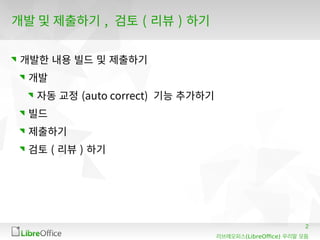
여기서는 실습으로 자동 교정(Auto correction)내용을 xml파일에 추가하여 Gerrit리뷰시스템에 제출하는 것을 목표로 합니다.
2020년 8월 16일 일요일, 대구에서 진행한 내용 정리함.
3
(LibreOffice)리브레오피스 우리말 모듬
개발기여하기 전에 해야할 사항
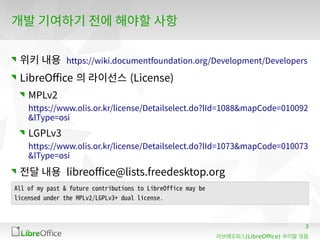
위키 내용 https://wiki.documentfoundation.org/Development/Developers
LibreOffice 의 라이선스 (License)
MPLv2
https://www.olis.or.kr/license/Detailselect.do?lId=1088&mapCode=010092
&lType=osi
LGPLv3
https://www.olis.or.kr/license/Detailselect.do?lId=1073&mapCode=010073
&lType=osi
전달 내용 libreoffice@lists.freedesktop.org
All of my past & future contributions to LibreOffice may be
licensed under the MPLv2/LGPLv3+ dual license.
4.
4
(LibreOffice)리브레오피스 우리말 모듬
개발기여하기 전에 해야할 사항
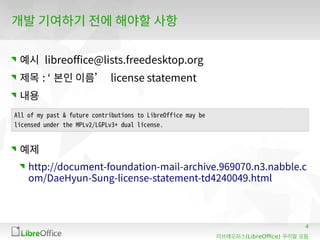
예시 libreoffice@lists.freedesktop.org
제목 : ‘ 본인 이름’ license statement
내용
예제
http://document-foundation-mail-archive.969070.n3.nabble.c
om/DaeHyun-Sung-license-statement-td4240049.html
All of my past & future contributions to LibreOffice may be
licensed under the MPLv2/LGPLv3+ dual license.
5.
5
(LibreOffice)리브레오피스 우리말 모듬
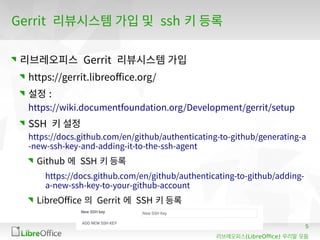
Gerrit리뷰시스템 가입 및 ssh 키 등록
리브레오피스 Gerrit 리뷰시스템 가입
https://gerrit.libreoffice.org/
설정 :
https://wiki.documentfoundation.org/Development/gerrit/setup
SSH 키 설정
https://docs.github.com/en/github/authenticating-to-github/generating-a
-new-ssh-key-and-adding-it-to-the-ssh-agent
Github 에 SSH 키 등록
https://docs.github.com/en/github/authenticating-to-github/adding-
a-new-ssh-key-to-your-github-account
LibreOffice 의 Gerrit 에 SSH 키 등록
6.
6
(LibreOffice)리브레오피스 우리말 모듬
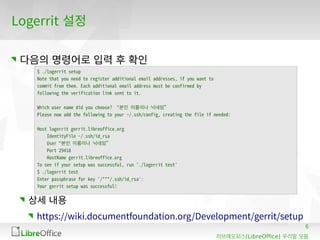
Logerrit설정
다음의 명령어로 입력 후 확인
상세 내용
https://wiki.documentfoundation.org/Development/gerrit/setup
$ ./logerrit setup
Note that you need to register additional email addresses, if you want to
commit from them. Each additional email address must be confirmed by
following the verification link sent to it.
Which user name did you choose? “본인 이름이나 닉네임”
Please now add the following to your ~/.ssh/config, creating the file if needed:
Host logerrit gerrit.libreoffice.org
IdentityFile ~/.ssh/id_rsa
User “본인 이름이나 닉네임”
Port 29418
HostName gerrit.libreoffice.org
To see if your setup was successful, run './logerrit test'
$ ./logerrit test
Enter passphrase for key '/***/.ssh/id_rsa':
Your gerrit setup was successful!
7.
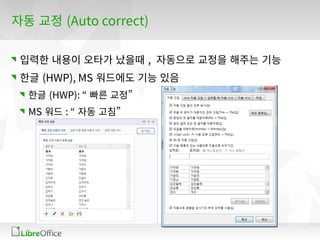
자동 교정 (Autocorrect)
입력한 내용이 오타가 났을때 , 자동으로 교정을 해주는 기능
한글 (HWP), MS 워드에도 기능 있음
한글 (HWP): “ 빠른 교정”
MS 워드 : “ 자동 고침”
8.
8
(LibreOffice)리브레오피스 우리말 모듬
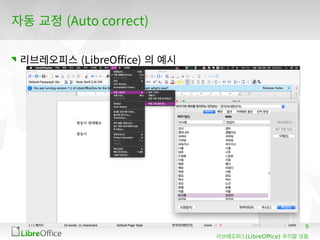
자동교정 (Auto correct)
Bugzilla
[ko] Extend Autocorrect list for Korean language
https://bugs.documentfoundation.org/show_bug.cgi?id=
135727
Gerrit 코드 리뷰 시스템
[ko] add new autocorrect words for Korean
https://gerrit.libreoffice.org/c/core/+/100682
10
(LibreOffice)리브레오피스 우리말 모듬
자동교정 (Auto correct)
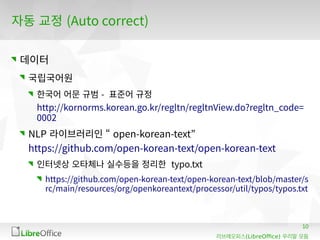
데이터
국립국어원
한국어 어문 규범 - 표준어 규정
http://kornorms.korean.go.kr/regltn/regltnView.do?regltn_code=
0002
NLP 라이브러리인 “ open-korean-text”
https://github.com/open-korean-text/open-korean-text
인터넷상 오타체나 실수등을 정리한 typo.txt
https://github.com/open-korean-text/open-korean-text/blob/master/s
rc/main/resources/org/openkoreantext/processor/util/typos/typos.txt
11.
11
(LibreOffice)리브레오피스 우리말 모듬
자동교정 (Auto correct)
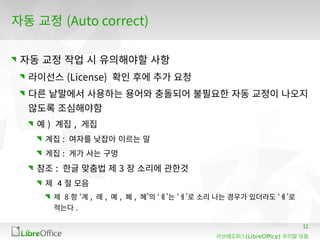
자동 교정 작업 시 유의해야할 사항
라이선스 (License) 확인 후에 추가 요청
다른 낱말에서 사용하는 용어와 충돌되어 불필요한 자동 교정이 나오지
않도록 조심해야함
예 ) 계집 , 게집
계집 : 여자를 낮잡아 이르는 말
게집 : 게가 사는 구멍
참조 : 한글 맞춤법 제 3 장 소리에 관한것
제 4 절 모음
제 8 항 ‘계 , 례 , 몌 , 폐 , 혜’의 ‘ㅖ’는 ‘ㅔ’로 소리 나는 경우가 있더라도 ‘ㅖ’로
적는다 .
빌드 (Build)
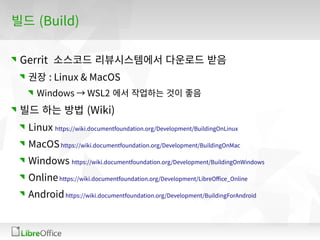
Gerrit 소스코드리뷰시스템에서 다운로드 받음
권장 : Linux & MacOS
Windows → WSL2 에서 작업하는 것이 좋음
빌드 하는 방법 (Wiki)
Linux https://wiki.documentfoundation.org/Development/BuildingOnLinux
MacOShttps://wiki.documentfoundation.org/Development/BuildingOnMac
Windows https://wiki.documentfoundation.org/Development/BuildingOnWindows
Onlinehttps://wiki.documentfoundation.org/Development/LibreOffice_Online
Androidhttps://wiki.documentfoundation.org/Development/BuildingForAndroid
14.
14
(LibreOffice)리브레오피스 우리말 모듬
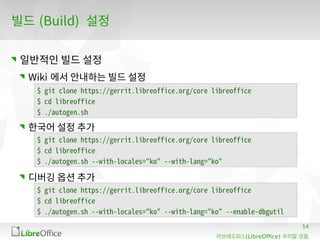
빌드(Build) 설정
일반적인 빌드 설정
Wiki 에서 안내하는 빌드 설정
한국어 설정 추가
디버깅 옵션 추가
$ git clone https://gerrit.libreoffice.org/core libreoffice
$ cd libreoffice
$ ./autogen.sh
$ git clone https://gerrit.libreoffice.org/core libreoffice
$ cd libreoffice
$ ./autogen.sh --with-locales="ko" --with-lang="ko"
$ git clone https://gerrit.libreoffice.org/core libreoffice
$ cd libreoffice
$ ./autogen.sh --with-locales="ko" --with-lang="ko" --enable-dbgutil
15.
15
(LibreOffice)리브레오피스 우리말 모듬
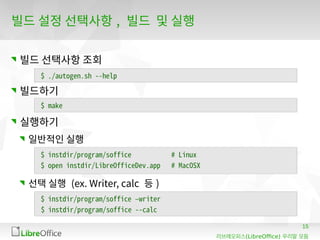
빌드설정 선택사항 , 빌드 및 실행
빌드 선택사항 조회
빌드하기
실행하기
일반적인 실행
선택 실행 (ex. Writer, calc 등 )
$ ./autogen.sh --help
$ make
$ instdir/program/soffice # Linux
$ open instdir/LibreOfficeDev.app # MacOSX
$ instdir/program/soffice –writer
$ instdir/program/soffice --calc
16.
16
(LibreOffice)리브레오피스 우리말 모듬
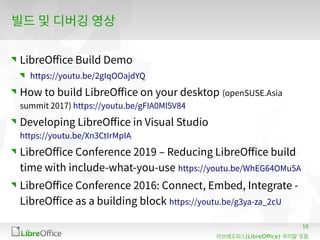
빌드및 디버깅 영상
LibreOffice Build Demo
https://youtu.be/2gIqOOajdYQ
How to build LibreOffice on your desktop (openSUSE.Asia
summit 2017) https://youtu.be/gFIA0Ml5V84
Developing LibreOffice in Visual Studio
https://youtu.be/Xn3CtIrMpIA
LibreOffice Conference 2019 – Reducing LibreOffice build
time with include-what-you-use https://youtu.be/WhEG64OMu5A
LibreOffice Conference 2016: Connect, Embed, Integrate -
LibreOffice as a building block https://youtu.be/g3ya-za_2cU
18
(LibreOffice)리브레오피스 우리말 모듬
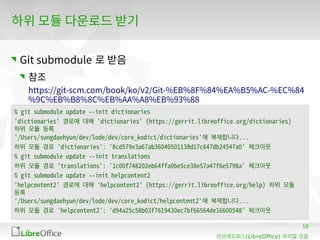
하위모듈 다운로드 받기
Git submodule 로 받음
참조
https://git-scm.com/book/ko/v2/Git-%EB%8F%84%EA%B5%AC-%EC%84
%9C%EB%B8%8C%EB%AA%A8%EB%93%88
% git submodule update --init dictionaries
'dictionaries' 경로에 대해 'dictionaries' (https://gerrit.libreoffice.org/dictionaries)
하위 모듈 등록
'/Users/sungdaehyun/dev/lode/dev/core_kodict/dictionaries'에 복제합니다...
하위 모듈 경로 'dictionaries': '8cd579e3a67ab36040501138d17c647db24547a0' 체크아웃
% git submodule update --init translations
하위 모듈 경로 'translations': '1c00f748202eb64ffa0be5ce38e57a47f6e5798a' 체크아웃
% git submodule update --init helpcontent2
'helpcontent2' 경로에 대해 'helpcontent2' (https://gerrit.libreoffice.org/help) 하위 모듈
등록
'/Users/sungdaehyun/dev/lode/dev/core_kodict/helpcontent2'에 복제합니다...
하위 모듈 경로 'helpcontent2': 'd94a25c58b03f7619430ec7bf66564de16600548' 체크아웃
19.
19
(LibreOffice)리브레오피스 우리말 모듬
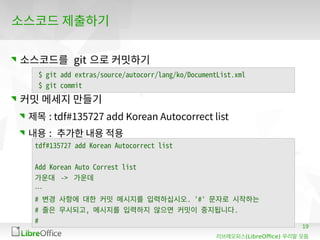
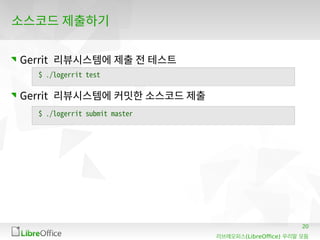
소스코드제출하기
소스코드를 git 으로 커밋하기
커밋 메세지 만들기
제목 : tdf#135727 add Korean Autocorrect list
내용 : 추가한 내용 적용
$ git add extras/source/autocorr/lang/ko/DocumentList.xml
$ git commit
tdf#135727 add Korean Autocorrect list
Add Korean Auto Correst list
가운대 -> 가운데
…
# 변경 사항에 대한 커밋 메시지를 입력하십시오. '#' 문자로 시작하는
# 줄은 무시되고, 메시지를 입력하지 않으면 커밋이 중지됩니다.
#
21
(LibreOffice)리브레오피스 우리말 모듬
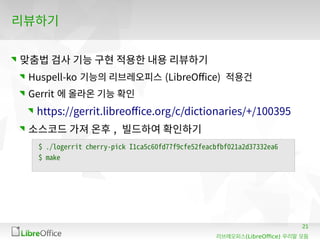
리뷰하기
맞춤법검사 기능 구현 적용한 내용 리뷰하기
Huspell-ko 기능의 리브레오피스 (LibreOffice) 적용건
Gerrit 에 올라온 기능 확인
https://gerrit.libreoffice.org/c/dictionaries/+/100395
소스코드 가져 온후 , 빌드하여 확인하기
$ ./logerrit cherry-pick I1ca5c60fd77f9cfe52feacbfbf021a2d37332ea6
$ make
22.
22
(LibreOffice)리브레오피스 우리말 모듬
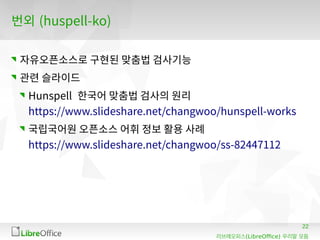
번외(huspell-ko)
자유오픈소스로 구현된 맞춤법 검사기능
관련 슬라이드
Hunspell 한국어 맞춤법 검사의 원리
https://www.slideshare.net/changwoo/hunspell-works
국립국어원 오픈소스 어휘 정보 활용 사례
https://www.slideshare.net/changwoo/ss-82447112
23.
23
(LibreOffice)리브레오피스 우리말 모듬
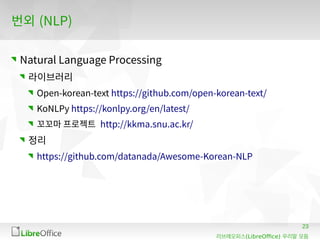
번외(NLP)
Natural Language Processing
라이브러리
Open-korean-text https://github.com/open-korean-text/
KoNLPy https://konlpy.org/en/latest/
꼬꼬마 프로젝트 http://kkma.snu.ac.kr/
정리
https://github.com/datanada/Awesome-Korean-NLP
24.
24
(LibreOffice)리브레오피스 우리말 모듬
Alltext and image content in this document is licensed under the Creative Commons Attribution-Share Alike 3.0 License
(unless otherwise specified). "LibreOffice" and "The Document Foundation" are registered trademarks. Their respective logos
and icons are subject to international copyright laws. The use of these therefore is subject to the trademark policy.
고맙습니다
문서화 , 번역 , 빌드 및 커밋을 해보고 , 9 월 초까지
여러가지 기여를 해봅니다

![8
(LibreOffice)리브레오피스 우리말 모듬
자동 교정 (Auto correct)
Bugzilla
[ko] Extend Autocorrect list for Korean language
https://bugs.documentfoundation.org/show_bug.cgi?id=
135727
Gerrit 코드 리뷰 시스템
[ko] add new autocorrect words for Korean
https://gerrit.libreoffice.org/c/core/+/100682](https://image.slidesharecdn.com/20200816libreofficebuildcommit-200816172007/85/2020-LibreOffice-8-320.jpg)
![17
(LibreOffice)리브레오피스 우리말 모듬
하위 모듈 git 설정
Git submodule 로 관리하는 대상
dictionaries
helpcontent2
translations
% cat .gitmodules
[submodule "dictionaries"]
path = dictionaries
url = https://gerrit.libreoffice.org/dictionaries
branch = .
[submodule "helpcontent2"]
path = helpcontent2
url = https://gerrit.libreoffice.org/help
branch = .
[submodule "translations"]
path = translations
url = https://gerrit.libreoffice.org/translations
branch = .](https://image.slidesharecdn.com/20200816libreofficebuildcommit-200816172007/85/2020-LibreOffice-17-320.jpg)

![[2020 컨트리뷰톤] 리브레오피스 (LibreOffice) 번역, 번역 도구관련 이야기](https://cdn.slidesharecdn.com/ss_thumbnails/20200823translatonomegat-200823055354-thumbnail.jpg?width=640&height=640&fit=bounds)
![[2021 오픈소스 컨트리뷰션 아카데미] #9 리브레오피스(LibreOffice) 컨트리뷰션 정리](https://cdn.slidesharecdn.com/ss_thumbnails/20211011libreofficecontribution-211010181309-thumbnail.jpg?width=640&height=640&fit=bounds)
![[컨트리뷰톤 2020] 리브레오피스(LibreOffice)의 QA 및 소스 코드 리뷰](https://cdn.slidesharecdn.com/ss_thumbnails/20200906libreofficeqa-200905190234-thumbnail.jpg?width=640&height=640&fit=bounds)
![[2021 오픈소스 컨트리뷰션 아카데미] #2 위키(Wiki) 등 번역(Translation)과 문서화(Documentation) (20...](https://cdn.slidesharecdn.com/ss_thumbnails/20200813libreofficewikitranslation-210813124926-thumbnail.jpg?width=640&height=640&fit=bounds)
![[2021 오픈소스 컨트리뷰션 아카데미] #6 XML파일구조 및 리브레오피스의 자동교정 기능 소개 등](https://cdn.slidesharecdn.com/ss_thumbnails/20210910xml-210907182524-thumbnail.jpg?width=640&height=640&fit=bounds)
![[2021 오픈소스 컨트리뷰션 아카데미] #4 버그질라 사용법, 보그 보고 방법 소개](https://cdn.slidesharecdn.com/ss_thumbnails/20210827libreofficebugzilla-210827084229-thumbnail.jpg?width=640&height=640&fit=bounds)
![[2021 오픈소스 컨트리뷰션 아카데미] #3 소프트웨어 번역(Translation)(2021.08.20.)](https://cdn.slidesharecdn.com/ss_thumbnails/20210820libreofficedocumentbuild-210819190521-thumbnail.jpg?width=640&height=640&fit=bounds)
![[2020 컨트리뷰톤] 리브레오피스의 버그질라 소개 및 사용법, 버그 헌팅 세션](https://cdn.slidesharecdn.com/ss_thumbnails/20200801libreofficebugzilla-200801070130-thumbnail.jpg?width=640&height=640&fit=bounds)
![[2020 컨트리뷰톤] 리브레오피스(LibreOffice)의 문서화 및 번역, 빌드등](https://cdn.slidesharecdn.com/ss_thumbnails/20200801libreofficedocumentbuild-200809033428-thumbnail.jpg?width=640&height=640&fit=bounds)
![[2020 컨트리뷰톤] 리브레오피스(LibreOffice)의 소스코드 개발, 빌드, 제출, 검토(리뷰)하기 등을 소개](https://cdn.slidesharecdn.com/ss_thumbnails/20200817libreofficebuildcommit-200816171607-thumbnail.jpg?width=640&height=640&fit=bounds)
![[2021 오픈소스 컨트리뷰션 아카데미] #7 자동교정 XML파일 수정 및 수정한 내용 gerrit으로 제출해보기](https://cdn.slidesharecdn.com/ss_thumbnails/20210917libreofficebuildcommit-210916172904-thumbnail.jpg?width=640&height=640&fit=bounds)
![[2021 오픈소스 컨트리뷰션 아카데미] #5 컨트리뷰션 정리 및 gerrit리뷰시스템 소개 등](https://cdn.slidesharecdn.com/ss_thumbnails/20210903gerrit-210902174205-thumbnail.jpg?width=640&height=640&fit=bounds)
![[2020 컨트리뷰톤] 리브레오피스 (LibreOffice) 한국어 사용성 향상 및 공헌자 양성 프로젝트 킥오프 발표자료](https://cdn.slidesharecdn.com/ss_thumbnails/2020contributonkickoffpresentation-200724150358-thumbnail.jpg?width=640&height=640&fit=bounds)
![[2021 오픈소스 컨트리뷰션 아카데미] Libreoffice 한국어 번역 및 사용성 기능 향상 프로젝트 킥오프 미팅 (2021.08.07.)](https://cdn.slidesharecdn.com/ss_thumbnails/2021contributonkickoff-210806164430-thumbnail.jpg?width=640&height=640&fit=bounds)
![[2019.02.01] 리브레오피스 우리말 모듬 첫 모임](https://cdn.slidesharecdn.com/ss_thumbnails/20190201libreofficekoreanteam1stmeetup-190201101238-thumbnail.jpg?width=640&height=640&fit=bounds)
![[2021 오픈소스 컨트리뷰션 아카데미] #8 Hacktoberfest 소개 및 리브레오피스(LibreOffice) 소스코드 제출해보기](https://cdn.slidesharecdn.com/ss_thumbnails/20211004libreofficehacktoberfest-211004040056-thumbnail.jpg?width=640&height=640&fit=bounds)
![[GDG Seoul] 2019.01.22. 나의 해외 컨퍼런스 참석 및 발표기](https://cdn.slidesharecdn.com/ss_thumbnails/20190122gdgseoulltmyoverseasconference-190121163045-thumbnail.jpg?width=640&height=640&fit=bounds)
![[Emocon 2017 S/S] 20170414 유니코드(Unicode)로 오픈소스에 기여하기](https://cdn.slidesharecdn.com/ss_thumbnails/20170414-170429081753-thumbnail.jpg?width=640&height=640&fit=bounds)


![[DebConf24] Workshop: Introduction to LibreOffice Korean Translations (Wiki &...](https://cdn.slidesharecdn.com/ss_thumbnails/debconf24libreofficekoreantranslations-240729051133-38e22b92-thumbnail.jpg?width=640&height=640&fit=bounds)
![[LiboCon 2023] LibreOffice's current status and community in South Korea](https://cdn.slidesharecdn.com/ss_thumbnails/libocon2023daehyunsungreleasedmac-231005163237-b1ea3833-thumbnail.jpg?width=640&height=640&fit=bounds)

![[UbuCon Korea 2023] 한국의 문서 표준과 LibreOffice 한국어 커뮤니티 활동 소개](https://cdn.slidesharecdn.com/ss_thumbnails/ubuconkorea2023-230909050003-4e1a5903-thumbnail.jpg?width=640&height=640&fit=bounds)
![[Ubucon Asia 2022] 리브레오피스의 현재와 앞으로 나아갈길](https://cdn.slidesharecdn.com/ss_thumbnails/uca22-221126170209-da74412b-thumbnail.jpg?width=640&height=640&fit=bounds)
![[LibreOffice Conference 2022] State of Korea in Libreoffice and promote futu...](https://cdn.slidesharecdn.com/ss_thumbnails/libocon2022daehyunsung-stateofkoreainlibreofficeandpromotefutureplansrev-220930134057-15711760-thumbnail.jpg?width=640&height=640&fit=bounds)
![[Ubucon Asia 2021] The challenge of Using LibreOffice & Building Local Commun...](https://cdn.slidesharecdn.com/ss_thumbnails/daehyunsungthechallengeofusinglibreofficeandbuildinglocalcommunityinkorea-210925145756-thumbnail.jpg?width=640&height=640&fit=bounds)
![[LibreOffice conference 2021] The challenge of Using LibreOffice & Building L...](https://cdn.slidesharecdn.com/ss_thumbnails/libocon2021daehyunsung-210924115242-thumbnail.jpg?width=640&height=640&fit=bounds)
![[LibreOffice Korea-Japan online Seminar] Introduce to LibreOffice & Korean Is...](https://cdn.slidesharecdn.com/ss_thumbnails/20201122introducelibreofficeandkoreanissue-201121192055-thumbnail.jpg?width=640&height=640&fit=bounds)

![[LibreOffice Asia Conference 2019] CJK Issues on LibreOffice(based on Korean ...](https://cdn.slidesharecdn.com/ss_thumbnails/koreanlanguage-190615051932-thumbnail.jpg?width=640&height=640&fit=bounds)
![[LibreOffice Asia Conference 2019] CJK Issues on LibreOffice(based on Korean ...](https://cdn.slidesharecdn.com/ss_thumbnails/koreanlanguage-190524090421-thumbnail.jpg?width=640&height=640&fit=bounds)
![[2018.12.09.] 第8回 九州LibreOffice勉強会 - HWP](https://cdn.slidesharecdn.com/ss_thumbnails/20181209hwplibreofficetalkfinal-181209063420-thumbnail.jpg?width=640&height=640&fit=bounds)