2017 CodeFest
$how Me the Money
Kory Becker
October, 2017, http://primaryobjects.com
Unsupervised Learning
Exploratory data analysis
Discovers patterns in unlabeled data
No training set
No error rate for potential solution
K-means Clustering, Markov Chains,
Feature Extraction, Principal Component
Analysis (Dimensionality Reduction)
2
K-Means Clustering
Popular clustering algorithm
Groups data into k clusters
Data points belong to the cluster with closest mean
Each cluster has a centroid (center)
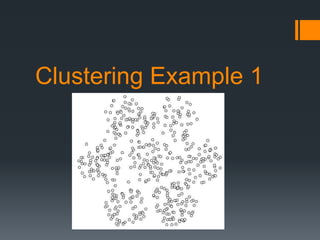
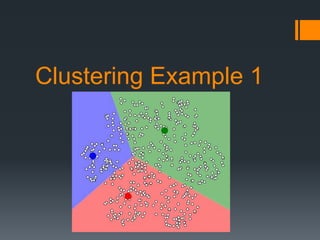
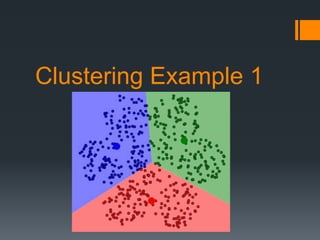
Clustering Example 1
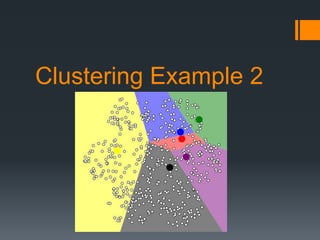
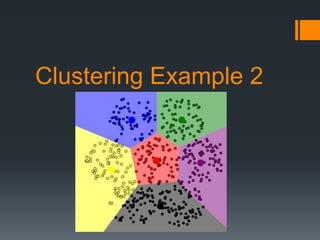
Clustering Example 2
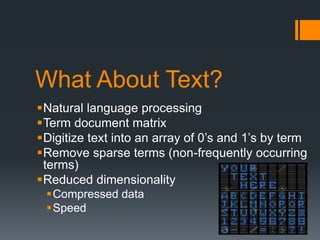
What About Text?
Natural language processing
Term document matrix
Digitize text into an array of 0’s and 1’s by term
Remove sparse terms (non-frequently occurring
terms)
Reduced dimensionality
Compressed data
Speed
Natural Language
Processing
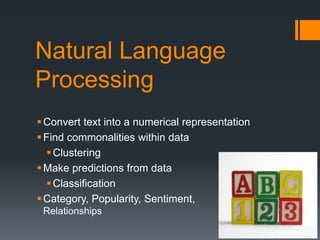
Convert text into a numerical representation
Find commonalities within data
Clustering
Make predictions from data
Classification
Category, Popularity, Sentiment,
Relationships
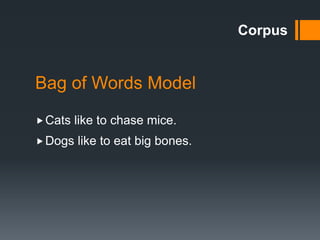
Bag of Words Model
Corpus
Cats like to chase mice.
Dogs like to eat big bones.
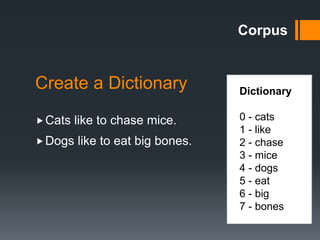
Create a Dictionary Dictionary
0 - cats
1 - like
2 - chase
3 - mice
4 - dogs
5 - eat
6 - big
7 - bones
Cats like to chase mice.
Dogs like to eat big bones.
Corpus
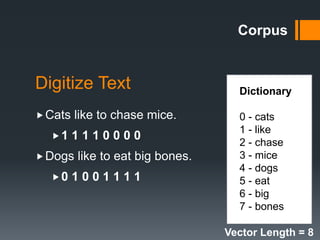
Digitize Text
Cats like to chase mice.
1 1 1 1 0 0 0 0
Dogs like to eat big bones.
0 1 0 0 1 1 1 1
Vector Length = 8
Corpus
Dictionary
0 - cats
1 - like
2 - chase
3 - mice
4 - dogs
5 - eat
6 - big
7 - bones
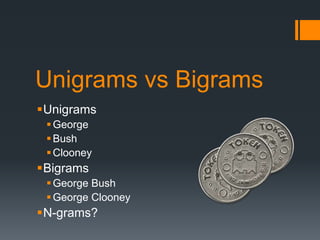
Unigrams vs Bigrams
Unigrams
George
Bush
Clooney
Bigrams
George Bush
George Clooney
N-grams?
ML + News + ??? = Profit!
Extract news stories
Build corpus of headlines
Use bigrams (word pairs)
Strip sparse terms
Apply k-means clustering
.. and what do we get?
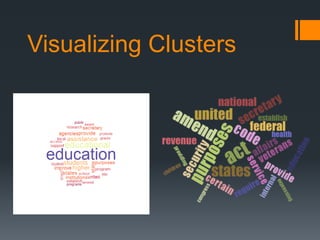
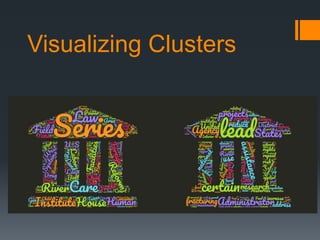
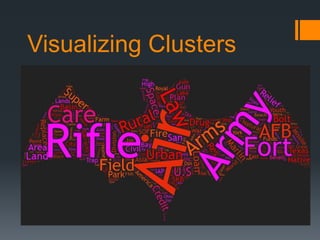
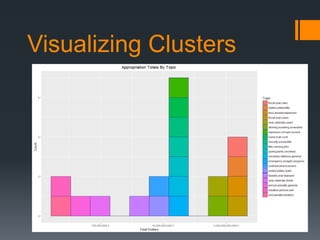
Visualizing Clusters
Additional Reading
Discovering Trending Topics in News
http://primaryobjects.com/CMS/Article162
Mirroring Your Twitter Personal with Intelligence
http://primaryobjects.com/CMS/Article160
TF*IDF with .NET
http://primaryobjects.com/CMS/Article157
Thank you!
Kory Becker
http://primaryobjects.com
@primaryobjects

2017 CodeFest Wrap-up Presentation

Editor's Notes

  • #3 Unsupervised learning is a type of exploratory data analysis. Unlike supervised learning, it doesn’t require outputs nor training data, cross-validation, test sets. Give it a bunch of data and the AI will make sense of it. Discover patterns.  Unsupervised learning is key behind deep-learning (layers of unsupervised neural networks learn to recognize abstract patterns and feed into a supervised layer for fine-tune training).
  • #4 One of the most common algorithms used for unsupervised learning is “k-Means Clustering”. This algorithm works by grouping data into a specified number of groups, also called “clusters”. Each data point within the data-set belongs to the closest cluster. Each cluster has a centroid (i.e., the center of the cluster). K-means is a really simple, yet powerful algorithm, for automatically clustering and grouping data. In fact, it can often be used as a first go-to algorithm for any data exploration project. Let’s take a look at how this algorithm works.
  • #5 Now that we have an idea of how the algorithm works, let’s see an example! In the above picture we have a series of data points, scattered within the plot. The data seems to have some kind of pattern, but generally, the points are mostly random within them. Suppose we want to divide this data into 6 groups (or clusters). You can probably visually get an idea of where those boundaries would be, effectively dividing the data into 6 parts at each spoke. However, what if we want to cluster into 3 groups? What would that look like? Let’s run through the k-means algorithm and cluster this data into 3 groups. We’ll start by initializing 3 random centroids within our data.
  • #6 We’ve added 3 random centroids to the data. They actually appear pretty well spaced apart within the data, but in actuality, they are indeed randomly placed. Each point has been assigned to its closest centroid, thus coloring the area in its respective centroid’s color. For example, consider the blue area. Do you see that point to the far top-right, sitting right on the line of blue and green? You might think that point is closer to green, but it is indeed closer to the blue centroid. The same goes for all other points within their assigned cluster. With the data points assigned to a cluster, the next step is to move each centroid to the center of their assigned points. So for example, the blue centroid is going to shift slightly up and to the right, so that it sits squarely within the center of the blue area. Likewise, the green centroid will shift slightly to the right and down. The red centroid will shift slightly to the right. After shifting the centroids, some of the data points will be re-assigned. For example, when the blue centroid shifts to the right, some of the points that were assigned to the green centroids will now be closer to the blue centroid. Thus, they’ll be re-assigned to blue. We repeat this process until the centroids stop shifting or the data points stop changing clusters – meaning the k-means algorithm has completed.
  • #7 This image shows the final iteration of the k-means algorithm, effectively clustering our data into 3 clusters. You can see how the data is evenly divided with each point assigned to its respective cluster.
  • #8 Let’s see one more example. This time, we’ll use 6 clusters. In this image, it’s easy to see the randomness of the initial cluster placements. The groups are nowhere near equal. Let’s see what the final iteration of the k-means algorithm looks like with 6 clusters.
  • #9 You can see how the groups are now evenly divided, with 6 clusters displayed with their respective assigned data points.
  • #10 Text can be clustered too! First convert it to a bit string, using a bag-of-words / term-document matrix. This is the key part of natural language processing. Reduce text into array of 1’s and 0’s by term (1 if the term exists in the dictionary, 0 if not existing). Remove sparse terms (words not appearing in many documents) to reduce dimensionality and compress data. Removing sparse terms reduced memory usage in the example data from 2GB to 91MB.
  • #11 Natural Language Processing The most basic form of natural language processing is to simply convert text into a numerical representation. This gives you an array of numbers. So, each document becomes a same-sized array of numbers. With this, you can apply machine learning algorithms, such as clustering and classification. This allows you to build unique insights into a set of documents, determining characteristics like category, popularity, sentiment, and relationships. This is the same type of processing that many popular online machine learning APIs use to classify data. For example, IBM Watson, Microsoft, Amazon, and Google, all include NLP APIs for working with data.
  • #12 Bag of Words Model Let’s take a look at a quick example. Here are two documents: “Cats like to chase mice.” and “Dogs like to eat big bones”. We’re going to try to categorize these documents as being about “eating”. To do this, we’ll build a bag-of-words model and then apply a classification algorithm. Now, the first thing to note is that the two documents are of different lengths. If you think about it, most documents will practically always be of different lengths. This is fine, because after we digitize the corpus, you’ll see that the resulting data fits neatly within same-sized vectors.
  • #13 Create a Dictionary So, the first step is to create a dictionary from our corpus. First, we apply a stemming algorithm on the corpus. This will remove the stop-word “to”. Next, we find each unique term and add it to our dictionary. You can see the resulting list on the right-side of this slide. Our dictionary contains 8 terms.
  • #14 Digitize Text With our dictionary created, we can now digitize the documents. Since our dictionary has 8 terms, each document will be encoded into a vector of length 8. This ensures that all documents end up having the same length. This makes it easier to process with machine learning algorithms. Let’s look at the first document. We’ll take the first term in the dictionary and see if it exists in the first document. The term is “cats”, which does indeed exist in the first document. Therefore, we’ll set a 1 as the first bit. The next term is “like”. Again, it exists in the first document, so we’ll set a 1 as the next bit. This repeats until we see the term “dogs”. This does not exist in the first document, so we set a “0”. Finally, we run through all terms in the dictionary and end up with a vector of length 8 for the first document. We repeat the same steps for the second document, going through each term in the dictionary and checking if it exists in the document.
  • #15 Which words should we include in our dictionary? i.e., how should we tokenize text? Take every word? “and”, “or”, “boy”, “dog” etc? No, we use porter stemmer to remove stop words and reduce longer words. Then we tokenize by either individual words (unigrams) or word-pairs (bigrams). While bigrams give more unique clusters, one downside is that they match less documents in each one. This is because finding documents that contain the same pairs of words is less likely than finding documents with the same single words. You can go further with N-grams, but this reduces the number of items in clusters even further (although they will be more unique). Extreme case of N-grams will assign each headline to its own cluster.
  • #16 What can we do with news data? Read the news database and extract headlines. Use bigrams. Strip sparse terms. Apply K-means clustering. Get highest count terms in each cluster -> trending topics!  
  • #17 Examples of the results. Each word cloud corresponds to a set of news stories. If you assigned each cluster a trending topic name (by term popularity), you could for example, display a dropdown of trending topics. Selecting a result could take the user to a result page of news stories that correspond to that topic.
  • #18 Examples of the results. Each word cloud corresponds to a set of news stories. If you assigned each cluster a trending topic name (by term popularity), you could for example, display a dropdown of trending topics. Selecting a result could take the user to a result page of news stories that correspond to that topic.
  • #19 Examples of the results. Each word cloud corresponds to a set of news stories. If you assigned each cluster a trending topic name (by term popularity), you could for example, display a dropdown of trending topics. Selecting a result could take the user to a result page of news stories that correspond to that topic.
  • #20 Examples of the results. Each word cloud corresponds to a set of news stories. If you assigned each cluster a trending topic name (by term popularity), you could for example, display a dropdown of trending topics. Selecting a result could take the user to a result page of news stories that correspond to that topic.