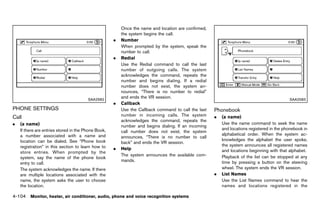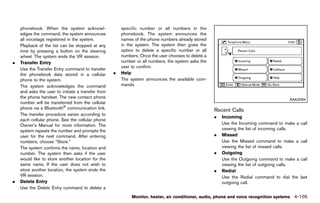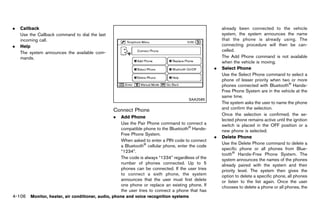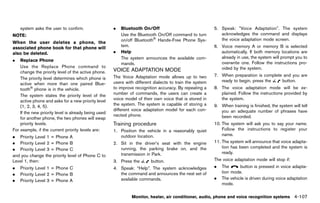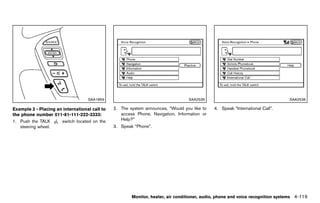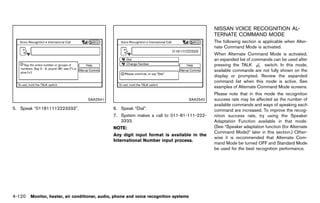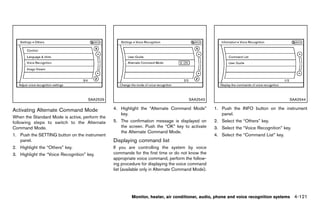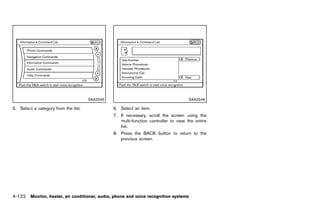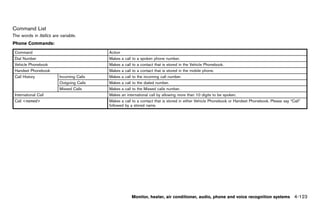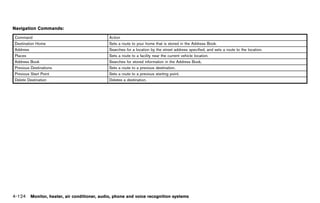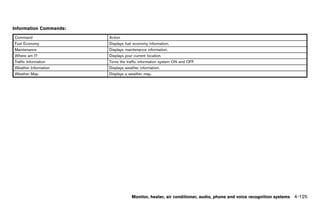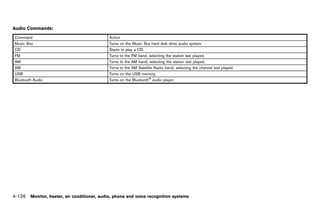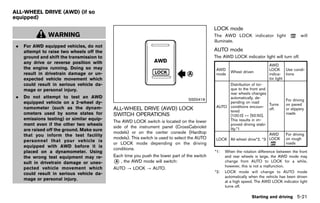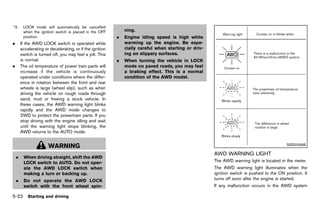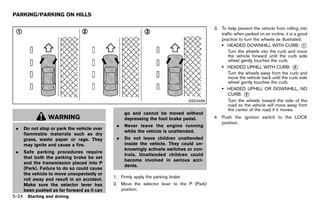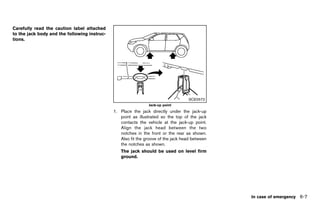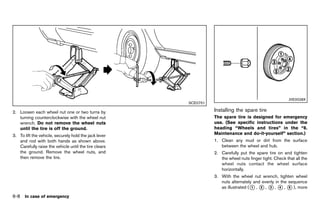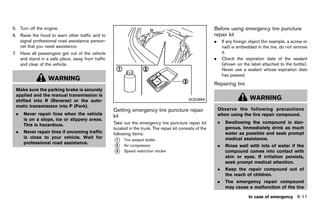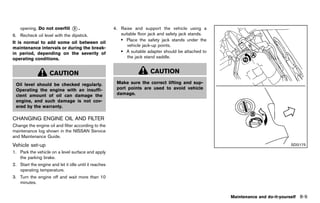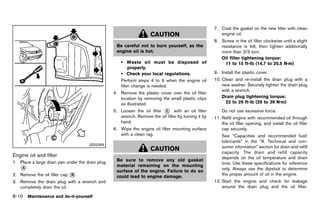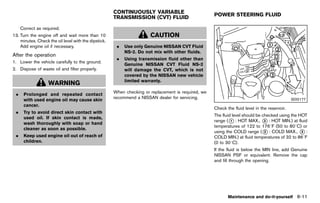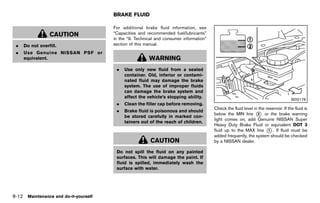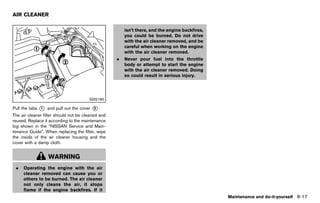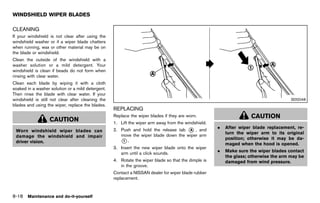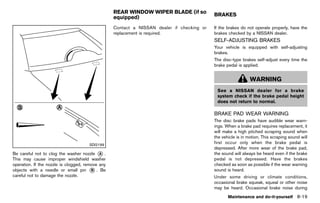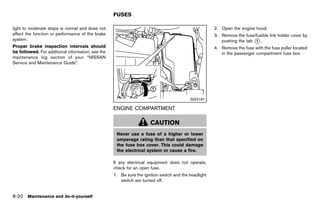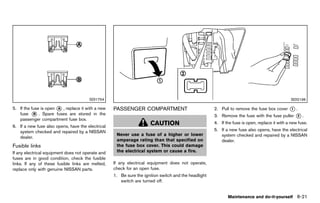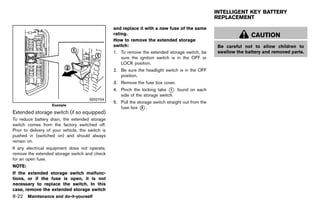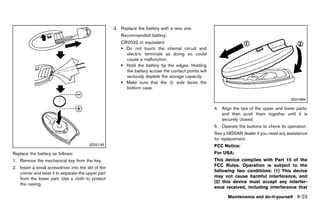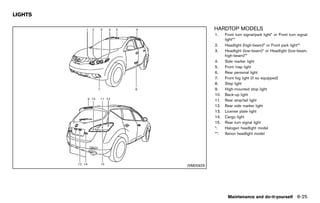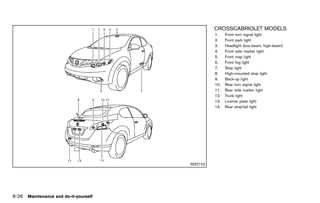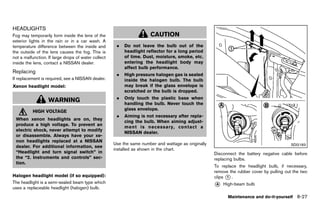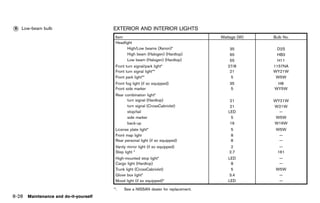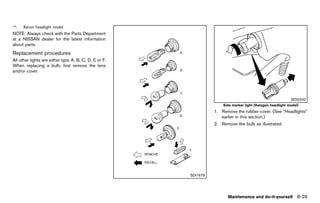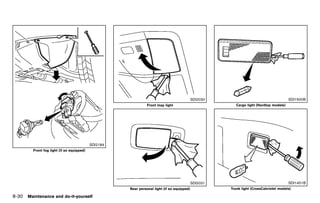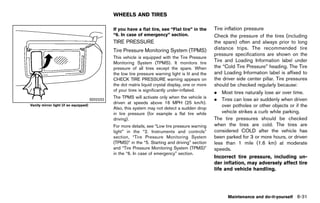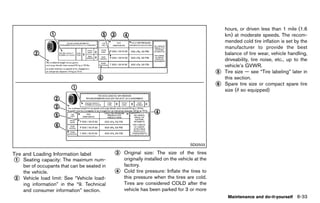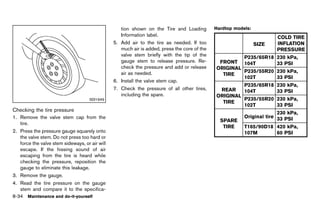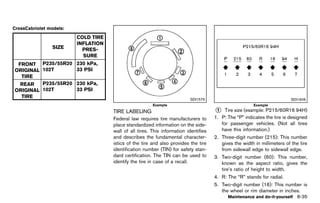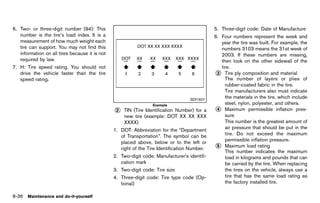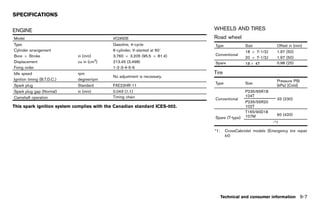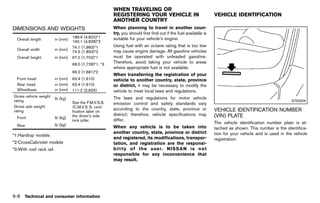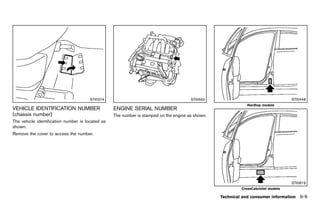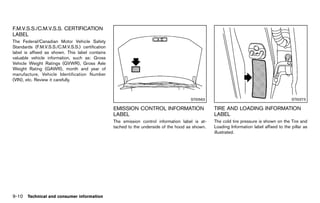
Black plate (3,1)


Foreword
               GUID-E7E6B9D7-70D5-46FD-8070-D86AD68B3005
Welcome to the growing family of new NISSAN                   accessories with which your vehicle is                     could distract you.
owners. This vehicle is delivered to you with                 equipped.
                                                                                                                     .   ALWAYS use your seat belts and
confidence. It was produced using the latest                  Your NISSAN dealer knows your vehicle best.                appropriate child restraint systems.
techniques and strict quality control.                        When you require any service or have any                   Pre-teen children should be seated
This manual was prepared to help you under-                   questions, we will be glad to assist you with the          in the rear seat.
stand the operation and maintenance of your                   extensive resources available to us.
                                                                                                                     .   ALWAYS provide information about
vehicle so that you may enjoy many miles of                   READ FIRST — THEN DRIVE SAFELY
                                                                        GUID-E8CEB247-EE99-4DF1-B514-E4CF8D44A577        the proper use of vehicle safety
driving pleasure. Please read through this
                                                              Before driving your vehicle, read your Owner’s             features to all occupants of the
manual before operating your vehicle.
                                                              Manual carefully. This will ensure familiarity with        vehicle.
A separate Warranty Information Booklet                       controls and maintenance requirements, assist-         .   ALWAYS review this Owner’s Man-
explains details about the warranties cov-                    ing you in the safe operation of your vehicle.             ual for important safety information.
ering your vehicle. The NISSAN Service
and Maintenance Guide explains details
about maintaining and servicing your ve-                                         WARNING                            ON-PAVEMENT AND OFF-ROAD
hicle. Additionally, a separate Customer                                                                            DRIVING
Care/Lemon Law Booklet (U.S. only) will                         IMPORTANT SAFETY INFORMATION
                                                                REMINDERS FOR SAFETY!                               This vehicle will handle and maneuver
explain how to resolve any concerns you
                                                                                                                    differently from an ordinary passenger
may have with your vehicle, as well as                          Follow these important driving rules to             car because it has a higher center of
clarify your rights under your state’s lemon                    help ensure a safe and comfortable trip             gravity. As with other vehicles with fea-
law.                                                            for you and your passengers!                        tures of this type, failure to operate this
In addition to factory installed options, your                                                                      vehicle correctly may result in loss of
                                                                .   NEVER drive under the influence of
vehicle may also be equipped with additional                                                                        control or an accident. Be sure to read
                                                                    alcohol or drugs.
accessories installed by NISSAN or by your                                                                          “On-pavement and off-road driving pre-
NISSAN dealer prior to delivery. It is important                .   ALWAYS observe posted speed lim-
                                                                                                                    cautions”, “Avoiding collision and roll-
that you familiarize yourself with all disclosures,                 its and never drive too fast for
                                                                                                                    over” and “Driving safety precautions” in
warnings, cautions and instructions concerning                      conditions.
                                                                                                                    the “5. Starting and driving” section of
proper use of such accessories prior to operat-                 .   ALWAYS give your full attention to              this manual.
ing the vehicle and/or accessory. See a NISSAN                      driving and avoid using vehicle
dealer for details concerning the particular                        features or taking other actions that


                                                           [ Edit: 2011/ 7/ 18 Model: Z51-D ]
Black plate (4,1)


MODIFICATION OF YOUR VEHI-                                IMPORTANT INFORMATION ABOUT
CLE                                                       THIS MANUAL
                                                                   GUID-6AD293D0-4474-4333-B259-0836BB040D67
                                                          You will see various symbols in this manual. They
This vehicle should not be modified.
                                                          are used in the following ways:
Modification could affect its performance,
safety or durability, and may even violate
governmental regulations. In addition,                                       WARNING
damage or performance problems result-
ing from modification may not be covered                    This is used to indicate the presence of
under NISSAN warranties.                                    a hazard that could cause death or
                                                            serious personal injury. To avoid or
WHEN READING THE MANUAL
        GUID-CB23972B-7971-4127-B62D-40CCA4B9E808
                                                            reduce the risk, the procedures must
This manual includes information for all                    be followed precisely.
                                                                                                                                                         SIC0697
options available on this model. Therefore,
you may find some information that does                                                                        If you see the symbol above, it means “Do not
not apply to your vehicle.                                                   CAUTION                           do this” or “Do not let this happen”.
All information, specifications and illustrations in
this manual are those in effect at the time of              This is used to indicate the presence of                                                    NOS1274
printing. NISSAN reserves the right to change               a hazard that could cause minor or
                                                                                                               If you see a symbol similar to those above in an
specifications or design at any time without                moderate personal injury or damage to
                                                                                                               illustration, it means the arrow points to the front
notice.                                                     your vehicle. To avoid or reduce the risk,
                                                                                                               of the vehicle.
                                                            the procedures must be followed care-
                                                            fully.                                                                                      NOS1275

                                                                                                               Arrows in an illustration that are similar to those
                                                                                                               above indicate movement or action.

                                                                                                                                                        NOS1276

                                                                                                               Arrows in an illustration that are similar to those


                                                       [ Edit: 2011/ 7/ 18 Model: Z51-D ]
Black plate (5,1)


above call attention to an item in the illustration.                        Bluetooth® is a trademark owned
                                                                            by Bluetooth SIG, Inc. and li-
CALIFORNIA PROPOSITION 65                                                   senced to Visteon Corporation
WARNING GUID-2BB33B36-3AFC-416F-9AE2-CFC36E1C928F                           and Clarion Co., Ltd.
                                                                            Gracenote® is a registered tra-
                                                                            demark of Gracenote, Inc. The
                   WARNING                                                  Gracenote logo and logo type,
                                                                            and the “Powered by Gracenote”
                                                                            logo are trademarks of Grace-
 Engine exhaust, some of its constitu-                                      note.
 ents, and certain vehicle components                                       XM Radio® requires a subscrip-
 contain or emit chemicals known to the                                     tion, sold separately. It is not
 State of California to cause cancer and                                    available in Alaska, Hawaii or
 birth defects or other reproductive                                        Guam. For more information, visit
                                                                            www.xmradio.com.
 harm. In addition, certain fluids con-
 tained in vehicles and certain products
 of component wear contain or emit
 chemicals known to the State of Cali-
 fornia to cause cancer and birth defects
 or other reproductive harm.

CALIFORNIA PERCHLORATE ADVI-
SORY      GUID-99091439-C66E-435E-940E-FCA5DE8B559E
Some vehicle parts, such as lithium bat-                  * 2011 NISSAN MOTOR CO., LTD.
                                                          C
teries, may contain perchlorate material.
The following advisory is provided: “Per-                 All rights reserved. No part of this Owner’s
chlorate Material - special handling may                  Manual may be reproduced or stored in a
apply, See www.dtsc.ca.gov/                               retrieval system, or transmitted in any form, or
                                                          by any means, electronic, mechanical, photo-
hazardouswaste/perchlorate.”                              copying, recording or otherwise, without the
                                                          prior written permission of Nissan Motor Co.,
                                                          Ltd.


                                                       [ Edit: 2011/ 7/ 18 Model: Z51-D ]
Black plate (6,1)


NISSAN CUSTOMER CARE
PROGRAM
               GUID-180FB925-3DF8-475A-9F88-B86194155C87
NISSAN CARES ...
Both NISSAN and your NISSAN dealer are dedicated to serving all your automotive needs. Your satisfaction with your vehicle and your NISSAN dealer are
our primary concerns. Your NISSAN dealer is always available to assist you with all your automobile sales and service needs.
However, if there is something that your                      The Consumer Affairs Department will ask for      You can write to NISSAN with the information at:
NISSAN dealer cannot assist you with or you                   the following information:                           For U.S. customers
would like to provide NISSAN directly with                    .    Your name, address, and telephone number          Nissan North America, Inc.
comments or questions, please contact the                                                                            Consumer Affairs Department
                                                              .    Vehicle identification number (attached to
NISSAN Consumer Affairs Department using                                                                             P.O. Box 685003
                                                                   the top of the instrument panel on the
our toll-free number:                                                                                                Franklin, TN 37068-5003
                                                                   driver’s side)
    For U.S. customers                                                                                               or via e-mail at:
                                                              .    Date of purchase
      1-800-NISSAN-1                                                                                                 nnaconsumeraffairs@nissan-usa.com
                                                              .    Current odometer reading
      (1-800-647-7261)                                                                                             For Canadian customers
    For Canadian customers                                    .    Your NISSAN dealer’s name                         Nissan Canada Inc.
      1-800-387-0122                                          .    Your comments or questions                        5290 Orbitor Drive
                                                              OR                                                     Mississauga, Ontario L4W 4Z5
                                                                                                                     or via e-mail at:
                                                                                                                     information.centre@nissancanada.
                                                                                                                     com
                                                                                                                If you prefer, visit us at:
                                                                                                                www.nissanusa.com (for U.S. customers) or
                                                                                                                www.nissan.ca (for Canadian customers)
                                                                                                                We appreciate your interest in NISSAN and
                                                                                                                thank you for buying a quality NISSAN vehicle.


                                                           [ Edit: 2011/ 7/ 18 Model: Z51-D ]
Black plate (1,1)


Table of   Illustrated table of contents                                         0
Contents   Safety — Seats, seat belts and supplemental
           restraint system                                                      1

           Instruments and controls                                              2

           Pre-driving checks and adjustments                                    3
           Monitor, heater, air conditioner, audio, phone and
           voice recognition systems                                             4

           Starting and driving                                                  5

           In case of emergency                                                  6

           Appearance and care                                                   7

           Maintenance and do-it-yourself                                        8

           Technical and consumer information                                    9

           Index                                                                 10

                        [ Edit: 2011/ 7/ 18 Model: Z51-D ]
Black plate (7,1)


0 Illustrated table of contents

Seats, seat belts and Supplemental Restraint                                                           Passenger compartment ......................................................... 0-8
                                                                                                                                                 ...
System (SRS) ............................................................................
                     ...                                                                         0-2       Hardtop models ................................................................. 0-8
                                                                                                                                         ...
   Hardtop models ...................................................................
                              ...                                                                0-2       CrossCabriolet models .................................................... 0-9
                                                                                                                                                      ...
   CrossCabriolet models ......................................................
                                          ...                                                    0-3   Cockpit ..................................................................................... 0-10
                                                                                                                  ...
Exterior front ...............................................................................
                 ...                                                                             0-4   Instrument panel .................................................................... 0-12
                                                                                                                                  ...
   Hardtop models ...................................................................
                              ...                                                                0-4   Meters and gauges ............................................................... 0-13
                                                                                                                                        ...
   CrossCabriolet models ......................................................
                                          ...                                                    0-5   Engine compartment ............................................................ 0-14
                                                                                                                                          ...
Exterior rear ................................................................................
                ...                                                                              0-6       VQ35DE engine ............................................................. 0-14
                                                                                                                                          ...
   Hardtop models ...................................................................
                              ...                                                                0-6   Warning and indicator lights .............................................. 0-15
                                                                                                                                                         ...
   CrossCabriolet models ......................................................
                                          ...                                                    0-7


                                                           [ Edit: 2011/ 7/ 18 Model: Z51-D ]
Black plate (8,1)


SEATS, SEAT BELTS AND
SUPPLEMENTAL RESTRAINT
SYSTEM (SRS)
               GUID-F65304FF-4FEF-47A3-91E8-E248623FE3F9
                                                                                                           HARDTOP MODELS
                                                                                                                   GUID-AF63B3DB-D6FC-464B-85E2-0C7FD3C88CF1
                                                                                                           1.    Rear center seat belt (P.1-25)
                                                                                                           2.    Adjustable headrest (P.1-14)
                                                                                                           3.    Seat belts (P.1-18)
                                                                                                           4.    Armrest (P.1-17)
                                                                                                           5.    Head restraints (P.1-11)
                                                                                                                 — Front-seat Active Head Restraints (P.1-14)
                                                                                                           6.    Roof-mounted curtain side-impact and rollover
                                                                                                                 supplemental air bags (P.1-48)
                                                                                                           7.    Supplemental front-impact air bags (P.1-48)
                                                                                                           8.    Child restraint anchor points (for top tether strap
                                                                                                                 child restraint) (P.1-44)
                                                                                                           9.    LATCH (Lower Anchors and Tethers for CHil-
                                                                                                                 dren) system (P.1-33)
                                                                                                           10.   Rear seats (P.1-9)
                                                                                                                 — Child restraints (P.1-30)
                                                                                                           11.   Front seat-mounted side-impact supplemental
                                                                                                                 air bags (P.1-48)
                                                                                                           12.   Seat belt pretensioner (P.1-61)
                                                                                                           13.   Front seats (P.1-3)
                                                                                                           14.   Occupant classification sensor (pattern sensor)
                                                                                                                 — Advanced Air Bag System (P.1-54)


                                                                                                SSI0372B


0-2   Illustrated table of contents


                                                           [ Edit: 2011/ 7/ 18 Model: Z51-D ]
Black plate (9,1)


                                                                                                           9.    Front seat-mounted side-impact supplemental
                                                                                                                 air bags (P.1-48)
                                                                                                           10.   Front seats (P.1-3)
                                                                                                           11.   Occupant classification sensor (pattern sensor)
                                                                                                                 — Advanced Air Bag System (P.1-54)


                                                                                                 SSI0834

CROSSCABRIOLET MODELS
       GUID-0E8434A8-4BC2-4163-BDCF-16D45DCFAF34
1.   Dual pop-up roll bar system (P.1-64)               5.   Supplemental front-impact air bags (P.1-48)
2.   Seat belts (P.1-18)                                6.   LATCH (Lower Anchors for CHildren) system
3.   Head restraints (P.1-11)                                (P.1-33)
     — Front-seat Active Head Restraints (P.1-14)       7.   Rear seats
4.   Door-mounted curtain side-impact and rollover           — Child restraints (P.1-30)
     supplemental air bags (P.1-48)                     8.   Front seat belt pretensioner (P.1-61)

                                                                                                                        Illustrated table of contents 0-3


                                                     [ Edit: 2011/ 7/ 18 Model: Z51-D ]
Black plate (10,1)


EXTERIOR FRONT
               GUID-ACAC74ED-4CE9-4346-84EA-C135DDC40621
                                                                                                                7.    Recovery hook (P.6-21)
                                                                                                                8.    License plate installation (P.9-12)
                                                                                                                9.    Fog lights*
                                                                                                                      — Switch operation (P.2-39)
                                                                                                                      — Bulb replacement (P.8-28)
                                                                                                                10.   Tires
                                                                                                                      — Wheel and tires (P.8-31, P.9-7)
                                                                                                                      — Flat tire (P.6-2)
                                                                                                                      — Tire Pressure Monitoring System (TPMS)
                                                                                                                      (P.2-14, P.5-3)
                                                                                                                11.   Outside mirrors (P.3-47)
                                                                                                                12.   Doors
                                                                                                                      — Keys (P.3-3)
                                                                                                                      — Door locks (P.3-5)
                                                                                                                      — Intelligent Key system (P.3-8)
                                                                                                                      — Security system (P.2-28)
                                                                                                                13.   Child safety rear door lock (P.3-8)
                                                                                                                14.   Fuel-filler door
                                                                                                                      — Operation (P.3-41)
                                                                                                                      — Fuel recommendation (P.9-3)
                                                                                                                *:    if so equipped
                                                                                                    JVO0040X

HARDTOP MODELS
         GUID-45F5CB05-5240-4214-B1AF-9A6EAB41FB53
1.    Hood (P.3-20)                                                — Rain-sensing auto wiper system* (P.2-32)
2.    Headlight and turn signal lights                             — Blade replacement (P.8-18)
      — Switch operation (P.2-35)                                  — Window washer fluid (P.8-13)
      — Bulb replacement (P.8-27)                             4.   Roof rack (rail)* (P.2-53)
3.    Windshield wiper and washer                             5.   Moonroof* (P.2-57)
      — Switch operation (P.2-31)                             6.   Power windows (P.2-54)

0-4   Illustrated table of contents


                                                           [ Edit: 2011/ 7/ 18 Model: Z51-D ]
Black plate (11,1)


                                                                                                            8.    Fog lights
                                                                                                                  — Switch operation (P.2-39)
                                                                                                                  — Bulb replacement (P.8-28)
                                                                                                            9.    Tires
                                                                                                                  — Wheel and tires (P.8-31, P.9-7)
                                                                                                                  — Flat tire (P.6-2)
                                                                                                                  — Tire Pressure Monitoring System (TPMS)
                                                                                                                  (P.2-14, P.5-3)
                                                                                                            10.   Outside mirrors (P.3-47)
                                                                                                            11.   Doors
                                                                                                                  — Keys (P.3-3)
                                                                                                                  — Door locks (P.3-5)
                                                                                                                  — Intelligent Key system (P.3-8)
                                                                                                                  — Security system (P.2-28)
                                                                                                            12.   Fuel-filler door
                                                                                                                  — Operation (P.3-41)
                                                                                                                  — Fuel recommendation (P.9-3)


                                                                                                  SSI0835

CROSSCABRIOLET MODELS
        GUID-DF0D496F-8646-47E0-B4BF-8034FB00EB80
1.   Hood (P.3-20)                                          — Blade replacement (P.8-18)
2.   Headlight and turn signal lights                       — Window washer fluid (P.8-13)
     — Switch operation (P.2-35)                       4.   Soft top (P.3-28)
     — Bulb replacement (P.8-27)                       5.   Power windows (P.2-54)
3.   Windshield wiper and washer                       6.   Recovery hook (P.6-21)
     — Switch operation (P.2-31)                       7.   License plate installation (P.9-12)

                                                                                                                        Illustrated table of contents 0-5


                                                    [ Edit: 2011/ 7/ 18 Model: Z51-D ]
Black plate (12,1)


EXTERIOR REAR
               GUID-B2A0C3DF-DA6E-4362-BE30-301154FA231D
                                                                                                                        — Bulb replacement (P.8-28)
                                                                                                                   *:   if so equipped


                                                                                                         SSI0813

HARDTOP MODELS
         GUID-98A8E9ED-6064-4584-986D-7BB45FD520AB
1.    Lift gate (P.3-20)                                      3.   Rear window defroster (P.2-35)
      — Remote keyless entry system (P.3-16)                  4.   High-mounted stop light
      — Intelligent Key system (P.3-8)                        5.   Antenna (P.4-83)
2.    Rear window wiper and washer                                 — Satellite radio antenna* (P.4-36)
      — Switch operation (P.2-33)                             6.   Rear view camera* (P.4-22)
      — Window washer fluid (P.8-13)                          7.   Rear combination light

0-6   Illustrated table of contents


                                                           [ Edit: 2011/ 7/ 18 Model: Z51-D ]
Black plate (13,1)


                                                                                               SSI0836

CROSSCABRIOLET MODELS
        GUID-6AA1108F-4E3C-4010-9EAE-A25163A23048
1.   Antenna (P.4-83)                                       — Intelligent Key system (P.3-8)
     — Satellite radio antenna (P.4-36)                5.   Rear view camera (P.4-22)
2.   High-mounted stop light                           6.   Rear combination light
3.   Rear window defroster (P.2-35)                         — Bulb replacement (P.8-28)
4.   Trunk (P.3-25)
     — Remote keyless entry system (P.3-16)

                                                                                                         Illustrated table of contents 0-7


                                                    [ Edit: 2011/ 7/ 18 Model: Z51-D ]
Black plate (14,1)


PASSENGER COMPARTMENT
               GUID-898A5FAA-ACAF-45AC-AF7C-F2CDAFA957BC
                                                                                                                 9.    Mood light (P.2-61)
                                                                                                                 10.   Sunglasses holder (P.2-46)
                                                                                                                 11.   Inside rearview mirror (P.3-46)
                                                                                                                       — HomeLink® universal transceiver* (P.2-62)
                                                                                                                       — Compass* (P.2-8)
                                                                                                                 12.   Cargo area
                                                                                                                       — Storages (P.2-49)
                                                                                                                       — Luggage hooks (P.2-51)
                                                                                                                       — Cargo light (P.2-61)
                                                                                                                       — Spare tire (P.6-4)
                                                                                                                 13.   Rear cup holders (P.2-45)
                                                                                                                 14.   Heated seat switch (rear)* (P.2-41)
                                                                                                                 15.   Console box (P.2-48)
                                                                                                                       — Power outlet* (P.2-43)
                                                                                                                       — Auxiliary input jacks* (P.4-79)
                                                                                                                       — iPod® connector* (P.4-70)
                                                                                                                       — USB connector* (P.4-61)
                                                                                                                 16.   Front cup holders (P.2-45)
                                                                                                                 17.   Storage box* (P.2-49) or Cigarette lighter/
                                                                                                                       Ashtray* (P.2-44)
                                                                                                                 *:    if so equipped

                                                                                                       SSI0815

HARDTOP MODELS
        GUID-1D3BA59C-6D3E-4AA7-9A6F-1F494D6CD9FC
1.    Cargo cover* (P.2-50)                                        — Power door lock switch (P.3-7)
2.    Rear personal light (P.2-59)                                 — Outside mirror remote control switch
3.    Coat hooks (P.2-54)                                          (P.3-47)
4.    Automatic drive positioner switch* (P.3-49)             6.   Sun visors (P.3-45)
5.    Door armrest                                            7.   Moonroof* (P.2-57)
      — Power window switch (P.2-54)                          8.   Front map lights (P.2-59)

0-8   Illustrated table of contents


                                                           [ Edit: 2011/ 7/ 18 Model: Z51-D ]
Black plate (15,1)


                                                                                                          7.   Console box (P.2-48)
                                                                                                               — Power outlet (P.2-43)
                                                                                                               — Auxiliary input jacks (P.4-79)
                                                                                                               — iPod® connector (P.4-70)
                                                                                                               — USB connector (P.4-61)
                                                                                                          8.   Front cup holders (P.2-45)
                                                                                                          9.   Storage box (P.2-49)
                                                                                                          *:   if so equipped


                                                                                                SSI0837

CROSSCABRIOLET MODELS
        GUID-62E8FEB0-3BDC-4FB2-AC71-097B4EB82FFF
1.   Door armrest                                      3.   Sun visors (P.3-45)
     — Power window switch (P.2-54)                    4.   Front map lights (P.2-59)
     — Power door lock switch (P.3-7)                  5.   Inside rearview mirror (P.3-46)
     — Outside mirror remote control switch                 — HomeLink® universal transceiver (P.2-62)
     (P.3-47)                                               — Compass* (P.2-8)
2.   Automatic drive positioner switch (P.3-49)        6.   Rear cup holders (P.2-45)

                                                                                                                      Illustrated table of contents 0-9


                                                    [ Edit: 2011/ 7/ 18 Model: Z51-D ]
Black plate (16,1)


COCKPIT
              GUID-32B6101A-1F0F-4AD4-AF3B-40C2CE7B8097
                                                                                                                9.    Power lift gate main switch* (Hardtop models)
                                                                                                                      (P.3-20) or All-Wheel Drive (AWD) LOCK
                                                                                                                      switch (CrossCabriolet models) (P.5-21)
                                                                                                                10.   Power rear seatback switch* (Hardtop models)
                                                                                                                      (P.1-9)
                                                                                                                11.   Power rear seatback switch* (Hardtop models)
                                                                                                                      (P.1-9) or Remote walk-in switch (CrossCabrio-
                                                                                                                      let models) (P.1-3)
                                                                                                                12.   Fuel-filler door opener switch (P.3-41)
                                                                                                                13.   Manual tilting/telescopic steering wheel lever*
                                                                                                                      (P.3-44)
                                                                                                                14.   Electric tilting/telescopic steering wheel switch*
                                                                                                                      (P.3-44)
                                                                                                                15.   Steering-wheel-mounted controls (left side)*
                                                                                                                      — Audio control* (P.4-81)
                                                                                                                      — Bluetooth® Hands-Free Phone System con-
                                                                                                                      trol (models with navigation system)* (P.4-84)
                                                                                                                      — Bluetooth® Hands-Free Phone System con-
                                                                                                                      trol (models without navigation system)*
                                                                                                                      (P.4-95)
                                                                                                                16.   Steering wheel
                                                                                                                      — Horn (P.2-40)
                                                                                                                      — Driver supplemental air bag (P.1-48)
                                                                                                      SSI0838
                                                                                                                      — Power steering system (P.5-25)
1.   Heated steering wheel switch* (P.2-40)                       — Turn signal light (P.2-39)                  17.   Steering-wheel-mounted controls (right side)
2.   Power lift gate switch* (Hardtop models)                     — Fog light* (P.2-39)                               — Cruise control switches (P.5-18)
     (P.3-20) or trunk lid release switch (Cross-            5.   Trip computer switch (P.2-23)                 18.   Center-console mounted controls
     Cabriolet models) (P.3-25)                              6.   TRIP/RESET switch (P.2-6)                           — Heated seat switches* (P.2-41)
3.   Instrument brightness control switch (P.2-38)           7.   Wiper and washer switch (P.2-31)                    — All-Wheel Drive (AWD) LOCK switch*
4.   Headlight, fog light and turn signal switch             8.   Vehicle Dynamic Control (VDC) off switch            (Hardtop models) (P.5-21)
     — Headlight (P.2-36)                                         (P.2-43, P.5-27)                                    — Soft top operating switch (CrossCabriolet

0-10 Illustrated table of contents


                                                          [ Edit: 2011/ 7/ 18 Model: Z51-D ]
Black plate (17,1)


     models) (P.3-28)
*:   if so equipped


                                                             Illustrated table of contents 0-11


                        [ Edit: 2011/ 7/ 18 Model: Z51-D ]
Black plate (18,1)


INSTRUMENT PANEL
               GUID-D2FB24F0-4B17-402D-8429-41D9E163851B
                                                                                                                           — Bluetooth ® Hands-Free Phone System
                                                                                                                           (models without navigation system)* (P.4-95)
                                                                                                                     7.    Hazard warning flasher switch (P.2-39)
                                                                                                                     8.    Front passenger supplemental air bag (P.1-48)
                                                                                                                     9.    Hood release handle (P.3-20)
                                                                                                                     10.   Fuse box cover (P.8-21)
                                                                                                                     11.   Parking brake (P.5-18)
                                                                                                                     12.   Intelligent Key port (P.5-12)
                                                                                                                     13.   Audio system (P.4-35)
                                                                                                                           — Clock* (P.2-42)
                                                                                                                     14.   Front passenger air bag status light (P.1-56)
                                                                                                                     15.   Power outlet (P.2-43)
                                                                                                                     16.   Rear window and outside mirror* defroster
                                                                                                                           switch (P.2-35)
                                                                                                                     17.   Heater/air conditioner control (P.4-30) or Audio
                                                                                                                           system (P.4-35)
                                                                                                                     18.   Trunk release power cancel switch (Cross-
                                                                                                                           Cabriolet models) (P.3-26)
                                                                                                                     19.   Glove box (P.2-47)
                                                                                                                     *:    if so equipped
                                                                                                                     **:   Refer to the separate Navigation System Own-
                                                                                                                           er’s Manual (if so equipped).
                                                                                                        SSI0839

1.   Side ventilator (P.4-29)                                 6.   Heater/air conditioner control or Center multi-
2.   Meters and gauges (P.2-5)                                     function control panel* (P.4-3)
3.   Push-button ignition switch (P.5-10)                          — Navigation system**
4.   Center ventilator (P.4-29)                                    — Vehicle information and setting buttons*
5.   Center display                                                (P.4-9)
     — Center color display* (P.4-3)                               — Bluetooth ® Hands-Free Phone System
     — Navigation system**                                         (models with navigation system)* (P.4-84)

0-12 Illustrated table of contents


                                                           [ Edit: 2011/ 7/ 18 Model: Z51-D ]
Black plate (19,1)


METERS AND GAUGES
              GUID-8035B36E-5604-4EA6-AA6B-CA8C0BC1732D


                                                                                                    JVO0043X

1.   Instrument brightness control switch (P.2-38)                 — Trip computer (P.2-39)
2.   Tachometer (P.2-7)                                      8.    Engine coolant temperature gauge (P.2-7)
3.   Speedometer (P.2-6)                                     9.    Odometer/twin trip odometer (P.2-6)/Continu-
4.   Fuel gauge (P.2-8)                                            ously Variable Transmission (CVT) position
5.   Warning/indicator lights (P.2-11)                             indicator (P.2-16)
6.   Trip computer switch (P.2-23)                           10.   RESET switch for trip odometer (P.2-6)
7.   Dot matrix liquid crystal display (P.2-19)

                                                                                                                  Illustrated table of contents 0-13


                                                          [ Edit: 2011/ 7/ 18 Model: Z51-D ]
Black plate (20,1)


ENGINE COMPARTMENT
               GUID-907FC48F-D93C-457F-AEE4-15BFC27C6D55


                                                                                                        SDI2172

VQ35DE ENGINE
         GUID-E583ADB4-3DB5-4B36-96ED-07E29BF970D7
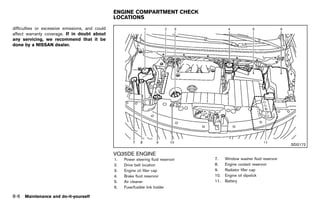
1.   Power steering fluid reservoir (P.8-11)                  7.    Window washer fluid reservoir (P.8-13)
2.   Drive belt location (P.8-15)                             8.    Engine coolant reservoir (P.8-7)
3.   Engine oil filler cap (P.8-8)                            9.    Radiator filler cap (P.8-7)
4.   Brake fluid reservoir (P.8-12)                           10.   Engine oil dipstick (P.8-8)
5.   Air cleaner (P.8-17)                                     11.   Battery (P.8-13)
6.   Fuse/fusible link holder (P.8-20)
0-14 Illustrated table of contents


                                                           [ Edit: 2011/ 7/ 18 Model: Z51-D ]
Black plate (21,1)


WARNING AND INDICATOR LIGHTS
              GUID-353409D4-8EDC-4D72-921B-F87CF9A54D49
                                                               Indicator
 Warning                                                                                Name                  Page
                        Name                   Page              light
  light
                                                                           All-Wheel Drive (AWD) LOCK
           All-Wheel Drive (AWD) warning                                                                      2-16
                                               2-12                        indicator light (AWD models)*
           light (AWD models)*
                                                                           Continuously Variable Trans-
           Anti-lock Braking System                                        mission (CVT) position indicator   2-16
                                               2-12                        light
           (ABS) warning light
                                                                           Cruise indicator light             2-17
                                                                           Front passenger air bag status
           Brake warning light                 2-13                                                           2-17
                                                                           light
                                                                           High beam indicator light          2-17
           Charge warning light                2-13
                                                                           Low beam indicator light           2-17
           Engine oil pressure warning
                                               2-13
           light                                                           Malfunction Indicator Light
                                                                                                              2-17
                                                                           (MIL)
           Intelligent Key warning light       2-14
                                                                           Overdrive off indicator light      2-18
           Low tire pressure warning light     2-14
                                                                           Soft top indicator light (Cross-
                                                                                                              2-18
           Master warning light                2-15                        Cabriolet models)*
                                                                           Turn signal/hazard indicator
           Seat belt warning light             2-15                                                           2-19
                                                                           lights
           Supplemental air bag warning                                    Vehicle Dynamic Control (VDC)      2-19
                                               2-16                        off indicator light
           light
           Vehicle Dynamic Control (VDC)       2-16          *: if so equipped
           warning light


                                                                                                                     Illustrated table of contents 0-15


                                                          [ Edit: 2011/ 7/ 18 Model: Z51-D ]
Black plate (22,1)


MEMO


0-16 Illustrated table of contents


                                     [ Edit: 2011/ 7/ 18 Model: Z51-D ]
Black plate (23,1)


1 Safety — Seats, seat belts and supplemental
  restraint system
Seats ............................................................................................ 1-2
        ...                                                                                                 Rear-facing child restraint installation using the
  Front seats ............................................................................ 1-3
                        ...                                                                                 seat belts ..........................................................................
                                                                                                                          ...                                                                       1-36
  Rear seats (Hardtop models) .......................................... 1-9
                                                          ...                                               Forward-facing child restraint installation using
  Head restraints ................................................................. 1-11
                                 ...                                                                        LATCH (Hardtop models only) ...................................
                                                                                                                                                                ...                                 1-39
  Adjustable headrest (Hardtop models) ...................... 1-14         ...                              Forward-facing child restraint installation using the
                                                                                                            seat belts ..........................................................................
                                                                                                                          ...                                                                       1-40
  Rear headrest (CrossCabriolet models) .................... 1-17            ...
                                                                                                            Installing top tether strap (Hardtop models) ..........                      ...        1-44
  Armrest (Hardtop models) ............................................. 1-17
                                                     ...
                                                                                                            Booster seats ..................................................................
                                                                                                                                  ...                                                               1-44
Seat belts ................................................................................. 1-18
                 ...
                                                                                                         Supplemental restraint system ...........................................
                                                                                                                                                          ...                                       1-48
  Precautions on seat belt usage .................................... 1-18
                                                              ...
                                                                                                            Precautions on supplemental restraint system .......                             ...    1-48
  Pregnant women .............................................................. 1-20
                                     ...
                                                                                                            NISSAN Advanced Air Bag System
  Injured persons ................................................................. 1-20
                                 ...
                                                                                                            (front seats) .....................................................................
                                                                                                                              ...                                                                   1-54
  Three-point type seat belt .............................................. 1-20
                                                    ...
                                                                                                            Front seat-mounted side-impact supplemental air
  Seat belt extenders .......................................................... 1-28
                                         ...                                                                bag and roof-mounted curtain side-impact and
  Seat belt maintenance .................................................... 1-28
                                             ...                                                            rollover supplemental air bag (Hardtop models) or
Child safety .............................................................................. 1-29
                    ...                                                                                     door-mounted curtain side-impact and rollover
  Infants .................................................................................. 1-29
                ...                                                                                         supplemental air bag (CrossCabriolet
  Small children .................................................................... 1-30
                              ...                                                                           models) systems ............................................................
                                                                                                                                       ...                                                          1-60
  Larger children .................................................................. 1-30
                                ...                                                                         Seat belts with pretensioners (front seats) .............                  ...          1-61
Child restraints ........................................................................ 1-30
                          ...                                                                               Supplemental air bag warning labels .......................      ...                    1-63
  Precautions on child restraints ..................................... 1-31
                                                            ...                                             Supplemental air bag warning light .............................                        1-63
  LATCH Lower Anchors System .................................... 1-33
                                                              ...                                           Repair and replacement procedure ..........................  ...                        1-63
  Rear-facing child restraint installation                                                                  Dual pop-up roll bar system
  using LATCH ..................................................................... 1-35
                            ...                                                                             (CrossCabriolet models) ..............................................
                                                                                                                                                      ...                                           1-64


                                                           [ Edit: 2011/ 7/ 18 Model: Z51-D ]
Black plate (24,1)


SEATS
             GUID-2869D0FF-2DAC-47DC-BF36-8D864A5BD9A3

                                                                                                         .   The seatback should not be reclined
                                                                                                             any more than needed for comfort.
                                                                                                             Seat belts are most effective when
                                                                                                             the passenger sits well back and
                                                                                                             straight up in the seat. If the seat-
                                                                                                             back is reclined, the risk of sliding
                                                                                                             under the lap belt and being injured
                                                                                                             is increased.


                                                                                                                          CAUTION

                                                                                               SSS0133
                                                                                                         When adjusting the seat positions, be
                                                                                                         sure not to contact any moving parts to
                                                                                                         avoid possible injuries and/or da-
                                                                  well back in the seat with both feet   mages.
                 WARNING                                          on the floor and adjust the seat
                                                                  properly. See “Precautions on seat
 .    Do not ride in a moving vehicle                             belt usage” later in this section.
      when the seatback is reclined. This
                                                              .   After adjustment, gently rock in the
      can be dangerous. The shoulder belt
                                                                  seat to make sure it is securely
      will not be against your body. In an
                                                                  locked.
      accident, you could be thrown into it
      and receive neck or other serious                       .   Do not leave children unattended
      injuries. You could also slide under                        inside the vehicle. They could un-
      the lap belt and receive serious                            knowingly activate switches or con-
      internal injuries.                                          trols. Unattended children could
                                                                  become involved in serious acci-
 .    For the most effective protection
                                                                  dents.
      when the vehicle is in motion, the
      seat should be upright. Always sit
1-2   Safety — Seats, seat belts and supplemental restraint system


                                                         [ Edit: 2011/ 7/ 18 Model: Z51-D ]
Black plate (25,1)


                                                                                                       SSS0792                                                    JVR0034X

FRONT SEATS
         GUID-589050CC-5D5C-4407-A4F0-CB0819F0ABAB
                                                                                                                    Sliding front passenger seat (CrossCab-
                                                                seatback for occupants of different sizes for       riolet models):
Manual seat adjustment                                                                                                               GUID-D73A39BF-43C8-459F-9C24-47B7F579C407
            GUID-6BE5370B-3D84-4E0B-B0E0-081F8AF0F764           added comfort and to help obtain proper seat        To slide the front passenger seat from the front
Forward and backward:
                 GUID-D73A39BF-43C8-459F-9C24-47B7F579C407      belt fit. (See “Precautions on seat belt usage”     most position to the rear most position, push the
Pull the lever * up and hold it while you slide
               1                                                later in this section.) Also, the seatback can be   bottom half of the seatback * or the front seat
                                                                                                                                                     A
the seat forward or backward to the desired                     reclined to allow occupants to rest when the        cushion * . If you push the top half of the
                                                                                                                               B
position. Release the lever to lock the seat in                 vehicle is stopped and the transmission in the P    seatback * , it will lock the seat in the front
                                                                                                                                C
position.                                                       (Park) position.                                    most position.
Reclining:       GUID-D73A39BF-43C8-459F-9C24-47B7F579C407
To recline the seatback, pull the lever * up and
                                              2
lean back. To bring the seatback forward, pull
the lever up and lean your body forward. Release
the lever to lock the seatback in position.
The reclining feature allows adjustment of the

                                                                                            Safety — Seats, seat belts and supplemental restraint system                 1-3


                                                             [ Edit: 2011/ 7/ 18 Model: Z51-D ]
Black plate (26,1)


                                                                                                                            Power seat adjustment
                                                                                                                                        GUID-2155E48C-B77E-4502-84B7-2AF110D60DE4

                                                                                                                            Operating tips:   GUID-D73A39BF-43C8-459F-9C24-47B7F579C407
                                                                                                                            . The power seat motor has an auto-reset
                                                                                                                                 overload protection circuit. If the motor
                                                                                                                                 stops during operation, wait 30 seconds,
                                                                                                                                 then reactivate the switch.
                                                                                                                            . Do not operate the power seat switch for a
                                                                                                                                 long period of time when the engine is off.
                                                                                                                                 This will discharge the battery.
                                                                                                                            See “Automatic drive positioner” in the “3. Pre-
                                                                                                                            driving checks and adjustments” section for the
                                                                                                                            seat position memory function.
                                              SSS0793                                                         SSS0684

Seat lifter (if so equipped):
                 GUID-D73A39BF-43C8-459F-9C24-47B7F579C407
                                                                Lumbar support (if so equipped):
                                                                                GUID-D73A39BF-43C8-459F-9C24-47B7F579C407
Pull up or push down the adjusting lever to                     The lumbar support feature provides lower back
adjust the seat height until the desired position               support to the driver.
is achieved.                                                    Move the lever * up or down to adjust the
                                                                                1
                                                                seatback lumbar area.


1-4    Safety — Seats, seat belts and supplemental restraint system


                                                             [ Edit: 2011/ 7/ 18 Model: Z51-D ]
Black plate (27,1)


                                                                                                    JVR0038X

Forward and backward:
                GUID-D73A39BF-43C8-459F-9C24-47B7F579C407
Moving the switch * forward or backward will
                     A
slide the seat forward or backward to the
desired position.
Pushing the front * or back * end of the
                   1              2
slide switch * will slide the driver seat forward
             B
or backward to the desired position (Cross-
Cabriolet models driver’s seat only).


                                                                                           Safety — Seats, seat belts and supplemental restraint system   1-5


                                                            [ Edit: 2011/ 7/ 18 Model: Z51-D ]
Black plate (28,1)


                                                                                                      JVR0039X                                                   SSS1027

Reclining:      GUID-D73A39BF-43C8-459F-9C24-47B7F579C407
                                                               vehicle is stopped and the transmission is in the   Seat lifter (if so equipped):
                                                                                                                                    GUID-D73A39BF-43C8-459F-9C24-47B7F579C407
Move the recline switch * backward until the
                            A                                  P (Park) position.                                  Push the front or rear end of the switch up or
desired angle is obtained. To bring the seatback                                                                   down to adjust the angle of the front portion or
forward again, move the switch * forward.
                                      A                                                                            height of the seat.
Push and hold the back * end of the reclining
                         2
switch * until the desired angle is obtained.
        B
To bring the seatback forward again, push and
hold the front * end of the switch (Cross-
                1
Cabriolet models driver’s seat only).
The reclining feature allows adjustment of the
seatback for occupants of different sizes for
added comfort and to help obtain proper seat
belt fit. (See “Precautions on seat belt usage”
later in this section.) Also, the seatback can be
reclined to allow occupants to rest when the
1-6    Safety — Seats, seat belts and supplemental restraint system


                                                            [ Edit: 2011/ 7/ 18 Model: Z51-D ]
Black plate (29,1)


                                                                                                                  Walk-in function (front passenger seat,
                                                                                                                  CrossCabriolet models):
                                                                                                                                GUID-D73A39BF-43C8-459F-9C24-47B7F579C407


                                                                                                                                       CAUTION
                                                                                                                    .   When operating the walk-in func-
                                                                                                                        tion, be sure not to contact any
                                                                                                                        moving parts to avoid possible in-
                                                                                                                        juries and/or damages.
                                                                                                                    .   When operating the walk-in func-
                                                                                                                        tion, be sure that the front passen-
                                                                                                                        ger seat is not occupied by a
                                              SSS1028                                                   SSS1172         passenger and/or any objects to
                                                                        Front passenger’s seatback switch               avoid possible injuries and/or da-
Lumbar support (if so equipped):
                GUID-D73A39BF-43C8-459F-9C24-47B7F579C407                                                               mages.
The lumbar support feature provides lower back                                                                      .   After operating the walk-in function,
support to the driver.                                                                                                  be sure to return the seat to the
Push the front * or back * end of the switch
                1          2                                                                                            rearmost position and then tilt up
to adjust the seatback lumbar area.                                                                                     the seatback until it latches.

                                                                                                                  This feature makes it easier to get in and out of
                                                                                                                  the rear seat. Use the following procedure when
                                                                                                                  getting in and out of the rear seat on the
                                                                                                                  passenger’s side. If the sun visor is used, close it
                                                                                                                  to the original position before operating the
                                                                                                                  walk-in feature.
                                                                                                                  1. Push the front passenger’s seatback switch
                                                                                                        SSS1175      to fold down the seatback and unlock the
                                                                             Remote walk-in switch                   seat position.
                                                                                             Safety — Seats, seat belts and supplemental restraint system           1-7


                                                            [ Edit: 2011/ 7/ 18 Model: Z51-D ]
Black plate (30,1)


      Alternatively, you can push the remote walk-
      in switch located on the instrument panel to                                                                             WARNING
      fold down the front passenger’s seatback
      and unlock the seat position.                                                                             Before using the driver’s seatback re-
2. Slide the seat forward to the foremost                                                                       lease, be sure that the driver’s seat is
   position manually.                                                                                           not occupied by a driver and/or any
                                                                                                                objects to avoid possible injuries and/
3. Get in or out the vehicle.
                                                                                                                or damage.
4. Return the front passenger seat to the
   rearmost position. To slide the front passen-
   ger seat, see “Manual seat adjustment”
   earlier in this section.

                                                                                                  SSS1173

                                                        Driver’s seatback release (CrossCabrio-
                                                        let models) GUID-116F27BD-8437-47A9-8270-AD99D91FA75D
                                                        To exit the rear seat from the driver’s side, pull
                                                        the strap behind the driver’s seat to release the
                                                        driver’s seatback. The driver’s seatback will tilt
                                                        forward so that you can exit the vehicle.
                                                        NOTE:
                                                        Pulling the strap behind the driver’s seat
                                                        does not slide the driver’s seat forward.
                                                        You cannot slide the driver’s seat manu-
                                                        ally.


1-8     Safety — Seats, seat belts and supplemental restraint system


                                                     [ Edit: 2011/ 7/ 18 Model: Z51-D ]
Black plate (31,1)


                                                               To fold down the seatbacks:
                                                                                GUID-D73A39BF-43C8-459F-9C24-47B7F579C407
                                                               Pull the strap on the rear seat * . Pull the lever
                                                                                                   A
                                                               * beside the cargo area and fold the seat-
                                                                B
                                                               back.


                                             SSS0569                                                                                                                     SSS0821

REAR SEATS (Hardtop models)
         GUID-42670C07-8DEA-4731-BDEC-1C3F2B7295A1
                                                                                                                            To return the seatbacks:
                                                                                                                                           GUID-D73A39BF-43C8-459F-9C24-47B7F579C407

Folding                                                                                                                     Manual operation:
                GUID-8333E9E4-6111-43A4-8DC3-B860D3C64DA7

Before foldingGUID-D73A39BF-43C8-459F-9C24-47B7F579C407
                  the rear seats:                                                                                           Lift up each seatback and push it to the upright
                                                                                                                            position until it is latched.
. Secure the seat belts on the seat belt hooks
   on the side wall. (See “Seat belt hooks                                                                                  Power operation (if so equipped):
   (Hardtop models)” later in this section.)                                                                                Push and hold the corresponding switch located
. Disconnect and stow the center seat belt                                                                                  on the lower side of the instrument panel * or
                                                                                                                                                                       B
   and tongue into the retractor base. (See                                                                                 the right or left side in the cargo area * .
                                                                                                                                                                     A
   “Rear center seat belt (Hardtop models)”                                                                                 A beep sounds once and the seatback will be
   later in this section.)                                                                                                  returned automatically.
. Always reconnect the center seat belt when                                                                                A beep sounds twice when the seatback is fully
   the seat is returned to the upright position.                                                                            returned to the seating position.
. Remove drink containers from the rear cup                                                                                 If the control unit detects any obstacle or
   holder.                                                                                                                  malfunctions while in the power operation, a
                                                                                                 Safety — Seats, seat belts and supplemental restraint system                  1-9


                                                            [ Edit: 2011/ 7/ 18 Model: Z51-D ]
Black plate (32,1)


beep sounds for 4 seconds and the seatback               .   Do not fold down the rear seats            center seat belt connector is com-
will return to the folded position automatically.            when occupants are in the rear seat        pletely secured.
Check if there are any obstacles caught that                 area or any luggage is on the rear
prevent seats from returning to the folded                                                          .   If the rear center seat belt connector
                                                             seats.                                     and the seatbacks are not secured
position. See a NISSAN dealer if the beep still
sounds.                                                  .   When folding or returning the seat-        in the correct position, serious per-
                                                             backs to the upright position, to          sonal injury may result in an acci-
                                                             avoid injury to yourself and others:       dent or sudden stop.
                   CAUTION                                   — Make sure that the seat path is
                                                               clear before moving the seat.
 When operating the rear power seat-
 back return, make sure that the vehicle                     — Be careful not to allow hands or
 is stopped and the transmission is in                         feet to get caught or pinched in
 the P (Park) position.                                        the seat.
                                                         .   Properly secure all cargo to help
                                                             prevent it from sliding or shifting.
                                                             Do not place cargo higher than the
                  WARNING                                    seatbacks. In a sudden stop or
                                                             collision, unsecured cargo could
 .   Never allow anyone to ride in the
                                                             cause personal injury.
     cargo area or on the rear seats
     when they are in the fold-down                      .   When returning the seatbacks, be
     position. In a collision, people riding                 sure to attach the rear center seat
     in these areas are more likely to be                    belt connector.
     seriously injured or killed.                        .   Do not unfasten the rear center seat
 .   Do not allow people to ride in any                      belt connector except when folding
     area of your vehicle that is not                        down the rear seat.
     equipped with seats and seat belts.                 .   When attaching the rear center seat
     Be sure everyone in your vehicle is                     belt connector, be certain that the
     in a seat and using a seat belt                         seatbacks are completely secured in
     properly.                                               the latched position and the rear
1-10 Safety — Seats, seat belts and supplemental restraint system


                                                    [ Edit: 2011/ 7/ 18 Model: Z51-D ]
Black plate (33,1)


                                                                                                               HEAD RESTRAINTS
                                                                                                                        GUID-5E605952-D804-4293-B401-616CD7C38955
                                                                                WARNING
                                                                .   Do not ride in a moving vehicle                               WARNING
                                                                    when the seatback is reclined. This
                                                                                                                Head restraints supplement the other
                                                                    can be dangerous. The shoulder belt
                                                                                                                vehicle safety systems. They may pro-
                                                                    will not be against your body. In an
                                                                                                                vide additional protection against injury
                                                                    accident, you could be thrown into it
                                                                                                                in certain rear end collisions. Adjust the
                                                                    and receive neck or other serious
                                                                                                                head restraints properly, as specified in
                                                                    injuries. You could also slide under
                                                                                                                this section. Check the adjustment after
                                                                    the lap belt and receive serious
                                                                                                                someone else uses the seat. Do not
                                                                    internal injuries.
                                                                                                                attach anything to the head restraint
                                                                .   For the most effective protection           stalks or remove the head restraint. Do
                                           SSS0227A
                                                                    when the vehicle is in motion, the          not use the seat if the head restraint
                                                                    seat should be upright. Always sit          has been removed. If the head restraint
Reclining      GUID-1BFE5C97-1FC3-4054-A6B3-17A9466D0C05            well back in the seat with both feet        was removed, reinstall and properly
Pull the reclining strap * and position the
                            A                                       on the floor and adjust the seat belt       adjust the head restraint before an
seatback at the desired angle. Release the                          properly. See “Precautions on seat          occupant uses the seating position.
reclining strap after positioning the seat at the                   belt usage” later in this section.          Failure to follow these instructions
desired angle.
                                                                .   After adjustment, check to be sure          can reduce the effectiveness of the
The reclining feature allows adjustment of the                      the seat is securely locked.                head restraints. This may increase the
seatback for occupants of different sizes to help                                                               risk of serious injury or death in a
obtain proper seat belt fit. (See “Precautions on                                                               collision.
seat belt usage” later in this section.) The
seatback may also be reclined to allow occu-
pants to rest when the vehicle is parked.


                                                                                        Safety — Seats, seat belts and supplemental restraint system       1-11


                                                           [ Edit: 2011/ 7/ 18 Model: Z51-D ]
Black plate (34,1)


                                     SSS1013                                                SSS0992                                                 SSS0997

The illustration shows the seating positions        Components                                           Adjustment
                                                             GUID-D58E33DF-16BC-41B1-B4C5-AA96E133EBC7                 GUID-ACB994E3-70CF-4004-BDD8-BB431714EC1E
equipped with head restraints. The head re-
                                                    1. Head restraint                                    Adjust the head restraint so the center is level
straints are adjustable.
                                                    2. Adjustment notches                                with the center of your ears.
    Indicates the seating position is equipped
with a head restraint.                              3. Lock knob
                                                    4. Stalks


1-12 Safety — Seats, seat belts and supplemental restraint system


                                                 [ Edit: 2011/ 7/ 18 Model: Z51-D ]
Black plate (35,1)


                                           SSS0993                                           SSS0994                                                 SSS0995

To raise the head restraint, pull it up.                To lower, push and hold the lock knob and push   Removal        GUID-FC0E7C18-BEC7-4083-8503-66512F55EE99
                                                        the head restraint down.
                                                                                                         Use the following procedure to remove the
                                                                                                         adjustable head restraints.
                                                                                                         1. Pull the head restraint up to the highest
                                                                                                            position.
                                                                                                         2. Push and hold the lock knob.
                                                                                                         3. Remove the head restraint from the seat.
                                                                                                         4. Store the head restraint properly in a secure
                                                                                                            place so it is not loose in the vehicle.
                                                                                                         5. Install and properly adjust the head restraint
                                                                                                            before an occupant uses the seating posi-
                                                                                                            tion.


                                                                                  Safety — Seats, seat belts and supplemental restraint system            1-13


                                                     [ Edit: 2011/ 7/ 18 Model: Z51-D ]
Black plate (36,1)


                                                                                                                      Adjust the Active Head Restraints properly as
                                                                                                                      described earlier in this section.
                                                                                                                      ADJUSTABLE HEADREST (Hardtop
                                                                                                                      models)  GUID-44BABEF8-0609-4B69-934B-AA984B2E807B


                                                                                                                                         WARNING
                                                                                                                       The adjustable headrests supplement
                                                                                                                       the other vehicle safety systems. They
                                                                                                                       may provide additional protection
                                                                                                                       against injury in certain rear end colli-
                                                                                                                       sions. Adjust the headrests properly, as
                                            SSS0996                                                     SSS0508        specified in this section. Check the
                                                                                                                       adjustment after someone else uses
Install        GUID-10B7C451-D81D-4E42-9DB2-2C10EBE1FF75
                                                              Front-seat Active Head Restraint
                                                                          GUID-3164FE3F-22C1-4D05-B110-75CFEC562928
                                                                                                                       the seat. Do not attach anything to the
1. Align the head restraint stalks with the holes             The Active Head Restraint moves forward                  adjustable headrest stalks or remove
   in the seat. Make sure that the head restraint             utilizing the force that the seatback receives           the adjustable headrests. Do not use
   is facing the correct direction. The stalk with            from the occupant in a rear-end collision. The           the seat if the adjustable headrests
   the adjustment notches * must be in-
                                 1                            movement of the head restraint helps support             have been removed. If the adjustable
   stalled in the hole with the lock knob * .2                the occupant’s head by reducing its backward             headrest was removed, reinstall and
                                                              movement and helping absorb some of the                  properly adjust the headrest before an
2. Push and hold the lock knob and push the
                                                              forces that may lead to whiplash-type injuries.          occupant uses the seating position.
   head restraint down.
                                                                                                                       Failure to follow these instructions
3. Properly adjust the head restraint before an               Active Head Restraints are effective for colli-
                                                                                                                       can reduce the effectiveness of the
   occupant uses the seating position.                        sions at low to medium speeds in which it is said
                                                                                                                       adjustable headrests. This may in-
                                                              that whiplash injury occurs most.
                                                                                                                       crease the risk of serious injury or
                                                              Active Head Restraints operate only in certain           death in a collision.
                                                              rear-end collisions. After the collision, the head
                                                              restraints return to their original position.

1-14 Safety — Seats, seat belts and supplemental restraint system


                                                           [ Edit: 2011/ 7/ 18 Model: Z51-D ]
Black plate (37,1)


                                     SSS1014                                                 SSS0992                                                 SSS0997

The illustration shows the seating positions        Components                                            Adjustment
                                                              GUID-08BD1B61-7B43-4109-A568-5892EDCD8D17                 GUID-909049BB-7248-4BC4-953B-DC4A4D1B6C05
equipped with adjustable headrests. The head-
                                                    1. Adjustable headrest                                Adjust the headrest so the center is level with
rests are adjustable.
                                                    2. Adjustment notches                                 the center of your ears.
    Indicates the seating position is equipped
with an adjustable headrest.                        3. Lock knob
                                                    4. Stalks


                                                                                Safety — Seats, seat belts and supplemental restraint system              1-15


                                                 [ Edit: 2011/ 7/ 18 Model: Z51-D ]
Black plate (38,1)


                                     SSS0993                                           SSS0994                                                SSS0995

To raise the headrest, pull it up.                To lower, push and hold the lock knob and push   Removal       GUID-BE2EE26A-B413-48C4-B196-33F5100BE36D
                                                  the headrest down.
                                                                                                   Use the following procedure to remove the
                                                                                                   adjustable headrests.
                                                                                                   1. Pull the headrest up to the highest position.
                                                                                                   2. Push and hold the lock knob.
                                                                                                   3. Remove the headrest from the seat.
                                                                                                   4. Store the headrest properly in a secure
                                                                                                      place so it is not loose in the vehicle.
                                                                                                   5. Install and properly adjust the headrest
                                                                                                      before an occupant uses the seating posi-
                                                                                                      tion.


1-16 Safety — Seats, seat belts and supplemental restraint system


                                               [ Edit: 2011/ 7/ 18 Model: Z51-D ]
Black plate (39,1)


                                           SSS0996                                                  JVR0030X                                              SSS0229A

Install                                                      REAR HEADREST (CrossCabriolet                        ARMREST (Hardtop models)
                                                                                                                            GUID-38665920-E49E-4A44-96F5-25968146C89C
              GUID-F3510470-0C00-4072-8C22-9B43D094B745
                                                             models)
1. Align the headrest stalks with the holes in                        GUID-E90B0FC8-0909-43DE-8515-8D064D935FB7   Rear armrest
                                                                                                                             GUID-9BC9B1A5-D55E-4C9C-A0C9-6CB62211A931
   the seat. Make sure that the headrest is                  The rear headrests of CrossCabriolet models
                                                                                                                  Pull the armrest forward until it is horizontal.
   facing the correct direction. The stalk with              cannot be removed or adjusted.
   the adjustment notches * must be in-
                                1                            + Indicates the seating position is not equipped
   stalled in the hole with the lock knob * .
                                          2                  with a removable or adjustable headrest.
2. Push and hold the lock knob and push the
   headrest down.
3. Properly adjust the headrest before an
   occupant uses the seating position.


                                                                                        Safety — Seats, seat belts and supplemental restraint system            1-17


                                                          [ Edit: 2011/ 7/ 18 Model: Z51-D ]
Black plate (40,1)


SEAT BELTS
               GUID-02C3DBF6-9D5A-47DE-B2F0-C98E0027F971
PRECAUTIONS ON SEAT BELT
USAGE    GUID-0C8D3A44-10AF-48A1-A8CC-9A495B9121D7
If you are wearing your seat belt properly
adjusted, and you are sitting upright and well
back in your seat with both feet on the floor, your
chances of being injured or killed in an accident
and/or the severity of injury may be greatly
reduced. NISSAN strongly encourages you and
all of your passengers to buckle up every time
you drive, even if your seating position includes a
supplemental air bag.
Most U.S. states and Canadian provinces
or territories specify that seat belts be                                                                            SSS0136
worn at all times when a vehicle is being
driven.


                                                                                                                     SSS0134


1-18 Safety — Seats, seat belts and supplemental restraint system


                                                           [ Edit: 2011/ 7/ 18 Model: Z51-D ]
Black plate (41,1)


                                                               .   Be sure the seat belt tongue is
                               WARNING                             securely fastened to the proper
                                                                   buckle.
               .   Every person who drives or rides in
                                                               .   Do not wear the seat belt inside out
                   this vehicle should use a seat belt at
                                                                   or twisted. Doing so may reduce its
                   all times. Children should be prop-
                                                                   effectiveness.
                   erly restrained in the rear seat and,
                   if appropriate, in a child restraint.       .   Do not allow more than one person
                                                                   to use the same seat belt.
               .   The seat belt should be properly
                   adjusted to a snug fit. Failure to do       .   Never carry more people in the
                   so may reduce the effectiveness of              vehicle than there are seat belts.
                   the entire restraint system and in-         .   If the seat belt warning light glows
                   crease the chance or severity of                continuously while the ignition is
SSS0016
                   injury in an accident. Serious injury           pushed to the ON position with all
                   or death can occur if the seat belt is          doors closed and all seat belts
                   not worn properly.                              fastened, it may indicate a malfunc-
               .   Always route the shoulder belt over             tion in the system. Have the system
                   your shoulder and across your                   checked by a NISSAN dealer.
                   chest. Never put the belt behind            .   No changes should be made to the
                   your back, under your arm or across             seat belt system. For example, do
                   your neck. The belt should be away              not modify the seat belt, add mate-
                   from your face and neck, but not                rial, or install devices that may
                   falling off your shoulder.                      change the seat belt routing or
               .   Position the lap belt as low and                tension. Doing so may affect the
                   snug as possible AROUND THE                     operation of the seat belt system.
                   HIPS, NOT THE WAIST. A lap belt                 Modifying or tampering with the
                   worn too high could increase the                seat belt system may result in
SSS0014            risk of internal injuries in an acci-           serious personal injury.
                   dent.

                                       Safety — Seats, seat belts and supplemental restraint system   1-19


          [ Edit: 2011/ 7/ 18 Model: Z51-D ]
Black plate (42,1)


 .   Once a seat belt pretensioner has                damaged.                                           injuries. You could also slide under
     activated, it cannot be reused and                                                                  the lap belt and receive serious
     must be replaced together with the         PREGNANTGUID-92E572E7-A7ED-4EC2-8824-E9C667CD8A35
                                                         WOMEN                                           internal injuries.
     retractor. See a NISSAN dealer.            NISSAN recommends that pregnant women use            .   For the most effective protection
 .   Removal and installation of the            seat belts. The seat belt should be worn snug,           when the vehicle is in motion, the
     pretensioner system components             and always position the lap belt as low as               seat should be upright. Always sit
     should be done by a NISSAN dealer.         possible around the hips, not the waist. Place           well back in the seat with both feet
 .   All seat belt assemblies, including        the shoulder belt over your shoulder and across          on the floor and adjust the seat belt
     retractors and attaching hardware,         your chest. Never run the lap/shoulder belt over         properly.
     should be inspected after any colli-       your abdominal area. Contact your doctor for         .   Do not allow children to play with
     sion by a NISSAN dealer. NISSAN            specific recommendations.                                the seat belts. Most seating posi-
     recommends that all seat belt as-          INJURED PERSONS                                          tions are equipped with Automatic
                                                         GUID-B47CCE32-408A-4E62-B891-7EBBE28DCC23
     semblies in use during a collision be      NISSAN recommends that injured persons use               Locking Retractor (ALR) mode seat
     replaced unless the collision was          seat belts. Check with your doctor for specific          belts. If the seat belt becomes
     minor and the belts show no da-            recommendations.                                         wrapped around a child’s neck with
     mage and continue to operate prop-                                                                  the ALR mode activated, the child
     erly. Seat belt assemblies not in use      THREE-POINT TYPE SEAT BELT
                                                         GUID-F9647E3B-7CCB-4333-9D53-DBFEBA7433EC       can be seriously injured or killed if
     during a collision should also be                                                                   the seat belt retracts and becomes
     inspected and replaced if either                              WARNING                               tight. This can occur even if the
     damage or improper operation is                                                                     vehicle is parked. Unbuckle the seat
     noted.                                       .   Every person who drives or rides in                belt to release the child. For the
 .   All child restraints and attaching               this vehicle should use a seat belt at             center of the rear seat, the connec-
     hardware should be inspected after               all times.                                         tor tongue may also be released.
     any collision. Always follow the                                                                    Release the connector tongue by
                                                  .   Do not ride in a moving vehicle
     restraint manufacturer’s inspection                                                                 inserting a suitable tool (such as a
                                                      when the seatback is reclined. This
     instructions and replacement re-                                                                    key) into the connector buckle. If the
                                                      can be dangerous. The shoulder belt
     commendations. The child restraints                                                                 seat belt can not be unbuckled or is
                                                      will not be against your body. In an
     should be replaced if they are                                                                      already unbuckled, release the child
                                                      accident, you could be thrown into it
                                                                                                         by cutting the seat belt with a
                                                      and receive neck or other serious
1-20 Safety — Seats, seat belts and supplemental restraint system


                                             [ Edit: 2011/ 7/ 18 Model: Z51-D ]
Black plate (43,1)


suitable tool (such as a knife or                                                                  retractor.
scissors) to release the seat belt.


                                                                                   SSS0292

                                         Fastening the seat belts
                                                     GUID-4C4C9056-82D7-4B6A-80A4-9DBA4C079A82
                                         1. Adjust the seat. (See “Seats” earlier in this
                                            section.)
                                         2. Slowly pull the seat belt out of the retractor
                                            and insert the tongue into the buckle until
                                            you hear and feel the latch engage.
                                            . The retractor is designed to lock
                                               during a sudden stop or on impact.
                                               A slow pulling motion permits the
                                               belt to move and allows you some
                                               freedom of movement in the seat.
                                            . If the seat belt cannot be pulled from
                                               its fully retracted position, firmly pull
                                               the belt and release it. Then
                                               smoothly pull the belt out of the
                                                                      Safety — Seats, seat belts and supplemental restraint system   1-21


                                      [ Edit: 2011/ 7/ 18 Model: Z51-D ]
Black plate (44,1)


                                                      of movement in the seat. The ELR locks the seat
                                                      belt when the vehicle slows down rapidly or
                                                      during certain impacts.
                                                      The Automatic Locking Retractor (ALR) mode
                                                      (child restraint mode) locks the seat belt for
                                                      child restraint installation.
                                                      When ALR mode is activated the seat belt
                                                      cannot be extended again until the seat belt
                                                      tongue is detached from the buckle and fully
                                                      retracted. The seat belt returns to the ELR mode
                                                      after the seat belt fully retracts. For additional
                                                      information, see “Child restraints” later in this
                                      SSS0290
                                                      section.                                                                                       SSS0326
                                                      The ALR mode should be used only for
3. Position the lap belt portion low and snug         child restraint installation. During normal          Unfastening the seat belts
                                                                                                                       GUID-313FD5EC-9489-4699-B4F1-98B31FED4129
   on the hips as shown.                              seat belt use by an occupant, the ALR                To unfasten the seat belt, push the button on the
4. Pull the shoulder belt portion toward the          mode should not be activated. If it is               buckle. The seat belt automatically retracts.
   retractor to take up extra slack. Be sure the      activated, it may cause uncomfortable seat
   shoulder belt is routed over your shoulder         belt tension.                                        Checking seat belt operation
                                                                                                                     GUID-AED6BCDC-CBDB-4FCF-9DB2-9B060E99627A
   and across your chest.                                                                                  Seat belt retractors are designed to lock seat
The front passenger seat and the rear seating                                                              belt movement by two separate methods:
                                                                         WARNING
positions three-point seat belts have two modes                                                            .   When the belt is pulled quickly from the
of operation:                                           When fastening the seat belts, be                      retractor.
. Emergency Locking Retractor (ELR)                     certain that seatbacks are completely              . When the vehicle slows down rapidly.
. Automatic Locking Retractor (ALR)                     secured in the latched position. If they           To increase your confidence in the seat belts,
The Emergency Locking Retractor (ELR) mode              are not completely secured, passengers             check the operation as follows:
allows the seat belt to extend and retract to           may be injured in an accident or sudden            .   Grasp the shoulder belt and pull forward
allow the driver and passengers some freedom            stop.                                                  quickly. The retractor should lock and

1-22 Safety — Seats, seat belts and supplemental restraint system


                                                   [ Edit: 2011/ 7/ 18 Model: Z51-D ]
Black plate (45,1)


     restrict further belt movement.                                                                              seat belt may slip and result in personal
If the retractor does not lock during this check or                                                               injury.
if you have any question about seat belt
operation, see a NISSAN dealer.

                                                                                                                                   CAUTION
                                                                                                                  .   When entering or exiting the rear
                                                                                                                      seat, or inserting or retrieving lug-
                                                                                                                      gage with the seatback folded
                                                                                                                      down, always release the seat belt
                                                                                                                      guide. Otherwise, the seat belt
                                                                                                                      guide may be damaged.
                                                                                                    SSS1181       .   Do not fold the seat forward or pull
                                                                                                                      it backward by holding the seat belt
                                                         Seat belt guide (front seats, CrossCab-                      guide in your hand. Doing so may
                                                         riolet models)
                                                                      GUID-3EF9ED5F-135A-43B1-8954-CAD684674E27       damage the seat belt guide.
                                                         When the seat belt guide is used with the front
                                                         seat, the seat belt can easily be pulled out.
                                                         Release the seat belt guide, clip the seat belt
                                                         and install the seat belt guide again.
                                                         When using the seat belt guide, do not allow it
                                                         to twist.


                                                                             WARNING
                                                           When using the seat belt guide, make
                                                           sure that the seat belt guide is securely
                                                           installed to the seat. Otherwise, the
                                                                                       Safety — Seats, seat belts and supplemental restraint system    1-23


                                                      [ Edit: 2011/ 7/ 18 Model: Z51-D ]
Black plate (46,1)


                                                                            WARNING
                                                            .   After adjustment, release the ad-
                                                                justment button and try to move the
                                                                shoulder belt anchor up and down
                                                                to make sure it is securely fixed in
                                                                position.
                                                            .   The shoulder belt anchor height
                                                                should be adjusted to the position
                                                                best for you. Failure to do so may
                                                                reduce the effectiveness of the
                                                                entire restraint system and increase
                                        SSS0351A                                                                                                   SSS0845
                                                                the chance or severity of injury in an
                                                                accident.
Shoulder belt height adjustment (Hard-                                                                   Seat belt hooks (Hardtop models)
                                                                                                                     GUID-0F6C8515-923F-4DA4-BED8-81B474353BA2
top models)GUID-E8DCDEEB-44E6-4A0A-B2D9-EB6DBF18146C                                                     When the rear seat belts are not in use and
The shoulder belt anchor height should be                                                                when folding down the rear seats, hook the rear
adjusted to the position best for you. (See                                                              outer seat belts on the seat belt hooks.
“Precautions on seat belt usage” earlier in this
section.)
To adjust, pull the adjustment button * , and
                                         1
then move the shoulder belt anchor to the
desired position * , so that the belt passes
                   2
over the center of the shoulder. The belt should
be away from your face and neck, but not falling
off of your shoulder. Release the adjustment
button to lock the shoulder belt anchor into
position.

1-24 Safety — Seats, seat belts and supplemental restraint system


                                                       [ Edit: 2011/ 7/ 18 Model: Z51-D ]
Black plate (47,1)


                                          SSS0846                                                SSS0241                                          SSS0703

Rear center GUID-D2977525-73CC-440E-AC17-490B6791BECA
            seat belt (Hardtop models)                                                                      The center seat belt buckle and the tongue are
                                                                             WARNING                        identified by the CENTER mark. The center seat
The rear center seat belt has a connector tongue
                                                                                                            belt tongue can be fastened only into the center
* and a seat belt tongue * . Both the
  1                                2
                                                                                                            seat belt buckle.
connector tongue and the seat belt tongue must               .   Always fasten the connector tongue
be securely latched for proper seat belt opera-                  and the seat belt in the order shown.
tion.                                                        .   Always make sure both the connec-
                                                                 tor tongue and the seat belt tongue
                                                                 are secured when using the seat
                                                                 belt or installing a child restraint. Do
                                                                 not use the seat belt or child
                                                                 restraint with only the seat belt
                                                                 tongue attached. This could result
                                                                 in serious personal injury in case of
                                                                 an accident or a sudden stop.


                                                                                     Safety — Seats, seat belts and supplemental restraint system     1-25


                                                        [ Edit: 2011/ 7/ 18 Model: Z51-D ]
Black plate (48,1)


                                               Stowing rear center seat belt:
                                                               GUID-D73A39BF-43C8-459F-9C24-47B7F579C407   in the correct position, serious per-
                                               When folding down the rear seat, the rear center            sonal injury may result in an acci-
                                               seat belt can be retracted into a stowed position           dent or sudden stop.
                                               as follows:
                                               1. Hold the connector tongue * so that the
                                                                                  1
                                                  seat belt does not retract suddenly when the
                                                  tongue is released from the connector
                                                  buckle. Release the connector tongue by
                                                  inserting a suitable tool such as key * into
                                                                                        A
                                                  the connector buckle.
                                               2. Insert the seat belt tongue into the retractor
                                                  base first * .
                                                              2

                                               3. Then secure the connector tongue into the
                                                  retractor base * .
                                                                 3


                                                                    WARNING
                                                 .   Do not unfasten the rear center seat
                                                     belt connector except when folding
                                                     down the rear seat.
                                                 .   When attaching the rear center seat
                                                     belt connector, be certain that the
                                                     seatbacks are completely secured in
                                                     the latched position and the rear
                                                     center seat belt connector is com-
                                  SSS0225            pletely secured.
                                                 .   If the rear center seat belt connector
                                                     and the seatbacks are not secured
1-26 Safety — Seats, seat belts and supplemental restraint system


                                            [ Edit: 2011/ 7/ 18 Model: Z51-D ]
Black plate (49,1)


             Attaching rearGUID-D73A39BF-43C8-459F-9C24-47B7F579C407
                             center seat belt:                             seatbacks are completely secured in
             Always be sure the rear center seat belt                      the latched position and the rear
             connector tongue and connector buckle are                     center seat belt connector is com-
             attached. Disconnect only when folding down                   pletely secured.
             the rear seat.                                            .   If the rear center seat belt connector
             To connect the buckle:                                        and the seatbacks are not secured
             1. Pull out the connector tongue from the                     in the correct position, serious per-
                retractor base * .
                               1                                           sonal injury may result in an acci-
                                                                           dent or sudden stop.
             2. Pull out the seat belt tongue from the
                retractor base * .
                               2

             3. Pull the seat belt and secure the connector
                buckle until it clicks * .
                                       3

             The center seat belt connector tongue and
             buckle are indicated by the ! and ~ mark.
             The center seat belt connector tongue can be
             attached only into the rear center seat belt
             connector buckle.
             To fasten the seat belt, see “Fastening the seat
             belts” earlier in this section.


                                  WARNING
               .   Do not unfasten the rear center seat
                   belt connector except when folding
SSS0232            down the rear seat.
               .   When attaching the rear center seat
                   belt connector, be certain that the
                                           Safety — Seats, seat belts and supplemental restraint system      1-27


          [ Edit: 2011/ 7/ 18 Model: Z51-D ]
Black plate (50,1)


                                                            purchasing an extender if an extender is                  .   If dirt builds up in the shoulder belt
                                                            required.                                                     guide of the seat belt anchors, the seat
                                                                                                                          belts may retract slowly. Wipe the shoulder
                                                                                                                          belt guide with a clean, dry cloth.
                                                                                   WARNING                            .   Periodically check to see that the seat
                                                                                                                          belt and the metal components, such as
                                                                .    Only NISSAN seat belt extenders,
                                                                                                                          buckles, tongues, retractors, flexible wires
                                                                     made by the same company which
                                                                                                                          and anchors, work properly. If loose parts,
                                                                     made the original equipment seat
                                                                                                                          deterioration, cuts or other damage on the
                                                                     belts, should be used with NISSAN
                                                                                                                          webbing is found, the entire seat belt
                                                                     seat belts.
                                                                                                                          assembly should be replaced.
                                                                .    Adults and children who can use the
                                                                     standard seat belt should not use an
                                           SSS0235                   extender. Such unnecessary use
                                                                     could result in serious personal
Storing rear seat belt buckles (Hardtop                              injury in the event of an accident.
models)      GUID-34BA1AAF-B284-4222-A05C-7E212FF3C674          .    Never use seat belt extenders to
Before folding down the seat, put the buckles in                     install child restraints. If the child
the storage of the seat cushion to avoid                             restraint is not secured properly, the
dropping it under the seat cushion.                                  child could be seriously injured in a
SEAT BELT EXTENDERS                                                  collision or a sudden stop.
          GUID-798C755D-7740-4606-AB38-FAC398986CFA
If, because of body size or driving position, it is
                                                            SEAT BELT GUID-3D5EE851-7E10-4B7F-A02B-8BFBB0D4CCE6
                                                                      MAINTENANCE
not possible to properly fit the lap-shoulder belt
and fasten it, an extender that is compatible with          .       To clean the seat belt webbing, apply a
the installed seat belts is available that can be                   mild soap solution or any solution recom-
purchased. The extender adds approximately 8                        mended for cleaning upholstery or carpets.
in (200 mm) of length and may be used for either                    Then wipe with a cloth and allow the seat
the driver or front passenger seating position.                     belts to dry in the shade. Do not allow the
See a NISSAN dealer for assistance with                             seat belts to retract until they are completely
                                                                    dry.
1-28 Safety — Seats, seat belts and supplemental restraint system


                                                         [ Edit: 2011/ 7/ 18 Model: Z51-D ]
Black plate (51,1)


CHILD SAFETY
               GUID-26D16DBE-9A0E-4759-945D-C9D751725375

                                                              many other sources, including doctors, teachers,       child restraints.
                   WARNING                                    government traffic safety offices, and community
                                                              organizations. Every child is different, so be sure
                                                                                                                    All U.S. states and Canadian provinces or
 Do not allow children to play with the                       to learn the best way to transport your child.
                                                                                                                    territories require the use of approved child
 seat belts. Most seating positions are                       There are three basic types of child restraint        restraints for infants and small children. See
 equipped with Automatic Locking Re-                          systems:                                              “Child restraints” later in this section.
 tractor (ALR) mode seat belts. If the                        . Rear-facing child restraint                         A child restraint may be secured in the vehicle
 seat belt becomes wrapped around a
                                                              . Forward-facing child restraint                      by using either the LATCH (Lower Anchor and
 child’s neck with the ALR mode acti-
                                                              . Booster seat                                        Tethers for CHildren) system or with the vehicle
 vated, the child can be seriously injured
                                                              The proper restraint depends on the child’s size.     seat belt. See “Child restraints” later in this
 or killed if the seat belt retracts and
                                                              Generally, infants up to about 1 year and less        section for more information.
 becomes tight. This can occur even if
 the vehicle is parked. Unbuckle the seat                     than 20 lbs (9 kg) should be placed in rear-          NISSAN recommends that all pre-teens
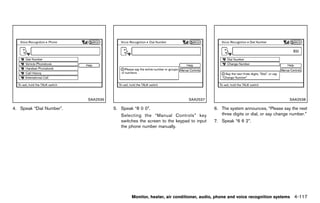
 belt to release the child. For the center                    facing child restraints. Forward-facing child         and children be restrained in the rear seat.
 of the rear seat, the connector tongue                       restraints are available for children who outgrow     Studies show that children are safer when
 may also be released. Release the                            rear-facing child restraints and are at least 1       properly restrained in the rear seat than in
 connector tongue by inserting a suita-                       year old. Booster seats are used to help position     the front seat.
 ble tool (such as a key) into the                            a vehicle lap/shoulder belt on a child who can no     This is especially important because your
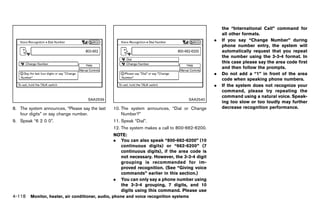
 connector buckle. If the seat belt can                       longer use a forward-facing child restraint.          vehicle has a supplemental restraint sys-
 not be unbuckled or is already un-                                                                                 tem (Air bag system) for the front passen-
 buckled, release the child by cutting                                                                              ger. See “Supplemental restraint system”
 the seat belt with a suitable tool (such
                                                                                 WARNING
                                                                                                                    later in this section.
 as a knife or scissors) to release the                         Infants and children need special pro-              INFANTS
 seat belt.                                                     tection. The vehicle’s seat belts may not
                                                                                                                                   GUID-0FA535EA-6323-4DB9-92F9-8B508130A6AC
                                                                                                                    Infants up to at least 1 year old should be placed
                                                                fit them properly. The shoulder belt may            in a rear-facing child restraint. NISSAN recom-
Children need adults to help protect them.                      come too close to the face or neck. The             mends that infants be placed in child restraints
They need to be properly restrained.                            lap belt may not fit over their small hip           that comply with Federal Motor Vehicle Safety
In addition to the general information in this                  bones. In an accident, an improperly                Standards or Canadian Motor Vehicle Safety
manual, child safety information is available from              fitting seat belt could cause serious or            Standards. You should choose a child restraint
                                                                fatal injury. Always use appropriate
                                                                                          Safety — Seats, seat belts and supplemental restraint system               1-29


                                                           [ Edit: 2011/ 7/ 18 Model: Z51-D ]
Black plate (52,1)


                                                                                                                  CHILD RESTRAINTS
                                                                                                                           GUID-D2F4DA62-62F0-46FA-BDC9-C09A7F684094

that fits your vehicle and always follow the                 commercially available booster seat if the
manufacturer’s instructions for installation and             shoulder belt fits close to the face or neck or if
use.                                                         the lap portion of the seat belt goes across the
SMALL CHILDREN                                               abdomen. The booster seat should raise the
         GUID-927D047A-9A7C-4FEB-90C0-65CE234F2245
                                                             child so that the shoulder belt is properly
Children that are over 1 year old and weigh at
                                                             positioned across the top, middle portion of
least 20 lbs (9 kg) should remain in a rear-facing
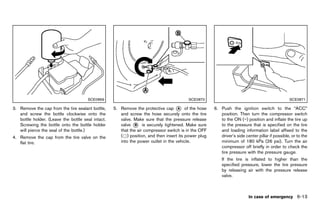
                                                             the shoulder and the lap belt is low on the hips.
child restraint as long as possible up to the
                                                             A booster seat can only be used in seating
height or weight limit of the child restraint.
                                                             positions that have a three-point type seat belt.
Forward-facing child restraints are available for
                                                             The booster seat should fit the vehicle seat and
children who outgrow rear facing child restraints
                                                             have a label certifying that it complies with
and are at least 1 year old. Refer to the
                                                             Federal Motor Vehicle Safety Standards or
manufacturer’s instructions for minimum and
                                                             Canadian Motor Vehicle Safety Standards.
maximum weight and height recommendations.
                                                             Once the child has grown so the shoulder belt                                              SSS0099
NISSAN recommends that small children be
                                                             is no longer on or near the face and neck, use
placed in child restraints that comply with
                                                             the shoulder belt without the booster seat.
Federal Motor Vehicle Safety Standards or
Canadian Motor Vehicle Safety Standards. You
should choose a child restraint that fits your                                  WARNING
vehicle and always follow the manufacturer’s
instructions for installation and use.                         Never let a child stand or kneel on any
LARGER CHILDREN                                                seat and do not allow a child in the
         GUID-EC196FE5-D487-4C51-9056-7FA7FF17ACB0
                                                               cargo area. The child could be seriously
Children who are too large for child restraints
                                                               injured or killed in a sudden stop or
should be seated and restrained by the seat
                                                               collision.
belts which are provided. The seat belt may not
fit properly if the child is less than 4 ft 9 in (142.5
cm) tall and weighs between 40 lbs (18 kg) and
80 lbs (36 kg). A booster seat should be used to
                                                                                                                                                        SSS0100
obtain proper seat belt fit.
NISSAN recommends that a child be placed in a
1-30 Safety — Seats, seat belts and supplemental restraint system


                                                          [ Edit: 2011/ 7/ 18 Model: Z51-D ]
Black plate (53,1)


PRECAUTIONS ON CHILD RE-                                        senger.                                         properly fitted.
STRAINTS GUID-6A8C536A-DB98-4A79-B638-8ED4F6FB91BB
                                                              — NISSAN recommends that all                    — Never use the anchor points for
                                                                child restraints be installed in                adult seat belts or harnesses.
                   WARNING                                      the rear seat. Studies show that              — A child restraint with a top tether
                                                                children are safer when properly                strap should not be used in the
 .   CrossCabriolet models are not                              restrained in the rear seat than                front passenger seat.
     equipped with top tethers. A child                         in the front seat. If you must
     restraint system requiring a top                           install a forward-facing child                — Keep seatbacks as upright as
     tether strap cannot be properly in-                        restraint in the front seat, see                possible after fitting the child
     stalled and should not be used in                          “Forward-facing child restraint                 restraint.
     your vehicle.                                              installation using the seat belts”            — Infants and children should al-
 .   Failure to follow the warnings and                         later in this section.                          ways be placed in an appropri-
     instructions for proper use and in-                      — Even with the NISSAN Advanced                   ate child restraint while in the
     stallation of child restraints could                       Air Bag System, never install a                 vehicle.
     result in serious injury or death of a                     rear-facing child restraint in the        .   When the child restraint is not in
     child or other passengers in a                             front seat. An inflating air bag              use, keep it secured with the LATCH
     sudden stop or collision:                                  could seriously injure or kill a              system or a seat belt. In a sudden
     — The child restraint must be used                         child. A rear-facing child re-                stop or collision, loose objects can
       and installed properly. Always                           straint must only be used in the              injure occupants or damage the
       follow all of the child restraint                        rear seat.                                    vehicle.
       manufacturer’s instructions for                        — Be sure to purchase a child
       installation and use.                                    restraint that will fit the child
     — Infants and children should                              and vehicle. Some child re-                                CAUTION
       never be held on anyone’s lap.                           straints may not fit properly in
       Even the strongest adult cannot                          your vehicle.                             A child restraint in a closed vehicle can
       resist the forces of a collision.                      — Child restraint anchor points are         become very hot. Check the seating
     — Do not put a seat belt around                            designed to withstand loads               surface and buckles before placing a
       both a child and another pas-                            from child restraints that are            child in the child restraint.

                                                                                  Safety — Seats, seat belts and supplemental restraint system   1-31


                                                     [ Edit: 2011/ 7/ 18 Model: Z51-D ]
Black plate (54,1)


This vehicle is equipped with a universal child               sure the child restraint is compatible with
restraint anchor system, referred to as the                   your child. Choose a child restraint that is
LATCH (Lower Anchors and Tethers for CHil-                    designed for your child’s height and weight.
dren) system. Some child restraints include rigid             Always follow all recommended procedures.
or webbing-mounted attachments that can be                All U.S. states and Canadian provinces or
connected to these anchors.                               territories require that infants and small
For details, see “LATCH Lower Anchors Sys-                children be restrained in an approved child
tem” later in this section.                               restraint at all times while the vehicle is
                                                          being operated. Canadian law requires the
LATCH child restraints generally require the use
                                                          top tether strap on forward-facing child
of a top tether strap. If your vehicle does not
                                                          restraints to be secured to the designated
have top tether anchor locations, do not install a
                                                          anchor point on the vehicle.
child restraints in your vehicle that requires the
use of a top tether strap.                                                                                                                       SSS0419B
If you do not have a LATCH compatible child                                                                     LATCH label location (Hardtop models)
restraint, the vehicle seat belts can be used.
Several manufacturers offer child restraints for
infants and small children of various sizes. When
selecting any child restraint, keep the following
points in mind:
.   Choose only a restraint with a label certifying
    that it complies with Federal Motor Vehicle
    Safety Standard 213 or Canadian Motor
    Vehicle Safety Standard 213.
.   Check the child restraint in your vehicle to
    be sure it is compatible with the vehicle’s
    seat and seat belt system.
.   If the child restraint is compatible with your
                                                                                                                                                   SSS0933
    vehicle, place your child in the child restraint
                                                                                                             LATCH label location (CrossCabriolet models)
    and check the various adjustments to be
1-32 Safety — Seats, seat belts and supplemental restraint system


                                                       [ Edit: 2011/ 7/ 18 Model: Z51-D ]
Black plate (55,1)


LATCH Lower Anchors SYSTEM
         GUID-5B0A4406-68B6-491C-B161-EC20158AB5AF             restraint will not be secured prop-
Your vehicle is equipped with special anchor                   erly.
points that are used with the LATCH (Lower                 .   Inspect the lower anchors by insert-
Anchors and Tethers for CHildren) system                       ing your fingers into the lower
compatible child restraints. This system may                   anchor area. Feel to make sure
also be referred to as the ISOFIX or ISOFIX                    there are no obstructions over the
compatible system. With this system, you do not                anchors such as seat belt webbing
have to use a vehicle seat belt to secure the                  or seat cushion material. The child
child restraint.                                               restraint will not be secured prop-
The LATCH anchor points are provided to install                erly if the lower anchors are ob-
child restraints in the rear outboard seating                  structed.
positions only.
LATCH lower anchor                                                                                                                                  SSS0637
          GUID-4797B6AD-EBE0-4886-9CA1-312C75CE0CF6
                                                                                                                      LATCH lower anchor location

                   WARNING                                                                                LATCH lowerGUID-94E9EDFE-3FEF-48B7-A3C5-82134F7A076B
                                                                                                                      anchor location
                                                                                                          The LATCH anchors are located at the rear of
 Failure to follow the warnings and                                                                       the seat cushion near the seatback. A label is
 instructions for proper use and installa-                                                                attached to the seatback to help you locate the
 tion of child restraints could result in                                                                 LATCH anchors.
 serious injury or death of a child or
 other passengers in a sudden stop or
 collision:
 .    Attach LATCH system compatible
      child restraints only at the locations
      shown in the illustration.
 .    Do not secure a child restraint in the
      center rear seating position using
      the LATCH lower anchors. The child
                                                                                   Safety — Seats, seat belts and supplemental restraint system         1-33


                                                      [ Edit: 2011/ 7/ 18 Model: Z51-D ]
Black plate (56,1)


                                            SSS0643                                                 SSS0644                                                SSS0822
        LATCH webbing-mounted attachment                                   LATCH rigid attachment

Installing child restraint LATCH lower                       If your vehicle is equipped with a top tether       Top tether anchor (Hardtop models)
                                                                                                                             GUID-0CAD3BA9-2525-4BC2-BA48-40988918011E

anchor attachments                                           anchor, it must be used when installing child
              GUID-4BE9649D-8090-4388-B26D-DF734FBAADA5
                                                             restraints with the LATCH lower anchor attach-                          WARNING
LATCH compatible child restraints include two
                                                             ments or seat belts. See “Top tether anchor
rigid or webbing-mounted attachments that can
                                                             (Hardtop models)” later in this section for          .    If the cargo cover (if so equipped)
be connected to anchors located at certain
                                                             installation instructions (Hardtop models).               contacts the top tether strap when it
seating positions in your vehicle. With this
system, you do not have to use a vehicle seat                When installing a child restraint, carefully read         is attached to the top tether anchor,
belt to secure the child restraint. Check your               and follow the instructions in this manual and            remove the cargo cover from the
child restraint for a label stating that it is               those supplied with the child restraint.                  vehicle or secure it on the cargo
compatible with LATCH. This information may                                                                            floor below its attachment location.
also be in the instructions provided by the child                                                                      If the cargo cover is not removed, it
restraint manufacturer.                                                                                                may damage the top tether strap
                                                                                                                       during a collision. Your child could
                                                                                                                       be seriously injured or killed in a
                                                                                                                       collision if the child restraint top
1-34 Safety — Seats, seat belts and supplemental restraint system


                                                          [ Edit: 2011/ 7/ 18 Model: Z51-D ]
Black plate (57,1)


      tether strap is damaged.
  .   Do not allow cargo to contact the
      top tether strap when it is attached
      to the top tether anchor. Properly
      secure the cargo so it does not
      contact the top tether strap. Cargo
      that is not properly secured or cargo
      that contacts the top tether strap
      may damage the top tether strap
      during a collision. Your child could
      be seriously injured or killed in a
      collision if the child restraint top
      tether strap is damaged.                                                                         SSS0648                                          SSS0639
                                                                      Rear-facing web-mounted — step 2                          Rear-facing — step 3
Top tether anchor point locations:
               GUID-D73A39BF-43C8-459F-9C24-47B7F579C407                                                         2. Secure the child restraint anchor attach-
Anchor points are located on the back side of                                                                       ments to the LATCH lower anchors. Check
the seatbacks.                                                                                                      to make sure the LATCH attachment is
REAR-FACING CHILD RESTRAINT IN-                                                                                     properly attached to the lower anchors.
STALLATION USING LATCH
          GUID-0637B231-098A-443B-BFD0-B842E89E11E5
                                                                                                                 3. For child restraints that are equipped with
Refer to all Warnings and Cautions in the “Child                                                                    webbing-mounted attachments, remove any
safety” and “Child restraints” sections before                                                                      additional slack from the anchor attach-
installing a child restraint.                                                                                       ments. Press downward and rearward firmly
                                                                                                                    in the center of the child restraint with your
Follow these steps to install a rear-facing child
                                                                                                                    hand to compress the vehicle seat cushion
restraint using the LATCH system:
                                                                                                                    and seatback while tightening the webbing
1. Position the child restraint on the seat.                                                                        of the anchor attachments.
   Always follow the child restraint manufac-
   turer’s instructions.                                                                               SSS0649
                                                                      Rear-facing rigid-mounted — step 2

                                                                                          Safety — Seats, seat belts and supplemental restraint system      1-35


                                                           [ Edit: 2011/ 7/ 18 Model: Z51-D ]
Black plate (58,1)


                                                         5. Check to make sure the child restraint is          section. (Hardtop models)
                                                            properly secured prior to each use. If the
                                                            child restraint is loose, repeat steps 1
                                                            through 4.
                                                         REAR-FACING CHILD RESTRAINT IN-
                                                         STALLATION USING THE SEAT BELTS
                                                                   GUID-8DE8014C-18D8-487E-9787-117D005E68B6


                                                                            WARNING
                                                           .   The three-point seat belt with Auto-
                                                               matic Locking Retractor (ALR) must
                                                               be used when installing a child
                                         SSS0650               restraint. Failure to use the ALR
               Rear-facing — step 4                            mode will result in the child re-
4. After attaching the child restraint, test it                straint not being properly secured.
   before you place the child in it. Push it from              The restraint could tip over or be
   side to side while holding the child restraint              loose and cause injury to a child in a
   near the LATCH attachment path. The child                   sudden stop or collision. Also, it can
   restraint should not move more than 1 inch                  change the operation of the front
   (25 mm), from side to side. Try to tug it                   passenger air bag. See “Front pas-
   forward and check to see if the LATCH                       senger air bag and status light”
   attachment holds the restraint in place. If the             later in this section.
   restraint is not secure, tighten the LATCH              .   When installing a child restraint
   attachment as necessary, or put the restraint               system in the rear center position,
   in another seat and test it again. You may                  both the center seat belt connector
   need to try a different child restraint or try              tongue and buckle tongue must be
   installing by using the vehicle seat belt (if               secured. See “Rear center seat belt
   applicable). Not all child restraints fit in all            (Hardtop models)” earlier in this
   types of vehicles.
1-36 Safety — Seats, seat belts and supplemental restraint system


                                                      [ Edit: 2011/ 7/ 18 Model: Z51-D ]
Black plate (59,1)


                                          SSS0100                                                    SSS0654                                              SSS0655
                Rear-facing — step 1                                       Rear-facing — step 2                                  Rear-facing — step 3
Refer to all Warnings and Cautions in the “Child           2. Route the seat belt tongue through the child        3. Pull the shoulder belt until the belt is fully
safety” earlier in this section and “Child re-                restraint and insert it into the buckle until you      extended. At this time, the seat belt retractor
straints” earlier in this section before installing a         hear and feel the latch engage. Be sure to             is in the Automatic Locking Retractor (ALR)
child restraint.                                              follow the child restraint manufacturer’s              mode (child restraint mode). It reverts to the
Follow these steps to install a rear-facing child             instructions for belt routing.                         Emergency Locking Retractor (ELR) mode
restraint using the vehicle seat belts in the rear                                                                   when the seat belt is fully retracted.
seats:
1. Child restraints for infants must be
   used in the rear-facing direction and
   therefore must not be used in the front
   seat. Position the child restraint on the seat.
   Always follow the restraint manufacturer’s
   instructions.


                                                                                        Safety — Seats, seat belts and supplemental restraint system          1-37


                                                        [ Edit: 2011/ 7/ 18 Model: Z51-D ]
Black plate (60,1)


                                       SSS0656                                               SSS0657                                              SSS0658
               Rear-facing — step 4                                   Rear-facing — step 5                               Rear-facing — step 6
4. Allow the seat belt to retract. Pull up on the      5. Remove any additional slack from the seat       6. After attaching the child restraint, test it
   shoulder belt to remove any slack in the belt.         belt; press downward and rearward firmly in        before you place the child in it. Push it from
                                                          the center of the child restraint to compress      side to side while holding the child restraint
                                                          the vehicle seat cushion and seatback while        near the seat belt path. The child restraint
                                                          pulling up on the seat belt.                       should not move more than 1 inch (25 mm),
                                                                                                             from side to side. Try to tug it forward and
                                                                                                             check to see if the belt holds the restraint in
                                                                                                             place. If the restraint is not secure, tighten
                                                                                                             the seat belt as necessary, or put the
                                                                                                             restraint in another seat and test it again.
                                                                                                             You may need to try a different child
                                                                                                             restraint. Not all child restraints fit in all
                                                                                                             types of vehicles.
                                                                                                          7. Check to make sure that the child restraint is
                                                                                                             properly secured prior to each use. If the
1-38 Safety — Seats, seat belts and supplemental restraint system


                                                    [ Edit: 2011/ 7/ 18 Model: Z51-D ]
Black plate (61,1)


    seat belt is not locked, repeat steps 1
    through 6.
After the child restraint is removed and the seat
belt fully retracted, the ALR mode (child restraint
mode) is canceled.
FORWARD-FACING CHILD RE-
STRAINT INSTALLATION USING
LATCH (Hardtop models only)
          GUID-C0068E19-F4E9-4C59-AAD1-F67BC6381275
Refer to all Warnings and Cautions in the “Child
safety” and “Child restraints” sections before
installing a child restraint.
Follow these steps to install a forward-facing
child restraint using the LATCH system:                                                            SSS0645                                               SSS0646
                                                                Forward-facing web-mounted — step 2                   Forward-facing rigid-mounted — step 3
1. Position the child restraint on the seat.
   Always follow the child restraint manufac-            2. Secure the child restraint anchor attach-           3. The back of the child restraint should be
   turer’s instructions.                                    ments to the LATCH lower anchors. Check                secured against the vehicle seatback.
                                                            to make sure the LATCH attachment is                   If necessary, adjust or remove the headrest
                                                            properly attached to the lower anchors.                to obtain the correct child restraint fit. If the
                                                             If the child restraint is equipped with a top         headrest is removed, store it in a secure
                                                             tether strap, route the top tether strap and          place. Be sure to reinstall the headrest
                                                             secure the tether strap to the tether anchor          when the child restraint is removed.
                                                             point. See “Installing top tether strap (Hard-        See “Adjustable headrest (Hardtop mod-
                                                             top models)” later in this section. Do not            els)” earlier in this section for headrest
                                                             install child restraints that require the use of      adjustment information.
                                                             a top tether strap in seating positions that do       If the seating position does not have an
                                                             not have a top tether anchor.                         adjustable headrest and it is interfering with
                                                                                                                   the proper child restraint fit, try another
                                                                                                                   seating position or a different child restraint.

                                                                                     Safety — Seats, seat belts and supplemental restraint system             1-39


                                                      [ Edit: 2011/ 7/ 18 Model: Z51-D ]
Black plate (62,1)


                                                                                                                  child restraint is loose, repeat steps 1
                                                                                                                  through 6.
                                                                                                             FORWARD-FACING CHILD RE-
                                                                                                             STRAINT INSTALLATION USING THE
                                                                                                             SEAT BELTSGUID-D986E0DE-3F9D-4081-B625-7A6C59773877


                                                                                                                                WARNING
                                                                                                              .    The three-point seat belt with Auto-
                                                                                                                   matic Locking Retractor (ALR) must
                                                                                                                   be used when installing a child
                                                                                                                   restraint. Failure to use the ALR
                                       SSS0647                                                  SSS0638            mode will result in the child re-
             Forward-facing — step 4                                 Forward-facing — step 6                       straint not being properly secured.
4. For child restraints that are equipped with         6. After attaching the child restraint, test it             The restraint could tip over or be
   webbing-mounted attachments, remove any                before you place the child in it. Push it from           loose and cause injury to a child in a
   additional slack from the anchor attach-               side to side while holding the child restraint           sudden stop or collision. Also, it can
   ments. Press downward and rearward firmly              near the LATCH attachment path. The child                change the operation of the front
   in the center of the child restraint with your         restraint should not move more than 1 inch               passenger air bag. See “Front pas-
   knee to compress the vehicle seat cushion              (25 mm), from side to side. Try to tug it                senger air bag and status light”
   and seatback while tightening the webbing              forward and check to see if the LATCH                    later in this section.
   of the anchor attachments.                             attachment holds the restraint in place. If the     .    When installing a child restraint
5. Tighten the tether strap according to the              restraint is not secure, tighten the LATCH               system in the rear center position,
   manufacturer’s instructions to remove any              attachment as necessary, or put the restraint            both the center seat belt connector
   slack.                                                 in another seat and test it again. You may               tongue and buckle tongue must be
                                                          need to try a different child restraint. Not all         secured. See “Rear center seat belt
                                                          child restraints fit in all types of vehicles.           (Hardtop models)” earlier in this
                                                       7. Check to make sure the child restraint is                section. (for Hardtop models)
                                                          properly secured prior to each use. If the
1-40 Safety — Seats, seat belts and supplemental restraint system


                                                    [ Edit: 2011/ 7/ 18 Model: Z51-D ]
Black plate (63,1)


                                                        2. Position the child restraint on the seat.
                                                           Always follow the child restraint manufac-
                                                           turer’s instructions.
                                                            The back of the child restraint should be
                                                            secured against the vehicle seatback.
                                                            If necessary, adjust or remove the head
                                                            restraint or headrest to obtain the correct
                                                            child restraint fit. If the head restraint or
                                                            headrest is removed, store it in a secure
                                                            place. Be sure to reinstall the head
                                                            restraint or headrest when the child
                                                            restraint is removed. See “Head re-
                                          SSS0640
                                                            straints” earlier in this section or “Adjustable                                           SSS0360B
                                                            headrest (Hardtop models)” earlier in this
   Forward-facing (front passenger seat) — step 1                                                                            Forward-facing — step 3
                                                            section for head restraint or headrest
Refer to all Warnings and Cautions in the “Child            adjustment, removal and installation informa-      3. Route the seat belt tongue through the child
safety” and “Child restraints” sections before              tion.                                                 restraint and insert it into the buckle until you
installing a child restraint.                                                                                     hear and feel the latch engage. Be sure to
                                                            If the seating position does not have an              follow the child restraint manufacturer’s
Follow these steps to install a forward-facing              adjustable head restraint or headrest and it
child restraint using the vehicle seat belt in the                                                                instructions for belt routing.
                                                            is interfering with the proper child restraint
rear seats or in the front passenger seat:                  fit, try another seating position or a different       If the child restraint is equipped with a top
1. If you must install a child restraint in                 child restraint.                                       tether strap, route the top tether strap and
   the front seat, it should be placed in a                                                                        secure the tether strap to the tether anchor
   forward-facing direction only. Move the                                                                         point (rear seat installation only, Hardtop
   seat to the rearmost position. Child                                                                            models). See “Installing top tether strap
   restraints for infants must be used in                                                                          (Hardtop models)” later in this section. Do
   the rear-facing direction and, therefore,                                                                       not install child restraints that require the
   must not be used in the front seat.                                                                             use of a top tether strap in seating positions
                                                                                                                   that do not have a top tether anchor.

                                                                                    Safety — Seats, seat belts and supplemental restraint system             1-41


                                                     [ Edit: 2011/ 7/ 18 Model: Z51-D ]
Black plate (64,1)


                                        SSS0651                                                SSS0652                                            SSS0653
             Forward-facing — step 4                                 Forward-facing — step 5                            Forward-facing — step 6
4. Pull the shoulder belt until the belt is fully       5. Allow the seat belt to retract. Pull up on the   6. Remove any additional slack from the seat
   extended. At this time, the seat belt retractor         shoulder belt to remove any slack in the belt.      belt; press downward and rearward firmly in
   is in the Automatic Locking Retractor (ALR)                                                                 the center of the child restraint with your
   mode (child restraint mode). It reverts to                                                                  knee to compress the vehicle seat cushion
   Emergency Locking Retractor (ELR) mode                                                                      and seatback while pulling up on the seat
   when the seat belt is fully retracted.                                                                      belt.
                                                                                                            7. Tighten the tether strap according to the
                                                                                                               manufacturer’s instructions to remove any
                                                                                                               slack.


1-42 Safety — Seats, seat belts and supplemental restraint system


                                                     [ Edit: 2011/ 7/ 18 Model: Z51-D ]
Black plate (65,1)


                                                            seat belt is not locked, repeat steps 2
                                                            through 8.


                                        SSS0641                                                                                                     SSS0823
             Forward-facing — step 8                                                                                   Forward-facing — step 10
8. After attaching the child restraint, test it                                                          10. If the child restraint is installed in the front
   before you place the child in it. Push it from                                                            passenger seat, place the ignition switch in
   side to side while holding the child restraint                                                            the ON position. The front passenger air bag
   near the seat belt path. The child restraint                                                              status light      should illuminate. If this light
   should not move more than 1 inch (25 mm),                                                                 is not illuminated, see “Front passenger air
   from side to side. Try to tug it forward and                                                              bag and status light” later in this section.
   check to see if the belt holds the restraint in                                                           Move the child restraint to another
   place. If the restraint is not secure, tighten                                                            seating position. Have the system
   the seat belt as necessary, or put the                                                                    checked by a NISSAN dealer.
   restraint in another seat and test it again.                                                          After the child restraint is removed and the seat
   You may need to try a different child                                                                 belt is fully retracted, the ALR mode (child
   restraint. Not all child restraints fit in all                                                        restraint mode) is canceled.
   types of vehicles.
9. Check to make sure the child restraint is
   properly secured prior to each use. If the
                                                                                  Safety — Seats, seat belts and supplemental restraint system           1-43


                                                     [ Edit: 2011/ 7/ 18 Model: Z51-D ]
Black plate (66,1)


                                                                Position the top tether strap over the top of     .   A booster seat must only be in-
                                                                the seatback.                                         stalled in a seating position that has
                                                          2. Secure the top tether strap to the tether                a lap/shoulder belt.
                                                             anchor point on the back of the seatback
                                                             behind the child restraint.
                                                          3. Refer to the appropriate child restraint
                                                             installation procedure steps in this section
                                                             before tightening the tether strap.
                                                          If you have any questions when installing a
                                                          top tether strap, consult your NISSAN
                                                          dealer for details.
                                                          BOOSTER SEATS
                                                                   GUID-5C761715-A70E-4E74-8871-BE6A74AC0326
                                          SSS0822
                                                          Precautions on booster seats
                                                                      GUID-469816AF-C7E6-4180-AFB1-93AE88597A78
INSTALLING TOP TETHER STRAP
(Hardtop models)
           GUID-10E4B72F-E871-4B10-A99B-9504B51D59C9
First, secure the child restraint with the LATCH
                                                                              WARNING
lower anchors (rear outboard seat positions                 If a booster seat and seat belt are not
only) or the seat belt, as applicable.                      used properly, the risk of a child being
1. If necessary, raise or remove the headrest to            injured in a sudden stop or collision
   position the top tether strap over the top of            greatly increases:
   the seatback. If the headrest is removed,
                                                            .    Make sure the shoulder portion of
   store it in a secure place. Be sure to reinstall
                                                                 the belt is away from the child’s face
   the headrest when the child restraint is
                                                                 and neck and the lap portion of the
   removed.
                                                                 belt does not cross the stomach.
    See “Adjustable headrest (Hardtop mod-
                                                            .    Make sure the shoulder belt is not
    els)” earlier in this section for headrest
                                                                 behind the child or under the child’s
    adjustment, removal and installation informa-
                                                                 arm.
    tion.
1-44 Safety — Seats, seat belts and supplemental restraint system


                                                       [ Edit: 2011/ 7/ 18 Model: Z51-D ]
Black plate (67,1)


                                        LRS0455                                                 LRS0453                                                LRS0464

Booster seats of various sizes are offered by           .   Make sure the child’s head will be properly      All U.S. states and Canadian provinces or
several manufacturers. When selecting any                   supported by the booster seat or vehicle         territories require that infants and small
booster seat, keep the following points in mind:            seat. The seatback must be at or above the       children be restrained in an approved child
.   Choose only a booster seat with a label                 center of the child’s ears. For example, if a    restraint at all times while the vehicle is
    certifying that it complies with Federal Motor          low back booster seat * is chosen, the
                                                                                       1                     being operated.
    Vehicle Safety Standard 213 or Canadian                 vehicle seatback must be at or above the         The instructions in this section apply to booster
    Motor Vehicle Safety Standard 213.                      center of the child’s ears. If the seatback is   seat installation in the rear seats or the front
.   Check the booster seat in your vehicle to be            lower than the center of the child’s ears, a     passenger seat.
    sure it is compatible with the vehicle’s seat           high back booster seat * should be used.
                                                                                      2
                                                        .   If the booster seat is compatible with your      Booster seat installation
    and seat belt system.                                                                                               GUID-DD7C3A91-D5DD-463D-A292-37C02FD6C0EF
                                                            vehicle, place your child in the booster seat
                                                            and check the various adjustments to be
                                                            sure the booster seat is compatible with
                                                                                                                                 CAUTION
                                                            your child. Always follow all recommended         Do not use the lap/shoulder belt Auto-
                                                            procedures.                                       matic Locking Retractor (ALR) mode
                                                                                   Safety — Seats, seat belts and supplemental restraint system            1-45


                                                     [ Edit: 2011/ 7/ 18 Model: Z51-D ]
Black plate (68,1)


 when using a booster seat with the seat
 belts.

Refer to all Warnings and Cautions in the “Child
safety” earlier in this section, “Child restraints”
earlier in this section and “Booster seats” earlier
in this section before installing a child restraint.
Follow these steps to install a booster seat in the
rear seat or in the front passenger seat:


                                                                                                 SSS0640                                              LRS0454
                                                                                                                          Front passenger position
                                                          1. If you must install a booster seat in the
                                                                                                              3. The booster seat should be positioned on
                                                             front seat, move the seat to the rear-
                                                                                                                 the vehicle seat so that it is stable.
                                                             most position.
                                                                                                                 If necessary, adjust or remove the head
                                                          2. Position the booster seat on the seat. Only
                                                                                                                 restraint or headrest to obtain the correct
                                                             place it in a forward-facing direction. Always
                                                                                                                 booster seat fit. If the head restraint or
                                                             follow the booster seat manufacturer’s
                                                                                                                 headrest is removed, store it in a secure
                                                             instructions.
                                                                                                                 place. Be sure to reinstall the head
                                                                                                                 restraint or headrest when the booster
                                                                                                                 seat is removed. See “Head restraints”
                                                                                                                 earlier in this section or “Adjustable headrest
                                                                                                                 (Hardtop models)” earlier in this section for
                                                                                                                 head restraint or headrest adjustment, re-
                                                                                                                 moval and installation information.
                                                                                                                 If the seating position does not have an

1-46 Safety — Seats, seat belts and supplemental restraint system


                                                       [ Edit: 2011/ 7/ 18 Model: Z51-D ]
Black plate (69,1)


    adjustable head restraint or headrest and it
    is interfering with the proper booster seat fit,
    try another seating position or a different
    booster seat.
4. Position the lap portion of the seat belt low
   and snug on the child’s hips. Be sure to
   follow the booster seat manufacturer’s
   instructions for adjusting the seat belt
   routing.
5. Pull the shoulder belt portion of the seat belt
   toward the retractor to take up extra slack.
   Be sure the shoulder belt is positioned
   across the top, middle portion of the child’s                                                SSS0823
   shoulder. Be sure to follow the booster seat
   manufacturer’s instructions for adjusting the          7. If the booster seat is installed in the front
   seat belt routing.                                        passenger seat, place the ignition switch in
6. Follow the warnings, cautions and instruc-                the ON position. The front passenger air bag
   tions for properly fastening a seat belt                  status light      may or may not illuminate
   shown in “Seat belts” earlier in this section.            depending on the size of the child and the
                                                             type of booster seat used. See “Front
                                                             passenger air bag and status light” later in
                                                             this section.


                                                                                    Safety — Seats, seat belts and supplemental restraint system   1-47


                                                       [ Edit: 2011/ 7/ 18 Model: Z51-D ]
Black plate (70,1)


SUPPLEMENTAL RESTRAINT
SYSTEM
              GUID-89C89C02-D98C-47EA-BD3E-60C2DD1787AC
PRECAUTIONS ON SUPPLEMENTAL                                  Roof-mounted curtain side-impact and                   should always be correctly worn and the
RESTRAINTGUID-7DBBCDDD-81AC-4813-B231-7475F02B5DFA
          SYSTEM                                             rollover supplemental air bag system (for              occupant seated a suitable distance away from
                                                             Hardtop models): This system can help                  the steering wheel, instrument panel and door
This Supplemental Restraint System (SRS)
                                                             cushion the impact force to the head of                finishers. (See “Seat belts” earlier in this section
section contains important information concern-
                                                             occupants in front and rear outboard seating           for instructions and precautions on seat belt
ing the following systems:
                                                             positions in certain side impact or rollover           usage.)
.   Driver and passenger supplemental front-                 collisions. In a side impact, the curtain and          The supplemental air bags operate only
    impact air bag (NISSAN Advanced Air Bag                  rollover air bags are designed to inflate on the       when the ignition switch is in the ON
    System)                                                  side where the vehicle is impacted. In a rollover,     position.
. Front seat-mounted side-impact supple-                     the curtain and rollover air bags on both sides
    mental air bag                                                                                                  After pushing the ignition switch to the ON
                                                             are designed to inflate. Under both side-impact
                                                                                                                    position, the supplemental air bag warning
. Roof-mounted curtain side-impact and roll-                 and rollover situations, the curtain air bags will
                                                                                                                    light illuminates. The supplemental air bag
    over supplemental air bag (for Hardtop                   remain inflated for a short period of time.
                                                                                                                    warning light will turn off after about 7
    models)                                                  Door-mounted curtain side-impact and                   seconds if the systems are operational.
. Door-mounted curtain side-impact and roll-                 rollover supplemental air bag system (for
    over supplemental air bag (for CrossCabrio-              CrossCabriolet models): This system can
    let models)                                              help cushion the impact force to the heads of
. Seat belt pretensioner                                     the driver and front passenger in certain side-
Supplemental front-impact air bag system:                    impact or rollover collisions. In a side impact, the
The NISSAN Advanced Air Bag System can                       curtain and rollover air bags are designed to
help cushion the impact force to the head and                inflate on the side where the vehicle is impacted.
chest of the driver and front passenger in certain           In a rollover, the curtain and rollover air bags on
frontal collisions.                                          both sides are designed to inflate. Under both
                                                             side-impact and rollover situations, the curtain
Front seat-mounted side-impact supple-
                                                             air bags will remain inflated for a short period of
mental air bag system: This system can help
                                                             time.
cushion the impact force to the chest area of the
driver and front passenger in certain side impact            These supplemental restraint systems are de-
collisions. The side air bags are designed to                signed to supplement the crash protection
inflate on the side where the vehicle is impacted.           provided by the driver and passenger seat belts
                                                             and are not a substitute for them. Seat belts
1-48 Safety — Seats, seat belts and supplemental restraint system


                                                          [ Edit: 2011/ 7/ 18 Model: Z51-D ]
Black plate (71,1)


                                                                     WARNING
                                                     .   The front air bags ordinarily will not
                                                         inflate in the event of a side impact,
                                                         rear impact, rollover, or lower se-
                                                         verity frontal collision. Always wear
                                                         your seat belts to help reduce the
                                                         risk or severity of injury in various
                                                         kinds of accidents.
                                                     .   The front passenger air bag will not
                                                         inflate if the passenger air bag
                                                         status light is lit or if the front
                                        SSS0131
                                                         passenger seat is unoccupied. See
                                                         “Front passenger air bag and status
                                                         light” later in this section.
                                                     .   The seat belts and the front air bags
                                                         are most effective when you are
                                                         sitting well back and upright in the
                                                         seat with both feet on the floor. The
                                                         front air bags inflate with great
                                                         force. Even with the NISSAN Ad-
                                                         vanced Air Bag System, if you are
                                                         unrestrained, leaning forward, sit-
                                                         ting sideways or out of position in
                                                         any way, you are at greater risk of
                                                         injury or death in a crash. You may
                                        SSS0132          also receive serious or fatal injuries
                                                         from the front air bag if you are up
                                                         against it when it inflates. Always sit
                             Safety — Seats, seat belts and supplemental restraint system   1-49


[ Edit: 2011/ 7/ 18 Model: Z51-D ]
Black plate (72,1)


     back against the seatback and as                 crease the risk that they are injured
     far-away as practical from the steer-            if the front air bag inflates.
     ing wheel or instrument panel. Al-
     ways use the seat belts.
 .   The driver and front passenger seat
     belt buckles are equipped with
     sensors that detect if the seat belts
     are fastened. The Advanced Air Bag
     System monitors the severity of a
     collision and seat belt usage then
     inflates the air bags as needed.
     Failure to properly wear seat belts
     can increase the risk or severity of                                                                          SSS0007
     injury in an accident.
 .   The front passenger seat is
     equipped with an occupant classifi-
     cation sensor (pattern sensor) that
     turns the front passenger air bag
     OFF under some conditions. This
     sensor is only used in this seat.
     Failure to be properly seated and
     wearing the seat belt can increase
     the risk or severity of injury in an
     accident. See “Front passenger air
     bag and status light” later in this
     section.
 .   Keep hands on the outside of the
                                                                                                                   SSS0006
     steering wheel. Placing them inside
     the steering wheel rim could in-
1-50 Safety — Seats, seat belts and supplemental restraint system


                                             [ Edit: 2011/ 7/ 18 Model: Z51-D ]
Black plate (73,1)


                                                                               WARNING
                                                               .   Never let children ride unrestrained
                                                                   or extend their hands or face out of
                                                                   the window. Do not attempt to hold
                                                                   them in your lap or arms. Some
                                                                   examples of dangerous riding posi-
                                                                   tions are shown in the illustrations.
                                                               .   Children may be severely injured or
                                                                   killed when the front air bags, side
                                                                   air bags or curtain and rollover air
                                                                   bags inflate if they are not properly
SSS0008                                           SSS0099
                                                                   restrained. Pre-teens and children
                                                                   should be properly restrained in the
                                                                   rear seat, if possible.
                                                               .   Even with the NISSAN Advanced Air
                                                                   Bag System, never install a rear-
                                                                   facing child restraint in the front
                                                                   seat. An inflating front air bag could
                                                                   seriously injure or kill your child.
                                                                   See “Child restraints” earlier in this
                                                                   section for details.


SSS0009                                           SSS0100


                                       Safety — Seats, seat belts and supplemental restraint system   1-51


          [ Edit: 2011/ 7/ 18 Model: Z51-D ]
Black plate (74,1)


                                       SSS0059A                                        SSS0140                                      SSS0159
      Do not lean against doors or windows.


                                                                                                                 WARNING
                                                                                                 Front seat-mounted side-impact sup-
                                                                                                 plemental air bags and roof-mounted
                                                                                                 curtain side-impact and rollover supple-
                                                                                                 mental air bags (Hardtop models) or
                                                                                                 door-mounted curtain side-impact and
                                                                                                 rollover supplemental air bags (Cross-
                                                                                                 Cabriolet models):
                                                                                                 .   The side air bags and curtain air
                                                                                                     bags ordinarily will not inflate in the
                                                                                       SSS0162       event of a frontal impact, rear im-
                                       SSS0188A                                                      pact or lower severity side collision.
                                                                                                     Always wear your seat belts to help
1-52 Safety — Seats, seat belts and supplemental restraint system


                                                  [ Edit: 2011/ 7/ 18 Model: Z51-D ]
Black plate (75,1)


    reduce the risk or severity of injury          .   Do not use seat covers on the front
    in various kinds of accidents.                     seatbacks. They may interfere with
.   The seat belts and air bags are most               side air bag inflation.
    effective when you are sitting well
    back and upright in the seat with
    both feet on the floor. The air bags
    inflate with great force. Do not allow
    anyone to place their hand, leg or
    face near the side air bag on the
    side of the seatback of the front
    seat, near the side roof rails (Hard-
    top models), or near the top of the
    door finisher (CrossCabriolet mod-
    els). Do not allow anyone sitting in
    the front seats or rear outboard
    seats to extend their hand out of
    the window or lean against the
    door. Some examples of dangerous
    riding positions are shown in the
    previous illustrations.
.   When sitting in the rear seat, do not
    hold onto the seatback of the front
    seat. If the side air bag inflates, you
    may be seriously injured. Be espe-
    cially careful with children, who
    should always be properly re-
    strained. Some examples of danger-
    ous riding positions are shown in
    the illustrations.

                                                                           Safety — Seats, seat belts and supplemental restraint system   1-53


                                              [ Edit: 2011/ 7/ 18 Model: Z51-D ]
Black plate (76,1)


                                                                                                               10.   Air bag Control Unit (ACU)


                                                                                                  SSS0847
                                              Hardtop models
NISSAN ADVANCED AIR BAG SYSTEM (front seats)
         GUID-62252794-B440-46E4-B4A3-195A0FB9B0EC
1.   Crash zone sensor                                    6.   Roof-mounted curtain side-impact and rollover
2.   Supplemental front-impact air bag modules                 supplemental air bags
3.   Front seat-mounted side-impact supplemental          7.   Roof-mounted curtain side-impact and rollover
     air bag modules                                           supplemental air bag inflators
4.   Occupant classification sensor (pattern sensor)      8.   Seat belt pretensioners
5.   Occupant classification system control unit          9.   Satellite sensors

1-54 Safety — Seats, seat belts and supplemental restraint system


                                                       [ Edit: 2011/ 7/ 18 Model: Z51-D ]
Black plate (77,1)


                                                                                                                This vehicle is equipped with the NISSAN
                                                                                                                Advanced Air Bag System for the driver and
                                                                                                                front passenger seats. This system is designed
                                                                                                                to meet certification requirements under U.S.
                                                                                                                regulations. It is also permitted in Canada.
                                                                                                                However, all of the information, cautions
                                                                                                                and warnings in this manual still apply and
                                                                                                                must be followed.
                                                                                                                The driver supplemental front-impact air bag is
                                                                                                                located in the center of the steering wheel; the
                                                                                                                passenger supplemental front-impact air bag is
                                                                                                                mounted in the instrument panel above the glove
                                                                                                                box. The front air bags are designed to inflate in
                                                                                                                higher severity frontal collisions, although they
                                                                                                                may inflate if the forces in another type of
                                                                                                                collision are similar to those of a higher severity
                                                                                                                frontal impact. They may not inflate in certain
                                                                                                                frontal collisions. Vehicle damage (or lack of it) is
                                                                                                                not always an indication of proper front air bag
                                                                                                                operation.
                                                                                                                The NISSAN Advanced Air Bag System has
                                                                                                   SSS1174      dual stage air bag inflators. The system monitors
                                           CrossCabriolet models                                                information from the crash zone sensor, satellite
1.   Crash zone sensor                                    7.    Door-mounted curtain side-impact and rollover
                                                                                                                sensor, Air bag Control Unit (ACU), seat belt
2.   Supplemental front-impact air bag modules                  supplemental air bag inflators
                                                                                                                buckle sensors and occupant classification
3.   Front seat-mounted side-impact supplemental          8.    Door-mounted curtain side-impact and rollover
                                                                supplemental air bags                           sensor (pattern sensor). Inflator operation is
     air bags
                                                          9.    Satellite sensors
                                                                                                                based on the severity of a collision and seat belt
4.   Occupant classification system control unit
                                                                                                                usage for the driver. For the front passenger, the
5.   Occupant classification sensor (pattern sensor)      10.   Seat belt pretensioners
                                                                                                                occupant classification sensor is also monitored.
6.   Dual pop-up roll bars                                11.   Air bag Control Unit (ACU)
                                                                                                                Based on information from the sensors, only one
                                                                                      Safety — Seats, seat belts and supplemental restraint system             1-55


                                                       [ Edit: 2011/ 7/ 18 Model: Z51-D ]
Black plate (78,1)


front air bag may inflate in a crash, depending on        and chest of the front occupants. They can help
the crash severity and whether the front                  save lives and reduce serious injuries. However,
occupants are belted or unbelted. Additionally,           an inflating front air bag may cause facial
the front passenger air bag may be automatically          abrasions or other injuries. Front air bags do
turned OFF under some conditions, depending               not provide restraint to the lower body.
on the information provided by the occupant               Even with NISSAN Advanced Air Bags, seat
classification sensor. If the front passenger air         belts should be correctly worn and the driver
bag is OFF, the passenger air bag status light            and passenger seated upright as far as practical
will be illuminated (if the seat is unoccupied, the       away from the steering wheel or instrument
light will not be illuminated, but the air bag will       panel. The front air bags inflate quickly in order
be off). (See “Front passenger air bag and                to help protect the front occupants. Because of
status light” later in this section for further           this, the force of the front air bag inflating can
details.) One front air bag inflating does not            increase the risk of injury if the occupant is too
indicate improper performance of the system.              close to, or is against, the air bag module during                                               SSS0823
                                                                                                                        Front passenger air bag status light
If you have any questions about your air bag              inflation.
system, contact NISSAN or a NISSAN dealer. If             The front air bags will deflate quickly after a      Front passenger air bag and status light
                                                                                                                           GUID-3CBF7429-7AEE-4E17-9176-3C55CA8B9FB7
you are considering modification of your vehicle          collision.
due to a disability, you may also contact
NISSAN. Contact information is contained in
                                                          The front air bags operate only when the                                 WARNING
                                                          ignition switch is in the ON position.
the front of this Owner’s Manual.
                                                          After pushing the ignition switch to the ON           The front passenger air bag is designed
When a front air bag inflates, a fairly loud noise                                                              to automatically turn OFF under some
                                                          position, the supplemental air bag warning
may be heard, followed by release of smoke.                                                                     conditions. Read this section carefully
                                                          light illuminates. The supplemental air bag
This smoke is not harmful and does not indicate                                                                 to learn how it operates. Proper use of
                                                          warning light will turn off after about 7
a fire. Care should be taken not to inhale it, as it                                                            the seat, seat belt and child restraints is
                                                          seconds if the system is operational.
may cause irritation and choking. Those with a                                                                  necessary for most effective protection.
history of a breathing condition should get fresh                                                               Failure to follow all instructions in this
air promptly.                                                                                                   manual concerning the use of seats,
Front air bags, along with the use of seat belts,                                                               seat belts and child restraints can
help to cushion the impact force on the head                                                                    increase the risk or severity of injury in

1-56 Safety — Seats, seat belts and supplemental restraint system


                                                       [ Edit: 2011/ 7/ 18 Model: Z51-D ]
Black plate (79,1)


    an accident.                                               below as permitted by U.S. regulations. If the          sensor to turn the air bag OFF. Always be sure
                                                               front passenger air bag is OFF, it will not inflate     to be seated and wearing the seat belt properly
                                                               in a crash. The driver air bag and other air bags       for the most effective protection by the seat belt
Status light: GUID-D73A39BF-43C8-459F-9C24-47B7F579C407        in your vehicle are not part of this system.            and supplemental air bag.
The front passenger air bag status light             is        The purpose of the regulation is to help reduce         NISSAN recommends that pre-teens and chil-
located on the instrument panel below the air                  the risk of injury or death from an inflating air bag   dren be properly restrained in a rear seat.
conditioner controls. After the ignition switch is             to certain front passenger seat occupants, such         NISSAN also recommends that appropriate
placed in the ON position, the front passenger                 as children, by requiring the air bag to be             child restraints and booster seats be properly
air bag status light illuminates for about 7                   automatically turned OFF.                               installed in a rear seat. If this is not possible, the
seconds and then turns off or illuminates                                                                              occupant classification sensor is designed to
depending on the front passenger occupied                      The occupant classification sensor (pattern
                                                               sensor) is in the front passenger seat cushion          operate as described above to turn the front
status. The light operates as follows:                                                                                 passenger air bag OFF for specified child
                                                               and is designed to detect an occupant and
.    Unoccupied passenger seat: The                            objects on the seat. For example, if a child is in      restraints. Failing to properly secure child
     light is OFF and the front passenger air                  the front passenger seat, the Advanced Air Bag          restrains and to use the Automatic Locking
     bag is OFF and will not inflate in a crash.               System is designed to turn the passenger air            Retractor (ALR) mode (child restraint mode)
.    Passenger’s seat occupied by a small adult,               bag OFF in accordance with the regulations.             may allow the restraint to tip or move in an
     child or child restraint as outlined in this              Also, if a child restraint of the type specified in     accident or sudden stop. This can also result in
     section: The            light illuminates to              the regulations is on the seat, the occupant            the passenger air bag inflating in a crash instead
     indicate that the front passenger air bag is              classification sensor can detect it and cause the       of being OFF. (See “Child restraints” earlier in
     OFF and will not inflate in a crash.                      air bag to turn OFF.                                    this section for proper use and installation.)
.    Occupied passenger seat and the passen-                   Front passenger seat adult occupants who are            If the front passenger seat is not occupied, the
     ger meets the conditions outlined in this                 properly seated and using the seat belt as              passenger air bag is designed not to inflate in a
     section: The         light is OFF to indicate             outlined in this manual should not cause the            crash. However, heavy objects placed on the
     that the front passenger air bag is opera-                passenger air bag to be automatically turned            seat could result in air bag inflation, because of
     tional.                                                   OFF. For small adults it may be turned OFF,             the object being detected by the occupant
Front passenger air bag:                                       however, if the occupant does not sit in the seat       classification sensor. Other conditions could
                GUID-D73A39BF-43C8-459F-9C24-47B7F579C407
                                                               properly (for example, by not sitting upright, by       also result in air bag inflation, such as if a child is
The front passenger air bag is designed to
                                                               sitting on an edge of the seat, or by otherwise         standing on the seat, or if two children are on the
automatically turn OFF when the vehicle is
                                                               being out of position), this could cause the            seat, contrary to the instructions in this manual.
operated under some conditions as described
                                                                                                                       Always be sure that you and all vehicle
                                                                                            Safety — Seats, seat belts and supplemental restraint system               1-57


                                                            [ Edit: 2011/ 7/ 18 Model: Z51-D ]
Black plate (80,1)


occupants are seated and restrained properly.             OFF). Your NISSAN dealer can check that the             .   Do not place objects with sharp
Using the passenger air bag status light, you can         system is OFF by using a special tool. However,             edges on the seat. Also, do not
monitor when the front passenger air bag is               until you have confirmed with your dealer that              place heavy objects on the seat that
automatically turned OFF with the seat occu-              your air bag is working properly, reposition the            will leave permanent impressions in
pied. The light will not illuminate when the front        occupant or child restraint in a rear seat.                 the seat. Such objects can damage
passenger seat is unoccupied.                             The air bag system and passenger air bag status             the seat or occupant classification
If an adult occupant is in the seat but the               light will take a few seconds to register a change          sensor (pattern sensor). This can
passenger air bag status light is illuminated             in the passenger seat status. However, if the               affect the operation of the air bag
(indicating that the air bag is OFF), it could be         seat becomes unoccupied, the air bag status                 system and result in serious perso-
that the person is a small adult, or is not sitting       light will remain off.                                      nal injury.
on the seat properly.                                     If a malfunction occurs in the front passenger air      .   Do not use water or acidic cleaners
If a child restraint must be used in the front seat,      bag system, the supplemental air bag warning                (hot steam cleaners) on the seat.
the passenger air bag status light may or may             light     , located in the meter and gauges area,           This can damage the seat or occu-
not be illuminated, depending on the size of the          will blink. Have the system checked by a                    pant classification sensor. This can
child and the type of child restraint being used. If      NISSAN dealer.                                              also affect the operation of the air
the air bag status light is not illuminated                                                                           bag system and result in serious
                                                          Other supplemental front-impact air bag                     personal injury.
(indicating that the air bag might inflate in a
                                                          precautions GUID-1331924B-CE23-4E8A-A024-69044301EFB8
crash), it could be that the child restraint or seat                                                              .   Immediately after inflation, several
belt is not being used properly. Make sure that                                                                       front air bag system components
the child restraint is installed properly, the seat                           WARNING                                 will be hot. Do not touch them; you
belt is used properly and the occupant is                                                                             may severely burn yourself.
positioned properly. If the air bag status light is         .   Do not place any objects on the                   .   No unauthorized changes should be
not illuminated, reposition the occupant or child               steering wheel pad or on the instru-                  made to any components or wiring
restraint in a rear seat.                                       ment panel. Also, do not place any                    of the supplemental air bag system.
If the passenger air bag status light will not                  objects between any occupant and                      This is to prevent accidental infla-
illuminate even though you believe that the child               the steering wheel or instrument                      tion of the supplemental air bag or
restraint, the seat belts and the occupant are                  panel. Such objects may become                        damage to the supplemental air bag
properly positioned, the system may be sensing                  dangerous projectiles and cause                       system.
an unoccupied seat (in which case the air bag is                injury if the front air bags inflate.

1-58 Safety — Seats, seat belts and supplemental restraint system


                                                       [ Edit: 2011/ 7/ 18 Model: Z51-D ]
Black plate (81,1)


.   Do not make unauthorized changes                      classification sensor.                      inform the buyer about the front air bag system
    to your vehicle’s electrical system,                                                              and guide the buyer to the appropriate sections
                                                     .    No unauthorized changes should be           in this Owner’s Manual.
    suspension system or front end                        made to any components or wiring
    structure. This could affect proper                   of the seat belt system. This may
    operation of the front air bag sys-                   affect the front air bag system.
    tem.                                                  Tampering with the seat belt system
.   Tampering with the supplemental                       may result in serious personal in-
    air bag system may result in serious                  jury.
    personal injury. Tampering includes              .    Work on and around the front air
    changes to the steering wheel and                     bag system should be done by a
    the instrument panel assembly by                      NISSAN dealer. Installation of elec-
    placing material over the steering                    trical equipment should also be
    wheel pad and above the instrument                    done by a NISSAN dealer. The
    panel or by installing additional trim                Supplemental Restraint System
    material around the air bag system.                   (SRS) wiring harnesses* should not
.   Modifying or tampering with the                       be modified or disconnected. Un-
    front passenger seat may result in                    authorized electrical test equipment
    serious personal injury. For exam-                    and probing devices should not be
    ple, do not change the front seats by                 used on the air bag system.
    placing material on the seat cushion             .    A cracked windshield should be
    or by installing additional trim ma-                  replaced immediately by a qualified
    terial, such as seat covers, on the                   repair facility. A cracked windshield
    seat that is not specifically designed                could affect the function of the
    to assure proper air bag operation.                   supplemental air bag system.
    Additionally, do not stow any ob-
    jects under the front passenger seat         *       The SRS wiring harness connectors are
    or the seat cushion and seatback.                    yellow and orange for easy identification.
    Such objects may interfere with the
    proper operation of the occupant            When selling your vehicle, we request that you

                                                                               Safety — Seats, seat belts and supplemental restraint system    1-59


                                             [ Edit: 2011/ 7/ 18 Model: Z51-D ]
Black plate (82,1)


                                                  FRONT SEAT-MOUNTED SIDE-IM-                            Vehicle damage (or lack of it) is not always an
                                                  PACT SUPPLEMENTAL AIR BAG AND                          indication of proper side air bag and curtain and
                                                  ROOF-MOUNTED CURTAIN SIDE-IM-                          rollover air bag operation.
                                                  PACT AND ROLLOVER SUPPLEMEN-                           When the side air bags and curtain and rollover
                                                  TAL AIR BAG (Hardtop models) OR                        air bags inflate, a fairly loud noise may be heard,
                                                  DOOR-MOUNTED CURTAIN SIDE-IM-                          followed by release of smoke. This smoke is not
                                                  PACT AND ROLLOVER SUPPLEMEN-                           harmful and does not indicate a fire. Care should
                                                  TAL AIR BAG (CrossCabriolet models)                    be taken not to inhale it, as it may cause irritation
                                                                                                         and choking. Those with a history of a breathing
                                                  SYSTEMS GUID-EB2F6895-6E81-4642-9F76-FC0B9A82DFD3
                                                                                                         condition should get fresh air promptly.
                                                  The side air bags are located in the outside of
                                                  the seatback of the front seats. The curtain air       Side air bags, along with the use of seat belts,
                                                  bags are located in the side roof rails (Hardtop       help to cushion the impact force on the chest
                                     SSS0848      models) or upper side of the door trim (Cross-         and pelvic area of the front occupants. Curtain
                                                  Cabriolet models). These systems are designed          and rollover air bags help to cushion the impact
               Hardtop models
                                                  to meet voluntary guidelines to help reduce the        force to the heads of occupants in the front and
                                                  risk of injury to out-of-position occupants.           rear outboard seating positions (Hardtop mod-
                                                  However, all of the information, cautions              els) or the heads of the driver and front
                                                  and warnings in this manual still apply and            passenger (CrossCabriolet models). They can
                                                  must be followed. The side air bags and                help save lives and reduce serious injuries.
                                                  curtain and rollover air bags are designed to          However, side air bags and curtain and rollover
                                                  inflate in higher severity side collisions, although   air bags may cause abrasions or other injuries.
                                                  they may inflate if the forces in another type of      Side air bags and curtain and rollover air bags
                                                  collision are similar to those of a higher severity    do not provide restraint to the lower body.
                                                  side impact. They are designed to inflate on the       The seat belts should be correctly worn and the
                                                  side where the vehicle is impacted. They may           driver and passenger seated upright as far as
                                                  not inflate in certain side collisions. Curtain and    practical away from the side air bags. Rear seat
                                                  rollover air bags are also designed to inflate in      passengers should be seated as far away as
                                     SSS0982      certain types of rollover collisions or near           practical from the door finishers and side roof
            CrossCabriolet moldels                rollovers.                                             rails. The side air bags and curtain and rollover

1-60 Safety — Seats, seat belts and supplemental restraint system


                                               [ Edit: 2011/ 7/ 18 Model: Z51-D ]
Black plate (83,1)


air bags inflate quickly in order to help protect             bag (CrossCabriolet model) inflates.           .    Work around and on the side air bag
the occupants. Because of this, the force of the                                                                  and curtain and rollover air bag
side air bags and curtain and rollover air bags           .   Right after inflation, several side air
                                                              bag and curtain and rollover air bag                systems should be done by a
inflating can increase the risk of injury if the                                                                  NISSAN dealer. Installation of elec-
occupant is too close to, or is against, these air            system components will be hot. Do
                                                              not touch them; you may severely                    trical equipment should also be
bag modules during inflation. In a rollover, the                                                                  done by a NISSAN dealer. The
curtain and rollover air bags on both sides are               burn yourself.
                                                                                                                  Supplemental Restraint System
designed to inflate. Under both side-impact and           .   No unauthorized changes should be
                                                                                                                  (SRS) wiring harnesses* should not
rollover situations, the curtain air bags will                made to any components or wiring
                                                                                                                  be modified or disconnected. Un-
remain inflated for a short period of time.                   of this side air bag and curtain and
                                                                                                                  authorized electrical test equipment
The side air bags and curtain and rollover                    rollover air bags. This is to prevent
                                                                                                                  and probing devices should not be
air bags operate only when the ignition                       damage to or accidental inflation of
                                                                                                                  used on the side air bag and curtain
switch is in the ON position.                                 the side-impact air bag and curtain
                                                                                                                  and rollover air bag systems.
                                                              side-impact and rollover air bag
After pushing the ignition switch to the ON                   systems.
position, the supplemental air bag warning                                                               *       The SRS wiring harness connectors are
light illuminates. The supplemental air bag               .   Do not make unauthorized changes                   yellow and orange for easy identification.
warning light will turn off after about 7                     to your vehicle’s electrical system,
                                                              suspension system, door panel,             When selling your vehicle, we request that you
seconds if the systems are operational.                                                                  inform the buyer about the side air bag and
                                                              door trim, or side panel. This could
                                                              affect proper operation of the side        curtain and rollover air bag systems and guide
                   WARNING                                    air bag and curtain and rollover air       the buyer to the appropriate sections in this
                                                              bag systems.                               Owner’s Manual.
 .   Do not place any objects near the                    .   Tampering with the supplemental            SEAT BELTS WITH PRETENSIONERS
     seatback of the front seats. Also, do                    air bag system may result in serious       (front seats) GUID-3B87B5A0-4336-4C99-89BF-22D756A42161
     not place any objects (an umbrella,                      personal injury. For example, do not
     bag, etc.) between the front door                        change the front seats by placing
     finisher and the front seat. Such                        material near the seatbacks or by
                                                                                                                               WARNING
     objects may become dangerous                             installing additional trim material,
     projectiles and cause injury if a side                                                                  .    The pretensioners cannot be reused
                                                              such as seat covers, around the side
     air bag or door-mounted curtain air                                                                          after activation. They must be re-
                                                              air bag.
                                                                                  Safety — Seats, seat belts and supplemental restraint system           1-61


                                                     [ Edit: 2011/ 7/ 18 Model: Z51-D ]
Black plate (84,1)


     placed together with the retractor                Service Manual. Incorrect disposal                  by a NISSAN dealer.
     and buckle as a unit.                             procedures could cause personal                     When selling your vehicle, we request that you
 .   If the vehicle becomes involved in a              injury.                                             inform the buyer about the pretensioner system
     collision but a pretensioner is not                                                                   and guide the buyer to the appropriate sections
     activated, be sure to have the pre-         The pretensioner system may activate with the             in this Owner’s Manual.
     tensioner system checked and, if            supplemental air bag system in certain types of
     necessary, replaced by a NISSAN             collisions. Working with the seat belt retractor, it
     dealer.                                     helps tighten the seat belt when the vehicle
                                                 becomes involved in certain types of collisions,
 .   No unauthorized changes should be
                                                 helping to restrain front seat occupants.
     made to any components or wiring
     of the pretensioner system. This is         The pretensioner is encased with the seat belt
     to prevent damage to or accidental          retractor. These seat belts are used the same
     activation of the pretensioners.            way as conventional seat belts.
     Tampering with the pretensioner             When a pretensioner activates, smoke is re-
     system may result in serious perso-         leased and a loud noise may be heard. The
     nal injury.                                 smoke is not harmful and does not indicate a
 .   Work around and on the preten-              fire. Care should be taken not to inhale it, as it
     sioner system should be done by a           may cause irritation and choking. Those with a
     NISSAN dealer. Installation of elec-        history of a breathing condition should get fresh
     trical equipment should also be             air promptly.
     done by a NISSAN dealer. Un-                After pretensioner activation, load limiters allow
     authorized electrical test equipment        the seat belt to release webbing (if necessary) to
     and probing devices should not be           reduce forces against the chest.
     used on the pretensioner system.            The supplemental air bag warning light               is
 .   If you need to dispose of a preten-         used to indicate malfunctions in the pretensioner
     sioner or scrap the vehicle, contact a      system. (See “Supplemental air bag warning
     NISSAN dealer. Correct preten-              light” later in this section for more details.) If the
     sioner disposal procedures are set          supplemental air bag warning light indicates
     forth in the appropriate NISSAN             there is a malfunction, have the system checked
1-62 Safety — Seats, seat belts and supplemental restraint system


                                              [ Edit: 2011/ 7/ 18 Model: Z51-D ]
Black plate (85,1)


                                                                                                                .   The supplemental air bag warning light
                                                                                                                    remains on after approximately 7 seconds.
                                                                                                                . The supplemental air bag warning light
                                                                                                                    flashes intermittently.
                                                                                                                . The supplemental air bag warning light does
                                                                                                                    not come on at all.
                                                                                                                Under these conditions, the air bags and/or
                                                                                                                pretensioner systems may not operate properly.
                                                                                                                They must be checked and repaired. Take your
                                                                                                                vehicle to the nearest NISSAN dealer.


                                                                                                                                   WARNING
                                          SSS1016                                                  SPA1097
                                                                                                                    If the supplemental air bag warning
SUPPLEMENTAL AIR BAG WARNING                               SUPPLEMENTAL AIR BAG WARNING                             light is on, it could mean that the air
LABELS  GUID-903148F5-C14E-43FA-AED1-8BBDAE796F82
                                                           LIGHT    GUID-51E691C0-0E01-4640-9FB4-F2F56D4D2B94       bags and/or pretensioner systems will
Warning labels about the supplemental front-               The supplemental air bag warning light, display-         not operate in an accident. To help
impact air bag system are placed in the vehicle            ing       in the instrument panel, monitors the          avoid injury to yourself or others, have
as shown in the illustration.                              circuits for the air bag systems, pretensioners          your vehicle checked by a NISSAN
                                                           and all related wiring.                                  dealer as soon as possible.
SRS air bag GUID-7BC8FADF-7E78-40A4-B77A-006F326840B9
                                                           When the ignition switch is in the ON position,
The warning labels * are located on the
                       1
                                                           the supplemental air bag warning light illumi-       REPAIR AND REPLACEMENT PRO-
surface of the sun visors.
                                                           nates for about 7 seconds and then turns off.        CEDURE GUID-BE097191-F8D3-4AAC-850E-F3F16831D6C5
                                                           This means the SRS air bag systems are               The front air bags, side air bags, curtain and
                                                           operational.                                         rollover air bags and pretensioners are designed
                                                           If any of the following conditions occur, the air    to activate on a one-time-only basis. As a
                                                           bags and/or pretensioner systems need servi-         reminder, unless it is damaged, the supplemen-
                                                           cing:                                                tal air bag warning light will remain illuminated
                                                                                                                after inflation has occurred. Repair and replace-
                                                                                      Safety — Seats, seat belts and supplemental restraint system         1-63


                                                        [ Edit: 2011/ 7/ 18 Model: Z51-D ]
Black plate (86,1)


ment of these systems should be done only by a                 end or side portion of the vehicle.
NISSAN dealer.
                                                           .   If you need to dispose of a supple-
When maintenance work is required on the                       mental air bag or pretensioner sys-
vehicle, the front air bags, side air bags, curtain            tems, or scrap the vehicle, contact a
and rollover air bags and pretensioners and                    NISSAN dealer. Correct supplemen-
related parts should be pointed out to the                     tal air bag and pretensioner system
person performing the maintenance. The ignition                disposal procedures are set forth in
switch should always be in the LOCK position                   the appropriate NISSAN Service
when working under the hood or inside the                      Manual. Incorrect disposal proce-
vehicle.                                                       dures could cause personal injury.

                   WARNING
                                                                                                                                                 SSS1178
 .    Once a front air bag, side air bag or
      curtain and rollover air bag has                                                                 DUAL POP-UP ROLL BAR SYSTEM
      inflated, the air bag module will                                                                (CrossCabriolet models)
                                                                                                                  GUID-94609B65-694A-4C47-A779-9B5BB5581CB7
      not function again and must be                                                                   The dual pop-up roll bars are designed to
      replaced. Additionally, the activated                                                            deploy only during rollover collisions. The dual
      pretensioners must also be re-                                                                   pop-up roll bars are located behind the rear
      placed. The air bag module and                                                                   seatback and deploy when the Air bag Control
      pretensioner system should be re-                                                                Unit (ACU) judges that the vehicle will overturn.
      placed by a NISSAN dealer. The air                                                               The dual pop-up roll bars, with proper seat belt
      bag modules and pretensioner sys-                                                                usage, help preserve occupant headroom in a
      tem cannot be repaired.                                                                          rollover collision and can help reduce the risk of
 .    The front air bag, side air bag and                                                              occupant injury.
      curtain and rollover air bag systems,
      and pretensioner system should be
      inspected by a NISSAN dealer if
      there is any damage to the front
1-64 Safety — Seats, seat belts and supplemental restraint system


                                                      [ Edit: 2011/ 7/ 18 Model: Z51-D ]
Black plate (87,1)


                                                     the dual pop-up roll bar to not
               WARNING                               operate properly.
                                                 .   Never allow anyone other than a
Failure to follow the warnings and
                                                     NISSAN dealer to retract or repair
instructions in this section may result
                                                     the dual pop-up roll bars. Always
in serious injury or death.
                                                     contact a NISSAN dealer after dual
.   The dual pop-up roll bars deploy                 pop-up roll bars deploy.
    upward at a high speed when acti-
    vated. Keep hands and other body
    parts away from the dual pop-up roll
    bars.
.   Never place objects (such as um-
    brellas or accessories) near the dual
    pop-up roll bars, which deploy from
    the top of rear seatback. Such
    objects can become dangerous pro-
    jectiles when dual pop-up roll bars
    deploy.
.   Tampering with the dual pop-up roll
    bars may cause them to uninten-
    tionally deploy or operate abnor-
    mally.
.   Never open the dual pop-up roll bar
    covers or modify or disassemble the
    dual pop-up roll bars.
.   Do not sit, place a heavy object, or
    apply a strong load on the dual pop-
    up roll bar cover. Doing so could
    cause damage to the cover or cause
                                                                         Safety — Seats, seat belts and supplemental restraint system   1-65


                                            [ Edit: 2011/ 7/ 18 Model: Z51-D ]
Black plate (88,1)


MEMO


1-66 Safety — Seats, seat belts and supplemental restraint system


                                          [ Edit: 2011/ 7/ 18 Model: Z51-D ]
Black plate (89,1)


2 Instruments and controls

Cockpit ........................................................................................ 2-3
          ...                                                                                          Rear window and outside mirror defroster switch .......                                   ...     2-35
                                                                                                                                                                                                                >
Instrument panel ........................................................................ 2-4
                           ...                                                                         Headlight and turn signal switch .......................................
                                                                                                                                                                  ...                                    2-35
Meters and gauges ................................................................... 2-5
                                  ...                                                                      Xenon headlights (if so equipped) ............................   ...                          2-35
   Speedometer and odometer ............................................ 2-6
                                                       ...                                                 Headlight switch ............................................................
                                                                                                                                            ...                                                          2-36
   Tachometer ........................................................................... 2-7
                       ...                                                                                 Turn signal switch ..........................................................
                                                                                                                                              ...                                                        2-39
   Engine coolant temperature gauge ................................ 2-7
                                                                  ...                                      Fog light switch (if so equipped) ..............................
                                                                                                                                                                          ...                            2-39
   Fuel gauge ............................................................................ 2-8
                      ...                                                                              Hazard warning flasher switch ...........................................
                                                                                                                                                              ...                                        2-39
Compass (if so equipped) ...................................................... 2-8
                                             ...                                                       Horn ..........................................................................................
                                                                                                              ...                                                                                        2-40
   Zone variation change procedure ................................ 2-10
                                                               ...                                     Heated steering wheel (if so equipped) .........................         ...                      2-40
Warning/indicator lights and audible reminders ............ 2-11                   ...                 Heated seats (if so equipped) ...........................................
                                                                                                                                                              ...                                        2-41
   Checking bulbs ................................................................. 2-12
                                ...                                                                    Clock ........................................................................................
                                                                                                                ...                                                                                      2-42
   Warning lights ................................................................... 2-12
                             ...                                                                           Models with color display ............................................
                                                                                                                                                            ...                                          2-42
   Indicator lights ................................................................... 2-16
                              ...                                                                          Models without color display ......................................
                                                                                                                                                                  ...                                    2-42
   Audible reminders ............................................................ 2-19
                                      ...                                                              Vehicle Dynamic Control (VDC) OFF switch .................                       ...              2-43
Dot matrix liquid crystal display .......................................... 2-19
                                                      ...                                              Power outlet ............................................................................
                                                                                                                             ...                                                                         2-43
   Operational indicators ..................................................... 2-20
                                           ...                                                         Cigarette lighter and ashtray (if so equipped) ..............                      ...            2-44
   Maintenance indicators ................................................... 2-23
                                             ...                                                       Storage ....................................................................................
                                                                                                                    ...                                                                                  2-45
   Trip computer .................................................................... 2-23
                            ...                                                                            Cup holders .....................................................................
                                                                                                                                    ...                                                                  2-45
Security systems .................................................................... 2-28
                            ...                                                                            Sunglasses holder (Hardtop models) .......................              ...                   2-46
   Vehicle security system (if so equipped) ................... 2-28        ...                            Glove box .........................................................................
                                                                                                                                ...                                                                      2-47
   NISSAN Vehicle Immobilizer System .......................... 2-29  ...                                  Console box ....................................................................
                                                                                                                                    ...                                                                  2-48
Windshield wiper and washer switch ............................... 2-31
                                                                 ...                                       Storage box (if so equipped) ......................................
                                                                                                                                                                   ...                                   2-49
   Rain-sensing auto wiper system (if so equipped) ..... 2-32                              ...             Cargo floor box (Hardtop models) ............................     ...                         2-49
Rear window wiper and washer switch                                                                        Luggage side box (Hardtop models) ........................             ...                    2-50
(Hardtop models) ................................................................... 2-33
                             ...


                                                          [ Edit: 2011/ 7/ 18 Model: Z51-D ]
Black plate (90,1)


    Cargo cover (if so equipped for                                                                   Mood lights (Hardtop models) ..........................................
                                                                                                                                                    ...                                        2-61
    Hardtop models) ..............................................................
                                ...                                                            2-50   Vanity mirror lights .................................................................
                                                                                                                              ...                                                              2-61
    Luggage hooks (Hardtop models) ...............................
                                                                ...                            2-51   Cargo lights (Hardtop models) ..........................................
                                                                                                                                                      ...                                      2-61
    Luggage cover (CrossCabriolet models) ...................               ...                2-52   Trunk light (CrossCabriolet models) ................................
                                                                                                                                                              ...                              2-62
    Roof rack (if so equipped for Hardtop models) .......                               ...    2-53   HomeLink® Universal Transceiver (if so equipped) ......                            ...   2-62
    Coat hooks (Hardtop models) ......................................
                                                         ...                                   2-54       Programming HomeLink® .............................................
                                                                                                                                                  ...                                          2-63
Windows ..................................................................................
              ...                                                                              2-54       Programming HomeLink® for
    Power windows ................................................................
                              ...                                                              2-54       Canadian customers .....................................................
                                                                                                                                         ...                                                   2-64
Moonroof (if so equipped for Hardtop models) .............                        ...          2-57       Operating the HomeLink®
    Automatic moonroof and sunshades ..........................     ...                        2-57       Universal Transceiver ....................................................
                                                                                                                                          ...                                                  2-64
Interior lights ............................................................................
                   ...                                                                         2-59       Programming trouble-diagnosis .................................
                                                                                                                                                             ...                               2-64
    Map lights ...........................................................................
                    ...                                                                        2-59       Clearing the programmed information ......................    ...                    2-65
    Personal lights (Hardtop models) ................................
                                                               ...                             2-59       Reprogramming a single HomeLink® button ..........                        ...        2-65
    Interior light control switch ............................................
                                                  ...                                          2-60       If your vehicle is stolen .................................................
                                                                                                                                              ...                                              2-65


                                                           [ Edit: 2011/ 7/ 18 Model: Z51-D ]
Black plate (91,1)


COCKPIT
               GUID-06B56D4D-A0AA-4178-A121-A31F959AC846
                                                                                                                            Cabriolet models)
                                                                                                                      10.   Power rear seatback switch* (Hardtop models)
                                                                                                                      11.   Power rear seatback switch* (Hardtop models)
                                                                                                                            or Remote walk-in switch (CrossCabriolet mod-
                                                                                                                            els)
                                                                                                                      12.   Fuel-filler door opener switch
                                                                                                                      13.   Manual tilting/telescopic steering wheel lever*
                                                                                                                      14.   Electric tilting/telescopic steering wheel switch*
                                                                                                                      15.   Steering-wheel-mounted controls (left side)*
                                                                                                                            — Audio control*
                                                                                                                            — Bluetooth® Hands-Free Phone System con-
                                                                                                                            trol (models with navigation system)*
                                                                                                                            — Bluetooth® Hands-Free Phone System con-
                                                                                                                            trol (models without navigation system)*
                                                                                                                      16.   Steering wheel
                                                                                                                            — Horn
                                                                                                                            — Driver supplemental air bag
                                                                                                                            — Power steering system
                                                                                                                      17.   Steering-wheel-mounted controls (right side)
                                                                                                                            — Cruise control switches
                                                                                                                      18.   Center-console mounted controls
                                                                                                                            — Heated seat switches*
                                                                                                         SSI0838
                                                                                                                            — All-Wheel Drive (AWD) LOCK switch*
1.   Heated steering wheel switch*                                 — Fog light*                                             (Hardtop models)
2.   Power lift gate switch* (Hardtop models) or              5.   Trip computer switch                                     — Soft top operating switch (CrossCabriolet
     trunk lid release switch (CrossCabriolet models)                                                                       models)
                                                              6.   TRIP/RESET switch
3.   Instrument brightness control switch                     7.   Wiper and washer switch                            *:    if so equipped
4.   Headlight, fog light and turn signal switch              8.   Vehicle Dynamic Control (VDC) off switch
     — Headlight                                              9.   Power lift gate main switch* (Hardtop models) or
     — Turn signal light                                           All-Wheel Drive (AWD) LOCK switch (Cross-

                                                                                                                                       Instruments and controls 2-3


                                                           [ Edit: 2011/ 7/ 18 Model: Z51-D ]
Black plate (92,1)


INSTRUMENT PANEL
                GUID-73174318-E521-4B16-8B9D-A3A74ECB1262
                                                                                                                            (models without navigation system)
                                                                                                                      7.    Hazard warning flasher switch
                                                                                                                      8.    Front passenger supplemental air bag
                                                                                                                      9.    Hood release handle
                                                                                                                      10.   Fuse box cover
                                                                                                                      11.   Parking brake
                                                                                                                      12.   Intelligent Key port
                                                                                                                      13.   Audio system
                                                                                                                            — Clock*
                                                                                                                      14.   Front passenger air bag status light
                                                                                                                      15.   Power outlet
                                                                                                                      16.   Rear window and outside mirror* defroster
                                                                                                                            switch
                                                                                                                      17.   Heater/air conditioner control or Audio system
                                                                                                                      18.   Trunk release power cancel switch (Cross-
                                                                                                                            Cabriolet models)
                                                                                                                      19.   Glove box
                                                                                                                      *:    if so equipped
                                                                                                                      **:   Refer to the separate Navigation System Own-
                                                                                                                            er’s Manual (if so equipped).


                                                                                                         SSI0839

1.    Side ventilator                                          6.   Heater/air conditioner control or Center multi-
2.    Meters and gauges                                             function control panel*
3.    Push-button ignition switch                                   — Navigation system**
4.    Center ventilator                                             — Vehicle information and setting buttons*
5.    Center display                                                — Bluetooth ® Hands-Free Phone System*
      — Center color display*                                       (models with navigation system)
      — Navigation system**                                         — Bluetooth ® Hands-Free Phone System*

2-4   Instruments and controls


                                                            [ Edit: 2011/ 7/ 18 Model: Z51-D ]
Black plate (93,1)


METERS AND GAUGES
              GUID-A68BAE6F-B6C6-458C-9E0C-28DA5D3B2890
                                                                                                                    LOCK position. This is not a malfunction.


                                                                                                      JVO0043X

1.   Instrument brightness control switch                          — Trip computer
2.   Tachometer                                              8.    Engine coolant temperature gauge
3.   Speedometer                                             9.    Odometer/twin trip odometer/Continuously Vari-
4.   Fuel gauge                                                    able Transmission (CVT) position indicator
5.   Warning/indicator lights                                10.   RESET switch for trip odometer
6.   Trip computer switch                                    The needle indicators may move slightly
7.   Dot matrix liquid crystal display                       after the ignition switch is pushed to the
                                                                                                                                 Instruments and controls 2-5


                                                          [ Edit: 2011/ 7/ 18 Model: Z51-D ]
Black plate (94,1)


                                                                                                                       Resetting the GUID-D73A39BF-43C8-459F-9C24-47B7F579C407
                                                                                                                                      trip odometer:
                                                                                                                       Pushing the TRIP RESET switch * for more
                                                                                                                                                              3
                                                                                                                       than 1 second resets the trip odometer to zero.


                                          JVI0252X                                                       SIC4699
                   Speedometer                                         Odometer/twin trip odometer
SPEEDOMETER AND ODOMETER
        GUID-A5312850-B162-4691-B245-BFE52CFF92CD         Odometer/twin trip odometer
                                                                    GUID-8971DF72-32A1-467A-9B68-200871A5DCCC

SpeedometerGUID-6D108D90-F044-4A12-A5A1-80A313264F81      The odometer * and twin trip odometer *
                                                                         1                               2
                                                          are displayed when the ignition switch is in the
The speedometer indicates vehicle speed in
                                                          ON position.
miles per hour (MPH) and kilometers per hour
(km/h).                                                   The odometer records the total distance the
                                                          vehicle has been driven.
                                                          The twin trip odometer records the distance of
                                                          individual trips.
                                                          Changing the display:
                                                                           GUID-D73A39BF-43C8-459F-9C24-47B7F579C407
                                                          Pushing the TRIP RESET switch * on the right
                                                                                                  3
                                                          side of the combination meter panel changes
                                                          the display as follows:
                                                          TRIP A ? TRIP B ? TRIP A
2-6   Instruments and controls


                                                       [ Edit: 2011/ 7/ 18 Model: Z51-D ]
Black plate (95,1)


                                                                                                            normal range, reduce vehicle speed to
                                                                                                            decrease temperature. If gauge is over
                                                                                                            the normal range, stop the vehicle as
                                                                                                            soon as safely possible and let the
                                                                                                            engine idle. If the engine is overheated,
                                                                                                            continued operation of the vehicle may
                                                                                                            seriously damage the engine. See “If
                                                                                                            your vehicle overheats” in the “6. In
                                                                                                            case of emergency” section for immedi-
                                                                                                            ate action required.


                                       JVI0253X                                                 SIC4690

TACHOMETER
        GUID-D6E06D01-68FC-46F3-83E0-465A7D80EEAA
                                                       ENGINE COOLANT TEMPERATURE
The tachometer indicates engine speed in               GAUGE    GUID-5D79A6DB-7B0E-48CD-B3D5-38EB0D89F9F4
revolutions per minute (RPM). Do not rev the           The gauge indicates the engine coolant tem-
engine into the red zone * .1                          perature.
                                                       The engine coolant temperature is within the
                   CAUTION                             normal range when the gauge needle points
                                                       within the zone * shown in the illustration.
                                                                       1

 When engine speed approaches the red                  The engine coolant temperature varies with the
 zone, shift to a higher gear or reduce                outside air temperature and driving conditions.
 engine speed. Operating the engine in
 the red zone may cause serious engine
 damage.                                                                  CAUTION
                                                         If the gauge indicates engine coolant
                                                         temperature near the hot (H) end of the
                                                                                                                        Instruments and controls 2-7


                                                    [ Edit: 2011/ 7/ 18 Model: Z51-D ]
Black plate (96,1)


                                                                                                             COMPASS (if so equipped)
                                                                                                                            GUID-56AB49A5-E009-4FD9-864E-78F14A1329E1

                                                          tank when the fuel gauge needle reaches “E”.
                                                          The       indicates that the fuel-filler door is
                                                          located on the driver’s side of the vehicle.


                                                                             CAUTION
                                                            .   If the vehicle runs out of fuel, the
                                                                     malfunction indicator light (MIL)
                                                                may come on. Refuel as soon as
                                                                possible. After a few driving trips,
                                                                the      light should turn off. If the
                                                                light remains on after a few driving
                                          JVI0338X              trips, have the vehicle inspected by                                                      SIC3181
                                                                a NISSAN dealer.
FUEL GAUGE                                                                                                   When the ignition switch is pushed to the ON
         GUID-7C88D297-60D4-4310-84BB-E1EC1735E409          .   For additional information, see              position, the compass display * will indicate
                                                                                                                                               B
The gauge indicates the approximate fuel level                  “Malfunction Indicator Light (MIL)”
in the tank.                                                                                                 the direction of the vehicle’s heading.
                                                                later in this section.
The gauge may move slightly during braking,
turning, acceleration, or going up or down hills.
The gauge needle returns to E (Empty) after the
ignition switch is pushed to the OFF position.
Refill the fuel tank before the gauge
registers “E” (Empty).
                                                                                                                                                        NOS1741
The low fuel warning          appears on the dot
matrix liquid crystal display when the fuel level in                                                         If the display reads “C”, calibrate the compass
the tank is getting low. Refuel as soon as it is                                                             by driving the vehicle in 3 complete circles at
convenient, preferably before the gauge reaches                                                              less than 5 MPH (8 km/h). You can also
“E”. There will be a small reserve of fuel in the                                                            calibrate the compass by driving your vehicle

2-8   Instruments and controls


                                                       [ Edit: 2011/ 7/ 18 Model: Z51-D ]
Black plate (97,1)


on your everyday route. The compass will be
calibrated once it has tracked 3 complete
circles.
To turn on and off the compass manually, push
the     switch * while the ignition switch is in
               A
the ON position.


                                                                                                                         SIC0611B
                                                                                        Zone map


                                                                                                      Instruments and controls 2-9


                                                   [ Edit: 2011/ 7/ 18 Model: Z51-D ]
Black plate (98,1)


ZONE VARIATION CHANGE PROCE-                                   pass point when the vehicle moves to an
DURE                                                           area where the geomagnetism is stabilized.)
          GUID-0E831674-32EA-49CF-AB30-0F9EEEB78E33
The difference between magnetic north and
geographical north is known as variance. In                                  CAUTION
some areas, this difference can sometimes be
great enough to cause false compass readings.              .    Do not install a ski rack, antenna,
Follow these instructions to set the variance for               etc., which are attached to the
your particular location if this happens:                       vehicle by means of a magnet. They
1. Push the         switch for more than 3                      affect the operation of the compass.
   seconds. The current zone number will                   .    When cleaning the mirror, use a
   appear in the display.                                       paper towel or similar material
2. Find your current location and variance                      dampened with glass cleaner. Do
   number on the zone map.                                      not spray glass cleaner directly on
    NOTE:                                                       the mirror as it may cause the liquid
    Use zone number 5 for Hawaii.                               cleaner to enter the mirror housing.
3. Push the         switch repeatedly until the
   new zone number appears in the display,
   then release the switch. After you release
   the switch, the display will show a compass
   direction within a few seconds.
   . If the compass deviates from the correct
      indication soon after repeated adjust-
      ment, have the compass checked at a
      NISSAN dealer.
   . The compass may not indicate the
      correct compass point in tunnels or while
      driving up or down a steep hill.
    (The compass returns to the correct com-

2-10 Instruments and controls


                                                      [ Edit: 2011/ 7/ 18 Model: Z51-D ]
Black plate (99,1)


WARNING/INDICATOR LIGHTS AND
AUDIBLE REMINDERS
          GUID-6AC4475F-D514-4474-861E-A33DFE4DFCFD

      All-Wheel Drive (AWD) warning light (AWD
                                                                  Master warning light                         Low beam indicator light
      models)
                                                                  Seat belt warning light                      Malfunction Indicator Light (MIL)
      Anti-lock Braking System (ABS) warning
      light
                                                                  Supplemental air bag warning light           Overdrive off indicator light
                                                                  Vehicle Dynamic Control (VDC) warning        Soft top indicator light (CrossCabriolet
                                                                  light                                        models)
      Brake warning light
                                                                  All-Wheel Drive (AWD) LOCK indicator light
                                                                                                               Turn signal/hazard indicator lights
                                                                  (AWD models)
                                                                  Continuously Variable Transmission (CVT)     Vehicle Dynamic Control (VDC) off indicator
      Charge warning light
                                                                  position indicator light                     light
      Engine oil pressure warning light                           Cruise indicator light

      Intelligent Key warning light                               Front passenger air bag status light

      Low tire pressure warning light                             High beam indicator light


                                                                                                                      Instruments and controls 2-11


                                                      [ Edit: 2011/ 7/ 18 Model: Z51-D ]
Black plate (100,1)


CHECKING BULBS
         GUID-B5546604-D327-4511-B24A-C4F4615F5F1F
                                                                 WARNING LIGHTS
                                                                          GUID-39AE13E8-806F-40A7-8C69-3AF4A1790761               malfunctioning. If the warning
With all doors closed, apply the parking brake                          All-Wheel Drive (AWD) warning                             light turns off, you can drive
and push the ignition switch to the ON position                                                                                   again.
                                                                 light (AWD models)
without starting the engine. The following lights                            GUID-2C7F9D36-036A-4856-8580-AE4D2A3CACAA
                                                                 The light comes on when the ignition switch is                — blinks slowly (about once every
will come on (if so equipped):
                                                                 pushed to ON. It turns off soon after the engine                2 seconds):
    ,     or      ,       ,       ,       ,       ,              is started.                                                     Pull off the road in a safe area,
The following lights come on briefly and then go                 If the AWD system malfunctions, or the diameter                 and idle the engine. Check that
off (if so equipped):                                            of the front and the rear wheels are different, the             all tire sizes are the same, tire
    ,      or         ,       ,       ,       ,       ,   ,      warning light will either remain illuminated or                 pressure is correct and tires are
                                                                 blink. (See “All-Wheel Drive (AWD)” in the “5.                  not worn.
If any light does not come on, it may indicate a                 Starting and driving” section.)                          .    If the warning light is still on after
burned-out bulb or an open circuit in the                                                                                      the above operations, have your
electrical system. Have the system checked by                                                                                  vehicle checked by a NISSAN dealer
a NISSAN dealer.
                                                                                      CAUTION                                  as soon as possible.
Some indicators and warnings are also dis-                         .   If the warning light comes on while
played on the dot matrix crystal display on the                        driving there may be a malfunction                     or        Anti-lock Braking System
speedometer. (See “Dot matrix liquid crystal                           in the AWD system. Reduce the                     (ABS) warning light
                                                                                                                                    GUID-06CAAC80-C465-4A21-9EB7-C024333BA100
display” later in this section.)                                       vehicle speed and have your vehicle               When the ignition switch is in the ON position,
                                                                       checked by a NISSAN dealer as                     the Anti-lock Braking System (ABS) warning
                                                                       soon as possible.                                 light illuminates and then turns off. This indicates
                                                                   .   If the AWD warning light blinks                   the ABS is operational.
                                                                       when you are driving:                             If the ABS warning light illuminates while the
                                                                       — blinks rapidly (about twice a                   engine is running, or while driving, it may
                                                                         second):                                        indicate the ABS is not functioning properly.
                                                                         Pull off the road in a safe area,               Have the system checked by a NISSAN dealer.
                                                                         and idle the engine. The driving                If an ABS malfunction occurs, the anti-lock
                                                                         mode will change to 2WD to                      function is turned off. The brake system then
                                                                         prevent the AWD system from                     operates normally, but without anti-lock assis-
2-12 Instruments and controls


                                                              [ Edit: 2011/ 7/ 18 Model: Z51-D ]
Black plate (101,1)


tance. (See “Brake system” in the “5. Starting                  the ABS is not functioning properly. Have the           Charge warning light
                                                                                                                             GUID-69B03338-0451-441C-B766-BECF7DE9BC90
and driving” section.)                                          brake system checked, and if necessary re-       If the light comes on while the engine is running,
                                                                paired, by a NISSAN dealer promptly. (See        it may indicate the charging system is not
        or          Brake warning light
                 GUID-4A67DFC2-D59E-4197-BAD5-168A3CE40A7E      “Anti-lock Braking System (ABS) warning light”   functioning properly. Turn the engine off and
This light functions for both the parking brake                 earlier in this section.)                        check the alternator belt. If the belt is loose,
and the foot brake systems.
                                                                                                                 broken, missing or if the light remains on, see a
Parking brakeGUID-D73A39BF-43C8-459F-9C24-47B7F579C407
                indicator:                                                                                       NISSAN dealer immediately.
                                                                                  WARNING
When the ignition switch is in the ON position,
the light comes on when the parking brake is                      .   Your brake system may not be
applied.
                                                                                                                                     CAUTION
                                                                      working properly if the warning light
Low brake fluid warning light:                                        is on. Driving could be dangerous. If       Do not continue driving if the alternator
                GUID-D73A39BF-43C8-459F-9C24-47B7F579C407
                                                                      you judge it to be safe, drive care-        belt is loose, broken or missing.
When the ignition switch is in the ON position,
                                                                      fully to the nearest service station
the light warns of a low brake fluid level. If the
                                                                      for repairs. Otherwise, have your
light comes on while the engine is running with
                                                                      vehicle towed because driving it                  EngineGUID-0AE5784C-961F-4FC8-BFAF-77A224D6D347
                                                                                                                               oil pressure warning light
the parking brake not applied, stop the vehicle
                                                                      could be dangerous.                        This light warns of low engine oil pressure. If the
and perform the following:
                                                                  .   Pressing the brake pedal with the          light flickers or comes on during normal driving,
1. Check the brake fluid level. Add brake fluid                                                                  pull off the road in a safe area, stop the engine
                                                                      engine stopped and/or low brake
   as necessary. (See “Brake fluid” in the “8.                                                                   immediately and call a NISSAN dealer or other
                                                                      fluid level may increase your stop-
   Maintenance and do-it-yourself” section.)                                                                     authorized repair shop.
                                                                      ping distance and braking will re-
2. If the brake fluid level is correct, have the                      quire greater pedal effort as well as      The engine oil pressure warning light is
   warning system checked by a NISSAN                                 pedal travel.                              not designed to indicate a low oil level.
   dealer.                                                                                                       Use the dipstick to check the oil level. (See
                                                                  .   If the brake fluid level is below the
Anti-lock Braking System (ABS) warning                                minimum or MIN mark on the brake           “Engine oil” in the “8. Maintenance and do-it-
indicator:       GUID-D73A39BF-43C8-459F-9C24-47B7F579C407            fluid reservoir, do not drive until the    yourself” section.)
When the parking brake is released and the                            brake system has been checked at a
brake fluid level is sufficient, if both the brake                    NISSAN dealer.
warning light and the Anti-lock Braking System
(ABS) warning light illuminate, it may indicate
                                                                                                                               Instruments and controls 2-13


                                                             [ Edit: 2011/ 7/ 18 Model: Z51-D ]
Black plate (102,1)


                                                                      Low tire pressure warning light
                                                                             GUID-2FD87A32-C17B-42A1-B740-5A7539F98F4B
                                                                                                                          remains illuminated.
                     CAUTION                                  Your vehicle is equipped with a Tire Pressure               For additional information, see “Dot matrix liquid
                                                              Monitoring System (TPMS) that monitors the tire             crystal display” later in this section, “Tire
 Running the engine with the engine oil                       pressure of all tires except the spare.                     Pressure Monitoring System (TPMS)” in the “5.
 pressure warning light on could cause                                                                                    Starting and driving” section and “Tire Pressure
                                                              The low tire pressure warning light warns of low
 serious damage to the engine almost                                                                                      Monitoring System (TPMS)” in the “6. In case of
                                                              tire pressure or indicates that the TPMS is not
 immediately. Such damage is not cov-                         functioning properly.                                       emergency” section.
 ered by warranty. Turn off the engine as
                                                              After the ignition switch is pushed ON, this light          TPMS malfunction:
 soon as it is safe to do so.                                                                                                               GUID-D73A39BF-43C8-459F-9C24-47B7F579C407
                                                              illuminates for about 1 second and turns off.               If the TPMS is not functioning properly, the low
                                                              Low tire pressure warning:                                  tire pressure warning light will flash for approxi-
       Intelligent Key warning light
               GUID-0700CAF3-DF55-4F0A-A342-324495D014C0
                                                                              GUID-D73A39BF-43C8-459F-9C24-47B7F579C407
                                                                                                                          mately 1 minute when the ignition switch is
                                                              If the vehicle is being driven with low tire                pushed ON. The light will remain on after the 1
After the ignition switch is pushed to the ON
                                                              pressure, the warning light will illuminate. A              minute. Have the system checked by a NISSAN
position, this light comes on for about 2 seconds
                                                              CHECK TIRE PRESSURE warning also appears                    dealer. The CHECK TIRE PRESSURE warning
and then turns off.
                                                              on the dot matrix liquid crystal display.                   does not appear if the low tire pressure warning
This light warns of a malfunction with the
                                                              When the low tire pressure warning light                    light illuminates to indicate a TPMS malfunction.
Intelligent Key system.
                                                              illuminates, you should stop and adjust the tire            For additional information, see “Tire Pressure
If the light comes on while the engine is                     pressure to the recommended COLD tire
stopped, it may be impossible to start the                                                                                Monitoring System (TPMS)” in the “5. Starting
                                                              pressure shown on the Tire and Loading                      and driving” section. For the CHECK TIRE
engine. If the light comes on while the engine                Information label. The low tire pressure warning
is running, you can drive the vehicle. However in                                                                         PRESSURE warning, see “Dot matrix liquid
                                                              light does not automatically turn off when the tire         crystal display” later in this section.
these cases, contact a NISSAN dealer for repair               pressure is adjusted. After the tire is inflated to
as soon as possible.                                          the recommended pressure, the vehicle must be
                                                              driven at speeds above 16 MPH (25 km/h) to                                        WARNING
                                                              activate the TPMS and turn off the low tire
                                                              pressure warning light. Use a tire pressure                   .   If the light does not illuminate with
                                                              gauge to check the tire pressure.                                 the ignition switch pushed ON, have
                                                              The CHECK TIRE PRESSURE warning is active                         the vehicle checked by a NISSAN
                                                              as long as the low tire pressure warning light                    dealer as soon as possible.

2-14 Instruments and controls


                                                           [ Edit: 2011/ 7/ 18 Model: Z51-D ]
Black plate (103,1)


.   If the light illuminates while driving,            possible for tire replacement and/                 .   No key warning
    avoid sudden steering maneuvers or                 or system resetting.                               .   Low fuel warning
    abrupt braking, reduce vehicle                 .   Replacing tires with those not ori-                .   Low washer fluid warning
    speed, pull off the road to a safe                 ginally specified by NISSAN could                  .   Parking brake release warning
    location and stop the vehicle as                   affect the proper operation of the                 .   Door/lift gate open warning (Hardtop mod-
    soon as possible. Driving with un-                 TPMS.                                                  els)
    der-inflated tires may permanently                                                                    . Door/trunk open warning (CrossCabriolet
    damage the tires and increase the                                                                         models)
    likelihood of tire failure. Serious
                                                                     CAUTION                              . Loose fuel cap warning
    vehicle damage could occur and
    may lead to an accident and could                                                                     . Check tire pressure warning
    result in serious personal injury.             .   The TPMS is not a substitute for the               See “Dot matrix liquid crystal display” later in this
    Check the tire pressure for all four               regular tire pressure check. Be sure               section.
    tires. Adjust the tire pressure to the             to check the tire pressure regularly.
                                                                                                                 Seat belt warning light
    recommended COLD tire pressure                 .   If the vehicle is being driven at                               GUID-956FC59D-0351-472F-8CD0-3356E0A21318

    shown on the Tire and Loading                      speeds of less than 16 MPH (25                     The light and chime remind you to fasten seat
    Information label to turn the low                  km/h), the TPMS may not operate                    belts. The light illuminates whenever the ignition
    tire pressure warning light OFF. If                correctly.                                         switch is pushed to the ON position, and will
    the light still illuminates while driv-                                                               remain illuminated until the driver’s seat belt is
                                                   .   Be sure to correctly install the                   fastened.
    ing after adjusting the tire pressure,             specified size of tires to the four
    a tire may be flat. If you have a flat             wheels.                                            The seat belt warning light for the front
    tire, replace it with a spare tire as                                                                 passenger will illuminate if the seat belt is not
    soon as possible.                                                                                     fastened when the front passenger’s seat is
                                                        MasterGUID-6AB3A8A0-B446-4089-A66C-618A6659F580
                                                               warning light                              occupied. For approximately 5 seconds after the
.   When a spare tire is mounted or a
    wheel is replaced, the TPMS will not         When the ignition switch is in the ON position,          ignition switch is in the ON position, the system
    function and the low tire pressure           the master warning light illuminates if any of the       does not activate the warning light for the front
    warning light will flash for approxi-        following are displayed on the dot matrix liquid         passenger.
    mately 1 minute. The light will              crystal display:                                         See “Seat belts” in the “1. Safety — Seats, seat
    remain on after 1 minute. Contact                                                                     belts and supplemental restraint system” section
    your NISSAN dealer as soon as                                                                         for precautions on seat belt usage.
                                                                                                                         Instruments and controls 2-15


                                              [ Edit: 2011/ 7/ 18 Model: Z51-D ]
Black plate (104,1)


        Supplemental air bag warning light
              GUID-C47663FA-9971-432A-840C-6232303C8EC4        bags and/or pretensioner systems will                  INDICATORGUID-BDD7DC61-68C7-435D-8B71-5F80E875AAAB
                                                                                                                                LIGHTS
After pushing the ignition switch to the ON                    not operate in an accident. To help                          All-Wheel Drive (AWD) LOCK
position, the supplemental air bag warning light               avoid injury to yourself or others, have               indicator light (AWD models)
will illuminate. The supplemental air bag warning              your vehicle checked by a NISSAN                                     GUID-B333F845-9EFA-4E8B-A367-0BBBFF6CDC04

light will turn off after about 7 seconds if the               dealer as soon as possible.                            This light illuminates when the ignition switch is
SRS air bag systems are operational.                                                                                  placed in the ON position, and turns off within 1
                                                                                                                      second.
If any of the following conditions occur, the air                  Vehicle dynamic control (VDC)
bags and/or pretensioner systems need servi-                                                                          When selecting the LOCK mode while the
                                                             warning lightGUID-9CD9709D-A6B8-4177-B503-4BF50BC0F688   engine is running, this light will illuminate. (See
cing and your vehicle must be taken to your
                                                             The light will blink when the Vehicle Dynamic            “All-Wheel Drive (AWD)” in the “5. Starting and
nearest NISSAN dealer.
                                                             Control (VDC) system or the traction control             driving” section.)
.   The supplemental air bag warning light                   system is operating, thus alerting the driver that
    remains on after approximately 7 seconds.                the vehicle is nearing its traction limits. The road           Continuously Variable Transmis-
. The supplemental air bag warning light                     surface may be slippery.                                 sion (CVT) position indicator light
                                                                                                                                  GUID-0130F932-2380-4325-91F5-49DD5E3D8B5F
    flashes intermittently.                                                                                           When the ignition switch is pushed to the ON
                                                             If the VDC warning light comes on and stays on
. The supplemental air bag warning light does                while the VDC system is on, this light alerts the        position, the indicator shows the automatic
    not come on at all.                                      driver to the fact that the VDC system’s fail-safe       selector shift position. (See “Continuously Vari-
Unless checked and repaired, the Supplemental                mode is operating, for example the VDC system            able Transmission (CVT)” in the “5. Starting and
Restraint Systems (air bag systems) and/or the               may not be functioning properly. Have the                driving” section.)
pretensioners may not function properly.                     system checked by a NISSAN dealer. If a
For additional information, see “Supplemental                malfunction occurs in the system, the VDC
restraint system” in the “1. Safety — Seats, seat            system function will be canceled but the vehicle
belts and supplemental restraint system” sec-                is still driveable. For additional information, see
tion.                                                        “Vehicle Dynamic Control (VDC) system” in the
                                                             “Starting and driving” section of this manual.

                     WARNING
    If the supplemental air bag warning
    light is on, it could mean that the air
2-16 Instruments and controls


                                                          [ Edit: 2011/ 7/ 18 Model: Z51-D ]
Black plate (105,1)


        CruiseGUID-C4011DB6-8909-4DF3-8C75-17ED51FCED58
               indicator light                                         High beam indicator light
                                                                             GUID-4EECC9D2-4C62-4418-9FA3-CF0C228A1386
                                                                                                                         tion/Maintenance (I/M) test” in the “9. Technical
                                                                This light comes on when the headlight high              and consumer information” section.)
Cruise main switch indicator:
                 GUID-D73A39BF-43C8-459F-9C24-47B7F579C407
This light illuminates when the cruise control                  beam is on and goes out when the low beam is             Operation:     GUID-D73A39BF-43C8-459F-9C24-47B7F579C407
main switch is pushed. The light turns off when                 selected.                                                The malfunction indicator light will come on in
the main switch is pushed again. When the                              Low beam indicator light                          one of two ways:
                                                                            GUID-31C3710D-82FC-41EC-AE8C-69D56A05CEF7
cruise main switch indicator light illuminates, the                                                                      .   Malfunction indicator light on steady — An
                                                                The light comes on when the front park, side
cruise control system is operational. (See                                                                                   emission control system and/or CVT mal-
                                                                marker, tail and license plate lights are on.
“Cruise control” in the “5. Starting and driving”                                                                            function has been detected. Check the fuel-
section.)                                                              Malfunction Indicator Light (MIL)                     filler cap if the LOOSE FUEL CAP warning
                                                                             GUID-6AF8662E-1DE1-45FE-852C-925D132DCE37
Cruise malfunction:                                             If the malfunction indicator light comes on                  appears on the dot matrix liquid crystal
                GUID-D73A39BF-43C8-459F-9C24-47B7F579C407
If the cruise indicator light blinks while the                  steady or blinks while the engine is running, it             display. If the fuel-filler cap is loose or
engine is running, it may indicate the cruise                   may indicate a potential emission control and/or             missing, tighten or install the cap and
control system is not functioning properly. Have                Continuously Variable Transmission (CVT) mal-                continue to drive the vehicle. The            light
the system checked by a NISSAN dealer. (See                     function.                                                    should turn off after a few driving trips. If the
“Cruise control” in the “5. Starting and driving”               The malfunction indicator light may also come on                    light does not turn off after a few driving
section.)                                                       steady if the fuel-filler cap is loose or missing, or        trips, have the vehicle inspected by a
                                                                if the vehicle runs out of fuel. Check to make               NISSAN dealer. You do not need to have
        Front passenger air bag status light
               GUID-1AD6EFB7-D318-4868-99B0-D18664F33C71        sure the fuel-filler cap is installed and closed             your vehicle towed to the dealer.
The front passenger air bag status light                        tightly, and that the vehicle has at least 3 US          .   Malfunction indicator light blinking — An
will be lit and the passenger front air bag will be             gallons (11.4 liters) of fuel in the fuel tank.              engine misfire has been detected which may
OFF depending on how the front passenger                                                                                     damage the emission control system.
                                                                After a few driving trips, the     light should
seat is being used.                                                                                                          To reduce or avoid emission control system
                                                                turn off if no other potential emission control
For front passenger air bag status light opera-                 system malfunction exists.                                   damage:
tion, see “NISSAN Advanced Air Bag System                                                                                    — Do not drive at speeds above 45 MPH
                                                                If this indicator light remains on for 20 seconds
(front seats)” in the “1. Safety — Seats, seat                                                                                    (72 km/h).
                                                                and then blinks for 10 seconds when the engine
belts and supplemental restraint system” section                                                                             — Avoid hard acceleration or deceleration.
                                                                is not running, it indicates that the vehicle is not
of this manual.                                                                                                              — Avoid steep uphill grades.
                                                                ready for an emission control system inspection/
                                                                maintenance test. (See “Readiness for Inspec-

                                                                                                                                         Instruments and controls 2-17


                                                             [ Edit: 2011/ 7/ 18 Model: Z51-D ]
Black plate (106,1)


    — If possible, reduce the amount of cargo                   Soft top indicator light (Cross-
        being hauled or towed.                             Cabriolet models)
                                                                       GUID-387DFA5A-917F-4E6B-8A1D-1A0AD860A8FA
                                                                                                                                       CAUTION
    The malfunction indicator light may stop               This light illuminates when the soft top is being
    blinking and remain on.                                operated or it is stopped before reaching a full            Operate the soft top with the engine
    Have the vehicle inspected by a NISSAN                 open/close state. When the top is fully opened              running to prevent a discharged battery.
    dealer. You do not need to have your vehicle           or closed, the light will turn off.
    towed to the dealer.                                   The light blinks while the soft top is not fully        When the soft top is operating, if any of the
                                                           opened or closed under the following condi-             above conditions are discontinued or any of the
                                                           tions:                                                  following conditions are met, the top will stop
                    CAUTION                                                                                        operating.
                                                           .    When the vehicle is driven.
 Continued vehicle operation without                                                                               .    When the selector lever is in the R (Reverse)
                                                           .    When the selector lever is in the R (Reverse)
 having the emission control system                                                                                     position.
                                                                position.
 and/or CVT system checked and re-                                                                                 . When the vehicle moves at a speed of 3
                                                           Be sure to fully open or close the soft top when
 paired as necessary could lead to poor                                                                                 MPH (5 km/h) or more.
                                                           driving the vehicle.
 driveability, reduced fuel economy, and                                                                           . When the battery voltage is extremely low.
                                                           The soft top can be moved with the soft top
 possible damage to the emission con-                                                                              . When the temperature of the soft top
                                                           operating switch only under all of the following
 trol system.                                                                                                           system becomes extremely high.
                                                           conditions:
                                                                                                                   Release the operating switch, and push it again
                                                           .   When the vehicle is stopped.
       Overdrive off indicator light                                                                               under the above conditions until the top is fully
            GUID-A88B5A9D-E1E7-4ADD-B5C6-FE6EBACFA9C0      .   When the ignition switch is ON.                     opened or closed. The soft top indicator light will
The overdrive off indicator light illuminates when         .   When the trunk is closed.                           turn off when the top operation is completely
the overdrive off mode is selected.
                                                           .   When the luggage cover is pulled out and            finished.
For additional information, see “Continuously                  hooked so that the roof storage area is             If the soft top indicator light illuminates with the
Variable Transmission (CVT)” in the “5. Starting               separated from the trunk.                           ignition switch ON, it may indicate the electric
and driving” section of this manual.                       .   When the selector lever is in a position other      soft top control unit is not functioning properly.
                                                               than the R (Reverse) position.                      Have your vehicle checked by a NISSAN dealer
                                                                                                                   as soon as possible.
                                                                                                                   For more details about the electric soft top

2-18 Instruments and controls


                                                        [ Edit: 2011/ 7/ 18 Model: Z51-D ]
Black plate (107,1)


                                                                                                                     DOT MATRIX LIQUID CRYSTAL
                                                                                                                     DISPLAY
                                                                                                                                   GUID-8111787A-C29E-4E6F-9310-B498CC7E010D

operation, see “Soft top (CrossCabriolet mod-                Light reminder chime
                                                                         GUID-7B425B53-6E2D-43C2-AE08-9F717545E029
els)” in the “3. Pre-driving checks and adjust-              A chime will sound when the driver side door is
ments” section.                                              opened with the light switch in the           or
       Turn signal/hazard indicator lights                       position and the ignition switch in the ACC
              GUID-F77394DF-EFC3-4B65-ACF6-5E0E91264160
                                                             or OFF position.
The light flashes when the turn signal switch
lever or hazard switch is turned on.                         Turn the light switch off when you leave the
                                                             vehicle.
      Vehicle Dynamic Control (VDC) off
indicator light                                              Parking brake reminder chime
                                                                         GUID-16CE9E88-5960-4CAA-845D-8ACC44A8DB19
             GUID-CE6E8B94-E3C1-4EDD-B5CC-1AA8B731382A
The light comes on when the Vehicle Dynamic                  The chime will sound if the vehicle is driven at
Control (VDC) off switch is pushed to OFF. This              more than 4 MPH (7 km/h) with the parking
indicates that the VDC system is not operating.              brake applied. Stop the vehicle and release the
For additional information, see “Vehicle Dynamic             parking brake.
                                                                                                                                                                 JVI0254X
Control (VDC) system” in the “5. Starting and                Seat belt warning chime
driving” section of this manual.                                        GUID-6CB52CBC-6585-437E-BC4E-959C5BB57A7B    The dot matrix liquid crystal display * is
                                                                                                                                                             1
                                                             The chime will sound for about 6 seconds                located in the speedometer, and it displays,
AUDIBLE REMINDERS
          GUID-854CE725-BA1A-4800-8732-43382E89CE05          unless the driver’s seat belt is securely fastened.     the key operation information and other warn-
Key reminder chime
           GUID-03B79EB0-07EF-4F48-9DFC-C531CF03B6F2         Brake pad wear warning                                  ings and information.
                                                                        GUID-A531CD6C-63DF-4083-A7B6-FC8F79CA75A0
A chime will sound if the driver side door is                The disc brake pads have audible wear warn-             For the detail about the Intelligent Key System,
opened while the ignition switch is pushed to                ings. When a brake pad requires replacement, it         see “Intelligent Key system” in the “3. Pre-
the ACC position or pushed to the OFF or                     will make a high pitched scraping sound when            driving checks and adjustments” section.
LOCK position with the Intelligent Key left in the           the vehicle is in motion. This scraping sound will
Intelligent Key port. Make sure the ignition                 first occur only when the brake pedal is
switch is pushed to the OFF position, and take               depressed. After more wear of the brake pad,
the Intelligent Key with you when leaving the                the sound will always be heard even if the brake
vehicle.                                                     pedal is not depressed. Have the brakes
                                                             checked as soon as possible if the warning
                                                             sound is heard.


                                                                                                                                  Instruments and controls 2-19


                                                          [ Edit: 2011/ 7/ 18 Model: Z51-D ]
Black plate (108,1)


                                                                                                                                                            JVI0355X


OPERATIONAL INDICATORS
        GUID-2BC84707-B5D6-420C-AF4E-599CBE87C0AA
                                                           pushing the ignition switch with the brake pedal     2. Key insertion indicator
                                                                                                                             GUID-05110D15-ABEF-44EB-A8DB-34AB9197B4B8
                                                           depressed.                                           This indicator appears when the key needs to be
1. Engine start operation indicator
            GUID-D97EB6AE-486E-4B90-8447-B6FE87D4AD91
                                                           You can start the engine directly in any position.   inserted into the key port. (For example, the
This indicator appears when the selector lever is
                                                                                                                Intelligent Key battery is discharged.)
in the P (Park) position.
                                                                                                                If this indicator appears, insert the key into the
This indicator means that the engine will start by
                                                                                                                key port in the correct direction. (See “Push-
2-20 Instruments and controls


                                                        [ Edit: 2011/ 7/ 18 Model: Z51-D ]
Black plate (109,1)


button ignition switch” in the “5. Starting and                more details.                                          7. Key battery discharge indicator
                                                                                                                                  GUID-4EDE548E-8FF0-4D46-ABCB-68B647C3999A
driving” section.)                                                                                                    This indicator appears when the key battery is
                                                               5. SHIFT “P” warning
                                                                          GUID-F63536DD-DDB8-49FB-8271-F811D25EC8A1
3. Key removal indicator                                                                                              running out of power.
           GUID-BB5416CE-8D01-47D1-8C3E-4F7E493AE6E1           This warning appears when the ignition switch is
This indicator appears when the driver’s door is               pushed to stop the engine with the selector lever      If this indicator appears, replace the battery with
opened with the ignition switch in the OFF or                  in any position except the P (Park) position.          a new one. (See “Intelligent key battery replace-
LOCK position and the key placed in the key                                                                           ment” in the “8. Maintenance and do-it-yourself”
                                                               If this warning appears, move the selector lever
port. A key reminder chime also sounds.                                                                               section.)
                                                               to the P (Park) position or push the ignition
If this indicator appears, remove the key from the             switch to the ON position.                             8. Parking brake release warning
                                                                                                                                  GUID-834CC27F-8812-483E-9320-C2D89C3E4B39
key port and take it with you when leaving the                 An inside warning chime will also sound. (See          This warning appears when the vehicle speed is
vehicle.                                                       “Intelligent Key system” in the “3. Pre-driving        above 4 MPH (7 km/h) and the parking brake is
4. NO KEY warning                                              checks and adjustments” section.)                      applied. Stop the vehicle and release the
          GUID-F57235F8-65EC-43AC-9534-39FFBAF7DBAD
                                                                                                                      parking brake.
This warning appears in either of the following                6. “PUSH” warning
                                                                          GUID-2B3DB981-A402-45B6-B5BB-474886B28E6A
conditions.                                                    This warning appears when the selector lever is        9. Low fuel warning
                                                                                                                                  GUID-15EF772B-A9F6-4FC2-AB15-CABF1BB1DF48

No key inside GUID-D73A39BF-43C8-459F-9C24-47B7F579C407
                 the vehicle:                                  moved to the P (Park) position with the ignition       This warning appears when the fuel level in the
The warning appears when the door is closed                    switch in the ACC position after the SHIFT “P”         tank is getting low. Refuel as soon as it is
with the Intelligent Key left outside the vehicle              warning appears.                                       convenient, preferably before the fuel gauge
and the ignition switch in the ACC or ON                       To push the ignition switch to the OFF position,       reaches the empty (E) position.
position. Make sure that the Intelligent Key is                perform the following procedure:                       There is a small reserve of fuel remaining
inside the vehicle.                                            SHIFT “P” warning ? (Move the selector                 in the tank when the fuel gauge reaches
                                                               lever to “P”) ? PUSH warning ? (Push the               the empty (E) position.
Unregistered key:
                GUID-D73A39BF-43C8-459F-9C24-47B7F579C407
                                                               ignition switch ? ignition switch position is          10. Low washer fluid warning
The warning appears when the ignition switch is                                                                                  GUID-75BFB25F-0C2B-423E-890D-9368CFA667DD
                                                               turned to ON) ? PUSH warning ? (Push the
pushed from the LOCK position and the key                                                                             This warning appears when the washer tank fluid
                                                               ignition switch ? ignition switch position is
cannot be recognized by the system. You cannot                                                                        is at a low level. Add washer fluid as necessary.
                                                               turned to OFF)
start the engine with an unregistered key. Use                                                                        (See “Window washer fluid” in the “8. Main-
the registered key.                                                                                                   tenance and do-it-yourself” section.)
See “Intelligent Key system” in the “3. Pre-
driving checks and adjustments” section for
                                                                                                                                     Instruments and controls 2-21


                                                            [ Edit: 2011/ 7/ 18 Model: Z51-D ]
Black plate (110,1)


11. Door/lift gate open warning (ignition                    section and “Tire Pressure Monitoring System
switch is in the ON position) (Hardtop                       (TPMS)” in the “5. Starting and driving” section.)
models)       GUID-E8BF5142-318A-41D5-8AB1-86843D59BCCF      15. “TIMER”GUID-FF6A1FD2-B5C4-4083-B2CA-3E728C17C633
                                                                         indicator
This warning appears if any of the doors and/or              This indicator appears when the set “TIMER”
the lift gate are open or not closed securely. The           indicator activates. You can set the time for up to
vehicle icon indicates which door is open on the             6 hours. (See “Trip computer” later in this
display.                                                     section.)
12. Door/trunk open warning (ignition                        16. Low outside temperature warning
switch is in the ON position) (Cross-                                   GUID-84D86BBA-1B59-4DDE-9353-177DB0D95B81
                                                             This warning appears if the outside temperature
Cabriolet models)
             GUID-CE5E7381-F4E7-4E9D-8BC1-5FDCD9D031B0       is below 378F (38C). The warning can be set not
This warning appears if any of the doors and/or              to be displayed. (See “Trip computer” later in
the trunk are open or not closed securely. The               this section.)
vehicle icon indicates which door is open on the
display.
13. Loose fuel cap warning
            GUID-BF7DA770-AB4E-4465-8317-1B41831C3607
This warning appears when the fuel-filler cap is
not tightened correctly after the vehicle has
been refueled. (See “Fuel-filler cap” in the “3.
Pre-driving checks and adjustments” section.)
                                                                                                                                          SIC4237
14. Check tire pressure warning
             GUID-0DD3569E-5223-4496-8B17-789648E1715D
This warning appears when the low tire pressure
warning light in the meter illuminates and low tire
pressure is detected. If this warning appears,
stop the vehicle and adjust the tire pressure to
the recommended COLD tire pressure shown
on the Tire and Loading Information label. (See
“Low tire pressure warning light” earlier in this
2-22 Instruments and controls


                                                          [ Edit: 2011/ 7/ 18 Model: Z51-D ]
Black plate (111,1)


MAINTENANCE INDICATORS
         GUID-0A851647-6BB2-4E92-AEB5-E04319FCA2E4              tires should be replaced. Setting the
1. Engine oilGUID-9CEF8B90-48A9-4FB5-BFD9-0CF43586EC4F
              replacement indicator                             tire replacement indicator for a certain
                                                                driving distance does not mean your
This indicator appears when the customer set
                                                                tires will last that long. Use the tire
time comes for changing the engine oil. You can
                                                                replacement indicator as a guide only
set or reset the distance for changing the engine
                                                                and always perform regular tire checks.
oil. (See “Trip computer” later in this section.)
                                                                Failure to perform regular tire checks,
2. Oil filter replacement indicator                             including tire pressure checks could
               GUID-C344252D-B1CB-46F2-AEAD-7C37EC262221
This indicator appears when the customer set                    result in tire failure. Serious vehicle
time comes for replacing the oil filter. You can                damage could occur and may lead to a
set or reset the distance for replacing the oil                 collision, which could result in serious
filter. (See “Trip computer” later in this section.)            personal injury or death.
                                                                                                                                                                SIC3580
3. Tire replacement indicator
             GUID-1A74526D-9B7C-43A3-95CF-62EFC05FBC61        4. “OTHER” GUID-17015DA7-2755-4CAC-AF46-619CAF47DE9D
                                                                          indicator
This indicator appears when the customer set
                                                              This indicator appears when the customer set
                                                                                                                       TRIP COMPUTER
                                                                                                                                GUID-F63231D7-123A-4BC6-844C-BA3C14A5C066
distance comes for replacing tires. You can set                                                                        Switches for the trip computer are located on
                                                              time comes for replacing items other than the
or reset the distance for replacing tires. (See                                                                        the right side of the combination meter panel. To
                                                              engine oil, oil filter and tires. You can set or reset
“Trip computer” later in this section.)                                                                                operate the trip computer, push the side or front
                                                              the distance for replacing the items. (See “Trip
                                                              computer” later in this section.)                        of the switches as shown above.
                     WARNING                                  More maintenance reminders are also available            *
                                                                                                                       A         switch
                                                              on the center display (if so equipped). (See             *
                                                                                                                       B         switch
  The tire replacement indicator is not a                     “How to use INFO button” in the “4. Monitor,             When the ignition switch is pushed to the ON
  substitute for regular tire checks, in-                     heater, air conditioner, audio, phone and voice          position, modes of the trip computer can be
  cluding tire pressure checks. See                           recognition systems” section.)                           selected by pushing the     switch * .
                                                                                                                                                          A
  “Changing wheels and tires” in the                                                                                   Each time the       switch * is pushed, the
                                                                                                                                                    A
  “Maintenance and do-it-yourself” sec-                                                                                display will change as follows:
  tion. Many factors including tire infla-
                                                                                                                       Current and average fuel consumption ?
  tion, alignment, driving habits and road
                                                                                                                       Average fuel consumption and speed ?
  conditions affect tire wear and when
                                                                                                                                     Instruments and controls 2-23


                                                           [ Edit: 2011/ 7/ 18 Model: Z51-D ]
Black plate (112,1)


Elapsed time and trip odometer ? Distance to
empty (dte) ? Outside air temperature (ICY) ?
Setting ? Warning check


                                                                                               JVI0251X                                                    SIC3674

                                                   Current and average fuel consumption                     Average fuel consumption (MPG, l/100
                                                   (MPG, l (liter)/100 km)
                                                                GUID-C03B6A5C-9ED7-43A7-9BC4-010DAD1E69BD
                                                                                                            km) and speed (MPH or km/h)
                                                                                                                        GUID-5567CAAC-37CB-49C0-8903-54489EC24183
                                                   The current and average fuel consumption mode            Fuel consumption:GUID-D73A39BF-43C8-459F-9C24-47B7F579C407
                                                   shows the current and average fuel consump-              The average fuel consumption mode shows the
                                                   tion.                                                    average fuel consumption since the last reset.
                                                                                                            Resetting is done by pushing the             switch *  B
                                                                                                            for longer than 1 second. (The average speed is
                                                                                                            also reset at the same time.)
                                                                                                            The display is updated every 30 seconds. At
                                                                                                            about the first 1/3 mile (500 m) after a reset, the
                                                                                                            display shows “——”.
                                                                                                            Speed:         GUID-D73A39BF-43C8-459F-9C24-47B7F579C407
                                                                                                            The average speed mode shows the average
                                                                                                            vehicle speed since the last reset. Resetting is
2-24 Instruments and controls


                                                [ Edit: 2011/ 7/ 18 Model: Z51-D ]
Black plate (113,1)


done by pushing the       switch * for longer
                                  B
than 1 second. (The average fuel consumption is
also reset at the same time.)
The display is updated every 30 seconds. The
first 30 seconds after a reset, the display shows
“——”.


                                                                                                      SIC4701                                                  SIC4702

                                                       Elapsed time and trip odometer (miles or                     Distance to empty (dte — miles or km)
                                                                                                                                GUID-6D35B21A-8E00-4687-AB2C-E21288A7467A
                                                       km)        GUID-FEA80D52-9DA7-4A2D-BD49-7619EBBECCF9         The distance to empty (dte) mode provides you
                                                       Elapsed time: GUID-D73A39BF-43C8-459F-9C24-47B7F579C407      with an estimation of the distance that can be
                                                                                                                    driven before refueling. The dte is constantly
                                                       The elapsed time mode shows the time since
                                                                                                                    being calculated, based on the amount of fuel in
                                                       the last reset. The displayed time can be reset
                                                                                                                    the fuel tank and the actual fuel consumption.
                                                       by pushing the      switch * for longer than 1
                                                                                    B
                                                       second. (The trip odometer is also reset at the              The display is updated every 30 seconds.
                                                       same time.)                                                  The dte mode includes a low range warning
                                                       Trip odometer:                                               feature. If the fuel level is low, the warning is
                                                                        GUID-D73A39BF-43C8-459F-9C24-47B7F579C407
                                                                                                                    displayed on the screen.
                                                       The trip odometer mode shows the total
                                                       distance the vehicle has been driven since the               When the fuel level drops even lower, the dte
                                                       last reset. Resetting is done by pushing the                 display will change to “——”.
                                                       switch * for longer than 1 second. (The
                                                                 B                                                  .   If the amount of fuel added is small, the
                                                       elapsed time is also reset at the same time.)                    display just before the ignition switch is
                                                                                                                                   Instruments and controls 2-25


                                                    [ Edit: 2011/ 7/ 18 Model: Z51-D ]
Black plate (114,1)


    pushed to the OFF position may continue to
    be displayed.
.   When driving uphill or rounding curves, the
    fuel in the tank shifts, which may momenta-
    rily change the display.


                                                                                                  SIC4703                                                     SIC3678

                                                     Outside air temperature (ICY — 8F or 8C)
                                                                   GUID-1F0F141E-7E24-493C-9ABE-8A75128A7804
                                                                                                               Setting          GUID-180A1674-9E9A-45F6-9ECF-354F636CDD00
                                                     The outside air temperature is displayed in 8F or         Setting cannot be made while driving. A
                                                     8C in the range of −22 to 1408F (−30 to 608C).            message “Setting can only be operated
                                                     The outside air temperature mode includes a low           when stopped” is also displayed on the dot
                                                     temperature warning feature. If the outside air           matrix crystal display.
                                                     temperature is below 378F (38C), the warning is           The       switch * and
                                                                                                                                  A            switch * are
                                                                                                                                                       B
                                                     displayed on the screen.                                  used in the setting mode to select and decide a
                                                     The outside temperature sensor is located in              menu.
                                                     front of the radiator. The sensor may be affected         SKIP:        GUID-D73A39BF-43C8-459F-9C24-47B7F579C407
                                                     by road or engine heat, wind directions and               Push the    switch * to move to the warning
                                                                                                                                    A
                                                     other driving conditions. The display may differ          check mode.
                                                     from the actual outside temperature or the
                                                     temperature displayed on various signs or bill-           Push the        switch * to select other menus.
                                                                                                                                      B

                                                     boards.

2-26 Instruments and controls


                                                  [ Edit: 2011/ 7/ 18 Model: Z51-D ]
Black plate (115,1)


ALERT:        GUID-D73A39BF-43C8-459F-9C24-47B7F579C407
                                                               To return to the top page of the setting mode,
Alert menu can be set to notify the following                  select “BACK”.
items.                                                         OPTIONS:     GUID-D73A39BF-43C8-459F-9C24-47B7F579C407
.   TIMER                                                      The 3 option menus can be set to your
    Select this submenu to specify when the                    preference.
    “TIMER” indicator activates.                               .   LANGUAGE
. ICY                                                              Select this submenu to choose English,
    Select this submenu to display the low                         French or Spanish for display.
    outside temperature warning.                               . UNIT
To return to the top page of the setting mode,                     Select this submenu to choose the unit from
select “BACK”.                                                     MPG or l/100 km.
MAINTENANCE:    GUID-D73A39BF-43C8-459F-9C24-47B7F579C407
                                                               . EFFECTS
                                                                                                                                                                  SIC3993
The maintenance intervals of the following items                   Select this menu to set the dial effects
can be set or reset for the reminders.                             described below to on or off.                        Warning check
                                                                                                                                   GUID-FF3DCF80-E792-4B60-B3EB-0786D9710BD7
.   OIL                                                            — The indicator needles sweep in the
                                                                                                                        To see if there are any of the following warnings
    Select this submenu to set or reset              the              meters and the ring illumination will be
                                                                                                                        and corresponding details, select this menu.
    distance for changing the engine oil.                             brightened gradually when the engine is
                                                                      started.                                          .   No key warning
.   FILTER                                                                                                              .   Low fuel warning
                                                               To return to the top page of the setting mode,
    Select this submenu to set or reset              the                                                                .   Low washer fluid warning
                                                               select “BACK”.
    distance for replacing the oil filter.
                                                                                                                        .   Parking brake release warning
.   TIRE
                                                                                                                        .   Door/lift gate open warning (Hardtop mod-
    Select this submenu to set or reset              the                                                                    els)
    distance for replacing tires.
                                                                                                                        .   Door/trunk open warning (CrossCabriolet
.   OTHER                                                                                                                   models)
    Select this submenu and set or reset             the                                                                .   Loose fuel cap warning
    distance for replacing items other than          the
    engine oil, oil filter and tires.

                                                                                                                                       Instruments and controls 2-27


                                                            [ Edit: 2011/ 7/ 18 Model: Z51-D ]
Black plate (116,1)


                                                              SECURITY SYSTEMS
                                                                            GUID-5B8EE3AC-B3AC-45D4-BF38-6AC7583B2D4C

.   Check tire pressure warning                                                                                         VEHICLE SECURITY SYSTEM (if so
SKIP:                                                                                                                   equipped) GUID-3A2129E5-3F98-44E7-8D33-56C1DC801E7A
               GUID-D73A39BF-43C8-459F-9C24-47B7F579C407
Push the       switch * to exit the warning
                         A                                                                                              The vehicle security system provides visual and
check display.                                                                                                          audio alarm signals if someone opens the doors
                                                                                                                        or lift gate/trunk when the system is armed. It is
Push the           switch   *
                            B     to select DETAIL
                                                                                                                        not, however, a motion detection type system
menus.
                                                                                                                        that activates when a vehicle is moved or when a
DETAIL:        GUID-D73A39BF-43C8-459F-9C24-47B7F579C407
                                                                                                                        vibration occurs.
This item is available only when a warning is                                                                           The system helps deter vehicle theft but cannot
displayed.                                                                                                              prevent it, nor can it prevent the theft of interior
Select this menu to see the details of warnings.                                                                        or exterior vehicle components in all situations.
                                                                                                                        Always secure your vehicle even if parking for a
                                                                                                          SIC2133       brief period. Never leave your keys in the vehicle,
                                                                                                                        and always lock it when unattended. Be aware
                                                              Your vehicle has two types of security systems,           of your surroundings, and park in secure, well-lit
                                                              as follows:                                               areas whenever possible.
                                                              . Vehicle security system (if so equipped)                Many devices offering additional protection,
                                                              . NISSAN Vehicle Immobilizer System                       such as component locks, identification markers,
                                                              The security condition will be shown by the               and tracking systems, are available at auto
                                                              security indicator light.                                 supply stores and specialty shops. Your
                                                                                                                        NISSAN dealer may also offer such equipment.
                                                                                                                        Check with your insurance company to see if
                                                                                                                        you may be eligible for discounts for various
                                                                                                                        theft protection features.


2-28 Instruments and controls


                                                           [ Edit: 2011/ 7/ 18 Model: Z51-D ]
Black plate (117,1)


                                                          5. Confirm that the security indicator light * A        The alarm is activated by:
                                                             comes on. The security indicator light stays         .   Unlocking the door or opening the lift gate/
                                                             on for about 30 seconds. The vehicle                     trunk without using the button on the
                                                             security system is now pre-armed. After                  Intelligent Key, the request switch or the
                                                             about 30 seconds the vehicle security                    key. (Even if the door is opened by releasing
                                                             system automatically shifts into the armed               the door inside lock knob, the alarm will
                                                             phase. The security light begins to flash                activate.)
                                                             once every approximately 3 seconds. If,
                                                             during this 30-second pre-arm time period,           How to stopGUID-3A47058D-D66F-43FA-8D5B-CE27C3B3E4A6
                                                                                                                              an activated alarm
                                                             the door is unlocked, or the ignition switch is      The alarm will stop by unlocking a door by
                                                             pushed to ACC or ON, the system will not             pushing the unlock button       on the Intelligent
                                                             arm.                                                 Key, pushing the request switch or using the key.
                                                          Even when the driver and/or passengers                  The alarm will not stop if the ignition switch is
                                         SIC1699A         are in the vehicle, the system will activate            placed in the ACC or ON position.
                                                          with all doors and lift gate/trunk locked               If the system does not operate as de-
How to arm GUID-E45D0EB0-DDEE-43F9-BCF5-4FFD6F801B10
           the vehicle security system                    with the ignition switch in the LOCK                    scribed above, have it checked by a
1. Close all windows.                                     position. When pushing the ignition switch              NISSAN dealer.
    The system can be armed even if the                   to the ACC or ON position, the system will
                                                                                                                  NISSAN VEHICLE IMMOBILIZER SYS-
    windows are open.                                     be released.
                                                                                                                  TEM       GUID-140A6D7E-5E78-4398-9FB4-FDC469E689FE
2. Push the ignition switch to the OFF position.          Vehicle security system activation                      The NISSAN Vehicle Immobilizer System will not
                                                                      GUID-D932FA41-7646-4669-AA61-035AB796F12C
3. Carry the Intelligent Key.                             The vehicle security system will give the follow-       allow the engine to start without the use of the
4. Close all doors and lift gate/trunk. Lock all          ing alarm:                                              registered key. Never leave these keys in the
   door. The doors can be locked with:                    .   The headlights blink and the horn sounds            vehicle.
   . the lock button       on the Intelligent Key             intermittently.                                     For USA:
   . any request switch                                   .   The alarm automatically turns off after             This device complies with Part 15 of the
   . the power door lock switch                               approximately 1 minute. However, the alarm          FCC Rules. Operation is subject to the
   . the key — master or mechanical                           reactivates if the vehicle is tampered with         following two conditions:
                                                              again.                                              (1) This device may not cause harmful

                                                                                                                                 Instruments and controls 2-29


                                                       [ Edit: 2011/ 7/ 18 Model: Z51-D ]
Black plate (118,1)


interference, and (2) this device must                                                                    service as soon as possible. Please bring
accept any interference received, including                                                               all registered keys that you have when
interference that may cause undesired                                                                     visiting a NISSAN dealer for service.
operation.
Note: Changes or modifications not ex-
pressly approved by the party responsible
for compliance could void the user’s
authority to operate the equipment.
For Canada:
This device complies with RSS-210 of
Industry Canada. Operation is subject to
the following two conditions:
(1) this device may not cause interference,                                                 SIC1699A
and (2) this device must accept any inter-
ference, including interference that may         Security indicator light
                                                              GUID-DBC33161-BF46-4EE3-8435-AB868C640CC4
cause undesired operation of the device.         The security indicator light * indicates the
                                                                              A
                                                 status of the NISSAN Vehicle Immobilizer
                                                 System.
                                                 The light blinks after the ignition switch was in
                                                 the ACC, OFF and LOCK position. This function
                                                 indicates the security systems equipped on the
                                                 vehicle are operational.
                                                 If the NISSAN Vehicle Immobilizer System is
                                                 malfunctioning, this light will remain on while the
                                                 ignition switch is in the ON position.
                                                 If the light still remains on and/or the
                                                 engine will not start, see a NISSAN dealer
                                                 for NISSAN Vehicle Immobilizer System
2-30 Instruments and controls


                                              [ Edit: 2011/ 7/ 18 Model: Z51-D ]
Black plate (119,1)


WINDSHIELD WIPER AND WASHER
SWITCH
            GUID-15F1CDB4-078A-4D01-A331-3BCB3082F46B

                                                                 reservoir tank. Do not use the
                WARNING                                          window washer reservoir tank to
                                                                 mix the washer fluid concentrate
In freezing temperatures the washer                              and water.
solution may freeze on the windshield
and obscure your vision which may lead
to an accident. Warm windshield with
the defroster before you wash the
windshield.


                 CAUTION
                                                                                                                           SIC3664
.   Do not operate the washer continu-                                                                        Type A
    ously for more than 30 seconds.
.   Do not operate the washer if the
    reservoir tank is empty.
.   Do not fill the window washer
    reservoir tank with washer fluid
    concentrates at full strength. Some
    methyl alcohol based washer fluid
    concentrates may permanently stain
    the grille if spilled while filling the
    window washer reservoir tank.
.   Pre-mix washer fluid concentrates
    with water to the manufacturer’s
    recommended levels before pouring
                                                                                                                           SIC4395
    the fluid into the window washer
                                                                                                              Type B

                                                                                                      Instruments and controls 2-31


                                                        [ Edit: 2011/ 7/ 18 Model: Z51-D ]
Black plate (120,1)


                                                           washer. Then the wiper will also operate several
                                                           times.


                                           SIC3922                                                                                                       SIC4017
                      Type C
                                                                                                              RAIN-SENSING AUTO WIPER SYS-
The windshield wiper and washer operates
when the ignition switch is in the ON position.
                                                                                                              TEM (if so equipped)
                                                                                                                          GUID-05A0C0C8-F56A-4E1F-90FD-7DD9CB5E2B3F
                                                                                                              The rain-sensing auto wiper system can auto-
Push the lever down to operate the wiper at the
                                                                                                              matically turn on the wipers and adjust the wiper
following speed:
                                                                                                              speed depending on the rainfall and the vehicle
*
1     INT (Type A or Type C) — intermittent operation
                                                                                                              speed by using the rain sensor located on the
     can be adjusted by turning the knob toward A*                                                            upper part of the windshield.
                 *
     (Slower) or B (Faster).
*
1      AUTO (Type B) — For models with the rain-                                                              To set the rain-sensing auto wiper system, push
     sensing auto wiper system, see “Rain-sensing                                                             the lever down to the AUTO position * . The
                                                                                                                                                      1
     auto wiper system” later in this section.                                                                wiper will sweep once while the ignition switch
*
2     LO — continuous low speed operation                                                                     is in the ON position.
*
3     HI — continuous high speed operation
                                                                                                              The rain sensor sensitivity level can be adjusted
Push the lever up * (MIST) to have one sweep
                   4                                                                                          by turning the knob toward the front * (High)
                                                                                                                                                      2
operation of the wiper.                                                                                       or toward the rear * (Low).
                                                                                                                                  3
Pull the lever toward you      *
                               5   to operate the
2-32 Instruments and controls


                                                        [ Edit: 2011/ 7/ 18 Model: Z51-D ]
Black plate (121,1)


                                                                                                  REAR WINDOW WIPER AND
                                                                                                  WASHER SWITCH (Hardtop models)
                                                                                                               GUID-E9B01D50-BAE9-400D-AF33-89486215C486

. High — High sensitive operation                     .   Be sure to turn off the rain-sensing
. Low — Low sensitive operation                           auto wiper system when you use a car                     WARNING
To turn the rain-sensing auto wiper system off,           wash.
push up the lever to the OFF position, or pull        .   The rain-sensing auto wipers may not     In freezing temperatures the washer
down the lever to the LO or HI position.                  operate if rain does not hit the rain    solution may freeze on the rear window
                                                          sensor even if it is raining.            glass and obscure your vision. Warm
                                                      .   Using genuine wiper blades is recom-     the rear window with the defroster
                   CAUTION                                mended for proper operation of the       before you wash the rear window.
                                                          rain-sensing auto wiper system. (See
    Do not touch the rain sensor and                      “Windshield wiper blades” in the “8.
    around it when the wiper switch is in                 Maintenance and do-it-yourself” sec-
    the AUTO position and the ignition                    tion for wiper blade replacement.)                        CAUTION
    switch is in the ON position. The wipers
    may operate unexpectedly and cause to                                                          .   Do not operate the washer continu-
    an injury or a wiper damage.                                                                       ously for more than 30 seconds.
                                                                                                   .   Do not operate the washer if the
.    The rain-sensing auto wipers are in-                                                              reservoir tank is empty.
     tended for use during rain. If the switch                                                     .   Do not fill the window washer
     is left in the AUTO position, the wipers                                                          reservoir tank with washer fluid
     may operate unexpectedly when dirt,                                                               concentrates at full strength. Some
     fingerprints, oil film or insects are stuck                                                       methyl alcohol based washer fluid
     on or around the sensor. The wipers                                                               concentrates may permanently stain
     may also operate when exhaust gas or                                                              the grille if spilled while filling the
     moisture affect the rain sensor.                                                                  window washer reservoir tank.
.    When the windshield glass is coated                                                           .   Pre-mix washer fluid concentrates
     with water repellent, the speed of the                                                            with water to the manufacturer’s
     rain-sensing auto wipers may be higher                                                            recommended levels before pouring
     even though the amount of the rainfall                                                            the fluid into the window washer
     is small.                                                                                         reservoir tank. Do not use the

                                                                                                              Instruments and controls 2-33


                                                   [ Edit: 2011/ 7/ 18 Model: Z51-D ]
Black plate (122,1)


     window washer reservoir tank to                                                         The rear window wiper and washer operate
     mix the washer fluid concentrate                                                        when the ignition switch is in the ON position.
     and water.                                                                              Turn the switch clockwise from the OFF position
                                                                                             to operate the wiper.
If the rear window wiper operation is                                                        *
                                                                                             1     Intermittent (INT) — intermittent operation (not
interrupted by snow or ice, the wiper may                                                         adjustable)
stop moving to protect its motor. If this                                                    *
                                                                                             2     Low (ON) — continuous low speed operation
occurs, turn the wiper switch to the OFF                                                     Push the switch forward * to operate the
                                                                                                                          3
position and remove the snow or ice that is                                                  washer. Then the wiper will also operate several
on and around the wiper arms. In approxi-                                                    times.
mately 1 minute, turn the switch on again
to operate the wiper.
                                                                                   SIC3666
                                                                      Type A


                                                                                   SIC4019
                                                                      Type B

2-34 Instruments and controls


                                              [ Edit: 2011/ 7/ 18 Model: Z51-D ]
Black plate (123,1)


REAR WINDOW AND OUTSIDE                                                                                     HEADLIGHT AND TURN SIGNAL
MIRROR DEFROSTER SWITCH                                                                                     SWITCH
        GUID-6A8EA538-4B5A-4260-A4F9-59AA6EEC9D6A
                                                                                                                              GUID-2E72A4A0-1386-460B-B497-869BC1657D74
                                                       To defog/defrost the rear window glass and           XENON HEADLIGHTS (if so equipped)
                                                                                                                    GUID-DDA42A0C-5BBE-4E9D-9B84-A8C6395E4D9F
                                                       outside mirrors (if so equipped), start the engine
                                                       and push the switch * on. The indicator light
                                                                               1
                                                       * will come on. Push the switch again to turn
                                                        2                                                                         WARNING
                                                       the defroster off.
                                                                                                                        HIGH VOLTAGE
                                                       It will automatically turn off in approximately 15
                                                       minutes.                                                 .    When xenon headlights are on, they
                                                                                                                     produce a high voltage. To prevent
                                                                                                                     an electric shock, never attempt to
                                                                          CAUTION                                    modify or disassemble. Always have
                                                                                                                     your xenon headlights replaced at a
                                                         .   When cleaning the inner side of the                     NISSAN dealer.
                                                             rear window, be careful not to
                                                                                                                .    Xenon headlights provide consider-
                                      SIC3584                scratch or damage the rear window
                                                                                                                     ably more light than conventional
               Type A                                        defroster.
                                                                                                                     headlights. If they are not correctly
                                                         .   Do not use the rear window defros-                      aimed, they might temporarily blind
                                                             ter switch while the soft top is being                  an oncoming driver or the driver
                                                             operated or fully opened. The heat                      ahead of you and cause a serious
                                                             may damage the soft top material                        accident. If headlights are not aimed
                                                             and/or components (CrossCabriolet                       correctly, immediately take your ve-
                                                             models).                                                hicle to a NISSAN dealer and have
                                                                                                                     the headlights adjusted correctly.

                                                                                                            When the xenon headlight is initially turned on,
                                                                                                            its brightness or color varies slightly. However,
                                                                                                            the color and brightness will soon stabilize.
                                                                                                            .       The life of xenon headlights will be
                                      SIC3667                                                                       shortened by frequent on-off opera-
               Type B
                                                                                                                    tion. It is generally desirable not to turn

                                                                                                                             Instruments and controls 2-35


                                                    [ Edit: 2011/ 7/ 18 Model: Z51-D ]
Black plate (124,1)


    off the headlights for short intervals
    (for example, when the vehicle stops at
    a traffic signal).
.   If the xenon headlight bulb is close to
    burning out, the brightness will drasti-
    cally decrease, the light will start
    blinking, or the color of the light will
    become reddish. If one or more of the
    above signs appear, contact a NISSAN
    dealer.


                                                                                                 SIC3668                                                    SIC3669

                                                  HEADLIGHTGUID-996522C0-4578-43C8-83E0-51BB0ADB49B2
                                                            SWITCH                                             Autolight system (if so equipped)
                                                                                                                             GUID-8905665A-6EF0-4112-A643-8A502F17847E
                                                  Lighting         GUID-C1692F98-2EF5-42BF-980D-AA54247F5578
                                                                                                               The autolight system allows the headlights to be
                                                  *
                                                  1    Turn the switch to the        position.                 set so they turn on and off automatically.
                                                       The front park, side marker, tail, license plate and    To set the autolight system:
                                                       instrument lights will come on.
                                                                                                               1. Make sure the headlight switch is in the
                                                  *
                                                  2    Turn the switch to the        position.
                                                                                                                  AUTO position * .
                                                                                                                                1
                                                       Headlights will come on and all the other lights
                                                       remain on.                                              2. Push the ignition switch to the ON position.
                                                                                                               3. The autolight system automatically turns the
                                                                                                                  headlights on and off.
                                                                                                               To turn the autolight system off, turn the switch
                                                                                                               to the OFF,       or      position.
                                                                                                               The autolight system can turn on the headlights
                                                                                                               automatically when it is dark and turn off the

2-36 Instruments and controls


                                               [ Edit: 2011/ 7/ 18 Model: Z51-D ]
Black plate (125,1)


headlights when it is light.
If the ignition switch is pushed to the OFF
position and one of the doors is opened and this
condition is continued, the headlights remain on
for 5 minutes.
Automatic headlights off delay:
               GUID-D73A39BF-43C8-459F-9C24-47B7F579C407
You can keep the headlights on for up to 180
seconds after you push the ignition switch to
OFF and open any door then close all the doors.
You can adjust the period of the automatic
headlights off delay from 0 seconds (OFF) to
180 seconds. The factory default setting is 45
seconds.                                                                                        SAA0642A                                                  SIC3670

For automatic headlights off delay setting, see               Be sure not to put anything on top of the      Headlight beam select
“Vehicle information and settings” in the “4.                 photo sensor * located on the top of the
                                                                             A                                           GUID-2ADBA756-362E-41D6-9A9B-2AF1DAC13669

Monitor, heater, air conditioner, audio, phone                instrument panel. The photo sensor con-
                                                                                                             *
                                                                                                             1     To select the low beam, put the lever in the
                                                                                                                   neutral position as shown.
and voice recognition systems” section.                       trols the autolight; if it is covered, the     *
                                                                                                             2     To select the high beam, push the lever forward
                                                              photo sensor reacts as if it is dark and the         while the switch is in the      position. Pull it
                                                              headlights will illuminate.                          back to select the low beam.
                                                                                                             *
                                                                                                             3     Pulling the lever toward you will flash the
                                                                                                                   headlight high beam even when the headlight
                                                                                                                   switch is in the OFF position.


                                                                                                                            Instruments and controls 2-37


                                                           [ Edit: 2011/ 7/ 18 Model: Z51-D ]
Black plate (126,1)


Battery saver system
            GUID-A19290B7-AD6C-4095-AB12-FAB3BC8E2D05            headlights turn off automatically.
A chime will sound when the driver side door is
opened with the light switch in the          or
                                                           Daytime running light system (Canada
    position and the ignition switch in the
                                                           only)
ACC, OFF or LOCK position.                                            GUID-297966B1-EC0F-457B-84B2-00A3EEA09CA5
                                                           The daytime running lights automatically illumi-
When the headlight switch is in the        or
                                                           nate when the engine is started with the parking
position while the ignition switch is in the ON
                                                           brake released. The daytime running lights
position, the lights will automatically turn off 5
                                                           operate with the headlight switch in the OFF
minutes after the ignition switch has been
                                                           position or in the      position. Turn the head-
pushed to the OFF position.
                                                           light switch to the     position for full illumina-
When the headlight switch remains in the                   tion when driving at night.
or      position after the lights automatically turn
                                                           If the parking brake is applied before the engine
off, the lights will turn on when the ignition                                                                                                               SIC3585
                                                           is started, the daytime running lights do not
switch is pushed to the ON position.
                                                           illuminate. The daytime running lights illuminate
                                                           once the parking brake is released. The daytime        Instrument brightness control
                                                                                                                              GUID-AE1AD09A-C607-43AF-A5FF-F011B28EA715

                                                           running lights will remain on until the ignition       The instrument brightness control operates
                     CAUTION                                                                                      when the ignition switch is in the ON position.
                                                           switch is pushed to the OFF position.
 .    When you turn on the headlight                                                                              To adjust the brightness of instrument panel
      switch again after the lights auto-                                                                         lights, push the control switches. Pushing the
      matically turn off, the lights will not
                                                                              WARNING                             upper switch * will brighten the lights. When
                                                                                                                                  A
      turn off automatically. Be sure to                                                                          the brightness reaches the maximum level, a
                                                             When the daytime running light system
      turn the light switch to the OFF                                                                            beep will sound. The lower switch * dims the
                                                                                                                                                       B
                                                             is active, tail lights on your vehicle are
      position when you leave the vehicle                                                                         lights. Repeatedly pushing the lower switch will
                                                             not on. It is necessary at dusk to turn on
      for extended periods of time, other-                                                                        turn the lights off and a beep will sound.
                                                             your headlights. Failure to do so could
      wise the battery will be discharged.                   cause an accident injuring yourself and
 .    Never leave the light switch on                        others.
      when the engine is not running for
      extended periods of time even if the

2-38 Instruments and controls


                                                        [ Edit: 2011/ 7/ 18 Model: Z51-D ]
Black plate (127,1)


                                                                                                                HAZARD WARNING FLASHER
                                                                                                                SWITCH
                                                                                                                             GUID-6A75B42D-D28E-4CDF-84D2-DC5652B93673


                                          SIC3671                                                  SIC3672                                                 SIC2574

TURN SIGNAL SWITCH
         GUID-05BFC159-21E8-4470-8F9F-A8F1315EF7D5
                                                          FOG LIGHT GUID-B77E006A-B448-42A0-B9EB-E9953893F221
                                                                    SWITCH (if so equipped)                     Push the switch on to warn other drivers when
                                                          To turn the fog lights on, turn the headlight         you must stop or park under emergency condi-
* Turn signal
1
           GUID-B3C07939-E89F-428A-BA7C-0BA5D82E2BAF                                                            tions. All turn signal lights will flash.
                                                          switch to the      position, then turn the switch
Move the lever up or down to signal the turning
                                                          to the      position. To turn them off, turn the
direction. When the turn is completed, the turn
                                                          switch to the OFF position.                                             WARNING
signals cancel automatically.
                                                          The headlights must be on for the fog lights to
* Lane change signal
2
          GUID-8FD0B298-53B2-4596-8590-D033172CF1AF
                                                          operate.                                               .   If stopping for an emergency, be
To indicate a lane change, move the lever up or                                                                      sure to move the vehicle well off the
down to the point where lights begin flashing.                                                                       road.
                                                                                                                 .   Do not use the hazard warning
                                                                                                                     flashers while moving on the high-
                                                                                                                     way unless unusual circumstances
                                                                                                                     force you to drive so slowly that
                                                                                                                     your vehicle might become a hazard
                                                                                                                     to other traffic.
                                                                                                                             Instruments and controls 2-39


                                                       [ Edit: 2011/ 7/ 18 Model: Z51-D ]
Black plate (128,1)


                                                                                                              HEATED STEERING WHEEL (if so
                                                   HORN
                                                                                                              equipped)
                                                                  GUID-76AEBFE4-FB9E-4225-A909-4F10E8A5C7A6                  GUID-158A9409-77D0-4867-8A63-D9F0D56BF7B6

 .   Turn signals do not work when the
     hazard warning flasher lights are
     on.

The flasher can be actuated with the ignition
switch in any position.
Some state laws may prohibit the use of
the hazard warning flasher switch while
driving.


                                                                                                SIC3586                                                    SIC4401

                                                   To sound the horn, push the pad area * of the
                                                                                        A                     The heated steering wheel system is designed
                                                   steering wheel.                                            to operate only when the surface temperature of
                                                                                                              the steering wheel is below 688F (208C).

                                                                     WARNING                                  Push the heated steering wheel switch to warm
                                                                                                              the steering wheel after the engine starts. The
                                                     Do not disassemble the horn. Doing so                    indicator light * on the switch will illuminate.
                                                                                                                              1

                                                     could affect proper operation of the                     If the surface temperature of the steering wheel
                                                     supplemental front air bag system.                       is below 688F (208C), the system will heat the
                                                     Tampering with the supplemental front                    steering wheel and cycle off and on to maintain a
                                                     air bag system may result in serious                     temperature above 688F (208C). The indicator
                                                     personal injury.                                         light will remain on as long as the system is on.
                                                                                                              Push the switch again to turn the heated
                                                                                                              steering wheel system off manually. The indica-
                                                                                                              tor light will turn off.

2-40 Instruments and controls


                                                [ Edit: 2011/ 7/ 18 Model: Z51-D ]
Black plate (129,1)


                                                HEATED SEATS (if so equipped)
                                                               GUID-633E2177-1D7D-44F5-94F5-0C74D026B322
NOTE:
                                                                                                               damage to the heater.
If the surface temperature of the steering                        WARNING
wheel is above 688F (208C) when the switch                                                                 .   Any liquid spilled on the heated seat
is turned on, the system will not heat the                                                                     should be removed immediately
                                                  Do not use or allow occupants to use                         with a dry cloth.
steering wheel. This is not a malfunction.        the seat heater if you or the occupants
                                                  cannot monitor elevated seat tempera-                    .   When cleaning the seat, never use
                                                  tures or have an inability to feel pain in                   gasoline, thinner, or any similar
                                                  body parts that contact the seat. Use of                     materials.
                                                  the seat heater by such people could                     .   If any malfunctions are found or the
                                                  result in serious injury.                                    heated seat does not operate, turn
                                                                                                               the switch off and have the system
                                                                                                               checked by a NISSAN dealer.

                                                                   CAUTION
                                                  .   The battery could run down if the
                                                      seat heater is operated while the
                                                      engine is not running.
                                                  .   Do not use the seat heater for
                                                      extended periods or when no one
                                                      is using the seat.
                                                  .   Do not put anything on the seat
                                                      which insulates heat, such as a
                                                      blanket, cushion, seat cover, etc.
                                                      Otherwise, the seat may become
                                                      overheated.
                                                  .   Do not place anything hard or heavy
                                                      on the seat or pierce it with a pin or
                                                      similar object. This may result in

                                                                                                                      Instruments and controls 2-41


                                             [ Edit: 2011/ 7/ 18 Model: Z51-D ]
Black plate (130,1)


                                                                                                         CLOCK
                                                                                                                        GUID-53AD618D-9089-48A6-866B-1B418BEC8B62

                                                         light goes off.                                 MODELS WITH COLOR DISPLAY
                                                                                                                 GUID-9BC2B067-0CB2-4D68-A1A5-7BFFBFAD895C

                                                         The heater is controlled by a thermostat,       To adjust the clock on the front color display, use
                                                         automatically turning the heater on and off.    the SETTING button on the center multi-
                                                         The indicator light will remain on as long as   function control panel. See “How to use
                                                         the switch is on.                               SETTING button” in the “4. Monitor, heater, air
                                                         When the vehicle’s interior is warmed, or       conditioner, audio, phone and voice recognition
                                                         before you leave the vehicle, be sure to turn   systems” section.
                                                         off the switch.                                 The clock settings display cannot be operated
                                                                                                         while driving. Stop the vehicle in a safe place
                                                                                                         and apply the parking brake before setting the
                                                                                                         clock.
                                                                                                         MODELS WITHOUT COLOR DISPLAY
                                                                                                                GUID-8DDA095F-EC3A-4CDC-BF15-CE4DA0C40D53
                                       SIC2770                                                           The digital clock (in the audio unit) displays the
                                                                                                         time when the ignition switch is in the ACC or
The seats are warmed by built-in heaters. The                                                            ON position.
switches located on the center console and rear
doors (if so equipped for rear seats) can be                                                             To adjust the clock, see “FM-AM radio with
operated independently of each other.                                                                    Compact Disc (CD) changer” in the “Monitor,
                                                                                                         heater, air conditioner, audio, phone and voice
1. Start the engine.                                                                                     recognition systems” section.
2. Select heat range.
   * For high heat, push the HI (High) side of
   1
   the switch.
   * For low heat, push the LO (Low) side of
   2
   the switch.
   The indicator light in the switch   *
                                       3   will
   illuminate when the heater is on.
3. To turn off the heater, return the switch to
   the level position. Make sure the indicator
2-42 Instruments and controls


                                                  [ Edit: 2011/ 7/ 18 Model: Z51-D ]
Black plate (131,1)


VEHICLE DYNAMIC CONTROL (VDC)
                                                             POWER OUTLET
OFF SWITCH
              GUID-6C21F80D-D0C6-473F-BAEB-444C091BCCDE                    GUID-6E6BB70A-A5D0-4C05-9E0F-176C7AC9D46F


                                           SSD1153                                                       SIC3587                                SIC3652
                                                                              Center console                             Console box — Type A
The vehicle should be driven with the Vehicle
Dynamic Control (VDC) system on for most
driving conditions.
If the vehicle is stuck in mud or snow, the VDC
system reduces the engine output to reduce
wheel spin. The engine speed will be reduced
even if the accelerator is depressed to the floor.
If maximum engine power is needed to free a
stuck vehicle, turn the VDC system off.
To turn off the VDC system, push the VDC OFF
switch. The       indicator will illuminate.
Push the VDC OFF switch again or restart the
engine to turn on the system. (See “Vehicle
Dynamic Control (VDC) system” in the “5.                                                                 SIC3651                                SIC3653
Starting and driving” section.)                                         Cargo area (Hardtop models)                      Console box — Type B

                                                                                                                         Instruments and controls 2-43


                                                          [ Edit: 2011/ 7/ 18 Model: Z51-D ]
Black plate (132,1)


                                                                                           CIGARETTE LIGHTER AND
                                                                                           ASHTRAY (if so equipped)
                                                                                                          GUID-4C7EBD79-5E6D-4E92-9577-71A7BEE6B260

To use the power outlet, pull the cover as         .   When not in use, be sure to close
illustrated.                                           the cap. Do not allow water to
                                                       contact the outlet.
                 CAUTION
 .   The outlet and plug may be hot
     during or immediately after use.
 .   Do not use with accessories that
     exceed a 12 volt, 120W (10A) power
     draw. Do not use double adapters or
     more than one electrical accessory.
 .   Use power outlet with the engine
     running to avoid discharging the                                                                                                   SIC3588
     vehicle battery.                                                                      To open the ashtray lid, push the lid down and
 .   Avoid using power outlet when the                                                     release it * .
                                                                                                      1
     air conditioner, headlights or rear                                                   To empty the ashtray, pull out    *.
                                                                                                                             2
     window defroster is on.
                                                                                           The cigarette lighter operates when the ignition
 .   This power outlet is not designed                                                     switch is in the ON position.
     for use with a cigarette lighter unit.
                                                                                           Push the lighter in all the way * , then release
                                                                                                                            3
 .   Push the plug in as far as it will go.                                                it. When the lighter is heated, it will spring out.
     If good contact is not made, the plug                                                 Return the lighter to its original position after
     may overheat or the internal tem-                                                     use.
     perature fuse may open.
 .   Before inserting or disconnecting a
     plug, be sure the electrical acces-                                                                       CAUTION
     sory being used is turned OFF.
                                                                                            .    The cigarette lighter socket is a
                                                                                                 power source for the cigarette light-
2-44 Instruments and controls


                                              [ Edit: 2011/ 7/ 18 Model: Z51-D ]
Black plate (133,1)


                                             STORAGE
                                                           GUID-86E3CA2B-BC40-4857-A4C1-B3487E3BB786

    er element only. The use of the          CUP HOLDERS
                                                     GUID-4F3D35E7-AF46-473C-BC0C-F0EE7C53FAAC

    cigarette lighter socket as a power
    source for any other accessory is                           CAUTION
    not recommended.
.   Do not use any other power outlet          .   Avoid abrupt starting and braking
    for an accessory lighter.                      when the cup holder is being used
                                                   to prevent spilling the drink. If the
                                                   liquid is hot, it can scald you or your
                                                   passenger.
                                               .   Use only soft cups in the cup holder.
                                                   Hard objects can injure you in an
                                                   accident.
                                                                                                                                                     SIC3118
                                                                                                                               Front

                                                                                                       Front           GUID-B482EF25-AADD-4164-87B3-E8C8642A9631
                                                                                                       To open the cup holder, push the lid        *.
                                                                                                                                                   1

                                                                                                       To remove the inner tray for cleaning, pull it up as
                                                                                                       illustrated * .
                                                                                                                   2


                                                                                                                      Instruments and controls 2-45


                                          [ Edit: 2011/ 7/ 18 Model: Z51-D ]
Black plate (134,1)


                                              SIC3042                                                SIC4742                                           SIC3589
                  Hardtop models                                             CrossCabriolet models
                                                                                                               SUNGLASSES HOLDER (Hardtop
Rear                                                           The cup holders are located on the center of
                GUID-D403F1AF-3B46-4568-9E5A-F5957C8699C4
                                                               rear seat.
                                                                                                               models) GUID-53F668A0-3562-4634-B37B-CFE15C4C94BD
Pull the armrest forward until it is horizontal.

                                                                                                                                  WARNING
                                                                                                                Keep the sunglasses holder closed
                                                                                                                while driving to prevent an accident.

                                                                                                               To open the sunglasses holder, push   *.
                                                                                                                                                     1


                                                                                                                                  CAUTION
                                                                                                                .   Do not use for anything other than
                                                                                                                    glasses.
2-46 Instruments and controls


                                                            [ Edit: 2011/ 7/ 18 Model: Z51-D ]
Black plate (135,1)


.   Do not leave glasses in the sun-
    glasses holder while parking in
    direct sunlight. The heat may da-
    mage the glasses.


                                                                                    SIC3590

                                           GLOVE BOXGUID-D5755917-EFBF-415E-AE59-B43411F701B6

                                                              WARNING
                                             Keep glove box lid closed while driving
                                             to help prevent injury in an accident or a
                                             sudden stop.

                                           To open the glove box, pull the handle   *.
                                                                                    1

                                           To close, push the lid in until the lock latches.
                                           To lock * /unlock * the glove box, use the
                                                   2            3
                                           mechanical key. For the mechanical key usage,
                                           see “Keys” in the “3. Pre-driving checks and
                                           adjustments” section.

                                                                                                  Instruments and controls 2-47


                                        [ Edit: 2011/ 7/ 18 Model: Z51-D ]
Black plate (136,1)


                                                                                               SIC3654                                                SIC3591
                                                      Front                                                                      Rear
CONSOLE BOX
        GUID-5C4739C0-4DF5-44A9-B5FD-FBFAAABBD011                                                        Rear (Hardtop models)
                                                                                                                     GUID-92205B1E-0645-4A20-A11C-FD29D6989A28
Front         GUID-DD4ABB5A-EB54-4D5E-B3ED-627D92BFD082
                                                                                                         To open, push the knob     *
                                                                                                                                    1       and pull out   *.
                                                                                                                                                           2
When the lever * (driver’s seat side) is pulled,
                   A
the upper case is available for storing some
small items. When the lever * (front passen-
                               B
ger’s seat side) is pulled, the bottom case is
available for storing some larger ones.


2-48 Instruments and controls


                                                          [ Edit: 2011/ 7/ 18 Model: Z51-D ]
Black plate (137,1)


                                         SIC3593                                                     SIC3655                                                    SIC3656
                                                                              Type A                                                      Type B
STORAGE BOX (if so equipped)
         GUID-A2B41DF3-66C9-4356-B69B-5EF4B1E23F3B      CARGO FLOOR BOX (Hardtop models)                           Type B
To open, push the storage box lid         *
                                          1    as                GUID-22855E8F-5045-4BAA-A462-88723F2D13B2                        GUID-4B77D327-C009-48B6-8B7B-1FC4BF4CC444

illustrated.                                            Type A                                                     To open the cargo floor box, push * . To close,
                                                                                                                                                        A
                                                                       GUID-D8151D1B-506A-40B8-A864-5F630B4E8E0B
                                                                                                                   push the lid until the lock latches.
The inner tray can be removed * as illustrated.
                              2                         1. To open the cargo floor box, pull the strap
Do not place valuable items in the storage                 *.
                                                            A                                                      The net partitions can be removed       *
                                                                                                                                                           B     to make
                                                                                                                   a larger storage space.
box.                                                    2. Remove the strap * from the back side of
                                                                            B
                                                           the board and hang it on the lip of the lift            The cargo floor box needs to be removed when
Do not use the storage box as an ashtray.                                                                          you need a spare tire. (See “Flat tire” in the “6. In
                                                           gate.
                                                                                                                   case of emergency” section.)


                                                                                                                                        CAUTION
                                                                                                                    To avoid damage, do not load more
                                                                                                                    than 22 lbs (10 kg) of cargo into the

                                                                                                                                  Instruments and controls 2-49


                                                     [ Edit: 2011/ 7/ 18 Model: Z51-D ]
Black plate (138,1)


 cargo floor box.


                                                                           SIC3594

                                   LUGGAGE SIDE BOX (Hardtop mod-
                                   els)    GUID-9D068CD2-3E85-4F54-A788-DBF041E5F1B2
                                   To open the luggage side box, pull up the strap.


                                                                                                                                 SIC3595

                                                                                       CARGO COVER (if so equipped for
                                                                                       Hardtop models)
                                                                                                  GUID-3641C44E-8123-4F91-B5B7-07B068F6D402
                                                                                       The cargo cover keeps the contents in the cargo
                                                                                       area hidden from the outside.
                                                                                       To use the cargo cover, pull it out and hang both
                                                                                       sides on the hooks * .
                                                                                                           1


2-50 Instruments and controls


                                [ Edit: 2011/ 7/ 18 Model: Z51-D ]
Black plate (139,1)


To use the sub cover, hang the straps on the                restraint top tether strap is da-
back of the headrest * .
                     2
                                                            maged.
To stow the cargo cover, remove it from the                 — If the cargo cover contacts the
hooks and hold until it is retracted.                         top tether strap when it is at-
To remove the cargo cover, stow the cover and                 tached to the top tether anchor,
pull the left side of the holder to the opposite              remove the cargo cover from the
side * .
       3                                                      vehicle or secure it on the cargo
                                                              floor below its attachment loca-
                                                              tion. If the cargo cover is not
                  WARNING                                     removed, it may damage the top
                                                              tether strap during a collision.
 .   Never put anything on the cargo
     cover, no matter how small. Any                        — Do not allow cargo to contact
     object on it could cause an injury                       the top tether strap when it is
     in an accident or sudden stop.                           attached to the top tether an-
                                                              chor. Properly secure the cargo
 .   Close the cargo cover when folding
                                                              so it does not contact the top
     the rear seat.
                                                              tether strap. Cargo that is not
 .   Do not leave the cargo cover in the                      properly secured or that con-
     vehicle with it disengaged from the                      tacts the top tether strap may
     holder.                                                  damage the top tether strap
 .   Properly secure all cargo with ropes                     during a collision.                                                         SIC3596
     or straps to help prevent it from
     sliding or shifting. Do not place                                                            LUGGAGE HOOKS (Hardtop models)
                                                                                                          GUID-A76D431E-5514-466D-8503-9352D8CBD662
     cargo higher than the seatbacks. In
     a sudden stop or collision, unse-
     cured cargo could cause personal                                                                                WARNING
     injury.
                                                                                                   .   Always make sure that the cargo is
 .   Your child could be seriously injured                                                             properly secured. Use the suitable
     or killed in a collision if the child                                                             ropes and hooks.
                                                                                                                Instruments and controls 2-51


                                                   [ Edit: 2011/ 7/ 18 Model: Z51-D ]
Black plate (140,1)


 .   Unsecured cargo can become dan-
     gerous in an accident or sudden                                                                             WARNING
     stop.
                                                                                                 .   Do not place anything over the
                                                                                                     luggage cover during soft top op-
                                                                                                     eration.
                CAUTION                                                                          .   Do not place or leave objects under
 Do not apply a total load of more than                                                              the cover that may push the cover
 22 lb (10 kg) * or 7 lb (3 kg) * to a
               A                B
                                                                                                     up.
 single hook.                                                                                    .   Do not place items on sides that
                                                                                                     intrude into luggage cover area.

                                                                                     SIC4744

                                             LUGGAGE COVER (CrossCabriolet
                                             models) GUID-6FCB585A-E72B-4BA2-A8FD-8ADDC214EFA2
                                             A luggage cover is used to separate the trunk
                                             and the top storage area.
                                             To use the luggage cover, pull it out and hang
                                             both sides on the hooks * .
                                                                     1

                                             To stow the luggage cover, remove it from the
                                             hooks and hold it until it is retracted.
                                             The luggage cover must be pulled out and hung
                                             on hooks * for the soft top to oparate. (See
                                                         1
                                             “Soft top (CrossCabriolet models)” in the “3.
                                             Pre-driving checks and adjustments” section.)


2-52 Instruments and controls


                                          [ Edit: 2011/ 7/ 18 Model: Z51-D ]
Black plate (141,1)


                                                           information regarding GVWR and GAWR, see
                                                           “Vehicle loading information” in the “9. Technical                   CAUTION
                                                           and consumer information” section.
                                                                                                                Use care when placing or removing
                                                                                                                items from the roof rack. If you cannot
                                                                              WARNING                           comfortably lift the items onto the roof
                                                                                                                rack from the ground, use a ladder or
                                                             .   Drive extra carefully when the vehi-
                                                                                                                stool.
                                                                 cle is loaded at or near the cargo
                                                                 carrying capacity, especially if the
                                                                 significant portion of that load is
                                                                 carried on the roof rack.
                                                             .   Heavy loading of the roof rack has
                                           SIC3597               the potential to affect the vehicle
                                                                 stability and handling during sud-
ROOF RACK (if so equipped for Hard-                              den or unusual handling maneuvers.
top models) GUID-75E038EF-E93A-4F7C-AC23-5CF5D424F222        .   Roof rack load should be evenly
Always distribute the luggage evenly on the roof                 distributed.
rack. Do not load more than 165 lb (75 kg)
                                                             .   Do not exceed maximum roof rack
(black) or 220 lb (100 kg) (silver) on the roof
                                                                 load weight capacity.
rails. Observe the maximum load limit shown on
the crossbars or roof carriers when you attach               .   Properly secure all cargo with ropes
them on the roof rails. Contact a NISSAN dealer                  or straps to help prevent it from
for crossbar or other equipment information. Be                  sliding or shifting. In a sudden stop
careful that your vehicle does not exceed the                    or collision, unsecured cargo could
Gross Vehicle Weight Rating (GVWR) or its                        cause personal injury.
Gross Axle Weight Rating (GAWR front and
rear). The GVWR and GAWR are located on the
F.M.V.S.S. or C.V.M.S.S. certification label (lo-
cated on the driver’s door pillar). For more

                                                                                                                           Instruments and controls 2-53


                                                        [ Edit: 2011/ 7/ 18 Model: Z51-D ]
Black plate (142,1)


                                                       WINDOWS
                                                                      GUID-F440431D-2466-4C69-98F0-4066DC360F6E
                                                       POWER WINDOWS
                                                               GUID-B224B039-2B26-4B2E-990E-61770AE48A00


                                                                         WARNING
                                                         .   Make sure that all passengers have
                                                             their hands, etc. inside the vehicle
                                                             while it is in motion and before
                                                             closing the windows. Use the win-
                                                             dow lock switch to prevent unex-
                                                             pected use of the power windows.
                                                         .   Do not leave children unattended
                                                             inside the vehicle. They could un-
                                        SIC3505              knowingly activate switches or con-                                                           SIC3283A
                                                             trols and become trapped in the                      1.   Driver side window
COAT HOOKS (Hardtop models)
        GUID-81FB43A8-33F0-4D0C-8696-020589E0AB14            window. Unattended children could                    2.   Front passenger side window
The coat hooks are equipped beside the rear                  become involved in serious acci-                     3.   Rear left passenger side window
personal lights.                                             dents.                                               4.   Rear right passenger side window
                                                                                                                  5.   Window lock button
                                                       The power windows operate when the ignition
                   CAUTION                             switch is in the ON position or for about 45               Main power window switch (driver’s
                                                       seconds after the ignition switch is pushed to             side)
 Do not place items which are more than                                                                                      GUID-26DFB0BE-6989-43F9-8167-0F6C3694B624
                                                       the OFF position. If the driver’s or front                 To open or close the window, push down * orA
 2 lb (1 kg) on the hook.
                                                       passenger’s door is opened during this period              pull up * the switch and hold it. The main
                                                                                                                            B
                                                       of about 45 seconds, power to the windows is               switch (driver side switches) will open or close
                                                       canceled.                                                  all the windows.
                                                       The power window switches will be deactivated
                                                       during soft top operation (CrossCabriolet mod-
                                                       els).

2-54 Instruments and controls


                                                    [ Edit: 2011/ 7/ 18 Model: Z51-D ]
Black plate (143,1)


Locking passengers’ windows
           GUID-16F0A2BC-0A92-4EBF-AEF9-3903882D9E1D
When the lock button * is pushed in, only the
                        C
driver side window can be opened or closed.
Push it in again to cancel.


                                                                                                    SIC3336                                SIC3285
                                                                                                                      Hardtop models
                                                          Passenger side power window switch
                                                                     GUID-4D77BC1E-53A2-4A38-9A39-222E83528CCC
                                                          The passenger side switch will open or close
                                                          only the corresponding window. To open or
                                                          close the window, push down or pull up the
                                                          switch and hold it.


                                                                                                                                           SIC4743
                                                                                                                   CrossCabriolet models

                                                                                                                   Instruments and controls 2-55


                                                       [ Edit: 2011/ 7/ 18 Model: Z51-D ]
Black plate (144,1)


Automatic operation
            GUID-3B0158AA-9687-4021-B3A8-12225F5D2198
                                                           Auto reverse GUID-19580295-1D80-4877-93A6-203373FD0AB2
                                                                        function                                    Automatic window lowering (CrossCab-
The automatic function is available for the switch                                                                  riolet models)
                                                                                                                                 GUID-68431D2A-45C1-4082-9602-DC8E37328739
that has an     mark on its surface.                                           WARNING                              When the soft top operating switch is pressed,
To fully open or close the window, completely                                                                       the power windows will automatically be low-
push down or pull up the switch and release it; it           There are some small distances imme-                   ered completely. The windows do not rise
need not be held. The window will automatically              diately before the closed position which               automatically after the soft top open/close
open or close all the way. To stop the window,               cannot be detected. Make sure that all                 operation is completed. Use the power window
just push or lift the switch in the opposite                 passengers have their hands, etc., in-                 switches to raise them.
direction.                                                   side the vehicle before closing the                    Automatic adjusting function (Cross-
A light push or pull on the switch will cause the            window.                                                Cabriolet models)
                                                                                                                                GUID-2A57D8B8-D2B5-4017-A2B4-5D5758878B3A
window to open or close until the switch is
released.                                                  If the control unit detects something caught in
The rear window automatic operation is for the             the window as it is closing, the window will be                               CAUTION
opening function only (CrossCabriolet models).             immediately lowered.
                                                           The auto reverse function can be activated when           When the battery cable is removed from
Simultaneous operation of all four win-                    the window is closed by automatic operation               the battery terminal, do not close either
dows (CrossCabriolet models)
           GUID-F3222C8C-2BD6-4165-85A5-6DEB6C706AF6       when the ignition switch is in the ON position or         of the front doors. The automatic win-
                                                           for 45 seconds after the ignition switch is               dow adjusting function will not work
                                                           pushed to the OFF position.                               and the side roof panel may be da-
                    WARNING                                                                                          maged.
                                                           Depending on the environment or driving
 Make sure that all passengers have                        conditions, the auto reverse function may
                                                                                                                    The power window has an automatic adjusting
 their hands, etc. inside the vehicle                      be activated if an impact or load similar to
                                                                                                                    function. When the door is being opened, the
 before closing the windows.                               something being caught in the window
                                                                                                                    window is automatically lowered slightly to avoid
                                                           occurs.
                                                                                                                    contact between the window and the top side
When the driver’s and passenger’s door window                                                                       rail. When the door is closed, the window is
switches (driver’s side) are pushed down or                                                                         automatically raised slightly.
pulled up simultaneously, all four windows are
                                                                                                                    While the automatic adjusting function does not
opened or closed.
                                                                                                                    work, the window will be controlled as follows:
2-56 Instruments and controls


                                                        [ Edit: 2011/ 7/ 18 Model: Z51-D ]
Black plate (145,1)


                                                            MOONROOF (if so equipped for
                                                            Hardtop models)
                                                                          GUID-B46D76D1-C71E-43ED-8E5B-5188E0D125CB

.   When the door is opened, the window                                                                               AUTOMATIC MOONROOF AND SUN-
    lowers for approximately 0.39 in (10 mm).                                 WARNING                                 SHADES   GUID-3349AE79-1AF5-473F-9AB7-69A7957FBC85
.   While the door is open, the window cannot                                                                         The moonroof and sunshades only operates
    be raised.                                                .   In an accident you could be thrown                  when the ignition switch is in the ON position.
                                                                  from the vehicle through an open
If the windows do not close automatically
             GUID-4DA9302E-1FB0-4884-925F-1A056E33BC0E            moonroof. Always use seat belts
                                                                                                                      The automatic moonroof and sunshades are
If the power window automatic function (closing                                                                       operational for about 45 seconds, even if the
                                                                  and child restraints.
only) does not operate properly, perform the                                                                          ignition switch is pushed to the OFF position. If
                                                              .   Do not allow anyone to stand up or                  the driver’s door or the passenger’s door is
following procedure to initialize the power
                                                                  extend any portion of their body out                opened during this period of about 45 seconds,
window system.
                                                                  of the moonroof opening while the                   power to the moonroof and sunshades is
1. Push the ignition switch to the ON position.                   vehicle is in motion or while the                   canceled.
2. Close the door and soft top (CrossCabriolet                    moonroof is closing.
   models).
3. Open the window completely by operating
   the power window switch.                                                    CAUTION
4. Pull the power window switch and hold it to
   close the window, and then hold the switch                 .   Remove water drops, snow, ice or
   more than 3 seconds after the window is                        sand from the moonroof before
   closed completely.                                             opening.
5. Release the power window switch. Operate                   .   Do not place any heavy object on
   the window by the automatic function to                        the moonroof or surrounding area.
   confirm the initialization is complete.                    .   Do not push or pull on the sun-
6. Perform steps 2 through 5 above for other                      shade. Doing so can damage the
   windows.                                                       sunshade.
If the power window automatic function does
not operate properly after performing the pro-
cedure above, have your vehicle checked by a
NISSAN dealer.

                                                                                                                                    Instruments and controls 2-57


                                                         [ Edit: 2011/ 7/ 18 Model: Z51-D ]
Black plate (146,1)


                                                           operation, push the moonroof switch to either of         The auto reverse function can be activated when
                                                           the OPEN * , CLOSE * or UP * position.
                                                                       1           2          5                     the moonroof and sunshades are closed by
                                                                                                                    automatic operation when the ignition switch is
                                                           Tilting moonroof
                                                                       GUID-5BCB6B6D-1017-4E94-B105-E837913634C6    in the ON position or for about 45 seconds after
                                                           To tilt up the moonroof, push the moonroof               the ignition switch is pushed to the OFF
                                                           switch to the UP position * .
                                                                                     5                              position.
                                                           To tilt down the moonroof, push the switch to the        If the moonroof and sunshades cannot be
                                                           UP position * or push the switch to the
                                                                           5                                        closed automatically when the auto reverse
                                                           CLOSE position * . 2                                     function activates due to a malfunction, push
                                                           When the moonroof is tilted up, push the                 and hold the switch to the CLOSE position * .
                                                                                                                                                              2
                                                           moonroof switch to the second detent to the              Depending on the environment or driving
                                                           CLOSE position * . The moonroof will tilt down
                                                                           4                                        conditions, the auto reverse function may
                                                           and the sunshades will close.                            be activated if an impact or load similar to
                                           SIC3801
                                                                                                                    something being caught in the moonroof
                                                           Auto reverse GUID-07736A6E-057D-4405-B60A-86505A7F3C58
                                                                         function
Sliding sunshade and moonroof                                                                                       occurs.
            GUID-35ECC1C1-78E5-4B3C-860F-E718E2CD552D
When the moonroof switch is pushed to the
                                                                               WARNING                              If the moonroof does not operate
                                                                                                                                GUID-55D929EA-1A05-47B0-9DBB-75466D80DB38
OPEN position * , the front and rear sun-
                  1                                                                                                 If the moonroof does not operate properly,
shades will fully open. When the switch is                                                                          perform the following procedure to initialize the
                                                             There are some small distances imme-
pushed again, the moonroof will fully open.                                                                         moonroof operation system.
                                                             diately before the closed position which
When the moonroof switch is pushed to the                    cannot be detected. Make sure that all                 1. If the moonroof is open, close it fully by
CLOSE position * , the moonroof will auto-
                   2                                         passengers have their hands, etc., in-                    pushing the switch to the CLOSE position
matically close. Push the switch again, and the              side the vehicle before closing the                       *.2
front and rear sunshades will close.                         moonroof.                                              2. Push and hold the switch to the CLOSE
When the moonroof switch is pushed to the                                                                              position * .
                                                                                                                                2
second detent to the OPEN * or CLOSE *
                             3            4                If the control unit detects something caught in
                                                                                                                    3. Release the moonroof switch after the
position, both the sunshade and moonroof will              the moonroof and sunshades when they are
                                                                                                                       moonroof or sunshade moves slightly to
open or close.                                             closing, the moonroof will be immediately
                                                                                                                       the closed position.
To stop the sunshades or moonroof during the               opened.

2-58 Instruments and controls


                                                        [ Edit: 2011/ 7/ 18 Model: Z51-D ]
Black plate (147,1)


                                                     INTERIOR LIGHTS
                                                                     GUID-396974CF-8D5C-4223-9393-BF5087FE27B2

4. Push and hold the switch to the CLOSE
   position * for 10 seconds.
            2

5. The moonroof and sunshades will fully open
   and then close.
6. Check if the moonroof switch operates
   normally.
If the moonroof does not operate properly after
performing the procedure above, have your
vehicle checked by a NISSAN dealer.


                                                                                                   SIC4238                                                    SIC3250

                                                     MAP LIGHTS
                                                              GUID-EACC0B68-0B00-4B4C-B7BA-2C1E9F1879FC
                                                                                                                 PERSONALGUID-649CAF7C-2CCF-4E76-A1BD-9F34B3E94A95
                                                                                                                          LIGHTS (Hardtop models)
                                                     Push the button as illustrated to turn the light on         Rear           GUID-0958BB58-F974-4165-8A79-D4E6DD15AACD
                                                     or off.
                                                                                                                 Push the button as illustrated to turn the light on
                                                                                                                 or off.


                                                                                                                               Instruments and controls 2-59


                                                  [ Edit: 2011/ 7/ 18 Model: Z51-D ]
Black plate (148,1)


                                                                   — remain on for about 15 seconds.                  .    any door is opened with the ignition switch
                                                                .  doors are unlocked by pushing the UN-                   in any position
                                                                   LOCK button on the Intelligent Key or door              — remain on while the door is opened.
                                                                   handle request switch with the ignition                     When the door is closed, the lights go
                                                                   switch in the LOCK position                                 off.
                                                                   — remain on for about 15 seconds.
                                                                                                                      OFF positionGUID-2E9E6196-2FCF-4993-83DD-8C4EF8E70D73
                                                                . any door is opened and then closed with the
                                                                                                                      When the switch is in the OFF position * , the
                                                                                                                                                             3
                                                                   ignition switch in the LOCK position
                                                                                                                      lights will not illuminate, regardless of the
                                                                   — remain on for about 15 seconds.
                                                                                                                      condition.
                                                                . any door is opened with the ignition switch
                                                                   in the ACC or ON position
                                                                   — remain on while the door is opened.                                   CAUTION
                                               SIC4239                 When the door is closed, the lights go
                                                                       off.                                               Do not use for extended periods of time
INTERIOR LIGHT CONTROL SWITCH
           GUID-2A6055BA-7B37-4FE4-B397-77EF5A05A796            The lights will also turn off after 15                    with the engine stopped. This could
The interior light control switch has three                     minutes when the lights remain illumi-                    result in a discharged battery.
positions: ON, DOOR and OFF.                                    nated after the ignition switch has been
                                                                pushed to the OFF or LOCK position to
ON position      GUID-7462AA90-5FAE-4F84-925A-24F0133E09B3      prevent the battery from becoming dis-
When the switch is in the ON position * the
                                        1                       charged.
map lights and rear personal lights will illumi-
                                                                Models with color display:
nate.
                                                                When the auto interior illumination is set to the
DOOR position
         GUID-2534F567-EC7E-4D89-9E58-CCFFC0DDC2B3              OFF position (see “Vehicle information and
When the switch is in the DOOR position * ,2                    settings” in the “4. Monitor, heater, air condi-
the map lights and rear personal lights will                    tioner, audio, phone and voice recognition
illuminate under the following conditions:                      systems” section), the lights will illuminate under
.   ignition switch is switched to the LOCK                     the following condition:
    position

2-60 Instruments and controls


                                                             [ Edit: 2011/ 7/ 18 Model: Z51-D ]
Black plate (149,1)


MOOD LIGHTS (Hardtop models)                                 VANITY MIRROR LIGHTS                                       CARGO LIGHTS (Hardtop models)
              GUID-010F00F5-89B1-468A-B28C-562B74BD8B74                     GUID-6E431C2A-BCAB-4ED8-9FA7-03F14AE124F0                   GUID-AC16BAD8-F320-4304-996B-A0D05319728A


                                            SIC3599                                                       SIC2064                                                   SIC2131A
                   Map lights
                                                             The light on the vanity mirror will turn on when           When the switch is in the ON position * , the 1
The mood lights * located in the following
                     A
                                                             the cover on the vanity mirror is opened.                  light illuminates while the lift gate is opened.
positions will illuminate whenever the headlight
                                                             When the cover is closed, the light will turn off.         When the lift gate is closed, the light will turn off.
switch is in the       or    position.
. next to the map lights                                     The lights will turn off after 15 minutes                  When the switch is in the OFF position         * , the
                                                                                                                                                                       2

                                                             when the lights remain illuminated to                      light will turn off.
. under the instrument panel
                                                             prevent the battery from becoming dis-                     The lights will turn off after 15 minutes
. under the driver’s power window switch
                                                             charged.                                                   when the light remain illuminated to pre-
The brightness of the mood lights can be                                                                                vent the battery from becoming dis-
adjusted with the illumination control buttons.                                                                         charged.
See “Instrument brightness control” earlier in
this section.


                                                                                                                                       Instruments and controls 2-61


                                                          [ Edit: 2011/ 7/ 18 Model: Z51-D ]
Black plate (150,1)


TRUNK LIGHT (CrossCabriolet                                   HomeLink® UNIVERSAL
models)                                                       TRANSCEIVER (if so equipped)
               GUID-F7665349-183E-4013-AA39-F31226267085                      GUID-55E56F2F-00B7-4A2E-969B-A4422F852328
The light illuminates when the trunk lid is                   HomeLink® Universal Transceiver provides a
                                                                                                                              reverse features as required by
opened. When the trunk lid is closed, the light               convenient way to consolidate the functions of
                                                                                                                              federal safety standards. (These
will turn off.                                                up to three individual hand-held transmitters into
                                                                                                                              standards became effective for
The light will also turn off after 15 minutes                 one built-in device.
                                                                                                                              opener models manufactured after
when the light remains illuminated after                      HomeLink® Universal Transceiver:                                April 1, 1982.) A garage door opener
the ignition switch has been pushed to the                    .  Will operate most Radio Frequency (RF)                       which cannot detect an object in the
OFF or LOCK position to prevent the                              devices such as garage doors, gates, home                    path of a closing garage door and
battery from becoming discharged.                                and office lighting, entry door locks and                    then automatically stop and reverse,
                                                                 security systems.                                            does not meet current federal safety
                                                              . Is powered by your vehicle’s battery. No                      standards. Using a garage door
                                                                 separate batteries are required. If the                      opener without these features in-
                                                                 vehicle’s battery is discharged or is dis-                   creases the risk of serious injury or
                                                                 connected, HomeLink® will retain all pro-                    death.
                                                                 gramming.                                                .   During programming procedure,
                                                              Once HomeLink® Universal Transceiver is                         your garage door or security gate
                                                              programmed, retain the original transmit-                       may open or close. Make sure that
                                                              ter for future programming procedures                           people and objects are clear of the
                                                              (Example: new vehicle purchases). Upon                          garage door, gate, etc. that you are
                                                              sale of the vehicle, the programmed                             programming.
                                                              HomeLink® Universal Transceiver buttons                     .   Your vehicle’s engine should be
                                                              should be erased for security purposes.                         turned off while programming
                                                              For additional information, see “Program-                       HomeLink® Universal Transceiver.
                                                              ming HomeLink®” later in this section.


                                                                                 WARNING
                                                                  .   Do not use HomeLink® Universal
                                                                      Transceiver with any garage door
                                                                      opener that lacks safety stop and
2-62 Instruments and controls


                                                           [ Edit: 2011/ 7/ 18 Model: Z51-D ]
Black plate (151,1)


PROGRAMMING HomeLink®
       GUID-D8C5E61E-41B3-4673-B29E-956822CDD882
To program your HomeLink® Transceiver to
operate a garage door, gate, or entry door
opener, home or office lighting, you need to be
at the same location as the device. Note:
Garage door openers (manufactured after
1996) have “rolling code protection”. To pro-
gram a garage door opener equipped with
“rolling code protection”; you will need to use
a ladder to get up to the garage door opener
motor to be able to access the “smart or learn”
program button.
                                                                                             SIC3612                                             SIC3613

                                                      1. To begin, push and hold the 2 outer             3. Using both hands, simultaneously push and
                                                         HomeLink® buttons (to clear the memory)            hold both the HomeLink® button you want to
                                                         until the indicator light * blinks (after 20
                                                                                   A                        program and the hand-held transmitter
                                                         seconds). Release both buttons.                    button.
                                                      2. Position the end of the hand-held transmitter       DO NOT release the buttons until step 4 has
                                                         1 to 3 in (20 to 70 mm) away from the               been completed.
                                                         HomeLink® surface.                              4. Hold down both buttons until the indicator
                                                                                                            light on HomeLink® flashes, changing from a
                                                                                                            “slow blink” to a “rapid blink”. This could
                                                                                                            take up to 90 seconds. When the indicator
                                                                                                            light blinks rapidly, both buttons may be
                                                                                                            released. The rapidly flashing light indicates
                                                                                                            successful programming. To activate the
                                                                                                            garage door or other programmed device,
                                                                                                            push and hold the programmed HomeLink®
                                                                                                                       Instruments and controls 2-63


                                                   [ Edit: 2011/ 7/ 18 Model: Z51-D ]
Black plate (152,1)


    button - releasing when the device begins to            HomeLink® button you’ve just programmed.         NOTE:
    activate.                                               Push and release the HomeLink® button up         If programming a garage door opener, etc.,
5. If the indicator light on HomeLink® blinks               to three times to complete the training.         it is advised to unplug the device during
   rapidly for two seconds and then turns solid,        8. Your HomeLink® button should now be               the “cycling” process to prevent possible
   HomeLink® has picked up a “rolling code”                programmed. To program the remaining              damage to the garage door opener com-
   garage door opener signal. You will need to             HomeLink® buttons for additional door or          ponents.
   proceed with the next steps to train                    gate openers, follow steps 2 through 8 only.      OPERATING THE HomeLink® UNIVER-
   HomeLink®, completing the programming                NOTE:                                                SAL TRANSCEIVER
                                                                                                                      GUID-19BE850B-BBDC-470B-9850-DE6B57FF6B98
   may require a ladder and another person                                                                   HomeLink® Universal Transceiver (once pro-
                                                        Do not repeat step 1 unless you want to
   for convenience.                                                                                          grammed) may now be used to activate the
                                                        “clear” all previously programmed
6. Push and release the program button                  HomeLink® buttons.                                   garage door, etc. To operate, simply push the
   located on the garage door opener’s motor                                                                 appropriate programmed HomeLink® Universal
                                                        If you have any questions or are having difficulty
   to activate the “training mode”. This button is                                                           Transceiver button. The red indicator light will
                                                        programming your HomeLink® buttons, please
   usually located near the antenna wire that                                                                illuminate while the signal is being transmitted.
                                                        refer to the HomeLink® web site at: www.
   hangs down from the motor. If the wire
                                                        homelink.com or call 1-800-355-3515.                 PROGRAMMING TROUBLE-DIAGNO-
   originates from under a light lens, you will
                                                        PROGRAMMING HomeLink® FOR CA-                        SIS
   need to remove the lens to access the                                                                             GUID-0B904713-E37A-46A3-9A90-63FADE14E79C

   training button.                                     NADIAN CUSTOMERS                                     If HomeLink® does not quickly learn the hand-
                                                                 GUID-8263D00C-5505-4CBD-9B5E-CB372155C17A
                                                                                                             held transmitter information:
    NOTE:                                               Prior to 1992, D.O.C. regulations required
    Once you have pushed and released                   hand-held transmitters to stop transmitting after    .   replace the hand-held transmitter batteries
    the training button on the garage door              2 seconds. To program your hand-held trans-              with new batteries.
    opener’s motor and the “training light”             mitter to HomeLink®, continue to push and hold       .   position the hand-held transmitter with its
    is lit, you have 30 seconds in which to             the HomeLink® button (note steps 2 through 4             battery area facing away from the
    perform step 7. For convenience, use                under “Programming HomeLink®”) while you                 HomeLink® surface.
    the help of a second person to assist               push and re-push (“cycle”) your hand-held            .   push and hold both the HomeLink® and
    when performing this step.                          transmitter every 2 seconds until the indicator          hand-held transmitter buttons without inter-
7. Quickly (within 30 seconds of pushing and            light flashes rapidly (indicating successful pro-        ruption.
   releasing the garage door opener training            gramming).                                           .   position the hand-held transmitter 2 to 5 in
   button) and firmly push and release the                                                                       (50 to 127 mm) away from the HomeLink®

2-64 Instruments and controls


                                                     [ Edit: 2011/ 7/ 18 Model: Z51-D ]
Black plate (153,1)


     surface. Hold the transmitter in that position       3. Push and hold the hand-held transmitter            may not cause harmful interference, and
     for up to 15 seconds. If HomeLink® is not               button.                                            (2) this device must accept any interfer-
     programmed within that time, try holding the         4. The HomeLink® indicator light will flash, first    ence received, including interference that
     transmitter in another position - keeping the           slowly and then rapidly. When the indicator        may cause undesired operation.
     indicator light in view at all times.                   light begins to flash rapidly, release both        Note: Changes or modifications not ex-
If you continue to have programming difficulties,            buttons.                                           pressly approved by the party responsible
please contact the NISSAN Consumer Affairs                                                                      for compliance could void the user’s
                                                          The HomeLink® Universal Transceiver button
Department. The phone numbers are located in                                                                    authority to operate the equipment.
                                                          has now been reprogrammed. The new device
the Foreword of this Owner’s Manual.
                                                          can be activated by pushing the HomeLink®             For Canada:
CLEARING THE PROGRAMMED IN-                               button that was just programmed. This proce-          This device complies with RSS-210 of
FORMATIONGUID-8C1871E3-C252-465F-A399-47B1EB58E018
                                                          dure will not affect any other programmed             Industry Canada. Operation is subject to
Individual buttons cannot be cleared, however to          HomeLink® buttons.                                    the following two conditions: (1) this
clear all programming, push and hold the two              IF YOUR VEHICLE IS STOLEN                             device may not cause interference, and
                                                                    GUID-464C8E7D-4693-445C-BEED-4B9B07479827
outside buttons and release when the indicator            If your vehicle is stolen, you should change the      (2) this device must accept any interfer-
light begins to flash (in approximately 20                codes of any non-rolling code device that has         ence, including interference that may
seconds).                                                 been programmed into HomeLink®. Consult the           cause undesired operation of the device.
REPROGRAMMING A SINGLE                                    Owner’s Manual of each device or call the
HomeLink® BUTTON
           GUID-2BF52974-A0FA-4080-821F-2E188B5DC58B
                                                          manufacturer or dealer of those devices for
To reprogram a HomeLink® Universal Transcei-              additional information.
ver button, complete the following.                       When your vehicle is recovered, you will
1. Push and hold the desired HomeLink             ®       need to reprogram the HomeLink® Univer-
   button. Do not release the button until step           sal Transceiver with your new transmitter
   4 has been completed.                                  information.
2. When the indicator light begins to flash               FCC Notice:
   slowly (after 20 seconds), position the                For USA:
   hand-held transmitter 2 to 5 in (50 to 127             This device complies with Part 15 of the
   mm) away from the HomeLink® surface.                   FCC Rules. Operation is subject to the
                                                          following two conditions: (1) This device
                                                                                                                            Instruments and controls 2-65


                                                       [ Edit: 2011/ 7/ 18 Model: Z51-D ]
Black plate (154,1)


MEMO


2-66 Instruments and controls


                                [ Edit: 2011/ 7/ 18 Model: Z51-D ]
Black plate (155,1)


3 Pre-driving checks and adjustments

Keys .............................................................................................. 3-3
        ...                                                                                                   Auto closure ....................................................................
                                                                                                                                 ...                                                                  3-24
    Intelligent Key system ......................................................... 3-3
                                             ...                                                              Lift gate release ..............................................................
                                                                                                                                        ...                                                           3-25
    Mechanical key .................................................................... 3-4
                                 ...                                                                      Trunk lid (CrossCabriolet models) ....................................
                                                                                                                                                                  ...                                 3-25
    Valet hand-off ....................................................................... 3-5
                              ...                                                                             Trunk lid release switch ................................................
                                                                                                                                                      ...                                             3-25
Doors ............................................................................................ 3-5
          ...                                                                                                 Trunk open request switch ..........................................
                                                                                                                                                            ...                                       3-26
    Locking with mechanical key ............................................ 3-5
                                                          ...                                                 Trunk button ....................................................................
                                                                                                                                 ...                                                                  3-26
    Opening and closing windows with the                                                                      Opening with key ...........................................................
                                                                                                                                            ...                                                       3-26
    mechanical key ..................................................................... 3-6
                                 ...                                                                          Trunk release power cancel switch ..............................                        3-26
    Locking with inside lock knob .......................................... 3-6
                                                            ...                                               Interior trunk lid release ................................................
                                                                                                                                                      ...                                             3-27
    Locking with power door lock switch ............................ 3-7  ...                             Soft top (CrossCabriolet models) ....................................
                                                                                                                                                                  ...                                 3-28
    Automatic door locks ......................................................... 3-7
                                            ...                                                               Before operating the top ..............................................
                                                                                                                                                        ...                                           3-28
    Child safety rear door lock (Hardtop models) ............. 3-8                       ...                  When operating the top ...............................................
                                                                                                                                                       ...                                            3-31
Intelligent Key system .............................................................. 3-8
                                       ...                                                                    Luggage cover ................................................................
                                                                                                                                      ...                                                             3-32
    Intelligent Key operating range ..................................... 3-10
                                                              ...                                             Soft top indicator light ..................................................
                                                                                                                                                   ...                                                3-32
    Door locks/unlocks precaution ..................................... 3-10
                                                              ...                                             Automatic window lowering ........................................
                                                                                                                                                              ...                                     3-33
    Intelligent Key operation ................................................. 3-11
                                                  ...                                                         Opening the top .............................................................
                                                                                                                                          ...                                                         3-33
    Battery saver system ....................................................... 3-14
                                           ...                                                                Closing the top ...............................................................
                                                                                                                                       ...                                                            3-34
    Warning signals ................................................................ 3-14
                                   ...                                                                        Opening the top using the intelligent key ...............               ...             3-34
    Troubleshooting guide ..................................................... 3-15
                                              ...                                                             Troubleshooting guide ..................................................
                                                                                                                                                   ...                                                3-35
Remote keyless entry system ............................................. 3-16
                                                      ...                                                     If the top does not open or close electrically .........                       ...      3-36
    How to use remote keyless entry system .................. 3-17               ...                          Care of the soft top and the vehicle body ..............                 ...            3-41
Hood .......................................................................................... 3-20
         ...                                                                                              Fuel-filler door ........................................................................
                                                                                                                             ...                                                                      3-41
Lift gate (Hardtop models) .................................................. 3-20
                                                 ...                                                          Opening fuel-filler door ................................................
                                                                                                                                                     ...                                              3-41
    Operating manual lift gate ............................................. 3-21
                                                      ...                                                     Fuel-filler cap ..................................................................
                                                                                                                                   ...                                                                3-42
    Operating power lift gate (if so equipped) ............... 3-21                ...


                                                           [ Edit: 2011/ 7/ 18 Model: Z51-D ]
Black plate (156,1)


Tilt/telescopic steering ..........................................................
                                     ...                                                      3-44   Mirrors ......................................................................................
                                                                                                               ...                                                                                    3-46
    Manual operation ..............................................................
                                ...                                                           3-44       Inside mirror .....................................................................
                                                                                                                                 ...                                                                  3-46
    Electric operation .............................................................
                                 ...                                                          3-44       Outside mirrors ...............................................................
                                                                                                                                       ...                                                            3-47
Sun visors ................................................................................
              ...                                                                             3-45       Vanity mirror .....................................................................
                                                                                                                                 ...                                                                  3-48
    Hardtop models ................................................................
                              ...                                                             3-45   Automatic drive positioner (if so equipped) ...................               ...                3-49
    CrossCabriolet models ...................................................
                                          ...                                                 3-45       Entry/exit function (if equipped) .................................
                                                                                                                                                                    ...                               3-49
                                                                                                         Memory storage ..............................................................
                                                                                                                                        ...                                                           3-49
                                                                                                         System operation ...........................................................
                                                                                                                                           ...                                                        3-50


                                                           [ Edit: 2011/ 7/ 18 Model: Z51-D ]
Black plate (157,1)


KEYS
               GUID-32E91F93-1BF6-407D-9C4D-E11C706B93DC
A key number plate is supplied with your keys.
Record the key number and keep it in a safe
place (such as your wallet), not in the vehicle. If
you lose your keys, see a NISSAN dealer for
duplicates by using the key number. NISSAN
does not record any key numbers so it is very
important to keep track of your key number plate.
A key number is only necessary when you have
lost all keys and do not have one to duplicate
from. If you still have a key, this key can be
duplicated by a NISSAN dealer.


                                                                                                SPA2406                                               SPA2865
                                                                                   Type A                                        Type C
                                                                                                          1.    Intelligent Key (2)
                                                                                                          2.    Mechanical key (inside the key) (2)
                                                                                                          3.    Key number plate (1)
                                                                                                          INTELLIGENT KEY SYSTEM
                                                                                                                    GUID-64550E60-3C68-49DC-B450-6EF37FA5B9C2
                                                                                                          Your vehicle can only be driven with the
                                                                                                          Intelligent Keys which are registered to your
                                                                                                          vehicle’s Intelligent Key system components and
                                                                                                          NISSAN Vehicle Immobilizer System compo-
                                                                                                          nents. As many as 4 Intelligent Keys can be
                                                                                                          registered and used with one vehicle. The new
                                                                                                          keys must be registered by a NISSAN dealer
                                                                                                          prior to use with the Intelligent Key system and
                                                                                                          NISSAN Vehicle Immobilizer System of your
                                                                                                SPA2431   vehicle. Since the registration process requires
                                                                                   Type B                 erasing all memory in the Intelligent Key compo-
                                                                                                               Pre-driving checks and adjustments         3-3


                                                           [ Edit: 2011/ 7/ 18 Model: Z51-D ]
Black plate (158,1)


nents when registering new keys, be sure to take            — Do not change or modify the
all Intelligent Keys that you have to the NISSAN              Intelligent Key.
dealer.
                                                            — Do not use a magnet key holder.
                                                            — Do not place the Intelligent Key
                   CAUTION                                    near an electric appliance such
                                                              as a television set, personal
 .    Be sure to carry the Intelligent Key
                                                              computer or cellular phone.
      with you when driving. The Intelli-
      gent Key is a precision device with a                 — Do not allow the Intelligent Key
      built-in transmitter. To avoid dama-                    to come into contact with water
      ging it, please note the following.                     or salt water, and do not wash it
      — The Intelligent Key is water                          in a washing machine. This
        resistant; however, wetting may                       could affect the system function.                                                  SPA2033
        damage the Intelligent Key. If                  .   If an Intelligent Key is lost or stolen,
        the Intelligent Key gets wet,                       NISSAN recommends erasing the ID           MECHANICAL KEY
                                                                                                               GUID-3D9FF77C-98B0-40A3-93C5-048839219F68
        immediately wipe until it is com-                   code of that Intelligent Key. This will    To remove the mechanical key, release the lock
        pletely dry.                                        prevent the Intelligent Key from           knob at the back of the key.
      — Do not bend, drop or strike it                      unauthorized use to unlock the             To install the mechanical key, firmly insert it into
        against another object.                             vehicle. For information regarding         the key until the lock knob returns to the lock
                                                            the erasing procedure, please con-         position.
      — If the outside temperature is                       tact a NISSAN dealer.
        below 148F (−108C), the battery                                                                Use the mechanical key to lock or unlock the
        of the Intelligent Key may not                                                                 doors and glove box, if they are equipped with a
        function properly.                                                                             key cylinder.
                                                                                                       See “Doors” later in this section and “Storage”
      — Do not place the Intelligent Key
                                                                                                       in the “2. Instruments and controls” section.
        for an extended period in a
        place where temperatures ex-
        ceed 1408F (608C).

3-4   Pre-driving checks and adjustments


                                                   [ Edit: 2011/ 7/ 18 Model: Z51-D ]
Black plate (159,1)


                                                        DOORS
                                                                      GUID-A6EDA02E-9855-47C0-A2E8-46DEBDFFD06C


                   CAUTION                                                WARNING
 Always carry the mechanical key in-                      .   Always have the doors locked while
 stalled in the key.                                          driving. Along with the use of seat
                                                              belts, this provides greater safety in
VALET HAND-OFF                                                the event of an accident by helping
         GUID-EFC63B4C-0F15-4531-AA8B-ACA78CB96860
When you have to leave a key with a valet, give               to prevent persons from being
them the Intelligent Key itself after removing the            thrown from the vehicle. This also
mechanical key to protect your belongings.                    helps keep children and others from
                                                              unintentionally opening the doors,
To prevent the glove box or the trunk (Cross-                 and will help keep out intruders.
Cabriolet models) from being opened during
valet hand-off, follow the procedures below.              .   Before opening any door, always
                                                                                                                                                           SPA2432
                                                              look for and avoid oncoming traffic.
1. Push the trunk release power cancel switch
                                                          .   Do not leave children unattended                    LOCKING WITH MECHANICAL KEY
   to the OFF side (CrossCabriolet models).                                                                                GUID-E8E0764D-7E38-467C-AB80-1609CF8DDD47
                                                              inside the vehicle. They could un-                  The power door lock system allows you to lock
2. Remove the mechanical key from the In-                     knowingly activate switches or con-                 or unlock all doors simultaneously using the
   telligent Key.                                             trols. Unattended children could                    mechanical key.
3. Lock the glove box with the mechanical key.                become involved in serious acci-
                                                              dents.                                              Hardtop models
4. Hand the Intelligent Key to the valet, keeping                                                                           GUID-0BFF314E-455C-4A8A-9BCF-B9DF3F2390B1

   the mechanical key in your pocket or bag.                                                                      .   Turning the driver’s door key cylinder to the
   Insert the mechanical key into the Intelligent                                                                     front of the vehicle * will lock all doors.
                                                                                                                                            1

   Key when you retrieve your vehicle.                                                                            .   Turning the driver’s door key cylinder once
                                                                                                                      to the rear of the vehicle * will unlock the
                                                                                                                                                  2
See glove box and “Storage” in the “2. Instru-
                                                                                                                      driver’s door. After returning the key to the
ments and controls” section and “Trunk lid
                                                                                                                      neutral position * , turning it to the rear
                                                                                                                                         3
(CrossCabriolet models)” later in this section.
                                                                                                                      again within 5 seconds will unlock all doors.


                                                                                                                      Pre-driving checks and adjustments        3-5


                                                     [ Edit: 2011/ 7/ 18 Model: Z51-D ]
Black plate (160,1)


Crosscabriolet models
           GUID-E42A3CA3-AD22-4044-A8E7-1CE5A91D11A8
                                                          key. (See “Remote keyless entry system” later in
.  Turning the driver’s door key cylinder to the          this section.)
   rear of the vehicle * will lock all doors.
                         2                                To close the windows, turn the driver’s door key
. Turning the driver’s door key cylinder once             cylinder to lock for longer than 1 second. The
   to the front of the vehicle * will unlock the
                               1                          door is locked and the window keeps closing
   driver’s door. After returning the key to the          while turning the key.
   neutral position * , turning it to the front
                       3
   again within 5 seconds will unlock all doors.
Models with color display:
You can switch the lock system to the mode that
allows you to open all the doors when the key is
turned once. (See “How to use SETTING
button” in the “4. Monitor, heater, air conditioner,                                                                                                 SPA2465
audio, phone and voice recognition systems”
section.)                                                                                                    LOCKING WITH INSIDE LOCK KNOB
                                                                                                                      GUID-280B5B43-891E-4CBE-9845-1698016E3BD4

OPENING AND CLOSING WINDOWS                                                                                  To lock the door individually, move the inside
WITH THE MECHANICAL KEY                                                                                      lock knob to the lock position * then close the
                                                                                                                                            1
         GUID-5CA6B107-CCEF-4728-83E6-1D0247152077
                                                                                                             door.
The driver’s door key operation also allows you
to open and close the window that is equipped                                                                To unlock, move the inside lock knob to the
with the automatic open/close function. (See                                                                 unlock position * .
                                                                                                                             2

“Power windows” in the “2. Instruments and                                                                   When locking the door without Intelligent
controls” section).                                                                                          Key, be sure not to leave the Intelligent
To open the windows, turn the driver’s door key                                                              Key inside the vehicle.
cylinder to unlock for longer than 1 second.
The door is unlocked and the window keeps
opening while turning the key.
This function can also be performed by pushing
and holding the door UNLOCK button of the
3-6   Pre-driving checks and adjustments


                                                       [ Edit: 2011/ 7/ 18 Model: Z51-D ]
Black plate (161,1)


                                                        switch to the unlock position    *.
                                                                                         2                      3. Within 20 seconds of performing Step 2,
                                                                                                                   push and hold the power door lock switch to
                                                        Lockout protection
                                                                    GUID-BB47EDF9-3384-43BF-9799-EA35B33C1506      the     position (UNLOCK) for more than 5
                                                        When the power door lock switch (driver or front           seconds.
                                                        passenger) is moved to the lock position with
                                                                                                                4. When activated, the hazard indicator will
                                                        the Intelligent Key in the port and any door open,
                                                                                                                   flash twice. When deactivated, the hazard
                                                        all doors will lock and unlock automatically. With
                                                                                                                   indicator will flash once.
                                                        the Intelligent Key left in the vehicle (not in the
                                                        Intelligent Key port) and any door open, all doors      5. The ignition switch must be placed in the
                                                        will unlock automatically and a chime will sound           OFF and ON position again between each
                                                        after the door is closed.                                  setting change.
                                                        These functions help to prevent the Intelligent         When the automatic door unlock system is
                                                        Key from being accidentally locked inside the           deactivated, the doors do not unlock when the
                                        SPA2300         vehicle.                                                ignition switch is placed in the OFF position. To
                                                                                                                unlock the door manually, use the inside lock
LOCKING WITH POWER DOOR LOCK                            AUTOMATIC DOOR LOCKS
                                                                GUID-FC92C800-B665-49FF-9CDE-4A1CBC7A147B       knob or the power door lock switch (driver’s or
SWITCH   GUID-DB03598A-E334-478D-9F87-2864156F8581
                                                        .   All doors will be locked automatically when         front passenger’s side).
Operating the power door lock switch will lock              the vehicle speed reaches 15 MPH (24
or unlock all the doors. The switches are located           km/h).
on the driver’s and front passenger’s door              . All doors will be unlocked automatically
armrests.                                                   when the ignition switch is placed in the
                                                            OFF position.
To lock the doors, push the power door lock
switch to the lock position * with the driver’s
                            1                           The automatic unlock function can be
or front passenger’s door open, then close the          deactivated or activated. To deactivate or
door.                                                   activate the automatic door unlock system,
                                                        perform the following procedure:
When locking the door this way, be certain
not to leave the Intelligent Key inside the             1. Close all doors.
vehicle.                                                2. Place the ignition switch in the ON position.
To unlock the doors, push the power door lock

                                                                                                                   Pre-driving checks and adjustments        3-7


                                                     [ Edit: 2011/ 7/ 18 Model: Z51-D ]
Black plate (162,1)


                                                          INTELLIGENT KEY SYSTEM
                                                                         GUID-A26B93CD-32CF-44F2-8707-5F0887B9E015


                                                                            WARNING                                                         CAUTION
                                                            .   Radio waves could adversely affect                       .    Be sure to carry the Intelligent Key
                                                                electric medical equipment. Those                             with you when operating the vehi-
                                                                who use a pacemaker should con-                               cle.
                                                                tact the electric medical equipment                      .    Never leave the Intelligent Key in
                                                                manufacturer for the possible influ-                          the vehicle when you leave the
                                                                ences before use.                                             vehicle.
                                                            .   The Intelligent Key transmits radio
                                                                waves when the buttons are                           The Intelligent Key is always communicating with
                                                                pushed. The FAA advises that radio                   the vehicle as it receives radio waves. The
                                                                waves may affect aircraft navigation                 Intelligent Key system transmits weak radio
                                          SPA2433
                                                                and communication systems. Do not                    waves. Environmental conditions may interfere
CHILD SAFETY REAR DOOR LOCK                                     operate the Intelligent Key while on                 with the operation of the Intelligent Key system
(Hardtop models)                                                an airplane. Make sure the buttons                   under the following operating conditions.
           GUID-02E4EA0C-4602-4E41-993C-FC56ED415767
                                                                are not operated unintentionally                     .       When operating near a location where
The child safety rear door locks help prevent
                                                                when the unit is stored for a flight.                        strong radio waves are transmitted, such
doors from being opened accidentally, espe-
cially when small children are in the vehicle.                                                                               as a TV tower, power station and broad-
                                                          The Intelligent Key system can operate all the                     casting station.
When the levers are in the lock position                  door (including the lift gate) and the trunk lid           .       When in possession of wireless equipment,
* , the rear doors can be opened only
 1
                                                          locks using the remote keyless function or                         such as a cellular telephone, transceiver,
from the outside.                                         pushing the request switch on the vehicle                          and CB radio.
To disengage, move the levers to the unlock               without taking the key out from a pocket or
                                                                                                                     .       When the Intelligent Key is in contact with or
position * .
         2                                                purse. The operating environment and/or condi-
                                                                                                                             covered by metallic materials.
                                                          tions may affect the Intelligent Key system
                                                          operation.                                                 .       When any type of radio wave remote control
                                                                                                                             is used nearby.
                                                          Be sure to read the following before using the
                                                                                                                     .       When the Intelligent Key is placed near an
                                                          Intelligent Key system.
                                                                                                                             electric appliance such as a personal
3-8   Pre-driving checks and adjustments


                                                       [ Edit: 2011/ 7/ 18 Model: Z51-D ]
Black plate (163,1)


    computer.                                           Keys, contact a NISSAN dealer.                  .    Do not place the Intelligent Key near
.   When the vehicle is parked near a parking                                                                equipment that produces a mag-
    meter.                                                                                                   netic field, such as a TV, audio
In such cases, correct the operating conditions
                                                                           CAUTION
                                                                                                             equipment, personal computer or
before using the Intelligent Key function or use                                                             cellular phone.
                                                          .   Do not allow the Intelligent Key,
the mechanical key.
                                                              which contains electrical compo-
Although the life of the battery varies depending             nents, to come into contact with         If an Intelligent Key is lost or stolen, NISSAN
on the operating conditions, the battery’s life is            water or salt water. This could affect   recommends erasing the ID code of that
approximately 2 years. If the battery is dis-                 the system function.                     Intelligent Key from the vehicle. This may prevent
charged, replace it with a new one.                                                                    the unauthorized use of the Intelligent Key to
                                                          .   Do not drop the Intelligent Key.         operate the vehicle. For information regarding
When the Intelligent Key battery is almost
                                                          .   Do not strike the Intelligent Key        the erasing procedure, contact a NISSAN deal-
discharged, insert the Intelligent Key into the
                                                              sharply against another object.          er.
Intelligent Key port to start the engine. Replace
the discharged battery with a new one as soon             .   Do not change or modify the Intel-       The Intelligent Key function can be disabled. For
as possible. For more details, see “Push-button               ligent Key.                              information about disabling the Intelligent Key
ignition switch” in the “5. Starting and driving”         .   Wetting may damage the Intelligent       function, contact a NISSAN dealer.
section.                                                      Key. If the Intelligent Key gets wet,
Since the Intelligent Key is continuously receiv-             immediately wipe until it is comple-
ing radio waves, if the key is left near equipment            tely dry.
which transmits strong radio waves, such as               .   If the outside temperature is below
signals from a TV and personal computer, the                  148F (−108C), the battery of the
battery life may become shorter.                              Intelligent Key may not function
For information regarding replacement of a                    properly.
battery, see “Intelligent key battery replacement”        .   Do not place the Intelligent Key for
in the “8. Maintenance and do-it-yourself”                    an extended period in an area where
section.                                                      temperatures exceed 1408F (608C).
As many as 4 Intelligent Keys can be registered           .   Do not attach the Intelligent Key
and used with one vehicle. For information about              with a key holder that contains a
the purchase and use of additional Intelligent                magnet.
                                                                                                            Pre-driving checks and adjustments       3-9


                                                     [ Edit: 2011/ 7/ 18 Model: Z51-D ]
Black plate (164,1)


                                                                                                 SPA2074                                             SPA2407

INTELLIGENT KEY OPERATING                                switches may not function.                           DOOR LOCKS/UNLOCKS PRECAU-
RANGE     GUID-88C8AC60-C35F-4257-BFE7-BFFE13458197      When the Intelligent Key is within the operating     TION    GUID-F886F6E8-EB74-4F3A-823E-A3D70ED7F320
The Intelligent Key functions can only be used           range, it is possible for anyone who does not        .   Do not push the door handle request switch
when the Intelligent Key is within the specified         carry the Intelligent Key to push the request            with the Intelligent Key held in your hand as
operating range from the request switch * .
                                          1              switch to lock/unlock the doors including the lift       illustrated. The close distance to the door
When the Intelligent Key battery is discharged or        gate and open the trunk lid.                             handle will cause the Intelligent Key system
strong radio waves are present near the operat-                                                                   to have difficulty recognizing that the In-
ing location, the Intelligent Key system’s operat-                                                                telligent Key is outside the vehicle.
ing range becomes narrower, and the Intelligent                                                               .   After locking with the door handle request
Key may not function properly.                                                                                    switch, verify the doors are securely locked
                                                                                                                  by testing them.
The operating range is within 31.50 in (80 cm)
from each request switch * .
                           1                                                                                  .   When locking the doors using the door
                                                                                                                  handle request switch, make sure to have
If the Intelligent Key is too close to the door                                                                   the Intelligent Key in your possession before
glass, handle or rear bumper the request                                                                          operating the door handle request switch to
3-10 Pre-driving checks and adjustments


                                                      [ Edit: 2011/ 7/ 18 Model: Z51-D ]
Black plate (165,1)


    prevent the Intelligent Key from being left in
    the vehicle.
.   The door handle request switch is opera-
    tional only when the Intelligent Key has been
    detected by the Intelligent Key system.
.   To prevent the Intelligent Key from being left
    inside the vehicle or the trunk, make sure you
    carry the key with you and then lock the
    doors or the trunk.
.   Do not pull the door handle before pushing
    the door handle request switch. The door
    will be unlocked but will not open. Release
    the door handle once and pull it again to
                                                                                                 SPA2408                                     SPA2779
    open the door.
.   The Intelligent Key system (opening/closing         INTELLIGENT KEY OPERATION
                                                                  GUID-11F409E1-2083-4E3E-98C3-276AB17A6B02
    doors with the door handle request switch)          You can lock or unlock the doors without taking
    can be set to remain inactive on the center         the key out from your pocket or bag.
    display (if so equipped). (See “Vehicle
    information and settings” in the “4. Monitor,
    heater, air conditioner, audio, phone and
    voice recognition systems” section.)


                                                                                                                                             SPA2780
                                                                                                                           Hardtop models


                                                                                                              Pre-driving checks and adjustments 3-11


                                                     [ Edit: 2011/ 7/ 18 Model: Z51-D ]
Black plate (166,1)


When you carry the Intelligent Key with you, you                    request switch with the Intelligent Key inside the    are locked, and then the Intelligent Key is put
can lock or unlock all doors by pushing the door                    vehicle.                                              inside the vehicle and all the doors are closed;
handle request switch * (driver’s or front
                           A                                        However, when an Intelligent Key is inside the        the lock will automatically unlock and the door
passenger’s) or the lift gate request switch *B                     vehicle, doors can be locked with another             buzzer sounds.
                                                                    registered Intelligent Key.
within the range of operation.                                                                                            NOTE:
When you lock or unlock the doors or the lift                                                                             The doors may not lock when the Intelli-
gate/trunk lid, the hazard indicator will flash and                                 CAUTION                               gent Key is in the same hand that is
the horn (or the outside chime) will sound as a                                                                           operating the request switch to lock the
confirmation. For details, see “Setting hazard                  .   After locking the doors using the                     door. Put the intelligent key in a purse,
indicator and horn mode” later in this section.                     request switch, make sure that the                    pocket or your other hand.
                                                                    doors have been securely locked by
Locking doors
            GUID-131EB795-ADF4-4035-8A9F-3856D80189ED               operating the door handles.
1. Move the selector lever to the P (Park)                      .   When locking the doors using the
                                                                                                                                             CAUTION
   position, push the ignition switch to the OFF                    request switch, make sure to have
   position and make sure you carry the                                                                                    The lockout protection may not function
                                                                    the Intelligent Key in your posses-
   Intelligent Key with you.*1                                                                                             under the following conditions:
                                                                    sion before operating the request
2. Close all the doors and the lift gate.*2                         switch to prevent the Intelligent Key                  .   When the Intelligent Key is placed
3. Push the door handle request switch * or
                                       A                            from being left in the vehicle.                            on top of the instrument panel.
   lift gate request switch * while carrying
                              B                                 .   The request switch is operational                      .   When the Intelligent Key is placed
   the Intelligent Key with you.*3                                  only when the Intelligent Key has                          inside the glove box or a storage
4. All the doors and the lift gate will lock.                       been detected by the Intelligent Key                       bin.
                                                                    system.                                                .   When the Intelligent Key is placed
5. The hazard indicator flashes twice and the
   outside chime sounds twice.                                                                                                 inside the door pockets.
*1:   Doors will lock with the Intelligent Key while the      Lockout protection:
                                                                              GUID-D73A39BF-43C8-459F-9C24-47B7F579C407    .   When the Intelligent Key is placed
      ignition switch is in the ACC or ON position.           To prevent the Intelligent Key from being                        on or under the spare tire area.
*2:   Doors will not lock by pushing the door handle          accidentally locked in the vehicle, lockout                  .   When the Intelligent Key is placed
      request switch while any door (including the lift       protection is equipped with the Intelligent Key                  on the outer side of trunk area.
      gate) is open.                                          system.
*3:   Doors will not lock by pushing the door handle
                                                              When the driver’s side door is open, the doors
3-12 Pre-driving checks and adjustments


                                                           [ Edit: 2011/ 7/ 18 Model: Z51-D ]
Black plate (167,1)


    .   When the Intelligent Key is placed                    button on the Intelligent Key is pushed, all
        inside or near metallic materials.                doors will be locked automatically after another
                                                          1 minute.

Unlocking doors
           GUID-E389B864-2ED4-43A0-A072-CBA801BA714E
                                                          Power lift gate open (if so equipped)
                                                                       GUID-C4223880-DBCA-4D91-ABF0-AFAF15DD1400
1. Push the door handle request switch * or
                                          A               1. Carry the Intelligent Key.
   the lift gate request switch * once while
                                  B                       2. Push the power lift gate opener switch        *.
                                                                                                           C
   carrying the Intelligent Key with you.
                                                          3. The lift gate will unlock and automatically
2. The hazard indicator flashes once and the                 open.
   outside chime sounds once. The corre-
                                                          4. The hazard indicator flashes 4 times and the
   sponding door or the lift gate will unlock.
                                                             outside chime sounds.
3. Push the request switch again within 1
                                                          To close the lift gate, push the power lift gate
   minute.
                                                          button on the key, or power lift gate switch on                                                        SPA2866
4. The hazard indicator flashes once and the              the instrument panel or lower part of the lift gate.                     CrossCabriolet models
   outside chime sounds once again. All the               (See “Lift gate (Hardtop models)” in the “3. Pre-
   doors and the lift gate will unlock.
                                                                                                                   Opening trunk lid (CrossCabriolet mod-
                                                          driving checks and adjustments” section.)
                                                                                                                   els)       GUID-A3A52D7E-A3C5-486E-B4E3-60918ECC8F87
All doors will be locked automatically unless one
of the following operations is performed within 1                                                                  1. Push the trunk open request switch           *
                                                                                                                                                                   D    for
minute after pushing the request switch while                                                                         more than 1 second.
the doors are locked. If during this 1-minute time                                                                 2. The trunk will unlatch. An outside chime will
period, the request switch is pushed, all doors                                                                       sound four times.
will be locked automatically after another 1                                                                       3. Raise the trunk lid to open the trunk.
minute.
                                                                                                                   Lockout protection:
                                                                                                                                   GUID-D73A39BF-43C8-459F-9C24-47B7F579C407
.   Opening any door (including the lift gate)
                                                                                                                   To prevent the Intelligent Key from being
.   Pushing the ignition switch                                                                                    accidentally locked in the trunk, lockout protec-
.   Inserting the Intelligent Key into the Intelli-                                                                tion is equipped with the Intelligent Key system.
    gent Key port
                                                                                                                   When the trunk lid is closed with the Intelligent
During this 1-minute time period, if the UNLOCK                                                                    Key inside the trunk, the outside buzzer will
                                                                                                                     Pre-driving checks and adjustments 3-13


                                                       [ Edit: 2011/ 7/ 18 Model: Z51-D ]
Black plate (168,1)


sound and the trunk will open.
BATTERY SAVER SYSTEM
         GUID-20E66BAB-355C-4A3F-B30F-61C4E89141BD
When all the following conditions are met for 60
minutes, the battery saver system will cut off the
power supply to prevent battery discharge.
.   The ignition switch is in the ACC position,
    and
.   All doors are closed, and
.   The selector lever is in the P (Park) position.
WARNING SIGNALS
        GUID-737B9BCC-17DA-4349-B877-AC71EFB1D933
To help prevent the vehicle from moving
unexpectedly by erroneous operation of the
Intelligent Key listed on the following chart or
to help prevent the vehicle from being stolen,
chime or beep sounds inside and outside the
vehicle and a warning displays in the dot matrix
liquid crystal display.
When a chime or beep sounds or the warning
displays, be sure to check the vehicle and
Intelligent Key.
See “Troubleshooting guide” later in this section
and “Dot matrix liquid crystal display” in the “2.
Instruments and controls” section.


3-14 Pre-driving checks and adjustments


                                                      [ Edit: 2011/ 7/ 18 Model: Z51-D ]
Black plate (169,1)


TROUBLESHOOTING GUIDE
        GUID-E1D6756A-F1B8-472A-887B-B4B6682D8BDF

                                    Symptom                                                      Possible cause                                Action to take
                                  The SHIFT P warning appears on the display
 When pushing the ignition switch                                                   The selector lever is not in the P (Park) Shift the selector lever to the P (Park)
                                  and the inside warning chime sounds con-
 to stop the engine                                                                 position.                                 position.
                                  tinuously.
 When shifting the selector lever                                                   The ignition switch is in the ACC or ON Push the ignition switch to the OFF posi-
                                    The inside warning chime sounds continuously.
 to the P (Park) position.                                                          position.                               tion.
                                                                                    The ignition switch is in the ACC           Push the ignition switch to the OFF posi-
 When opening the driver’s door                                                     position.                                   tion.
                                    The inside warning chime sounds continuously.
 to get out of the vehicle                                                          The Intelligent Key is in the Intelligent   Remove the Intelligent Key from the Intelli-
                                                                                    Key port.                                   gent Key port.
                                  The NO KEY warning appears on the display,
                                  the outside chime sounds 3 times and the   The ignition switch is in the ACC or ON            Push the ignition switch to the OFF posi-
                                  inside warning chime sounds for a few      position.                                          tion.
 When closing the door after get- seconds.
 ting out of the vehicle
                                                                             The ignition switch is in the ACC or OFF           Move the selector lever to the P (Park)
                                  The SHIFT P warning appears on the display
                                                                             position and the selector lever is not in          position and push the ignition switch to the
                                  and the outside chime sounds continuously.
                                                                             the P (Park) position.                             OFF position.
 When closing the door with the The outside chime sounds for a few seconds          The Intelligent Key is inside the vehicle
                                                                                                                                Carry the Intelligent Key with you.
 inside lock knob turned to LOCK and all the doors unlock.                          or cargo/trunk room area.
 When pushing the request switch                                                The Intelligent Key is inside the vehicle
                                                                                                                                Carry the Intelligent Key with you.
 or the LOCK          button on the The outside chime sounds for a few seconds. or cargo/trunk room area.
 Intelligent Key to lock the door                                               A door is not closed securely.                  Close the door securely.
 When closing the trunk lid         The outside chime sounds for approximately 10                                               Carry the Intelligent Key with you.
                                                                                  The Intelligent Key is inside the trunk.
 (CrossCabriolet models)            seconds and the trunk lid opens.


                                                                                                                          Pre-driving checks and adjustments 3-15


                                                      [ Edit: 2011/ 7/ 18 Model: Z51-D ]
Black plate (170,1)


REMOTE KEYLESS ENTRY SYSTEM
                GUID-2CA37571-0169-4EEF-8C1B-5C2849855720
                                                               when:
                    WARNING                                    .   the distance between the Intelligent Key and
                                                                   the vehicle is over 33 ft (10 m).
 The Intelligent Key transmits radio                           . the Intelligent Key battery is discharged.
 waves when the buttons are pushed.                            After locking with the remote keyless entry
 The FAA advises that radio waves may                          function, pull the door handle to make sure the
 affect aircraft navigation and commu-                         doors are securely locked.
 nication systems. Do not operate the                          The LOCK/UNLOCK operating range varies
 Intelligent Key while on an airplane.                         depending on the environment. To securely
 Make sure the buttons are not operated                        operate the lock and unlock buttons, approach
 unintentionally when the unit is stored                       the vehicle to about 3 ft (1 m) from the door.
 for a flight.
                                                                                                                                        SPA2252A
It is possible to lock/unlock all doors and the lift                                                                        Type A
gate/trunk lid, activate the panic alarm and open
the windows and lift gate/trunk lid (if so
equipped) by pushing the buttons on the
Intelligent Key from outside the vehicle.
Before locking the doors, make sure the
Intelligent Key is not left in the vehicle.
The LOCK/UNLOCK button on the Intelligent
Key can operate at a distance of approximately
33 ft (10 m) from the vehicle. (The effective
distance depends upon the conditions around
the vehicle.) As many as 4 Intelligent Keys can
be used with one vehicle. For information
concerning the purchase and use of additional
Intelligent Keys, contact a NISSAN dealer.                                                                                               SPA2436
The lock and unlock buttons will not operate                                                                                Type B

3-16 Pre-driving checks and adjustments


                                                            [ Edit: 2011/ 7/ 18 Model: Z51-D ]
Black plate (171,1)


                                                       HOW TO USE REMOTE KEYLESS                                  4. The hazard indicator flashes once again. All
                                                       ENTRY SYSTEM                                                  the doors and the lift gate will unlock.
                                                                 GUID-C6C8F65F-3152-4763-BF0F-A4447FDA547F
                                                       When you lock or unlock the doors or the lift              All doors will be locked automatically unless one
                                                       gate/trunk lid, the hazard indicator will flash and        of the following operations is performed within 1
                                                       the horn (or the outside chime) will sound as a            minute after pushing the UNLOCK            button
                                                       confirmation. For details, see “Setting hazard             * while the doors are locked. If during this 1-
                                                                                                                    2
                                                       indicator and horn mode” later in this section.            minute time period, the UNLOCK          button *2
                                                                                                                  is pushed, all doors will be locked automatically
                                                       Locking doors
                                                                  GUID-8CBF74EB-4EC8-465A-B09B-2CA410A11EC0       after another 1 minute.
                                                       1. Move the selector lever to the P (Park)                 .    Opening any door (including the lift gate) or
                                                          position and push the ignition switch to the                 trunk
                                                          OFF position. Make sure you carry the
                                                                                                                  .    Pushing the ignition switch
                                                          Intelligent Key with you.*
                                        SPA2867
                                                       2. Close all the doors and lift gate.                      Opening windows
                                                                                                                             GUID-A6DE3912-EF46-4CEA-887C-286260C70F8F
                     Type C
                                                                                             *.                   The UNLOCK           button * operation also
                                                                                                                                              2
*
1   LOCK button                                        3. Push the LOCK             button   1
                                                                                                                  allows you to open the window that is equipped
*
2   UNLOCK button                                      4. All the doors and the lift gate will lock.
                                                                                                                  with the automatic open/close function. (See
*
3   Power lift gate button       (if so equipped)      5. The hazard indicator flashes twice and the              “Power windows” in the “2. Instruments and
*
4   PANIC button                                          horn chirps once.                                       controls” section).
*
5   TRUNK button         (CrossCabriolet models)
                                                       *:   Doors will lock while the ignition switch is in the
                                                                                                                  To open the windows, push the door UNLOCK
                                                            ACC or ON position.
                                                                                                                       button * for about 3 seconds after the
                                                                                                                               2
                                                       Unlocking doors
                                                                  GUID-07D2F8A3-E183-47DE-B2BB-5F0B2765BABE
                                                                                                                  door is unlocked.
                                                       1. Push the UNLOCK               button   *
                                                                                                 2      once.     To stop opening, release the UNLOCK
                                                       2. The hazard indicator flashes once. The                  button * .
                                                                                                                         2

                                                          driver’s door will unlock.                              Windows cannot be closed using the button on
                                                       3. Push the UNLOCK                button   * 2    again    the Intelligent Key.
                                                          within 1 minute.                                        If the window open operation is stopped in mid-
                                                                                                                  operation while pushing the UNLOCK
                                                                                                                  button * , release and push the UNLOCK
                                                                                                                            2
                                                                                                                      Pre-driving checks and adjustments 3-17


                                                    [ Edit: 2011/ 7/ 18 Model: Z51-D ]
Black plate (172,1)


    button    *
              2   again until the window opens            Using panic GUID-0EEA2C46-8F73-4264-8914-B8CE095E8B5C
                                                                      alarm                                       Setting hazard indicator and horn mode
                                                                                                                              GUID-0B7C4602-8422-4E4E-A11F-E789553B0A3D
completely.                                               If you are near your vehicle and feel threatened,       This vehicle is set in hazard indicator and horn
The door windows can be opened or closed by               you can activate the alarm according to the             mode when you first receive the vehicle.
turning the mechanical key in a door lock. (See           following procedure to call attention.                  In hazard indicator and horn mode, when the
“Doors” earlier in this section.)                         1. Push the PANIC            button   *
                                                                                                4   for more      LOCK          button * is pushed, the hazard
                                                                                                                                        1

Opening/closing lift gate (if so equipped)                   than 1 second.                                       indicator flashes twice and the horn chirps once.
           GUID-7A0EC3F3-A0FF-43A5-983C-6F30EE025AB4
                                                          2. The theft warning alarm will sound and the           When the UNLOCK            button * is pushed,
                                                                                                                                                     2
1. Push the power lift gate               button   *
                                                   3
                                                                                                                  the hazard indicator flashes once.
   for more than 1 second.                                   headlights will flash for 25 seconds.
                                                          3. The panic alarm stops under either of the            If horns are not necessary, the system can be
2. The lift gate will automatically open.
                                                             following conditions.                                switched to the hazard indicator mode.
The hazard indicator flashes 4 times and the
                                                             . It has run for 25 seconds, or                      In hazard indicator mode, when the LOCK
outside chime sounds for approximately 3
                                                             . Any of the buttons is pushed. (Note: the           button * is pushed, the hazard indicator
                                                                                                                           1
seconds.
                                                                 PANIC         button * should be
                                                                                        4                         flashes twice. When the UNLOCK         button
To close the lift gate, push the power lift gate                 pushed for more than 1 second.)                  * is pushed, neither the hazard indicator nor
                                                                                                                    2
       button * .
                3                                                                                                 the horn operates.
The lift gate will automatically close.                   Opening trunk lid (CrossCabriolet mod-
                                                          els)
If the power lift gate        button * is pushed
                                     3                               GUID-87B7F82C-E682-4BF3-BE6B-52CC949856EB

while the lift gate is being opened or closed, the        1. Push the TRUNK            button * on the
                                                                                               5

lift gate will reverse.                                      Intelligent Key for more than 1 second.
The power lift gate      button * cannot be
                                 3                        2. The trunk will unlatch.
operated when the ignition switch is in the ON            3. Raise the trunk lid to open the trunk.
position.


3-18 Pre-driving checks and adjustments


                                                       [ Edit: 2011/ 7/ 18 Model: Z51-D ]
Black plate (173,1)


Hazard indicator and horn mode:                                                                              Switching procedure:
                                                                                                                             GUID-D73A39BF-43C8-459F-9C24-47B7F579C407
                 GUID-D73A39BF-43C8-459F-9C24-47B7F579C407
                                                                                                             Push the LOCK          * and UNLOCK
                                                                                                                                     1                            * 2
                                          DOOR LOCK                  DOOR UNLOCK           TRUNK UNLOCK      buttons simultaneously for more than 2 seconds
    Intelligent Key system          HAZARD - twice                HAZARD - once          HAZARD - none       to switch the mode from one to the other.
 (Using door handle or lift gate/   OUTSIDE CHIME -               OUTSIDE CHIME -        OUTSIDE CHIME - 4
                                                                                                             When pushing the buttons to set the hazard
      trunk request switch)         twice                         once                   times
                                                                                                             indicator mode, the hazard indicator flashes 3
  Remote keyless entry sys-
                                    HAZARD - twice                HAZARD - once          HAZARD - none       times.
               tem                                                                       HORN - none
                                    HORN - once                   HORN - none
(Using      ,    or       button)                                                                            When pushing the buttons to set the hazard
                                                                                                             indicator and horn mode, the hazard indicator
Hazard indicator mode:                                                                                       flashes once and the horn chirps once.
                 GUID-D73A39BF-43C8-459F-9C24-47B7F579C407

                                          DOOR LOCK                  DOOR UNLOCK           TRUNK UNLOCK
    Intelligent Key system          HAZARD - twice                HAZARD - none          HAZARD - none
 (Using door handle or lift gate/   OUTSIDE CHIME -               OUTSIDE CHIME -        OUTSIDE CHIME -
      trunk request switch)         none                          none                   none
  Remote keyless entry sys-
                                    HAZARD - twice                HAZARD - none          HAZARD - none
               tem                                                                       HORN - none
                                    HORN - none                   HORN - none
(Using      ,    or       button)


                                                                                                                                                          NOS1695


                                                                                                               Pre-driving checks and adjustments 3-19


                                                             [ Edit: 2011/ 7/ 18 Model: Z51-D ]
Black plate (174,1)


HOOD                                                                                                     LIFT GATE (Hardtop models)
              GUID-EFCA6993-4C66-4840-8CB7-A8AB3D34E97F                                                              GUID-4BA01BDD-7B7E-4674-BC74-CD9F5511DABB


                                                                                                                          WARNING
                                                                                                          .   Always be sure the lift gate has
                                                                                                              been closed securely to prevent it
                                                                                                              from opening while driving.
                                                                                                          .   Do not drive with the lift gate open.
                                                                                                              This could allow dangerous exhaust
                                                                                                              gases to be drawn into the vehicle.
                                                                                                              See “Exhaust gas (carbon monox-
                                                                                                              ide)” in the “5. Starting and driving”
                                                                                                              section of this manual.
                                                                                               SPA2437    .   Do not leave children unattended
                                                                                                              inside the vehicle. They could un-
1. Pull the hood lock release handle *   1                                                                    knowingly activate switches or con-
   located below the instrument panel; the                         hood to fly open and result in an
                                                                                                              trols. Unattended children could
                                                                   accident.
   hood will then spring up slightly.                                                                         become involved in serious acci-
                                                               .   If you see steam or smoke coming
2. Pull the lever * up at the front of the hood
                  2                                                                                           dents.
   with your fingertips and raise the hood.                        from the engine compartment, to
                                                                                                          .   Always be sure that hands and feet
                                                                   avoid injury do not open the hood.
3. When closing the hood, slowly close the                                                                    are clear of the door frame to avoid
   hood down and make sure it locks into                                                                      injury while closing the lift gate.
   place.


                  WARNING
 .   Make sure the hood is completely
     closed and latched before driving.
     Failure to do so could cause the
3-20 Pre-driving checks and adjustments


                                                          [ Edit: 2011/ 7/ 18 Model: Z51-D ]
Black plate (175,1)


                                                             the vehicle twice.
                                                         To close the lift gate, pull down until it securely
                                                         locks.
                                                         OPERATING POWER LIFT GATE (if so
                                                         equipped) GUID-8341353C-675A-42F8-BB11-F9F93D73F7A6
                                                         To operate the power lift gate, the selector lever
                                                         must be in the P (Park) position.
                                                         The power lift gate will not operate if the battery
                                                         voltage is low.


                                         SPA2438                                                                                                          SPA2461

OPERATING MANUAL LIFT GATE
         GUID-61A6DC11-5EF1-41BC-B25F-AD72BB5A5897                                                             Power lift gate main switch
                                                                                                                            GUID-F5D61AAE-138A-4E73-8934-59B0837383B1
To open the lift gate, unlock it and push the                                                                  The power lift gate operation can be turned on
opener switch * . Pull up the lift gate to open.
               A                                                                                               or off by the power lift gate main switch on the
The lift gate can be unlocked by:                                                                              instrument panel.
.   pushing the unlock button              on the                                                              When the power lift gate main switch is pushed
    Intelligent Key twice.                                                                                     to the “OFF” position, the power operation is not
.   pushing the lift gate request switch (if so                                                                available by the power lift gate switch on the lift
    equipped).                                                                                                 gate and lift gate opener switch.
.   pushing the door handle request switch
    twice (if so equipped).
.   pushing the power door lock switch to the
    unlock position.
.   inserting the mechanical key into the driver’s
    door key cylinder and turning it to the rear of

                                                                                                                 Pre-driving checks and adjustments 3-21


                                                      [ Edit: 2011/ 7/ 18 Model: Z51-D ]
Black plate (176,1)


                                                                                          Power open       GUID-4B6F9483-D240-461C-8F75-22A08D5716EE
                                                                                          When the lift gate is fully closed, the lift gate will
                                                                                          fully open automatically by:
                                                                                          .   pushing the power lift gate switch * onA
                                                                                              the instrument panel
                                                                                          . pushing the lift gate opener switch *   B
                                                                                          . pushing the power lift gate button * on  C
                                                                                              the Intelligent Key for more than 1 second
                                                                                          The hazard flashes 4 times and the outside
                                                                                          chime sounds when the lift gate starts opening.
                                                                                          NOTE:

                                 SPA2439                                        SPA2463
                                                                                          The lift gate can be opened by the power
                                                                                          lift gate switch * or the lift gate button
                                                                                                           A
                                                                                                  * even if the lift gate is locked.
                                                                                                   C
                                                                                          The lift gate will individually unlock and
                                                                                          open. Once the lift gate is closed, its lock
                                                                                          will align to the vehicle’s lock or unlock
                                                                                          status.
                                                                                          Power closeGUID-E888CA90-E984-4CE2-975D-16E18CC2BCC1
                                                                                          When the lift gate is fully opened, the lift gate
                                                                                          will fully close automatically by:
                                                                                          .   pushing the power lift gate switch * on
                                                                                                                                    A
                                                                                              the instrument panel
                                                                                          .   pushing the power lift gate switch * on
                                                                                                                                    D
                                                                                              the lower part of the lift gate
                                 SPA2462                                        SPA2440   .   pushing the lift gate release button * on
                                                                                                                                    C
                                                                                              the Intelligent Key for more than 1 second

3-22 Pre-driving checks and adjustments


                                           [ Edit: 2011/ 7/ 18 Model: Z51-D ]
Black plate (177,1)


The hazard flashes 4 times and the outside                  mode.                                                  pushed during power open or close, the power
chime sounds when the lift gate starts closing.             A pinch sensor is mounted on each side of the          operation will be canceled and the lift gate can
                                                            lift gate. If an obstacle is detected by the pinch     be operated manually.
Reverse function
            GUID-28EE2E95-2E6D-4231-A853-225C012F131B
                                                            sensor during power close, the lift gate will
The power lift gate will reverse immediately if
                                                            reverse and return to the full open position
one of the following actions is performed during
                                                            immediately.
power open or power close.
                                                            NOTE:
.   pushing the power lift gate switch * on
                                       A
    the instrument panel                                    If the pinch sensor is damaged or removed,
                                                            the power close function will not operate.
. pushing the lift gate switch * on the lower
                               D
    part of the lift gate
. pushing the lift gate button         * on
                                       C                                       WARNING
    the Intelligent Key.
The outside chime sounds when the lift gate                   There is a small distance immediately
starts to reverse.                                            before the closed position that cannot
                                                              be detected. Make sure that all passen-
The power lift gate button           * on the
                                       C
                                                              gers keep their hands, etc., clear from
Intelligent Key cannot be operated when the                   the lift gate opening before closing the
ignition switch is in the ON position.                        lift gate.
Auto reverse GUID-588A601D-27B2-48E9-8FDE-883DF425CE62
              function
The auto-reverse function enables the lift gate to          Manual modeGUID-2D066900-C91C-4239-8B7E-587EF875F5E6
automatically reverse when something is caught              If power operation is not available, the lift gate
in the lift gate as it is opening or closing. When          can be operated manually. Power operation may
the control unit detects an obstacle, the lift gate         not be available if multiple obstacles have been
will reverse and return to the full open or full            detected in a single power cycle or if the battery
close position.                                             voltage is low. When the power lift gate main
If a second obstacle is detected, the lift gate             switch is in the OFF position, the lift gate can be
motion will stop and the drive motor will                   opened manually by pushing the lift gate opener
disengage. The lift gate will enter the manual              switch. If the power lift gate opener switch is

                                                                                                                     Pre-driving checks and adjustments 3-23


                                                         [ Edit: 2011/ 7/ 18 Model: Z51-D ]
Black plate (178,1)


                                                                                   CAUTION                                             CAUTION
                                                                .   If the power lift gate does not stay               .   The lift gate will automatically close
                                                                    open or if the lift gate unexpectedly                  from a partly open position. To avoid
                                                                    closes at any time, do not operate                     pinching, keep hands and fingers
                                                                    the lift gate. There may be a pres-                    away from lift gate opening.
                                                                    sure loss in one or both of the lift               .   Do not let children operate the lift
                                                                    gate gas stays. Have the lift gate                     gate.
                                                                    inspected by a NISSAN dealer.
                                                                .   Do not activate the power lift gate if
                                                                    one or both of the lift gate gas stays
                                                                    are removed. Damage to the lift
                                            SPA2464
                                                                    gate or power lift gate mechanisms
                                                                    may occur.
Safe Mode      GUID-9161D00E-0361-4406-9899-CE4F57ECAF0B
If the gas stays of the lift gate * lose pressure,
                                  1
                                                              AUTO CLOSURE
                                                                       GUID-7AD58A51-23F5-4099-B091-E857EB67A8A8
the power lift gate safe mode is activated. When
the safe mode is activated, the lift gate                     If the lift gate is pulled down to a partly open
intermittently closes. Then the lift gate will be             position, the lift gate will pull itself to the closed
pulled to the closed and latched position by a                position.
motor.                                                        Do not apply excessive force when the
The power lift gate cannot be opened using the                auto closure is operating. Excessive force
switches at any time in the safe mode.                        applied may cause the mechanism to
                                                              malfunction.
Do not operate the lift gate again until it is
checked by a NISSAN dealer.


3-24 Pre-driving checks and adjustments


                                                           [ Edit: 2011/ 7/ 18 Model: Z51-D ]
Black plate (179,1)


                                                          TRUNK LID (CrossCabriolet models)
                                                                         GUID-2C264EE5-CF00-4D99-8287-BE0FA9532E1E


                                                                            WARNING
                                                            .   Do not drive with the trunk lid open.
                                                                This could allow dangerous exhaust
                                                                gases to be drawn into the vehicle.
                                                                See “Exhaust gas (carbon monox-
                                                                ide)” in the “5. Starting and driving”
                                                                section of this manual.
                                                            .   Closely supervise children when
                                                                they are around cars to prevent
                                                                them from playing and becoming
                                                                locked in the trunk where they could
                                          SPA1915                                                                                                              SPA2868
                                                                be seriously injured. Keep the car
LIFT GATE RELEASE                                               locked, with the trunk closed, when                  TRUNK LID GUID-3E3F75C6-3DEC-4CB3-AB7F-5D7232A3354C
                                                                                                                               RELEASE SWITCH
           GUID-1D614743-17EC-4673-B778-F929F5E10CB9
                                                                not in use, and prevent children’s
If the lift gate cannot be opened due to a
                                                                access to Intelligent Keys.
                                                                                                                     The trunk lid release switch      *
                                                                                                                                                       A   is located on
discharged battery, follow these steps.                                                                              the instrument panel.
1. Remove the cover inside of the lift gate with                                                                     To open the trunk lid, push the release switch
   a suitable tool.                                                                                                  down as illustrated. To close, push the trunk lid
2. Move the lever toward the direction      *
                                            A    as                                                                  down.
   illustrated to open the lift gate.
Have the vehicle checked by a NISSAN dealer.


                                                                                                                       Pre-driving checks and adjustments 3-25


                                                       [ Edit: 2011/ 7/ 18 Model: Z51-D ]
Black plate (180,1)


                                      SPA2866-A                                                SPA2871                                              SPA2869

TRUNK OPEN REQUEST SWITCH
         GUID-B01B03F7-E6F4-4880-AF56-804BF02D2CC4
                                                        OPENING WITH KEY
                                                                GUID-A6A5B4FC-5FBC-4C5F-8A27-A149CEEDAF32
                                                                                                            TRUNK RELEASE POWER CANCEL
The trunk lid can be opened by pushing the              To open the trunk lid, insert the mechanical key    SWITCH   GUID-4D40CB74-0EE0-44CF-9D72-61FB52259054
trunk open request switch * when the
                                  A                     to the trunk key cylinder and turn the key to the   When the switch located inside the glove box is
Intelligent Key is within the operating range of        right side of the vehicle. To close, remove the     in the OFF position * , the power to the trunk
                                                                                                                                  A
the trunk lock/unlock function regardless of the        key and push the trunk lid down.                    lid will be canceled and the trunk lid cannot be
inside lock knob position. (See “Intelligent Key                                                            opened by the trunk lid release switch, the trunk
system” earlier in this section.)                                                                           open request switch with the Intelligent Key
TRUNK BUTTON                                                                                                carried with you or the TRUNK button on the
         GUID-BBA61B35-8253-481A-BABD-2C8031AD5525
                                                                                                            Intelligent Key.
The trunk lid can be opened by pushing the
TRUNK button        on the Intelligent Key for                                                              When you have to leave the vehicle with a valet
more than 1 second.                                                                                         and want to keep your belongings safe in the
                                                                                                            glove box and the trunk, push this switch to OFF
                                                                                                            and lock the glove box with the mechanical key.
                                                                                                            Then leave the vehicle and the Intelligent Key
                                                                                                            with the valet and keep the mechanical key with
3-26 Pre-driving checks and adjustments


                                                     [ Edit: 2011/ 7/ 18 Model: Z51-D ]
Black plate (181,1)


you.                                                                                                       become locked inside the trunk or in the event of
See “Keys” earlier in this section.                                                                        the loss of electrical power such as a dis-
                                                                                                           charged battery.
To connect the power to the trunk lid, push the
switch to the ON * position.
                 B                                                                                         Releasing inside the trunk
                                                                                                                       GUID-AF4D5EDF-174E-4F6F-B198-B456683E28BD
                                                                                                           To open the trunk lid from the inside, pull the
                                                                                                           release handle * until the lock releases and
                                                                                                                            1
                                                                                                           push up on the trunk lid. The release lever is
                                                                                                           made of a material that glows in the dark after a
                                                                                                           brief exposure to ambient light.
                                                                                                           The handle is located on the back of the trunk lid
                                                                                                           as illustrated.

                                                                                              SPA2870

                                                     INTERIOR TRUNK LID RELEASE
                                                               GUID-76617E49-69A3-42A3-B4CE-6BA318A11DE5


                                                                        WARNING
                                                       Closely supervise children when they
                                                       are around cars to prevent them from
                                                       playing and becoming locked in the
                                                       trunk where they could be seriously
                                                       injured. Keep the car locked, with the
                                                       trunk lid securely latched, when not in
                                                       use, and prevent children’s access to
                                                       Intelligent Keys.

                                                     The interior trunk lid release mechanism allows
                                                     opening of the trunk lid in the event that people
                                                                                                             Pre-driving checks and adjustments 3-27


                                                  [ Edit: 2011/ 7/ 18 Model: Z51-D ]
Black plate (182,1)


SOFT TOP (CrossCabriolet models)
              GUID-4E386DA4-547C-4A5A-BC6A-9C85B5A124D5
                                                                                                                        (See “Luggage cover (CrossCabriolet mod-
                                                                                                                        els)” in the “2. Instruments and controls”
                                                                                                                        section).
                                                                                                                  .     When the selector lever is in a position other
                                                                                                                        than the R (Reverse) position.


                                                                                                                                       CAUTION
                                                                                                                      Always keep the engine running while
                                                                                                                      operating the soft top. The top will also
                                                                                                                      operate when the ignition switch is in
                                                                                                                      the ON position, but run the engine to
                                                                                                     SPA2872
                                                                                                                      prevent a discharged battery.
                                              Interior/exterior view
1.   Soft top indicator light (on the combination            BEFORE OPERATING THE TOP                             Be sure to follow the operating instructions, and
                                                                      GUID-B5A72515-20E3-4BF7-986E-50FBF5D603CE
     meter)                                                                                                       all the warnings and cautions in this section.
                                                             The soft top of this vehicle is electrically
2.   Soft top operating switch                                                                                    Improper operation of the top could cause
                                                             operated. You can fully open or close the top
3.   Top lock hole                                                                                                a system malfunction, damage, or dete-
                                                             only by pressing the operating switch located on
4.   Soft top                                                                                                     rioration of the top material and related
                                                             the center console.
5.   Rear parcel shelf                                                                                            parts.
6.   Skylight glass                                          Only operate the soft top operating switch under
7.   Rear window                                             all of the following conditions:
8.   Top storage lid                                         .   When the trunk is closed.
9.   Trunk lid                                               .   When the vehicle is stopped.
                                                             .   When the engine is running or when the
                                                                 ignition switch is in the ON position.
                                                             .   When the luggage cover is pulled out and
                                                                 hooked so that the roof storage area is
                                                                 separated from the trunk.
3-28 Pre-driving checks and adjustments


                                                          [ Edit: 2011/ 7/ 18 Model: Z51-D ]
Black plate (183,1)


                                                      it while moving. The top operating
                                                      system could also be damaged.
                                                  .   Do not operate the top when there
                                                      is not enough clearance behind the
                                                      vehicle. Someone could become
                                                      trapped between the top storage
                                                      lid and another object (for example
                                                      a wall) which could result in serious
                                                      injury.
                                                  .   Do not operate the top in a strong
                                                      wind. It could be blown by the wind,
                                                      striking someone or damageing the
                                   SPA2873            top.                                                                     JVP0045X
                                                  .   Do not allow anyone to stand up or
                                                      extend any portion of their body out
               WARNING                                of the opening while the vehicle is in                   WARNING
                                                      motion or while the top is being
.   Park the vehicle in a safe and level              operated.                                .   Never install a cover or film (for
    place and apply the parking brake.                                                             example window tint) on the sky-
                                                  .   In an accident you could be thrown
.   Make sure the parking area is clear                                                            light glass. This may cause the dual
                                                      from the vehicle with an open top.
    of obstacles and there is enough                                                               pop-up roll bars to operate impro-
                                                      Always use seat belts and proper
    clearance over the top (for example,                                                           perly and could result in serious
                                                      child restraints.
    in a garage or a covered area). More                                                           injury or death in the event of a
    than approximately 10 ft (3 m) from                                                            rollover. (see “Dual pop-up roll bar
    the ground and more than approxi-                                                              system (CrossCabriolet models)” in
    mately 4.9 ft (1.5 m) from the rear of                                                         the “1. Safety — Seats, seat belts
    the vehicle is required to open or                                                             and supplemental restraint system”
    close the top safely. Otherwise, the                                                           section.)
    top may damage any objects above
                                                                                               Pre-driving checks and adjustments 3-29


                                             [ Edit: 2011/ 7/ 18 Model: Z51-D ]
Black plate (184,1)


                                                                                            .   Do not place anything in the top
                CAUTION                                                                         storage area. The top will not fit
                                                                                                there properly, and this could da-
 .   Do not operate the top when the                                                            mage the top and/or the vehicle
     temperature is below 328F (08C).                                                           body.
     This may result in damage to the
                                                                                            .   Do not sit or place anything on the
     top material or operating system.
                                                                                                top, rear parcel shelf, inner flaps,
 .   Remove water drops, snow, ice or                                                           storage lid and trunk lid, especially
     sand from the top, and dry the                                                             when the top is being operated. The
     surface of the top completely before                                                       top may be damaged.
     opening it.
                                                                                            .   Do not drive the vehicle with the top
 .   Do not open the top when it is wet                                                         partially opened. Always make sure
     or damp. This may cause interior                                             SPA2691       the top is either fully opened or
     water damage, stains or mildew on                                                          closed before driving.
     the top material.
                                                                                            .   Secure items so that they cannot be
 .   Be sure to turn off the rear window                          CAUTION                       blown from the vehicle while driving
     defroster switch. Never turn it on                                                         with the top open.
     while the top is being operated or          .   Do not place any objects between
                                                                                            .   Do not operate the top manually
     fully opened. The heat may damage               the top cloth and the structure.
                                                                                                except for emergency cases. Manual
     the top material.                               Doing so could interfere with top
                                                                                                operation may damage the top.
                                                     operation and cause damage to the
                                                     top operating system or the objects.   .   Be sure to fully open or fully close
                                                                                                the top. Do not release the switch
                                                 .   Do not place anything on the top,
                                                                                                half way through the roof opening
                                                     rear parcel shelf, inner flaps and
                                                                                                or closing process. If the top is only
                                                     trunk lid. Even small items may
                                                                                                partially opened, significant da-
                                                     interfere with the top operation
                                                                                                mage to the top could occur.
                                                     and could cause damage to the top
                                                     or the vehicle body.                   .   Do not operate the top if the dual
                                                                                                pop-up roll bars have been acti-

3-30 Pre-driving checks and adjustments


                                            [ Edit: 2011/ 7/ 18 Model: Z51-D ]
Black plate (185,1)


     vated. Extended dual pop-up roll
     bars may interfere with top opera-
     tion and could cause damage to the
     top or the vehicle body.

Make sure the trunk lid is securely closed before
operating the top.


                                                                                              SPA2874                                     SPA2875

                                                       WHEN OPERATING THE TOP
                                                               GUID-9783AAEB-D9EE-4150-9CAA-F03901BE51C6

                                                                                                                           CAUTION
                                                                         WARNING
                                                                                                           .   Keep all parts of the top linkage
                                                         Keep hands and other parts of the body                clear of obstructions, or the top
                                                         away from moving parts such as the                    latch may not be securely locked.
                                                         top, storage lid, inner flap * and
                                                                                        A                  .   Do not place anything in the top
                                                         power windows.                                        storage area. Cargo that contacts
                                                                                                               the top could damage the top and/
                                                                                                               or the vehicle body. See Caution
                                                                                                               label * attached in the trunk.
                                                                                                                     B


                                                                                                           Pre-driving checks and adjustments 3-31


                                                    [ Edit: 2011/ 7/ 18 Model: Z51-D ]
Black plate (186,1)


NOTE:                                                                                                        fully opened or fully closed position.
. In case of low battery or low tempera-
                                                                                                             When the soft top is operating, and any of the
  ture, the top may temporarily stop
                                                                                                             following conditions occur, the top will stop
  moving during the operation. This func-
                                                                                                             operating.
  tions to protect the top control me-
  chanism, and it is not a malfunction.                                                                      .    When the selector lever is in the R (Reverse)
. The top operation may be automati-                                                                              position.
  cally stopped to protect the system                                                                        . When the vehicle moves at a speed of 3
  under the following conditions:                                                                                 MPH (5 km/h) or more.
  — Immediately after the engine is                                                                          . When the battery voltage is extremely low.
      started.                                                                                               . When the temperature of the soft top
  — If the top or power windows are                                                                               system becomes extremely high.
      operated repeatedly in a short per-                                                                    Release the soft top operating switch, and push
      iod of time.                                                                              SPA1691      the switch again to move the top to the fully
  — If the top is left partially open for a                                                                  opened or closed position. The soft top indicator
                                                        SOFT TOP GUID-AC0A62DC-CB4D-48FD-9A3A-3C2535153F4E
                                                                 INDICATOR LIGHT                             light will turn off when the top operation is
      long period of time before the top is
      fully opened.                                     The soft top indicator light in the instrument       completely finished.
                                                        panel shows the conditions of top operation.
  Wait for approximately 5 minutes be-                                                                       If the soft top indicator light illuminates with the
                                                        The light illuminates when the soft top is being
  fore operating the top again.                                                                              ignition switch ON (whether the top is operated
                                                        operated or if it is stopped before reaching the
LUGGAGE COVER                                                                                                or not, and when the top is engaged), it may
         GUID-B26A5118-9345-47A5-9852-69A71FF769AB      fully opened or closed position. When the top is
                                                                                                             indicate the top operating system is not
The soft top can be operated only when the              fully opened or closed, the light will turn off.
                                                                                                             functioning properly. Have your vehicle checked
trunk is separated by the luggage cover. The            The light blinks while the soft top is not fully     by a NISSAN dealer as soon as possible.
luggage cover must be pulled out and hung on            opened or closed under the following condi-
the hooks or the top will not operate.                  tions:
(See “Luggage cover (CrossCabriolet models)”            .  When the vehicle is driven.
in the “2. Instruments and controls” section).          .  When the selector lever is in the R (Reverse)
                                                           position.
                                                        Only drive the vehicle when the soft top is in the

3-32 Pre-driving checks and adjustments


                                                     [ Edit: 2011/ 7/ 18 Model: Z51-D ]
Black plate (187,1)


AUTOMATIC GUID-53158076-5049-419E-B46E-60FF9661FC5C
           WINDOW LOWERING                                                                                    NOTE:
When the soft top operating switch is pressed,                                                                If you release the switch and press it again
the power windows will automatically be low-                                                                  while the top is being opened, the top will
ered completely. The windows do not rise                                                                      slightly move to the closing direction, then
automatically after the top operation is com-                                                                 start moving to the opening direction
pleted. Use the power window switches to raise                                                                again. The top is designed to move in this
them.                                                                                                         way. It is not a malfunction.


                                                                                                 SPA2632

                                                         OPENING THE TOP
                                                                  GUID-A212C8E0-E684-4914-9C6A-29123B5D454E
                                                         1. Start the engine.
                                                         2. Push OPEN on the soft top operating switch
                                                            and hold it until the top is fully opened.
                                                            . The soft top indicator light will illuminate
                                                               while the top is in motion. (In about 20
                                                               seconds, the opening movement will
                                                               finish and the indicator light turns off.)
                                                            . Windows will automatically be fully
                                                               opened.
                                                         3. Release the switch when the top is fully
                                                            opened. (The indicator light turns off.)


                                                                                                                Pre-driving checks and adjustments 3-33


                                                      [ Edit: 2011/ 7/ 18 Model: Z51-D ]
Black plate (188,1)


                                                          OPENING THE TOP USING THE IN-
                                                          TELLIGENT GUID-49044D36-3539-45EB-A570-6E07681CB5C9
                                                                    KEY
                                                          The soft top can be opened using the door
                                                          handle request switch.


                                          SPA2633                                                                                                        JVP0049X

CLOSING THE TOP
         GUID-DAD80567-3F61-4CBF-86B1-D92B657E227A                                                              Opening theGUID-4C7A2A7D-B19A-4092-923C-63EC90103CB4
                                                                                                                            soft top
1. Start the engine.                                                                                            Push the ignition switch to the OFF position and
2. Push CLOSE on the soft top operating                                                                         make sure to carry the Intelligent Key with you.
   switch and hold it until the top is fully closed.                                                            Make sure that the trunk luggage cover is pulled
   . The soft top indicator light will illuminate                                                               out and hung on the hooks. Push the door
      while the top is in motion. (In about 20                                                                  handle request switch (driver’s or passenger’s)
      seconds, the closing movement will                                                                        * and hold it until the soft top is fully open.
                                                                                                                 A
      finish.)
   . Windows will automatically be fully
      opened.
3. Release the switch when the top is fully
   closed. (The indicator light will turn off.)


3-34 Pre-driving checks and adjustments


                                                       [ Edit: 2011/ 7/ 18 Model: Z51-D ]
Black plate (189,1)


TROUBLESHOOTING GUIDE
        GUID-2D51144E-87AE-4042-BCCA-A9F63DED76ED
If the soft top stops halfway during operation or does not operate normally, follow the procedures shown in the following table. If the procedures in the
following table do not solve the symptom, immediately contact a NISSAN dealer for the inspection.
                 Symptom                           Beep                           Possible cause                                        Possible solution
                                                                The OPEN side of the soft top operating switch is Push the CLOSE side of the soft top operating
                                                                pushed while the soft top is fully open, or the   switch when the soft top is fully open. Push the
                                                Sounds twice
                                                                CLOSE side of the soft top operating switch is    OPEN side of the soft top operating switch when the
                                                                pushed while the soft top is fully closed.        soft top is fully closed.
 The OPEN side of the soft top operating
 switch is pushed, but the soft top does not                                                                         Shift the selector lever to the P (Park) or N (Neutral)
                                                Sounds twice    The selector lever is in the R (Reverse) position.
 operate.                                                                                                            position, and then operate the soft top.
                                                Sounds twice    The trunk lid is opened.                             Fully close the trunk lid.
                                               Does not sound   The battery voltage is low.                          Start the engine again and operate the soft top.
                                               Does not sound   The operation stops to protect the system.           Wait for approximately 5 minutes.
                                                                                                                   Check that an object is not trapped inside the rear
                                                                Objects are trapped in the moving structure of the parcel shelf, inner flap and soft top. After the check,
 The soft top stops halfway during opera-       Sounds twice
                                                                soft top.                                          turn the ignition switch to the OFF position, start the
 tion.                                                                                                             engine again and then operate the soft top.
                                                Sounds twice    The battery voltage is low.                          Start the engine again and operate the soft top.
 When the vehicle is being driven, the beep Sounds continu-                                                          Immediately park the vehicle in a safe location and
                                                            The soft top is partially opened.                        fully open or fully close the soft top.
 sounds.                                        ously


                                                                                                                       Pre-driving checks and adjustments 3-35


                                                      [ Edit: 2011/ 7/ 18 Model: Z51-D ]
Black plate (190,1)


IF THE TOP DOES NOT OPEN OR
CLOSE ELECTRICALLY
          GUID-17B75AAD-7BCD-4553-9A36-FB3FA5E49CAF
                                                                           WARNING
If you cannot operate the soft top with the
operating switch, first check whether all the              .   Do not drive with the top partially
following operating conditions are met.                        opened.
.    Vehicle is stopped                                    .   If the top cannot be operated prop-
.    Ignition switch is ON (Run the engine when                erly, see a NISSAN dealer as soon
     operating the top.)                                       as possible to have your vehicle
                                                               checked.
. The trunk is closed
. The selector lever is in a position other than
     the R (Reverse) position
. The luggage cover is pulled out and hooked                                CAUTION
     so that the roof storage area is separated                                                                                          JVP0036X
     from the trunk.                                       The storage lid is extremely heavy. The
                                                           storage lid should be manually opened       a. Remove the trunk light    *.
                                                                                                                                    1
If the top still does not move under the above
                                                           or closed by two people.                    b. Remove the lower trim clips * and
                                                                                                                                         3
conditions or has any system malfunction, see a
                                                                                                          remove the upper and lower trim pieces
NISSAN dealer as soon as possible. When you
must close the top by yourself, in the event of          1. Open the trunk lid. In the event of a         *.
                                                                                                           2

emergency or when an immediate dealer service               discharged battery, the secondary trunk    c. Remove the two luggage cover hooks *  4
is not available, close the top manually accord-            release mechanism should be operated.         on the left and right side of the trunk.
ing to the procedures shown in this section.                (See “Trunk lid (CrossCabriolet models)”      Then disconnect the connector * on5
                                                            earlier in this section.)                     the left side luggage cover hook.
When closing the soft top manually:
                                                         2. Open the top storage lid.                  d. Remove the clips * behind the luggage
                                                                                                                           6
.  Move the vehicle to a safe place, away from
                                                                                                          cover hooks.
   traffic.
. Two people should perform this procedure,
   as some of the top parts are extremely
   heavy.
The top cannot be opened manually.
3-36 Pre-driving checks and adjustments


                                                      [ Edit: 2011/ 7/ 18 Model: Z51-D ]
Black plate (191,1)


                                                             * in the direction of the arrow using a
                                                              A
                                                             suitable tool, and release the storage lid
                                                             lock * .
                                                                   B

                                                          NOTE:
                                                          Use a cloth or other tool to protect your
                                                          hands when pulling on the cables.


                                                                                                                                               JVP0038X

                                                                                                           f. Push and hold the lever * toward the
                                                                                                                                            C
                                                                                                               front of the vehicle to release the storage
                                                                                                               lid.
                                                                                                           g. Close the trunk lid.


                                                                                                                           CAUTION
                                                                                                          Make sure to close the trunk lid before
                                                                                                          opening the storage lid. The storage lid
                                                                                                          may contact the trunk lid and damage it.

                                     JVP0037X

e. Pull back the left and right side trim in the
   trunk room. Pull the left and right cables
                                                                                                          Pre-driving checks and adjustments 3-37


                                                   [ Edit: 2011/ 7/ 18 Model: Z51-D ]
Black plate (192,1)


                                                                                                     j. Move the inner flap * and * in the
                                                                                                                               E       F
                                                                                                        direction of the arrows, then secure the
                                                                                                        flaps with tape or string.


                                      JVP0039X

   h. With two people, manually lift the storage
      lid by hand on the left and right side of
      the vehicle at lid edge * .
                              D


                                                                                         JVP0040X

                                                          i. Move the storage lid in the direction
                                                             marked by the arrow to open it.
3-38 Pre-driving checks and adjustments


                                                   [ Edit: 2011/ 7/ 18 Model: Z51-D ]
Black plate (193,1)


                                                                                                               soft top forward all the way.


                                    JVP0041X

3. Close the soft top.
   a. Pull up the soft top simultaneously from
      the right and left side of the vehicle.


                                                                                             JVP0042X

                                                        b. Lift the rear side of the soft top * until it
                                                                                              A
                                                           is out of the storage area, then open the
                                                                                                           Pre-driving checks and adjustments 3-39


                                                 [ Edit: 2011/ 7/ 18 Model: Z51-D ]
Black plate (194,1)


                                 JVP0043X                                             JVP0044X                                               SPA2689

   c. Close the storage lid.                       d. Close the front and rear parts of the soft   4. Lock the front part of the soft top.
                                                      top at the same time as illustrated.              a. Remove the cap   *
                                                                                                                            1    as illustrated.
                  CAUTION                                                                               b. Insert tool * (located in the trunk) into
                                                                                                                       2
                                                                                                           the hole and turn clockwise.
 Make sure to close the storage lid
 completely. The storage lid may contact
 the soft top and damage it.                                                                                           CAUTION
                                                                                                    .    After closing the top manually, have
                                                                                                         the system checked and/or repaired
                                                                                                         by a NISSAN dealer as soon as
                                                                                                         possible.
                                                                                                    .    Avoid leaving the vehicle outside for
                                                                                                         long periods or driving at high
                                                                                                         speeds. The rear of the top is not
3-40 Pre-driving checks and adjustments


                                            [ Edit: 2011/ 7/ 18 Model: Z51-D ]
Black plate (195,1)


                                                                                                              FUEL-FILLER DOOR
                                                                                                                             GUID-58F03607-9C0E-45A3-A739-6F6533CBE06D

      locked completely, and this may                    .   A protective clear tape is applied to the top
      allow wind and rain to get into your                   storage lid painted surface where the soft
      vehicle.                                               top contacts the surface. When the top is
                                                             fully closed, the tape may transmit some
                                                             light, visible from the inside of the vehicle.
CARE OF THE SOFT TOP AND THE
                                                             This does not affect the water and air
VEHICLE BODY
          GUID-85248970-F9FC-4037-98ED-B29AF18639F5          tightness of the seal.
To use your CrossCabriolet safely and comfor-            .   The inner surface of the trunk and top
tably, you need to observe all the warnings and              storage lids may show a fibrous, or marbled
cautions shown in the previous pages. Also, to               pattern. This is the normal appearance of the
maintain a good appearance of the soft top and               material used in these parts.
the vehicle body, you need to care for them by
cleaning and/or washing properly.
                                                                                                                                                          SPA2441

                    CAUTION                                                                                   OPENING FUEL-FILLER DOOR
                                                                                                                       GUID-C2164B1B-2157-4717-902B-A3E94EF3F4D7
                                                                                                              To open the fuel-filler door, push the opener
 .    Do not use an automatic car wash or
                                                                                                              switch located below the instrument panel. To
      a high-pressure car wash to clean
                                                                                                              lock, close the fuel-filler door securely.
      your vehicle. The top may be da-
      maged and water may leak into the
      inside of the vehicle.
 .    Store the vehicle with the top closed
      if it is not to be used for long
      periods. Keeping the top stowed
      for long periods may cause wrinkles
      on the surface of the top.

See “Cleaning exterior” in the “7. Appearance
and care” section for detailed instructions.

                                                                                                                Pre-driving checks and adjustments 3-41


                                                      [ Edit: 2011/ 7/ 18 Model: Z51-D ]
Black plate (196,1)


FUEL-FILLERGUID-45E9B200-5266-43FB-B114-5A04EF6FA26A
            CAP                                             .   Never pour fuel into the throttle         .   Insert the cap straight into the fuel-
                                                                body to attempt to start your vehi-           filler tube, then tighten the fuel-filler
                   WARNING                                      cle.                                          cap until a single click is heard.
                                                            .   Do not fill a portable fuel container         Failure to tighten the fuel-filler cap
 .    Gasoline is extremely flammable                           in the vehicle or trailer. Static elec-       properly may cause the              mal-
      and highly explosive under certain                        tricity can cause an explosion of             function indicator light (MIL) to
      conditions. You could be burned or                        flammable liquid, vapor or gas in             illuminate. If the         light illumi-
      seriously injured if it is misused or                     any vehicle or trailer. To reduce the         nates because the fuel-filler cap is
      mishandled. Always stop engine                            risk of serious injury or death when          loose or missing, tighten or install
      and do not smoke or allow open                            filling portable fuel containers:             the cap and continue to drive the
      flames or sparks near the vehicle                                                                       vehicle. The       light should turn off
                                                                — Always place the container on
      when refueling.                                                                                         after a few driving trips. If the
                                                                  the ground when filling.
                                                                                                              light does not turn off after a few
 .    Do not attempt to top off the fuel                        — Do not use electronic devices               driving trips, have the vehicle in-
      tank after the fuel pump nozzle                             when filling.                               spected by a NISSAN dealer.
      shuts off automatically. Continued
      refueling may cause fuel overflow,                        — Keep the pump nozzle in contact             For additional information, see
      resulting in fuel spray and possibly                        with the container while you are            “Malfunction Indicator Light (MIL)”
      a fire.                                                     filling it.                                 in the “2. Instruments and controls”
 .    Use only an original equipment type                       — Use only approved portable fuel             section.
      fuel-filler cap as a replacement. It                        containers for flammable liquid.        .   The LOOSE FUEL CAP warning will
      has a built-in safety valve needed                                                                      appear if the fuel-filler cap is not
      for proper operation of the fuel                                                                        properly tightened. It may take a few
      system and emission control sys-                                                                        driving trips for the message to be
      tem. An incorrect cap can result in a
                                                                             CAUTION                          displayed. Failure to tighten the
      serious malfunction and possible                                                                        fuel-filler cap properly after the
                                                            .   If fuel is spilled on the vehicle body,       LOOSE FUEL CAP warning appears
      injury. It could also cause the mal-
                                                                flush it away with water to avoid             may cause the            Malfunction
      function indicator light to come on.
                                                                paint damage.                                 Indicator Light (MIL) to illuminate.


3-42 Pre-driving checks and adjustments


                                                       [ Edit: 2011/ 7/ 18 Model: Z51-D ]
Black plate (197,1)


                                                                                                                  to turn off the LOOSE FUEL CAP warning
                                                                                                                  after tightening the fuel cap.


                                           SPA2442                                                  SPA2833

To remove the fuel-filler cap:                             LOOSE FUEL CAP warning
                                                                    GUID-A04C09C8-3C53-423B-AC70-189E634F9E83
1. Turn the fuel-filler cap counterclockwise to            The LOOSE FUEL CAP warning appears on the
   remove.                                                 dot matrix liquid crystal display when the fuel-
2. Put the fuel-filler cap on the cap holder     *
                                                 A         filler cap is not tightened correctly after the
   while refueling.                                        vehicle has been refueled. It may take a few
To install the fuel-filler cap:                            driving trips for the message to be displayed. To
                                                           turn off the warning, perform the following steps:
1. Insert the fuel-filler cap straight into the fuel-
   filler tube.                                            1. Remove and install the fuel-filler cap as soon
                                                              as possible. (See “Fuel-filler cap” earlier in
2. Turn the fuel-filler cap clockwise until a
                                                              this section.)
   single click is heard.
                                                           2. Tighten the fuel-filler cap until a single click
                                                              is heard.
                                                           3. Push the reset switch * on the right side
                                                                                     A
                                                              of the combination meter for about 1 second

                                                                                                                 Pre-driving checks and adjustments 3-43


                                                        [ Edit: 2011/ 7/ 18 Model: Z51-D ]
Black plate (198,1)


TILT/TELESCOPIC STEERING
              GUID-24FBE4B2-4508-4AC7-A4F2-026DF692853E


                 WARNING
 .   Do not adjust the steering wheel
     while driving. You could lose control
     of your vehicle and cause an acci-
     dent.
 .   Do not adjust the steering wheel
     any closer to you than is necessary
     for proper steering operation and
     comfort. The driver’s air bag inflates
     with great force. If you are unrest-
     rained, leaning forward, sitting side-
                                                                                                       SPA2443                                                  SPA2444A
     ways or out of position in any way,
     you are at greater risk of injury or                    MANUAL OPERATION                                       ELECTRIC OPERATION
                                                                     GUID-20C3E099-AD1B-4DFF-97DD-6AF9D7373A42               GUID-27257F1D-DB84-47F2-83F2-B6F7CC1D700D
     death in a crash. You may also
     receive serious or fatal injuries from                  Manual operation
                                                                        GUID-69ADA9CB-3148-41B8-8BFC-2FD888E82F39
                                                                                                                    Tilt or telescopic operation
                                                                                                                                   GUID-0F8A0E36-72D5-4F58-A543-110128462B2D
     the air bag if you are up against it                    Pull the lock lever * down and adjust the
                                                                                 1                                  Move the lever to adjust the steering wheel up or
     when it inflates. Always sit back                       steering wheel forward or rearward to the              down, forward or rearward to the desired
     against the seatback and as far                         desired position.                                      position.
     away as practical from the steering                     Push the lock lever up securely to lock the            Entry/Exit function operation (if so
     wheel. Always use the seat belts.                       steering wheel in place.                               equipped):      GUID-D73A39BF-43C8-459F-9C24-47B7F579C407
                                                             Pull the lock lever * and adjust the steering
                                                                                 2                                  The automatic drive positioner system will make
                                                             wheel up or down to the desired position.              the steering wheel move up automatically when
                                                             Release the lock lever to lock the steering wheel      the driver’s door is opened with the ignition
                                                             in place.                                              switch in the LOCK position. This lets the driver
                                                                                                                    get into and out of the seat more easily.
                                                                                                                    For more information, see “Automatic drive
                                                                                                                    positioner” later in this section.
3-44 Pre-driving checks and adjustments


                                                          [ Edit: 2011/ 7/ 18 Model: Z51-D ]
Black plate (199,1)


SUN VISORS
        GUID-E95255EA-C17D-4F05-8E11-DD566D7FB686

                                                       HARDTOP MODELS
                                                               GUID-ACCBC1FC-4BB4-4873-BB24-EFB9F2B19183


                                                                          CAUTION
                                                         .   Do not store the main sun visor
                                                             before storing the extension sun
                                                             visor.
                                                         .   Do not pull the extension sun visor
                                                             forcedly downward.

                                                       1. To block out glare from the front, swing
                                                          down the main sun visor * .
                                                                                  1

                                                       2. To block glare from the side, remove the
                                                          main sun visor from the center mount and
                                                          swing it to the side * .
                                                                               2

                                                       3. Draw out the extension sun visor * from
                                                                                           3
                                                          the main sun visor to block from further
                                                          glare.


                                                                                                                                                   SIC2872

                                                                                                           CROSSCABRIOLET MODELS
                                                                                                                   GUID-638F4A62-05CB-4943-BF6B-4E76A2BF9AB2
                                                                                                           1. To block out glare from the front, swing
                                                                                                              down the sun visor * .
                                                                                                                                 1

                                                                                                           2. To block glare from the side, remove the sun
                                                                                                              visor from the center mount and swing it to
                                                                                                              the side * .
                                                                                                                        2
                                      SIC3451
                                                                                                             Pre-driving checks and adjustments 3-45


                                                    [ Edit: 2011/ 7/ 18 Model: Z51-D ]
Black plate (200,1)


MIRRORS
                GUID-18188D7A-64F7-4D74-BFF2-8A606EDED136


                                             SPA2447                                                      SPA2143                             SPA2422A
                                                                                                                                  Type A
INSIDE MIRROR
          GUID-333780B7-50C0-4562-BBC4-FEC53134867A
                                                               Manual anti-glare type
                                                                            GUID-F100EFA2-76F3-450F-8CD1-FA039540B2A2
Adjust the height and the angle of the inside                  The night position * will reduce glare from the
                                                                                   1
mirror to the desired position.                                headlights of vehicles behind you at night.
                                                               Use the day position * when driving in daylight
                                                                                    2
                                                               hours.


                                                                                   WARNING
                                                                 Use the night position only when ne-
                                                                 cessary, because it reduces rear view
                                                                 clarity.

                                                                                                                                               SPA2450
                                                                                                                                  Type B

3-46 Pre-driving checks and adjustments


                                                            [ Edit: 2011/ 7/ 18 Model: Z51-D ]
Black plate (201,1)


Automatic anti-glare type                                 For the HomeLink® Universal Transceiver opera-
           GUID-75561106-D8BE-4E21-A23B-64B84E0A7AC5
The inside mirror is designed so that it                  tion, see “HomeLink® Universal Transceiver” in
automatically changes reflection according to             the “2. Instruments and controls” section.
the intensity of the headlights of the following          OUTSIDE MIRRORS
                                                                    GUID-EA0119F9-F39F-4DB3-A112-568766B0ECF6
vehicle.
The anti-glare system will be automatically                                  WARNING
turned on when the ignition switch is pushed
to the ON position.                                         Objects viewed in the outside mirror on
When the anti-glare system is turned on, the                the passenger side are closer than they
indicator light * will illuminate and excessive
                A                                           appear. Be careful when moving to the
glare from the headlights of the vehicle behind             right. Using only this mirror could cause
you will be reduced.                                        an accident. Use the inside mirror or
Type A: Push the          switch * to make the
                                   B                        glance over your shoulder to properly                                                          SPA2319
inside rearview mirror operate normally and the             judge distances to other objects.
indicator light will turn off. Push the  switch                                                                 Adjusting outside mirrors
                                                                                                                            GUID-BDFF896E-E842-4BF3-8D64-FADE035BD4D5
again to turn the system on.                                                                                    The outside mirror control switch is located on
Type B: Push the “*” switch * to make the
                                  C                                                                             the armrest.
inside rearview mirror operate normally. The                                                                    The outside mirror will operate only when the
indicator light will turn off. Push the “I” switch                                                              ignition switch is in the ACC or ON position.
* to turn the system on.
  D
                                                                                                                Turn the switch right or left to select the right or
Do not allow any object to cover the                                                                            left side mirror * , then adjust using the control
                                                                                                                                 1
sensors * or apply glass cleaner on
          E                                                                                                     switch * .2
them. Doing so will reduce the sensitivity
of the sensor, resulting in improper opera-
tion.
For the compass (if so equipped) operation, see
“Compass” in the “2. Instruments and controls”
section.

                                                                                                                  Pre-driving checks and adjustments 3-47


                                                       [ Edit: 2011/ 7/ 18 Model: Z51-D ]
Black plate (202,1)


Defrosting outside mirrors (if so
equipped) GUID-68C28473-B796-47E1-911F-00D0EEF293DB
The outside mirrors will be heated when the rear
window defroster switch is operated.


                                                                                                    SPA1829                                               SIC2064

                                                         Foldable outside mirrors                                VANITY MIRROR
                                                                                                                           GUID-67A0AA3C-5897-4AD3-A960-33D20860995E
                                                                     GUID-820E720A-12E0-455E-87A1-9AB90C7B54F2
                                                         Fold the outside mirror by pushing it toward the        To use the front vanity mirror, pull down the sun
                                                         rear of the vehicle.                                    visor and pull up the cover.


3-48 Pre-driving checks and adjustments


                                                      [ Edit: 2011/ 7/ 18 Model: Z51-D ]
Black plate (203,1)


AUTOMATIC DRIVE POSITIONER (if
so equipped)
                GUID-851FDA9C-62A3-4F94-9BB3-456D0780664E
The automatic drive positioner system has two                  switch for more than 10 seconds.
features:                                                      The indicator lights on the memory switches (1
.   Entry/exit function (if equipped)                          and 2) will blink once when the function is
.   Memory storage                                             canceled, and the indicator lights will blink twice
ENTRY/EXIT FUNCTION (if equipped)                              when the function is activated. Note that the
         GUID-B20D2394-0488-4194-B222-ACBB971CCC5C
                                                               indicator lights may illuminate after 5 seconds
This system is designed so that the driver’s seat
                                                               while holding the SET switch. This indicates
and steering column will automatically move
                                                               readiness for linking the Intelligent Key to a
when the selector lever is in the P (Park)
                                                               stored memory position. Keep the SET switch
position. This allows the driver to get into and
                                                               pressed for more than 10 seconds to turn on or
out of the driver’s seat more easily.
                                                               off the entry/exit function.
The driver’s seat will slide backward and the
                                                               The entry/exit function can also be activated or
steering wheel will move up when the driver’s
                                                               canceled if the “Lift Steering Wheel on Exit” key
door is opened with the ignition switch in the                                                                                                                   SPA2756
                                                               or “Slide Driver Seat Back on Exit” key is turned
LOCK position and the Intelligent Key not
                                                               to ON or OFF in the “Comfort” settings. (See               MEMORY STORAGE
inserted in the Intelligent Key port.                                                                                             GUID-1645D943-6DDE-4A8E-B347-C359AF16FEDF
                                                               “Vehicle information and settings” in the “4.              Two positions for the driver’s seat, steering
The driver’s seat and steering wheel will return               Monitor, heater, air conditioner, audio, phone
to the previous positions when the ignition                                                                               column and outside mirrors can be stored in the
                                                               and voice recognition systems” section.)                   automatic drive positioner memory. Follow these
switch is pushed to the ACC position.
                                                               Initialize entry/exit function                             procedures to use the memory system.
The driver’s seat will not return to the previous                             GUID-3B7D11F0-51D7-4A5F-B078-9C3A3C24A746

positions if the seat or steering adjusting switch             If the battery cable is disconnected, or if the fuse       1. Move the selector lever to the P (Park)
is operated when the seat is at the exit position.             opens, the entry/exit function will not work                  position.
                                                               though this function was set on before. In such            2. Push the ignition switch to the ON position.
Cancel or activate entry/exit function                         a case, after connecting the battery or replacing
           GUID-58D4463D-3833-4D6F-AB39-9C380DA99AC9                                                                      3. Adjust the driver’s seat, steering column and
The selector lever must be in the P (Park)                     with a new fuse, open and close the driver’s                  outside mirrors to the desired positions by
position with the ignition switch in the OFF                   door more than two times after the ignition                   manually operating each adjusting switch.
position.                                                      switch is placed in the LOCK position from the                For additional information, see “Seats” in the
The entry/exit function can be activated or                    ON position. The entry/exit function will be                  “1. Safety — Seats, seat belts and supple-
canceled by pressing and holding the SET                       activated.                                                    mental restraint system” section and “Tilt/

                                                                                                                            Pre-driving checks and adjustments 3-49


                                                            [ Edit: 2011/ 7/ 18 Model: Z51-D ]
Black plate (204,1)


    telescopic steering” earlier in this section            then push the       button on the Intelligent Key.          .   Push the ignition switch to the ON
    and “Outside mirrors” earlier in this section.          The driver’s seat, steering wheel and outside                   position and push the memory switch (1
                                                            mirrors will move to the memorized position.                    or 2).
4. Push the SET switch and, within 5 seconds,
   push the memory switch (1 or 2).
                                                                                                                        .   Within 45 seconds of opening the
                                                            Confirming memory storage
                                                                       GUID-C42E9A63-7C42-464C-ABAE-3B9C731E9AA0            driver’s door, push the memory switch
    The indicator light for the pushed memory               .   Push the ignition switch to the ON position                 (1 or 2).
    switch will stay on for approximately 5                     and push the SET switch. If the main
    seconds after pushing the switch.                                                                                   The driver’s seat, steering column and
                                                                memory has not been stored, the indicator               outside mirrors will move to the memorized
    If memory is stored in the same memory                      light will come on for approximately 0.5                position with the indicator light flashing, and
    switch, the previous memory will be deleted.                second. When the memory has stored in                   then the light will stay on for approximately 5
                                                                position, the indicator light will stay on for          seconds.
Linking Intelligent Key to a stored mem-                        approximately 5 seconds.
ory position GUID-83DABFB4-1BAC-4D52-AAD9-89B23BBFA840                                                              SYSTEM OPERATION
                                                            .   If the battery cable is disconnected, or if the              GUID-6E092FC2-4164-461D-8930-0184862E613A
The Intelligent Key can be linked to a stored                   fuse opens, the memory will be canceled. In         The automatic drive positioner system will not
memory position with the following procedure.                   this case, reset the desired position using         work or will stop operating under the following
1. Follow one of the steps for storing a memory                 the previous procedure.                             conditions:
   position.                                                .   If optional keys are added to your vehicle,         .   When the vehicle speed is above 4 MPH (7
.    While the indicator light for the memory                   the memory storage procedure to switch 1                km/h) (entry/exit function).
     switch being set is illuminated for 5 sec-                 or 2 and linking Intelligent Key procedure to       .   When the vehicle is driven (memory sto-
     onds, push the        button on the Intelligent            a stored memory position should be per-                 rage).
     Key.                                                       formed again for each Intelligent Key. For          .   When the adjusting switch for the driver’s
. Push the ignition switch to the OFF position,                 additional Intelligent Key information, see             seat and steering column is turned on while
     and then push the SET switch. Push the                     “Keys” earlier in this section.                         the automatic drive positioner is operating.
     button while pushing the memory button                 Selecting the memorized position                        .   When the seat, steering column and outside
                                                                        GUID-1B13DD82-31E7-4920-83B1-6D7C94FBAB3E
     while the indicator light stays on for approxi-                                                                    mirrors have already been moved to the
                                                            1. Move the selector lever to the P (Park)
     mately 5 seconds.                                                                                                  memorized position.
                                                               position.
If the indicator light blinks, the Intelligent Key is                                                               .   When no position is stored in the memory
linked to that memory setting.                              2. Use one of the following methods to move                 switch.
                                                               the driver’s seat, the outside mirrors and the
Push the ignition switch to the OFF position, and              steering wheel.
3-50 Pre-driving checks and adjustments


                                                         [ Edit: 2011/ 7/ 18 Model: Z51-D ]
Black plate (205,1)


.   When the engine is started while moving the
    automatic drive positioner.
.   When the selector lever is moved from the P
    (Park) position to any other position. (How-
    ever, it will not be canceled while the seat
    and steering column are returning to the
    previous positions (entry/exit function).)
.   When the driver’s door remains open for
    more than 45 seconds and the ignition
    switch is not in the ON position.


                                                                                        Pre-driving checks and adjustments 3-51


                                                   [ Edit: 2011/ 7/ 18 Model: Z51-D ]
Black plate (206,1)


MEMO


3-52 Pre-driving checks and adjustments


                                          [ Edit: 2011/ 7/ 18 Model: Z51-D ]
Black plate (207,1)


4 Monitor, heater, air conditioner, audio, phone
  and voice recognition systems
Safety note .................................................................................. 4-3
                 ...                                                                                     Manual operation ............................................................
                                                                                                                                      ...                                                        4-33
Center multi-function control panel (models with color                                                   To turn the system ON/OFF .......................................
                                                                                                                                                        ...                                      4-34
display screen) .......................................................................... 4-3
                        ...                                                                              Operating tips .................................................................
                                                                                                                                ...                                                              4-34
   How to use multi-function controller .............................. 4-5
                                                                     ...                                 In-cabin microfilter .........................................................
                                                                                                                                        ...                                                      4-34
   How to use touch screen (models with                                                                  Servicing air conditioner ..............................................
                                                                                                                                                  ...                                            4-34
   navigation system) .............................................................. 4-5
                                    ...                                                              Audio system ..........................................................................
                                                                                                                        ...                                                                      4-35
   Menu options (models with navigation system) .......... 4-7                           ...             Audio operation precautions .......................................
                                                                                                                                                         ...                                     4-35
   How to select menus on the screen .............................. 4-8
                                                                     ...                                 FM-AM radio with Compact Disc (CD) changer .....                                  ...   4-49
Vehicle information and settings (if so equipped) ............ 4-9                     ...               FM-AM-SAT radio with Compact Disc
   How to use STATUS button ............................................. 4-9
                                                      ...                                                (CD) player ......................................................................
                                                                                                                            ...                                                                  4-54
   How to use brightness control and display                                                             DVD (Digital Versatile Disc) player operation
   ON/OFF button ................................................................... 4-9
                               ...                                                                       (models with navigation system) ................................
                                                                                                                                                                ...                              4-58
   How to use INFO button .................................................. 4-9
                                                ...                                                      USB memory operation (if so equipped) ................                ...               4-61
   How to use SETTING button ....................................... 4-13
                                                        ...                                              Bluetooth® streaming audio (models with
RearView monitor (if so equipped) ................................... 4-22
                                                            ...                                          navigation system) .........................................................
                                                                                                                                         ...                                                     4-65
   How to read the displayed lines .................................. 4-23
                                                              ...                                        iPod® player operation (if so equipped) ..................          ...                 4-70
   How to park with predicted course lines ................... 4-23          ...                         Music Box® (if so equipped) ......................................
                                                                                                                                                          ...                                    4-71
   Difference between predicted and                                                                      Auxiliary input jacks (if so equipped) ...........................                      4-79
   actual distances ................................................................ 4-25
                                ...                                                                      CD/DVD/USB memory care and cleaning ..............                       ...            4-80
   Predictive course line settings ...................................... 4-28
                                                          ...                                            Steering-wheel-mounted controls for audio
   How to adjust the screen .............................................. 4-28
                                                 ...                                                     (if so equipped) ..............................................................
                                                                                                                                    ...                                                          4-81
   Operating tips ................................................................... 4-28
                            ...                                                                          Antenna ............................................................................
                                                                                                                     ...                                                                         4-83
Ventilators ................................................................................. 4-29
               ...                                                                                   Car phone or CB radio ........................................................
                                                                                                                                          ...                                                    4-84
Heater and air conditioner ................................................... 4-30
                                            ...                                                      Bluetooth® Hands-Free Phone System (models with
   Automatic operation ........................................................ 4-32
                                       ...                                                           navigation system) ................................................................
                                                                                                                                 ...                                                             4-84
                                                                                                         Regulatory information ..................................................
                                                                                                                                              ...                                                4-86


                                                        [ Edit: 2011/ 7/ 18 Model: Z51-D ]
Black plate (208,1)


   Voice commands .............................................................. 4-86
                            ...                                                                    Pairing procedure .......................................................
                                                                                                                              ...                                                    4-101
   Control buttons ................................................................. 4-86
                         ...                                                                       Phonebook registration ..............................................
                                                                                                                                       ...                                           4-102
   Connecting procedure .................................................... 4-87
                                      ...                                                          Making a call ................................................................
                                                                                                                    ...                                                              4-102
   Phone selection ................................................................ 4-87
                          ...                                                                      Receiving a call ...........................................................
                                                                                                                          ...                                                        4-103
   Vehicle phonebook .......................................................... 4-87
                                ...                                                                During a call .................................................................
                                                                                                                   ...                                                               4-103
   Making a call ..................................................................... 4-90
                    ...                                                                            Phone settings .............................................................
                                                                                                                        ...                                                          4-104
   Receiving a call ................................................................. 4-91
                         ...                                                                       Voice adaptation mode ..............................................
                                                                                                                                       ...                                           4-107
   During a call ...................................................................... 4-92
                   ...                                                                         NISSAN voice recognition system (models with
   Phone setting .................................................................... 4-92
                     ...                                                                       navigation system) .............................................................
                                                                                                                       ...                                                           4-108
   Troubleshooting guide ..................................................... 4-94
                                     ...                                                           NISSAN voice recognition Standard Mode .........                        ...       4-108
Bluetooth® Hands-Free Phone System (models without                                                 Using the system ........................................................
                                                                                                                             ...                                                     4-111
navigation system) (if so equipped) .................................. 4-95
                                                        ...                                        NISSAN voice recognition Alternate
   Regulatory information .................................................... 4-96
                                     ...                                                           Command Mode .........................................................
                                                                                                                            ...                                                      4-120
   Control buttons ................................................................. 4-97
                         ...                                                                       Using the system ........................................................
                                                                                                                             ...                                                     4-129
   Voice recognition system ............................................... 4-97
                                          ...                                                      Troubleshooting guide ...............................................
                                                                                                                                     ...                                             4-134


                                                     [ Edit: 2011/ 7/ 18 Model: Z51-D ]
Black plate (209,1)


                                                            CENTER MULTI-FUNCTION
SAFETY NOTE                                                 CONTROL PANEL (models with
                                                            color display screen)
                                                                       GUID-7D2F9E4D-2C59-48D4-9F90-610254DECE2C
             GUID-A29CC705-3846-4072-9454-906E5A6C79AE


                 WARNING
 .   Do not disassemble or modify this
     system. If you do, it may result in
     accidents, fire, or electric shock.
 .   Do not use this system if you notice
     any abnormality, such as a frozen
     screen or lack of sound. Continued
     use of the system may result in
     accident, fire or electric shock.
 .   In case you notice any foreign
     object in the system hardware, spill                                                                                                             SAA1845
     liquid on it, or notice smoke or smell                                                            With navigation system
     coming from it, stop using the                         1.    “STATUS” status display button (P.4-9)
     system immediately and contact                         2, 6, 7, 8, 9.
                                                                  For navigation system control buttons (Refer to
     your nearest NISSAN dealer. Ignor-
                                                                  the separate Navigation System Owner’s Man-
     ing such conditions may lead to                              ual.)
     accidents, fire, or electric shock.
                                                            3.    Multi-function controller (P.4-5)
 .   Park the vehicle in a safe location                    4.    “PHONE” Bluetooth® Hands-Free Phone Sys-
     and apply the parking brake to view                          tem button (P.4-84)
     the images on the front center dis-                    5.    “      OFF” brightness control and display ON/
     play screen.                                                 OFF button (P.4-9)
                                                            10. “INFO” vehicle and navigation information but-
Do not attempt to operate the system in                           ton (P.4-9)
extreme temperature conditions [below                       11. “SETTING” button (P.4-13)
−48F (−208C) and above 1588F (708C)].
Operating this system under these condi-
tions may result in system malfunctions.
                                                                         Monitor, heater, air conditioner, audio, phone and voice recognition systems     4-3


                                                         [ Edit: 2011/ 7/ 18 Model: Z51-D ]
Black plate (210,1)


                                                                                            SAA1846                               SAA1847
                                         Without navigation system                                      With navigation system
1.    “INFO” vehicle and navigation information but-
      ton (P.4-9)
2.    “STATUS” status display button (P.4-9)
3.    Multi-function controller (P.4-5)
4.    “      OFF” brightness control and display ON/
      OFF button (P.4-9)
5.    “SETTING” button (P.4-13)
When you use this system, make sure the
engine is running.
If you use the system with the engine not
running (ignition ON or ACC) for a long
time, it will discharge the battery and the
engine may not start.
                                                                                                                                  SAA1848
                                                                                                      Without navigation system

4-4   Monitor, heater, air conditioner, audio, phone and voice recognition systems


                                                       [ Edit: 2011/ 7/ 18 Model: Z51-D ]
Black plate (211,1)


HOW TO USE MULTI-FUNCTION                                    .   To clean the display, use a soft, dry            vehicle and cause an accident.
CONTROLLER
        GUID-7F44560C-BAE2-4507-9B21-C095BC715247                cloth. If additional cleaning is ne-
Choose an item on the display using the main                     cessary, use a small amount of             Touch screen operation
directional buttons * (or additional directional
                    2                                            neutral detergent with a soft cloth.                  GUID-DF032376-F40E-4BD2-BC76-F4734CD72B3A
                                                                                                            With this system, the same operations as those
buttons * with navigation system) or center
          6                                                      Never use a rough cloth, alcohol,
                                                                                                            for the multi-function controller are possible
dial * , and push the ENTER button * for
      3                                  1                       benzine, thinner or any kind of
                                                                 solvent or paper towel with a che-         using the touch screen operation.
operation.
If you push the BACK button * before the
                                 4                               mical cleaning agent. They will
setup is completed, the setup will be canceled                   scratch or deteriorate the panel.
and/or the display will return to the previous               .   Do not splash any liquid such as
screen. This button can also be used to delete                   water or car fragrance on the dis-
characters that have been input.                                 play. Contact with liquid will cause
After the setup is completed, push the BACK                      the system to malfunction.
button * and return to the previous screen.
        4
                                                           To ensure safe driving, some functions cannot
For the VOICE button * functions, refer to the
                      5
                                                           be operated while driving.
separate Navigation System Owner’s Manual.
                                                           The on-screen functions that are not available
HOW TO USE TOUCH SCREEN                                    while driving will be “grayed out” or muted.
(models withGUID-7F7FEA0F-A05C-4196-A97B-C46AEB320545
             navigation system)
                                                           Park the vehicle in a safe location and then
                                                           operate the navigation system.
                     CAUTION
 .    The glass screen on the liquid                                         WARNING
      crystal display may break if it is hit
                                                             .   ALWAYS give your full attention to
      with a hard or sharp object. If the
                                                                 driving.
      glass screen breaks, do not touch it.
      Doing so could result in an injury.                    .   Avoid using vehicle features that
                                                                 could distract you. If distracted,
                                                                 you could lose control of your
                                                                       Monitor, heater, air conditioner, audio, phone and voice recognition systems        4-5


                                                        [ Edit: 2011/ 7/ 18 Model: Z51-D ]
Black plate (212,1)


                                             SAA2473                                                      SAA2474                                                     SAA2475

Selecting the item:
               GUID-D73A39BF-43C8-459F-9C24-47B7F579C407
                                                              Adjusting an item:
                                                                            GUID-D73A39BF-43C8-459F-9C24-47B7F579C407
                                                                                                                        Inputting characters:
                                                                                                                                        GUID-D73A39BF-43C8-459F-9C24-47B7F579C407
Touch an item to select it. To select the “Audio”             Touch the + * or − * button to adjust the
                                                                          1           2                                 Touch the letter or number * .  1
settings, touch the “Audio” area * on the 1                   settings.                                                 There are some options available when inputting
screen.                                                       Touch the       * or
                                                                               3           * button to move
                                                                                            4                           characters.
Touch the BACK        *
                      2    button to return to the            to the previous or next item.                             .   Uppercase:
previous screen.                                              Touch the       * or
                                                                               5          * button to move
                                                                                            6                               Shows uppercase characters.
                                                              to the previous or next page.                             .   Lowercase:
                                                                                                                            Shows lowercase characters.
                                                                                                                        .   Symbols:
                                                                                                                            Shows symbols such as the question mark
                                                                                                                            (?).
                                                                                                                        .   Space:
                                                                                                                            Inserts a space.

4-6    Monitor, heater, air conditioner, audio, phone and voice recognition systems


                                                           [ Edit: 2011/ 7/ 18 Model: Z51-D ]
Black plate (213,1)


.   Delete:
    Deletes the last character that has been
    input with one touch. Push and hold the
    button to delete all of the characters.
.   OK:
    Completes character inputs.
Touch screen maintenance
            GUID-9BDEC9F0-A002-4A31-B490-824690F05315
If you clean the display screen, use a dry, soft
cloth. If additional cleaning is necessary, use a
small amount of neutral detergent with a soft
cloth. Never spray the screen with water or
detergent. Dampen the cloth first, and then wipe
the screen.                                                                                           SAA1860                                                      SAA2476

                                                           MENU OPTIONS (models with naviga-                        Available items
                                                                                                                                 GUID-DD1ABDE8-C666-47D1-AC16-753794FDC7CE
                                                           tion system) GUID-0F759577-9CF1-4316-ADAF-030CA74FECD1
                                                                                                                    Destination/Route:
                                                                                                                                     GUID-D73A39BF-43C8-459F-9C24-47B7F579C407
                                                           The start menu can be displayed using the menu
                                                                                                                    These items are for the navigation system. See
                                                           control switch on the steering-wheel-mounted
                                                                                                                    the separate Navigation System Owner’s Man-
                                                           controls.
                                                                                                                    ual for details.
                                                           1. While the MAP or STATUS screen is
                                                              displayed, push and hold the menu control             Info:           GUID-D73A39BF-43C8-459F-9C24-47B7F579C407
                                                              switch until the “Menu Options” screen                Displays the information screen. It is the same
                                                              appears.                                              screen that appears when you push the INFO
                                                           2. Highlight the preferred item by tilting the           button.
                                                              menu control switch up or down, and then              Settings:     GUID-D73A39BF-43C8-459F-9C24-47B7F579C407
                                                              push the menu control switch to select it.            Displays the settings screen. It is the same
                                                                                                                    screen that appears when you push the
                                                                                                                    SETTING button.

                                                                        Monitor, heater, air conditioner, audio, phone and voice recognition systems                     4-7


                                                        [ Edit: 2011/ 7/ 18 Model: Z51-D ]
Black plate (214,1)


                                                      HOW TO SELECT MENUS ON THE                           about the menu selection currently high-
                                                      SCREEN                                               lighted. (i.e. Adjust head lamp on time after
                                                               GUID-A99F09D5-163A-4999-B026-01C6F0DE8FF4
                                                      Vehicle functions are viewed on the display          shut-off.)
                                                      screen in menus. To select each key item,
                                                      highlight the preferred item using the multi-
                                                      function controller and push the ENTER button.
                                                      Whenever a menu selection is made or menu
                                                      item is highlighted, different areas on the screen
                                                      provide you with important information. See the
                                                      following for details.
                                                      1. Header:
                                                          Shows the path used to get to the current
                                         SAA2477          screen. (i.e. push SETTING button >
         Models with navigation system                    choose “Comfort” menu item.)
                                                      2. Menu Selections:
                                                          Shows the options to choose within that
                                                          menu screen.
                                                      3. UP/DOWN Movement indicator:
                                                          Shows that the multi-function controller may
                                                          be used to move UP/DOWN on the screen
                                                          and select more options.
                                                      4. Menu Items Counter:
                                                          Shows the total number of items listed
                                                          across all pages for the current menu (i.e.
                                                          3/7).
                                         SAA3149      5. Footer/Information Line:
        Models without navigation system                  Provides more information (if available)
4-8   Monitor, heater, air conditioner, audio, phone and voice recognition systems


                                                   [ Edit: 2011/ 7/ 18 Model: Z51-D ]
Black plate (215,1)


VEHICLE INFORMATION AND
SETTINGS (if so equipped)
                GUID-F7A83021-C912-4027-83E7-B46D245829BB
HOW TO USE STATUS BUTTON
        GUID-D4F24C59-0F9C-4A00-8AA6-B66EB05996C3              HOW TO USE INFO BUTTON
                                                                       GUID-2E5EFAA6-DA33-4957-BB56-8D40C15FCE06
To display the status of the audio, air conditioner            The display screen shows vehicle and navigation
system, fuel consumption and navigation sys-                   information for your convenience.
tem, push the STATUS button. The following
                                                               The information shown on the screen should be
information will appear when the STATUS button
                                                               a guide to determine the condition of the vehicle.
is pushed repeatedly.
                                                               See the following for details.
Audio and Air conditioner system ? Audio and
fuel economy ? Audio and Navigation system
HOW TO USE BRIGHTNESS CON-
TROL AND DISPLAY ON/OFF BUTTON
         GUID-7FB036B7-899E-4665-B680-D4CAC31DB0AE
Push the “      OFF” button to switch the display
brightness to the daytime mode or the nighttime
mode, and to adjust the display brightness using                                                                                                         SAA2478
the multi-function controller while the indicator is                                                                     Models with navigation system
displayed at the bottom of the screen.
The display brightness can also be adjusted
using the brightness UP button (+) or bright-
ness DOWN button (−).
Push and hold the “       OFF” button for more
than 2 seconds to turn the display off. Push the
button again to turn the display on.


                                                                                                                                                         SAA1511
                                                                                                                        Models without navigation system

                                                                           Monitor, heater, air conditioner, audio, phone and voice recognition systems      4-9


                                                            [ Edit: 2011/ 7/ 18 Model: Z51-D ]
Black plate (216,1)


Vehicle information display
             GUID-32C5A8DD-621C-4FF7-86BB-D0600EE0817B
1. Push the INFO button on the control panel.
2. Select an item from the INFO menu.
3. After viewing or adjusting the information on
   the following screens, push the BACK
   button to return to the INFO menu.
See the separate Navigation System Owner’s
Manual for the following items:
. Where am I?
. Traffic Info
. Weather Info
. Map Update                                                                                          SAA2479                                     SAA2480
. Navigation Version                                                  Models with navigation system               Models with navigation system
*When the ignition switch is in the ON position,
the “Navigation Version” key is displayed after
selecting the “Others” key.


                                                                                                      JVH0056M                                    JVH0057M
                                                                     Models without navigation system            Models without navigation system

4-10 Monitor, heater, air conditioner, audio, phone and voice recognition systems


                                                         [ Edit: 2011/ 7/ 18 Model: Z51-D ]
Black plate (217,1)


Fuel Economy information
           GUID-D6FC79E8-7233-412E-95F9-9C2F07165942
                                                                                                              Maintenance information
                                                                                                                        GUID-2AEB012A-B058-44C5-AED3-71B7ACFDA0B8
The approximate distance to empty, average fuel                                                               The maintenance intervals can be displayed for
economy and current fuel economy will be                                                                      the engine oil, oil filter, tire and other reminders.
displayed for reference.                                                                                      To set a maintenance interval, select a preferred
To reset the average fuel economy (Avg Fuel                                                                   item from the list.
Econ or Average Fuel Economy), select the                                                                     You can also set to display a message to remind
“Reset Fuel Eco” or “Reset” key.                                                                              you that the maintenance needs to be per-
If the “Fuel Eco History” or “View” key is                                                                    formed.
selected, the average fuel consumption history                                                                The following example shows how to set the
will be displayed in graph form along with the                                                                engine oil maintenance information. Use the
average for the previous Reset-to-Reset period.                                                               same steps to set the other maintenance
The unit can be converted between “US” and                                                                    information.
“Metric”. (See “How to use SETTING button”                                                          SAA2481
later in this section.)                                             Models with navigation system

The fuel economy information may differ from the
information displayed on the dot matrix liquid
crystal display. This is due to the timing
difference in updating the information and does
not indicate a malfunction.


                                                                                                    SAA2830
                                                                   Models without navigation system

                                                                     Monitor, heater, air conditioner, audio, phone and voice recognition systems            4-11


                                                       [ Edit: 2011/ 7/ 18 Model: Z51-D ]
Black plate (218,1)


                                                      1. Set the interval (mileage) of the maintenance
                                                         schedule. To determine the recommended
                                                         maintenance interval, refer to your “NISSAN
                                                         Service and Maintenance Guide”.
                                                      2. To display the reminder automatically when
                                                         the desired distance is reached, select the
                                                         “Reminder” key.
                                                      3. Reset the driving distance to the new
                                                         maintenance schedule.
                                                      4. To return to the previous screen, push the
                                                         BACK button.
                                                      The unit can be converted between “US” and
                                         SAA2482      “Metric”. (See “How to use SETTING button”                                               SAA3003
         Models with navigation system                later in this section.)                                                Example
                                                                                                         The Reminder will be automatically displayed
                                                                                                         when the specified distance has been driven
                                                                                                         and every time the ignition switch is pushed to
                                                                                                         the ACC or ON position. The reminder will not
                                                                                                         appear while driving.
                                                                                                         Select the “OK” key to hide the reminder for the
                                                                                                         rest of the current drive.
                                                                                                         To stop the reminder from appearing, perform
                                                                                                         one of the following actions:
                                                                                                         .   Select the “Reset Distance”.
                                                                                                         .   Deactivate the “Reminder”.
                                                                                                         .   Increase the “Interval” distance to be more
                                         SAA3141                                                             than the current distance being tracked.
        Models without navigation system

4-12 Monitor, heater, air conditioner, audio, phone and voice recognition systems


                                                   [ Edit: 2011/ 7/ 18 Model: Z51-D ]
Black plate (219,1)


                                                                                                                    HOW TO USE SETTING BUTTON
                                                                                                                            GUID-C60F65D8-DC71-49BA-A445-C03B312665B8
                                                                                                                    The display as illustrated will appear when the
                                                                                                                    SETTING button is pushed.
                                                                                                                    For navigation settings, refer to the separate
                                                                                                                    Navigation System Owner’s Manual.


                                               SAA2483                                                    SAA2484
                                                                          Models with navigation system
Others information (models with naviga-
tion system) GUID-19CFE7FD-4EB2-4F83-99BE-96E545E703BF
The Others information display will appear when
pushing the INFO button and selecting the
“Others” key.
GPS Position: GUID-D73A39BF-43C8-459F-9C24-47B7F579C407
For the details of this item, see the separate
Navigation System Owner’s Manual.
Voice Recognition:
                 GUID-D73A39BF-43C8-459F-9C24-47B7F579C407
For the details of this item, see “NISSAN voice
recognition system (models with navigation
system)” later in this section.
                                                                                                          SAA1514
                                                                         Models without navigation system

                                                                           Monitor, heater, air conditioner, audio, phone and voice recognition systems        4-13


                                                             [ Edit: 2011/ 7/ 18 Model: Z51-D ]
Black plate (220,1)


                                                      Audio settings
                                                                  GUID-67095D9E-D601-4AF8-AB86-556CAD5A6C31
                                                                                                                   Display Album Cover Art (models with
                                                      The display as illustrated will appear when                  navigation system):
                                                                                                                                    GUID-D73A39BF-43C8-459F-9C24-47B7F579C407
                                                      pushing the SETTING button and selecting the                 When this item is turned to ON, the album cover
                                                      “Audio” key.                                                 image is displayed when playing iPod® or MP3
                                                                                                                   music files through a CD, DVD or USB memory.
                                                      Bass/Treble/Balance/Fade:
                                                                       GUID-D73A39BF-43C8-459F-9C24-47B7F579C407   When the image is not properly embedded in
                                                      To adjust the speaker tone quality and sound                 the file or device, the image will not be
                                                      balance, select the “Bass”, “Treble”, “Balance”              displayed.
                                                      or “Fade” key and adjust it with the multi-
                                                      function controller.                                         Phone settings (models with navigation
                                                      These items can also be adjusted by pushing                  system)     GUID-B41718AF-2D4C-42E3-B4B5-02E747E29603
                                                      and turning the AUDIO knob.                                  For details of the “Phone” settings, see “Blue-
                                                                                                                   tooth® Hands-Free Phone System (models with
                                         SAA2485      Speed Sensitive Vol.:
                                                                       GUID-D73A39BF-43C8-459F-9C24-47B7F579C407   navigation system)” later in this section.
         Models with navigation system                The audio system’s volume is increased with the
                                                      vehicle speed. Select the “Speed Sensitive Vol.”             Bluetooth® settings (models with navi-
                                                      and adjust the effect level with the multi-function          gation system)
                                                                                                                               GUID-6622418E-D21C-439C-A2D1-B530D582A150
                                                      controller. The Speed Sensitive Volume function              For details of the “Bluetooth” settings, see
                                                      is turned off when the level is set to “OFF”.                “Bluetooth® Hands-Free Phone System (models
                                                      Increasing the value will cause the volume to                with navigation system)” later in this section or
                                                      increase faster with vehicle speed.                          “Bluetooth® streaming audio (models with navi-
                                                      DivX® Registration Code (models with                         gation system)” later in this section.
                                                      navigation system):
                                                                       GUID-D73A39BF-43C8-459F-9C24-47B7F579C407
                                                      The registration code for a device that is used to
                                                      download DivX® files will be displayed on the
                                                      screen. If a disc is loaded or a USB memory is
                                                      connected to the audio system, this function will
                                                      not be activated.
                                         SAA2740
        Models without navigation system

4-14 Monitor, heater, air conditioner, audio, phone and voice recognition systems


                                                   [ Edit: 2011/ 7/ 18 Model: Z51-D ]
Black plate (221,1)


                                                                “Guidance Volume” and adjust it with the multi-
                                                                function controller.
                                                                You can also adjust the guidance voice volume
                                                                by turning the VOLUME control knob while voice
                                                                guidance is being announced.
                                                                Ringtone/Incoming Call/Outgoing Call:
                                                                                GUID-D73A39BF-43C8-459F-9C24-47B7F579C407
                                                                For the details of these items, see “Bluetooth®
                                                                Hands-Free Phone System (models with navi-
                                                                gation system)” later in this section.
                                                                Switch Beeps:GUID-D73A39BF-43C8-459F-9C24-47B7F579C407
                                                                When this item is turned to ON, you will hear a
                                               SAA2554
                                                                beep sound when you use a button.                                                                      SAA2605
                        Example                                 Guidance Voice: GUID-D73A39BF-43C8-459F-9C24-47B7F579C407

Volume and Beeps settings (models with                          When this item is turned to ON, you will hear               Button beeps settings (models without
navigation system)                                              voice guidance in the navigation operation or in            navigation system)
                                                                                                                                         GUID-F5E6FA6C-24DE-4338-88B7-518E84B2FB30
            GUID-DE566CBB-6649-444D-AEE4-25644D29C89A
                                                                other operations.                                           The “Button Beeps” screen will appear when
The display as illustrated will appear when
pushing the SETTING button, selecting the                       NOTE:                                                       pushing the SETTING button, selecting the
                                                                                                                            “Button Beeps” key with the multi-function
“Volume & Beeps” key.                                           When the voice guidance is being an-
                                                                                                                            controller and pushing the ENTER button.
Audio Volume:                                                   nounced during audio playback, turning
                 GUID-D73A39BF-43C8-459F-9C24-47B7F579C407
                                                                the volume knob does not adjust the music                   Button Beeps:GUID-D73A39BF-43C8-459F-9C24-47B7F579C407
To increase or decrease the audio volume,
                                                                level; it adjusts the guidance volume level.                When this item is turned to ON, you will hear a
select the “Audio Volume” and adjust it with
                                                                If voice guidance is not being heard,                       beep sound when you use a button.
the multi-function controller. You can also adjust
                                                                please check the Guidance Volume level.
the audio volume by turning the VOLUME
control knob.
Guidance Volume:GUID-D73A39BF-43C8-459F-9C24-47B7F579C407
To adjust the guidance voice volume, select the

                                                                            Monitor, heater, air conditioner, audio, phone and voice recognition systems                    4-15


                                                             [ Edit: 2011/ 7/ 18 Model: Z51-D ]
Black plate (222,1)


                                                              When any mode button is pushed with the
                                                              screen off, the screen turns on for further
                                                              operation. The screen will turn off automatically
                                                              5 seconds after the operation is finished.
                                                              To turn on the screen, set this item to the ON
                                                              position, or push and hold the “          OFF”
                                                              button.
                                                              . Brightness/Contrast/Background Color
                                                              To adjust the brightness and contrast of the
                                                              screen, select the “Brightness” or “Contrast”
                                                              key.
                                                              Then, you can adjust the brightness and the
                                             SAA2486          contrast using the multi-function controller.                                                           SAA2115
                                                              For information on the “Background Color” key,
Display settings (models with navigation                      refer to the separate Navigation System Own-             Display settings (models without navi-
system)       GUID-6B97F069-D0A2-4D56-88B1-70E630F6D857       er’s Manual.                                             gation system)GUID-681B4660-8EE5-421B-8DE5-F74AD37100DF
The display as illustrated will appear when                   For CrossCabriolet models:                               The “Display” screen will appear when pushing
pushing the SETTING button and selecting the                                                                           the SETTING button on the control panel.
                                                              Depending on the driver’s seat position, the
“Display” key.
                                                              display could be hard to read. Adjust the                Display:         GUID-D73A39BF-43C8-459F-9C24-47B7F579C407
Display Adjustment:
               GUID-D73A39BF-43C8-459F-9C24-47B7F579C407      brightness and contrast of the display on the            To turn off the screen, push the ENTER button
To adjust the display settings, select the “Dis-              setting screen.                                          and turn the “ON” indicator off.
play Adjustment” key. The following settings are              Color Theme: GUID-D73A39BF-43C8-459F-9C24-47B7F579C407   When any mode button is pushed with the
available.                                                                                                             screen off, the screen turns on for further
                                                              Choose the theme color of the menu screen
. Display                                                     from “Black”, “Blue” or “Red”.                           operation. The screen will turn off automatically
To turn off the screen, push the ENTER button                                                                          5 seconds after the operation is finished.
and turn the “Display” indicator off. The other                                                                        To turn on the screen, set this item to the “ON”
method is to push and hold the “          OFF”                                                                         position or push the “    ” button.
button for more than 2 seconds.
4-16 Monitor, heater, air conditioner, audio, phone and voice recognition systems


                                                           [ Edit: 2011/ 7/ 18 Model: Z51-D ]
Black plate (223,1)


Brightness/Contrast/Background Color:
                GUID-D73A39BF-43C8-459F-9C24-47B7F579C407
                                                                                                                   Clock settings
                                                                                                                                GUID-0F9705E3-F855-40A9-BBEF-68E09DD66282
To adjust the brightness, contrast and back-                                                                       Models with navigation system:
ground color of the screen, select the appro-                                                                      The display as illustrated will appear when
priate “Brightness”, “Contrast” or “Background                                                                     pushing the SETTING button and selecting the
Color” key and push the ENTER button.                                                                              “Others” key, and then selecting the “Clock” key.
You can then adjust the brightness and contrast                                                                    Models without navigation system:
using the multi-function controller. Switch the
background color to the daytime mode or the                                                                        The display as illustrated will appear when
nighttime mode by pushing the ENTER button.                                                                        pushing the SETTING button and selecting the
                                                                                                                   “Clock” key.
                                                                                                                   The clock settings display cannot be operated
                                                                                                                   while driving. Stop the vehicle in a safe place
                                                                                                                   and apply the parking brake before setting the
                                                                                                         SAA2487
                                                                                                                   clock.
                                                                         Models with navigation system
                                                                                                                   On-screen Clock:
                                                                                                                                  GUID-D73A39BF-43C8-459F-9C24-47B7F579C407
                                                                                                                   When this item is turned to ON, a clock is
                                                                                                                   always displayed in the upper right corner of the
                                                                                                                   screen.
                                                                                                                   This clock will indicate the time almost exactly
                                                                                                                   because it is always adjusted by the GPS
                                                                                                                   system (models with navigation system).
                                                                                                                   Clock Format GUID-D73A39BF-43C8-459F-9C24-47B7F579C407
                                                                                                                                    (24h):
                                                                                                                   When this item is turned to ON, the 24-hour
                                                                                                                   clock is displayed. When this item is not turned
                                                                                                                   to ON, the 12-hour clock is displayed.

                                                                                                         SAA3675
                                                                        Models without navigation system

                                                                          Monitor, heater, air conditioner, audio, phone and voice recognition systems              4-17


                                                            [ Edit: 2011/ 7/ 18 Model: Z51-D ]
Black plate (224,1)


Offset (hour)/(min) (models with naviga-
tion system)/Clock Adjust (models without
navigation system):
                GUID-D73A39BF-43C8-459F-9C24-47B7F579C407
Adjust the time by increasing or decreasing per
hour or per minute.
Daylight Saving Time:
                GUID-D73A39BF-43C8-459F-9C24-47B7F579C407
Turn this item to ON for daylight saving time
application.
Time Zone: GUID-D73A39BF-43C8-459F-9C24-47B7F579C407
Choose the time zone from the following
Models with navigation system
. Pacific                                                                                                SAA2489                                        SAA3151
. Mountain                                                                                                              Models with navigation system

. Central                                                      Others settings (models with navigation
. Eastern
                                                               system)     GUID-AA194879-4CE8-4800-B439-5CDB3557F9CB

. Atlantic                                                     The Others settings display will appear when
                                                               pushing the SETTING button and selecting the
. Newfoundland
                                                               “Others” key.
. Hawaii
                                                               The following items are available:
. Alaska
Models without navigation system                               .   Comfort
                                                               .   Language & Units
.   Eniwetok, Kwajalein
                                                               .   Voice Recognition
.   Midway Island, Samoa
                                                               .   Image Viewer
.   Hawaii
.   Alaska
.   Pacific                                                                                                                                             SAA3150
                                                                                                                       Models without navigation system

4-18 Monitor, heater, air conditioner, audio, phone and voice recognition systems


                                                            [ Edit: 2011/ 7/ 18 Model: Z51-D ]
Black plate (225,1)


Comfort settings
           GUID-3DDC93FC-D89B-4259-BE03-63BADC7525EC
                                                                  position.                                                    unlock function by pushing the door handle
Models with navigation system                                                                                                  request switch will be activated.
                                                                  Slide Driver Seat Back on Exit (if so
The display as illustrated will appear when                       equipped):       GUID-D73A39BF-43C8-459F-9C24-47B7F579C407
                                                                                                                               Return All Settings to Default:
                                                                                                                                                 GUID-D73A39BF-43C8-459F-9C24-47B7F579C407
pushing the SETTING button, selecting the                         When this item is turned to ON, the driver’s seat            Select this item and then select “YES” to return
“Others” key and then selecting the “Comfort”                     moves backward for easy exit if the ignition                 all settings to the default.
key. This key does not appear on the display until                switch is in the OFF position and the driver’s
the ignition switch is pushed to the ON position.                 door is opened. After getting into the vehicle and
Models without navigation system                                  pushing the ignition switch to the ACC position,
                                                                  the driver’s seat moves to the previous position.
The display as illustrated will appear when
pushing the SETTING button and selecting the                      Light Off Delay:GUID-D73A39BF-43C8-459F-9C24-47B7F579C407
“Comfort” key. This key does not appear on the                    Choose the duration of the automatic headlight
display until the ignition switch is pushed to the                off timer from 0, 30, 45, 60, 90, 120, 150 and
ON position.                                                      180 second periods.
Auto Interior Illumination:
                   GUID-D73A39BF-43C8-459F-9C24-47B7F579C407      Selective Door Unlock:
                                                                                   GUID-D73A39BF-43C8-459F-9C24-47B7F579C407
When this item is turned to ON, the interior                      When this item is turned to ON, only the driver’s
lights will illuminate if any door is unlocked.                   door is unlocked first after the door unlock
Light Sensitivity:                                                operation. When the door handle request switch
                 GUID-D73A39BF-43C8-459F-9C24-47B7F579C407
                                                                  on the driver’s or front passenger’s side door is
Adjust the sensitivity of the automatic headlights
                                                                  pushed to be unlocked, only the corresponding
higher (right) or lower (left).
                                                                  door is unlocked first. All the doors can be
Lift Steering Wheel on Exit (if so                                unlocked if the door unlock operation is per-
equipped):       GUID-D73A39BF-43C8-459F-9C24-47B7F579C407
                                                                  formed again within 60 seconds.
When this item is turned to ON, the steering                      When this item is turned to OFF, all the doors
wheel moves upward for easy exit if the ignition                  will be unlocked after the door unlock operation
switch is in the LOCK position and the driver’s                   is performed once.
door is opened. After getting into the vehicle and
                                                                  Intelligent KeyGUID-D73A39BF-43C8-459F-9C24-47B7F579C407
                                                                                  Lock/Unlock:
pushing the ignition switch to the ACC position,
the steering wheel moves to the previous                          When this item is turned to ON, door lock/

                                                                               Monitor, heater, air conditioner, audio, phone and voice recognition systems                        4-19


                                                               [ Edit: 2011/ 7/ 18 Model: Z51-D ]
Black plate (226,1)


                                                      Language & GUID-EF26B33E-A713-4102-B9CC-DF01C1C05358
                                                                 Units settings                                    Voice Recognition settings (models with
                                                      Models with navigation system:                               navigation system)
                                                                                                                               GUID-BB674004-CBDC-4642-8A46-25DB1E9D9CB9

                                                      The Language & Units settings display will                   For details about the “Voice Recognition”
                                                      appear when pushing the SETTING button,                      settings, see “NISSAN voice recognition system
                                                      selecting the “Others” key, and then selecting               (models with navigation system)” later in this
                                                      the “Language & Units” key.                                  section.
                                                      Models without navigation system:                            CAMERA settings (if so equipped)
                                                                                                                            GUID-15D319A3-6638-481A-9569-E90D877250BB
                                                      The display illustrated will appear when pushing             The “CAMERA” screen will appear when select-
                                                      the SETTING button and selecting the “Lan-                   ing the “Camera” key.
                                                      guage & Units” key.                                          For the details about the camera system
                                                      Select Language: GUID-D73A39BF-43C8-459F-9C24-47B7F579C407
                                                                                                                   operation, see “RearView monitor” later in this
                                                      Select the “Select Language” key. Choose                     section.
                                         SAA2490
         Models with navigation system                                  ¸                     ˜
                                                      “English”, “Francais” or “Espanol” for your
                                                      favorite display appearance.
                                                      If you select the “Francais” key, the French
                                                                              ¸
                                                      language will be displayed, so please use the
                                                      French Owner’s Manual. To obtain a French
                                                      Owner’s Manual, see “Owner’s Manual/Service
                                                      Manual order information” in the “9. Technical
                                                      and consumer information” section.
                                                      Select Units: GUID-D73A39BF-43C8-459F-9C24-47B7F579C407
                                                      Select the “Select Units” key. Choose “US”
                                                      (Mile, 8F, MPG) or “Metric” (km, 8C, L/100 km)
                                                      for your favorite display appearance.


                                         SAA1092
        Models without navigation system

4-20 Monitor, heater, air conditioner, audio, phone and voice recognition systems


                                                   [ Edit: 2011/ 7/ 18 Model: Z51-D ]
Black plate (227,1)


                                                          vehicle in a safe location and apply the parking
                                                          brake.


                                          SAA2491                                                                                                          SAA2492

Image Viewer (models with navigation                                                                         Full Screen Display:
                                                                                                                             GUID-D73A39BF-43C8-459F-9C24-47B7F579C407
system)    GUID-349708DE-A253-43D9-BE87-82FEAD504FB9
                                                                                                             The full screen display will appear when select-
The image files in the USB memory will be                                                                    ing the “Full Screen Display” key.
displayed. To display the Image Viewer, push the                                                             To operate the Image Viewer or to change the
SETTING button, select the “Other” key and                                                                   settings, select the desired key using the multi-
then select the “Image Viewer” key. The image of                                                             function controller.
the selected file is displayed on the right side of                                                          .          (Start)
the screen.                                                                                                      Select the “         ” key to start playing the
When a number of folders are included in the                                                                     slideshow.
USB memory, select a folder from the list to                                                                 .          (Stop)
display the file list.                                                                                           Select the “       ” key to stop the slideshow.
Images will not be shown on the display while                                                                .          (Next)
the vehicle is in any drive position to reduce                                                                   Select the “       ” key to display the next file.
driver distraction. To view images, stop the

                                                                     Monitor, heater, air conditioner, audio, phone and voice recognition systems              4-21


                                                       [ Edit: 2011/ 7/ 18 Model: Z51-D ]
Black plate (228,1)


                                                                                                                    REARVIEW MONITOR (if so
                                                                                                                    equipped)
                                                                                                                                   GUID-0DD20D16-8E9A-4618-974A-1790E9A356D9

.          (Previous)                                               — Maximum Size: 2-MB                            When the selector lever is shifted into the R
    Select the “    ” key to display the previous                   — Colors: 32768 (15-bit)                        (Reverse) position, the monitor display shows
    file.                                                           — Maximum File Name lengths: 253-Bytes          the view to the rear of the vehicle.

Setting the Image Viewer:                                           — Maximum Folders: 500                          The system is designed as an aid to the driver in
                 GUID-D73A39BF-43C8-459F-9C24-47B7F579C407
                                                                    — Maximum Images per Folder: 1024               detecting large stationary objects to help avoid
The Image Viewer setting display will appear                                                                        damaging the vehicle. The system will not detect
when selecting the “Settings” key on the full                   .   If an electronic device (such as a digital
                                                                                                                    small objects below the bumper and may not
screen display. The following settings are                          camera) is directly connected to the vehicle
                                                                                                                    detect objects close to the bumper or on the
available for the full screen display.                              using a USB cable, no image will be
                                                                                                                    ground.
.   Slideshow Speed                                                 displayed on the screen.
    Select the “Slideshow Speed” key. From the                  .   If the file name is too long, some file names
    following display, select the changing time                     may not be entirely displayed.                                     WARNING
    from 5, 10, 30, 60 seconds or “No Auto                      .   When the total number of characters in the
    Change”.                                                        file name exceeds 100 or if 1 file name in a     .   The rearview monitor is a conveni-
                                                                    directory exceeds 100 characters, all files          ence but it is not a substitute for
.   Slideshow Order
                                                                    will show a shortened 8-character version.           proper vehicle operation because it
    Select the “Slideshow Order” key. From the                                                                           has areas where objects cannot be
                                                                    The image will still be displayed when
    following display, select “Random” or “Order                                                                         viewed. Always look out the win-
                                                                    selected.
    List”. For “Order List”, the image order is the                                                                      dows and check mirrors to be sure
    order of the files as stored on the USB                                                                              that it is safe to move before
    memory.                                                                                                              operating the vehicle. Always oper-
Operating tips:                                                                                                          ate the vehicle slowly.
               GUID-D73A39BF-43C8-459F-9C24-47B7F579C407
. Only files that meet the following conditions                                                                      .   Objects viewed in the RearView
  will be displayed.                                                                                                     Monitor differ from actual distance
  — Image type: JPEG                                                                                                     because a wide-angle lens is used.
  — File Extensions: *.jpg, *jpeg                                                                                        Objects in the RearView Monitor
                                                                                                                         will appear visually opposite than
  — Maximum Resolution: 2048 6 1536
                                                                                                                         when viewed in the rear view and
      pixels
                                                                                                                         outside mirrors.


4-22 Monitor, heater, air conditioner, audio, phone and voice recognition systems


                                                             [ Edit: 2011/ 7/ 18 Model: Z51-D ]
Black plate (229,1)


.   Make sure that the lift gate or trunk                                                           Predicted course lines     *:
                                                                                                                               6

    is securely closed when backing up.                                                             Indicate the predicted course when backing up.
.   Underneath the bumper and the                                                                   The predicted course lines will be displayed on
    corner areas of the bumper cannot                                                               the monitor when the selector lever is in the R
    be viewed on the RearView Monitor                                                               (Reverse) position and the steering wheel is
    because of its monitoring range                                                                 turned. The predicted course lines will move
    limitation.                                                                                     depending on how much the steering wheel is
                                                                                                    turned and will not be displayed while the
.   Do not put anything on the rear view                                                            steering wheel is in the neutral position.
    camera. The rear view camera is
    installed above the license plate.                                                              HOW TO PARK WITH PREDICTED
.   When washing the vehicle with
                                                                                                    COURSE LINES
                                                                                                              GUID-7197099F-6724-4863-82D4-E0646631D861

    high-pressure water, be sure not to
                                                                                       SAA1896
    spray it around the camera. Other-                                                                                 WARNING
    wise, water may enter the camera
                                               HOW TO READ THE DISPLAYED
    unit causing water condensation on                                                               .    Always turn and check that it is safe
    the lens, a malfunction, fire or an
                                               LINES    GUID-A59A3275-24D0-4869-9185-75830F165CE3         to do so before backing up. Always
    electric shock.                            Guiding lines which indicate the vehicle width             back up slowly.
                                               and distances to objects with reference to the
.   Do not strike the camera. It is a                                                                .    Use the displayed lines as a refer-
                                               vehicle body line * are displayed on the
                                                                  A
    precision instrument. Otherwise, it                                                                   ence. The lines are highly affected
                                               monitor.
    may malfunction or cause damage                                                                       by the number of occupants, fuel
    resulting in a fire or an electric         Distance guide lines:                                      level, vehicle position, road condi-
    shock.                                     Indicate distances from the vehicle body.                  tion and road grade.
                                               . Red line * : approx. 1.5 ft (0.5 m)
                                                            1                                        .    If the tires are replaced with differ-
                                               . Yellow line * : approx. 3 ft (1 m)
                                                              2                                           ent sized tires, the predicted course
                CAUTION                        . Green line * : approx. 7 ft (2 m)
                                                              3                                           line may be displayed incorrectly.
                                               . Green line * : approx. 10 ft (3 m)
                                                              4                                      .    On a snow-covered or slippery road,
Do not scratch the camera lens when                                                                       there may be a difference between
                                               Vehicle width guide lines * :
                                                                           5
cleaning dirt or snow from the lens.                                                                      the predicted course line and the
                                               Indicate the vehicle width when backing up.
                                                          Monitor, heater, air conditioner, audio, phone and voice recognition systems           4-23


                                            [ Edit: 2011/ 7/ 18 Model: Z51-D ]
Black plate (230,1)


     actual course line.                              objects viewed in the monitor are
 .   If the battery is disconnected or                closer than they appear. Use the
     becomes discharged, the predicted                inside mirror or glance over your
     course lines may be displayed in-                shoulder to properly judge dis-
     correctly. If this occurs, drive the             tances to other objects.
     vehicle on a straight road for more
     than 5 minutes.                            The vehicle width and predicted course
                                                lines are wider than the actual width and
 .   When the steering wheel is turned
                                                course.
     with the ignition switch in the ACC
     position, the predicted course lines
     may be displayed incorrectly.
 .   The displayed lines will appear
     slightly off to the right because the
     rear view camera is not installed in
     the rear center of the vehicle.
 .   The distance guide line and the
     vehicle width line should be used
     as a reference only when the vehicle
     is on a level paved surface. The
     distance viewed on the monitor is
     for reference only and may be                                                                                                SAA1897
     different than the actual distance
                                                                                            1. Visually check that the parking space is safe
     between the vehicle and displayed
                                                                                               before parking your vehicle.
     objects.
                                                                                            2. The rear view of the vehicle is displayed on
 .   When backing-up the vehicle up a
                                                                                               the screen * when the selector lever is
                                                                                                            A
     hill objects viewed in the monitor
                                                                                               moved to the R (Reverse) position.
     are further than they appear. When
     backing-up the vehicle down a hill,

4-24 Monitor, heater, air conditioner, audio, phone and voice recognition systems


                                             [ Edit: 2011/ 7/ 18 Model: Z51-D ]
Black plate (231,1)


                                                    5. When the vehicle is parked in the space
                                                       completely, move the selector lever to the P
                                                       (Park) position and apply the parking brake.
                                                    DIFFERENCE BETWEEN PREDICTED
                                                    AND ACTUAL DISTANCES
                                                             GUID-302A28CA-AC28-4AE5-B064-524507B0E06E
                                                    The distance guide line and the vehicle width
                                                    guide line should be used as a reference only
                                                    when the vehicle is on a level, paved surface.
                                                    The distance viewed on the monitor is for
                                                    reference only and may be different than the
                                                    actual distance between the vehicle and dis-
                                                    played objects.


                                     SAA1898                                                                                                       SAA1978

3. Slowly back up the vehicle adjusting the                                                              Backing up GUID-9D4C9AE0-331F-46DC-A0F9-BCC442E7A25A
                                                                                                                    on a steep uphill
   steering wheel so that the predicted course
                                                                                                         When backing up the vehicle up a hill, the
   lines * enter the parking space * .
          B                            C
                                                                                                         distance guide lines and the vehicle width guide
4. Maneuver the steering wheel to make the                                                               lines are shown closer than the actual distance.
   vehicle width guide lines * parallel to the
                             D                                                                           For example, the display shows 3 ft (1 m) to the
   parking space * while referring to the
                    C                                                                                    place * , but the actual 3 ft (1 m) distance on
                                                                                                                  A
   predicted course lines.                                                                               the hill is the place * . Note that any object on
                                                                                                                               B

                                                               Monitor, heater, air conditioner, audio, phone and voice recognition systems            4-25


                                                 [ Edit: 2011/ 7/ 18 Model: Z51-D ]
Black plate (232,1)


the hill is viewed in the monitor further than it                                                             the hill is viewed in the monitor closer than it
appears.                                                                                                      appears.


                                                                                                 SAA1979

                                                       Backing up on a steep downhill
                                                                  GUID-70852630-5DC4-4BC9-A562-6761DFD00801
                                                       When backing up the vehicle down a hill, the
                                                       distance guide lines and the vehicle width guide
                                                       lines are shown further than the actual distance.
                                                       For example, the display shows 3 ft (1 m) to the
                                                       place * , but the actual 3 ft (1 m) distance on
                                                                A
                                                       the hill is the place * . Note that any object on
                                                                             B
4-26 Monitor, heater, air conditioner, audio, phone and voice recognition systems


                                                    [ Edit: 2011/ 7/ 18 Model: Z51-D ]
Black plate (233,1)


                                                                                                                  course.


                                          SAA1923                                                   SAA1980

Backing up GUID-9D6EBC33-935D-46A4-ACB3-53A6D833AE98
           near a projecting object                       Backing up behind a projecting object
                                                                      GUID-38876F5B-3001-41F9-8E1A-F9AAB88DE919
The predicted course lines * do not touch the
                           A                              The position * is shown further than the
                                                                         C
object in the display. However, the vehicle may           position * in the display. However, the
                                                                     B
hit the object if it projects over the actual             position * is actually at the same distance
                                                                    C
backing up course.                                        as the position * . The vehicle may hit the
                                                                            A
                                                          object when backing up to the position * if
                                                                                                    A
                                                          the object projects over the actual backing up
                                                                      Monitor, heater, air conditioner, audio, phone and voice recognition systems   4-27


                                                       [ Edit: 2011/ 7/ 18 Model: Z51-D ]
Black plate (234,1)


                                                      PREDICTIVEGUID-68450C56-3780-4314-A535-6365AA7D2D8D
                                                                 COURSE LINE SETTINGS                           after the selector lever has been shifted to R
                                                      To turn ON or OFF the predictive course line              from another position or to another position
                                                      display, push the SETTING button, select the              from R. Objects may be distorted momenta-
                                                      “Camera” key and push the ENTER button.                   rily until the RearView Monitor screen is
                                                                                                                displayed completely.
                                                      . Predictive Course Lines
                                                                                                            .   When the temperature is extremely high or
                                                      When this item is turned to ON, the predicted             low, the screen may not clearly display
                                                      course lines will be displayed on the monitor             objects. This is not a malfunction.
                                                      when the selector lever is in the “R” (Reverse)
                                                                                                            .   When strong light directly enters the cam-
                                                      position.
                                                                                                                era, objects may not be displayed clearly.
                                                      HOW TO ADJUST THE SCREEN
                                                              GUID-EBE73AC0-2CFE-45F5-99BC-42FE5D8343D2         This is not a malfunction.
                                                      To adjust the Display ON/OFF, Brightness, Tint,       .   Vertical lines may be seen in objects on the
                                                      Color, Contrast and Black Level of the RearView           screen. This is due to strong reflected light
                                         SAA2404      Monitor, push the SETTING button with the                 from the bumper. This is not a malfunction.
         Models with navigation system                RearView Monitor on, select the item key and          .   The screen may flicker under fluorescent
                                                      adjust the level using the multi-function con-            light. This is not a malfunction.
                                                      troller.                                              .   The colors of objects on the RearView
                                                      Do not adjust the Brightness, Tint, Color,                Monitor may differ somewhat from those of
                                                      Contrast and Black Level of the RearView                  the actual object.
                                                      Monitor while the vehicle is moving. Make sure        .   Objects on the monitor may not be clear in a
                                                      the parking brake is firmly applied and the               dark place or at night. This is not a
                                                      engine is not running.                                    malfunction.
                                                      OPERATINGGUID-2C7B18A8-765F-48EB-81F4-4527DA0D3E26
                                                                TIPS                                        .   If dirt, rain or snow attaches to the camera,
                                                      .   When the selector lever is shifted to the R           the RearView Monitor may not clearly dis-
                                                          (Reverse) position, the monitor screen auto-          play objects. Clean the camera.
                                                          matically changes to the RearView Monitor         .   Do not use alcohol, benzine or thinner to
                                                          mode.                                                 clean the camera. This will cause discolora-
                                         SAA2606      .   It may take some time until the RearView              tion. To clean the camera, wipe with a cloth
        Models without navigation system                  Monitor or the normal screen is displayed             dampened with diluted mild cleaning agent
4-28 Monitor, heater, air conditioner, audio, phone and voice recognition systems


                                                   [ Edit: 2011/ 7/ 18 Model: Z51-D ]
Black plate (235,1)


                                                   VENTILATORS
                                                                  GUID-5620F45C-95A1-4691-9F0B-E47071C3B894

    and then wipe with a dry cloth.
.   Do not damage the camera as the monitor
    screen may be adversely affected.
.   Do not use wax on the camera window.
    Wipe off any wax with a clean cloth
    dampened with mild detergent diluted with
    water.


                                                                                               SAA1991                                               SAA1066
                                                                   Center ventilators                            Rear ventilators (for Hardtop models)


                                                                                               SAA1990                                             SAA0564B
                                                                    Side ventilators                          Rear ventilators (for CrossCabriolet models)

                                                              Monitor, heater, air conditioner, audio, phone and voice recognition systems               4-29


                                                [ Edit: 2011/ 7/ 18 Model: Z51-D ]
Black plate (236,1)


                                                            HEATER AND AIR CONDITIONER
                                                                          GUID-FC7D28D6-FA80-42E2-A3B4-6CF8ABD33B6A

Open or close, and adjust the air flow direction
of ventilators.                                                               WARNING
    :   This symbol indicates that the ventilators are
        closed.                                               .   The air conditioner cooling function
    :   This symbol indicates that the ventilators are            operates only when the engine is
        open.                                                     running.
                                                              .   Do not leave children or adults who
                                                                  would normally require the support
                                                                  of others alone in your vehicle. Pets
                                                                  should not be left alone either. On
                                                                  hot, sunny days, temperatures in a
                                                                  closed vehicle could quickly become
                                                                  high enough to cause severe or
                                                                                                                                                       SAA2723
                                                                  possibly fatal injuries to people or
                                                                                                                       Models with navigation system
                                                                  animals.
                                                              .   Do not use the recirculation mode
                                                                  for long periods as it may cause the
                                                                  interior air to become stale and the
                                                                  windows to fog up.

                                                            Start the engine and operate the heater and air
                                                            conditioner system.
                                                            You can individually set the driver and front
                                                            passenger side temperature using each tem-
                                                            perature control buttons.


                                                                                                                                                       SAA1520
                                                                                                                      Models without navigation system

4-30 Monitor, heater, air conditioner, audio, phone and voice recognition systems


                                                         [ Edit: 2011/ 7/ 18 Model: Z51-D ]
Black plate (237,1)


For the models with the color display screen,
push the “STATUS” button to display the heater
and air conditioner status screen. (See “How to
use STATUS button” earlier in this section.)


                                                                                                                                          SAA2040
                                                                                                         Type A
                                                     1.    Temperature control button (driver side)
                                                     2.    “AUTO” automatic air conditioner ON button
                                                     3.    “     ” front defroster button
                                                     4.    “     ” fan speed control dial/OFF button
                                                     5.    “     ” intake air control button
                                                     6.    “MODE” manual air flow control button
                                                     7.    Temperature control button (passenger side)
                                                     8.    “A/C” air conditioner ON/OFF button
                                                     9.    “     ” rear window defroster button (See “Rear
                                                           window and outside mirror defroster switch” in
                                                           the “2. Instruments and controls” section.)
                                                     10.   “     ” upper vent system button
                                                     11.   “DUAL” zone control ON/OFF button


                                                                Monitor, heater, air conditioner, audio, phone and voice recognition systems   4-31


                                                  [ Edit: 2011/ 7/ 18 Model: Z51-D ]
Black plate (238,1)


                                                                                                                     Adjust the temperature to about 758F
                                                                                                                     (248C) for normal operation.
                                                                                                                     . The temperature of the passenger com-
                                                                                                                        partment will be maintained automati-
                                                                                                                        cally. Air flow distribution and fan speed
                                                                                                                        will also be controlled automatically.
                                                                                                                 3. You can individually set driver and front
                                                                                                                    passenger side temperature using each
                                                                                                                    temperature control buttons (type A) or dial
                                                                                                                    (type B). When the “DUAL” button is pushed
                                                                                                                    or the passenger side temperature control
                                                                                                                    buttons (type A) or dial (type B) is/are
                                                                                                                    operated, the DUAL indicator will come on.
                                                                                                    SAA2834
                                                                                                                    To turn off the passenger side temperature
                                                   Type B
                                                                                                                    control, push the “DUAL” button.
1.   “AUTO” automatic air conditioner ON button/          AUTOMATICGUID-0FE56354-85D2-43F0-AEA7-6DFAE35EC270
                                                                    OPERATION
     Temperature control dial (driver side)                                                                      A visible mist may be seen coming from the
2.   “A/C” air conditioner ON/OFF button                  Cooling and/or dehumidified heating                    ventilators in hot, humid conditions as the air is
3.   “     ” intake air control button                    (AUTO)     GUID-501AABAA-75ED-4A8C-BDC5-F83D84729E33
                                                                                                                 cooled rapidly. This does not indicate a mal-
4.   “     ” fan speed control dial/ON/OFF button         This mode may be used all year round. The              function.
5.   “     ” upper vent system button                     system works automatically to control the inside       Heating (A/C OFF)
                                                                                                                             GUID-C4D96DF4-D0D2-4751-8F78-451CD5632566
6.   “DUAL” zone control ON/OFF button/Tempera-           temperature, air flow distribution and fan speed
     ture control dial (passenger side)                                                                          The air conditioner does not activate in this
                                                          after the preferred temperature is set manually.
7.   “     ” front defroster button                                                                              mode. When you need to heat only, use this
                                                          1. Push the “AUTO” button on. (The indicator           mode.
8.   “     ” rear window defroster button (See “Rear
     window and outside mirror defroster switch” in
                                                             on the button will illuminate and AUTO will
                                                                                                                 1. Push the “A/C” button. (The A/C indicator
     the “2. Instruments and controls” section.)             be displayed.)
                                                                                                                    will turn off.)
9.   “MODE” manual air flow control button                2. Operate the driver side temperature control
                                                                                                                 2. Operate the temperature control buttons
                                                             buttons (type A) or dial (type B) to set the
                                                                                                                    (type A) or dial (type B) to set the desired
                                                             desired temperature.
                                                                                                                    temperature.
4-32 Monitor, heater, air conditioner, audio, phone and voice recognition systems


                                                       [ Edit: 2011/ 7/ 18 Model: Z51-D ]
Black plate (239,1)


.   The temperature of the passenger compart-                  performance.                                           twice, and then the intake air will be controlled
    ment will be maintained automatically. Air             MANUAL OPERATION                                           automatically.
                                                                   GUID-DD9F85E6-993D-4D0F-AA81-0E42CFEE8E18
    flow distribution and fan speed are also
    controlled automatically.                              Fan speed control                                          Air flow control
                                                                                                                                   GUID-C19D08E9-C968-405F-8023-0A5995635CB9
                                                                      GUID-A47CE066-351F-4CC8-AC17-7FC4FC991E14

.   Do not set the temperature lower than the              Turn the “      ” fan speed control dial to                Pushing the “MODE” manual air flow control
    outside air temperature. Otherwise the                 manually control the fan speed.                            button selects the air outlet to:
    system may not work properly.                          Push the “AUTO” button to return to automatic                   :   Air flows from center and side ventilators.
.   Not recommended if windows fog up.                     control of the fan speed.                                       :   Air flows from center and side ventilators
                                                                                                                               and foot outlets.
DehumidifiedGUID-6430F809-96AC-4582-A1F2-907A1F44D1CF
             defrosting or defogging                       Air recirculation
                                                                          GUID-2B823F0D-0272-430E-975F-993BF534048A        :   Air flows mainly from foot outlets.
1. Push the “      ” front defroster button. (The          Push the intake air control button “         ” to               :   Air flows from defroster and foot outlets.
   indicator light on the button will come on.)            recirculate interior air inside the vehicle. The
                                                           indicator light “    ” will come on.                       Upper vent system
                                                                                                                                  GUID-19867573-E52A-4FE3-A98D-EAD52DA785CD
2. Operate the temperature control buttons
                                                                                                                      When the “        ” upper vent system button is
   (type A) or dial (type B) to set the desired            The air recirculation mode cannot be activated
   temperature.                                            when the air conditioner is in the front defrosting        pushed, the air flow against the driver’s or
                                                           mode “      ”.                                             passenger’s upper body becomes gentle. The
.   To quickly remove ice from the outside of the                                                                     indicator light on the button will come on.
    windows, turn the “        ” fan speed control         Outside air circulation
                                                                        GUID-E6DC013B-AF1A-40A2-93FA-8FF729A446D3     In this mode, air from the center ventilators flows
    dial and set it to the maximum position.
                                                           Push the intake air control button “         ” to          both straight and upward in order to control the
.   As soon as possible after the windshield is
                                                           change the air circulation from the intake air to          cabin temperature without blowing air directly
    clean, push the “AUTO” button to return to
                                                           the outside air. The indicator light “ ” will turn         on the occupants.
    the auto mode.
                                                           off.                                                       If you want strong air flow against your upper
.   When the “         ” front defroster button is
    pushed, the air conditioner will automatically         Automatic airGUID-8618E9EF-436B-4EE2-BD6B-EF915C7F0650
                                                                         intake control                               body, push the “   ” button to turn the indicator
    be turned on at outside temperatures above                                                                        light off.
                                                           In the AUTO mode, the intake air will be
    238F (−58C) to defog the windshield, and               controlled automatically. To manually control
    the air recirculate mode will automatically be         the intake air, push the intake air control button
    turned off.                                            “     ”. To return to the automatic control mode,
    Outside air is drawn into the passenger                push the intake air control button “         ” for
    compartment to improve the defogging                   about 2 seconds. The indicator lights will flash
                                                                       Monitor, heater, air conditioner, audio, phone and voice recognition systems                   4-33


                                                        [ Edit: 2011/ 7/ 18 Model: Z51-D ]
Black plate (240,1)


TO TURN THE SYSTEM ON/OFF
          GUID-47724BF7-EA71-42CD-B9E2-1924EE973459
                                                                                                               extremely decreased or when windows fog
Push the “OFF” or “ON·OFF” button when the                                                                     up easily when operating heater or air
heater and air conditioner is off. The system will                                                             conditioning system.
turn on with the settings that were used                                                                       SERVICING GUID-50FE276B-3951-41D5-85EB-DF3E3DB9E09D
                                                                                                                          AIR CONDITIONER
immediately before the system was turned off.                                                                  The air conditioning system in your NISSAN is
                                                                                                               charged with a refrigerant designed with the
                                                                                                               environment in mind. This refrigerant will not
                                                                                                               harm the earth’s ozone layer. However,
                                                                                                               special charging equipment and lubricant are
                                                                                                               required when servicing your NISSAN air con-
                                                                                                               ditioner. Using improper refrigerants or lubri-
                                                                                                               cants will cause severe damage to your air
                                                                                                  SAA1989
                                                                                                               conditioning system. (See “Capacities and
                                                                                                               recommended fuel/lubricants” in the “9. Techni-
                                                         OPERATINGGUID-7630774E-D2E9-4A30-80CE-5991156106D5
                                                                   TIPS                                        cal and consumer information” section for air
                                                         The sunload sensor * on the instrument panel
                                                                              A                                conditioning system refrigerant and lubricant
                                                         helps maintain a constant temperature. Do not         recommendations.)
                                                         put anything on or around this sensor.                Your NISSAN dealer will be able to service your
                                                         IN-CABIN MICROFILTER                                  environmentally friendly air conditioning system.
                                                                   GUID-2A733D05-72A8-4084-85C6-C44B8D240310
                                                         The air conditioning system is equipped with an
                                                         in-cabin microfilter which collects dirt, pollen,                        WARNING
                                                         dust, etc. To make sure the air conditioner heats,
                                                         defogs, and ventilates efficiently, replace the        The system contains refrigerant under
                                                         filter in accordance with the maintenance              high pressure. To avoid personal injury,
                                                         schedule in the NISSAN Service and Mainte-             any air conditioner service should be
                                                         nance Guide. To replace the filter, contact a          done only by an experienced technician
                                                         NISSAN dealer.                                         with the proper equipment.
                                                         The filter should be replaced if air flow is

4-34 Monitor, heater, air conditioner, audio, phone and voice recognition systems


                                                      [ Edit: 2011/ 7/ 18 Model: Z51-D ]
Black plate (241,1)


AUDIO SYSTEM
                  GUID-E954533A-76AC-41A8-828A-6CCF73E0885C
AUDIO OPERATION PRECAUTIONS                                      function in your NISSAN radio system.
         GUID-E2189C1D-321B-4738-BF15-C7924AA9611C
                                                                 Reception conditions will constantly change
Radio             GUID-96801352-B989-4EC4-990B-A07BD4F970BB      because of vehicle movement. Buildings, terrain,
Push the ignition switch to the ACC or ON                        signal distance and interference from other
position and push the radio band select button                   vehicles can work against ideal reception.
to turn on the radio. If you listen to the radio with            Described below are some of the factors that
the engine not running, the ignition switch                      can affect your radio reception.
should be pushed to the ACC position.
                                                                 Some cellular phones or other devices may
Radio reception is affected by station signal                    cause interference or a buzzing noise to come
strength, distance from radio transmitter, build-                from the audio system speakers. Storing the
ings, bridges, mountains and other external                      device in a different location may reduce or
influences. Intermittent changes in reception                    eliminate the noise.
quality normally are caused by these external
influences.                                                                                                                                                        SAA0306

Using a cellular phone in or near the                                                                               FM radio reception:
                                                                                                                                     GUID-D73A39BF-43C8-459F-9C24-47B7F579C407
vehicle may influence radio reception                                                                               Range: FM range is normally limited to 25 to 30
quality.                                                                                                            miles (40 to 48 km), with monaural (single
Radio reception:  GUID-D73A39BF-43C8-459F-9C24-47B7F579C407
                                                                                                                    channel) FM having slightly more range than
Your NISSAN radio system is equipped with                                                                           stereo FM. External influences may sometimes
state-of-the-art electronic circuits to enhance                                                                     interfere with FM station reception even if the
radio reception. These circuits are designed to                                                                     FM station is within 25 miles (40 km). The
extend reception range, and to enhance the                                                                          strength of the FM signal is directly related to the
quality of that reception.                                                                                          distance between the transmitter and receiver.
                                                                                                                    FM signals follow a line-of-sight path, exhibiting
However there are some general characteristics
                                                                                                                    many of the same characteristics as light. For
of both FM and AM radio signals that can affect
                                                                                                                    example they will reflect off objects.
radio reception quality in a moving vehicle, even
when the finest equipment is used. These                                                                            Fade and drift: As your vehicle moves away from
characteristics are completely normal in a given                                                                    a station transmitter, the signals will tend to fade
reception area, and do not indicate any mal-                                                                        and/or drift.
                                                                            Monitor, heater, air conditioner, audio, phone and voice recognition systems               4-35


                                                              [ Edit: 2011/ 7/ 18 Model: Z51-D ]
Black plate (242,1)


Static and flutter: During signal interference from             Satellite radioGUID-D73A39BF-43C8-459F-9C24-47B7F579C407
                                                                                  reception (if so equipped):
buildings, large hills or due to antenna position,              When the satellite radio is used for the first time
usually in conjunction with increased distance                  or the battery has been replaced, the satellite
from the station transmitter, static or flutter can             radio may not work properly. This is not a
be heard. This can be reduced by lowering the                   malfunction. Wait more than 10 minutes with the
treble setting to reduce the treble response.                   satellite radio ON and the vehicle outside of any
Multipath reception: Because of the reflective                  metal or large building for the satellite radio to
characteristics of FM signals, direct and re-                   receive all of the necessary data.
flected signals reach the receiver at the same                  The satellite radio mode requires an active XM®
time. The signals may cancel each other,                        Satellite Radio subscription. The satellite radio is
resulting in momentary flutter or loss of sound.                not available in Alaska, Hawaii and Guam.
AM radio reception:
                 GUID-D73A39BF-43C8-459F-9C24-47B7F579C407
                                                                A build up of ice on the satellite radio antenna
AM signals, because of their low frequency, can                 can affect satellite radio performance. Remove
bend around objects and skip along the ground.                  the ice to restore satellite radio reception.
In addition, the signals can be bounced off the                 For Hardtop models: The satellite radio perfor-
ionosphere and bent back to earth. Because of                   mance may be affected if cargo carried on the
these characteristics. AM signals are also                      roof blocks the satellite radio signal. If possible,
subject to interference as they travel from                     do not put cargo near the satellite antenna.
transmitter to receiver.
Fading: Occurs while the vehicle is passing
through freeway underpasses or in areas with                                                                                                                         SAA0480
many tall buildings. It can also occur for several
seconds during ionospheric turbulence even in                                                                              Compact Disc (CD) player
                                                                                                                                      GUID-9B39164F-B68F-48E3-B2A0-AD541CFA7507
areas where no obstacles exist.                                                                                            .   Do not force a compact disc into the CD
Static: Caused by thunderstorms, electrical                                                                                    insert slot. This could damage the CD and/
power lines, electric signs and even traffic lights.                                                                           or CD changer/player.
                                                                                                                           .   Trying to load a CD with the CD door closed
                                                                                                                               could damage the CD and/or CD changer.

4-36 Monitor, heater, air conditioner, audio, phone and voice recognition systems


                                                             [ Edit: 2011/ 7/ 18 Model: Z51-D ]
Black plate (243,1)


.   During cold weather or rainy days, the player        .   This audio system can only play prerecorded
    may malfunction due to the humidity. If this             CDs. It has no capabilities to record or burn
    occurs, remove the CD and dehumidify or                  CDs.
    ventilate the player completely.                     .   If the CD cannot be played, one of the
.   The player may skip while driving on rough               following messages will be displayed.
    roads.                                                   CHECK DISC:
.   The CD player sometimes cannot function                  — Confirm that the CD is inserted correctly
    when the passenger compartment tempera-                      (the label side is facing up, etc.).
    ture is extremely high. Decrease the tem-                — Confirm that the CD is not bent or
    perature before use.                                         warped and it is free of scratches.
.   Only use high quality 4.7 in (12 cm) round               PUSH EJECT:
    discs that have the “COMPACT disc DIGI-
                                                             This is an error due to the temperature inside
    TAL AUDIO” logo on the disc or packaging.
                                                             the player is too high. Remove the CD by
.   Do not expose the CD to direct sunlight.                 pushing the EJECT button, and after a short
.   CDs that are of poor quality, dirty, scratched,          time reinsert the CD. The CD can be played
    covered with fingerprints, or that have pin              when the temperature of the player returns
    holes may not work properly.                             to normal.
.   The following CDs may not work properly:                 UNPLAYABLE:
    — Copy control compact discs (CCCD)                      The file is unplayable in this audio system
    — Recordable compact discs (CD-R)                        (only MP3 or WMA CD).                                                                       LHA0484
    — Rewritable compact discs (CD-RW)
.   Do not use the following CDs as they may                                                                  DVD (Digital Versatile Disc) player
    cause the CD player to malfunction.                                                                       (models with GUID-BA593422-AF0C-4754-8221-8AD1D545FA2F
                                                                                                                            navigation system)
    — 3.1 in (8 cm) discs                                                                                     .   Do not force a compact disc into the CD/
    — CDs that are not round                                                                                      DVD insert slot. This could damage the CD/
                                                                                                                  DVD player.
    — CDs with a paper label
                                                                                                              .   During cold weather or rainy days, the player
    — CDs that are warped, scratched, or have
                                                                                                                  may malfunction due to humidity. If this
       abnormal edges
                                                                                                                  occurs, remove the CD/DVD and dehumidify
                                                                    Monitor, heater, air conditioner, audio, phone and voice recognition systems              4-37


                                                      [ Edit: 2011/ 7/ 18 Model: Z51-D ]
Black plate (244,1)


    or ventilate the player completely.                    —    3.1 in (8 cm) discs                           — The file is not MP3, WMA, AAC, M4A or
.   The player may skip while driving on rough             —    CD/DVDs that are not round                      DivX® type.
    roads.                                                 —    CD/DVDs with a paper label                    Region Invalid:
.   The CD/DVD player sometimes cannot                     —    CD/DVDs that are warped, scratched or         — The DVD is not for region 1 or all regions.
    function when the passenger compartment                    have abnormal edges                              Use DVDs with a region code “1”, “ALL”
    temperature is extremely high. Decrease the            — This audio system can only play pre-               or “1 included” for your DVD entertain-
    temperature before use.                                    recorded CD/DVDs. It has no capabilities         ment system. (The region code * is   A
.   Only use high quality 4.7 in (12 cm) round                 to record or burn CD/DVDs.                       displayed as a small symbol printed on
    discs that have the “COMPACT disc DIGI-                                                                     the top of the DVD * .) This vehicle-
                                                                                                                                       B
                                                       .   If the CD/DVD cannot be played, one of the
    TAL AUDIO” or “DVD Video” logo on the                  following messages will be displayed.                installed DVD player cannot play DVDs
    disc or packaging.                                                                                          with a region code other than “1” or
                                                           Disc Read Error:
.   Do not expose the CD/DVD to direct                                                                          “ALL”.
                                                           — Confirm that the CD/DVD is inserted
    sunlight.                                                  correctly (the label side is facing up,    Copyright and GUID-D73A39BF-43C8-459F-9C24-47B7F579C407
                                                                                                                           trademark:
.   CD/DVDs that are of poor quality, dirty,                   etc.).                                     . The technology protected by the U.S. patent
    scratched, covered with fingerprints, or that          — Confirm that the CD/DVD is not bent or          and other intellectual property rights owned
    have pinholes may not work properly.                       warped and it is free of scratches.           by Macrovision Corporation and other right
.   The following CD/DVDs are not guaranteed               Please Eject Disc:                                holders is adopted for this system.
    to play:                                                                                              . This copyright protected technology cannot
                                                           — This may be an error due to the
    — Copy control compact discs (CCCD)                        temperature inside the player being too       be used without a permit from Macrovision
    — Recordable compact discs (CD-R)                          high. Remove the CD/DVD by pushing            Corporation. It is limited to be personal use,
    — Rewritable compact discs (CD-RW)                         the EJECT button, and after a short time      etc., as long as the permit from Macrovision
    — Recordable DVDs (DVD±R, DVD±R DL)                        reinsert the CD/DVD. The CD/DVD can           Corporation is not issued.
    — Rewritable DVDs (DVD±RW, DVD±RW                          be played when the temperature of the      . Modifying or disassembling is prohibited.
        DL)                                                    player returns to normal. If the error     . Dolby digital is manufactured under license
.   Do not use the following CD/DVDs as they                   persists, consult your local dealership.      from Dolby Laboratories, Inc.
    may cause the CD/DVD player to malfunc-                Unplayable File:                               . Dolby and the double D mark “                 ” are
    tion.                                                  — The file may be copy protected.                 trademarks of Dolby Laboratories, Inc.


4-38 Monitor, heater, air conditioner, audio, phone and voice recognition systems


                                                    [ Edit: 2011/ 7/ 18 Model: Z51-D ]
Black plate (245,1)


.   DTS and DTS 2.0 “               ” are registered          .   During cold weather or rainy days, the player       exposed to fluids other than water, evapora-
    trademarks of DTS, Inc.                                       may malfunction due to humidity. If this            tive residue may cause a short between the
                                                                  occurs, remove the USB device and dehu-             connector pins.
Parental level GUID-D73A39BF-43C8-459F-9C24-47B7F579C407
                (parental control):
                                                                  midify or ventilate the USB player comple-      . Large video podcast files cause slow
DVDs with the parental control setting can be                     tely.                                               responses in an iPod®. The vehicle center
played with this system. Please use your own
                                                              .   The USB player sometimes cannot function            display may momentarily black out, but it will
judgement to set the parental control with the
                                                                  when the passenger compartment tempera-             soon recover.
system.
                                                                  ture is extremely high. Decrease the tem-       . If an iPod® automatically selects large video
Disc selection:GUID-D73A39BF-43C8-459F-9C24-47B7F579C407
                                                                  perature before use.                                podcast files while in the shuffle mode, the
The following disc formats can be played with                 .   Do not leave USB memory in a place prone            vehicle center display may momentarily
the DVD drive.                                                    to static electricity or where the air condi-       black out, but it will soon recover.
.   DVD-VIDEO                                                     tioner blows directly. The data in the USB      . Audiobooks may not play in the same order
.   VIDEO-CD                                                      memory may be damaged.                              as they appear on an iPod®.
.   CD-DA (Conventional Compact Disc)                         .   The vehicle is not equipped with a USB          . An iPod nano® (1st generation) may remain
                                                                  memory stick.                                       in fast forward or rewind mode if it is
.   DTS-CD
                                                              .   A USB device cannot be formatted with this          connected during a seek operation. In this
USB (Universal Serial Bus) (if so                                 system. To format a USB device, use a               case, please manually reset the iPod®.
equipped) GUID-055AB149-F3B8-4DDD-8A6A-BBC837D27315               personal computer.                              . An iPod nano® (2nd generation) will con-
This system supports various USB memory                       .   Partitioned USB devices may not be played           tinue to fast forward or rewind if it is
sticks, USB hard drives and iPod® players.                        correctly.                                          disconnected during a seek operation.
There are some USB devices which may not be                   .   Some characters used in other languages         . An incorrect song title may appear when the
supported with this system.                                       (Chinese, Japanese, etc.) are not displayed         Play Mode is changed while using the iPod
.   Make sure that the USB device is connected                    properly on the vehicle center screen. Using        nano® (2nd generation)
    correctly into the USB connector.                             English language characters with a USB          iPod® is a trademark of Apple Inc., registered in
                                                                  device is recommended.                          the U.S. and other countries.
.   Do not force the memory stick or USB cable
    into the USB connector. This could damage                 .   Do not connect a USB device if a connector
    the connector.                                                or cable is wet. Allow the cable and/or
                                                                  connectors to dry completely before con-
                                                                  necting the USB device. If the connector is

                                                                         Monitor, heater, air conditioner, audio, phone and voice recognition systems         4-39


                                                           [ Edit: 2011/ 7/ 18 Model: Z51-D ]
Black plate (246,1)


Compressed Audio Files (MP3/WMA/                               .   Bit rate — Bit rate denotes the number of
AAC)                                                               bits per second used by a digital music file.
          GUID-E90E3FC2-BD24-46C0-A893-097B9AE428B9
                                                                   The size and quality of a compressed digital
Explanation of terms:
                GUID-D73A39BF-43C8-459F-9C24-47B7F579C407          audio file is determined by the bit rate used
. MP3 — MP3 is short for Moving Pictures                           when encoding the file.
   Experts Group Audio Layer 3. MP3 is the                     . Sampling frequency — Sampling frequency
   most well known compressed digital audio                        is the rate at which the samples of a signal
   file format. This format allows for near “CD                    are converted from analog to digital (A/D
   quality” sound, but at a fraction of the size of                conversion) per second.
   normal audio files. MP3 conversion of an
                                                               . Multisession — Multisession is one of the
   audio track can reduce the file size by
                                                                   methods for writing data to media. Writing
   approximately a 10:1 ratio (Sampling: 44.1
                                                                   data once to the media is called a single
   kHz, Bit rate: 128 kbps) with virtually no
                                                                   session, and writing more than once is
   perceptible loss in quality. The compression
                                                                   called a multisession.
   reduces certain parts of sound that seem
   inaudible to most people.                                   . ID3/WMA Tag — The ID3/WMA tag is the
                                                                   part of the encoded MP3 or WMA file that
. WMA — Windows Media Audio (WMA) is a
                                                                   contains information about the digital music
   compressed audio format created by Micro-
                                                                   file such as song title, artist, album title,
   soft as an alternative to MP3. The WMA
                                                                   encoding bit rate, track time duration, etc.
   codec offers greater file compression than
                                                                   ID3 tag information is displayed on the
   the MP3 codec, enabling storage of more
                                                                   Album/Artist/Track title line on the display.
   digital audio tracks in the same amount of                                                                                                                     SAA2494
   space when compared to MP3s at the same                     * Windows® and Windows Media® are regis-
   level of quality.                                           tered trademarks or trademarks of Microsoft
                                                                                                                   Playback order:
                                                               Corporation in the United States of America                          GUID-D73A39BF-43C8-459F-9C24-47B7F579C407
. AAC/M4A — Advanced Audio Coding                                                                                  . The folder names of folders not containing
                                                               and/or other countries.
   (AAC) is a lossy audio compression format.                                                                         compressed audio files are not shown in the
   Audio files that have been encoded with                                                                            display.
   AAC are generally smaller in size and deliver                                                                   . If there is a file in the top level of a disc/USB,
   a higher quality of sound than MP3.                                                                                “Root Folder” is displayed.

4-40 Monitor, heater, air conditioner, audio, phone and voice recognition systems


                                                            [ Edit: 2011/ 7/ 18 Model: Z51-D ]
Black plate (247,1)


.   The playback order is the order in which the
    files were written by the writing software, so
    the files might not play in the desired order.
.   Music playback order of compressed audio
    files is as illustrated.


                                                                   Monitor, heater, air conditioner, audio, phone and voice recognition systems   4-41


                                                     [ Edit: 2011/ 7/ 18 Model: Z51-D ]
Black plate (248,1)


Specification chart (for FM-AM radio with Compact Disc (CD) changer):
                 GUID-D73A39BF-43C8-459F-9C24-47B7F579C407

 Supported media                                                    CD, CD-R, CD-RW
                                                                    CD, CD-R, CD-RW: ISO9660 LEVEL1, ISO9660 LEVEL2, Romeo, Joliet
                                                                    * ISO9660 Level 3 (packet writing) is not supported.
 Supported file systems
                                                                    * Files saved using the Live File System component (on a Windows Vista-based computer) are not
                                                                    supported.
                                    Version                         MPEG1, MPEG2, MPEG2.5
                       MP3          Sampling frequency              8 kHz - 48 kHz
 Supported                          Bit rate                        8 kbps - 320 kbps, VBR*4
 versions*1                         Version                         WMA7, WMA8, WMA9
                       WMA*2        Sampling frequency              32 kHz - 48 kHz
                                    Bit rate                        32 kbps - 192 kbps, VBR*4
                                                                    ID3 tag VER1.0, VER1.1, VER2.2, VER2.3, VER2.4 (MP3 only)
 Tag information (Song title and Artist name)
                                                                    WMA tag (WMA only)
                                                                    With navigation system:
                                                                    Folder levels: 8, Folders: 255 (including root folder), Files: 512 (Max. 255 files for one folder)
 Folder levels
                                                                    Without navigation system:
                                                                    Folder levels: 8, Folders and files: 999 (Max. 255 files for one folder)
                                                                    With navigation system: 128 characters
 Text character number limitation
                                                                    Without navigation system: 64 characters
                                                                    01: ASCII, 02: ISO-8859-1, 03: UNICODE (UTF-16 BOM Big Endian), 04: UNICODE (UTF-16 Non-BOM
 Displayable character codes*3                                      Big Endian), 05: UNICODE (UTF-8), 06: UNICODE (Non-UTF-16 BOM Little Endian)

*1 Files created with a combination of 48 kHz sampling frequency and 64 kbps bit rate cannot be played.
*2 Protected WMA files (DRM) cannot be played.
*3 Available codes depend on what kind of media, versions and information are going to be displayed.
*4 When VBR files are played, the playback time may not be displayed correctly.


4-42 Monitor, heater, air conditioner, audio, phone and voice recognition systems


                                                             [ Edit: 2011/ 7/ 18 Model: Z51-D ]
Black plate (249,1)


Specification chart (for FM-AM-SAT radio with Compact Disc (CD) player):
                 GUID-D73A39BF-43C8-459F-9C24-47B7F579C407

 Supported media                                               CD, CD-R, CD-RW, DVD-ROM*5, DVD±R*5, DVD±RW*5, DVD±R DL*5, USB2.0
                                                               CD, CD-R, CD-RW, DVD-ROM*5, DVD±R, DVD±RW, DVD±R DL: ISO9660 LEVEL1, ISO9660 LEVEL2,
                                                               Romeo, Joliet
                                                               * ISO9660 Level 3 (packet writing) is not supported.
 Supported file systems                                        * Files saved using the Live File System component (on a Windows Vista-based computer) are not supported.
                                                               UDF Bridge (UDF1.02+ISO9660), UDF1.5, UDF2.0
                                                               * VDF1.5/VDF2.0 (packet writing) is not supported.
                                                               USB memory: FAT16, FAT32
                                    Version                    MPEG1 Audio Layer 3
                       MP3          Sampling frequency         8 kHz - 48 kHz
                                    Bit rate                   8 kbps - 320 kbps, VBR*4
                                    Version                    WMA7, WMA8, WMA9
 Supported
                       WMA*2        Sampling frequency         32 kHz - 48 kHz
 versions*1
                                    Bit rate                   32 kbps - 192 kbps, VBR*4
                                    Version                    MPEG-AAC
                       AAC*5        Sampling frequency         8 kHz - 96 kHz
                                    Bit rate                   16 kbps - 320 kbps, VBR*4
                                                               ID3 tag VER1.0, VER1.1, VER2.2, VER2.3, VER2.4 (MP3 only)
 Tag information (Song title and Artist name)
                                                               WMA tag (WMA only)
                                                               Models with navigation system:
                                                               Folder levels: 8, Folders: 512 (including root folder), Files: 5,000
 Folder levels
                                                               Models without navigation system:
                                                               Folder levels: 8, Folders and files: 999 (Max. 255 files for one folder)
                                                               Models with navigation system: 100 characters
 Text character number limitation
                                                               Models without navigation system: 64 characters
                                                               01: ASCII, 02: ISO-8859-1, 03: UNICODE (UTF-16 BOM Big Endian), 04: UNICODE (UTF-16 Non-BOM Big
 Displayable character codes*3                                 Endian), 05: UNICODE (UTF-8), 06: UNICODE (Non-UTF-16 BOM Little Endian), 07: SHIFT-JIS

*1 Files created with a combination of 48 kHz sampling frequency and 64 kbps bit rate cannot be played.
                                                                            Monitor, heater, air conditioner, audio, phone and voice recognition systems            4-43


                                                             [ Edit: 2011/ 7/ 18 Model: Z51-D ]
Black plate (250,1)


*2 Protected WMA files (DRM) cannot be played.
*3 Available codes depend on what kind of media, versions and information are going to be displayed.
*4 When VBR files are played, the playback time may not be displayed correctly.
*5 Models with navigation system


4-44 Monitor, heater, air conditioner, audio, phone and voice recognition systems


                                              [ Edit: 2011/ 7/ 18 Model: Z51-D ]
Black plate (251,1)


Troubleshooting guide:
                 GUID-D73A39BF-43C8-459F-9C24-47B7F579C407

              Symptom                                                                         Cause and Countermeasure
                                        Check if the disc or USB device was inserted correctly.
                                        Check if the disc is scratched or dirty.
                                        Check if there is condensation inside the player, and if there is, wait until the condensation is gone (about 1 hour) before using the
                                        player.
                                        If an error occurs due to an increase in temperature, the player will play correctly after it returns to the normal temperature.
                                        If there is a mixture of music CD files (CD-DA data) and compressed audio files on a CD, only the music CD files (CD-DA data) will
                                        be played.
Cannot play
                                        Files with extensions other than “.MP3 (.mp3)”, “.WMA (.wma)”, “.AAC (.aac)”, “.M4A (.m4a)”, or “.AA3 (.aa3)” cannot be played. In
                                        addition, the character codes and number of characters for folder names and file names should be in compliance with the
                                        specifications.
                                        Check if the disc or the file is generated in an irregular format. This may occur depending on the variation or the setting of
                                        compressed audio writing applications or other text editing applications.
                                        Check if the finalization processes, such as session close and disc close, have been performed for the disc.
                                        Check if the disc or USB device is protected by copyright.
Poor sound quality                      Check if the disc is scratched or dirty.
It takes a relatively long time before
                                       If there are many folder or file levels on the disc or USB device, some time may be required before the music starts playing.
the music starts playing.
                                        The writing software and hardware combination might not match, or the writing speed, writing depth, writing width, etc., might not
Music cuts off or skips
                                        match the specifications. Try using the slowest writing speed.
Skipping with high bit rate files       Skipping may occur with large quantities of data, such as for high bit rate data.
System skips immediately to the next If an unsupported compressed audio file has been given a supported extension like .MP3, or when play is prohibited by copyright
song when playing.                   protection, the player will skip to the next song.
The songs do not play back in the       The playback order is the order in which the files were written by the writing software, so the files might not play in the desired order.
desired order.                          Random/Shuffle may be active on the audio system or on a USB device.


                                                                           Monitor, heater, air conditioner, audio, phone and voice recognition systems                      4-45


                                                             [ Edit: 2011/ 7/ 18 Model: Z51-D ]
Black plate (252,1)


Compressed Video Files (models with
navigation system)
             GUID-59111AA7-6866-4844-A3C3-8BA27726C420

Explanation of terms:
                 GUID-D73A39BF-43C8-459F-9C24-47B7F579C407
. DivX® - DivX® refers to the DivX® codec
   owned by DivX, Inc. used for a lossy
   compression of video based on MPEG-4.
. AVI - AVI stands for Audio Video Interleave.
   It is a standard file format originated by
   Microsoft Corporation. A “.divx” encoded file
   can be saved into the “.avi” file format for
   playback on this system if it meets the
   requirements stated in the table in this
   section. However, not all the “.avi” files are
   playable on this system since different
   encodings can be used than the DivX®
   codec.
. ASF - ASF stands for Advanced Systems
   Format. It is a file format owned by Microsoft
   Corporation. Note: Only “.asf” files that meet
   the requirements stated in the table in this
   section can be played.
. Bit rate — Bit rate denotes the number of
   bits per second used by a digital video file.
   The size and quality of a compressed digital
   audio file is determined by the bit rate used
   when encoding the file.


4-46 Monitor, heater, air conditioner, audio, phone and voice recognition systems


                                                             [ Edit: 2011/ 7/ 18 Model: Z51-D ]
Black plate (253,1)


Requirement for Supporting Video Playback:                                                                              — Receiving a hands-free call.
                  GUID-D73A39BF-43C8-459F-9C24-47B7F579C407
                                                                                                                        — Checking the connection to the hands-
 Media             CD, CD-R, CD-RW, DVD, DVD±R, DVD±RW, DVD±RW DL, USB 2.0 Memory
                                                                                                                           free phone.
                   CD,
                   CD-R,
                                           ISO9660 LEVEL1, ISO9660 LEVEL2, Romeo, Joliet, UDF Bridge                .   Do not place a Bluetooth® audio device in
                                           (UDF1.02+ISO9660), UDF1.5, UDF2.0                                            an area surrounded by metal or far away
                   CD-RW,
                                           - ISO9660 Level 3 (packet writing) is not supported.
                   DVD,
                                           - Files saved using the Live File System component (on a Windows
                                                                                                                        from the in-vehicle Bluetooth® module to
 File Systems      DVD±R,
                                           Vista-based computer) are not supported.                                     prevent tone quality degradation and wire-
                   DVD±RW,
                                           - VDF1.5/VDF2.0 (packet writing) is not supported.                           less connection disruption.
                   DVD±RW DL
                   USB Memory              FAT16, FAT32
                                                                                                                    .   While an audio device is connected through
                                                                                                                        a Bluetooth® wireless connection, the bat-
                                           Video Codecs                   DivX3, DivX4, DivX5, DivX6
                   .divx, .avi                                                                                          tery power of the device may discharge
                                           Audio Codecs                   MP3, MPEG2.5 Audio Layer3, AC3, LPCM
 File Types                                                                                                             quicker than usual.
                                           Video Codec                    ISO-MPEG4
                   .asf                                                                                             .   This system supports the Bluetooth® Audio
                                           Audio Codec                    G.726                                         Distribution Profile (A2DP, AVRCP).
                                           Maximum Average                4Mbps                                     .   Wireless LAN (Wi-Fi) and the Bluetooth®
 Bit Rates         .divx, .avi
                                           Maximum Peak                   8Mbps                                         functions share the same frequency band
                                           Minimum                        32 6 32                                       (2.4 GHz). Using the Bluetooth® and the
                   .divx, .avi
                                           Maximum                        720 6 480                                     wireless LAN functions at the same time may
 Resolution
                                           Minimum                        32 6 32                                       slow down or disconnect the communica-
                   .asf
                                           Maximum                        720 6 576                                     tion and cause undesired noise. It is
                                                                                                                        recommended that you turn off the wireless
Bluetooth® Audio player (models with                                 tooth® audio player.                               LAN (Wi-Fi) when using the Bluetooth®
navigation system)
             GUID-1996356F-09EC-4936-89C4-F87A02A9868C           .   Operating procedure of the Bluetooth ®             functions.
.   Some Bluetooth® audio devices may not be                         audio player will vary depending on the        .   Bluetooth® is a trademark owned by Blue-
    recognized by the in-vehicle audio system.                       device. Make sure you understand how to            tooth SIG, Inc. and licensed to Clarion Co.,
.   It is necessary to set up the wireless                           operate an audio device before using it with       Ltd.
    connection between a compatible Blue-                            this system.
    tooth® audio device and the in-vehicle                       .   The Bluetooth ® audio player may be
    Bluetooth® module before using the Blue-                         stopped under the following conditions:

                                                                            Monitor, heater, air conditioner, audio, phone and voice recognition systems      4-47


                                                              [ Edit: 2011/ 7/ 18 Model: Z51-D ]
Black plate (254,1)


Music Box® (if so equipped)
            GUID-2F96A7C3-2217-4FA6-B9DA-327E2534E826
                                                                   or it may take a long time to record.
Recording:      GUID-D73A39BF-43C8-459F-9C24-47B7F579C407
                                                               Automatic title download:
                                                                              GUID-D73A39BF-43C8-459F-9C24-47B7F579C407
. Note that data that is lost and not stored to                . The title information that is automatically
   the hard drive/flash memory due to system                      downloaded may differ from the actual title.
   damage, improper operation or malfunction                   . When newly released compact discs are
   is not under warranty.                                         recorded, their title information may not be
. Vehicle owners are not permitted to record                      downloaded.
   music without permission of the owner of                    . The title information on the hard drive/flash
   the copyright except for personal use.                         memory can be updated. (See “Playing
. Check if the music is appropriately recorded                    recorded songs” later in this section.)
   to the hard drive/flash memory after record-
   ing when the compact disc cannot be
   rerecorded.
. Some music cannot be recorded depending
   on the disc condition due to high-speed
   recording being used.
. Jumping sounds may be recorded when a
   compact disc is recorded while driving on
   rough roads and excessive vibration occurs.
. A mark indicating jumping sounds is dis-
   played if jumping sounds are recorded.
. No sounds may be recorded if jumping
   sounds occurs or the disc is in poor
   condition.
. Tracks that include Serial Copy Manage-
   ment System (SCMS) are not recorded.
. If a compact disc is scratched or dirty, it may
   not be recorded, jumping sounds may occur

4-48 Monitor, heater, air conditioner, audio, phone and voice recognition systems


                                                            [ Edit: 2011/ 7/ 18 Model: Z51-D ]
Black plate (255,1)


                                                                                                    14.   AUX IN jack
                                                                                                    FM-AM RADIO WITH COMPACT DISC
                                                                                                    (CD) CHANGER
                                                                                                             GUID-47466BC8-4A62-4A64-A770-4369849C768A
                                                                                                    For all operation precautions, see “Audio opera-
                                                                                                    tion precautions” earlier in this section.
                                                                                                    Audio main operation
                                                                                                               GUID-18CF23DB-D676-46FD-ACE9-770CA9F831CA

                                                                                                    Head unit:       GUID-D73A39BF-43C8-459F-9C24-47B7F579C407
                                                                                                    The radio has an FM diversity reception system,
                                                                                                    which employs two antennas printed on the rear
                                                                                                    window (for Hardtop models). This system
                                                                                                    automatically switches to the antenna which is
                                                                                                    receiving less interference.
                                                                                                    The auto loudness circuit enhances the low and
                                                                                                    high frequency ranges automatically in both
                                                                                                    radio reception and CD playback.
                                                                                                    ON·OFF/Volume control:
                                                                                                                    GUID-D73A39BF-43C8-459F-9C24-47B7F579C407
                                                                                                    Push the ignition switch to the ACC or ON
                                                                                                    position, and then push the ON·OFF/VOLUME
                                                                                                    control knob while the system is off to call up the
                                                                                          SAA3473   mode (radio, CD or AUX) which was playing
1.   CD EJECT button                               7.    DISC button                                immediately before the system was turned off.
2.   ON·OFF/VOLUME control knob                    8.    AUX button                                 While the system is on, pushing the ON·OFF/
3.   Radio station and CD selector buttons         9.    DISP (display) change/CLOCK button         VOLUME control knob turns the system off.
4.   Radio tuning / MP3/WMA folder selector /      10.   Radio/CD SCAN (tuning) button              Turn the ON·OFF/VOLUME control knob to
     AUDIO control knob                            11.   CD RPT (repeat)/RDM (random) play button   adjust the volume.
5.   CD LOAD button                                12.   REW (rewind) button for SEEK/TRACK
6.   AM·FM band select button                      13.   FF (fast forward) button for SEEK/TRACK

                                                              Monitor, heater, air conditioner, audio, phone and voice recognition systems             4-49


                                                [ Edit: 2011/ 7/ 18 Model: Z51-D ]
Black plate (256,1)


Adjusting sound quality:
               GUID-D73A39BF-43C8-459F-9C24-47B7F579C407
                                                              1. Push and hold the CLOCK button * for  9                on when the ON·OFF/VOL control knob is
Push the Audio control knob to change the                        more than 2 seconds until the display shows            pushed to ON.
selecting mode as follows.                                       “Hour Adjust”.                                         If another audio source is playing when the radio
Bass ? Treble ? Fade ? Balance ? Speed                        2. Turn the AUDIO knob        *
                                                                                            4    to adjust hours.       band select button is turned to ON, the audio
Sensitive Volume ? Beep                                       3. Push the CLOCK button * or AUDIO
                                                                                         9                              source will automatically be turned off and the
                                                                 knob * to enter. The display will show
                                                                        2                                               last radio station played will come on.
Rotate the Audio control knob to adjust Bass,
Treble, Fade and Balance to the desired level.                   “Minute Adjust”.                                       When the stereo broadcast signal is weak, the
Fade adjusts the sound level between the front                4. Turn the AUDIO knob * to adjust minutes.
                                                                                     4                                  radio will automatically change from stereo to
and rear speakers and Balance adjusts the                                                                               monaural reception.
sound between the right and left speakers.
                                                              5. Push the CLOCK button             *
                                                                                                   9    or AUDIO
                                                                 knob * to enter.
                                                                      4                                                 TUNE (Tuning): GUID-D73A39BF-43C8-459F-9C24-47B7F579C407
These items can also be adjusted by pushing                   The display will return to the regular clock              Turn the TUNE/FOLDER knob for manual tuning.
the AUDIO button.                                             display after 10 seconds.
.   Speed Sensitive Vol.                                      If the power supply is disconnected, the clock                          SEEK tuning:
                                                                                                                                        GUID-D73A39BF-43C8-459F-9C24-47B7F579C407
    Sound volume is increased according to the                will not indicate the correct time.                       Push the SEEK·CAT or TRACK button                     or
    vehicle speed. Choose the effect level from                                                                               to tune from low to high or high to low
                                                              Readjust the time.
    “HIGH”, “MID”, “LOW” or “OFF”.                                                                                      frequencies and to stop at the next broadcasting
. Beep tuning                                                 AM-FM radio operation
                                                                         GUID-1376C7D0-99F6-4FBC-8CC2-16FA35A11F12
                                                                                                                        station.
    When this item is turned to ON, you will hear
    a beep sound when you use a button.                             radio (FM/AM) band select:
                                                                            GUID-D73A39BF-43C8-459F-9C24-47B7F579C407
                                                                                                                               SCAN tuning:
                                                                                                                                        GUID-D73A39BF-43C8-459F-9C24-47B7F579C407
Once you have adjusted the sound quality to the               Pushing the radio band select button will                 Push the SCAN tuning button to tune from low
desired level, push the Audio control knob                    change the band as follows:                               to high frequencies and stops at each broad-
repeatedly until the radio or CD display re-                  AM ? FM1 ? FM2 ? AM                                       casting station for 5 seconds. Pushing the
appears. Otherwise, the radio or CD display will                                                                        button again during this 5 seconds period will
                                                              When the radio band select button is pushed
automatically reappear after about 5 seconds.                                                                           stop SCAN tuning and the radio will remain
                                                              while the ignition switch is in the ACC or ON
                                                                                                                        tuned to that station.
                                                              position, the radio will come on at the station last
      CLOCK adjust:
               GUID-D73A39BF-43C8-459F-9C24-47B7F579C407      played.                                                   If the SCAN tuning button is not pushed within 5
Push the CLOCK adjust button for more than                                                                              seconds, SCAN tuning moves to the next
                                                              The last station/channel played will also come
1.5 seconds to turn on the CLOCK display.                                                                               station.
4-50 Monitor, heater, air conditioner, audio, phone and voice recognition systems


                                                           [ Edit: 2011/ 7/ 18 Model: Z51-D ]
Black plate (257,1)


*
1    to * Station memory operations:
         6
                 GUID-D73A39BF-43C8-459F-9C24-47B7F579C407
                                                                Compact Disc (CD) changer operation
                                                                           GUID-972EA4B9-3241-42FD-A4C3-A4F32FFBAE4D               PLAY: GUID-D73A39BF-43C8-459F-9C24-47B7F579C407
12 stations/channels can be set for the FM band                 Push the ignition switch to the ACC or ON
                                                                                                                           When the DISC (CD play) button is pushed with
(6 for FM1, 6 for FM2) and 6 stations can be set                position, push the LOAD button and insert the
                                                                                                                           the system off and the compact disc loaded, the
for the AM band.                                                compact disc into the slot with the label side
                                                                                                                           system will turn on and the compact disc will
1. Choose the radio band AM, FM1 or FM2                         facing up. The compact disc will be guided
                                                                                                                           start to play.
   using the radio band select button.                          automatically into the slot and start playing.
                                                                                                                           When the DISC button is pushed with the
2. Tune to the desired station using the SEEK,                  After loading the disc, the number of tracks on
                                                                                                                           compact disc loaded and the radio playing, the
   SCAN or TUNE button.                                         the disc and the play time will appear on the
                                                                                                                           radio will automatically be turned off and the
                                                                display.
3. Select the desired station/channel and keep                                                                             compact disc will start to play.
   pushing any of the desired station preset                    If the radio is already operating, it will auto-
   buttons * to * until a beep sound is
             1       6                                          matically turn off and the compact disc will play.                CD PLAY INFORMATION:
                                                                                                                                           GUID-D73A39BF-43C8-459F-9C24-47B7F579C407
   heard. (The radio mutes when the select                      If the system has been turned off while the                When the DISP button is pushed for less than
   button is pushed.)                                           compact disc was playing, pushing the                      1.5 seconds while the CD is being played, the
4. The channel indicator will then come on and                  ON·OFF/VOL control knob will start the com-                disc information display will change as follows:
   the sound will resume. Memorizing is now                     pact disc.
                                                                                                                           CD:
   complete.
5. Other buttons can be set in the same                                CD LOAD:GUID-D73A39BF-43C8-459F-9C24-47B7F579C407

   manner.                                                      To insert a CD in the CD changer, push the                                                              NOS2287
If the battery cable is disconnected, or if the fuse            LOAD button for less than 1.5 seconds. Select
                                                                the loading position by pushing the CD insert              CD with MP3 or WMA:
blows, the radio memory will be erased. In that
case, reset the desired stations.                               select button * to * , then insert the CD.
                                                                              1        6

                                                                To insert 6 CDs to the CD changer in
                                                                                                                                                                        NOS2288
                                                                succession, push the LOAD button for more
                                                                than 1.5 seconds.
                                                                The inserted slot numbers will illuminate on the                       FF (Fast Forward), REW (Re-
                                                                display.                                                   wind)/APS (Automatic Program Search)
                                                                                                                           FF, APS REW:GUID-D73A39BF-43C8-459F-9C24-47B7F579C407
                                                                                                                           Push the FF or REW button for more than 1.5

                                                                            Monitor, heater, air conditioner, audio, phone and voice recognition systems                     4-51


                                                             [ Edit: 2011/ 7/ 18 Model: Z51-D ]
Black plate (258,1)


seconds while a CD is being played to fast                     ejected.                                                    AUX (Auxiliary) input
                                                                                                                                        GUID-298EBF8C-8046-42B7-9748-7C48AA1F9988
forward or rewind through the track. When the                  To eject the discs selected by the CD select
button is released, the compact disc will return               button, push the EJECT button for less than 1.5                    AUX (Auxiliary) button:
                                                                                                                                           GUID-D73A39BF-43C8-459F-9C24-47B7F579C407
to normal play speed.                                          seconds.                                                    The AUX IN jack is located on the audio unit.
When the        or     button is pushed for less               To eject all the discs, push the EJECT button for           The AUX IN audio input jack accepts any
than 1.5 seconds while the compact disc is                     more than 1.5 seconds.                                      standard analog audio input such as from a
being played, the next track or the beginning of                                                                           portable cassette tape/CD player, MP3 player or
                                                               When this button is pushed while the compact
the current track on the CD will be played.                                                                                laptop computers.
                                                               disc is being played, the compact disc will come
CD PLAY selection:
                GUID-D73A39BF-43C8-459F-9C24-47B7F579C407      out and the system will turn off.                           Push the AUX button to play a compatible
To change to another CD already loaded into the                                                                            device when it is plugged into the AUX IN jack.
                                                               If the compact disc comes out and is not
player, push the CD play select buttons * to      1            removed, it will be pulled back into the slot               NISSAN strongly recommend using a stereo
*.
 6                                                             to protect it.                                              mini plug cable when connecting your music
                                                                                                                           device to the audio system. Music may not be
      REPEATGUID-D73A39BF-43C8-459F-9C24-47B7F579C407
                (RPT), RANDOM (RDM):                                  SCAN tuning:                                         played properly when you use a monaural cable.
                                                                               GUID-D73A39BF-43C8-459F-9C24-47B7F579C407
When the RPT button is pushed while the                        When the SCAN tuning button is pushed for
compact disc is played, the play pattern can be                less than 1.5 seconds while the CD is being
changed as follows:                                            played, the beginning of all the tracks of CDs will
(CD)                                                           be played for 10 seconds in sequence.
                                                               When the SCAN tuning button is pushed for
                                             NOS2285           more than 1.5 seconds while the CD is being
                                                               played, the first program in all the CDs will be
(CD with MP3 or WMA)
                                                               played for 10 seconds.
                                                               Pushing the button again during this 10 second
                                             NOS2286           period will stop SCAN tuning.
                                                               If the SCAN tuning button is not pushed within
     CD EJECT:                                                 10 seconds, SCAN tuning moves to the next
               GUID-D73A39BF-43C8-459F-9C24-47B7F579C407
When the CD EJECT button is pushed with the                    disc program.
compact disc loaded, the compact disc will be
4-52 Monitor, heater, air conditioner, audio, phone and voice recognition systems


                                                            [ Edit: 2011/ 7/ 18 Model: Z51-D ]
Black plate (259,1)


                                                                                                                                              SAA1851
                                                                                                                     With navigation system
                                                                                                        1.   AM·FM band select button
                                                                                                        2.   SAT button
                                                                                                        3.   DISC·AUX button


                                                                                              SAA3474

1.   CD EJECT button                                        SEEK/TRACK
2.   ON·OFF/VOLUME control knob                        8.   FF (fast forward) button for SEEK/TRACK
3.   Radio station and CD selector buttons
4.   Radio tuning/AUDIO control knob
5.   Radio SCAN (tuning) button
6.   CD RPT (repeat)/RDM (random) play button
7.   Radio CAT (category)/REW (rewind) button for

                                                                  Monitor, heater, air conditioner, audio, phone and voice recognition systems   4-53


                                                    [ Edit: 2011/ 7/ 18 Model: Z51-D ]
Black plate (260,1)


                                                    FM-AM-SAT RADIO WITH COMPACT                                Adjusting tone quality and speaker bal-
                                                    DISC (CD) PLAYER                                            ance:            GUID-D73A39BF-43C8-459F-9C24-47B7F579C407
                                                               GUID-C131FB44-F458-4E5F-863F-8282EA324CB7
                                                    For all operation precautions, see “Audio opera-            To adjust Bass, Treble, Balance and Fade, push
                                                    tion precautions” earlier in this section.                  the Audio control knob. When the display shows
                                                                                                                the setting you want to change (Bass, Treble,
                                                    The satellite radio mode requires an active XM
                                                                                                                Balance and Fade), rotate the Audio control
                                                    Satellite Radio subscription. The satellite radio is
                                                                                                                knob to set the desired setting. For the other
                                                    not available in Alaska, Hawaii and Guam.
                                                                                                                setting methods, see “How to use SETTING
                                                    It may take some time to receive the activation             button” earlier in this section.
                                                    signal after subscribing the XM Satellite Radio.
                                                                                                                This vehicle has some sound effect functions as
                                                    After receiving the activation signal, an available
                                                                                                                follows:
                                                    channel list will be automatically updated in the
                                                    radio. For XM, push the ignition switch from                . Speed Sensitive Vol.
                                       SAA1852      LOCK to ACC to update the channel list.                     For more details, see “Vehicle information and
           Without navigation system                                                                            settings” earlier in this section.
1.   AM·FM band select button
                                                    Audio main operation
                                                                GUID-00A49DC2-4837-44E9-892D-DF21199AA14E
                                                                                                                Switching the GUID-D73A39BF-43C8-459F-9C24-47B7F579C407
                                                                                                                                 display:
2.   DISC button                                    Head unit:      GUID-D73A39BF-43C8-459F-9C24-47B7F579C407
                                                                                                                . Models with navigation system
3.   AUX/SAT band select button                     The auto loudness circuit enhances the low and
                                                                                                                Pushing the DISC·AUX button will switch the
                                                    high frequency ranges automatically in both
                                                                                                                displays as follows:
                                                    radio reception and CD playback.
                                                                                                                iPod®/USB ? CD/DVD ? Music Box® ?
                                                    ON·OFF/Volume control:
                                                                    GUID-D73A39BF-43C8-459F-9C24-47B7F579C407   Bluetooth® Audio ? AUX ? iPod®/USB
                                                    Push the ignition switch to the ACC or ON
                                                                                                                . Models without navigation system
                                                    position, and then push the ON·OFF button
                                                    while the system is off to turn on the last audio           Pushing the DISC button will switch the display
                                                    source, which was playing immediately before                as follows:
                                                    the system was turned off. While the system is              CD ? Music Box® ? CD
                                                    on, pushing the ON·OFF button turns the system              Pushing the AUX button will switch the display
                                                    off.                                                        as follows:
                                                    Turn the VOL control knob to adjust the volume.             USB/iPod® ? XM1 ? XM2 ? XM3 ? USB/
4-54 Monitor, heater, air conditioner, audio, phone and voice recognition systems


                                                 [ Edit: 2011/ 7/ 18 Model: Z51-D ]
Black plate (261,1)


iPod®                                                        monaural reception.                                           .   NO SIGNAL (No signal is received while the
                                                                                                                               SAT tuner is connected.)
FM-AM-SAT GUID-EBA85A4A-0F33-4FFD-BE29-8039767BB0D9
           radio operation
                                                                    radio (SAT) band select (models                        .   OFF AIR (Broadcasting signed off)
                                                             without navigation system):                                   .   CHECK ANTENNA (Antenna connection
      radio (FM/AM) band select:                                               GUID-D73A39BF-43C8-459F-9C24-47B7F579C407
              GUID-D73A39BF-43C8-459F-9C24-47B7F579C407
                                                             Push the satellite band select button to select                   error)
Pushing the radio band select button will
                                                             the satellite radio mode XM1, XM2 or XM3.                     .   LOADING (When the initial setting is
change the band as follows:
                                                             TUNE (Tuning):                                                    performed)
AM ? FM1 ? FM2 ? AM                                                           GUID-D73A39BF-43C8-459F-9C24-47B7F579C407
                                                                                                                           .   UPDATING (When the satellite radio sub-
                                                             . For AM and FM radio
                                                                                                                               scription is not active)
      radio (SAT) band select (models with                      Turn the radio TUNE knob for manual tuning.
navigation system):                                          . For XM Satellite Radio
              GUID-D73A39BF-43C8-459F-9C24-47B7F579C407                                                                            SCAN tuning:
                                                                                                                                           GUID-D73A39BF-43C8-459F-9C24-47B7F579C407
Pushing the radio band select button will                       Turn the radio TUNE knob to seek channels
                                                                                                                           Push the SCAN tuning button to tune from low
change the band as follows:                                     from all of the categories when any category
                                                                                                                           to high frequencies and stop at each broad-
XM1 ? XM2 ? XM3 ? XM1                                           is not selected.
                                                                                                                           casting station/channel for 5 seconds. Pushing
When the radio band select button is pushed                                                                                the button again during this 5 seconds period
                                                                            SEEK tuning/CATEGORY                           will stop SCAN tuning and the radio will remain
while the ignition switch is in the ACC or ON
                                                             (CAT):                                                        tuned to that station/channel.
position, the radio will come on at the channel                               GUID-D73A39BF-43C8-459F-9C24-47B7F579C407

last played.                                                 . For AM and FM radio
                                                                                                                           If the SCAN tuning button is not pushed within 5
                                                                 Push the SEEK button               or        to tune      seconds, SCAN tuning moves to the next
The last channel played will also come on when
                                                                 from low to high or high to low frequencies               station/channel.
the ON·OFF button is pushed to ON.
                                                                 and to stop at the next broadcasting station.
The satellite radio is not available in Alaska,              . For XM Satellite Radio                                      *
                                                                                                                           1   to * Station memory operations:
                                                                                                                                    6
                                                                                                                                           GUID-D73A39BF-43C8-459F-9C24-47B7F579C407
Hawaii and Guam.                                                                                                           12 stations/channels can be set for the FM band
                                                                 Push the SEEK button               or        to tune
If another audio source is playing when the radio                to the first channel of the next or previous              (6 each for FM1 and FM2), 18 for XM radio (6
band select button is turned to ON, the audio                    category.                                                 each for XM1, XM2 and XM3) and 6 stations
source will automatically be turned off and the                                                                            can be set for the AM band.
                                                             During satellite radio reception, the following
last radio channel played will come on.                      notices will be displayed under certain condi-                1. Choose the radio band using the radio band
When the stereo broadcast signal is weak, the                tions.                                                           select button.
radio will automatically change from stereo to
                                                                          Monitor, heater, air conditioner, audio, phone and voice recognition systems                       4-55


                                                          [ Edit: 2011/ 7/ 18 Model: Z51-D ]
Black plate (262,1)


2. Tune to the desired station/channel using                    .   Preset List                                              .   CH Name
   the SEEK/TRACK, SCAN button or the                               Displays the preset channel list. If 1 of the 6          .   Category
   radio TUNE knob.                                                 preset stations listed is touched and held,              .   Name
3. Push and hold the desired station preset                         the current station will be stored as the new            .   Title
   button * to * until the radio mutes.
          1     6                                                   preset.
                                                                                                                             .   Other
4. The station indicator will then come on and                  .   Customize Channel List
   the sound will resume. Memorizing is now                         Selects specific channels to skip while using            Compact Disc (CD) player operation
                                                                                                                                       GUID-F3F7ECB7-D20C-494A-9EAD-66D08C16AB2C

   complete.                                                        the TUNE, SEEK/CATEGORY or Menu-                         Push the ignition switch to the ACC or ON
                                                                    Categories feature.                                      position and insert the Compact Disc (CD) into
5. Other buttons can be set in the same
                                                                .   Favorite Artists & Songs                                 the slot with the label side facing up. The CD will
   manner.
                                                                    Stores the current artist or song that is being          be guided automatically into the slot and start
If the battery cable is disconnected, or if the fuse                                                                         playing.
                                                                    played. Touch the “Alert” key to be reminded
opens, the radio memory will be erased. In that
                                                                    when the stored artist or song is playing on a           After loading the CD, the number of tracks on
case, reset the desired stations/channels.
                                                                    station while listening to XM.                           the CD and the play time will appear on the
List (AM and FM radio) (models with                             .   Categories                                               display.
navigation system):
                 GUID-D73A39BF-43C8-459F-9C24-47B7F579C407          Selecting a category will go to the first                If the radio is already operating, it will auto-
When the “List” key on the display is selected                      channel in that category as defined by XM                matically turn off and the CD will play.
while the FM or AM radio is being played, the                       Radio.                                                   If the system has been turned off while the CD
preset station list will be displayed.                          .   Direct Tune                                              was playing, pushing the ON·OFF button will
If 1 of the 6 preset stations listed is touched and                 Inputs the channel number by using a                     start the CD.
held, the current station will be stored as the                     keypad.                                                  Do not use 3.1 in (8 cm) discs.
new preset.
                                                                Text (models without navigation system):
                                                                                 GUID-D73A39BF-43C8-459F-9C24-47B7F579C407
Menu (XM Satellite Radio) (models with                                                                                               or       PLAY:
                                                                When the “Text” key is selected with the multi-                              GUID-D73A39BF-43C8-459F-9C24-47B7F579C407
navigation system):                                                                                                          When the DISC·AUX or DISC (CD play) button
                 GUID-D73A39BF-43C8-459F-9C24-47B7F579C407      function controller on the display and then the
When the “Menu” key on the display is selected                  ENTER button is pushed while the satellite radio             is pushed with the system off and the CD
while the XM Satellite Radio is being played, the               is being played, the text information listed below           loaded, the system will turn on and the CD will
menu list will be displayed.                                    will be displayed on the screen.                             start to play.
The following items are available.                                                                                           When the DISC·AUX or DISC button is pushed
4-56 Monitor, heater, air conditioner, audio, phone and voice recognition systems


                                                             [ Edit: 2011/ 7/ 18 Model: Z51-D ]
Black plate (263,1)


with the CD loaded and the radio playing, the                  Data Base) to acquire track information from            .   File title
radio will automatically be turned off and the CD              the Gracenote Database, or set the priority             .   Song title
will start to play.                                            to CD-TEXT to acquire the information from              .   Album title
                                                               CDs.
Menu (modelsGUID-D73A39BF-43C8-459F-9C24-47B7F579C407
                 with navigation system):                                                                              .   Artist
                                                           . Automatic Recording (for CD)
When the “Menu” key on the display is selected
while the CD is being played, the menu screen                  When this item is turned on, the Music Box®                           Next/Previous Track and Fast
will be displayed. The following menu options                  hard drive/flash memory automatically starts            Forward/Rewind: GUID-D73A39BF-43C8-459F-9C24-47B7F579C407
are available.                                                 recording when a CD is inserted.
                                                                                                                       Push the FF or REW button for more than 1.5
                                                           . Recording Quality (for CD)                                seconds while a CD is being played to fast
.   Folder List (for CD with compressed audio
    files)                                                     The larger number (132) will increase the               forward or rewind through the track. When the
                                                               recorded sound quality while taking up more             button is released, the CD will return to normal
    Displays the folder list.
                                                               space on the Music Box® leaving less room               play speed.
.   Track List                                                 for more songs.
    Displays the track list.                                                                                           When the FF button is pushed for less than 1.5
                                                           For the details of Music Box®, see “Music Box®”             seconds while a CD is being played, the next
.   Play Mode                                              later in this section.                                      track on the CD will be played.
    Select a play mode from the following items.
                                                           Text (models without navigation system):
                                                                           GUID-D73A39BF-43C8-459F-9C24-47B7F579C407   When the REW button is pushed for less than
    — Normal
                                                           When the “Text” key is selected in the screen               1.5 seconds within 3 seconds after the current
    — 1 Folder Repeat (for CD with com-
                                                           using the multi-function controller and then the            track started playing, the previous track will be
        pressed audio files)
                                                           ENTER button is pushed while the CD is being                played.
    — 1 Track Repeat                                       played, the music information below will be                 When the REW button is pushed for less than
    — 1 Disc Random                                        displayed on the screen.                                    1.5 seconds after 3 seconds from when the
    — 1 Folder Random (for CD with com-                    CD:                                                         current track started playing, the beginning of
        pressed audio files)                                                                                           the current track will be played.
                                                           . Disc title
.   Record to Music Box® (for CD)
                                                           . Track title
    Select to choose specific songs on the CD
                                                           CD with compressed audio files:
    to record to the Music Box®.
.   Title Text Priority (for CD)                           .   Folder title
    Set the priority to CDDB (Compact Disc

                                                                       Monitor, heater, air conditioner, audio, phone and voice recognition systems                      4-57


                                                        [ Edit: 2011/ 7/ 18 Model: Z51-D ]
Black plate (264,1)


       REPEATGUID-D73A39BF-43C8-459F-9C24-47B7F579C407
                (RPT), RANDOM (RDM):
                                                              DVD (Digital Versatile Disc) PLAYER
When the RPT button is pushed while the CD is
                                                              OPERATION (models with navigation                                                CAUTION
                                                              system)
played, the play pattern can be changed as                               GUID-EF98CC42-EAAD-4426-B294-DCA157F6C9EE
                                                                                                                           .    Only operate the DVD while the
follows:                                                      Precautions     GUID-B37A835C-2698-4C52-A8FB-20146AE67DE8         vehicle engine is running. Operating
(CD)                                                          Start the engine when using the DVD entertain-                    the DVD for extended periods of
                                                              ment system.                                                      time with the engine OFF can dis-
                                                              Movies will not be shown on the front display                     charge the vehicle battery.
                                            NOS2606           while the vehicle is in any drive position to                .    Do not allow the system to get wet.
(CD with compressed audio files)                              reduce driver distraction. Audio is available                     Excessive moisture such as spilled
                                                              when a movie is played. To view movies in the                     liquids may cause the system to
                                                              front display, stop the vehicle in a safe location,               malfunction.
                                            NOS2607           move the selector lever to the P (Park) position
                                                                                                                           .    While playing VIDEO-CD media, this
                                                              and apply the parking brake.                                      DVD player does not guarantee
      CD EJECT:                                                                                                                 complete functionality of all VI-
               GUID-D73A39BF-43C8-459F-9C24-47B7F579C407
                                                                                  WARNING                                       DEO-CD formats.
When the CD EJECT button is pushed with the
CD loaded, the CD will be ejected.
                                                                .   The driver must not attempt to                        Display settings
When this button is pushed while the CD is                          operate the DVD system or wear
                                                                                                                                        GUID-2AF4320E-8689-441A-A759-33B7D1DB0309

being played, the CD will be ejected.                                                                                     To adjust the front display mode, push the
                                                                    the headphones while the vehicle is                   SETTING button while the DVD is being played.
If the CD comes out and is not removed, it                          in motion so that full attention may
will be pulled back into the slot to protect                        be given to vehicle operation.                        To adjust the display ON/OFF, brightness, tint,
it.                                                                                                                       color and contrast, select the “Display Adjust-
                                                                .   Do not attempt to modify the system                   ment” key and then select each key.
                                                                    to display a movie on the front
                                                                    screen while the vehicle is being                     Then you can adjust each item using the multi-
                                                                    driven. Doing so may distract the                     function controller. After changes have been
                                                                    driver and may cause a collision and                  made push the BACK button to save the setting.
                                                                    serious personal injury or death.

4-58 Monitor, heater, air conditioner, audio, phone and voice recognition systems


                                                           [ Edit: 2011/ 7/ 18 Model: Z51-D ]
Black plate (265,1)


                                                             button again.
                                                                                                                                 /         Commercial Skip:
                                                             DVD operation keys:
                                                                             GUID-D73A39BF-43C8-459F-9C24-47B7F579C407   This function is only for DVD-VIDEO, DVD-VR.
                                                             When the DVD is playing without the operation               Select the “    ” or “    ” key to skip forward or
                                                             screen being shown, you may use the touch                   backwards by the set amount as defined in the
                                                             screen to select items from the displayed video.            DVD Settings menu.
                                                             You may also use the multifunction controller to
                                                             select an item from the displayed video. When               Top Menu:        GUID-D73A39BF-43C8-459F-9C24-47B7F579C407

                                                             the operation screen is being shown, use the                When the “Top Menu” key is selected in the
                                                             multifunction controller or touch screen to select          screen while a DVD is being played, the top
                                                             an item from the displayed menus.                           menu specific to each disc will be displayed. For
                                                                                                                         details, see the instructions on the disc.
                                                                      PAUSE:
                                            SAA2497          Select the “    ” key to pause the DVD. To
                                                             resume playing the DVD, use the “PLAY” key.
Playing a DVD
            GUID-E8CC217F-6D7F-4F38-96D5-04BF53DD1CF7

DISC·AUX button:                                                      PLAY:
              GUID-D73A39BF-43C8-459F-9C24-47B7F579C407
Park the vehicle in a safe location for the                  Select the “     ” key to start playing the DVD,
front seat occupants to operate the DVD                      for example, after pausing the DVD.
drive while watching the images.
Push the DISC·AUX button on the instrument                            STOP:
panel and turn the display to the DVD mode.                  Select the “       ” key to stop playing the DVD.
When a DVD is loaded, it will be replayed
automatically.                                                       /         Next/Previous Chapter:
The operation screen will be turned on when the              Select the “       ” or “   ” key to skip the
DISC·AUX button located on the instrument                    chapter(s) of the disc forward/backward. The
panel is pushed while a DVD is being played,                 chapters will advance/go back the number of
and it will turn off automatically after a period of         times this key is selected.
time. To turn it on again, push the DISC·AUX
                                                                         Monitor, heater, air conditioner, audio, phone and voice recognition systems                       4-59


                                                          [ Edit: 2011/ 7/ 18 Model: Z51-D ]
Black plate (266,1)


                                                              Title Menu (DVD-VIDEO):
                                                                            GUID-D73A39BF-43C8-459F-9C24-47B7F579C407
                                                                                                                          “−” side is selected.
                                                              Some menus specific to each disc will be                    Angle Mark (DVD-VIDEO):
                                                                                                                                         GUID-D73A39BF-43C8-459F-9C24-47B7F579C407
                                                              shown. For details, see the instructions on the
                                                                                                                          When this item is turned on, an angle mark will
                                                              disc.
                                                                                                                          be shown on the bottom of the screen if the
                                                              Title Search (DVD-VIDEO, DVD-VR):
                                                                             GUID-D73A39BF-43C8-459F-9C24-47B7F579C407
                                                                                                                          scene can be seen from a different angle.
                                                              The scene with the specified title will be                  Menu Skip (DVD-VIDEO):
                                                                                                                                         GUID-D73A39BF-43C8-459F-9C24-47B7F579C407
                                                              displayed each time the “+” side or “−” side is
                                                                                                                          DVD menus are automatically configured and
                                                              selected.
                                                                                                                          the contents will be played directly when the
                                                              Group Search GUID-D73A39BF-43C8-459F-9C24-47B7F579C407
                                                                              (VIDEO CD):                                 “Menu Skip” key is turned on. Note that some
                                                              A scene in the specified group will be displayed            discs may not be played directly even if this item
                                                              each time the “+” side or “−” side is selected.             is turned on.

                                             SAA2498          10 Key Search (DVD-VIDEO, VIDEO-CD,                         CM Skip (DVD-VIDEO):
                                                                                                                                          GUID-D73A39BF-43C8-459F-9C24-47B7F579C407
                       Example                                CD-DA, DVD-VR): GUID-D73A39BF-43C8-459F-9C24-47B7F579C407
                                                                                                                          Select the “CM Skip” key. Choose the setting
                                                              Select the “10 Key Search” key to open the                  time from 15, 30 or 60 seconds by selecting the
DVD settings
           GUID-7B8B7A8C-B156-4DAE-929A-FD370C7ED7C3
                                                              number entry screen. Input the number to be                 “+” side or “−” side.
Select the “Settings” key to adjust the following
                                                              searched and select the “OK” key. The specified             DRC (DVD-VIDEO, DVD-VR):
settings.                                                                                                                                 GUID-D73A39BF-43C8-459F-9C24-47B7F579C407
                                                              Title/Chapter or Group/Track will be played.
                                                                                                                          DRC (Dynamic Range Compression) automati-
Key (DVD-VIDEO):
               GUID-D73A39BF-43C8-459F-9C24-47B7F579C407      Select No. (VIDEO-CD):
                                                                              GUID-D73A39BF-43C8-459F-9C24-47B7F579C407
                                                                                                                          cally adjusts the soundtrack volume level to
Keys for the DVD menu operation are displayed.                                                                            maintain a more even sound to the speakers.
                                                              Select the “Select No.” key to open the number
       : Move the cursor to select a DVD menu.                entry screen. Input the number to be searched               DVD Language (DVD-VIDEO, VIDEO-CD):
                                                                                                                                         GUID-D73A39BF-43C8-459F-9C24-47B7F579C407
Enter: Enter the selected menu.                               and select the “OK” key. The specified scene
                                                                                                                          Select the “DVD Language” key to open the
Move: Change the display location by moving                   will be played.
                                                                                                                          number entry screen. Input the number corre-
the operation key.                                            Angle (DVD-VIDEO):                                          sponding to the preferred language and select
                                                                              GUID-D73A39BF-43C8-459F-9C24-47B7F579C407
Back: Return to the previous screen.                          If the DVD contains different angles (such as               the “OK” key. The DVD top menu language will
                                                              moving images), the current image angle can be              be changed to the one specified.
        Hide: Hide the operation key.
                                                              switched to another one. Select the “Angle” key.
                                                              The angle will change each time the “+” side or
4-60 Monitor, heater, air conditioner, audio, phone and voice recognition systems


                                                           [ Edit: 2011/ 7/ 18 Model: Z51-D ]
Black plate (267,1)


Display:        GUID-D73A39BF-43C8-459F-9C24-47B7F579C407
To adjust the image quality of the screen, select
the preferred adjustment items.
Audio:          GUID-D73A39BF-43C8-459F-9C24-47B7F579C407
Select the preferred language for audio.
Subtitle (DVD-VIDEO, DVD-VR):
                GUID-D73A39BF-43C8-459F-9C24-47B7F579C407
Select the preferred language for subtitles.
Display Mode (DVD-VIDEO, VIDEO-CD,
DVD-VR):      GUID-D73A39BF-43C8-459F-9C24-47B7F579C407
Select from the “Full”, “Wide”, “Normal” or
“Cinema” modes.
                                                                                                         SAA3557                                                  SAA2500
Title List (DVD-VR):
                GUID-D73A39BF-43C8-459F-9C24-47B7F579C407
Select the preferred title from the list.                      USB MEMORY OPERATION (if so                             File selection (models with navigation
Play Mode: GUID-D73A39BF-43C8-459F-9C24-47B7F579C407           equipped) GUID-1911C9E0-A85B-4796-B0E6-1983A3CCE23D     system)      GUID-8C3D41CC-4A4A-4890-99A6-A075C3299677
Select the preferred play mode.                                Audio main operation
                                                                           GUID-EC470606-27FA-41BF-8B6E-3F3D06147A2A
                                                                                                                       When there are both audio and movie files in the
                                                               Open the console lid and connect a USB                  USB memory, the mode select screen is
PG/PL Mode (DVD-VR):
               GUID-D73A39BF-43C8-459F-9C24-47B7F579C407
                                                               memory as illustrated. Then, push the DISC·AUX          displayed. Select the preferred content to play.
Select the “PG” or “PL” mode.
                                                               or AUX button repeatedly to switch to the USB           When there is only one type of file, the audio or
                                                               memory mode.                                            movie operation screen is displayed and the file
                                                               If the system has been turned off while the USB         will start to play.
                                                               memory was playing, pushing the ON·OFF/VOL              If playback of a video file is restricted to a
                                                               control knob will start the USB memory.                 specific number of times, a confirmation screen
                                                                                                                       will appear asking you if you want to play the file.
                                                                                                                       Answer yes or no as requested by the display.


                                                                           Monitor, heater, air conditioner, audio, phone and voice recognition systems                4-61


                                                            [ Edit: 2011/ 7/ 18 Model: Z51-D ]
Black plate (268,1)


                                                      Audio file operation
                                                                   GUID-86A04B3E-66EC-408F-BFBC-198604AA6B80
                                                                                                                   current track started playing, the beginning of
                                                                                                                   the current track will be played.
                                                             or         PLAY:
                                                                       GUID-D73A39BF-43C8-459F-9C24-47B7F579C407   The multi-function controller can also be used to
                                                      When the DISC·AUX or AUX button is pushed                    select tracks when the USB memory is being
                                                      with the system off and the USB memory                       played.
                                                      inserted, the system will turn on.                           Folder selection:GUID-D73A39BF-43C8-459F-9C24-47B7F579C407
                                                      If another audio source is playing and a USB                 To change to another folder on the USB
                                                      memory is inserted, push the DISC·AUX or AUX                 memory, turn the folder selector or choose a
                                                      button repeatedly until the center display                   folder displayed on the screen using the multi-
                                                      changes to the USB memory mode.                              function controller.

                                                                    Next/Previous File and Fast                          REPEATGUID-D73A39BF-43C8-459F-9C24-47B7F579C407
                                                                                                                                   (RPT), RANDOM (RDM):
                                         SAA2501      Forward/Rewind:  GUID-D73A39BF-43C8-459F-9C24-47B7F579C407   When the RPT button is pushed while the USB
         Models with navigation system                Push the FF or REW button for more than 1.5                  memory is played, the play pattern can be
                                                      seconds while a USB memory is being played to                changed as follows.
                                                      fast forward or rewind through a track. When the
                                                                                                                   To change the play mode, push the RPT button
                                                      button is released, the USB memory will return
                                                                                                                   repeatedly and the mode will change as follows.
                                                      to normal play speed.
                                                                                                                   Normal ? 1 Folder Repeat ? 1 Track Repeat ?
                                                      When the FF button is pushed for less than 1.5
                                                                                                                   All Random ? 1 Folder Random ? Normal
                                                      seconds while a USB memory is being played,
                                                      the next track on the USB memory will be
                                                      played.
                                                      When the REW button is pushed for less than
                                                      1.5 seconds within 3 seconds after the current
                                                      track started playing, the previous track will be
                                                      played.
                                                      When the REW button is pushed for less than
                                         SAA2611
                                                      1.5 seconds after 3 seconds from when the
        Models without navigation system

4-62 Monitor, heater, air conditioner, audio, phone and voice recognition systems


                                                   [ Edit: 2011/ 7/ 18 Model: Z51-D ]
Black plate (269,1)


                                                           .   Play Mode
                                                               Select the preferred play mode.
                                                           Text (models without navigation system):
                                                                           GUID-D73A39BF-43C8-459F-9C24-47B7F579C407
                                                           When the “Text” key is selected on the screen
                                                           using the multi-function controller and then the
                                                           ENTER button is pushed while a USB memory is
                                                           being played, the music information listed below
                                                           will be displayed on the screen.
                                                           .   Folder title
                                                           .   File title
                                                           .   Song title
                                                           .   Album Title
                                          SAA2502                                                                                                                SAA2503
                                                           .   Artist
Menu (modelsGUID-D73A39BF-43C8-459F-9C24-47B7F579C407
                  with navigation system):                                                                             Movie file operation (models with navi-
There are some options available during play-                                                                          gation system)
                                                                                                                                   GUID-457F5420-C299-43BB-8BF4-B9BDC6FFCBEC
back. Select one of the following options that                                                                         Park the vehicle in a safe location for the
are displayed on the screen if necessary. Refer                                                                        front seat occupants to operate the USB
to the following information for each item.                                                                            memory while watching the images.
.   Movie Playback
    Switch to the movie playback mode. This                                                                                  PLAY: GUID-D73A39BF-43C8-459F-9C24-47B7F579C407
    item is displayed only when a USB memory                                                                           When the DISC·AUX button is pushed with the
    contains movie files.                                                                                              system off and the USB memory inserted, the
.   Folder List/Track List                                                                                             system will turn on.
    Displays the folder or track list. The “Movie                                                                      If another audio source is playing and a USB
    Playback” key is also displayed in this list                                                                       memory is inserted, push the DISC·AUX button
    screen, and enables switching to the movie                                                                         repeatedly until the center display changes to
    playback mode.                                                                                                     the USB memory mode.

                                                                       Monitor, heater, air conditioner, audio, phone and voice recognition systems                   4-63


                                                        [ Edit: 2011/ 7/ 18 Model: Z51-D ]
Black plate (270,1)


Operation keys: GUID-D73A39BF-43C8-459F-9C24-47B7F579C407
                                                               List:            GUID-D73A39BF-43C8-459F-9C24-47B7F579C407
To operate the USB memory, select the desired                  Select the “List” key on the movie file operation
key displayed on the operation screen using the                screen to display the file list.
multi-function controller.

         Pause
Select the “   ” key to pause the movie file. To
resume playing the movie file, select the “    ”
key.

         Play
Select the “    ” key to start playing a movie file,
for example, after pausing a movie file.                                                                                                                                  SAA2504
                                                                                                                                                    Example
         STOP                                                                                                               Settings:       GUID-D73A39BF-43C8-459F-9C24-47B7F579C407
Select the “      ” key to stop playing a movie file.                                                                       Select the “Settings” key to adjust the following
                                                                                                                            settings.
         Skip (Next chapter)                                                                                                .   Audio File Playback
Select the “    ” key to skip the chapter(s) of                                                                                 Switch to the audio playback mode. This
the disc forward. The chapters will advance the                                                                                 item is displayed only when the USB
number of times the ENTER button is pushed.                                                                                     memory contains the audio files.
                                                                                                                            .   Play Mode
         Skip (Previous chapter)                                                                                                Select the “Normal” or “1 Track Repeat” play
Select the “    ” key to skip the chapter(s) of                                                                                 mode.
the disc backward. The chapters will go back                                                                                .   10 Key Search
the number of times the “    ” key is selected.                                                                                 Select the “10 Key Search” key to open the
                                                                                                                                number entry screen.
                                                                                                                                Input the number to be searched and select
4-64 Monitor, heater, air conditioner, audio, phone and voice recognition systems


                                                            [ Edit: 2011/ 7/ 18 Model: Z51-D ]
Black plate (271,1)


    the “OK” key.                                    Bluetooth® STREAMING AUDIO (mod-                         Bluetooth® functions.
    The specified folder/file will be played.        els with navigation system)
                                                                  GUID-7C5387E1-2FFC-446A-8C32-80F22C893E68   Regulatory information
.   Display                                          Your NISSAN is equipped with Bluetooth ®                              GUID-E8BCBECC-3690-4404-A5A8-1565F8965F62

                                                     Streaming Audio. If you have a compatible                FCC Regulatory information:
    To adjust the image quality of the screen,                                                                               GUID-D73A39BF-43C8-459F-9C24-47B7F579C407

    select the preferred adjustment items.           Bluetooth® device with streaming audio (A2DP             . CAUTION: To maintain compliance with
.   DRC                                              profile), you can set up the wireless connection            FCC’s RF exposure guidelines, use only
                                                     between your Bluetooth® device and the in-                  the supplied antenna. Unauthorized antenna,
    DRC (Dynamic Range Compression) auto-
                                                     vehicle audio system. This connection allows                modification, or attachments could damage
    matically adjusts the soundtrack volume
                                                     you to listen to the audio from the Bluetooth®              the transmitter and may violate FCC regula-
    level to maintain a more even sound to the
                                                     device using your vehicle speakers. It also may             tions.
    speakers.
                                                     allow basic control of the device for playing and        . Operation is subject to the following two
.   Audio
                                                     skipping audio files using the AVRCP Blue-                  conditions:
    Select the preferred language for audio.         tooth® profile. All Bluetooth® Devices do not               1) This device may not cause interference
.   Subtitle                                         have the same level of controls for AVRCP.                      and
    Select the preferred language for subtitle.      Please consult the manual for your Bluetooth®               2) This device must accept any interfer-
.   Display Mode                                     Device for more details.                                        ence, including interference that may
    Select the “Normal”, “Wide”, “Cinema” or         Once your Bluetooth® device is connected to                     cause undesired operation of the device
    “Full” mode.                                     the in-vehicle audio system, it will automatically       IC Regulatory GUID-D73A39BF-43C8-459F-9C24-47B7F579C407
                                                                                                                             information:
                                                     reconnect whenever the device is present in the
                                                                                                              . Operation is subject to the following two
                                                     vehicle and you select Bluetooth® Audio from
                                                                                                                 conditions:
                                                     your audio system. You do not need to manually
                                                     reconnect for each usage.                                   1) This device may not cause interference,
                                                                                                                     and
                                                     Wireless LAN (Wi-Fi) and the Bluetooth ®
                                                                                                                 2) This device must accept any interfer-
                                                     functions share the same frequency band (2.4
                                                                                                                     ence, including interference that may
                                                     GHz). Using the Bluetooth® and the wireless
                                                                                                                     cause undesired operation of the device.
                                                     LAN functions at the same time may slow down
                                                     or disconnect the communication and cause                . This Class B digital apparatus meets all
                                                     undesired noise. It is recommended that you                 requirements of the Canadian Interference-
                                                     turn off the wireless LAN (Wi-Fi) when using the            Causing Equipment Regulations.

                                                                 Monitor, heater, air conditioner, audio, phone and voice recognition systems                  4-65


                                                  [ Edit: 2011/ 7/ 18 Model: Z51-D ]
Black plate (272,1)


Bluetooth trademark:
                 Bluetooth® is a trademark owned
                 by Bluetooth SIG, Inc. and li-
                 censed to Clarion Co., Ltd.


                                                                                                SAA2505                                          SAA2506

                                                      Connecting procedure                                   2. Select the “Connect Bluetooth” key.
                                                                 GUID-40491939-1EDD-4FA2-8C53-4CFE711B8116
                                                      1. Push the SETTING button and select the
                                                         “Bluetooth” key.


4-66 Monitor, heater, air conditioner, audio, phone and voice recognition systems


                                                   [ Edit: 2011/ 7/ 18 Model: Z51-D ]
Black plate (273,1)


                                     SAA2507                                             SAA3005                                          SAA3006

3. A confirmation screen will be displayed.         4. Choose a PIN code to use with the             5. The standby message screen will appear.
   Select “No”.                                        compatible Bluetooth audio device using          Operate the compatible Bluetooth® audio
   Note: Selecting “Yes” will only connect the         the number input screen. The PIN code will       device. For the connecting procedure of the
   hands free phone portion of a Bluetooth®            need to be entered into the Bluetooth®           audio device, see the Bluetooth® audio
   device.                                             audio device after step 5. Select the “OK”       instructions.
                                                       key.                                             When the connecting is completed, the
                                                                                                        screen will return to the Bluetooth® setup
                                                                                                        display.


                                                               Monitor, heater, air conditioner, audio, phone and voice recognition systems   4-67


                                                 [ Edit: 2011/ 7/ 18 Model: Z51-D ]
Black plate (274,1)


                                                                                                                       select tracks when the Bluetooth® audio is
                                                                  DISC·AUX button:
                                                                           GUID-D73A39BF-43C8-459F-9C24-47B7F579C407   playing.
                                                           When the DISC·AUX button is pushed with the
                                                           system off and the Bluetooth® audio device                        REPEATGUID-D73A39BF-43C8-459F-9C24-47B7F579C407
                                                                                                                                       (RPT), RANDOM (RDM):
                                                           connected, the system will turn on. If another
                                                                                                                       To change the play mode, push the            button
                                                           audio source is playing and the Bluetooth®
                                                                                                                       repeatedly and the mode changes as follows.
                                                           audio device is connected, push the DISC·AUX
                                                           button repeatedly until the display changes to              Normal ? Shuffle All Tracks ? Shuffle Group
                                                           the Bluetooth® audio mode.                                  ? Repeat 1 Track ? Repeat All Tracks ?
                                                                                                                       Repeat Group ? Normal
                                                                        Next/Previous Track and Fast                   Operation keys: GUID-D73A39BF-43C8-459F-9C24-47B7F579C407
                                                           Forward/Rewind: GUID-D73A39BF-43C8-459F-9C24-47B7F579C407   To operate a Bluetooth® audio device, select a
                                                           Push the FF or REW button for more than 1.5                 key displayed on the operation screen using the
                                          SAA2510          seconds while a Bluetooth® file is being played             multi-function controller.
                                                           to fast forward or rewind through the track.
Audio main operation
            GUID-31F0400D-E6C9-437E-84A4-D3047932557B      When the button is released, the Bluetooth®                          Play
Push the ignition switch to the ACC or ON                  audio device will return to the normal play speed.
                                                                                                                       Select the “    ” key to start playing when
position. Then, push the DISC·AUX button                   When the FF button is pushed for less than 1.5              pausing. Select this key again to pause the
repeatedly to switch to the Bluetooth® audio               seconds while the Bluetooth® audio device is                audio play.
mode. If the system has been turned off while              being played, the next track will be played.
the Bluetooth® audio device was playing, push-
                                                           When the REW button is pushed for less than                          Pause
ing the ON·OFF/VOL control knob will start the
                                                           1.5 seconds within 3 seconds after the current                             ” key to pause the Bluetooth®
Bluetooth® audio device.                                                                                               Select the “
                                                           track started playing, the previous track will be           audio device. Select this key again to resume
The ability to pause, change tracks, fast forward,         played.                                                     playing.
rewind, randomize and repeat music may be
                                                           When the REW button is pushed for less than
different between devices. Some or all of these                                                                        Play Mode: GUID-D73A39BF-43C8-459F-9C24-47B7F579C407
                                                           1.5 seconds after 3 seconds from when the
functions may not be supported on each device.                                                                         The play mode setting display will appear when
                                                           current track started playing, the beginning of
                                                           the current track will be played.                           the “Menu” key is selected.
                                                           The multi-function controller can also be used to           Choose the preferred play mode from the

4-68 Monitor, heater, air conditioner, audio, phone and voice recognition systems


                                                        [ Edit: 2011/ 7/ 18 Model: Z51-D ]
Black plate (275,1)


following items.                                                                                                Connected Devices:
                                                                                                                                GUID-D73A39BF-43C8-459F-9C24-47B7F579C407
.   Shuffle                                                                                                     Registered devices are shown on the list. Select
    Choose “Shuffle OFF”, “Shuffle All Tracks”                                                                  a Bluetooth® device from the list, the following
    and “Shuffle Group”.                                                                                        options will be available.
.   Repeat                                                                                                      .   Select
    Choose from “Repeat OFF”, “Repeat 1                                                                             Select “Select” to connect the selected
    Track”, “Repeat All Tracks” and “Repeat                                                                         device to the vehicle. If there is a different
    Group”.                                                                                                         device currently connected, the selected
                                                                                                                    device will replace the current device.
                                                                                                                .   Edit
                                                                                                                    Rename the selected Bluetooth® device
                                                                                                                    using the keypad displayed on the screen.
                                                                                                  SAA2511           (See “How to use touch screen (models
                                                                                                                    with navigation system)” earlier in this
                                                    Bluetooth® settings
                                                                GUID-A68ABD46-54A5-4F84-8427-C2EE07708F0F
                                                                                                                    section.)
                                                    To set up the Bluetooth® device system to the               .   Delete
                                                    preferred settings, push the SETTING button                     Delete the selected Bluetooth® device.
                                                    and select the “Bluetooth” key.
                                                                                                                Edit BluetoothGUID-D73A39BF-43C8-459F-9C24-47B7F579C407
                                                                                                                                Info:
                                                    Bluetooth:      GUID-D73A39BF-43C8-459F-9C24-47B7F579C407   Change the name broadcasted by this system
                                                    If this setting is turned off, the connection               over Bluetooth®. Change the PIN code that is
                                                    between the Bluetooth® devices and the in-                  entered when connecting a hands free device to
                                                    vehicle Bluetooth® module will be canceled.                 this system.
                                                    Connect Bluetooth:
                                                                   GUID-D73A39BF-43C8-459F-9C24-47B7F579C407
                                                                                                                Replace Connected Phone:
                                                                                                                                GUID-D73A39BF-43C8-459F-9C24-47B7F579C407
                                                    Connects to the Bluetooth® device. See “Con-                Replace the Bluetooth® connection with a
                                                    necting procedure” earlier in this section. Up to           connected Bluetooth® cellular phone. For de-
                                                    5 devices can be registered.                                tails about Hands-Free Phone System, see
                                                                                                                “Bluetooth® Hands-Free Phone System (models
                                                                                                                with navigation system)” later in this section.
                                                                Monitor, heater, air conditioner, audio, phone and voice recognition systems                      4-69


                                                 [ Edit: 2011/ 7/ 18 Model: Z51-D ]
Black plate (276,1)


                                                           the U.S. and other countries.                              .  First generation iPod touch® (firmware ver-
                                                                                                                         sion 2.1)
                                                           Compatibility
                                                                       GUID-EAD69E7A-4C90-4E6D-AABE-42D8D2DFEF93      . Second generation iPod touch® (firmware
                                                           The following models are available:                           version 2.1.1)
                                                           Models with navigation system:
                                                                          GUID-D73A39BF-43C8-459F-9C24-47B7F579C407
                                                                                                                      . First generation iPod nano® (firmware ver-
                                                           . Fifth generation iPod® (firmware 1.2.3 or                   sion 1.3.1)
                                                             later)                                                   . Second generation iPod nano® (firmware
                                                           . iPod classic® (firmware 1.1.1 or later)                     version 1.1.3)
                                                           . First generation iPod touch® (firmware 2.0.0             . Third generation iPod nano® (firmware ver-
                                                             or later)                                                   sion 1.1 PC)
                                                           . Second generation iPod touch® (firmware                  . Third generation iPhone® (firmware version
                                                             1.2.3 or later)                                             2.1)
                                          SAA3344          . First generation iPod nano® (firmware 1.3.1              Make sure that the iPod® firmware is updated.
                                                             or later)
iPod® PLAYER OPERATION (if so                                                                                         Audio main operation
                                                           . Second generation iPod nano® (firmware                               GUID-28472054-9448-47CD-BD59-B1639785F044
equipped) GUID-FD80F47E-8BB4-4D68-986A-C5731080C4CF          1.1.3 or later)
                                                                                                                      Push the ignition switch to the ACC or ON
                      ®                                                                                               position. Then, push the DISC·AUX button
Connecting iPod
            GUID-A72BE860-589F-4B89-9C7B-C3DF3405040E
                                                           . Third generation iPod nano® (firmware 1.1                repeatedly to switch to the iPod® mode.
Open the console lid and connect the iPod®                   or later)
                                                                                                                      If the system has been turned off while the iPod®
cable to the USB connector. If compatible, the             . Fourth generation iPod nano® (firmware
                                                                                                                      was playing, pushing the ON·OFF button will
battery of the iPod® is charged while the                    1.0.2 or later)
                                                                                                                      start the iPod®.
connection to the vehicle.                                 Models without navigation system:
                                                                         GUID-D73A39BF-43C8-459F-9C24-47B7F579C407
Depending on the version of the iPod®, the                 . Fifth generation iPod® (firmware version 1.3)                   or         play:
display on the iPod® shows a NISSAN or                     . First generation iPod classic® (firmware
                                                                                                                                       GUID-D73A39BF-43C8-459F-9C24-47B7F579C407
                                                                                                                      When the DISC·AUX or AUX button is pushed
Accessory Attached screen when the connec-                   version 1.1.2 PC)                                        with the system off and the iPod® connected,
tion is completed. When the iPod® is connected
                                                           . Second generation iPod classic® (firmware                the system will turn on. If another audio source is
to the vehicle, the iPod® music library can only
                                                             version 2.0 PC)                                          playing and the iPod® is connected, push the
be operated by the vehicle audio controls.
                                                                                                                      DISC·AUX or AUX button repeatedly until the
* iPod® is a trademark of Apple Inc., registered in                                                                   center display changes to the iPod® mode.
4-70 Monitor, heater, air conditioner, audio, phone and voice recognition systems


                                                        [ Edit: 2011/ 7/ 18 Model: Z51-D ]
Black plate (277,1)


Interface:       GUID-D73A39BF-43C8-459F-9C24-47B7F579C407                    Next/Previous Track and Fast
The interface for iPod® operation shown on the                  Forward/Rewind:
vehicle center display is similar to the iPod®                                  GUID-D73A39BF-43C8-459F-9C24-47B7F579C407
                                                                Push the FF or REW button for more than 1.5
interface. Use the multi-function controller and
                                                                seconds while the iPod® is playing to fast
the ENTER or BACK button to play the iPod®
                                                                forward or rewind through a track. When the
with your favorite settings.
                                                                button is released, the iPod® will return to the
The following items can be chosen from the                                                                                                                          NOS2652
                                                                normal play speed.
menu list screen. For further information about                                                                                          ®
each item, see the iPod® Owner’s Manual.
                                                                When the FF button is pushed for less than 1.5              Music Box GUID-58EEA799-0C8F-43D3-8A7D-7EBAEF5C935A
                                                                                                                                      (if so equipped)
                                                                seconds while the iPod® is being played, the                The Music Box® can store songs from CDs
. Now Playing                                                   next track will be played.                                  being played. The system has 9.3GB storage
. Playlists
                                                                When the REW button is pushed for less than                 capacity in models with navigation system or
. Artists                                                       1.5 seconds within 3 seconds after the current              2.0GB (800 MB for music storage) for models
. Albums                                                        track started playing, the previous track will be           without navigation system.
. Songs                                                         played.                                                     The following CDs can be recorded in the Music
. Podcasts                                                      When the REW button is pushed for less than                 Box audio system.
. Genres                                                        1.5 seconds after 3 seconds from when the                   .   CDs that contain uncompressed audio files
. Composers                                                     current track started playing, the beginning of
                                                                                                                            .   Hybrid Compact Disc Digital Audio (Hybrid
. Audiobooks                                                    the current track will be played.
                                                                                                                                CD-DA) specification in Super Audio CDs
. Shuffle Songs                                                 The multi-function controller can also be used to           . Compact Disc Digital Audio (CD-DA) spe-
The following touch-panel buttons shown on the                  select tracks when the iPod® is playing.                        cification in CD-Extras
screen are also available:                                                                                                  . First session of multisession disc
                                                                        REPEATGUID-D73A39BF-43C8-459F-9C24-47B7F579C407
                                                                                (RPT), RANDOM (RDM):
.        : returns to the previous screen.                                                                                  Extreme temperature conditions [below
.        : plays/pauses the music selected.                     When the RPT button is pushed while a track is              -48F (-208C) and above 1588F (708C)] could
                                                                being played, the play pattern can be changed               affect the performance of the system.
                                                                as follows:
                                                                                                                            NOTE:
                                                                                                                            If the system needs to be replaced due to a
                                                                                                                            malfunction, all stored music data will be

                                                                            Monitor, heater, air conditioner, audio, phone and voice recognition systems                 4-71


                                                             [ Edit: 2011/ 7/ 18 Model: Z51-D ]
Black plate (278,1)


erased.                                                                                           Recording CDs
                                                                                                             GUID-7F60A778-FD1A-4E13-B648-BDEDD3D019C3
                                                                                                  1. Operate the audio system to play a CD. For
                                                                                                     the details of playing CDs, see “FM-AM-SAT
                                                                                                     radio with Compact Disc (CD) player” earlier
                                                                                                     in this section.
                                                                                                  2. Select the “Start REC” key.
                                                                                                  NOTE:
                                                                                                  . The system starts playing and record-
                                                                                                    ing the 1st track on the CD when the
                                                                                                    “Start REC” key is selected.
                                                                                                  . The recording process can be stopped
                                                                                                    at any time. All tracks that were played
                                                                                        SAA2513     before the CD was stopped are stored.
                                                        Models with navigation system             . Individual tracks can be deleted from
                                                                                                    the hard drive/flash memory after the
                                                                                                    CD is recorded.


                                                                                        SAA2612
                                                       Models without navigation system

4-72 Monitor, heater, air conditioner, audio, phone and voice recognition systems


                                           [ Edit: 2011/ 7/ 18 Model: Z51-D ]
Black plate (279,1)


                                              If the title information of the track being recorded        off or the ignition switch is pushed to the OFF
                                              is stored either in the hard drive/flash memory or          position, the recording also stops.
                                              in the CD, the title is automatically displayed on
                                              the screen. For title acquisition from the hard
                                              drive/flash memory, music recognition technol-
                                              ogy and related data are provided by Grace-
                                              note®.
                                              If a track is not recorded successfully due to the
                                              CD skipping, the         mark is displayed behind
                                              the track number.
                                              The Music Box® hard drive/flash memory cannot
                                              perform recording under the following condi-
                                 SAA2514
                                              tions.
 Models with navigation system                .   There is not enough space on the hard
                                                  drive/flash memory
                                              .   The number of albums reaches the maximum
                                                  of 500.
                                              .   The number of tracks reaches the maximum
                                                  of 3,000.
                                              Automatic recording:
                                                              GUID-D73A39BF-43C8-459F-9C24-47B7F579C407
                                              If the “Automatic Recording” function is turned
                                              on, recording starts when a CD is inserted. (See
                                              “Music Box® settings” later in this section.)
                                              Stopping recording:
                                                              GUID-D73A39BF-43C8-459F-9C24-47B7F579C407
                                              To stop the recording, select the “Stop REC”
                                              key button by touching the screen or using the
                                 SAA2613      multi-function controller.
Models without navigation system
                                              If the CD is ejected, the audio system is turned
                                                          Monitor, heater, air conditioner, audio, phone and voice recognition systems             4-73


                                           [ Edit: 2011/ 7/ 18 Model: Z51-D ]
Black plate (280,1)


                                                      Playing recorded songs
                                                                  GUID-A7ED283D-E94D-405C-A20A-276DDF150CA9
                                                                                                                 button is released, the track will return to the
                                                      Select the Music Box® audio system by using                normal play speed.
                                                      one of the following methods.                              When the FF button is pushed for less than 1.5
                                                      .     Push the audio source switch on the                  seconds while a track is being played, the next
                                                            steering wheel repeatedly until the center           track will be played.
                                                            display changes to the Music Box® mode.              When the REW button is pushed for less than
                                                            (See “Steering-wheel-mounted controls for            1.5 seconds within 3 seconds after the current
                                                            audio” later in this section.)                       track started playing, the previous track will be
                                                      .     Push the DISC·AUX or AUX button repeat-              played.
                                                            edly until the center display changes to the         When the REW button is pushed for less than
                                                            Music Box® mode.                                     1.5 seconds after 3 seconds from when the
                                                      .     Models with navigation system                        current track started playing, the beginning of
                                         SAA2515            Give voice commands. (See “NISSAN voice              the current track will be played.
         Models with navigation system                      recognition system (models with navigation           The multi-function controller can also be used to
                                                            system)” later in this section.)                     select tracks when a track is being played.
                                                      Stopping playback:
                                                                    GUID-D73A39BF-43C8-459F-9C24-47B7F579C407    Play mode selection:
                                                                                                                                   GUID-D73A39BF-43C8-459F-9C24-47B7F579C407
                                                      The system stops playing when:                             The TUNE/FOLDER knob will skip from album to
                                                       a.    another mode (radio, CD, DVD, USB memory,           album unless it is playing “All Songs” from the
                                                             iPod® or AUX) is selected.                          Music Library menu. When playing “All Songs”,
                                                       b.    the audio system is turned off.                     the knob will change the track instead of the
                                                       c.    the ignition switch is pushed to the LOCK           album. The upper right corner of the main screen
                                                             position.                                           will indicate if the TUNE knob is changing by
                                                                                                                 track or album.
                                                                   Next/Previous Track and Fast
                                                      Forward/Rewind:                                                   REPEATGUID-D73A39BF-43C8-459F-9C24-47B7F579C407
                                                                                                                                  (RPT), RANDOM (RDM):
                                                                     GUID-D73A39BF-43C8-459F-9C24-47B7F579C407
                                                      Push the FF or REW button for more than 1.5                When the RPT·RDM button is pushed while a
                                         SAA2614      seconds while a track is being played to fast              track is being played, the play pattern can be
        Models without navigation system              forward or rewind through the track. When the              changed as follows:
4-74 Monitor, heater, air conditioner, audio, phone and voice recognition systems


                                                   [ Edit: 2011/ 7/ 18 Model: Z51-D ]
Black plate (281,1)


(Normal) ? 1 Album Repeat ? 1 Track Repeat                                                                           There are some options available by selecting
? 1 Album Random ? All Random ? (Normal)                                                                             the “Menu” key on the screen during playback.
                                                                                                                     Select one of the following options that are
Tag Track (models with navigation system):
                  GUID-D73A39BF-43C8-459F-9C24-47B7F579C407                                                          displayed on the screen if necessary.
Select “Tag Track” key on the screen when a
track is being played. A menu will show the 5                                                                        Now Playing (models with navigation sys-
available playlists. Select one of the playlists to                                                                  tem):           GUID-D73A39BF-43C8-459F-9C24-47B7F579C407
add the current song to that playlist. If a playlist                                                                 Displays a track list to choose a preferred track
is not selectable (text is grayed out), it means                                                                     for playback.
the song already exists in that playlist.
                                                                                                                     Music Library: GUID-D73A39BF-43C8-459F-9C24-47B7F579C407
                                                                                                                     There are some options available during play-
                                                                                                                     back. Select one of the following options that
                                                                                                                     are displayed on the screen if necessary.
                                                                                                           SAA2516
                                                                                                                     .   Artists
                                                                           Models with navigation system
                                                                                                                         Play tracks by an artist whose music is
                                                                                                                         currently being played. The artists are sorted
                                                                                                                         in alphabetical order.
                                                                                                                     .   Albums
                                                                                                                         Play tracks in each album. The albums are
                                                                                                                         sorted in alphabetical order.
                                                                                                                     .   All Songs
                                                                                                                         Play tracks from all recorded tracks. The
                                                                                                                         tracks are sorted in alphabetical order.
                                                                                                                     .   Genres
                                                                                                                         Play tracks by a selected genre.
                                                                                                                     My Playlists (models with navigation sys-
                                                                                                           SAA2725   tem):         GUID-D73A39BF-43C8-459F-9C24-47B7F579C407
                                                                          Models without navigation system           Displays the Playlist and edits the Playlist if
                                                                            Monitor, heater, air conditioner, audio, phone and voice recognition systems               4-75


                                                              [ Edit: 2011/ 7/ 18 Model: Z51-D ]
Black plate (282,1)


necessary.                                                 Play Mode (models with navigation sys-                       .   Edit Information by Album (models
Select the “Edit” key.                                     tem):            GUID-D73A39BF-43C8-459F-9C24-47B7F579C407
                                                                                                                            with navigation system)
                                                           Choose the preferred play mode from the                          Edit the displayed name and of a selected
The following items are available
                                                           following items.                                                 album and the track information on the
.   Add Current Songs                                                                                                       album.
                                                           .   Normal
    Add a current track to the Playlist.                                                                                .   Update Gracenote from USB Device
                                                           .   1 Album Repeat
.   Add Songs by Album                                                                                                      (models with navigation system)/
                                                           .   1 Track Repeat
    Displays a list of albums in alphabetical                                                                               Transfer Titles from USB (models with-
    order. Selecting an album displays all of the          .   1 Playlist Random                                            out navigation system)
    tracks in the album. Select tracks from the            .   1 Artist Random                                              Update the in-vehicle Gracenote Database
    list to add to the Playlist.                           .   1 Album Random                                               using a USB memory. Search the title from a
.   Add Songs by Artist                                    .   1 All Track Random                                           information acquired on the Internet. Visit
    Displays a list of artists in alphabetical order.      .   1 All Random                                                 www.nissanusa.com/gracenote/ for details.
    Selecting an artist displays all of the tracks         Edit Music Information:                                      .   Transfer Missing Titles to USB
                                                                          GUID-D73A39BF-43C8-459F-9C24-47B7F579C407
    by the artist. Select tracks from the list to                                                                           Transfer the information of an album re-
                                                           Displays the following information about the
    add to the Playlist.                                                                                                    corded without titles to a USB memory. Visit
                                                           Music Box® hard drive/flash memory to edit if
.   Edit Songs Order                                                                                                        www.nissanusa.com/gracenote/ for details.
                                                           necessary.
    Reorder the tracks in the Playlist by select-                                                                       .   Update Gracenote from HDD (models
                                                           .   Edit Information of Current Song (mod-
    ing a track and specifying the order.                                                                                   with navigation system)/Update Miss-
                                                               els with navigation system)
.   Edit Name                                                                                                               ing Titles (models without navigation
                                                               Edit the “Track”, “Artist” and “Genre” in-                   system)
    Edit the name of the Playlist using the
                                                               formation of the current track using the
    keypad displayed on the screen. (See                                                                                    Search the title using the database on the
                                                               keypad displayed on the screen. (See “How
    “How to use multi-function controller” earlier                                                                          hard drive/flash memory.
                                                               to use touch screen (models with navigation
    in this section.)
                                                               system)” earlier in this section.)
.   Delete Songs
                                                               Edit the “Mode” information by selecting
    Delete tracks in the Playlist by selecting from            from the list.
    the displayed song list.


4-76 Monitor, heater, air conditioner, audio, phone and voice recognition systems


                                                        [ Edit: 2011/ 7/ 18 Model: Z51-D ]
Black plate (283,1)


                                              Music Box® GUID-B949C62E-4A06-4DE3-ADAF-5C058BA04AD1
                                                         settings                                         CDDB Version (models with navigation
                                              To set the Music box® hard drive/flash memory               system)/Gracenote Database Version
                                              to your preferred settings, select the “Menu”               (models without navigation system):
                                                                                                                          GUID-D73A39BF-43C8-459F-9C24-47B7F579C407
                                              key during playback, and the “Music Box                     The version of the built-in Gracenote Database
                                              Settings” key with the multi-function controller,           is displayed.
                                              and then push the ENTER button.
                                                                                                          Gracenote         GUID-85404772-EB07-4741-8180-012C4167A09C
                                              Music Box Used/Free Space:
                                                             GUID-D73A39BF-43C8-459F-9C24-47B7F579C407    NOTE:
                                              Information about “Saved Album”, “Saved Track”              . The information contained in the
                                              and “Remaining Time” is displayed.                            Gracenote Database is not fully guar-
                                              Automatic Recording:                                          anteed.
                                                              GUID-D73A39BF-43C8-459F-9C24-47B7F579C407
                                              When this item is turned on, the Music Box®                 . The service of the Gracenote Database
                                              hard drive/flash memory automatically starts                  on the Internet may be stopped without
                                 SAA2517                                                                    prior notice for maintenance.
 Models with navigation system
                                              recording when a CD is inserted.
                                              Delete Songs GUID-D73A39BF-43C8-459F-9C24-47B7F579C407
                                                             from Music Box:
                                              Deletes the current song, selected songs or                 End-User License Agreement
                                              albums by choosing from the list, or all songs/             USE OF THIS PRODUCT IMPLIES ACCEP-
                                              albums in the Music Box®.                                   TANCE OF THE TERMS BELOW.
                                              Recording Quality:
                                                              GUID-D73A39BF-43C8-459F-9C24-47B7F579C407
                                                                                                          Gracenote® MusicID® Terms of Use
                                              Set the recording quality of 105 kbps or 132                This application or device contains software
                                              kbps. The default is set to 105 kbps (models                from Gracenote, Inc. of Emeryville, California
                                              with navigation system).                                    (“Gracenote”). The software from Gracenote
                                              Set the recording quality of 96 kbps, 128 kbps              (the “Gracenote Software”) enables this appli-
                                              or 192 kbps. The default is set to 128 kbps                 cation to perform disc and/or file identification
                                              (models without navigation system).                         and obtain music-related information, including
                                                                                                          name, artist, track, and title information (“Grace-
                                 SAA2438
                                                                                                          note Data”) from online servers or embedded
Models without navigation system
                                                                                                          databases (collectively, “Gracenote Servers”)

                                                          Monitor, heater, air conditioner, audio, phone and voice recognition systems                        4-77


                                           [ Edit: 2011/ 7/ 18 Model: Z51-D ]
Black plate (284,1)


and to perform other functions. You may use             to track queries for statistical purposes. The      WARRANT THE RESULTS THAT WILL BE
Gracenote Data only by means of the intended            purpose of a randomly assigned numeric identi-      OBTAINED BY YOUR USE OF THE GRACE-
End-User functions of this application or device.       fier is to allow the Gracenote service to count     NOTE SOFTWARE OR ANY GRACENOTE
You agree that you will use Gracenote Data, the         queries without knowing anything about who          SERVER. IN NO CASE WILL GRACENOTE
Gracenote Software, and Gracenote Servers for           you are. For more information, see the web page     BE LIABLE FOR ANY CONSEQUENTIAL OR
your own personal non-commercial use only.              for the Gracenote Privacy Policy for the Grace-     INCIDENTAL DAMAGES OR FOR ANY LOST
You agree not to assign, copy, transfer or              note service.                                       PROFITS OR LOST REVENUES.
transmit the Gracenote Software or any Grace-           The Gracenote Software and each item of             Copyright:
note Data to any third party. YOU AGREE NOT             Gracenote Data are licensed to you “AS IS.”
                                                                                                                             GUID-D73A39BF-43C8-459F-9C24-47B7F579C407

TO USE OR EXPLOIT GRACENOTE DATA,                                                                           Music recognition technology and related data
                                                        Gracenote makes no representations or warran-       are provided by Gracenote®. Gracenote is the
THE GRACENOTE SOFTWARE, OR GRACE-                       ties, express or implied, regarding the accuracy
NOTE SERVERS, EXCEPT AS EXPRESSLY                                                                           industry standard in music recognition technol-
                                                        of any Gracenote Data from in the Gracenote         ogy and related content delivery. For more
PERMITTED HEREIN.                                       Servers. Gracenote reserves the right to delete     information, please visit www.gracenote.com.
You agree that your non-exclusive license to use        data from the Gracenote Servers or to change
the Gracenote Data, the Gracenote Software,             data categories for any cause that Gracenote        CD and music-related data from Gracenote,
and Gracenote Servers will terminate if you             deems sufficient. No warranty is made that the      Inc., copyright * 2000-2009 Gracenote.
                                                                                                                              C

violate these restrictions. If your license termi-      Gracenote Software or Gracenote Servers are         Gracenote Software, copyright * 2000-2009
                                                                                                                                             C

nates, you agree to cease any and all use of the        error-free or that functioning of Gracenote         Gracenote. This product and service may
Gracenote Data, the Gracenote Software, and             Software or Gracenote Servers will be unin-         practice one or more of the following U.S.
Gracenote Servers. Gracenote reserves all               terrupted. Gracenote is not obligated to provide    Patents: #5,987,525; #6,061,680;
rights in Gracenote Data, the Gracenote Soft-           you with new enhanced or additional data types      #6,154,773, #6,161,132, #6,230,192,
ware, and the Gracenote Servers, including all          or categories that Gracenote may provide in the     #6,230,207, #6,240,459, #6,330,593, and
ownership rights. Under no circumstances will           future and is free to discontinue its services at   other patents issued or pending. Some services
Gracenote become liable for any payment to you          any time.                                           supplied under license from Open Globe, Inc.
for any information that you provide.                                                                       for U.S. Patent: #6,304,523.
                                                        GRACENOTE DISCLAIMS ALL WARRANTIES
You agree that Gracenote, Inc. may enforce its          EXPRESS OR IMPLIED, INCLUDING, BUT                  Gracenote and CDDB are registered trade-
rights under this Agreement against you directly        NOT LIMITED TO, IMPLIED WARRANTIES OF               marks of Gracenote. The Gracenote logo and
in its own name.                                        MERCHANTABILITY, FITNESS FOR A PARTI-               logotype, and the “Powered by Gracenote” logo
                                                        CULAR PURPOSE, TITLE, AND NON-INFRIN-               are trademarks of Gracenote.
The Gracenote service uses a unique identifier
                                                        G E M E N T. G R A C E N OT E D O E S N OT
4-78 Monitor, heater, air conditioner, audio, phone and voice recognition systems


                                                     [ Edit: 2011/ 7/ 18 Model: Z51-D ]
Black plate (285,1)


                                                         . Red - right channel audio input
                                                         Before connecting a device to a jack, turn off the
                                                         power of the portable device.
                                                         With a compatible device connected to the
                                                         jacks, push the DISC·AUX or AUX button
                                                         repeatedly until the display switches to the
                                                         AUX mode.


                                         SAA3342                                                                                                    SAA2496
                                                                                                                    Models with navigation system
AUXILIARY INPUT JACKS (if so
equipped) GUID-031E6845-355E-4B94-AB0A-BC5D7A96E419
The auxiliary input jacks are located in the center
console. NTSC compatible devices such as
video games, camcorders and portable video
players can be connected to the auxiliary jacks.
Compatible audio devices, such as some MP3
players, can also be connected to the system
through the auxiliary jacks.
The auxiliary jacks are color coded for identifica-
tion purposes.
.   Yellow - video input
.   White - left channel audio input
                                                                                                                                                    SAA1567
                                                                                                                  Models without navigation system

                                                                    Monitor, heater, air conditioner, audio, phone and voice recognition systems       4-79


                                                      [ Edit: 2011/ 7/ 18 Model: Z51-D ]
Black plate (286,1)


AUX Menu         GUID-281DDB8B-E18B-41B6-9B6D-F3679632BC95
                                                                                                                           .   A new disc may be rough on the inner and
When the “Menu” key on the display is selected                                                                                 outer edges. Remove the rough edges by
while in the AUX mode, the menu screen will be                                                                                 rubbing the inner and outer edges with the
displayed.                                                                                                                     side of a pen or pencil
2012 MURANO OWNER'S MANUAL

2012 MURANO OWNER'S MANUAL

  • 3.
    Black plate (3,1) Foreword GUID-E7E6B9D7-70D5-46FD-8070-D86AD68B3005 Welcome to the growing family of new NISSAN accessories with which your vehicle is could distract you. owners. This vehicle is delivered to you with equipped. . ALWAYS use your seat belts and confidence. It was produced using the latest Your NISSAN dealer knows your vehicle best. appropriate child restraint systems. techniques and strict quality control. When you require any service or have any Pre-teen children should be seated This manual was prepared to help you under- questions, we will be glad to assist you with the in the rear seat. stand the operation and maintenance of your extensive resources available to us. . ALWAYS provide information about vehicle so that you may enjoy many miles of READ FIRST — THEN DRIVE SAFELY GUID-E8CEB247-EE99-4DF1-B514-E4CF8D44A577 the proper use of vehicle safety driving pleasure. Please read through this Before driving your vehicle, read your Owner’s features to all occupants of the manual before operating your vehicle. Manual carefully. This will ensure familiarity with vehicle. A separate Warranty Information Booklet controls and maintenance requirements, assist- . ALWAYS review this Owner’s Man- explains details about the warranties cov- ing you in the safe operation of your vehicle. ual for important safety information. ering your vehicle. The NISSAN Service and Maintenance Guide explains details about maintaining and servicing your ve- WARNING ON-PAVEMENT AND OFF-ROAD hicle. Additionally, a separate Customer DRIVING Care/Lemon Law Booklet (U.S. only) will IMPORTANT SAFETY INFORMATION REMINDERS FOR SAFETY! This vehicle will handle and maneuver explain how to resolve any concerns you differently from an ordinary passenger may have with your vehicle, as well as Follow these important driving rules to car because it has a higher center of clarify your rights under your state’s lemon help ensure a safe and comfortable trip gravity. As with other vehicles with fea- law. for you and your passengers! tures of this type, failure to operate this In addition to factory installed options, your vehicle correctly may result in loss of . NEVER drive under the influence of vehicle may also be equipped with additional control or an accident. Be sure to read alcohol or drugs. accessories installed by NISSAN or by your “On-pavement and off-road driving pre- NISSAN dealer prior to delivery. It is important . ALWAYS observe posted speed lim- cautions”, “Avoiding collision and roll- that you familiarize yourself with all disclosures, its and never drive too fast for over” and “Driving safety precautions” in warnings, cautions and instructions concerning conditions. the “5. Starting and driving” section of proper use of such accessories prior to operat- . ALWAYS give your full attention to this manual. ing the vehicle and/or accessory. See a NISSAN driving and avoid using vehicle dealer for details concerning the particular features or taking other actions that [ Edit: 2011/ 7/ 18 Model: Z51-D ]
  • 4.
    Black plate (4,1) MODIFICATIONOF YOUR VEHI- IMPORTANT INFORMATION ABOUT CLE THIS MANUAL GUID-6AD293D0-4474-4333-B259-0836BB040D67 You will see various symbols in this manual. They This vehicle should not be modified. are used in the following ways: Modification could affect its performance, safety or durability, and may even violate governmental regulations. In addition, WARNING damage or performance problems result- ing from modification may not be covered This is used to indicate the presence of under NISSAN warranties. a hazard that could cause death or serious personal injury. To avoid or WHEN READING THE MANUAL GUID-CB23972B-7971-4127-B62D-40CCA4B9E808 reduce the risk, the procedures must This manual includes information for all be followed precisely. SIC0697 options available on this model. Therefore, you may find some information that does If you see the symbol above, it means “Do not not apply to your vehicle. CAUTION do this” or “Do not let this happen”. All information, specifications and illustrations in this manual are those in effect at the time of This is used to indicate the presence of NOS1274 printing. NISSAN reserves the right to change a hazard that could cause minor or If you see a symbol similar to those above in an specifications or design at any time without moderate personal injury or damage to illustration, it means the arrow points to the front notice. your vehicle. To avoid or reduce the risk, of the vehicle. the procedures must be followed care- fully. NOS1275 Arrows in an illustration that are similar to those above indicate movement or action. NOS1276 Arrows in an illustration that are similar to those [ Edit: 2011/ 7/ 18 Model: Z51-D ]
  • 5.
    Black plate (5,1) abovecall attention to an item in the illustration. Bluetooth® is a trademark owned by Bluetooth SIG, Inc. and li- CALIFORNIA PROPOSITION 65 senced to Visteon Corporation WARNING GUID-2BB33B36-3AFC-416F-9AE2-CFC36E1C928F and Clarion Co., Ltd. Gracenote® is a registered tra- demark of Gracenote, Inc. The WARNING Gracenote logo and logo type, and the “Powered by Gracenote” logo are trademarks of Grace- Engine exhaust, some of its constitu- note. ents, and certain vehicle components XM Radio® requires a subscrip- contain or emit chemicals known to the tion, sold separately. It is not State of California to cause cancer and available in Alaska, Hawaii or birth defects or other reproductive Guam. For more information, visit www.xmradio.com. harm. In addition, certain fluids con- tained in vehicles and certain products of component wear contain or emit chemicals known to the State of Cali- fornia to cause cancer and birth defects or other reproductive harm. CALIFORNIA PERCHLORATE ADVI- SORY GUID-99091439-C66E-435E-940E-FCA5DE8B559E Some vehicle parts, such as lithium bat- * 2011 NISSAN MOTOR CO., LTD. C teries, may contain perchlorate material. The following advisory is provided: “Per- All rights reserved. No part of this Owner’s chlorate Material - special handling may Manual may be reproduced or stored in a apply, See www.dtsc.ca.gov/ retrieval system, or transmitted in any form, or by any means, electronic, mechanical, photo- hazardouswaste/perchlorate.” copying, recording or otherwise, without the prior written permission of Nissan Motor Co., Ltd. [ Edit: 2011/ 7/ 18 Model: Z51-D ]
  • 6.
    Black plate (6,1) NISSANCUSTOMER CARE PROGRAM GUID-180FB925-3DF8-475A-9F88-B86194155C87 NISSAN CARES ... Both NISSAN and your NISSAN dealer are dedicated to serving all your automotive needs. Your satisfaction with your vehicle and your NISSAN dealer are our primary concerns. Your NISSAN dealer is always available to assist you with all your automobile sales and service needs. However, if there is something that your The Consumer Affairs Department will ask for You can write to NISSAN with the information at: NISSAN dealer cannot assist you with or you the following information: For U.S. customers would like to provide NISSAN directly with . Your name, address, and telephone number Nissan North America, Inc. comments or questions, please contact the Consumer Affairs Department . Vehicle identification number (attached to NISSAN Consumer Affairs Department using P.O. Box 685003 the top of the instrument panel on the our toll-free number: Franklin, TN 37068-5003 driver’s side) For U.S. customers or via e-mail at: . Date of purchase 1-800-NISSAN-1 nnaconsumeraffairs@nissan-usa.com . Current odometer reading (1-800-647-7261) For Canadian customers For Canadian customers . Your NISSAN dealer’s name Nissan Canada Inc. 1-800-387-0122 . Your comments or questions 5290 Orbitor Drive OR Mississauga, Ontario L4W 4Z5 or via e-mail at: information.centre@nissancanada. com If you prefer, visit us at: www.nissanusa.com (for U.S. customers) or www.nissan.ca (for Canadian customers) We appreciate your interest in NISSAN and thank you for buying a quality NISSAN vehicle. [ Edit: 2011/ 7/ 18 Model: Z51-D ]
  • 7.
    Black plate (1,1) Tableof Illustrated table of contents 0 Contents Safety — Seats, seat belts and supplemental restraint system 1 Instruments and controls 2 Pre-driving checks and adjustments 3 Monitor, heater, air conditioner, audio, phone and voice recognition systems 4 Starting and driving 5 In case of emergency 6 Appearance and care 7 Maintenance and do-it-yourself 8 Technical and consumer information 9 Index 10 [ Edit: 2011/ 7/ 18 Model: Z51-D ]
  • 8.
    Black plate (7,1) 0Illustrated table of contents Seats, seat belts and Supplemental Restraint Passenger compartment ......................................................... 0-8 ... System (SRS) ............................................................................ ... 0-2 Hardtop models ................................................................. 0-8 ... Hardtop models ................................................................... ... 0-2 CrossCabriolet models .................................................... 0-9 ... CrossCabriolet models ...................................................... ... 0-3 Cockpit ..................................................................................... 0-10 ... Exterior front ............................................................................... ... 0-4 Instrument panel .................................................................... 0-12 ... Hardtop models ................................................................... ... 0-4 Meters and gauges ............................................................... 0-13 ... CrossCabriolet models ...................................................... ... 0-5 Engine compartment ............................................................ 0-14 ... Exterior rear ................................................................................ ... 0-6 VQ35DE engine ............................................................. 0-14 ... Hardtop models ................................................................... ... 0-6 Warning and indicator lights .............................................. 0-15 ... CrossCabriolet models ...................................................... ... 0-7 [ Edit: 2011/ 7/ 18 Model: Z51-D ]
  • 9.
    Black plate (8,1) SEATS,SEAT BELTS AND SUPPLEMENTAL RESTRAINT SYSTEM (SRS) GUID-F65304FF-4FEF-47A3-91E8-E248623FE3F9 HARDTOP MODELS GUID-AF63B3DB-D6FC-464B-85E2-0C7FD3C88CF1 1. Rear center seat belt (P.1-25) 2. Adjustable headrest (P.1-14) 3. Seat belts (P.1-18) 4. Armrest (P.1-17) 5. Head restraints (P.1-11) — Front-seat Active Head Restraints (P.1-14) 6. Roof-mounted curtain side-impact and rollover supplemental air bags (P.1-48) 7. Supplemental front-impact air bags (P.1-48) 8. Child restraint anchor points (for top tether strap child restraint) (P.1-44) 9. LATCH (Lower Anchors and Tethers for CHil- dren) system (P.1-33) 10. Rear seats (P.1-9) — Child restraints (P.1-30) 11. Front seat-mounted side-impact supplemental air bags (P.1-48) 12. Seat belt pretensioner (P.1-61) 13. Front seats (P.1-3) 14. Occupant classification sensor (pattern sensor) — Advanced Air Bag System (P.1-54) SSI0372B 0-2 Illustrated table of contents [ Edit: 2011/ 7/ 18 Model: Z51-D ]
  • 10.
    Black plate (9,1) 9. Front seat-mounted side-impact supplemental air bags (P.1-48) 10. Front seats (P.1-3) 11. Occupant classification sensor (pattern sensor) — Advanced Air Bag System (P.1-54) SSI0834 CROSSCABRIOLET MODELS GUID-0E8434A8-4BC2-4163-BDCF-16D45DCFAF34 1. Dual pop-up roll bar system (P.1-64) 5. Supplemental front-impact air bags (P.1-48) 2. Seat belts (P.1-18) 6. LATCH (Lower Anchors for CHildren) system 3. Head restraints (P.1-11) (P.1-33) — Front-seat Active Head Restraints (P.1-14) 7. Rear seats 4. Door-mounted curtain side-impact and rollover — Child restraints (P.1-30) supplemental air bags (P.1-48) 8. Front seat belt pretensioner (P.1-61) Illustrated table of contents 0-3 [ Edit: 2011/ 7/ 18 Model: Z51-D ]
  • 11.
    Black plate (10,1) EXTERIORFRONT GUID-ACAC74ED-4CE9-4346-84EA-C135DDC40621 7. Recovery hook (P.6-21) 8. License plate installation (P.9-12) 9. Fog lights* — Switch operation (P.2-39) — Bulb replacement (P.8-28) 10. Tires — Wheel and tires (P.8-31, P.9-7) — Flat tire (P.6-2) — Tire Pressure Monitoring System (TPMS) (P.2-14, P.5-3) 11. Outside mirrors (P.3-47) 12. Doors — Keys (P.3-3) — Door locks (P.3-5) — Intelligent Key system (P.3-8) — Security system (P.2-28) 13. Child safety rear door lock (P.3-8) 14. Fuel-filler door — Operation (P.3-41) — Fuel recommendation (P.9-3) *: if so equipped JVO0040X HARDTOP MODELS GUID-45F5CB05-5240-4214-B1AF-9A6EAB41FB53 1. Hood (P.3-20) — Rain-sensing auto wiper system* (P.2-32) 2. Headlight and turn signal lights — Blade replacement (P.8-18) — Switch operation (P.2-35) — Window washer fluid (P.8-13) — Bulb replacement (P.8-27) 4. Roof rack (rail)* (P.2-53) 3. Windshield wiper and washer 5. Moonroof* (P.2-57) — Switch operation (P.2-31) 6. Power windows (P.2-54) 0-4 Illustrated table of contents [ Edit: 2011/ 7/ 18 Model: Z51-D ]
  • 12.
    Black plate (11,1) 8. Fog lights — Switch operation (P.2-39) — Bulb replacement (P.8-28) 9. Tires — Wheel and tires (P.8-31, P.9-7) — Flat tire (P.6-2) — Tire Pressure Monitoring System (TPMS) (P.2-14, P.5-3) 10. Outside mirrors (P.3-47) 11. Doors — Keys (P.3-3) — Door locks (P.3-5) — Intelligent Key system (P.3-8) — Security system (P.2-28) 12. Fuel-filler door — Operation (P.3-41) — Fuel recommendation (P.9-3) SSI0835 CROSSCABRIOLET MODELS GUID-DF0D496F-8646-47E0-B4BF-8034FB00EB80 1. Hood (P.3-20) — Blade replacement (P.8-18) 2. Headlight and turn signal lights — Window washer fluid (P.8-13) — Switch operation (P.2-35) 4. Soft top (P.3-28) — Bulb replacement (P.8-27) 5. Power windows (P.2-54) 3. Windshield wiper and washer 6. Recovery hook (P.6-21) — Switch operation (P.2-31) 7. License plate installation (P.9-12) Illustrated table of contents 0-5 [ Edit: 2011/ 7/ 18 Model: Z51-D ]
  • 13.
    Black plate (12,1) EXTERIORREAR GUID-B2A0C3DF-DA6E-4362-BE30-301154FA231D — Bulb replacement (P.8-28) *: if so equipped SSI0813 HARDTOP MODELS GUID-98A8E9ED-6064-4584-986D-7BB45FD520AB 1. Lift gate (P.3-20) 3. Rear window defroster (P.2-35) — Remote keyless entry system (P.3-16) 4. High-mounted stop light — Intelligent Key system (P.3-8) 5. Antenna (P.4-83) 2. Rear window wiper and washer — Satellite radio antenna* (P.4-36) — Switch operation (P.2-33) 6. Rear view camera* (P.4-22) — Window washer fluid (P.8-13) 7. Rear combination light 0-6 Illustrated table of contents [ Edit: 2011/ 7/ 18 Model: Z51-D ]
  • 14.
    Black plate (13,1) SSI0836 CROSSCABRIOLET MODELS GUID-6AA1108F-4E3C-4010-9EAE-A25163A23048 1. Antenna (P.4-83) — Intelligent Key system (P.3-8) — Satellite radio antenna (P.4-36) 5. Rear view camera (P.4-22) 2. High-mounted stop light 6. Rear combination light 3. Rear window defroster (P.2-35) — Bulb replacement (P.8-28) 4. Trunk (P.3-25) — Remote keyless entry system (P.3-16) Illustrated table of contents 0-7 [ Edit: 2011/ 7/ 18 Model: Z51-D ]
  • 15.
    Black plate (14,1) PASSENGERCOMPARTMENT GUID-898A5FAA-ACAF-45AC-AF7C-F2CDAFA957BC 9. Mood light (P.2-61) 10. Sunglasses holder (P.2-46) 11. Inside rearview mirror (P.3-46) — HomeLink® universal transceiver* (P.2-62) — Compass* (P.2-8) 12. Cargo area — Storages (P.2-49) — Luggage hooks (P.2-51) — Cargo light (P.2-61) — Spare tire (P.6-4) 13. Rear cup holders (P.2-45) 14. Heated seat switch (rear)* (P.2-41) 15. Console box (P.2-48) — Power outlet* (P.2-43) — Auxiliary input jacks* (P.4-79) — iPod® connector* (P.4-70) — USB connector* (P.4-61) 16. Front cup holders (P.2-45) 17. Storage box* (P.2-49) or Cigarette lighter/ Ashtray* (P.2-44) *: if so equipped SSI0815 HARDTOP MODELS GUID-1D3BA59C-6D3E-4AA7-9A6F-1F494D6CD9FC 1. Cargo cover* (P.2-50) — Power door lock switch (P.3-7) 2. Rear personal light (P.2-59) — Outside mirror remote control switch 3. Coat hooks (P.2-54) (P.3-47) 4. Automatic drive positioner switch* (P.3-49) 6. Sun visors (P.3-45) 5. Door armrest 7. Moonroof* (P.2-57) — Power window switch (P.2-54) 8. Front map lights (P.2-59) 0-8 Illustrated table of contents [ Edit: 2011/ 7/ 18 Model: Z51-D ]
  • 16.
    Black plate (15,1) 7. Console box (P.2-48) — Power outlet (P.2-43) — Auxiliary input jacks (P.4-79) — iPod® connector (P.4-70) — USB connector (P.4-61) 8. Front cup holders (P.2-45) 9. Storage box (P.2-49) *: if so equipped SSI0837 CROSSCABRIOLET MODELS GUID-62E8FEB0-3BDC-4FB2-AC71-097B4EB82FFF 1. Door armrest 3. Sun visors (P.3-45) — Power window switch (P.2-54) 4. Front map lights (P.2-59) — Power door lock switch (P.3-7) 5. Inside rearview mirror (P.3-46) — Outside mirror remote control switch — HomeLink® universal transceiver (P.2-62) (P.3-47) — Compass* (P.2-8) 2. Automatic drive positioner switch (P.3-49) 6. Rear cup holders (P.2-45) Illustrated table of contents 0-9 [ Edit: 2011/ 7/ 18 Model: Z51-D ]
  • 17.
    Black plate (16,1) COCKPIT GUID-32B6101A-1F0F-4AD4-AF3B-40C2CE7B8097 9. Power lift gate main switch* (Hardtop models) (P.3-20) or All-Wheel Drive (AWD) LOCK switch (CrossCabriolet models) (P.5-21) 10. Power rear seatback switch* (Hardtop models) (P.1-9) 11. Power rear seatback switch* (Hardtop models) (P.1-9) or Remote walk-in switch (CrossCabrio- let models) (P.1-3) 12. Fuel-filler door opener switch (P.3-41) 13. Manual tilting/telescopic steering wheel lever* (P.3-44) 14. Electric tilting/telescopic steering wheel switch* (P.3-44) 15. Steering-wheel-mounted controls (left side)* — Audio control* (P.4-81) — Bluetooth® Hands-Free Phone System con- trol (models with navigation system)* (P.4-84) — Bluetooth® Hands-Free Phone System con- trol (models without navigation system)* (P.4-95) 16. Steering wheel — Horn (P.2-40) — Driver supplemental air bag (P.1-48) SSI0838 — Power steering system (P.5-25) 1. Heated steering wheel switch* (P.2-40) — Turn signal light (P.2-39) 17. Steering-wheel-mounted controls (right side) 2. Power lift gate switch* (Hardtop models) — Fog light* (P.2-39) — Cruise control switches (P.5-18) (P.3-20) or trunk lid release switch (Cross- 5. Trip computer switch (P.2-23) 18. Center-console mounted controls Cabriolet models) (P.3-25) 6. TRIP/RESET switch (P.2-6) — Heated seat switches* (P.2-41) 3. Instrument brightness control switch (P.2-38) 7. Wiper and washer switch (P.2-31) — All-Wheel Drive (AWD) LOCK switch* 4. Headlight, fog light and turn signal switch 8. Vehicle Dynamic Control (VDC) off switch (Hardtop models) (P.5-21) — Headlight (P.2-36) (P.2-43, P.5-27) — Soft top operating switch (CrossCabriolet 0-10 Illustrated table of contents [ Edit: 2011/ 7/ 18 Model: Z51-D ]
  • 18.
    Black plate (17,1) models) (P.3-28) *: if so equipped Illustrated table of contents 0-11 [ Edit: 2011/ 7/ 18 Model: Z51-D ]
  • 19.
    Black plate (18,1) INSTRUMENTPANEL GUID-D2FB24F0-4B17-402D-8429-41D9E163851B — Bluetooth ® Hands-Free Phone System (models without navigation system)* (P.4-95) 7. Hazard warning flasher switch (P.2-39) 8. Front passenger supplemental air bag (P.1-48) 9. Hood release handle (P.3-20) 10. Fuse box cover (P.8-21) 11. Parking brake (P.5-18) 12. Intelligent Key port (P.5-12) 13. Audio system (P.4-35) — Clock* (P.2-42) 14. Front passenger air bag status light (P.1-56) 15. Power outlet (P.2-43) 16. Rear window and outside mirror* defroster switch (P.2-35) 17. Heater/air conditioner control (P.4-30) or Audio system (P.4-35) 18. Trunk release power cancel switch (Cross- Cabriolet models) (P.3-26) 19. Glove box (P.2-47) *: if so equipped **: Refer to the separate Navigation System Own- er’s Manual (if so equipped). SSI0839 1. Side ventilator (P.4-29) 6. Heater/air conditioner control or Center multi- 2. Meters and gauges (P.2-5) function control panel* (P.4-3) 3. Push-button ignition switch (P.5-10) — Navigation system** 4. Center ventilator (P.4-29) — Vehicle information and setting buttons* 5. Center display (P.4-9) — Center color display* (P.4-3) — Bluetooth ® Hands-Free Phone System — Navigation system** (models with navigation system)* (P.4-84) 0-12 Illustrated table of contents [ Edit: 2011/ 7/ 18 Model: Z51-D ]
  • 20.
    Black plate (19,1) METERSAND GAUGES GUID-8035B36E-5604-4EA6-AA6B-CA8C0BC1732D JVO0043X 1. Instrument brightness control switch (P.2-38) — Trip computer (P.2-39) 2. Tachometer (P.2-7) 8. Engine coolant temperature gauge (P.2-7) 3. Speedometer (P.2-6) 9. Odometer/twin trip odometer (P.2-6)/Continu- 4. Fuel gauge (P.2-8) ously Variable Transmission (CVT) position 5. Warning/indicator lights (P.2-11) indicator (P.2-16) 6. Trip computer switch (P.2-23) 10. RESET switch for trip odometer (P.2-6) 7. Dot matrix liquid crystal display (P.2-19) Illustrated table of contents 0-13 [ Edit: 2011/ 7/ 18 Model: Z51-D ]
  • 21.
    Black plate (20,1) ENGINECOMPARTMENT GUID-907FC48F-D93C-457F-AEE4-15BFC27C6D55 SDI2172 VQ35DE ENGINE GUID-E583ADB4-3DB5-4B36-96ED-07E29BF970D7 1. Power steering fluid reservoir (P.8-11) 7. Window washer fluid reservoir (P.8-13) 2. Drive belt location (P.8-15) 8. Engine coolant reservoir (P.8-7) 3. Engine oil filler cap (P.8-8) 9. Radiator filler cap (P.8-7) 4. Brake fluid reservoir (P.8-12) 10. Engine oil dipstick (P.8-8) 5. Air cleaner (P.8-17) 11. Battery (P.8-13) 6. Fuse/fusible link holder (P.8-20) 0-14 Illustrated table of contents [ Edit: 2011/ 7/ 18 Model: Z51-D ]
  • 22.
    Black plate (21,1) WARNINGAND INDICATOR LIGHTS GUID-353409D4-8EDC-4D72-921B-F87CF9A54D49 Indicator Warning Name Page Name Page light light All-Wheel Drive (AWD) LOCK All-Wheel Drive (AWD) warning 2-16 2-12 indicator light (AWD models)* light (AWD models)* Continuously Variable Trans- Anti-lock Braking System mission (CVT) position indicator 2-16 2-12 light (ABS) warning light Cruise indicator light 2-17 Front passenger air bag status Brake warning light 2-13 2-17 light High beam indicator light 2-17 Charge warning light 2-13 Low beam indicator light 2-17 Engine oil pressure warning 2-13 light Malfunction Indicator Light 2-17 (MIL) Intelligent Key warning light 2-14 Overdrive off indicator light 2-18 Low tire pressure warning light 2-14 Soft top indicator light (Cross- 2-18 Master warning light 2-15 Cabriolet models)* Turn signal/hazard indicator Seat belt warning light 2-15 2-19 lights Supplemental air bag warning Vehicle Dynamic Control (VDC) 2-19 2-16 off indicator light light Vehicle Dynamic Control (VDC) 2-16 *: if so equipped warning light Illustrated table of contents 0-15 [ Edit: 2011/ 7/ 18 Model: Z51-D ]
  • 23.
    Black plate (22,1) MEMO 0-16Illustrated table of contents [ Edit: 2011/ 7/ 18 Model: Z51-D ]
  • 24.
    Black plate (23,1) 1Safety — Seats, seat belts and supplemental restraint system Seats ............................................................................................ 1-2 ... Rear-facing child restraint installation using the Front seats ............................................................................ 1-3 ... seat belts .......................................................................... ... 1-36 Rear seats (Hardtop models) .......................................... 1-9 ... Forward-facing child restraint installation using Head restraints ................................................................. 1-11 ... LATCH (Hardtop models only) ................................... ... 1-39 Adjustable headrest (Hardtop models) ...................... 1-14 ... Forward-facing child restraint installation using the seat belts .......................................................................... ... 1-40 Rear headrest (CrossCabriolet models) .................... 1-17 ... Installing top tether strap (Hardtop models) .......... ... 1-44 Armrest (Hardtop models) ............................................. 1-17 ... Booster seats .................................................................. ... 1-44 Seat belts ................................................................................. 1-18 ... Supplemental restraint system ........................................... ... 1-48 Precautions on seat belt usage .................................... 1-18 ... Precautions on supplemental restraint system ....... ... 1-48 Pregnant women .............................................................. 1-20 ... NISSAN Advanced Air Bag System Injured persons ................................................................. 1-20 ... (front seats) ..................................................................... ... 1-54 Three-point type seat belt .............................................. 1-20 ... Front seat-mounted side-impact supplemental air Seat belt extenders .......................................................... 1-28 ... bag and roof-mounted curtain side-impact and Seat belt maintenance .................................................... 1-28 ... rollover supplemental air bag (Hardtop models) or Child safety .............................................................................. 1-29 ... door-mounted curtain side-impact and rollover Infants .................................................................................. 1-29 ... supplemental air bag (CrossCabriolet Small children .................................................................... 1-30 ... models) systems ............................................................ ... 1-60 Larger children .................................................................. 1-30 ... Seat belts with pretensioners (front seats) ............. ... 1-61 Child restraints ........................................................................ 1-30 ... Supplemental air bag warning labels ....................... ... 1-63 Precautions on child restraints ..................................... 1-31 ... Supplemental air bag warning light ............................. 1-63 LATCH Lower Anchors System .................................... 1-33 ... Repair and replacement procedure .......................... ... 1-63 Rear-facing child restraint installation Dual pop-up roll bar system using LATCH ..................................................................... 1-35 ... (CrossCabriolet models) .............................................. ... 1-64 [ Edit: 2011/ 7/ 18 Model: Z51-D ]
  • 25.
    Black plate (24,1) SEATS GUID-2869D0FF-2DAC-47DC-BF36-8D864A5BD9A3 . The seatback should not be reclined any more than needed for comfort. Seat belts are most effective when the passenger sits well back and straight up in the seat. If the seat- back is reclined, the risk of sliding under the lap belt and being injured is increased. CAUTION SSS0133 When adjusting the seat positions, be sure not to contact any moving parts to avoid possible injuries and/or da- well back in the seat with both feet mages. WARNING on the floor and adjust the seat properly. See “Precautions on seat . Do not ride in a moving vehicle belt usage” later in this section. when the seatback is reclined. This . After adjustment, gently rock in the can be dangerous. The shoulder belt seat to make sure it is securely will not be against your body. In an locked. accident, you could be thrown into it and receive neck or other serious . Do not leave children unattended injuries. You could also slide under inside the vehicle. They could un- the lap belt and receive serious knowingly activate switches or con- internal injuries. trols. Unattended children could become involved in serious acci- . For the most effective protection dents. when the vehicle is in motion, the seat should be upright. Always sit 1-2 Safety — Seats, seat belts and supplemental restraint system [ Edit: 2011/ 7/ 18 Model: Z51-D ]
  • 26.
    Black plate (25,1) SSS0792 JVR0034X FRONT SEATS GUID-589050CC-5D5C-4407-A4F0-CB0819F0ABAB Sliding front passenger seat (CrossCab- seatback for occupants of different sizes for riolet models): Manual seat adjustment GUID-D73A39BF-43C8-459F-9C24-47B7F579C407 GUID-6BE5370B-3D84-4E0B-B0E0-081F8AF0F764 added comfort and to help obtain proper seat To slide the front passenger seat from the front Forward and backward: GUID-D73A39BF-43C8-459F-9C24-47B7F579C407 belt fit. (See “Precautions on seat belt usage” most position to the rear most position, push the Pull the lever * up and hold it while you slide 1 later in this section.) Also, the seatback can be bottom half of the seatback * or the front seat A the seat forward or backward to the desired reclined to allow occupants to rest when the cushion * . If you push the top half of the B position. Release the lever to lock the seat in vehicle is stopped and the transmission in the P seatback * , it will lock the seat in the front C position. (Park) position. most position. Reclining: GUID-D73A39BF-43C8-459F-9C24-47B7F579C407 To recline the seatback, pull the lever * up and 2 lean back. To bring the seatback forward, pull the lever up and lean your body forward. Release the lever to lock the seatback in position. The reclining feature allows adjustment of the Safety — Seats, seat belts and supplemental restraint system 1-3 [ Edit: 2011/ 7/ 18 Model: Z51-D ]
  • 27.
    Black plate (26,1) Power seat adjustment GUID-2155E48C-B77E-4502-84B7-2AF110D60DE4 Operating tips: GUID-D73A39BF-43C8-459F-9C24-47B7F579C407 . The power seat motor has an auto-reset overload protection circuit. If the motor stops during operation, wait 30 seconds, then reactivate the switch. . Do not operate the power seat switch for a long period of time when the engine is off. This will discharge the battery. See “Automatic drive positioner” in the “3. Pre- driving checks and adjustments” section for the seat position memory function. SSS0793 SSS0684 Seat lifter (if so equipped): GUID-D73A39BF-43C8-459F-9C24-47B7F579C407 Lumbar support (if so equipped): GUID-D73A39BF-43C8-459F-9C24-47B7F579C407 Pull up or push down the adjusting lever to The lumbar support feature provides lower back adjust the seat height until the desired position support to the driver. is achieved. Move the lever * up or down to adjust the 1 seatback lumbar area. 1-4 Safety — Seats, seat belts and supplemental restraint system [ Edit: 2011/ 7/ 18 Model: Z51-D ]
  • 28.
    Black plate (27,1) JVR0038X Forward and backward: GUID-D73A39BF-43C8-459F-9C24-47B7F579C407 Moving the switch * forward or backward will A slide the seat forward or backward to the desired position. Pushing the front * or back * end of the 1 2 slide switch * will slide the driver seat forward B or backward to the desired position (Cross- Cabriolet models driver’s seat only). Safety — Seats, seat belts and supplemental restraint system 1-5 [ Edit: 2011/ 7/ 18 Model: Z51-D ]
  • 29.
    Black plate (28,1) JVR0039X SSS1027 Reclining: GUID-D73A39BF-43C8-459F-9C24-47B7F579C407 vehicle is stopped and the transmission is in the Seat lifter (if so equipped): GUID-D73A39BF-43C8-459F-9C24-47B7F579C407 Move the recline switch * backward until the A P (Park) position. Push the front or rear end of the switch up or desired angle is obtained. To bring the seatback down to adjust the angle of the front portion or forward again, move the switch * forward. A height of the seat. Push and hold the back * end of the reclining 2 switch * until the desired angle is obtained. B To bring the seatback forward again, push and hold the front * end of the switch (Cross- 1 Cabriolet models driver’s seat only). The reclining feature allows adjustment of the seatback for occupants of different sizes for added comfort and to help obtain proper seat belt fit. (See “Precautions on seat belt usage” later in this section.) Also, the seatback can be reclined to allow occupants to rest when the 1-6 Safety — Seats, seat belts and supplemental restraint system [ Edit: 2011/ 7/ 18 Model: Z51-D ]
  • 30.
    Black plate (29,1) Walk-in function (front passenger seat, CrossCabriolet models): GUID-D73A39BF-43C8-459F-9C24-47B7F579C407 CAUTION . When operating the walk-in func- tion, be sure not to contact any moving parts to avoid possible in- juries and/or damages. . When operating the walk-in func- tion, be sure that the front passen- ger seat is not occupied by a SSS1028 SSS1172 passenger and/or any objects to Front passenger’s seatback switch avoid possible injuries and/or da- Lumbar support (if so equipped): GUID-D73A39BF-43C8-459F-9C24-47B7F579C407 mages. The lumbar support feature provides lower back . After operating the walk-in function, support to the driver. be sure to return the seat to the Push the front * or back * end of the switch 1 2 rearmost position and then tilt up to adjust the seatback lumbar area. the seatback until it latches. This feature makes it easier to get in and out of the rear seat. Use the following procedure when getting in and out of the rear seat on the passenger’s side. If the sun visor is used, close it to the original position before operating the walk-in feature. 1. Push the front passenger’s seatback switch SSS1175 to fold down the seatback and unlock the Remote walk-in switch seat position. Safety — Seats, seat belts and supplemental restraint system 1-7 [ Edit: 2011/ 7/ 18 Model: Z51-D ]
  • 31.
    Black plate (30,1) Alternatively, you can push the remote walk- in switch located on the instrument panel to WARNING fold down the front passenger’s seatback and unlock the seat position. Before using the driver’s seatback re- 2. Slide the seat forward to the foremost lease, be sure that the driver’s seat is position manually. not occupied by a driver and/or any objects to avoid possible injuries and/ 3. Get in or out the vehicle. or damage. 4. Return the front passenger seat to the rearmost position. To slide the front passen- ger seat, see “Manual seat adjustment” earlier in this section. SSS1173 Driver’s seatback release (CrossCabrio- let models) GUID-116F27BD-8437-47A9-8270-AD99D91FA75D To exit the rear seat from the driver’s side, pull the strap behind the driver’s seat to release the driver’s seatback. The driver’s seatback will tilt forward so that you can exit the vehicle. NOTE: Pulling the strap behind the driver’s seat does not slide the driver’s seat forward. You cannot slide the driver’s seat manu- ally. 1-8 Safety — Seats, seat belts and supplemental restraint system [ Edit: 2011/ 7/ 18 Model: Z51-D ]
  • 32.
    Black plate (31,1) To fold down the seatbacks: GUID-D73A39BF-43C8-459F-9C24-47B7F579C407 Pull the strap on the rear seat * . Pull the lever A * beside the cargo area and fold the seat- B back. SSS0569 SSS0821 REAR SEATS (Hardtop models) GUID-42670C07-8DEA-4731-BDEC-1C3F2B7295A1 To return the seatbacks: GUID-D73A39BF-43C8-459F-9C24-47B7F579C407 Folding Manual operation: GUID-8333E9E4-6111-43A4-8DC3-B860D3C64DA7 Before foldingGUID-D73A39BF-43C8-459F-9C24-47B7F579C407 the rear seats: Lift up each seatback and push it to the upright position until it is latched. . Secure the seat belts on the seat belt hooks on the side wall. (See “Seat belt hooks Power operation (if so equipped): (Hardtop models)” later in this section.) Push and hold the corresponding switch located . Disconnect and stow the center seat belt on the lower side of the instrument panel * or B and tongue into the retractor base. (See the right or left side in the cargo area * . A “Rear center seat belt (Hardtop models)” A beep sounds once and the seatback will be later in this section.) returned automatically. . Always reconnect the center seat belt when A beep sounds twice when the seatback is fully the seat is returned to the upright position. returned to the seating position. . Remove drink containers from the rear cup If the control unit detects any obstacle or holder. malfunctions while in the power operation, a Safety — Seats, seat belts and supplemental restraint system 1-9 [ Edit: 2011/ 7/ 18 Model: Z51-D ]
  • 33.
    Black plate (32,1) beepsounds for 4 seconds and the seatback . Do not fold down the rear seats center seat belt connector is com- will return to the folded position automatically. when occupants are in the rear seat pletely secured. Check if there are any obstacles caught that area or any luggage is on the rear prevent seats from returning to the folded . If the rear center seat belt connector seats. and the seatbacks are not secured position. See a NISSAN dealer if the beep still sounds. . When folding or returning the seat- in the correct position, serious per- backs to the upright position, to sonal injury may result in an acci- avoid injury to yourself and others: dent or sudden stop. CAUTION — Make sure that the seat path is clear before moving the seat. When operating the rear power seat- back return, make sure that the vehicle — Be careful not to allow hands or is stopped and the transmission is in feet to get caught or pinched in the P (Park) position. the seat. . Properly secure all cargo to help prevent it from sliding or shifting. Do not place cargo higher than the WARNING seatbacks. In a sudden stop or collision, unsecured cargo could . Never allow anyone to ride in the cause personal injury. cargo area or on the rear seats when they are in the fold-down . When returning the seatbacks, be position. In a collision, people riding sure to attach the rear center seat in these areas are more likely to be belt connector. seriously injured or killed. . Do not unfasten the rear center seat . Do not allow people to ride in any belt connector except when folding area of your vehicle that is not down the rear seat. equipped with seats and seat belts. . When attaching the rear center seat Be sure everyone in your vehicle is belt connector, be certain that the in a seat and using a seat belt seatbacks are completely secured in properly. the latched position and the rear 1-10 Safety — Seats, seat belts and supplemental restraint system [ Edit: 2011/ 7/ 18 Model: Z51-D ]
  • 34.
    Black plate (33,1) HEAD RESTRAINTS GUID-5E605952-D804-4293-B401-616CD7C38955 WARNING . Do not ride in a moving vehicle WARNING when the seatback is reclined. This Head restraints supplement the other can be dangerous. The shoulder belt vehicle safety systems. They may pro- will not be against your body. In an vide additional protection against injury accident, you could be thrown into it in certain rear end collisions. Adjust the and receive neck or other serious head restraints properly, as specified in injuries. You could also slide under this section. Check the adjustment after the lap belt and receive serious someone else uses the seat. Do not internal injuries. attach anything to the head restraint . For the most effective protection stalks or remove the head restraint. Do SSS0227A when the vehicle is in motion, the not use the seat if the head restraint seat should be upright. Always sit has been removed. If the head restraint Reclining GUID-1BFE5C97-1FC3-4054-A6B3-17A9466D0C05 well back in the seat with both feet was removed, reinstall and properly Pull the reclining strap * and position the A on the floor and adjust the seat belt adjust the head restraint before an seatback at the desired angle. Release the properly. See “Precautions on seat occupant uses the seating position. reclining strap after positioning the seat at the belt usage” later in this section. Failure to follow these instructions desired angle. . After adjustment, check to be sure can reduce the effectiveness of the The reclining feature allows adjustment of the the seat is securely locked. head restraints. This may increase the seatback for occupants of different sizes to help risk of serious injury or death in a obtain proper seat belt fit. (See “Precautions on collision. seat belt usage” later in this section.) The seatback may also be reclined to allow occu- pants to rest when the vehicle is parked. Safety — Seats, seat belts and supplemental restraint system 1-11 [ Edit: 2011/ 7/ 18 Model: Z51-D ]
  • 35.
    Black plate (34,1) SSS1013 SSS0992 SSS0997 The illustration shows the seating positions Components Adjustment GUID-D58E33DF-16BC-41B1-B4C5-AA96E133EBC7 GUID-ACB994E3-70CF-4004-BDD8-BB431714EC1E equipped with head restraints. The head re- 1. Head restraint Adjust the head restraint so the center is level straints are adjustable. 2. Adjustment notches with the center of your ears. Indicates the seating position is equipped with a head restraint. 3. Lock knob 4. Stalks 1-12 Safety — Seats, seat belts and supplemental restraint system [ Edit: 2011/ 7/ 18 Model: Z51-D ]
  • 36.
    Black plate (35,1) SSS0993 SSS0994 SSS0995 To raise the head restraint, pull it up. To lower, push and hold the lock knob and push Removal GUID-FC0E7C18-BEC7-4083-8503-66512F55EE99 the head restraint down. Use the following procedure to remove the adjustable head restraints. 1. Pull the head restraint up to the highest position. 2. Push and hold the lock knob. 3. Remove the head restraint from the seat. 4. Store the head restraint properly in a secure place so it is not loose in the vehicle. 5. Install and properly adjust the head restraint before an occupant uses the seating posi- tion. Safety — Seats, seat belts and supplemental restraint system 1-13 [ Edit: 2011/ 7/ 18 Model: Z51-D ]
  • 37.
    Black plate (36,1) Adjust the Active Head Restraints properly as described earlier in this section. ADJUSTABLE HEADREST (Hardtop models) GUID-44BABEF8-0609-4B69-934B-AA984B2E807B WARNING The adjustable headrests supplement the other vehicle safety systems. They may provide additional protection against injury in certain rear end colli- sions. Adjust the headrests properly, as SSS0996 SSS0508 specified in this section. Check the adjustment after someone else uses Install GUID-10B7C451-D81D-4E42-9DB2-2C10EBE1FF75 Front-seat Active Head Restraint GUID-3164FE3F-22C1-4D05-B110-75CFEC562928 the seat. Do not attach anything to the 1. Align the head restraint stalks with the holes The Active Head Restraint moves forward adjustable headrest stalks or remove in the seat. Make sure that the head restraint utilizing the force that the seatback receives the adjustable headrests. Do not use is facing the correct direction. The stalk with from the occupant in a rear-end collision. The the seat if the adjustable headrests the adjustment notches * must be in- 1 movement of the head restraint helps support have been removed. If the adjustable stalled in the hole with the lock knob * .2 the occupant’s head by reducing its backward headrest was removed, reinstall and movement and helping absorb some of the properly adjust the headrest before an 2. Push and hold the lock knob and push the forces that may lead to whiplash-type injuries. occupant uses the seating position. head restraint down. Failure to follow these instructions 3. Properly adjust the head restraint before an Active Head Restraints are effective for colli- can reduce the effectiveness of the occupant uses the seating position. sions at low to medium speeds in which it is said adjustable headrests. This may in- that whiplash injury occurs most. crease the risk of serious injury or Active Head Restraints operate only in certain death in a collision. rear-end collisions. After the collision, the head restraints return to their original position. 1-14 Safety — Seats, seat belts and supplemental restraint system [ Edit: 2011/ 7/ 18 Model: Z51-D ]
  • 38.
    Black plate (37,1) SSS1014 SSS0992 SSS0997 The illustration shows the seating positions Components Adjustment GUID-08BD1B61-7B43-4109-A568-5892EDCD8D17 GUID-909049BB-7248-4BC4-953B-DC4A4D1B6C05 equipped with adjustable headrests. The head- 1. Adjustable headrest Adjust the headrest so the center is level with rests are adjustable. 2. Adjustment notches the center of your ears. Indicates the seating position is equipped with an adjustable headrest. 3. Lock knob 4. Stalks Safety — Seats, seat belts and supplemental restraint system 1-15 [ Edit: 2011/ 7/ 18 Model: Z51-D ]
  • 39.
    Black plate (38,1) SSS0993 SSS0994 SSS0995 To raise the headrest, pull it up. To lower, push and hold the lock knob and push Removal GUID-BE2EE26A-B413-48C4-B196-33F5100BE36D the headrest down. Use the following procedure to remove the adjustable headrests. 1. Pull the headrest up to the highest position. 2. Push and hold the lock knob. 3. Remove the headrest from the seat. 4. Store the headrest properly in a secure place so it is not loose in the vehicle. 5. Install and properly adjust the headrest before an occupant uses the seating posi- tion. 1-16 Safety — Seats, seat belts and supplemental restraint system [ Edit: 2011/ 7/ 18 Model: Z51-D ]
  • 40.
    Black plate (39,1) SSS0996 JVR0030X SSS0229A Install REAR HEADREST (CrossCabriolet ARMREST (Hardtop models) GUID-38665920-E49E-4A44-96F5-25968146C89C GUID-F3510470-0C00-4072-8C22-9B43D094B745 models) 1. Align the headrest stalks with the holes in GUID-E90B0FC8-0909-43DE-8515-8D064D935FB7 Rear armrest GUID-9BC9B1A5-D55E-4C9C-A0C9-6CB62211A931 the seat. Make sure that the headrest is The rear headrests of CrossCabriolet models Pull the armrest forward until it is horizontal. facing the correct direction. The stalk with cannot be removed or adjusted. the adjustment notches * must be in- 1 + Indicates the seating position is not equipped stalled in the hole with the lock knob * . 2 with a removable or adjustable headrest. 2. Push and hold the lock knob and push the headrest down. 3. Properly adjust the headrest before an occupant uses the seating position. Safety — Seats, seat belts and supplemental restraint system 1-17 [ Edit: 2011/ 7/ 18 Model: Z51-D ]
  • 41.
    Black plate (40,1) SEATBELTS GUID-02C3DBF6-9D5A-47DE-B2F0-C98E0027F971 PRECAUTIONS ON SEAT BELT USAGE GUID-0C8D3A44-10AF-48A1-A8CC-9A495B9121D7 If you are wearing your seat belt properly adjusted, and you are sitting upright and well back in your seat with both feet on the floor, your chances of being injured or killed in an accident and/or the severity of injury may be greatly reduced. NISSAN strongly encourages you and all of your passengers to buckle up every time you drive, even if your seating position includes a supplemental air bag. Most U.S. states and Canadian provinces or territories specify that seat belts be SSS0136 worn at all times when a vehicle is being driven. SSS0134 1-18 Safety — Seats, seat belts and supplemental restraint system [ Edit: 2011/ 7/ 18 Model: Z51-D ]
  • 42.
    Black plate (41,1) . Be sure the seat belt tongue is WARNING securely fastened to the proper buckle. . Every person who drives or rides in . Do not wear the seat belt inside out this vehicle should use a seat belt at or twisted. Doing so may reduce its all times. Children should be prop- effectiveness. erly restrained in the rear seat and, if appropriate, in a child restraint. . Do not allow more than one person to use the same seat belt. . The seat belt should be properly adjusted to a snug fit. Failure to do . Never carry more people in the so may reduce the effectiveness of vehicle than there are seat belts. the entire restraint system and in- . If the seat belt warning light glows crease the chance or severity of continuously while the ignition is SSS0016 injury in an accident. Serious injury pushed to the ON position with all or death can occur if the seat belt is doors closed and all seat belts not worn properly. fastened, it may indicate a malfunc- . Always route the shoulder belt over tion in the system. Have the system your shoulder and across your checked by a NISSAN dealer. chest. Never put the belt behind . No changes should be made to the your back, under your arm or across seat belt system. For example, do your neck. The belt should be away not modify the seat belt, add mate- from your face and neck, but not rial, or install devices that may falling off your shoulder. change the seat belt routing or . Position the lap belt as low and tension. Doing so may affect the snug as possible AROUND THE operation of the seat belt system. HIPS, NOT THE WAIST. A lap belt Modifying or tampering with the worn too high could increase the seat belt system may result in SSS0014 risk of internal injuries in an acci- serious personal injury. dent. Safety — Seats, seat belts and supplemental restraint system 1-19 [ Edit: 2011/ 7/ 18 Model: Z51-D ]
  • 43.
    Black plate (42,1) . Once a seat belt pretensioner has damaged. injuries. You could also slide under activated, it cannot be reused and the lap belt and receive serious must be replaced together with the PREGNANTGUID-92E572E7-A7ED-4EC2-8824-E9C667CD8A35 WOMEN internal injuries. retractor. See a NISSAN dealer. NISSAN recommends that pregnant women use . For the most effective protection . Removal and installation of the seat belts. The seat belt should be worn snug, when the vehicle is in motion, the pretensioner system components and always position the lap belt as low as seat should be upright. Always sit should be done by a NISSAN dealer. possible around the hips, not the waist. Place well back in the seat with both feet . All seat belt assemblies, including the shoulder belt over your shoulder and across on the floor and adjust the seat belt retractors and attaching hardware, your chest. Never run the lap/shoulder belt over properly. should be inspected after any colli- your abdominal area. Contact your doctor for . Do not allow children to play with sion by a NISSAN dealer. NISSAN specific recommendations. the seat belts. Most seating posi- recommends that all seat belt as- INJURED PERSONS tions are equipped with Automatic GUID-B47CCE32-408A-4E62-B891-7EBBE28DCC23 semblies in use during a collision be NISSAN recommends that injured persons use Locking Retractor (ALR) mode seat replaced unless the collision was seat belts. Check with your doctor for specific belts. If the seat belt becomes minor and the belts show no da- recommendations. wrapped around a child’s neck with mage and continue to operate prop- the ALR mode activated, the child erly. Seat belt assemblies not in use THREE-POINT TYPE SEAT BELT GUID-F9647E3B-7CCB-4333-9D53-DBFEBA7433EC can be seriously injured or killed if during a collision should also be the seat belt retracts and becomes inspected and replaced if either WARNING tight. This can occur even if the damage or improper operation is vehicle is parked. Unbuckle the seat noted. . Every person who drives or rides in belt to release the child. For the . All child restraints and attaching this vehicle should use a seat belt at center of the rear seat, the connec- hardware should be inspected after all times. tor tongue may also be released. any collision. Always follow the Release the connector tongue by . Do not ride in a moving vehicle restraint manufacturer’s inspection inserting a suitable tool (such as a when the seatback is reclined. This instructions and replacement re- key) into the connector buckle. If the can be dangerous. The shoulder belt commendations. The child restraints seat belt can not be unbuckled or is will not be against your body. In an should be replaced if they are already unbuckled, release the child accident, you could be thrown into it by cutting the seat belt with a and receive neck or other serious 1-20 Safety — Seats, seat belts and supplemental restraint system [ Edit: 2011/ 7/ 18 Model: Z51-D ]
  • 44.
    Black plate (43,1) suitabletool (such as a knife or retractor. scissors) to release the seat belt. SSS0292 Fastening the seat belts GUID-4C4C9056-82D7-4B6A-80A4-9DBA4C079A82 1. Adjust the seat. (See “Seats” earlier in this section.) 2. Slowly pull the seat belt out of the retractor and insert the tongue into the buckle until you hear and feel the latch engage. . The retractor is designed to lock during a sudden stop or on impact. A slow pulling motion permits the belt to move and allows you some freedom of movement in the seat. . If the seat belt cannot be pulled from its fully retracted position, firmly pull the belt and release it. Then smoothly pull the belt out of the Safety — Seats, seat belts and supplemental restraint system 1-21 [ Edit: 2011/ 7/ 18 Model: Z51-D ]
  • 45.
    Black plate (44,1) of movement in the seat. The ELR locks the seat belt when the vehicle slows down rapidly or during certain impacts. The Automatic Locking Retractor (ALR) mode (child restraint mode) locks the seat belt for child restraint installation. When ALR mode is activated the seat belt cannot be extended again until the seat belt tongue is detached from the buckle and fully retracted. The seat belt returns to the ELR mode after the seat belt fully retracts. For additional information, see “Child restraints” later in this SSS0290 section. SSS0326 The ALR mode should be used only for 3. Position the lap belt portion low and snug child restraint installation. During normal Unfastening the seat belts GUID-313FD5EC-9489-4699-B4F1-98B31FED4129 on the hips as shown. seat belt use by an occupant, the ALR To unfasten the seat belt, push the button on the 4. Pull the shoulder belt portion toward the mode should not be activated. If it is buckle. The seat belt automatically retracts. retractor to take up extra slack. Be sure the activated, it may cause uncomfortable seat shoulder belt is routed over your shoulder belt tension. Checking seat belt operation GUID-AED6BCDC-CBDB-4FCF-9DB2-9B060E99627A and across your chest. Seat belt retractors are designed to lock seat The front passenger seat and the rear seating belt movement by two separate methods: WARNING positions three-point seat belts have two modes . When the belt is pulled quickly from the of operation: When fastening the seat belts, be retractor. . Emergency Locking Retractor (ELR) certain that seatbacks are completely . When the vehicle slows down rapidly. . Automatic Locking Retractor (ALR) secured in the latched position. If they To increase your confidence in the seat belts, The Emergency Locking Retractor (ELR) mode are not completely secured, passengers check the operation as follows: allows the seat belt to extend and retract to may be injured in an accident or sudden . Grasp the shoulder belt and pull forward allow the driver and passengers some freedom stop. quickly. The retractor should lock and 1-22 Safety — Seats, seat belts and supplemental restraint system [ Edit: 2011/ 7/ 18 Model: Z51-D ]
  • 46.
    Black plate (45,1) restrict further belt movement. seat belt may slip and result in personal If the retractor does not lock during this check or injury. if you have any question about seat belt operation, see a NISSAN dealer. CAUTION . When entering or exiting the rear seat, or inserting or retrieving lug- gage with the seatback folded down, always release the seat belt guide. Otherwise, the seat belt guide may be damaged. SSS1181 . Do not fold the seat forward or pull it backward by holding the seat belt Seat belt guide (front seats, CrossCab- guide in your hand. Doing so may riolet models) GUID-3EF9ED5F-135A-43B1-8954-CAD684674E27 damage the seat belt guide. When the seat belt guide is used with the front seat, the seat belt can easily be pulled out. Release the seat belt guide, clip the seat belt and install the seat belt guide again. When using the seat belt guide, do not allow it to twist. WARNING When using the seat belt guide, make sure that the seat belt guide is securely installed to the seat. Otherwise, the Safety — Seats, seat belts and supplemental restraint system 1-23 [ Edit: 2011/ 7/ 18 Model: Z51-D ]
  • 47.
    Black plate (46,1) WARNING . After adjustment, release the ad- justment button and try to move the shoulder belt anchor up and down to make sure it is securely fixed in position. . The shoulder belt anchor height should be adjusted to the position best for you. Failure to do so may reduce the effectiveness of the entire restraint system and increase SSS0351A SSS0845 the chance or severity of injury in an accident. Shoulder belt height adjustment (Hard- Seat belt hooks (Hardtop models) GUID-0F6C8515-923F-4DA4-BED8-81B474353BA2 top models)GUID-E8DCDEEB-44E6-4A0A-B2D9-EB6DBF18146C When the rear seat belts are not in use and The shoulder belt anchor height should be when folding down the rear seats, hook the rear adjusted to the position best for you. (See outer seat belts on the seat belt hooks. “Precautions on seat belt usage” earlier in this section.) To adjust, pull the adjustment button * , and 1 then move the shoulder belt anchor to the desired position * , so that the belt passes 2 over the center of the shoulder. The belt should be away from your face and neck, but not falling off of your shoulder. Release the adjustment button to lock the shoulder belt anchor into position. 1-24 Safety — Seats, seat belts and supplemental restraint system [ Edit: 2011/ 7/ 18 Model: Z51-D ]
  • 48.
    Black plate (47,1) SSS0846 SSS0241 SSS0703 Rear center GUID-D2977525-73CC-440E-AC17-490B6791BECA seat belt (Hardtop models) The center seat belt buckle and the tongue are WARNING identified by the CENTER mark. The center seat The rear center seat belt has a connector tongue belt tongue can be fastened only into the center * and a seat belt tongue * . Both the 1 2 seat belt buckle. connector tongue and the seat belt tongue must . Always fasten the connector tongue be securely latched for proper seat belt opera- and the seat belt in the order shown. tion. . Always make sure both the connec- tor tongue and the seat belt tongue are secured when using the seat belt or installing a child restraint. Do not use the seat belt or child restraint with only the seat belt tongue attached. This could result in serious personal injury in case of an accident or a sudden stop. Safety — Seats, seat belts and supplemental restraint system 1-25 [ Edit: 2011/ 7/ 18 Model: Z51-D ]
  • 49.
    Black plate (48,1) Stowing rear center seat belt: GUID-D73A39BF-43C8-459F-9C24-47B7F579C407 in the correct position, serious per- When folding down the rear seat, the rear center sonal injury may result in an acci- seat belt can be retracted into a stowed position dent or sudden stop. as follows: 1. Hold the connector tongue * so that the 1 seat belt does not retract suddenly when the tongue is released from the connector buckle. Release the connector tongue by inserting a suitable tool such as key * into A the connector buckle. 2. Insert the seat belt tongue into the retractor base first * . 2 3. Then secure the connector tongue into the retractor base * . 3 WARNING . Do not unfasten the rear center seat belt connector except when folding down the rear seat. . When attaching the rear center seat belt connector, be certain that the seatbacks are completely secured in the latched position and the rear center seat belt connector is com- SSS0225 pletely secured. . If the rear center seat belt connector and the seatbacks are not secured 1-26 Safety — Seats, seat belts and supplemental restraint system [ Edit: 2011/ 7/ 18 Model: Z51-D ]
  • 50.
    Black plate (49,1) Attaching rearGUID-D73A39BF-43C8-459F-9C24-47B7F579C407 center seat belt: seatbacks are completely secured in Always be sure the rear center seat belt the latched position and the rear connector tongue and connector buckle are center seat belt connector is com- attached. Disconnect only when folding down pletely secured. the rear seat. . If the rear center seat belt connector To connect the buckle: and the seatbacks are not secured 1. Pull out the connector tongue from the in the correct position, serious per- retractor base * . 1 sonal injury may result in an acci- dent or sudden stop. 2. Pull out the seat belt tongue from the retractor base * . 2 3. Pull the seat belt and secure the connector buckle until it clicks * . 3 The center seat belt connector tongue and buckle are indicated by the ! and ~ mark. The center seat belt connector tongue can be attached only into the rear center seat belt connector buckle. To fasten the seat belt, see “Fastening the seat belts” earlier in this section. WARNING . Do not unfasten the rear center seat belt connector except when folding SSS0232 down the rear seat. . When attaching the rear center seat belt connector, be certain that the Safety — Seats, seat belts and supplemental restraint system 1-27 [ Edit: 2011/ 7/ 18 Model: Z51-D ]
  • 51.
    Black plate (50,1) purchasing an extender if an extender is . If dirt builds up in the shoulder belt required. guide of the seat belt anchors, the seat belts may retract slowly. Wipe the shoulder belt guide with a clean, dry cloth. WARNING . Periodically check to see that the seat belt and the metal components, such as . Only NISSAN seat belt extenders, buckles, tongues, retractors, flexible wires made by the same company which and anchors, work properly. If loose parts, made the original equipment seat deterioration, cuts or other damage on the belts, should be used with NISSAN webbing is found, the entire seat belt seat belts. assembly should be replaced. . Adults and children who can use the standard seat belt should not use an SSS0235 extender. Such unnecessary use could result in serious personal Storing rear seat belt buckles (Hardtop injury in the event of an accident. models) GUID-34BA1AAF-B284-4222-A05C-7E212FF3C674 . Never use seat belt extenders to Before folding down the seat, put the buckles in install child restraints. If the child the storage of the seat cushion to avoid restraint is not secured properly, the dropping it under the seat cushion. child could be seriously injured in a SEAT BELT EXTENDERS collision or a sudden stop. GUID-798C755D-7740-4606-AB38-FAC398986CFA If, because of body size or driving position, it is SEAT BELT GUID-3D5EE851-7E10-4B7F-A02B-8BFBB0D4CCE6 MAINTENANCE not possible to properly fit the lap-shoulder belt and fasten it, an extender that is compatible with . To clean the seat belt webbing, apply a the installed seat belts is available that can be mild soap solution or any solution recom- purchased. The extender adds approximately 8 mended for cleaning upholstery or carpets. in (200 mm) of length and may be used for either Then wipe with a cloth and allow the seat the driver or front passenger seating position. belts to dry in the shade. Do not allow the See a NISSAN dealer for assistance with seat belts to retract until they are completely dry. 1-28 Safety — Seats, seat belts and supplemental restraint system [ Edit: 2011/ 7/ 18 Model: Z51-D ]
  • 52.
    Black plate (51,1) CHILDSAFETY GUID-26D16DBE-9A0E-4759-945D-C9D751725375 many other sources, including doctors, teachers, child restraints. WARNING government traffic safety offices, and community organizations. Every child is different, so be sure All U.S. states and Canadian provinces or Do not allow children to play with the to learn the best way to transport your child. territories require the use of approved child seat belts. Most seating positions are There are three basic types of child restraint restraints for infants and small children. See equipped with Automatic Locking Re- systems: “Child restraints” later in this section. tractor (ALR) mode seat belts. If the . Rear-facing child restraint A child restraint may be secured in the vehicle seat belt becomes wrapped around a . Forward-facing child restraint by using either the LATCH (Lower Anchor and child’s neck with the ALR mode acti- . Booster seat Tethers for CHildren) system or with the vehicle vated, the child can be seriously injured The proper restraint depends on the child’s size. seat belt. See “Child restraints” later in this or killed if the seat belt retracts and Generally, infants up to about 1 year and less section for more information. becomes tight. This can occur even if the vehicle is parked. Unbuckle the seat than 20 lbs (9 kg) should be placed in rear- NISSAN recommends that all pre-teens belt to release the child. For the center facing child restraints. Forward-facing child and children be restrained in the rear seat. of the rear seat, the connector tongue restraints are available for children who outgrow Studies show that children are safer when may also be released. Release the rear-facing child restraints and are at least 1 properly restrained in the rear seat than in connector tongue by inserting a suita- year old. Booster seats are used to help position the front seat. ble tool (such as a key) into the a vehicle lap/shoulder belt on a child who can no This is especially important because your connector buckle. If the seat belt can longer use a forward-facing child restraint. vehicle has a supplemental restraint sys- not be unbuckled or is already un- tem (Air bag system) for the front passen- buckled, release the child by cutting ger. See “Supplemental restraint system” the seat belt with a suitable tool (such WARNING later in this section. as a knife or scissors) to release the Infants and children need special pro- INFANTS seat belt. tection. The vehicle’s seat belts may not GUID-0FA535EA-6323-4DB9-92F9-8B508130A6AC Infants up to at least 1 year old should be placed fit them properly. The shoulder belt may in a rear-facing child restraint. NISSAN recom- Children need adults to help protect them. come too close to the face or neck. The mends that infants be placed in child restraints They need to be properly restrained. lap belt may not fit over their small hip that comply with Federal Motor Vehicle Safety In addition to the general information in this bones. In an accident, an improperly Standards or Canadian Motor Vehicle Safety manual, child safety information is available from fitting seat belt could cause serious or Standards. You should choose a child restraint fatal injury. Always use appropriate Safety — Seats, seat belts and supplemental restraint system 1-29 [ Edit: 2011/ 7/ 18 Model: Z51-D ]
  • 53.
    Black plate (52,1) CHILD RESTRAINTS GUID-D2F4DA62-62F0-46FA-BDC9-C09A7F684094 that fits your vehicle and always follow the commercially available booster seat if the manufacturer’s instructions for installation and shoulder belt fits close to the face or neck or if use. the lap portion of the seat belt goes across the SMALL CHILDREN abdomen. The booster seat should raise the GUID-927D047A-9A7C-4FEB-90C0-65CE234F2245 child so that the shoulder belt is properly Children that are over 1 year old and weigh at positioned across the top, middle portion of least 20 lbs (9 kg) should remain in a rear-facing the shoulder and the lap belt is low on the hips. child restraint as long as possible up to the A booster seat can only be used in seating height or weight limit of the child restraint. positions that have a three-point type seat belt. Forward-facing child restraints are available for The booster seat should fit the vehicle seat and children who outgrow rear facing child restraints have a label certifying that it complies with and are at least 1 year old. Refer to the Federal Motor Vehicle Safety Standards or manufacturer’s instructions for minimum and Canadian Motor Vehicle Safety Standards. maximum weight and height recommendations. Once the child has grown so the shoulder belt SSS0099 NISSAN recommends that small children be is no longer on or near the face and neck, use placed in child restraints that comply with the shoulder belt without the booster seat. Federal Motor Vehicle Safety Standards or Canadian Motor Vehicle Safety Standards. You should choose a child restraint that fits your WARNING vehicle and always follow the manufacturer’s instructions for installation and use. Never let a child stand or kneel on any LARGER CHILDREN seat and do not allow a child in the GUID-EC196FE5-D487-4C51-9056-7FA7FF17ACB0 cargo area. The child could be seriously Children who are too large for child restraints injured or killed in a sudden stop or should be seated and restrained by the seat collision. belts which are provided. The seat belt may not fit properly if the child is less than 4 ft 9 in (142.5 cm) tall and weighs between 40 lbs (18 kg) and 80 lbs (36 kg). A booster seat should be used to SSS0100 obtain proper seat belt fit. NISSAN recommends that a child be placed in a 1-30 Safety — Seats, seat belts and supplemental restraint system [ Edit: 2011/ 7/ 18 Model: Z51-D ]
  • 54.
    Black plate (53,1) PRECAUTIONSON CHILD RE- senger. properly fitted. STRAINTS GUID-6A8C536A-DB98-4A79-B638-8ED4F6FB91BB — NISSAN recommends that all — Never use the anchor points for child restraints be installed in adult seat belts or harnesses. WARNING the rear seat. Studies show that — A child restraint with a top tether children are safer when properly strap should not be used in the . CrossCabriolet models are not restrained in the rear seat than front passenger seat. equipped with top tethers. A child in the front seat. If you must restraint system requiring a top install a forward-facing child — Keep seatbacks as upright as tether strap cannot be properly in- restraint in the front seat, see possible after fitting the child stalled and should not be used in “Forward-facing child restraint restraint. your vehicle. installation using the seat belts” — Infants and children should al- . Failure to follow the warnings and later in this section. ways be placed in an appropri- instructions for proper use and in- — Even with the NISSAN Advanced ate child restraint while in the stallation of child restraints could Air Bag System, never install a vehicle. result in serious injury or death of a rear-facing child restraint in the . When the child restraint is not in child or other passengers in a front seat. An inflating air bag use, keep it secured with the LATCH sudden stop or collision: could seriously injure or kill a system or a seat belt. In a sudden — The child restraint must be used child. A rear-facing child re- stop or collision, loose objects can and installed properly. Always straint must only be used in the injure occupants or damage the follow all of the child restraint rear seat. vehicle. manufacturer’s instructions for — Be sure to purchase a child installation and use. restraint that will fit the child — Infants and children should and vehicle. Some child re- CAUTION never be held on anyone’s lap. straints may not fit properly in Even the strongest adult cannot your vehicle. A child restraint in a closed vehicle can resist the forces of a collision. — Child restraint anchor points are become very hot. Check the seating — Do not put a seat belt around designed to withstand loads surface and buckles before placing a both a child and another pas- from child restraints that are child in the child restraint. Safety — Seats, seat belts and supplemental restraint system 1-31 [ Edit: 2011/ 7/ 18 Model: Z51-D ]
  • 55.
    Black plate (54,1) Thisvehicle is equipped with a universal child sure the child restraint is compatible with restraint anchor system, referred to as the your child. Choose a child restraint that is LATCH (Lower Anchors and Tethers for CHil- designed for your child’s height and weight. dren) system. Some child restraints include rigid Always follow all recommended procedures. or webbing-mounted attachments that can be All U.S. states and Canadian provinces or connected to these anchors. territories require that infants and small For details, see “LATCH Lower Anchors Sys- children be restrained in an approved child tem” later in this section. restraint at all times while the vehicle is being operated. Canadian law requires the LATCH child restraints generally require the use top tether strap on forward-facing child of a top tether strap. If your vehicle does not restraints to be secured to the designated have top tether anchor locations, do not install a anchor point on the vehicle. child restraints in your vehicle that requires the use of a top tether strap. SSS0419B If you do not have a LATCH compatible child LATCH label location (Hardtop models) restraint, the vehicle seat belts can be used. Several manufacturers offer child restraints for infants and small children of various sizes. When selecting any child restraint, keep the following points in mind: . Choose only a restraint with a label certifying that it complies with Federal Motor Vehicle Safety Standard 213 or Canadian Motor Vehicle Safety Standard 213. . Check the child restraint in your vehicle to be sure it is compatible with the vehicle’s seat and seat belt system. . If the child restraint is compatible with your SSS0933 vehicle, place your child in the child restraint LATCH label location (CrossCabriolet models) and check the various adjustments to be 1-32 Safety — Seats, seat belts and supplemental restraint system [ Edit: 2011/ 7/ 18 Model: Z51-D ]
  • 56.
    Black plate (55,1) LATCHLower Anchors SYSTEM GUID-5B0A4406-68B6-491C-B161-EC20158AB5AF restraint will not be secured prop- Your vehicle is equipped with special anchor erly. points that are used with the LATCH (Lower . Inspect the lower anchors by insert- Anchors and Tethers for CHildren) system ing your fingers into the lower compatible child restraints. This system may anchor area. Feel to make sure also be referred to as the ISOFIX or ISOFIX there are no obstructions over the compatible system. With this system, you do not anchors such as seat belt webbing have to use a vehicle seat belt to secure the or seat cushion material. The child child restraint. restraint will not be secured prop- The LATCH anchor points are provided to install erly if the lower anchors are ob- child restraints in the rear outboard seating structed. positions only. LATCH lower anchor SSS0637 GUID-4797B6AD-EBE0-4886-9CA1-312C75CE0CF6 LATCH lower anchor location WARNING LATCH lowerGUID-94E9EDFE-3FEF-48B7-A3C5-82134F7A076B anchor location The LATCH anchors are located at the rear of Failure to follow the warnings and the seat cushion near the seatback. A label is instructions for proper use and installa- attached to the seatback to help you locate the tion of child restraints could result in LATCH anchors. serious injury or death of a child or other passengers in a sudden stop or collision: . Attach LATCH system compatible child restraints only at the locations shown in the illustration. . Do not secure a child restraint in the center rear seating position using the LATCH lower anchors. The child Safety — Seats, seat belts and supplemental restraint system 1-33 [ Edit: 2011/ 7/ 18 Model: Z51-D ]
  • 57.
    Black plate (56,1) SSS0643 SSS0644 SSS0822 LATCH webbing-mounted attachment LATCH rigid attachment Installing child restraint LATCH lower If your vehicle is equipped with a top tether Top tether anchor (Hardtop models) GUID-0CAD3BA9-2525-4BC2-BA48-40988918011E anchor attachments anchor, it must be used when installing child GUID-4BE9649D-8090-4388-B26D-DF734FBAADA5 restraints with the LATCH lower anchor attach- WARNING LATCH compatible child restraints include two ments or seat belts. See “Top tether anchor rigid or webbing-mounted attachments that can (Hardtop models)” later in this section for . If the cargo cover (if so equipped) be connected to anchors located at certain installation instructions (Hardtop models). contacts the top tether strap when it seating positions in your vehicle. With this system, you do not have to use a vehicle seat When installing a child restraint, carefully read is attached to the top tether anchor, belt to secure the child restraint. Check your and follow the instructions in this manual and remove the cargo cover from the child restraint for a label stating that it is those supplied with the child restraint. vehicle or secure it on the cargo compatible with LATCH. This information may floor below its attachment location. also be in the instructions provided by the child If the cargo cover is not removed, it restraint manufacturer. may damage the top tether strap during a collision. Your child could be seriously injured or killed in a collision if the child restraint top 1-34 Safety — Seats, seat belts and supplemental restraint system [ Edit: 2011/ 7/ 18 Model: Z51-D ]
  • 58.
    Black plate (57,1) tether strap is damaged. . Do not allow cargo to contact the top tether strap when it is attached to the top tether anchor. Properly secure the cargo so it does not contact the top tether strap. Cargo that is not properly secured or cargo that contacts the top tether strap may damage the top tether strap during a collision. Your child could be seriously injured or killed in a collision if the child restraint top tether strap is damaged. SSS0648 SSS0639 Rear-facing web-mounted — step 2 Rear-facing — step 3 Top tether anchor point locations: GUID-D73A39BF-43C8-459F-9C24-47B7F579C407 2. Secure the child restraint anchor attach- Anchor points are located on the back side of ments to the LATCH lower anchors. Check the seatbacks. to make sure the LATCH attachment is REAR-FACING CHILD RESTRAINT IN- properly attached to the lower anchors. STALLATION USING LATCH GUID-0637B231-098A-443B-BFD0-B842E89E11E5 3. For child restraints that are equipped with Refer to all Warnings and Cautions in the “Child webbing-mounted attachments, remove any safety” and “Child restraints” sections before additional slack from the anchor attach- installing a child restraint. ments. Press downward and rearward firmly in the center of the child restraint with your Follow these steps to install a rear-facing child hand to compress the vehicle seat cushion restraint using the LATCH system: and seatback while tightening the webbing 1. Position the child restraint on the seat. of the anchor attachments. Always follow the child restraint manufac- turer’s instructions. SSS0649 Rear-facing rigid-mounted — step 2 Safety — Seats, seat belts and supplemental restraint system 1-35 [ Edit: 2011/ 7/ 18 Model: Z51-D ]
  • 59.
    Black plate (58,1) 5. Check to make sure the child restraint is section. (Hardtop models) properly secured prior to each use. If the child restraint is loose, repeat steps 1 through 4. REAR-FACING CHILD RESTRAINT IN- STALLATION USING THE SEAT BELTS GUID-8DE8014C-18D8-487E-9787-117D005E68B6 WARNING . The three-point seat belt with Auto- matic Locking Retractor (ALR) must be used when installing a child SSS0650 restraint. Failure to use the ALR Rear-facing — step 4 mode will result in the child re- 4. After attaching the child restraint, test it straint not being properly secured. before you place the child in it. Push it from The restraint could tip over or be side to side while holding the child restraint loose and cause injury to a child in a near the LATCH attachment path. The child sudden stop or collision. Also, it can restraint should not move more than 1 inch change the operation of the front (25 mm), from side to side. Try to tug it passenger air bag. See “Front pas- forward and check to see if the LATCH senger air bag and status light” attachment holds the restraint in place. If the later in this section. restraint is not secure, tighten the LATCH . When installing a child restraint attachment as necessary, or put the restraint system in the rear center position, in another seat and test it again. You may both the center seat belt connector need to try a different child restraint or try tongue and buckle tongue must be installing by using the vehicle seat belt (if secured. See “Rear center seat belt applicable). Not all child restraints fit in all (Hardtop models)” earlier in this types of vehicles. 1-36 Safety — Seats, seat belts and supplemental restraint system [ Edit: 2011/ 7/ 18 Model: Z51-D ]
  • 60.
    Black plate (59,1) SSS0100 SSS0654 SSS0655 Rear-facing — step 1 Rear-facing — step 2 Rear-facing — step 3 Refer to all Warnings and Cautions in the “Child 2. Route the seat belt tongue through the child 3. Pull the shoulder belt until the belt is fully safety” earlier in this section and “Child re- restraint and insert it into the buckle until you extended. At this time, the seat belt retractor straints” earlier in this section before installing a hear and feel the latch engage. Be sure to is in the Automatic Locking Retractor (ALR) child restraint. follow the child restraint manufacturer’s mode (child restraint mode). It reverts to the Follow these steps to install a rear-facing child instructions for belt routing. Emergency Locking Retractor (ELR) mode restraint using the vehicle seat belts in the rear when the seat belt is fully retracted. seats: 1. Child restraints for infants must be used in the rear-facing direction and therefore must not be used in the front seat. Position the child restraint on the seat. Always follow the restraint manufacturer’s instructions. Safety — Seats, seat belts and supplemental restraint system 1-37 [ Edit: 2011/ 7/ 18 Model: Z51-D ]
  • 61.
    Black plate (60,1) SSS0656 SSS0657 SSS0658 Rear-facing — step 4 Rear-facing — step 5 Rear-facing — step 6 4. Allow the seat belt to retract. Pull up on the 5. Remove any additional slack from the seat 6. After attaching the child restraint, test it shoulder belt to remove any slack in the belt. belt; press downward and rearward firmly in before you place the child in it. Push it from the center of the child restraint to compress side to side while holding the child restraint the vehicle seat cushion and seatback while near the seat belt path. The child restraint pulling up on the seat belt. should not move more than 1 inch (25 mm), from side to side. Try to tug it forward and check to see if the belt holds the restraint in place. If the restraint is not secure, tighten the seat belt as necessary, or put the restraint in another seat and test it again. You may need to try a different child restraint. Not all child restraints fit in all types of vehicles. 7. Check to make sure that the child restraint is properly secured prior to each use. If the 1-38 Safety — Seats, seat belts and supplemental restraint system [ Edit: 2011/ 7/ 18 Model: Z51-D ]
  • 62.
    Black plate (61,1) seat belt is not locked, repeat steps 1 through 6. After the child restraint is removed and the seat belt fully retracted, the ALR mode (child restraint mode) is canceled. FORWARD-FACING CHILD RE- STRAINT INSTALLATION USING LATCH (Hardtop models only) GUID-C0068E19-F4E9-4C59-AAD1-F67BC6381275 Refer to all Warnings and Cautions in the “Child safety” and “Child restraints” sections before installing a child restraint. Follow these steps to install a forward-facing child restraint using the LATCH system: SSS0645 SSS0646 Forward-facing web-mounted — step 2 Forward-facing rigid-mounted — step 3 1. Position the child restraint on the seat. Always follow the child restraint manufac- 2. Secure the child restraint anchor attach- 3. The back of the child restraint should be turer’s instructions. ments to the LATCH lower anchors. Check secured against the vehicle seatback. to make sure the LATCH attachment is If necessary, adjust or remove the headrest properly attached to the lower anchors. to obtain the correct child restraint fit. If the If the child restraint is equipped with a top headrest is removed, store it in a secure tether strap, route the top tether strap and place. Be sure to reinstall the headrest secure the tether strap to the tether anchor when the child restraint is removed. point. See “Installing top tether strap (Hard- See “Adjustable headrest (Hardtop mod- top models)” later in this section. Do not els)” earlier in this section for headrest install child restraints that require the use of adjustment information. a top tether strap in seating positions that do If the seating position does not have an not have a top tether anchor. adjustable headrest and it is interfering with the proper child restraint fit, try another seating position or a different child restraint. Safety — Seats, seat belts and supplemental restraint system 1-39 [ Edit: 2011/ 7/ 18 Model: Z51-D ]
  • 63.
    Black plate (62,1) child restraint is loose, repeat steps 1 through 6. FORWARD-FACING CHILD RE- STRAINT INSTALLATION USING THE SEAT BELTSGUID-D986E0DE-3F9D-4081-B625-7A6C59773877 WARNING . The three-point seat belt with Auto- matic Locking Retractor (ALR) must be used when installing a child restraint. Failure to use the ALR SSS0647 SSS0638 mode will result in the child re- Forward-facing — step 4 Forward-facing — step 6 straint not being properly secured. 4. For child restraints that are equipped with 6. After attaching the child restraint, test it The restraint could tip over or be webbing-mounted attachments, remove any before you place the child in it. Push it from loose and cause injury to a child in a additional slack from the anchor attach- side to side while holding the child restraint sudden stop or collision. Also, it can ments. Press downward and rearward firmly near the LATCH attachment path. The child change the operation of the front in the center of the child restraint with your restraint should not move more than 1 inch passenger air bag. See “Front pas- knee to compress the vehicle seat cushion (25 mm), from side to side. Try to tug it senger air bag and status light” and seatback while tightening the webbing forward and check to see if the LATCH later in this section. of the anchor attachments. attachment holds the restraint in place. If the . When installing a child restraint 5. Tighten the tether strap according to the restraint is not secure, tighten the LATCH system in the rear center position, manufacturer’s instructions to remove any attachment as necessary, or put the restraint both the center seat belt connector slack. in another seat and test it again. You may tongue and buckle tongue must be need to try a different child restraint. Not all secured. See “Rear center seat belt child restraints fit in all types of vehicles. (Hardtop models)” earlier in this 7. Check to make sure the child restraint is section. (for Hardtop models) properly secured prior to each use. If the 1-40 Safety — Seats, seat belts and supplemental restraint system [ Edit: 2011/ 7/ 18 Model: Z51-D ]
  • 64.
    Black plate (63,1) 2. Position the child restraint on the seat. Always follow the child restraint manufac- turer’s instructions. The back of the child restraint should be secured against the vehicle seatback. If necessary, adjust or remove the head restraint or headrest to obtain the correct child restraint fit. If the head restraint or headrest is removed, store it in a secure place. Be sure to reinstall the head restraint or headrest when the child restraint is removed. See “Head re- SSS0640 straints” earlier in this section or “Adjustable SSS0360B headrest (Hardtop models)” earlier in this Forward-facing (front passenger seat) — step 1 Forward-facing — step 3 section for head restraint or headrest Refer to all Warnings and Cautions in the “Child adjustment, removal and installation informa- 3. Route the seat belt tongue through the child safety” and “Child restraints” sections before tion. restraint and insert it into the buckle until you installing a child restraint. hear and feel the latch engage. Be sure to If the seating position does not have an follow the child restraint manufacturer’s Follow these steps to install a forward-facing adjustable head restraint or headrest and it child restraint using the vehicle seat belt in the instructions for belt routing. is interfering with the proper child restraint rear seats or in the front passenger seat: fit, try another seating position or a different If the child restraint is equipped with a top 1. If you must install a child restraint in child restraint. tether strap, route the top tether strap and the front seat, it should be placed in a secure the tether strap to the tether anchor forward-facing direction only. Move the point (rear seat installation only, Hardtop seat to the rearmost position. Child models). See “Installing top tether strap restraints for infants must be used in (Hardtop models)” later in this section. Do the rear-facing direction and, therefore, not install child restraints that require the must not be used in the front seat. use of a top tether strap in seating positions that do not have a top tether anchor. Safety — Seats, seat belts and supplemental restraint system 1-41 [ Edit: 2011/ 7/ 18 Model: Z51-D ]
  • 65.
    Black plate (64,1) SSS0651 SSS0652 SSS0653 Forward-facing — step 4 Forward-facing — step 5 Forward-facing — step 6 4. Pull the shoulder belt until the belt is fully 5. Allow the seat belt to retract. Pull up on the 6. Remove any additional slack from the seat extended. At this time, the seat belt retractor shoulder belt to remove any slack in the belt. belt; press downward and rearward firmly in is in the Automatic Locking Retractor (ALR) the center of the child restraint with your mode (child restraint mode). It reverts to knee to compress the vehicle seat cushion Emergency Locking Retractor (ELR) mode and seatback while pulling up on the seat when the seat belt is fully retracted. belt. 7. Tighten the tether strap according to the manufacturer’s instructions to remove any slack. 1-42 Safety — Seats, seat belts and supplemental restraint system [ Edit: 2011/ 7/ 18 Model: Z51-D ]
  • 66.
    Black plate (65,1) seat belt is not locked, repeat steps 2 through 8. SSS0641 SSS0823 Forward-facing — step 8 Forward-facing — step 10 8. After attaching the child restraint, test it 10. If the child restraint is installed in the front before you place the child in it. Push it from passenger seat, place the ignition switch in side to side while holding the child restraint the ON position. The front passenger air bag near the seat belt path. The child restraint status light should illuminate. If this light should not move more than 1 inch (25 mm), is not illuminated, see “Front passenger air from side to side. Try to tug it forward and bag and status light” later in this section. check to see if the belt holds the restraint in Move the child restraint to another place. If the restraint is not secure, tighten seating position. Have the system the seat belt as necessary, or put the checked by a NISSAN dealer. restraint in another seat and test it again. After the child restraint is removed and the seat You may need to try a different child belt is fully retracted, the ALR mode (child restraint. Not all child restraints fit in all restraint mode) is canceled. types of vehicles. 9. Check to make sure the child restraint is properly secured prior to each use. If the Safety — Seats, seat belts and supplemental restraint system 1-43 [ Edit: 2011/ 7/ 18 Model: Z51-D ]
  • 67.
    Black plate (66,1) Position the top tether strap over the top of . A booster seat must only be in- the seatback. stalled in a seating position that has 2. Secure the top tether strap to the tether a lap/shoulder belt. anchor point on the back of the seatback behind the child restraint. 3. Refer to the appropriate child restraint installation procedure steps in this section before tightening the tether strap. If you have any questions when installing a top tether strap, consult your NISSAN dealer for details. BOOSTER SEATS GUID-5C761715-A70E-4E74-8871-BE6A74AC0326 SSS0822 Precautions on booster seats GUID-469816AF-C7E6-4180-AFB1-93AE88597A78 INSTALLING TOP TETHER STRAP (Hardtop models) GUID-10E4B72F-E871-4B10-A99B-9504B51D59C9 First, secure the child restraint with the LATCH WARNING lower anchors (rear outboard seat positions If a booster seat and seat belt are not only) or the seat belt, as applicable. used properly, the risk of a child being 1. If necessary, raise or remove the headrest to injured in a sudden stop or collision position the top tether strap over the top of greatly increases: the seatback. If the headrest is removed, . Make sure the shoulder portion of store it in a secure place. Be sure to reinstall the belt is away from the child’s face the headrest when the child restraint is and neck and the lap portion of the removed. belt does not cross the stomach. See “Adjustable headrest (Hardtop mod- . Make sure the shoulder belt is not els)” earlier in this section for headrest behind the child or under the child’s adjustment, removal and installation informa- arm. tion. 1-44 Safety — Seats, seat belts and supplemental restraint system [ Edit: 2011/ 7/ 18 Model: Z51-D ]
  • 68.
    Black plate (67,1) LRS0455 LRS0453 LRS0464 Booster seats of various sizes are offered by . Make sure the child’s head will be properly All U.S. states and Canadian provinces or several manufacturers. When selecting any supported by the booster seat or vehicle territories require that infants and small booster seat, keep the following points in mind: seat. The seatback must be at or above the children be restrained in an approved child . Choose only a booster seat with a label center of the child’s ears. For example, if a restraint at all times while the vehicle is certifying that it complies with Federal Motor low back booster seat * is chosen, the 1 being operated. Vehicle Safety Standard 213 or Canadian vehicle seatback must be at or above the The instructions in this section apply to booster Motor Vehicle Safety Standard 213. center of the child’s ears. If the seatback is seat installation in the rear seats or the front . Check the booster seat in your vehicle to be lower than the center of the child’s ears, a passenger seat. sure it is compatible with the vehicle’s seat high back booster seat * should be used. 2 . If the booster seat is compatible with your Booster seat installation and seat belt system. GUID-DD7C3A91-D5DD-463D-A292-37C02FD6C0EF vehicle, place your child in the booster seat and check the various adjustments to be sure the booster seat is compatible with CAUTION your child. Always follow all recommended Do not use the lap/shoulder belt Auto- procedures. matic Locking Retractor (ALR) mode Safety — Seats, seat belts and supplemental restraint system 1-45 [ Edit: 2011/ 7/ 18 Model: Z51-D ]
  • 69.
    Black plate (68,1) when using a booster seat with the seat belts. Refer to all Warnings and Cautions in the “Child safety” earlier in this section, “Child restraints” earlier in this section and “Booster seats” earlier in this section before installing a child restraint. Follow these steps to install a booster seat in the rear seat or in the front passenger seat: SSS0640 LRS0454 Front passenger position 1. If you must install a booster seat in the 3. The booster seat should be positioned on front seat, move the seat to the rear- the vehicle seat so that it is stable. most position. If necessary, adjust or remove the head 2. Position the booster seat on the seat. Only restraint or headrest to obtain the correct place it in a forward-facing direction. Always booster seat fit. If the head restraint or follow the booster seat manufacturer’s headrest is removed, store it in a secure instructions. place. Be sure to reinstall the head restraint or headrest when the booster seat is removed. See “Head restraints” earlier in this section or “Adjustable headrest (Hardtop models)” earlier in this section for head restraint or headrest adjustment, re- moval and installation information. If the seating position does not have an 1-46 Safety — Seats, seat belts and supplemental restraint system [ Edit: 2011/ 7/ 18 Model: Z51-D ]
  • 70.
    Black plate (69,1) adjustable head restraint or headrest and it is interfering with the proper booster seat fit, try another seating position or a different booster seat. 4. Position the lap portion of the seat belt low and snug on the child’s hips. Be sure to follow the booster seat manufacturer’s instructions for adjusting the seat belt routing. 5. Pull the shoulder belt portion of the seat belt toward the retractor to take up extra slack. Be sure the shoulder belt is positioned across the top, middle portion of the child’s SSS0823 shoulder. Be sure to follow the booster seat manufacturer’s instructions for adjusting the 7. If the booster seat is installed in the front seat belt routing. passenger seat, place the ignition switch in 6. Follow the warnings, cautions and instruc- the ON position. The front passenger air bag tions for properly fastening a seat belt status light may or may not illuminate shown in “Seat belts” earlier in this section. depending on the size of the child and the type of booster seat used. See “Front passenger air bag and status light” later in this section. Safety — Seats, seat belts and supplemental restraint system 1-47 [ Edit: 2011/ 7/ 18 Model: Z51-D ]
  • 71.
    Black plate (70,1) SUPPLEMENTALRESTRAINT SYSTEM GUID-89C89C02-D98C-47EA-BD3E-60C2DD1787AC PRECAUTIONS ON SUPPLEMENTAL Roof-mounted curtain side-impact and should always be correctly worn and the RESTRAINTGUID-7DBBCDDD-81AC-4813-B231-7475F02B5DFA SYSTEM rollover supplemental air bag system (for occupant seated a suitable distance away from Hardtop models): This system can help the steering wheel, instrument panel and door This Supplemental Restraint System (SRS) cushion the impact force to the head of finishers. (See “Seat belts” earlier in this section section contains important information concern- occupants in front and rear outboard seating for instructions and precautions on seat belt ing the following systems: positions in certain side impact or rollover usage.) . Driver and passenger supplemental front- collisions. In a side impact, the curtain and The supplemental air bags operate only impact air bag (NISSAN Advanced Air Bag rollover air bags are designed to inflate on the when the ignition switch is in the ON System) side where the vehicle is impacted. In a rollover, position. . Front seat-mounted side-impact supple- the curtain and rollover air bags on both sides mental air bag After pushing the ignition switch to the ON are designed to inflate. Under both side-impact position, the supplemental air bag warning . Roof-mounted curtain side-impact and roll- and rollover situations, the curtain air bags will light illuminates. The supplemental air bag over supplemental air bag (for Hardtop remain inflated for a short period of time. warning light will turn off after about 7 models) Door-mounted curtain side-impact and seconds if the systems are operational. . Door-mounted curtain side-impact and roll- rollover supplemental air bag system (for over supplemental air bag (for CrossCabrio- CrossCabriolet models): This system can let models) help cushion the impact force to the heads of . Seat belt pretensioner the driver and front passenger in certain side- Supplemental front-impact air bag system: impact or rollover collisions. In a side impact, the The NISSAN Advanced Air Bag System can curtain and rollover air bags are designed to help cushion the impact force to the head and inflate on the side where the vehicle is impacted. chest of the driver and front passenger in certain In a rollover, the curtain and rollover air bags on frontal collisions. both sides are designed to inflate. Under both side-impact and rollover situations, the curtain Front seat-mounted side-impact supple- air bags will remain inflated for a short period of mental air bag system: This system can help time. cushion the impact force to the chest area of the driver and front passenger in certain side impact These supplemental restraint systems are de- collisions. The side air bags are designed to signed to supplement the crash protection inflate on the side where the vehicle is impacted. provided by the driver and passenger seat belts and are not a substitute for them. Seat belts 1-48 Safety — Seats, seat belts and supplemental restraint system [ Edit: 2011/ 7/ 18 Model: Z51-D ]
  • 72.
    Black plate (71,1) WARNING . The front air bags ordinarily will not inflate in the event of a side impact, rear impact, rollover, or lower se- verity frontal collision. Always wear your seat belts to help reduce the risk or severity of injury in various kinds of accidents. . The front passenger air bag will not inflate if the passenger air bag status light is lit or if the front SSS0131 passenger seat is unoccupied. See “Front passenger air bag and status light” later in this section. . The seat belts and the front air bags are most effective when you are sitting well back and upright in the seat with both feet on the floor. The front air bags inflate with great force. Even with the NISSAN Ad- vanced Air Bag System, if you are unrestrained, leaning forward, sit- ting sideways or out of position in any way, you are at greater risk of injury or death in a crash. You may SSS0132 also receive serious or fatal injuries from the front air bag if you are up against it when it inflates. Always sit Safety — Seats, seat belts and supplemental restraint system 1-49 [ Edit: 2011/ 7/ 18 Model: Z51-D ]
  • 73.
    Black plate (72,1) back against the seatback and as crease the risk that they are injured far-away as practical from the steer- if the front air bag inflates. ing wheel or instrument panel. Al- ways use the seat belts. . The driver and front passenger seat belt buckles are equipped with sensors that detect if the seat belts are fastened. The Advanced Air Bag System monitors the severity of a collision and seat belt usage then inflates the air bags as needed. Failure to properly wear seat belts can increase the risk or severity of SSS0007 injury in an accident. . The front passenger seat is equipped with an occupant classifi- cation sensor (pattern sensor) that turns the front passenger air bag OFF under some conditions. This sensor is only used in this seat. Failure to be properly seated and wearing the seat belt can increase the risk or severity of injury in an accident. See “Front passenger air bag and status light” later in this section. . Keep hands on the outside of the SSS0006 steering wheel. Placing them inside the steering wheel rim could in- 1-50 Safety — Seats, seat belts and supplemental restraint system [ Edit: 2011/ 7/ 18 Model: Z51-D ]
  • 74.
    Black plate (73,1) WARNING . Never let children ride unrestrained or extend their hands or face out of the window. Do not attempt to hold them in your lap or arms. Some examples of dangerous riding posi- tions are shown in the illustrations. . Children may be severely injured or killed when the front air bags, side air bags or curtain and rollover air bags inflate if they are not properly SSS0008 SSS0099 restrained. Pre-teens and children should be properly restrained in the rear seat, if possible. . Even with the NISSAN Advanced Air Bag System, never install a rear- facing child restraint in the front seat. An inflating front air bag could seriously injure or kill your child. See “Child restraints” earlier in this section for details. SSS0009 SSS0100 Safety — Seats, seat belts and supplemental restraint system 1-51 [ Edit: 2011/ 7/ 18 Model: Z51-D ]
  • 75.
    Black plate (74,1) SSS0059A SSS0140 SSS0159 Do not lean against doors or windows. WARNING Front seat-mounted side-impact sup- plemental air bags and roof-mounted curtain side-impact and rollover supple- mental air bags (Hardtop models) or door-mounted curtain side-impact and rollover supplemental air bags (Cross- Cabriolet models): . The side air bags and curtain air bags ordinarily will not inflate in the SSS0162 event of a frontal impact, rear im- SSS0188A pact or lower severity side collision. Always wear your seat belts to help 1-52 Safety — Seats, seat belts and supplemental restraint system [ Edit: 2011/ 7/ 18 Model: Z51-D ]
  • 76.
    Black plate (75,1) reduce the risk or severity of injury . Do not use seat covers on the front in various kinds of accidents. seatbacks. They may interfere with . The seat belts and air bags are most side air bag inflation. effective when you are sitting well back and upright in the seat with both feet on the floor. The air bags inflate with great force. Do not allow anyone to place their hand, leg or face near the side air bag on the side of the seatback of the front seat, near the side roof rails (Hard- top models), or near the top of the door finisher (CrossCabriolet mod- els). Do not allow anyone sitting in the front seats or rear outboard seats to extend their hand out of the window or lean against the door. Some examples of dangerous riding positions are shown in the previous illustrations. . When sitting in the rear seat, do not hold onto the seatback of the front seat. If the side air bag inflates, you may be seriously injured. Be espe- cially careful with children, who should always be properly re- strained. Some examples of danger- ous riding positions are shown in the illustrations. Safety — Seats, seat belts and supplemental restraint system 1-53 [ Edit: 2011/ 7/ 18 Model: Z51-D ]
  • 77.
    Black plate (76,1) 10. Air bag Control Unit (ACU) SSS0847 Hardtop models NISSAN ADVANCED AIR BAG SYSTEM (front seats) GUID-62252794-B440-46E4-B4A3-195A0FB9B0EC 1. Crash zone sensor 6. Roof-mounted curtain side-impact and rollover 2. Supplemental front-impact air bag modules supplemental air bags 3. Front seat-mounted side-impact supplemental 7. Roof-mounted curtain side-impact and rollover air bag modules supplemental air bag inflators 4. Occupant classification sensor (pattern sensor) 8. Seat belt pretensioners 5. Occupant classification system control unit 9. Satellite sensors 1-54 Safety — Seats, seat belts and supplemental restraint system [ Edit: 2011/ 7/ 18 Model: Z51-D ]
  • 78.
    Black plate (77,1) This vehicle is equipped with the NISSAN Advanced Air Bag System for the driver and front passenger seats. This system is designed to meet certification requirements under U.S. regulations. It is also permitted in Canada. However, all of the information, cautions and warnings in this manual still apply and must be followed. The driver supplemental front-impact air bag is located in the center of the steering wheel; the passenger supplemental front-impact air bag is mounted in the instrument panel above the glove box. The front air bags are designed to inflate in higher severity frontal collisions, although they may inflate if the forces in another type of collision are similar to those of a higher severity frontal impact. They may not inflate in certain frontal collisions. Vehicle damage (or lack of it) is not always an indication of proper front air bag operation. The NISSAN Advanced Air Bag System has SSS1174 dual stage air bag inflators. The system monitors CrossCabriolet models information from the crash zone sensor, satellite 1. Crash zone sensor 7. Door-mounted curtain side-impact and rollover sensor, Air bag Control Unit (ACU), seat belt 2. Supplemental front-impact air bag modules supplemental air bag inflators buckle sensors and occupant classification 3. Front seat-mounted side-impact supplemental 8. Door-mounted curtain side-impact and rollover supplemental air bags sensor (pattern sensor). Inflator operation is air bags 9. Satellite sensors based on the severity of a collision and seat belt 4. Occupant classification system control unit usage for the driver. For the front passenger, the 5. Occupant classification sensor (pattern sensor) 10. Seat belt pretensioners occupant classification sensor is also monitored. 6. Dual pop-up roll bars 11. Air bag Control Unit (ACU) Based on information from the sensors, only one Safety — Seats, seat belts and supplemental restraint system 1-55 [ Edit: 2011/ 7/ 18 Model: Z51-D ]
  • 79.
    Black plate (78,1) frontair bag may inflate in a crash, depending on and chest of the front occupants. They can help the crash severity and whether the front save lives and reduce serious injuries. However, occupants are belted or unbelted. Additionally, an inflating front air bag may cause facial the front passenger air bag may be automatically abrasions or other injuries. Front air bags do turned OFF under some conditions, depending not provide restraint to the lower body. on the information provided by the occupant Even with NISSAN Advanced Air Bags, seat classification sensor. If the front passenger air belts should be correctly worn and the driver bag is OFF, the passenger air bag status light and passenger seated upright as far as practical will be illuminated (if the seat is unoccupied, the away from the steering wheel or instrument light will not be illuminated, but the air bag will panel. The front air bags inflate quickly in order be off). (See “Front passenger air bag and to help protect the front occupants. Because of status light” later in this section for further this, the force of the front air bag inflating can details.) One front air bag inflating does not increase the risk of injury if the occupant is too indicate improper performance of the system. close to, or is against, the air bag module during SSS0823 Front passenger air bag status light If you have any questions about your air bag inflation. system, contact NISSAN or a NISSAN dealer. If The front air bags will deflate quickly after a Front passenger air bag and status light GUID-3CBF7429-7AEE-4E17-9176-3C55CA8B9FB7 you are considering modification of your vehicle collision. due to a disability, you may also contact NISSAN. Contact information is contained in The front air bags operate only when the WARNING ignition switch is in the ON position. the front of this Owner’s Manual. After pushing the ignition switch to the ON The front passenger air bag is designed When a front air bag inflates, a fairly loud noise to automatically turn OFF under some position, the supplemental air bag warning may be heard, followed by release of smoke. conditions. Read this section carefully light illuminates. The supplemental air bag This smoke is not harmful and does not indicate to learn how it operates. Proper use of warning light will turn off after about 7 a fire. Care should be taken not to inhale it, as it the seat, seat belt and child restraints is seconds if the system is operational. may cause irritation and choking. Those with a necessary for most effective protection. history of a breathing condition should get fresh Failure to follow all instructions in this air promptly. manual concerning the use of seats, Front air bags, along with the use of seat belts, seat belts and child restraints can help to cushion the impact force on the head increase the risk or severity of injury in 1-56 Safety — Seats, seat belts and supplemental restraint system [ Edit: 2011/ 7/ 18 Model: Z51-D ]
  • 80.
    Black plate (79,1) an accident. below as permitted by U.S. regulations. If the sensor to turn the air bag OFF. Always be sure front passenger air bag is OFF, it will not inflate to be seated and wearing the seat belt properly in a crash. The driver air bag and other air bags for the most effective protection by the seat belt Status light: GUID-D73A39BF-43C8-459F-9C24-47B7F579C407 in your vehicle are not part of this system. and supplemental air bag. The front passenger air bag status light is The purpose of the regulation is to help reduce NISSAN recommends that pre-teens and chil- located on the instrument panel below the air the risk of injury or death from an inflating air bag dren be properly restrained in a rear seat. conditioner controls. After the ignition switch is to certain front passenger seat occupants, such NISSAN also recommends that appropriate placed in the ON position, the front passenger as children, by requiring the air bag to be child restraints and booster seats be properly air bag status light illuminates for about 7 automatically turned OFF. installed in a rear seat. If this is not possible, the seconds and then turns off or illuminates occupant classification sensor is designed to depending on the front passenger occupied The occupant classification sensor (pattern sensor) is in the front passenger seat cushion operate as described above to turn the front status. The light operates as follows: passenger air bag OFF for specified child and is designed to detect an occupant and . Unoccupied passenger seat: The objects on the seat. For example, if a child is in restraints. Failing to properly secure child light is OFF and the front passenger air the front passenger seat, the Advanced Air Bag restrains and to use the Automatic Locking bag is OFF and will not inflate in a crash. System is designed to turn the passenger air Retractor (ALR) mode (child restraint mode) . Passenger’s seat occupied by a small adult, bag OFF in accordance with the regulations. may allow the restraint to tip or move in an child or child restraint as outlined in this Also, if a child restraint of the type specified in accident or sudden stop. This can also result in section: The light illuminates to the regulations is on the seat, the occupant the passenger air bag inflating in a crash instead indicate that the front passenger air bag is classification sensor can detect it and cause the of being OFF. (See “Child restraints” earlier in OFF and will not inflate in a crash. air bag to turn OFF. this section for proper use and installation.) . Occupied passenger seat and the passen- Front passenger seat adult occupants who are If the front passenger seat is not occupied, the ger meets the conditions outlined in this properly seated and using the seat belt as passenger air bag is designed not to inflate in a section: The light is OFF to indicate outlined in this manual should not cause the crash. However, heavy objects placed on the that the front passenger air bag is opera- passenger air bag to be automatically turned seat could result in air bag inflation, because of tional. OFF. For small adults it may be turned OFF, the object being detected by the occupant Front passenger air bag: however, if the occupant does not sit in the seat classification sensor. Other conditions could GUID-D73A39BF-43C8-459F-9C24-47B7F579C407 properly (for example, by not sitting upright, by also result in air bag inflation, such as if a child is The front passenger air bag is designed to sitting on an edge of the seat, or by otherwise standing on the seat, or if two children are on the automatically turn OFF when the vehicle is being out of position), this could cause the seat, contrary to the instructions in this manual. operated under some conditions as described Always be sure that you and all vehicle Safety — Seats, seat belts and supplemental restraint system 1-57 [ Edit: 2011/ 7/ 18 Model: Z51-D ]
  • 81.
    Black plate (80,1) occupantsare seated and restrained properly. OFF). Your NISSAN dealer can check that the . Do not place objects with sharp Using the passenger air bag status light, you can system is OFF by using a special tool. However, edges on the seat. Also, do not monitor when the front passenger air bag is until you have confirmed with your dealer that place heavy objects on the seat that automatically turned OFF with the seat occu- your air bag is working properly, reposition the will leave permanent impressions in pied. The light will not illuminate when the front occupant or child restraint in a rear seat. the seat. Such objects can damage passenger seat is unoccupied. The air bag system and passenger air bag status the seat or occupant classification If an adult occupant is in the seat but the light will take a few seconds to register a change sensor (pattern sensor). This can passenger air bag status light is illuminated in the passenger seat status. However, if the affect the operation of the air bag (indicating that the air bag is OFF), it could be seat becomes unoccupied, the air bag status system and result in serious perso- that the person is a small adult, or is not sitting light will remain off. nal injury. on the seat properly. If a malfunction occurs in the front passenger air . Do not use water or acidic cleaners If a child restraint must be used in the front seat, bag system, the supplemental air bag warning (hot steam cleaners) on the seat. the passenger air bag status light may or may light , located in the meter and gauges area, This can damage the seat or occu- not be illuminated, depending on the size of the will blink. Have the system checked by a pant classification sensor. This can child and the type of child restraint being used. If NISSAN dealer. also affect the operation of the air the air bag status light is not illuminated bag system and result in serious Other supplemental front-impact air bag personal injury. (indicating that the air bag might inflate in a precautions GUID-1331924B-CE23-4E8A-A024-69044301EFB8 crash), it could be that the child restraint or seat . Immediately after inflation, several belt is not being used properly. Make sure that front air bag system components the child restraint is installed properly, the seat WARNING will be hot. Do not touch them; you belt is used properly and the occupant is may severely burn yourself. positioned properly. If the air bag status light is . Do not place any objects on the . No unauthorized changes should be not illuminated, reposition the occupant or child steering wheel pad or on the instru- made to any components or wiring restraint in a rear seat. ment panel. Also, do not place any of the supplemental air bag system. If the passenger air bag status light will not objects between any occupant and This is to prevent accidental infla- illuminate even though you believe that the child the steering wheel or instrument tion of the supplemental air bag or restraint, the seat belts and the occupant are panel. Such objects may become damage to the supplemental air bag properly positioned, the system may be sensing dangerous projectiles and cause system. an unoccupied seat (in which case the air bag is injury if the front air bags inflate. 1-58 Safety — Seats, seat belts and supplemental restraint system [ Edit: 2011/ 7/ 18 Model: Z51-D ]
  • 82.
    Black plate (81,1) . Do not make unauthorized changes classification sensor. inform the buyer about the front air bag system to your vehicle’s electrical system, and guide the buyer to the appropriate sections . No unauthorized changes should be in this Owner’s Manual. suspension system or front end made to any components or wiring structure. This could affect proper of the seat belt system. This may operation of the front air bag sys- affect the front air bag system. tem. Tampering with the seat belt system . Tampering with the supplemental may result in serious personal in- air bag system may result in serious jury. personal injury. Tampering includes . Work on and around the front air changes to the steering wheel and bag system should be done by a the instrument panel assembly by NISSAN dealer. Installation of elec- placing material over the steering trical equipment should also be wheel pad and above the instrument done by a NISSAN dealer. The panel or by installing additional trim Supplemental Restraint System material around the air bag system. (SRS) wiring harnesses* should not . Modifying or tampering with the be modified or disconnected. Un- front passenger seat may result in authorized electrical test equipment serious personal injury. For exam- and probing devices should not be ple, do not change the front seats by used on the air bag system. placing material on the seat cushion . A cracked windshield should be or by installing additional trim ma- replaced immediately by a qualified terial, such as seat covers, on the repair facility. A cracked windshield seat that is not specifically designed could affect the function of the to assure proper air bag operation. supplemental air bag system. Additionally, do not stow any ob- jects under the front passenger seat * The SRS wiring harness connectors are or the seat cushion and seatback. yellow and orange for easy identification. Such objects may interfere with the proper operation of the occupant When selling your vehicle, we request that you Safety — Seats, seat belts and supplemental restraint system 1-59 [ Edit: 2011/ 7/ 18 Model: Z51-D ]
  • 83.
    Black plate (82,1) FRONT SEAT-MOUNTED SIDE-IM- Vehicle damage (or lack of it) is not always an PACT SUPPLEMENTAL AIR BAG AND indication of proper side air bag and curtain and ROOF-MOUNTED CURTAIN SIDE-IM- rollover air bag operation. PACT AND ROLLOVER SUPPLEMEN- When the side air bags and curtain and rollover TAL AIR BAG (Hardtop models) OR air bags inflate, a fairly loud noise may be heard, DOOR-MOUNTED CURTAIN SIDE-IM- followed by release of smoke. This smoke is not PACT AND ROLLOVER SUPPLEMEN- harmful and does not indicate a fire. Care should TAL AIR BAG (CrossCabriolet models) be taken not to inhale it, as it may cause irritation and choking. Those with a history of a breathing SYSTEMS GUID-EB2F6895-6E81-4642-9F76-FC0B9A82DFD3 condition should get fresh air promptly. The side air bags are located in the outside of the seatback of the front seats. The curtain air Side air bags, along with the use of seat belts, bags are located in the side roof rails (Hardtop help to cushion the impact force on the chest SSS0848 models) or upper side of the door trim (Cross- and pelvic area of the front occupants. Curtain Cabriolet models). These systems are designed and rollover air bags help to cushion the impact Hardtop models to meet voluntary guidelines to help reduce the force to the heads of occupants in the front and risk of injury to out-of-position occupants. rear outboard seating positions (Hardtop mod- However, all of the information, cautions els) or the heads of the driver and front and warnings in this manual still apply and passenger (CrossCabriolet models). They can must be followed. The side air bags and help save lives and reduce serious injuries. curtain and rollover air bags are designed to However, side air bags and curtain and rollover inflate in higher severity side collisions, although air bags may cause abrasions or other injuries. they may inflate if the forces in another type of Side air bags and curtain and rollover air bags collision are similar to those of a higher severity do not provide restraint to the lower body. side impact. They are designed to inflate on the The seat belts should be correctly worn and the side where the vehicle is impacted. They may driver and passenger seated upright as far as not inflate in certain side collisions. Curtain and practical away from the side air bags. Rear seat rollover air bags are also designed to inflate in passengers should be seated as far away as SSS0982 certain types of rollover collisions or near practical from the door finishers and side roof CrossCabriolet moldels rollovers. rails. The side air bags and curtain and rollover 1-60 Safety — Seats, seat belts and supplemental restraint system [ Edit: 2011/ 7/ 18 Model: Z51-D ]
  • 84.
    Black plate (83,1) airbags inflate quickly in order to help protect bag (CrossCabriolet model) inflates. . Work around and on the side air bag the occupants. Because of this, the force of the and curtain and rollover air bag side air bags and curtain and rollover air bags . Right after inflation, several side air bag and curtain and rollover air bag systems should be done by a inflating can increase the risk of injury if the NISSAN dealer. Installation of elec- occupant is too close to, or is against, these air system components will be hot. Do not touch them; you may severely trical equipment should also be bag modules during inflation. In a rollover, the done by a NISSAN dealer. The curtain and rollover air bags on both sides are burn yourself. Supplemental Restraint System designed to inflate. Under both side-impact and . No unauthorized changes should be (SRS) wiring harnesses* should not rollover situations, the curtain air bags will made to any components or wiring be modified or disconnected. Un- remain inflated for a short period of time. of this side air bag and curtain and authorized electrical test equipment The side air bags and curtain and rollover rollover air bags. This is to prevent and probing devices should not be air bags operate only when the ignition damage to or accidental inflation of used on the side air bag and curtain switch is in the ON position. the side-impact air bag and curtain and rollover air bag systems. side-impact and rollover air bag After pushing the ignition switch to the ON systems. position, the supplemental air bag warning * The SRS wiring harness connectors are light illuminates. The supplemental air bag . Do not make unauthorized changes yellow and orange for easy identification. warning light will turn off after about 7 to your vehicle’s electrical system, suspension system, door panel, When selling your vehicle, we request that you seconds if the systems are operational. inform the buyer about the side air bag and door trim, or side panel. This could affect proper operation of the side curtain and rollover air bag systems and guide WARNING air bag and curtain and rollover air the buyer to the appropriate sections in this bag systems. Owner’s Manual. . Do not place any objects near the . Tampering with the supplemental SEAT BELTS WITH PRETENSIONERS seatback of the front seats. Also, do air bag system may result in serious (front seats) GUID-3B87B5A0-4336-4C99-89BF-22D756A42161 not place any objects (an umbrella, personal injury. For example, do not bag, etc.) between the front door change the front seats by placing finisher and the front seat. Such material near the seatbacks or by WARNING objects may become dangerous installing additional trim material, projectiles and cause injury if a side . The pretensioners cannot be reused such as seat covers, around the side air bag or door-mounted curtain air after activation. They must be re- air bag. Safety — Seats, seat belts and supplemental restraint system 1-61 [ Edit: 2011/ 7/ 18 Model: Z51-D ]
  • 85.
    Black plate (84,1) placed together with the retractor Service Manual. Incorrect disposal by a NISSAN dealer. and buckle as a unit. procedures could cause personal When selling your vehicle, we request that you . If the vehicle becomes involved in a injury. inform the buyer about the pretensioner system collision but a pretensioner is not and guide the buyer to the appropriate sections activated, be sure to have the pre- The pretensioner system may activate with the in this Owner’s Manual. tensioner system checked and, if supplemental air bag system in certain types of necessary, replaced by a NISSAN collisions. Working with the seat belt retractor, it dealer. helps tighten the seat belt when the vehicle becomes involved in certain types of collisions, . No unauthorized changes should be helping to restrain front seat occupants. made to any components or wiring of the pretensioner system. This is The pretensioner is encased with the seat belt to prevent damage to or accidental retractor. These seat belts are used the same activation of the pretensioners. way as conventional seat belts. Tampering with the pretensioner When a pretensioner activates, smoke is re- system may result in serious perso- leased and a loud noise may be heard. The nal injury. smoke is not harmful and does not indicate a . Work around and on the preten- fire. Care should be taken not to inhale it, as it sioner system should be done by a may cause irritation and choking. Those with a NISSAN dealer. Installation of elec- history of a breathing condition should get fresh trical equipment should also be air promptly. done by a NISSAN dealer. Un- After pretensioner activation, load limiters allow authorized electrical test equipment the seat belt to release webbing (if necessary) to and probing devices should not be reduce forces against the chest. used on the pretensioner system. The supplemental air bag warning light is . If you need to dispose of a preten- used to indicate malfunctions in the pretensioner sioner or scrap the vehicle, contact a system. (See “Supplemental air bag warning NISSAN dealer. Correct preten- light” later in this section for more details.) If the sioner disposal procedures are set supplemental air bag warning light indicates forth in the appropriate NISSAN there is a malfunction, have the system checked 1-62 Safety — Seats, seat belts and supplemental restraint system [ Edit: 2011/ 7/ 18 Model: Z51-D ]
  • 86.
    Black plate (85,1) . The supplemental air bag warning light remains on after approximately 7 seconds. . The supplemental air bag warning light flashes intermittently. . The supplemental air bag warning light does not come on at all. Under these conditions, the air bags and/or pretensioner systems may not operate properly. They must be checked and repaired. Take your vehicle to the nearest NISSAN dealer. WARNING SSS1016 SPA1097 If the supplemental air bag warning SUPPLEMENTAL AIR BAG WARNING SUPPLEMENTAL AIR BAG WARNING light is on, it could mean that the air LABELS GUID-903148F5-C14E-43FA-AED1-8BBDAE796F82 LIGHT GUID-51E691C0-0E01-4640-9FB4-F2F56D4D2B94 bags and/or pretensioner systems will Warning labels about the supplemental front- The supplemental air bag warning light, display- not operate in an accident. To help impact air bag system are placed in the vehicle ing in the instrument panel, monitors the avoid injury to yourself or others, have as shown in the illustration. circuits for the air bag systems, pretensioners your vehicle checked by a NISSAN and all related wiring. dealer as soon as possible. SRS air bag GUID-7BC8FADF-7E78-40A4-B77A-006F326840B9 When the ignition switch is in the ON position, The warning labels * are located on the 1 the supplemental air bag warning light illumi- REPAIR AND REPLACEMENT PRO- surface of the sun visors. nates for about 7 seconds and then turns off. CEDURE GUID-BE097191-F8D3-4AAC-850E-F3F16831D6C5 This means the SRS air bag systems are The front air bags, side air bags, curtain and operational. rollover air bags and pretensioners are designed If any of the following conditions occur, the air to activate on a one-time-only basis. As a bags and/or pretensioner systems need servi- reminder, unless it is damaged, the supplemen- cing: tal air bag warning light will remain illuminated after inflation has occurred. Repair and replace- Safety — Seats, seat belts and supplemental restraint system 1-63 [ Edit: 2011/ 7/ 18 Model: Z51-D ]
  • 87.
    Black plate (86,1) mentof these systems should be done only by a end or side portion of the vehicle. NISSAN dealer. . If you need to dispose of a supple- When maintenance work is required on the mental air bag or pretensioner sys- vehicle, the front air bags, side air bags, curtain tems, or scrap the vehicle, contact a and rollover air bags and pretensioners and NISSAN dealer. Correct supplemen- related parts should be pointed out to the tal air bag and pretensioner system person performing the maintenance. The ignition disposal procedures are set forth in switch should always be in the LOCK position the appropriate NISSAN Service when working under the hood or inside the Manual. Incorrect disposal proce- vehicle. dures could cause personal injury. WARNING SSS1178 . Once a front air bag, side air bag or curtain and rollover air bag has DUAL POP-UP ROLL BAR SYSTEM inflated, the air bag module will (CrossCabriolet models) GUID-94609B65-694A-4C47-A779-9B5BB5581CB7 not function again and must be The dual pop-up roll bars are designed to replaced. Additionally, the activated deploy only during rollover collisions. The dual pretensioners must also be re- pop-up roll bars are located behind the rear placed. The air bag module and seatback and deploy when the Air bag Control pretensioner system should be re- Unit (ACU) judges that the vehicle will overturn. placed by a NISSAN dealer. The air The dual pop-up roll bars, with proper seat belt bag modules and pretensioner sys- usage, help preserve occupant headroom in a tem cannot be repaired. rollover collision and can help reduce the risk of . The front air bag, side air bag and occupant injury. curtain and rollover air bag systems, and pretensioner system should be inspected by a NISSAN dealer if there is any damage to the front 1-64 Safety — Seats, seat belts and supplemental restraint system [ Edit: 2011/ 7/ 18 Model: Z51-D ]
  • 88.
    Black plate (87,1) the dual pop-up roll bar to not WARNING operate properly. . Never allow anyone other than a Failure to follow the warnings and NISSAN dealer to retract or repair instructions in this section may result the dual pop-up roll bars. Always in serious injury or death. contact a NISSAN dealer after dual . The dual pop-up roll bars deploy pop-up roll bars deploy. upward at a high speed when acti- vated. Keep hands and other body parts away from the dual pop-up roll bars. . Never place objects (such as um- brellas or accessories) near the dual pop-up roll bars, which deploy from the top of rear seatback. Such objects can become dangerous pro- jectiles when dual pop-up roll bars deploy. . Tampering with the dual pop-up roll bars may cause them to uninten- tionally deploy or operate abnor- mally. . Never open the dual pop-up roll bar covers or modify or disassemble the dual pop-up roll bars. . Do not sit, place a heavy object, or apply a strong load on the dual pop- up roll bar cover. Doing so could cause damage to the cover or cause Safety — Seats, seat belts and supplemental restraint system 1-65 [ Edit: 2011/ 7/ 18 Model: Z51-D ]
  • 89.
    Black plate (88,1) MEMO 1-66Safety — Seats, seat belts and supplemental restraint system [ Edit: 2011/ 7/ 18 Model: Z51-D ]
  • 90.
    Black plate (89,1) 2Instruments and controls Cockpit ........................................................................................ 2-3 ... Rear window and outside mirror defroster switch ....... ... 2-35 > Instrument panel ........................................................................ 2-4 ... Headlight and turn signal switch ....................................... ... 2-35 Meters and gauges ................................................................... 2-5 ... Xenon headlights (if so equipped) ............................ ... 2-35 Speedometer and odometer ............................................ 2-6 ... Headlight switch ............................................................ ... 2-36 Tachometer ........................................................................... 2-7 ... Turn signal switch .......................................................... ... 2-39 Engine coolant temperature gauge ................................ 2-7 ... Fog light switch (if so equipped) .............................. ... 2-39 Fuel gauge ............................................................................ 2-8 ... Hazard warning flasher switch ........................................... ... 2-39 Compass (if so equipped) ...................................................... 2-8 ... Horn .......................................................................................... ... 2-40 Zone variation change procedure ................................ 2-10 ... Heated steering wheel (if so equipped) ......................... ... 2-40 Warning/indicator lights and audible reminders ............ 2-11 ... Heated seats (if so equipped) ........................................... ... 2-41 Checking bulbs ................................................................. 2-12 ... Clock ........................................................................................ ... 2-42 Warning lights ................................................................... 2-12 ... Models with color display ............................................ ... 2-42 Indicator lights ................................................................... 2-16 ... Models without color display ...................................... ... 2-42 Audible reminders ............................................................ 2-19 ... Vehicle Dynamic Control (VDC) OFF switch ................. ... 2-43 Dot matrix liquid crystal display .......................................... 2-19 ... Power outlet ............................................................................ ... 2-43 Operational indicators ..................................................... 2-20 ... Cigarette lighter and ashtray (if so equipped) .............. ... 2-44 Maintenance indicators ................................................... 2-23 ... Storage .................................................................................... ... 2-45 Trip computer .................................................................... 2-23 ... Cup holders ..................................................................... ... 2-45 Security systems .................................................................... 2-28 ... Sunglasses holder (Hardtop models) ....................... ... 2-46 Vehicle security system (if so equipped) ................... 2-28 ... Glove box ......................................................................... ... 2-47 NISSAN Vehicle Immobilizer System .......................... 2-29 ... Console box .................................................................... ... 2-48 Windshield wiper and washer switch ............................... 2-31 ... Storage box (if so equipped) ...................................... ... 2-49 Rain-sensing auto wiper system (if so equipped) ..... 2-32 ... Cargo floor box (Hardtop models) ............................ ... 2-49 Rear window wiper and washer switch Luggage side box (Hardtop models) ........................ ... 2-50 (Hardtop models) ................................................................... 2-33 ... [ Edit: 2011/ 7/ 18 Model: Z51-D ]
  • 91.
    Black plate (90,1) Cargo cover (if so equipped for Mood lights (Hardtop models) .......................................... ... 2-61 Hardtop models) .............................................................. ... 2-50 Vanity mirror lights ................................................................. ... 2-61 Luggage hooks (Hardtop models) ............................... ... 2-51 Cargo lights (Hardtop models) .......................................... ... 2-61 Luggage cover (CrossCabriolet models) ................... ... 2-52 Trunk light (CrossCabriolet models) ................................ ... 2-62 Roof rack (if so equipped for Hardtop models) ....... ... 2-53 HomeLink® Universal Transceiver (if so equipped) ...... ... 2-62 Coat hooks (Hardtop models) ...................................... ... 2-54 Programming HomeLink® ............................................. ... 2-63 Windows .................................................................................. ... 2-54 Programming HomeLink® for Power windows ................................................................ ... 2-54 Canadian customers ..................................................... ... 2-64 Moonroof (if so equipped for Hardtop models) ............. ... 2-57 Operating the HomeLink® Automatic moonroof and sunshades .......................... ... 2-57 Universal Transceiver .................................................... ... 2-64 Interior lights ............................................................................ ... 2-59 Programming trouble-diagnosis ................................. ... 2-64 Map lights ........................................................................... ... 2-59 Clearing the programmed information ...................... ... 2-65 Personal lights (Hardtop models) ................................ ... 2-59 Reprogramming a single HomeLink® button .......... ... 2-65 Interior light control switch ............................................ ... 2-60 If your vehicle is stolen ................................................. ... 2-65 [ Edit: 2011/ 7/ 18 Model: Z51-D ]
  • 92.
    Black plate (91,1) COCKPIT GUID-06B56D4D-A0AA-4178-A121-A31F959AC846 Cabriolet models) 10. Power rear seatback switch* (Hardtop models) 11. Power rear seatback switch* (Hardtop models) or Remote walk-in switch (CrossCabriolet mod- els) 12. Fuel-filler door opener switch 13. Manual tilting/telescopic steering wheel lever* 14. Electric tilting/telescopic steering wheel switch* 15. Steering-wheel-mounted controls (left side)* — Audio control* — Bluetooth® Hands-Free Phone System con- trol (models with navigation system)* — Bluetooth® Hands-Free Phone System con- trol (models without navigation system)* 16. Steering wheel — Horn — Driver supplemental air bag — Power steering system 17. Steering-wheel-mounted controls (right side) — Cruise control switches 18. Center-console mounted controls — Heated seat switches* SSI0838 — All-Wheel Drive (AWD) LOCK switch* 1. Heated steering wheel switch* — Fog light* (Hardtop models) 2. Power lift gate switch* (Hardtop models) or 5. Trip computer switch — Soft top operating switch (CrossCabriolet trunk lid release switch (CrossCabriolet models) models) 6. TRIP/RESET switch 3. Instrument brightness control switch 7. Wiper and washer switch *: if so equipped 4. Headlight, fog light and turn signal switch 8. Vehicle Dynamic Control (VDC) off switch — Headlight 9. Power lift gate main switch* (Hardtop models) or — Turn signal light All-Wheel Drive (AWD) LOCK switch (Cross- Instruments and controls 2-3 [ Edit: 2011/ 7/ 18 Model: Z51-D ]
  • 93.
    Black plate (92,1) INSTRUMENTPANEL GUID-73174318-E521-4B16-8B9D-A3A74ECB1262 (models without navigation system) 7. Hazard warning flasher switch 8. Front passenger supplemental air bag 9. Hood release handle 10. Fuse box cover 11. Parking brake 12. Intelligent Key port 13. Audio system — Clock* 14. Front passenger air bag status light 15. Power outlet 16. Rear window and outside mirror* defroster switch 17. Heater/air conditioner control or Audio system 18. Trunk release power cancel switch (Cross- Cabriolet models) 19. Glove box *: if so equipped **: Refer to the separate Navigation System Own- er’s Manual (if so equipped). SSI0839 1. Side ventilator 6. Heater/air conditioner control or Center multi- 2. Meters and gauges function control panel* 3. Push-button ignition switch — Navigation system** 4. Center ventilator — Vehicle information and setting buttons* 5. Center display — Bluetooth ® Hands-Free Phone System* — Center color display* (models with navigation system) — Navigation system** — Bluetooth ® Hands-Free Phone System* 2-4 Instruments and controls [ Edit: 2011/ 7/ 18 Model: Z51-D ]
  • 94.
    Black plate (93,1) METERSAND GAUGES GUID-A68BAE6F-B6C6-458C-9E0C-28DA5D3B2890 LOCK position. This is not a malfunction. JVO0043X 1. Instrument brightness control switch — Trip computer 2. Tachometer 8. Engine coolant temperature gauge 3. Speedometer 9. Odometer/twin trip odometer/Continuously Vari- 4. Fuel gauge able Transmission (CVT) position indicator 5. Warning/indicator lights 10. RESET switch for trip odometer 6. Trip computer switch The needle indicators may move slightly 7. Dot matrix liquid crystal display after the ignition switch is pushed to the Instruments and controls 2-5 [ Edit: 2011/ 7/ 18 Model: Z51-D ]
  • 95.
    Black plate (94,1) Resetting the GUID-D73A39BF-43C8-459F-9C24-47B7F579C407 trip odometer: Pushing the TRIP RESET switch * for more 3 than 1 second resets the trip odometer to zero. JVI0252X SIC4699 Speedometer Odometer/twin trip odometer SPEEDOMETER AND ODOMETER GUID-A5312850-B162-4691-B245-BFE52CFF92CD Odometer/twin trip odometer GUID-8971DF72-32A1-467A-9B68-200871A5DCCC SpeedometerGUID-6D108D90-F044-4A12-A5A1-80A313264F81 The odometer * and twin trip odometer * 1 2 are displayed when the ignition switch is in the The speedometer indicates vehicle speed in ON position. miles per hour (MPH) and kilometers per hour (km/h). The odometer records the total distance the vehicle has been driven. The twin trip odometer records the distance of individual trips. Changing the display: GUID-D73A39BF-43C8-459F-9C24-47B7F579C407 Pushing the TRIP RESET switch * on the right 3 side of the combination meter panel changes the display as follows: TRIP A ? TRIP B ? TRIP A 2-6 Instruments and controls [ Edit: 2011/ 7/ 18 Model: Z51-D ]
  • 96.
    Black plate (95,1) normal range, reduce vehicle speed to decrease temperature. If gauge is over the normal range, stop the vehicle as soon as safely possible and let the engine idle. If the engine is overheated, continued operation of the vehicle may seriously damage the engine. See “If your vehicle overheats” in the “6. In case of emergency” section for immedi- ate action required. JVI0253X SIC4690 TACHOMETER GUID-D6E06D01-68FC-46F3-83E0-465A7D80EEAA ENGINE COOLANT TEMPERATURE The tachometer indicates engine speed in GAUGE GUID-5D79A6DB-7B0E-48CD-B3D5-38EB0D89F9F4 revolutions per minute (RPM). Do not rev the The gauge indicates the engine coolant tem- engine into the red zone * .1 perature. The engine coolant temperature is within the CAUTION normal range when the gauge needle points within the zone * shown in the illustration. 1 When engine speed approaches the red The engine coolant temperature varies with the zone, shift to a higher gear or reduce outside air temperature and driving conditions. engine speed. Operating the engine in the red zone may cause serious engine damage. CAUTION If the gauge indicates engine coolant temperature near the hot (H) end of the Instruments and controls 2-7 [ Edit: 2011/ 7/ 18 Model: Z51-D ]
  • 97.
    Black plate (96,1) COMPASS (if so equipped) GUID-56AB49A5-E009-4FD9-864E-78F14A1329E1 tank when the fuel gauge needle reaches “E”. The indicates that the fuel-filler door is located on the driver’s side of the vehicle. CAUTION . If the vehicle runs out of fuel, the malfunction indicator light (MIL) may come on. Refuel as soon as possible. After a few driving trips, the light should turn off. If the light remains on after a few driving JVI0338X trips, have the vehicle inspected by SIC3181 a NISSAN dealer. FUEL GAUGE When the ignition switch is pushed to the ON GUID-7C88D297-60D4-4310-84BB-E1EC1735E409 . For additional information, see position, the compass display * will indicate B The gauge indicates the approximate fuel level “Malfunction Indicator Light (MIL)” in the tank. the direction of the vehicle’s heading. later in this section. The gauge may move slightly during braking, turning, acceleration, or going up or down hills. The gauge needle returns to E (Empty) after the ignition switch is pushed to the OFF position. Refill the fuel tank before the gauge registers “E” (Empty). NOS1741 The low fuel warning appears on the dot matrix liquid crystal display when the fuel level in If the display reads “C”, calibrate the compass the tank is getting low. Refuel as soon as it is by driving the vehicle in 3 complete circles at convenient, preferably before the gauge reaches less than 5 MPH (8 km/h). You can also “E”. There will be a small reserve of fuel in the calibrate the compass by driving your vehicle 2-8 Instruments and controls [ Edit: 2011/ 7/ 18 Model: Z51-D ]
  • 98.
    Black plate (97,1) onyour everyday route. The compass will be calibrated once it has tracked 3 complete circles. To turn on and off the compass manually, push the switch * while the ignition switch is in A the ON position. SIC0611B Zone map Instruments and controls 2-9 [ Edit: 2011/ 7/ 18 Model: Z51-D ]
  • 99.
    Black plate (98,1) ZONEVARIATION CHANGE PROCE- pass point when the vehicle moves to an DURE area where the geomagnetism is stabilized.) GUID-0E831674-32EA-49CF-AB30-0F9EEEB78E33 The difference between magnetic north and geographical north is known as variance. In CAUTION some areas, this difference can sometimes be great enough to cause false compass readings. . Do not install a ski rack, antenna, Follow these instructions to set the variance for etc., which are attached to the your particular location if this happens: vehicle by means of a magnet. They 1. Push the switch for more than 3 affect the operation of the compass. seconds. The current zone number will . When cleaning the mirror, use a appear in the display. paper towel or similar material 2. Find your current location and variance dampened with glass cleaner. Do number on the zone map. not spray glass cleaner directly on NOTE: the mirror as it may cause the liquid Use zone number 5 for Hawaii. cleaner to enter the mirror housing. 3. Push the switch repeatedly until the new zone number appears in the display, then release the switch. After you release the switch, the display will show a compass direction within a few seconds. . If the compass deviates from the correct indication soon after repeated adjust- ment, have the compass checked at a NISSAN dealer. . The compass may not indicate the correct compass point in tunnels or while driving up or down a steep hill. (The compass returns to the correct com- 2-10 Instruments and controls [ Edit: 2011/ 7/ 18 Model: Z51-D ]
  • 100.
    Black plate (99,1) WARNING/INDICATORLIGHTS AND AUDIBLE REMINDERS GUID-6AC4475F-D514-4474-861E-A33DFE4DFCFD All-Wheel Drive (AWD) warning light (AWD Master warning light Low beam indicator light models) Seat belt warning light Malfunction Indicator Light (MIL) Anti-lock Braking System (ABS) warning light Supplemental air bag warning light Overdrive off indicator light Vehicle Dynamic Control (VDC) warning Soft top indicator light (CrossCabriolet light models) Brake warning light All-Wheel Drive (AWD) LOCK indicator light Turn signal/hazard indicator lights (AWD models) Continuously Variable Transmission (CVT) Vehicle Dynamic Control (VDC) off indicator Charge warning light position indicator light light Engine oil pressure warning light Cruise indicator light Intelligent Key warning light Front passenger air bag status light Low tire pressure warning light High beam indicator light Instruments and controls 2-11 [ Edit: 2011/ 7/ 18 Model: Z51-D ]
  • 101.
    Black plate (100,1) CHECKINGBULBS GUID-B5546604-D327-4511-B24A-C4F4615F5F1F WARNING LIGHTS GUID-39AE13E8-806F-40A7-8C69-3AF4A1790761 malfunctioning. If the warning With all doors closed, apply the parking brake All-Wheel Drive (AWD) warning light turns off, you can drive and push the ignition switch to the ON position again. light (AWD models) without starting the engine. The following lights GUID-2C7F9D36-036A-4856-8580-AE4D2A3CACAA The light comes on when the ignition switch is — blinks slowly (about once every will come on (if so equipped): pushed to ON. It turns off soon after the engine 2 seconds): , or , , , , , is started. Pull off the road in a safe area, The following lights come on briefly and then go If the AWD system malfunctions, or the diameter and idle the engine. Check that off (if so equipped): of the front and the rear wheels are different, the all tire sizes are the same, tire , or , , , , , , warning light will either remain illuminated or pressure is correct and tires are blink. (See “All-Wheel Drive (AWD)” in the “5. not worn. If any light does not come on, it may indicate a Starting and driving” section.) . If the warning light is still on after burned-out bulb or an open circuit in the the above operations, have your electrical system. Have the system checked by vehicle checked by a NISSAN dealer a NISSAN dealer. CAUTION as soon as possible. Some indicators and warnings are also dis- . If the warning light comes on while played on the dot matrix crystal display on the driving there may be a malfunction or Anti-lock Braking System speedometer. (See “Dot matrix liquid crystal in the AWD system. Reduce the (ABS) warning light GUID-06CAAC80-C465-4A21-9EB7-C024333BA100 display” later in this section.) vehicle speed and have your vehicle When the ignition switch is in the ON position, checked by a NISSAN dealer as the Anti-lock Braking System (ABS) warning soon as possible. light illuminates and then turns off. This indicates . If the AWD warning light blinks the ABS is operational. when you are driving: If the ABS warning light illuminates while the — blinks rapidly (about twice a engine is running, or while driving, it may second): indicate the ABS is not functioning properly. Pull off the road in a safe area, Have the system checked by a NISSAN dealer. and idle the engine. The driving If an ABS malfunction occurs, the anti-lock mode will change to 2WD to function is turned off. The brake system then prevent the AWD system from operates normally, but without anti-lock assis- 2-12 Instruments and controls [ Edit: 2011/ 7/ 18 Model: Z51-D ]
  • 102.
    Black plate (101,1) tance.(See “Brake system” in the “5. Starting the ABS is not functioning properly. Have the Charge warning light GUID-69B03338-0451-441C-B766-BECF7DE9BC90 and driving” section.) brake system checked, and if necessary re- If the light comes on while the engine is running, paired, by a NISSAN dealer promptly. (See it may indicate the charging system is not or Brake warning light GUID-4A67DFC2-D59E-4197-BAD5-168A3CE40A7E “Anti-lock Braking System (ABS) warning light” functioning properly. Turn the engine off and This light functions for both the parking brake earlier in this section.) check the alternator belt. If the belt is loose, and the foot brake systems. broken, missing or if the light remains on, see a Parking brakeGUID-D73A39BF-43C8-459F-9C24-47B7F579C407 indicator: NISSAN dealer immediately. WARNING When the ignition switch is in the ON position, the light comes on when the parking brake is . Your brake system may not be applied. CAUTION working properly if the warning light Low brake fluid warning light: is on. Driving could be dangerous. If Do not continue driving if the alternator GUID-D73A39BF-43C8-459F-9C24-47B7F579C407 you judge it to be safe, drive care- belt is loose, broken or missing. When the ignition switch is in the ON position, fully to the nearest service station the light warns of a low brake fluid level. If the for repairs. Otherwise, have your light comes on while the engine is running with vehicle towed because driving it EngineGUID-0AE5784C-961F-4FC8-BFAF-77A224D6D347 oil pressure warning light the parking brake not applied, stop the vehicle could be dangerous. This light warns of low engine oil pressure. If the and perform the following: . Pressing the brake pedal with the light flickers or comes on during normal driving, 1. Check the brake fluid level. Add brake fluid pull off the road in a safe area, stop the engine engine stopped and/or low brake as necessary. (See “Brake fluid” in the “8. immediately and call a NISSAN dealer or other fluid level may increase your stop- Maintenance and do-it-yourself” section.) authorized repair shop. ping distance and braking will re- 2. If the brake fluid level is correct, have the quire greater pedal effort as well as The engine oil pressure warning light is warning system checked by a NISSAN pedal travel. not designed to indicate a low oil level. dealer. Use the dipstick to check the oil level. (See . If the brake fluid level is below the Anti-lock Braking System (ABS) warning minimum or MIN mark on the brake “Engine oil” in the “8. Maintenance and do-it- indicator: GUID-D73A39BF-43C8-459F-9C24-47B7F579C407 fluid reservoir, do not drive until the yourself” section.) When the parking brake is released and the brake system has been checked at a brake fluid level is sufficient, if both the brake NISSAN dealer. warning light and the Anti-lock Braking System (ABS) warning light illuminate, it may indicate Instruments and controls 2-13 [ Edit: 2011/ 7/ 18 Model: Z51-D ]
  • 103.
    Black plate (102,1) Low tire pressure warning light GUID-2FD87A32-C17B-42A1-B740-5A7539F98F4B remains illuminated. CAUTION Your vehicle is equipped with a Tire Pressure For additional information, see “Dot matrix liquid Monitoring System (TPMS) that monitors the tire crystal display” later in this section, “Tire Running the engine with the engine oil pressure of all tires except the spare. Pressure Monitoring System (TPMS)” in the “5. pressure warning light on could cause Starting and driving” section and “Tire Pressure The low tire pressure warning light warns of low serious damage to the engine almost Monitoring System (TPMS)” in the “6. In case of tire pressure or indicates that the TPMS is not immediately. Such damage is not cov- functioning properly. emergency” section. ered by warranty. Turn off the engine as After the ignition switch is pushed ON, this light TPMS malfunction: soon as it is safe to do so. GUID-D73A39BF-43C8-459F-9C24-47B7F579C407 illuminates for about 1 second and turns off. If the TPMS is not functioning properly, the low Low tire pressure warning: tire pressure warning light will flash for approxi- Intelligent Key warning light GUID-0700CAF3-DF55-4F0A-A342-324495D014C0 GUID-D73A39BF-43C8-459F-9C24-47B7F579C407 mately 1 minute when the ignition switch is If the vehicle is being driven with low tire pushed ON. The light will remain on after the 1 After the ignition switch is pushed to the ON pressure, the warning light will illuminate. A minute. Have the system checked by a NISSAN position, this light comes on for about 2 seconds CHECK TIRE PRESSURE warning also appears dealer. The CHECK TIRE PRESSURE warning and then turns off. on the dot matrix liquid crystal display. does not appear if the low tire pressure warning This light warns of a malfunction with the When the low tire pressure warning light light illuminates to indicate a TPMS malfunction. Intelligent Key system. illuminates, you should stop and adjust the tire For additional information, see “Tire Pressure If the light comes on while the engine is pressure to the recommended COLD tire stopped, it may be impossible to start the Monitoring System (TPMS)” in the “5. Starting pressure shown on the Tire and Loading and driving” section. For the CHECK TIRE engine. If the light comes on while the engine Information label. The low tire pressure warning is running, you can drive the vehicle. However in PRESSURE warning, see “Dot matrix liquid light does not automatically turn off when the tire crystal display” later in this section. these cases, contact a NISSAN dealer for repair pressure is adjusted. After the tire is inflated to as soon as possible. the recommended pressure, the vehicle must be driven at speeds above 16 MPH (25 km/h) to WARNING activate the TPMS and turn off the low tire pressure warning light. Use a tire pressure . If the light does not illuminate with gauge to check the tire pressure. the ignition switch pushed ON, have The CHECK TIRE PRESSURE warning is active the vehicle checked by a NISSAN as long as the low tire pressure warning light dealer as soon as possible. 2-14 Instruments and controls [ Edit: 2011/ 7/ 18 Model: Z51-D ]
  • 104.
    Black plate (103,1) . If the light illuminates while driving, possible for tire replacement and/ . No key warning avoid sudden steering maneuvers or or system resetting. . Low fuel warning abrupt braking, reduce vehicle . Replacing tires with those not ori- . Low washer fluid warning speed, pull off the road to a safe ginally specified by NISSAN could . Parking brake release warning location and stop the vehicle as affect the proper operation of the . Door/lift gate open warning (Hardtop mod- soon as possible. Driving with un- TPMS. els) der-inflated tires may permanently . Door/trunk open warning (CrossCabriolet damage the tires and increase the models) likelihood of tire failure. Serious CAUTION . Loose fuel cap warning vehicle damage could occur and may lead to an accident and could . Check tire pressure warning result in serious personal injury. . The TPMS is not a substitute for the See “Dot matrix liquid crystal display” later in this Check the tire pressure for all four regular tire pressure check. Be sure section. tires. Adjust the tire pressure to the to check the tire pressure regularly. Seat belt warning light recommended COLD tire pressure . If the vehicle is being driven at GUID-956FC59D-0351-472F-8CD0-3356E0A21318 shown on the Tire and Loading speeds of less than 16 MPH (25 The light and chime remind you to fasten seat Information label to turn the low km/h), the TPMS may not operate belts. The light illuminates whenever the ignition tire pressure warning light OFF. If correctly. switch is pushed to the ON position, and will the light still illuminates while driv- remain illuminated until the driver’s seat belt is . Be sure to correctly install the fastened. ing after adjusting the tire pressure, specified size of tires to the four a tire may be flat. If you have a flat wheels. The seat belt warning light for the front tire, replace it with a spare tire as passenger will illuminate if the seat belt is not soon as possible. fastened when the front passenger’s seat is MasterGUID-6AB3A8A0-B446-4089-A66C-618A6659F580 warning light occupied. For approximately 5 seconds after the . When a spare tire is mounted or a wheel is replaced, the TPMS will not When the ignition switch is in the ON position, ignition switch is in the ON position, the system function and the low tire pressure the master warning light illuminates if any of the does not activate the warning light for the front warning light will flash for approxi- following are displayed on the dot matrix liquid passenger. mately 1 minute. The light will crystal display: See “Seat belts” in the “1. Safety — Seats, seat remain on after 1 minute. Contact belts and supplemental restraint system” section your NISSAN dealer as soon as for precautions on seat belt usage. Instruments and controls 2-15 [ Edit: 2011/ 7/ 18 Model: Z51-D ]
  • 105.
    Black plate (104,1) Supplemental air bag warning light GUID-C47663FA-9971-432A-840C-6232303C8EC4 bags and/or pretensioner systems will INDICATORGUID-BDD7DC61-68C7-435D-8B71-5F80E875AAAB LIGHTS After pushing the ignition switch to the ON not operate in an accident. To help All-Wheel Drive (AWD) LOCK position, the supplemental air bag warning light avoid injury to yourself or others, have indicator light (AWD models) will illuminate. The supplemental air bag warning your vehicle checked by a NISSAN GUID-B333F845-9EFA-4E8B-A367-0BBBFF6CDC04 light will turn off after about 7 seconds if the dealer as soon as possible. This light illuminates when the ignition switch is SRS air bag systems are operational. placed in the ON position, and turns off within 1 second. If any of the following conditions occur, the air Vehicle dynamic control (VDC) bags and/or pretensioner systems need servi- When selecting the LOCK mode while the warning lightGUID-9CD9709D-A6B8-4177-B503-4BF50BC0F688 engine is running, this light will illuminate. (See cing and your vehicle must be taken to your The light will blink when the Vehicle Dynamic “All-Wheel Drive (AWD)” in the “5. Starting and nearest NISSAN dealer. Control (VDC) system or the traction control driving” section.) . The supplemental air bag warning light system is operating, thus alerting the driver that remains on after approximately 7 seconds. the vehicle is nearing its traction limits. The road Continuously Variable Transmis- . The supplemental air bag warning light surface may be slippery. sion (CVT) position indicator light GUID-0130F932-2380-4325-91F5-49DD5E3D8B5F flashes intermittently. When the ignition switch is pushed to the ON If the VDC warning light comes on and stays on . The supplemental air bag warning light does while the VDC system is on, this light alerts the position, the indicator shows the automatic not come on at all. driver to the fact that the VDC system’s fail-safe selector shift position. (See “Continuously Vari- Unless checked and repaired, the Supplemental mode is operating, for example the VDC system able Transmission (CVT)” in the “5. Starting and Restraint Systems (air bag systems) and/or the may not be functioning properly. Have the driving” section.) pretensioners may not function properly. system checked by a NISSAN dealer. If a For additional information, see “Supplemental malfunction occurs in the system, the VDC restraint system” in the “1. Safety — Seats, seat system function will be canceled but the vehicle belts and supplemental restraint system” sec- is still driveable. For additional information, see tion. “Vehicle Dynamic Control (VDC) system” in the “Starting and driving” section of this manual. WARNING If the supplemental air bag warning light is on, it could mean that the air 2-16 Instruments and controls [ Edit: 2011/ 7/ 18 Model: Z51-D ]
  • 106.
    Black plate (105,1) CruiseGUID-C4011DB6-8909-4DF3-8C75-17ED51FCED58 indicator light High beam indicator light GUID-4EECC9D2-4C62-4418-9FA3-CF0C228A1386 tion/Maintenance (I/M) test” in the “9. Technical This light comes on when the headlight high and consumer information” section.) Cruise main switch indicator: GUID-D73A39BF-43C8-459F-9C24-47B7F579C407 This light illuminates when the cruise control beam is on and goes out when the low beam is Operation: GUID-D73A39BF-43C8-459F-9C24-47B7F579C407 main switch is pushed. The light turns off when selected. The malfunction indicator light will come on in the main switch is pushed again. When the Low beam indicator light one of two ways: GUID-31C3710D-82FC-41EC-AE8C-69D56A05CEF7 cruise main switch indicator light illuminates, the . Malfunction indicator light on steady — An The light comes on when the front park, side cruise control system is operational. (See emission control system and/or CVT mal- marker, tail and license plate lights are on. “Cruise control” in the “5. Starting and driving” function has been detected. Check the fuel- section.) Malfunction Indicator Light (MIL) filler cap if the LOOSE FUEL CAP warning GUID-6AF8662E-1DE1-45FE-852C-925D132DCE37 Cruise malfunction: If the malfunction indicator light comes on appears on the dot matrix liquid crystal GUID-D73A39BF-43C8-459F-9C24-47B7F579C407 If the cruise indicator light blinks while the steady or blinks while the engine is running, it display. If the fuel-filler cap is loose or engine is running, it may indicate the cruise may indicate a potential emission control and/or missing, tighten or install the cap and control system is not functioning properly. Have Continuously Variable Transmission (CVT) mal- continue to drive the vehicle. The light the system checked by a NISSAN dealer. (See function. should turn off after a few driving trips. If the “Cruise control” in the “5. Starting and driving” The malfunction indicator light may also come on light does not turn off after a few driving section.) steady if the fuel-filler cap is loose or missing, or trips, have the vehicle inspected by a if the vehicle runs out of fuel. Check to make NISSAN dealer. You do not need to have Front passenger air bag status light GUID-1AD6EFB7-D318-4868-99B0-D18664F33C71 sure the fuel-filler cap is installed and closed your vehicle towed to the dealer. The front passenger air bag status light tightly, and that the vehicle has at least 3 US . Malfunction indicator light blinking — An will be lit and the passenger front air bag will be gallons (11.4 liters) of fuel in the fuel tank. engine misfire has been detected which may OFF depending on how the front passenger damage the emission control system. After a few driving trips, the light should seat is being used. To reduce or avoid emission control system turn off if no other potential emission control For front passenger air bag status light opera- system malfunction exists. damage: tion, see “NISSAN Advanced Air Bag System — Do not drive at speeds above 45 MPH If this indicator light remains on for 20 seconds (front seats)” in the “1. Safety — Seats, seat (72 km/h). and then blinks for 10 seconds when the engine belts and supplemental restraint system” section — Avoid hard acceleration or deceleration. is not running, it indicates that the vehicle is not of this manual. — Avoid steep uphill grades. ready for an emission control system inspection/ maintenance test. (See “Readiness for Inspec- Instruments and controls 2-17 [ Edit: 2011/ 7/ 18 Model: Z51-D ]
  • 107.
    Black plate (106,1) — If possible, reduce the amount of cargo Soft top indicator light (Cross- being hauled or towed. Cabriolet models) GUID-387DFA5A-917F-4E6B-8A1D-1A0AD860A8FA CAUTION The malfunction indicator light may stop This light illuminates when the soft top is being blinking and remain on. operated or it is stopped before reaching a full Operate the soft top with the engine Have the vehicle inspected by a NISSAN open/close state. When the top is fully opened running to prevent a discharged battery. dealer. You do not need to have your vehicle or closed, the light will turn off. towed to the dealer. The light blinks while the soft top is not fully When the soft top is operating, if any of the opened or closed under the following condi- above conditions are discontinued or any of the tions: following conditions are met, the top will stop CAUTION operating. . When the vehicle is driven. Continued vehicle operation without . When the selector lever is in the R (Reverse) . When the selector lever is in the R (Reverse) having the emission control system position. position. and/or CVT system checked and re- . When the vehicle moves at a speed of 3 Be sure to fully open or close the soft top when paired as necessary could lead to poor MPH (5 km/h) or more. driving the vehicle. driveability, reduced fuel economy, and . When the battery voltage is extremely low. The soft top can be moved with the soft top possible damage to the emission con- . When the temperature of the soft top operating switch only under all of the following trol system. system becomes extremely high. conditions: Release the operating switch, and push it again . When the vehicle is stopped. Overdrive off indicator light under the above conditions until the top is fully GUID-A88B5A9D-E1E7-4ADD-B5C6-FE6EBACFA9C0 . When the ignition switch is ON. opened or closed. The soft top indicator light will The overdrive off indicator light illuminates when . When the trunk is closed. turn off when the top operation is completely the overdrive off mode is selected. . When the luggage cover is pulled out and finished. For additional information, see “Continuously hooked so that the roof storage area is If the soft top indicator light illuminates with the Variable Transmission (CVT)” in the “5. Starting separated from the trunk. ignition switch ON, it may indicate the electric and driving” section of this manual. . When the selector lever is in a position other soft top control unit is not functioning properly. than the R (Reverse) position. Have your vehicle checked by a NISSAN dealer as soon as possible. For more details about the electric soft top 2-18 Instruments and controls [ Edit: 2011/ 7/ 18 Model: Z51-D ]
  • 108.
    Black plate (107,1) DOT MATRIX LIQUID CRYSTAL DISPLAY GUID-8111787A-C29E-4E6F-9310-B498CC7E010D operation, see “Soft top (CrossCabriolet mod- Light reminder chime GUID-7B425B53-6E2D-43C2-AE08-9F717545E029 els)” in the “3. Pre-driving checks and adjust- A chime will sound when the driver side door is ments” section. opened with the light switch in the or Turn signal/hazard indicator lights position and the ignition switch in the ACC GUID-F77394DF-EFC3-4B65-ACF6-5E0E91264160 or OFF position. The light flashes when the turn signal switch lever or hazard switch is turned on. Turn the light switch off when you leave the vehicle. Vehicle Dynamic Control (VDC) off indicator light Parking brake reminder chime GUID-16CE9E88-5960-4CAA-845D-8ACC44A8DB19 GUID-CE6E8B94-E3C1-4EDD-B5CC-1AA8B731382A The light comes on when the Vehicle Dynamic The chime will sound if the vehicle is driven at Control (VDC) off switch is pushed to OFF. This more than 4 MPH (7 km/h) with the parking indicates that the VDC system is not operating. brake applied. Stop the vehicle and release the For additional information, see “Vehicle Dynamic parking brake. JVI0254X Control (VDC) system” in the “5. Starting and Seat belt warning chime driving” section of this manual. GUID-6CB52CBC-6585-437E-BC4E-959C5BB57A7B The dot matrix liquid crystal display * is 1 The chime will sound for about 6 seconds located in the speedometer, and it displays, AUDIBLE REMINDERS GUID-854CE725-BA1A-4800-8732-43382E89CE05 unless the driver’s seat belt is securely fastened. the key operation information and other warn- Key reminder chime GUID-03B79EB0-07EF-4F48-9DFC-C531CF03B6F2 Brake pad wear warning ings and information. GUID-A531CD6C-63DF-4083-A7B6-FC8F79CA75A0 A chime will sound if the driver side door is The disc brake pads have audible wear warn- For the detail about the Intelligent Key System, opened while the ignition switch is pushed to ings. When a brake pad requires replacement, it see “Intelligent Key system” in the “3. Pre- the ACC position or pushed to the OFF or will make a high pitched scraping sound when driving checks and adjustments” section. LOCK position with the Intelligent Key left in the the vehicle is in motion. This scraping sound will Intelligent Key port. Make sure the ignition first occur only when the brake pedal is switch is pushed to the OFF position, and take depressed. After more wear of the brake pad, the Intelligent Key with you when leaving the the sound will always be heard even if the brake vehicle. pedal is not depressed. Have the brakes checked as soon as possible if the warning sound is heard. Instruments and controls 2-19 [ Edit: 2011/ 7/ 18 Model: Z51-D ]
  • 109.
    Black plate (108,1) JVI0355X OPERATIONAL INDICATORS GUID-2BC84707-B5D6-420C-AF4E-599CBE87C0AA pushing the ignition switch with the brake pedal 2. Key insertion indicator GUID-05110D15-ABEF-44EB-A8DB-34AB9197B4B8 depressed. This indicator appears when the key needs to be 1. Engine start operation indicator GUID-D97EB6AE-486E-4B90-8447-B6FE87D4AD91 You can start the engine directly in any position. inserted into the key port. (For example, the This indicator appears when the selector lever is Intelligent Key battery is discharged.) in the P (Park) position. If this indicator appears, insert the key into the This indicator means that the engine will start by key port in the correct direction. (See “Push- 2-20 Instruments and controls [ Edit: 2011/ 7/ 18 Model: Z51-D ]
  • 110.
    Black plate (109,1) buttonignition switch” in the “5. Starting and more details. 7. Key battery discharge indicator GUID-4EDE548E-8FF0-4D46-ABCB-68B647C3999A driving” section.) This indicator appears when the key battery is 5. SHIFT “P” warning GUID-F63536DD-DDB8-49FB-8271-F811D25EC8A1 3. Key removal indicator running out of power. GUID-BB5416CE-8D01-47D1-8C3E-4F7E493AE6E1 This warning appears when the ignition switch is This indicator appears when the driver’s door is pushed to stop the engine with the selector lever If this indicator appears, replace the battery with opened with the ignition switch in the OFF or in any position except the P (Park) position. a new one. (See “Intelligent key battery replace- LOCK position and the key placed in the key ment” in the “8. Maintenance and do-it-yourself” If this warning appears, move the selector lever port. A key reminder chime also sounds. section.) to the P (Park) position or push the ignition If this indicator appears, remove the key from the switch to the ON position. 8. Parking brake release warning GUID-834CC27F-8812-483E-9320-C2D89C3E4B39 key port and take it with you when leaving the An inside warning chime will also sound. (See This warning appears when the vehicle speed is vehicle. “Intelligent Key system” in the “3. Pre-driving above 4 MPH (7 km/h) and the parking brake is 4. NO KEY warning checks and adjustments” section.) applied. Stop the vehicle and release the GUID-F57235F8-65EC-43AC-9534-39FFBAF7DBAD parking brake. This warning appears in either of the following 6. “PUSH” warning GUID-2B3DB981-A402-45B6-B5BB-474886B28E6A conditions. This warning appears when the selector lever is 9. Low fuel warning GUID-15EF772B-A9F6-4FC2-AB15-CABF1BB1DF48 No key inside GUID-D73A39BF-43C8-459F-9C24-47B7F579C407 the vehicle: moved to the P (Park) position with the ignition This warning appears when the fuel level in the The warning appears when the door is closed switch in the ACC position after the SHIFT “P” tank is getting low. Refuel as soon as it is with the Intelligent Key left outside the vehicle warning appears. convenient, preferably before the fuel gauge and the ignition switch in the ACC or ON To push the ignition switch to the OFF position, reaches the empty (E) position. position. Make sure that the Intelligent Key is perform the following procedure: There is a small reserve of fuel remaining inside the vehicle. SHIFT “P” warning ? (Move the selector in the tank when the fuel gauge reaches lever to “P”) ? PUSH warning ? (Push the the empty (E) position. Unregistered key: GUID-D73A39BF-43C8-459F-9C24-47B7F579C407 ignition switch ? ignition switch position is 10. Low washer fluid warning The warning appears when the ignition switch is GUID-75BFB25F-0C2B-423E-890D-9368CFA667DD turned to ON) ? PUSH warning ? (Push the pushed from the LOCK position and the key This warning appears when the washer tank fluid ignition switch ? ignition switch position is cannot be recognized by the system. You cannot is at a low level. Add washer fluid as necessary. turned to OFF) start the engine with an unregistered key. Use (See “Window washer fluid” in the “8. Main- the registered key. tenance and do-it-yourself” section.) See “Intelligent Key system” in the “3. Pre- driving checks and adjustments” section for Instruments and controls 2-21 [ Edit: 2011/ 7/ 18 Model: Z51-D ]
  • 111.
    Black plate (110,1) 11.Door/lift gate open warning (ignition section and “Tire Pressure Monitoring System switch is in the ON position) (Hardtop (TPMS)” in the “5. Starting and driving” section.) models) GUID-E8BF5142-318A-41D5-8AB1-86843D59BCCF 15. “TIMER”GUID-FF6A1FD2-B5C4-4083-B2CA-3E728C17C633 indicator This warning appears if any of the doors and/or This indicator appears when the set “TIMER” the lift gate are open or not closed securely. The indicator activates. You can set the time for up to vehicle icon indicates which door is open on the 6 hours. (See “Trip computer” later in this display. section.) 12. Door/trunk open warning (ignition 16. Low outside temperature warning switch is in the ON position) (Cross- GUID-84D86BBA-1B59-4DDE-9353-177DB0D95B81 This warning appears if the outside temperature Cabriolet models) GUID-CE5E7381-F4E7-4E9D-8BC1-5FDCD9D031B0 is below 378F (38C). The warning can be set not This warning appears if any of the doors and/or to be displayed. (See “Trip computer” later in the trunk are open or not closed securely. The this section.) vehicle icon indicates which door is open on the display. 13. Loose fuel cap warning GUID-BF7DA770-AB4E-4465-8317-1B41831C3607 This warning appears when the fuel-filler cap is not tightened correctly after the vehicle has been refueled. (See “Fuel-filler cap” in the “3. Pre-driving checks and adjustments” section.) SIC4237 14. Check tire pressure warning GUID-0DD3569E-5223-4496-8B17-789648E1715D This warning appears when the low tire pressure warning light in the meter illuminates and low tire pressure is detected. If this warning appears, stop the vehicle and adjust the tire pressure to the recommended COLD tire pressure shown on the Tire and Loading Information label. (See “Low tire pressure warning light” earlier in this 2-22 Instruments and controls [ Edit: 2011/ 7/ 18 Model: Z51-D ]
  • 112.
    Black plate (111,1) MAINTENANCEINDICATORS GUID-0A851647-6BB2-4E92-AEB5-E04319FCA2E4 tires should be replaced. Setting the 1. Engine oilGUID-9CEF8B90-48A9-4FB5-BFD9-0CF43586EC4F replacement indicator tire replacement indicator for a certain driving distance does not mean your This indicator appears when the customer set tires will last that long. Use the tire time comes for changing the engine oil. You can replacement indicator as a guide only set or reset the distance for changing the engine and always perform regular tire checks. oil. (See “Trip computer” later in this section.) Failure to perform regular tire checks, 2. Oil filter replacement indicator including tire pressure checks could GUID-C344252D-B1CB-46F2-AEAD-7C37EC262221 This indicator appears when the customer set result in tire failure. Serious vehicle time comes for replacing the oil filter. You can damage could occur and may lead to a set or reset the distance for replacing the oil collision, which could result in serious filter. (See “Trip computer” later in this section.) personal injury or death. SIC3580 3. Tire replacement indicator GUID-1A74526D-9B7C-43A3-95CF-62EFC05FBC61 4. “OTHER” GUID-17015DA7-2755-4CAC-AF46-619CAF47DE9D indicator This indicator appears when the customer set This indicator appears when the customer set TRIP COMPUTER GUID-F63231D7-123A-4BC6-844C-BA3C14A5C066 distance comes for replacing tires. You can set Switches for the trip computer are located on time comes for replacing items other than the or reset the distance for replacing tires. (See the right side of the combination meter panel. To engine oil, oil filter and tires. You can set or reset “Trip computer” later in this section.) operate the trip computer, push the side or front the distance for replacing the items. (See “Trip computer” later in this section.) of the switches as shown above. WARNING More maintenance reminders are also available * A switch on the center display (if so equipped). (See * B switch The tire replacement indicator is not a “How to use INFO button” in the “4. Monitor, When the ignition switch is pushed to the ON substitute for regular tire checks, in- heater, air conditioner, audio, phone and voice position, modes of the trip computer can be cluding tire pressure checks. See recognition systems” section.) selected by pushing the switch * . A “Changing wheels and tires” in the Each time the switch * is pushed, the A “Maintenance and do-it-yourself” sec- display will change as follows: tion. Many factors including tire infla- Current and average fuel consumption ? tion, alignment, driving habits and road Average fuel consumption and speed ? conditions affect tire wear and when Instruments and controls 2-23 [ Edit: 2011/ 7/ 18 Model: Z51-D ]
  • 113.
    Black plate (112,1) Elapsedtime and trip odometer ? Distance to empty (dte) ? Outside air temperature (ICY) ? Setting ? Warning check JVI0251X SIC3674 Current and average fuel consumption Average fuel consumption (MPG, l/100 (MPG, l (liter)/100 km) GUID-C03B6A5C-9ED7-43A7-9BC4-010DAD1E69BD km) and speed (MPH or km/h) GUID-5567CAAC-37CB-49C0-8903-54489EC24183 The current and average fuel consumption mode Fuel consumption:GUID-D73A39BF-43C8-459F-9C24-47B7F579C407 shows the current and average fuel consump- The average fuel consumption mode shows the tion. average fuel consumption since the last reset. Resetting is done by pushing the switch * B for longer than 1 second. (The average speed is also reset at the same time.) The display is updated every 30 seconds. At about the first 1/3 mile (500 m) after a reset, the display shows “——”. Speed: GUID-D73A39BF-43C8-459F-9C24-47B7F579C407 The average speed mode shows the average vehicle speed since the last reset. Resetting is 2-24 Instruments and controls [ Edit: 2011/ 7/ 18 Model: Z51-D ]
  • 114.
    Black plate (113,1) doneby pushing the switch * for longer B than 1 second. (The average fuel consumption is also reset at the same time.) The display is updated every 30 seconds. The first 30 seconds after a reset, the display shows “——”. SIC4701 SIC4702 Elapsed time and trip odometer (miles or Distance to empty (dte — miles or km) GUID-6D35B21A-8E00-4687-AB2C-E21288A7467A km) GUID-FEA80D52-9DA7-4A2D-BD49-7619EBBECCF9 The distance to empty (dte) mode provides you Elapsed time: GUID-D73A39BF-43C8-459F-9C24-47B7F579C407 with an estimation of the distance that can be driven before refueling. The dte is constantly The elapsed time mode shows the time since being calculated, based on the amount of fuel in the last reset. The displayed time can be reset the fuel tank and the actual fuel consumption. by pushing the switch * for longer than 1 B second. (The trip odometer is also reset at the The display is updated every 30 seconds. same time.) The dte mode includes a low range warning Trip odometer: feature. If the fuel level is low, the warning is GUID-D73A39BF-43C8-459F-9C24-47B7F579C407 displayed on the screen. The trip odometer mode shows the total distance the vehicle has been driven since the When the fuel level drops even lower, the dte last reset. Resetting is done by pushing the display will change to “——”. switch * for longer than 1 second. (The B . If the amount of fuel added is small, the elapsed time is also reset at the same time.) display just before the ignition switch is Instruments and controls 2-25 [ Edit: 2011/ 7/ 18 Model: Z51-D ]
  • 115.
    Black plate (114,1) pushed to the OFF position may continue to be displayed. . When driving uphill or rounding curves, the fuel in the tank shifts, which may momenta- rily change the display. SIC4703 SIC3678 Outside air temperature (ICY — 8F or 8C) GUID-1F0F141E-7E24-493C-9ABE-8A75128A7804 Setting GUID-180A1674-9E9A-45F6-9ECF-354F636CDD00 The outside air temperature is displayed in 8F or Setting cannot be made while driving. A 8C in the range of −22 to 1408F (−30 to 608C). message “Setting can only be operated The outside air temperature mode includes a low when stopped” is also displayed on the dot temperature warning feature. If the outside air matrix crystal display. temperature is below 378F (38C), the warning is The switch * and A switch * are B displayed on the screen. used in the setting mode to select and decide a The outside temperature sensor is located in menu. front of the radiator. The sensor may be affected SKIP: GUID-D73A39BF-43C8-459F-9C24-47B7F579C407 by road or engine heat, wind directions and Push the switch * to move to the warning A other driving conditions. The display may differ check mode. from the actual outside temperature or the temperature displayed on various signs or bill- Push the switch * to select other menus. B boards. 2-26 Instruments and controls [ Edit: 2011/ 7/ 18 Model: Z51-D ]
  • 116.
    Black plate (115,1) ALERT: GUID-D73A39BF-43C8-459F-9C24-47B7F579C407 To return to the top page of the setting mode, Alert menu can be set to notify the following select “BACK”. items. OPTIONS: GUID-D73A39BF-43C8-459F-9C24-47B7F579C407 . TIMER The 3 option menus can be set to your Select this submenu to specify when the preference. “TIMER” indicator activates. . LANGUAGE . ICY Select this submenu to choose English, Select this submenu to display the low French or Spanish for display. outside temperature warning. . UNIT To return to the top page of the setting mode, Select this submenu to choose the unit from select “BACK”. MPG or l/100 km. MAINTENANCE: GUID-D73A39BF-43C8-459F-9C24-47B7F579C407 . EFFECTS SIC3993 The maintenance intervals of the following items Select this menu to set the dial effects can be set or reset for the reminders. described below to on or off. Warning check GUID-FF3DCF80-E792-4B60-B3EB-0786D9710BD7 . OIL — The indicator needles sweep in the To see if there are any of the following warnings Select this submenu to set or reset the meters and the ring illumination will be and corresponding details, select this menu. distance for changing the engine oil. brightened gradually when the engine is started. . No key warning . FILTER . Low fuel warning To return to the top page of the setting mode, Select this submenu to set or reset the . Low washer fluid warning select “BACK”. distance for replacing the oil filter. . Parking brake release warning . TIRE . Door/lift gate open warning (Hardtop mod- Select this submenu to set or reset the els) distance for replacing tires. . Door/trunk open warning (CrossCabriolet . OTHER models) Select this submenu and set or reset the . Loose fuel cap warning distance for replacing items other than the engine oil, oil filter and tires. Instruments and controls 2-27 [ Edit: 2011/ 7/ 18 Model: Z51-D ]
  • 117.
    Black plate (116,1) SECURITY SYSTEMS GUID-5B8EE3AC-B3AC-45D4-BF38-6AC7583B2D4C . Check tire pressure warning VEHICLE SECURITY SYSTEM (if so SKIP: equipped) GUID-3A2129E5-3F98-44E7-8D33-56C1DC801E7A GUID-D73A39BF-43C8-459F-9C24-47B7F579C407 Push the switch * to exit the warning A The vehicle security system provides visual and check display. audio alarm signals if someone opens the doors or lift gate/trunk when the system is armed. It is Push the switch * B to select DETAIL not, however, a motion detection type system menus. that activates when a vehicle is moved or when a DETAIL: GUID-D73A39BF-43C8-459F-9C24-47B7F579C407 vibration occurs. This item is available only when a warning is The system helps deter vehicle theft but cannot displayed. prevent it, nor can it prevent the theft of interior Select this menu to see the details of warnings. or exterior vehicle components in all situations. Always secure your vehicle even if parking for a SIC2133 brief period. Never leave your keys in the vehicle, and always lock it when unattended. Be aware Your vehicle has two types of security systems, of your surroundings, and park in secure, well-lit as follows: areas whenever possible. . Vehicle security system (if so equipped) Many devices offering additional protection, . NISSAN Vehicle Immobilizer System such as component locks, identification markers, The security condition will be shown by the and tracking systems, are available at auto security indicator light. supply stores and specialty shops. Your NISSAN dealer may also offer such equipment. Check with your insurance company to see if you may be eligible for discounts for various theft protection features. 2-28 Instruments and controls [ Edit: 2011/ 7/ 18 Model: Z51-D ]
  • 118.
    Black plate (117,1) 5. Confirm that the security indicator light * A The alarm is activated by: comes on. The security indicator light stays . Unlocking the door or opening the lift gate/ on for about 30 seconds. The vehicle trunk without using the button on the security system is now pre-armed. After Intelligent Key, the request switch or the about 30 seconds the vehicle security key. (Even if the door is opened by releasing system automatically shifts into the armed the door inside lock knob, the alarm will phase. The security light begins to flash activate.) once every approximately 3 seconds. If, during this 30-second pre-arm time period, How to stopGUID-3A47058D-D66F-43FA-8D5B-CE27C3B3E4A6 an activated alarm the door is unlocked, or the ignition switch is The alarm will stop by unlocking a door by pushed to ACC or ON, the system will not pushing the unlock button on the Intelligent arm. Key, pushing the request switch or using the key. Even when the driver and/or passengers The alarm will not stop if the ignition switch is SIC1699A are in the vehicle, the system will activate placed in the ACC or ON position. with all doors and lift gate/trunk locked If the system does not operate as de- How to arm GUID-E45D0EB0-DDEE-43F9-BCF5-4FFD6F801B10 the vehicle security system with the ignition switch in the LOCK scribed above, have it checked by a 1. Close all windows. position. When pushing the ignition switch NISSAN dealer. The system can be armed even if the to the ACC or ON position, the system will NISSAN VEHICLE IMMOBILIZER SYS- windows are open. be released. TEM GUID-140A6D7E-5E78-4398-9FB4-FDC469E689FE 2. Push the ignition switch to the OFF position. Vehicle security system activation The NISSAN Vehicle Immobilizer System will not GUID-D932FA41-7646-4669-AA61-035AB796F12C 3. Carry the Intelligent Key. The vehicle security system will give the follow- allow the engine to start without the use of the 4. Close all doors and lift gate/trunk. Lock all ing alarm: registered key. Never leave these keys in the door. The doors can be locked with: . The headlights blink and the horn sounds vehicle. . the lock button on the Intelligent Key intermittently. For USA: . any request switch . The alarm automatically turns off after This device complies with Part 15 of the . the power door lock switch approximately 1 minute. However, the alarm FCC Rules. Operation is subject to the . the key — master or mechanical reactivates if the vehicle is tampered with following two conditions: again. (1) This device may not cause harmful Instruments and controls 2-29 [ Edit: 2011/ 7/ 18 Model: Z51-D ]
  • 119.
    Black plate (118,1) interference,and (2) this device must service as soon as possible. Please bring accept any interference received, including all registered keys that you have when interference that may cause undesired visiting a NISSAN dealer for service. operation. Note: Changes or modifications not ex- pressly approved by the party responsible for compliance could void the user’s authority to operate the equipment. For Canada: This device complies with RSS-210 of Industry Canada. Operation is subject to the following two conditions: (1) this device may not cause interference, SIC1699A and (2) this device must accept any inter- ference, including interference that may Security indicator light GUID-DBC33161-BF46-4EE3-8435-AB868C640CC4 cause undesired operation of the device. The security indicator light * indicates the A status of the NISSAN Vehicle Immobilizer System. The light blinks after the ignition switch was in the ACC, OFF and LOCK position. This function indicates the security systems equipped on the vehicle are operational. If the NISSAN Vehicle Immobilizer System is malfunctioning, this light will remain on while the ignition switch is in the ON position. If the light still remains on and/or the engine will not start, see a NISSAN dealer for NISSAN Vehicle Immobilizer System 2-30 Instruments and controls [ Edit: 2011/ 7/ 18 Model: Z51-D ]
  • 120.
    Black plate (119,1) WINDSHIELDWIPER AND WASHER SWITCH GUID-15F1CDB4-078A-4D01-A331-3BCB3082F46B reservoir tank. Do not use the WARNING window washer reservoir tank to mix the washer fluid concentrate In freezing temperatures the washer and water. solution may freeze on the windshield and obscure your vision which may lead to an accident. Warm windshield with the defroster before you wash the windshield. CAUTION SIC3664 . Do not operate the washer continu- Type A ously for more than 30 seconds. . Do not operate the washer if the reservoir tank is empty. . Do not fill the window washer reservoir tank with washer fluid concentrates at full strength. Some methyl alcohol based washer fluid concentrates may permanently stain the grille if spilled while filling the window washer reservoir tank. . Pre-mix washer fluid concentrates with water to the manufacturer’s recommended levels before pouring SIC4395 the fluid into the window washer Type B Instruments and controls 2-31 [ Edit: 2011/ 7/ 18 Model: Z51-D ]
  • 121.
    Black plate (120,1) washer. Then the wiper will also operate several times. SIC3922 SIC4017 Type C RAIN-SENSING AUTO WIPER SYS- The windshield wiper and washer operates when the ignition switch is in the ON position. TEM (if so equipped) GUID-05A0C0C8-F56A-4E1F-90FD-7DD9CB5E2B3F The rain-sensing auto wiper system can auto- Push the lever down to operate the wiper at the matically turn on the wipers and adjust the wiper following speed: speed depending on the rainfall and the vehicle * 1 INT (Type A or Type C) — intermittent operation speed by using the rain sensor located on the can be adjusted by turning the knob toward A* upper part of the windshield. * (Slower) or B (Faster). * 1 AUTO (Type B) — For models with the rain- To set the rain-sensing auto wiper system, push sensing auto wiper system, see “Rain-sensing the lever down to the AUTO position * . The 1 auto wiper system” later in this section. wiper will sweep once while the ignition switch * 2 LO — continuous low speed operation is in the ON position. * 3 HI — continuous high speed operation The rain sensor sensitivity level can be adjusted Push the lever up * (MIST) to have one sweep 4 by turning the knob toward the front * (High) 2 operation of the wiper. or toward the rear * (Low). 3 Pull the lever toward you * 5 to operate the 2-32 Instruments and controls [ Edit: 2011/ 7/ 18 Model: Z51-D ]
  • 122.
    Black plate (121,1) REAR WINDOW WIPER AND WASHER SWITCH (Hardtop models) GUID-E9B01D50-BAE9-400D-AF33-89486215C486 . High — High sensitive operation . Be sure to turn off the rain-sensing . Low — Low sensitive operation auto wiper system when you use a car WARNING To turn the rain-sensing auto wiper system off, wash. push up the lever to the OFF position, or pull . The rain-sensing auto wipers may not In freezing temperatures the washer down the lever to the LO or HI position. operate if rain does not hit the rain solution may freeze on the rear window sensor even if it is raining. glass and obscure your vision. Warm . Using genuine wiper blades is recom- the rear window with the defroster CAUTION mended for proper operation of the before you wash the rear window. rain-sensing auto wiper system. (See Do not touch the rain sensor and “Windshield wiper blades” in the “8. around it when the wiper switch is in Maintenance and do-it-yourself” sec- the AUTO position and the ignition tion for wiper blade replacement.) CAUTION switch is in the ON position. The wipers may operate unexpectedly and cause to . Do not operate the washer continu- an injury or a wiper damage. ously for more than 30 seconds. . Do not operate the washer if the . The rain-sensing auto wipers are in- reservoir tank is empty. tended for use during rain. If the switch . Do not fill the window washer is left in the AUTO position, the wipers reservoir tank with washer fluid may operate unexpectedly when dirt, concentrates at full strength. Some fingerprints, oil film or insects are stuck methyl alcohol based washer fluid on or around the sensor. The wipers concentrates may permanently stain may also operate when exhaust gas or the grille if spilled while filling the moisture affect the rain sensor. window washer reservoir tank. . When the windshield glass is coated . Pre-mix washer fluid concentrates with water repellent, the speed of the with water to the manufacturer’s rain-sensing auto wipers may be higher recommended levels before pouring even though the amount of the rainfall the fluid into the window washer is small. reservoir tank. Do not use the Instruments and controls 2-33 [ Edit: 2011/ 7/ 18 Model: Z51-D ]
  • 123.
    Black plate (122,1) window washer reservoir tank to The rear window wiper and washer operate mix the washer fluid concentrate when the ignition switch is in the ON position. and water. Turn the switch clockwise from the OFF position to operate the wiper. If the rear window wiper operation is * 1 Intermittent (INT) — intermittent operation (not interrupted by snow or ice, the wiper may adjustable) stop moving to protect its motor. If this * 2 Low (ON) — continuous low speed operation occurs, turn the wiper switch to the OFF Push the switch forward * to operate the 3 position and remove the snow or ice that is washer. Then the wiper will also operate several on and around the wiper arms. In approxi- times. mately 1 minute, turn the switch on again to operate the wiper. SIC3666 Type A SIC4019 Type B 2-34 Instruments and controls [ Edit: 2011/ 7/ 18 Model: Z51-D ]
  • 124.
    Black plate (123,1) REARWINDOW AND OUTSIDE HEADLIGHT AND TURN SIGNAL MIRROR DEFROSTER SWITCH SWITCH GUID-6A8EA538-4B5A-4260-A4F9-59AA6EEC9D6A GUID-2E72A4A0-1386-460B-B497-869BC1657D74 To defog/defrost the rear window glass and XENON HEADLIGHTS (if so equipped) GUID-DDA42A0C-5BBE-4E9D-9B84-A8C6395E4D9F outside mirrors (if so equipped), start the engine and push the switch * on. The indicator light 1 * will come on. Push the switch again to turn 2 WARNING the defroster off. HIGH VOLTAGE It will automatically turn off in approximately 15 minutes. . When xenon headlights are on, they produce a high voltage. To prevent an electric shock, never attempt to CAUTION modify or disassemble. Always have your xenon headlights replaced at a . When cleaning the inner side of the NISSAN dealer. rear window, be careful not to . Xenon headlights provide consider- SIC3584 scratch or damage the rear window ably more light than conventional Type A defroster. headlights. If they are not correctly . Do not use the rear window defros- aimed, they might temporarily blind ter switch while the soft top is being an oncoming driver or the driver operated or fully opened. The heat ahead of you and cause a serious may damage the soft top material accident. If headlights are not aimed and/or components (CrossCabriolet correctly, immediately take your ve- models). hicle to a NISSAN dealer and have the headlights adjusted correctly. When the xenon headlight is initially turned on, its brightness or color varies slightly. However, the color and brightness will soon stabilize. . The life of xenon headlights will be SIC3667 shortened by frequent on-off opera- Type B tion. It is generally desirable not to turn Instruments and controls 2-35 [ Edit: 2011/ 7/ 18 Model: Z51-D ]
  • 125.
    Black plate (124,1) off the headlights for short intervals (for example, when the vehicle stops at a traffic signal). . If the xenon headlight bulb is close to burning out, the brightness will drasti- cally decrease, the light will start blinking, or the color of the light will become reddish. If one or more of the above signs appear, contact a NISSAN dealer. SIC3668 SIC3669 HEADLIGHTGUID-996522C0-4578-43C8-83E0-51BB0ADB49B2 SWITCH Autolight system (if so equipped) GUID-8905665A-6EF0-4112-A643-8A502F17847E Lighting GUID-C1692F98-2EF5-42BF-980D-AA54247F5578 The autolight system allows the headlights to be * 1 Turn the switch to the position. set so they turn on and off automatically. The front park, side marker, tail, license plate and To set the autolight system: instrument lights will come on. 1. Make sure the headlight switch is in the * 2 Turn the switch to the position. AUTO position * . 1 Headlights will come on and all the other lights remain on. 2. Push the ignition switch to the ON position. 3. The autolight system automatically turns the headlights on and off. To turn the autolight system off, turn the switch to the OFF, or position. The autolight system can turn on the headlights automatically when it is dark and turn off the 2-36 Instruments and controls [ Edit: 2011/ 7/ 18 Model: Z51-D ]
  • 126.
    Black plate (125,1) headlightswhen it is light. If the ignition switch is pushed to the OFF position and one of the doors is opened and this condition is continued, the headlights remain on for 5 minutes. Automatic headlights off delay: GUID-D73A39BF-43C8-459F-9C24-47B7F579C407 You can keep the headlights on for up to 180 seconds after you push the ignition switch to OFF and open any door then close all the doors. You can adjust the period of the automatic headlights off delay from 0 seconds (OFF) to 180 seconds. The factory default setting is 45 seconds. SAA0642A SIC3670 For automatic headlights off delay setting, see Be sure not to put anything on top of the Headlight beam select “Vehicle information and settings” in the “4. photo sensor * located on the top of the A GUID-2ADBA756-362E-41D6-9A9B-2AF1DAC13669 Monitor, heater, air conditioner, audio, phone instrument panel. The photo sensor con- * 1 To select the low beam, put the lever in the neutral position as shown. and voice recognition systems” section. trols the autolight; if it is covered, the * 2 To select the high beam, push the lever forward photo sensor reacts as if it is dark and the while the switch is in the position. Pull it headlights will illuminate. back to select the low beam. * 3 Pulling the lever toward you will flash the headlight high beam even when the headlight switch is in the OFF position. Instruments and controls 2-37 [ Edit: 2011/ 7/ 18 Model: Z51-D ]
  • 127.
    Black plate (126,1) Batterysaver system GUID-A19290B7-AD6C-4095-AB12-FAB3BC8E2D05 headlights turn off automatically. A chime will sound when the driver side door is opened with the light switch in the or Daytime running light system (Canada position and the ignition switch in the only) ACC, OFF or LOCK position. GUID-297966B1-EC0F-457B-84B2-00A3EEA09CA5 The daytime running lights automatically illumi- When the headlight switch is in the or nate when the engine is started with the parking position while the ignition switch is in the ON brake released. The daytime running lights position, the lights will automatically turn off 5 operate with the headlight switch in the OFF minutes after the ignition switch has been position or in the position. Turn the head- pushed to the OFF position. light switch to the position for full illumina- When the headlight switch remains in the tion when driving at night. or position after the lights automatically turn If the parking brake is applied before the engine off, the lights will turn on when the ignition SIC3585 is started, the daytime running lights do not switch is pushed to the ON position. illuminate. The daytime running lights illuminate once the parking brake is released. The daytime Instrument brightness control GUID-AE1AD09A-C607-43AF-A5FF-F011B28EA715 running lights will remain on until the ignition The instrument brightness control operates CAUTION when the ignition switch is in the ON position. switch is pushed to the OFF position. . When you turn on the headlight To adjust the brightness of instrument panel switch again after the lights auto- lights, push the control switches. Pushing the matically turn off, the lights will not WARNING upper switch * will brighten the lights. When A turn off automatically. Be sure to the brightness reaches the maximum level, a When the daytime running light system turn the light switch to the OFF beep will sound. The lower switch * dims the B is active, tail lights on your vehicle are position when you leave the vehicle lights. Repeatedly pushing the lower switch will not on. It is necessary at dusk to turn on for extended periods of time, other- turn the lights off and a beep will sound. your headlights. Failure to do so could wise the battery will be discharged. cause an accident injuring yourself and . Never leave the light switch on others. when the engine is not running for extended periods of time even if the 2-38 Instruments and controls [ Edit: 2011/ 7/ 18 Model: Z51-D ]
  • 128.
    Black plate (127,1) HAZARD WARNING FLASHER SWITCH GUID-6A75B42D-D28E-4CDF-84D2-DC5652B93673 SIC3671 SIC3672 SIC2574 TURN SIGNAL SWITCH GUID-05BFC159-21E8-4470-8F9F-A8F1315EF7D5 FOG LIGHT GUID-B77E006A-B448-42A0-B9EB-E9953893F221 SWITCH (if so equipped) Push the switch on to warn other drivers when To turn the fog lights on, turn the headlight you must stop or park under emergency condi- * Turn signal 1 GUID-B3C07939-E89F-428A-BA7C-0BA5D82E2BAF tions. All turn signal lights will flash. switch to the position, then turn the switch Move the lever up or down to signal the turning to the position. To turn them off, turn the direction. When the turn is completed, the turn switch to the OFF position. WARNING signals cancel automatically. The headlights must be on for the fog lights to * Lane change signal 2 GUID-8FD0B298-53B2-4596-8590-D033172CF1AF operate. . If stopping for an emergency, be To indicate a lane change, move the lever up or sure to move the vehicle well off the down to the point where lights begin flashing. road. . Do not use the hazard warning flashers while moving on the high- way unless unusual circumstances force you to drive so slowly that your vehicle might become a hazard to other traffic. Instruments and controls 2-39 [ Edit: 2011/ 7/ 18 Model: Z51-D ]
  • 129.
    Black plate (128,1) HEATED STEERING WHEEL (if so HORN equipped) GUID-76AEBFE4-FB9E-4225-A909-4F10E8A5C7A6 GUID-158A9409-77D0-4867-8A63-D9F0D56BF7B6 . Turn signals do not work when the hazard warning flasher lights are on. The flasher can be actuated with the ignition switch in any position. Some state laws may prohibit the use of the hazard warning flasher switch while driving. SIC3586 SIC4401 To sound the horn, push the pad area * of the A The heated steering wheel system is designed steering wheel. to operate only when the surface temperature of the steering wheel is below 688F (208C). WARNING Push the heated steering wheel switch to warm the steering wheel after the engine starts. The Do not disassemble the horn. Doing so indicator light * on the switch will illuminate. 1 could affect proper operation of the If the surface temperature of the steering wheel supplemental front air bag system. is below 688F (208C), the system will heat the Tampering with the supplemental front steering wheel and cycle off and on to maintain a air bag system may result in serious temperature above 688F (208C). The indicator personal injury. light will remain on as long as the system is on. Push the switch again to turn the heated steering wheel system off manually. The indica- tor light will turn off. 2-40 Instruments and controls [ Edit: 2011/ 7/ 18 Model: Z51-D ]
  • 130.
    Black plate (129,1) HEATED SEATS (if so equipped) GUID-633E2177-1D7D-44F5-94F5-0C74D026B322 NOTE: damage to the heater. If the surface temperature of the steering WARNING wheel is above 688F (208C) when the switch . Any liquid spilled on the heated seat is turned on, the system will not heat the should be removed immediately Do not use or allow occupants to use with a dry cloth. steering wheel. This is not a malfunction. the seat heater if you or the occupants cannot monitor elevated seat tempera- . When cleaning the seat, never use tures or have an inability to feel pain in gasoline, thinner, or any similar body parts that contact the seat. Use of materials. the seat heater by such people could . If any malfunctions are found or the result in serious injury. heated seat does not operate, turn the switch off and have the system checked by a NISSAN dealer. CAUTION . The battery could run down if the seat heater is operated while the engine is not running. . Do not use the seat heater for extended periods or when no one is using the seat. . Do not put anything on the seat which insulates heat, such as a blanket, cushion, seat cover, etc. Otherwise, the seat may become overheated. . Do not place anything hard or heavy on the seat or pierce it with a pin or similar object. This may result in Instruments and controls 2-41 [ Edit: 2011/ 7/ 18 Model: Z51-D ]
  • 131.
    Black plate (130,1) CLOCK GUID-53AD618D-9089-48A6-866B-1B418BEC8B62 light goes off. MODELS WITH COLOR DISPLAY GUID-9BC2B067-0CB2-4D68-A1A5-7BFFBFAD895C The heater is controlled by a thermostat, To adjust the clock on the front color display, use automatically turning the heater on and off. the SETTING button on the center multi- The indicator light will remain on as long as function control panel. See “How to use the switch is on. SETTING button” in the “4. Monitor, heater, air When the vehicle’s interior is warmed, or conditioner, audio, phone and voice recognition before you leave the vehicle, be sure to turn systems” section. off the switch. The clock settings display cannot be operated while driving. Stop the vehicle in a safe place and apply the parking brake before setting the clock. MODELS WITHOUT COLOR DISPLAY GUID-8DDA095F-EC3A-4CDC-BF15-CE4DA0C40D53 SIC2770 The digital clock (in the audio unit) displays the time when the ignition switch is in the ACC or The seats are warmed by built-in heaters. The ON position. switches located on the center console and rear doors (if so equipped for rear seats) can be To adjust the clock, see “FM-AM radio with operated independently of each other. Compact Disc (CD) changer” in the “Monitor, heater, air conditioner, audio, phone and voice 1. Start the engine. recognition systems” section. 2. Select heat range. * For high heat, push the HI (High) side of 1 the switch. * For low heat, push the LO (Low) side of 2 the switch. The indicator light in the switch * 3 will illuminate when the heater is on. 3. To turn off the heater, return the switch to the level position. Make sure the indicator 2-42 Instruments and controls [ Edit: 2011/ 7/ 18 Model: Z51-D ]
  • 132.
    Black plate (131,1) VEHICLEDYNAMIC CONTROL (VDC) POWER OUTLET OFF SWITCH GUID-6C21F80D-D0C6-473F-BAEB-444C091BCCDE GUID-6E6BB70A-A5D0-4C05-9E0F-176C7AC9D46F SSD1153 SIC3587 SIC3652 Center console Console box — Type A The vehicle should be driven with the Vehicle Dynamic Control (VDC) system on for most driving conditions. If the vehicle is stuck in mud or snow, the VDC system reduces the engine output to reduce wheel spin. The engine speed will be reduced even if the accelerator is depressed to the floor. If maximum engine power is needed to free a stuck vehicle, turn the VDC system off. To turn off the VDC system, push the VDC OFF switch. The indicator will illuminate. Push the VDC OFF switch again or restart the engine to turn on the system. (See “Vehicle Dynamic Control (VDC) system” in the “5. SIC3651 SIC3653 Starting and driving” section.) Cargo area (Hardtop models) Console box — Type B Instruments and controls 2-43 [ Edit: 2011/ 7/ 18 Model: Z51-D ]
  • 133.
    Black plate (132,1) CIGARETTE LIGHTER AND ASHTRAY (if so equipped) GUID-4C7EBD79-5E6D-4E92-9577-71A7BEE6B260 To use the power outlet, pull the cover as . When not in use, be sure to close illustrated. the cap. Do not allow water to contact the outlet. CAUTION . The outlet and plug may be hot during or immediately after use. . Do not use with accessories that exceed a 12 volt, 120W (10A) power draw. Do not use double adapters or more than one electrical accessory. . Use power outlet with the engine running to avoid discharging the SIC3588 vehicle battery. To open the ashtray lid, push the lid down and . Avoid using power outlet when the release it * . 1 air conditioner, headlights or rear To empty the ashtray, pull out *. 2 window defroster is on. The cigarette lighter operates when the ignition . This power outlet is not designed switch is in the ON position. for use with a cigarette lighter unit. Push the lighter in all the way * , then release 3 . Push the plug in as far as it will go. it. When the lighter is heated, it will spring out. If good contact is not made, the plug Return the lighter to its original position after may overheat or the internal tem- use. perature fuse may open. . Before inserting or disconnecting a plug, be sure the electrical acces- CAUTION sory being used is turned OFF. . The cigarette lighter socket is a power source for the cigarette light- 2-44 Instruments and controls [ Edit: 2011/ 7/ 18 Model: Z51-D ]
  • 134.
    Black plate (133,1) STORAGE GUID-86E3CA2B-BC40-4857-A4C1-B3487E3BB786 er element only. The use of the CUP HOLDERS GUID-4F3D35E7-AF46-473C-BC0C-F0EE7C53FAAC cigarette lighter socket as a power source for any other accessory is CAUTION not recommended. . Do not use any other power outlet . Avoid abrupt starting and braking for an accessory lighter. when the cup holder is being used to prevent spilling the drink. If the liquid is hot, it can scald you or your passenger. . Use only soft cups in the cup holder. Hard objects can injure you in an accident. SIC3118 Front Front GUID-B482EF25-AADD-4164-87B3-E8C8642A9631 To open the cup holder, push the lid *. 1 To remove the inner tray for cleaning, pull it up as illustrated * . 2 Instruments and controls 2-45 [ Edit: 2011/ 7/ 18 Model: Z51-D ]
  • 135.
    Black plate (134,1) SIC3042 SIC4742 SIC3589 Hardtop models CrossCabriolet models SUNGLASSES HOLDER (Hardtop Rear The cup holders are located on the center of GUID-D403F1AF-3B46-4568-9E5A-F5957C8699C4 rear seat. models) GUID-53F668A0-3562-4634-B37B-CFE15C4C94BD Pull the armrest forward until it is horizontal. WARNING Keep the sunglasses holder closed while driving to prevent an accident. To open the sunglasses holder, push *. 1 CAUTION . Do not use for anything other than glasses. 2-46 Instruments and controls [ Edit: 2011/ 7/ 18 Model: Z51-D ]
  • 136.
    Black plate (135,1) . Do not leave glasses in the sun- glasses holder while parking in direct sunlight. The heat may da- mage the glasses. SIC3590 GLOVE BOXGUID-D5755917-EFBF-415E-AE59-B43411F701B6 WARNING Keep glove box lid closed while driving to help prevent injury in an accident or a sudden stop. To open the glove box, pull the handle *. 1 To close, push the lid in until the lock latches. To lock * /unlock * the glove box, use the 2 3 mechanical key. For the mechanical key usage, see “Keys” in the “3. Pre-driving checks and adjustments” section. Instruments and controls 2-47 [ Edit: 2011/ 7/ 18 Model: Z51-D ]
  • 137.
    Black plate (136,1) SIC3654 SIC3591 Front Rear CONSOLE BOX GUID-5C4739C0-4DF5-44A9-B5FD-FBFAAABBD011 Rear (Hardtop models) GUID-92205B1E-0645-4A20-A11C-FD29D6989A28 Front GUID-DD4ABB5A-EB54-4D5E-B3ED-627D92BFD082 To open, push the knob * 1 and pull out *. 2 When the lever * (driver’s seat side) is pulled, A the upper case is available for storing some small items. When the lever * (front passen- B ger’s seat side) is pulled, the bottom case is available for storing some larger ones. 2-48 Instruments and controls [ Edit: 2011/ 7/ 18 Model: Z51-D ]
  • 138.
    Black plate (137,1) SIC3593 SIC3655 SIC3656 Type A Type B STORAGE BOX (if so equipped) GUID-A2B41DF3-66C9-4356-B69B-5EF4B1E23F3B CARGO FLOOR BOX (Hardtop models) Type B To open, push the storage box lid * 1 as GUID-22855E8F-5045-4BAA-A462-88723F2D13B2 GUID-4B77D327-C009-48B6-8B7B-1FC4BF4CC444 illustrated. Type A To open the cargo floor box, push * . To close, A GUID-D8151D1B-506A-40B8-A864-5F630B4E8E0B push the lid until the lock latches. The inner tray can be removed * as illustrated. 2 1. To open the cargo floor box, pull the strap Do not place valuable items in the storage *. A The net partitions can be removed * B to make a larger storage space. box. 2. Remove the strap * from the back side of B the board and hang it on the lip of the lift The cargo floor box needs to be removed when Do not use the storage box as an ashtray. you need a spare tire. (See “Flat tire” in the “6. In gate. case of emergency” section.) CAUTION To avoid damage, do not load more than 22 lbs (10 kg) of cargo into the Instruments and controls 2-49 [ Edit: 2011/ 7/ 18 Model: Z51-D ]
  • 139.
    Black plate (138,1) cargo floor box. SIC3594 LUGGAGE SIDE BOX (Hardtop mod- els) GUID-9D068CD2-3E85-4F54-A788-DBF041E5F1B2 To open the luggage side box, pull up the strap. SIC3595 CARGO COVER (if so equipped for Hardtop models) GUID-3641C44E-8123-4F91-B5B7-07B068F6D402 The cargo cover keeps the contents in the cargo area hidden from the outside. To use the cargo cover, pull it out and hang both sides on the hooks * . 1 2-50 Instruments and controls [ Edit: 2011/ 7/ 18 Model: Z51-D ]
  • 140.
    Black plate (139,1) Touse the sub cover, hang the straps on the restraint top tether strap is da- back of the headrest * . 2 maged. To stow the cargo cover, remove it from the — If the cargo cover contacts the hooks and hold until it is retracted. top tether strap when it is at- To remove the cargo cover, stow the cover and tached to the top tether anchor, pull the left side of the holder to the opposite remove the cargo cover from the side * . 3 vehicle or secure it on the cargo floor below its attachment loca- tion. If the cargo cover is not WARNING removed, it may damage the top tether strap during a collision. . Never put anything on the cargo cover, no matter how small. Any — Do not allow cargo to contact object on it could cause an injury the top tether strap when it is in an accident or sudden stop. attached to the top tether an- chor. Properly secure the cargo . Close the cargo cover when folding so it does not contact the top the rear seat. tether strap. Cargo that is not . Do not leave the cargo cover in the properly secured or that con- vehicle with it disengaged from the tacts the top tether strap may holder. damage the top tether strap . Properly secure all cargo with ropes during a collision. SIC3596 or straps to help prevent it from sliding or shifting. Do not place LUGGAGE HOOKS (Hardtop models) GUID-A76D431E-5514-466D-8503-9352D8CBD662 cargo higher than the seatbacks. In a sudden stop or collision, unse- cured cargo could cause personal WARNING injury. . Always make sure that the cargo is . Your child could be seriously injured properly secured. Use the suitable or killed in a collision if the child ropes and hooks. Instruments and controls 2-51 [ Edit: 2011/ 7/ 18 Model: Z51-D ]
  • 141.
    Black plate (140,1) . Unsecured cargo can become dan- gerous in an accident or sudden WARNING stop. . Do not place anything over the luggage cover during soft top op- eration. CAUTION . Do not place or leave objects under Do not apply a total load of more than the cover that may push the cover 22 lb (10 kg) * or 7 lb (3 kg) * to a A B up. single hook. . Do not place items on sides that intrude into luggage cover area. SIC4744 LUGGAGE COVER (CrossCabriolet models) GUID-6FCB585A-E72B-4BA2-A8FD-8ADDC214EFA2 A luggage cover is used to separate the trunk and the top storage area. To use the luggage cover, pull it out and hang both sides on the hooks * . 1 To stow the luggage cover, remove it from the hooks and hold it until it is retracted. The luggage cover must be pulled out and hung on hooks * for the soft top to oparate. (See 1 “Soft top (CrossCabriolet models)” in the “3. Pre-driving checks and adjustments” section.) 2-52 Instruments and controls [ Edit: 2011/ 7/ 18 Model: Z51-D ]
  • 142.
    Black plate (141,1) information regarding GVWR and GAWR, see “Vehicle loading information” in the “9. Technical CAUTION and consumer information” section. Use care when placing or removing items from the roof rack. If you cannot WARNING comfortably lift the items onto the roof rack from the ground, use a ladder or . Drive extra carefully when the vehi- stool. cle is loaded at or near the cargo carrying capacity, especially if the significant portion of that load is carried on the roof rack. . Heavy loading of the roof rack has SIC3597 the potential to affect the vehicle stability and handling during sud- ROOF RACK (if so equipped for Hard- den or unusual handling maneuvers. top models) GUID-75E038EF-E93A-4F7C-AC23-5CF5D424F222 . Roof rack load should be evenly Always distribute the luggage evenly on the roof distributed. rack. Do not load more than 165 lb (75 kg) . Do not exceed maximum roof rack (black) or 220 lb (100 kg) (silver) on the roof load weight capacity. rails. Observe the maximum load limit shown on the crossbars or roof carriers when you attach . Properly secure all cargo with ropes them on the roof rails. Contact a NISSAN dealer or straps to help prevent it from for crossbar or other equipment information. Be sliding or shifting. In a sudden stop careful that your vehicle does not exceed the or collision, unsecured cargo could Gross Vehicle Weight Rating (GVWR) or its cause personal injury. Gross Axle Weight Rating (GAWR front and rear). The GVWR and GAWR are located on the F.M.V.S.S. or C.V.M.S.S. certification label (lo- cated on the driver’s door pillar). For more Instruments and controls 2-53 [ Edit: 2011/ 7/ 18 Model: Z51-D ]
  • 143.
    Black plate (142,1) WINDOWS GUID-F440431D-2466-4C69-98F0-4066DC360F6E POWER WINDOWS GUID-B224B039-2B26-4B2E-990E-61770AE48A00 WARNING . Make sure that all passengers have their hands, etc. inside the vehicle while it is in motion and before closing the windows. Use the win- dow lock switch to prevent unex- pected use of the power windows. . Do not leave children unattended inside the vehicle. They could un- SIC3505 knowingly activate switches or con- SIC3283A trols and become trapped in the 1. Driver side window COAT HOOKS (Hardtop models) GUID-81FB43A8-33F0-4D0C-8696-020589E0AB14 window. Unattended children could 2. Front passenger side window The coat hooks are equipped beside the rear become involved in serious acci- 3. Rear left passenger side window personal lights. dents. 4. Rear right passenger side window 5. Window lock button The power windows operate when the ignition CAUTION switch is in the ON position or for about 45 Main power window switch (driver’s seconds after the ignition switch is pushed to side) Do not place items which are more than GUID-26DFB0BE-6989-43F9-8167-0F6C3694B624 the OFF position. If the driver’s or front To open or close the window, push down * orA 2 lb (1 kg) on the hook. passenger’s door is opened during this period pull up * the switch and hold it. The main B of about 45 seconds, power to the windows is switch (driver side switches) will open or close canceled. all the windows. The power window switches will be deactivated during soft top operation (CrossCabriolet mod- els). 2-54 Instruments and controls [ Edit: 2011/ 7/ 18 Model: Z51-D ]
  • 144.
    Black plate (143,1) Lockingpassengers’ windows GUID-16F0A2BC-0A92-4EBF-AEF9-3903882D9E1D When the lock button * is pushed in, only the C driver side window can be opened or closed. Push it in again to cancel. SIC3336 SIC3285 Hardtop models Passenger side power window switch GUID-4D77BC1E-53A2-4A38-9A39-222E83528CCC The passenger side switch will open or close only the corresponding window. To open or close the window, push down or pull up the switch and hold it. SIC4743 CrossCabriolet models Instruments and controls 2-55 [ Edit: 2011/ 7/ 18 Model: Z51-D ]
  • 145.
    Black plate (144,1) Automaticoperation GUID-3B0158AA-9687-4021-B3A8-12225F5D2198 Auto reverse GUID-19580295-1D80-4877-93A6-203373FD0AB2 function Automatic window lowering (CrossCab- The automatic function is available for the switch riolet models) GUID-68431D2A-45C1-4082-9602-DC8E37328739 that has an mark on its surface. WARNING When the soft top operating switch is pressed, To fully open or close the window, completely the power windows will automatically be low- push down or pull up the switch and release it; it There are some small distances imme- ered completely. The windows do not rise need not be held. The window will automatically diately before the closed position which automatically after the soft top open/close open or close all the way. To stop the window, cannot be detected. Make sure that all operation is completed. Use the power window just push or lift the switch in the opposite passengers have their hands, etc., in- switches to raise them. direction. side the vehicle before closing the Automatic adjusting function (Cross- A light push or pull on the switch will cause the window. Cabriolet models) GUID-2A57D8B8-D2B5-4017-A2B4-5D5758878B3A window to open or close until the switch is released. If the control unit detects something caught in The rear window automatic operation is for the the window as it is closing, the window will be CAUTION opening function only (CrossCabriolet models). immediately lowered. The auto reverse function can be activated when When the battery cable is removed from Simultaneous operation of all four win- the window is closed by automatic operation the battery terminal, do not close either dows (CrossCabriolet models) GUID-F3222C8C-2BD6-4165-85A5-6DEB6C706AF6 when the ignition switch is in the ON position or of the front doors. The automatic win- for 45 seconds after the ignition switch is dow adjusting function will not work pushed to the OFF position. and the side roof panel may be da- WARNING maged. Depending on the environment or driving Make sure that all passengers have conditions, the auto reverse function may The power window has an automatic adjusting their hands, etc. inside the vehicle be activated if an impact or load similar to function. When the door is being opened, the before closing the windows. something being caught in the window window is automatically lowered slightly to avoid occurs. contact between the window and the top side When the driver’s and passenger’s door window rail. When the door is closed, the window is switches (driver’s side) are pushed down or automatically raised slightly. pulled up simultaneously, all four windows are While the automatic adjusting function does not opened or closed. work, the window will be controlled as follows: 2-56 Instruments and controls [ Edit: 2011/ 7/ 18 Model: Z51-D ]
  • 146.
    Black plate (145,1) MOONROOF (if so equipped for Hardtop models) GUID-B46D76D1-C71E-43ED-8E5B-5188E0D125CB . When the door is opened, the window AUTOMATIC MOONROOF AND SUN- lowers for approximately 0.39 in (10 mm). WARNING SHADES GUID-3349AE79-1AF5-473F-9AB7-69A7957FBC85 . While the door is open, the window cannot The moonroof and sunshades only operates be raised. . In an accident you could be thrown when the ignition switch is in the ON position. from the vehicle through an open If the windows do not close automatically GUID-4DA9302E-1FB0-4884-925F-1A056E33BC0E moonroof. Always use seat belts The automatic moonroof and sunshades are If the power window automatic function (closing operational for about 45 seconds, even if the and child restraints. only) does not operate properly, perform the ignition switch is pushed to the OFF position. If . Do not allow anyone to stand up or the driver’s door or the passenger’s door is following procedure to initialize the power extend any portion of their body out opened during this period of about 45 seconds, window system. of the moonroof opening while the power to the moonroof and sunshades is 1. Push the ignition switch to the ON position. vehicle is in motion or while the canceled. 2. Close the door and soft top (CrossCabriolet moonroof is closing. models). 3. Open the window completely by operating the power window switch. CAUTION 4. Pull the power window switch and hold it to close the window, and then hold the switch . Remove water drops, snow, ice or more than 3 seconds after the window is sand from the moonroof before closed completely. opening. 5. Release the power window switch. Operate . Do not place any heavy object on the window by the automatic function to the moonroof or surrounding area. confirm the initialization is complete. . Do not push or pull on the sun- 6. Perform steps 2 through 5 above for other shade. Doing so can damage the windows. sunshade. If the power window automatic function does not operate properly after performing the pro- cedure above, have your vehicle checked by a NISSAN dealer. Instruments and controls 2-57 [ Edit: 2011/ 7/ 18 Model: Z51-D ]
  • 147.
    Black plate (146,1) operation, push the moonroof switch to either of The auto reverse function can be activated when the OPEN * , CLOSE * or UP * position. 1 2 5 the moonroof and sunshades are closed by automatic operation when the ignition switch is Tilting moonroof GUID-5BCB6B6D-1017-4E94-B105-E837913634C6 in the ON position or for about 45 seconds after To tilt up the moonroof, push the moonroof the ignition switch is pushed to the OFF switch to the UP position * . 5 position. To tilt down the moonroof, push the switch to the If the moonroof and sunshades cannot be UP position * or push the switch to the 5 closed automatically when the auto reverse CLOSE position * . 2 function activates due to a malfunction, push When the moonroof is tilted up, push the and hold the switch to the CLOSE position * . 2 moonroof switch to the second detent to the Depending on the environment or driving CLOSE position * . The moonroof will tilt down 4 conditions, the auto reverse function may and the sunshades will close. be activated if an impact or load similar to SIC3801 something being caught in the moonroof Auto reverse GUID-07736A6E-057D-4405-B60A-86505A7F3C58 function Sliding sunshade and moonroof occurs. GUID-35ECC1C1-78E5-4B3C-860F-E718E2CD552D When the moonroof switch is pushed to the WARNING If the moonroof does not operate GUID-55D929EA-1A05-47B0-9DBB-75466D80DB38 OPEN position * , the front and rear sun- 1 If the moonroof does not operate properly, shades will fully open. When the switch is perform the following procedure to initialize the There are some small distances imme- pushed again, the moonroof will fully open. moonroof operation system. diately before the closed position which When the moonroof switch is pushed to the cannot be detected. Make sure that all 1. If the moonroof is open, close it fully by CLOSE position * , the moonroof will auto- 2 passengers have their hands, etc., in- pushing the switch to the CLOSE position matically close. Push the switch again, and the side the vehicle before closing the *.2 front and rear sunshades will close. moonroof. 2. Push and hold the switch to the CLOSE When the moonroof switch is pushed to the position * . 2 second detent to the OPEN * or CLOSE * 3 4 If the control unit detects something caught in 3. Release the moonroof switch after the position, both the sunshade and moonroof will the moonroof and sunshades when they are moonroof or sunshade moves slightly to open or close. closing, the moonroof will be immediately the closed position. To stop the sunshades or moonroof during the opened. 2-58 Instruments and controls [ Edit: 2011/ 7/ 18 Model: Z51-D ]
  • 148.
    Black plate (147,1) INTERIOR LIGHTS GUID-396974CF-8D5C-4223-9393-BF5087FE27B2 4. Push and hold the switch to the CLOSE position * for 10 seconds. 2 5. The moonroof and sunshades will fully open and then close. 6. Check if the moonroof switch operates normally. If the moonroof does not operate properly after performing the procedure above, have your vehicle checked by a NISSAN dealer. SIC4238 SIC3250 MAP LIGHTS GUID-EACC0B68-0B00-4B4C-B7BA-2C1E9F1879FC PERSONALGUID-649CAF7C-2CCF-4E76-A1BD-9F34B3E94A95 LIGHTS (Hardtop models) Push the button as illustrated to turn the light on Rear GUID-0958BB58-F974-4165-8A79-D4E6DD15AACD or off. Push the button as illustrated to turn the light on or off. Instruments and controls 2-59 [ Edit: 2011/ 7/ 18 Model: Z51-D ]
  • 149.
    Black plate (148,1) — remain on for about 15 seconds. . any door is opened with the ignition switch . doors are unlocked by pushing the UN- in any position LOCK button on the Intelligent Key or door — remain on while the door is opened. handle request switch with the ignition When the door is closed, the lights go switch in the LOCK position off. — remain on for about 15 seconds. OFF positionGUID-2E9E6196-2FCF-4993-83DD-8C4EF8E70D73 . any door is opened and then closed with the When the switch is in the OFF position * , the 3 ignition switch in the LOCK position lights will not illuminate, regardless of the — remain on for about 15 seconds. condition. . any door is opened with the ignition switch in the ACC or ON position — remain on while the door is opened. CAUTION SIC4239 When the door is closed, the lights go off. Do not use for extended periods of time INTERIOR LIGHT CONTROL SWITCH GUID-2A6055BA-7B37-4FE4-B397-77EF5A05A796 The lights will also turn off after 15 with the engine stopped. This could The interior light control switch has three minutes when the lights remain illumi- result in a discharged battery. positions: ON, DOOR and OFF. nated after the ignition switch has been pushed to the OFF or LOCK position to ON position GUID-7462AA90-5FAE-4F84-925A-24F0133E09B3 prevent the battery from becoming dis- When the switch is in the ON position * the 1 charged. map lights and rear personal lights will illumi- Models with color display: nate. When the auto interior illumination is set to the DOOR position GUID-2534F567-EC7E-4D89-9E58-CCFFC0DDC2B3 OFF position (see “Vehicle information and When the switch is in the DOOR position * ,2 settings” in the “4. Monitor, heater, air condi- the map lights and rear personal lights will tioner, audio, phone and voice recognition illuminate under the following conditions: systems” section), the lights will illuminate under . ignition switch is switched to the LOCK the following condition: position 2-60 Instruments and controls [ Edit: 2011/ 7/ 18 Model: Z51-D ]
  • 150.
    Black plate (149,1) MOODLIGHTS (Hardtop models) VANITY MIRROR LIGHTS CARGO LIGHTS (Hardtop models) GUID-010F00F5-89B1-468A-B28C-562B74BD8B74 GUID-6E431C2A-BCAB-4ED8-9FA7-03F14AE124F0 GUID-AC16BAD8-F320-4304-996B-A0D05319728A SIC3599 SIC2064 SIC2131A Map lights The light on the vanity mirror will turn on when When the switch is in the ON position * , the 1 The mood lights * located in the following A the cover on the vanity mirror is opened. light illuminates while the lift gate is opened. positions will illuminate whenever the headlight When the cover is closed, the light will turn off. When the lift gate is closed, the light will turn off. switch is in the or position. . next to the map lights The lights will turn off after 15 minutes When the switch is in the OFF position * , the 2 when the lights remain illuminated to light will turn off. . under the instrument panel prevent the battery from becoming dis- The lights will turn off after 15 minutes . under the driver’s power window switch charged. when the light remain illuminated to pre- The brightness of the mood lights can be vent the battery from becoming dis- adjusted with the illumination control buttons. charged. See “Instrument brightness control” earlier in this section. Instruments and controls 2-61 [ Edit: 2011/ 7/ 18 Model: Z51-D ]
  • 151.
    Black plate (150,1) TRUNKLIGHT (CrossCabriolet HomeLink® UNIVERSAL models) TRANSCEIVER (if so equipped) GUID-F7665349-183E-4013-AA39-F31226267085 GUID-55E56F2F-00B7-4A2E-969B-A4422F852328 The light illuminates when the trunk lid is HomeLink® Universal Transceiver provides a reverse features as required by opened. When the trunk lid is closed, the light convenient way to consolidate the functions of federal safety standards. (These will turn off. up to three individual hand-held transmitters into standards became effective for The light will also turn off after 15 minutes one built-in device. opener models manufactured after when the light remains illuminated after HomeLink® Universal Transceiver: April 1, 1982.) A garage door opener the ignition switch has been pushed to the . Will operate most Radio Frequency (RF) which cannot detect an object in the OFF or LOCK position to prevent the devices such as garage doors, gates, home path of a closing garage door and battery from becoming discharged. and office lighting, entry door locks and then automatically stop and reverse, security systems. does not meet current federal safety . Is powered by your vehicle’s battery. No standards. Using a garage door separate batteries are required. If the opener without these features in- vehicle’s battery is discharged or is dis- creases the risk of serious injury or connected, HomeLink® will retain all pro- death. gramming. . During programming procedure, Once HomeLink® Universal Transceiver is your garage door or security gate programmed, retain the original transmit- may open or close. Make sure that ter for future programming procedures people and objects are clear of the (Example: new vehicle purchases). Upon garage door, gate, etc. that you are sale of the vehicle, the programmed programming. HomeLink® Universal Transceiver buttons . Your vehicle’s engine should be should be erased for security purposes. turned off while programming For additional information, see “Program- HomeLink® Universal Transceiver. ming HomeLink®” later in this section. WARNING . Do not use HomeLink® Universal Transceiver with any garage door opener that lacks safety stop and 2-62 Instruments and controls [ Edit: 2011/ 7/ 18 Model: Z51-D ]
  • 152.
    Black plate (151,1) PROGRAMMINGHomeLink® GUID-D8C5E61E-41B3-4673-B29E-956822CDD882 To program your HomeLink® Transceiver to operate a garage door, gate, or entry door opener, home or office lighting, you need to be at the same location as the device. Note: Garage door openers (manufactured after 1996) have “rolling code protection”. To pro- gram a garage door opener equipped with “rolling code protection”; you will need to use a ladder to get up to the garage door opener motor to be able to access the “smart or learn” program button. SIC3612 SIC3613 1. To begin, push and hold the 2 outer 3. Using both hands, simultaneously push and HomeLink® buttons (to clear the memory) hold both the HomeLink® button you want to until the indicator light * blinks (after 20 A program and the hand-held transmitter seconds). Release both buttons. button. 2. Position the end of the hand-held transmitter DO NOT release the buttons until step 4 has 1 to 3 in (20 to 70 mm) away from the been completed. HomeLink® surface. 4. Hold down both buttons until the indicator light on HomeLink® flashes, changing from a “slow blink” to a “rapid blink”. This could take up to 90 seconds. When the indicator light blinks rapidly, both buttons may be released. The rapidly flashing light indicates successful programming. To activate the garage door or other programmed device, push and hold the programmed HomeLink® Instruments and controls 2-63 [ Edit: 2011/ 7/ 18 Model: Z51-D ]
  • 153.
    Black plate (152,1) button - releasing when the device begins to HomeLink® button you’ve just programmed. NOTE: activate. Push and release the HomeLink® button up If programming a garage door opener, etc., 5. If the indicator light on HomeLink® blinks to three times to complete the training. it is advised to unplug the device during rapidly for two seconds and then turns solid, 8. Your HomeLink® button should now be the “cycling” process to prevent possible HomeLink® has picked up a “rolling code” programmed. To program the remaining damage to the garage door opener com- garage door opener signal. You will need to HomeLink® buttons for additional door or ponents. proceed with the next steps to train gate openers, follow steps 2 through 8 only. OPERATING THE HomeLink® UNIVER- HomeLink®, completing the programming NOTE: SAL TRANSCEIVER GUID-19BE850B-BBDC-470B-9850-DE6B57FF6B98 may require a ladder and another person HomeLink® Universal Transceiver (once pro- Do not repeat step 1 unless you want to for convenience. grammed) may now be used to activate the “clear” all previously programmed 6. Push and release the program button HomeLink® buttons. garage door, etc. To operate, simply push the located on the garage door opener’s motor appropriate programmed HomeLink® Universal If you have any questions or are having difficulty to activate the “training mode”. This button is Transceiver button. The red indicator light will programming your HomeLink® buttons, please usually located near the antenna wire that illuminate while the signal is being transmitted. refer to the HomeLink® web site at: www. hangs down from the motor. If the wire homelink.com or call 1-800-355-3515. PROGRAMMING TROUBLE-DIAGNO- originates from under a light lens, you will PROGRAMMING HomeLink® FOR CA- SIS need to remove the lens to access the GUID-0B904713-E37A-46A3-9A90-63FADE14E79C training button. NADIAN CUSTOMERS If HomeLink® does not quickly learn the hand- GUID-8263D00C-5505-4CBD-9B5E-CB372155C17A held transmitter information: NOTE: Prior to 1992, D.O.C. regulations required Once you have pushed and released hand-held transmitters to stop transmitting after . replace the hand-held transmitter batteries the training button on the garage door 2 seconds. To program your hand-held trans- with new batteries. opener’s motor and the “training light” mitter to HomeLink®, continue to push and hold . position the hand-held transmitter with its is lit, you have 30 seconds in which to the HomeLink® button (note steps 2 through 4 battery area facing away from the perform step 7. For convenience, use under “Programming HomeLink®”) while you HomeLink® surface. the help of a second person to assist push and re-push (“cycle”) your hand-held . push and hold both the HomeLink® and when performing this step. transmitter every 2 seconds until the indicator hand-held transmitter buttons without inter- 7. Quickly (within 30 seconds of pushing and light flashes rapidly (indicating successful pro- ruption. releasing the garage door opener training gramming). . position the hand-held transmitter 2 to 5 in button) and firmly push and release the (50 to 127 mm) away from the HomeLink® 2-64 Instruments and controls [ Edit: 2011/ 7/ 18 Model: Z51-D ]
  • 154.
    Black plate (153,1) surface. Hold the transmitter in that position 3. Push and hold the hand-held transmitter may not cause harmful interference, and for up to 15 seconds. If HomeLink® is not button. (2) this device must accept any interfer- programmed within that time, try holding the 4. The HomeLink® indicator light will flash, first ence received, including interference that transmitter in another position - keeping the slowly and then rapidly. When the indicator may cause undesired operation. indicator light in view at all times. light begins to flash rapidly, release both Note: Changes or modifications not ex- If you continue to have programming difficulties, buttons. pressly approved by the party responsible please contact the NISSAN Consumer Affairs for compliance could void the user’s The HomeLink® Universal Transceiver button Department. The phone numbers are located in authority to operate the equipment. has now been reprogrammed. The new device the Foreword of this Owner’s Manual. can be activated by pushing the HomeLink® For Canada: CLEARING THE PROGRAMMED IN- button that was just programmed. This proce- This device complies with RSS-210 of FORMATIONGUID-8C1871E3-C252-465F-A399-47B1EB58E018 dure will not affect any other programmed Industry Canada. Operation is subject to Individual buttons cannot be cleared, however to HomeLink® buttons. the following two conditions: (1) this clear all programming, push and hold the two IF YOUR VEHICLE IS STOLEN device may not cause interference, and GUID-464C8E7D-4693-445C-BEED-4B9B07479827 outside buttons and release when the indicator If your vehicle is stolen, you should change the (2) this device must accept any interfer- light begins to flash (in approximately 20 codes of any non-rolling code device that has ence, including interference that may seconds). been programmed into HomeLink®. Consult the cause undesired operation of the device. REPROGRAMMING A SINGLE Owner’s Manual of each device or call the HomeLink® BUTTON GUID-2BF52974-A0FA-4080-821F-2E188B5DC58B manufacturer or dealer of those devices for To reprogram a HomeLink® Universal Transcei- additional information. ver button, complete the following. When your vehicle is recovered, you will 1. Push and hold the desired HomeLink ® need to reprogram the HomeLink® Univer- button. Do not release the button until step sal Transceiver with your new transmitter 4 has been completed. information. 2. When the indicator light begins to flash FCC Notice: slowly (after 20 seconds), position the For USA: hand-held transmitter 2 to 5 in (50 to 127 This device complies with Part 15 of the mm) away from the HomeLink® surface. FCC Rules. Operation is subject to the following two conditions: (1) This device Instruments and controls 2-65 [ Edit: 2011/ 7/ 18 Model: Z51-D ]
  • 155.
    Black plate (154,1) MEMO 2-66Instruments and controls [ Edit: 2011/ 7/ 18 Model: Z51-D ]
  • 156.
    Black plate (155,1) 3Pre-driving checks and adjustments Keys .............................................................................................. 3-3 ... Auto closure .................................................................... ... 3-24 Intelligent Key system ......................................................... 3-3 ... Lift gate release .............................................................. ... 3-25 Mechanical key .................................................................... 3-4 ... Trunk lid (CrossCabriolet models) .................................... ... 3-25 Valet hand-off ....................................................................... 3-5 ... Trunk lid release switch ................................................ ... 3-25 Doors ............................................................................................ 3-5 ... Trunk open request switch .......................................... ... 3-26 Locking with mechanical key ............................................ 3-5 ... Trunk button .................................................................... ... 3-26 Opening and closing windows with the Opening with key ........................................................... ... 3-26 mechanical key ..................................................................... 3-6 ... Trunk release power cancel switch .............................. 3-26 Locking with inside lock knob .......................................... 3-6 ... Interior trunk lid release ................................................ ... 3-27 Locking with power door lock switch ............................ 3-7 ... Soft top (CrossCabriolet models) .................................... ... 3-28 Automatic door locks ......................................................... 3-7 ... Before operating the top .............................................. ... 3-28 Child safety rear door lock (Hardtop models) ............. 3-8 ... When operating the top ............................................... ... 3-31 Intelligent Key system .............................................................. 3-8 ... Luggage cover ................................................................ ... 3-32 Intelligent Key operating range ..................................... 3-10 ... Soft top indicator light .................................................. ... 3-32 Door locks/unlocks precaution ..................................... 3-10 ... Automatic window lowering ........................................ ... 3-33 Intelligent Key operation ................................................. 3-11 ... Opening the top ............................................................. ... 3-33 Battery saver system ....................................................... 3-14 ... Closing the top ............................................................... ... 3-34 Warning signals ................................................................ 3-14 ... Opening the top using the intelligent key ............... ... 3-34 Troubleshooting guide ..................................................... 3-15 ... Troubleshooting guide .................................................. ... 3-35 Remote keyless entry system ............................................. 3-16 ... If the top does not open or close electrically ......... ... 3-36 How to use remote keyless entry system .................. 3-17 ... Care of the soft top and the vehicle body .............. ... 3-41 Hood .......................................................................................... 3-20 ... Fuel-filler door ........................................................................ ... 3-41 Lift gate (Hardtop models) .................................................. 3-20 ... Opening fuel-filler door ................................................ ... 3-41 Operating manual lift gate ............................................. 3-21 ... Fuel-filler cap .................................................................. ... 3-42 Operating power lift gate (if so equipped) ............... 3-21 ... [ Edit: 2011/ 7/ 18 Model: Z51-D ]
  • 157.
    Black plate (156,1) Tilt/telescopicsteering .......................................................... ... 3-44 Mirrors ...................................................................................... ... 3-46 Manual operation .............................................................. ... 3-44 Inside mirror ..................................................................... ... 3-46 Electric operation ............................................................. ... 3-44 Outside mirrors ............................................................... ... 3-47 Sun visors ................................................................................ ... 3-45 Vanity mirror ..................................................................... ... 3-48 Hardtop models ................................................................ ... 3-45 Automatic drive positioner (if so equipped) ................... ... 3-49 CrossCabriolet models ................................................... ... 3-45 Entry/exit function (if equipped) ................................. ... 3-49 Memory storage .............................................................. ... 3-49 System operation ........................................................... ... 3-50 [ Edit: 2011/ 7/ 18 Model: Z51-D ]
  • 158.
    Black plate (157,1) KEYS GUID-32E91F93-1BF6-407D-9C4D-E11C706B93DC A key number plate is supplied with your keys. Record the key number and keep it in a safe place (such as your wallet), not in the vehicle. If you lose your keys, see a NISSAN dealer for duplicates by using the key number. NISSAN does not record any key numbers so it is very important to keep track of your key number plate. A key number is only necessary when you have lost all keys and do not have one to duplicate from. If you still have a key, this key can be duplicated by a NISSAN dealer. SPA2406 SPA2865 Type A Type C 1. Intelligent Key (2) 2. Mechanical key (inside the key) (2) 3. Key number plate (1) INTELLIGENT KEY SYSTEM GUID-64550E60-3C68-49DC-B450-6EF37FA5B9C2 Your vehicle can only be driven with the Intelligent Keys which are registered to your vehicle’s Intelligent Key system components and NISSAN Vehicle Immobilizer System compo- nents. As many as 4 Intelligent Keys can be registered and used with one vehicle. The new keys must be registered by a NISSAN dealer prior to use with the Intelligent Key system and NISSAN Vehicle Immobilizer System of your SPA2431 vehicle. Since the registration process requires Type B erasing all memory in the Intelligent Key compo- Pre-driving checks and adjustments 3-3 [ Edit: 2011/ 7/ 18 Model: Z51-D ]
  • 159.
    Black plate (158,1) nentswhen registering new keys, be sure to take — Do not change or modify the all Intelligent Keys that you have to the NISSAN Intelligent Key. dealer. — Do not use a magnet key holder. — Do not place the Intelligent Key CAUTION near an electric appliance such as a television set, personal . Be sure to carry the Intelligent Key computer or cellular phone. with you when driving. The Intelli- gent Key is a precision device with a — Do not allow the Intelligent Key built-in transmitter. To avoid dama- to come into contact with water ging it, please note the following. or salt water, and do not wash it — The Intelligent Key is water in a washing machine. This resistant; however, wetting may could affect the system function. SPA2033 damage the Intelligent Key. If . If an Intelligent Key is lost or stolen, the Intelligent Key gets wet, NISSAN recommends erasing the ID MECHANICAL KEY GUID-3D9FF77C-98B0-40A3-93C5-048839219F68 immediately wipe until it is com- code of that Intelligent Key. This will To remove the mechanical key, release the lock pletely dry. prevent the Intelligent Key from knob at the back of the key. — Do not bend, drop or strike it unauthorized use to unlock the To install the mechanical key, firmly insert it into against another object. vehicle. For information regarding the key until the lock knob returns to the lock the erasing procedure, please con- position. — If the outside temperature is tact a NISSAN dealer. below 148F (−108C), the battery Use the mechanical key to lock or unlock the of the Intelligent Key may not doors and glove box, if they are equipped with a function properly. key cylinder. See “Doors” later in this section and “Storage” — Do not place the Intelligent Key in the “2. Instruments and controls” section. for an extended period in a place where temperatures ex- ceed 1408F (608C). 3-4 Pre-driving checks and adjustments [ Edit: 2011/ 7/ 18 Model: Z51-D ]
  • 160.
    Black plate (159,1) DOORS GUID-A6EDA02E-9855-47C0-A2E8-46DEBDFFD06C CAUTION WARNING Always carry the mechanical key in- . Always have the doors locked while stalled in the key. driving. Along with the use of seat belts, this provides greater safety in VALET HAND-OFF the event of an accident by helping GUID-EFC63B4C-0F15-4531-AA8B-ACA78CB96860 When you have to leave a key with a valet, give to prevent persons from being them the Intelligent Key itself after removing the thrown from the vehicle. This also mechanical key to protect your belongings. helps keep children and others from unintentionally opening the doors, To prevent the glove box or the trunk (Cross- and will help keep out intruders. Cabriolet models) from being opened during valet hand-off, follow the procedures below. . Before opening any door, always SPA2432 look for and avoid oncoming traffic. 1. Push the trunk release power cancel switch . Do not leave children unattended LOCKING WITH MECHANICAL KEY to the OFF side (CrossCabriolet models). GUID-E8E0764D-7E38-467C-AB80-1609CF8DDD47 inside the vehicle. They could un- The power door lock system allows you to lock 2. Remove the mechanical key from the In- knowingly activate switches or con- or unlock all doors simultaneously using the telligent Key. trols. Unattended children could mechanical key. 3. Lock the glove box with the mechanical key. become involved in serious acci- dents. Hardtop models 4. Hand the Intelligent Key to the valet, keeping GUID-0BFF314E-455C-4A8A-9BCF-B9DF3F2390B1 the mechanical key in your pocket or bag. . Turning the driver’s door key cylinder to the Insert the mechanical key into the Intelligent front of the vehicle * will lock all doors. 1 Key when you retrieve your vehicle. . Turning the driver’s door key cylinder once to the rear of the vehicle * will unlock the 2 See glove box and “Storage” in the “2. Instru- driver’s door. After returning the key to the ments and controls” section and “Trunk lid neutral position * , turning it to the rear 3 (CrossCabriolet models)” later in this section. again within 5 seconds will unlock all doors. Pre-driving checks and adjustments 3-5 [ Edit: 2011/ 7/ 18 Model: Z51-D ]
  • 161.
    Black plate (160,1) Crosscabrioletmodels GUID-E42A3CA3-AD22-4044-A8E7-1CE5A91D11A8 key. (See “Remote keyless entry system” later in . Turning the driver’s door key cylinder to the this section.) rear of the vehicle * will lock all doors. 2 To close the windows, turn the driver’s door key . Turning the driver’s door key cylinder once cylinder to lock for longer than 1 second. The to the front of the vehicle * will unlock the 1 door is locked and the window keeps closing driver’s door. After returning the key to the while turning the key. neutral position * , turning it to the front 3 again within 5 seconds will unlock all doors. Models with color display: You can switch the lock system to the mode that allows you to open all the doors when the key is turned once. (See “How to use SETTING button” in the “4. Monitor, heater, air conditioner, SPA2465 audio, phone and voice recognition systems” section.) LOCKING WITH INSIDE LOCK KNOB GUID-280B5B43-891E-4CBE-9845-1698016E3BD4 OPENING AND CLOSING WINDOWS To lock the door individually, move the inside WITH THE MECHANICAL KEY lock knob to the lock position * then close the 1 GUID-5CA6B107-CCEF-4728-83E6-1D0247152077 door. The driver’s door key operation also allows you to open and close the window that is equipped To unlock, move the inside lock knob to the with the automatic open/close function. (See unlock position * . 2 “Power windows” in the “2. Instruments and When locking the door without Intelligent controls” section). Key, be sure not to leave the Intelligent To open the windows, turn the driver’s door key Key inside the vehicle. cylinder to unlock for longer than 1 second. The door is unlocked and the window keeps opening while turning the key. This function can also be performed by pushing and holding the door UNLOCK button of the 3-6 Pre-driving checks and adjustments [ Edit: 2011/ 7/ 18 Model: Z51-D ]
  • 162.
    Black plate (161,1) switch to the unlock position *. 2 3. Within 20 seconds of performing Step 2, push and hold the power door lock switch to Lockout protection GUID-BB47EDF9-3384-43BF-9799-EA35B33C1506 the position (UNLOCK) for more than 5 When the power door lock switch (driver or front seconds. passenger) is moved to the lock position with 4. When activated, the hazard indicator will the Intelligent Key in the port and any door open, flash twice. When deactivated, the hazard all doors will lock and unlock automatically. With indicator will flash once. the Intelligent Key left in the vehicle (not in the Intelligent Key port) and any door open, all doors 5. The ignition switch must be placed in the will unlock automatically and a chime will sound OFF and ON position again between each after the door is closed. setting change. These functions help to prevent the Intelligent When the automatic door unlock system is Key from being accidentally locked inside the deactivated, the doors do not unlock when the SPA2300 vehicle. ignition switch is placed in the OFF position. To unlock the door manually, use the inside lock LOCKING WITH POWER DOOR LOCK AUTOMATIC DOOR LOCKS GUID-FC92C800-B665-49FF-9CDE-4A1CBC7A147B knob or the power door lock switch (driver’s or SWITCH GUID-DB03598A-E334-478D-9F87-2864156F8581 . All doors will be locked automatically when front passenger’s side). Operating the power door lock switch will lock the vehicle speed reaches 15 MPH (24 or unlock all the doors. The switches are located km/h). on the driver’s and front passenger’s door . All doors will be unlocked automatically armrests. when the ignition switch is placed in the OFF position. To lock the doors, push the power door lock switch to the lock position * with the driver’s 1 The automatic unlock function can be or front passenger’s door open, then close the deactivated or activated. To deactivate or door. activate the automatic door unlock system, perform the following procedure: When locking the door this way, be certain not to leave the Intelligent Key inside the 1. Close all doors. vehicle. 2. Place the ignition switch in the ON position. To unlock the doors, push the power door lock Pre-driving checks and adjustments 3-7 [ Edit: 2011/ 7/ 18 Model: Z51-D ]
  • 163.
    Black plate (162,1) INTELLIGENT KEY SYSTEM GUID-A26B93CD-32CF-44F2-8707-5F0887B9E015 WARNING CAUTION . Radio waves could adversely affect . Be sure to carry the Intelligent Key electric medical equipment. Those with you when operating the vehi- who use a pacemaker should con- cle. tact the electric medical equipment . Never leave the Intelligent Key in manufacturer for the possible influ- the vehicle when you leave the ences before use. vehicle. . The Intelligent Key transmits radio waves when the buttons are The Intelligent Key is always communicating with pushed. The FAA advises that radio the vehicle as it receives radio waves. The waves may affect aircraft navigation Intelligent Key system transmits weak radio SPA2433 and communication systems. Do not waves. Environmental conditions may interfere CHILD SAFETY REAR DOOR LOCK operate the Intelligent Key while on with the operation of the Intelligent Key system (Hardtop models) an airplane. Make sure the buttons under the following operating conditions. GUID-02E4EA0C-4602-4E41-993C-FC56ED415767 are not operated unintentionally . When operating near a location where The child safety rear door locks help prevent when the unit is stored for a flight. strong radio waves are transmitted, such doors from being opened accidentally, espe- cially when small children are in the vehicle. as a TV tower, power station and broad- The Intelligent Key system can operate all the casting station. When the levers are in the lock position door (including the lift gate) and the trunk lid . When in possession of wireless equipment, * , the rear doors can be opened only 1 locks using the remote keyless function or such as a cellular telephone, transceiver, from the outside. pushing the request switch on the vehicle and CB radio. To disengage, move the levers to the unlock without taking the key out from a pocket or . When the Intelligent Key is in contact with or position * . 2 purse. The operating environment and/or condi- covered by metallic materials. tions may affect the Intelligent Key system operation. . When any type of radio wave remote control is used nearby. Be sure to read the following before using the . When the Intelligent Key is placed near an Intelligent Key system. electric appliance such as a personal 3-8 Pre-driving checks and adjustments [ Edit: 2011/ 7/ 18 Model: Z51-D ]
  • 164.
    Black plate (163,1) computer. Keys, contact a NISSAN dealer. . Do not place the Intelligent Key near . When the vehicle is parked near a parking equipment that produces a mag- meter. netic field, such as a TV, audio In such cases, correct the operating conditions CAUTION equipment, personal computer or before using the Intelligent Key function or use cellular phone. . Do not allow the Intelligent Key, the mechanical key. which contains electrical compo- Although the life of the battery varies depending nents, to come into contact with If an Intelligent Key is lost or stolen, NISSAN on the operating conditions, the battery’s life is water or salt water. This could affect recommends erasing the ID code of that approximately 2 years. If the battery is dis- the system function. Intelligent Key from the vehicle. This may prevent charged, replace it with a new one. the unauthorized use of the Intelligent Key to . Do not drop the Intelligent Key. operate the vehicle. For information regarding When the Intelligent Key battery is almost . Do not strike the Intelligent Key the erasing procedure, contact a NISSAN deal- discharged, insert the Intelligent Key into the sharply against another object. er. Intelligent Key port to start the engine. Replace the discharged battery with a new one as soon . Do not change or modify the Intel- The Intelligent Key function can be disabled. For as possible. For more details, see “Push-button ligent Key. information about disabling the Intelligent Key ignition switch” in the “5. Starting and driving” . Wetting may damage the Intelligent function, contact a NISSAN dealer. section. Key. If the Intelligent Key gets wet, Since the Intelligent Key is continuously receiv- immediately wipe until it is comple- ing radio waves, if the key is left near equipment tely dry. which transmits strong radio waves, such as . If the outside temperature is below signals from a TV and personal computer, the 148F (−108C), the battery of the battery life may become shorter. Intelligent Key may not function For information regarding replacement of a properly. battery, see “Intelligent key battery replacement” . Do not place the Intelligent Key for in the “8. Maintenance and do-it-yourself” an extended period in an area where section. temperatures exceed 1408F (608C). As many as 4 Intelligent Keys can be registered . Do not attach the Intelligent Key and used with one vehicle. For information about with a key holder that contains a the purchase and use of additional Intelligent magnet. Pre-driving checks and adjustments 3-9 [ Edit: 2011/ 7/ 18 Model: Z51-D ]
  • 165.
    Black plate (164,1) SPA2074 SPA2407 INTELLIGENT KEY OPERATING switches may not function. DOOR LOCKS/UNLOCKS PRECAU- RANGE GUID-88C8AC60-C35F-4257-BFE7-BFFE13458197 When the Intelligent Key is within the operating TION GUID-F886F6E8-EB74-4F3A-823E-A3D70ED7F320 The Intelligent Key functions can only be used range, it is possible for anyone who does not . Do not push the door handle request switch when the Intelligent Key is within the specified carry the Intelligent Key to push the request with the Intelligent Key held in your hand as operating range from the request switch * . 1 switch to lock/unlock the doors including the lift illustrated. The close distance to the door When the Intelligent Key battery is discharged or gate and open the trunk lid. handle will cause the Intelligent Key system strong radio waves are present near the operat- to have difficulty recognizing that the In- ing location, the Intelligent Key system’s operat- telligent Key is outside the vehicle. ing range becomes narrower, and the Intelligent . After locking with the door handle request Key may not function properly. switch, verify the doors are securely locked by testing them. The operating range is within 31.50 in (80 cm) from each request switch * . 1 . When locking the doors using the door handle request switch, make sure to have If the Intelligent Key is too close to the door the Intelligent Key in your possession before glass, handle or rear bumper the request operating the door handle request switch to 3-10 Pre-driving checks and adjustments [ Edit: 2011/ 7/ 18 Model: Z51-D ]
  • 166.
    Black plate (165,1) prevent the Intelligent Key from being left in the vehicle. . The door handle request switch is opera- tional only when the Intelligent Key has been detected by the Intelligent Key system. . To prevent the Intelligent Key from being left inside the vehicle or the trunk, make sure you carry the key with you and then lock the doors or the trunk. . Do not pull the door handle before pushing the door handle request switch. The door will be unlocked but will not open. Release the door handle once and pull it again to SPA2408 SPA2779 open the door. . The Intelligent Key system (opening/closing INTELLIGENT KEY OPERATION GUID-11F409E1-2083-4E3E-98C3-276AB17A6B02 doors with the door handle request switch) You can lock or unlock the doors without taking can be set to remain inactive on the center the key out from your pocket or bag. display (if so equipped). (See “Vehicle information and settings” in the “4. Monitor, heater, air conditioner, audio, phone and voice recognition systems” section.) SPA2780 Hardtop models Pre-driving checks and adjustments 3-11 [ Edit: 2011/ 7/ 18 Model: Z51-D ]
  • 167.
    Black plate (166,1) Whenyou carry the Intelligent Key with you, you request switch with the Intelligent Key inside the are locked, and then the Intelligent Key is put can lock or unlock all doors by pushing the door vehicle. inside the vehicle and all the doors are closed; handle request switch * (driver’s or front A However, when an Intelligent Key is inside the the lock will automatically unlock and the door passenger’s) or the lift gate request switch *B vehicle, doors can be locked with another buzzer sounds. registered Intelligent Key. within the range of operation. NOTE: When you lock or unlock the doors or the lift The doors may not lock when the Intelli- gate/trunk lid, the hazard indicator will flash and CAUTION gent Key is in the same hand that is the horn (or the outside chime) will sound as a operating the request switch to lock the confirmation. For details, see “Setting hazard . After locking the doors using the door. Put the intelligent key in a purse, indicator and horn mode” later in this section. request switch, make sure that the pocket or your other hand. doors have been securely locked by Locking doors GUID-131EB795-ADF4-4035-8A9F-3856D80189ED operating the door handles. 1. Move the selector lever to the P (Park) . When locking the doors using the CAUTION position, push the ignition switch to the OFF request switch, make sure to have position and make sure you carry the The lockout protection may not function the Intelligent Key in your posses- Intelligent Key with you.*1 under the following conditions: sion before operating the request 2. Close all the doors and the lift gate.*2 switch to prevent the Intelligent Key . When the Intelligent Key is placed 3. Push the door handle request switch * or A from being left in the vehicle. on top of the instrument panel. lift gate request switch * while carrying B . The request switch is operational . When the Intelligent Key is placed the Intelligent Key with you.*3 only when the Intelligent Key has inside the glove box or a storage 4. All the doors and the lift gate will lock. been detected by the Intelligent Key bin. system. . When the Intelligent Key is placed 5. The hazard indicator flashes twice and the outside chime sounds twice. inside the door pockets. *1: Doors will lock with the Intelligent Key while the Lockout protection: GUID-D73A39BF-43C8-459F-9C24-47B7F579C407 . When the Intelligent Key is placed ignition switch is in the ACC or ON position. To prevent the Intelligent Key from being on or under the spare tire area. *2: Doors will not lock by pushing the door handle accidentally locked in the vehicle, lockout . When the Intelligent Key is placed request switch while any door (including the lift protection is equipped with the Intelligent Key on the outer side of trunk area. gate) is open. system. *3: Doors will not lock by pushing the door handle When the driver’s side door is open, the doors 3-12 Pre-driving checks and adjustments [ Edit: 2011/ 7/ 18 Model: Z51-D ]
  • 168.
    Black plate (167,1) . When the Intelligent Key is placed button on the Intelligent Key is pushed, all inside or near metallic materials. doors will be locked automatically after another 1 minute. Unlocking doors GUID-E389B864-2ED4-43A0-A072-CBA801BA714E Power lift gate open (if so equipped) GUID-C4223880-DBCA-4D91-ABF0-AFAF15DD1400 1. Push the door handle request switch * or A 1. Carry the Intelligent Key. the lift gate request switch * once while B 2. Push the power lift gate opener switch *. C carrying the Intelligent Key with you. 3. The lift gate will unlock and automatically 2. The hazard indicator flashes once and the open. outside chime sounds once. The corre- 4. The hazard indicator flashes 4 times and the sponding door or the lift gate will unlock. outside chime sounds. 3. Push the request switch again within 1 To close the lift gate, push the power lift gate minute. button on the key, or power lift gate switch on SPA2866 4. The hazard indicator flashes once and the the instrument panel or lower part of the lift gate. CrossCabriolet models outside chime sounds once again. All the (See “Lift gate (Hardtop models)” in the “3. Pre- doors and the lift gate will unlock. Opening trunk lid (CrossCabriolet mod- driving checks and adjustments” section.) els) GUID-A3A52D7E-A3C5-486E-B4E3-60918ECC8F87 All doors will be locked automatically unless one of the following operations is performed within 1 1. Push the trunk open request switch * D for minute after pushing the request switch while more than 1 second. the doors are locked. If during this 1-minute time 2. The trunk will unlatch. An outside chime will period, the request switch is pushed, all doors sound four times. will be locked automatically after another 1 3. Raise the trunk lid to open the trunk. minute. Lockout protection: GUID-D73A39BF-43C8-459F-9C24-47B7F579C407 . Opening any door (including the lift gate) To prevent the Intelligent Key from being . Pushing the ignition switch accidentally locked in the trunk, lockout protec- . Inserting the Intelligent Key into the Intelli- tion is equipped with the Intelligent Key system. gent Key port When the trunk lid is closed with the Intelligent During this 1-minute time period, if the UNLOCK Key inside the trunk, the outside buzzer will Pre-driving checks and adjustments 3-13 [ Edit: 2011/ 7/ 18 Model: Z51-D ]
  • 169.
    Black plate (168,1) soundand the trunk will open. BATTERY SAVER SYSTEM GUID-20E66BAB-355C-4A3F-B30F-61C4E89141BD When all the following conditions are met for 60 minutes, the battery saver system will cut off the power supply to prevent battery discharge. . The ignition switch is in the ACC position, and . All doors are closed, and . The selector lever is in the P (Park) position. WARNING SIGNALS GUID-737B9BCC-17DA-4349-B877-AC71EFB1D933 To help prevent the vehicle from moving unexpectedly by erroneous operation of the Intelligent Key listed on the following chart or to help prevent the vehicle from being stolen, chime or beep sounds inside and outside the vehicle and a warning displays in the dot matrix liquid crystal display. When a chime or beep sounds or the warning displays, be sure to check the vehicle and Intelligent Key. See “Troubleshooting guide” later in this section and “Dot matrix liquid crystal display” in the “2. Instruments and controls” section. 3-14 Pre-driving checks and adjustments [ Edit: 2011/ 7/ 18 Model: Z51-D ]
  • 170.
    Black plate (169,1) TROUBLESHOOTINGGUIDE GUID-E1D6756A-F1B8-472A-887B-B4B6682D8BDF Symptom Possible cause Action to take The SHIFT P warning appears on the display When pushing the ignition switch The selector lever is not in the P (Park) Shift the selector lever to the P (Park) and the inside warning chime sounds con- to stop the engine position. position. tinuously. When shifting the selector lever The ignition switch is in the ACC or ON Push the ignition switch to the OFF posi- The inside warning chime sounds continuously. to the P (Park) position. position. tion. The ignition switch is in the ACC Push the ignition switch to the OFF posi- When opening the driver’s door position. tion. The inside warning chime sounds continuously. to get out of the vehicle The Intelligent Key is in the Intelligent Remove the Intelligent Key from the Intelli- Key port. gent Key port. The NO KEY warning appears on the display, the outside chime sounds 3 times and the The ignition switch is in the ACC or ON Push the ignition switch to the OFF posi- inside warning chime sounds for a few position. tion. When closing the door after get- seconds. ting out of the vehicle The ignition switch is in the ACC or OFF Move the selector lever to the P (Park) The SHIFT P warning appears on the display position and the selector lever is not in position and push the ignition switch to the and the outside chime sounds continuously. the P (Park) position. OFF position. When closing the door with the The outside chime sounds for a few seconds The Intelligent Key is inside the vehicle Carry the Intelligent Key with you. inside lock knob turned to LOCK and all the doors unlock. or cargo/trunk room area. When pushing the request switch The Intelligent Key is inside the vehicle Carry the Intelligent Key with you. or the LOCK button on the The outside chime sounds for a few seconds. or cargo/trunk room area. Intelligent Key to lock the door A door is not closed securely. Close the door securely. When closing the trunk lid The outside chime sounds for approximately 10 Carry the Intelligent Key with you. The Intelligent Key is inside the trunk. (CrossCabriolet models) seconds and the trunk lid opens. Pre-driving checks and adjustments 3-15 [ Edit: 2011/ 7/ 18 Model: Z51-D ]
  • 171.
    Black plate (170,1) REMOTEKEYLESS ENTRY SYSTEM GUID-2CA37571-0169-4EEF-8C1B-5C2849855720 when: WARNING . the distance between the Intelligent Key and the vehicle is over 33 ft (10 m). The Intelligent Key transmits radio . the Intelligent Key battery is discharged. waves when the buttons are pushed. After locking with the remote keyless entry The FAA advises that radio waves may function, pull the door handle to make sure the affect aircraft navigation and commu- doors are securely locked. nication systems. Do not operate the The LOCK/UNLOCK operating range varies Intelligent Key while on an airplane. depending on the environment. To securely Make sure the buttons are not operated operate the lock and unlock buttons, approach unintentionally when the unit is stored the vehicle to about 3 ft (1 m) from the door. for a flight. SPA2252A It is possible to lock/unlock all doors and the lift Type A gate/trunk lid, activate the panic alarm and open the windows and lift gate/trunk lid (if so equipped) by pushing the buttons on the Intelligent Key from outside the vehicle. Before locking the doors, make sure the Intelligent Key is not left in the vehicle. The LOCK/UNLOCK button on the Intelligent Key can operate at a distance of approximately 33 ft (10 m) from the vehicle. (The effective distance depends upon the conditions around the vehicle.) As many as 4 Intelligent Keys can be used with one vehicle. For information concerning the purchase and use of additional Intelligent Keys, contact a NISSAN dealer. SPA2436 The lock and unlock buttons will not operate Type B 3-16 Pre-driving checks and adjustments [ Edit: 2011/ 7/ 18 Model: Z51-D ]
  • 172.
    Black plate (171,1) HOW TO USE REMOTE KEYLESS 4. The hazard indicator flashes once again. All ENTRY SYSTEM the doors and the lift gate will unlock. GUID-C6C8F65F-3152-4763-BF0F-A4447FDA547F When you lock or unlock the doors or the lift All doors will be locked automatically unless one gate/trunk lid, the hazard indicator will flash and of the following operations is performed within 1 the horn (or the outside chime) will sound as a minute after pushing the UNLOCK button confirmation. For details, see “Setting hazard * while the doors are locked. If during this 1- 2 indicator and horn mode” later in this section. minute time period, the UNLOCK button *2 is pushed, all doors will be locked automatically Locking doors GUID-8CBF74EB-4EC8-465A-B09B-2CA410A11EC0 after another 1 minute. 1. Move the selector lever to the P (Park) . Opening any door (including the lift gate) or position and push the ignition switch to the trunk OFF position. Make sure you carry the . Pushing the ignition switch Intelligent Key with you.* SPA2867 2. Close all the doors and lift gate. Opening windows GUID-A6DE3912-EF46-4CEA-887C-286260C70F8F Type C *. The UNLOCK button * operation also 2 * 1 LOCK button 3. Push the LOCK button 1 allows you to open the window that is equipped * 2 UNLOCK button 4. All the doors and the lift gate will lock. with the automatic open/close function. (See * 3 Power lift gate button (if so equipped) 5. The hazard indicator flashes twice and the “Power windows” in the “2. Instruments and * 4 PANIC button horn chirps once. controls” section). * 5 TRUNK button (CrossCabriolet models) *: Doors will lock while the ignition switch is in the To open the windows, push the door UNLOCK ACC or ON position. button * for about 3 seconds after the 2 Unlocking doors GUID-07D2F8A3-E183-47DE-B2BB-5F0B2765BABE door is unlocked. 1. Push the UNLOCK button * 2 once. To stop opening, release the UNLOCK 2. The hazard indicator flashes once. The button * . 2 driver’s door will unlock. Windows cannot be closed using the button on 3. Push the UNLOCK button * 2 again the Intelligent Key. within 1 minute. If the window open operation is stopped in mid- operation while pushing the UNLOCK button * , release and push the UNLOCK 2 Pre-driving checks and adjustments 3-17 [ Edit: 2011/ 7/ 18 Model: Z51-D ]
  • 173.
    Black plate (172,1) button * 2 again until the window opens Using panic GUID-0EEA2C46-8F73-4264-8914-B8CE095E8B5C alarm Setting hazard indicator and horn mode GUID-0B7C4602-8422-4E4E-A11F-E789553B0A3D completely. If you are near your vehicle and feel threatened, This vehicle is set in hazard indicator and horn The door windows can be opened or closed by you can activate the alarm according to the mode when you first receive the vehicle. turning the mechanical key in a door lock. (See following procedure to call attention. In hazard indicator and horn mode, when the “Doors” earlier in this section.) 1. Push the PANIC button * 4 for more LOCK button * is pushed, the hazard 1 Opening/closing lift gate (if so equipped) than 1 second. indicator flashes twice and the horn chirps once. GUID-7A0EC3F3-A0FF-43A5-983C-6F30EE025AB4 2. The theft warning alarm will sound and the When the UNLOCK button * is pushed, 2 1. Push the power lift gate button * 3 the hazard indicator flashes once. for more than 1 second. headlights will flash for 25 seconds. 3. The panic alarm stops under either of the If horns are not necessary, the system can be 2. The lift gate will automatically open. following conditions. switched to the hazard indicator mode. The hazard indicator flashes 4 times and the . It has run for 25 seconds, or In hazard indicator mode, when the LOCK outside chime sounds for approximately 3 . Any of the buttons is pushed. (Note: the button * is pushed, the hazard indicator 1 seconds. PANIC button * should be 4 flashes twice. When the UNLOCK button To close the lift gate, push the power lift gate pushed for more than 1 second.) * is pushed, neither the hazard indicator nor 2 button * . 3 the horn operates. The lift gate will automatically close. Opening trunk lid (CrossCabriolet mod- els) If the power lift gate button * is pushed 3 GUID-87B7F82C-E682-4BF3-BE6B-52CC949856EB while the lift gate is being opened or closed, the 1. Push the TRUNK button * on the 5 lift gate will reverse. Intelligent Key for more than 1 second. The power lift gate button * cannot be 3 2. The trunk will unlatch. operated when the ignition switch is in the ON 3. Raise the trunk lid to open the trunk. position. 3-18 Pre-driving checks and adjustments [ Edit: 2011/ 7/ 18 Model: Z51-D ]
  • 174.
    Black plate (173,1) Hazardindicator and horn mode: Switching procedure: GUID-D73A39BF-43C8-459F-9C24-47B7F579C407 GUID-D73A39BF-43C8-459F-9C24-47B7F579C407 Push the LOCK * and UNLOCK 1 * 2 DOOR LOCK DOOR UNLOCK TRUNK UNLOCK buttons simultaneously for more than 2 seconds Intelligent Key system HAZARD - twice HAZARD - once HAZARD - none to switch the mode from one to the other. (Using door handle or lift gate/ OUTSIDE CHIME - OUTSIDE CHIME - OUTSIDE CHIME - 4 When pushing the buttons to set the hazard trunk request switch) twice once times indicator mode, the hazard indicator flashes 3 Remote keyless entry sys- HAZARD - twice HAZARD - once HAZARD - none times. tem HORN - none HORN - once HORN - none (Using , or button) When pushing the buttons to set the hazard indicator and horn mode, the hazard indicator Hazard indicator mode: flashes once and the horn chirps once. GUID-D73A39BF-43C8-459F-9C24-47B7F579C407 DOOR LOCK DOOR UNLOCK TRUNK UNLOCK Intelligent Key system HAZARD - twice HAZARD - none HAZARD - none (Using door handle or lift gate/ OUTSIDE CHIME - OUTSIDE CHIME - OUTSIDE CHIME - trunk request switch) none none none Remote keyless entry sys- HAZARD - twice HAZARD - none HAZARD - none tem HORN - none HORN - none HORN - none (Using , or button) NOS1695 Pre-driving checks and adjustments 3-19 [ Edit: 2011/ 7/ 18 Model: Z51-D ]
  • 175.
    Black plate (174,1) HOOD LIFT GATE (Hardtop models) GUID-EFCA6993-4C66-4840-8CB7-A8AB3D34E97F GUID-4BA01BDD-7B7E-4674-BC74-CD9F5511DABB WARNING . Always be sure the lift gate has been closed securely to prevent it from opening while driving. . Do not drive with the lift gate open. This could allow dangerous exhaust gases to be drawn into the vehicle. See “Exhaust gas (carbon monox- ide)” in the “5. Starting and driving” section of this manual. SPA2437 . Do not leave children unattended inside the vehicle. They could un- 1. Pull the hood lock release handle * 1 knowingly activate switches or con- located below the instrument panel; the hood to fly open and result in an trols. Unattended children could accident. hood will then spring up slightly. become involved in serious acci- . If you see steam or smoke coming 2. Pull the lever * up at the front of the hood 2 dents. with your fingertips and raise the hood. from the engine compartment, to . Always be sure that hands and feet avoid injury do not open the hood. 3. When closing the hood, slowly close the are clear of the door frame to avoid hood down and make sure it locks into injury while closing the lift gate. place. WARNING . Make sure the hood is completely closed and latched before driving. Failure to do so could cause the 3-20 Pre-driving checks and adjustments [ Edit: 2011/ 7/ 18 Model: Z51-D ]
  • 176.
    Black plate (175,1) the vehicle twice. To close the lift gate, pull down until it securely locks. OPERATING POWER LIFT GATE (if so equipped) GUID-8341353C-675A-42F8-BB11-F9F93D73F7A6 To operate the power lift gate, the selector lever must be in the P (Park) position. The power lift gate will not operate if the battery voltage is low. SPA2438 SPA2461 OPERATING MANUAL LIFT GATE GUID-61A6DC11-5EF1-41BC-B25F-AD72BB5A5897 Power lift gate main switch GUID-F5D61AAE-138A-4E73-8934-59B0837383B1 To open the lift gate, unlock it and push the The power lift gate operation can be turned on opener switch * . Pull up the lift gate to open. A or off by the power lift gate main switch on the The lift gate can be unlocked by: instrument panel. . pushing the unlock button on the When the power lift gate main switch is pushed Intelligent Key twice. to the “OFF” position, the power operation is not . pushing the lift gate request switch (if so available by the power lift gate switch on the lift equipped). gate and lift gate opener switch. . pushing the door handle request switch twice (if so equipped). . pushing the power door lock switch to the unlock position. . inserting the mechanical key into the driver’s door key cylinder and turning it to the rear of Pre-driving checks and adjustments 3-21 [ Edit: 2011/ 7/ 18 Model: Z51-D ]
  • 177.
    Black plate (176,1) Power open GUID-4B6F9483-D240-461C-8F75-22A08D5716EE When the lift gate is fully closed, the lift gate will fully open automatically by: . pushing the power lift gate switch * onA the instrument panel . pushing the lift gate opener switch * B . pushing the power lift gate button * on C the Intelligent Key for more than 1 second The hazard flashes 4 times and the outside chime sounds when the lift gate starts opening. NOTE: SPA2439 SPA2463 The lift gate can be opened by the power lift gate switch * or the lift gate button A * even if the lift gate is locked. C The lift gate will individually unlock and open. Once the lift gate is closed, its lock will align to the vehicle’s lock or unlock status. Power closeGUID-E888CA90-E984-4CE2-975D-16E18CC2BCC1 When the lift gate is fully opened, the lift gate will fully close automatically by: . pushing the power lift gate switch * on A the instrument panel . pushing the power lift gate switch * on D the lower part of the lift gate SPA2462 SPA2440 . pushing the lift gate release button * on C the Intelligent Key for more than 1 second 3-22 Pre-driving checks and adjustments [ Edit: 2011/ 7/ 18 Model: Z51-D ]
  • 178.
    Black plate (177,1) Thehazard flashes 4 times and the outside mode. pushed during power open or close, the power chime sounds when the lift gate starts closing. A pinch sensor is mounted on each side of the operation will be canceled and the lift gate can lift gate. If an obstacle is detected by the pinch be operated manually. Reverse function GUID-28EE2E95-2E6D-4231-A853-225C012F131B sensor during power close, the lift gate will The power lift gate will reverse immediately if reverse and return to the full open position one of the following actions is performed during immediately. power open or power close. NOTE: . pushing the power lift gate switch * on A the instrument panel If the pinch sensor is damaged or removed, the power close function will not operate. . pushing the lift gate switch * on the lower D part of the lift gate . pushing the lift gate button * on C WARNING the Intelligent Key. The outside chime sounds when the lift gate There is a small distance immediately starts to reverse. before the closed position that cannot be detected. Make sure that all passen- The power lift gate button * on the C gers keep their hands, etc., clear from Intelligent Key cannot be operated when the the lift gate opening before closing the ignition switch is in the ON position. lift gate. Auto reverse GUID-588A601D-27B2-48E9-8FDE-883DF425CE62 function The auto-reverse function enables the lift gate to Manual modeGUID-2D066900-C91C-4239-8B7E-587EF875F5E6 automatically reverse when something is caught If power operation is not available, the lift gate in the lift gate as it is opening or closing. When can be operated manually. Power operation may the control unit detects an obstacle, the lift gate not be available if multiple obstacles have been will reverse and return to the full open or full detected in a single power cycle or if the battery close position. voltage is low. When the power lift gate main If a second obstacle is detected, the lift gate switch is in the OFF position, the lift gate can be motion will stop and the drive motor will opened manually by pushing the lift gate opener disengage. The lift gate will enter the manual switch. If the power lift gate opener switch is Pre-driving checks and adjustments 3-23 [ Edit: 2011/ 7/ 18 Model: Z51-D ]
  • 179.
    Black plate (178,1) CAUTION CAUTION . If the power lift gate does not stay . The lift gate will automatically close open or if the lift gate unexpectedly from a partly open position. To avoid closes at any time, do not operate pinching, keep hands and fingers the lift gate. There may be a pres- away from lift gate opening. sure loss in one or both of the lift . Do not let children operate the lift gate gas stays. Have the lift gate gate. inspected by a NISSAN dealer. . Do not activate the power lift gate if one or both of the lift gate gas stays are removed. Damage to the lift SPA2464 gate or power lift gate mechanisms may occur. Safe Mode GUID-9161D00E-0361-4406-9899-CE4F57ECAF0B If the gas stays of the lift gate * lose pressure, 1 AUTO CLOSURE GUID-7AD58A51-23F5-4099-B091-E857EB67A8A8 the power lift gate safe mode is activated. When the safe mode is activated, the lift gate If the lift gate is pulled down to a partly open intermittently closes. Then the lift gate will be position, the lift gate will pull itself to the closed pulled to the closed and latched position by a position. motor. Do not apply excessive force when the The power lift gate cannot be opened using the auto closure is operating. Excessive force switches at any time in the safe mode. applied may cause the mechanism to malfunction. Do not operate the lift gate again until it is checked by a NISSAN dealer. 3-24 Pre-driving checks and adjustments [ Edit: 2011/ 7/ 18 Model: Z51-D ]
  • 180.
    Black plate (179,1) TRUNK LID (CrossCabriolet models) GUID-2C264EE5-CF00-4D99-8287-BE0FA9532E1E WARNING . Do not drive with the trunk lid open. This could allow dangerous exhaust gases to be drawn into the vehicle. See “Exhaust gas (carbon monox- ide)” in the “5. Starting and driving” section of this manual. . Closely supervise children when they are around cars to prevent them from playing and becoming locked in the trunk where they could SPA1915 SPA2868 be seriously injured. Keep the car LIFT GATE RELEASE locked, with the trunk closed, when TRUNK LID GUID-3E3F75C6-3DEC-4CB3-AB7F-5D7232A3354C RELEASE SWITCH GUID-1D614743-17EC-4673-B778-F929F5E10CB9 not in use, and prevent children’s If the lift gate cannot be opened due to a access to Intelligent Keys. The trunk lid release switch * A is located on discharged battery, follow these steps. the instrument panel. 1. Remove the cover inside of the lift gate with To open the trunk lid, push the release switch a suitable tool. down as illustrated. To close, push the trunk lid 2. Move the lever toward the direction * A as down. illustrated to open the lift gate. Have the vehicle checked by a NISSAN dealer. Pre-driving checks and adjustments 3-25 [ Edit: 2011/ 7/ 18 Model: Z51-D ]
  • 181.
    Black plate (180,1) SPA2866-A SPA2871 SPA2869 TRUNK OPEN REQUEST SWITCH GUID-B01B03F7-E6F4-4880-AF56-804BF02D2CC4 OPENING WITH KEY GUID-A6A5B4FC-5FBC-4C5F-8A27-A149CEEDAF32 TRUNK RELEASE POWER CANCEL The trunk lid can be opened by pushing the To open the trunk lid, insert the mechanical key SWITCH GUID-4D40CB74-0EE0-44CF-9D72-61FB52259054 trunk open request switch * when the A to the trunk key cylinder and turn the key to the When the switch located inside the glove box is Intelligent Key is within the operating range of right side of the vehicle. To close, remove the in the OFF position * , the power to the trunk A the trunk lock/unlock function regardless of the key and push the trunk lid down. lid will be canceled and the trunk lid cannot be inside lock knob position. (See “Intelligent Key opened by the trunk lid release switch, the trunk system” earlier in this section.) open request switch with the Intelligent Key TRUNK BUTTON carried with you or the TRUNK button on the GUID-BBA61B35-8253-481A-BABD-2C8031AD5525 Intelligent Key. The trunk lid can be opened by pushing the TRUNK button on the Intelligent Key for When you have to leave the vehicle with a valet more than 1 second. and want to keep your belongings safe in the glove box and the trunk, push this switch to OFF and lock the glove box with the mechanical key. Then leave the vehicle and the Intelligent Key with the valet and keep the mechanical key with 3-26 Pre-driving checks and adjustments [ Edit: 2011/ 7/ 18 Model: Z51-D ]
  • 182.
    Black plate (181,1) you. become locked inside the trunk or in the event of See “Keys” earlier in this section. the loss of electrical power such as a dis- charged battery. To connect the power to the trunk lid, push the switch to the ON * position. B Releasing inside the trunk GUID-AF4D5EDF-174E-4F6F-B198-B456683E28BD To open the trunk lid from the inside, pull the release handle * until the lock releases and 1 push up on the trunk lid. The release lever is made of a material that glows in the dark after a brief exposure to ambient light. The handle is located on the back of the trunk lid as illustrated. SPA2870 INTERIOR TRUNK LID RELEASE GUID-76617E49-69A3-42A3-B4CE-6BA318A11DE5 WARNING Closely supervise children when they are around cars to prevent them from playing and becoming locked in the trunk where they could be seriously injured. Keep the car locked, with the trunk lid securely latched, when not in use, and prevent children’s access to Intelligent Keys. The interior trunk lid release mechanism allows opening of the trunk lid in the event that people Pre-driving checks and adjustments 3-27 [ Edit: 2011/ 7/ 18 Model: Z51-D ]
  • 183.
    Black plate (182,1) SOFTTOP (CrossCabriolet models) GUID-4E386DA4-547C-4A5A-BC6A-9C85B5A124D5 (See “Luggage cover (CrossCabriolet mod- els)” in the “2. Instruments and controls” section). . When the selector lever is in a position other than the R (Reverse) position. CAUTION Always keep the engine running while operating the soft top. The top will also operate when the ignition switch is in the ON position, but run the engine to SPA2872 prevent a discharged battery. Interior/exterior view 1. Soft top indicator light (on the combination BEFORE OPERATING THE TOP Be sure to follow the operating instructions, and GUID-B5A72515-20E3-4BF7-986E-50FBF5D603CE meter) all the warnings and cautions in this section. The soft top of this vehicle is electrically 2. Soft top operating switch Improper operation of the top could cause operated. You can fully open or close the top 3. Top lock hole a system malfunction, damage, or dete- only by pressing the operating switch located on 4. Soft top rioration of the top material and related the center console. 5. Rear parcel shelf parts. 6. Skylight glass Only operate the soft top operating switch under 7. Rear window all of the following conditions: 8. Top storage lid . When the trunk is closed. 9. Trunk lid . When the vehicle is stopped. . When the engine is running or when the ignition switch is in the ON position. . When the luggage cover is pulled out and hooked so that the roof storage area is separated from the trunk. 3-28 Pre-driving checks and adjustments [ Edit: 2011/ 7/ 18 Model: Z51-D ]
  • 184.
    Black plate (183,1) it while moving. The top operating system could also be damaged. . Do not operate the top when there is not enough clearance behind the vehicle. Someone could become trapped between the top storage lid and another object (for example a wall) which could result in serious injury. . Do not operate the top in a strong wind. It could be blown by the wind, striking someone or damageing the SPA2873 top. JVP0045X . Do not allow anyone to stand up or extend any portion of their body out WARNING of the opening while the vehicle is in WARNING motion or while the top is being . Park the vehicle in a safe and level operated. . Never install a cover or film (for place and apply the parking brake. example window tint) on the sky- . In an accident you could be thrown . Make sure the parking area is clear light glass. This may cause the dual from the vehicle with an open top. of obstacles and there is enough pop-up roll bars to operate impro- Always use seat belts and proper clearance over the top (for example, perly and could result in serious child restraints. in a garage or a covered area). More injury or death in the event of a than approximately 10 ft (3 m) from rollover. (see “Dual pop-up roll bar the ground and more than approxi- system (CrossCabriolet models)” in mately 4.9 ft (1.5 m) from the rear of the “1. Safety — Seats, seat belts the vehicle is required to open or and supplemental restraint system” close the top safely. Otherwise, the section.) top may damage any objects above Pre-driving checks and adjustments 3-29 [ Edit: 2011/ 7/ 18 Model: Z51-D ]
  • 185.
    Black plate (184,1) . Do not place anything in the top CAUTION storage area. The top will not fit there properly, and this could da- . Do not operate the top when the mage the top and/or the vehicle temperature is below 328F (08C). body. This may result in damage to the . Do not sit or place anything on the top material or operating system. top, rear parcel shelf, inner flaps, . Remove water drops, snow, ice or storage lid and trunk lid, especially sand from the top, and dry the when the top is being operated. The surface of the top completely before top may be damaged. opening it. . Do not drive the vehicle with the top . Do not open the top when it is wet partially opened. Always make sure or damp. This may cause interior SPA2691 the top is either fully opened or water damage, stains or mildew on closed before driving. the top material. . Secure items so that they cannot be . Be sure to turn off the rear window CAUTION blown from the vehicle while driving defroster switch. Never turn it on with the top open. while the top is being operated or . Do not place any objects between . Do not operate the top manually fully opened. The heat may damage the top cloth and the structure. except for emergency cases. Manual the top material. Doing so could interfere with top operation may damage the top. operation and cause damage to the top operating system or the objects. . Be sure to fully open or fully close the top. Do not release the switch . Do not place anything on the top, half way through the roof opening rear parcel shelf, inner flaps and or closing process. If the top is only trunk lid. Even small items may partially opened, significant da- interfere with the top operation mage to the top could occur. and could cause damage to the top or the vehicle body. . Do not operate the top if the dual pop-up roll bars have been acti- 3-30 Pre-driving checks and adjustments [ Edit: 2011/ 7/ 18 Model: Z51-D ]
  • 186.
    Black plate (185,1) vated. Extended dual pop-up roll bars may interfere with top opera- tion and could cause damage to the top or the vehicle body. Make sure the trunk lid is securely closed before operating the top. SPA2874 SPA2875 WHEN OPERATING THE TOP GUID-9783AAEB-D9EE-4150-9CAA-F03901BE51C6 CAUTION WARNING . Keep all parts of the top linkage Keep hands and other parts of the body clear of obstructions, or the top away from moving parts such as the latch may not be securely locked. top, storage lid, inner flap * and A . Do not place anything in the top power windows. storage area. Cargo that contacts the top could damage the top and/ or the vehicle body. See Caution label * attached in the trunk. B Pre-driving checks and adjustments 3-31 [ Edit: 2011/ 7/ 18 Model: Z51-D ]
  • 187.
    Black plate (186,1) NOTE: fully opened or fully closed position. . In case of low battery or low tempera- When the soft top is operating, and any of the ture, the top may temporarily stop following conditions occur, the top will stop moving during the operation. This func- operating. tions to protect the top control me- chanism, and it is not a malfunction. . When the selector lever is in the R (Reverse) . The top operation may be automati- position. cally stopped to protect the system . When the vehicle moves at a speed of 3 under the following conditions: MPH (5 km/h) or more. — Immediately after the engine is . When the battery voltage is extremely low. started. . When the temperature of the soft top — If the top or power windows are system becomes extremely high. operated repeatedly in a short per- Release the soft top operating switch, and push iod of time. SPA1691 the switch again to move the top to the fully — If the top is left partially open for a opened or closed position. The soft top indicator SOFT TOP GUID-AC0A62DC-CB4D-48FD-9A3A-3C2535153F4E INDICATOR LIGHT light will turn off when the top operation is long period of time before the top is fully opened. The soft top indicator light in the instrument completely finished. panel shows the conditions of top operation. Wait for approximately 5 minutes be- If the soft top indicator light illuminates with the The light illuminates when the soft top is being fore operating the top again. ignition switch ON (whether the top is operated operated or if it is stopped before reaching the LUGGAGE COVER or not, and when the top is engaged), it may GUID-B26A5118-9345-47A5-9852-69A71FF769AB fully opened or closed position. When the top is indicate the top operating system is not The soft top can be operated only when the fully opened or closed, the light will turn off. functioning properly. Have your vehicle checked trunk is separated by the luggage cover. The The light blinks while the soft top is not fully by a NISSAN dealer as soon as possible. luggage cover must be pulled out and hung on opened or closed under the following condi- the hooks or the top will not operate. tions: (See “Luggage cover (CrossCabriolet models)” . When the vehicle is driven. in the “2. Instruments and controls” section). . When the selector lever is in the R (Reverse) position. Only drive the vehicle when the soft top is in the 3-32 Pre-driving checks and adjustments [ Edit: 2011/ 7/ 18 Model: Z51-D ]
  • 188.
    Black plate (187,1) AUTOMATICGUID-53158076-5049-419E-B46E-60FF9661FC5C WINDOW LOWERING NOTE: When the soft top operating switch is pressed, If you release the switch and press it again the power windows will automatically be low- while the top is being opened, the top will ered completely. The windows do not rise slightly move to the closing direction, then automatically after the top operation is com- start moving to the opening direction pleted. Use the power window switches to raise again. The top is designed to move in this them. way. It is not a malfunction. SPA2632 OPENING THE TOP GUID-A212C8E0-E684-4914-9C6A-29123B5D454E 1. Start the engine. 2. Push OPEN on the soft top operating switch and hold it until the top is fully opened. . The soft top indicator light will illuminate while the top is in motion. (In about 20 seconds, the opening movement will finish and the indicator light turns off.) . Windows will automatically be fully opened. 3. Release the switch when the top is fully opened. (The indicator light turns off.) Pre-driving checks and adjustments 3-33 [ Edit: 2011/ 7/ 18 Model: Z51-D ]
  • 189.
    Black plate (188,1) OPENING THE TOP USING THE IN- TELLIGENT GUID-49044D36-3539-45EB-A570-6E07681CB5C9 KEY The soft top can be opened using the door handle request switch. SPA2633 JVP0049X CLOSING THE TOP GUID-DAD80567-3F61-4CBF-86B1-D92B657E227A Opening theGUID-4C7A2A7D-B19A-4092-923C-63EC90103CB4 soft top 1. Start the engine. Push the ignition switch to the OFF position and 2. Push CLOSE on the soft top operating make sure to carry the Intelligent Key with you. switch and hold it until the top is fully closed. Make sure that the trunk luggage cover is pulled . The soft top indicator light will illuminate out and hung on the hooks. Push the door while the top is in motion. (In about 20 handle request switch (driver’s or passenger’s) seconds, the closing movement will * and hold it until the soft top is fully open. A finish.) . Windows will automatically be fully opened. 3. Release the switch when the top is fully closed. (The indicator light will turn off.) 3-34 Pre-driving checks and adjustments [ Edit: 2011/ 7/ 18 Model: Z51-D ]
  • 190.
    Black plate (189,1) TROUBLESHOOTINGGUIDE GUID-2D51144E-87AE-4042-BCCA-A9F63DED76ED If the soft top stops halfway during operation or does not operate normally, follow the procedures shown in the following table. If the procedures in the following table do not solve the symptom, immediately contact a NISSAN dealer for the inspection. Symptom Beep Possible cause Possible solution The OPEN side of the soft top operating switch is Push the CLOSE side of the soft top operating pushed while the soft top is fully open, or the switch when the soft top is fully open. Push the Sounds twice CLOSE side of the soft top operating switch is OPEN side of the soft top operating switch when the pushed while the soft top is fully closed. soft top is fully closed. The OPEN side of the soft top operating switch is pushed, but the soft top does not Shift the selector lever to the P (Park) or N (Neutral) Sounds twice The selector lever is in the R (Reverse) position. operate. position, and then operate the soft top. Sounds twice The trunk lid is opened. Fully close the trunk lid. Does not sound The battery voltage is low. Start the engine again and operate the soft top. Does not sound The operation stops to protect the system. Wait for approximately 5 minutes. Check that an object is not trapped inside the rear Objects are trapped in the moving structure of the parcel shelf, inner flap and soft top. After the check, The soft top stops halfway during opera- Sounds twice soft top. turn the ignition switch to the OFF position, start the tion. engine again and then operate the soft top. Sounds twice The battery voltage is low. Start the engine again and operate the soft top. When the vehicle is being driven, the beep Sounds continu- Immediately park the vehicle in a safe location and The soft top is partially opened. fully open or fully close the soft top. sounds. ously Pre-driving checks and adjustments 3-35 [ Edit: 2011/ 7/ 18 Model: Z51-D ]
  • 191.
    Black plate (190,1) IFTHE TOP DOES NOT OPEN OR CLOSE ELECTRICALLY GUID-17B75AAD-7BCD-4553-9A36-FB3FA5E49CAF WARNING If you cannot operate the soft top with the operating switch, first check whether all the . Do not drive with the top partially following operating conditions are met. opened. . Vehicle is stopped . If the top cannot be operated prop- . Ignition switch is ON (Run the engine when erly, see a NISSAN dealer as soon operating the top.) as possible to have your vehicle checked. . The trunk is closed . The selector lever is in a position other than the R (Reverse) position . The luggage cover is pulled out and hooked CAUTION so that the roof storage area is separated JVP0036X from the trunk. The storage lid is extremely heavy. The storage lid should be manually opened a. Remove the trunk light *. 1 If the top still does not move under the above or closed by two people. b. Remove the lower trim clips * and 3 conditions or has any system malfunction, see a remove the upper and lower trim pieces NISSAN dealer as soon as possible. When you must close the top by yourself, in the event of 1. Open the trunk lid. In the event of a *. 2 emergency or when an immediate dealer service discharged battery, the secondary trunk c. Remove the two luggage cover hooks * 4 is not available, close the top manually accord- release mechanism should be operated. on the left and right side of the trunk. ing to the procedures shown in this section. (See “Trunk lid (CrossCabriolet models)” Then disconnect the connector * on5 earlier in this section.) the left side luggage cover hook. When closing the soft top manually: 2. Open the top storage lid. d. Remove the clips * behind the luggage 6 . Move the vehicle to a safe place, away from cover hooks. traffic. . Two people should perform this procedure, as some of the top parts are extremely heavy. The top cannot be opened manually. 3-36 Pre-driving checks and adjustments [ Edit: 2011/ 7/ 18 Model: Z51-D ]
  • 192.
    Black plate (191,1) * in the direction of the arrow using a A suitable tool, and release the storage lid lock * . B NOTE: Use a cloth or other tool to protect your hands when pulling on the cables. JVP0038X f. Push and hold the lever * toward the C front of the vehicle to release the storage lid. g. Close the trunk lid. CAUTION Make sure to close the trunk lid before opening the storage lid. The storage lid may contact the trunk lid and damage it. JVP0037X e. Pull back the left and right side trim in the trunk room. Pull the left and right cables Pre-driving checks and adjustments 3-37 [ Edit: 2011/ 7/ 18 Model: Z51-D ]
  • 193.
    Black plate (192,1) j. Move the inner flap * and * in the E F direction of the arrows, then secure the flaps with tape or string. JVP0039X h. With two people, manually lift the storage lid by hand on the left and right side of the vehicle at lid edge * . D JVP0040X i. Move the storage lid in the direction marked by the arrow to open it. 3-38 Pre-driving checks and adjustments [ Edit: 2011/ 7/ 18 Model: Z51-D ]
  • 194.
    Black plate (193,1) soft top forward all the way. JVP0041X 3. Close the soft top. a. Pull up the soft top simultaneously from the right and left side of the vehicle. JVP0042X b. Lift the rear side of the soft top * until it A is out of the storage area, then open the Pre-driving checks and adjustments 3-39 [ Edit: 2011/ 7/ 18 Model: Z51-D ]
  • 195.
    Black plate (194,1) JVP0043X JVP0044X SPA2689 c. Close the storage lid. d. Close the front and rear parts of the soft 4. Lock the front part of the soft top. top at the same time as illustrated. a. Remove the cap * 1 as illustrated. CAUTION b. Insert tool * (located in the trunk) into 2 the hole and turn clockwise. Make sure to close the storage lid completely. The storage lid may contact the soft top and damage it. CAUTION . After closing the top manually, have the system checked and/or repaired by a NISSAN dealer as soon as possible. . Avoid leaving the vehicle outside for long periods or driving at high speeds. The rear of the top is not 3-40 Pre-driving checks and adjustments [ Edit: 2011/ 7/ 18 Model: Z51-D ]
  • 196.
    Black plate (195,1) FUEL-FILLER DOOR GUID-58F03607-9C0E-45A3-A739-6F6533CBE06D locked completely, and this may . A protective clear tape is applied to the top allow wind and rain to get into your storage lid painted surface where the soft vehicle. top contacts the surface. When the top is fully closed, the tape may transmit some light, visible from the inside of the vehicle. CARE OF THE SOFT TOP AND THE This does not affect the water and air VEHICLE BODY GUID-85248970-F9FC-4037-98ED-B29AF18639F5 tightness of the seal. To use your CrossCabriolet safely and comfor- . The inner surface of the trunk and top tably, you need to observe all the warnings and storage lids may show a fibrous, or marbled cautions shown in the previous pages. Also, to pattern. This is the normal appearance of the maintain a good appearance of the soft top and material used in these parts. the vehicle body, you need to care for them by cleaning and/or washing properly. SPA2441 CAUTION OPENING FUEL-FILLER DOOR GUID-C2164B1B-2157-4717-902B-A3E94EF3F4D7 To open the fuel-filler door, push the opener . Do not use an automatic car wash or switch located below the instrument panel. To a high-pressure car wash to clean lock, close the fuel-filler door securely. your vehicle. The top may be da- maged and water may leak into the inside of the vehicle. . Store the vehicle with the top closed if it is not to be used for long periods. Keeping the top stowed for long periods may cause wrinkles on the surface of the top. See “Cleaning exterior” in the “7. Appearance and care” section for detailed instructions. Pre-driving checks and adjustments 3-41 [ Edit: 2011/ 7/ 18 Model: Z51-D ]
  • 197.
    Black plate (196,1) FUEL-FILLERGUID-45E9B200-5266-43FB-B114-5A04EF6FA26A CAP . Never pour fuel into the throttle . Insert the cap straight into the fuel- body to attempt to start your vehi- filler tube, then tighten the fuel-filler WARNING cle. cap until a single click is heard. . Do not fill a portable fuel container Failure to tighten the fuel-filler cap . Gasoline is extremely flammable in the vehicle or trailer. Static elec- properly may cause the mal- and highly explosive under certain tricity can cause an explosion of function indicator light (MIL) to conditions. You could be burned or flammable liquid, vapor or gas in illuminate. If the light illumi- seriously injured if it is misused or any vehicle or trailer. To reduce the nates because the fuel-filler cap is mishandled. Always stop engine risk of serious injury or death when loose or missing, tighten or install and do not smoke or allow open filling portable fuel containers: the cap and continue to drive the flames or sparks near the vehicle vehicle. The light should turn off — Always place the container on when refueling. after a few driving trips. If the the ground when filling. light does not turn off after a few . Do not attempt to top off the fuel — Do not use electronic devices driving trips, have the vehicle in- tank after the fuel pump nozzle when filling. spected by a NISSAN dealer. shuts off automatically. Continued refueling may cause fuel overflow, — Keep the pump nozzle in contact For additional information, see resulting in fuel spray and possibly with the container while you are “Malfunction Indicator Light (MIL)” a fire. filling it. in the “2. Instruments and controls” . Use only an original equipment type — Use only approved portable fuel section. fuel-filler cap as a replacement. It containers for flammable liquid. . The LOOSE FUEL CAP warning will has a built-in safety valve needed appear if the fuel-filler cap is not for proper operation of the fuel properly tightened. It may take a few system and emission control sys- driving trips for the message to be tem. An incorrect cap can result in a CAUTION displayed. Failure to tighten the serious malfunction and possible fuel-filler cap properly after the . If fuel is spilled on the vehicle body, LOOSE FUEL CAP warning appears injury. It could also cause the mal- flush it away with water to avoid may cause the Malfunction function indicator light to come on. paint damage. Indicator Light (MIL) to illuminate. 3-42 Pre-driving checks and adjustments [ Edit: 2011/ 7/ 18 Model: Z51-D ]
  • 198.
    Black plate (197,1) to turn off the LOOSE FUEL CAP warning after tightening the fuel cap. SPA2442 SPA2833 To remove the fuel-filler cap: LOOSE FUEL CAP warning GUID-A04C09C8-3C53-423B-AC70-189E634F9E83 1. Turn the fuel-filler cap counterclockwise to The LOOSE FUEL CAP warning appears on the remove. dot matrix liquid crystal display when the fuel- 2. Put the fuel-filler cap on the cap holder * A filler cap is not tightened correctly after the while refueling. vehicle has been refueled. It may take a few To install the fuel-filler cap: driving trips for the message to be displayed. To turn off the warning, perform the following steps: 1. Insert the fuel-filler cap straight into the fuel- filler tube. 1. Remove and install the fuel-filler cap as soon as possible. (See “Fuel-filler cap” earlier in 2. Turn the fuel-filler cap clockwise until a this section.) single click is heard. 2. Tighten the fuel-filler cap until a single click is heard. 3. Push the reset switch * on the right side A of the combination meter for about 1 second Pre-driving checks and adjustments 3-43 [ Edit: 2011/ 7/ 18 Model: Z51-D ]
  • 199.
    Black plate (198,1) TILT/TELESCOPICSTEERING GUID-24FBE4B2-4508-4AC7-A4F2-026DF692853E WARNING . Do not adjust the steering wheel while driving. You could lose control of your vehicle and cause an acci- dent. . Do not adjust the steering wheel any closer to you than is necessary for proper steering operation and comfort. The driver’s air bag inflates with great force. If you are unrest- rained, leaning forward, sitting side- SPA2443 SPA2444A ways or out of position in any way, you are at greater risk of injury or MANUAL OPERATION ELECTRIC OPERATION GUID-20C3E099-AD1B-4DFF-97DD-6AF9D7373A42 GUID-27257F1D-DB84-47F2-83F2-B6F7CC1D700D death in a crash. You may also receive serious or fatal injuries from Manual operation GUID-69ADA9CB-3148-41B8-8BFC-2FD888E82F39 Tilt or telescopic operation GUID-0F8A0E36-72D5-4F58-A543-110128462B2D the air bag if you are up against it Pull the lock lever * down and adjust the 1 Move the lever to adjust the steering wheel up or when it inflates. Always sit back steering wheel forward or rearward to the down, forward or rearward to the desired against the seatback and as far desired position. position. away as practical from the steering Push the lock lever up securely to lock the Entry/Exit function operation (if so wheel. Always use the seat belts. steering wheel in place. equipped): GUID-D73A39BF-43C8-459F-9C24-47B7F579C407 Pull the lock lever * and adjust the steering 2 The automatic drive positioner system will make wheel up or down to the desired position. the steering wheel move up automatically when Release the lock lever to lock the steering wheel the driver’s door is opened with the ignition in place. switch in the LOCK position. This lets the driver get into and out of the seat more easily. For more information, see “Automatic drive positioner” later in this section. 3-44 Pre-driving checks and adjustments [ Edit: 2011/ 7/ 18 Model: Z51-D ]
  • 200.
    Black plate (199,1) SUNVISORS GUID-E95255EA-C17D-4F05-8E11-DD566D7FB686 HARDTOP MODELS GUID-ACCBC1FC-4BB4-4873-BB24-EFB9F2B19183 CAUTION . Do not store the main sun visor before storing the extension sun visor. . Do not pull the extension sun visor forcedly downward. 1. To block out glare from the front, swing down the main sun visor * . 1 2. To block glare from the side, remove the main sun visor from the center mount and swing it to the side * . 2 3. Draw out the extension sun visor * from 3 the main sun visor to block from further glare. SIC2872 CROSSCABRIOLET MODELS GUID-638F4A62-05CB-4943-BF6B-4E76A2BF9AB2 1. To block out glare from the front, swing down the sun visor * . 1 2. To block glare from the side, remove the sun visor from the center mount and swing it to the side * . 2 SIC3451 Pre-driving checks and adjustments 3-45 [ Edit: 2011/ 7/ 18 Model: Z51-D ]
  • 201.
    Black plate (200,1) MIRRORS GUID-18188D7A-64F7-4D74-BFF2-8A606EDED136 SPA2447 SPA2143 SPA2422A Type A INSIDE MIRROR GUID-333780B7-50C0-4562-BBC4-FEC53134867A Manual anti-glare type GUID-F100EFA2-76F3-450F-8CD1-FA039540B2A2 Adjust the height and the angle of the inside The night position * will reduce glare from the 1 mirror to the desired position. headlights of vehicles behind you at night. Use the day position * when driving in daylight 2 hours. WARNING Use the night position only when ne- cessary, because it reduces rear view clarity. SPA2450 Type B 3-46 Pre-driving checks and adjustments [ Edit: 2011/ 7/ 18 Model: Z51-D ]
  • 202.
    Black plate (201,1) Automaticanti-glare type For the HomeLink® Universal Transceiver opera- GUID-75561106-D8BE-4E21-A23B-64B84E0A7AC5 The inside mirror is designed so that it tion, see “HomeLink® Universal Transceiver” in automatically changes reflection according to the “2. Instruments and controls” section. the intensity of the headlights of the following OUTSIDE MIRRORS GUID-EA0119F9-F39F-4DB3-A112-568766B0ECF6 vehicle. The anti-glare system will be automatically WARNING turned on when the ignition switch is pushed to the ON position. Objects viewed in the outside mirror on When the anti-glare system is turned on, the the passenger side are closer than they indicator light * will illuminate and excessive A appear. Be careful when moving to the glare from the headlights of the vehicle behind right. Using only this mirror could cause you will be reduced. an accident. Use the inside mirror or Type A: Push the switch * to make the B glance over your shoulder to properly SPA2319 inside rearview mirror operate normally and the judge distances to other objects. indicator light will turn off. Push the switch Adjusting outside mirrors GUID-BDFF896E-E842-4BF3-8D64-FADE035BD4D5 again to turn the system on. The outside mirror control switch is located on Type B: Push the “*” switch * to make the C the armrest. inside rearview mirror operate normally. The The outside mirror will operate only when the indicator light will turn off. Push the “I” switch ignition switch is in the ACC or ON position. * to turn the system on. D Turn the switch right or left to select the right or Do not allow any object to cover the left side mirror * , then adjust using the control 1 sensors * or apply glass cleaner on E switch * .2 them. Doing so will reduce the sensitivity of the sensor, resulting in improper opera- tion. For the compass (if so equipped) operation, see “Compass” in the “2. Instruments and controls” section. Pre-driving checks and adjustments 3-47 [ Edit: 2011/ 7/ 18 Model: Z51-D ]
  • 203.
    Black plate (202,1) Defrostingoutside mirrors (if so equipped) GUID-68C28473-B796-47E1-911F-00D0EEF293DB The outside mirrors will be heated when the rear window defroster switch is operated. SPA1829 SIC2064 Foldable outside mirrors VANITY MIRROR GUID-67A0AA3C-5897-4AD3-A960-33D20860995E GUID-820E720A-12E0-455E-87A1-9AB90C7B54F2 Fold the outside mirror by pushing it toward the To use the front vanity mirror, pull down the sun rear of the vehicle. visor and pull up the cover. 3-48 Pre-driving checks and adjustments [ Edit: 2011/ 7/ 18 Model: Z51-D ]
  • 204.
    Black plate (203,1) AUTOMATICDRIVE POSITIONER (if so equipped) GUID-851FDA9C-62A3-4F94-9BB3-456D0780664E The automatic drive positioner system has two switch for more than 10 seconds. features: The indicator lights on the memory switches (1 . Entry/exit function (if equipped) and 2) will blink once when the function is . Memory storage canceled, and the indicator lights will blink twice ENTRY/EXIT FUNCTION (if equipped) when the function is activated. Note that the GUID-B20D2394-0488-4194-B222-ACBB971CCC5C indicator lights may illuminate after 5 seconds This system is designed so that the driver’s seat while holding the SET switch. This indicates and steering column will automatically move readiness for linking the Intelligent Key to a when the selector lever is in the P (Park) stored memory position. Keep the SET switch position. This allows the driver to get into and pressed for more than 10 seconds to turn on or out of the driver’s seat more easily. off the entry/exit function. The driver’s seat will slide backward and the The entry/exit function can also be activated or steering wheel will move up when the driver’s canceled if the “Lift Steering Wheel on Exit” key door is opened with the ignition switch in the SPA2756 or “Slide Driver Seat Back on Exit” key is turned LOCK position and the Intelligent Key not to ON or OFF in the “Comfort” settings. (See MEMORY STORAGE inserted in the Intelligent Key port. GUID-1645D943-6DDE-4A8E-B347-C359AF16FEDF “Vehicle information and settings” in the “4. Two positions for the driver’s seat, steering The driver’s seat and steering wheel will return Monitor, heater, air conditioner, audio, phone to the previous positions when the ignition column and outside mirrors can be stored in the and voice recognition systems” section.) automatic drive positioner memory. Follow these switch is pushed to the ACC position. Initialize entry/exit function procedures to use the memory system. The driver’s seat will not return to the previous GUID-3B7D11F0-51D7-4A5F-B078-9C3A3C24A746 positions if the seat or steering adjusting switch If the battery cable is disconnected, or if the fuse 1. Move the selector lever to the P (Park) is operated when the seat is at the exit position. opens, the entry/exit function will not work position. though this function was set on before. In such 2. Push the ignition switch to the ON position. Cancel or activate entry/exit function a case, after connecting the battery or replacing GUID-58D4463D-3833-4D6F-AB39-9C380DA99AC9 3. Adjust the driver’s seat, steering column and The selector lever must be in the P (Park) with a new fuse, open and close the driver’s outside mirrors to the desired positions by position with the ignition switch in the OFF door more than two times after the ignition manually operating each adjusting switch. position. switch is placed in the LOCK position from the For additional information, see “Seats” in the The entry/exit function can be activated or ON position. The entry/exit function will be “1. Safety — Seats, seat belts and supple- canceled by pressing and holding the SET activated. mental restraint system” section and “Tilt/ Pre-driving checks and adjustments 3-49 [ Edit: 2011/ 7/ 18 Model: Z51-D ]
  • 205.
    Black plate (204,1) telescopic steering” earlier in this section then push the button on the Intelligent Key. . Push the ignition switch to the ON and “Outside mirrors” earlier in this section. The driver’s seat, steering wheel and outside position and push the memory switch (1 mirrors will move to the memorized position. or 2). 4. Push the SET switch and, within 5 seconds, push the memory switch (1 or 2). . Within 45 seconds of opening the Confirming memory storage GUID-C42E9A63-7C42-464C-ABAE-3B9C731E9AA0 driver’s door, push the memory switch The indicator light for the pushed memory . Push the ignition switch to the ON position (1 or 2). switch will stay on for approximately 5 and push the SET switch. If the main seconds after pushing the switch. The driver’s seat, steering column and memory has not been stored, the indicator outside mirrors will move to the memorized If memory is stored in the same memory light will come on for approximately 0.5 position with the indicator light flashing, and switch, the previous memory will be deleted. second. When the memory has stored in then the light will stay on for approximately 5 position, the indicator light will stay on for seconds. Linking Intelligent Key to a stored mem- approximately 5 seconds. ory position GUID-83DABFB4-1BAC-4D52-AAD9-89B23BBFA840 SYSTEM OPERATION . If the battery cable is disconnected, or if the GUID-6E092FC2-4164-461D-8930-0184862E613A The Intelligent Key can be linked to a stored fuse opens, the memory will be canceled. In The automatic drive positioner system will not memory position with the following procedure. this case, reset the desired position using work or will stop operating under the following 1. Follow one of the steps for storing a memory the previous procedure. conditions: position. . If optional keys are added to your vehicle, . When the vehicle speed is above 4 MPH (7 . While the indicator light for the memory the memory storage procedure to switch 1 km/h) (entry/exit function). switch being set is illuminated for 5 sec- or 2 and linking Intelligent Key procedure to . When the vehicle is driven (memory sto- onds, push the button on the Intelligent a stored memory position should be per- rage). Key. formed again for each Intelligent Key. For . When the adjusting switch for the driver’s . Push the ignition switch to the OFF position, additional Intelligent Key information, see seat and steering column is turned on while and then push the SET switch. Push the “Keys” earlier in this section. the automatic drive positioner is operating. button while pushing the memory button Selecting the memorized position . When the seat, steering column and outside GUID-1B13DD82-31E7-4920-83B1-6D7C94FBAB3E while the indicator light stays on for approxi- mirrors have already been moved to the 1. Move the selector lever to the P (Park) mately 5 seconds. memorized position. position. If the indicator light blinks, the Intelligent Key is . When no position is stored in the memory linked to that memory setting. 2. Use one of the following methods to move switch. the driver’s seat, the outside mirrors and the Push the ignition switch to the OFF position, and steering wheel. 3-50 Pre-driving checks and adjustments [ Edit: 2011/ 7/ 18 Model: Z51-D ]
  • 206.
    Black plate (205,1) . When the engine is started while moving the automatic drive positioner. . When the selector lever is moved from the P (Park) position to any other position. (How- ever, it will not be canceled while the seat and steering column are returning to the previous positions (entry/exit function).) . When the driver’s door remains open for more than 45 seconds and the ignition switch is not in the ON position. Pre-driving checks and adjustments 3-51 [ Edit: 2011/ 7/ 18 Model: Z51-D ]
  • 207.
    Black plate (206,1) MEMO 3-52Pre-driving checks and adjustments [ Edit: 2011/ 7/ 18 Model: Z51-D ]
  • 208.
    Black plate (207,1) 4Monitor, heater, air conditioner, audio, phone and voice recognition systems Safety note .................................................................................. 4-3 ... Manual operation ............................................................ ... 4-33 Center multi-function control panel (models with color To turn the system ON/OFF ....................................... ... 4-34 display screen) .......................................................................... 4-3 ... Operating tips ................................................................. ... 4-34 How to use multi-function controller .............................. 4-5 ... In-cabin microfilter ......................................................... ... 4-34 How to use touch screen (models with Servicing air conditioner .............................................. ... 4-34 navigation system) .............................................................. 4-5 ... Audio system .......................................................................... ... 4-35 Menu options (models with navigation system) .......... 4-7 ... Audio operation precautions ....................................... ... 4-35 How to select menus on the screen .............................. 4-8 ... FM-AM radio with Compact Disc (CD) changer ..... ... 4-49 Vehicle information and settings (if so equipped) ............ 4-9 ... FM-AM-SAT radio with Compact Disc How to use STATUS button ............................................. 4-9 ... (CD) player ...................................................................... ... 4-54 How to use brightness control and display DVD (Digital Versatile Disc) player operation ON/OFF button ................................................................... 4-9 ... (models with navigation system) ................................ ... 4-58 How to use INFO button .................................................. 4-9 ... USB memory operation (if so equipped) ................ ... 4-61 How to use SETTING button ....................................... 4-13 ... Bluetooth® streaming audio (models with RearView monitor (if so equipped) ................................... 4-22 ... navigation system) ......................................................... ... 4-65 How to read the displayed lines .................................. 4-23 ... iPod® player operation (if so equipped) .................. ... 4-70 How to park with predicted course lines ................... 4-23 ... Music Box® (if so equipped) ...................................... ... 4-71 Difference between predicted and Auxiliary input jacks (if so equipped) ........................... 4-79 actual distances ................................................................ 4-25 ... CD/DVD/USB memory care and cleaning .............. ... 4-80 Predictive course line settings ...................................... 4-28 ... Steering-wheel-mounted controls for audio How to adjust the screen .............................................. 4-28 ... (if so equipped) .............................................................. ... 4-81 Operating tips ................................................................... 4-28 ... Antenna ............................................................................ ... 4-83 Ventilators ................................................................................. 4-29 ... Car phone or CB radio ........................................................ ... 4-84 Heater and air conditioner ................................................... 4-30 ... Bluetooth® Hands-Free Phone System (models with Automatic operation ........................................................ 4-32 ... navigation system) ................................................................ ... 4-84 Regulatory information .................................................. ... 4-86 [ Edit: 2011/ 7/ 18 Model: Z51-D ]
  • 209.
    Black plate (208,1) Voice commands .............................................................. 4-86 ... Pairing procedure ....................................................... ... 4-101 Control buttons ................................................................. 4-86 ... Phonebook registration .............................................. ... 4-102 Connecting procedure .................................................... 4-87 ... Making a call ................................................................ ... 4-102 Phone selection ................................................................ 4-87 ... Receiving a call ........................................................... ... 4-103 Vehicle phonebook .......................................................... 4-87 ... During a call ................................................................. ... 4-103 Making a call ..................................................................... 4-90 ... Phone settings ............................................................. ... 4-104 Receiving a call ................................................................. 4-91 ... Voice adaptation mode .............................................. ... 4-107 During a call ...................................................................... 4-92 ... NISSAN voice recognition system (models with Phone setting .................................................................... 4-92 ... navigation system) ............................................................. ... 4-108 Troubleshooting guide ..................................................... 4-94 ... NISSAN voice recognition Standard Mode ......... ... 4-108 Bluetooth® Hands-Free Phone System (models without Using the system ........................................................ ... 4-111 navigation system) (if so equipped) .................................. 4-95 ... NISSAN voice recognition Alternate Regulatory information .................................................... 4-96 ... Command Mode ......................................................... ... 4-120 Control buttons ................................................................. 4-97 ... Using the system ........................................................ ... 4-129 Voice recognition system ............................................... 4-97 ... Troubleshooting guide ............................................... ... 4-134 [ Edit: 2011/ 7/ 18 Model: Z51-D ]
  • 210.
    Black plate (209,1) CENTER MULTI-FUNCTION SAFETY NOTE CONTROL PANEL (models with color display screen) GUID-7D2F9E4D-2C59-48D4-9F90-610254DECE2C GUID-A29CC705-3846-4072-9454-906E5A6C79AE WARNING . Do not disassemble or modify this system. If you do, it may result in accidents, fire, or electric shock. . Do not use this system if you notice any abnormality, such as a frozen screen or lack of sound. Continued use of the system may result in accident, fire or electric shock. . In case you notice any foreign object in the system hardware, spill SAA1845 liquid on it, or notice smoke or smell With navigation system coming from it, stop using the 1. “STATUS” status display button (P.4-9) system immediately and contact 2, 6, 7, 8, 9. For navigation system control buttons (Refer to your nearest NISSAN dealer. Ignor- the separate Navigation System Owner’s Man- ing such conditions may lead to ual.) accidents, fire, or electric shock. 3. Multi-function controller (P.4-5) . Park the vehicle in a safe location 4. “PHONE” Bluetooth® Hands-Free Phone Sys- and apply the parking brake to view tem button (P.4-84) the images on the front center dis- 5. “ OFF” brightness control and display ON/ play screen. OFF button (P.4-9) 10. “INFO” vehicle and navigation information but- Do not attempt to operate the system in ton (P.4-9) extreme temperature conditions [below 11. “SETTING” button (P.4-13) −48F (−208C) and above 1588F (708C)]. Operating this system under these condi- tions may result in system malfunctions. Monitor, heater, air conditioner, audio, phone and voice recognition systems 4-3 [ Edit: 2011/ 7/ 18 Model: Z51-D ]
  • 211.
    Black plate (210,1) SAA1846 SAA1847 Without navigation system With navigation system 1. “INFO” vehicle and navigation information but- ton (P.4-9) 2. “STATUS” status display button (P.4-9) 3. Multi-function controller (P.4-5) 4. “ OFF” brightness control and display ON/ OFF button (P.4-9) 5. “SETTING” button (P.4-13) When you use this system, make sure the engine is running. If you use the system with the engine not running (ignition ON or ACC) for a long time, it will discharge the battery and the engine may not start. SAA1848 Without navigation system 4-4 Monitor, heater, air conditioner, audio, phone and voice recognition systems [ Edit: 2011/ 7/ 18 Model: Z51-D ]
  • 212.
    Black plate (211,1) HOWTO USE MULTI-FUNCTION . To clean the display, use a soft, dry vehicle and cause an accident. CONTROLLER GUID-7F44560C-BAE2-4507-9B21-C095BC715247 cloth. If additional cleaning is ne- Choose an item on the display using the main cessary, use a small amount of Touch screen operation directional buttons * (or additional directional 2 neutral detergent with a soft cloth. GUID-DF032376-F40E-4BD2-BC76-F4734CD72B3A With this system, the same operations as those buttons * with navigation system) or center 6 Never use a rough cloth, alcohol, for the multi-function controller are possible dial * , and push the ENTER button * for 3 1 benzine, thinner or any kind of solvent or paper towel with a che- using the touch screen operation. operation. If you push the BACK button * before the 4 mical cleaning agent. They will setup is completed, the setup will be canceled scratch or deteriorate the panel. and/or the display will return to the previous . Do not splash any liquid such as screen. This button can also be used to delete water or car fragrance on the dis- characters that have been input. play. Contact with liquid will cause After the setup is completed, push the BACK the system to malfunction. button * and return to the previous screen. 4 To ensure safe driving, some functions cannot For the VOICE button * functions, refer to the 5 be operated while driving. separate Navigation System Owner’s Manual. The on-screen functions that are not available HOW TO USE TOUCH SCREEN while driving will be “grayed out” or muted. (models withGUID-7F7FEA0F-A05C-4196-A97B-C46AEB320545 navigation system) Park the vehicle in a safe location and then operate the navigation system. CAUTION . The glass screen on the liquid WARNING crystal display may break if it is hit . ALWAYS give your full attention to with a hard or sharp object. If the driving. glass screen breaks, do not touch it. Doing so could result in an injury. . Avoid using vehicle features that could distract you. If distracted, you could lose control of your Monitor, heater, air conditioner, audio, phone and voice recognition systems 4-5 [ Edit: 2011/ 7/ 18 Model: Z51-D ]
  • 213.
    Black plate (212,1) SAA2473 SAA2474 SAA2475 Selecting the item: GUID-D73A39BF-43C8-459F-9C24-47B7F579C407 Adjusting an item: GUID-D73A39BF-43C8-459F-9C24-47B7F579C407 Inputting characters: GUID-D73A39BF-43C8-459F-9C24-47B7F579C407 Touch an item to select it. To select the “Audio” Touch the + * or − * button to adjust the 1 2 Touch the letter or number * . 1 settings, touch the “Audio” area * on the 1 settings. There are some options available when inputting screen. Touch the * or 3 * button to move 4 characters. Touch the BACK * 2 button to return to the to the previous or next item. . Uppercase: previous screen. Touch the * or 5 * button to move 6 Shows uppercase characters. to the previous or next page. . Lowercase: Shows lowercase characters. . Symbols: Shows symbols such as the question mark (?). . Space: Inserts a space. 4-6 Monitor, heater, air conditioner, audio, phone and voice recognition systems [ Edit: 2011/ 7/ 18 Model: Z51-D ]
  • 214.
    Black plate (213,1) . Delete: Deletes the last character that has been input with one touch. Push and hold the button to delete all of the characters. . OK: Completes character inputs. Touch screen maintenance GUID-9BDEC9F0-A002-4A31-B490-824690F05315 If you clean the display screen, use a dry, soft cloth. If additional cleaning is necessary, use a small amount of neutral detergent with a soft cloth. Never spray the screen with water or detergent. Dampen the cloth first, and then wipe the screen. SAA1860 SAA2476 MENU OPTIONS (models with naviga- Available items GUID-DD1ABDE8-C666-47D1-AC16-753794FDC7CE tion system) GUID-0F759577-9CF1-4316-ADAF-030CA74FECD1 Destination/Route: GUID-D73A39BF-43C8-459F-9C24-47B7F579C407 The start menu can be displayed using the menu These items are for the navigation system. See control switch on the steering-wheel-mounted the separate Navigation System Owner’s Man- controls. ual for details. 1. While the MAP or STATUS screen is displayed, push and hold the menu control Info: GUID-D73A39BF-43C8-459F-9C24-47B7F579C407 switch until the “Menu Options” screen Displays the information screen. It is the same appears. screen that appears when you push the INFO 2. Highlight the preferred item by tilting the button. menu control switch up or down, and then Settings: GUID-D73A39BF-43C8-459F-9C24-47B7F579C407 push the menu control switch to select it. Displays the settings screen. It is the same screen that appears when you push the SETTING button. Monitor, heater, air conditioner, audio, phone and voice recognition systems 4-7 [ Edit: 2011/ 7/ 18 Model: Z51-D ]
  • 215.
    Black plate (214,1) HOW TO SELECT MENUS ON THE about the menu selection currently high- SCREEN lighted. (i.e. Adjust head lamp on time after GUID-A99F09D5-163A-4999-B026-01C6F0DE8FF4 Vehicle functions are viewed on the display shut-off.) screen in menus. To select each key item, highlight the preferred item using the multi- function controller and push the ENTER button. Whenever a menu selection is made or menu item is highlighted, different areas on the screen provide you with important information. See the following for details. 1. Header: Shows the path used to get to the current SAA2477 screen. (i.e. push SETTING button > Models with navigation system choose “Comfort” menu item.) 2. Menu Selections: Shows the options to choose within that menu screen. 3. UP/DOWN Movement indicator: Shows that the multi-function controller may be used to move UP/DOWN on the screen and select more options. 4. Menu Items Counter: Shows the total number of items listed across all pages for the current menu (i.e. 3/7). SAA3149 5. Footer/Information Line: Models without navigation system Provides more information (if available) 4-8 Monitor, heater, air conditioner, audio, phone and voice recognition systems [ Edit: 2011/ 7/ 18 Model: Z51-D ]
  • 216.
    Black plate (215,1) VEHICLEINFORMATION AND SETTINGS (if so equipped) GUID-F7A83021-C912-4027-83E7-B46D245829BB HOW TO USE STATUS BUTTON GUID-D4F24C59-0F9C-4A00-8AA6-B66EB05996C3 HOW TO USE INFO BUTTON GUID-2E5EFAA6-DA33-4957-BB56-8D40C15FCE06 To display the status of the audio, air conditioner The display screen shows vehicle and navigation system, fuel consumption and navigation sys- information for your convenience. tem, push the STATUS button. The following The information shown on the screen should be information will appear when the STATUS button a guide to determine the condition of the vehicle. is pushed repeatedly. See the following for details. Audio and Air conditioner system ? Audio and fuel economy ? Audio and Navigation system HOW TO USE BRIGHTNESS CON- TROL AND DISPLAY ON/OFF BUTTON GUID-7FB036B7-899E-4665-B680-D4CAC31DB0AE Push the “ OFF” button to switch the display brightness to the daytime mode or the nighttime mode, and to adjust the display brightness using SAA2478 the multi-function controller while the indicator is Models with navigation system displayed at the bottom of the screen. The display brightness can also be adjusted using the brightness UP button (+) or bright- ness DOWN button (−). Push and hold the “ OFF” button for more than 2 seconds to turn the display off. Push the button again to turn the display on. SAA1511 Models without navigation system Monitor, heater, air conditioner, audio, phone and voice recognition systems 4-9 [ Edit: 2011/ 7/ 18 Model: Z51-D ]
  • 217.
    Black plate (216,1) Vehicleinformation display GUID-32C5A8DD-621C-4FF7-86BB-D0600EE0817B 1. Push the INFO button on the control panel. 2. Select an item from the INFO menu. 3. After viewing or adjusting the information on the following screens, push the BACK button to return to the INFO menu. See the separate Navigation System Owner’s Manual for the following items: . Where am I? . Traffic Info . Weather Info . Map Update SAA2479 SAA2480 . Navigation Version Models with navigation system Models with navigation system *When the ignition switch is in the ON position, the “Navigation Version” key is displayed after selecting the “Others” key. JVH0056M JVH0057M Models without navigation system Models without navigation system 4-10 Monitor, heater, air conditioner, audio, phone and voice recognition systems [ Edit: 2011/ 7/ 18 Model: Z51-D ]
  • 218.
    Black plate (217,1) FuelEconomy information GUID-D6FC79E8-7233-412E-95F9-9C2F07165942 Maintenance information GUID-2AEB012A-B058-44C5-AED3-71B7ACFDA0B8 The approximate distance to empty, average fuel The maintenance intervals can be displayed for economy and current fuel economy will be the engine oil, oil filter, tire and other reminders. displayed for reference. To set a maintenance interval, select a preferred To reset the average fuel economy (Avg Fuel item from the list. Econ or Average Fuel Economy), select the You can also set to display a message to remind “Reset Fuel Eco” or “Reset” key. you that the maintenance needs to be per- If the “Fuel Eco History” or “View” key is formed. selected, the average fuel consumption history The following example shows how to set the will be displayed in graph form along with the engine oil maintenance information. Use the average for the previous Reset-to-Reset period. same steps to set the other maintenance The unit can be converted between “US” and information. “Metric”. (See “How to use SETTING button” SAA2481 later in this section.) Models with navigation system The fuel economy information may differ from the information displayed on the dot matrix liquid crystal display. This is due to the timing difference in updating the information and does not indicate a malfunction. SAA2830 Models without navigation system Monitor, heater, air conditioner, audio, phone and voice recognition systems 4-11 [ Edit: 2011/ 7/ 18 Model: Z51-D ]
  • 219.
    Black plate (218,1) 1. Set the interval (mileage) of the maintenance schedule. To determine the recommended maintenance interval, refer to your “NISSAN Service and Maintenance Guide”. 2. To display the reminder automatically when the desired distance is reached, select the “Reminder” key. 3. Reset the driving distance to the new maintenance schedule. 4. To return to the previous screen, push the BACK button. The unit can be converted between “US” and SAA2482 “Metric”. (See “How to use SETTING button” SAA3003 Models with navigation system later in this section.) Example The Reminder will be automatically displayed when the specified distance has been driven and every time the ignition switch is pushed to the ACC or ON position. The reminder will not appear while driving. Select the “OK” key to hide the reminder for the rest of the current drive. To stop the reminder from appearing, perform one of the following actions: . Select the “Reset Distance”. . Deactivate the “Reminder”. . Increase the “Interval” distance to be more SAA3141 than the current distance being tracked. Models without navigation system 4-12 Monitor, heater, air conditioner, audio, phone and voice recognition systems [ Edit: 2011/ 7/ 18 Model: Z51-D ]
  • 220.
    Black plate (219,1) HOW TO USE SETTING BUTTON GUID-C60F65D8-DC71-49BA-A445-C03B312665B8 The display as illustrated will appear when the SETTING button is pushed. For navigation settings, refer to the separate Navigation System Owner’s Manual. SAA2483 SAA2484 Models with navigation system Others information (models with naviga- tion system) GUID-19CFE7FD-4EB2-4F83-99BE-96E545E703BF The Others information display will appear when pushing the INFO button and selecting the “Others” key. GPS Position: GUID-D73A39BF-43C8-459F-9C24-47B7F579C407 For the details of this item, see the separate Navigation System Owner’s Manual. Voice Recognition: GUID-D73A39BF-43C8-459F-9C24-47B7F579C407 For the details of this item, see “NISSAN voice recognition system (models with navigation system)” later in this section. SAA1514 Models without navigation system Monitor, heater, air conditioner, audio, phone and voice recognition systems 4-13 [ Edit: 2011/ 7/ 18 Model: Z51-D ]
  • 221.
    Black plate (220,1) Audio settings GUID-67095D9E-D601-4AF8-AB86-556CAD5A6C31 Display Album Cover Art (models with The display as illustrated will appear when navigation system): GUID-D73A39BF-43C8-459F-9C24-47B7F579C407 pushing the SETTING button and selecting the When this item is turned to ON, the album cover “Audio” key. image is displayed when playing iPod® or MP3 music files through a CD, DVD or USB memory. Bass/Treble/Balance/Fade: GUID-D73A39BF-43C8-459F-9C24-47B7F579C407 When the image is not properly embedded in To adjust the speaker tone quality and sound the file or device, the image will not be balance, select the “Bass”, “Treble”, “Balance” displayed. or “Fade” key and adjust it with the multi- function controller. Phone settings (models with navigation These items can also be adjusted by pushing system) GUID-B41718AF-2D4C-42E3-B4B5-02E747E29603 and turning the AUDIO knob. For details of the “Phone” settings, see “Blue- tooth® Hands-Free Phone System (models with SAA2485 Speed Sensitive Vol.: GUID-D73A39BF-43C8-459F-9C24-47B7F579C407 navigation system)” later in this section. Models with navigation system The audio system’s volume is increased with the vehicle speed. Select the “Speed Sensitive Vol.” Bluetooth® settings (models with navi- and adjust the effect level with the multi-function gation system) GUID-6622418E-D21C-439C-A2D1-B530D582A150 controller. The Speed Sensitive Volume function For details of the “Bluetooth” settings, see is turned off when the level is set to “OFF”. “Bluetooth® Hands-Free Phone System (models Increasing the value will cause the volume to with navigation system)” later in this section or increase faster with vehicle speed. “Bluetooth® streaming audio (models with navi- DivX® Registration Code (models with gation system)” later in this section. navigation system): GUID-D73A39BF-43C8-459F-9C24-47B7F579C407 The registration code for a device that is used to download DivX® files will be displayed on the screen. If a disc is loaded or a USB memory is connected to the audio system, this function will not be activated. SAA2740 Models without navigation system 4-14 Monitor, heater, air conditioner, audio, phone and voice recognition systems [ Edit: 2011/ 7/ 18 Model: Z51-D ]
  • 222.
    Black plate (221,1) “Guidance Volume” and adjust it with the multi- function controller. You can also adjust the guidance voice volume by turning the VOLUME control knob while voice guidance is being announced. Ringtone/Incoming Call/Outgoing Call: GUID-D73A39BF-43C8-459F-9C24-47B7F579C407 For the details of these items, see “Bluetooth® Hands-Free Phone System (models with navi- gation system)” later in this section. Switch Beeps:GUID-D73A39BF-43C8-459F-9C24-47B7F579C407 When this item is turned to ON, you will hear a SAA2554 beep sound when you use a button. SAA2605 Example Guidance Voice: GUID-D73A39BF-43C8-459F-9C24-47B7F579C407 Volume and Beeps settings (models with When this item is turned to ON, you will hear Button beeps settings (models without navigation system) voice guidance in the navigation operation or in navigation system) GUID-F5E6FA6C-24DE-4338-88B7-518E84B2FB30 GUID-DE566CBB-6649-444D-AEE4-25644D29C89A other operations. The “Button Beeps” screen will appear when The display as illustrated will appear when pushing the SETTING button, selecting the NOTE: pushing the SETTING button, selecting the “Button Beeps” key with the multi-function “Volume & Beeps” key. When the voice guidance is being an- controller and pushing the ENTER button. Audio Volume: nounced during audio playback, turning GUID-D73A39BF-43C8-459F-9C24-47B7F579C407 the volume knob does not adjust the music Button Beeps:GUID-D73A39BF-43C8-459F-9C24-47B7F579C407 To increase or decrease the audio volume, level; it adjusts the guidance volume level. When this item is turned to ON, you will hear a select the “Audio Volume” and adjust it with If voice guidance is not being heard, beep sound when you use a button. the multi-function controller. You can also adjust please check the Guidance Volume level. the audio volume by turning the VOLUME control knob. Guidance Volume:GUID-D73A39BF-43C8-459F-9C24-47B7F579C407 To adjust the guidance voice volume, select the Monitor, heater, air conditioner, audio, phone and voice recognition systems 4-15 [ Edit: 2011/ 7/ 18 Model: Z51-D ]
  • 223.
    Black plate (222,1) When any mode button is pushed with the screen off, the screen turns on for further operation. The screen will turn off automatically 5 seconds after the operation is finished. To turn on the screen, set this item to the ON position, or push and hold the “ OFF” button. . Brightness/Contrast/Background Color To adjust the brightness and contrast of the screen, select the “Brightness” or “Contrast” key. Then, you can adjust the brightness and the SAA2486 contrast using the multi-function controller. SAA2115 For information on the “Background Color” key, Display settings (models with navigation refer to the separate Navigation System Own- Display settings (models without navi- system) GUID-6B97F069-D0A2-4D56-88B1-70E630F6D857 er’s Manual. gation system)GUID-681B4660-8EE5-421B-8DE5-F74AD37100DF The display as illustrated will appear when For CrossCabriolet models: The “Display” screen will appear when pushing pushing the SETTING button and selecting the the SETTING button on the control panel. Depending on the driver’s seat position, the “Display” key. display could be hard to read. Adjust the Display: GUID-D73A39BF-43C8-459F-9C24-47B7F579C407 Display Adjustment: GUID-D73A39BF-43C8-459F-9C24-47B7F579C407 brightness and contrast of the display on the To turn off the screen, push the ENTER button To adjust the display settings, select the “Dis- setting screen. and turn the “ON” indicator off. play Adjustment” key. The following settings are Color Theme: GUID-D73A39BF-43C8-459F-9C24-47B7F579C407 When any mode button is pushed with the available. screen off, the screen turns on for further Choose the theme color of the menu screen . Display from “Black”, “Blue” or “Red”. operation. The screen will turn off automatically To turn off the screen, push the ENTER button 5 seconds after the operation is finished. and turn the “Display” indicator off. The other To turn on the screen, set this item to the “ON” method is to push and hold the “ OFF” position or push the “ ” button. button for more than 2 seconds. 4-16 Monitor, heater, air conditioner, audio, phone and voice recognition systems [ Edit: 2011/ 7/ 18 Model: Z51-D ]
  • 224.
    Black plate (223,1) Brightness/Contrast/BackgroundColor: GUID-D73A39BF-43C8-459F-9C24-47B7F579C407 Clock settings GUID-0F9705E3-F855-40A9-BBEF-68E09DD66282 To adjust the brightness, contrast and back- Models with navigation system: ground color of the screen, select the appro- The display as illustrated will appear when priate “Brightness”, “Contrast” or “Background pushing the SETTING button and selecting the Color” key and push the ENTER button. “Others” key, and then selecting the “Clock” key. You can then adjust the brightness and contrast Models without navigation system: using the multi-function controller. Switch the background color to the daytime mode or the The display as illustrated will appear when nighttime mode by pushing the ENTER button. pushing the SETTING button and selecting the “Clock” key. The clock settings display cannot be operated while driving. Stop the vehicle in a safe place and apply the parking brake before setting the SAA2487 clock. Models with navigation system On-screen Clock: GUID-D73A39BF-43C8-459F-9C24-47B7F579C407 When this item is turned to ON, a clock is always displayed in the upper right corner of the screen. This clock will indicate the time almost exactly because it is always adjusted by the GPS system (models with navigation system). Clock Format GUID-D73A39BF-43C8-459F-9C24-47B7F579C407 (24h): When this item is turned to ON, the 24-hour clock is displayed. When this item is not turned to ON, the 12-hour clock is displayed. SAA3675 Models without navigation system Monitor, heater, air conditioner, audio, phone and voice recognition systems 4-17 [ Edit: 2011/ 7/ 18 Model: Z51-D ]
  • 225.
    Black plate (224,1) Offset(hour)/(min) (models with naviga- tion system)/Clock Adjust (models without navigation system): GUID-D73A39BF-43C8-459F-9C24-47B7F579C407 Adjust the time by increasing or decreasing per hour or per minute. Daylight Saving Time: GUID-D73A39BF-43C8-459F-9C24-47B7F579C407 Turn this item to ON for daylight saving time application. Time Zone: GUID-D73A39BF-43C8-459F-9C24-47B7F579C407 Choose the time zone from the following Models with navigation system . Pacific SAA2489 SAA3151 . Mountain Models with navigation system . Central Others settings (models with navigation . Eastern system) GUID-AA194879-4CE8-4800-B439-5CDB3557F9CB . Atlantic The Others settings display will appear when pushing the SETTING button and selecting the . Newfoundland “Others” key. . Hawaii The following items are available: . Alaska Models without navigation system . Comfort . Language & Units . Eniwetok, Kwajalein . Voice Recognition . Midway Island, Samoa . Image Viewer . Hawaii . Alaska . Pacific SAA3150 Models without navigation system 4-18 Monitor, heater, air conditioner, audio, phone and voice recognition systems [ Edit: 2011/ 7/ 18 Model: Z51-D ]
  • 226.
    Black plate (225,1) Comfortsettings GUID-3DDC93FC-D89B-4259-BE03-63BADC7525EC position. unlock function by pushing the door handle Models with navigation system request switch will be activated. Slide Driver Seat Back on Exit (if so The display as illustrated will appear when equipped): GUID-D73A39BF-43C8-459F-9C24-47B7F579C407 Return All Settings to Default: GUID-D73A39BF-43C8-459F-9C24-47B7F579C407 pushing the SETTING button, selecting the When this item is turned to ON, the driver’s seat Select this item and then select “YES” to return “Others” key and then selecting the “Comfort” moves backward for easy exit if the ignition all settings to the default. key. This key does not appear on the display until switch is in the OFF position and the driver’s the ignition switch is pushed to the ON position. door is opened. After getting into the vehicle and Models without navigation system pushing the ignition switch to the ACC position, the driver’s seat moves to the previous position. The display as illustrated will appear when pushing the SETTING button and selecting the Light Off Delay:GUID-D73A39BF-43C8-459F-9C24-47B7F579C407 “Comfort” key. This key does not appear on the Choose the duration of the automatic headlight display until the ignition switch is pushed to the off timer from 0, 30, 45, 60, 90, 120, 150 and ON position. 180 second periods. Auto Interior Illumination: GUID-D73A39BF-43C8-459F-9C24-47B7F579C407 Selective Door Unlock: GUID-D73A39BF-43C8-459F-9C24-47B7F579C407 When this item is turned to ON, the interior When this item is turned to ON, only the driver’s lights will illuminate if any door is unlocked. door is unlocked first after the door unlock Light Sensitivity: operation. When the door handle request switch GUID-D73A39BF-43C8-459F-9C24-47B7F579C407 on the driver’s or front passenger’s side door is Adjust the sensitivity of the automatic headlights pushed to be unlocked, only the corresponding higher (right) or lower (left). door is unlocked first. All the doors can be Lift Steering Wheel on Exit (if so unlocked if the door unlock operation is per- equipped): GUID-D73A39BF-43C8-459F-9C24-47B7F579C407 formed again within 60 seconds. When this item is turned to ON, the steering When this item is turned to OFF, all the doors wheel moves upward for easy exit if the ignition will be unlocked after the door unlock operation switch is in the LOCK position and the driver’s is performed once. door is opened. After getting into the vehicle and Intelligent KeyGUID-D73A39BF-43C8-459F-9C24-47B7F579C407 Lock/Unlock: pushing the ignition switch to the ACC position, the steering wheel moves to the previous When this item is turned to ON, door lock/ Monitor, heater, air conditioner, audio, phone and voice recognition systems 4-19 [ Edit: 2011/ 7/ 18 Model: Z51-D ]
  • 227.
    Black plate (226,1) Language & GUID-EF26B33E-A713-4102-B9CC-DF01C1C05358 Units settings Voice Recognition settings (models with Models with navigation system: navigation system) GUID-BB674004-CBDC-4642-8A46-25DB1E9D9CB9 The Language & Units settings display will For details about the “Voice Recognition” appear when pushing the SETTING button, settings, see “NISSAN voice recognition system selecting the “Others” key, and then selecting (models with navigation system)” later in this the “Language & Units” key. section. Models without navigation system: CAMERA settings (if so equipped) GUID-15D319A3-6638-481A-9569-E90D877250BB The display illustrated will appear when pushing The “CAMERA” screen will appear when select- the SETTING button and selecting the “Lan- ing the “Camera” key. guage & Units” key. For the details about the camera system Select Language: GUID-D73A39BF-43C8-459F-9C24-47B7F579C407 operation, see “RearView monitor” later in this Select the “Select Language” key. Choose section. SAA2490 Models with navigation system ¸ ˜ “English”, “Francais” or “Espanol” for your favorite display appearance. If you select the “Francais” key, the French ¸ language will be displayed, so please use the French Owner’s Manual. To obtain a French Owner’s Manual, see “Owner’s Manual/Service Manual order information” in the “9. Technical and consumer information” section. Select Units: GUID-D73A39BF-43C8-459F-9C24-47B7F579C407 Select the “Select Units” key. Choose “US” (Mile, 8F, MPG) or “Metric” (km, 8C, L/100 km) for your favorite display appearance. SAA1092 Models without navigation system 4-20 Monitor, heater, air conditioner, audio, phone and voice recognition systems [ Edit: 2011/ 7/ 18 Model: Z51-D ]
  • 228.
    Black plate (227,1) vehicle in a safe location and apply the parking brake. SAA2491 SAA2492 Image Viewer (models with navigation Full Screen Display: GUID-D73A39BF-43C8-459F-9C24-47B7F579C407 system) GUID-349708DE-A253-43D9-BE87-82FEAD504FB9 The full screen display will appear when select- The image files in the USB memory will be ing the “Full Screen Display” key. displayed. To display the Image Viewer, push the To operate the Image Viewer or to change the SETTING button, select the “Other” key and settings, select the desired key using the multi- then select the “Image Viewer” key. The image of function controller. the selected file is displayed on the right side of . (Start) the screen. Select the “ ” key to start playing the When a number of folders are included in the slideshow. USB memory, select a folder from the list to . (Stop) display the file list. Select the “ ” key to stop the slideshow. Images will not be shown on the display while . (Next) the vehicle is in any drive position to reduce Select the “ ” key to display the next file. driver distraction. To view images, stop the Monitor, heater, air conditioner, audio, phone and voice recognition systems 4-21 [ Edit: 2011/ 7/ 18 Model: Z51-D ]
  • 229.
    Black plate (228,1) REARVIEW MONITOR (if so equipped) GUID-0DD20D16-8E9A-4618-974A-1790E9A356D9 . (Previous) — Maximum Size: 2-MB When the selector lever is shifted into the R Select the “ ” key to display the previous — Colors: 32768 (15-bit) (Reverse) position, the monitor display shows file. — Maximum File Name lengths: 253-Bytes the view to the rear of the vehicle. Setting the Image Viewer: — Maximum Folders: 500 The system is designed as an aid to the driver in GUID-D73A39BF-43C8-459F-9C24-47B7F579C407 — Maximum Images per Folder: 1024 detecting large stationary objects to help avoid The Image Viewer setting display will appear damaging the vehicle. The system will not detect when selecting the “Settings” key on the full . If an electronic device (such as a digital small objects below the bumper and may not screen display. The following settings are camera) is directly connected to the vehicle detect objects close to the bumper or on the available for the full screen display. using a USB cable, no image will be ground. . Slideshow Speed displayed on the screen. Select the “Slideshow Speed” key. From the . If the file name is too long, some file names following display, select the changing time may not be entirely displayed. WARNING from 5, 10, 30, 60 seconds or “No Auto . When the total number of characters in the Change”. file name exceeds 100 or if 1 file name in a . The rearview monitor is a conveni- directory exceeds 100 characters, all files ence but it is not a substitute for . Slideshow Order will show a shortened 8-character version. proper vehicle operation because it Select the “Slideshow Order” key. From the has areas where objects cannot be The image will still be displayed when following display, select “Random” or “Order viewed. Always look out the win- selected. List”. For “Order List”, the image order is the dows and check mirrors to be sure order of the files as stored on the USB that it is safe to move before memory. operating the vehicle. Always oper- Operating tips: ate the vehicle slowly. GUID-D73A39BF-43C8-459F-9C24-47B7F579C407 . Only files that meet the following conditions . Objects viewed in the RearView will be displayed. Monitor differ from actual distance — Image type: JPEG because a wide-angle lens is used. — File Extensions: *.jpg, *jpeg Objects in the RearView Monitor will appear visually opposite than — Maximum Resolution: 2048 6 1536 when viewed in the rear view and pixels outside mirrors. 4-22 Monitor, heater, air conditioner, audio, phone and voice recognition systems [ Edit: 2011/ 7/ 18 Model: Z51-D ]
  • 230.
    Black plate (229,1) . Make sure that the lift gate or trunk Predicted course lines *: 6 is securely closed when backing up. Indicate the predicted course when backing up. . Underneath the bumper and the The predicted course lines will be displayed on corner areas of the bumper cannot the monitor when the selector lever is in the R be viewed on the RearView Monitor (Reverse) position and the steering wheel is because of its monitoring range turned. The predicted course lines will move limitation. depending on how much the steering wheel is turned and will not be displayed while the . Do not put anything on the rear view steering wheel is in the neutral position. camera. The rear view camera is installed above the license plate. HOW TO PARK WITH PREDICTED . When washing the vehicle with COURSE LINES GUID-7197099F-6724-4863-82D4-E0646631D861 high-pressure water, be sure not to SAA1896 spray it around the camera. Other- WARNING wise, water may enter the camera HOW TO READ THE DISPLAYED unit causing water condensation on . Always turn and check that it is safe the lens, a malfunction, fire or an LINES GUID-A59A3275-24D0-4869-9185-75830F165CE3 to do so before backing up. Always electric shock. Guiding lines which indicate the vehicle width back up slowly. and distances to objects with reference to the . Do not strike the camera. It is a . Use the displayed lines as a refer- vehicle body line * are displayed on the A precision instrument. Otherwise, it ence. The lines are highly affected monitor. may malfunction or cause damage by the number of occupants, fuel resulting in a fire or an electric Distance guide lines: level, vehicle position, road condi- shock. Indicate distances from the vehicle body. tion and road grade. . Red line * : approx. 1.5 ft (0.5 m) 1 . If the tires are replaced with differ- . Yellow line * : approx. 3 ft (1 m) 2 ent sized tires, the predicted course CAUTION . Green line * : approx. 7 ft (2 m) 3 line may be displayed incorrectly. . Green line * : approx. 10 ft (3 m) 4 . On a snow-covered or slippery road, Do not scratch the camera lens when there may be a difference between Vehicle width guide lines * : 5 cleaning dirt or snow from the lens. the predicted course line and the Indicate the vehicle width when backing up. Monitor, heater, air conditioner, audio, phone and voice recognition systems 4-23 [ Edit: 2011/ 7/ 18 Model: Z51-D ]
  • 231.
    Black plate (230,1) actual course line. objects viewed in the monitor are . If the battery is disconnected or closer than they appear. Use the becomes discharged, the predicted inside mirror or glance over your course lines may be displayed in- shoulder to properly judge dis- correctly. If this occurs, drive the tances to other objects. vehicle on a straight road for more than 5 minutes. The vehicle width and predicted course lines are wider than the actual width and . When the steering wheel is turned course. with the ignition switch in the ACC position, the predicted course lines may be displayed incorrectly. . The displayed lines will appear slightly off to the right because the rear view camera is not installed in the rear center of the vehicle. . The distance guide line and the vehicle width line should be used as a reference only when the vehicle is on a level paved surface. The distance viewed on the monitor is for reference only and may be SAA1897 different than the actual distance 1. Visually check that the parking space is safe between the vehicle and displayed before parking your vehicle. objects. 2. The rear view of the vehicle is displayed on . When backing-up the vehicle up a the screen * when the selector lever is A hill objects viewed in the monitor moved to the R (Reverse) position. are further than they appear. When backing-up the vehicle down a hill, 4-24 Monitor, heater, air conditioner, audio, phone and voice recognition systems [ Edit: 2011/ 7/ 18 Model: Z51-D ]
  • 232.
    Black plate (231,1) 5. When the vehicle is parked in the space completely, move the selector lever to the P (Park) position and apply the parking brake. DIFFERENCE BETWEEN PREDICTED AND ACTUAL DISTANCES GUID-302A28CA-AC28-4AE5-B064-524507B0E06E The distance guide line and the vehicle width guide line should be used as a reference only when the vehicle is on a level, paved surface. The distance viewed on the monitor is for reference only and may be different than the actual distance between the vehicle and dis- played objects. SAA1898 SAA1978 3. Slowly back up the vehicle adjusting the Backing up GUID-9D4C9AE0-331F-46DC-A0F9-BCC442E7A25A on a steep uphill steering wheel so that the predicted course When backing up the vehicle up a hill, the lines * enter the parking space * . B C distance guide lines and the vehicle width guide 4. Maneuver the steering wheel to make the lines are shown closer than the actual distance. vehicle width guide lines * parallel to the D For example, the display shows 3 ft (1 m) to the parking space * while referring to the C place * , but the actual 3 ft (1 m) distance on A predicted course lines. the hill is the place * . Note that any object on B Monitor, heater, air conditioner, audio, phone and voice recognition systems 4-25 [ Edit: 2011/ 7/ 18 Model: Z51-D ]
  • 233.
    Black plate (232,1) thehill is viewed in the monitor further than it the hill is viewed in the monitor closer than it appears. appears. SAA1979 Backing up on a steep downhill GUID-70852630-5DC4-4BC9-A562-6761DFD00801 When backing up the vehicle down a hill, the distance guide lines and the vehicle width guide lines are shown further than the actual distance. For example, the display shows 3 ft (1 m) to the place * , but the actual 3 ft (1 m) distance on A the hill is the place * . Note that any object on B 4-26 Monitor, heater, air conditioner, audio, phone and voice recognition systems [ Edit: 2011/ 7/ 18 Model: Z51-D ]
  • 234.
    Black plate (233,1) course. SAA1923 SAA1980 Backing up GUID-9D6EBC33-935D-46A4-ACB3-53A6D833AE98 near a projecting object Backing up behind a projecting object GUID-38876F5B-3001-41F9-8E1A-F9AAB88DE919 The predicted course lines * do not touch the A The position * is shown further than the C object in the display. However, the vehicle may position * in the display. However, the B hit the object if it projects over the actual position * is actually at the same distance C backing up course. as the position * . The vehicle may hit the A object when backing up to the position * if A the object projects over the actual backing up Monitor, heater, air conditioner, audio, phone and voice recognition systems 4-27 [ Edit: 2011/ 7/ 18 Model: Z51-D ]
  • 235.
    Black plate (234,1) PREDICTIVEGUID-68450C56-3780-4314-A535-6365AA7D2D8D COURSE LINE SETTINGS after the selector lever has been shifted to R To turn ON or OFF the predictive course line from another position or to another position display, push the SETTING button, select the from R. Objects may be distorted momenta- “Camera” key and push the ENTER button. rily until the RearView Monitor screen is displayed completely. . Predictive Course Lines . When the temperature is extremely high or When this item is turned to ON, the predicted low, the screen may not clearly display course lines will be displayed on the monitor objects. This is not a malfunction. when the selector lever is in the “R” (Reverse) . When strong light directly enters the cam- position. era, objects may not be displayed clearly. HOW TO ADJUST THE SCREEN GUID-EBE73AC0-2CFE-45F5-99BC-42FE5D8343D2 This is not a malfunction. To adjust the Display ON/OFF, Brightness, Tint, . Vertical lines may be seen in objects on the Color, Contrast and Black Level of the RearView screen. This is due to strong reflected light SAA2404 Monitor, push the SETTING button with the from the bumper. This is not a malfunction. Models with navigation system RearView Monitor on, select the item key and . The screen may flicker under fluorescent adjust the level using the multi-function con- light. This is not a malfunction. troller. . The colors of objects on the RearView Do not adjust the Brightness, Tint, Color, Monitor may differ somewhat from those of Contrast and Black Level of the RearView the actual object. Monitor while the vehicle is moving. Make sure . Objects on the monitor may not be clear in a the parking brake is firmly applied and the dark place or at night. This is not a engine is not running. malfunction. OPERATINGGUID-2C7B18A8-765F-48EB-81F4-4527DA0D3E26 TIPS . If dirt, rain or snow attaches to the camera, . When the selector lever is shifted to the R the RearView Monitor may not clearly dis- (Reverse) position, the monitor screen auto- play objects. Clean the camera. matically changes to the RearView Monitor . Do not use alcohol, benzine or thinner to mode. clean the camera. This will cause discolora- SAA2606 . It may take some time until the RearView tion. To clean the camera, wipe with a cloth Models without navigation system Monitor or the normal screen is displayed dampened with diluted mild cleaning agent 4-28 Monitor, heater, air conditioner, audio, phone and voice recognition systems [ Edit: 2011/ 7/ 18 Model: Z51-D ]
  • 236.
    Black plate (235,1) VENTILATORS GUID-5620F45C-95A1-4691-9F0B-E47071C3B894 and then wipe with a dry cloth. . Do not damage the camera as the monitor screen may be adversely affected. . Do not use wax on the camera window. Wipe off any wax with a clean cloth dampened with mild detergent diluted with water. SAA1991 SAA1066 Center ventilators Rear ventilators (for Hardtop models) SAA1990 SAA0564B Side ventilators Rear ventilators (for CrossCabriolet models) Monitor, heater, air conditioner, audio, phone and voice recognition systems 4-29 [ Edit: 2011/ 7/ 18 Model: Z51-D ]
  • 237.
    Black plate (236,1) HEATER AND AIR CONDITIONER GUID-FC7D28D6-FA80-42E2-A3B4-6CF8ABD33B6A Open or close, and adjust the air flow direction of ventilators. WARNING : This symbol indicates that the ventilators are closed. . The air conditioner cooling function : This symbol indicates that the ventilators are operates only when the engine is open. running. . Do not leave children or adults who would normally require the support of others alone in your vehicle. Pets should not be left alone either. On hot, sunny days, temperatures in a closed vehicle could quickly become high enough to cause severe or SAA2723 possibly fatal injuries to people or Models with navigation system animals. . Do not use the recirculation mode for long periods as it may cause the interior air to become stale and the windows to fog up. Start the engine and operate the heater and air conditioner system. You can individually set the driver and front passenger side temperature using each tem- perature control buttons. SAA1520 Models without navigation system 4-30 Monitor, heater, air conditioner, audio, phone and voice recognition systems [ Edit: 2011/ 7/ 18 Model: Z51-D ]
  • 238.
    Black plate (237,1) Forthe models with the color display screen, push the “STATUS” button to display the heater and air conditioner status screen. (See “How to use STATUS button” earlier in this section.) SAA2040 Type A 1. Temperature control button (driver side) 2. “AUTO” automatic air conditioner ON button 3. “ ” front defroster button 4. “ ” fan speed control dial/OFF button 5. “ ” intake air control button 6. “MODE” manual air flow control button 7. Temperature control button (passenger side) 8. “A/C” air conditioner ON/OFF button 9. “ ” rear window defroster button (See “Rear window and outside mirror defroster switch” in the “2. Instruments and controls” section.) 10. “ ” upper vent system button 11. “DUAL” zone control ON/OFF button Monitor, heater, air conditioner, audio, phone and voice recognition systems 4-31 [ Edit: 2011/ 7/ 18 Model: Z51-D ]
  • 239.
    Black plate (238,1) Adjust the temperature to about 758F (248C) for normal operation. . The temperature of the passenger com- partment will be maintained automati- cally. Air flow distribution and fan speed will also be controlled automatically. 3. You can individually set driver and front passenger side temperature using each temperature control buttons (type A) or dial (type B). When the “DUAL” button is pushed or the passenger side temperature control buttons (type A) or dial (type B) is/are operated, the DUAL indicator will come on. SAA2834 To turn off the passenger side temperature Type B control, push the “DUAL” button. 1. “AUTO” automatic air conditioner ON button/ AUTOMATICGUID-0FE56354-85D2-43F0-AEA7-6DFAE35EC270 OPERATION Temperature control dial (driver side) A visible mist may be seen coming from the 2. “A/C” air conditioner ON/OFF button Cooling and/or dehumidified heating ventilators in hot, humid conditions as the air is 3. “ ” intake air control button (AUTO) GUID-501AABAA-75ED-4A8C-BDC5-F83D84729E33 cooled rapidly. This does not indicate a mal- 4. “ ” fan speed control dial/ON/OFF button This mode may be used all year round. The function. 5. “ ” upper vent system button system works automatically to control the inside Heating (A/C OFF) GUID-C4D96DF4-D0D2-4751-8F78-451CD5632566 6. “DUAL” zone control ON/OFF button/Tempera- temperature, air flow distribution and fan speed ture control dial (passenger side) The air conditioner does not activate in this after the preferred temperature is set manually. 7. “ ” front defroster button mode. When you need to heat only, use this 1. Push the “AUTO” button on. (The indicator mode. 8. “ ” rear window defroster button (See “Rear window and outside mirror defroster switch” in on the button will illuminate and AUTO will 1. Push the “A/C” button. (The A/C indicator the “2. Instruments and controls” section.) be displayed.) will turn off.) 9. “MODE” manual air flow control button 2. Operate the driver side temperature control 2. Operate the temperature control buttons buttons (type A) or dial (type B) to set the (type A) or dial (type B) to set the desired desired temperature. temperature. 4-32 Monitor, heater, air conditioner, audio, phone and voice recognition systems [ Edit: 2011/ 7/ 18 Model: Z51-D ]
  • 240.
    Black plate (239,1) . The temperature of the passenger compart- performance. twice, and then the intake air will be controlled ment will be maintained automatically. Air MANUAL OPERATION automatically. GUID-DD9F85E6-993D-4D0F-AA81-0E42CFEE8E18 flow distribution and fan speed are also controlled automatically. Fan speed control Air flow control GUID-C19D08E9-C968-405F-8023-0A5995635CB9 GUID-A47CE066-351F-4CC8-AC17-7FC4FC991E14 . Do not set the temperature lower than the Turn the “ ” fan speed control dial to Pushing the “MODE” manual air flow control outside air temperature. Otherwise the manually control the fan speed. button selects the air outlet to: system may not work properly. Push the “AUTO” button to return to automatic : Air flows from center and side ventilators. . Not recommended if windows fog up. control of the fan speed. : Air flows from center and side ventilators and foot outlets. DehumidifiedGUID-6430F809-96AC-4582-A1F2-907A1F44D1CF defrosting or defogging Air recirculation GUID-2B823F0D-0272-430E-975F-993BF534048A : Air flows mainly from foot outlets. 1. Push the “ ” front defroster button. (The Push the intake air control button “ ” to : Air flows from defroster and foot outlets. indicator light on the button will come on.) recirculate interior air inside the vehicle. The indicator light “ ” will come on. Upper vent system GUID-19867573-E52A-4FE3-A98D-EAD52DA785CD 2. Operate the temperature control buttons When the “ ” upper vent system button is (type A) or dial (type B) to set the desired The air recirculation mode cannot be activated temperature. when the air conditioner is in the front defrosting pushed, the air flow against the driver’s or mode “ ”. passenger’s upper body becomes gentle. The . To quickly remove ice from the outside of the indicator light on the button will come on. windows, turn the “ ” fan speed control Outside air circulation GUID-E6DC013B-AF1A-40A2-93FA-8FF729A446D3 In this mode, air from the center ventilators flows dial and set it to the maximum position. Push the intake air control button “ ” to both straight and upward in order to control the . As soon as possible after the windshield is change the air circulation from the intake air to cabin temperature without blowing air directly clean, push the “AUTO” button to return to the outside air. The indicator light “ ” will turn on the occupants. the auto mode. off. If you want strong air flow against your upper . When the “ ” front defroster button is pushed, the air conditioner will automatically Automatic airGUID-8618E9EF-436B-4EE2-BD6B-EF915C7F0650 intake control body, push the “ ” button to turn the indicator be turned on at outside temperatures above light off. In the AUTO mode, the intake air will be 238F (−58C) to defog the windshield, and controlled automatically. To manually control the air recirculate mode will automatically be the intake air, push the intake air control button turned off. “ ”. To return to the automatic control mode, Outside air is drawn into the passenger push the intake air control button “ ” for compartment to improve the defogging about 2 seconds. The indicator lights will flash Monitor, heater, air conditioner, audio, phone and voice recognition systems 4-33 [ Edit: 2011/ 7/ 18 Model: Z51-D ]
  • 241.
    Black plate (240,1) TOTURN THE SYSTEM ON/OFF GUID-47724BF7-EA71-42CD-B9E2-1924EE973459 extremely decreased or when windows fog Push the “OFF” or “ON·OFF” button when the up easily when operating heater or air heater and air conditioner is off. The system will conditioning system. turn on with the settings that were used SERVICING GUID-50FE276B-3951-41D5-85EB-DF3E3DB9E09D AIR CONDITIONER immediately before the system was turned off. The air conditioning system in your NISSAN is charged with a refrigerant designed with the environment in mind. This refrigerant will not harm the earth’s ozone layer. However, special charging equipment and lubricant are required when servicing your NISSAN air con- ditioner. Using improper refrigerants or lubri- cants will cause severe damage to your air SAA1989 conditioning system. (See “Capacities and recommended fuel/lubricants” in the “9. Techni- OPERATINGGUID-7630774E-D2E9-4A30-80CE-5991156106D5 TIPS cal and consumer information” section for air The sunload sensor * on the instrument panel A conditioning system refrigerant and lubricant helps maintain a constant temperature. Do not recommendations.) put anything on or around this sensor. Your NISSAN dealer will be able to service your IN-CABIN MICROFILTER environmentally friendly air conditioning system. GUID-2A733D05-72A8-4084-85C6-C44B8D240310 The air conditioning system is equipped with an in-cabin microfilter which collects dirt, pollen, WARNING dust, etc. To make sure the air conditioner heats, defogs, and ventilates efficiently, replace the The system contains refrigerant under filter in accordance with the maintenance high pressure. To avoid personal injury, schedule in the NISSAN Service and Mainte- any air conditioner service should be nance Guide. To replace the filter, contact a done only by an experienced technician NISSAN dealer. with the proper equipment. The filter should be replaced if air flow is 4-34 Monitor, heater, air conditioner, audio, phone and voice recognition systems [ Edit: 2011/ 7/ 18 Model: Z51-D ]
  • 242.
    Black plate (241,1) AUDIOSYSTEM GUID-E954533A-76AC-41A8-828A-6CCF73E0885C AUDIO OPERATION PRECAUTIONS function in your NISSAN radio system. GUID-E2189C1D-321B-4738-BF15-C7924AA9611C Reception conditions will constantly change Radio GUID-96801352-B989-4EC4-990B-A07BD4F970BB because of vehicle movement. Buildings, terrain, Push the ignition switch to the ACC or ON signal distance and interference from other position and push the radio band select button vehicles can work against ideal reception. to turn on the radio. If you listen to the radio with Described below are some of the factors that the engine not running, the ignition switch can affect your radio reception. should be pushed to the ACC position. Some cellular phones or other devices may Radio reception is affected by station signal cause interference or a buzzing noise to come strength, distance from radio transmitter, build- from the audio system speakers. Storing the ings, bridges, mountains and other external device in a different location may reduce or influences. Intermittent changes in reception eliminate the noise. quality normally are caused by these external influences. SAA0306 Using a cellular phone in or near the FM radio reception: GUID-D73A39BF-43C8-459F-9C24-47B7F579C407 vehicle may influence radio reception Range: FM range is normally limited to 25 to 30 quality. miles (40 to 48 km), with monaural (single Radio reception: GUID-D73A39BF-43C8-459F-9C24-47B7F579C407 channel) FM having slightly more range than Your NISSAN radio system is equipped with stereo FM. External influences may sometimes state-of-the-art electronic circuits to enhance interfere with FM station reception even if the radio reception. These circuits are designed to FM station is within 25 miles (40 km). The extend reception range, and to enhance the strength of the FM signal is directly related to the quality of that reception. distance between the transmitter and receiver. FM signals follow a line-of-sight path, exhibiting However there are some general characteristics many of the same characteristics as light. For of both FM and AM radio signals that can affect example they will reflect off objects. radio reception quality in a moving vehicle, even when the finest equipment is used. These Fade and drift: As your vehicle moves away from characteristics are completely normal in a given a station transmitter, the signals will tend to fade reception area, and do not indicate any mal- and/or drift. Monitor, heater, air conditioner, audio, phone and voice recognition systems 4-35 [ Edit: 2011/ 7/ 18 Model: Z51-D ]
  • 243.
    Black plate (242,1) Staticand flutter: During signal interference from Satellite radioGUID-D73A39BF-43C8-459F-9C24-47B7F579C407 reception (if so equipped): buildings, large hills or due to antenna position, When the satellite radio is used for the first time usually in conjunction with increased distance or the battery has been replaced, the satellite from the station transmitter, static or flutter can radio may not work properly. This is not a be heard. This can be reduced by lowering the malfunction. Wait more than 10 minutes with the treble setting to reduce the treble response. satellite radio ON and the vehicle outside of any Multipath reception: Because of the reflective metal or large building for the satellite radio to characteristics of FM signals, direct and re- receive all of the necessary data. flected signals reach the receiver at the same The satellite radio mode requires an active XM® time. The signals may cancel each other, Satellite Radio subscription. The satellite radio is resulting in momentary flutter or loss of sound. not available in Alaska, Hawaii and Guam. AM radio reception: GUID-D73A39BF-43C8-459F-9C24-47B7F579C407 A build up of ice on the satellite radio antenna AM signals, because of their low frequency, can can affect satellite radio performance. Remove bend around objects and skip along the ground. the ice to restore satellite radio reception. In addition, the signals can be bounced off the For Hardtop models: The satellite radio perfor- ionosphere and bent back to earth. Because of mance may be affected if cargo carried on the these characteristics. AM signals are also roof blocks the satellite radio signal. If possible, subject to interference as they travel from do not put cargo near the satellite antenna. transmitter to receiver. Fading: Occurs while the vehicle is passing through freeway underpasses or in areas with SAA0480 many tall buildings. It can also occur for several seconds during ionospheric turbulence even in Compact Disc (CD) player GUID-9B39164F-B68F-48E3-B2A0-AD541CFA7507 areas where no obstacles exist. . Do not force a compact disc into the CD Static: Caused by thunderstorms, electrical insert slot. This could damage the CD and/ power lines, electric signs and even traffic lights. or CD changer/player. . Trying to load a CD with the CD door closed could damage the CD and/or CD changer. 4-36 Monitor, heater, air conditioner, audio, phone and voice recognition systems [ Edit: 2011/ 7/ 18 Model: Z51-D ]
  • 244.
    Black plate (243,1) . During cold weather or rainy days, the player . This audio system can only play prerecorded may malfunction due to the humidity. If this CDs. It has no capabilities to record or burn occurs, remove the CD and dehumidify or CDs. ventilate the player completely. . If the CD cannot be played, one of the . The player may skip while driving on rough following messages will be displayed. roads. CHECK DISC: . The CD player sometimes cannot function — Confirm that the CD is inserted correctly when the passenger compartment tempera- (the label side is facing up, etc.). ture is extremely high. Decrease the tem- — Confirm that the CD is not bent or perature before use. warped and it is free of scratches. . Only use high quality 4.7 in (12 cm) round PUSH EJECT: discs that have the “COMPACT disc DIGI- This is an error due to the temperature inside TAL AUDIO” logo on the disc or packaging. the player is too high. Remove the CD by . Do not expose the CD to direct sunlight. pushing the EJECT button, and after a short . CDs that are of poor quality, dirty, scratched, time reinsert the CD. The CD can be played covered with fingerprints, or that have pin when the temperature of the player returns holes may not work properly. to normal. . The following CDs may not work properly: UNPLAYABLE: — Copy control compact discs (CCCD) The file is unplayable in this audio system — Recordable compact discs (CD-R) (only MP3 or WMA CD). LHA0484 — Rewritable compact discs (CD-RW) . Do not use the following CDs as they may DVD (Digital Versatile Disc) player cause the CD player to malfunction. (models with GUID-BA593422-AF0C-4754-8221-8AD1D545FA2F navigation system) — 3.1 in (8 cm) discs . Do not force a compact disc into the CD/ — CDs that are not round DVD insert slot. This could damage the CD/ DVD player. — CDs with a paper label . During cold weather or rainy days, the player — CDs that are warped, scratched, or have may malfunction due to humidity. If this abnormal edges occurs, remove the CD/DVD and dehumidify Monitor, heater, air conditioner, audio, phone and voice recognition systems 4-37 [ Edit: 2011/ 7/ 18 Model: Z51-D ]
  • 245.
    Black plate (244,1) or ventilate the player completely. — 3.1 in (8 cm) discs — The file is not MP3, WMA, AAC, M4A or . The player may skip while driving on rough — CD/DVDs that are not round DivX® type. roads. — CD/DVDs with a paper label Region Invalid: . The CD/DVD player sometimes cannot — CD/DVDs that are warped, scratched or — The DVD is not for region 1 or all regions. function when the passenger compartment have abnormal edges Use DVDs with a region code “1”, “ALL” temperature is extremely high. Decrease the — This audio system can only play pre- or “1 included” for your DVD entertain- temperature before use. recorded CD/DVDs. It has no capabilities ment system. (The region code * is A . Only use high quality 4.7 in (12 cm) round to record or burn CD/DVDs. displayed as a small symbol printed on discs that have the “COMPACT disc DIGI- the top of the DVD * .) This vehicle- B . If the CD/DVD cannot be played, one of the TAL AUDIO” or “DVD Video” logo on the following messages will be displayed. installed DVD player cannot play DVDs disc or packaging. with a region code other than “1” or Disc Read Error: . Do not expose the CD/DVD to direct “ALL”. — Confirm that the CD/DVD is inserted sunlight. correctly (the label side is facing up, Copyright and GUID-D73A39BF-43C8-459F-9C24-47B7F579C407 trademark: . CD/DVDs that are of poor quality, dirty, etc.). . The technology protected by the U.S. patent scratched, covered with fingerprints, or that — Confirm that the CD/DVD is not bent or and other intellectual property rights owned have pinholes may not work properly. warped and it is free of scratches. by Macrovision Corporation and other right . The following CD/DVDs are not guaranteed Please Eject Disc: holders is adopted for this system. to play: . This copyright protected technology cannot — This may be an error due to the — Copy control compact discs (CCCD) temperature inside the player being too be used without a permit from Macrovision — Recordable compact discs (CD-R) high. Remove the CD/DVD by pushing Corporation. It is limited to be personal use, — Rewritable compact discs (CD-RW) the EJECT button, and after a short time etc., as long as the permit from Macrovision — Recordable DVDs (DVD±R, DVD±R DL) reinsert the CD/DVD. The CD/DVD can Corporation is not issued. — Rewritable DVDs (DVD±RW, DVD±RW be played when the temperature of the . Modifying or disassembling is prohibited. DL) player returns to normal. If the error . Dolby digital is manufactured under license . Do not use the following CD/DVDs as they persists, consult your local dealership. from Dolby Laboratories, Inc. may cause the CD/DVD player to malfunc- Unplayable File: . Dolby and the double D mark “ ” are tion. — The file may be copy protected. trademarks of Dolby Laboratories, Inc. 4-38 Monitor, heater, air conditioner, audio, phone and voice recognition systems [ Edit: 2011/ 7/ 18 Model: Z51-D ]
  • 246.
    Black plate (245,1) . DTS and DTS 2.0 “ ” are registered . During cold weather or rainy days, the player exposed to fluids other than water, evapora- trademarks of DTS, Inc. may malfunction due to humidity. If this tive residue may cause a short between the occurs, remove the USB device and dehu- connector pins. Parental level GUID-D73A39BF-43C8-459F-9C24-47B7F579C407 (parental control): midify or ventilate the USB player comple- . Large video podcast files cause slow DVDs with the parental control setting can be tely. responses in an iPod®. The vehicle center played with this system. Please use your own . The USB player sometimes cannot function display may momentarily black out, but it will judgement to set the parental control with the when the passenger compartment tempera- soon recover. system. ture is extremely high. Decrease the tem- . If an iPod® automatically selects large video Disc selection:GUID-D73A39BF-43C8-459F-9C24-47B7F579C407 perature before use. podcast files while in the shuffle mode, the The following disc formats can be played with . Do not leave USB memory in a place prone vehicle center display may momentarily the DVD drive. to static electricity or where the air condi- black out, but it will soon recover. . DVD-VIDEO tioner blows directly. The data in the USB . Audiobooks may not play in the same order . VIDEO-CD memory may be damaged. as they appear on an iPod®. . CD-DA (Conventional Compact Disc) . The vehicle is not equipped with a USB . An iPod nano® (1st generation) may remain memory stick. in fast forward or rewind mode if it is . DTS-CD . A USB device cannot be formatted with this connected during a seek operation. In this USB (Universal Serial Bus) (if so system. To format a USB device, use a case, please manually reset the iPod®. equipped) GUID-055AB149-F3B8-4DDD-8A6A-BBC837D27315 personal computer. . An iPod nano® (2nd generation) will con- This system supports various USB memory . Partitioned USB devices may not be played tinue to fast forward or rewind if it is sticks, USB hard drives and iPod® players. correctly. disconnected during a seek operation. There are some USB devices which may not be . Some characters used in other languages . An incorrect song title may appear when the supported with this system. (Chinese, Japanese, etc.) are not displayed Play Mode is changed while using the iPod . Make sure that the USB device is connected properly on the vehicle center screen. Using nano® (2nd generation) correctly into the USB connector. English language characters with a USB iPod® is a trademark of Apple Inc., registered in device is recommended. the U.S. and other countries. . Do not force the memory stick or USB cable into the USB connector. This could damage . Do not connect a USB device if a connector the connector. or cable is wet. Allow the cable and/or connectors to dry completely before con- necting the USB device. If the connector is Monitor, heater, air conditioner, audio, phone and voice recognition systems 4-39 [ Edit: 2011/ 7/ 18 Model: Z51-D ]
  • 247.
    Black plate (246,1) CompressedAudio Files (MP3/WMA/ . Bit rate — Bit rate denotes the number of AAC) bits per second used by a digital music file. GUID-E90E3FC2-BD24-46C0-A893-097B9AE428B9 The size and quality of a compressed digital Explanation of terms: GUID-D73A39BF-43C8-459F-9C24-47B7F579C407 audio file is determined by the bit rate used . MP3 — MP3 is short for Moving Pictures when encoding the file. Experts Group Audio Layer 3. MP3 is the . Sampling frequency — Sampling frequency most well known compressed digital audio is the rate at which the samples of a signal file format. This format allows for near “CD are converted from analog to digital (A/D quality” sound, but at a fraction of the size of conversion) per second. normal audio files. MP3 conversion of an . Multisession — Multisession is one of the audio track can reduce the file size by methods for writing data to media. Writing approximately a 10:1 ratio (Sampling: 44.1 data once to the media is called a single kHz, Bit rate: 128 kbps) with virtually no session, and writing more than once is perceptible loss in quality. The compression called a multisession. reduces certain parts of sound that seem inaudible to most people. . ID3/WMA Tag — The ID3/WMA tag is the part of the encoded MP3 or WMA file that . WMA — Windows Media Audio (WMA) is a contains information about the digital music compressed audio format created by Micro- file such as song title, artist, album title, soft as an alternative to MP3. The WMA encoding bit rate, track time duration, etc. codec offers greater file compression than ID3 tag information is displayed on the the MP3 codec, enabling storage of more Album/Artist/Track title line on the display. digital audio tracks in the same amount of SAA2494 space when compared to MP3s at the same * Windows® and Windows Media® are regis- level of quality. tered trademarks or trademarks of Microsoft Playback order: Corporation in the United States of America GUID-D73A39BF-43C8-459F-9C24-47B7F579C407 . AAC/M4A — Advanced Audio Coding . The folder names of folders not containing and/or other countries. (AAC) is a lossy audio compression format. compressed audio files are not shown in the Audio files that have been encoded with display. AAC are generally smaller in size and deliver . If there is a file in the top level of a disc/USB, a higher quality of sound than MP3. “Root Folder” is displayed. 4-40 Monitor, heater, air conditioner, audio, phone and voice recognition systems [ Edit: 2011/ 7/ 18 Model: Z51-D ]
  • 248.
    Black plate (247,1) . The playback order is the order in which the files were written by the writing software, so the files might not play in the desired order. . Music playback order of compressed audio files is as illustrated. Monitor, heater, air conditioner, audio, phone and voice recognition systems 4-41 [ Edit: 2011/ 7/ 18 Model: Z51-D ]
  • 249.
    Black plate (248,1) Specificationchart (for FM-AM radio with Compact Disc (CD) changer): GUID-D73A39BF-43C8-459F-9C24-47B7F579C407 Supported media CD, CD-R, CD-RW CD, CD-R, CD-RW: ISO9660 LEVEL1, ISO9660 LEVEL2, Romeo, Joliet * ISO9660 Level 3 (packet writing) is not supported. Supported file systems * Files saved using the Live File System component (on a Windows Vista-based computer) are not supported. Version MPEG1, MPEG2, MPEG2.5 MP3 Sampling frequency 8 kHz - 48 kHz Supported Bit rate 8 kbps - 320 kbps, VBR*4 versions*1 Version WMA7, WMA8, WMA9 WMA*2 Sampling frequency 32 kHz - 48 kHz Bit rate 32 kbps - 192 kbps, VBR*4 ID3 tag VER1.0, VER1.1, VER2.2, VER2.3, VER2.4 (MP3 only) Tag information (Song title and Artist name) WMA tag (WMA only) With navigation system: Folder levels: 8, Folders: 255 (including root folder), Files: 512 (Max. 255 files for one folder) Folder levels Without navigation system: Folder levels: 8, Folders and files: 999 (Max. 255 files for one folder) With navigation system: 128 characters Text character number limitation Without navigation system: 64 characters 01: ASCII, 02: ISO-8859-1, 03: UNICODE (UTF-16 BOM Big Endian), 04: UNICODE (UTF-16 Non-BOM Displayable character codes*3 Big Endian), 05: UNICODE (UTF-8), 06: UNICODE (Non-UTF-16 BOM Little Endian) *1 Files created with a combination of 48 kHz sampling frequency and 64 kbps bit rate cannot be played. *2 Protected WMA files (DRM) cannot be played. *3 Available codes depend on what kind of media, versions and information are going to be displayed. *4 When VBR files are played, the playback time may not be displayed correctly. 4-42 Monitor, heater, air conditioner, audio, phone and voice recognition systems [ Edit: 2011/ 7/ 18 Model: Z51-D ]
  • 250.
    Black plate (249,1) Specificationchart (for FM-AM-SAT radio with Compact Disc (CD) player): GUID-D73A39BF-43C8-459F-9C24-47B7F579C407 Supported media CD, CD-R, CD-RW, DVD-ROM*5, DVD±R*5, DVD±RW*5, DVD±R DL*5, USB2.0 CD, CD-R, CD-RW, DVD-ROM*5, DVD±R, DVD±RW, DVD±R DL: ISO9660 LEVEL1, ISO9660 LEVEL2, Romeo, Joliet * ISO9660 Level 3 (packet writing) is not supported. Supported file systems * Files saved using the Live File System component (on a Windows Vista-based computer) are not supported. UDF Bridge (UDF1.02+ISO9660), UDF1.5, UDF2.0 * VDF1.5/VDF2.0 (packet writing) is not supported. USB memory: FAT16, FAT32 Version MPEG1 Audio Layer 3 MP3 Sampling frequency 8 kHz - 48 kHz Bit rate 8 kbps - 320 kbps, VBR*4 Version WMA7, WMA8, WMA9 Supported WMA*2 Sampling frequency 32 kHz - 48 kHz versions*1 Bit rate 32 kbps - 192 kbps, VBR*4 Version MPEG-AAC AAC*5 Sampling frequency 8 kHz - 96 kHz Bit rate 16 kbps - 320 kbps, VBR*4 ID3 tag VER1.0, VER1.1, VER2.2, VER2.3, VER2.4 (MP3 only) Tag information (Song title and Artist name) WMA tag (WMA only) Models with navigation system: Folder levels: 8, Folders: 512 (including root folder), Files: 5,000 Folder levels Models without navigation system: Folder levels: 8, Folders and files: 999 (Max. 255 files for one folder) Models with navigation system: 100 characters Text character number limitation Models without navigation system: 64 characters 01: ASCII, 02: ISO-8859-1, 03: UNICODE (UTF-16 BOM Big Endian), 04: UNICODE (UTF-16 Non-BOM Big Displayable character codes*3 Endian), 05: UNICODE (UTF-8), 06: UNICODE (Non-UTF-16 BOM Little Endian), 07: SHIFT-JIS *1 Files created with a combination of 48 kHz sampling frequency and 64 kbps bit rate cannot be played. Monitor, heater, air conditioner, audio, phone and voice recognition systems 4-43 [ Edit: 2011/ 7/ 18 Model: Z51-D ]
  • 251.
    Black plate (250,1) *2Protected WMA files (DRM) cannot be played. *3 Available codes depend on what kind of media, versions and information are going to be displayed. *4 When VBR files are played, the playback time may not be displayed correctly. *5 Models with navigation system 4-44 Monitor, heater, air conditioner, audio, phone and voice recognition systems [ Edit: 2011/ 7/ 18 Model: Z51-D ]
  • 252.
    Black plate (251,1) Troubleshootingguide: GUID-D73A39BF-43C8-459F-9C24-47B7F579C407 Symptom Cause and Countermeasure Check if the disc or USB device was inserted correctly. Check if the disc is scratched or dirty. Check if there is condensation inside the player, and if there is, wait until the condensation is gone (about 1 hour) before using the player. If an error occurs due to an increase in temperature, the player will play correctly after it returns to the normal temperature. If there is a mixture of music CD files (CD-DA data) and compressed audio files on a CD, only the music CD files (CD-DA data) will be played. Cannot play Files with extensions other than “.MP3 (.mp3)”, “.WMA (.wma)”, “.AAC (.aac)”, “.M4A (.m4a)”, or “.AA3 (.aa3)” cannot be played. In addition, the character codes and number of characters for folder names and file names should be in compliance with the specifications. Check if the disc or the file is generated in an irregular format. This may occur depending on the variation or the setting of compressed audio writing applications or other text editing applications. Check if the finalization processes, such as session close and disc close, have been performed for the disc. Check if the disc or USB device is protected by copyright. Poor sound quality Check if the disc is scratched or dirty. It takes a relatively long time before If there are many folder or file levels on the disc or USB device, some time may be required before the music starts playing. the music starts playing. The writing software and hardware combination might not match, or the writing speed, writing depth, writing width, etc., might not Music cuts off or skips match the specifications. Try using the slowest writing speed. Skipping with high bit rate files Skipping may occur with large quantities of data, such as for high bit rate data. System skips immediately to the next If an unsupported compressed audio file has been given a supported extension like .MP3, or when play is prohibited by copyright song when playing. protection, the player will skip to the next song. The songs do not play back in the The playback order is the order in which the files were written by the writing software, so the files might not play in the desired order. desired order. Random/Shuffle may be active on the audio system or on a USB device. Monitor, heater, air conditioner, audio, phone and voice recognition systems 4-45 [ Edit: 2011/ 7/ 18 Model: Z51-D ]
  • 253.
    Black plate (252,1) CompressedVideo Files (models with navigation system) GUID-59111AA7-6866-4844-A3C3-8BA27726C420 Explanation of terms: GUID-D73A39BF-43C8-459F-9C24-47B7F579C407 . DivX® - DivX® refers to the DivX® codec owned by DivX, Inc. used for a lossy compression of video based on MPEG-4. . AVI - AVI stands for Audio Video Interleave. It is a standard file format originated by Microsoft Corporation. A “.divx” encoded file can be saved into the “.avi” file format for playback on this system if it meets the requirements stated in the table in this section. However, not all the “.avi” files are playable on this system since different encodings can be used than the DivX® codec. . ASF - ASF stands for Advanced Systems Format. It is a file format owned by Microsoft Corporation. Note: Only “.asf” files that meet the requirements stated in the table in this section can be played. . Bit rate — Bit rate denotes the number of bits per second used by a digital video file. The size and quality of a compressed digital audio file is determined by the bit rate used when encoding the file. 4-46 Monitor, heater, air conditioner, audio, phone and voice recognition systems [ Edit: 2011/ 7/ 18 Model: Z51-D ]
  • 254.
    Black plate (253,1) Requirementfor Supporting Video Playback: — Receiving a hands-free call. GUID-D73A39BF-43C8-459F-9C24-47B7F579C407 — Checking the connection to the hands- Media CD, CD-R, CD-RW, DVD, DVD±R, DVD±RW, DVD±RW DL, USB 2.0 Memory free phone. CD, CD-R, ISO9660 LEVEL1, ISO9660 LEVEL2, Romeo, Joliet, UDF Bridge . Do not place a Bluetooth® audio device in (UDF1.02+ISO9660), UDF1.5, UDF2.0 an area surrounded by metal or far away CD-RW, - ISO9660 Level 3 (packet writing) is not supported. DVD, - Files saved using the Live File System component (on a Windows from the in-vehicle Bluetooth® module to File Systems DVD±R, Vista-based computer) are not supported. prevent tone quality degradation and wire- DVD±RW, - VDF1.5/VDF2.0 (packet writing) is not supported. less connection disruption. DVD±RW DL USB Memory FAT16, FAT32 . While an audio device is connected through a Bluetooth® wireless connection, the bat- Video Codecs DivX3, DivX4, DivX5, DivX6 .divx, .avi tery power of the device may discharge Audio Codecs MP3, MPEG2.5 Audio Layer3, AC3, LPCM File Types quicker than usual. Video Codec ISO-MPEG4 .asf . This system supports the Bluetooth® Audio Audio Codec G.726 Distribution Profile (A2DP, AVRCP). Maximum Average 4Mbps . Wireless LAN (Wi-Fi) and the Bluetooth® Bit Rates .divx, .avi Maximum Peak 8Mbps functions share the same frequency band Minimum 32 6 32 (2.4 GHz). Using the Bluetooth® and the .divx, .avi Maximum 720 6 480 wireless LAN functions at the same time may Resolution Minimum 32 6 32 slow down or disconnect the communica- .asf Maximum 720 6 576 tion and cause undesired noise. It is recommended that you turn off the wireless Bluetooth® Audio player (models with tooth® audio player. LAN (Wi-Fi) when using the Bluetooth® navigation system) GUID-1996356F-09EC-4936-89C4-F87A02A9868C . Operating procedure of the Bluetooth ® functions. . Some Bluetooth® audio devices may not be audio player will vary depending on the . Bluetooth® is a trademark owned by Blue- recognized by the in-vehicle audio system. device. Make sure you understand how to tooth SIG, Inc. and licensed to Clarion Co., . It is necessary to set up the wireless operate an audio device before using it with Ltd. connection between a compatible Blue- this system. tooth® audio device and the in-vehicle . The Bluetooth ® audio player may be Bluetooth® module before using the Blue- stopped under the following conditions: Monitor, heater, air conditioner, audio, phone and voice recognition systems 4-47 [ Edit: 2011/ 7/ 18 Model: Z51-D ]
  • 255.
    Black plate (254,1) MusicBox® (if so equipped) GUID-2F96A7C3-2217-4FA6-B9DA-327E2534E826 or it may take a long time to record. Recording: GUID-D73A39BF-43C8-459F-9C24-47B7F579C407 Automatic title download: GUID-D73A39BF-43C8-459F-9C24-47B7F579C407 . Note that data that is lost and not stored to . The title information that is automatically the hard drive/flash memory due to system downloaded may differ from the actual title. damage, improper operation or malfunction . When newly released compact discs are is not under warranty. recorded, their title information may not be . Vehicle owners are not permitted to record downloaded. music without permission of the owner of . The title information on the hard drive/flash the copyright except for personal use. memory can be updated. (See “Playing . Check if the music is appropriately recorded recorded songs” later in this section.) to the hard drive/flash memory after record- ing when the compact disc cannot be rerecorded. . Some music cannot be recorded depending on the disc condition due to high-speed recording being used. . Jumping sounds may be recorded when a compact disc is recorded while driving on rough roads and excessive vibration occurs. . A mark indicating jumping sounds is dis- played if jumping sounds are recorded. . No sounds may be recorded if jumping sounds occurs or the disc is in poor condition. . Tracks that include Serial Copy Manage- ment System (SCMS) are not recorded. . If a compact disc is scratched or dirty, it may not be recorded, jumping sounds may occur 4-48 Monitor, heater, air conditioner, audio, phone and voice recognition systems [ Edit: 2011/ 7/ 18 Model: Z51-D ]
  • 256.
    Black plate (255,1) 14. AUX IN jack FM-AM RADIO WITH COMPACT DISC (CD) CHANGER GUID-47466BC8-4A62-4A64-A770-4369849C768A For all operation precautions, see “Audio opera- tion precautions” earlier in this section. Audio main operation GUID-18CF23DB-D676-46FD-ACE9-770CA9F831CA Head unit: GUID-D73A39BF-43C8-459F-9C24-47B7F579C407 The radio has an FM diversity reception system, which employs two antennas printed on the rear window (for Hardtop models). This system automatically switches to the antenna which is receiving less interference. The auto loudness circuit enhances the low and high frequency ranges automatically in both radio reception and CD playback. ON·OFF/Volume control: GUID-D73A39BF-43C8-459F-9C24-47B7F579C407 Push the ignition switch to the ACC or ON position, and then push the ON·OFF/VOLUME control knob while the system is off to call up the SAA3473 mode (radio, CD or AUX) which was playing 1. CD EJECT button 7. DISC button immediately before the system was turned off. 2. ON·OFF/VOLUME control knob 8. AUX button While the system is on, pushing the ON·OFF/ 3. Radio station and CD selector buttons 9. DISP (display) change/CLOCK button VOLUME control knob turns the system off. 4. Radio tuning / MP3/WMA folder selector / 10. Radio/CD SCAN (tuning) button Turn the ON·OFF/VOLUME control knob to AUDIO control knob 11. CD RPT (repeat)/RDM (random) play button adjust the volume. 5. CD LOAD button 12. REW (rewind) button for SEEK/TRACK 6. AM·FM band select button 13. FF (fast forward) button for SEEK/TRACK Monitor, heater, air conditioner, audio, phone and voice recognition systems 4-49 [ Edit: 2011/ 7/ 18 Model: Z51-D ]
  • 257.
    Black plate (256,1) Adjustingsound quality: GUID-D73A39BF-43C8-459F-9C24-47B7F579C407 1. Push and hold the CLOCK button * for 9 on when the ON·OFF/VOL control knob is Push the Audio control knob to change the more than 2 seconds until the display shows pushed to ON. selecting mode as follows. “Hour Adjust”. If another audio source is playing when the radio Bass ? Treble ? Fade ? Balance ? Speed 2. Turn the AUDIO knob * 4 to adjust hours. band select button is turned to ON, the audio Sensitive Volume ? Beep 3. Push the CLOCK button * or AUDIO 9 source will automatically be turned off and the knob * to enter. The display will show 2 last radio station played will come on. Rotate the Audio control knob to adjust Bass, Treble, Fade and Balance to the desired level. “Minute Adjust”. When the stereo broadcast signal is weak, the Fade adjusts the sound level between the front 4. Turn the AUDIO knob * to adjust minutes. 4 radio will automatically change from stereo to and rear speakers and Balance adjusts the monaural reception. sound between the right and left speakers. 5. Push the CLOCK button * 9 or AUDIO knob * to enter. 4 TUNE (Tuning): GUID-D73A39BF-43C8-459F-9C24-47B7F579C407 These items can also be adjusted by pushing The display will return to the regular clock Turn the TUNE/FOLDER knob for manual tuning. the AUDIO button. display after 10 seconds. . Speed Sensitive Vol. If the power supply is disconnected, the clock SEEK tuning: GUID-D73A39BF-43C8-459F-9C24-47B7F579C407 Sound volume is increased according to the will not indicate the correct time. Push the SEEK·CAT or TRACK button or vehicle speed. Choose the effect level from to tune from low to high or high to low Readjust the time. “HIGH”, “MID”, “LOW” or “OFF”. frequencies and to stop at the next broadcasting . Beep tuning AM-FM radio operation GUID-1376C7D0-99F6-4FBC-8CC2-16FA35A11F12 station. When this item is turned to ON, you will hear a beep sound when you use a button. radio (FM/AM) band select: GUID-D73A39BF-43C8-459F-9C24-47B7F579C407 SCAN tuning: GUID-D73A39BF-43C8-459F-9C24-47B7F579C407 Once you have adjusted the sound quality to the Pushing the radio band select button will Push the SCAN tuning button to tune from low desired level, push the Audio control knob change the band as follows: to high frequencies and stops at each broad- repeatedly until the radio or CD display re- AM ? FM1 ? FM2 ? AM casting station for 5 seconds. Pushing the appears. Otherwise, the radio or CD display will button again during this 5 seconds period will When the radio band select button is pushed automatically reappear after about 5 seconds. stop SCAN tuning and the radio will remain while the ignition switch is in the ACC or ON tuned to that station. position, the radio will come on at the station last CLOCK adjust: GUID-D73A39BF-43C8-459F-9C24-47B7F579C407 played. If the SCAN tuning button is not pushed within 5 Push the CLOCK adjust button for more than seconds, SCAN tuning moves to the next The last station/channel played will also come 1.5 seconds to turn on the CLOCK display. station. 4-50 Monitor, heater, air conditioner, audio, phone and voice recognition systems [ Edit: 2011/ 7/ 18 Model: Z51-D ]
  • 258.
    Black plate (257,1) * 1 to * Station memory operations: 6 GUID-D73A39BF-43C8-459F-9C24-47B7F579C407 Compact Disc (CD) changer operation GUID-972EA4B9-3241-42FD-A4C3-A4F32FFBAE4D PLAY: GUID-D73A39BF-43C8-459F-9C24-47B7F579C407 12 stations/channels can be set for the FM band Push the ignition switch to the ACC or ON When the DISC (CD play) button is pushed with (6 for FM1, 6 for FM2) and 6 stations can be set position, push the LOAD button and insert the the system off and the compact disc loaded, the for the AM band. compact disc into the slot with the label side system will turn on and the compact disc will 1. Choose the radio band AM, FM1 or FM2 facing up. The compact disc will be guided start to play. using the radio band select button. automatically into the slot and start playing. When the DISC button is pushed with the 2. Tune to the desired station using the SEEK, After loading the disc, the number of tracks on compact disc loaded and the radio playing, the SCAN or TUNE button. the disc and the play time will appear on the radio will automatically be turned off and the display. 3. Select the desired station/channel and keep compact disc will start to play. pushing any of the desired station preset If the radio is already operating, it will auto- buttons * to * until a beep sound is 1 6 matically turn off and the compact disc will play. CD PLAY INFORMATION: GUID-D73A39BF-43C8-459F-9C24-47B7F579C407 heard. (The radio mutes when the select If the system has been turned off while the When the DISP button is pushed for less than button is pushed.) compact disc was playing, pushing the 1.5 seconds while the CD is being played, the 4. The channel indicator will then come on and ON·OFF/VOL control knob will start the com- disc information display will change as follows: the sound will resume. Memorizing is now pact disc. CD: complete. 5. Other buttons can be set in the same CD LOAD:GUID-D73A39BF-43C8-459F-9C24-47B7F579C407 manner. To insert a CD in the CD changer, push the NOS2287 If the battery cable is disconnected, or if the fuse LOAD button for less than 1.5 seconds. Select the loading position by pushing the CD insert CD with MP3 or WMA: blows, the radio memory will be erased. In that case, reset the desired stations. select button * to * , then insert the CD. 1 6 To insert 6 CDs to the CD changer in NOS2288 succession, push the LOAD button for more than 1.5 seconds. The inserted slot numbers will illuminate on the FF (Fast Forward), REW (Re- display. wind)/APS (Automatic Program Search) FF, APS REW:GUID-D73A39BF-43C8-459F-9C24-47B7F579C407 Push the FF or REW button for more than 1.5 Monitor, heater, air conditioner, audio, phone and voice recognition systems 4-51 [ Edit: 2011/ 7/ 18 Model: Z51-D ]
  • 259.
    Black plate (258,1) secondswhile a CD is being played to fast ejected. AUX (Auxiliary) input GUID-298EBF8C-8046-42B7-9748-7C48AA1F9988 forward or rewind through the track. When the To eject the discs selected by the CD select button is released, the compact disc will return button, push the EJECT button for less than 1.5 AUX (Auxiliary) button: GUID-D73A39BF-43C8-459F-9C24-47B7F579C407 to normal play speed. seconds. The AUX IN jack is located on the audio unit. When the or button is pushed for less To eject all the discs, push the EJECT button for The AUX IN audio input jack accepts any than 1.5 seconds while the compact disc is more than 1.5 seconds. standard analog audio input such as from a being played, the next track or the beginning of portable cassette tape/CD player, MP3 player or When this button is pushed while the compact the current track on the CD will be played. laptop computers. disc is being played, the compact disc will come CD PLAY selection: GUID-D73A39BF-43C8-459F-9C24-47B7F579C407 out and the system will turn off. Push the AUX button to play a compatible To change to another CD already loaded into the device when it is plugged into the AUX IN jack. If the compact disc comes out and is not player, push the CD play select buttons * to 1 removed, it will be pulled back into the slot NISSAN strongly recommend using a stereo *. 6 to protect it. mini plug cable when connecting your music device to the audio system. Music may not be REPEATGUID-D73A39BF-43C8-459F-9C24-47B7F579C407 (RPT), RANDOM (RDM): SCAN tuning: played properly when you use a monaural cable. GUID-D73A39BF-43C8-459F-9C24-47B7F579C407 When the RPT button is pushed while the When the SCAN tuning button is pushed for compact disc is played, the play pattern can be less than 1.5 seconds while the CD is being changed as follows: played, the beginning of all the tracks of CDs will (CD) be played for 10 seconds in sequence. When the SCAN tuning button is pushed for NOS2285 more than 1.5 seconds while the CD is being played, the first program in all the CDs will be (CD with MP3 or WMA) played for 10 seconds. Pushing the button again during this 10 second NOS2286 period will stop SCAN tuning. If the SCAN tuning button is not pushed within CD EJECT: 10 seconds, SCAN tuning moves to the next GUID-D73A39BF-43C8-459F-9C24-47B7F579C407 When the CD EJECT button is pushed with the disc program. compact disc loaded, the compact disc will be 4-52 Monitor, heater, air conditioner, audio, phone and voice recognition systems [ Edit: 2011/ 7/ 18 Model: Z51-D ]
  • 260.
    Black plate (259,1) SAA1851 With navigation system 1. AM·FM band select button 2. SAT button 3. DISC·AUX button SAA3474 1. CD EJECT button SEEK/TRACK 2. ON·OFF/VOLUME control knob 8. FF (fast forward) button for SEEK/TRACK 3. Radio station and CD selector buttons 4. Radio tuning/AUDIO control knob 5. Radio SCAN (tuning) button 6. CD RPT (repeat)/RDM (random) play button 7. Radio CAT (category)/REW (rewind) button for Monitor, heater, air conditioner, audio, phone and voice recognition systems 4-53 [ Edit: 2011/ 7/ 18 Model: Z51-D ]
  • 261.
    Black plate (260,1) FM-AM-SAT RADIO WITH COMPACT Adjusting tone quality and speaker bal- DISC (CD) PLAYER ance: GUID-D73A39BF-43C8-459F-9C24-47B7F579C407 GUID-C131FB44-F458-4E5F-863F-8282EA324CB7 For all operation precautions, see “Audio opera- To adjust Bass, Treble, Balance and Fade, push tion precautions” earlier in this section. the Audio control knob. When the display shows the setting you want to change (Bass, Treble, The satellite radio mode requires an active XM Balance and Fade), rotate the Audio control Satellite Radio subscription. The satellite radio is knob to set the desired setting. For the other not available in Alaska, Hawaii and Guam. setting methods, see “How to use SETTING It may take some time to receive the activation button” earlier in this section. signal after subscribing the XM Satellite Radio. This vehicle has some sound effect functions as After receiving the activation signal, an available follows: channel list will be automatically updated in the radio. For XM, push the ignition switch from . Speed Sensitive Vol. SAA1852 LOCK to ACC to update the channel list. For more details, see “Vehicle information and Without navigation system settings” earlier in this section. 1. AM·FM band select button Audio main operation GUID-00A49DC2-4837-44E9-892D-DF21199AA14E Switching the GUID-D73A39BF-43C8-459F-9C24-47B7F579C407 display: 2. DISC button Head unit: GUID-D73A39BF-43C8-459F-9C24-47B7F579C407 . Models with navigation system 3. AUX/SAT band select button The auto loudness circuit enhances the low and Pushing the DISC·AUX button will switch the high frequency ranges automatically in both displays as follows: radio reception and CD playback. iPod®/USB ? CD/DVD ? Music Box® ? ON·OFF/Volume control: GUID-D73A39BF-43C8-459F-9C24-47B7F579C407 Bluetooth® Audio ? AUX ? iPod®/USB Push the ignition switch to the ACC or ON . Models without navigation system position, and then push the ON·OFF button while the system is off to turn on the last audio Pushing the DISC button will switch the display source, which was playing immediately before as follows: the system was turned off. While the system is CD ? Music Box® ? CD on, pushing the ON·OFF button turns the system Pushing the AUX button will switch the display off. as follows: Turn the VOL control knob to adjust the volume. USB/iPod® ? XM1 ? XM2 ? XM3 ? USB/ 4-54 Monitor, heater, air conditioner, audio, phone and voice recognition systems [ Edit: 2011/ 7/ 18 Model: Z51-D ]
  • 262.
    Black plate (261,1) iPod® monaural reception. . NO SIGNAL (No signal is received while the SAT tuner is connected.) FM-AM-SAT GUID-EBA85A4A-0F33-4FFD-BE29-8039767BB0D9 radio operation radio (SAT) band select (models . OFF AIR (Broadcasting signed off) without navigation system): . CHECK ANTENNA (Antenna connection radio (FM/AM) band select: GUID-D73A39BF-43C8-459F-9C24-47B7F579C407 GUID-D73A39BF-43C8-459F-9C24-47B7F579C407 Push the satellite band select button to select error) Pushing the radio band select button will the satellite radio mode XM1, XM2 or XM3. . LOADING (When the initial setting is change the band as follows: TUNE (Tuning): performed) AM ? FM1 ? FM2 ? AM GUID-D73A39BF-43C8-459F-9C24-47B7F579C407 . UPDATING (When the satellite radio sub- . For AM and FM radio scription is not active) radio (SAT) band select (models with Turn the radio TUNE knob for manual tuning. navigation system): . For XM Satellite Radio GUID-D73A39BF-43C8-459F-9C24-47B7F579C407 SCAN tuning: GUID-D73A39BF-43C8-459F-9C24-47B7F579C407 Pushing the radio band select button will Turn the radio TUNE knob to seek channels Push the SCAN tuning button to tune from low change the band as follows: from all of the categories when any category to high frequencies and stop at each broad- XM1 ? XM2 ? XM3 ? XM1 is not selected. casting station/channel for 5 seconds. Pushing When the radio band select button is pushed the button again during this 5 seconds period SEEK tuning/CATEGORY will stop SCAN tuning and the radio will remain while the ignition switch is in the ACC or ON (CAT): tuned to that station/channel. position, the radio will come on at the channel GUID-D73A39BF-43C8-459F-9C24-47B7F579C407 last played. . For AM and FM radio If the SCAN tuning button is not pushed within 5 Push the SEEK button or to tune seconds, SCAN tuning moves to the next The last channel played will also come on when from low to high or high to low frequencies station/channel. the ON·OFF button is pushed to ON. and to stop at the next broadcasting station. The satellite radio is not available in Alaska, . For XM Satellite Radio * 1 to * Station memory operations: 6 GUID-D73A39BF-43C8-459F-9C24-47B7F579C407 Hawaii and Guam. 12 stations/channels can be set for the FM band Push the SEEK button or to tune If another audio source is playing when the radio to the first channel of the next or previous (6 each for FM1 and FM2), 18 for XM radio (6 band select button is turned to ON, the audio category. each for XM1, XM2 and XM3) and 6 stations source will automatically be turned off and the can be set for the AM band. During satellite radio reception, the following last radio channel played will come on. notices will be displayed under certain condi- 1. Choose the radio band using the radio band When the stereo broadcast signal is weak, the tions. select button. radio will automatically change from stereo to Monitor, heater, air conditioner, audio, phone and voice recognition systems 4-55 [ Edit: 2011/ 7/ 18 Model: Z51-D ]
  • 263.
    Black plate (262,1) 2.Tune to the desired station/channel using . Preset List . CH Name the SEEK/TRACK, SCAN button or the Displays the preset channel list. If 1 of the 6 . Category radio TUNE knob. preset stations listed is touched and held, . Name 3. Push and hold the desired station preset the current station will be stored as the new . Title button * to * until the radio mutes. 1 6 preset. . Other 4. The station indicator will then come on and . Customize Channel List the sound will resume. Memorizing is now Selects specific channels to skip while using Compact Disc (CD) player operation GUID-F3F7ECB7-D20C-494A-9EAD-66D08C16AB2C complete. the TUNE, SEEK/CATEGORY or Menu- Push the ignition switch to the ACC or ON Categories feature. position and insert the Compact Disc (CD) into 5. Other buttons can be set in the same . Favorite Artists & Songs the slot with the label side facing up. The CD will manner. Stores the current artist or song that is being be guided automatically into the slot and start If the battery cable is disconnected, or if the fuse playing. played. Touch the “Alert” key to be reminded opens, the radio memory will be erased. In that when the stored artist or song is playing on a After loading the CD, the number of tracks on case, reset the desired stations/channels. station while listening to XM. the CD and the play time will appear on the List (AM and FM radio) (models with . Categories display. navigation system): GUID-D73A39BF-43C8-459F-9C24-47B7F579C407 Selecting a category will go to the first If the radio is already operating, it will auto- When the “List” key on the display is selected channel in that category as defined by XM matically turn off and the CD will play. while the FM or AM radio is being played, the Radio. If the system has been turned off while the CD preset station list will be displayed. . Direct Tune was playing, pushing the ON·OFF button will If 1 of the 6 preset stations listed is touched and Inputs the channel number by using a start the CD. held, the current station will be stored as the keypad. Do not use 3.1 in (8 cm) discs. new preset. Text (models without navigation system): GUID-D73A39BF-43C8-459F-9C24-47B7F579C407 Menu (XM Satellite Radio) (models with or PLAY: When the “Text” key is selected with the multi- GUID-D73A39BF-43C8-459F-9C24-47B7F579C407 navigation system): When the DISC·AUX or DISC (CD play) button GUID-D73A39BF-43C8-459F-9C24-47B7F579C407 function controller on the display and then the When the “Menu” key on the display is selected ENTER button is pushed while the satellite radio is pushed with the system off and the CD while the XM Satellite Radio is being played, the is being played, the text information listed below loaded, the system will turn on and the CD will menu list will be displayed. will be displayed on the screen. start to play. The following items are available. When the DISC·AUX or DISC button is pushed 4-56 Monitor, heater, air conditioner, audio, phone and voice recognition systems [ Edit: 2011/ 7/ 18 Model: Z51-D ]
  • 264.
    Black plate (263,1) withthe CD loaded and the radio playing, the Data Base) to acquire track information from . File title radio will automatically be turned off and the CD the Gracenote Database, or set the priority . Song title will start to play. to CD-TEXT to acquire the information from . Album title CDs. Menu (modelsGUID-D73A39BF-43C8-459F-9C24-47B7F579C407 with navigation system): . Artist . Automatic Recording (for CD) When the “Menu” key on the display is selected while the CD is being played, the menu screen When this item is turned on, the Music Box® Next/Previous Track and Fast will be displayed. The following menu options hard drive/flash memory automatically starts Forward/Rewind: GUID-D73A39BF-43C8-459F-9C24-47B7F579C407 are available. recording when a CD is inserted. Push the FF or REW button for more than 1.5 . Recording Quality (for CD) seconds while a CD is being played to fast . Folder List (for CD with compressed audio files) The larger number (132) will increase the forward or rewind through the track. When the recorded sound quality while taking up more button is released, the CD will return to normal Displays the folder list. space on the Music Box® leaving less room play speed. . Track List for more songs. Displays the track list. When the FF button is pushed for less than 1.5 For the details of Music Box®, see “Music Box®” seconds while a CD is being played, the next . Play Mode later in this section. track on the CD will be played. Select a play mode from the following items. Text (models without navigation system): GUID-D73A39BF-43C8-459F-9C24-47B7F579C407 When the REW button is pushed for less than — Normal When the “Text” key is selected in the screen 1.5 seconds within 3 seconds after the current — 1 Folder Repeat (for CD with com- using the multi-function controller and then the track started playing, the previous track will be pressed audio files) ENTER button is pushed while the CD is being played. — 1 Track Repeat played, the music information below will be When the REW button is pushed for less than — 1 Disc Random displayed on the screen. 1.5 seconds after 3 seconds from when the — 1 Folder Random (for CD with com- CD: current track started playing, the beginning of pressed audio files) the current track will be played. . Disc title . Record to Music Box® (for CD) . Track title Select to choose specific songs on the CD CD with compressed audio files: to record to the Music Box®. . Title Text Priority (for CD) . Folder title Set the priority to CDDB (Compact Disc Monitor, heater, air conditioner, audio, phone and voice recognition systems 4-57 [ Edit: 2011/ 7/ 18 Model: Z51-D ]
  • 265.
    Black plate (264,1) REPEATGUID-D73A39BF-43C8-459F-9C24-47B7F579C407 (RPT), RANDOM (RDM): DVD (Digital Versatile Disc) PLAYER When the RPT button is pushed while the CD is OPERATION (models with navigation CAUTION system) played, the play pattern can be changed as GUID-EF98CC42-EAAD-4426-B294-DCA157F6C9EE . Only operate the DVD while the follows: Precautions GUID-B37A835C-2698-4C52-A8FB-20146AE67DE8 vehicle engine is running. Operating (CD) Start the engine when using the DVD entertain- the DVD for extended periods of ment system. time with the engine OFF can dis- Movies will not be shown on the front display charge the vehicle battery. NOS2606 while the vehicle is in any drive position to . Do not allow the system to get wet. (CD with compressed audio files) reduce driver distraction. Audio is available Excessive moisture such as spilled when a movie is played. To view movies in the liquids may cause the system to front display, stop the vehicle in a safe location, malfunction. NOS2607 move the selector lever to the P (Park) position . While playing VIDEO-CD media, this and apply the parking brake. DVD player does not guarantee CD EJECT: complete functionality of all VI- GUID-D73A39BF-43C8-459F-9C24-47B7F579C407 WARNING DEO-CD formats. When the CD EJECT button is pushed with the CD loaded, the CD will be ejected. . The driver must not attempt to Display settings When this button is pushed while the CD is operate the DVD system or wear GUID-2AF4320E-8689-441A-A759-33B7D1DB0309 being played, the CD will be ejected. To adjust the front display mode, push the the headphones while the vehicle is SETTING button while the DVD is being played. If the CD comes out and is not removed, it in motion so that full attention may will be pulled back into the slot to protect be given to vehicle operation. To adjust the display ON/OFF, brightness, tint, it. color and contrast, select the “Display Adjust- . Do not attempt to modify the system ment” key and then select each key. to display a movie on the front screen while the vehicle is being Then you can adjust each item using the multi- driven. Doing so may distract the function controller. After changes have been driver and may cause a collision and made push the BACK button to save the setting. serious personal injury or death. 4-58 Monitor, heater, air conditioner, audio, phone and voice recognition systems [ Edit: 2011/ 7/ 18 Model: Z51-D ]
  • 266.
    Black plate (265,1) button again. / Commercial Skip: DVD operation keys: GUID-D73A39BF-43C8-459F-9C24-47B7F579C407 This function is only for DVD-VIDEO, DVD-VR. When the DVD is playing without the operation Select the “ ” or “ ” key to skip forward or screen being shown, you may use the touch backwards by the set amount as defined in the screen to select items from the displayed video. DVD Settings menu. You may also use the multifunction controller to select an item from the displayed video. When Top Menu: GUID-D73A39BF-43C8-459F-9C24-47B7F579C407 the operation screen is being shown, use the When the “Top Menu” key is selected in the multifunction controller or touch screen to select screen while a DVD is being played, the top an item from the displayed menus. menu specific to each disc will be displayed. For details, see the instructions on the disc. PAUSE: SAA2497 Select the “ ” key to pause the DVD. To resume playing the DVD, use the “PLAY” key. Playing a DVD GUID-E8CC217F-6D7F-4F38-96D5-04BF53DD1CF7 DISC·AUX button: PLAY: GUID-D73A39BF-43C8-459F-9C24-47B7F579C407 Park the vehicle in a safe location for the Select the “ ” key to start playing the DVD, front seat occupants to operate the DVD for example, after pausing the DVD. drive while watching the images. Push the DISC·AUX button on the instrument STOP: panel and turn the display to the DVD mode. Select the “ ” key to stop playing the DVD. When a DVD is loaded, it will be replayed automatically. / Next/Previous Chapter: The operation screen will be turned on when the Select the “ ” or “ ” key to skip the DISC·AUX button located on the instrument chapter(s) of the disc forward/backward. The panel is pushed while a DVD is being played, chapters will advance/go back the number of and it will turn off automatically after a period of times this key is selected. time. To turn it on again, push the DISC·AUX Monitor, heater, air conditioner, audio, phone and voice recognition systems 4-59 [ Edit: 2011/ 7/ 18 Model: Z51-D ]
  • 267.
    Black plate (266,1) Title Menu (DVD-VIDEO): GUID-D73A39BF-43C8-459F-9C24-47B7F579C407 “−” side is selected. Some menus specific to each disc will be Angle Mark (DVD-VIDEO): GUID-D73A39BF-43C8-459F-9C24-47B7F579C407 shown. For details, see the instructions on the When this item is turned on, an angle mark will disc. be shown on the bottom of the screen if the Title Search (DVD-VIDEO, DVD-VR): GUID-D73A39BF-43C8-459F-9C24-47B7F579C407 scene can be seen from a different angle. The scene with the specified title will be Menu Skip (DVD-VIDEO): GUID-D73A39BF-43C8-459F-9C24-47B7F579C407 displayed each time the “+” side or “−” side is DVD menus are automatically configured and selected. the contents will be played directly when the Group Search GUID-D73A39BF-43C8-459F-9C24-47B7F579C407 (VIDEO CD): “Menu Skip” key is turned on. Note that some A scene in the specified group will be displayed discs may not be played directly even if this item each time the “+” side or “−” side is selected. is turned on. SAA2498 10 Key Search (DVD-VIDEO, VIDEO-CD, CM Skip (DVD-VIDEO): GUID-D73A39BF-43C8-459F-9C24-47B7F579C407 Example CD-DA, DVD-VR): GUID-D73A39BF-43C8-459F-9C24-47B7F579C407 Select the “CM Skip” key. Choose the setting Select the “10 Key Search” key to open the time from 15, 30 or 60 seconds by selecting the DVD settings GUID-7B8B7A8C-B156-4DAE-929A-FD370C7ED7C3 number entry screen. Input the number to be “+” side or “−” side. Select the “Settings” key to adjust the following searched and select the “OK” key. The specified DRC (DVD-VIDEO, DVD-VR): settings. GUID-D73A39BF-43C8-459F-9C24-47B7F579C407 Title/Chapter or Group/Track will be played. DRC (Dynamic Range Compression) automati- Key (DVD-VIDEO): GUID-D73A39BF-43C8-459F-9C24-47B7F579C407 Select No. (VIDEO-CD): GUID-D73A39BF-43C8-459F-9C24-47B7F579C407 cally adjusts the soundtrack volume level to Keys for the DVD menu operation are displayed. maintain a more even sound to the speakers. Select the “Select No.” key to open the number : Move the cursor to select a DVD menu. entry screen. Input the number to be searched DVD Language (DVD-VIDEO, VIDEO-CD): GUID-D73A39BF-43C8-459F-9C24-47B7F579C407 Enter: Enter the selected menu. and select the “OK” key. The specified scene Select the “DVD Language” key to open the Move: Change the display location by moving will be played. number entry screen. Input the number corre- the operation key. Angle (DVD-VIDEO): sponding to the preferred language and select GUID-D73A39BF-43C8-459F-9C24-47B7F579C407 Back: Return to the previous screen. If the DVD contains different angles (such as the “OK” key. The DVD top menu language will moving images), the current image angle can be be changed to the one specified. Hide: Hide the operation key. switched to another one. Select the “Angle” key. The angle will change each time the “+” side or 4-60 Monitor, heater, air conditioner, audio, phone and voice recognition systems [ Edit: 2011/ 7/ 18 Model: Z51-D ]
  • 268.
    Black plate (267,1) Display: GUID-D73A39BF-43C8-459F-9C24-47B7F579C407 To adjust the image quality of the screen, select the preferred adjustment items. Audio: GUID-D73A39BF-43C8-459F-9C24-47B7F579C407 Select the preferred language for audio. Subtitle (DVD-VIDEO, DVD-VR): GUID-D73A39BF-43C8-459F-9C24-47B7F579C407 Select the preferred language for subtitles. Display Mode (DVD-VIDEO, VIDEO-CD, DVD-VR): GUID-D73A39BF-43C8-459F-9C24-47B7F579C407 Select from the “Full”, “Wide”, “Normal” or “Cinema” modes. SAA3557 SAA2500 Title List (DVD-VR): GUID-D73A39BF-43C8-459F-9C24-47B7F579C407 Select the preferred title from the list. USB MEMORY OPERATION (if so File selection (models with navigation Play Mode: GUID-D73A39BF-43C8-459F-9C24-47B7F579C407 equipped) GUID-1911C9E0-A85B-4796-B0E6-1983A3CCE23D system) GUID-8C3D41CC-4A4A-4890-99A6-A075C3299677 Select the preferred play mode. Audio main operation GUID-EC470606-27FA-41BF-8B6E-3F3D06147A2A When there are both audio and movie files in the Open the console lid and connect a USB USB memory, the mode select screen is PG/PL Mode (DVD-VR): GUID-D73A39BF-43C8-459F-9C24-47B7F579C407 memory as illustrated. Then, push the DISC·AUX displayed. Select the preferred content to play. Select the “PG” or “PL” mode. or AUX button repeatedly to switch to the USB When there is only one type of file, the audio or memory mode. movie operation screen is displayed and the file If the system has been turned off while the USB will start to play. memory was playing, pushing the ON·OFF/VOL If playback of a video file is restricted to a control knob will start the USB memory. specific number of times, a confirmation screen will appear asking you if you want to play the file. Answer yes or no as requested by the display. Monitor, heater, air conditioner, audio, phone and voice recognition systems 4-61 [ Edit: 2011/ 7/ 18 Model: Z51-D ]
  • 269.
    Black plate (268,1) Audio file operation GUID-86A04B3E-66EC-408F-BFBC-198604AA6B80 current track started playing, the beginning of the current track will be played. or PLAY: GUID-D73A39BF-43C8-459F-9C24-47B7F579C407 The multi-function controller can also be used to When the DISC·AUX or AUX button is pushed select tracks when the USB memory is being with the system off and the USB memory played. inserted, the system will turn on. Folder selection:GUID-D73A39BF-43C8-459F-9C24-47B7F579C407 If another audio source is playing and a USB To change to another folder on the USB memory is inserted, push the DISC·AUX or AUX memory, turn the folder selector or choose a button repeatedly until the center display folder displayed on the screen using the multi- changes to the USB memory mode. function controller. Next/Previous File and Fast REPEATGUID-D73A39BF-43C8-459F-9C24-47B7F579C407 (RPT), RANDOM (RDM): SAA2501 Forward/Rewind: GUID-D73A39BF-43C8-459F-9C24-47B7F579C407 When the RPT button is pushed while the USB Models with navigation system Push the FF or REW button for more than 1.5 memory is played, the play pattern can be seconds while a USB memory is being played to changed as follows. fast forward or rewind through a track. When the To change the play mode, push the RPT button button is released, the USB memory will return repeatedly and the mode will change as follows. to normal play speed. Normal ? 1 Folder Repeat ? 1 Track Repeat ? When the FF button is pushed for less than 1.5 All Random ? 1 Folder Random ? Normal seconds while a USB memory is being played, the next track on the USB memory will be played. When the REW button is pushed for less than 1.5 seconds within 3 seconds after the current track started playing, the previous track will be played. When the REW button is pushed for less than SAA2611 1.5 seconds after 3 seconds from when the Models without navigation system 4-62 Monitor, heater, air conditioner, audio, phone and voice recognition systems [ Edit: 2011/ 7/ 18 Model: Z51-D ]
  • 270.
    Black plate (269,1) . Play Mode Select the preferred play mode. Text (models without navigation system): GUID-D73A39BF-43C8-459F-9C24-47B7F579C407 When the “Text” key is selected on the screen using the multi-function controller and then the ENTER button is pushed while a USB memory is being played, the music information listed below will be displayed on the screen. . Folder title . File title . Song title . Album Title SAA2502 SAA2503 . Artist Menu (modelsGUID-D73A39BF-43C8-459F-9C24-47B7F579C407 with navigation system): Movie file operation (models with navi- There are some options available during play- gation system) GUID-457F5420-C299-43BB-8BF4-B9BDC6FFCBEC back. Select one of the following options that Park the vehicle in a safe location for the are displayed on the screen if necessary. Refer front seat occupants to operate the USB to the following information for each item. memory while watching the images. . Movie Playback Switch to the movie playback mode. This PLAY: GUID-D73A39BF-43C8-459F-9C24-47B7F579C407 item is displayed only when a USB memory When the DISC·AUX button is pushed with the contains movie files. system off and the USB memory inserted, the . Folder List/Track List system will turn on. Displays the folder or track list. The “Movie If another audio source is playing and a USB Playback” key is also displayed in this list memory is inserted, push the DISC·AUX button screen, and enables switching to the movie repeatedly until the center display changes to playback mode. the USB memory mode. Monitor, heater, air conditioner, audio, phone and voice recognition systems 4-63 [ Edit: 2011/ 7/ 18 Model: Z51-D ]
  • 271.
    Black plate (270,1) Operationkeys: GUID-D73A39BF-43C8-459F-9C24-47B7F579C407 List: GUID-D73A39BF-43C8-459F-9C24-47B7F579C407 To operate the USB memory, select the desired Select the “List” key on the movie file operation key displayed on the operation screen using the screen to display the file list. multi-function controller. Pause Select the “ ” key to pause the movie file. To resume playing the movie file, select the “ ” key. Play Select the “ ” key to start playing a movie file, for example, after pausing a movie file. SAA2504 Example STOP Settings: GUID-D73A39BF-43C8-459F-9C24-47B7F579C407 Select the “ ” key to stop playing a movie file. Select the “Settings” key to adjust the following settings. Skip (Next chapter) . Audio File Playback Select the “ ” key to skip the chapter(s) of Switch to the audio playback mode. This the disc forward. The chapters will advance the item is displayed only when the USB number of times the ENTER button is pushed. memory contains the audio files. . Play Mode Skip (Previous chapter) Select the “Normal” or “1 Track Repeat” play Select the “ ” key to skip the chapter(s) of mode. the disc backward. The chapters will go back . 10 Key Search the number of times the “ ” key is selected. Select the “10 Key Search” key to open the number entry screen. Input the number to be searched and select 4-64 Monitor, heater, air conditioner, audio, phone and voice recognition systems [ Edit: 2011/ 7/ 18 Model: Z51-D ]
  • 272.
    Black plate (271,1) the “OK” key. Bluetooth® STREAMING AUDIO (mod- Bluetooth® functions. The specified folder/file will be played. els with navigation system) GUID-7C5387E1-2FFC-446A-8C32-80F22C893E68 Regulatory information . Display Your NISSAN is equipped with Bluetooth ® GUID-E8BCBECC-3690-4404-A5A8-1565F8965F62 Streaming Audio. If you have a compatible FCC Regulatory information: To adjust the image quality of the screen, GUID-D73A39BF-43C8-459F-9C24-47B7F579C407 select the preferred adjustment items. Bluetooth® device with streaming audio (A2DP . CAUTION: To maintain compliance with . DRC profile), you can set up the wireless connection FCC’s RF exposure guidelines, use only between your Bluetooth® device and the in- the supplied antenna. Unauthorized antenna, DRC (Dynamic Range Compression) auto- vehicle audio system. This connection allows modification, or attachments could damage matically adjusts the soundtrack volume you to listen to the audio from the Bluetooth® the transmitter and may violate FCC regula- level to maintain a more even sound to the device using your vehicle speakers. It also may tions. speakers. allow basic control of the device for playing and . Operation is subject to the following two . Audio skipping audio files using the AVRCP Blue- conditions: Select the preferred language for audio. tooth® profile. All Bluetooth® Devices do not 1) This device may not cause interference . Subtitle have the same level of controls for AVRCP. and Select the preferred language for subtitle. Please consult the manual for your Bluetooth® 2) This device must accept any interfer- . Display Mode Device for more details. ence, including interference that may Select the “Normal”, “Wide”, “Cinema” or Once your Bluetooth® device is connected to cause undesired operation of the device “Full” mode. the in-vehicle audio system, it will automatically IC Regulatory GUID-D73A39BF-43C8-459F-9C24-47B7F579C407 information: reconnect whenever the device is present in the . Operation is subject to the following two vehicle and you select Bluetooth® Audio from conditions: your audio system. You do not need to manually reconnect for each usage. 1) This device may not cause interference, and Wireless LAN (Wi-Fi) and the Bluetooth ® 2) This device must accept any interfer- functions share the same frequency band (2.4 ence, including interference that may GHz). Using the Bluetooth® and the wireless cause undesired operation of the device. LAN functions at the same time may slow down or disconnect the communication and cause . This Class B digital apparatus meets all undesired noise. It is recommended that you requirements of the Canadian Interference- turn off the wireless LAN (Wi-Fi) when using the Causing Equipment Regulations. Monitor, heater, air conditioner, audio, phone and voice recognition systems 4-65 [ Edit: 2011/ 7/ 18 Model: Z51-D ]
  • 273.
    Black plate (272,1) Bluetoothtrademark: Bluetooth® is a trademark owned by Bluetooth SIG, Inc. and li- censed to Clarion Co., Ltd. SAA2505 SAA2506 Connecting procedure 2. Select the “Connect Bluetooth” key. GUID-40491939-1EDD-4FA2-8C53-4CFE711B8116 1. Push the SETTING button and select the “Bluetooth” key. 4-66 Monitor, heater, air conditioner, audio, phone and voice recognition systems [ Edit: 2011/ 7/ 18 Model: Z51-D ]
  • 274.
    Black plate (273,1) SAA2507 SAA3005 SAA3006 3. A confirmation screen will be displayed. 4. Choose a PIN code to use with the 5. The standby message screen will appear. Select “No”. compatible Bluetooth audio device using Operate the compatible Bluetooth® audio Note: Selecting “Yes” will only connect the the number input screen. The PIN code will device. For the connecting procedure of the hands free phone portion of a Bluetooth® need to be entered into the Bluetooth® audio device, see the Bluetooth® audio device. audio device after step 5. Select the “OK” instructions. key. When the connecting is completed, the screen will return to the Bluetooth® setup display. Monitor, heater, air conditioner, audio, phone and voice recognition systems 4-67 [ Edit: 2011/ 7/ 18 Model: Z51-D ]
  • 275.
    Black plate (274,1) select tracks when the Bluetooth® audio is DISC·AUX button: GUID-D73A39BF-43C8-459F-9C24-47B7F579C407 playing. When the DISC·AUX button is pushed with the system off and the Bluetooth® audio device REPEATGUID-D73A39BF-43C8-459F-9C24-47B7F579C407 (RPT), RANDOM (RDM): connected, the system will turn on. If another To change the play mode, push the button audio source is playing and the Bluetooth® repeatedly and the mode changes as follows. audio device is connected, push the DISC·AUX button repeatedly until the display changes to Normal ? Shuffle All Tracks ? Shuffle Group the Bluetooth® audio mode. ? Repeat 1 Track ? Repeat All Tracks ? Repeat Group ? Normal Next/Previous Track and Fast Operation keys: GUID-D73A39BF-43C8-459F-9C24-47B7F579C407 Forward/Rewind: GUID-D73A39BF-43C8-459F-9C24-47B7F579C407 To operate a Bluetooth® audio device, select a Push the FF or REW button for more than 1.5 key displayed on the operation screen using the SAA2510 seconds while a Bluetooth® file is being played multi-function controller. to fast forward or rewind through the track. Audio main operation GUID-31F0400D-E6C9-437E-84A4-D3047932557B When the button is released, the Bluetooth® Play Push the ignition switch to the ACC or ON audio device will return to the normal play speed. Select the “ ” key to start playing when position. Then, push the DISC·AUX button When the FF button is pushed for less than 1.5 pausing. Select this key again to pause the repeatedly to switch to the Bluetooth® audio seconds while the Bluetooth® audio device is audio play. mode. If the system has been turned off while being played, the next track will be played. the Bluetooth® audio device was playing, push- When the REW button is pushed for less than Pause ing the ON·OFF/VOL control knob will start the 1.5 seconds within 3 seconds after the current ” key to pause the Bluetooth® Bluetooth® audio device. Select the “ track started playing, the previous track will be audio device. Select this key again to resume The ability to pause, change tracks, fast forward, played. playing. rewind, randomize and repeat music may be When the REW button is pushed for less than different between devices. Some or all of these Play Mode: GUID-D73A39BF-43C8-459F-9C24-47B7F579C407 1.5 seconds after 3 seconds from when the functions may not be supported on each device. The play mode setting display will appear when current track started playing, the beginning of the current track will be played. the “Menu” key is selected. The multi-function controller can also be used to Choose the preferred play mode from the 4-68 Monitor, heater, air conditioner, audio, phone and voice recognition systems [ Edit: 2011/ 7/ 18 Model: Z51-D ]
  • 276.
    Black plate (275,1) followingitems. Connected Devices: GUID-D73A39BF-43C8-459F-9C24-47B7F579C407 . Shuffle Registered devices are shown on the list. Select Choose “Shuffle OFF”, “Shuffle All Tracks” a Bluetooth® device from the list, the following and “Shuffle Group”. options will be available. . Repeat . Select Choose from “Repeat OFF”, “Repeat 1 Select “Select” to connect the selected Track”, “Repeat All Tracks” and “Repeat device to the vehicle. If there is a different Group”. device currently connected, the selected device will replace the current device. . Edit Rename the selected Bluetooth® device using the keypad displayed on the screen. SAA2511 (See “How to use touch screen (models with navigation system)” earlier in this Bluetooth® settings GUID-A68ABD46-54A5-4F84-8427-C2EE07708F0F section.) To set up the Bluetooth® device system to the . Delete preferred settings, push the SETTING button Delete the selected Bluetooth® device. and select the “Bluetooth” key. Edit BluetoothGUID-D73A39BF-43C8-459F-9C24-47B7F579C407 Info: Bluetooth: GUID-D73A39BF-43C8-459F-9C24-47B7F579C407 Change the name broadcasted by this system If this setting is turned off, the connection over Bluetooth®. Change the PIN code that is between the Bluetooth® devices and the in- entered when connecting a hands free device to vehicle Bluetooth® module will be canceled. this system. Connect Bluetooth: GUID-D73A39BF-43C8-459F-9C24-47B7F579C407 Replace Connected Phone: GUID-D73A39BF-43C8-459F-9C24-47B7F579C407 Connects to the Bluetooth® device. See “Con- Replace the Bluetooth® connection with a necting procedure” earlier in this section. Up to connected Bluetooth® cellular phone. For de- 5 devices can be registered. tails about Hands-Free Phone System, see “Bluetooth® Hands-Free Phone System (models with navigation system)” later in this section. Monitor, heater, air conditioner, audio, phone and voice recognition systems 4-69 [ Edit: 2011/ 7/ 18 Model: Z51-D ]
  • 277.
    Black plate (276,1) the U.S. and other countries. . First generation iPod touch® (firmware ver- sion 2.1) Compatibility GUID-EAD69E7A-4C90-4E6D-AABE-42D8D2DFEF93 . Second generation iPod touch® (firmware The following models are available: version 2.1.1) Models with navigation system: GUID-D73A39BF-43C8-459F-9C24-47B7F579C407 . First generation iPod nano® (firmware ver- . Fifth generation iPod® (firmware 1.2.3 or sion 1.3.1) later) . Second generation iPod nano® (firmware . iPod classic® (firmware 1.1.1 or later) version 1.1.3) . First generation iPod touch® (firmware 2.0.0 . Third generation iPod nano® (firmware ver- or later) sion 1.1 PC) . Second generation iPod touch® (firmware . Third generation iPhone® (firmware version 1.2.3 or later) 2.1) SAA3344 . First generation iPod nano® (firmware 1.3.1 Make sure that the iPod® firmware is updated. or later) iPod® PLAYER OPERATION (if so Audio main operation . Second generation iPod nano® (firmware GUID-28472054-9448-47CD-BD59-B1639785F044 equipped) GUID-FD80F47E-8BB4-4D68-986A-C5731080C4CF 1.1.3 or later) Push the ignition switch to the ACC or ON ® position. Then, push the DISC·AUX button Connecting iPod GUID-A72BE860-589F-4B89-9C7B-C3DF3405040E . Third generation iPod nano® (firmware 1.1 repeatedly to switch to the iPod® mode. Open the console lid and connect the iPod® or later) If the system has been turned off while the iPod® cable to the USB connector. If compatible, the . Fourth generation iPod nano® (firmware was playing, pushing the ON·OFF button will battery of the iPod® is charged while the 1.0.2 or later) start the iPod®. connection to the vehicle. Models without navigation system: GUID-D73A39BF-43C8-459F-9C24-47B7F579C407 Depending on the version of the iPod®, the . Fifth generation iPod® (firmware version 1.3) or play: display on the iPod® shows a NISSAN or . First generation iPod classic® (firmware GUID-D73A39BF-43C8-459F-9C24-47B7F579C407 When the DISC·AUX or AUX button is pushed Accessory Attached screen when the connec- version 1.1.2 PC) with the system off and the iPod® connected, tion is completed. When the iPod® is connected . Second generation iPod classic® (firmware the system will turn on. If another audio source is to the vehicle, the iPod® music library can only version 2.0 PC) playing and the iPod® is connected, push the be operated by the vehicle audio controls. DISC·AUX or AUX button repeatedly until the * iPod® is a trademark of Apple Inc., registered in center display changes to the iPod® mode. 4-70 Monitor, heater, air conditioner, audio, phone and voice recognition systems [ Edit: 2011/ 7/ 18 Model: Z51-D ]
  • 278.
    Black plate (277,1) Interface: GUID-D73A39BF-43C8-459F-9C24-47B7F579C407 Next/Previous Track and Fast The interface for iPod® operation shown on the Forward/Rewind: vehicle center display is similar to the iPod® GUID-D73A39BF-43C8-459F-9C24-47B7F579C407 Push the FF or REW button for more than 1.5 interface. Use the multi-function controller and seconds while the iPod® is playing to fast the ENTER or BACK button to play the iPod® forward or rewind through a track. When the with your favorite settings. button is released, the iPod® will return to the The following items can be chosen from the NOS2652 normal play speed. menu list screen. For further information about ® each item, see the iPod® Owner’s Manual. When the FF button is pushed for less than 1.5 Music Box GUID-58EEA799-0C8F-43D3-8A7D-7EBAEF5C935A (if so equipped) seconds while the iPod® is being played, the The Music Box® can store songs from CDs . Now Playing next track will be played. being played. The system has 9.3GB storage . Playlists When the REW button is pushed for less than capacity in models with navigation system or . Artists 1.5 seconds within 3 seconds after the current 2.0GB (800 MB for music storage) for models . Albums track started playing, the previous track will be without navigation system. . Songs played. The following CDs can be recorded in the Music . Podcasts When the REW button is pushed for less than Box audio system. . Genres 1.5 seconds after 3 seconds from when the . CDs that contain uncompressed audio files . Composers current track started playing, the beginning of . Hybrid Compact Disc Digital Audio (Hybrid . Audiobooks the current track will be played. CD-DA) specification in Super Audio CDs . Shuffle Songs The multi-function controller can also be used to . Compact Disc Digital Audio (CD-DA) spe- The following touch-panel buttons shown on the select tracks when the iPod® is playing. cification in CD-Extras screen are also available: . First session of multisession disc REPEATGUID-D73A39BF-43C8-459F-9C24-47B7F579C407 (RPT), RANDOM (RDM): . : returns to the previous screen. Extreme temperature conditions [below . : plays/pauses the music selected. When the RPT button is pushed while a track is -48F (-208C) and above 1588F (708C)] could being played, the play pattern can be changed affect the performance of the system. as follows: NOTE: If the system needs to be replaced due to a malfunction, all stored music data will be Monitor, heater, air conditioner, audio, phone and voice recognition systems 4-71 [ Edit: 2011/ 7/ 18 Model: Z51-D ]
  • 279.
    Black plate (278,1) erased. Recording CDs GUID-7F60A778-FD1A-4E13-B648-BDEDD3D019C3 1. Operate the audio system to play a CD. For the details of playing CDs, see “FM-AM-SAT radio with Compact Disc (CD) player” earlier in this section. 2. Select the “Start REC” key. NOTE: . The system starts playing and record- ing the 1st track on the CD when the “Start REC” key is selected. . The recording process can be stopped at any time. All tracks that were played SAA2513 before the CD was stopped are stored. Models with navigation system . Individual tracks can be deleted from the hard drive/flash memory after the CD is recorded. SAA2612 Models without navigation system 4-72 Monitor, heater, air conditioner, audio, phone and voice recognition systems [ Edit: 2011/ 7/ 18 Model: Z51-D ]
  • 280.
    Black plate (279,1) If the title information of the track being recorded off or the ignition switch is pushed to the OFF is stored either in the hard drive/flash memory or position, the recording also stops. in the CD, the title is automatically displayed on the screen. For title acquisition from the hard drive/flash memory, music recognition technol- ogy and related data are provided by Grace- note®. If a track is not recorded successfully due to the CD skipping, the mark is displayed behind the track number. The Music Box® hard drive/flash memory cannot perform recording under the following condi- SAA2514 tions. Models with navigation system . There is not enough space on the hard drive/flash memory . The number of albums reaches the maximum of 500. . The number of tracks reaches the maximum of 3,000. Automatic recording: GUID-D73A39BF-43C8-459F-9C24-47B7F579C407 If the “Automatic Recording” function is turned on, recording starts when a CD is inserted. (See “Music Box® settings” later in this section.) Stopping recording: GUID-D73A39BF-43C8-459F-9C24-47B7F579C407 To stop the recording, select the “Stop REC” key button by touching the screen or using the SAA2613 multi-function controller. Models without navigation system If the CD is ejected, the audio system is turned Monitor, heater, air conditioner, audio, phone and voice recognition systems 4-73 [ Edit: 2011/ 7/ 18 Model: Z51-D ]
  • 281.
    Black plate (280,1) Playing recorded songs GUID-A7ED283D-E94D-405C-A20A-276DDF150CA9 button is released, the track will return to the Select the Music Box® audio system by using normal play speed. one of the following methods. When the FF button is pushed for less than 1.5 . Push the audio source switch on the seconds while a track is being played, the next steering wheel repeatedly until the center track will be played. display changes to the Music Box® mode. When the REW button is pushed for less than (See “Steering-wheel-mounted controls for 1.5 seconds within 3 seconds after the current audio” later in this section.) track started playing, the previous track will be . Push the DISC·AUX or AUX button repeat- played. edly until the center display changes to the When the REW button is pushed for less than Music Box® mode. 1.5 seconds after 3 seconds from when the . Models with navigation system current track started playing, the beginning of SAA2515 Give voice commands. (See “NISSAN voice the current track will be played. Models with navigation system recognition system (models with navigation The multi-function controller can also be used to system)” later in this section.) select tracks when a track is being played. Stopping playback: GUID-D73A39BF-43C8-459F-9C24-47B7F579C407 Play mode selection: GUID-D73A39BF-43C8-459F-9C24-47B7F579C407 The system stops playing when: The TUNE/FOLDER knob will skip from album to a. another mode (radio, CD, DVD, USB memory, album unless it is playing “All Songs” from the iPod® or AUX) is selected. Music Library menu. When playing “All Songs”, b. the audio system is turned off. the knob will change the track instead of the c. the ignition switch is pushed to the LOCK album. The upper right corner of the main screen position. will indicate if the TUNE knob is changing by track or album. Next/Previous Track and Fast Forward/Rewind: REPEATGUID-D73A39BF-43C8-459F-9C24-47B7F579C407 (RPT), RANDOM (RDM): GUID-D73A39BF-43C8-459F-9C24-47B7F579C407 Push the FF or REW button for more than 1.5 When the RPT·RDM button is pushed while a SAA2614 seconds while a track is being played to fast track is being played, the play pattern can be Models without navigation system forward or rewind through the track. When the changed as follows: 4-74 Monitor, heater, air conditioner, audio, phone and voice recognition systems [ Edit: 2011/ 7/ 18 Model: Z51-D ]
  • 282.
    Black plate (281,1) (Normal)? 1 Album Repeat ? 1 Track Repeat There are some options available by selecting ? 1 Album Random ? All Random ? (Normal) the “Menu” key on the screen during playback. Select one of the following options that are Tag Track (models with navigation system): GUID-D73A39BF-43C8-459F-9C24-47B7F579C407 displayed on the screen if necessary. Select “Tag Track” key on the screen when a track is being played. A menu will show the 5 Now Playing (models with navigation sys- available playlists. Select one of the playlists to tem): GUID-D73A39BF-43C8-459F-9C24-47B7F579C407 add the current song to that playlist. If a playlist Displays a track list to choose a preferred track is not selectable (text is grayed out), it means for playback. the song already exists in that playlist. Music Library: GUID-D73A39BF-43C8-459F-9C24-47B7F579C407 There are some options available during play- back. Select one of the following options that are displayed on the screen if necessary. SAA2516 . Artists Models with navigation system Play tracks by an artist whose music is currently being played. The artists are sorted in alphabetical order. . Albums Play tracks in each album. The albums are sorted in alphabetical order. . All Songs Play tracks from all recorded tracks. The tracks are sorted in alphabetical order. . Genres Play tracks by a selected genre. My Playlists (models with navigation sys- SAA2725 tem): GUID-D73A39BF-43C8-459F-9C24-47B7F579C407 Models without navigation system Displays the Playlist and edits the Playlist if Monitor, heater, air conditioner, audio, phone and voice recognition systems 4-75 [ Edit: 2011/ 7/ 18 Model: Z51-D ]
  • 283.
    Black plate (282,1) necessary. Play Mode (models with navigation sys- . Edit Information by Album (models Select the “Edit” key. tem): GUID-D73A39BF-43C8-459F-9C24-47B7F579C407 with navigation system) Choose the preferred play mode from the Edit the displayed name and of a selected The following items are available following items. album and the track information on the . Add Current Songs album. . Normal Add a current track to the Playlist. . Update Gracenote from USB Device . 1 Album Repeat . Add Songs by Album (models with navigation system)/ . 1 Track Repeat Displays a list of albums in alphabetical Transfer Titles from USB (models with- order. Selecting an album displays all of the . 1 Playlist Random out navigation system) tracks in the album. Select tracks from the . 1 Artist Random Update the in-vehicle Gracenote Database list to add to the Playlist. . 1 Album Random using a USB memory. Search the title from a . Add Songs by Artist . 1 All Track Random information acquired on the Internet. Visit Displays a list of artists in alphabetical order. . 1 All Random www.nissanusa.com/gracenote/ for details. Selecting an artist displays all of the tracks Edit Music Information: . Transfer Missing Titles to USB GUID-D73A39BF-43C8-459F-9C24-47B7F579C407 by the artist. Select tracks from the list to Transfer the information of an album re- Displays the following information about the add to the Playlist. corded without titles to a USB memory. Visit Music Box® hard drive/flash memory to edit if . Edit Songs Order www.nissanusa.com/gracenote/ for details. necessary. Reorder the tracks in the Playlist by select- . Update Gracenote from HDD (models . Edit Information of Current Song (mod- ing a track and specifying the order. with navigation system)/Update Miss- els with navigation system) . Edit Name ing Titles (models without navigation Edit the “Track”, “Artist” and “Genre” in- system) Edit the name of the Playlist using the formation of the current track using the keypad displayed on the screen. (See Search the title using the database on the keypad displayed on the screen. (See “How “How to use multi-function controller” earlier hard drive/flash memory. to use touch screen (models with navigation in this section.) system)” earlier in this section.) . Delete Songs Edit the “Mode” information by selecting Delete tracks in the Playlist by selecting from from the list. the displayed song list. 4-76 Monitor, heater, air conditioner, audio, phone and voice recognition systems [ Edit: 2011/ 7/ 18 Model: Z51-D ]
  • 284.
    Black plate (283,1) Music Box® GUID-B949C62E-4A06-4DE3-ADAF-5C058BA04AD1 settings CDDB Version (models with navigation To set the Music box® hard drive/flash memory system)/Gracenote Database Version to your preferred settings, select the “Menu” (models without navigation system): GUID-D73A39BF-43C8-459F-9C24-47B7F579C407 key during playback, and the “Music Box The version of the built-in Gracenote Database Settings” key with the multi-function controller, is displayed. and then push the ENTER button. Gracenote GUID-85404772-EB07-4741-8180-012C4167A09C Music Box Used/Free Space: GUID-D73A39BF-43C8-459F-9C24-47B7F579C407 NOTE: Information about “Saved Album”, “Saved Track” . The information contained in the and “Remaining Time” is displayed. Gracenote Database is not fully guar- Automatic Recording: anteed. GUID-D73A39BF-43C8-459F-9C24-47B7F579C407 When this item is turned on, the Music Box® . The service of the Gracenote Database hard drive/flash memory automatically starts on the Internet may be stopped without SAA2517 prior notice for maintenance. Models with navigation system recording when a CD is inserted. Delete Songs GUID-D73A39BF-43C8-459F-9C24-47B7F579C407 from Music Box: Deletes the current song, selected songs or End-User License Agreement albums by choosing from the list, or all songs/ USE OF THIS PRODUCT IMPLIES ACCEP- albums in the Music Box®. TANCE OF THE TERMS BELOW. Recording Quality: GUID-D73A39BF-43C8-459F-9C24-47B7F579C407 Gracenote® MusicID® Terms of Use Set the recording quality of 105 kbps or 132 This application or device contains software kbps. The default is set to 105 kbps (models from Gracenote, Inc. of Emeryville, California with navigation system). (“Gracenote”). The software from Gracenote Set the recording quality of 96 kbps, 128 kbps (the “Gracenote Software”) enables this appli- or 192 kbps. The default is set to 128 kbps cation to perform disc and/or file identification (models without navigation system). and obtain music-related information, including name, artist, track, and title information (“Grace- SAA2438 note Data”) from online servers or embedded Models without navigation system databases (collectively, “Gracenote Servers”) Monitor, heater, air conditioner, audio, phone and voice recognition systems 4-77 [ Edit: 2011/ 7/ 18 Model: Z51-D ]
  • 285.
    Black plate (284,1) andto perform other functions. You may use to track queries for statistical purposes. The WARRANT THE RESULTS THAT WILL BE Gracenote Data only by means of the intended purpose of a randomly assigned numeric identi- OBTAINED BY YOUR USE OF THE GRACE- End-User functions of this application or device. fier is to allow the Gracenote service to count NOTE SOFTWARE OR ANY GRACENOTE You agree that you will use Gracenote Data, the queries without knowing anything about who SERVER. IN NO CASE WILL GRACENOTE Gracenote Software, and Gracenote Servers for you are. For more information, see the web page BE LIABLE FOR ANY CONSEQUENTIAL OR your own personal non-commercial use only. for the Gracenote Privacy Policy for the Grace- INCIDENTAL DAMAGES OR FOR ANY LOST You agree not to assign, copy, transfer or note service. PROFITS OR LOST REVENUES. transmit the Gracenote Software or any Grace- The Gracenote Software and each item of Copyright: note Data to any third party. YOU AGREE NOT Gracenote Data are licensed to you “AS IS.” GUID-D73A39BF-43C8-459F-9C24-47B7F579C407 TO USE OR EXPLOIT GRACENOTE DATA, Music recognition technology and related data Gracenote makes no representations or warran- are provided by Gracenote®. Gracenote is the THE GRACENOTE SOFTWARE, OR GRACE- ties, express or implied, regarding the accuracy NOTE SERVERS, EXCEPT AS EXPRESSLY industry standard in music recognition technol- of any Gracenote Data from in the Gracenote ogy and related content delivery. For more PERMITTED HEREIN. Servers. Gracenote reserves the right to delete information, please visit www.gracenote.com. You agree that your non-exclusive license to use data from the Gracenote Servers or to change the Gracenote Data, the Gracenote Software, data categories for any cause that Gracenote CD and music-related data from Gracenote, and Gracenote Servers will terminate if you deems sufficient. No warranty is made that the Inc., copyright * 2000-2009 Gracenote. C violate these restrictions. If your license termi- Gracenote Software or Gracenote Servers are Gracenote Software, copyright * 2000-2009 C nates, you agree to cease any and all use of the error-free or that functioning of Gracenote Gracenote. This product and service may Gracenote Data, the Gracenote Software, and Software or Gracenote Servers will be unin- practice one or more of the following U.S. Gracenote Servers. Gracenote reserves all terrupted. Gracenote is not obligated to provide Patents: #5,987,525; #6,061,680; rights in Gracenote Data, the Gracenote Soft- you with new enhanced or additional data types #6,154,773, #6,161,132, #6,230,192, ware, and the Gracenote Servers, including all or categories that Gracenote may provide in the #6,230,207, #6,240,459, #6,330,593, and ownership rights. Under no circumstances will future and is free to discontinue its services at other patents issued or pending. Some services Gracenote become liable for any payment to you any time. supplied under license from Open Globe, Inc. for any information that you provide. for U.S. Patent: #6,304,523. GRACENOTE DISCLAIMS ALL WARRANTIES You agree that Gracenote, Inc. may enforce its EXPRESS OR IMPLIED, INCLUDING, BUT Gracenote and CDDB are registered trade- rights under this Agreement against you directly NOT LIMITED TO, IMPLIED WARRANTIES OF marks of Gracenote. The Gracenote logo and in its own name. MERCHANTABILITY, FITNESS FOR A PARTI- logotype, and the “Powered by Gracenote” logo CULAR PURPOSE, TITLE, AND NON-INFRIN- are trademarks of Gracenote. The Gracenote service uses a unique identifier G E M E N T. G R A C E N OT E D O E S N OT 4-78 Monitor, heater, air conditioner, audio, phone and voice recognition systems [ Edit: 2011/ 7/ 18 Model: Z51-D ]
  • 286.
    Black plate (285,1) . Red - right channel audio input Before connecting a device to a jack, turn off the power of the portable device. With a compatible device connected to the jacks, push the DISC·AUX or AUX button repeatedly until the display switches to the AUX mode. SAA3342 SAA2496 Models with navigation system AUXILIARY INPUT JACKS (if so equipped) GUID-031E6845-355E-4B94-AB0A-BC5D7A96E419 The auxiliary input jacks are located in the center console. NTSC compatible devices such as video games, camcorders and portable video players can be connected to the auxiliary jacks. Compatible audio devices, such as some MP3 players, can also be connected to the system through the auxiliary jacks. The auxiliary jacks are color coded for identifica- tion purposes. . Yellow - video input . White - left channel audio input SAA1567 Models without navigation system Monitor, heater, air conditioner, audio, phone and voice recognition systems 4-79 [ Edit: 2011/ 7/ 18 Model: Z51-D ]
  • 287.
    Black plate (286,1) AUXMenu GUID-281DDB8B-E18B-41B6-9B6D-F3679632BC95 . A new disc may be rough on the inner and When the “Menu” key on the display is selected outer edges. Remove the rough edges by while in the AUX mode, the menu screen will be rubbing the inner and outer edges with the displayed. side of a pen or pencil