
OS/400 Security

All you want to know about:


 Security Tools
     Presented by
Wayne O. Evans
2


                DISCLAIMER
• The security recommendations and any programming
  source are offered "AS IS" for your consideration.
• Wayne O Evans Consulting, makes no warranties or
  representations as to the quality of the examples.
  ALL WARRANTIES OF       Wayne O. Evans
  MERCHANTABILITY
  AND FITNESS FOR
                           WOEvans@AOL.com
  PARTICULAR PURPOSE,     5677 West Circle Z St
  ARE SPECIFICALLY          Tucson, AZ 85713
  DISCLAIMED.
                            (520)-578-7785
3
Security Toolkit


  Security Tools
      Simplify
       security
    man  agement
    an d reporting
4
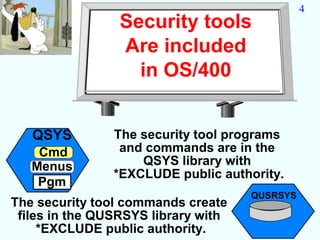
                 Security tools
                 Are included
                   in OS/400


   QSYS         The security tool programs
    Cmd          and commands are in the
   Menus            QSYS library with
                *EXCLUDE public authority.
    Pgm
                                     QUSRSYS
The security tool commands create
 files in the QUSRSYS library with
     *EXCLUDE public authority.
Security Tools                                5


     You should sign on as a security officer
        when you use the security tools.
   The security tools commands
   require *ALLOBJ special authority.
 Some of the commands require *SECADM,
*AUDIT, or *IOSYSCFG special authority.
      This authority can be adopted so that users
      do not need to be given powerful authority

       The implementation details are explained
       later in the question and answers section.
6
   Outline

Security Tools

  Interactive Options
  Batch Report
  Scheduling Reports
  General Options
7
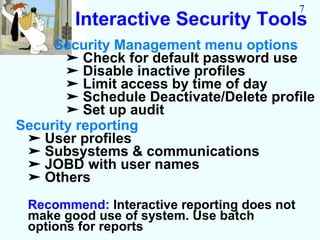
        Interactive Security Tools
     Security Management menu options
       ➤ Check for default password use
       ➤ Disable inactive profiles
       ➤ Limit access by time of day
       ➤ Schedule Deactivate/Delete profile
       ➤ Set up audit
Security reporting
 ➤ User profiles
 ➤ Subsystems & communications
 ➤ JOBD with user names
 ➤ Others
 Recommend: Interactive reporting does not
 make good use of system. Use batch
 options for reports
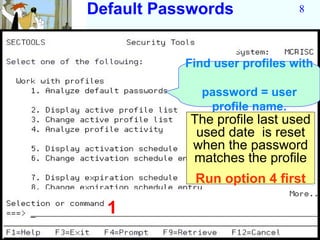
Default Passwords              8


           Find user profiles with

             password = user
              profile name.
            The profile last used
             used date is reset
            when the password
            matches the profile
            Run option 4 first

  1
9
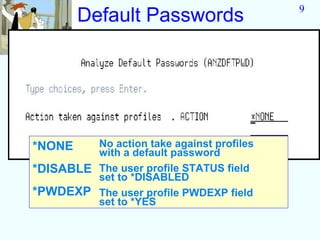
        Default Passwords


*NONE    No action take against profiles
         with a default password
*DISABLE The user profile STATUS field
         set to *DISABLED
*PWDEXP The user profile PWDEXP field
         set to *YES
10
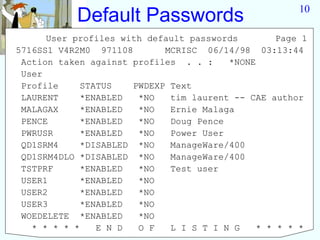
            Default Passwords
      User profiles with default passwords         Page 1
5716SS1 V4R2M0 971108        MCRISC 06/14/98 03:13:44
 Action taken against profiles . . :     *NONE
 User
 Profile     STATUS    PWDEXP Text
 LAURENT     *ENABLED   *NO   tim laurent -- CAE author
 MALAGAX     *ENABLED   *NO   Ernie Malaga
 PENCE       *ENABLED   *NO   Doug Pence
 PWRUSR      *ENABLED   *NO   Power User
 QD1SRM4     *DISABLED *NO    ManageWare/400
 QD1SRM4DLO *DISABLED *NO     ManageWare/400
 TSTPRF      *ENABLED   *NO   Test user
 USER1       *ENABLED   *NO
 USER2       *ENABLED   *NO
 USER3       *ENABLED   *NO
 WOEDELETE *ENABLED     *NO
   * * * * *    E N D   O F   L I S T I N G    * * * * *
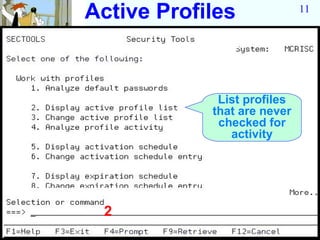
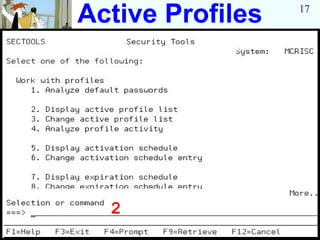
Active Profiles              11


             List profiles
            that are never
             checked for
               activity


 2
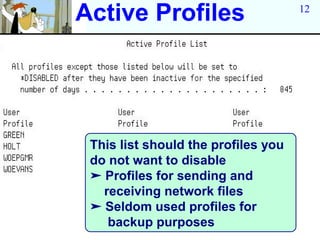
Active Profiles                      12


 This list should the profiles you
 do not want to disable
 ➤ Profiles for sending and
   receiving network files
 ➤ Seldom used profiles for
    backup purposes
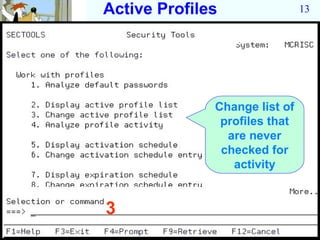
Active Profiles                13


              Change list of
               profiles that
                are never
               checked for
                 activity


3
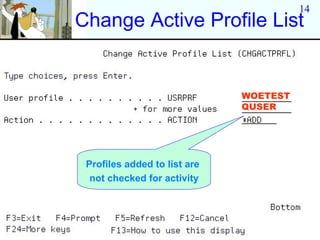
14
Change Active Profile List


                              WOETEST
                              QUSER


 Profiles added to list are
  not checked for activity
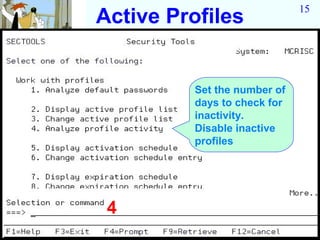
15
Active Profiles


          Set the number of
          days to check for
          inactivity.
          Disable inactive
          profiles


 4
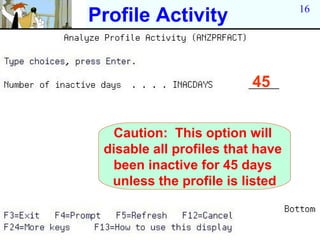
16
Profile Activity


                          45


  Caution: This option will
 disable all profiles that have
  been inactive for 45 days
  unless the profile is listed
Active Profiles   17


  2
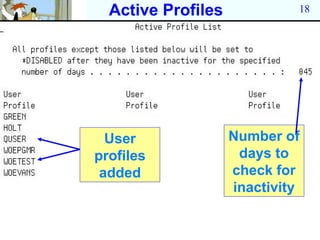
Active Profiles            18


  User              Number of
profiles             days to
 added              check for
                    inactivity
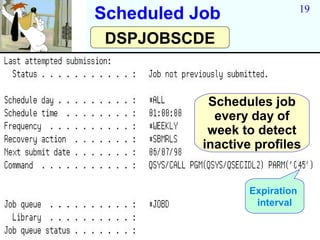
19
Scheduled Job
 DSPJOBSCDE


            Schedules job
             every day of
            week to detect
           inactive profiles


                   Expiration
                    interval
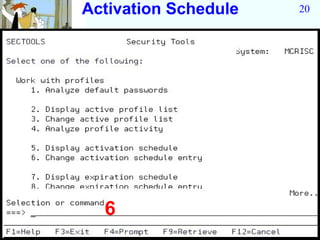
Activation Schedule   20


  6
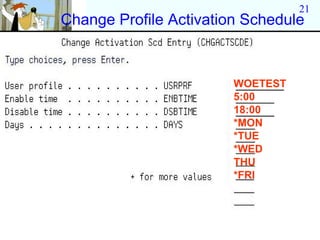
21
Change Profile Activation Schedule


                        WOETEST
                        5:00
                        18:00
                        *MON
                        *TUE
                        *WED
                        THU
                        *FRI
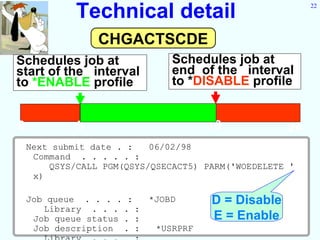
Technical detail                             22


                 CHGACTSCDE
Schedules job at                Schedules job at
start of the interval           end of the interval
to *ENABLE profile              to *DISABLE profile


0            5                         18            24
    Next submit date . :   06/02/98
     Command . . . . . :
        QSYS/CALL PGM(QSYS/QSECACT5) PARM('WOEDELETE '
     x)

    Job queue . . . . :     *JOBD      D = Disable
       Library . . . . :
     Job queue status . :              E = Enable
     Job description . :     *USRPRF
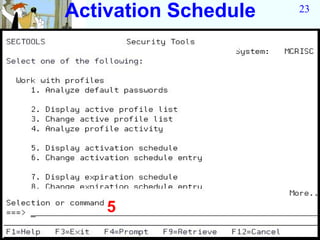
Activation Schedule   23


    5
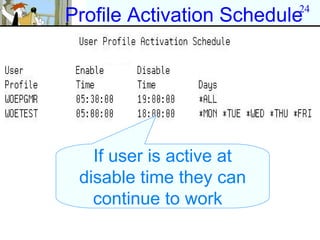
24
Profile Activation Schedule


   If user is active at
 disable time they can
   continue to work
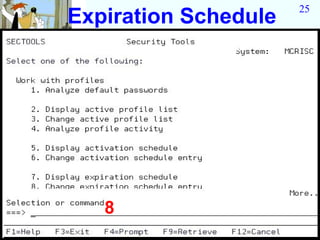
25
Expiration Schedule


   8
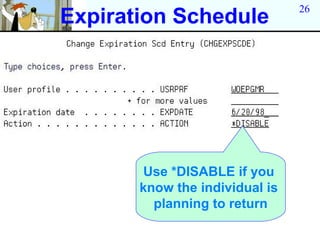
26
Expiration Schedule


       Use *DISABLE if you
       know the individual is
         planning to return
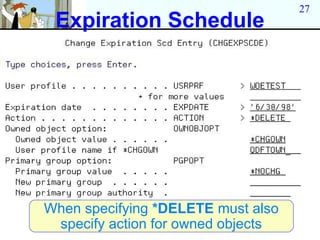
27
 Expiration Schedule


When specifying *DELETE must also
 specify action for owned objects
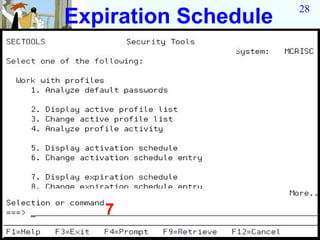
28
Expiration Schedule


   7
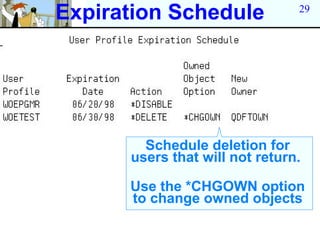
Expiration Schedule             29


        Schedule deletion for
      users that will not return.

      Use the *CHGOWN option
      to change owned objects
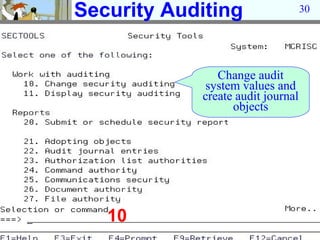
Security Auditing                  30


               Change audit
             system values and
            create audit journal
                  objects


   10
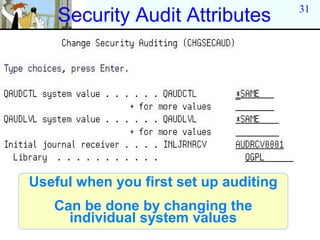
31
    Security Audit Attributes


Useful when you first set up auditing
   Can be done by changing the
     individual system values
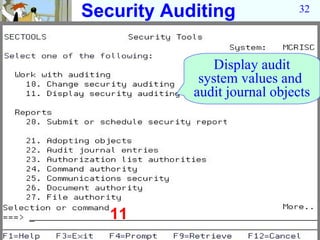
Security Auditing              32


                Display audit
             system values and
            audit journal objects


   11
33

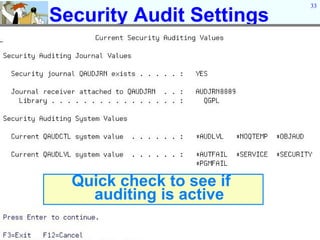
Security Audit Settings


  Quick check to see if
    auditing is active
34
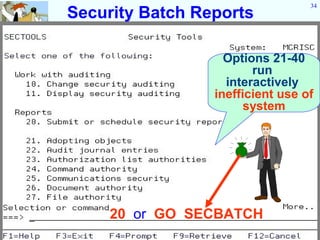
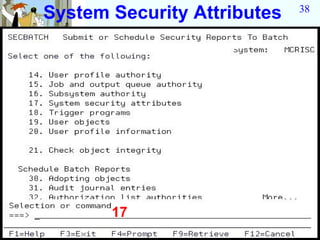
Security Batch Reports

                   Options 21-40
                        run
                   interactively
                 inefficient use of
                       system


     20 or GO SECBATCH
35
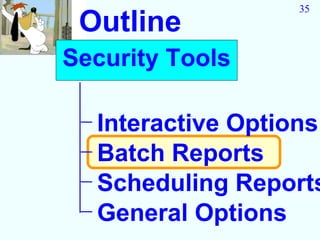
 Outline
Security Tools

  Interactive Options
  Batch Reports
  Scheduling Reports
  General Options
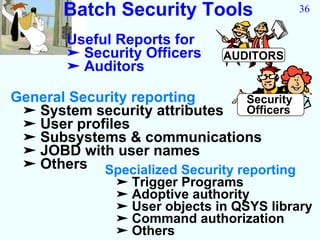
Batch Security Tools                 36

        Useful Reports for
        ➤ Security Officers    AUDITORS
        ➤ Auditors

General Security reporting       Security
 ➤ System security attributes    Officers
 ➤ User profiles
 ➤ Subsystems & communications
 ➤ JOBD with user names
 ➤ Others Specialized Security reporting
               ➤ Trigger Programs
               ➤ Adoptive authority
               ➤ User objects in QSYS library
               ➤ Command authorization
               ➤ Others
37


Batch Reports
                      Security
                      Officers
 General Options
 Advanced Options AUDITORS
 Scheduling Reports
System Security Attributes   38


       17
39
System Security Attributes


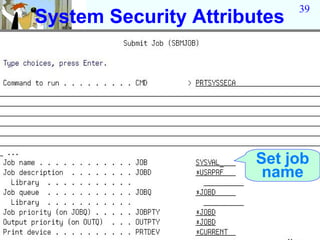
                       Set job
                        name
40
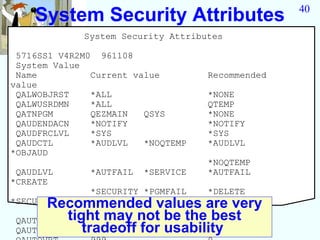
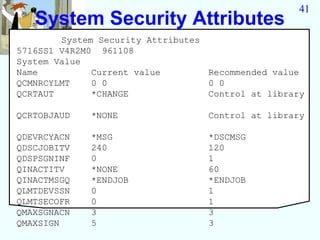
    System Security Attributes
             System Security Attributes

 5716SS1 V4R2M0 961108
 System Value
 Name          Current value         Recommended
value
 QALWOBJRST    *ALL                  *NONE
 QALWUSRDMN    *ALL                  QTEMP
 QATNPGM       QEZMAIN   QSYS        *NONE
 QAUDENDACN    *NOTIFY               *NOTIFY
 QAUDFRCLVL    *SYS                  *SYS
 QAUDCTL       *AUDLVL   *NOQTEMP    *AUDLVL
*OBJAUD
                                     *NOQTEMP
 QAUDLVL       *AUTFAIL   *SERVICE   *AUTFAIL
*CREATE
               *SECURITY *PGMFAIL    *DELETE
       Recommended values are very
*SECURITY

 QAUTOCFG tight may not be the *SAVRST
               1                0best
 QAUTORMT    tradeoff for usability
               0                0
41
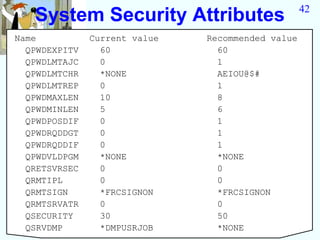
   System Security Attributes
        System Security Attributes
5716SS1 V4R2M0 961108
System Value
Name          Current value        Recommended value
QCMNRCYLMT    0 0                  0 0
QCRTAUT       *CHANGE              Control at library

QCRTOBJAUD   *NONE                 Control at library

QDEVRCYACN   *MSG                  *DSCMSG
QDSCJOBITV   240                   120
QDSPSGNINF   0                     1
QINACTITV    *NONE                 60
QINACTMSGQ   *ENDJOB               *ENDJOB
QLMTDEVSSN   0                     1
QLMTSECOFR   0                     1
QMAXSGNACN   3                     3
QMAXSIGN     5                     3
42
   System Security Attributes
Name           Current value   Recommended value
  QPWDEXPITV     60              60
  QPWDLMTAJC     0               1
  QPWDLMTCHR     *NONE           AEIOU@$#
  QPWDLMTREP     0               1
  QPWDMAXLEN     10              8
  QPWDMINLEN     5               6
  QPWDPOSDIF     0               1
  QPWDRQDDGT     0               1
  QPWDRQDDIF     0               1
  QPWDVLDPGM     *NONE           *NONE
  QRETSVRSEC     0               0
  QRMTIPL        0               0
  QRMTSIGN       *FRCSIGNON      *FRCSIGNON
  QRMTSRVATR     0               0
  QSECURITY      30              50
  QSRVDMP        *DMPUSRJOB      *NONE
43
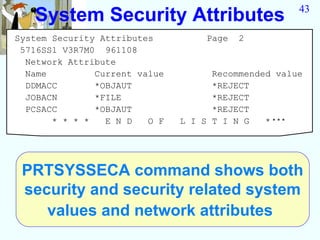
   System Security Attributes
System Security Attributes          Page   2
 5716SS1 V3R7M0 961108
  Network Attribute
  Name         Current value         Recommended value
  DDMACC       *OBJAUT               *REJECT
  JOBACN       *FILE                 *REJECT
  PCSACC       *OBJAUT               *REJECT
       * * * *   E N D   O F   L I S T I N G   ****


 PRTSYSSECA command shows both
 security and security related system
    values and network attributes
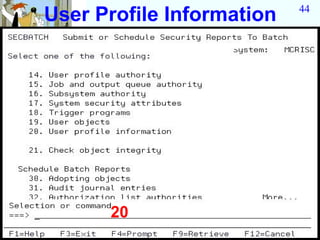
User Profile Information   44


      20
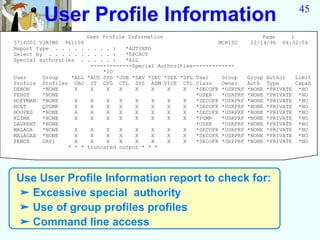
User Profile Information                                                            45

                       User Profile Information                                 Page       1
5716SS1 V3R7M0 961108                                           MCRISC      12/14/96    04:32:54
Report type . . . . . . . . . :    *AUTINFO
Select by . . . . . . . . . . :    *SPCAUT
Special authorities . . . . . :    *ALL
                        -------------Special Authorities-------------
                            *IO
User     Group    *ALL *AUD SYS *JOB *SAV *SEC *SER *SPL User    Group     Group   Author   Limit
Profile Profiles OBJ IT CFG CTL SYS ADM VICE CTL Class           Owner     Auth    Type     Capab
DENON    *NONE     X    X    X   X    X     X   X    X   *SECOFR *USRPRF   *NONE   *PRIVATE *NO
FENDT    *NONE                                           *USER   *USRPRF   *NONE   *PRIVATE *NO
HOFFMAN *NONE      X    X    X   X    X     X   X    X   *SECOFR *USRPRF   *NONE   *PRIVATE *NO
HOLT     QPGMR     X    X    X   X    X     X   X    X   *SECOFR *USRPRF   *NONE   *PRIVATE *NO
HOOPES   *NONE     X    X    X   X    X     X   X    X   *SECOFR *USRPRF   *NONE   *PRIVATE *NO
KLIMA    *NONE     X    X    X   X    X     X   X    X   *PGMR   *USRPRF   *NONE   *PRIVATE *NO
LAURENT *NONE                                            *USER   *USRPRF   *NONE   *PRIVATE *NO
MALAGA   *NONE     X    X    X   X    X     X   X    X   *SECOFR *USRPRF   *NONE   *PRIVATE *NO
MALAGAX *NONE      X    X    X   X    X     X   X    X   *SECOFR *USRPRF   *NONE   *PRIVATE *NO
PENCE    GRP1      X    X    X   X    X     X   X    X   *SECOFR *GRPPRF   *NONE   *PRIVATE *NO
                 * * * truncated output * * *


Use User Profile Information report to check for:
➤ Excessive special authority
➤ Use of group profiles profiles
➤ Command line access
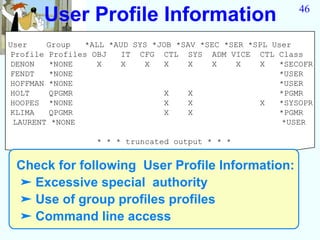
User Profile Information                             46


User    Group   *ALL *AUD SYS *JOB *SAV *SEC *SER *SPL User
Profile Profiles OBJ   IT CFG CTL SYS ADM VICE CTL Class
DENON   *NONE     X    X    X   X    X    X    X    X   *SECOFR
FENDT   *NONE                                           *USER
HOFFMAN *NONE                                           *USER
HOLT    QPGMR                   X    X                  *PGMR
HOOPES *NONE                    X    X              X   *SYSOPR
KLIMA   QPGMR                   X    X                  *PGMR
 LAURENT *NONE                                           *USER

                  * * * truncated output * * *


 Check for following User Profile Information:
 ➤ Excessive special authority
 ➤ Use of group profiles profiles
 ➤ Command line access
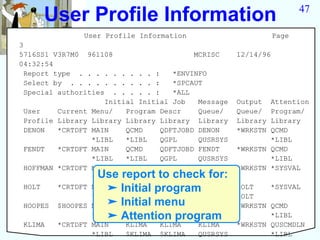
User Profile Information                                          47

               User Profile Information                         Page
3
5716SS1 V3R7M0 961108                     MCRISC     12/14/96
04:32:54
  Report type . . . . . . . . . :    *ENVINFO
  Select by . . . . . . . . . . :    *SPCAUT
  Special authorities . . . . . :    *ALL
                     Initial Initial Job   Message   Output  Attention
  User    Current Menu/   Program Descr    Queue/    Queue/  Program/
  Profile Library Library Library Library Library    Library Library
  DENON   *CRTDFT MAIN    QCMD    QDFTJOBD DENON     *WRKSTN QCMD
                  *LIBL   *LIBL   QGPL     QUSRSYS           *LIBL
  FENDT   *CRTDFT MAIN    QCMD    QDFTJOBD FENDT     *WRKSTN QCMD
                  *LIBL   *LIBL   QGPL     QUSRSYS           *LIBL
  HOFFMAN *CRTDFT MAIN    *NONE   QDFTJOBD HOFFMAN   *WRKSTN *SYSVAL
                  Use report to check for:
                  *LIBL           QGPL     QUSRSYS
  HOLT             ➤ Initial program
          *CRTDFT MAIN    *NONE   QDFTJOBD HOLT      HOLT    *SYSVAL
                  *LIBL           QGPL     QUSRSYS   HOLT
                   ➤ Initial menu
  HOOPES $HOOPES MAIN     *NONE   QDFTJOBD HOOPES    *WRKSTN QCMD
                   ➤ Attention program
                  *LIBL           QGPL     QUSRSYS           *LIBL
  KLIMA   *CRTDFT MAIN    KLIMA   KLIMA    KLIMA     *WRKSTN QUSCMDLN
                  *LIBL   $KLIMA $KLIMA    QUSRSYS           *LIBL
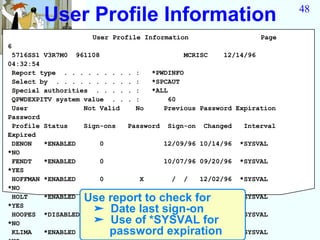
User Profile Information                                              48

                    User Profile Information                           Page
6
 5716SS1 V3R7M0 961108                           MCRISC     12/14/96
04:32:54
 Report type . . . . . . . .   .   :    *PWDINFO
 Select by . . . . . . . . .   .   :    *SPCAUT
 Special authorities . . . .   .   :    *ALL
 QPWDEXPITV system value . .   .   :         60
 User              Not Valid       No      Previous Password Expiration
Password
 Profile Status    Sign-ons    Password     Sign-on    Changed    Interval
Expired
 DENON   *ENABLED      0                   12/09/96 10/14/96     *SYSVAL
*NO
 FENDT   *ENABLED      0                   10/07/96 09/20/96     *SYSVAL
*YES
 HOFFMAN *ENABLED      0            X        /   /    12/02/96   *SYSVAL
*NO
 HOLT    *ENABLED Use report to check for /
                       0           / /      /                    *SYSVAL
*YES
 HOOPES *DISABLED
                   ➤ Date last sign-on
                       0         09/26/96 07/29/96               *SYSVAL
*NO                ➤ Use of *SYSVAL for
 KLIMA   *ENABLED     password12/13/96 12/05/96
                       1          expiration                     *SYSVAL
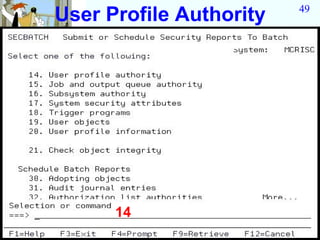
User Profile Authority   49


      14
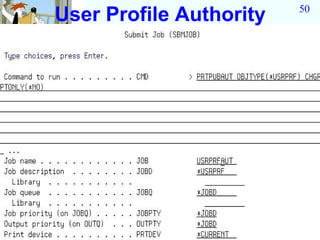
User Profile Authority   50
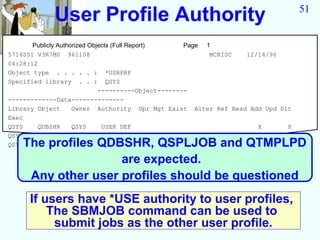
User Profile Authority                                                 51


       Publicly Authorized Objects (Full Report)       Page 1
5716SS1 V3R7M0 961108                                        MCRISC    12/14/96
04:28:12
Object type . . . . . : *USRPRF
Specified library . . : QSYS
                              ----------Object--------
-------------Data--------------
Library Object       Owner Authority Opr Mgt Exist Alter Ref Read Add Upd Dlt
Exec
QSYS     QDBSHR      QSYS      USER DEF                                   X       X
QSYS     QSPLJOB QSYS         *USE             X                    X                 X
QSYSThe profiles QDBSHR, QSPLJOB and QTMPLPD
         QTMPLPD QSYS         USER DEF         X
                                     * * * * *   E N D   O F  L I S T I N G   * * * * *
                    are expected.
     Any other user profiles should be questioned
      If users have *USE authority to user profiles,
          The SBMJOB command can be used to
           submit jobs as the other user profile.
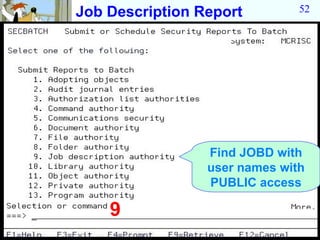
Job Description Report         52


                 Find JOBD with
                 user names with
                 PUBLIC access

    9
53
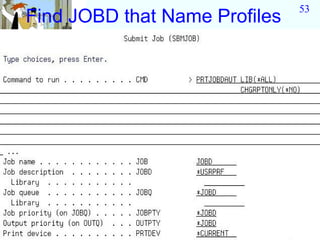
Find JOBD that Name Profiles
54
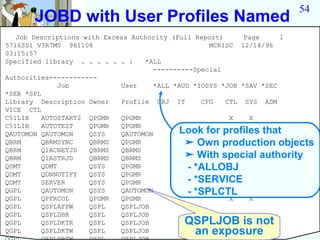
      JOBD with User Profiles Named
   Job Descriptions with Excess Authority (Full Report)      Page     1
5716SS1 V3R7M0 961108                               MCRISC 12/14/96
03:15:57
Specified library . . . . . . :    *ALL
                                      ----------Special
Authorities------------
               Job           User     *ALL *AUD *IOSYS *JOB *SAV *SEC
*SER *SPL
Library Description Owner    Profile OBJ IT       CFG   CTL SYS ADM
VICE CTL
C51LIB    AUTOSTART2 QPGMR   QPGMR                       X    X
C51LIB    AUTOTEST   QPGMR   QPGMR                       X    X
QAUTOMON QAUTOMON    QSYS    QAUTOMON        Look for profiles that
                                                         X    X
QBRM      QBRMSYNC   QBRMS   QPGMR            ➤ Own production objects
                                                         X    X
QBRM      Q1ACNETJD  QBRMS   QBRMS
QBRM      Q1ASTRJD   QBRMS   QBRMS            ➤ With special authority
QDMT      QDMT       QSYS    QPGMR             - *ALLOBJ X
                                                         X
QDMT      QDNNOTIFY  QSYS    QPGMR                       X    X
QDMT      SERVER     QSYS    QPGMR             - *SERVICE X
                                                         X
QGPL      QAUTOMON   QSYS    QAUTOMON          - *SPLCTL X
                                                         X
QGPL      QPFRCOL    QPGMR   QPGMR                       X    X
QGPL      QSPLAFPW   QSPL    QSPLJOB
QGPL      QSPLDBR    QSPL    QSPLJOB
QGPL      QSPLDKTR   QSPL    QSPLJOB     QSPLJOB is not
QGPL      QSPLDKTW   QSPL    QSPLJOB      an exposure
55


Batch Reports
                   Security
                   Officers

  General Options
  Advanced Options
  Scheduling Reports   AUDITORS
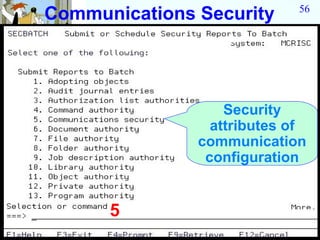
Communications Security      56


                   Security
                 attributes of
               communication
                configuration


      5
Communications Security   57
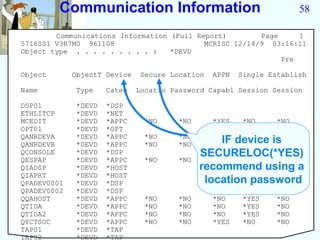
Communication Information                                     58

        Communications Information (Full Report)        Page     1
5716SS1 V3R7M0 961108                      MCRISC 12/14/9 03:16:11
Object type . . . . . . . . . :    *DEVD
                                                             Pre

Object       ObjectT Device    Secure Location   APPN   Single Establish

Name         Type    Categ    Locatio Password Capabl Session Session

DSP01        *DEVD   *DSP
ETHLITCP     *DEVD   *NET
MCEDIT       *DEVD   *APPC      *NO     *NO      *YES    *NO     *NO
OPT01        *DEVD   *OPT
QANRDEVA     *DEVD   *APPC      *NO     *NO      *NO  *NO    *NO
QANRDEVB     *DEVD   *APPC      *NO     *NO        IF
                                                 *NO device is
                                                      *NO    *NO
QCONSOLE
QESPAP
             *DEVD
             *DEVD
                     *DSP
                     *APPC      *NO     *NO
                                              SECURELOC(*YES)
                                                 *NO  *YES   *NO
QIADSP       *DEVD   *HOST                    recommend using a
QIAPRT       *DEVD   *HOST
QPADEV0001   *DEVD   *DSP                      location password
QPADEV0002   *DEVD   *DSP
QQAHOST      *DEVD   *APPC      *NO     *NO      *NO     *YES    *NO
QTIDA        *DEVD   *APPC      *NO     *NO      *NO     *YES    *NO
QTIDA2       *DEVD   *APPC      *NO     *NO      *NO     *YES    *NO
QYCTSOC      *DEVD   *APPC      *NO     *NO      *YES    *NO     *NO
TAP01        *DEVD   *TAP
TAP02        *DEVD   *TAP
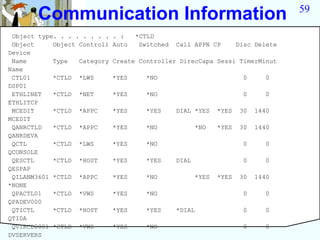
Communication Information                                                   59

 Object type. . . . . . . .   . :    *CTLD
 Object     Object Controll   Auto    Switched   Call APPN CP         Disc Delete
Device
 Name       Type   Category   Create Controller DirecCapa Sessi TimerMinut
Name
 CTL01      *CTLD *LWS        *YES     *NO                              0      0
DSP01
 ETHLINET   *CTLD *NET        *YES     *NO                              0      0
ETHLITCP
 MCEDIT     *CTLD *APPC       *YES     *YES      DIAL *YES     *YES    30   1440
MCEDIT
 QANRCTLD   *CTLD *APPC       *YES     *NO              *NO    *YES    30   1440
QANRDEVA
 QCTL       *CTLD *LWS        *YES     *NO                              0      0
QCONSOLE
 QESCTL     *CTLD *HOST       *YES     *YES      DIAL                   0      0
QESPAP
 QILANM3601 *CTLD *APPC       *YES     *NO              *YES   *YES    30   1440
*NONE
 QPACTL01   *CTLD *VWS        *YES     *NO                              0      0
QPADEV000
 QTICTL     *CTLD *HOST       *YES     *YES      *DIAL                  0      0
QTIDA
 QVIRCD0001 *CTLD *VWS        *YES     *NO                              0      0
DVSERVERS
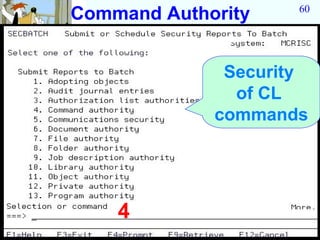
Command Authority    60


              Security
               of CL
             commands


    4
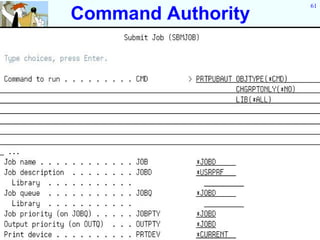
61
Command Authority
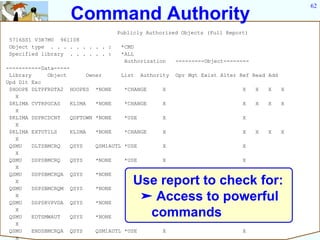
62
                    Command Authority
                                   Publicly Authorized Objects (Full Report)
 5716SS1 V3R7M0 961108
 Object type . . . . . . . . . :    *CMD
 Specified library . . . . . . :    *ALL
                                     Authorization     ---------Object--------
-----------Data-----
 Library      Object       Owner      List Authority   Opr Mgt Exist Alter Ref Read Add
Upd Dlt Exc
 $HOOPE DLTPFRDTA2 HOOPES *NONE        *CHANGE    X                        X     X   X    X
   X
 $KLIMA CVTRPGCAS    KLIMA    *NONE    *CHANGE    X                        X     X   X    X
   X
 $KLIMA DSPRCDCNT    QDFTOWN *NONE     *USE       X                        X
   X
 $KLIMA EXTUTILS     KLIMA    *NONE    *CHANGE    X                        X     X   X    X
   X
 QSMU    DLTSBMCRQ   QSYS     QSM1AUTL *USE       X                        X
   X
 QSMU    DSPSBMCRQ   QSYS     *NONE    *USE       X                        X
   X
 QSMU    DSPSBMCRQA QSYS      *NONE    *USE       X                        X
   X
 QSMU    DSPSBMCRQM QSYS      *NONE
                                        Use report to check for:
                                       *USE       X                        X
   X
 QSMU    DSPSRVPVDA QSYS      *NONE
                                         ➤ Access to powerful
                                       *USE       X                        X
   X
 QSMU    EDTSMWAUT   QSYS     *NONE       commands
                                       *USE       X                        X
   X
 QSMU    ENDSBMCRQA QSYS      QSM1AUTL *USE       X                        X
   X
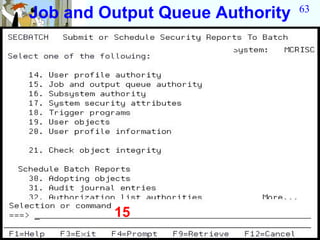
63
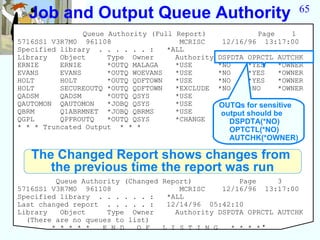
Job and Output Queue Authority


         15
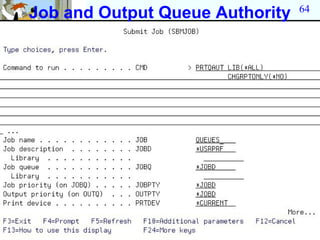
64
Job and Output Queue Authority
65
  Job and Output Queue Authority
                Queue Authority (Full Report)              Page   1
5716SS1 V3R7M0 961108                  MCRISC      12/16/96 13:17:00
Specified library . . . . . . :     *ALL
Library   Object      Type Owner      Authority   DSPDTA   OPRCTL   AUTCHK
ERNIE     ERNIE       *OUTQ MALAGA    *USE        *NO      *YES     *OWNER
EVANS     EVANS       *OUTQ WOEVANS   *USE        *NO      *YES     *OWNER
HOLT      HOLT        *OUTQ QDFTOWN   *USE        *NO      *YES     *OWNER
HOLT      SECUREOUTQ *OUTQ QDFTOWN    *EXCLUDE    *NO      *NO      *OWNER
QADSM     QADSM       *OUTQ QSYS      *USE
QAUTOMON QAUTOMON     *JOBQ QSYS      *USE        OUTQs for sensitive
QBRM      Q1ABRMNET *JOBQ QBRMS       *USE        output should be
QGPL      QPFROUTQ    *OUTQ QSYS      *CHANGE       DSPDTA(*NO)
* * * Truncated Output * * *                        OPTCTL(*NO)
                                                    AUTCHK(*OWNER)

   The Changed Report shows changes from
      the previous time the report was run
         Queue Authority (Changed Report)           Page     3
5716SS1 V3R7M0 961108                 MCRISC    12/16/96 13:17:00
Specified library . . . . . . :    *ALL
Last changed report . . . . . :    12/14/96 05:42:10
Library   Object     Type Owner      Authority DSPDTA OPRCTL AUTCHK
  (There are no queues to list)
        * * * * *   E N D   O F   L I S T I N G   * * * **
66
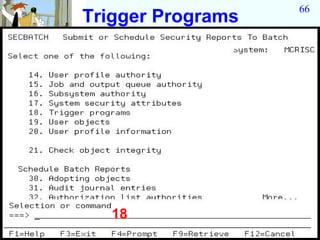
Trigger Programs


  18
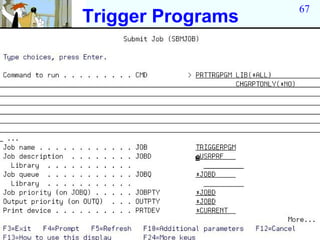
67
Trigger Programs
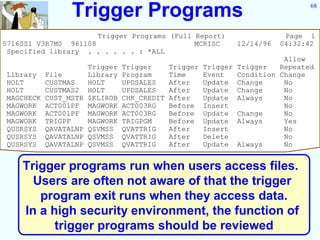
Trigger Programs                                        68


                      Trigger Programs (Full Report)               Page 1
5716SS1 V3R7M0 961108                        MCRISC    12/14/96   04:32:42
 Specified library . . . . . . : *ALL
                                                                 Allow
                   Trigger Trigger    Trigger Trigger Trigger   Repeated
Library File       Library Program    Time    Event   Condition Change
HOLT     CUSTMAS   HOLT    UPDSALES   After   Update Change      No
HOLT     CUSTMAS2 HOLT     UPDSALES   After   Update Change      No
MAGCHECK CUST_MSTR $KLIROB CHK_CREDIT After   Update Always      No
MAGWORK ACT001PF MAGWORK ACT003RG     Before Insert              No
MAGWORK ACT001PF MAGWORK ACT003RG     Before Update Change       No
MAGWORK TRIGPF     MAGWORK TRIGPGM    Before Update Always       Yes
QUSRSYS QAVATALNP QSVMSS QVATTRIG     After   Insert             No
QUSRSYS QAVATALNP QSVMSS QVATTRIG     After   Delete             No
QUSRSYS QAVATALNP QSVMSS QVATTRIG     After   Update Always      No


    Trigger programs run when users access files.
      Users are often not aware of that the trigger
       program exit runs when they access data.
    In a high security environment, the function of
          trigger programs should be reviewed
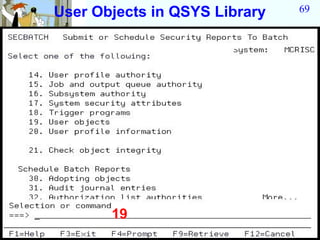
User Objects in QSYS Library   69


       19
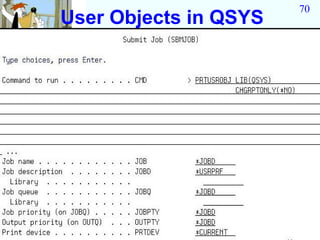
70
User Objects in QSYS
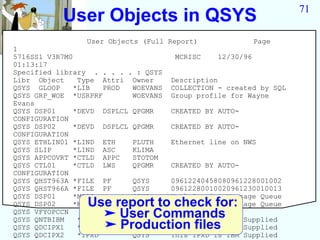
71
           User Objects in QSYS
                User Objects (Full Report)                 Page
1
5716SS1 V3R7M0                       MCRISC     12/30/96
01:13:17
Specified library . . . . . : QSYS
Libr Object    Type Attri Owner      Description
QSYS GLOOP    *LIB   PROD  WOEVANS   COLLECTION - created by SQL
QSYS GRP_WOE *USRPRF       WOEVANS   Group profile for Wayne
Evans
QSYS DSP01    *DEVD DSPLCL QPGMR     CREATED BY AUTO-
CONFIGURATION
QSYS DSP02    *DEVD DSPLCL QPGMR     CREATED BY AUTO-
CONFIGURATION
QSYS ETHLIN01 *LIND ETH    PLUTH     Ethernet line on NWS
QSYS SLIP     *LIND ASC    KLIMA
QSYS APPCOVRT *CTLD APPC   STOTOM
QSYS CTL01    *CTLD LWS    QPGMR     CREATED BY AUTO-
CONFIGURATION
QSYS QHST963A *FILE PF     QSYS      09612240458080961228001002
QSYS QHST966A *FILE PF     QSYS      09612280010020961230010013
QSYS DSP01    *MSGQ        QSYS      Work Station Message Queue
QSYS DSP02      Use report to check for:
              *MSGQ        QSYS      Work Station Message Queue
QSYS VFYOPCCN
                  ➤ User Commands IBM
                *CMD       QSYS

                  ➤ Production IPXD is IBM
QSYS QNTBIBM   *NTBD       QSYS
                             This NTBD is             Supplied
QSYS QDCIPX1   *IPXD         This files
                           QSYS                       Supplied
QSYS QDCIPX2   *IPXD       QSYS      This IPXD is IBM Supplied
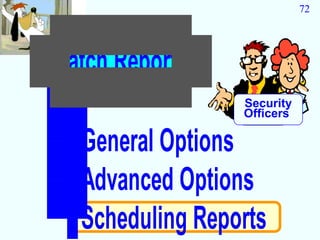
72


Batch Reports
                 Security
                 Officers

  General Options
  Advanced Options
  Scheduling Reports
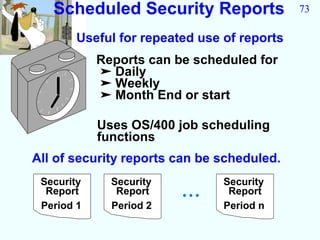
Scheduled Security Reports                73

        Useful for repeated use of reports
            Reports can be scheduled for
            ➤ Daily
            ➤ Weekly
            ➤ Month End or start

            Uses OS/400 job scheduling
            functions
All of security reports can be scheduled.
 Security     Security          Security
  Report       Report    •••     Report
 Period 1     Period 2          Period n
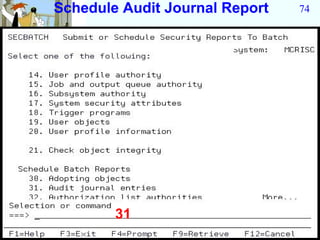
Schedule Audit Journal Report   74


        31
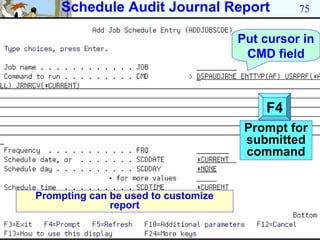
Schedule Audit Journal Report              75

                                     Put cursor in
                                      CMD field


                                         F4
                                      Prompt for
                                      submitted
                                      command


Prompting can be used to customize
              report
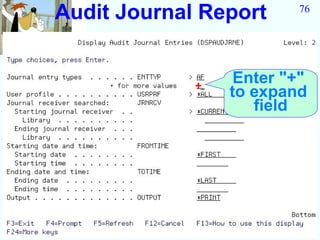
Audit Journal Report     76


             +
                  Enter "+"
                 to expand
                    field
77
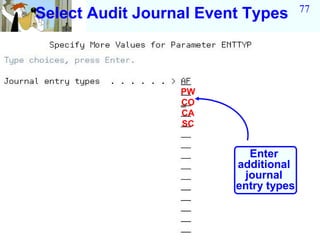
Select Audit Journal Event Types


                  PW
                  CO
                  CA
                  SC


                           Enter
                         additional
                          journal
                         entry types
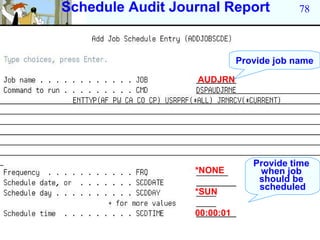
Schedule Audit Journal Report             78


                             Provide job name

                  AUDJRN


                                Provide time
                  *NONE          when job
                                 should be
                                 scheduled
                  *SUN

                  00:00:01
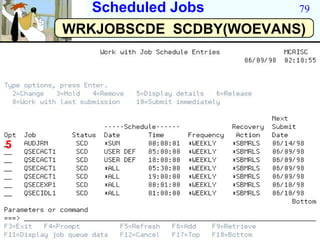
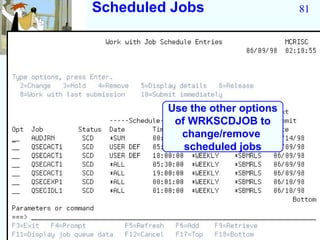
Scheduled Jobs       79

    WRKJOBSCDE SCDBY(WOEVANS)


5
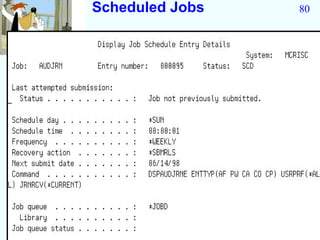
Scheduled Jobs   80
Scheduled Jobs                   81


         Use the other options
          of WRKSCDJOB to
           change/remove
            scheduled jobs
82
     Outline

Security Tools

  Interactive Options
  Batch Report
  Scheduling Reports
  General Options
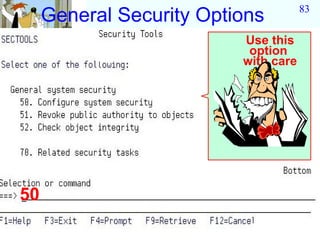
83
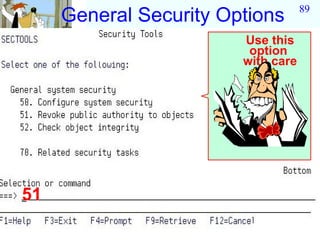
     General Security Options
                          Use this
                           option
                          with care


50
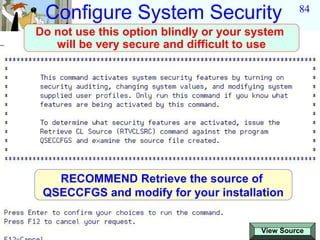
Configure System Security                       84

Do not use this option blindly or your system
   will be very secure and difficult to use


   RECOMMEND Retrieve the source of
 QSECCFGS and modify for your installation


                                        View Source
85
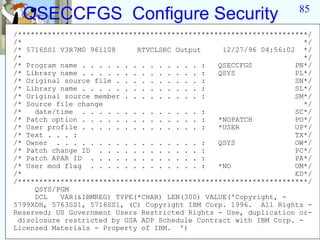
  QSECCFGS Configure Security
/********************************************************************/
/*                                                                   */
/* 5716SS1 V3R7M0 961108     RTVCLSRC Output     12/27/96 04:56:02 */
/*                                                                   */
/* Program name . . . . . . . . . . . . . . :   QSECCFGS          PN*/
/* Library name . . . . . . . . . . . . . . :   QSYS              PL*/
/* Original source file . . . . . . . . . . :                     SN*/
/* Library name . . . . . . . . . . . . . . :                     SL*/
/* Original source member . . . . . . . . . :                     SM*/
/* Source file change                                                */
/*   date/time . . . . . . . . . . . . . . :                      SC*/
/* Patch option . . . . . . . . . . . . . . :   *NOPATCH          PO*/
/* User profile . . . . . . . . . . . . . . :   *USER             UP*/
/* Text . . . :                                                   TX*/
/* Owner . . . . . . . . . . . . . . . . . :    QSYS              OW*/
/* Patch change ID . . . . . . . . . . . . :                      PC*/
/* Patch APAR ID . . . . . . . . . . . . . :                      PA*/
/* User mod flag . . . . . . . . . . . . . :    *NO               UM*/
/*                                                                ED*/
/********************************************************************/
     QSYS/PGM
     DCL   VAR(&IBMREG) TYPE(*CHAR) LEN(300) VALUE('Copyright, -
5799XDH, 5763SS1, 5716SS1, (C) Copyright IBM Corp. 1996. All Rights -
Reserved; US Government Users Restricted Rights - Use, duplication or-
 disclosure restricted by GSA ADP Schedule Contract with IBM Corp. -
Licensed Materials - Property of IBM. ')
86
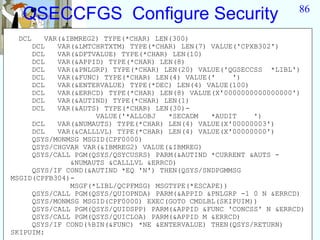
  QSECCFGS Configure Security
 DCL    VAR(&IBMREG2) TYPE(*CHAR) LEN(300)
     DCL   VAR(&LMTCHRTXTM) TYPE(*CHAR) LEN(7) VALUE('CPXB302')
     DCL   VAR(&DFTVALUE) TYPE(*CHAR) LEN(10)
     DCL   VAR(&APPID) TYPE(*CHAR) LEN(8)
     DCL   VAR(&PNLGRP) TYPE(*CHAR) LEN(20) VALUE('QGSECCSS *LIBL')
     DCL   VAR(&FUNC) TYPE(*CHAR) LEN(4) VALUE('    ')
     DCL   VAR(&ENTERVALUE) TYPE(*DEC) LEN(4) VALUE(100)
     DCL   VAR(&ERRCD) TYPE(*CHAR) LEN(8) VALUE(X'0000000000000000')
     DCL   VAR(&AUTIND) TYPE(*CHAR) LEN(1)
     DCL   VAR(&AUTS) TYPE(*CHAR) LEN(30)-
                    VALUE('*ALLOBJ   *SECADM   *AUDIT    ')
     DCL   VAR(&NUMAUTS) TYPE(*CHAR) LEN(4) VALUE(X'00000003')
     DCL   VAR(&CALLLVL) TYPE(*CHAR) LEN(4) VALUE(X'00000000')
     QSYS/MONMSG MSGID(CPF0000)
     QSYS/CHGVAR VAR(&IBMREG2) VALUE(&IBMREG)
     QSYS/CALL PGM(QSYS/QSYCUSRS) PARM(&AUTIND *CURRENT &AUTS -
              &NUMAUTS &CALLLVL &ERRCD)
     QSYS/IF COND(&AUTIND *EQ 'N') THEN(QSYS/SNDPGMMSG
MSGID(CPFB304)-
              MSGF(*LIBL/QCPFMSG) MSGTYPE(*ESCAPE))
     QSYS/CALL PGM(QSYS/QUIOPNDA) PARM(&APPID &PNLGRP -1 0 N &ERRCD)
     QSYS/MONMSG MSGID(CPF0000) EXEC(GOTO CMDLBL(SKIPUIM))
     QSYS/CALL PGM(QSYS/QUIDSPP) PARM(&APPID &FUNC 'CONCSS' N &ERRCD)
     QSYS/CALL PGM(QSYS/QUICLOA) PARM(&APPID M &ERRCD)
     QSYS/IF COND(%BIN(&FUNC) *NE &ENTERVALUE) THEN(QSYS/RETURN)
SKIPUIM:
87
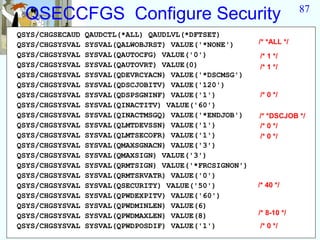
 QSECCFGS Configure Security
QSYS/CHGSECAUD   QAUDCTL(*ALL) QAUDLVL(*DFTSET)
QSYS/CHGSYSVAL   SYSVAL(QALWOBJRST) VALUE('*NONE')      /* *ALL */
QSYS/CHGSYSVAL   SYSVAL(QAUTOCFG) VALUE('0')            /* 1 */
QSYS/CHGSYSVAL   SYSVAL(QAUTOVRT) VALUE(0)              /* 1 */
QSYS/CHGSYSVAL   SYSVAL(QDEVRCYACN) VALUE('*DSCMSG')
QSYS/CHGSYSVAL   SYSVAL(QDSCJOBITV) VALUE('120')
QSYS/CHGSYSVAL   SYSVAL(QDSPSGNINF) VALUE('1')          /* 0 */
QSYS/CHGSYSVAL   SYSVAL(QINACTITV) VALUE('60')
QSYS/CHGSYSVAL   SYSVAL(QINACTMSGQ) VALUE('*ENDJOB')    /* *DSCJOB */
QSYS/CHGSYSVAL   SYSVAL(QLMTDEVSSN) VALUE('1')          /* 0 */
QSYS/CHGSYSVAL   SYSVAL(QLMTSECOFR) VALUE('1')          /* 0 */
QSYS/CHGSYSVAL   SYSVAL(QMAXSGNACN) VALUE('3')
QSYS/CHGSYSVAL   SYSVAL(QMAXSIGN) VALUE('3')
QSYS/CHGSYSVAL   SYSVAL(QRMTSIGN) VALUE('*FRCSIGNON')
QSYS/CHGSYSVAL   SYSVAL(QRMTSRVATR) VALUE('0')
QSYS/CHGSYSVAL   SYSVAL(QSECURITY) VALUE('50')          /* 40 */
QSYS/CHGSYSVAL   SYSVAL(QPWDEXPITV) VALUE('60')
QSYS/CHGSYSVAL   SYSVAL(QPWDMINLEN) VALUE(6)
QSYS/CHGSYSVAL   SYSVAL(QPWDMAXLEN) VALUE(8)            /* 8-10 */
QSYS/CHGSYSVAL   SYSVAL(QPWDPOSDIF) VALUE('1')          /* 0 */
88
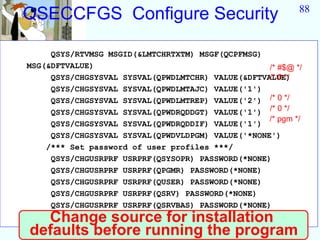
QSECCFGS Configure Security

     QSYS/RTVMSG MSGID(&LMTCHRTXTM) MSGF(QCPFMSG)
MSG(&DFTVALUE)                                     /* #$@ */
                                                   /* 0 */
     QSYS/CHGSYSVAL SYSVAL(QPWDLMTCHR) VALUE(&DFTVALUE)
     QSYS/CHGSYSVAL SYSVAL(QPWDLMTAJC) VALUE('1')
     QSYS/CHGSYSVAL SYSVAL(QPWDLMTREP) VALUE('2') /* 0 */
     QSYS/CHGSYSVAL SYSVAL(QPWDRQDDGT) VALUE('1') /* 0 */
                                                   /* pgm */
     QSYS/CHGSYSVAL SYSVAL(QPWDRQDDIF) VALUE('1')
     QSYS/CHGSYSVAL SYSVAL(QPWDVLDPGM) VALUE('*NONE')
    /*** Set password of user profiles ***/
     QSYS/CHGUSRPRF USRPRF(QSYSOPR) PASSWORD(*NONE)
     QSYS/CHGUSRPRF USRPRF(QPGMR) PASSWORD(*NONE)
     QSYS/CHGUSRPRF USRPRF(QUSER) PASSWORD(*NONE)
     QSYS/CHGUSRPRF USRPRF(QSRV) PASSWORD(*NONE)
     QSYS/CHGUSRPRF USRPRF(QSRVBAS) PASSWORD(*NONE)
  Change source for installation
QSYS/ENDPGM
defaults before running the program
89
     General Security Options
                        Use this
                         option
                        with care


51
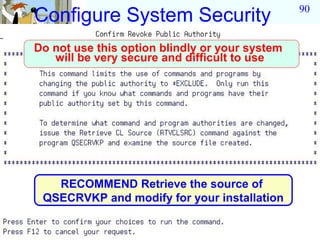
90
Configure System Security
Do not use this option blindly or your system
   will be very secure and difficult to use


   RECOMMEND Retrieve the source of
 QSECRVKP and modify for your installation
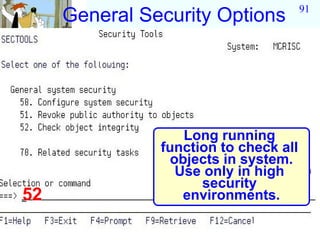
91
     General Security Options


                   Long running
               function to check all
                 objects in system.
                  Use only in high
                     security
52                 environments.
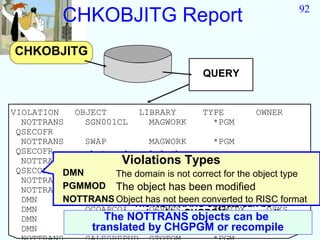
92
           CHKOBJITG Report
CHKOBJITG
                                         QUERY


VIOLATION   OBJECT        LIBRARY        TYPE          OWNER
  NOTTRANS    SGN001CL      MAGWORK        *PGM
 QSECOFR
  NOTTRANS    SWAP          MAGWORK        *PGM
 QSECOFR
  NOTTRANS     Integrity violations types
              RISPRFCLViolations Types
                            POINT51        *PGM
 QSECOFR DMNDMN     The domain is not correct for the object type
                     The domain is not correct for the object type
  NOTTRANSPGMMOD The object has been*PGM
              QHIWX6EP      QPWXCGY         modified QSYS
         NOTTRANS The object has been *PGM  modified QSYS
  NOTTRANSPGMMOD Object has not been converted to RISC format
              QHIWX2ES      QPWXCWND
  DMN     NOTTRANS Object has not been converted to RISC format
              QCQJMSMQ      QSVMSS         *SMQ          QSYS
                         The NOTTRANS objects can be
  DMN         QCQAPCOI      QSVMSS         *SMIDX
                      translated by CHGPGM or recompile  QSYS
  DMN         QCQJMSMINOTTRANS objects can be
                   The      QSVMSS         *SMIDX        QSYS
  DMN           translated by CHGPGM*DSNXO
              QCQJMSPC      QSVMSS          or recompile QSYS
PROBLEM                          93


Security tools shipped by
IBM require *ALLOBJ and
   *IOSYSCFG special
        authority.
       Administrators that want
      auditors to use tools do not
       want to give these users
           powerful *ALLOBJ
                authority.
94
      Adoption of Authority

QUESTION
 Is there a way to give someone other than
    a user with powerful special authority
        access to the security tools?

ANSWER

 Yes, the special authorities *ALLOBJ and
        *IOSYSCFG can be adopted.
95
          Adoption of Authority

QUESTION
   Can I give users access by adopting before I
          display the security tool menu?
 ANSWER
 YES it is possible to adopt before you issue
         the GO SECTOOLS command
NOT RECOMMENDED
1. The security tools menu has a command line.
   Adoption Rule 1
    DO NOT GIVE USERS A COMMAND LINE
    WHEN ADOPTING

2. Adopted authority will not work for
96
            Adoption of Authority
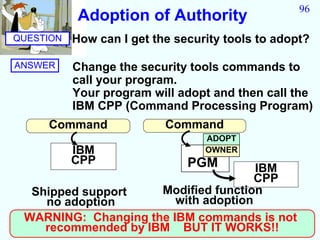
QUESTION   How can I get the security tools to adopt?

ANSWER     Change the security tools commands to
           call your program.
           Your program will adopt and then call the
           IBM CPP (Command Processing Program)
     Command               Command
                                  ADOPT
           IBM                    OWNER
           CPP                 PGM    IBM
                                      CPP
  Shipped support    Modified function
    no adoption         with adoption
 WARNING: Changing the IBM commands is not
    recommended by IBM BUT IT WORKS!!
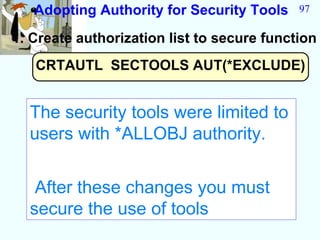
Adopting Authority for Security Tools    97

1. Create authorization list to secure function
   CRTAUTL SECTOOLS AUT(*EXCLUDE)


  The security tools were limited to
  users with *ALLOBJ authority.


   After these changes you must
  secure the use of tools
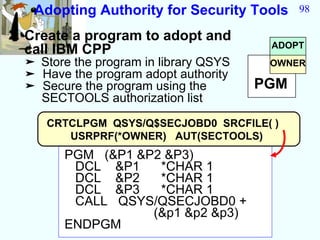
Adopting Authority for Security Tools      98

2. Create a program to adopt and
                                         ADOPT
  call IBM CPP
  ➤ Store the program in library QSYS    OWNER
  ➤ Have the program adopt authority
  ➤ Secure the program using the        PGM
    SECTOOLS authorization list

     CRTCLPGM QSYS/Q$SECJOBD0 SRCFILE( )
        USRPRF(*OWNER) AUT(SECTOOLS)
        PGM (&P1 &P2 &P3)
         DCL &P1    *CHAR 1
         DCL &P2    *CHAR 1
         DCL &P3    *CHAR 1
         CALL QSYS/QSECJOBD0 +
                   (&p1 &p2 &p3)
        ENDPGM
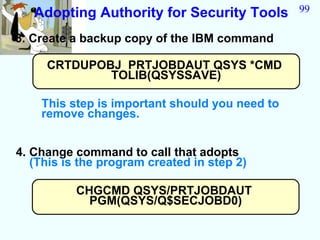
Adopting Authority for Security Tools        99

3. Create a backup copy of the IBM command

     CRTDUPOBJ PRTJOBDAUT QSYS *CMD
             TOLIB(QSYSSAVE)

    This step is important should you need to
    remove changes.


4. Change command to call that adopts
   (This is the program created in step 2)

          CHGCMD QSYS/PRTJOBDAUT
            PGM(QSYS/Q$SECJOBD0)
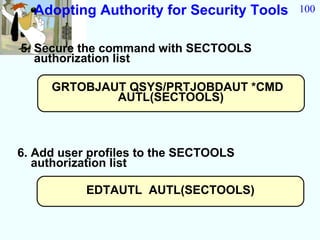
Adopting Authority for Security Tools   100


5. Secure the command with SECTOOLS
   authorization list

     GRTOBJAUT QSYS/PRTJOBDAUT *CMD
             AUTL(SECTOOLS)


6. Add user profiles to the SECTOOLS
   authorization list

           EDTAUTL AUTL(SECTOOLS)
101


End of Presentation


 WOEvans@AOL.com

2010 sectool

  • 1.
    OS/400 Security All youwant to know about: Security Tools Presented by Wayne O. Evans
  • 2.
    2 DISCLAIMER • The security recommendations and any programming source are offered "AS IS" for your consideration. • Wayne O Evans Consulting, makes no warranties or representations as to the quality of the examples. ALL WARRANTIES OF Wayne O. Evans MERCHANTABILITY AND FITNESS FOR WOEvans@AOL.com PARTICULAR PURPOSE, 5677 West Circle Z St ARE SPECIFICALLY Tucson, AZ 85713 DISCLAIMED. (520)-578-7785
  • 3.
    3 Security Toolkit Security Tools Simplify security man agement an d reporting
  • 4.
    4 Security tools Are included in OS/400 QSYS The security tool programs Cmd and commands are in the Menus QSYS library with *EXCLUDE public authority. Pgm QUSRSYS The security tool commands create files in the QUSRSYS library with *EXCLUDE public authority.
  • 5.
    Security Tools 5 You should sign on as a security officer when you use the security tools. The security tools commands require *ALLOBJ special authority. Some of the commands require *SECADM, *AUDIT, or *IOSYSCFG special authority. This authority can be adopted so that users do not need to be given powerful authority The implementation details are explained later in the question and answers section.
  • 6.
    6 Outline Security Tools Interactive Options Batch Report Scheduling Reports General Options
  • 7.
    7 Interactive Security Tools Security Management menu options ➤ Check for default password use ➤ Disable inactive profiles ➤ Limit access by time of day ➤ Schedule Deactivate/Delete profile ➤ Set up audit Security reporting ➤ User profiles ➤ Subsystems & communications ➤ JOBD with user names ➤ Others Recommend: Interactive reporting does not make good use of system. Use batch options for reports
  • 8.
    Default Passwords 8 Find user profiles with password = user profile name. The profile last used used date is reset when the password matches the profile Run option 4 first 1
  • 9.
    9 Default Passwords *NONE No action take against profiles with a default password *DISABLE The user profile STATUS field set to *DISABLED *PWDEXP The user profile PWDEXP field set to *YES
  • 10.
    10 Default Passwords User profiles with default passwords Page 1 5716SS1 V4R2M0 971108 MCRISC 06/14/98 03:13:44 Action taken against profiles . . : *NONE User Profile STATUS PWDEXP Text LAURENT *ENABLED *NO tim laurent -- CAE author MALAGAX *ENABLED *NO Ernie Malaga PENCE *ENABLED *NO Doug Pence PWRUSR *ENABLED *NO Power User QD1SRM4 *DISABLED *NO ManageWare/400 QD1SRM4DLO *DISABLED *NO ManageWare/400 TSTPRF *ENABLED *NO Test user USER1 *ENABLED *NO USER2 *ENABLED *NO USER3 *ENABLED *NO WOEDELETE *ENABLED *NO * * * * * E N D O F L I S T I N G * * * * *
  • 11.
    Active Profiles 11 List profiles that are never checked for activity 2
  • 12.
    Active Profiles 12 This list should the profiles you do not want to disable ➤ Profiles for sending and receiving network files ➤ Seldom used profiles for backup purposes
  • 13.
    Active Profiles 13 Change list of profiles that are never checked for activity 3
  • 14.
    14 Change Active ProfileList WOETEST QUSER Profiles added to list are not checked for activity
  • 15.
    15 Active Profiles Set the number of days to check for inactivity. Disable inactive profiles 4
  • 16.
    16 Profile Activity 45 Caution: This option will disable all profiles that have been inactive for 45 days unless the profile is listed
  • 17.
  • 18.
    Active Profiles 18 User Number of profiles days to added check for inactivity
  • 19.
    19 Scheduled Job DSPJOBSCDE Schedules job every day of week to detect inactive profiles Expiration interval
  • 20.
  • 21.
    21 Change Profile ActivationSchedule WOETEST 5:00 18:00 *MON *TUE *WED THU *FRI
  • 22.
    Technical detail 22 CHGACTSCDE Schedules job at Schedules job at start of the interval end of the interval to *ENABLE profile to *DISABLE profile 0 5 18 24 Next submit date . : 06/02/98 Command . . . . . : QSYS/CALL PGM(QSYS/QSECACT5) PARM('WOEDELETE ' x) Job queue . . . . : *JOBD D = Disable Library . . . . : Job queue status . : E = Enable Job description . : *USRPRF
  • 23.
  • 24.
    24 Profile Activation Schedule If user is active at disable time they can continue to work
  • 25.
  • 26.
    26 Expiration Schedule Use *DISABLE if you know the individual is planning to return
  • 27.
    27 Expiration Schedule Whenspecifying *DELETE must also specify action for owned objects
  • 28.
  • 29.
    Expiration Schedule 29 Schedule deletion for users that will not return. Use the *CHGOWN option to change owned objects
  • 30.
    Security Auditing 30 Change audit system values and create audit journal objects 10
  • 31.
    31 Security Audit Attributes Useful when you first set up auditing Can be done by changing the individual system values
  • 32.
    Security Auditing 32 Display audit system values and audit journal objects 11
  • 33.
    33 Security Audit Settings Quick check to see if auditing is active
  • 34.
    34 Security Batch Reports Options 21-40 run interactively inefficient use of system 20 or GO SECBATCH
  • 35.
    35 Outline Security Tools Interactive Options Batch Reports Scheduling Reports General Options
  • 36.
    Batch Security Tools 36 Useful Reports for ➤ Security Officers AUDITORS ➤ Auditors General Security reporting Security ➤ System security attributes Officers ➤ User profiles ➤ Subsystems & communications ➤ JOBD with user names ➤ Others Specialized Security reporting ➤ Trigger Programs ➤ Adoptive authority ➤ User objects in QSYS library ➤ Command authorization ➤ Others
  • 37.
    37 Batch Reports Security Officers General Options Advanced Options AUDITORS Scheduling Reports
  • 38.
  • 39.
  • 40.
    40 System Security Attributes System Security Attributes 5716SS1 V4R2M0 961108 System Value Name Current value Recommended value QALWOBJRST *ALL *NONE QALWUSRDMN *ALL QTEMP QATNPGM QEZMAIN QSYS *NONE QAUDENDACN *NOTIFY *NOTIFY QAUDFRCLVL *SYS *SYS QAUDCTL *AUDLVL *NOQTEMP *AUDLVL *OBJAUD *NOQTEMP QAUDLVL *AUTFAIL *SERVICE *AUTFAIL *CREATE *SECURITY *PGMFAIL *DELETE Recommended values are very *SECURITY QAUTOCFG tight may not be the *SAVRST 1 0best QAUTORMT tradeoff for usability 0 0
  • 41.
    41 System Security Attributes System Security Attributes 5716SS1 V4R2M0 961108 System Value Name Current value Recommended value QCMNRCYLMT 0 0 0 0 QCRTAUT *CHANGE Control at library QCRTOBJAUD *NONE Control at library QDEVRCYACN *MSG *DSCMSG QDSCJOBITV 240 120 QDSPSGNINF 0 1 QINACTITV *NONE 60 QINACTMSGQ *ENDJOB *ENDJOB QLMTDEVSSN 0 1 QLMTSECOFR 0 1 QMAXSGNACN 3 3 QMAXSIGN 5 3
  • 42.
    42 System Security Attributes Name Current value Recommended value QPWDEXPITV 60 60 QPWDLMTAJC 0 1 QPWDLMTCHR *NONE AEIOU@$# QPWDLMTREP 0 1 QPWDMAXLEN 10 8 QPWDMINLEN 5 6 QPWDPOSDIF 0 1 QPWDRQDDGT 0 1 QPWDRQDDIF 0 1 QPWDVLDPGM *NONE *NONE QRETSVRSEC 0 0 QRMTIPL 0 0 QRMTSIGN *FRCSIGNON *FRCSIGNON QRMTSRVATR 0 0 QSECURITY 30 50 QSRVDMP *DMPUSRJOB *NONE
  • 43.
    43 System Security Attributes System Security Attributes Page 2 5716SS1 V3R7M0 961108 Network Attribute Name Current value Recommended value DDMACC *OBJAUT *REJECT JOBACN *FILE *REJECT PCSACC *OBJAUT *REJECT * * * * E N D O F L I S T I N G **** PRTSYSSECA command shows both security and security related system values and network attributes
  • 44.
  • 45.
    User Profile Information 45 User Profile Information Page 1 5716SS1 V3R7M0 961108 MCRISC 12/14/96 04:32:54 Report type . . . . . . . . . : *AUTINFO Select by . . . . . . . . . . : *SPCAUT Special authorities . . . . . : *ALL -------------Special Authorities------------- *IO User Group *ALL *AUD SYS *JOB *SAV *SEC *SER *SPL User Group Group Author Limit Profile Profiles OBJ IT CFG CTL SYS ADM VICE CTL Class Owner Auth Type Capab DENON *NONE X X X X X X X X *SECOFR *USRPRF *NONE *PRIVATE *NO FENDT *NONE *USER *USRPRF *NONE *PRIVATE *NO HOFFMAN *NONE X X X X X X X X *SECOFR *USRPRF *NONE *PRIVATE *NO HOLT QPGMR X X X X X X X X *SECOFR *USRPRF *NONE *PRIVATE *NO HOOPES *NONE X X X X X X X X *SECOFR *USRPRF *NONE *PRIVATE *NO KLIMA *NONE X X X X X X X X *PGMR *USRPRF *NONE *PRIVATE *NO LAURENT *NONE *USER *USRPRF *NONE *PRIVATE *NO MALAGA *NONE X X X X X X X X *SECOFR *USRPRF *NONE *PRIVATE *NO MALAGAX *NONE X X X X X X X X *SECOFR *USRPRF *NONE *PRIVATE *NO PENCE GRP1 X X X X X X X X *SECOFR *GRPPRF *NONE *PRIVATE *NO * * * truncated output * * * Use User Profile Information report to check for: ➤ Excessive special authority ➤ Use of group profiles profiles ➤ Command line access
  • 46.
    User Profile Information 46 User Group *ALL *AUD SYS *JOB *SAV *SEC *SER *SPL User Profile Profiles OBJ IT CFG CTL SYS ADM VICE CTL Class DENON *NONE X X X X X X X X *SECOFR FENDT *NONE *USER HOFFMAN *NONE *USER HOLT QPGMR X X *PGMR HOOPES *NONE X X X *SYSOPR KLIMA QPGMR X X *PGMR LAURENT *NONE *USER * * * truncated output * * * Check for following User Profile Information: ➤ Excessive special authority ➤ Use of group profiles profiles ➤ Command line access
  • 47.
    User Profile Information 47 User Profile Information Page 3 5716SS1 V3R7M0 961108 MCRISC 12/14/96 04:32:54 Report type . . . . . . . . . : *ENVINFO Select by . . . . . . . . . . : *SPCAUT Special authorities . . . . . : *ALL Initial Initial Job Message Output Attention User Current Menu/ Program Descr Queue/ Queue/ Program/ Profile Library Library Library Library Library Library Library DENON *CRTDFT MAIN QCMD QDFTJOBD DENON *WRKSTN QCMD *LIBL *LIBL QGPL QUSRSYS *LIBL FENDT *CRTDFT MAIN QCMD QDFTJOBD FENDT *WRKSTN QCMD *LIBL *LIBL QGPL QUSRSYS *LIBL HOFFMAN *CRTDFT MAIN *NONE QDFTJOBD HOFFMAN *WRKSTN *SYSVAL Use report to check for: *LIBL QGPL QUSRSYS HOLT ➤ Initial program *CRTDFT MAIN *NONE QDFTJOBD HOLT HOLT *SYSVAL *LIBL QGPL QUSRSYS HOLT ➤ Initial menu HOOPES $HOOPES MAIN *NONE QDFTJOBD HOOPES *WRKSTN QCMD ➤ Attention program *LIBL QGPL QUSRSYS *LIBL KLIMA *CRTDFT MAIN KLIMA KLIMA KLIMA *WRKSTN QUSCMDLN *LIBL $KLIMA $KLIMA QUSRSYS *LIBL
  • 48.
    User Profile Information 48 User Profile Information Page 6 5716SS1 V3R7M0 961108 MCRISC 12/14/96 04:32:54 Report type . . . . . . . . . : *PWDINFO Select by . . . . . . . . . . : *SPCAUT Special authorities . . . . . : *ALL QPWDEXPITV system value . . . : 60 User Not Valid No Previous Password Expiration Password Profile Status Sign-ons Password Sign-on Changed Interval Expired DENON *ENABLED 0 12/09/96 10/14/96 *SYSVAL *NO FENDT *ENABLED 0 10/07/96 09/20/96 *SYSVAL *YES HOFFMAN *ENABLED 0 X / / 12/02/96 *SYSVAL *NO HOLT *ENABLED Use report to check for / 0 / / / *SYSVAL *YES HOOPES *DISABLED ➤ Date last sign-on 0 09/26/96 07/29/96 *SYSVAL *NO ➤ Use of *SYSVAL for KLIMA *ENABLED password12/13/96 12/05/96 1 expiration *SYSVAL
  • 49.
  • 50.
  • 51.
    User Profile Authority 51 Publicly Authorized Objects (Full Report) Page 1 5716SS1 V3R7M0 961108 MCRISC 12/14/96 04:28:12 Object type . . . . . : *USRPRF Specified library . . : QSYS ----------Object-------- -------------Data-------------- Library Object Owner Authority Opr Mgt Exist Alter Ref Read Add Upd Dlt Exec QSYS QDBSHR QSYS USER DEF X X QSYS QSPLJOB QSYS *USE X X X QSYSThe profiles QDBSHR, QSPLJOB and QTMPLPD QTMPLPD QSYS USER DEF X * * * * * E N D O F L I S T I N G * * * * * are expected. Any other user profiles should be questioned If users have *USE authority to user profiles, The SBMJOB command can be used to submit jobs as the other user profile.
  • 52.
    Job Description Report 52 Find JOBD with user names with PUBLIC access 9
  • 53.
    53 Find JOBD thatName Profiles
  • 54.
    54 JOBD with User Profiles Named Job Descriptions with Excess Authority (Full Report) Page 1 5716SS1 V3R7M0 961108 MCRISC 12/14/96 03:15:57 Specified library . . . . . . : *ALL ----------Special Authorities------------ Job User *ALL *AUD *IOSYS *JOB *SAV *SEC *SER *SPL Library Description Owner Profile OBJ IT CFG CTL SYS ADM VICE CTL C51LIB AUTOSTART2 QPGMR QPGMR X X C51LIB AUTOTEST QPGMR QPGMR X X QAUTOMON QAUTOMON QSYS QAUTOMON Look for profiles that X X QBRM QBRMSYNC QBRMS QPGMR ➤ Own production objects X X QBRM Q1ACNETJD QBRMS QBRMS QBRM Q1ASTRJD QBRMS QBRMS ➤ With special authority QDMT QDMT QSYS QPGMR - *ALLOBJ X X QDMT QDNNOTIFY QSYS QPGMR X X QDMT SERVER QSYS QPGMR - *SERVICE X X QGPL QAUTOMON QSYS QAUTOMON - *SPLCTL X X QGPL QPFRCOL QPGMR QPGMR X X QGPL QSPLAFPW QSPL QSPLJOB QGPL QSPLDBR QSPL QSPLJOB QGPL QSPLDKTR QSPL QSPLJOB QSPLJOB is not QGPL QSPLDKTW QSPL QSPLJOB an exposure
  • 55.
    55 Batch Reports Security Officers General Options Advanced Options Scheduling Reports AUDITORS
  • 56.
    Communications Security 56 Security attributes of communication configuration 5
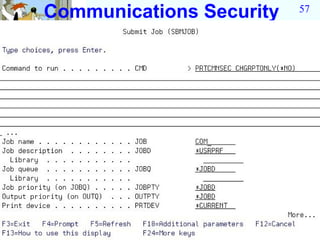
  • 57.
  • 58.
    Communication Information 58 Communications Information (Full Report) Page 1 5716SS1 V3R7M0 961108 MCRISC 12/14/9 03:16:11 Object type . . . . . . . . . : *DEVD Pre Object ObjectT Device Secure Location APPN Single Establish Name Type Categ Locatio Password Capabl Session Session DSP01 *DEVD *DSP ETHLITCP *DEVD *NET MCEDIT *DEVD *APPC *NO *NO *YES *NO *NO OPT01 *DEVD *OPT QANRDEVA *DEVD *APPC *NO *NO *NO *NO *NO QANRDEVB *DEVD *APPC *NO *NO IF *NO device is *NO *NO QCONSOLE QESPAP *DEVD *DEVD *DSP *APPC *NO *NO SECURELOC(*YES) *NO *YES *NO QIADSP *DEVD *HOST recommend using a QIAPRT *DEVD *HOST QPADEV0001 *DEVD *DSP location password QPADEV0002 *DEVD *DSP QQAHOST *DEVD *APPC *NO *NO *NO *YES *NO QTIDA *DEVD *APPC *NO *NO *NO *YES *NO QTIDA2 *DEVD *APPC *NO *NO *NO *YES *NO QYCTSOC *DEVD *APPC *NO *NO *YES *NO *NO TAP01 *DEVD *TAP TAP02 *DEVD *TAP
  • 59.
    Communication Information 59 Object type. . . . . . . . . : *CTLD Object Object Controll Auto Switched Call APPN CP Disc Delete Device Name Type Category Create Controller DirecCapa Sessi TimerMinut Name CTL01 *CTLD *LWS *YES *NO 0 0 DSP01 ETHLINET *CTLD *NET *YES *NO 0 0 ETHLITCP MCEDIT *CTLD *APPC *YES *YES DIAL *YES *YES 30 1440 MCEDIT QANRCTLD *CTLD *APPC *YES *NO *NO *YES 30 1440 QANRDEVA QCTL *CTLD *LWS *YES *NO 0 0 QCONSOLE QESCTL *CTLD *HOST *YES *YES DIAL 0 0 QESPAP QILANM3601 *CTLD *APPC *YES *NO *YES *YES 30 1440 *NONE QPACTL01 *CTLD *VWS *YES *NO 0 0 QPADEV000 QTICTL *CTLD *HOST *YES *YES *DIAL 0 0 QTIDA QVIRCD0001 *CTLD *VWS *YES *NO 0 0 DVSERVERS
  • 60.
    Command Authority 60 Security of CL commands 4
  • 61.
  • 62.
    62 Command Authority Publicly Authorized Objects (Full Report) 5716SS1 V3R7M0 961108 Object type . . . . . . . . . : *CMD Specified library . . . . . . : *ALL Authorization ---------Object-------- -----------Data----- Library Object Owner List Authority Opr Mgt Exist Alter Ref Read Add Upd Dlt Exc $HOOPE DLTPFRDTA2 HOOPES *NONE *CHANGE X X X X X X $KLIMA CVTRPGCAS KLIMA *NONE *CHANGE X X X X X X $KLIMA DSPRCDCNT QDFTOWN *NONE *USE X X X $KLIMA EXTUTILS KLIMA *NONE *CHANGE X X X X X X QSMU DLTSBMCRQ QSYS QSM1AUTL *USE X X X QSMU DSPSBMCRQ QSYS *NONE *USE X X X QSMU DSPSBMCRQA QSYS *NONE *USE X X X QSMU DSPSBMCRQM QSYS *NONE Use report to check for: *USE X X X QSMU DSPSRVPVDA QSYS *NONE ➤ Access to powerful *USE X X X QSMU EDTSMWAUT QSYS *NONE commands *USE X X X QSMU ENDSBMCRQA QSYS QSM1AUTL *USE X X X
  • 63.
    63 Job and OutputQueue Authority 15
  • 64.
    64 Job and OutputQueue Authority
  • 65.
    65 Joband Output Queue Authority Queue Authority (Full Report) Page 1 5716SS1 V3R7M0 961108 MCRISC 12/16/96 13:17:00 Specified library . . . . . . : *ALL Library Object Type Owner Authority DSPDTA OPRCTL AUTCHK ERNIE ERNIE *OUTQ MALAGA *USE *NO *YES *OWNER EVANS EVANS *OUTQ WOEVANS *USE *NO *YES *OWNER HOLT HOLT *OUTQ QDFTOWN *USE *NO *YES *OWNER HOLT SECUREOUTQ *OUTQ QDFTOWN *EXCLUDE *NO *NO *OWNER QADSM QADSM *OUTQ QSYS *USE QAUTOMON QAUTOMON *JOBQ QSYS *USE OUTQs for sensitive QBRM Q1ABRMNET *JOBQ QBRMS *USE output should be QGPL QPFROUTQ *OUTQ QSYS *CHANGE DSPDTA(*NO) * * * Truncated Output * * * OPTCTL(*NO) AUTCHK(*OWNER) The Changed Report shows changes from the previous time the report was run Queue Authority (Changed Report) Page 3 5716SS1 V3R7M0 961108 MCRISC 12/16/96 13:17:00 Specified library . . . . . . : *ALL Last changed report . . . . . : 12/14/96 05:42:10 Library Object Type Owner Authority DSPDTA OPRCTL AUTCHK (There are no queues to list) * * * * * E N D O F L I S T I N G * * * **
  • 66.
  • 67.
  • 68.
    Trigger Programs 68 Trigger Programs (Full Report) Page 1 5716SS1 V3R7M0 961108 MCRISC 12/14/96 04:32:42 Specified library . . . . . . : *ALL Allow Trigger Trigger Trigger Trigger Trigger Repeated Library File Library Program Time Event Condition Change HOLT CUSTMAS HOLT UPDSALES After Update Change No HOLT CUSTMAS2 HOLT UPDSALES After Update Change No MAGCHECK CUST_MSTR $KLIROB CHK_CREDIT After Update Always No MAGWORK ACT001PF MAGWORK ACT003RG Before Insert No MAGWORK ACT001PF MAGWORK ACT003RG Before Update Change No MAGWORK TRIGPF MAGWORK TRIGPGM Before Update Always Yes QUSRSYS QAVATALNP QSVMSS QVATTRIG After Insert No QUSRSYS QAVATALNP QSVMSS QVATTRIG After Delete No QUSRSYS QAVATALNP QSVMSS QVATTRIG After Update Always No Trigger programs run when users access files. Users are often not aware of that the trigger program exit runs when they access data. In a high security environment, the function of trigger programs should be reviewed
  • 69.
    User Objects inQSYS Library 69 19
  • 70.
  • 71.
    71 User Objects in QSYS User Objects (Full Report) Page 1 5716SS1 V3R7M0 MCRISC 12/30/96 01:13:17 Specified library . . . . . : QSYS Libr Object Type Attri Owner Description QSYS GLOOP *LIB PROD WOEVANS COLLECTION - created by SQL QSYS GRP_WOE *USRPRF WOEVANS Group profile for Wayne Evans QSYS DSP01 *DEVD DSPLCL QPGMR CREATED BY AUTO- CONFIGURATION QSYS DSP02 *DEVD DSPLCL QPGMR CREATED BY AUTO- CONFIGURATION QSYS ETHLIN01 *LIND ETH PLUTH Ethernet line on NWS QSYS SLIP *LIND ASC KLIMA QSYS APPCOVRT *CTLD APPC STOTOM QSYS CTL01 *CTLD LWS QPGMR CREATED BY AUTO- CONFIGURATION QSYS QHST963A *FILE PF QSYS 09612240458080961228001002 QSYS QHST966A *FILE PF QSYS 09612280010020961230010013 QSYS DSP01 *MSGQ QSYS Work Station Message Queue QSYS DSP02 Use report to check for: *MSGQ QSYS Work Station Message Queue QSYS VFYOPCCN ➤ User Commands IBM *CMD QSYS ➤ Production IPXD is IBM QSYS QNTBIBM *NTBD QSYS This NTBD is Supplied QSYS QDCIPX1 *IPXD This files QSYS Supplied QSYS QDCIPX2 *IPXD QSYS This IPXD is IBM Supplied
  • 72.
    72 Batch Reports Security Officers General Options Advanced Options Scheduling Reports
  • 73.
    Scheduled Security Reports 73 Useful for repeated use of reports Reports can be scheduled for ➤ Daily ➤ Weekly ➤ Month End or start Uses OS/400 job scheduling functions All of security reports can be scheduled. Security Security Security Report Report ••• Report Period 1 Period 2 Period n
  • 74.
  • 75.
    Schedule Audit JournalReport 75 Put cursor in CMD field F4 Prompt for submitted command Prompting can be used to customize report
  • 76.
    Audit Journal Report 76 + Enter "+" to expand field
  • 77.
    77 Select Audit JournalEvent Types PW CO CA SC Enter additional journal entry types
  • 78.
    Schedule Audit JournalReport 78 Provide job name AUDJRN Provide time *NONE when job should be scheduled *SUN 00:00:01
  • 79.
    Scheduled Jobs 79 WRKJOBSCDE SCDBY(WOEVANS) 5
  • 80.
  • 81.
    Scheduled Jobs 81 Use the other options of WRKSCDJOB to change/remove scheduled jobs
  • 82.
    82 Outline Security Tools Interactive Options Batch Report Scheduling Reports General Options
  • 83.
    83 General Security Options Use this option with care 50
  • 84.
    Configure System Security 84 Do not use this option blindly or your system will be very secure and difficult to use RECOMMEND Retrieve the source of QSECCFGS and modify for your installation View Source
  • 85.
    85 QSECCFGSConfigure Security /********************************************************************/ /* */ /* 5716SS1 V3R7M0 961108 RTVCLSRC Output 12/27/96 04:56:02 */ /* */ /* Program name . . . . . . . . . . . . . . : QSECCFGS PN*/ /* Library name . . . . . . . . . . . . . . : QSYS PL*/ /* Original source file . . . . . . . . . . : SN*/ /* Library name . . . . . . . . . . . . . . : SL*/ /* Original source member . . . . . . . . . : SM*/ /* Source file change */ /* date/time . . . . . . . . . . . . . . : SC*/ /* Patch option . . . . . . . . . . . . . . : *NOPATCH PO*/ /* User profile . . . . . . . . . . . . . . : *USER UP*/ /* Text . . . : TX*/ /* Owner . . . . . . . . . . . . . . . . . : QSYS OW*/ /* Patch change ID . . . . . . . . . . . . : PC*/ /* Patch APAR ID . . . . . . . . . . . . . : PA*/ /* User mod flag . . . . . . . . . . . . . : *NO UM*/ /* ED*/ /********************************************************************/ QSYS/PGM DCL VAR(&IBMREG) TYPE(*CHAR) LEN(300) VALUE('Copyright, - 5799XDH, 5763SS1, 5716SS1, (C) Copyright IBM Corp. 1996. All Rights - Reserved; US Government Users Restricted Rights - Use, duplication or- disclosure restricted by GSA ADP Schedule Contract with IBM Corp. - Licensed Materials - Property of IBM. ')
  • 86.
    86 QSECCFGSConfigure Security DCL VAR(&IBMREG2) TYPE(*CHAR) LEN(300) DCL VAR(&LMTCHRTXTM) TYPE(*CHAR) LEN(7) VALUE('CPXB302') DCL VAR(&DFTVALUE) TYPE(*CHAR) LEN(10) DCL VAR(&APPID) TYPE(*CHAR) LEN(8) DCL VAR(&PNLGRP) TYPE(*CHAR) LEN(20) VALUE('QGSECCSS *LIBL') DCL VAR(&FUNC) TYPE(*CHAR) LEN(4) VALUE(' ') DCL VAR(&ENTERVALUE) TYPE(*DEC) LEN(4) VALUE(100) DCL VAR(&ERRCD) TYPE(*CHAR) LEN(8) VALUE(X'0000000000000000') DCL VAR(&AUTIND) TYPE(*CHAR) LEN(1) DCL VAR(&AUTS) TYPE(*CHAR) LEN(30)- VALUE('*ALLOBJ *SECADM *AUDIT ') DCL VAR(&NUMAUTS) TYPE(*CHAR) LEN(4) VALUE(X'00000003') DCL VAR(&CALLLVL) TYPE(*CHAR) LEN(4) VALUE(X'00000000') QSYS/MONMSG MSGID(CPF0000) QSYS/CHGVAR VAR(&IBMREG2) VALUE(&IBMREG) QSYS/CALL PGM(QSYS/QSYCUSRS) PARM(&AUTIND *CURRENT &AUTS - &NUMAUTS &CALLLVL &ERRCD) QSYS/IF COND(&AUTIND *EQ 'N') THEN(QSYS/SNDPGMMSG MSGID(CPFB304)- MSGF(*LIBL/QCPFMSG) MSGTYPE(*ESCAPE)) QSYS/CALL PGM(QSYS/QUIOPNDA) PARM(&APPID &PNLGRP -1 0 N &ERRCD) QSYS/MONMSG MSGID(CPF0000) EXEC(GOTO CMDLBL(SKIPUIM)) QSYS/CALL PGM(QSYS/QUIDSPP) PARM(&APPID &FUNC 'CONCSS' N &ERRCD) QSYS/CALL PGM(QSYS/QUICLOA) PARM(&APPID M &ERRCD) QSYS/IF COND(%BIN(&FUNC) *NE &ENTERVALUE) THEN(QSYS/RETURN) SKIPUIM:
  • 87.
    87 QSECCFGS ConfigureSecurity QSYS/CHGSECAUD QAUDCTL(*ALL) QAUDLVL(*DFTSET) QSYS/CHGSYSVAL SYSVAL(QALWOBJRST) VALUE('*NONE') /* *ALL */ QSYS/CHGSYSVAL SYSVAL(QAUTOCFG) VALUE('0') /* 1 */ QSYS/CHGSYSVAL SYSVAL(QAUTOVRT) VALUE(0) /* 1 */ QSYS/CHGSYSVAL SYSVAL(QDEVRCYACN) VALUE('*DSCMSG') QSYS/CHGSYSVAL SYSVAL(QDSCJOBITV) VALUE('120') QSYS/CHGSYSVAL SYSVAL(QDSPSGNINF) VALUE('1') /* 0 */ QSYS/CHGSYSVAL SYSVAL(QINACTITV) VALUE('60') QSYS/CHGSYSVAL SYSVAL(QINACTMSGQ) VALUE('*ENDJOB') /* *DSCJOB */ QSYS/CHGSYSVAL SYSVAL(QLMTDEVSSN) VALUE('1') /* 0 */ QSYS/CHGSYSVAL SYSVAL(QLMTSECOFR) VALUE('1') /* 0 */ QSYS/CHGSYSVAL SYSVAL(QMAXSGNACN) VALUE('3') QSYS/CHGSYSVAL SYSVAL(QMAXSIGN) VALUE('3') QSYS/CHGSYSVAL SYSVAL(QRMTSIGN) VALUE('*FRCSIGNON') QSYS/CHGSYSVAL SYSVAL(QRMTSRVATR) VALUE('0') QSYS/CHGSYSVAL SYSVAL(QSECURITY) VALUE('50') /* 40 */ QSYS/CHGSYSVAL SYSVAL(QPWDEXPITV) VALUE('60') QSYS/CHGSYSVAL SYSVAL(QPWDMINLEN) VALUE(6) QSYS/CHGSYSVAL SYSVAL(QPWDMAXLEN) VALUE(8) /* 8-10 */ QSYS/CHGSYSVAL SYSVAL(QPWDPOSDIF) VALUE('1') /* 0 */
  • 88.
    88 QSECCFGS Configure Security QSYS/RTVMSG MSGID(&LMTCHRTXTM) MSGF(QCPFMSG) MSG(&DFTVALUE) /* #$@ */ /* 0 */ QSYS/CHGSYSVAL SYSVAL(QPWDLMTCHR) VALUE(&DFTVALUE) QSYS/CHGSYSVAL SYSVAL(QPWDLMTAJC) VALUE('1') QSYS/CHGSYSVAL SYSVAL(QPWDLMTREP) VALUE('2') /* 0 */ QSYS/CHGSYSVAL SYSVAL(QPWDRQDDGT) VALUE('1') /* 0 */ /* pgm */ QSYS/CHGSYSVAL SYSVAL(QPWDRQDDIF) VALUE('1') QSYS/CHGSYSVAL SYSVAL(QPWDVLDPGM) VALUE('*NONE') /*** Set password of user profiles ***/ QSYS/CHGUSRPRF USRPRF(QSYSOPR) PASSWORD(*NONE) QSYS/CHGUSRPRF USRPRF(QPGMR) PASSWORD(*NONE) QSYS/CHGUSRPRF USRPRF(QUSER) PASSWORD(*NONE) QSYS/CHGUSRPRF USRPRF(QSRV) PASSWORD(*NONE) QSYS/CHGUSRPRF USRPRF(QSRVBAS) PASSWORD(*NONE) Change source for installation QSYS/ENDPGM defaults before running the program
  • 89.
    89 General Security Options Use this option with care 51
  • 90.
    90 Configure System Security Donot use this option blindly or your system will be very secure and difficult to use RECOMMEND Retrieve the source of QSECRVKP and modify for your installation
  • 91.
    91 General Security Options Long running function to check all objects in system. Use only in high security 52 environments.
  • 92.
    92 CHKOBJITG Report CHKOBJITG QUERY VIOLATION OBJECT LIBRARY TYPE OWNER NOTTRANS SGN001CL MAGWORK *PGM QSECOFR NOTTRANS SWAP MAGWORK *PGM QSECOFR NOTTRANS Integrity violations types RISPRFCLViolations Types POINT51 *PGM QSECOFR DMNDMN The domain is not correct for the object type The domain is not correct for the object type NOTTRANSPGMMOD The object has been*PGM QHIWX6EP QPWXCGY modified QSYS NOTTRANS The object has been *PGM modified QSYS NOTTRANSPGMMOD Object has not been converted to RISC format QHIWX2ES QPWXCWND DMN NOTTRANS Object has not been converted to RISC format QCQJMSMQ QSVMSS *SMQ QSYS The NOTTRANS objects can be DMN QCQAPCOI QSVMSS *SMIDX translated by CHGPGM or recompile QSYS DMN QCQJMSMINOTTRANS objects can be The QSVMSS *SMIDX QSYS DMN translated by CHGPGM*DSNXO QCQJMSPC QSVMSS or recompile QSYS
  • 93.
    PROBLEM 93 Security tools shipped by IBM require *ALLOBJ and *IOSYSCFG special authority. Administrators that want auditors to use tools do not want to give these users powerful *ALLOBJ authority.
  • 94.
    94 Adoption of Authority QUESTION Is there a way to give someone other than a user with powerful special authority access to the security tools? ANSWER Yes, the special authorities *ALLOBJ and *IOSYSCFG can be adopted.
  • 95.
    95 Adoption of Authority QUESTION Can I give users access by adopting before I display the security tool menu? ANSWER YES it is possible to adopt before you issue the GO SECTOOLS command NOT RECOMMENDED 1. The security tools menu has a command line. Adoption Rule 1 DO NOT GIVE USERS A COMMAND LINE WHEN ADOPTING 2. Adopted authority will not work for
  • 96.
    96 Adoption of Authority QUESTION How can I get the security tools to adopt? ANSWER Change the security tools commands to call your program. Your program will adopt and then call the IBM CPP (Command Processing Program) Command Command ADOPT IBM OWNER CPP PGM IBM CPP Shipped support Modified function no adoption with adoption WARNING: Changing the IBM commands is not recommended by IBM BUT IT WORKS!!
  • 97.
    Adopting Authority forSecurity Tools 97 1. Create authorization list to secure function CRTAUTL SECTOOLS AUT(*EXCLUDE) The security tools were limited to users with *ALLOBJ authority. After these changes you must secure the use of tools
  • 98.
    Adopting Authority forSecurity Tools 98 2. Create a program to adopt and ADOPT call IBM CPP ➤ Store the program in library QSYS OWNER ➤ Have the program adopt authority ➤ Secure the program using the PGM SECTOOLS authorization list CRTCLPGM QSYS/Q$SECJOBD0 SRCFILE( ) USRPRF(*OWNER) AUT(SECTOOLS) PGM (&P1 &P2 &P3) DCL &P1 *CHAR 1 DCL &P2 *CHAR 1 DCL &P3 *CHAR 1 CALL QSYS/QSECJOBD0 + (&p1 &p2 &p3) ENDPGM
  • 99.
    Adopting Authority forSecurity Tools 99 3. Create a backup copy of the IBM command CRTDUPOBJ PRTJOBDAUT QSYS *CMD TOLIB(QSYSSAVE) This step is important should you need to remove changes. 4. Change command to call that adopts (This is the program created in step 2) CHGCMD QSYS/PRTJOBDAUT PGM(QSYS/Q$SECJOBD0)
  • 100.
    Adopting Authority forSecurity Tools 100 5. Secure the command with SECTOOLS authorization list GRTOBJAUT QSYS/PRTJOBDAUT *CMD AUTL(SECTOOLS) 6. Add user profiles to the SECTOOLS authorization list EDTAUTL AUTL(SECTOOLS)
  • 101.
    101 End of Presentation WOEvans@AOL.com