Thanks for joining us.


The webinar will begin
       shortly.
    Join the pre-show chatter on
    Twitter using hashtag: #mindfireinc
March 11th, 2011


                                                LookWho’sClicking
                                                2.25 Release Webinar
                                                   Taking Your Landing Pages Social
                                                                                Joseph Manos
                                                                      Executive Vice President

                                                                             David Rosendahl
                                                                Co-founder, EVP Client Services

                                                                             Michael Dunahee
                                                                             Product Manager

© 2011 MindFireInc
This document is the property of MindFireInc.
Housekeeping
 We’re recording!

 Today’s hashtag:
 #mindfireinc

 Ask questions
Housekeeping


  Submit questions/comments
   during the session via chat
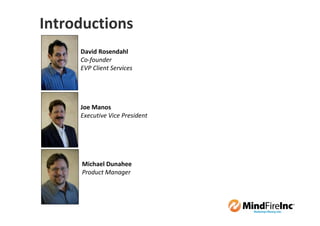
Introductions
     David Rosendahl
     Co-founder
     EVP Client Services


     Joe Manos
     Executive Vice President


     Michael Dunahee
     Product Manager
Today’s Tour
 Social Media: Why Should You Care?

 New Features for Campaign Flexibility

 A Look Ahead

 Q & A (15 minutes)
Today’s Approach
 Not “technical”

 Learn about new
 features … spark ideas!

 Give you 3+ ideas for Q2
POLL!
Social Media
What
 The
Heck is
Social
Media
“Social media is the use of web-
  based and mobile technologies
  to turn communication into
  interactive dialogue.”

“A common thread running
  through all definitions of social
  media is a blending of
  technology and social
  interaction for the co-creation
  of value. “
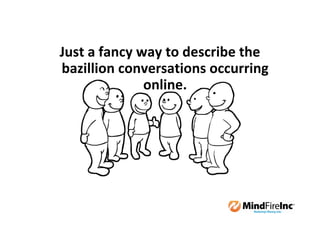
Just a fancy way to describe the
bazillion conversations occurring
              online.
Why
Should
 I Care
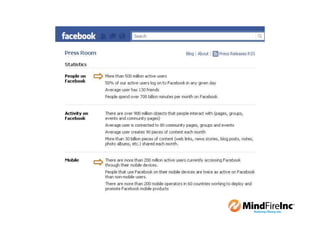
500+ million
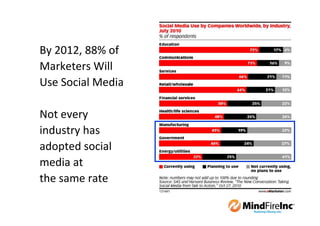
By 2012, 88% of
Marketers Will
Use Social Media

Not every
industry has
adopted social
media at
the same rate
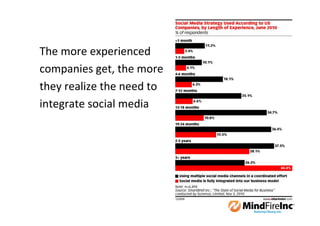
The more experienced
companies get, the more
they realize the need to
integrate social media
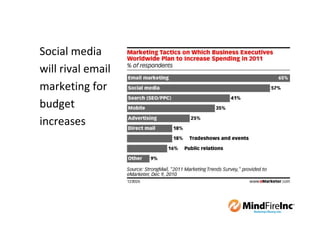
Social media
will rival email
marketing for
budget
increases
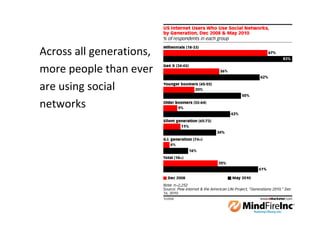
Across all generations,
more people than ever
are using social
networks
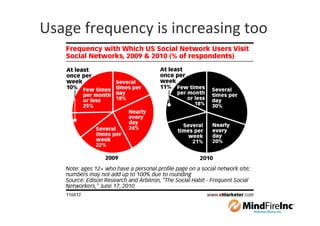
Usage frequency is increasing too
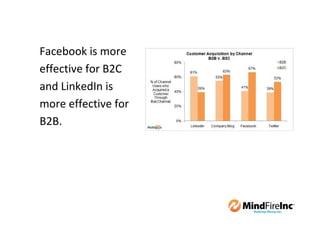
Facebook is more
effective for B2C
and LinkedIn is
more effective for
B2B.
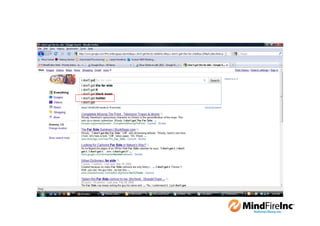
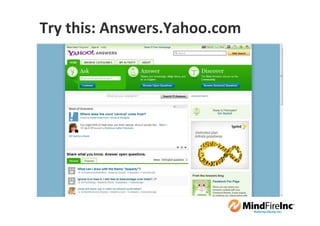
Try this: Answers.Yahoo.com
Where
 do I
 Start
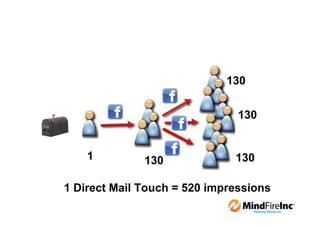
130

                               130


    1         130             130

1 Direct Mail Touch = 520 impressions
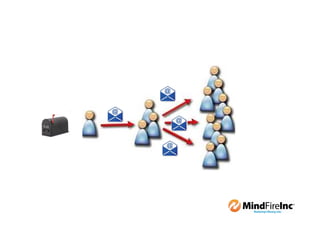
1. Embed share button(s) within any page

2. When respondents press the share button, content
   is shared to the social network with a link back to
   the microsite

3. “Friends” view the content, and click the link to the
   microsite

4. You have a new contact/lead. The process repeats.

5. Identify “influencers”
Real
World
Example
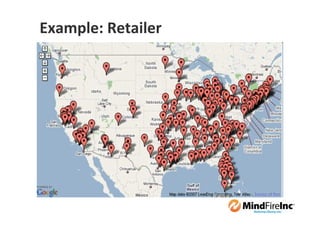
Example: Retailer
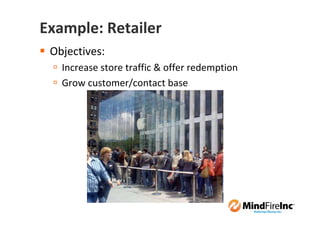
Example: Retailer
 Objectives:
   Increase store traffic & offer redemption
   Grow customer/contact base
Tactics
1. Create direct mail w/personalized URL, driving respondents to
   landing page.

2. On the landing page:
      Respondents complete a short survey to receive an offer via email
      The offer must be taken to a store for redemption
      Respondents can also share the offer with their friends

3. Respondents who shares the offer with friends are
   automatically entered into a sweepstakes (free stuff for a
   year, iPad 2, etc.)

4. Friends who respond virally start a step 2, and the process
   repeats.
Metrics to Measure
 Visit & Response Rate to Direct Mail

 Social Media:
    Facebook: Measure how many people each share brings (e.g., 1 share
    brings 5 additional people)
    Twitter: Measure how many people each tweet brings (e.g., 1 tweet
    brings 10 additional people)
    Determine which social media site drives quality results (consider
    placing ads on the network)
    Determine which individuals are biggest “influencers”

 Measure in-store redemption, by channel

 Measure increase in contact/database size
How Do
 I Do It?
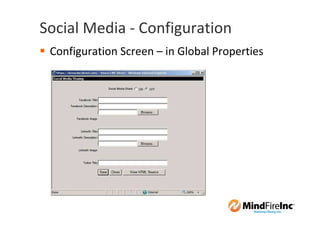
Social Media - Configuration
 Configuration Screen – in Global Properties
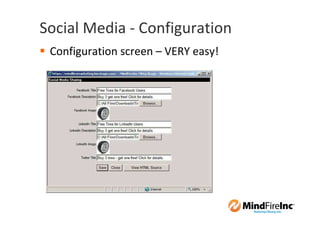
Social Media - Configuration
 Configuration screen – VERY easy!
Social Media - Configuration
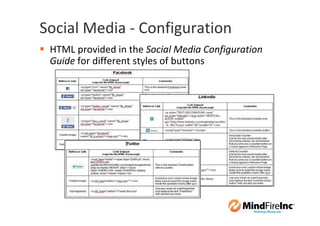
 HTML provided in the Social Media Configuration
 Guide for different styles of buttons
Social Media - Configuration
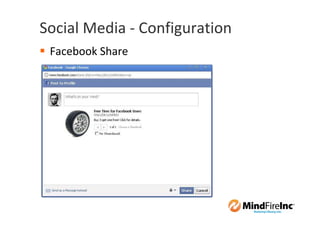
 Facebook Share
Social Media - Configuration
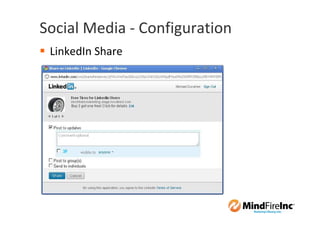
 LinkedIn Share
Social Media - Configuration
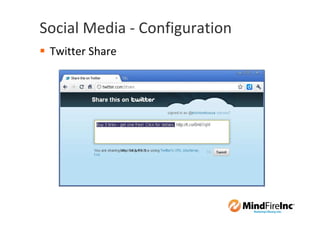
 Twitter Share
Social Media - Reporting
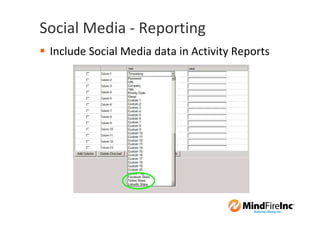
 Include Social Media data in Activity Reports
Social Media - Reporting
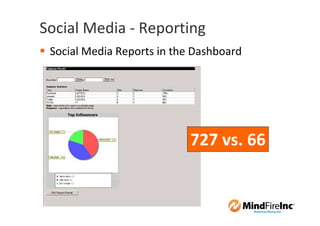
 Social Media Reports in the Dashboard


                            727 vs. 66
How Do
I Learn
More
A few tips
 Read:
   FastLaunch Resource Center
   Mashable.com
   Insidefacebook.com
   Marketingsherpa.com


 Create an account at Facebook, LinkedIn,
 Twitter. Friend me!
Who Wants to be a Millionaire?
           Business.com: $7.5 million
            Fund.com: $9.9 million
         CreditCards.com: $2.75 million

 Tips:
   Register your company name (and your own!)
   Register your Client’s!
Campaign
Flexibility
Campaign Flexibility
 Develop expertise to deploy various scenarios

 Steps:
   Take advantage of Training, offered 3x p/week
   Watch training videos, participate in MindShare
   Execute your Self-Promotional Campaign


 Leverage Professional Services if needed
The 2.25 Release
 Features have been designed to give you
 greater flexibility in your campaigns.

 Features have been rolled out
 in several smaller releases

 More features are being added in
 the next few weeks.
The 2.25 Release
  Social Media Sharing

  Edit Mail File Records in a Live Campaign

  Add a Custom Logo to your Customers’ Dashboards

  Version Pages based on the Source Tracking Origin

  SMS Improvements
Edit Mail File Records

 Previously, users had to remove mail file(s),
 make edits and re-upload mail file(s).

 Users can now edit individual mail file records
 in a live campaign without affecting statistics.

 Modify, add or remove any mail file field
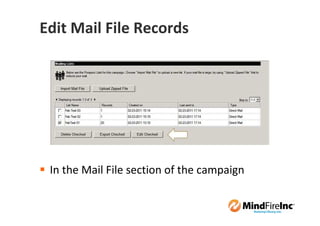
Edit Mail File Records


 In the Mail File section of the campaign
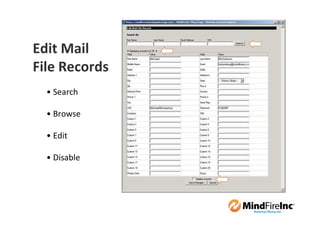
Edit Mail
File Records
  • Search

  • Browse

  • Edit

  • Disable
Add a Custom Logo to the Dashboard

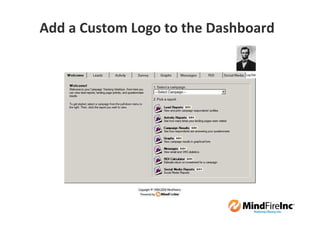
 Add a custom logo or image to the users’
 Dashboards.

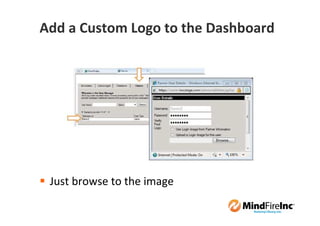
 When adding or editing a user, browse to the
 logo or image.

 The same image dimensions are still
 recommended (200pixels X 60pixels).
Add a Custom Logo to the Dashboard


 Just browse to the image
Add a Custom Logo to the Dashboard
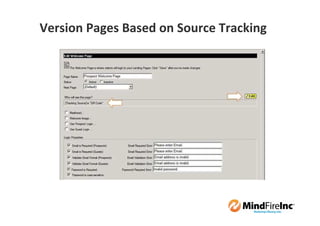
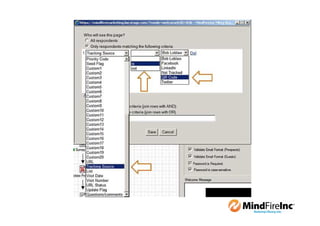
Version Pages Based on Source Tracking
 Version Welcome or Thank You pages based
 on the Source Tracking

 For example, if you are using Source Tracking
 in your QR Codes, you can version your
 Welcome Page to be more mobile-friendly.

 This feature sets the stage for more mobile
 marketing features in the next release
 (Summer ‘11)
Version Pages Based on Source Tracking
SMS Improvements
 Users will not notice any difference in how the
 program works, but they will see increased
 coverage in the US.

 The platform is now in place to add two-way
 SMS in the next release.

 Expected to be released next week.
A Look Ahead
Summer and Fall ’11 Releases
 Use Control Panel in Firefox and Safari

 Most features will be geared towards
 mobile marketing

     Inbound SMS
     Mobile Device Detection
     Versioning the Survey Page
Also in our plans for future releases:

 Any other great suggestions that you make on
 the MindShare website.
 http://mindshare.mindfireinc.com

 Call me directly (949-265-1255) if you want to
 discuss upcoming features.
 Note: This number is not for Technical Support.
How
Do I…?
How do I …
 Configure the features:
 Support & Training: 949-474-4418 option 2


 Market & sell the features:
 Carrie Driscoll-Hill: 480-626-4957


 Get started:
 Joe Manos: 916-284-8112
Reach Us
David Rosendahl
                           David Rosendahl
949-474-4418 x208          Co-founder
daver@mindfireinc.com      EVP Client Services
@daverosendahl

Joe Manos                  Joe Manos
916-284-8112               Executive Vice President
jmanos@mindfireinc.com
@jemanos

Michael Dunahee
949-265-1255               Michael Dunahee
                           Product Manager
mdunahee@mindfireinc.com
@mdunahee
Submit your
questions now.
Q&A
Thank you!

Taking Your Landing Pages Social

  • 1.
    Thanks for joiningus. The webinar will begin shortly. Join the pre-show chatter on Twitter using hashtag: #mindfireinc
  • 2.
    March 11th, 2011 LookWho’sClicking 2.25 Release Webinar Taking Your Landing Pages Social Joseph Manos Executive Vice President David Rosendahl Co-founder, EVP Client Services Michael Dunahee Product Manager © 2011 MindFireInc This document is the property of MindFireInc.
  • 3.
    Housekeeping We’re recording! Today’s hashtag: #mindfireinc Ask questions
  • 4.
    Housekeeping Submitquestions/comments during the session via chat
  • 6.
    Introductions David Rosendahl Co-founder EVP Client Services Joe Manos Executive Vice President Michael Dunahee Product Manager
  • 7.
    Today’s Tour SocialMedia: Why Should You Care? New Features for Campaign Flexibility A Look Ahead Q & A (15 minutes)
  • 8.
    Today’s Approach Not“technical” Learn about new features … spark ideas! Give you 3+ ideas for Q2
  • 9.
  • 10.
  • 11.
  • 13.
    “Social media isthe use of web- based and mobile technologies to turn communication into interactive dialogue.” “A common thread running through all definitions of social media is a blending of technology and social interaction for the co-creation of value. “
  • 14.
    Just a fancyway to describe the bazillion conversations occurring online.
  • 15.
  • 16.
  • 18.
    By 2012, 88%of Marketers Will Use Social Media Not every industry has adopted social media at the same rate
  • 19.
    The more experienced companiesget, the more they realize the need to integrate social media
  • 20.
    Social media will rivalemail marketing for budget increases
  • 21.
    Across all generations, morepeople than ever are using social networks
  • 22.
    Usage frequency isincreasing too
  • 24.
    Facebook is more effectivefor B2C and LinkedIn is more effective for B2B.
  • 25.
  • 26.
  • 28.
    130 130 1 130 130 1 Direct Mail Touch = 520 impressions
  • 29.
    1. Embed sharebutton(s) within any page 2. When respondents press the share button, content is shared to the social network with a link back to the microsite 3. “Friends” view the content, and click the link to the microsite 4. You have a new contact/lead. The process repeats. 5. Identify “influencers”
  • 30.
  • 31.
  • 32.
    Example: Retailer Objectives: Increase store traffic & offer redemption Grow customer/contact base
  • 33.
    Tactics 1. Create directmail w/personalized URL, driving respondents to landing page. 2. On the landing page: Respondents complete a short survey to receive an offer via email The offer must be taken to a store for redemption Respondents can also share the offer with their friends 3. Respondents who shares the offer with friends are automatically entered into a sweepstakes (free stuff for a year, iPad 2, etc.) 4. Friends who respond virally start a step 2, and the process repeats.
  • 34.
    Metrics to Measure Visit & Response Rate to Direct Mail Social Media: Facebook: Measure how many people each share brings (e.g., 1 share brings 5 additional people) Twitter: Measure how many people each tweet brings (e.g., 1 tweet brings 10 additional people) Determine which social media site drives quality results (consider placing ads on the network) Determine which individuals are biggest “influencers” Measure in-store redemption, by channel Measure increase in contact/database size
  • 35.
    How Do IDo It?
  • 36.
    Social Media -Configuration Configuration Screen – in Global Properties
  • 37.
    Social Media -Configuration Configuration screen – VERY easy!
  • 38.
    Social Media -Configuration HTML provided in the Social Media Configuration Guide for different styles of buttons
  • 39.
    Social Media -Configuration Facebook Share
  • 40.
    Social Media -Configuration LinkedIn Share
  • 41.
    Social Media -Configuration Twitter Share
  • 42.
    Social Media -Reporting Include Social Media data in Activity Reports
  • 43.
    Social Media -Reporting Social Media Reports in the Dashboard 727 vs. 66
  • 44.
  • 45.
    A few tips Read: FastLaunch Resource Center Mashable.com Insidefacebook.com Marketingsherpa.com Create an account at Facebook, LinkedIn, Twitter. Friend me!
  • 46.
    Who Wants tobe a Millionaire? Business.com: $7.5 million Fund.com: $9.9 million CreditCards.com: $2.75 million Tips: Register your company name (and your own!) Register your Client’s!
  • 47.
  • 48.
    Campaign Flexibility Developexpertise to deploy various scenarios Steps: Take advantage of Training, offered 3x p/week Watch training videos, participate in MindShare Execute your Self-Promotional Campaign Leverage Professional Services if needed
  • 49.
    The 2.25 Release Features have been designed to give you greater flexibility in your campaigns. Features have been rolled out in several smaller releases More features are being added in the next few weeks.
  • 50.
    The 2.25 Release Social Media Sharing Edit Mail File Records in a Live Campaign Add a Custom Logo to your Customers’ Dashboards Version Pages based on the Source Tracking Origin SMS Improvements
  • 51.
    Edit Mail FileRecords Previously, users had to remove mail file(s), make edits and re-upload mail file(s). Users can now edit individual mail file records in a live campaign without affecting statistics. Modify, add or remove any mail file field
  • 52.
    Edit Mail FileRecords In the Mail File section of the campaign
  • 53.
    Edit Mail File Records • Search • Browse • Edit • Disable
  • 54.
    Add a CustomLogo to the Dashboard Add a custom logo or image to the users’ Dashboards. When adding or editing a user, browse to the logo or image. The same image dimensions are still recommended (200pixels X 60pixels).
  • 55.
    Add a CustomLogo to the Dashboard Just browse to the image
  • 56.
    Add a CustomLogo to the Dashboard
  • 57.
    Version Pages Basedon Source Tracking Version Welcome or Thank You pages based on the Source Tracking For example, if you are using Source Tracking in your QR Codes, you can version your Welcome Page to be more mobile-friendly. This feature sets the stage for more mobile marketing features in the next release (Summer ‘11)
  • 58.
    Version Pages Basedon Source Tracking
  • 60.
    SMS Improvements Userswill not notice any difference in how the program works, but they will see increased coverage in the US. The platform is now in place to add two-way SMS in the next release. Expected to be released next week.
  • 61.
  • 62.
    Summer and Fall’11 Releases Use Control Panel in Firefox and Safari Most features will be geared towards mobile marketing Inbound SMS Mobile Device Detection Versioning the Survey Page
  • 63.
    Also in ourplans for future releases: Any other great suggestions that you make on the MindShare website. http://mindshare.mindfireinc.com Call me directly (949-265-1255) if you want to discuss upcoming features. Note: This number is not for Technical Support.
  • 65.
  • 66.
    How do I… Configure the features: Support & Training: 949-474-4418 option 2 Market & sell the features: Carrie Driscoll-Hill: 480-626-4957 Get started: Joe Manos: 916-284-8112
  • 67.
    Reach Us David Rosendahl David Rosendahl 949-474-4418 x208 Co-founder daver@mindfireinc.com EVP Client Services @daverosendahl Joe Manos Joe Manos 916-284-8112 Executive Vice President jmanos@mindfireinc.com @jemanos Michael Dunahee 949-265-1255 Michael Dunahee Product Manager mdunahee@mindfireinc.com @mdunahee
  • 68.
  • 69.
  • 70.