User Models
Predicting a user’s behaviour
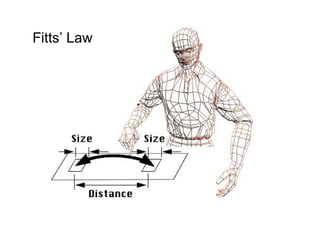
Fitts’ Law
Objectives
• Define predictive and descriptive models and
explain why they are useful
• Describe Fitts’ Law and explain its
implications for interface design
• Apply Fitts’ Law and other predictive models
to evaluate interfaces
• Explain Guiard’s model of two-handed
interaction. Apply this model to evaluate two-
handed interaction techniques
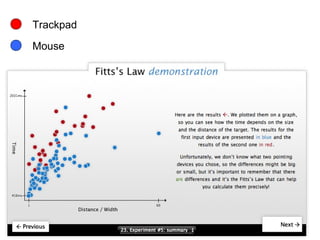
Trackpad
Mouse
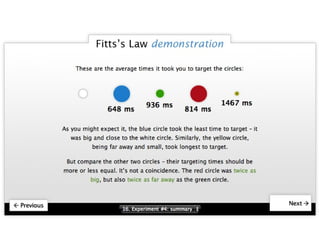
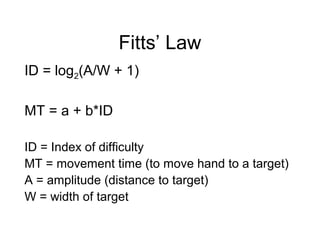
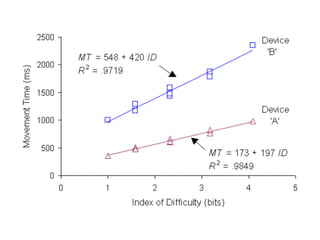
Fitts’ Law
ID = log2(A/W + 1)
MT = a + b*ID
ID = Index of difficulty
MT = movement time (to move hand to a target)
A = amplitude (distance to target)
W = width of target
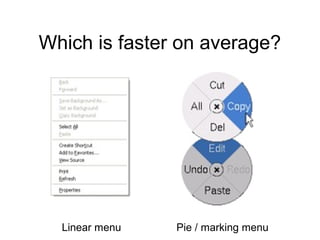
Which is faster on average?
Linear menu Pie / marking menu
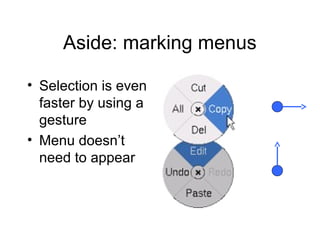
Aside: marking menus
• Selection is even
faster by using a
gesture
• Menu doesn’t
need to appear
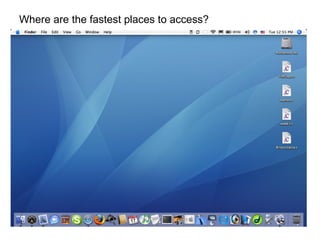
Where are the fastest places to access?
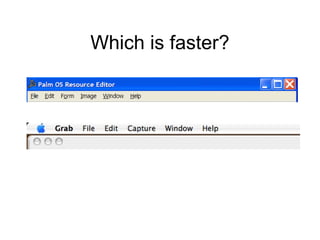
Which is faster?
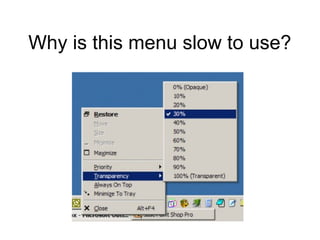
Why is this menu slow to use?
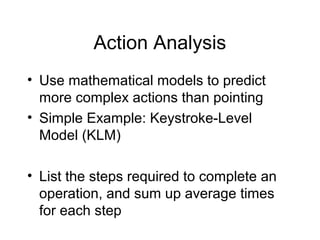
Action Analysis
• Use mathematical models to predict
more complex actions than pointing
• Simple Example: Keystroke-Level
Model (KLM)
• List the steps required to complete an
operation, and sum up average times
for each step
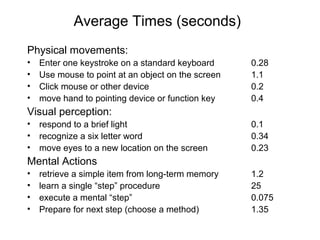
Average Times (seconds)
Physical movements:
• Enter one keystroke on a standard keyboard 0.28
• Use mouse to point at an object on the screen 1.1
• Click mouse or other device 0.2
• move hand to pointing device or function key 0.4
Visual perception:
• respond to a brief light 0.1
• recognize a six letter word 0.34
• move eyes to a new location on the screen 0.23
Mental Actions
• retrieve a simple item from long-term memory 1.2
• learn a single “step” procedure 25
• execute a mental “step” 0.075
• Prepare for next step (choose a method) 1.35
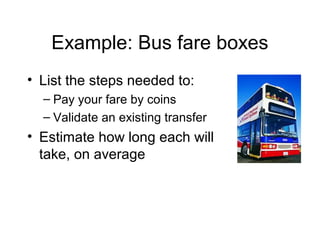
Example: Bus fare boxes
• List the steps needed to:
– Pay your fare by coins
– Validate an existing transfer
• Estimate how long each will
take, on average
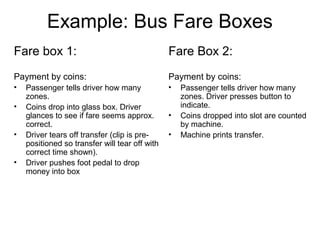
Example: Bus Fare Boxes
Fare box 1:
Payment by coins:
• Passenger tells driver how many
zones.
• Coins drop into glass box. Driver
glances to see if fare seems approx.
correct.
• Driver tears off transfer (clip is pre-
positioned so transfer will tear off with
correct time shown).
• Driver pushes foot pedal to drop
money into box
Fare Box 2:
Payment by coins:
• Passenger tells driver how many
zones. Driver presses button to
indicate.
• Coins dropped into slot are counted
by machine.
• Machine prints transfer.
Example: Bus Fare Boxes
Fare box 1:
To validate an existing transfer
• Passenger holds up for driver to see
• Driver determines if time is valid
Fare Box 2:
To validate a transfer
• Passenger feeds transfer into slot.
• Machine reads transfer
electronically and prints ok
message.
• Machine returns transfer to user.
Expert vs. novice users
• Fitts’ law and the KLM model only
EXPERT performance.
• Novice performance is much harder to
model.
Predictive vs. Descriptive
models
• Predictive – allow a mathematical
prediction of performance (usually time)
e.g. Fitts’ law, KLM
• Descriptive – A framework for thinking
about a problem e.g. Guiard’s model
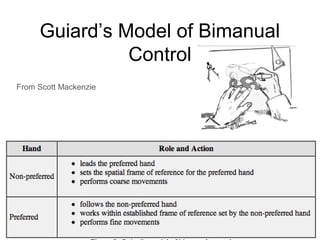
Guiard’s Model of Bimanual
Control
From Scott Mackenzie
Case studies
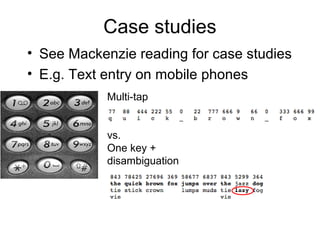
• See Mackenzie reading for case studies
• E.g. Text entry on mobile phones
Multi-tap
vs.
One key +
disambiguation
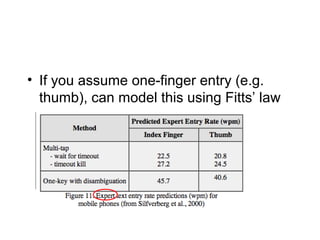
• If you assume one-finger entry (e.g.
thumb), can model this using Fitts’ law
More complex user modeling:
Eg. Correctly placing menus
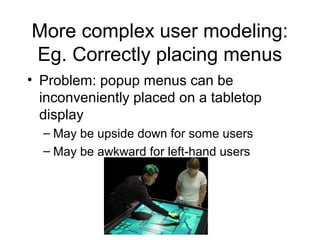
• Problem: popup menus can be
inconveniently placed on a tabletop
display
– May be upside down for some users
– May be awkward for left-hand users
Solution: neural network
Step 1: Training
Handedness
Side of table
Position & orientation
of input device (pen)
Neural network
Mark Hancock - 2003
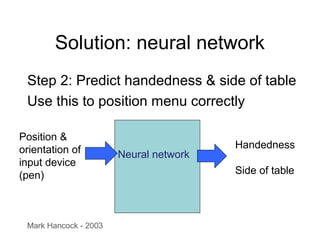
Solution: neural network
Step 2: Predict handedness & side of table
Use this to position menu correctly
Position &
orientation of
input device
(pen)
Neural network
Mark Hancock - 2003
Handedness
Side of table
Key Points
• Predictive models enable you to predict
expert user performance at simple tasks, and
consequently design interfaces that will
support better performance.
• Predictive models have limited usefulness
(only expert users & frequent operations).
They should not replace user testing.
• Descriptive models may help you understand
a process better.

18 models

  • 1.
    User Models Predicting auser’s behaviour
  • 2.
  • 3.
    Objectives • Define predictiveand descriptive models and explain why they are useful • Describe Fitts’ Law and explain its implications for interface design • Apply Fitts’ Law and other predictive models to evaluate interfaces • Explain Guiard’s model of two-handed interaction. Apply this model to evaluate two- handed interaction techniques
  • 5.
  • 6.
    Fitts’ Law ID =log2(A/W + 1) MT = a + b*ID ID = Index of difficulty MT = movement time (to move hand to a target) A = amplitude (distance to target) W = width of target
  • 8.
    Which is fasteron average? Linear menu Pie / marking menu
  • 9.
    Aside: marking menus •Selection is even faster by using a gesture • Menu doesn’t need to appear
  • 10.
    Where are thefastest places to access?
  • 11.
  • 12.
    Why is thismenu slow to use?
  • 13.
    Action Analysis • Usemathematical models to predict more complex actions than pointing • Simple Example: Keystroke-Level Model (KLM) • List the steps required to complete an operation, and sum up average times for each step
  • 14.
    Average Times (seconds) Physicalmovements: • Enter one keystroke on a standard keyboard 0.28 • Use mouse to point at an object on the screen 1.1 • Click mouse or other device 0.2 • move hand to pointing device or function key 0.4 Visual perception: • respond to a brief light 0.1 • recognize a six letter word 0.34 • move eyes to a new location on the screen 0.23 Mental Actions • retrieve a simple item from long-term memory 1.2 • learn a single “step” procedure 25 • execute a mental “step” 0.075 • Prepare for next step (choose a method) 1.35
  • 15.
    Example: Bus fareboxes • List the steps needed to: – Pay your fare by coins – Validate an existing transfer • Estimate how long each will take, on average
  • 16.
    Example: Bus FareBoxes Fare box 1: Payment by coins: • Passenger tells driver how many zones. • Coins drop into glass box. Driver glances to see if fare seems approx. correct. • Driver tears off transfer (clip is pre- positioned so transfer will tear off with correct time shown). • Driver pushes foot pedal to drop money into box Fare Box 2: Payment by coins: • Passenger tells driver how many zones. Driver presses button to indicate. • Coins dropped into slot are counted by machine. • Machine prints transfer.
  • 17.
    Example: Bus FareBoxes Fare box 1: To validate an existing transfer • Passenger holds up for driver to see • Driver determines if time is valid Fare Box 2: To validate a transfer • Passenger feeds transfer into slot. • Machine reads transfer electronically and prints ok message. • Machine returns transfer to user.
  • 18.
    Expert vs. noviceusers • Fitts’ law and the KLM model only EXPERT performance. • Novice performance is much harder to model.
  • 19.
    Predictive vs. Descriptive models •Predictive – allow a mathematical prediction of performance (usually time) e.g. Fitts’ law, KLM • Descriptive – A framework for thinking about a problem e.g. Guiard’s model
  • 20.
    Guiard’s Model ofBimanual Control From Scott Mackenzie
  • 21.
    Case studies • SeeMackenzie reading for case studies • E.g. Text entry on mobile phones Multi-tap vs. One key + disambiguation
  • 22.
    • If youassume one-finger entry (e.g. thumb), can model this using Fitts’ law
  • 23.
    More complex usermodeling: Eg. Correctly placing menus • Problem: popup menus can be inconveniently placed on a tabletop display – May be upside down for some users – May be awkward for left-hand users
  • 24.
    Solution: neural network Step1: Training Handedness Side of table Position & orientation of input device (pen) Neural network Mark Hancock - 2003
  • 25.
    Solution: neural network Step2: Predict handedness & side of table Use this to position menu correctly Position & orientation of input device (pen) Neural network Mark Hancock - 2003 Handedness Side of table
  • 26.
    Key Points • Predictivemodels enable you to predict expert user performance at simple tasks, and consequently design interfaces that will support better performance. • Predictive models have limited usefulness (only expert users & frequent operations). They should not replace user testing. • Descriptive models may help you understand a process better.
Editor's Notes

  • #11 Where is the fastest place to access? (where your cursor is currently) Next fastest? (corners) Next fastest? (sides)