Origins of theTerm
The term "hash" comes by way of
analogy with its standard meaning in
the physical world, to "chop and
mix.”
D. Knuth notes that Hans Peter
Luhn of IBM appears to have been
the first to use the concept, in a
memo dated January 1953; the term
hash came into use some ten years
later.
3.
Concept of Hashing
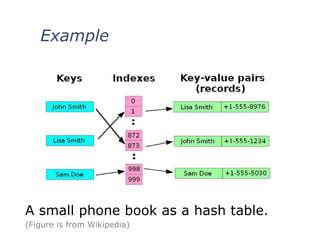
In CS, a hash table, or a hash map,
is a data structure that associates
keys (names) with values (attributes).
Look-Up Table
Dictionary
Cache
Extended Array
Just An Idea
Hash table :
Collection of pairs,
Lookup function (Hash function)
Hash tables are often used to
implement associative arrays,
Worst-case time for Get, Insert, and
Delete is O(size).
Expected time is O(1).
7.
7
Hash Tables
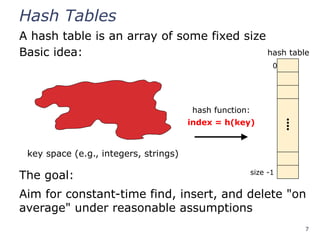
A hashtable is an array of some fixed size
Basic idea:
The goal:
Aim for constant-time find, insert, and delete "on
average" under reasonable assumptions
0
⁞
size -1
hash function:
index = h(key)
hash table
key space (e.g., integers, strings)
8.
8
An Ideal HashFunctions
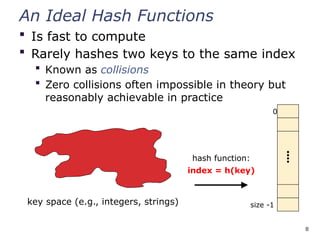
Is fast to compute
Rarely hashes two keys to the same index
Known as collisions
Zero collisions often impossible in theory but
reasonably achievable in practice
0
⁞
size -1
hash function:
index = h(key)
key space (e.g., integers, strings)
9.
9
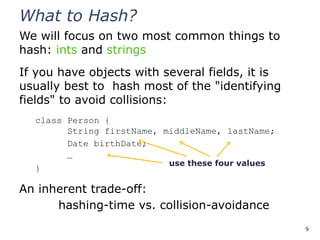
What to Hash?
Wewill focus on two most common things to
hash: ints and strings
If you have objects with several fields, it is
usually best to hash most of the "identifying
fields" to avoid collisions:
class Person {
String firstName, middleName, lastName;
Date birthDate;
…
}
An inherent trade-off:
hashing-time vs. collision-avoidance
use these four values
11
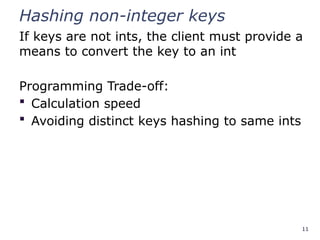
Hashing non-integer keys
Ifkeys are not ints, the client must provide a
means to convert the key to an int
Programming Trade-off:
Calculation speed
Avoiding distinct keys hashing to same ints
12.
12
Hashing Strings
Key spaceK = s0s1s2…sk-1
where si are chars: si [0, 256]
Some choices: Which ones best avoid collisions?
h(K)=(s0)% TableSize
h(K)=
(∑
i=0
k −1
si)% TableSize
h(K)=
(∑
i=0
k −1
si∙37𝑖
)% TableSize
13.
13
Combining Hash Functions
Afew rules of thumb / tricks:
1. Use all 32 bits (be careful with negative numbers)
2. Use different overlapping bits for different parts of the hash
This is why a factor of 37i
works better than 256i
Example: "abcde" and "ebcda"
3. When smashing two hashes into one hash, use bitwise-xor
bitwise-and produces too many 0 bits
bitwise-or produces too many 1 bits
4. Rely on expertise of others; consult books and other
resources for standard hashing functions
5. Advanced: If keys are known ahead of time, a perfect hash
can be calculated
16
Collision Avoidance
With (x%TableSize),number of collisions depends on
the ints inserted
TableSize
Larger table-size tends to help, but not always
Example: 70, 24, 56, 43, 10
with TableSize = 10 and TableSize = 60
Technique: Pick table size to be prime. Why?
Real-life data tends to have a pattern,
"Multiples of 61" are probably less likely than
"multiples of 60"
Some collision strategies do better with prime size
17.
17
Collision Resolution
Collision:
When twokeys map to the same location
in the hash table
We try to avoid it, but the number of keys
always exceeds the table size
Ergo, hash tables generally must support
some form of collision resolution
18.
18
Flavors of CollisionResolution
Separate Chaining
Open Addressing
Linear Probing
Quadratic Probing
Double Hashing
19.
Terminology Warning
We andthe book use the terms
"chaining" or "separate chaining"
"open addressing"
Very confusingly, others use the terms
"open hashing" for "chaining"
"closed hashing" for "open addressing"
We also do trees upside-down
19
20.
20
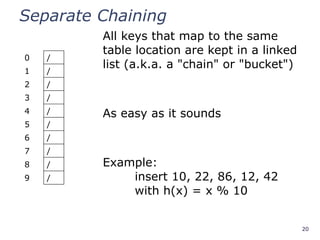
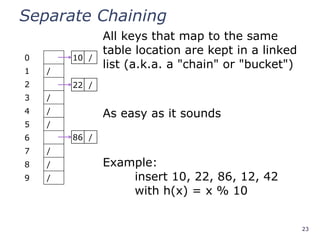
Separate Chaining
0 /
1/
2 /
3 /
4 /
5 /
6 /
7 /
8 /
9 /
All keys that map to the same
table location are kept in a linked
list (a.k.a. a "chain" or "bucket")
As easy as it sounds
Example:
insert 10, 22, 86, 12, 42
with h(x) = x % 10
21.
21
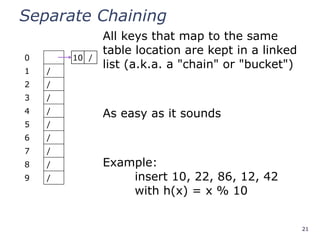
Separate Chaining
0
1 /
2/
3 /
4 /
5 /
6 /
7 /
8 /
9 /
All keys that map to the same
table location are kept in a linked
list (a.k.a. a "chain" or "bucket")
As easy as it sounds
Example:
insert 10, 22, 86, 12, 42
with h(x) = x % 10
10 /
22.
22
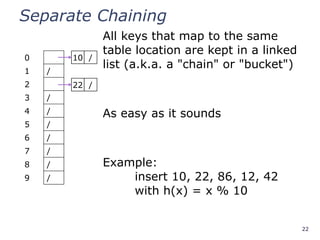
Separate Chaining
0
1 /
2
3/
4 /
5 /
6 /
7 /
8 /
9 /
All keys that map to the same
table location are kept in a linked
list (a.k.a. a "chain" or "bucket")
As easy as it sounds
Example:
insert 10, 22, 86, 12, 42
with h(x) = x % 10
10 /
22 /
23.
23
Separate Chaining
0
1 /
2
3/
4 /
5 /
6
7 /
8 /
9 /
All keys that map to the same
table location are kept in a linked
list (a.k.a. a "chain" or "bucket")
As easy as it sounds
Example:
insert 10, 22, 86, 12, 42
with h(x) = x % 10
10 /
22 /
86 /
24.
24
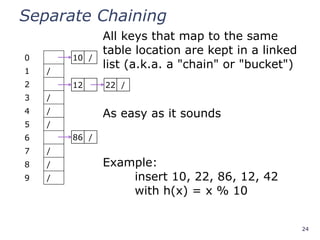
Separate Chaining
0
1 /
2
3/
4 /
5 /
6
7 /
8 /
9 /
All keys that map to the same
table location are kept in a linked
list (a.k.a. a "chain" or "bucket")
As easy as it sounds
Example:
insert 10, 22, 86, 12, 42
with h(x) = x % 10
10 /
12
86 /
22 /
25.
25
Separate Chaining
0
1 /
2
3/
4 /
5 /
6
7 /
8 /
9 /
All keys that map to the same
table location are kept in a linked
list (a.k.a. a "chain" or "bucket")
As easy as it sounds
Example:
insert 10, 22, 86, 12, 42
with h(x) = x % 10
10 /
42
86 /
12 22 /
26.
26
Thoughts on SeparateChaining
Worst-case time for find?
Linear
But only with really bad luck or bad hash function
Not worth avoiding (e.g., with balanced trees at each bucket)
Keep small number of items in each bucket
Overhead of tree balancing not worthwhile for small n
Beyond asymptotic complexity, some "data-structure
engineering" can improve constant factors
Linked list, array, or a hybrid
Insert at end or beginning of list
Sorting the lists gains and loses performance
Splay-like: Always move item to front of list
27.
27
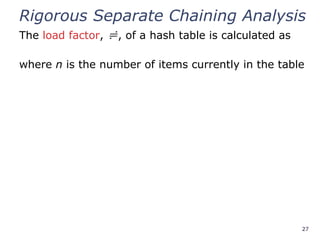
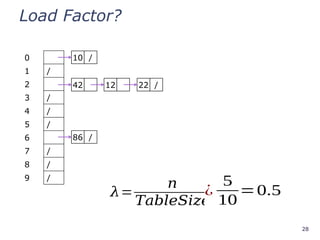
Rigorous Separate ChainingAnalysis
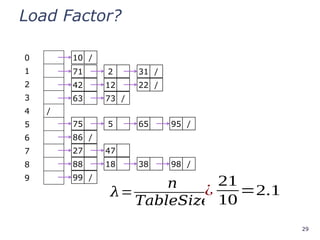
The load factor, , of a hash table is calculated as
where n is the number of items currently in the table
31
Rigorous Separate ChainingAnalysis
The load factor, , of a hash table is calculated as
where n is the number of items currently in the table
Under chaining, the average number of elements per
bucket is
So if some inserts are followed by random finds, then
on average:
Each unsuccessful find compares against items
Each successful find compares against items
If is low, find and insert likely to be O(1)
We like to keep around 1 for separate chaining
32.
32
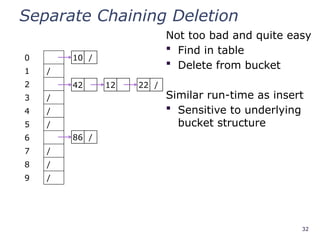
Separate Chaining Deletion
Nottoo bad and quite easy
Find in table
Delete from bucket
Similar run-time as insert
Sensitive to underlying
bucket structure
0
1 /
2
3 /
4 /
5 /
6
7 /
8 /
9 /
10 /
42
86 /
12 22 /
33.
33
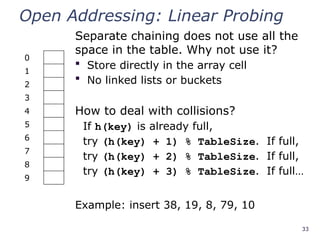
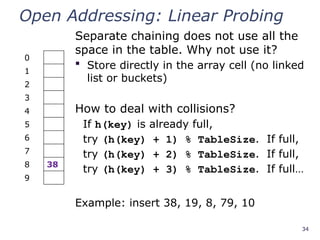
Open Addressing: LinearProbing
Separate chaining does not use all the
space in the table. Why not use it?
Store directly in the array cell
No linked lists or buckets
How to deal with collisions?
If h(key) is already full,
try (h(key) + 1) % TableSize. If full,
try (h(key) + 2) % TableSize. If full,
try (h(key) + 3) % TableSize. If full…
Example: insert 38, 19, 8, 79, 10
0
1
2
3
4
5
6
7
8
9
34.
34
Open Addressing: LinearProbing
Separate chaining does not use all the
space in the table. Why not use it?
Store directly in the array cell (no linked
list or buckets)
How to deal with collisions?
If h(key) is already full,
try (h(key) + 1) % TableSize. If full,
try (h(key) + 2) % TableSize. If full,
try (h(key) + 3) % TableSize. If full…
Example: insert 38, 19, 8, 79, 10
0
1
2
3
4
5
6
7
8 38
9
35.
35
Open Addressing: LinearProbing
Separate chaining does not use all the
space in the table. Why not use it?
Store directly in the array cell
(no linked list or buckets)
How to deal with collisions?
If h(key) is already full,
try (h(key) + 1) % TableSize. If full,
try (h(key) + 2) % TableSize. If full,
try (h(key) + 3) % TableSize. If full…
Example: insert 38, 19, 8, 79, 10
0
1
2
3
4
5
6
7
8 38
9 19
36.
36
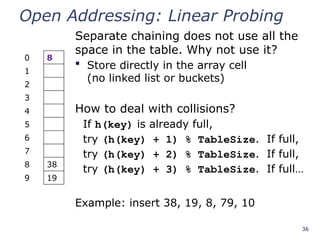
Open Addressing: LinearProbing
Separate chaining does not use all the
space in the table. Why not use it?
Store directly in the array cell
(no linked list or buckets)
How to deal with collisions?
If h(key) is already full,
try (h(key) + 1) % TableSize. If full,
try (h(key) + 2) % TableSize. If full,
try (h(key) + 3) % TableSize. If full…
Example: insert 38, 19, 8, 79, 10
0 8
1
2
3
4
5
6
7
8 38
9 19
37.
37
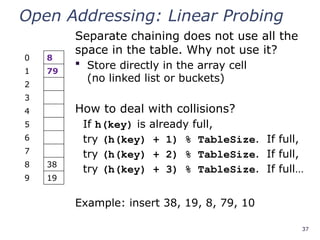
Open Addressing: LinearProbing
Separate chaining does not use all the
space in the table. Why not use it?
Store directly in the array cell
(no linked list or buckets)
How to deal with collisions?
If h(key) is already full,
try (h(key) + 1) % TableSize. If full,
try (h(key) + 2) % TableSize. If full,
try (h(key) + 3) % TableSize. If full…
Example: insert 38, 19, 8, 79, 10
0 8
1 79
2
3
4
5
6
7
8 38
9 19
38.
38
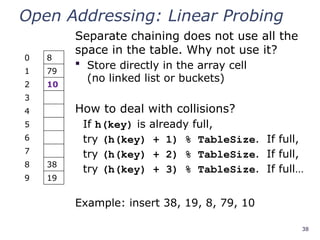
Open Addressing: LinearProbing
Separate chaining does not use all the
space in the table. Why not use it?
Store directly in the array cell
(no linked list or buckets)
How to deal with collisions?
If h(key) is already full,
try (h(key) + 1) % TableSize. If full,
try (h(key) + 2) % TableSize. If full,
try (h(key) + 3) % TableSize. If full…
Example: insert 38, 19, 8, 79, 10
0 8
1 79
2 10
3
4
5
6
7
8 38
9 19
39.
39
Load Factor?
0 8
179
2 10
3
4
5
6
7
8 38
9 19
𝜆=
𝑛
𝑇𝑎𝑏𝑙𝑒𝑆𝑖𝑧𝑒
=?
¿
5
10
=0.5
Can the load factor when using
linear probing ever exceed 1.0?
Nope!!
40.
40
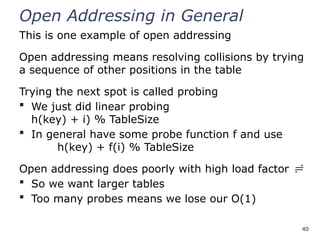
Open Addressing inGeneral
This is one example of open addressing
Open addressing means resolving collisions by trying
a sequence of other positions in the table
Trying the next spot is called probing
We just did linear probing
h(key) + i) % TableSize
In general have some probe function f and use
h(key) + f(i) % TableSize
Open addressing does poorly with high load factor
So we want larger tables
Too many probes means we lose our O(1)
41.
41
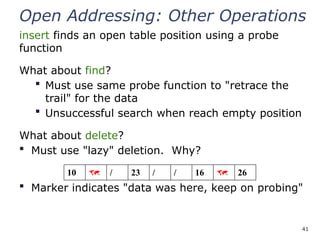
Open Addressing: OtherOperations
insert finds an open table position using a probe
function
What about find?
Must use same probe function to "retrace the
trail" for the data
Unsuccessful search when reach empty position
What about delete?
Must use "lazy" deletion. Why?
Marker indicates "data was here, keep on probing"
10 / 23 / / 16 26
42.
42
Primary Clustering
It turnsout linear probing is a bad idea, even
though the probe function is quick to compute
(which is a good thing)
This tends to produce
clusters, which lead to
long probe sequences
This is called primary
clustering
We saw the start of a
cluster in our linear
probing example
[R. Sedgewick]
43.
43
Analysis of LinearProbing
Trivial fact:
For any < 1, linear probing will find an empty slot
We are safe from an infinite loop unless table is full
Non-trivial facts (we won’t prove these):
Average # of probes given load factor
For an unsuccessful search as :
For an successful search as :
44.
44
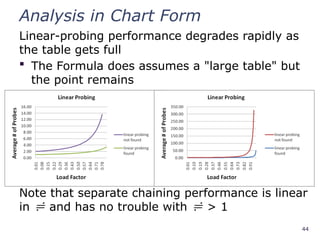
Analysis in ChartForm
Linear-probing performance degrades rapidly as
the table gets full
The Formula does assumes a "large table" but
the point remains
Note that separate chaining performance is linear
in and has no trouble with > 1
45.
45
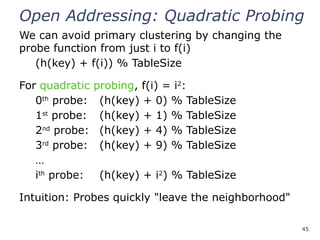
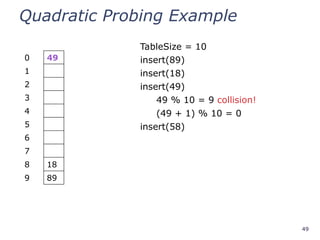
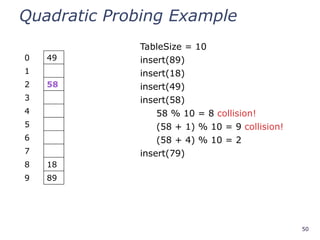
Open Addressing: QuadraticProbing
We can avoid primary clustering by changing the
probe function from just i to f(i)
(h(key) + f(i)) % TableSize
For quadratic probing, f(i) = i2
:
0th
probe: (h(key) + 0) % TableSize
1st
probe: (h(key) + 1) % TableSize
2nd
probe: (h(key) + 4) % TableSize
3rd
probe: (h(key) + 9) % TableSize
…
ith
probe: (h(key) + i2
) % TableSize
Intuition: Probes quickly "leave the neighborhood"
59
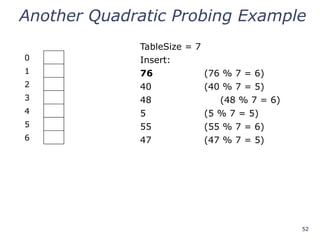
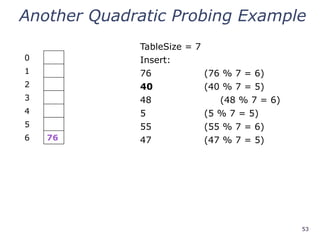
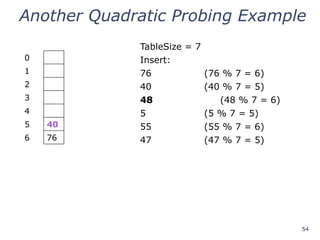
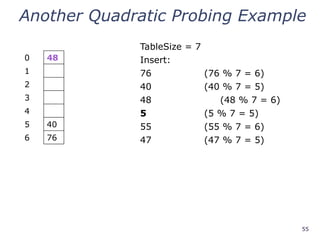
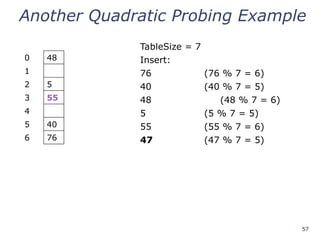
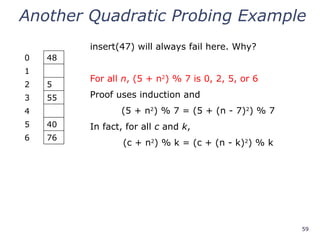
Another Quadratic ProbingExample
0 48
1
2 5
3 55
4
5 40
6 76
insert(47) will always fail here. Why?
For all n, (5 + n2
) % 7 is 0, 2, 5, or 6
Proof uses induction and
(5 + n2
) % 7 = (5 + (n - 7)2
) % 7
In fact, for all c and k,
(c + n2
) % k = (c + (n - k)2
) % k
60.
60
From Bad Newsto Good News
After TableSize quadratic probes, we cycle
through the same indices
The good news:
For prime T and 0 i, j T/2 where i j,
(h(key) + i2
) % T (h(key) + j2
) % T
If TableSize is prime and < ½, quadratic
probing will find an empty slot in at most
TableSize/2 probes
If you keep < ½, no need to detect cycles as
we just saw
61.
61
Clustering Reconsidered
Quadratic probingdoes not suffer from primary
clustering as the quadratic nature quickly escapes
the neighborhood
But it is no help if keys initially hash the same index
Any 2 keys that hash to the same value will have
the same series of moves after that
Called secondary clustering
We can avoid secondary clustering with a probe
function that depends on the key: double hashing
62.
62
Open Addressing: DoubleHashing
Idea:
Given two good hash functions h and g, it is very
unlikely that for some key, h(key) == g(key)
Ergo, why not probe using g(key)?
For double hashing, f(i) = i ⋅ g(key):
0th
probe: (h(key) + 0 ⋅ g(key)) % TableSize
1st
probe: (h(key) + 1 ⋅ g(key)) % TableSize
2nd
probe: (h(key) + 2 ⋅ g(key)) % TableSize
…
ith
probe: (h(key) + i ⋅ g(key)) % TableSize
Crucial Detail:
We must make sure that g(key) cannot be 0
63.
63
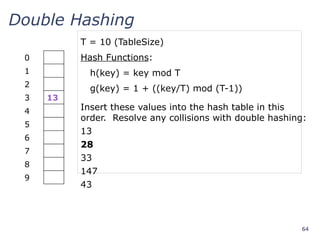
Double Hashing
Insert thesevalues into the hash table in this
order. Resolve any collisions with double hashing:
13
28
33
147
43
T = 10 (TableSize)
Hash Functions:
h(key) = key mod T
g(key) = 1 + ((key/T) mod (T-1))
0
1
2
3
4
5
6
7
8
9
64.
64
Double Hashing
Insert thesevalues into the hash table in this
order. Resolve any collisions with double hashing:
13
28
33
147
43
T = 10 (TableSize)
Hash Functions:
h(key) = key mod T
g(key) = 1 + ((key/T) mod (T-1))
0
1
2
3 13
4
5
6
7
8
9
65.
65
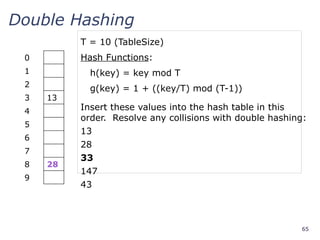
Double Hashing
Insert thesevalues into the hash table in this
order. Resolve any collisions with double hashing:
13
28
33
147
43
T = 10 (TableSize)
Hash Functions:
h(key) = key mod T
g(key) = 1 + ((key/T) mod (T-1))
0
1
2
3 13
4
5
6
7
8 28
9
66.
66
Double Hashing
Insert thesevalues into the hash table in this
order. Resolve any collisions with double hashing:
13
28
33 g(33) = 1 + 3 mod 9 = 4
147
43
T = 10 (TableSize)
Hash Functions:
h(key) = key mod T
g(key) = 1 + ((key/T) mod (T-1))
0
1
2
3 13
4
5
6
7 33
8 28
9
67.
67
Double Hashing
Insert thesevalues into the hash table in this
order. Resolve any collisions with double hashing:
13
28
33
147 g(147) = 1 + 14 mod 9 = 6
43
T = 10 (TableSize)
Hash Functions:
h(key) = key mod T
g(key) = 1 + ((key/T) mod (T-1))
0
1
2
3 13
4
5
6
7 33
8 28
9 147
68.
68
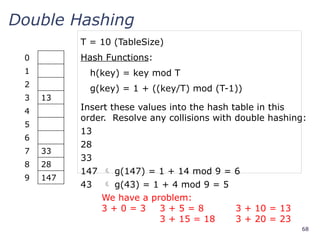
Double Hashing
Insert thesevalues into the hash table in this
order. Resolve any collisions with double hashing:
13
28
33
147 g(147) = 1 + 14 mod 9 = 6
43 g(43) = 1 + 4 mod 9 = 5
T = 10 (TableSize)
Hash Functions:
h(key) = key mod T
g(key) = 1 + ((key/T) mod (T-1))
0
1
2
3 13
4
5
6
7 33
8 28
9 147
We have a problem:
3 + 0 = 3 3 + 5 = 8 3 + 10 = 13
3 + 15 = 18 3 + 20 = 23
69.
69
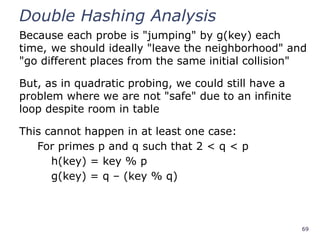
Double Hashing Analysis
Becauseeach probe is "jumping" by g(key) each
time, we should ideally "leave the neighborhood" and
"go different places from the same initial collision"
But, as in quadratic probing, we could still have a
problem where we are not "safe" due to an infinite
loop despite room in table
This cannot happen in at least one case:
For primes p and q such that 2 < q < p
h(key) = key % p
g(key) = q – (key % q)
70.
70
Summarizing Collision Resolution
SeparateChaining is easy
find, delete proportional to load factor on average
insert can be constant if just push on front of list
Open addressing uses probing, has clustering issues
as it gets full but still has reasons for its use:
Easier data representation
Less memory allocation
Run-time overhead for list nodes (but an array
implementation could be faster)
72
Rehashing
As with array-basedstacks/queues/lists
If table gets too full, create a bigger table and copy
everything
Less helpful to shrink a table that is underfull
With chaining, we get to decide what "too full" means
Keep load factor reasonable (e.g., < 1)?
Consider average or max size of non-empty chains
For open addressing, half-full is a good rule of thumb
73.
73
Rehashing
What size shouldwe choose?
Twice-as-big?
Except that won’t be prime!
We go twice-as-big but guarantee prime
Implement by hard coding a list of prime numbers
You probably will not grow more than 20-30 times
and can then calculate after that if necessary
74.
74
Rehashing
Can we copyall data to the same indices in the new table?
Will not work; we calculated the index based on TableSize
Rehash Algorithm:
Go through old table
Do standard insert for each item into new table
Resize is an O(n) operation,
Iterate over old table: O(n)
n inserts / calls to the hash function: n ⋅ O(1) = O(n)
Is there some way to avoid all those hash function calls?
Space/time tradeoff: Could store h(key) with each data item
Growing the table is still O(n); only helps by a constant
factor
76
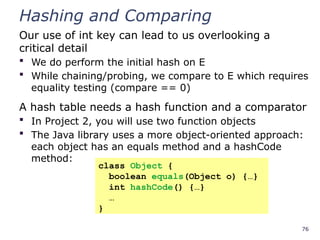
Hashing and Comparing
Ouruse of int key can lead to us overlooking a
critical detail
We do perform the initial hash on E
While chaining/probing, we compare to E which requires
equality testing (compare == 0)
A hash table needs a hash function and a comparator
In Project 2, you will use two function objects
The Java library uses a more object-oriented approach:
each object has an equals method and a hashCode
method:
class Object {
boolean equals(Object o) {…}
int hashCode() {…}
…
}
77.
77
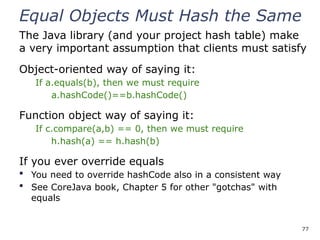
Equal Objects MustHash the Same
The Java library (and your project hash table) make
a very important assumption that clients must satisfy
Object-oriented way of saying it:
If a.equals(b), then we must require
a.hashCode()==b.hashCode()
Function object way of saying it:
If c.compare(a,b) == 0, then we must require
h.hash(a) == h.hash(b)
If you ever override equals
You need to override hashCode also in a consistent way
See CoreJava book, Chapter 5 for other "gotchas" with
equals
78.
78
Comparable/Comparator Rules
We havenot emphasized important "rules"
about comparison for:
all our dictionaries
sorting (next major topic)
Comparison must impose a consistent,
total ordering:
For all a, b, and c:
If compare(a,b) < 0, then compare(b,a) > 0
If compare(a,b) == 0, then compare(b,a) == 0
If compare(a,b) < 0 and compare(b,c) < 0,
then compare(a,c) < 0
79.
79
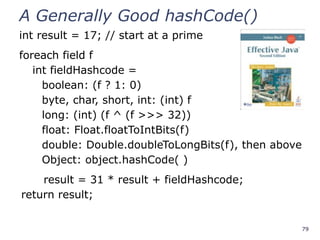
A Generally GoodhashCode()
int result = 17; // start at a prime
foreach field f
int fieldHashcode =
boolean: (f ? 1: 0)
byte, char, short, int: (int) f
long: (int) (f ^ (f >>> 32))
float: Float.floatToIntBits(f)
double: Double.doubleToLongBits(f), then above
Object: object.hashCode( )
result = 31 * result + fieldHashcode;
return result;
80.
80
Final Word onHashing
The hash table is one of the most important data structures
Efficient find, insert, and delete
Operations based on sorted order are not so efficient
Useful in many, many real-world applications
Popular topic for job interview questions
Important to use a good hash function
Good distribution of key hashs
Not overly expensive to calculate (bit shifts good!)
Important to keep hash table at a good size
Keep TableSize a prime number
Set a preferable depending on type of hashtable
82
The Midterm
It isnext Wednesday, July 18
It will take up the entire class period
It will cover everything up through today:
Algorithmic analysis, Big-O, Recurrences
Heaps and Priority Queues
Stacks, Queues, Arrays, Linked Lists, etc.
Dictionaries
Regular BSTs, Balanced Trees, and B-Trees
Hash Tables
83.
83
The Midterm
The examconsists of 10 problems
Total points possible is 110
Your score will be out of 100
Yes, you could score as well as 110/100
Types of Questions:
Some calculations
Drill problems manipulating data structures
Writing pseudocode solutions
84.
84
Book, Calculator, andNotes
The exam is closed book
You can bring a calculator if you want
You can bring a limited set of notes:
One 3x5 index card (both sides)
Must be handwritten (no typing!)
You must turn in the card with your exam
85.
85
Preparing for theExam
Quiz section tomorrow is a review
Come with questions for David
We might do an exam review session
Only if you show interest
Previous exams available for review
Look for the link on midterm information
86.
86
Kate's General ExamAdvice
Get a good night's sleep
Eat some breakfast
Read through the exam before you start
Write down partial work
Remember the class is curved at the end
88
Improving Linked Lists
Forreasons beyond your control, you have
to work with a very large linked list. You
will be doing many finds, inserts, and
deletes. Although you cannot stop using a
linked list, you are allowed to modify the
linked structure to improve performance.
What can you do?
89.
89
Depth Traversal ofa Tree
One way to list the nodes of a BST is the
depth traversal:
List the root
List the root's two children
List the root's children's children, etc.
How would you implement this traversal?
How would you handle null children?
What is the big-O of your solution?
90.
90
Nth smallest elementin a B Tree
For a B Tree, you want to implement a
function FindSmallestKey(i) which returns
the ith
smallest key in the tree.
Describe a pseudocode solution.
What is the run-time of your code?
Is it dependent on L, M, and/or n?
91.
91
Hashing a Checkerboad
Oneway to speed up Game AIs is to hash
and store common game states. In the case
of checkers, how would you store the game
state of:
The 8x8 board
The 12 red pieces (single men or kings)
The 12 black pieces (single men or kings)
Can your solution generalize to more complex
games like chess?
Editor's Notes
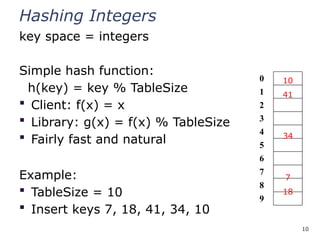
#10 Note that we are ignoring the data associated with the keys



![12
Hashing Strings
Key space K = s0s1s2…sk-1
where si are chars: si [0, 256]
Some choices: Which ones best avoid collisions?
h(K)=(s0)% TableSize
h(K)=
(∑
i=0
k −1
si)% TableSize
h(K)=
(∑
i=0
k −1
si∙37𝑖
)% TableSize](https://image.slidesharecdn.com/18-251003010654-f83306c5/85/18-Hashing-collisions-pptx-Hashing-in-data-Structure-12-320.jpg)










![42
Primary Clustering
It turns out linear probing is a bad idea, even
though the probe function is quick to compute
(which is a good thing)
This tends to produce
clusters, which lead to
long probe sequences
This is called primary
clustering
We saw the start of a
cluster in our linear
probing example
[R. Sedgewick]](https://image.slidesharecdn.com/18-251003010654-f83306c5/85/18-Hashing-collisions-pptx-Hashing-in-data-Structure-42-320.jpg)