Distributed Database Systems
Lecture 17 - NoSQL DBs
Types of Data
 Data can be broadly classified into four types:
1. Structured Data:
 Have a predefined model, which organizes data into a
form that is relatively easy to store, process, retrieve
and manage
 E.g., relational data
2. Unstructured Data:
 Opposite of structured data
 E.g., Flat binary files containing text, video or audio
 Note: data is not completely devoid of a structure (e.g.,
an audio file may still have an encoding structure and
some metadata associated with it)
Types of Data
 Data can be broadly classified into four types:
3. Dynamic Data:
 Data that changes relatively frequently
 E.g., office documents and transactional entries in a
financial database
4. Static Data:
 Opposite of dynamic data
 E.g., Medical imaging data from MRI or CT scans
Scaling Traditional Databases
 Traditional RDBMSs can be either scaled:
 Vertically (or Up)
 Can be achieved by hardware upgrades (e.g., faster CPU,
more memory, or larger disk)
 Limited by the amount of CPU, RAM and disk that can be
configured on a single machine
 Horizontally (or Out)
 Can be achieved by adding more machines
 Requires database sharding and probably replication
 Limited by the Read-to-Write ratio and communication
overhead
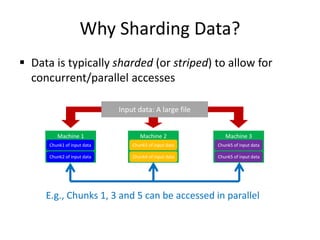
Why Sharding Data?
 Data is typically sharded (or striped) to allow for
concurrent/parallel accesses
Input data: A large file
Machine 1
Chunk1 of input data
Machine 2
Chunk3 of input data
Machine 3
Chunk5 of input data
Chunk2 of input data Chunk4 of input data Chunk5 of input data
E.g., Chunks 1, 3 and 5 can be accessed in parallel
Amdahl’s Law
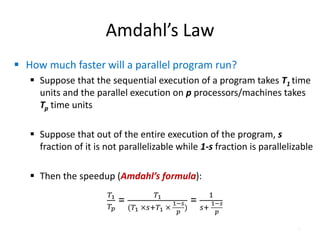
 How much faster will a parallel program run?
 Suppose that the sequential execution of a program takes T1 time
units and the parallel execution on p processors/machines takes
Tp time units
 Suppose that out of the entire execution of the program, s
fraction of it is not parallelizable while 1-s fraction is parallelizable
 Then the speedup (Amdahl’s formula):
6
Amdahl’s Law: An Example
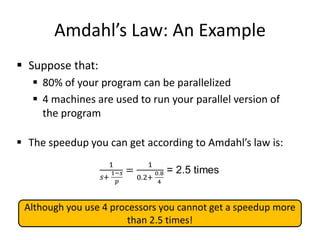
 Suppose that:
 80% of your program can be parallelized
 4 machines are used to run your parallel version of
the program
 The speedup you can get according to Amdahl’s law is:
7
Although you use 4 processors you cannot get a speedup more
than 2.5 times!
Real Vs. Actual Cases
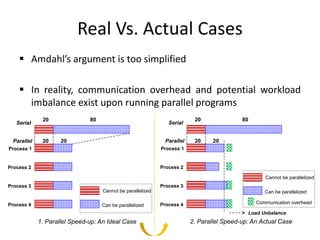
 Amdahl’s argument is too simplified
 In reality, communication overhead and potential workload
imbalance exist upon running parallel programs
20 80
20 20
Process 1
Process 2
Process 3
Process 4
Serial
Parallel
1. Parallel Speed-up: An Ideal Case
Cannot be parallelized
Can be parallelized
20 80
20 20
Process 1
Process 2
Process 3
Process 4
Serial
Parallel
2. Parallel Speed-up: An Actual Case
Cannot be parallelized
Can be parallelized
Load Unbalance
Communication overhead
Why Replicating Data?
 Replicating data across servers helps in:
 Avoiding performance bottlenecks
 Avoiding single point of failures
 And, hence, enhancing scalability and availability
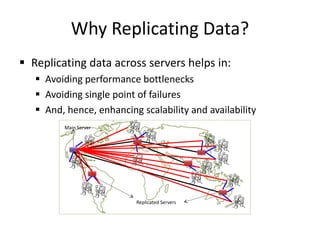
Why Replicating Data?
 Replicating data across servers helps in:
 Avoiding performance bottlenecks
 Avoiding single point of failures
 And, hence, enhancing scalability and availability
Main Server
Replicated Servers
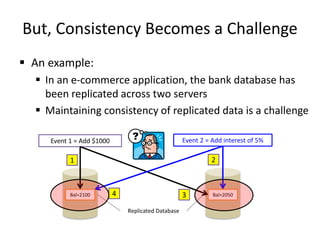
But, Consistency Becomes a Challenge
 An example:
 In an e-commerce application, the bank database has
been replicated across two servers
 Maintaining consistency of replicated data is a challenge
Bal=1000 Bal=1000
Replicated Database
Event 1 = Add $1000 Event 2 = Add interest of 5%
Bal=2000
1 2
Bal=1050
3 Bal=2050
4
Bal=2100
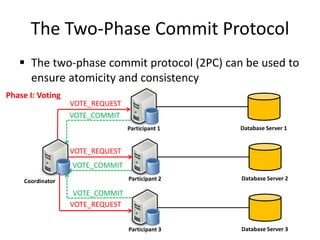
The Two-Phase Commit Protocol
 The two-phase commit protocol (2PC) can be used to
ensure atomicity and consistency
Database Server 1
Participant 1
Coordinator Database Server 2
Participant 2
Database Server 3
Participant 3
VOTE_REQUEST
VOTE_REQUEST
VOTE_REQUEST
Phase I: Voting
VOTE_COMMIT
VOTE_COMMIT
VOTE_COMMIT
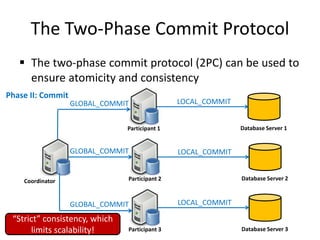
The Two-Phase Commit Protocol
 The two-phase commit protocol (2PC) can be used to
ensure atomicity and consistency
Database Server 1
Participant 1
Coordinator Database Server 2
Participant 2
Database Server 3
Participant 3
GLOBAL_COMMIT
GLOBAL_COMMIT
GLOBAL_COMMIT
Phase II: Commit
LOCAL_COMMIT
LOCAL_COMMIT
LOCAL_COMMIT
“Strict” consistency, which
limits scalability!
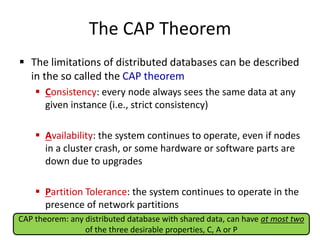
The CAP Theorem
 The limitations of distributed databases can be described
in the so called the CAP theorem
 Consistency: every node always sees the same data at any
given instance (i.e., strict consistency)
 Availability: the system continues to operate, even if nodes
in a cluster crash, or some hardware or software parts are
down due to upgrades
 Partition Tolerance: the system continues to operate in the
presence of network partitions
CAP theorem: any distributed database with shared data, can have at most two
of the three desirable properties, C, A or P
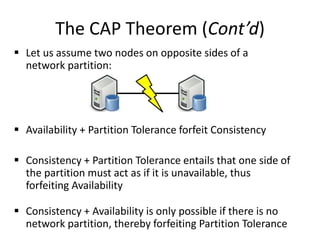
The CAP Theorem (Cont’d)
 Let us assume two nodes on opposite sides of a
network partition:
 Availability + Partition Tolerance forfeit Consistency
 Consistency + Partition Tolerance entails that one side of
the partition must act as if it is unavailable, thus
forfeiting Availability
 Consistency + Availability is only possible if there is no
network partition, thereby forfeiting Partition Tolerance
Large-Scale Databases
 When companies such as Google and Amazon were
designing large-scale databases, 24/7 Availability was a key
 A few minutes of downtime means lost revenue
 When horizontally scaling databases to 1000s of machines,
the likelihood of a node or a network failure
increases tremendously
 Therefore, in order to have strong guarantees on
Availability and Partition Tolerance, they had to sacrifice
“strict” Consistency (implied by the CAP theorem)
Trading-Off Consistency
 Maintaining consistency should balance between the
strictness of consistency versus availability/scalability
 Good-enough consistency depends on your application
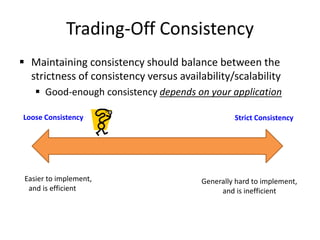
Trading-Off Consistency
 Maintaining consistency should balance between the
strictness of consistency versus availability/scalability
 Good-enough consistency depends on your application
Strict Consistency
Generally hard to implement,
and is inefficient
Loose Consistency
Easier to implement,
and is efficient
The BASE Properties
 The CAP theorem proves that it is impossible to guarantee
strict Consistency and Availability while being able to
tolerate network partitions
 This resulted in databases with relaxed ACID guarantees
 In particular, such databases apply the BASE properties:
 Basically Available: the system guarantees Availability
 Soft-State: the state of the system may change over time
 Eventual Consistency: the system will eventually
become consistent
Eventual Consistency
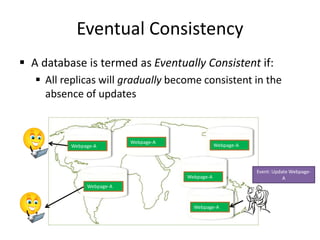
 A database is termed as Eventually Consistent if:
 All replicas will gradually become consistent in the
absence of updates
Eventual Consistency
 A database is termed as Eventually Consistent if:
 All replicas will gradually become consistent in the
absence of updates
Webpage-A
Event: Update Webpage-
A
Webpage-A
Webpage-A
Webpage-A
Webpage-A
Webpage-A
Webpage-A
Webpage-A
Webpage-A
Webpage-A
Webpage-A
Webpage-A
Eventual Consistency:
A Main Challenge
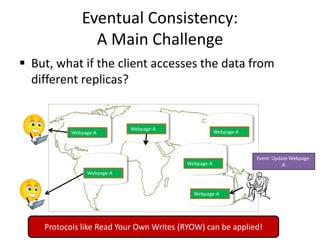
 But, what if the client accesses the data from
different replicas?
Webpage-A
Event: Update Webpage-
A
Webpage-A
Webpage-A
Webpage-A
Webpage-A
Webpage-A
Webpage-A
Webpage-A
Webpage-A
Webpage-A
Webpage-A
Webpage-A
Protocols like Read Your Own Writes (RYOW) can be applied!
NoSQL Databases
 To this end, a new class of databases emerged, which
mainly follow the BASE properties
 These were dubbed as NoSQL databases
 E.g., Amazon’s Dynamo and Google’s Bigtable
 Main characteristics of NoSQL databases include:
 No strict schema requirements
 No strict adherence to ACID properties
 Consistency is traded in favor of Availability
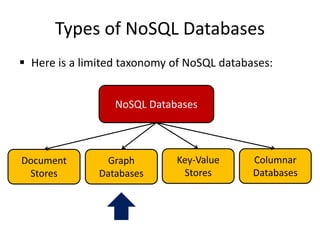
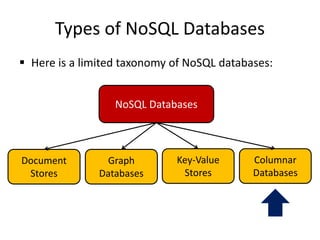
Types of NoSQL Databases
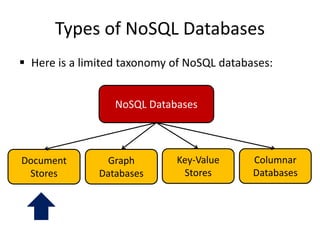
 Here is a limited taxonomy of NoSQL databases:
NoSQL Databases
Document
Stores
Graph
Databases
Key-Value
Stores
Columnar
Databases
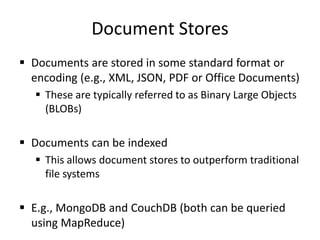
Document Stores
 Documents are stored in some standard format or
encoding (e.g., XML, JSON, PDF or Office Documents)
 These are typically referred to as Binary Large Objects
(BLOBs)
 Documents can be indexed
 This allows document stores to outperform traditional
file systems
 E.g., MongoDB and CouchDB (both can be queried
using MapReduce)
Types of NoSQL Databases
 Here is a limited taxonomy of NoSQL databases:
NoSQL Databases
Document
Stores
Graph
Databases
Key-Value
Stores
Columnar
Databases
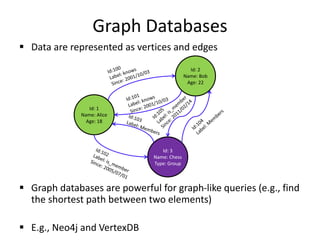
Graph Databases
 Data are represented as vertices and edges
 Graph databases are powerful for graph-like queries (e.g., find
the shortest path between two elements)
 E.g., Neo4j and VertexDB
Id: 1
Name: Alice
Age: 18
Id: 2
Name: Bob
Age: 22
Id: 3
Name: Chess
Type: Group
Types of NoSQL Databases
 Here is a limited taxonomy of NoSQL databases:
NoSQL Databases
Document
Stores
Graph
Databases
Key-Value
Stores
Columnar
Databases
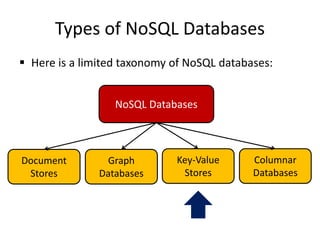
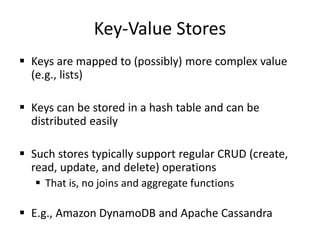
Key-Value Stores
 Keys are mapped to (possibly) more complex value
(e.g., lists)
 Keys can be stored in a hash table and can be
distributed easily
 Such stores typically support regular CRUD (create,
read, update, and delete) operations
 That is, no joins and aggregate functions
 E.g., Amazon DynamoDB and Apache Cassandra
Types of NoSQL Databases
 Here is a limited taxonomy of NoSQL databases:
NoSQL Databases
Document
Stores
Graph
Databases
Key-Value
Stores
Columnar
Databases
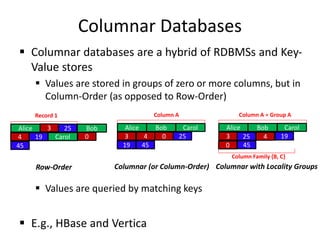
Columnar Databases
 Columnar databases are a hybrid of RDBMSs and Key-
Value stores
 Values are stored in groups of zero or more columns, but in
Column-Order (as opposed to Row-Order)
 Values are queried by matching keys
 E.g., HBase and Vertica
Alice 3 25 Bob
4 19 Carol 0
45
Record 1
Row-Order
Alice
3 25
Bob
4
19
Carol
0
45
Column A
Columnar (or Column-Order)
Alice
3 25
Bob
4 19
Carol
0 45
Columnar with Locality Groups
Column A = Group A
Column Family {B, C}
Column Store NoSQL DBs
Column Store
• Stores data as tables
– Advantages for data warehouses, customer
relationship management (CRM) systems
– More efficient for:
• Aggregates, many columns of same row required
• Update rows in same column
• Easier to compress, all values same per column
Concept of keys
• Most NoSQL DBs utilize the concept of keys
• In column store – called key or row key
• Each column/column family data stored along
with key
HBase
• HBase is an open-source, distributed, versioned,
non-relational, column-oriented data store
• It is an Apache project whose goal is to provide
storage for the Hadoop Distributed Computing
• Facebook has chose HBase to implement its
message platform
• Data is logically organized into tables, rows and
columns
Hbase - Apache
• Based on BigTable –Google
• Built on HDFS
• Basic operations – CRUD
– Create, read, update, delete
https://azure.microsoft.com/en-us/documentation/articles/hdinsight-hbase-tutorial-get-
started/
Operations
• Create()/Disable()/Drop()
– Create/Disable/Drop a table
• Put()
– Insert a new record with a new key
– Insert a record for an existing key
• Get()
– Select value from table by a key
• Scan()
– Scan a table with a filter
• No Join!
Querying
• Scans and queries can select a subset of
available columns, perhaps by using a filter
• There are three types of lookups:
– Fast lookup using row key and optional timestamp
– Full table scan
– Range scan from region start to end
• Tables have one primary index: the row key
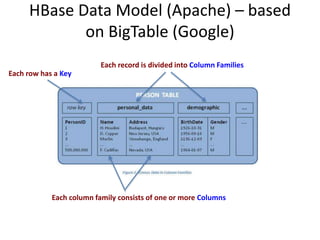
HBase Data Model (Apache) – based
on BigTable (Google)
Each row has a Key
Each record is divided into Column Families
Each column family consists of one or more Columns
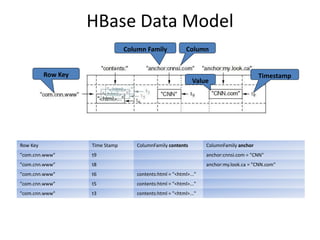
HBase Data Model
Row Key
Column Family Column
Value
Timestamp
Row Key Time Stamp ColumnFamily contents ColumnFamily anchor
"com.cnn.www" t9 anchor:cnnsi.com = "CNN"
"com.cnn.www" t8 anchor:my.look.ca = "CNN.com"
"com.cnn.www" t6 contents:html = "<html>..."
"com.cnn.www" t5 contents:html = "<html>..."
"com.cnn.www" t3 contents:html = "<html>..."
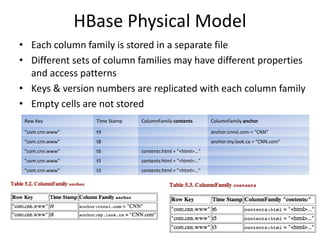
HBase Physical Model
• Each column family is stored in a separate file
• Different sets of column families may have different properties
and access patterns
• Keys & version numbers are replicated with each column family
• Empty cells are not stored
Row Key Time Stamp ColumnFamily contents ColumnFamily anchor
"com.cnn.www" t9 anchor:cnnsi.com = "CNN"
"com.cnn.www" t8 anchor:my.look.ca = "CNN.com"
"com.cnn.www" t6 contents:html = "<html>..."
"com.cnn.www" t5 contents:html = "<html>..."
"com.cnn.www" t3 contents:html = "<html>..."
HBase
• Tables are sorted by Row Key
• Table schema only defines its column families .
– Each family consists of any number of columns
– Each column consists of any number of versions
– Columns only exist when inserted, NULLs are free.
– Columns within a family are sorted and stored
together
• Everything except table names are byte[]
• (Row, Family: Column, Timestamp)  Value
Cassandra
• Open Source, Apache
• Schema optional
• CQL (Cassandra Query Language)
– Select, From Where
– Insert, Update, Delete
– Create ColumnFamily
• Has primary and secondary indexes
Cassandra
• Keyspace is container (like DB)
– Contains column family objects (like tables)
• Contain columns, set of related columns identified by
application supplied row keys
– Each row does not have to have same set of columns
• Has PKs, but no FKs
• Join not supported
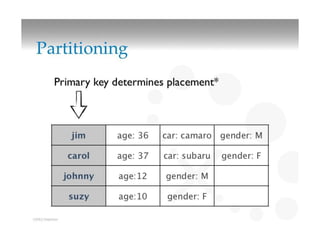
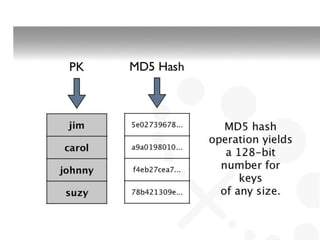
– Stores data in different clusters – uses hash key for
placement
Key-Value Store
Key-value store
• Key–value (k, v) stores allow the application to store its
data in a schema-less way
• Keys – can be ?
• Values – objects not interpreted by the system
– v can be an arbitrarily complex structure with its own
semantics or a simple word
– Good for unstructured data
• Data could be stored in a datatype of a programming
language or an object
• No meta data
• No need for a fixed data model
Key-Value Stores
• Simple data model
– a.k.a. Map or dictionary
– Put/request values per key
– Length of keys limited, few limitations on value
– High scalability over consistency
– No complex ad-hoc querying and analytics
– No joins, aggregate operations
Dynamo
• Amazon’s Dynamo
– Highly distributed
– Only store and retrieve data by primary key
– Simple key/value interface, store values as BLOBs
– Operations limited to k,v at a time
• Get(key) returns list of objects and a context
• Put(key, context, object) no return values
– Context is metadata, e.g. version number
DynamoDB
– Based on Dynamo
– Can create tables, define attributes, etc.
– Have 2 APIs to query data
• Query
• Scan
–
DynamoDB - Query
• A Query operation
– searches only primary key attribute values
– Can Query indexes in the same way as tables
– supports a subset of comparison operators on key
attribute values
– returns all of the item’s data for the matching keys (all of
each item's attributes)
– up to 1 MB of data per query operation
– Always returns results, but can return empty results
– Query results are always sorted by the range key
• http://blog.grio.com/2012/03/getting-started-with-amazon-
dynamodb.html
DynamoDB - Scan
• Similar to Query except:
– examines every item in the table
– User specifies filters to apply to the results to
refine the values returned after scan has finished
DynamoDB - Scan
• A Scan operation
– examines every item in the table
– User specifies filters to apply to the results to
refine the values returned after scan has finished
– A 1 MB limit on the scan (the limit applies before
the results are filtered)
– Scan can result in no table data meeting the filter
criteria.
– Scan supports a specific set of comparison
operators
Document Store
Document Store
• Notion of a document
• Documents encapsulate and encode data in
some standard formats or encodings
• Encodings include:
– JSON and XML
– binary forms like BSON, PDF and Microsoft Office
documents
• Good for semi-structured data, but OK for
unstructured, structured
Document Store
• More functionality than key-value
• More appropriate for semi-structured data
• Recognizes structure of objects stored
• Objects are documents that may have
attributes of various types
• Objects grouped into collections
• Simple query mechanisms to search
collections for attribute values
Document Store
• Typically (e.g. MongoDB)
– Collections – tables
– documents – records
• But not all documents in a collection have same fields
– Documents are addressed in the database via a
unique key
– Allows beyond the simple key-document (or key–
value) lookup
– API or query language allows retrieval of
documents based on their contents
MongoDB Specifics
MongoDB
• huMONGOus
• MongoDB – document-oriented organized
around collections of documents
– Each document has an ID (key-value pair)
– Collections correspond to tables in RDBMS
– Document corresponds to rows in RDBMS
– Collections can be created at run-time
– Documents’ structure not required to be the
same, although it may be
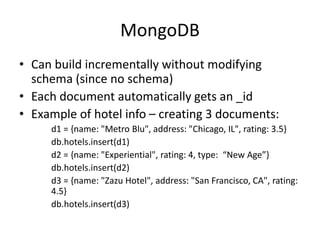
MongoDB
• Can build incrementally without modifying
schema (since no schema)
• Each document automatically gets an _id
• Example of hotel info – creating 3 documents:
d1 = {name: "Metro Blu", address: "Chicago, IL", rating: 3.5}
db.hotels.insert(d1)
d2 = {name: "Experiential", rating: 4, type: “New Age”}
db.hotels.insert(d2)
d3 = {name: "Zazu Hotel", address: "San Francisco, CA", rating:
4.5}
db.hotels.insert(d3)
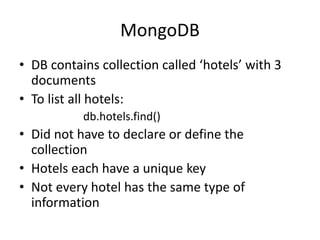
MongoDB
• DB contains collection called ‘hotels’ with 3
documents
• To list all hotels:
db.hotels.find()
• Did not have to declare or define the
collection
• Hotels each have a unique key
• Not every hotel has the same type of
information
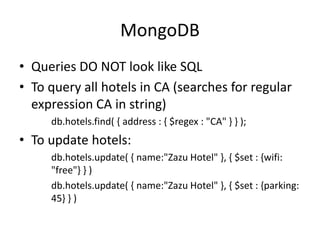
MongoDB
• Queries DO NOT look like SQL
• To query all hotels in CA (searches for regular
expression CA in string)
db.hotels.find( { address : { $regex : "CA" } } );
• To update hotels:
db.hotels.update( { name:"Zazu Hotel" }, { $set : {wifi:
"free"} } )
db.hotels.update( { name:"Zazu Hotel" }, { $set : {parking:
45} } )
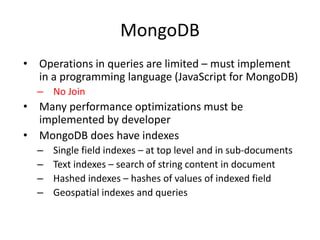
MongoDB
• Operations in queries are limited – must implement
in a programming language (JavaScript for MongoDB)
– No Join
• Many performance optimizations must be
implemented by developer
• MongoDB does have indexes
– Single field indexes – at top level and in sub-documents
– Text indexes – search of string content in document
– Hashed indexes – hashes of values of indexed field
– Geospatial indexes and queries
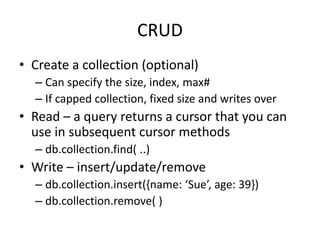
CRUD
• Create a collection (optional)
– Can specify the size, index, max#
– If capped collection, fixed size and writes over
• Read – a query returns a cursor that you can
use in subsequent cursor methods
– db.collection.find( ..)
• Write – insert/update/remove
– db.collection.insert({name: ‘Sue’, age: 39})
– db.collection.remove( )
Data types
• A field in Mongodb can be any BSON data type
including:
– Nested documents
– Arrays
– Arrays of documents
{
name: {first: “Sue”, last: “Sky”},
age: 39,
classes: [“database”, “cloud”]
}
Find() to Query
db.collection.find(<criteria>, <projection>)
db.collection.find{{select conditions}, {project columns})
Select conditions:
• To match the value of a field:
db.collection.find({c1: 5})
• Everything for select ops must be inside of { }
• Can use other comparators, e.g. $gt, $lt, $regex, etc.
db.collection.find ({c1: {$gt: 5}})
• If have more than one condition, need to connect with
$and or $or and place inside brackets []
db.collection.find({$and: [{c1: {$gt: 5}}, {c2: {$lt: 2}}] })
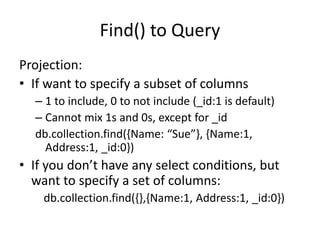
Find() to Query
Projection:
• If want to specify a subset of columns
– 1 to include, 0 to not include (_id:1 is default)
– Cannot mix 1s and 0s, except for _id
db.collection.find({Name: “Sue”}, {Name:1,
Address:1, _id:0})
• If you don’t have any select conditions, but
want to specify a set of columns:
db.collection.find({},{Name:1, Address:1, _id:0})
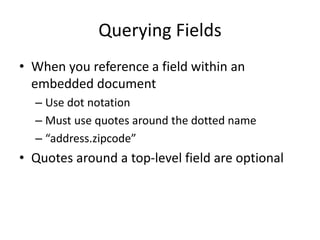
Querying Fields
• When you reference a field within an
embedded document
– Use dot notation
– Must use quotes around the dotted name
– “address.zipcode”
• Quotes around a top-level field are optional
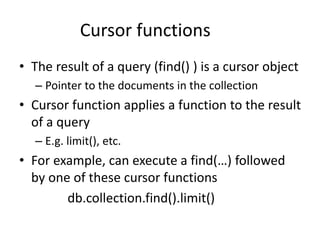
Cursor functions
• The result of a query (find() ) is a cursor object
– Pointer to the documents in the collection
• Cursor function applies a function to the result
of a query
– E.g. limit(), etc.
• For example, can execute a find(…) followed
by one of these cursor functions
db.collection.find().limit()
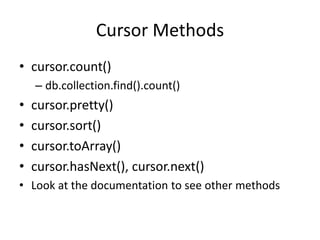
Cursor Methods
• cursor.count()
– db.collection.find().count()
• cursor.pretty()
• cursor.sort()
• cursor.toArray()
• cursor.hasNext(), cursor.next()
• Look at the documentation to see other methods
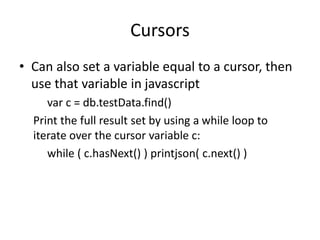
Cursors
• Can also set a variable equal to a cursor, then
use that variable in javascript
var c = db.testData.find()
Print the full result set by using a while loop to
iterate over the cursor variable c:
while ( c.hasNext() ) printjson( c.next() )
Aggregation
• Three ways to perform aggregation
– Single purpose
– Pipeline
– MapReduce
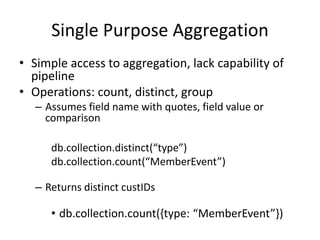
Single Purpose Aggregation
• Simple access to aggregation, lack capability of
pipeline
• Operations: count, distinct, group
– Assumes field name with quotes, field value or
comparison
db.collection.distinct(“type”)
db.collection.count(“MemberEvent”)
– Returns distinct custIDs
• db.collection.count({type: “MemberEvent”})
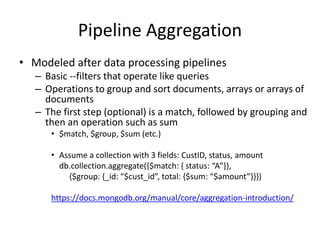
Pipeline Aggregation
• Modeled after data processing pipelines
– Basic --filters that operate like queries
– Operations to group and sort documents, arrays or arrays of
documents
– The first step (optional) is a match, followed by grouping and
then an operation such as sum
• $match, $group, $sum (etc.)
• Assume a collection with 3 fields: CustID, status, amount
db.collection.aggregate({$match: { status: “A”}},
{$group: {_id: “$cust_id”, total: {$sum: “$amount”}}})
https://docs.mongodb.org/manual/core/aggregation-introduction/
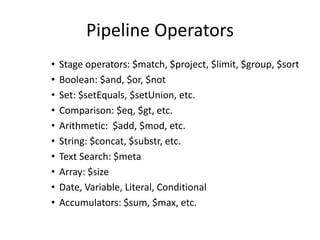
Pipeline Operators
• Stage operators: $match, $project, $limit, $group, $sort
• Boolean: $and, $or, $not
• Set: $setEquals, $setUnion, etc.
• Comparison: $eq, $gt, etc.
• Arithmetic: $add, $mod, etc.
• String: $concat, $substr, etc.
• Text Search: $meta
• Array: $size
• Date, Variable, Literal, Conditional
• Accumulators: $sum, $max, etc.
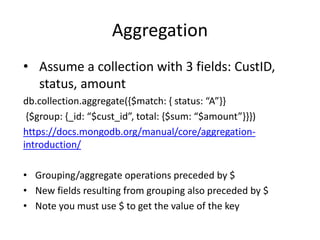
Aggregation
• Assume a collection with 3 fields: CustID,
status, amount
db.collection.aggregate({$match: { status: “A”}}
{$group: {_id: “$cust_id”, total: {$sum: “$amount”}}})
https://docs.mongodb.org/manual/core/aggregation-
introduction/
• Grouping/aggregate operations preceded by $
• New fields resulting from grouping also preceded by $
• Note you must use $ to get the value of the key
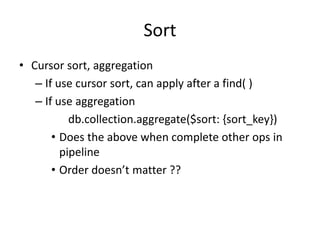
Sort
• Cursor sort, aggregation
– If use cursor sort, can apply after a find( )
– If use aggregation
db.collection.aggregate($sort: {sort_key})
• Does the above when complete other ops in
pipeline
• Order doesn’t matter ??
Arrays
• Arrays are denoted with [ ]
• Some fields can contain arrays
• Using a find to query a field that contains an
array
• If a field contains an array and your query has multiple conditional
operators, the field as a whole will match if either a single array element
meets the conditions or a combination of array elements meet the
conditions.
FYI
• Case sensitive to field names, collection
names, e.g. Title will not match title

17-NoSQL.pptx

  • 1.
  • 2.
    Types of Data Data can be broadly classified into four types: 1. Structured Data:  Have a predefined model, which organizes data into a form that is relatively easy to store, process, retrieve and manage  E.g., relational data 2. Unstructured Data:  Opposite of structured data  E.g., Flat binary files containing text, video or audio  Note: data is not completely devoid of a structure (e.g., an audio file may still have an encoding structure and some metadata associated with it)
  • 3.
    Types of Data Data can be broadly classified into four types: 3. Dynamic Data:  Data that changes relatively frequently  E.g., office documents and transactional entries in a financial database 4. Static Data:  Opposite of dynamic data  E.g., Medical imaging data from MRI or CT scans
  • 4.
    Scaling Traditional Databases Traditional RDBMSs can be either scaled:  Vertically (or Up)  Can be achieved by hardware upgrades (e.g., faster CPU, more memory, or larger disk)  Limited by the amount of CPU, RAM and disk that can be configured on a single machine  Horizontally (or Out)  Can be achieved by adding more machines  Requires database sharding and probably replication  Limited by the Read-to-Write ratio and communication overhead
  • 5.
    Why Sharding Data? Data is typically sharded (or striped) to allow for concurrent/parallel accesses Input data: A large file Machine 1 Chunk1 of input data Machine 2 Chunk3 of input data Machine 3 Chunk5 of input data Chunk2 of input data Chunk4 of input data Chunk5 of input data E.g., Chunks 1, 3 and 5 can be accessed in parallel
  • 6.
    Amdahl’s Law  Howmuch faster will a parallel program run?  Suppose that the sequential execution of a program takes T1 time units and the parallel execution on p processors/machines takes Tp time units  Suppose that out of the entire execution of the program, s fraction of it is not parallelizable while 1-s fraction is parallelizable  Then the speedup (Amdahl’s formula): 6
  • 7.
    Amdahl’s Law: AnExample  Suppose that:  80% of your program can be parallelized  4 machines are used to run your parallel version of the program  The speedup you can get according to Amdahl’s law is: 7 Although you use 4 processors you cannot get a speedup more than 2.5 times!
  • 8.
    Real Vs. ActualCases  Amdahl’s argument is too simplified  In reality, communication overhead and potential workload imbalance exist upon running parallel programs 20 80 20 20 Process 1 Process 2 Process 3 Process 4 Serial Parallel 1. Parallel Speed-up: An Ideal Case Cannot be parallelized Can be parallelized 20 80 20 20 Process 1 Process 2 Process 3 Process 4 Serial Parallel 2. Parallel Speed-up: An Actual Case Cannot be parallelized Can be parallelized Load Unbalance Communication overhead
  • 9.
    Why Replicating Data? Replicating data across servers helps in:  Avoiding performance bottlenecks  Avoiding single point of failures  And, hence, enhancing scalability and availability
  • 10.
    Why Replicating Data? Replicating data across servers helps in:  Avoiding performance bottlenecks  Avoiding single point of failures  And, hence, enhancing scalability and availability Main Server Replicated Servers
  • 11.
    But, Consistency Becomesa Challenge  An example:  In an e-commerce application, the bank database has been replicated across two servers  Maintaining consistency of replicated data is a challenge Bal=1000 Bal=1000 Replicated Database Event 1 = Add $1000 Event 2 = Add interest of 5% Bal=2000 1 2 Bal=1050 3 Bal=2050 4 Bal=2100
  • 12.
    The Two-Phase CommitProtocol  The two-phase commit protocol (2PC) can be used to ensure atomicity and consistency Database Server 1 Participant 1 Coordinator Database Server 2 Participant 2 Database Server 3 Participant 3 VOTE_REQUEST VOTE_REQUEST VOTE_REQUEST Phase I: Voting VOTE_COMMIT VOTE_COMMIT VOTE_COMMIT
  • 13.
    The Two-Phase CommitProtocol  The two-phase commit protocol (2PC) can be used to ensure atomicity and consistency Database Server 1 Participant 1 Coordinator Database Server 2 Participant 2 Database Server 3 Participant 3 GLOBAL_COMMIT GLOBAL_COMMIT GLOBAL_COMMIT Phase II: Commit LOCAL_COMMIT LOCAL_COMMIT LOCAL_COMMIT “Strict” consistency, which limits scalability!
  • 14.
    The CAP Theorem The limitations of distributed databases can be described in the so called the CAP theorem  Consistency: every node always sees the same data at any given instance (i.e., strict consistency)  Availability: the system continues to operate, even if nodes in a cluster crash, or some hardware or software parts are down due to upgrades  Partition Tolerance: the system continues to operate in the presence of network partitions CAP theorem: any distributed database with shared data, can have at most two of the three desirable properties, C, A or P
  • 15.
    The CAP Theorem(Cont’d)  Let us assume two nodes on opposite sides of a network partition:  Availability + Partition Tolerance forfeit Consistency  Consistency + Partition Tolerance entails that one side of the partition must act as if it is unavailable, thus forfeiting Availability  Consistency + Availability is only possible if there is no network partition, thereby forfeiting Partition Tolerance
  • 16.
    Large-Scale Databases  Whencompanies such as Google and Amazon were designing large-scale databases, 24/7 Availability was a key  A few minutes of downtime means lost revenue  When horizontally scaling databases to 1000s of machines, the likelihood of a node or a network failure increases tremendously  Therefore, in order to have strong guarantees on Availability and Partition Tolerance, they had to sacrifice “strict” Consistency (implied by the CAP theorem)
  • 17.
    Trading-Off Consistency  Maintainingconsistency should balance between the strictness of consistency versus availability/scalability  Good-enough consistency depends on your application
  • 18.
    Trading-Off Consistency  Maintainingconsistency should balance between the strictness of consistency versus availability/scalability  Good-enough consistency depends on your application Strict Consistency Generally hard to implement, and is inefficient Loose Consistency Easier to implement, and is efficient
  • 19.
    The BASE Properties The CAP theorem proves that it is impossible to guarantee strict Consistency and Availability while being able to tolerate network partitions  This resulted in databases with relaxed ACID guarantees  In particular, such databases apply the BASE properties:  Basically Available: the system guarantees Availability  Soft-State: the state of the system may change over time  Eventual Consistency: the system will eventually become consistent
  • 20.
    Eventual Consistency  Adatabase is termed as Eventually Consistent if:  All replicas will gradually become consistent in the absence of updates
  • 21.
    Eventual Consistency  Adatabase is termed as Eventually Consistent if:  All replicas will gradually become consistent in the absence of updates Webpage-A Event: Update Webpage- A Webpage-A Webpage-A Webpage-A Webpage-A Webpage-A Webpage-A Webpage-A Webpage-A Webpage-A Webpage-A Webpage-A
  • 22.
    Eventual Consistency: A MainChallenge  But, what if the client accesses the data from different replicas? Webpage-A Event: Update Webpage- A Webpage-A Webpage-A Webpage-A Webpage-A Webpage-A Webpage-A Webpage-A Webpage-A Webpage-A Webpage-A Webpage-A Protocols like Read Your Own Writes (RYOW) can be applied!
  • 23.
    NoSQL Databases  Tothis end, a new class of databases emerged, which mainly follow the BASE properties  These were dubbed as NoSQL databases  E.g., Amazon’s Dynamo and Google’s Bigtable  Main characteristics of NoSQL databases include:  No strict schema requirements  No strict adherence to ACID properties  Consistency is traded in favor of Availability
  • 24.
    Types of NoSQLDatabases  Here is a limited taxonomy of NoSQL databases: NoSQL Databases Document Stores Graph Databases Key-Value Stores Columnar Databases
  • 25.
    Document Stores  Documentsare stored in some standard format or encoding (e.g., XML, JSON, PDF or Office Documents)  These are typically referred to as Binary Large Objects (BLOBs)  Documents can be indexed  This allows document stores to outperform traditional file systems  E.g., MongoDB and CouchDB (both can be queried using MapReduce)
  • 26.
    Types of NoSQLDatabases  Here is a limited taxonomy of NoSQL databases: NoSQL Databases Document Stores Graph Databases Key-Value Stores Columnar Databases
  • 27.
    Graph Databases  Dataare represented as vertices and edges  Graph databases are powerful for graph-like queries (e.g., find the shortest path between two elements)  E.g., Neo4j and VertexDB Id: 1 Name: Alice Age: 18 Id: 2 Name: Bob Age: 22 Id: 3 Name: Chess Type: Group
  • 28.
    Types of NoSQLDatabases  Here is a limited taxonomy of NoSQL databases: NoSQL Databases Document Stores Graph Databases Key-Value Stores Columnar Databases
  • 29.
    Key-Value Stores  Keysare mapped to (possibly) more complex value (e.g., lists)  Keys can be stored in a hash table and can be distributed easily  Such stores typically support regular CRUD (create, read, update, and delete) operations  That is, no joins and aggregate functions  E.g., Amazon DynamoDB and Apache Cassandra
  • 30.
    Types of NoSQLDatabases  Here is a limited taxonomy of NoSQL databases: NoSQL Databases Document Stores Graph Databases Key-Value Stores Columnar Databases
  • 31.
    Columnar Databases  Columnardatabases are a hybrid of RDBMSs and Key- Value stores  Values are stored in groups of zero or more columns, but in Column-Order (as opposed to Row-Order)  Values are queried by matching keys  E.g., HBase and Vertica Alice 3 25 Bob 4 19 Carol 0 45 Record 1 Row-Order Alice 3 25 Bob 4 19 Carol 0 45 Column A Columnar (or Column-Order) Alice 3 25 Bob 4 19 Carol 0 45 Columnar with Locality Groups Column A = Group A Column Family {B, C}
  • 32.
  • 33.
    Column Store • Storesdata as tables – Advantages for data warehouses, customer relationship management (CRM) systems – More efficient for: • Aggregates, many columns of same row required • Update rows in same column • Easier to compress, all values same per column
  • 34.
    Concept of keys •Most NoSQL DBs utilize the concept of keys • In column store – called key or row key • Each column/column family data stored along with key
  • 35.
    HBase • HBase isan open-source, distributed, versioned, non-relational, column-oriented data store • It is an Apache project whose goal is to provide storage for the Hadoop Distributed Computing • Facebook has chose HBase to implement its message platform • Data is logically organized into tables, rows and columns
  • 36.
    Hbase - Apache •Based on BigTable –Google • Built on HDFS • Basic operations – CRUD – Create, read, update, delete https://azure.microsoft.com/en-us/documentation/articles/hdinsight-hbase-tutorial-get- started/
  • 37.
    Operations • Create()/Disable()/Drop() – Create/Disable/Dropa table • Put() – Insert a new record with a new key – Insert a record for an existing key • Get() – Select value from table by a key • Scan() – Scan a table with a filter • No Join!
  • 38.
    Querying • Scans andqueries can select a subset of available columns, perhaps by using a filter • There are three types of lookups: – Fast lookup using row key and optional timestamp – Full table scan – Range scan from region start to end • Tables have one primary index: the row key
  • 39.
    HBase Data Model(Apache) – based on BigTable (Google) Each row has a Key Each record is divided into Column Families Each column family consists of one or more Columns
  • 40.
    HBase Data Model RowKey Column Family Column Value Timestamp Row Key Time Stamp ColumnFamily contents ColumnFamily anchor "com.cnn.www" t9 anchor:cnnsi.com = "CNN" "com.cnn.www" t8 anchor:my.look.ca = "CNN.com" "com.cnn.www" t6 contents:html = "<html>..." "com.cnn.www" t5 contents:html = "<html>..." "com.cnn.www" t3 contents:html = "<html>..."
  • 41.
    HBase Physical Model •Each column family is stored in a separate file • Different sets of column families may have different properties and access patterns • Keys & version numbers are replicated with each column family • Empty cells are not stored Row Key Time Stamp ColumnFamily contents ColumnFamily anchor "com.cnn.www" t9 anchor:cnnsi.com = "CNN" "com.cnn.www" t8 anchor:my.look.ca = "CNN.com" "com.cnn.www" t6 contents:html = "<html>..." "com.cnn.www" t5 contents:html = "<html>..." "com.cnn.www" t3 contents:html = "<html>..."
  • 42.
    HBase • Tables aresorted by Row Key • Table schema only defines its column families . – Each family consists of any number of columns – Each column consists of any number of versions – Columns only exist when inserted, NULLs are free. – Columns within a family are sorted and stored together • Everything except table names are byte[] • (Row, Family: Column, Timestamp)  Value
  • 43.
    Cassandra • Open Source,Apache • Schema optional • CQL (Cassandra Query Language) – Select, From Where – Insert, Update, Delete – Create ColumnFamily • Has primary and secondary indexes
  • 44.
    Cassandra • Keyspace iscontainer (like DB) – Contains column family objects (like tables) • Contain columns, set of related columns identified by application supplied row keys – Each row does not have to have same set of columns • Has PKs, but no FKs • Join not supported – Stores data in different clusters – uses hash key for placement
  • 49.
  • 50.
    Key-value store • Key–value(k, v) stores allow the application to store its data in a schema-less way • Keys – can be ? • Values – objects not interpreted by the system – v can be an arbitrarily complex structure with its own semantics or a simple word – Good for unstructured data • Data could be stored in a datatype of a programming language or an object • No meta data • No need for a fixed data model
  • 51.
    Key-Value Stores • Simpledata model – a.k.a. Map or dictionary – Put/request values per key – Length of keys limited, few limitations on value – High scalability over consistency – No complex ad-hoc querying and analytics – No joins, aggregate operations
  • 52.
    Dynamo • Amazon’s Dynamo –Highly distributed – Only store and retrieve data by primary key – Simple key/value interface, store values as BLOBs – Operations limited to k,v at a time • Get(key) returns list of objects and a context • Put(key, context, object) no return values – Context is metadata, e.g. version number
  • 53.
    DynamoDB – Based onDynamo – Can create tables, define attributes, etc. – Have 2 APIs to query data • Query • Scan –
  • 54.
    DynamoDB - Query •A Query operation – searches only primary key attribute values – Can Query indexes in the same way as tables – supports a subset of comparison operators on key attribute values – returns all of the item’s data for the matching keys (all of each item's attributes) – up to 1 MB of data per query operation – Always returns results, but can return empty results – Query results are always sorted by the range key • http://blog.grio.com/2012/03/getting-started-with-amazon- dynamodb.html
  • 55.
    DynamoDB - Scan •Similar to Query except: – examines every item in the table – User specifies filters to apply to the results to refine the values returned after scan has finished
  • 56.
    DynamoDB - Scan •A Scan operation – examines every item in the table – User specifies filters to apply to the results to refine the values returned after scan has finished – A 1 MB limit on the scan (the limit applies before the results are filtered) – Scan can result in no table data meeting the filter criteria. – Scan supports a specific set of comparison operators
  • 57.
  • 58.
    Document Store • Notionof a document • Documents encapsulate and encode data in some standard formats or encodings • Encodings include: – JSON and XML – binary forms like BSON, PDF and Microsoft Office documents • Good for semi-structured data, but OK for unstructured, structured
  • 59.
    Document Store • Morefunctionality than key-value • More appropriate for semi-structured data • Recognizes structure of objects stored • Objects are documents that may have attributes of various types • Objects grouped into collections • Simple query mechanisms to search collections for attribute values
  • 60.
    Document Store • Typically(e.g. MongoDB) – Collections – tables – documents – records • But not all documents in a collection have same fields – Documents are addressed in the database via a unique key – Allows beyond the simple key-document (or key– value) lookup – API or query language allows retrieval of documents based on their contents
  • 61.
  • 62.
    MongoDB • huMONGOus • MongoDB– document-oriented organized around collections of documents – Each document has an ID (key-value pair) – Collections correspond to tables in RDBMS – Document corresponds to rows in RDBMS – Collections can be created at run-time – Documents’ structure not required to be the same, although it may be
  • 63.
    MongoDB • Can buildincrementally without modifying schema (since no schema) • Each document automatically gets an _id • Example of hotel info – creating 3 documents: d1 = {name: "Metro Blu", address: "Chicago, IL", rating: 3.5} db.hotels.insert(d1) d2 = {name: "Experiential", rating: 4, type: “New Age”} db.hotels.insert(d2) d3 = {name: "Zazu Hotel", address: "San Francisco, CA", rating: 4.5} db.hotels.insert(d3)
  • 64.
    MongoDB • DB containscollection called ‘hotels’ with 3 documents • To list all hotels: db.hotels.find() • Did not have to declare or define the collection • Hotels each have a unique key • Not every hotel has the same type of information
  • 65.
    MongoDB • Queries DONOT look like SQL • To query all hotels in CA (searches for regular expression CA in string) db.hotels.find( { address : { $regex : "CA" } } ); • To update hotels: db.hotels.update( { name:"Zazu Hotel" }, { $set : {wifi: "free"} } ) db.hotels.update( { name:"Zazu Hotel" }, { $set : {parking: 45} } )
  • 66.
    MongoDB • Operations inqueries are limited – must implement in a programming language (JavaScript for MongoDB) – No Join • Many performance optimizations must be implemented by developer • MongoDB does have indexes – Single field indexes – at top level and in sub-documents – Text indexes – search of string content in document – Hashed indexes – hashes of values of indexed field – Geospatial indexes and queries
  • 67.
    CRUD • Create acollection (optional) – Can specify the size, index, max# – If capped collection, fixed size and writes over • Read – a query returns a cursor that you can use in subsequent cursor methods – db.collection.find( ..) • Write – insert/update/remove – db.collection.insert({name: ‘Sue’, age: 39}) – db.collection.remove( )
  • 68.
    Data types • Afield in Mongodb can be any BSON data type including: – Nested documents – Arrays – Arrays of documents { name: {first: “Sue”, last: “Sky”}, age: 39, classes: [“database”, “cloud”] }
  • 69.
    Find() to Query db.collection.find(<criteria>,<projection>) db.collection.find{{select conditions}, {project columns}) Select conditions: • To match the value of a field: db.collection.find({c1: 5}) • Everything for select ops must be inside of { } • Can use other comparators, e.g. $gt, $lt, $regex, etc. db.collection.find ({c1: {$gt: 5}}) • If have more than one condition, need to connect with $and or $or and place inside brackets [] db.collection.find({$and: [{c1: {$gt: 5}}, {c2: {$lt: 2}}] })
  • 70.
    Find() to Query Projection: •If want to specify a subset of columns – 1 to include, 0 to not include (_id:1 is default) – Cannot mix 1s and 0s, except for _id db.collection.find({Name: “Sue”}, {Name:1, Address:1, _id:0}) • If you don’t have any select conditions, but want to specify a set of columns: db.collection.find({},{Name:1, Address:1, _id:0})
  • 71.
    Querying Fields • Whenyou reference a field within an embedded document – Use dot notation – Must use quotes around the dotted name – “address.zipcode” • Quotes around a top-level field are optional
  • 72.
    Cursor functions • Theresult of a query (find() ) is a cursor object – Pointer to the documents in the collection • Cursor function applies a function to the result of a query – E.g. limit(), etc. • For example, can execute a find(…) followed by one of these cursor functions db.collection.find().limit()
  • 73.
    Cursor Methods • cursor.count() –db.collection.find().count() • cursor.pretty() • cursor.sort() • cursor.toArray() • cursor.hasNext(), cursor.next() • Look at the documentation to see other methods
  • 74.
    Cursors • Can alsoset a variable equal to a cursor, then use that variable in javascript var c = db.testData.find() Print the full result set by using a while loop to iterate over the cursor variable c: while ( c.hasNext() ) printjson( c.next() )
  • 75.
    Aggregation • Three waysto perform aggregation – Single purpose – Pipeline – MapReduce
  • 76.
    Single Purpose Aggregation •Simple access to aggregation, lack capability of pipeline • Operations: count, distinct, group – Assumes field name with quotes, field value or comparison db.collection.distinct(“type”) db.collection.count(“MemberEvent”) – Returns distinct custIDs • db.collection.count({type: “MemberEvent”})
  • 77.
    Pipeline Aggregation • Modeledafter data processing pipelines – Basic --filters that operate like queries – Operations to group and sort documents, arrays or arrays of documents – The first step (optional) is a match, followed by grouping and then an operation such as sum • $match, $group, $sum (etc.) • Assume a collection with 3 fields: CustID, status, amount db.collection.aggregate({$match: { status: “A”}}, {$group: {_id: “$cust_id”, total: {$sum: “$amount”}}}) https://docs.mongodb.org/manual/core/aggregation-introduction/
  • 78.
    Pipeline Operators • Stageoperators: $match, $project, $limit, $group, $sort • Boolean: $and, $or, $not • Set: $setEquals, $setUnion, etc. • Comparison: $eq, $gt, etc. • Arithmetic: $add, $mod, etc. • String: $concat, $substr, etc. • Text Search: $meta • Array: $size • Date, Variable, Literal, Conditional • Accumulators: $sum, $max, etc.
  • 79.
    Aggregation • Assume acollection with 3 fields: CustID, status, amount db.collection.aggregate({$match: { status: “A”}} {$group: {_id: “$cust_id”, total: {$sum: “$amount”}}}) https://docs.mongodb.org/manual/core/aggregation- introduction/ • Grouping/aggregate operations preceded by $ • New fields resulting from grouping also preceded by $ • Note you must use $ to get the value of the key
  • 80.
    Sort • Cursor sort,aggregation – If use cursor sort, can apply after a find( ) – If use aggregation db.collection.aggregate($sort: {sort_key}) • Does the above when complete other ops in pipeline • Order doesn’t matter ??
  • 81.
    Arrays • Arrays aredenoted with [ ] • Some fields can contain arrays • Using a find to query a field that contains an array • If a field contains an array and your query has multiple conditional operators, the field as a whole will match if either a single array element meets the conditions or a combination of array elements meet the conditions.
  • 82.
    FYI • Case sensitiveto field names, collection names, e.g. Title will not match title

Editor's Notes

  • #41 Tables are sorted by Row Table schema only define it’s column families . Each family consists of any number of columns Each column consists of any number of versions Columns only exist when inserted, NULLs are free. Columns within a family are sorted and stored together Everything except table names are byte[] (Row, Family: Column, Timestamp)  Value