Google Developer Student Clubs
GHRIET Nagpur
LET’S GIT TOGETHER!
WELCOME!
KNOW YOUR SPEAKER
- Full Stack/Software Developer
- Web Dev LEAD @GDSC_GHRIET_Nagpur
- Intern @RustDesk
- Strong suits : Rust, Go, Next.js,
TypeScript, MongoDB
@SahilYeole
https://www.linkedin.com/in/sahilyeole
Topics to be covered :
➔ Setting up git and github
➔ Basic terminal commands for
navigation
➔ What is version control system?
➔ Creating & cloning a repository
➔ Making changes
➔ Pushing changes to github
➔ Git branches and merging
➔ Creating a pull request
➔ Making your first open source
contribution [Activity]
BONUS :
● Resolving
merge conflicts
● VS code
integration with
git
https://github.com/gdsc-ghrietn/git-github
Scan for notes :>
- Creating GitHub account
- Downloading Git
- Installing Git
1. Setting up Git and GitHub
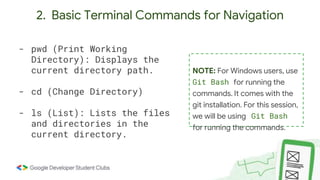
2. Basic Terminal Commands for Navigation
- pwd (Print Working
Directory): Displays the
current directory path.
- cd (Change Directory)
- ls (List): Lists the files
and directories in the
current directory.
NOTE: For Windows users, use
Git Bash for running the
commands. It comes with the
git installation. For this session,
we will be using Git Bash
for running the commands.
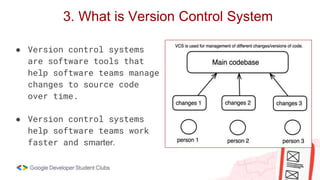
3. What is Version Control System
● Version control systems
are software tools that
help software teams manage
changes to source code
over time.
● Version control systems
help software teams work
faster and smarter.
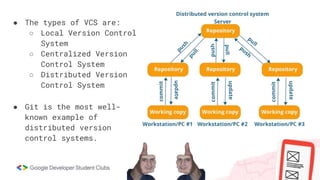
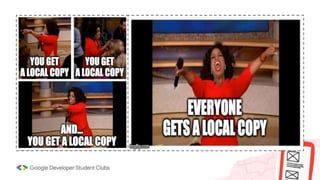
● The types of VCS are:
○ Local Version Control
System
○ Centralized Version
Control System
○ Distributed Version
Control System
● Git is the most well-
known example of
distributed version
control systems.
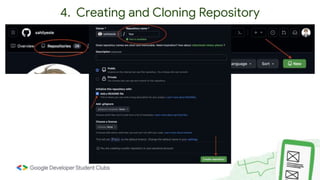
4. Creating and Cloning Repository
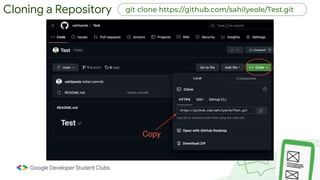
Cloning a Repository git clone https://github.com/sahilyeole/Test.git
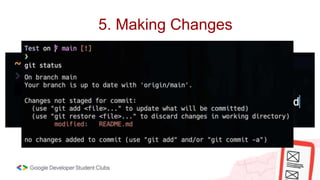
5. Making Changes
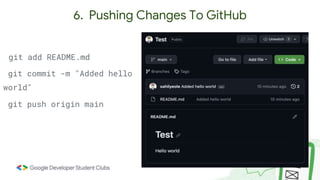
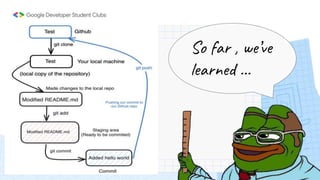
6. Pushing Changes To GitHub
git add README.md
git commit -m "Added hello
world"
git push origin main
So far , we’ve
learned …
7. Git Branches and Merging
1. git branch to list all the available
branches.
1. git branch [branch name] to create
a new branch.
1. git switch [branch name] to
switch branches
git pull
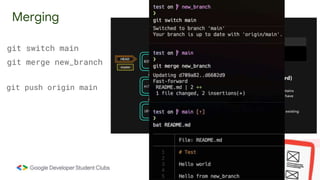
Merging
git switch main
git merge new_branch
git push origin main
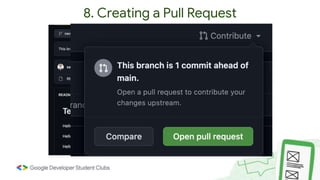
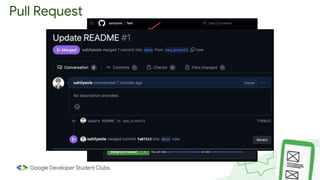
8. Creating a Pull Request
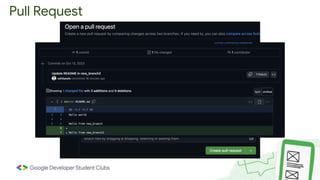
Pull Request
Pull Request
Pull Request
1. Go to https://github.com/gdsc-ghrietn/git-github#making-
changes
9. Making your first open source contribution
[Activity]
[Activity]
2. Fork
3. Clone your fork
4. Create new branch
5. Make changes
- Contribute -> add .txt file of your name,
inside it, again add your name and other
details if you want to.
[Activity]
6. Add, commit, push changes to forked repo
7. Create pull request
BONUS :
● Resolving merge conflicts
● VS code integration with git
Refer notes
QUESTIONS ?
That is all from our side !
Thanks and Regards
QnA
Ask whatever comes to your mind
Just don’t get too personal 😶
🌫 😶🌫
Connect with us:

14 oct Git & GitHub.pptx

  • 1.
    Google Developer StudentClubs GHRIET Nagpur LET’S GIT TOGETHER! WELCOME!
  • 2.
    KNOW YOUR SPEAKER -Full Stack/Software Developer - Web Dev LEAD @GDSC_GHRIET_Nagpur - Intern @RustDesk - Strong suits : Rust, Go, Next.js, TypeScript, MongoDB @SahilYeole https://www.linkedin.com/in/sahilyeole
  • 3.
    Topics to becovered : ➔ Setting up git and github ➔ Basic terminal commands for navigation ➔ What is version control system? ➔ Creating & cloning a repository ➔ Making changes ➔ Pushing changes to github ➔ Git branches and merging ➔ Creating a pull request ➔ Making your first open source contribution [Activity] BONUS : ● Resolving merge conflicts ● VS code integration with git
  • 4.
  • 5.
    - Creating GitHubaccount - Downloading Git - Installing Git 1. Setting up Git and GitHub
  • 6.
    2. Basic TerminalCommands for Navigation - pwd (Print Working Directory): Displays the current directory path. - cd (Change Directory) - ls (List): Lists the files and directories in the current directory. NOTE: For Windows users, use Git Bash for running the commands. It comes with the git installation. For this session, we will be using Git Bash for running the commands.
  • 7.
    3. What isVersion Control System ● Version control systems are software tools that help software teams manage changes to source code over time. ● Version control systems help software teams work faster and smarter.
  • 8.
    ● The typesof VCS are: ○ Local Version Control System ○ Centralized Version Control System ○ Distributed Version Control System ● Git is the most well- known example of distributed version control systems.
  • 10.
    4. Creating andCloning Repository
  • 11.
    Cloning a Repositorygit clone https://github.com/sahilyeole/Test.git
  • 12.
  • 13.
    6. Pushing ChangesTo GitHub git add README.md git commit -m "Added hello world" git push origin main
  • 14.
    So far ,we’ve learned …
  • 15.
    7. Git Branchesand Merging 1. git branch to list all the available branches. 1. git branch [branch name] to create a new branch. 1. git switch [branch name] to switch branches git pull
  • 16.
    Merging git switch main gitmerge new_branch git push origin main
  • 17.
    8. Creating aPull Request
  • 18.
  • 19.
  • 20.
  • 21.
    1. Go tohttps://github.com/gdsc-ghrietn/git-github#making- changes 9. Making your first open source contribution [Activity]
  • 22.
    [Activity] 2. Fork 3. Cloneyour fork 4. Create new branch 5. Make changes - Contribute -> add .txt file of your name, inside it, again add your name and other details if you want to.
  • 23.
    [Activity] 6. Add, commit,push changes to forked repo 7. Create pull request
  • 24.
    BONUS : ● Resolvingmerge conflicts ● VS code integration with git Refer notes QUESTIONS ?
  • 25.
    That is allfrom our side ! Thanks and Regards
  • 26.
    QnA Ask whatever comesto your mind Just don’t get too personal 😶 🌫 😶🌫
  • 27.