• Is CiviCRM Right for
Your Organization
#12NTCCivi


• Dave Greenberg
• Lisa Rau
Evaluate This Session!
Each entry is a chance to win an NTEN engraved iPad!


         or Online at www.nten.org/ntc/eval
Agenda


• Why might you need a CRM?
• What is CiviCRM?
• Features and examples
• Getting started
• Q&A
• Wrap-up
How important is this person to your organization?


• Volunteered for your organization once?
• Gave a one time donation of $50?
• Attended a lecture your organization sponsored?
• A client of one of your service programs?
l What if this is all the same person?
l * From Harness the Power of Your Data - Kami Griffiths and
Dean Graham
How are you currently tracking your data?

• Spreadsheets
• Index cards/paper
• Access/FileMaker Database
• Online tool
• Outlook
• QuickBooks
• Proprietary software
• Not tracking data
l Goals of a CRM


• Record interactions with multiple constituencies
    – Volunteers, Clients, Board,
    – Staff, Donors, Funders
• Track the “shared experience”
• Decentralize data entry
• Prevent loss of institutional knowledge
• Part of the fabric of the organization
What is CiviCRM?

• Constituent relationship management
• For non-profits and other civic sector organizations
• Web-based
• Open source
• Integrated with Drupal, Joomla! and WordPress
Content Management Systems (CMS’s)
• Localized (20+ languages)
All your data IN ONE PLACE!
    l Donors, volunteers, event participants, mailing
    lists, members, clients, staff, media, partners …
    • Fundraising
    • Memberships
    • Events
    • eNewsletters / email communications
    • Case management
    • Grants
    • Canvassing and Petitions
Get the big picture
Understand your constituents
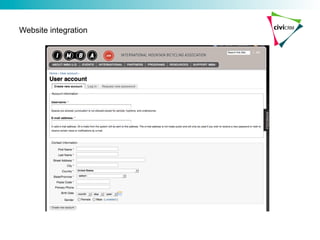
Website Integration

• Donation, mailing list signup, event registration
integrate seamlessly into your site design
• Constituents can update their own contact
information
• Online “self service” options save staff time
• Data is recorded real-time
• Share parts of your CRM data on your site (upcoming
events, online directories …)
• Control access to site content based on membership
or other attributes
Website integration
Map integration
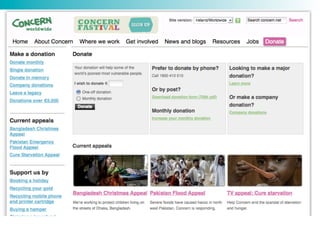
Fundraising

• Online and offline donations
• Reports and configurable dashboard
• Smart groups
• Integrated communications (email, snail mail)
• Pledges
• Personal campaign pages
l Thank-you gifts
Personal campaign pages
Events

• Event listings integrated with your site
• Online or offline registration (paid or free)
• Participant => CRM record
• Find and communicate with current and past participants
• Simple or complex fee structures
• Tell a friend
Memberships

• Offer memberships with defined benefits and durations
• Paid memberships
• Allow online or offline signup / renewal
• Limit access to website content or features
Email communications

• Bulk mail / eNewsletters
• Filter communications by CRM data (events, donations,
membership …)
• Click-thru tracking, bounce handling …
• Recipients can manage subscriptions
Customize: Maryland Family Network
  • Manage staff training requirements by position and center.
  • Complex training registration process
Custom fields in a form
Web-based CRM

+ Access your data “anytime / anywhere”
+ Centralized
+ Security and data “safety”
+ Easier integration
- No access if offline
- Getting started can take longer
- May require more technical skills
Diverse community!


• Foundation – Wikimedia, Electronic Frontier Foundation
• Humanitarian - Concern Worldwide, Amnesty International
• Advocacy - American Friends Svc Committee
• Community Arts - Wellington Circus Trust
• Culture - Creative Commons
• Human Rights - Frontline Defenders
• Human Services - Physician Health Program
• Membership - International Mtn Biking Association
• Political Party - UK, NZ and Australia Green Parties
• Trade Association - Clean Economy Network
• Government - NY Senate, European Commission
• Educational, Religious …
Viral growth

• 475,000+ total downloads since 2006
• Community forums
    – 15,000+ members
    – Avg 50+ posts / week-day
• 2011 NTEN Data Ecosystem report
    – Solid A’s in user satisfaction
• 2011 NTEN Low-cost Donor Management - Top 10
• FLOSS (free) and Packt Publishing books
• Developers and users contributing:
   – Code and bug fixes
   – Documentation
   – Sponsorships
   – Local meetups
What do you need to use CiviCRM?


• Prepare your Server
     – Web-site running Drupal or Joomla CMS
• Prepare your data
     – Export your data and clean it up prior to importing it
     – Prepare your data import file
• Technical resource to do the installation
     – Install the software and integrate/configure it in the server
     – Install and configure the database
• Train your folks
     – Train your team on CiviCRM (managing data and donors)
     – Train your administrators on how to manage CiviCRM
What does CiviCRM cost?

• It depends….
    – Size of your data
    – Complexity of your organization
    – Your specific needs (e.g. how much needs to be customized?)

• At a minimum, you will need
    – Administrative resources to maintain your data (if you already have a system, these people
    can likely learn CiviCRM)
    – Technical admin resources to manage CiviCRM
          • Deduplication
          • Data import/exports
          • Event, profiles, custom data configuration
          • Other configuration

• You may need development resources to
    – Customize CiviCRM
    – Develop custom reports
Choosing partner(s)


• Where do you need help?
   – Design, Configure and Customize
   – Data Migration
   – Hosting
   – Ongoing support and maintenance (upgrades!)
• Partner selection is critical
   – Experience w/ open source + specific platform(s)
   – Experience w/ organizations and implementations like
   yours (features, scale, user profile …)
   – Best practices approach to customization
Next steps?


• Read the books
• Play with the public demo
• Talk to others who use CiviCRM
• Talk to a CiviCRM consultant
• Install a test database
Resources


• CiviCRM website: http://civicrm.org
   – Community forum
   – Professional services listings
   – Blog
   – Issue Tracker and roadmaps
   – Training sessions and local meetups
• Understanding CiviCRM: A Comprehensive Guide
   – Free online book
• Using CiviCRM
   – Print or eBook from Packt Publishing
• Choosing and Using Free and Open Source Software:
primer for non-profits
   – http://nosi.net/projects/primer
Evaluate This Session!
Each entry is a chance to win an NTEN engraved iPad!


         or Online at www.nten.org/ntc/eval

Is CiviCRM Right for Your Organization

  • 1.
    • Is CiviCRM Rightfor Your Organization #12NTCCivi • Dave Greenberg • Lisa Rau
  • 2.
    Evaluate This Session! Eachentry is a chance to win an NTEN engraved iPad! or Online at www.nten.org/ntc/eval
  • 3.
    Agenda • Why might youneed a CRM? • What is CiviCRM? • Features and examples • Getting started • Q&A • Wrap-up
  • 4.
    How important isthis person to your organization? • Volunteered for your organization once? • Gave a one time donation of $50? • Attended a lecture your organization sponsored? • A client of one of your service programs? l What if this is all the same person? l * From Harness the Power of Your Data - Kami Griffiths and Dean Graham
  • 5.
    How are youcurrently tracking your data? • Spreadsheets • Index cards/paper • Access/FileMaker Database • Online tool • Outlook • QuickBooks • Proprietary software • Not tracking data
  • 6.
    l Goals of aCRM • Record interactions with multiple constituencies – Volunteers, Clients, Board, – Staff, Donors, Funders • Track the “shared experience” • Decentralize data entry • Prevent loss of institutional knowledge • Part of the fabric of the organization
  • 7.
    What is CiviCRM? • Constituentrelationship management • For non-profits and other civic sector organizations • Web-based • Open source • Integrated with Drupal, Joomla! and WordPress Content Management Systems (CMS’s) • Localized (20+ languages)
  • 8.
    All your dataIN ONE PLACE! l Donors, volunteers, event participants, mailing lists, members, clients, staff, media, partners … • Fundraising • Memberships • Events • eNewsletters / email communications • Case management • Grants • Canvassing and Petitions
  • 9.
    Get the bigpicture
  • 10.
  • 11.
    Website Integration • Donation, mailinglist signup, event registration integrate seamlessly into your site design • Constituents can update their own contact information • Online “self service” options save staff time • Data is recorded real-time • Share parts of your CRM data on your site (upcoming events, online directories …) • Control access to site content based on membership or other attributes
  • 12.
  • 13.
  • 14.
    Fundraising • Online and offlinedonations • Reports and configurable dashboard • Smart groups • Integrated communications (email, snail mail) • Pledges • Personal campaign pages
  • 16.
  • 17.
  • 18.
    Events • Event listings integratedwith your site • Online or offline registration (paid or free) • Participant => CRM record • Find and communicate with current and past participants • Simple or complex fee structures • Tell a friend
  • 21.
    Memberships • Offer memberships withdefined benefits and durations • Paid memberships • Allow online or offline signup / renewal • Limit access to website content or features
  • 23.
    Email communications • Bulk mail/ eNewsletters • Filter communications by CRM data (events, donations, membership …) • Click-thru tracking, bounce handling … • Recipients can manage subscriptions
  • 24.
    Customize: Maryland FamilyNetwork • Manage staff training requirements by position and center. • Complex training registration process
  • 25.
  • 26.
    Web-based CRM + Access yourdata “anytime / anywhere” + Centralized + Security and data “safety” + Easier integration - No access if offline - Getting started can take longer - May require more technical skills
  • 27.
    Diverse community! • Foundation –Wikimedia, Electronic Frontier Foundation • Humanitarian - Concern Worldwide, Amnesty International • Advocacy - American Friends Svc Committee • Community Arts - Wellington Circus Trust • Culture - Creative Commons • Human Rights - Frontline Defenders • Human Services - Physician Health Program • Membership - International Mtn Biking Association • Political Party - UK, NZ and Australia Green Parties • Trade Association - Clean Economy Network • Government - NY Senate, European Commission • Educational, Religious …
  • 28.
    Viral growth • 475,000+ totaldownloads since 2006 • Community forums – 15,000+ members – Avg 50+ posts / week-day • 2011 NTEN Data Ecosystem report – Solid A’s in user satisfaction • 2011 NTEN Low-cost Donor Management - Top 10 • FLOSS (free) and Packt Publishing books • Developers and users contributing: – Code and bug fixes – Documentation – Sponsorships – Local meetups
  • 29.
    What do youneed to use CiviCRM? • Prepare your Server – Web-site running Drupal or Joomla CMS • Prepare your data – Export your data and clean it up prior to importing it – Prepare your data import file • Technical resource to do the installation – Install the software and integrate/configure it in the server – Install and configure the database • Train your folks – Train your team on CiviCRM (managing data and donors) – Train your administrators on how to manage CiviCRM
  • 30.
    What does CiviCRMcost? • It depends…. – Size of your data – Complexity of your organization – Your specific needs (e.g. how much needs to be customized?) • At a minimum, you will need – Administrative resources to maintain your data (if you already have a system, these people can likely learn CiviCRM) – Technical admin resources to manage CiviCRM • Deduplication • Data import/exports • Event, profiles, custom data configuration • Other configuration • You may need development resources to – Customize CiviCRM – Develop custom reports
  • 31.
    Choosing partner(s) • Where doyou need help? – Design, Configure and Customize – Data Migration – Hosting – Ongoing support and maintenance (upgrades!) • Partner selection is critical – Experience w/ open source + specific platform(s) – Experience w/ organizations and implementations like yours (features, scale, user profile …) – Best practices approach to customization
  • 32.
    Next steps? • Read thebooks • Play with the public demo • Talk to others who use CiviCRM • Talk to a CiviCRM consultant • Install a test database
  • 33.
    Resources • CiviCRM website: http://civicrm.org – Community forum – Professional services listings – Blog – Issue Tracker and roadmaps – Training sessions and local meetups • Understanding CiviCRM: A Comprehensive Guide – Free online book • Using CiviCRM – Print or eBook from Packt Publishing • Choosing and Using Free and Open Source Software: primer for non-profits – http://nosi.net/projects/primer
  • 34.
    Evaluate This Session! Eachentry is a chance to win an NTEN engraved iPad! or Online at www.nten.org/ntc/eval