TUT Virtual Library      Choosing and implementing user­centered product development method  V 1.2 
________________________________________________________________________________________________________ 
 
Choosing and implementing user­centered product development 
method 
TUT Virtual Library  
version 1.2 


COURSE: TIE­41206 User­centered product development 
GROUP NAME: K­T­N 
Ekaterina Olshannikova 
Tatiana Anagnostaki 
Nazia Hasan 
ekaterina.olshannikova@student.tut.fi 
tatiana.anagnostaki@student.tut.fi 
nazia.hasan@student.tut.fi 
246836 
248601 
244888 


02.03.15                                                                                                                                                                          1​/17 
TUT Virtual Library      Choosing and implementing user­centered product development method  V 1.2 
________________________________________________________________________________________________________ 
Version history 
Version  Date  Author(s)  Definition 
0.1  18.02.2015  Nazia  Personalization of assignment template 
according to group; sharing via Google drive 
0.2  26.02.2015  Ekaterina  Added description of Contextual Design and 
Participatory Design methodologies 
0.3  27.02.2015  Ekaterina  Added definition of LUCID, JAD, TRUMP 
and Usage Сentered design methodologies 
0.4  27.02.2015  Tatiana  Added paragraphs 1.1, 2.1 and 2.2. 
0.5  28.02.2015  Tatiana  Added additional paragraphs in 2.2 and added 
paragraph 3. 
0.6  28.02.2015  Tatiana  Added paragraph 1.2 
0.7  28.02.2015  Nazia  Proof Reading;  
0.8  01.03.2015  Nazia  Added references 
0.9  01.03.2015  Ekaterina  Added references, information to the Method 
vs. Method and Chosen method sections, 
Added info to the 1.2 section 
1.0  01.03.2015  Tatiana  Proofreading; added new material in paragraph 
1.2  
1.1  02.03.2015  Tatiana, 
Ekaterina, 
Nazia 
Added Chapter 5; proof reading; preparing for 
final submission. 
1.2  22.03.2015  Ekaterina, 
Tatiana,  
Nazia 
Added information to the 4.2 paragraph; 
Added 2.3 paragraph; Proofreading. 
   
 
02.03.15                                                                                                                                                                          2​/17 
TUT Virtual Library      Choosing and implementing user­centered product development method  V 1.2 
________________________________________________________________________________________________________ 
Table of contents
1. Introduction
1.1 Overview
1.2 Words, concepts, notations
1.3 References
2. Usability goals
2.1 Short description of the product
2.2 Usability goals of the product
2.3 Measurement of the goal achievement
3. Product features
4. Human­centered development methods
4.1 Representing methods
4.2 Method vs. method
4.3 Chosen method
5. Implementing the chosen method


02.03.15                                                                                                                                                                          3​/17 
TUT Virtual Library      Choosing and implementing user­centered product development method  V 1.2 
________________________________________________________________________________________________________ 


1. Introduction 
1.1 Overview 
The purpose of this document is to give a description about the product the team decided to design                                   
by using augmented reality. The TUT Virtual Library is a product that aims to modify and master                                 
the traditional way of searching, finding and using learning materials. In the following sections, it'll                             
be described in details how the system functions, who are the end users and how they can interact                                   
with it. The main focus will be on the most important usability goals and features by providing a                                   
proper justification for these goals. 
As an attempt to understand how this product can be further developed, from the conceptual model                               
to the final product, a thorough analysis of several development methods, such as Contextual                           
Design, Participatory Design, Logical User­Centered Interaction Design (LUCID), Joint                 
Application Design (JAD), Trial Usability Maturity Process (TRUMP) and Usage­Centered Design                     
will be explain later on. Two of the aforementioned methods will be compared furthermore. The                             
final selection criteria of the chosen method and a concrete guideline of how this method will be                                 
implemented to the product development will also be mentioned here. 
 
1.2 Words, concepts, notations 
Augmented Reality​: ​a technology that superimposes digital elements on a user’s view of the real                             
world and provides a composite view. These elements are supplemented in the view in real life, by                                 
using computer­generated sensory input such as sound, video, graphics or GPS data. 
End User​:​ ​the person who actually uses a particular product. 
Usability Goals​: ​according to an international standard, usability is the extent to which a product                             
can be used by specified users to achieve specified goals with effectiveness, efficiency and                           
satisfaction in a specified context of use. In order to do so, the product should be evaluated                                 
properly, from many different aspects by using some measurable goals, e.g. how easily the user can                               
learn to interact with the product, how fast and so on. 
 
02.03.15                                                                                                                                                                          4​/17 
TUT Virtual Library      Choosing and implementing user­centered product development method  V 1.2 
________________________________________________________________________________________________________ 
Conceptual Models​: ​According to Don Norman [1], "a conceptual model is an explanation, usually                           
highly simplified, of how something works. It doesn’t have to be complete or even accurate as long                                 
as it is useful”. 
Virtual (object)​: ​an item that does not physically existing as such, but instead is made by software                                 
to appear to do so. 
TUT: ​Tampere University of Technology 
Requirements specification (of a software​) [3]: a list of functional and non­functional requirements                         
that describe a software system which will be developed. It can include different use cases that                               
explain the different interactions the users will have with that specific software. 
Prototype​: a first or preliminary version of a product, which is used for further development. 
Stakeholder​: a person with an interest or concern in something, especially a business. 


Table 1 Notation used in the document. 
Italic  Terms that require further explanation 
CAPS  Abbreviations for specific terms 
[Square brackets]  References 
 
 
1.3 References 
[1] ​Norman D. The Design of Everyday Things. 2013. Library of Congress 
Cataloging­in­Publication Data. Date: 28.02.2015 
[2] Wikipedia. 2005. Prosody (Linguistics). [ONLINE] Available at: 
http://en.wikipedia.org/wiki/Prosody_(linguistics)​. [Accessed 28 February 15]. 
[3] Wikipedia. 2004. Software Requirement Specifications. [ONLINE] Available at: 
http://en.wikipedia.org/wiki/Software_requirements_specification​.​ [Accessed 28 February 15]. 
[4] ​Beyer, H., & Holtzblatt, K. 1997. Contextual design: defining customer­centered systems. 
Elsevier. 
[5] Kensing, F., & Blomberg, J. 1998. Participatory design: Issues and concerns.Computer 
Supported Cooperative Work (CSCW), Vol. 7(3­4), 167­185. 
[6] Kreitzberg, C. 1998. The LUCID Design Framework (Logical User­Centered Interaction 
Design). Cognetics Corporation, Princeton, NJ, USA. 
 
02.03.15                                                                                                                                                                          5​/17 
TUT Virtual Library      Choosing and implementing user­centered product development method  V 1.2 
________________________________________________________________________________________________________ 
[7] Davidson, E. J. 1999. Joint application design (JAD) in practice. Journal of Systems and 
Software, 45(3), 215­223. 
[8] Kuusinen, K. 2009. Faculty of Electronics, Communications and Automation (Doctoral 
dissertation, Tampere University of Technology). ​[ONLINE] ​Available at: 
http://www.cs.tut.fi/ihte/projects/kaste/Msc_Thesis_Kuusinen.pdf​. [Accessed 27 February 15] 
[9] Constantine, L. L., Biddle, R., & Noble, J. 2003. Usage­Centered Design and Software 
Engineering: Models for Integration. In ICSE Workshop on SE­HCI. Vol. 3,106­113. 
[10] Bevan, N. 2003. UsabilityNet methods for user centred design. Human­Computer Interaction: 
theory and Practice. 
[11] Nielsen Norman Group. 2012. 10 Usability Heuristics for User Interface Design. [ONLINE] 
Available at: ​http://www.nngroup.com/articles/ten­usability­heuristics​. [Accessed on 02.03.2015] 
[12] Nielsen Norman Group. 2013. Severity Ratings for Usability Problems. [ONLINE] Available 
at: ​http://www.nngroup.com/articles/how­to­rate­the­severity­of­usability­problems​. [Accessed on 
02.03.2015]  
 
2. Usability goals 
2.1 Short description of the product 
The intended product to be designed is called TUT Virtual Library. As the name suggests, it's about                                 
a library which is located in a special room at the university premises. Students of all nationalities                                 
who attend the university, as well as university personnel like professors, administrators and                         
researchers between the ages of 20­65 can have access, by using their identity card provided by the                                 
university. In this card will be stored all the personal information about the user, i.e. name, age,                                 
nationality, program degree, courses, and any other information that can be useful to identify in                             
which category the user belongs: students, administration and staff members. 
A user needs to swipe his/her card before getting access to the room where the virtual library is                                   
located. Once the user enters the room, the system automatically authenticates his/her identity                         
based on the information that is stored in the respective ID card and creates an account for that                                   
particular user. This way the user doesn't need to use any usernames or passwords to have access to                                   
it. The main equipment is a pair of augmented reality glasses along with a camera, a microphone                                 
that is embedded in the glasses and gloves with sensors that will aid the user to interact with the                                     
virtual objects, i.e. keyboard, books, magazines, newspapers, articles and so on. 
Like in any traditional library, the primary task of the user is to search and find any kind of                                     
learning/study material. The basic interface types are speech, command­based by using a virtual                         
keyboard and air­based gestures which can be captured from the camera's sensors. When the user                             
interacts with the system for the first time, a virtual tutorial will be displayed guiding him through                                 
the basic features and usage of the system, such as common commands, gestures etc. 
It's very important that the environment is as quiet as possible in order for one to study properly. To                                     
achieve this, the room will be divided in smaller separate slots, so maximum of 5 to 10 users can                                     
have access at the same time. So even though the users might use speech as an interaction type, the                                     
other persons who are in the room will not be affected by noises produced. Also in this way, it is                                       
possible for a small group of users to work together, like in any other traditional libra 
 
02.03.15                                                                                                                                                                          6​/17 
TUT Virtual Library      Choosing and implementing user­centered product development method  V 1.2 
________________________________________________________________________________________________________ 
The only prerequisite for using the TUT Virtual Library, is that the user needs to book in advance a                                     
specific date and time to reserve a slot in the room. This can be achieved by filling an on online                                       
timetable, provided by the university to all the potential users. 
 
2.2 Usability goals of the product 
1. ​Usability goal​: 100% of students can send the studying material to their email account                             
with a single click or command. 
Justification​: The prerequisite for using the TUT Virtual Library is to book in advance a                             
free slot and it’s not always easy to find the most suitable time. In addition, the user should be able                                       
to have access to the material at any given time. 
2. ​Usability goal​: At least 95% of people with poor eyesight can effectively use the                             
augmented reality glasses.  
Justification​: Many people between the ages of 20­60 are wearing glasses either because                         
they suffer from myopia, farsightedness or astigmatism. 
3. ​Usability goal​: At least 90% of the users can find the book that they're looking for under                                   
2 minutes by using speech commands in English. 
Justification​: In a university such as the TUT, there is a great number of international and                               
exchanged students. In addition, English is the most common language that it's used in the                             
technology field. 
4. ​Usability goal​: At least 75% of users can find the correct excerpt from a book, article,                                 
research or other learning material without knowing the title or the author. 
Justification​: Many times people have poor recollection as to what they have read exactly                           
and where they have read it. In a conversation it's quite common to say something like "I don't                                   
remember where exactly I've read this, but the article was talking about this and that", where "this                                 
and that" is a short synopsis of what the user remembered. 
5. ​Usability goal​: At least 95% of users can create their own private mini library according                               
to their studies and field of expertise with a single click or command. 
Justification​: With the private mini library the user can use the material which is stored                             
there for future reference, without having to search for it again. 
6. ​Usability goal​: At least 95% of the users who use the system for the first time will have                                     
immediate access to suggested learning material based on their studies and field of expertise. 
Justification​: The suggested learning material aims to decrease the search time for the first                           
time user. This will lead to better understanding of the system, less frustration and enjoyable user                               
experience. 
 
The main evaluation approach for the aforementioned usability goals is usability tests. Typically                         
usability tests take place in a laboratory or in laboratory­like conditions where the user is isolated                               
from the normal day­to­day interruptions. The session is recorded, so that it can be analyzed later                               
on and user's behavior is observed to give a better understanding. In addition, it's quite common to                                 
use the think­aloud method, where the user speaks out loud, expressing his/her thoughts or the steps                               
that s/he has to follow in order to complete the series of tasks that s/he has been given. 
 
02.03.15                                                                                                                                                                          7​/17 
TUT Virtual Library      Choosing and implementing user­centered product development method  V 1.2 
________________________________________________________________________________________________________ 
Another reason for using usability tests is that by definition, the virtual library has very similar                               
environmental conditions: it's an isolated quiet place, where talking to other people is very limited                             
and the user is mainly focused on his task. 
A second evaluation approach is to use analytical evaluation such as walkthroughs. As the name                             
suggests, the evaluation method involves experts in walking through scenarios with prototypes of                         
the application. A key feature for this kind of evaluation is that the end users don't need to be                                     
present. The experts can give their opinion on how efficient is the system, how effective it is to use                                     
and how much satisfying the experience can be. 
 
2.3 Measurement of the goal achievement 
The level of successful completion of the target task reveals if the goal has been achieved or not.                                   
This can be measured by the level of tips from supervisor: 
Tip level 1 – Supervisor answers on the question of participant, but don’t give any additional                               
details. 
Tip level 2 – Supervisor admits that the participant has a problem while doing task and gives an                                   
advice without specific details.  
Tip level 3 – a participant gives up while completing the task or tries to do it many times without                                       
any result. Supervisor gives a certain suggestion on how to perform it.  
It should also be transformed into “acceptability” rating at the end so we will have information how                                 
many test participants were satisfied with the tested application / concept or not. 
For that we need to assign specific “acceptability” (usability) value to each level of tips. For                               
example, an acceptability rate of the range 80% ­ 100% can be considered as tip level one; an                                   
acceptability rate of the range 60% ­ 80% as tip level 2 and below this range (60% or less) can be                                         
considered as tip level 3. Our target is to achieve a tip level 1 for 80% of all the users. Since we are                                             
adopting an iterative development method, the chances are higher that we will gradually increase                           
the number of users who successfully complete the given tasks according to the improvements                           
made from the previous tests.  
 
3. Product features 
The following features are according to the list of usability goals that are described above. 
 
1. As it was mentioned in the description of the product, the personal ID of the user                                 
contains valuable information. The system automatically recognizes the user and logs in to his/her                           
account. This way, when the user finds the material s/he is looking for, s/he can give a simple                                   
command like "send to email" or press a button with the same command, if s/he prefers to use the                                     
virtual keyboard. 
2. For this usability goal, there will be a button in the augmented reality glasses that can                                 
adjust the power and enhance the eyesight, just like using prescribed glasses from an eye doctor. 
3. To achieve this goal, an advanced voice recognition system, will remove any prosodic of                             
the spoken language from the speech, such as variation in syllable weight, loudness, pitch, breaks                             
 
02.03.15                                                                                                                                                                          8​/17 
TUT Virtual Library      Choosing and implementing user­centered product development method  V 1.2 
________________________________________________________________________________________________________ 
between words, accent, emotions of the speaker and so on. This will create a "raw" voice, which                                 
enables the system to recognize and interpret the input correctly. [2] 
4. By giving an oral command or typing to a virtual keyboard keywords and small pieces of                                 
text, the system will run an advanced algorithm to find all the possible combinations of the given                                 
words. It will offer a list sorted from the most common excerpts to the least common ones. 
5. Similar to the first feature, the personal identity card will be used to recognize the user, so                                   
the s/he can give a simple command such as "send to my library" or press a button. 
6. Again, this feature is based on the personal identity card, where all the information of the                                 
user is stored. Using this collected data, the system will be able to give proper suggestions. 
 
4. Human­centered development methods 
4.1 Representing methods  
Contextual Design 
According to Beyer and Holtzblatt [4], context study is based on the craft (master ­ apprentice)                               
model of learning: it is necessary to observe the user and ask him questions as if he were a good                                       
craftsman, and the interviewer is his new apprentice. Beyer and Holtzblatt have also listed four                             
basic principles of organization of ethnographic interviews: 
1. Context. ​Instead of conducting interviews in a clean white room, the interviewer should                         
interact with users and observe them in a natural work environment or otherwise, something                           
appropriate for this product, the physical context. Users are observed when they are busy                           
with their activities and making inquiries in their familiar surroundings with a lot of artifacts                             
they use on a daily basis, help to extract the core characteristics of their behavior. 
2. Cooperation. Interviews and observations should have the characteristics of a joint user                       
study in which observation activity is focused on the discussion of its structure and                           
subtleties. 
3. Interpretation. ​A ​designer's work is largely reduced by identifying what is behind the                         
words and behavior of users and the characteristics of their habitats. The task of the                             
designer is to consider the collected data as a whole and to reveal the impact that they have                                   
on the design. 
4. Orientation. Instead of rigidly adhere to a pre­existing questionnaire or, conversely, making                       
the interview "a free voyage", the designer must carefully guide the conversation in search                           
of data related to design issues. 
Participatory Design 
Participatory design [5] is a design method where all stakeholders (users, customers, designers,                         
developers, sales and marketing personnel, management personnel, etc.) have opportunity to be                       
actively involved in the developmental processes and procedures. Participants’ roles and                     
responsibilities are varying and their involvement differs throughout the project. The aim of such                           
kind of approach is that the final project meets all needs of various stakeholder groups. A ground                                 
rule of this approach is that each person in this group should be an expert at some field. 
LUCID 
Originally, Logical User Centered Interaction Design [6] was used as an approach to interface                           
designing at Cognetics Corporation. Currently, it is a powerful method to conduct the process of                             
software development process. It assists designers in order to: 
 
02.03.15                                                                                                                                                                          9​/17 
TUT Virtual Library      Choosing and implementing user­centered product development method  V 1.2 
________________________________________________________________________________________________________ 
1. Elaborate consistent and clear concept of a product that will create its connectivity with                           
project’s goals. 
2. Reveal business objectives which in turn will improve developmental performance. 
3. Gain demographic data of population and the needs of each segment. 
4. Provide final needs and functionality analysis from user’s perspective. 
5. Establish navigational structure which includes all required functionality in a simplest                     
manner. 
This methodology has six phases that are listed in the table [6] below: 
 
Table 1. LUCID process. 
JAD 
Joint Application Design [7] is a methodology like the Participatory Design which is based on the                               
concept that users are the main experts. This method leads to a shorter developmental life cycle and                                 
greater user satisfaction because of the collaborative system analysis and design. The outcomes                         
from group sessions are requirements specification and prototype. There is a planning phase,                         
several design sessions and final Wrap­Up stage.  
TRUMP 
The international principles of Human­Centered Interaction are the basis of Trial Usability Maturity                         
Process [8]. It is a project that raised the usability maturity of large companies and it shares its                                   
knowledge to others in order to achieve beneficial results. The lifecycle of this methodology                           
includes several phases that are listed below: 
1. Feasibility. This phase consists of stakeholder meetings, revealing context of use and                       
creating scenarios. 
2. Requirements. Evaluation of existing system and outlining the usability requirements are                     
performed in this phase. 
3. Design.​ ​The phase includes prototyping and creating a style guide. 
4. Implement. ​This is an evaluation phase where usability testing takes place. 
5. Release. ​This phase relates to collecting feedback.  
 
02.03.15                                                                                                                                                                          10​/17 
TUT Virtual Library      Choosing and implementing user­centered product development method  V 1.2 
________________________________________________________________________________________________________ 
Usage­Centered Design 
The main focus of Usage­centered design [9] is on “usage”, i. e. is on the improvement of task                                   
accomplishment. This method is driven by different models. The process includes selective user                         
involvement and consists of exploratory modeling, model validation and structured usability                     
inspections. The accent is made on models of user relationships with the system. Design models are                               
abstract in comparison with the user­centered methodology. The designing process is systematic,                       
fully specified and made through modeling.  
4.2 Method vs. method 
In this section, comparison is made between TRUMP and Participatory design methods. TRUMP                         
project is a trialed use of User­Centered design methods based on ISO 13407 [8]. Tables included                               
in reference [10] demonstrate correlation of TRUMP methods with the User­Centered Process: 
 
Table 2. TRUMP methods 
There are ten methods/stages which were selected as applicable in the development environment                         
for the ​TRUMP​ approach: 
1. Stakeholder Meeting​. This method is aimed to identify and reconcile usability goals,                       
intended context of use and their relation to the business objectives and success criteria for                             
the system. A meeting is organized for this purpose which lasts for a half of a day. 
2. Context of Use. This stage is organized as half­day workshop where information about                         
intended users, their tasks, technical and environmental constraints are collected. 
3. Scenarios of use. This method reveals how a user is expected to carry out main tasks in a                                   
certain context. Such process provides a significant input to design. 
4. Evaluate an existing system. In this stage, assessment of previous system is done in order to                               
obtain usability issues and measurements of usability. This stage supplies input to the                         
usability requirements. 
5. Usability requirements. In this stage, elaboration of usability requirements for the user                       
groups and tasks is made. These requirements are identified in the analysis of context of use                               
and in the scenarios. 
6. Paper prototyping. It is evaluation stage where users test low fidelity prototypes (paper or                           
other materials are used). It helps to reveal usability drawbacks in the early stage. 
 
02.03.15                                                                                                                                                                          11​/17 
TUT Virtual Library      Choosing and implementing user­centered product development method  V 1.2 
________________________________________________________________________________________________________ 
7. Style guide. In this stage, project conventions are created and documented for screen and                           
page design. 
8. Evaluation of machine prototype. 3­5 expert users carry out key tasks and give a rapid                             
feedback on the usability of the implemented system. 
9. Usability testing. At least 8 users participate in the formal usability testing. Evaluation of                           
usability is aimed to objectify the overall achievement of the designed and implemented                         
system. 
10. Collecting feedback from users​. Usability surveys help to reveal hidden problems that                       
should be fixed in newer/upcoming version. 
TRUMP approach to software and hardware design identifies an appropriate interaction between                       
user and system, active involvement of users to the development process and iterations of various                             
design solutions. Moreover, for this method it is important to observe the users’ practices and                             
behavior in the context of use. 
Participatory Design is a specific mode of User­Centered Design where users participate in the                           
designing through the entire development process and make decisions regarding to designs. It                         
should be mentioned that TRUMP and Participatory design can be considered as overlapping                         
because some cases which are user­centered can be compatible with user participation and vice                           
versa. 
The main difference between TRUMP and Participatory Design methods is that PD establishes                         
bespoke (custom­made) product with the participants, who are end users of the product being                           
developed; while TRUMP method can work with both the representative users and actual users. 
Participatory Design is not only a development approach but also a methodology that adjusts the                             
workplace processes by improving employee job satisfaction via diminishing power distance. Such                       
aspect does not tend to appear in TRUMP method and users’ influence in a system’s development                               
is usually limited. 
By a user­oriented approach, such as Participatory Design, it is possible to reveal information about                             
context specific technical, multifaceted cultural, political, communication, motivational and                 
personal issues. Unfortunately, information which is obtained by this method cannot be used as                           
detailed instructions for the system development. Meanwhile, the multi­methodological approach                   
as TRUMP contains many important techniques that are part of other independent methods for                           
designing (e. g context of use, scenarios, prototyping and involvement of stakeholders) and they are                             
strongly incorporated with the development process. 
Moreover, in our case it will be problematic to search and recruit appropriate participants, because                             
they have to be fluent and expert in certain areas of the research and development topic. This can                                   
be a negative point of the Participatory Design method because participants’ selection is a time                             
consuming process. 
Furthermore, it is obviously difficult to find people who are ready to contribute to the whole                               
designing process without any financial support. From the TRUMP perspective, developers have to                         
meet stakeholders/target user group ​not more than what is necessary and does not require any                             
significant funding. The goals of the meeting are to create common visions regarding to the project                               
and to ensure that all factors that relate to use of the system are identified before the actual design                                     
work starts. 
Nevertheless, in spite of all positive aspects of the TRUMP method, many techniques are used in                               
this approach might become a negative factor. Since ours is a small team, not a large organization,                                 
 
02.03.15                                                                                                                                                                          12​/17 
TUT Virtual Library      Choosing and implementing user­centered product development method  V 1.2 
________________________________________________________________________________________________________ 
and this project is the assignment of the course at university and not funded, we will be able to                                     
implement only a few phases of TRUMP method. In our study, the final product will be                               
represented by a low­fidelity prototype, which means we would need to skip some of the final                               
techniques of the TRUMP lifecycle (e. g. evaluation of machine prototype). 
In a conclusive aspect, the challenges of TRUMP are not significant comparing to what advantages                             
it may provide for efficiently designing our product. The potential of this approach provides us                             
wide range of opportunities in design and the organization of the workflow. 
 
4.3 Chosen method 
We consider the TRUMP method to be the best option for designing our project. The main benefits                                 
of TRUMP method for user­centered design affected our decision are: 
● Development time can be reduced, because the identification of the usability goals and                         
objectives, as well as revealing resolution of usability issues, occurs in the early stages; 
● Techniques which are used during the TRUMP life cycle are cost­effective and easy to learn                             
and to use; 
● This method provide the system that meet users needs and improve their processes; 
● As it has been mentioned above, TRUMP method contains aspects of Participatory Design.                         
In addition, this method contains similarities with Contextual Design, JAD and LUCID                       
methods as well; 
● It is based on ISO 13407, which is recognized and accepted in the Human­Centered                           
Interaction field of research and study; 
● This approach consists of a number of significant practices, including the user participations                         
and contextual studies. From this point, we have the option of a wide range of techniques                               
that can be implemented during the designing process; 
As it was mentioned in the 4.2 paragraph, the wide range of the techniques can trigger a number of                                     
difficulties in the organization of the designing process as well. Our aim is to carefully identify                               
applicable techniques for the assigned goals. Certain phases should be modified according to their                           
feasibility. For example, the style guide creation will be replaced by the designing of the                             
Moodboard, where elements of virtual interface will be displayed (icons, patterns of layout, fonts,                           
etc.).  
5. Implementing the chosen method 
Here is demonstrated the process by designing how it is used on implementing the product that will                                 
be designed in 2nd part of the assignment with the chosen development process. 
1. ​Stakeholder meeting​. In this stage we will demonstrate user case scenarios to make stakeholders                             
familiar with the concept of the project. Moreover, we will provide an online questionnaire from                             
which we will obtain basic background information (demographic data etc) and additional data on                           
how the users are likely to use the non­traditional library. Afterwards we will have informal                             
discussion with the participants in order to receive their attitude and opinion about the project.  
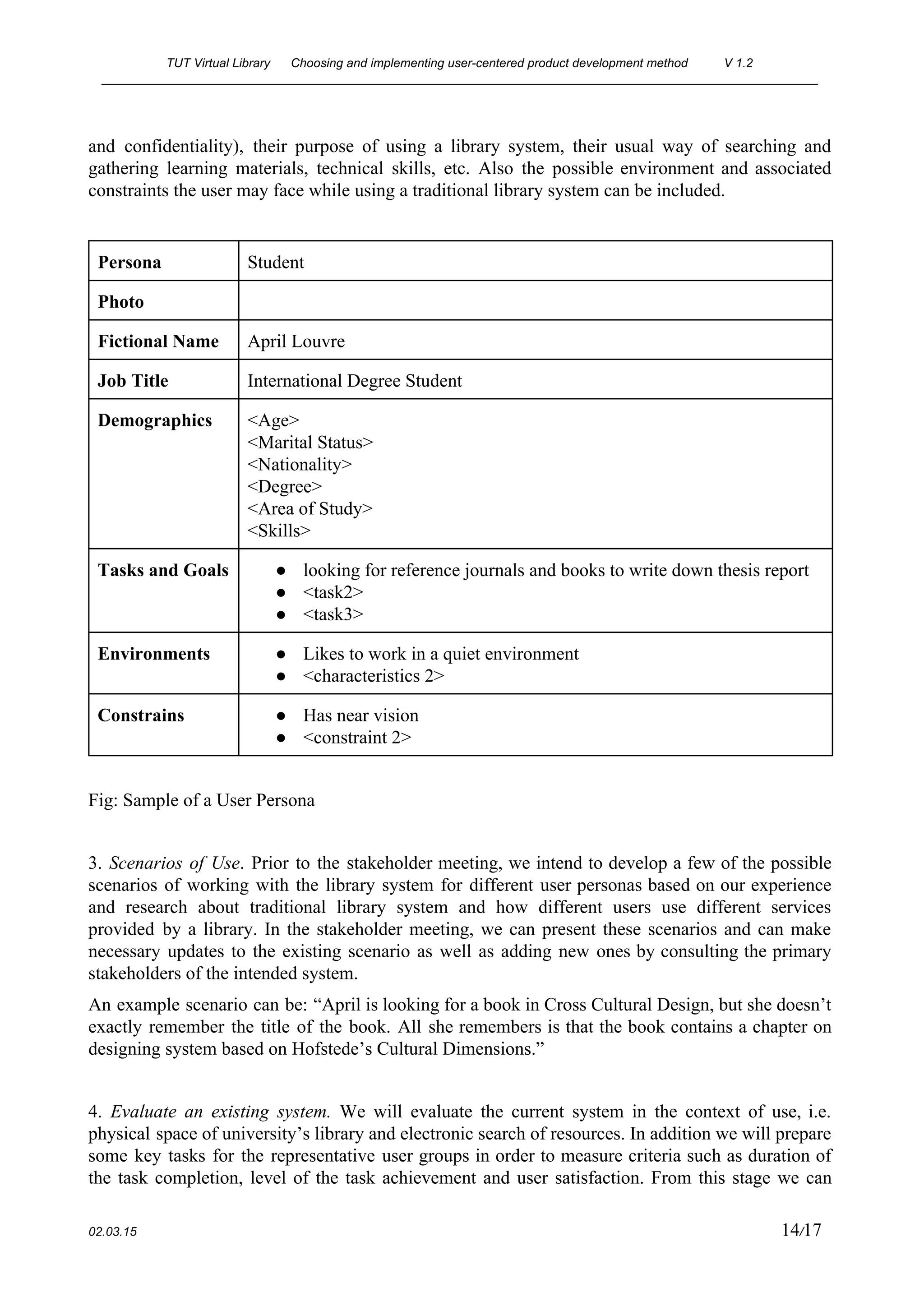
2. ​Context of Use. As the stage is conducted using a half day workshop, we intend to create User                                     
personas in order to describe the potential users of the library system that is to be implemented by                                   
using information that was collected from the interviews of representative user groups. Description                         
in the User Persona will include name of a user (the names are imaginary for the sake of privacy                                     
 
02.03.15                                                                                                                                                                          13​/17 
TUT Virtual Library      Choosing and implementing user­centered product development method  V 1.2 
________________________________________________________________________________________________________ 
and confidentiality), their purpose of using a library system, their usual way of searching and                             
gathering learning materials, technical skills, etc. Also the possible environment and associated                       
constraints the user may face while using a traditional library system can be included. 
 
Persona  Student 
Photo   
Fictional Name  April Louvre 
Job Title  International Degree Student 
Demographics  <Age> 
<Marital Status> 
<Nationality> 
<Degree> 
<Area of Study> 
<Skills> 
Tasks and Goals  ● looking for reference journals and books to write down thesis report 
● <task2> 
● <task3> 
Environments  ● Likes to work in a quiet environment 
● <characteristics 2> 
Constrains  ● Has near vision 
● <constraint 2> 
 
Fig: Sample of a User Persona 
 
3. ​Scenarios of Use​. Prior to the stakeholder meeting, we intend to develop a few of the possible                                   
scenarios of working with the library system for different user personas based on our experience                             
and research about traditional library system and how different users use different services                         
provided by a library. In the stakeholder meeting, we can present these scenarios and can make                               
necessary updates to the existing scenario as well as adding new ones by consulting the primary                               
stakeholders of the intended system. 
An example scenario can be: “April is looking for a book in Cross Cultural Design, but she doesn’t                                   
exactly remember the title of the book. All she remembers is that the book contains a chapter on                                   
designing system based on Hofstede’s Cultural Dimensions.” 
 
4. ​Evaluate an existing system. ​We will evaluate the current system in the context of use, i.e.                                 
physical space of university’s library and electronic search of resources. In addition we will prepare                             
some key tasks for the representative user groups in order to measure criteria such as duration of                                 
the task completion, level of the task achievement and user satisfaction. From this stage we can                               
 
02.03.15                                                                                                                                                                          14​/17 
TUT Virtual Library      Choosing and implementing user­centered product development method  V 1.2 
________________________________________________________________________________________________________ 
reveal potential existing problems in the traditional system and design novel features that can be                             
implemented in our project, e.g. to collect data from all universities’ libraries into common                           
cloud­based server. This evaluation can be made in a Heuristic approach, where usability problems                           
can be defined, described and the severity as well as the category of the problems can be rated                                   
based on some well established Usability Heuristics (e.g. Nielsen’s 10 Usability Heuristics [11]). 
 
[No.]  [Name of the Usability Problem Found] 
Description   
Heuristic(s) 
violated 
<heuristic1>, <heuristic2> 
Severity of 
the Problem 
[scale of 0 ­4] [12] 
 
Fig: Sample template to define usability problem based on Nielsen’s 10 Usability Heuristics.  
 
5. ​Usability Requirements​. The results obtained from conducting a usability evaluation test on                         
existing library system can work as an excellent source for defining the primary requirements for                             
the intended system to be implemented. All the requirements defined can be categorized depending                           
on which functionality/feature they most resemble to fulfill. For Example: 
 
Category 1.  System Initialization and Setting 
1.1  On punching/swiping an ID card, the system will automatically create a user 
account/profile based on the information contained in the ID card. 
1.2  <requirement description> 
 
Fig: Sample format to define usability requirements. 
 
 
6. Prototyping​. For this stage we create cardboard/plastic prototype for the glasses and use textile                             
for the gloves. In addition we will create the basic views of the user interface. These will be                                   
designed in a graphical software (e.g. Adobe Illustrator, Photoshop etc) and upload them to a                             
web­based prototyping tool (e.g. InVision). This will help the user to interact with the system and                               
achieve his tasks. 
7. Collecting feedback from users​. As it was stated before, the usability surveys will help to reveal                                 
any potential problems. The purpose of collecting the feedback is to have a perspective of people                               
who will actually be using the system. The statistical analysis of the overall feedback helps to                               
determine whether the system has achieved its intended purpose and users can accomplish their                           
 
02.03.15                                                                                                                                                                          15​/17 
TUT Virtual Library      Choosing and implementing user­centered product development method  V 1.2 
________________________________________________________________________________________________________ 
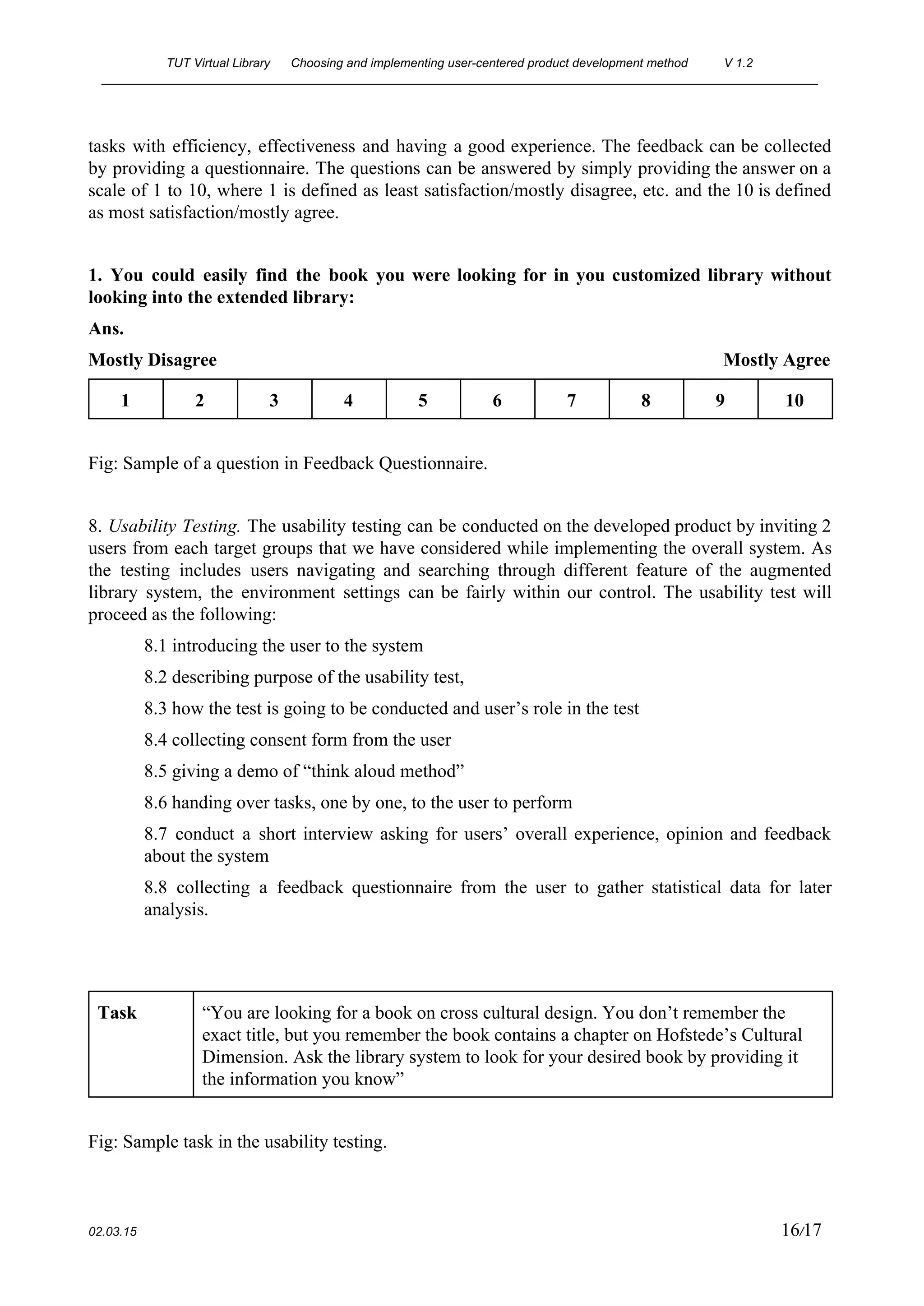
tasks with efficiency, effectiveness and having a good experience. The feedback can be collected                           
by providing a questionnaire. The questions can be answered by simply providing the answer on a                               
scale of 1 to 10, where 1 is defined as least satisfaction/mostly disagree, etc. and the 10 is defined                                     
as most satisfaction/mostly agree. 
 
1. You could easily find the book you were looking for in you customized library without                               
looking into the extended library: 
Ans. 
Mostly Disagree                                                                                                             Mostly Agree 
1  2  3  4  5  6  7  8  9  10 
 
Fig: Sample of a question in Feedback Questionnaire.  
 
8. ​Usability Testing. ​The usability testing can be conducted on the developed product by inviting 2                               
users from each target groups that we have considered while implementing the overall system. As                             
the testing includes users navigating and searching through different feature of the augmented                         
library system, the environment settings can be fairly within our control. The usability test will                             
proceed as the following: 
8.1 introducing the user to the system 
8.2 describing purpose of the usability test,  
8.3 how the test is going to be conducted and user’s role in the test 
8.4 collecting consent form from the user 
8.5 giving a demo of “think aloud method”  
8.6 handing over tasks, one by one, to the user to perform 
8.7 conduct a short interview asking for users’ overall experience, opinion and feedback                         
about the system 
8.8 collecting a feedback questionnaire from the user to gather statistical data for later                           
analysis. 
 
 
Task  “You are looking for a book on cross cultural design. You don’t remember the 
exact title, but you remember the book contains a chapter on Hofstede’s Cultural 
Dimension. Ask the library system to look for your desired book by providing it 
the information you know” 
 
Fig: Sample task in the usability testing. 
 
02.03.15                                                                                                                                                                          16​/17 
TUT Virtual Library      Choosing and implementing user­centered product development method  V 1.2 
________________________________________________________________________________________________________ 


02.03.15                                                                                                                                                                          17​/17 

1. TUT_Virtual_Library_Phase1

  • 1.
    TUT Virtual Library      Choosing and implementing user­centered product development method  V 1.2  ________________________________________________________________________________________________________    Choosing and implementing user­centered product development  method  TUT Virtual Library   version 1.2                      COURSE: TIE­41206 User­centered product development  GROUP NAME: K­T­N  Ekaterina Olshannikova  Tatiana Anagnostaki  Nazia Hasan  ekaterina.olshannikova@student.tut.fi  tatiana.anagnostaki@student.tut.fi  nazia.hasan@student.tut.fi  246836  248601  244888         02.03.15                                                                                                                                                                          1​/17 
  • 2.
    TUT Virtual Library      Choosing and implementing user­centered product development method  V 1.2  ________________________________________________________________________________________________________  Version history  Version  Date Author(s)  Definition  0.1  18.02.2015  Nazia  Personalization of assignment template  according to group; sharing via Google drive  0.2  26.02.2015  Ekaterina  Added description of Contextual Design and  Participatory Design methodologies  0.3  27.02.2015  Ekaterina  Added definition of LUCID, JAD, TRUMP  and Usage Сentered design methodologies  0.4  27.02.2015  Tatiana  Added paragraphs 1.1, 2.1 and 2.2.  0.5  28.02.2015  Tatiana  Added additional paragraphs in 2.2 and added  paragraph 3.  0.6  28.02.2015  Tatiana  Added paragraph 1.2  0.7  28.02.2015  Nazia  Proof Reading;   0.8  01.03.2015  Nazia  Added references  0.9  01.03.2015  Ekaterina  Added references, information to the Method  vs. Method and Chosen method sections,  Added info to the 1.2 section  1.0  01.03.2015  Tatiana  Proofreading; added new material in paragraph  1.2   1.1  02.03.2015  Tatiana,  Ekaterina,  Nazia  Added Chapter 5; proof reading; preparing for  final submission.  1.2  22.03.2015  Ekaterina,  Tatiana,   Nazia  Added information to the 4.2 paragraph;  Added 2.3 paragraph; Proofreading.        02.03.15                                                                                                                                                                          2​/17 
  • 3.
    TUT Virtual Library      Choosing and implementing user­centered product development method  V 1.2  ________________________________________________________________________________________________________  Table of contents 1. Introduction 1.1 Overview 1.2 Words, concepts, notations 1.3 References 2. Usability goals 2.1 Short description of the product 2.2 Usability goals of the product 2.3 Measurement of the goal achievement 3. Product features 4. Human­centered development methods 4.1 Representing methods 4.2 Method vs. method 4.3 Chosen method 5. Implementing the chosen method                                     02.03.15                                                                                                                                                                          3​/17 
  • 4.
    TUT Virtual Library      Choosing and implementing user­centered product development method  V 1.2  ________________________________________________________________________________________________________                    1. Introduction  1.1 Overview  The purposeof this document is to give a description about the product the team decided to design                                    by using augmented reality. The TUT Virtual Library is a product that aims to modify and master                                  the traditional way of searching, finding and using learning materials. In the following sections, it'll                              be described in details how the system functions, who are the end users and how they can interact                                    with it. The main focus will be on the most important usability goals and features by providing a                                    proper justification for these goals.  As an attempt to understand how this product can be further developed, from the conceptual model                                to the final product, a thorough analysis of several development methods, such as Contextual                            Design, Participatory Design, Logical User­Centered Interaction Design (LUCID), Joint                  Application Design (JAD), Trial Usability Maturity Process (TRUMP) and Usage­Centered Design                      will be explain later on. Two of the aforementioned methods will be compared furthermore. The                              final selection criteria of the chosen method and a concrete guideline of how this method will be                                  implemented to the product development will also be mentioned here.    1.2 Words, concepts, notations  Augmented Reality​: ​a technology that superimposes digital elements on a user’s view of the real                              world and provides a composite view. These elements are supplemented in the view in real life, by                                  using computer­generated sensory input such as sound, video, graphics or GPS data.  End User​:​ ​the person who actually uses a particular product.  Usability Goals​: ​according to an international standard, usability is the extent to which a product                              can be used by specified users to achieve specified goals with effectiveness, efficiency and                            satisfaction in a specified context of use. In order to do so, the product should be evaluated                                  properly, from many different aspects by using some measurable goals, e.g. how easily the user can                                learn to interact with the product, how fast and so on.    02.03.15                                                                                                                                                                          4​/17 
  • 5.
    TUT Virtual Library      Choosing and implementing user­centered product development method  V 1.2  ________________________________________________________________________________________________________  Conceptual Models​:​According to Don Norman [1], "a conceptual model is an explanation, usually                            highly simplified, of how something works. It doesn’t have to be complete or even accurate as long                                  as it is useful”.  Virtual (object)​: ​an item that does not physically existing as such, but instead is made by software                                  to appear to do so.  TUT: ​Tampere University of Technology  Requirements specification (of a software​) [3]: a list of functional and non­functional requirements                          that describe a software system which will be developed. It can include different use cases that                                explain the different interactions the users will have with that specific software.  Prototype​: a first or preliminary version of a product, which is used for further development.  Stakeholder​: a person with an interest or concern in something, especially a business.          Table 1 Notation used in the document.  Italic  Terms that require further explanation  CAPS  Abbreviations for specific terms  [Square brackets]  References      1.3 References  [1] ​Norman D. The Design of Everyday Things. 2013. Library of Congress  Cataloging­in­Publication Data. Date: 28.02.2015  [2] Wikipedia. 2005. Prosody (Linguistics). [ONLINE] Available at:  http://en.wikipedia.org/wiki/Prosody_(linguistics)​. [Accessed 28 February 15].  [3] Wikipedia. 2004. Software Requirement Specifications. [ONLINE] Available at:  http://en.wikipedia.org/wiki/Software_requirements_specification​.​ [Accessed 28 February 15].  [4] ​Beyer, H., & Holtzblatt, K. 1997. Contextual design: defining customer­centered systems.  Elsevier.  [5] Kensing, F., & Blomberg, J. 1998. Participatory design: Issues and concerns.Computer  Supported Cooperative Work (CSCW), Vol. 7(3­4), 167­185.  [6] Kreitzberg, C. 1998. The LUCID Design Framework (Logical User­Centered Interaction  Design). Cognetics Corporation, Princeton, NJ, USA.    02.03.15                                                                                                                                                                          5​/17 
  • 6.
    TUT Virtual Library      Choosing and implementing user­centered product development method  V 1.2  ________________________________________________________________________________________________________  [7] Davidson, E. J. 1999. Joint application design (JAD) in practice. Journal of Systems and  Software, 45(3), 215­223.  [8] Kuusinen, K. 2009. Faculty of Electronics, Communications and Automation (Doctoral  dissertation, Tampere University of Technology). ​[ONLINE] ​Available at:  http://www.cs.tut.fi/ihte/projects/kaste/Msc_Thesis_Kuusinen.pdf​. [Accessed 27 February 15]  [9] Constantine, L. L., Biddle, R., & Noble, J. 2003. Usage­Centered Design and Software  Engineering: Models for Integration. In ICSE Workshop on SE­HCI. Vol. 3,106­113.  [10] Bevan, N. 2003. UsabilityNet methods for user centred design. Human­Computer Interaction:  theory and Practice.  [11] Nielsen Norman Group. 2012. 10 Usability Heuristics for User Interface Design. [ONLINE]  Available at: ​http://www.nngroup.com/articles/ten­usability­heuristics​. [Accessed on 02.03.2015]  [12] Nielsen Norman Group. 2013. Severity Ratings for Usability Problems. [ONLINE] Available  at: ​http://www.nngroup.com/articles/how­to­rate­the­severity­of­usability­problems​. [Accessed on  02.03.2015]     2. Usability goals  2.1 Short description of the product  The intendedproduct to be designed is called TUT Virtual Library. As the name suggests, it's about                                  a library which is located in a special room at the university premises. Students of all nationalities                                  who attend the university, as well as university personnel like professors, administrators and                          researchers between the ages of 20­65 can have access, by using their identity card provided by the                                  university. In this card will be stored all the personal information about the user, i.e. name, age,                                  nationality, program degree, courses, and any other information that can be useful to identify in                              which category the user belongs: students, administration and staff members.  A user needs to swipe his/her card before getting access to the room where the virtual library is                                    located. Once the user enters the room, the system automatically authenticates his/her identity                          based on the information that is stored in the respective ID card and creates an account for that                                    particular user. This way the user doesn't need to use any usernames or passwords to have access to                                    it. The main equipment is a pair of augmented reality glasses along with a camera, a microphone                                  that is embedded in the glasses and gloves with sensors that will aid the user to interact with the                                      virtual objects, i.e. keyboard, books, magazines, newspapers, articles and so on.  Like in any traditional library, the primary task of the user is to search and find any kind of                                      learning/study material. The basic interface types are speech, command­based by using a virtual                          keyboard and air­based gestures which can be captured from the camera's sensors. When the user                              interacts with the system for the first time, a virtual tutorial will be displayed guiding him through                                  the basic features and usage of the system, such as common commands, gestures etc.  It's very important that the environment is as quiet as possible in order for one to study properly. To                                      achieve this, the room will be divided in smaller separate slots, so maximum of 5 to 10 users can                                      have access at the same time. So even though the users might use speech as an interaction type, the                                      other persons who are in the room will not be affected by noises produced. Also in this way, it is                                        possible for a small group of users to work together, like in any other traditional libra    02.03.15                                                                                                                                                                          6​/17 
  • 7.
    TUT Virtual Library      Choosing and implementing user­centered product development method  V 1.2  ________________________________________________________________________________________________________  The onlyprerequisite for using the TUT Virtual Library, is that the user needs to book in advance a                                      specific date and time to reserve a slot in the room. This can be achieved by filling an on online                                        timetable, provided by the university to all the potential users.    2.2 Usability goals of the product  1. ​Usability goal​: 100% of students can send the studying material to their email account                              with a single click or command.  Justification​: The prerequisite for using the TUT Virtual Library is to book in advance a                              free slot and it’s not always easy to find the most suitable time. In addition, the user should be able                                        to have access to the material at any given time.  2. ​Usability goal​: At least 95% of people with poor eyesight can effectively use the                              augmented reality glasses.   Justification​: Many people between the ages of 20­60 are wearing glasses either because                          they suffer from myopia, farsightedness or astigmatism.  3. ​Usability goal​: At least 90% of the users can find the book that they're looking for under                                    2 minutes by using speech commands in English.  Justification​: In a university such as the TUT, there is a great number of international and                                exchanged students. In addition, English is the most common language that it's used in the                              technology field.  4. ​Usability goal​: At least 75% of users can find the correct excerpt from a book, article,                                  research or other learning material without knowing the title or the author.  Justification​: Many times people have poor recollection as to what they have read exactly                            and where they have read it. In a conversation it's quite common to say something like "I don't                                    remember where exactly I've read this, but the article was talking about this and that", where "this                                  and that" is a short synopsis of what the user remembered.  5. ​Usability goal​: At least 95% of users can create their own private mini library according                                to their studies and field of expertise with a single click or command.  Justification​: With the private mini library the user can use the material which is stored                              there for future reference, without having to search for it again.  6. ​Usability goal​: At least 95% of the users who use the system for the first time will have                                      immediate access to suggested learning material based on their studies and field of expertise.  Justification​: The suggested learning material aims to decrease the search time for the first                            time user. This will lead to better understanding of the system, less frustration and enjoyable user                                experience.    The main evaluation approach for the aforementioned usability goals is usability tests. Typically                          usability tests take place in a laboratory or in laboratory­like conditions where the user is isolated                                from the normal day­to­day interruptions. The session is recorded, so that it can be analyzed later                                on and user's behavior is observed to give a better understanding. In addition, it's quite common to                                  use the think­aloud method, where the user speaks out loud, expressing his/her thoughts or the steps                                that s/he has to follow in order to complete the series of tasks that s/he has been given.    02.03.15                                                                                                                                                                          7​/17 
  • 8.
    TUT Virtual Library      Choosing and implementing user­centered product development method  V 1.2  ________________________________________________________________________________________________________  Another reasonfor using usability tests is that by definition, the virtual library has very similar                                environmental conditions: it's an isolated quiet place, where talking to other people is very limited                              and the user is mainly focused on his task.  A second evaluation approach is to use analytical evaluation such as walkthroughs. As the name                              suggests, the evaluation method involves experts in walking through scenarios with prototypes of                          the application. A key feature for this kind of evaluation is that the end users don't need to be                                      present. The experts can give their opinion on how efficient is the system, how effective it is to use                                      and how much satisfying the experience can be.    2.3 Measurement of the goal achievement  The level of successful completion of the target task reveals if the goal has been achieved or not.                                    This can be measured by the level of tips from supervisor:  Tip level 1 – Supervisor answers on the question of participant, but don’t give any additional                                details.  Tip level 2 – Supervisor admits that the participant has a problem while doing task and gives an                                    advice without specific details.   Tip level 3 – a participant gives up while completing the task or tries to do it many times without                                        any result. Supervisor gives a certain suggestion on how to perform it.   It should also be transformed into “acceptability” rating at the end so we will have information how                                  many test participants were satisfied with the tested application / concept or not.  For that we need to assign specific “acceptability” (usability) value to each level of tips. For                                example, an acceptability rate of the range 80% ­ 100% can be considered as tip level one; an                                    acceptability rate of the range 60% ­ 80% as tip level 2 and below this range (60% or less) can be                                          considered as tip level 3. Our target is to achieve a tip level 1 for 80% of all the users. Since we are                                              adopting an iterative development method, the chances are higher that we will gradually increase                            the number of users who successfully complete the given tasks according to the improvements                            made from the previous tests.     3. Product features  The following features are according to the list of usability goals that are described above.    1. As it was mentioned in the description of the product, the personal ID of the user                                  contains valuable information. The system automatically recognizes the user and logs in to his/her                            account. This way, when the user finds the material s/he is looking for, s/he can give a simple                                    command like "send to email" or press a button with the same command, if s/he prefers to use the                                      virtual keyboard.  2. For this usability goal, there will be a button in the augmented reality glasses that can                                  adjust the power and enhance the eyesight, just like using prescribed glasses from an eye doctor.  3. To achieve this goal, an advanced voice recognition system, will remove any prosodic of                              the spoken language from the speech, such as variation in syllable weight, loudness, pitch, breaks                                02.03.15                                                                                                                                                                          8​/17 
  • 9.
    TUT Virtual Library      Choosing and implementing user­centered product development method  V 1.2  ________________________________________________________________________________________________________  between words,accent, emotions of the speaker and so on. This will create a "raw" voice, which                                  enables the system to recognize and interpret the input correctly. [2]  4. By giving an oral command or typing to a virtual keyboard keywords and small pieces of                                  text, the system will run an advanced algorithm to find all the possible combinations of the given                                  words. It will offer a list sorted from the most common excerpts to the least common ones.  5. Similar to the first feature, the personal identity card will be used to recognize the user, so                                    the s/he can give a simple command such as "send to my library" or press a button.  6. Again, this feature is based on the personal identity card, where all the information of the                                  user is stored. Using this collected data, the system will be able to give proper suggestions.    4. Human­centered development methods  4.1 Representing methods   Contextual Design  According to Beyer and Holtzblatt [4], context study is based on the craft (master ­ apprentice)                                model of learning: it is necessary to observe the user and ask him questions as if he were a good                                        craftsman, and the interviewer is his new apprentice. Beyer and Holtzblatt have also listed four                              basic principles of organization of ethnographic interviews:  1. Context. ​Instead of conducting interviews in a clean white room, the interviewer should                          interact with users and observe them in a natural work environment or otherwise, something                            appropriate for this product, the physical context. Users are observed when they are busy                            with their activities and making inquiries in their familiar surroundings with a lot of artifacts                              they use on a daily basis, help to extract the core characteristics of their behavior.  2. Cooperation. Interviews and observations should have the characteristics of a joint user                        study in which observation activity is focused on the discussion of its structure and                            subtleties.  3. Interpretation. ​A ​designer's work is largely reduced by identifying what is behind the                          words and behavior of users and the characteristics of their habitats. The task of the                              designer is to consider the collected data as a whole and to reveal the impact that they have                                    on the design.  4. Orientation. Instead of rigidly adhere to a pre­existing questionnaire or, conversely, making                        the interview "a free voyage", the designer must carefully guide the conversation in search                            of data related to design issues.  Participatory Design  Participatory design [5] is a design method where all stakeholders (users, customers, designers,                          developers, sales and marketing personnel, management personnel, etc.) have opportunity to be                        actively involved in the developmental processes and procedures. Participants’ roles and                      responsibilities are varying and their involvement differs throughout the project. The aim of such                            kind of approach is that the final project meets all needs of various stakeholder groups. A ground                                  rule of this approach is that each person in this group should be an expert at some field.  LUCID  Originally, Logical User Centered Interaction Design [6] was used as an approach to interface                            designing at Cognetics Corporation. Currently, it is a powerful method to conduct the process of                              software development process. It assists designers in order to:    02.03.15                                                                                                                                                                          9​/17 
  • 10.
    TUT Virtual Library      Choosing and implementing user­centered product development method  V 1.2  ________________________________________________________________________________________________________  1. Elaborateconsistent and clear concept of a product that will create its connectivity with                            project’s goals.  2. Reveal business objectives which in turn will improve developmental performance.  3. Gain demographic data of population and the needs of each segment.  4. Provide final needs and functionality analysis from user’s perspective.  5. Establish navigational structure which includes all required functionality in a simplest                      manner.  This methodology has six phases that are listed in the table [6] below:    Table 1. LUCID process.  JAD  Joint Application Design [7] is a methodology like the Participatory Design which is based on the                                concept that users are the main experts. This method leads to a shorter developmental life cycle and                                  greater user satisfaction because of the collaborative system analysis and design. The outcomes                          from group sessions are requirements specification and prototype. There is a planning phase,                          several design sessions and final Wrap­Up stage.   TRUMP  The international principles of Human­Centered Interaction are the basis of Trial Usability Maturity                          Process [8]. It is a project that raised the usability maturity of large companies and it shares its                                    knowledge to others in order to achieve beneficial results. The lifecycle of this methodology                            includes several phases that are listed below:  1. Feasibility. This phase consists of stakeholder meetings, revealing context of use and                        creating scenarios.  2. Requirements. Evaluation of existing system and outlining the usability requirements are                      performed in this phase.  3. Design.​ ​The phase includes prototyping and creating a style guide.  4. Implement. ​This is an evaluation phase where usability testing takes place.  5. Release. ​This phase relates to collecting feedback.     02.03.15                                                                                                                                                                          10​/17 
  • 11.
    TUT Virtual Library      Choosing and implementing user­centered product development method  V 1.2  ________________________________________________________________________________________________________  Usage­Centered Design  The mainfocus of Usage­centered design [9] is on “usage”, i. e. is on the improvement of task                                    accomplishment. This method is driven by different models. The process includes selective user                          involvement and consists of exploratory modeling, model validation and structured usability                      inspections. The accent is made on models of user relationships with the system. Design models are                                abstract in comparison with the user­centered methodology. The designing process is systematic,                        fully specified and made through modeling.   4.2 Method vs. method  In this section, comparison is made between TRUMP and Participatory design methods. TRUMP                          project is a trialed use of User­Centered design methods based on ISO 13407 [8]. Tables included                                in reference [10] demonstrate correlation of TRUMP methods with the User­Centered Process:    Table 2. TRUMP methods  There are ten methods/stages which were selected as applicable in the development environment                          for the ​TRUMP​ approach:  1. Stakeholder Meeting​. This method is aimed to identify and reconcile usability goals,                        intended context of use and their relation to the business objectives and success criteria for                              the system. A meeting is organized for this purpose which lasts for a half of a day.  2. Context of Use. This stage is organized as half­day workshop where information about                          intended users, their tasks, technical and environmental constraints are collected.  3. Scenarios of use. This method reveals how a user is expected to carry out main tasks in a                                    certain context. Such process provides a significant input to design.  4. Evaluate an existing system. In this stage, assessment of previous system is done in order to                                obtain usability issues and measurements of usability. This stage supplies input to the                          usability requirements.  5. Usability requirements. In this stage, elaboration of usability requirements for the user                        groups and tasks is made. These requirements are identified in the analysis of context of use                                and in the scenarios.  6. Paper prototyping. It is evaluation stage where users test low fidelity prototypes (paper or                            other materials are used). It helps to reveal usability drawbacks in the early stage.    02.03.15                                                                                                                                                                          11​/17 
  • 12.
    TUT Virtual Library      Choosing and implementing user­centered product development method  V 1.2  ________________________________________________________________________________________________________  7. Styleguide. In this stage, project conventions are created and documented for screen and                            page design.  8. Evaluation of machine prototype. 3­5 expert users carry out key tasks and give a rapid                              feedback on the usability of the implemented system.  9. Usability testing. At least 8 users participate in the formal usability testing. Evaluation of                            usability is aimed to objectify the overall achievement of the designed and implemented                          system.  10. Collecting feedback from users​. Usability surveys help to reveal hidden problems that                        should be fixed in newer/upcoming version.  TRUMP approach to software and hardware design identifies an appropriate interaction between                        user and system, active involvement of users to the development process and iterations of various                              design solutions. Moreover, for this method it is important to observe the users’ practices and                              behavior in the context of use.  Participatory Design is a specific mode of User­Centered Design where users participate in the                            designing through the entire development process and make decisions regarding to designs. It                          should be mentioned that TRUMP and Participatory design can be considered as overlapping                          because some cases which are user­centered can be compatible with user participation and vice                            versa.  The main difference between TRUMP and Participatory Design methods is that PD establishes                          bespoke (custom­made) product with the participants, who are end users of the product being                            developed; while TRUMP method can work with both the representative users and actual users.  Participatory Design is not only a development approach but also a methodology that adjusts the                              workplace processes by improving employee job satisfaction via diminishing power distance. Such                        aspect does not tend to appear in TRUMP method and users’ influence in a system’s development                                is usually limited.  By a user­oriented approach, such as Participatory Design, it is possible to reveal information about                              context specific technical, multifaceted cultural, political, communication, motivational and                  personal issues. Unfortunately, information which is obtained by this method cannot be used as                            detailed instructions for the system development. Meanwhile, the multi­methodological approach                    as TRUMP contains many important techniques that are part of other independent methods for                            designing (e. g context of use, scenarios, prototyping and involvement of stakeholders) and they are                              strongly incorporated with the development process.  Moreover, in our case it will be problematic to search and recruit appropriate participants, because                              they have to be fluent and expert in certain areas of the research and development topic. This can                                    be a negative point of the Participatory Design method because participants’ selection is a time                              consuming process.  Furthermore, it is obviously difficult to find people who are ready to contribute to the whole                                designing process without any financial support. From the TRUMP perspective, developers have to                          meet stakeholders/target user group ​not more than what is necessary and does not require any                              significant funding. The goals of the meeting are to create common visions regarding to the project                                and to ensure that all factors that relate to use of the system are identified before the actual design                                      work starts.  Nevertheless, in spite of all positive aspects of the TRUMP method, many techniques are used in                                this approach might become a negative factor. Since ours is a small team, not a large organization,                                    02.03.15                                                                                                                                                                          12​/17 
  • 13.
    TUT Virtual Library      Choosing and implementing user­centered product development method  V 1.2  ________________________________________________________________________________________________________  and thisproject is the assignment of the course at university and not funded, we will be able to                                      implement only a few phases of TRUMP method. In our study, the final product will be                                represented by a low­fidelity prototype, which means we would need to skip some of the final                                techniques of the TRUMP lifecycle (e. g. evaluation of machine prototype).  In a conclusive aspect, the challenges of TRUMP are not significant comparing to what advantages                              it may provide for efficiently designing our product. The potential of this approach provides us                              wide range of opportunities in design and the organization of the workflow.    4.3 Chosen method  We consider the TRUMP method to be the best option for designing our project. The main benefits                                  of TRUMP method for user­centered design affected our decision are:  ● Development time can be reduced, because the identification of the usability goals and                          objectives, as well as revealing resolution of usability issues, occurs in the early stages;  ● Techniques which are used during the TRUMP life cycle are cost­effective and easy to learn                              and to use;  ● This method provide the system that meet users needs and improve their processes;  ● As it has been mentioned above, TRUMP method contains aspects of Participatory Design.                          In addition, this method contains similarities with Contextual Design, JAD and LUCID                        methods as well;  ● It is based on ISO 13407, which is recognized and accepted in the Human­Centered                            Interaction field of research and study;  ● This approach consists of a number of significant practices, including the user participations                          and contextual studies. From this point, we have the option of a wide range of techniques                                that can be implemented during the designing process;  As it was mentioned in the 4.2 paragraph, the wide range of the techniques can trigger a number of                                      difficulties in the organization of the designing process as well. Our aim is to carefully identify                                applicable techniques for the assigned goals. Certain phases should be modified according to their                            feasibility. For example, the style guide creation will be replaced by the designing of the                              Moodboard, where elements of virtual interface will be displayed (icons, patterns of layout, fonts,                            etc.).   5. Implementing the chosen method  Here is demonstrated the process by designing how it is used on implementing the product that will                                  be designed in 2nd part of the assignment with the chosen development process.  1. ​Stakeholder meeting​. In this stage we will demonstrate user case scenarios to make stakeholders                              familiar with the concept of the project. Moreover, we will provide an online questionnaire from                              which we will obtain basic background information (demographic data etc) and additional data on                            how the users are likely to use the non­traditional library. Afterwards we will have informal                              discussion with the participants in order to receive their attitude and opinion about the project.   2. ​Context of Use. As the stage is conducted using a half day workshop, we intend to create User                                      personas in order to describe the potential users of the library system that is to be implemented by                                    using information that was collected from the interviews of representative user groups. Description                          in the User Persona will include name of a user (the names are imaginary for the sake of privacy                                        02.03.15                                                                                                                                                                          13​/17 
  • 14.
    TUT Virtual Library      Choosing and implementing user­centered product development method  V 1.2  ________________________________________________________________________________________________________  and confidentiality),their purpose of using a library system, their usual way of searching and                              gathering learning materials, technical skills, etc. Also the possible environment and associated                        constraints the user may face while using a traditional library system can be included.    Persona  Student  Photo    Fictional Name  April Louvre  Job Title  International Degree Student  Demographics  <Age>  <Marital Status>  <Nationality>  <Degree>  <Area of Study>  <Skills>  Tasks and Goals  ● looking for reference journals and books to write down thesis report  ● <task2>  ● <task3>  Environments  ● Likes to work in a quiet environment  ● <characteristics 2>  Constrains  ● Has near vision  ● <constraint 2>    Fig: Sample of a User Persona    3. ​Scenarios of Use​. Prior to the stakeholder meeting, we intend to develop a few of the possible                                    scenarios of working with the library system for different user personas based on our experience                              and research about traditional library system and how different users use different services                          provided by a library. In the stakeholder meeting, we can present these scenarios and can make                                necessary updates to the existing scenario as well as adding new ones by consulting the primary                                stakeholders of the intended system.  An example scenario can be: “April is looking for a book in Cross Cultural Design, but she doesn’t                                    exactly remember the title of the book. All she remembers is that the book contains a chapter on                                    designing system based on Hofstede’s Cultural Dimensions.”    4. ​Evaluate an existing system. ​We will evaluate the current system in the context of use, i.e.                                  physical space of university’s library and electronic search of resources. In addition we will prepare                              some key tasks for the representative user groups in order to measure criteria such as duration of                                  the task completion, level of the task achievement and user satisfaction. From this stage we can                                  02.03.15                                                                                                                                                                          14​/17 
  • 15.
    TUT Virtual Library      Choosing and implementing user­centered product development method  V 1.2  ________________________________________________________________________________________________________  reveal potentialexisting problems in the traditional system and design novel features that can be                              implemented in our project, e.g. to collect data from all universities’ libraries into common                            cloud­based server. This evaluation can be made in a Heuristic approach, where usability problems                            can be defined, described and the severity as well as the category of the problems can be rated                                    based on some well established Usability Heuristics (e.g. Nielsen’s 10 Usability Heuristics [11]).    [No.]  [Name of the Usability Problem Found]  Description    Heuristic(s)  violated  <heuristic1>, <heuristic2>  Severity of  the Problem  [scale of 0 ­4] [12]    Fig: Sample template to define usability problem based on Nielsen’s 10 Usability Heuristics.     5. ​Usability Requirements​. The results obtained from conducting a usability evaluation test on                          existing library system can work as an excellent source for defining the primary requirements for                              the intended system to be implemented. All the requirements defined can be categorized depending                            on which functionality/feature they most resemble to fulfill. For Example:    Category 1.  System Initialization and Setting  1.1  On punching/swiping an ID card, the system will automatically create a user  account/profile based on the information contained in the ID card.  1.2  <requirement description>    Fig: Sample format to define usability requirements.      6. Prototyping​. For this stage we create cardboard/plastic prototype for the glasses and use textile                              for the gloves. In addition we will create the basic views of the user interface. These will be                                    designed in a graphical software (e.g. Adobe Illustrator, Photoshop etc) and upload them to a                              web­based prototyping tool (e.g. InVision). This will help the user to interact with the system and                                achieve his tasks.  7. Collecting feedback from users​. As it was stated before, the usability surveys will help to reveal                                  any potential problems. The purpose of collecting the feedback is to have a perspective of people                                who will actually be using the system. The statistical analysis of the overall feedback helps to                                determine whether the system has achieved its intended purpose and users can accomplish their                              02.03.15                                                                                                                                                                          15​/17 
  • 16.
    TUT Virtual Library      Choosing and implementing user­centered product development method  V 1.2  ________________________________________________________________________________________________________  tasks withefficiency, effectiveness and having a good experience. The feedback can be collected                            by providing a questionnaire. The questions can be answered by simply providing the answer on a                                scale of 1 to 10, where 1 is defined as least satisfaction/mostly disagree, etc. and the 10 is defined                                      as most satisfaction/mostly agree.    1. You could easily find the book you were looking for in you customized library without                                looking into the extended library:  Ans.  Mostly Disagree                                                                                                             Mostly Agree  1  2  3  4  5  6  7  8  9  10    Fig: Sample of a question in Feedback Questionnaire.     8. ​Usability Testing. ​The usability testing can be conducted on the developed product by inviting 2                                users from each target groups that we have considered while implementing the overall system. As                              the testing includes users navigating and searching through different feature of the augmented                          library system, the environment settings can be fairly within our control. The usability test will                              proceed as the following:  8.1 introducing the user to the system  8.2 describing purpose of the usability test,   8.3 how the test is going to be conducted and user’s role in the test  8.4 collecting consent form from the user  8.5 giving a demo of “think aloud method”   8.6 handing over tasks, one by one, to the user to perform  8.7 conduct a short interview asking for users’ overall experience, opinion and feedback                          about the system  8.8 collecting a feedback questionnaire from the user to gather statistical data for later                            analysis.      Task  “You are looking for a book on cross cultural design. You don’t remember the  exact title, but you remember the book contains a chapter on Hofstede’s Cultural  Dimension. Ask the library system to look for your desired book by providing it  the information you know”    Fig: Sample task in the usability testing.    02.03.15                                                                                                                                                                          16​/17 
  • 17.