©2010 Hewlett-Packard Development Company, L.P. The information contained herein is subject to change without
notice
Networking Fundamentals
Introduction
– This is the first module of the Introduction to Networking
Course. This module is delivered as an approximately 20
minute recorded session. The session presents the
general topic of data communications, outlining many of
the techniques employed in LAN and WAN solutions today
and the devices used to build data networks.
– The session then outlines the self-study tasks for the
students to complete before moving on to the next module.
– Additional information can be found in the Student Study
Plan.
2
Learning Objectives
– Understand the building blocks used in building a data network.
– Be able to outline the differences between asynchronous and synchronous
communication.
– Understand both connection and connectionless orientated communication
and the fundamentals of addressing.
– Describe different network topologies and the pros and cons of each.
– Describe bounded & unbounded media and understand in what situations
each type should be used.
– Appreciate the various types of network infrastructure devices and understand
where each should be deployed.
3
Agenda
– Basic concepts in communications
– Understanding Networking
– Understanding Transmission Medium
– Understanding Network Hardware
– WAN and LAN
– Understanding Network Protocols
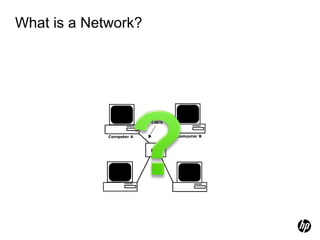
What is a Network?
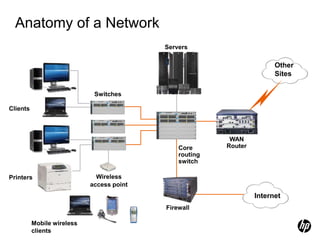
Anatomy of a Network
Servers
Firewall
Internet
Wireless
access point
Switches
Mobile wireless
clients
Clients
Core
routing
switch
WAN
Router
Other
Sites
Printers
Basic Communication Concepts
– Communications – activity associated with distributing or
exchanging information
– Telecommunications – technology of communications at a
distance that permits information to be created any where
and used everywhere with little delay
– Today it, involves
•Data: digital and analog
•Voice: spoken word
•Video: telecommunication imaging
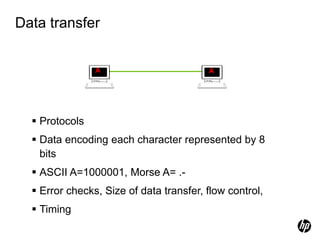
Data transfer
 Protocols
 Data encoding each character represented by 8
bits
 ASCII A=1000001, Morse A= .-
 Error checks, Size of data transfer, flow control,
 Timing
A A
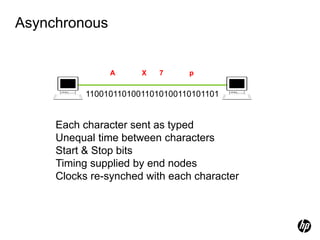
Asynchronous
Each character sent as typed
Unequal time between characters
Start & Stop bits
Timing supplied by end nodes
Clocks re-synched with each character
A X p
7
11001011010011010100110101101
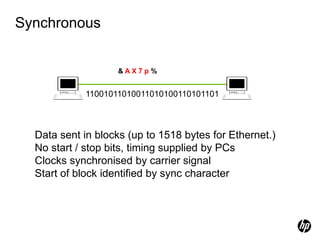
Synchronous
& A X 7 p %
Data sent in blocks (up to 1518 bytes for Ethernet.)
No start / stop bits, timing supplied by PCs
Clocks synchronised by carrier signal
Start of block identified by sync character
11001011010011010100110101101
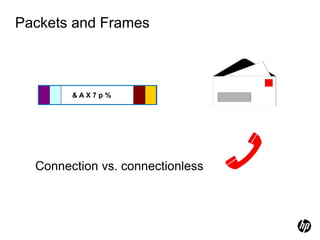
Packets and Frames
Connection vs. connectionless
& A X 7 p %
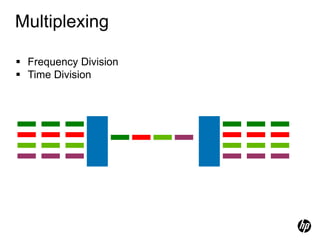
Multiplexing
Multiplexer De-
Multiplexer
 Frequency Division
 Time Division
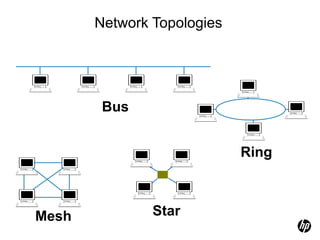
Network Topologies
Mesh
Ring
Star
Bus
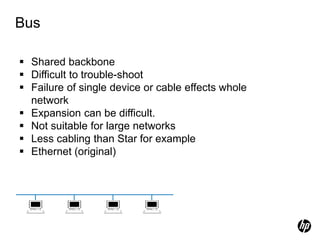
Bus
 Shared backbone
 Difficult to trouble-shoot
 Failure of single device or cable effects whole
network
 Expansion can be difficult.
 Not suitable for large networks
 Less cabling than Star for example
 Ethernet (original)
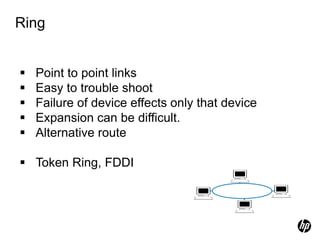
Ring
 Point to point links
 Easy to trouble shoot
 Failure of device effects only that device
 Expansion can be difficult.
 Alternative route
 Token Ring, FDDI
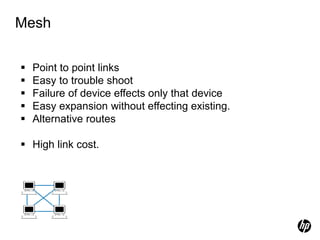
Mesh
 Point to point links
 Easy to trouble shoot
 Failure of device effects only that device
 Easy expansion without effecting existing.
 Alternative routes
 High link cost.
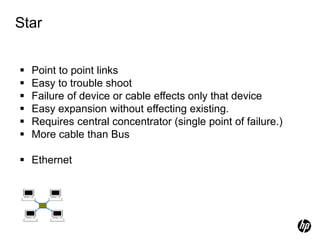
Star
 Point to point links
 Easy to trouble shoot
 Failure of device or cable effects only that device
 Easy expansion without effecting existing.
 Requires central concentrator (single point of failure.)
 More cable than Bus
 Ethernet
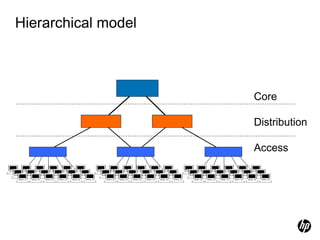
Hierarchical model
Core
Distribution
Access
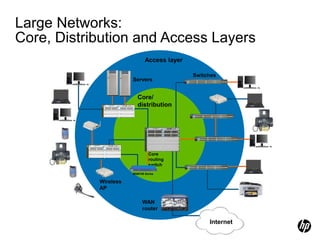
Large Networks:
Core, Distribution and Access Layers
Wired clients
Core/
distribution
Access layer
Servers
Switches
Wireless
AP
Internet
Core
routing
switch
WAN
router
Mobile
clients
Power
Fault
Locator
E F
C D
A
ProCurve Networking
HP Innovation
zl
ProCurve
24p Gig-T
zl Module
J8702A PoE-Integrated 10/100/1000Base-T Ports (1-24) - Ports are IEEE Auto MDI/MDI-X
1 5
6
2
3
4
7 11
12
8
9
10
13 17
18
14
15
16
19 23
24
20
21
22 zl
ProCurve
24p Gig-T
zl Module
J8702A PoE-Integrated 10/100/1000Base-T Ports (1-24) - Ports are IEEE Auto MDI/MDI-X
1 5
6
2
3
4
7 11
12
8
9
10
13 17
18
14
15
16
19 23
24
20
21
22
Console
Reset Clear
Auxiliary Port
ProCurve Switch 5400zl
Management Module
J8726A
Internal
Power
PoE
Pwr
2
1
2
4
1
3
PoE
Temp
Fan
Flash
DIMM
Mgmt
Chas
Test
LED Mode
Modules
Status
Act
FDx
Spd Usr
PoE
H
J
L
K
I
G
F
D
B
E
C
A
ProCurve
Switch 5406zl
J8699A PoE
Use
zl Modules
only
B
MSM700 Series
Power
Fault
Locator
E F
C D
A
ProCurve Networking
HP Innovation
zl
ProCurve
24p Gig-T
zl Module
J8702A PoE-Integrated 10/100/1000Base-T Ports (1-24) - Ports are IEEE Auto MDI/MDI-X
1 5
6
2
3
4
7 11
12
8
9
10
13 17
18
14
15
16
19 23
24
20
21
22 zl
ProCurve
24p Gig-T
zl Module
J8702A PoE-Integrated 10/100/1000Base-T Ports (1-24) - Ports are IEEE Auto MDI/MDI-X
1 5
6
2
3
4
7 11
12
8
9
10
13 17
18
14
15
16
19 23
24
20
21
22
Console
Reset Clear
Auxiliary Port
ProCurve Switch 5400zl
Management Module
J8726A
Internal
Power
PoE
Pwr
2
1
2
4
1
3
PoE
Temp
Fan
Flash
DIMM
Mgmt
Chas
Test
LED Mode
Modules
Status
Act
FDx
Spd Usr
PoE
H
J
L
K
I
G
F
D
B
E
C
A
ProCurve
Switch 5406zl
J8699A PoE
Use
zl Modules
only
B
Data Transmission
– Successful transmission of data depends on:
•The quality of the signal being transmitted
•Characteristics of the transmission medium
– Data rate – bits per second in data communications
– Bandwidth – bandwidth or signal is constrained by the
transmitter and the nature of the transmission in cycles per
second or hertz
– Noise – Average level of noise over the communication
path.
– Error rate – rate at which errors occur where error in 1 or 0
bit occurs
Basic transmission medium concepts
– Medium is the physical path between transmitter and
receiver in a data transmission system
– Bounded Medium: waves are guided along a solid medium
path (twisted pair, coaxial cable, and optical fiber).
– Un-bounded medium: waves are propagated through the
atmosphere and inner/outer space (satellite, laser, and
wireless transmissions).
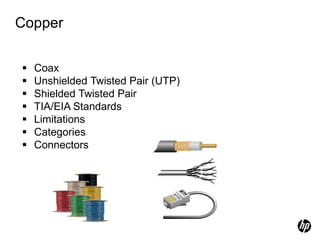
Copper
 Coax
 Unshielded Twisted Pair (UTP)
 Shielded Twisted Pair
 TIA/EIA Standards
 Limitations
 Categories
 Connectors
Twisted Pair Cables
– Physical description:
• Each wire with copper conductor
• Separately insulated wires
• Twisted together to reduce cross talk
• Often bundled into cables of two or four twisted pairs
• If enclosed in a sheath then is shielded twisted pair (STP) otherwise often for
home usage unshielded twisted pair (UTP). Must be shield from voltage lines
– Application:
• Common in building for digital signaling used at speed of 10’s Mb/s (CAT3)
and 100Mb/s (CAT5) over 100s meters.
• Common for telephone interconnection at home and office buildings
• Less expensive medium; limited in distance, bandwidth, and data rate.
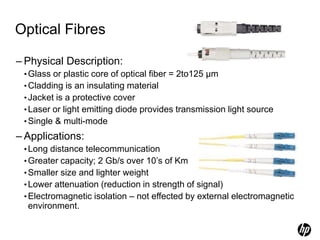
Optical Fibres
– Physical Description:
•Glass or plastic core of optical fiber = 2to125 µm
•Cladding is an insulating material
•Jacket is a protective cover
•Laser or light emitting diode provides transmission light source
•Single & multi-mode
– Applications:
•Long distance telecommunication
•Greater capacity; 2 Gb/s over 10’s of Km
•Smaller size and lighter weight
•Lower attenuation (reduction in strength of signal)
•Electromagnetic isolation – not effected by external electromagnetic
environment.
Wireless Transmission
– Frequency range (line of sight):
•26 GHz to 40 GHz: for microwave with highly directional beam as
possible
•30 MHz to 1 GHz: for omnidirectional applications
•300MHz to 20000 GHz: for infrared spectrum; used for point to point
and multiple point application (line of sight)
– Physical applications:
•Terrestrial microwave – long haul telecommunication service
(alternative to coaxial or optical fiber)
•Few amplifiers and repeaters
•Propagation via towers located without blockage from trees, etc
(towers less than 60 miles apart)
WANs and LANs
Types of Networks
• Local area network (LAN)
• Wireless LAN (WLAN)
• Virtual local area network (VLAN)
• Wide area network (WAN)
• Virtual private network (VPN)
• Converged or multi-service network
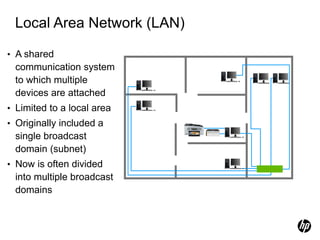
Local Area Network (LAN)
• A shared
communication system
to which multiple
devices are attached
• Limited to a local area
• Originally included a
single broadcast
domain (subnet)
• Now is often divided
into multiple broadcast
domains
Power
Fault
Locator
E F
C D
A
ProCurve Networking
HP Innovation
zl
ProCurve
24p Gig-T
zl Module
J8702A PoE-Integrated 10/100/1000Base-T Ports (1-24) - Ports are IEEE Auto MDI/MDI-X
1 5
6
2
3
4
7 11
12
8
9
10
13 17
18
14
15
16
19 23
24
20
21
22 zl
ProCurve
24p Gig-T
zl Module
J8702A PoE-Integrated 10/100/1000Base-T Ports (1-24) - Ports are IEEE Auto MDI/MDI-X
1 5
6
2
3
4
7 11
12
8
9
10
13 17
18
14
15
16
19 23
24
20
21
22
Console
Reset Clear
Auxiliary Port
ProCurve Switch 5400zl
Management Module
J8726A
Internal
Power
PoE
Pwr
2
1
2
4
1
3
PoE
Temp
Fan
Flash
DIMM
Mgmt
Chas
Test
LED Mode
Modules
Status
Act
FDx
Spd Usr
PoE
H
J
L
K
I
G
F
D
B
E
C
A
ProCurve
Switch 5406zl
J8699A PoE
Use
zl Modules
only
B
Wide Area Network (WAN)
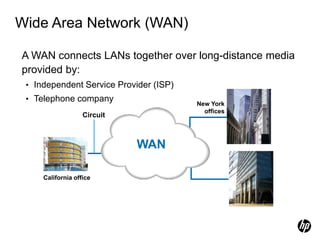
A WAN connects LANs together over long-distance media
provided by:
• Independent Service Provider (ISP)
• Telephone company
Circuit
New York
offices
California office
European offices
WAN
Circuit Switching Technologies
– Circuit switching is a dedicated communications path established
between two stations or multiple end points through nodes of the WAN
– Transmission path is a connected sequence of physical link between
nodes.
– On each link, a logical channel is dedicated to the connection. Data
generated by the source station are transmitted along dedicated path
as rapidly as possible.
– At each node, incoming data are routed or switched to the appropriate
outgoing channel without excessive delay. However, if data processing
is required, some delay is experienced.
– Example of circuit switching above is the telephone networks.
Packet Switching Technologies
– It is not necessary (as in circuit switching) to dedicate transmission
capacity along a path through the WAN rather data are sent out in a
sequence of small chucks, called packets.
– Each packet, consisting of several bits is passed through the network
from node to node along some path leading from the source to the
destination
– At each node along the path, the entire packet is received, stored
briefly, and then transmitted to the next node.
– At destination all individual packets are assembled together to form
the complete text and message from the source. Each packet is
identified as to its place in the overall text for reassembly.
– Packet switching networks are commonly used for terminal-to-
computer and computer-to-computer communications.
– If packet errors occur, the packet is retransmitted.
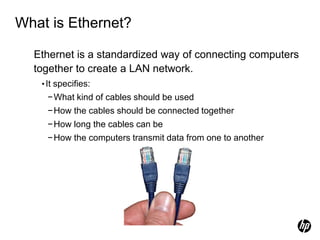
What is Ethernet?
Ethernet is a standardized way of connecting computers
together to create a LAN network.
•It specifies:
−What kind of cables should be used
−How the cables should be connected together
−How long the cables can be
−How the computers transmit data from one to another
Ethernet
– Ethernet (10Base-X)
– Fast Ethernet (100Base-X)
– Gigabit Ethernet (1000Base-X)
– 10 Gigabit Ethernet (10GBase-X)
– Future: 40 Gigabit and 100 Gigabit Ethernet
(802.3ba)
Sample Only
Understanding Network Protocols
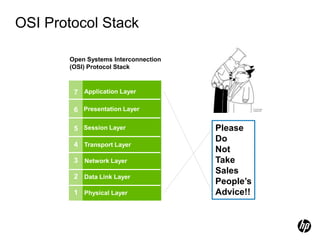
OSI Protocol Stack
Open Systems Interconnection
(OSI) Protocol Stack
7 Application Layer
1 Physical Layer
6
5
4
3
Presentation Layer
Session Layer
Transport Layer
Network Layer
Data Link Layer
2
Please
Do
Not
Take
Sales
People’s
Advice!!
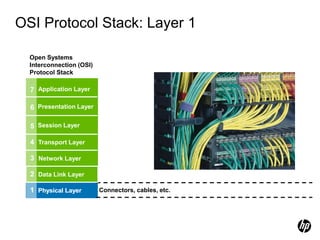
OSI Protocol Stack: Layer 1
1 Physical Layer Connectors, cables, etc.
Open Systems
Interconnection (OSI)
Protocol Stack
7
1 Physical Layer
6
5
4
3 Network Layer
Data Link Layer
2
Application Layer
Presentation Layer
Session Layer
Transport Layer
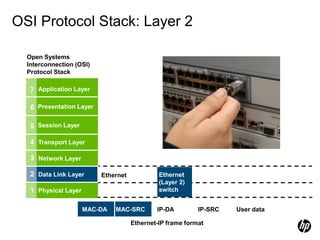
OSI Protocol Stack: Layer 2
Ethernet
MAC-DA MAC-SRC IP-DA IP-SRC User data
Ethernet-IP frame format
Open Systems
Interconnection (OSI)
Protocol Stack
7
1 Physical Layer
6
5
4
3 Network Layer
Data Link Layer
2
Application Layer
Presentation Layer
Session Layer
Transport Layer
Ethernet
(Layer 2)
switch
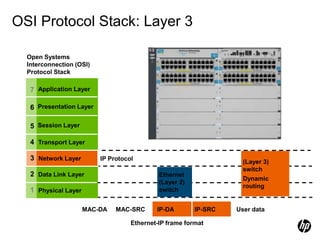
OSI Protocol Stack: Layer 3
Ethernet
(Layer 2)
switch
MAC-DA MAC-SRC IP-DA IP-SRC User data
Ethernet-IP frame format
Open Systems
Interconnection (OSI)
Protocol Stack
7
1 Physical Layer
6
5
4
3 Network Layer
Data Link Layer
2
Application Layer
Presentation Layer
Session Layer
Transport Layer
IP Protocol
(Layer 3)
switch
Dynamic
routing
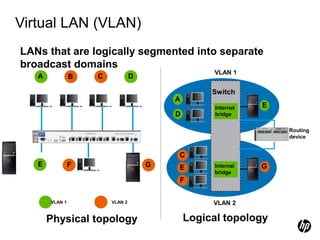
Virtual LAN (VLAN)
D
VLAN 1
A
E
G
C
VLAN 2
E
F
Physical topology Logical topology
VLAN 1 VLAN 2
F G
C
B
A D
E
LANs that are logically segmented into separate
broadcast domains
Switch
Internal
bridge
Internal
bridge
Routing
device
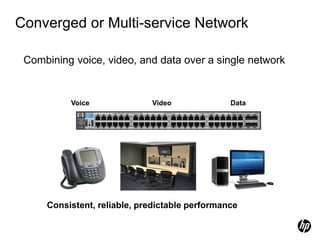
Converged or Multi-service Network
Combining voice, video, and data over a single network
Consistent, reliable, predictable performance
Video Data
Voice
Network Components
Included in every network are:
• At least two devices, each with a network interface
• A connection medium
• A network operating system
• Often other peripheral devices such as printers, scanners, and
servers
• Infrastructure devices such as switches, routers, and wireless
APs
Network Infrastructure Components
– Hub
– Layer 2 switch
– Wireless Access Point (AP)
– Layer 3 switch
– Light Layer 3 switch
– Router
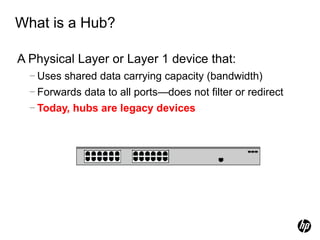
What is a Hub?
A Physical Layer or Layer 1 device that:
− Uses shared data carrying capacity (bandwidth)
− Forwards data to all ports—does not filter or redirect
− Today, hubs are legacy devices.
What is a Layer 2 Switch?
A Data Link Layer or Layer 2 device that:
− Is smarter than a hub
− Forwards data on the appropriate port for reaching the
device
• Reads the destination MAC address in the frame
• Matches the addresses to the port using an ARP table
− Provides dedicated bandwidth for each connection
What is a Wireless AP?
A Data Link Layer or Layer 2 device that:
– Includes a wireless transceiver or radio, which is like a wireless hub:
•Provides shared bandwidth
•Relays all transmissions to and from connected devices
– Bridges data so wireless users can reach wired servers:
•Typically, bridges data on an Ethernet port
•Can bridge data on a wireless connection to another AP (local
wireless meshing)
What is a Layer 3 Switch or Routing
Switch?
A Network Layer or Layer 3 device that:
•Is smarter than a hub and a Layer 2 switch
•Forwards information based on the IP address
•Can determine the best path to the destination device
•Can provide interfaces for connecting wide area
networks, or WANs
•Allows devices on multiple networks to communicate
What is a Lite Layer 3 Switch?
A Network Layer or Layer 3 switch with limited capabilities:
•Static routes rather than dynamic routing
•No Transport Layer or Layer 4 capabilities
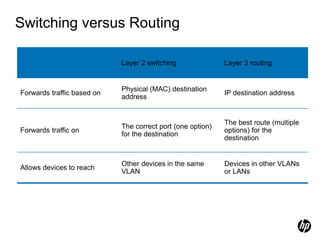
Switching versus Routing
Layer 2 switching Layer 3 routing
Forwards traffic based on
Physical (MAC) destination
address
IP destination address
Forwards traffic on
The correct port (one option)
for the destination
The best route (multiple
options) for the
destination
Allows devices to reach
Other devices in the same
VLAN
Devices in other VLANs
or LANs
Summary
In this module you learned:-
– The building blocks used in building a data network.
– The differences between asynchronous and synchronous
communication.
– Of connection and connectionless orientated communication and the
fundamentals of addressing.
– About different network topologies and the pros and cons of each.
– The various types of network infrastructure devices and understand
where each should be deployed.
49
HP Enterprise Business. Outcomes that matter.

1. Networking Fundamentals.pptx

  • 1.
    ©2010 Hewlett-Packard DevelopmentCompany, L.P. The information contained herein is subject to change without notice Networking Fundamentals
  • 2.
    Introduction – This isthe first module of the Introduction to Networking Course. This module is delivered as an approximately 20 minute recorded session. The session presents the general topic of data communications, outlining many of the techniques employed in LAN and WAN solutions today and the devices used to build data networks. – The session then outlines the self-study tasks for the students to complete before moving on to the next module. – Additional information can be found in the Student Study Plan. 2
  • 3.
    Learning Objectives – Understandthe building blocks used in building a data network. – Be able to outline the differences between asynchronous and synchronous communication. – Understand both connection and connectionless orientated communication and the fundamentals of addressing. – Describe different network topologies and the pros and cons of each. – Describe bounded & unbounded media and understand in what situations each type should be used. – Appreciate the various types of network infrastructure devices and understand where each should be deployed. 3
  • 4.
    Agenda – Basic conceptsin communications – Understanding Networking – Understanding Transmission Medium – Understanding Network Hardware – WAN and LAN – Understanding Network Protocols
  • 5.
    What is aNetwork?
  • 6.
    Anatomy of aNetwork Servers Firewall Internet Wireless access point Switches Mobile wireless clients Clients Core routing switch WAN Router Other Sites Printers
  • 7.
    Basic Communication Concepts –Communications – activity associated with distributing or exchanging information – Telecommunications – technology of communications at a distance that permits information to be created any where and used everywhere with little delay – Today it, involves •Data: digital and analog •Voice: spoken word •Video: telecommunication imaging
  • 8.
    Data transfer  Protocols Data encoding each character represented by 8 bits  ASCII A=1000001, Morse A= .-  Error checks, Size of data transfer, flow control,  Timing A A
  • 9.
    Asynchronous Each character sentas typed Unequal time between characters Start & Stop bits Timing supplied by end nodes Clocks re-synched with each character A X p 7 11001011010011010100110101101
  • 10.
    Synchronous & A X7 p % Data sent in blocks (up to 1518 bytes for Ethernet.) No start / stop bits, timing supplied by PCs Clocks synchronised by carrier signal Start of block identified by sync character 11001011010011010100110101101
  • 11.
    Packets and Frames Connectionvs. connectionless & A X 7 p %
  • 12.
  • 13.
  • 14.
    Bus  Shared backbone Difficult to trouble-shoot  Failure of single device or cable effects whole network  Expansion can be difficult.  Not suitable for large networks  Less cabling than Star for example  Ethernet (original)
  • 15.
    Ring  Point topoint links  Easy to trouble shoot  Failure of device effects only that device  Expansion can be difficult.  Alternative route  Token Ring, FDDI
  • 16.
    Mesh  Point topoint links  Easy to trouble shoot  Failure of device effects only that device  Easy expansion without effecting existing.  Alternative routes  High link cost.
  • 17.
    Star  Point topoint links  Easy to trouble shoot  Failure of device or cable effects only that device  Easy expansion without effecting existing.  Requires central concentrator (single point of failure.)  More cable than Bus  Ethernet
  • 18.
  • 19.
    Large Networks: Core, Distributionand Access Layers Wired clients Core/ distribution Access layer Servers Switches Wireless AP Internet Core routing switch WAN router Mobile clients Power Fault Locator E F C D A ProCurve Networking HP Innovation zl ProCurve 24p Gig-T zl Module J8702A PoE-Integrated 10/100/1000Base-T Ports (1-24) - Ports are IEEE Auto MDI/MDI-X 1 5 6 2 3 4 7 11 12 8 9 10 13 17 18 14 15 16 19 23 24 20 21 22 zl ProCurve 24p Gig-T zl Module J8702A PoE-Integrated 10/100/1000Base-T Ports (1-24) - Ports are IEEE Auto MDI/MDI-X 1 5 6 2 3 4 7 11 12 8 9 10 13 17 18 14 15 16 19 23 24 20 21 22 Console Reset Clear Auxiliary Port ProCurve Switch 5400zl Management Module J8726A Internal Power PoE Pwr 2 1 2 4 1 3 PoE Temp Fan Flash DIMM Mgmt Chas Test LED Mode Modules Status Act FDx Spd Usr PoE H J L K I G F D B E C A ProCurve Switch 5406zl J8699A PoE Use zl Modules only B MSM700 Series Power Fault Locator E F C D A ProCurve Networking HP Innovation zl ProCurve 24p Gig-T zl Module J8702A PoE-Integrated 10/100/1000Base-T Ports (1-24) - Ports are IEEE Auto MDI/MDI-X 1 5 6 2 3 4 7 11 12 8 9 10 13 17 18 14 15 16 19 23 24 20 21 22 zl ProCurve 24p Gig-T zl Module J8702A PoE-Integrated 10/100/1000Base-T Ports (1-24) - Ports are IEEE Auto MDI/MDI-X 1 5 6 2 3 4 7 11 12 8 9 10 13 17 18 14 15 16 19 23 24 20 21 22 Console Reset Clear Auxiliary Port ProCurve Switch 5400zl Management Module J8726A Internal Power PoE Pwr 2 1 2 4 1 3 PoE Temp Fan Flash DIMM Mgmt Chas Test LED Mode Modules Status Act FDx Spd Usr PoE H J L K I G F D B E C A ProCurve Switch 5406zl J8699A PoE Use zl Modules only B
  • 20.
    Data Transmission – Successfultransmission of data depends on: •The quality of the signal being transmitted •Characteristics of the transmission medium – Data rate – bits per second in data communications – Bandwidth – bandwidth or signal is constrained by the transmitter and the nature of the transmission in cycles per second or hertz – Noise – Average level of noise over the communication path. – Error rate – rate at which errors occur where error in 1 or 0 bit occurs
  • 21.
    Basic transmission mediumconcepts – Medium is the physical path between transmitter and receiver in a data transmission system – Bounded Medium: waves are guided along a solid medium path (twisted pair, coaxial cable, and optical fiber). – Un-bounded medium: waves are propagated through the atmosphere and inner/outer space (satellite, laser, and wireless transmissions).
  • 22.
    Copper  Coax  UnshieldedTwisted Pair (UTP)  Shielded Twisted Pair  TIA/EIA Standards  Limitations  Categories  Connectors
  • 23.
    Twisted Pair Cables –Physical description: • Each wire with copper conductor • Separately insulated wires • Twisted together to reduce cross talk • Often bundled into cables of two or four twisted pairs • If enclosed in a sheath then is shielded twisted pair (STP) otherwise often for home usage unshielded twisted pair (UTP). Must be shield from voltage lines – Application: • Common in building for digital signaling used at speed of 10’s Mb/s (CAT3) and 100Mb/s (CAT5) over 100s meters. • Common for telephone interconnection at home and office buildings • Less expensive medium; limited in distance, bandwidth, and data rate.
  • 24.
    Optical Fibres – PhysicalDescription: •Glass or plastic core of optical fiber = 2to125 µm •Cladding is an insulating material •Jacket is a protective cover •Laser or light emitting diode provides transmission light source •Single & multi-mode – Applications: •Long distance telecommunication •Greater capacity; 2 Gb/s over 10’s of Km •Smaller size and lighter weight •Lower attenuation (reduction in strength of signal) •Electromagnetic isolation – not effected by external electromagnetic environment.
  • 25.
    Wireless Transmission – Frequencyrange (line of sight): •26 GHz to 40 GHz: for microwave with highly directional beam as possible •30 MHz to 1 GHz: for omnidirectional applications •300MHz to 20000 GHz: for infrared spectrum; used for point to point and multiple point application (line of sight) – Physical applications: •Terrestrial microwave – long haul telecommunication service (alternative to coaxial or optical fiber) •Few amplifiers and repeaters •Propagation via towers located without blockage from trees, etc (towers less than 60 miles apart)
  • 26.
  • 27.
    Types of Networks •Local area network (LAN) • Wireless LAN (WLAN) • Virtual local area network (VLAN) • Wide area network (WAN) • Virtual private network (VPN) • Converged or multi-service network
  • 28.
    Local Area Network(LAN) • A shared communication system to which multiple devices are attached • Limited to a local area • Originally included a single broadcast domain (subnet) • Now is often divided into multiple broadcast domains Power Fault Locator E F C D A ProCurve Networking HP Innovation zl ProCurve 24p Gig-T zl Module J8702A PoE-Integrated 10/100/1000Base-T Ports (1-24) - Ports are IEEE Auto MDI/MDI-X 1 5 6 2 3 4 7 11 12 8 9 10 13 17 18 14 15 16 19 23 24 20 21 22 zl ProCurve 24p Gig-T zl Module J8702A PoE-Integrated 10/100/1000Base-T Ports (1-24) - Ports are IEEE Auto MDI/MDI-X 1 5 6 2 3 4 7 11 12 8 9 10 13 17 18 14 15 16 19 23 24 20 21 22 Console Reset Clear Auxiliary Port ProCurve Switch 5400zl Management Module J8726A Internal Power PoE Pwr 2 1 2 4 1 3 PoE Temp Fan Flash DIMM Mgmt Chas Test LED Mode Modules Status Act FDx Spd Usr PoE H J L K I G F D B E C A ProCurve Switch 5406zl J8699A PoE Use zl Modules only B
  • 29.
    Wide Area Network(WAN) A WAN connects LANs together over long-distance media provided by: • Independent Service Provider (ISP) • Telephone company Circuit New York offices California office European offices WAN
  • 30.
    Circuit Switching Technologies –Circuit switching is a dedicated communications path established between two stations or multiple end points through nodes of the WAN – Transmission path is a connected sequence of physical link between nodes. – On each link, a logical channel is dedicated to the connection. Data generated by the source station are transmitted along dedicated path as rapidly as possible. – At each node, incoming data are routed or switched to the appropriate outgoing channel without excessive delay. However, if data processing is required, some delay is experienced. – Example of circuit switching above is the telephone networks.
  • 31.
    Packet Switching Technologies –It is not necessary (as in circuit switching) to dedicate transmission capacity along a path through the WAN rather data are sent out in a sequence of small chucks, called packets. – Each packet, consisting of several bits is passed through the network from node to node along some path leading from the source to the destination – At each node along the path, the entire packet is received, stored briefly, and then transmitted to the next node. – At destination all individual packets are assembled together to form the complete text and message from the source. Each packet is identified as to its place in the overall text for reassembly. – Packet switching networks are commonly used for terminal-to- computer and computer-to-computer communications. – If packet errors occur, the packet is retransmitted.
  • 32.
    What is Ethernet? Ethernetis a standardized way of connecting computers together to create a LAN network. •It specifies: −What kind of cables should be used −How the cables should be connected together −How long the cables can be −How the computers transmit data from one to another
  • 33.
    Ethernet – Ethernet (10Base-X) –Fast Ethernet (100Base-X) – Gigabit Ethernet (1000Base-X) – 10 Gigabit Ethernet (10GBase-X) – Future: 40 Gigabit and 100 Gigabit Ethernet (802.3ba) Sample Only
  • 34.
  • 35.
    OSI Protocol Stack OpenSystems Interconnection (OSI) Protocol Stack 7 Application Layer 1 Physical Layer 6 5 4 3 Presentation Layer Session Layer Transport Layer Network Layer Data Link Layer 2 Please Do Not Take Sales People’s Advice!!
  • 36.
    OSI Protocol Stack:Layer 1 1 Physical Layer Connectors, cables, etc. Open Systems Interconnection (OSI) Protocol Stack 7 1 Physical Layer 6 5 4 3 Network Layer Data Link Layer 2 Application Layer Presentation Layer Session Layer Transport Layer
  • 37.
    OSI Protocol Stack:Layer 2 Ethernet MAC-DA MAC-SRC IP-DA IP-SRC User data Ethernet-IP frame format Open Systems Interconnection (OSI) Protocol Stack 7 1 Physical Layer 6 5 4 3 Network Layer Data Link Layer 2 Application Layer Presentation Layer Session Layer Transport Layer Ethernet (Layer 2) switch
  • 38.
    OSI Protocol Stack:Layer 3 Ethernet (Layer 2) switch MAC-DA MAC-SRC IP-DA IP-SRC User data Ethernet-IP frame format Open Systems Interconnection (OSI) Protocol Stack 7 1 Physical Layer 6 5 4 3 Network Layer Data Link Layer 2 Application Layer Presentation Layer Session Layer Transport Layer IP Protocol (Layer 3) switch Dynamic routing
  • 39.
    Virtual LAN (VLAN) D VLAN1 A E G C VLAN 2 E F Physical topology Logical topology VLAN 1 VLAN 2 F G C B A D E LANs that are logically segmented into separate broadcast domains Switch Internal bridge Internal bridge Routing device
  • 40.
    Converged or Multi-serviceNetwork Combining voice, video, and data over a single network Consistent, reliable, predictable performance Video Data Voice
  • 41.
    Network Components Included inevery network are: • At least two devices, each with a network interface • A connection medium • A network operating system • Often other peripheral devices such as printers, scanners, and servers • Infrastructure devices such as switches, routers, and wireless APs
  • 42.
    Network Infrastructure Components –Hub – Layer 2 switch – Wireless Access Point (AP) – Layer 3 switch – Light Layer 3 switch – Router
  • 43.
    What is aHub? A Physical Layer or Layer 1 device that: − Uses shared data carrying capacity (bandwidth) − Forwards data to all ports—does not filter or redirect − Today, hubs are legacy devices.
  • 44.
    What is aLayer 2 Switch? A Data Link Layer or Layer 2 device that: − Is smarter than a hub − Forwards data on the appropriate port for reaching the device • Reads the destination MAC address in the frame • Matches the addresses to the port using an ARP table − Provides dedicated bandwidth for each connection
  • 45.
    What is aWireless AP? A Data Link Layer or Layer 2 device that: – Includes a wireless transceiver or radio, which is like a wireless hub: •Provides shared bandwidth •Relays all transmissions to and from connected devices – Bridges data so wireless users can reach wired servers: •Typically, bridges data on an Ethernet port •Can bridge data on a wireless connection to another AP (local wireless meshing)
  • 46.
    What is aLayer 3 Switch or Routing Switch? A Network Layer or Layer 3 device that: •Is smarter than a hub and a Layer 2 switch •Forwards information based on the IP address •Can determine the best path to the destination device •Can provide interfaces for connecting wide area networks, or WANs •Allows devices on multiple networks to communicate
  • 47.
    What is aLite Layer 3 Switch? A Network Layer or Layer 3 switch with limited capabilities: •Static routes rather than dynamic routing •No Transport Layer or Layer 4 capabilities
  • 48.
    Switching versus Routing Layer2 switching Layer 3 routing Forwards traffic based on Physical (MAC) destination address IP destination address Forwards traffic on The correct port (one option) for the destination The best route (multiple options) for the destination Allows devices to reach Other devices in the same VLAN Devices in other VLANs or LANs
  • 49.
    Summary In this moduleyou learned:- – The building blocks used in building a data network. – The differences between asynchronous and synchronous communication. – Of connection and connectionless orientated communication and the fundamentals of addressing. – About different network topologies and the pros and cons of each. – The various types of network infrastructure devices and understand where each should be deployed. 49
  • 50.
    HP Enterprise Business.Outcomes that matter.