Basics of Java Programming
Prepared By: Minal Maniar,
Asst. Professor, CSPIT, CHARUSAT
Outline
• Evolution of programming Languages
• Popular Programming Languages
• History of Java
• Modules of Java
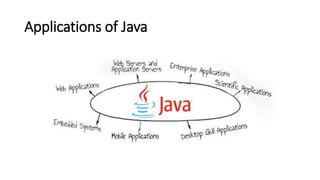
• Applications of Java
Evolution of Programming Languages
Popular Programming Languages in 2018
Java – History & Introduction
• James Gosling and team at Sun Microsystems , 1995
• Oak - The predecessor of Java
• Created for consumer electronics
• HotJava
• The first Java-enabled Web browser
• JDK Evolutions
• Java is “C++ -- ++”
3 Modules of Java
• J2SE : Java Standard Edition
• 1 –tier or 1 layer
• VB.NET, D2K, PB, Fox Pro – Platform dependent (alternatives)
• J2EE : Java Enterprise Edition
• J2ME : Java Micro Edition
Why you choose Java?
• Simple and Powerful
• Object Oriented
• Portable
• Architecture Neutral
• Distributed
• Multi-threaded
• Robust, Secure/Safe
• Interpreted
• High Performance
• Dynamic programming language/platform
Java Buzz Words!!!!
Applications of Java
Running a Java Program
Compile & Run Java Program
• How to Compile?
• How to Run?
Hello.java Hello.class
Just In Time
Compiler
Hello.class
JVM OS
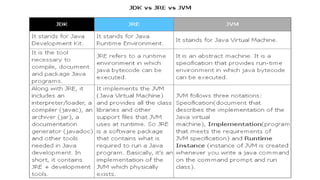
JDK & JRE
• Java Development Kit contains
tools needed to develop Java
Programs.
• Javadoc
• Javac.exe
• Java.exe
• Applet viewer etc.
• https://docs.oracle.com/javase/
8/docs/api/
• Java Runtime Environment
• Used to run Java program
• It contains JVM and Java Package
classes – Java Library
• JVM interprets the bytecode into
machine code depending upon
the underlying operating system
and hardware combination.
First Java Program : Welcome.java
Use Pascal Notation
to declare a class
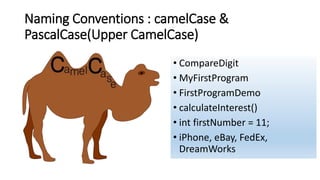
Naming Conventions : camelCase &
PascalCase(Upper CamelCase)
• CompareDigit
• MyFirstProgram
• FirstProgramDemo
• calculateInterest()
• int firstNumber = 11;
• iPhone, eBay, FedEx,
DreamWorks
Questions…
• What are features of Java?
• What is Bytecode?
• Is Java Platform independent? Justify your answer.
• Is JVM Platform independent? Justify your answer.
• Is JVM Hardware or Software?
• Explain JDK, JRE and JVM.
• Explain public static void main(String args[]).
Java Basics
Outline
• How do we create code?
• Variables and data types
• Arrays & String Handling
• The Object class
A Car Represented in Code
• Attributes: Describing the Car class
• License Plate number
• Average Miles per gallon
• Paint color
• Operations: Interacting with Car class
• Check the tail lights
• Change the paint
Three Independent Cars
CAR A
• License plate:
“GJ1B21890
• Average MPG:
25.5
• Paint Color: Blue
CAR B
• License plate:
“GJ02C2170
• Average MPG:
20.5
• Paint Color:
Black
CAR C
• License plate:
“GJ03D5710
• Average MPG:
23.5
• Paint Color:
White
Program to introduce variables
• Variable is name of reserved area allocated in memory.
• It is a name of memory location.
• Define a Car class with variable
Heap Space vs Stack – Memory Allocation in Java
Types of Variable
• There are three types of variables in java:
Types of Variables
Instance variable
Local Variable
Static variable
Static variable initialization
Java Primitive Data Types
Default values of Primitive Data Types
Data Type Default Value Default size
boolean false 1 bit
char 'u0000' 2 byte
byte 0 1 byte
short 0 2 byte
int 0 4 byte
long 0L 8 byte
float 0.0f 4 byte
double 0.0d 8 byte
• Program of counter without static variable
Arrays
• Set of homogeneous elements
• There are two types of array.
• Single Dimensional Array
• Multidimensional Array
• Syntax to Declare single dimensional Array in java
• dataType[] arr; (or)
• dataType []arr; (or)
• dataType arr[];
Array Declaration- One Dimensional
1. int a[]=new int[3];//declaration and instantiation
a[0]=10;//initialization
a[1]=20;
a[2]=30;
2. int a[]={10,20,30};//declaration, instantiation and initialization
Array Declaration- Multi Dimensional
dataType[][] arrayRefVar; (or)
dataType [][]arrayRefVar; (or)
dataType arrayRefVar[][]; (or)
dataType []arrayRefVar[];
int [][]f;
float[][] f1;
double f2[][];
boolean []b[];
Which of the following statements are valid?
int[][] r = new int[2];
int[] x = new int[];
int[][] y = new int[3][];
int[][] z = {{1, 2}};
int[][] m = {{1, 2}, {2, 3}};
int[][] n = {{1, 2}, {2, 3}, };
Ragged Arrays or Jagged Arrays
• Each row in a two-dimensional array is itself an array. Thus, the rows
can have different lengths. (varying no of columns in each row)
• An array of this kind is known as a ragged array.
Ragged Arrays or Jagged Arrays
• If you If you don’t know the values in a ragged array in advance, but
do know the sizes—say, the same as before—you can create a ragged
array using the following syntax:
• triangleArray[0].length = 5
• triangleArray[1].length = 4
• triangleArray[2].length = 3
• triangleArray[3].length = 2
• triangleArray[4].length = 1
What is the output of the following code?
Output
The Arrays class
Explore following methods of Array class
• Arrays.toString()
• Arrays.deepToString()
• Arrays.sort()
• Arrays.fill()
String Handling
The String Type
• A string is a sequence of characters.
• The java String is immutable.
• Whenever we change any string,
a new instance is created.
• For mutable string,
you can use
StringBuffer & StringBuilder classes.
Two ways to create String object:
String Literal
• String s1="Welcome";
• String s2="Welcome";//will not create new instance
By new
keyword
• String s=new String("Welcome");
//creates two objects and one reference variable
Java uses the concept of string literal, that is
why string objects are immutable in java.
String compare by equals() method
Output
String compare by == operator
Output
Methods of String Class
StringBuffer class
class creates strings of flexible length that can be
modified in terms of both length and content.
• Available in java.lang package
• Thread-safe
Output
16
20
21
Reserves room for 16 characters
without reallocation
Sets initial contents of StringBuffer and
allocates room for 16 characters
Explicitly sets size of buffer
String Concatenation test -String: 16ms
Output
String Concatenation test StringBuffer: 16ms
Output
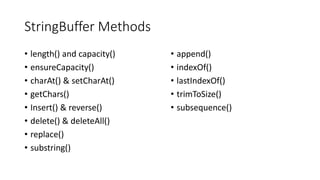
StringBuffer Methods
• length() and capacity()
• ensureCapacity()
• charAt() & setCharAt()
• getChars()
• Insert() & reverse()
• delete() & deleteAll()
• replace()
• substring()
• append()
• indexOf()
• lastIndexOf()
• trimToSize()
• subsequence()
The StringBuilder class
• StringBuilder is a relatively recent addition to Java’s string handling
capabilities.
• StringBuilder is similar to StringBuffer except for one important
difference: it is not synchronized, which means that it is not thread-
safe.
• The advantage of StringBuilder is faster performance.
• However, in cases in which a mutable string will be accessed by
multiple threads, and no external synchronization is employed, you
must use StringBuffer rather than StringBuilder.
StringTokenizer class
• The processing of text often consists of
parsing a formatted input string.
• Parsing is the division of text into a set of
discrete parts, or tokens, which in a certain
sequence can convey a semantic meaning.
• The StringTokenizer class provides the first
step in this parsing process, often called the
lexer (lexical analyzer) or scanner.
• StringTokenizer implements the
Enumeration interface. Therefore, given an
input string, you can enumerate the
individual tokens contained in it using
StringTokenizer.
• To use StringTokenizer, you specify an input
string and a string that contains delimiters.
• Delimiters are characters that separate
tokens.
Delimiter: space (“ “)
StringTokenizer Example
Output
Exercise : Count no of words and lines in given string.
The Object Class
• To use StringTokenizer, you specify an input string and a string that
contains delimiters.
• Delimiters are characters that separate tokens.
The Object Class
• There is one special class, Object, defined by Java. All other classes
are subclasses of Object.
• That is, Object is a superclass of all other classes. This means that a
reference variable of type Object can refer to an object of any other
class. Also, since arrays are implemented as classes, a variable of type
Object can also refer to any array.
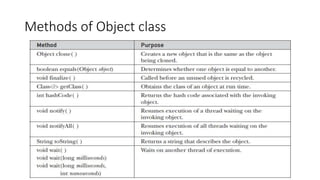
• Object defines the following methods, which means that they are
available in every object.
Methods of Object class
References
• http://www.geeksforgeeks.org
• http://beginnersbook.com
• Introduction to Java Programming, Comprehensive Version (10th
Edition), Y. Daniel Liang
• https://www.Lynda.com
• http://www.javatpoint.com

Java ce241

  • 1.
    Basics of JavaProgramming Prepared By: Minal Maniar, Asst. Professor, CSPIT, CHARUSAT
  • 2.
    Outline • Evolution ofprogramming Languages • Popular Programming Languages • History of Java • Modules of Java • Applications of Java
  • 3.
  • 4.
  • 5.
    Java – History& Introduction • James Gosling and team at Sun Microsystems , 1995 • Oak - The predecessor of Java • Created for consumer electronics • HotJava • The first Java-enabled Web browser • JDK Evolutions • Java is “C++ -- ++”
  • 6.
    3 Modules ofJava • J2SE : Java Standard Edition • 1 –tier or 1 layer • VB.NET, D2K, PB, Fox Pro – Platform dependent (alternatives) • J2EE : Java Enterprise Edition • J2ME : Java Micro Edition
  • 7.
    Why you chooseJava? • Simple and Powerful • Object Oriented • Portable • Architecture Neutral • Distributed • Multi-threaded • Robust, Secure/Safe • Interpreted • High Performance • Dynamic programming language/platform Java Buzz Words!!!!
  • 8.
  • 9.
  • 10.
    Compile & RunJava Program • How to Compile? • How to Run? Hello.java Hello.class Just In Time Compiler Hello.class JVM OS
  • 11.
    JDK & JRE •Java Development Kit contains tools needed to develop Java Programs. • Javadoc • Javac.exe • Java.exe • Applet viewer etc. • https://docs.oracle.com/javase/ 8/docs/api/ • Java Runtime Environment • Used to run Java program • It contains JVM and Java Package classes – Java Library • JVM interprets the bytecode into machine code depending upon the underlying operating system and hardware combination.
  • 13.
    First Java Program: Welcome.java Use Pascal Notation to declare a class
  • 14.
    Naming Conventions :camelCase & PascalCase(Upper CamelCase) • CompareDigit • MyFirstProgram • FirstProgramDemo • calculateInterest() • int firstNumber = 11; • iPhone, eBay, FedEx, DreamWorks
  • 15.
    Questions… • What arefeatures of Java? • What is Bytecode? • Is Java Platform independent? Justify your answer. • Is JVM Platform independent? Justify your answer. • Is JVM Hardware or Software? • Explain JDK, JRE and JVM. • Explain public static void main(String args[]).
  • 16.
  • 17.
    Outline • How dowe create code? • Variables and data types • Arrays & String Handling • The Object class
  • 19.
    A Car Representedin Code • Attributes: Describing the Car class • License Plate number • Average Miles per gallon • Paint color • Operations: Interacting with Car class • Check the tail lights • Change the paint
  • 20.
    Three Independent Cars CARA • License plate: “GJ1B21890 • Average MPG: 25.5 • Paint Color: Blue CAR B • License plate: “GJ02C2170 • Average MPG: 20.5 • Paint Color: Black CAR C • License plate: “GJ03D5710 • Average MPG: 23.5 • Paint Color: White
  • 21.
    Program to introducevariables • Variable is name of reserved area allocated in memory. • It is a name of memory location. • Define a Car class with variable
  • 22.
    Heap Space vsStack – Memory Allocation in Java
  • 23.
    Heap Space vsStack – Memory Allocation in Java
  • 24.
    Types of Variable •There are three types of variables in java:
  • 25.
    Types of Variables Instancevariable Local Variable Static variable
  • 26.
  • 28.
  • 29.
    Default values ofPrimitive Data Types Data Type Default Value Default size boolean false 1 bit char 'u0000' 2 byte byte 0 1 byte short 0 2 byte int 0 4 byte long 0L 8 byte float 0.0f 4 byte double 0.0d 8 byte
  • 30.
    • Program ofcounter without static variable
  • 31.
    Arrays • Set ofhomogeneous elements • There are two types of array. • Single Dimensional Array • Multidimensional Array • Syntax to Declare single dimensional Array in java • dataType[] arr; (or) • dataType []arr; (or) • dataType arr[];
  • 32.
    Array Declaration- OneDimensional 1. int a[]=new int[3];//declaration and instantiation a[0]=10;//initialization a[1]=20; a[2]=30; 2. int a[]={10,20,30};//declaration, instantiation and initialization
  • 33.
    Array Declaration- MultiDimensional dataType[][] arrayRefVar; (or) dataType [][]arrayRefVar; (or) dataType arrayRefVar[][]; (or) dataType []arrayRefVar[]; int [][]f; float[][] f1; double f2[][]; boolean []b[];
  • 34.
    Which of thefollowing statements are valid? int[][] r = new int[2]; int[] x = new int[]; int[][] y = new int[3][]; int[][] z = {{1, 2}}; int[][] m = {{1, 2}, {2, 3}}; int[][] n = {{1, 2}, {2, 3}, };
  • 35.
    Ragged Arrays orJagged Arrays • Each row in a two-dimensional array is itself an array. Thus, the rows can have different lengths. (varying no of columns in each row) • An array of this kind is known as a ragged array.
  • 36.
    Ragged Arrays orJagged Arrays • If you If you don’t know the values in a ragged array in advance, but do know the sizes—say, the same as before—you can create a ragged array using the following syntax: • triangleArray[0].length = 5 • triangleArray[1].length = 4 • triangleArray[2].length = 3 • triangleArray[3].length = 2 • triangleArray[4].length = 1
  • 37.
    What is theoutput of the following code? Output
  • 38.
    The Arrays class Explorefollowing methods of Array class • Arrays.toString() • Arrays.deepToString() • Arrays.sort() • Arrays.fill()
  • 39.
  • 40.
    The String Type •A string is a sequence of characters. • The java String is immutable. • Whenever we change any string, a new instance is created. • For mutable string, you can use StringBuffer & StringBuilder classes.
  • 41.
    Two ways tocreate String object: String Literal • String s1="Welcome"; • String s2="Welcome";//will not create new instance By new keyword • String s=new String("Welcome"); //creates two objects and one reference variable
  • 42.
    Java uses theconcept of string literal, that is why string objects are immutable in java.
  • 43.
    String compare byequals() method Output
  • 44.
    String compare by== operator Output
  • 45.
  • 46.
    StringBuffer class class createsstrings of flexible length that can be modified in terms of both length and content. • Available in java.lang package • Thread-safe Output 16 20 21 Reserves room for 16 characters without reallocation Sets initial contents of StringBuffer and allocates room for 16 characters Explicitly sets size of buffer
  • 47.
    String Concatenation test-String: 16ms Output
  • 48.
    String Concatenation testStringBuffer: 16ms Output
  • 49.
    StringBuffer Methods • length()and capacity() • ensureCapacity() • charAt() & setCharAt() • getChars() • Insert() & reverse() • delete() & deleteAll() • replace() • substring() • append() • indexOf() • lastIndexOf() • trimToSize() • subsequence()
  • 50.
    The StringBuilder class •StringBuilder is a relatively recent addition to Java’s string handling capabilities. • StringBuilder is similar to StringBuffer except for one important difference: it is not synchronized, which means that it is not thread- safe. • The advantage of StringBuilder is faster performance. • However, in cases in which a mutable string will be accessed by multiple threads, and no external synchronization is employed, you must use StringBuffer rather than StringBuilder.
  • 51.
    StringTokenizer class • Theprocessing of text often consists of parsing a formatted input string. • Parsing is the division of text into a set of discrete parts, or tokens, which in a certain sequence can convey a semantic meaning. • The StringTokenizer class provides the first step in this parsing process, often called the lexer (lexical analyzer) or scanner. • StringTokenizer implements the Enumeration interface. Therefore, given an input string, you can enumerate the individual tokens contained in it using StringTokenizer. • To use StringTokenizer, you specify an input string and a string that contains delimiters. • Delimiters are characters that separate tokens. Delimiter: space (“ “)
  • 52.
    StringTokenizer Example Output Exercise :Count no of words and lines in given string.
  • 53.
    The Object Class •To use StringTokenizer, you specify an input string and a string that contains delimiters. • Delimiters are characters that separate tokens.
  • 54.
    The Object Class •There is one special class, Object, defined by Java. All other classes are subclasses of Object. • That is, Object is a superclass of all other classes. This means that a reference variable of type Object can refer to an object of any other class. Also, since arrays are implemented as classes, a variable of type Object can also refer to any array. • Object defines the following methods, which means that they are available in every object.
  • 55.
  • 56.
    References • http://www.geeksforgeeks.org • http://beginnersbook.com •Introduction to Java Programming, Comprehensive Version (10th Edition), Y. Daniel Liang • https://www.Lynda.com • http://www.javatpoint.com