Lecture Scenario
•Basic language overview
–Advantages over assembly language programming
•Language elements
–The Structure of a program
–Keywords, Program Syntax
–Data types, Function declaration and Function calling
–String handling, assembly language statements
•The compiler preprocessor
•Using libraries
–C derivatives
–C++
–Embedded C++ (EC++)
C advantages over Assembly
language
• Knowledge of the processor instruction set is not
required (portable code; suitable for any µP)
(platform specific).
• Register allocation and addressing of memory and
data is managed by the compiler. (By developer)
• Programs get a formal structure and can be divided
into separate functions (Reusable code).
• Test time is drastically reduced, this increases
efficiency.
• C libraries contain many standard routines such as
numeric conversions.
Embedded C vs. C (Cont.)
Main characteristics of an Embedded programming
environment:
• Limited ROM.
• Limited RAM.
• Limited stack space.
• Hardware oriented programming.
• Critical timing (Interrupt Service Routines, tasks,
…).
• Many different pointer kinds (far / near / rom / uni /
paged / …).
• Special keywords and tokens (@, interrupt, tiny, ).
Embedded C vs. C (Cont.)
Successful Embedded C programs must keep the
code small and “tight”. In order to write efficient C
code there has to be good knowledge about:
• Architecture characteristics
• The tools for programming/debugging
• Data types native support
• Standard libraries
• Understand the difference between simple code
vs. efficient code
Advantage of Embedded C
• Efficient Memory Management.
• Timing centric operations.
• Direction Hardware/IO Control.
• Code size constrains.
• Optimized Execution.
Embedded C
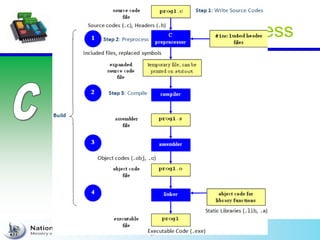
Code compilation Process
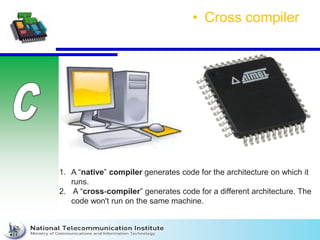
• Cross compiler
1. A “native” compiler generates code for the architecture on which it
runs.
2. A “cross-compiler” generates code for a different architecture. The
code won't run on the same machine.
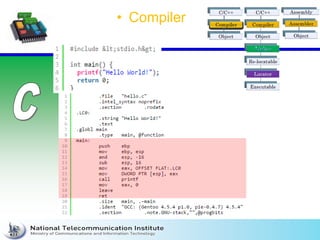
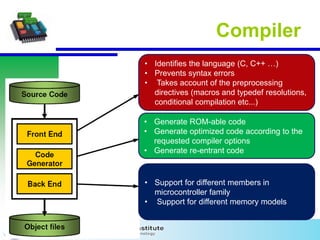
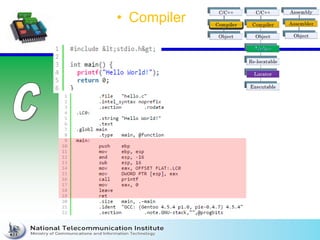
• Compiler
• Identifies the language (C, C++ …)
• Prevents syntax errors
• Takes account of the preprocessing
directives (macros and typedef resolutions,
conditional compilation etc...)
• Generate ROM-able code
• Generate optimized code according to the
requested compiler options
• Generate re-entrant code
• Support for different members in
microcontroller family
• Support for different memory models
Compiler
• Compiler
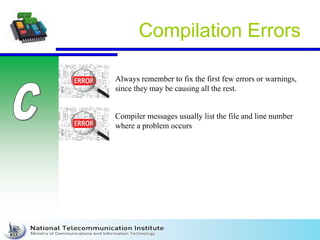
Compilation Errors
Always remember to fix the first few errors or warnings,
since they may be causing all the rest.
Compiler messages usually list the file and line number
where a problem occurs
Linker
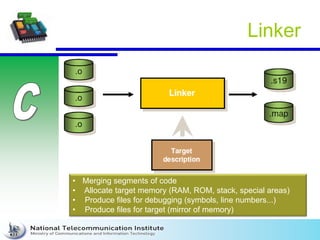
• Merging segments of code
• Allocate target memory (RAM, ROM, stack, special areas)
• Produce files for debugging (symbols, line numbers...)
• Produce files for target (mirror of memory)
Linker Errors
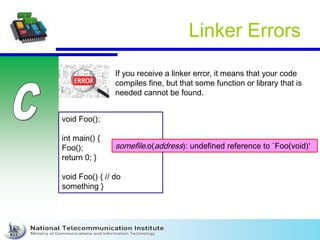
If you receive a linker error, it means that your code
compiles fine, but that some function or library that is
needed cannot be found.
void Foo();
int main() {
Foo();
return 0; }
void Foo() { // do
something }
somefile.o(address): undefined reference to `Foo(void)'
Run-Time Errors
Divide by zero , Calculate sqrt for –ve numbers
Bad pointers; access local variables after released,
calculations on uninitialized arrays
Language Elements
• structure of a program
– C Editor writes at least the main
function and source files.
– The compiler automatically adds
startup code to initialize the underlying
processor.
– The linker adds library code as used
within the source code as needed.
Preprocessing
1. Preprocessing directives
2. Object-like Macro
3. Function-like Macro
4. Conditional compilation
5. #pragma
6. Preprocessor error
7. Stringification
8. Concentration
Intro
1. The preprocessors are the directives, which give
instructions to the compiler to preprocess the
information before actual compilation starts.
2. All preprocessor directives begin with #.
3. White-space characters may appear before a
preprocessor directive on a line.
4. Preprocessor directives are not C statements, so
they do not end in a semicolon (;).
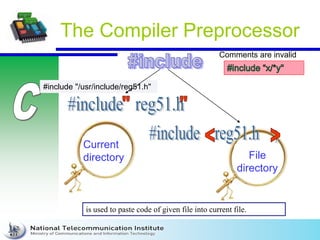
#include "/usr/include/reg51.h"
The Compiler Preprocessor
Current
directory File
directory
is used to paste code of given file into current file.
Comments are invalid
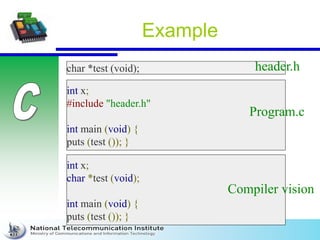
Example
char *test (void);
int x;
#include "header.h"
int main (void) {
puts (test ()); }
int x;
char *test (void);
int main (void) {
puts (test ()); }
header.h
Program.c
Compiler vision
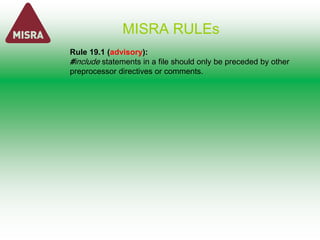
MISRA RULEs
Rule 19.1 (advisory):
#include statements in a file should only be preceded by other
preprocessor directives or comments.
Modular programming
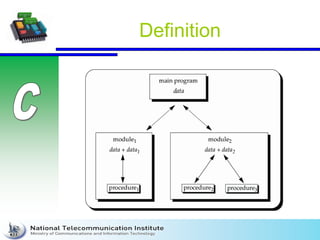
Definition
Advantages Of Modular Programming
Some advantages ::
1.Faster development.
2.Easy debugging and maintenance.
3.faster re-compilation, since the modified files just only re-
compiled.
4.Several programmers can work on individual programs at
the same time.
5.Easy to understand as each module works independently
to another module.
6.The scoping of variables can easily be controlled.
7.changing the implementation details of a modules does not
require to modify the clients using them as far as the interface
does not change.
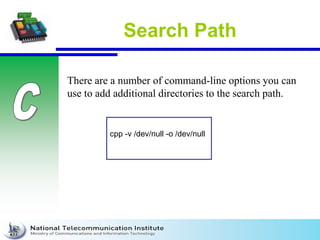
Search Path
There are a number of command-line options you can
use to add additional directories to the search path.
cpp -v /dev/null -o /dev/null
Object-like Macros
Replaces:
# define SYSTEM_H "system_1.h"
#include SYSTEM_H
#define MAXCOUNT 5
#define NUMBERS 1, 
2, 
3
int x[] = { NUMBERS };
int x[] = { 1, 2, 3 };
/* */ # /*
*/ defi
ne FO
O 10
20
#define FOO 1020
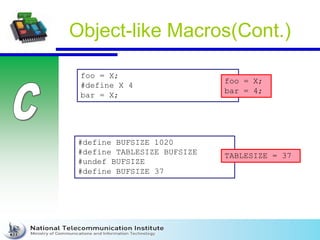
Object-like Macros(Cont.)
foo = X;
#define X 4
bar = X;
foo = X;
bar = 4;
#define BUFSIZE 1020
#define TABLESIZE BUFSIZE
#undef BUFSIZE
#define BUFSIZE 37
TABLESIZE = 37
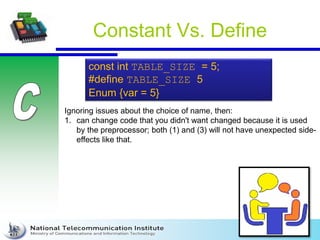
Constant Vs. Define
const int TABLE_SIZE = 5;
#define TABLE_SIZE 5
Enum {var = 5}
Ignoring issues about the choice of name, then:
1. can change code that you didn't want changed because it is used
by the preprocessor; both (1) and (3) will not have unexpected side-
effects like that.
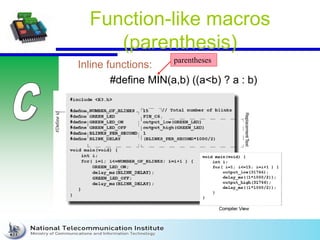
Function-like macros
(parenthesis)
Inline functions:
#define MIN(a,b) ((a<b) ? a : b)
parentheses
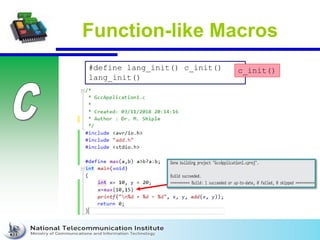
Function-like Macros
#define lang_init() c_init()
lang_init()
c_init()
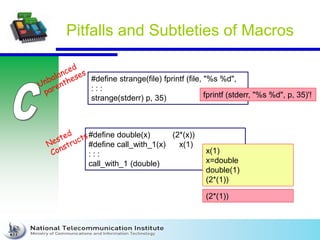
Pitfalls and Subtleties of Macros
#define strange(file) fprintf (file, "%s %d",
: : :
strange(stderr) p, 35) fprintf (stderr, "%s %d", p, 35)'!
#define double(x) (2*(x))
#define call_with_1(x) x(1)
: : :
call_with_1 (double)
x(1)
x=double
double(1)
(2*(1))
(2*(1))
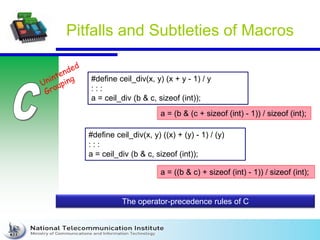
Pitfalls and Subtleties of Macros
#define ceil_div(x, y) (x + y - 1) / y
: : :
a = ceil_div (b & c, sizeof (int));
a = (b & (c + sizeof (int) - 1)) / sizeof (int);
#define ceil_div(x, y) ((x) + (y) - 1) / (y)
: : :
a = ceil_div (b & c, sizeof (int));
a = ((b & c) + sizeof (int) - 1)) / sizeof (int);
The operator-precedence rules of C
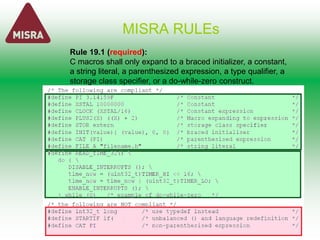
MISRA RULEs
Rule 19.1 (required):
C macros shall only expand to a braced initializer, a constant,
a string literal, a parenthesized expression, a type qualifier, a
storage class specifier, or a do-while-zero construct.
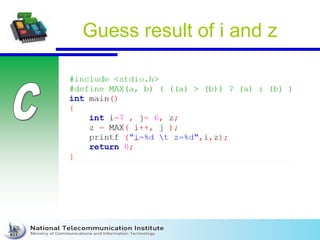
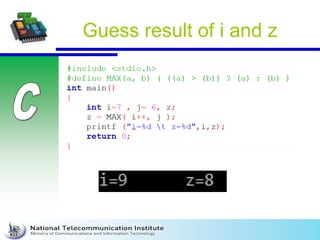
Guess result of i and z
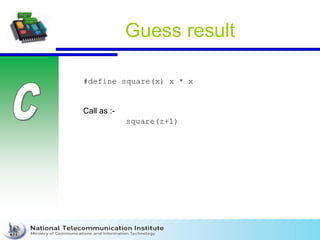
Guess result
#define square(x) x * x
square(z+1)
Call as :-
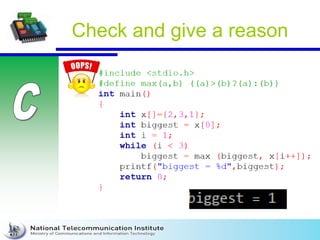
Check and give a reason
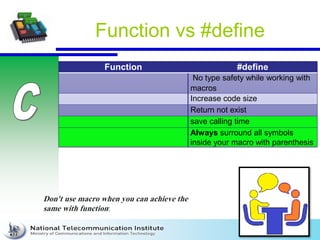
Function vs #define
Function #define
No type safety while working with
macros
Increase code size
Return not exist
save calling time
Always surround all symbols
inside your macro with parenthesis
Don't use macro when you can achieve the
same with function:
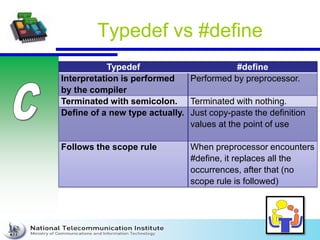
Typedef vs #define
Typedef #define
Interpretation is performed
by the compiler
Performed by preprocessor.
Terminated with semicolon. Terminated with nothing.
Define of a new type actually. Just copy-paste the definition
values at the point of use
Follows the scope rule When preprocessor encounters
#define, it replaces all the
occurrences, after that (no
scope rule is followed)
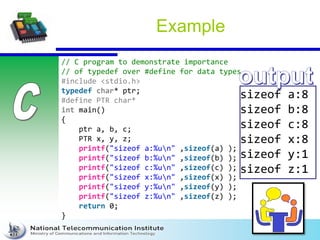
Example
// C program to demonstrate importance
// of typedef over #define for data types
#include <stdio.h>
typedef char* ptr;
#define PTR char*
int main()
{
ptr a, b, c;
PTR x, y, z;
printf("sizeof a:%un" ,sizeof(a) );
printf("sizeof b:%un" ,sizeof(b) );
printf("sizeof c:%un" ,sizeof(c) );
printf("sizeof x:%un" ,sizeof(x) );
printf("sizeof y:%un" ,sizeof(y) );
printf("sizeof z:%un" ,sizeof(z) );
return 0;
}
sizeof a:8
sizeof b:8
sizeof c:8
sizeof x:8
sizeof y:1
sizeof z:1
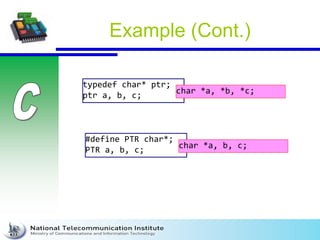
Example (Cont.)
typedef char* ptr;
ptr a, b, c;
char *a, *b, *c;
#define PTR char*;
PTR a, b, c;
char *a, b, c;
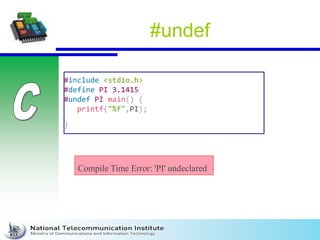
#undef
#include <stdio.h>
#define PI 3.1415
#undef PI main() {
printf("%f",PI);
}
Compile Time Error: 'PI' undeclared
Review
#include
#define (object , function)
#undef
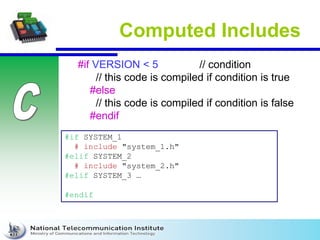
Computed Includes
#if VERSION < 5 // condition
// this code is compiled if condition is true
#else
// this code is compiled if condition is false
#endif
#if SYSTEM_1
# include "system_1.h"
#elif SYSTEM_2
# include "system_2.h"
#elif SYSTEM_3 …
#endif
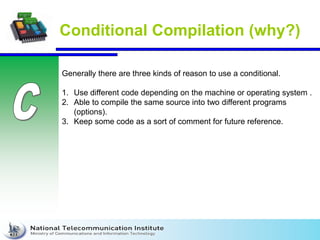
Conditional Compilation (why?)
Generally there are three kinds of reason to use a conditional.
1. Use different code depending on the machine or operating system .
2. Able to compile the same source into two different programs
(options).
3. Keep some code as a sort of comment for future reference.
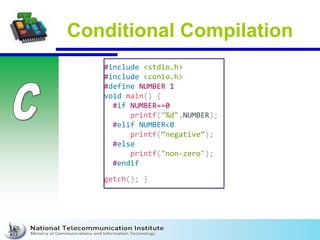
Conditional Compilation
#include <stdio.h>
#include <conio.h>
#define NUMBER 1
void main() {
#if NUMBER==0
printf(“%d",NUMBER);
#elif NUMBER<0
printf(“negative”);
#else
printf("non-zero");
#endif
getch(); }
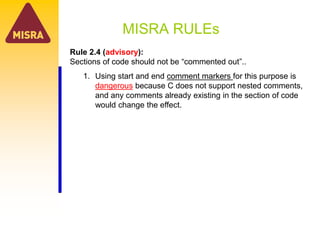
MISRA RULEs
Rule 2.4 (advisory):
Sections of code should not be “commented out”..
1. Using start and end comment markers for this purpose is
dangerous because C does not support nested comments,
and any comments already existing in the section of code
would change the effect.
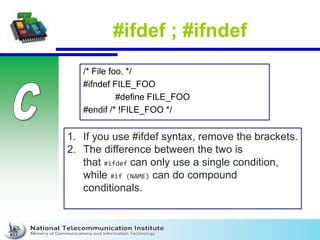
#ifdef ; #ifndef
/* File foo. */
#ifndef FILE_FOO
#define FILE_FOO
#endif /* !FILE_FOO */
1. If you use #ifdef syntax, remove the brackets.
2. The difference between the two is
that #ifdef can only use a single condition,
while #if (NAME) can do compound
conditionals.
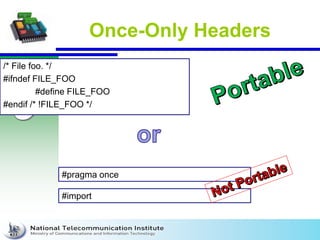
Once-Only Headers
/* File foo. */
#ifndef FILE_FOO
#define FILE_FOO
#endif /* !FILE_FOO */
#pragma once
#import
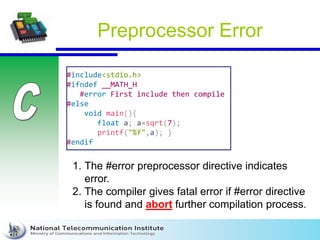
Preprocessor Error
#include<stdio.h>
#ifndef __MATH_H
#error First include then compile
#else
void main(){
float a; a=sqrt(7);
printf("%f",a); }
#endif
1. The #error preprocessor directive indicates
error.
2. The compiler gives fatal error if #error directive
is found and abort further compilation process.
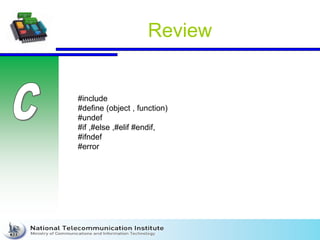
Review
#include
#define (object , function)
#undef
#if ,#else ,#elif #endif,
#ifndef
#error
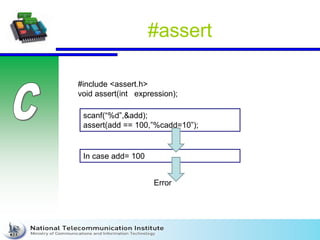
#assert
#include <assert.h>
void assert(int expression);
scanf(“%d”,&add);
assert(add == 100,”%cadd=10”);
In case add= 100
Error
Example
#include <assert.h>
#include <stdio.h>
int main () {
int a;
char str[50];
printf("Enter an integer value: ");
scanf("%d", &a);
assert(a >= 10);
printf("Integer entered is %dn", a);
printf("Enter string: ");
scanf("%s", str);
assert(str != NULL);
printf("String entered is: %sn", str);
return(0);
}
What a difference between assert and #error?
Run-time failures
arithmetic errors
1. Overflow, underflow.
2. Divide by zero.
3. Loss of significant bits through shifting.
4. negative numbers must not be passed to the sqrt or log
functions
5. some implementations can produce unexpected results
(check upper and lower limits)
6. Don’t concatenate bitwise not and shift in one statement.
7. Don’t use incremented and decremented variables
1. x = b[i] + i++;
2. x = func( i++, i );
3. p->task_start_fn (p++);
Run-time failures
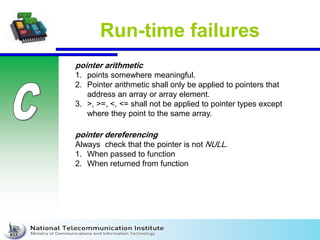
pointer dereferencing
Always check that the pointer is not NULL.
1. When passed to function
2. When returned from function
pointer arithmetic
1. points somewhere meaningful.
2. Pointer arithmetic shall only be applied to pointers that
address an array or array element.
3. >, >=, <, <= shall not be applied to pointer types except
where they point to the same array.
Run-time failures
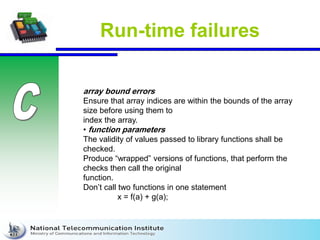
array bound errors
Ensure that array indices are within the bounds of the array
size before using them to
index the array.
• function parameters
The validity of values passed to library functions shall be
checked.
Produce “wrapped” versions of functions, that perform the
checks then call the original
function.
Don’t call two functions in one statement
x = f(a) + g(a);
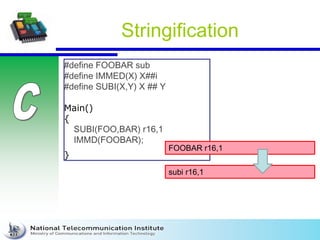
Stringification
#define FOOBAR sub
#define IMMED(X) X##i
#define SUBI(X,Y) X ## Y
Main()
{
SUBI(FOO,BAR) r16,1
IMMD(FOOBAR);
}
FOOBAR r16,1
subi r16,1
Concatenation
#define COMMAND(NAME) { #NAME, NAME ## _command }
struct command commands[ ] =
{
COMMAND (quit),
COMMAND (help),
: : :
};
struct command commands[ ] =
{
{ "quit", quit_command},
{ "help", help_command},
: : :
}; https://www.includehelp.com/c-
programs/stringizing-operator-print-
variable-name-in-c.aspx
Embedded C
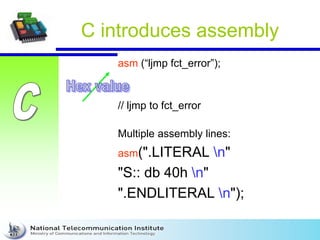
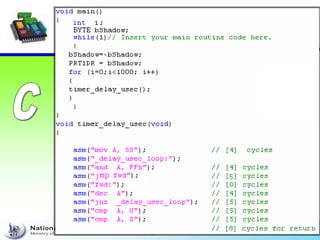
C introduces assembly
asm (“ljmp fct_error”);
// ljmp to fct_error
Multiple assembly lines:
asm(".LITERAL n"
"S:: db 40h n"
".ENDLITERAL n");
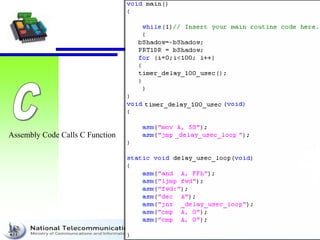
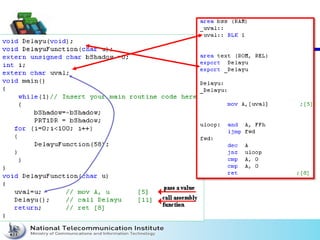
Assembly Code Calls C Function
• The compiler will not attempt to optimize such code. The
compiler assumes that the user has a good reason to
avoid the compiler's code generation and optimization.
Survey microcontrollers
that are used in automotive
industry
Reading Assignment
• Chapter 2 From Source to Binary
• Textbook: Extreme C. by Kamran Amini
0100_Embeded_C_CompilationProcess.pdf

0100_Embeded_C_CompilationProcess.pdf

  • 2.
    Lecture Scenario •Basic languageoverview –Advantages over assembly language programming •Language elements –The Structure of a program –Keywords, Program Syntax –Data types, Function declaration and Function calling –String handling, assembly language statements •The compiler preprocessor •Using libraries –C derivatives –C++ –Embedded C++ (EC++)
  • 3.
    C advantages overAssembly language • Knowledge of the processor instruction set is not required (portable code; suitable for any µP) (platform specific). • Register allocation and addressing of memory and data is managed by the compiler. (By developer) • Programs get a formal structure and can be divided into separate functions (Reusable code). • Test time is drastically reduced, this increases efficiency. • C libraries contain many standard routines such as numeric conversions.
  • 4.
    Embedded C vs.C (Cont.) Main characteristics of an Embedded programming environment: • Limited ROM. • Limited RAM. • Limited stack space. • Hardware oriented programming. • Critical timing (Interrupt Service Routines, tasks, …). • Many different pointer kinds (far / near / rom / uni / paged / …). • Special keywords and tokens (@, interrupt, tiny, ).
  • 5.
    Embedded C vs.C (Cont.) Successful Embedded C programs must keep the code small and “tight”. In order to write efficient C code there has to be good knowledge about: • Architecture characteristics • The tools for programming/debugging • Data types native support • Standard libraries • Understand the difference between simple code vs. efficient code
  • 6.
    Advantage of EmbeddedC • Efficient Memory Management. • Timing centric operations. • Direction Hardware/IO Control. • Code size constrains. • Optimized Execution.
  • 7.
  • 8.
  • 9.
    • Cross compiler 1.A “native” compiler generates code for the architecture on which it runs. 2. A “cross-compiler” generates code for a different architecture. The code won't run on the same machine.
  • 10.
  • 11.
    • Identifies thelanguage (C, C++ …) • Prevents syntax errors • Takes account of the preprocessing directives (macros and typedef resolutions, conditional compilation etc...) • Generate ROM-able code • Generate optimized code according to the requested compiler options • Generate re-entrant code • Support for different members in microcontroller family • Support for different memory models Compiler
  • 12.
  • 13.
    Compilation Errors Always rememberto fix the first few errors or warnings, since they may be causing all the rest. Compiler messages usually list the file and line number where a problem occurs
  • 14.
    Linker • Merging segmentsof code • Allocate target memory (RAM, ROM, stack, special areas) • Produce files for debugging (symbols, line numbers...) • Produce files for target (mirror of memory)
  • 15.
    Linker Errors If youreceive a linker error, it means that your code compiles fine, but that some function or library that is needed cannot be found. void Foo(); int main() { Foo(); return 0; } void Foo() { // do something } somefile.o(address): undefined reference to `Foo(void)'
  • 16.
    Run-Time Errors Divide byzero , Calculate sqrt for –ve numbers Bad pointers; access local variables after released, calculations on uninitialized arrays
  • 17.
    Language Elements • structureof a program – C Editor writes at least the main function and source files. – The compiler automatically adds startup code to initialize the underlying processor. – The linker adds library code as used within the source code as needed.
  • 18.
    Preprocessing 1. Preprocessing directives 2.Object-like Macro 3. Function-like Macro 4. Conditional compilation 5. #pragma 6. Preprocessor error 7. Stringification 8. Concentration
  • 19.
    Intro 1. The preprocessorsare the directives, which give instructions to the compiler to preprocess the information before actual compilation starts. 2. All preprocessor directives begin with #. 3. White-space characters may appear before a preprocessor directive on a line. 4. Preprocessor directives are not C statements, so they do not end in a semicolon (;).
  • 20.
    #include "/usr/include/reg51.h" The CompilerPreprocessor Current directory File directory is used to paste code of given file into current file. Comments are invalid
  • 21.
    Example char *test (void); intx; #include "header.h" int main (void) { puts (test ()); } int x; char *test (void); int main (void) { puts (test ()); } header.h Program.c Compiler vision
  • 22.
    MISRA RULEs Rule 19.1(advisory): #include statements in a file should only be preceded by other preprocessor directives or comments.
  • 23.
  • 24.
  • 25.
    Advantages Of ModularProgramming Some advantages :: 1.Faster development. 2.Easy debugging and maintenance. 3.faster re-compilation, since the modified files just only re- compiled. 4.Several programmers can work on individual programs at the same time. 5.Easy to understand as each module works independently to another module. 6.The scoping of variables can easily be controlled. 7.changing the implementation details of a modules does not require to modify the clients using them as far as the interface does not change.
  • 26.
    Search Path There area number of command-line options you can use to add additional directories to the search path. cpp -v /dev/null -o /dev/null
  • 27.
    Object-like Macros Replaces: # defineSYSTEM_H "system_1.h" #include SYSTEM_H #define MAXCOUNT 5 #define NUMBERS 1, 2, 3 int x[] = { NUMBERS }; int x[] = { 1, 2, 3 }; /* */ # /* */ defi ne FO O 10 20 #define FOO 1020
  • 28.
    Object-like Macros(Cont.) foo =X; #define X 4 bar = X; foo = X; bar = 4; #define BUFSIZE 1020 #define TABLESIZE BUFSIZE #undef BUFSIZE #define BUFSIZE 37 TABLESIZE = 37
  • 29.
    Constant Vs. Define constint TABLE_SIZE = 5; #define TABLE_SIZE 5 Enum {var = 5} Ignoring issues about the choice of name, then: 1. can change code that you didn't want changed because it is used by the preprocessor; both (1) and (3) will not have unexpected side- effects like that.
  • 30.
  • 31.
    Function-like Macros #define lang_init()c_init() lang_init() c_init()
  • 32.
    Pitfalls and Subtletiesof Macros #define strange(file) fprintf (file, "%s %d", : : : strange(stderr) p, 35) fprintf (stderr, "%s %d", p, 35)'! #define double(x) (2*(x)) #define call_with_1(x) x(1) : : : call_with_1 (double) x(1) x=double double(1) (2*(1)) (2*(1))
  • 33.
    Pitfalls and Subtletiesof Macros #define ceil_div(x, y) (x + y - 1) / y : : : a = ceil_div (b & c, sizeof (int)); a = (b & (c + sizeof (int) - 1)) / sizeof (int); #define ceil_div(x, y) ((x) + (y) - 1) / (y) : : : a = ceil_div (b & c, sizeof (int)); a = ((b & c) + sizeof (int) - 1)) / sizeof (int); The operator-precedence rules of C
  • 34.
    MISRA RULEs Rule 19.1(required): C macros shall only expand to a braced initializer, a constant, a string literal, a parenthesized expression, a type qualifier, a storage class specifier, or a do-while-zero construct.
  • 35.
  • 36.
  • 37.
    Guess result #define square(x)x * x square(z+1) Call as :-
  • 38.
  • 39.
    Function vs #define Function#define No type safety while working with macros Increase code size Return not exist save calling time Always surround all symbols inside your macro with parenthesis Don't use macro when you can achieve the same with function:
  • 40.
    Typedef vs #define Typedef#define Interpretation is performed by the compiler Performed by preprocessor. Terminated with semicolon. Terminated with nothing. Define of a new type actually. Just copy-paste the definition values at the point of use Follows the scope rule When preprocessor encounters #define, it replaces all the occurrences, after that (no scope rule is followed)
  • 41.
    Example // C programto demonstrate importance // of typedef over #define for data types #include <stdio.h> typedef char* ptr; #define PTR char* int main() { ptr a, b, c; PTR x, y, z; printf("sizeof a:%un" ,sizeof(a) ); printf("sizeof b:%un" ,sizeof(b) ); printf("sizeof c:%un" ,sizeof(c) ); printf("sizeof x:%un" ,sizeof(x) ); printf("sizeof y:%un" ,sizeof(y) ); printf("sizeof z:%un" ,sizeof(z) ); return 0; } sizeof a:8 sizeof b:8 sizeof c:8 sizeof x:8 sizeof y:1 sizeof z:1
  • 42.
    Example (Cont.) typedef char*ptr; ptr a, b, c; char *a, *b, *c; #define PTR char*; PTR a, b, c; char *a, b, c;
  • 43.
    #undef #include <stdio.h> #define PI3.1415 #undef PI main() { printf("%f",PI); } Compile Time Error: 'PI' undeclared
  • 44.
  • 45.
    Computed Includes #if VERSION< 5 // condition // this code is compiled if condition is true #else // this code is compiled if condition is false #endif #if SYSTEM_1 # include "system_1.h" #elif SYSTEM_2 # include "system_2.h" #elif SYSTEM_3 … #endif
  • 46.
    Conditional Compilation (why?) Generallythere are three kinds of reason to use a conditional. 1. Use different code depending on the machine or operating system . 2. Able to compile the same source into two different programs (options). 3. Keep some code as a sort of comment for future reference.
  • 47.
    Conditional Compilation #include <stdio.h> #include<conio.h> #define NUMBER 1 void main() { #if NUMBER==0 printf(“%d",NUMBER); #elif NUMBER<0 printf(“negative”); #else printf("non-zero"); #endif getch(); }
  • 48.
    MISRA RULEs Rule 2.4(advisory): Sections of code should not be “commented out”.. 1. Using start and end comment markers for this purpose is dangerous because C does not support nested comments, and any comments already existing in the section of code would change the effect.
  • 49.
    #ifdef ; #ifndef /*File foo. */ #ifndef FILE_FOO #define FILE_FOO #endif /* !FILE_FOO */ 1. If you use #ifdef syntax, remove the brackets. 2. The difference between the two is that #ifdef can only use a single condition, while #if (NAME) can do compound conditionals.
  • 50.
    Once-Only Headers /* Filefoo. */ #ifndef FILE_FOO #define FILE_FOO #endif /* !FILE_FOO */ #pragma once #import
  • 51.
    Preprocessor Error #include<stdio.h> #ifndef __MATH_H #errorFirst include then compile #else void main(){ float a; a=sqrt(7); printf("%f",a); } #endif 1. The #error preprocessor directive indicates error. 2. The compiler gives fatal error if #error directive is found and abort further compilation process.
  • 52.
    Review #include #define (object ,function) #undef #if ,#else ,#elif #endif, #ifndef #error
  • 53.
    #assert #include <assert.h> void assert(intexpression); scanf(“%d”,&add); assert(add == 100,”%cadd=10”); In case add= 100 Error
  • 54.
    Example #include <assert.h> #include <stdio.h> intmain () { int a; char str[50]; printf("Enter an integer value: "); scanf("%d", &a); assert(a >= 10); printf("Integer entered is %dn", a); printf("Enter string: "); scanf("%s", str); assert(str != NULL); printf("String entered is: %sn", str); return(0); }
  • 55.
    What a differencebetween assert and #error?
  • 56.
    Run-time failures arithmetic errors 1.Overflow, underflow. 2. Divide by zero. 3. Loss of significant bits through shifting. 4. negative numbers must not be passed to the sqrt or log functions 5. some implementations can produce unexpected results (check upper and lower limits) 6. Don’t concatenate bitwise not and shift in one statement. 7. Don’t use incremented and decremented variables 1. x = b[i] + i++; 2. x = func( i++, i ); 3. p->task_start_fn (p++);
  • 57.
    Run-time failures pointer dereferencing Alwayscheck that the pointer is not NULL. 1. When passed to function 2. When returned from function pointer arithmetic 1. points somewhere meaningful. 2. Pointer arithmetic shall only be applied to pointers that address an array or array element. 3. >, >=, <, <= shall not be applied to pointer types except where they point to the same array.
  • 58.
    Run-time failures array bounderrors Ensure that array indices are within the bounds of the array size before using them to index the array. • function parameters The validity of values passed to library functions shall be checked. Produce “wrapped” versions of functions, that perform the checks then call the original function. Don’t call two functions in one statement x = f(a) + g(a);
  • 59.
    Stringification #define FOOBAR sub #defineIMMED(X) X##i #define SUBI(X,Y) X ## Y Main() { SUBI(FOO,BAR) r16,1 IMMD(FOOBAR); } FOOBAR r16,1 subi r16,1
  • 60.
    Concatenation #define COMMAND(NAME) {#NAME, NAME ## _command } struct command commands[ ] = { COMMAND (quit), COMMAND (help), : : : }; struct command commands[ ] = { { "quit", quit_command}, { "help", help_command}, : : : }; https://www.includehelp.com/c- programs/stringizing-operator-print- variable-name-in-c.aspx
  • 61.
  • 62.
    C introduces assembly asm(“ljmp fct_error”); // ljmp to fct_error Multiple assembly lines: asm(".LITERAL n" "S:: db 40h n" ".ENDLITERAL n");
  • 64.
  • 66.
    • The compilerwill not attempt to optimize such code. The compiler assumes that the user has a good reason to avoid the compiler's code generation and optimization.
  • 67.
    Survey microcontrollers that areused in automotive industry
  • 68.
    Reading Assignment • Chapter2 From Source to Binary • Textbook: Extreme C. by Kamran Amini