Chapter 1 –Introduction
Asmelash G.
Department of Information Technology
Open Source Computing
2.
What is OpenSource?
• The term "open source" refers to something people can modify and share
because its design is publicly accessible.
• “Open source" designates a broader set of values—what we call “the open
source way”.
• Open source projects, products, or initiatives embrace and celebrate
principles of open exchange, collaborative participation, rapid prototyping,
transparency, meritocracy, and community-oriented development.
IT4208 Open Source Computing 2
2019-04-08
3.
What is OpenSource?...
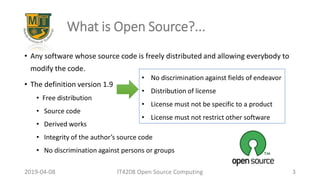
• Any software whose source code is freely distributed and allowing everybody to
modify the code.
• The definition version 1.9
• Free distribution
• Source code
• Derived works
• Integrity of the author’s source code
• No discrimination against persons or groups
IT4208 Open Source Computing 3
2019-04-08
• No discrimination against fields of endeavor
• Distribution of license
• License must not be specific to a product
• License must not restrict other software
4.
History and Evolutionof Open Source
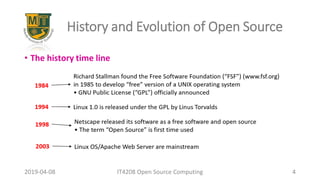
• The history time line
IT4208 Open Source Computing 4
2019-04-08
5.
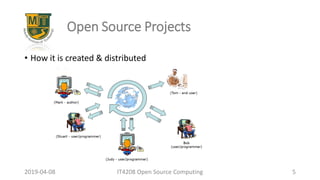
Open Source Projects
•How it is created & distributed
IT4208 Open Source Computing 5
2019-04-08
6.
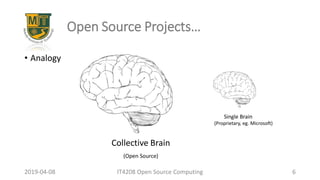
Open Source Projects…
•Analogy
IT4208 Open Source Computing 6
2019-04-08
Collective Brain
Single Brain
(Proprietary, eg. Microsoft)
(Open Source)
7.
What is themotivation?
• Knowledge to be shared “like knowledge the sharing of recipes among
cooks”
• Most developers have a need or a want to; they are not simply
programmer drones at a huge corporation!
• OSS projects have log files listing all contributors of the software.
• They find it desirable to participate in OSS projects to signal their ability and to
enhance professional advancement.
• Some individuals find it fun to go against the giant such as Microsoft
IT4208 Open Source Computing 7
2019-04-08
8.
Open Source Computing
Opensource computing is a diverse and fertile ecosystem of tools and
methods
1. Open source programming languages
2. Open source development environments
3. Open source tools to learn programming
4. Software freedom
5. Contributing to open source projects
6. Open source mentors
IT4208 Open Source Computing 8
2019-04-08
9.
Open Source ProgrammingLanguages
• A number of programming languages are essentially open source
projects
• Source code for interpreters and compilers,
• Standard libraries of the language.
• Scripting languages for web based applications such as Perl, PHP and
Python are open source PLs
IT4208 Open Source Computing 9
2019-04-08
10.
Open Source DevelopmentEnvir’nt
• Open source tools can also be used to provide rich, fully featured
development environments for PLs
• Gnu Compiler Collection (C, C++ Objective C, Fortran, Java, and Ada),
• On GNU/Linux project
• On multipurpose development environments such as Emacs, Eclipse, KDevelop
IT4208 Open Source Computing 10
2019-04-08
11.
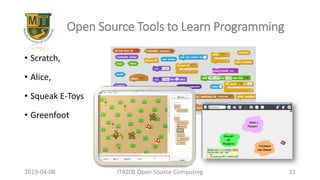
Open Source Toolsto Learn Programming
• Scratch,
• Alice,
• Squeak E-Toys
• Greenfoot
IT4208 Open Source Computing 11
2019-04-08
12.
Software Freedom
• Freesoftware contains freedom to:
• Study how the program works
• Change it to make it do what you wish
• Distribute the modified version to others
IT4208 Open Source Computing 12
2019-04-08
13.
Contributing to OpenSource Projects
• “These freedoms create the opportunity for anyone to contribute to open
source projects, from supporting others and helping with documentation
(‘legitimate peripheral participation’) through spotting and then fixing bugs
to contributing and maintaining modules and even the core code of a
project.” MILES BERRY
• Examples:
• GitHub
• Q & A community
IT4208 Open Source Computing 13
2019-04-08
14.
Open Source Mentors
•Providing internship opportunities for students
• Small open source project
IT4208 Open Source Computing 14
2019-04-08
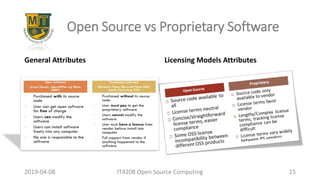
15.
General Attributes LicensingModels Attributes
2019-04-08 IT4208 Open Source Computing 15
Open Source vs Proprietary Software
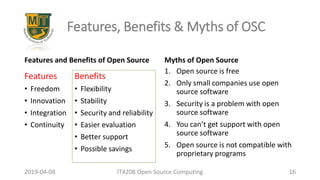
16.
Features and Benefitsof Open Source Myths of Open Source
2019-04-08 IT4208 Open Source Computing 16
Features, Benefits & Myths of OSC
Features
• Freedom
• Innovation
• Integration
• Continuity
1. Open source is free
2. Only small companies use open
source software
3. Security is a problem with open
source software
4. You can’t get support with open
source software
5. Open source is not compatible with
proprietary programs
Benefits
• Flexibility
• Stability
• Security and reliability
• Easier evaluation
• Better support
• Possible savings
Open Source OpenSource Technologies
• Open source applications
• TCP/IP protocol suite
• Linux OS
• Firefox
• BIND/DNS
• SENDMAIL
• Apache
• OpenOffice
IT4208 Open Source Computing 18
2019-04-08
19.
Open Source Software
•Open source software is software with source code that anyone can
inspect, modify, and enhance.
• "Source code" is the part of software that most computer users don't
ever see; it's the code computer programmers can manipulate to
change how a piece of software—a "program" or "application"—
works.
IT4208 Open Source Computing 19
2019-04-08
20.
Types of OpenSource Software
• Operating systems: Linux, FreeBSD, Android, ReactOS
• Web servers: Apache HTTP Server, NGINX, Node.js, Apache Tomcat, Lighttpd
• Database systems: TrustRadius, MySQL, PostgreSQL, MariaDB, Apache Hive, SQLite
• Mobile development frameworks: Ionic, React Native, Flutter, Xamarin
• QA automation tools: Selenium, Watir (Web App Testing in Ruby), Robot framework
• Big data analytics tools: Apache Hadoop, Apache SAMOA, HPCC
• Office software suites: Apache OpenOffice, LibreOffice, NeoOffice
IT4208 Open Source Computing 20
2019-04-08
How to selectan Open Source Software?
• Functionality and flexibility
• Security – Check SecurityFocus (news portal)
• Maintenance and support
• User community
• Documentation
• Licensing
• Budgeting
IT4208 Open Source Computing 22
2019-04-08
23.
Today, open sourcetechnologies are being used in education, industries, and by governments
2019-04-08 IT4208 Open Source Computing 23
Open Source in Education, Industry,
and Government
Education
• Virtual universities
• Online courses
• Education portals
• Courseware
LMS tools
• Moodle
• Bodington
Government
• s
Industry
• Data aggregation
• Device management
• Event management
• Data analysis
• Security
24.
Project Assignments
• Makea group of four people in a group
• Create an account at GitHub, https://github.com
• Follow me @asmelu, https://github.com/asmelu
• Read more regarding GitHub @https://guides.github.com/
• I will create [a] project/s and we will work with it
• Select one open source software form slides 20 and 21, and learn how to customize it to
your own preference in group
IT4208 Open Source Computing 24
2019-04-08

![Project Assignments
• Make a group of four people in a group
• Create an account at GitHub, https://github.com
• Follow me @asmelu, https://github.com/asmelu
• Read more regarding GitHub @https://guides.github.com/
• I will create [a] project/s and we will work with it
• Select one open source software form slides 20 and 21, and learn how to customize it to
your own preference in group
IT4208 Open Source Computing 24
2019-04-08](https://image.slidesharecdn.com/01-250628053904-ab806633/85/01-Introduction-to-open-source-computing-24-320.jpg)