INDEX
• Introduction to Cyber Security & Ethical Hacking
• CIA Triad
• CVE & CVSS
• Types of Security Testing
• Introduction to Network & Network Topology
• Categories of Computer Networks
• LAN, MAN, WAN
• Computer Network Architecture
• Peer-to-Peer Architecture
• Client-to-Server Architecture
• Career & Placement
What is Cyber Security?
• Cyber Security is the art of protecting networks,
devices, and data from unauthorized access or
criminal use and the practice of ensuring
confidentiality, integrity, and availability of
information.
• Cyber Security refers to a set of techniques used to
protect the integrity of networks, programs and data
from attack, damage or unauthorized access.
Introduction
to
Cyber Security
& Ethical
Hacking
Cont…
• The use of cyber security can help prevent cyber attacks, data breaches, and identity theft
and can aid in risk management.
• So, when talking about Cyber Security, one might wonder,
“What are we trying to protect ourselves against?”
• Well, there are three main aspects we are trying to control, name:
• Un-Authorised Access
• Un-Aauthorised Deletion
• Un-Authorised Modification
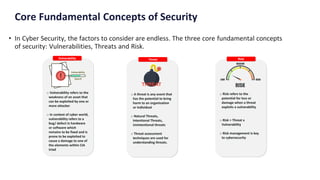
Core Fundamental Concepts of Security
• In Cyber Security, the factors to consider are endless. The three core fundamental concepts
of security: Vulnerabilities, Threats and Risk.
What is Ethical Hacking?
• Ethical hacking is to scan vulnerabilities and to find potential threats on a computer or
network. An ethical hacker finds the weak points or loopholes in a computer, web
application or network and reports them to the organization.
• Carrying out an ethical hack involves duplicating strategies and actions of malicious
attackers.
• This practice helps to identify security vulnerabilities which can then be resolved before a
malicious attacker has the opportunity to exploit them.
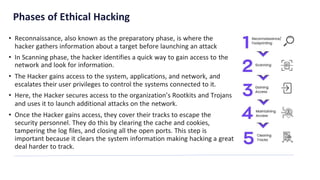
Phases of Ethical Hacking
• Reconnaissance, also known as the preparatory phase, is where the
hacker gathers information about a target before launching an attack
• In Scanning phase, the hacker identifies a quick way to gain access to the
network and look for information.
• The Hacker gains access to the system, applications, and network, and
escalates their user privileges to control the systems connected to it.
• Here, the Hacker secures access to the organization’s Rootkits and Trojans
and uses it to launch additional attacks on the network.
• Once the Hacker gains access, they cover their tracks to escape the
security personnel. They do this by clearing the cache and cookies,
tampering the log files, and closing all the open ports. This step is
important because it clears the system information making hacking a great
deal harder to track.
What is CIA Triad?
• The three letters in "CIA triad" stand for
• Confidentiality,
• Integrity, and
• Availability.
• The CIA triad is a common design model that forms
the basis for the development of security systems.
• The components of the triad are considered to be the
most important and fundamental components of
security
CIA Triad
CIA Triad
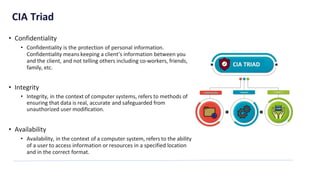
• Confidentiality
• Confidentiality is the protection of personal information.
Confidentiality means keeping a client’s information between you
and the client, and not telling others including co-workers, friends,
family, etc.
• Integrity
• Integrity, in the context of computer systems, refers to methods of
ensuring that data is real, accurate and safeguarded from
unauthorized user modification.
• Availability
• Availability, in the context of a computer system, refers to the ability
of a user to access information or resources in a specified location
and in the correct format.
What is CVE ?
• CVE stands for Common Vulnerability and Exposure.
• CVE is a standardized, unique identifier assigned to
security vulnerabilities or exposures in software and
hardware products.
• The CVE system facilitates accurate tracking and
management of security issues across diverse
platforms, vendors, and technologies, empowering
users, vendors, and regulatory authorities to
efficiently identify, catalog, prioritize, and remediate
potential cybersecurity threats.
Common
Vulnerability
Exposure (CVE)
What is a Vulnerability?
• A vulnerability is a specific weakness or flaw within a software, hardware, or network
system that can be exploited by an attacker to compromise its security.
• Vulnerability can further be classified as:
• Human Error
• Design Flaws
• Configuration Issues
• Third-party Components
• Unpatched Software
• Zero-day Vulnerabilities
What is CVSS ?
• The Common Vulnerability Scoring System (CVSS) is a
free and open industry standard for assessing the
severity of computer system security vulnerabilities.
• CVSS attempts to assign severity scores to
vulnerabilities, allowing responders to prioritize
responses and resources according to threat.
Common
Vulnerability
Scoring
System(CVSS)
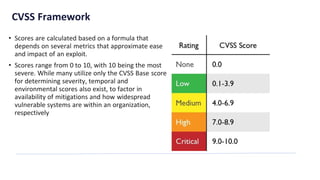
CVSS Framework
• Scores are calculated based on a formula that
depends on several metrics that approximate ease
and impact of an exploit.
• Scores range from 0 to 10, with 10 being the most
severe. While many utilize only the CVSS Base score
for determining severity, temporal and
environmental scores also exist, to factor in
availability of mitigations and how widespread
vulnerable systems are within an organization,
respectively
Security Testing
• Security testing checks whether software is
vulnerable to cyber attacks, and tests the impact of
malicious or unexpected inputs on its operations.
• Security testing provides evidence that systems and
information are safe and reliable, and that they do
not accept unauthorized inputs.
Security Testing
Main Goals of Security Testing
• Identify assets
• Things that need to be protected, such as software applications and computing infrastructure.
• Identify threats and vulnerabilities
• Activities that can cause damage to an asset, or weaknesses in one or more assets that can be exploited
by attackers.
• Identify risk
• Security testing aims to evaluate the risk that specific threats or vulnerabilities will cause a negative
impact to the business. Risk is evaluated by identifying the severity of a threat or vulnerability, and the
likelihood and impact of exploitation.
• Perform remediation
• It provides actionable guidance for remediating vulnerabilities discovered, and can verify that
vulnerabilities were successfully fixed.
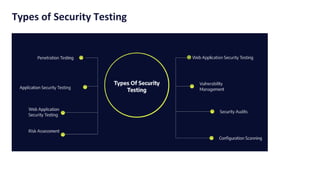
Types of Security Testing
Security Testing Approaches
• Black Box Testing
• In black box testing, the security tester evaluates a system’s security from the outside without knowing the
internal processes generating responses.
• White Box Testing
• In white box testing, the tester designs test cases and tests based on the software’s source code.
• Gray Box Testing
• Gray box testing is a hybrid of white box and black box testing – black box testing involves a test object with
an unknown internal structure; white box testing requires the application’s internal structure to be fully
known.
What is a network?
• A network is two or more computers (or other
electronic devices) that are connected together,
usually by cables or Wirelessly.
• Using a network allows you to share:
• hardware, such as a printer
• software, allowing multiple users to run the same
programs on different computers
• data, so that other people can access shared work
and you can access your data from any computer
on the network
Introduction to
Networks & Network
Topology
Network Topology
• Topology defines the structure of the network of how all the components are
interconnected to each other. There are two types of topology: physical and logical
topology.
Types of Network Topology
• Physical Topology
• Logical Topology
Both these types can be further classified.
Types of Physical Topology
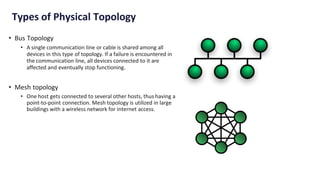
• Bus Topology
• A single communication line or cable is shared among all
devices in this type of topology. If a failure is encountered in
the communication line, all devices connected to it are
affected and eventually stop functioning.
• Mesh topology
• One host gets connected to several other hosts, thus having a
point-to-point connection. Mesh topology is utilized in large
buildings with a wireless network for internet access.
Types of Physical Topology
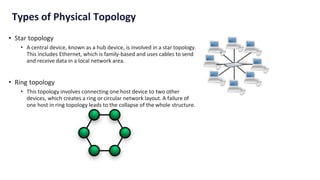
• Star topology
• A central device, known as a hub device, is involved in a star topology.
This includes Ethernet, which is family-based and uses cables to send
and receive data in a local network area.
• Ring topology
• This topology involves connecting one host device to two other
devices, which creates a ring or circular network layout. A failure of
one host in ring topology leads to the collapse of the whole structure.
Types of Logical Topology
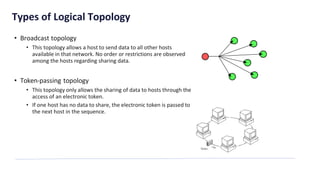
• Broadcast topology
• This topology allows a host to send data to all other hosts
available in that network. No order or restrictions are observed
among the hosts regarding sharing data.
• Token-passing topology
• This topology only allows the sharing of data to hosts through the
access of an electronic token.
• If one host has no data to share, the electronic token is passed to
the next host in the sequence.
What is a Computer network?
• A computer network is a set of computers sharing
resources located on or provided by network nodes.
• Computers use common communication
protocols over digital interconnections to
communicate with each other.
• These interconnections are made up
of telecommunication network technologies based
on physically wired, optical, and wireless radio-
frequency methods that may be arranged in a variety
of network topologies.
Computer Networks
Types of Computer Networks
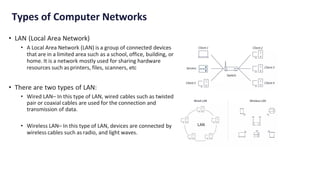
• LAN (Local Area Network)
• A Local Area Network (LAN) is a group of connected devices
that are in a limited area such as a school, office, building, or
home. It is a network mostly used for sharing hardware
resources such as printers, files, scanners, etc
• There are two types of LAN:
• Wired LAN– In this type of LAN, wired cables such as twisted
pair or coaxial cables are used for the connection and
transmission of data.
• Wireless LAN– In this type of LAN, devices are connected by
wireless cables such as radio, and light waves.
Understanding Computer network
Architecture
• Computer Network Architecture is defined as the
physical and logical design of the software, hardware,
protocols, and media of the transmission of data.
• Simply we can say that how computers are organized
and how tasks are allocated to the computer
• The Architecture is further classified into two
Categories
Computer Network
Architecture
Types of Computer Network Architecture
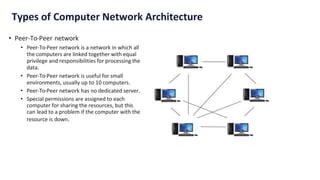
• Peer-To-Peer network
• Peer-To-Peer network is a network in which all
the computers are linked together with equal
privilege and responsibilities for processing the
data.
• Peer-To-Peer network is useful for small
environments, usually up to 10 computers.
• Peer-To-Peer network has no dedicated server.
• Special permissions are assigned to each
computer for sharing the resources, but this
can lead to a problem if the computer with the
resource is down.
Types of Computer Network Architecture
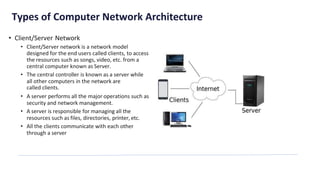
• Client/Server Network
• Client/Server network is a network model
designed for the end users called clients, to access
the resources such as songs, video, etc. from a
central computer known as Server.
• The central controller is known as a server while
all other computers in the network are
called clients.
• A server performs all the major operations such as
security and network management.
• A server is responsible for managing all the
resources such as files, directories, printer, etc.
• All the clients communicate with each other
through a server
Career Opportunities
• As the threat of cyberattacks grows, so does the
demand for cybersecurity experts.
• Cyber security is a growing industry that is still in
need of skilled professionals
Market Size and Growth
• Cyber security is a method of protecting systems,
networks, and programs from digital attacks.
• The cyber security market size was valued at USD
153.65 billion in 2022 and is projected to grow from
USD 172.32 billion in 2023 to USD 424.97 billion in
2030, exhibiting a 13.8% CAGR during the forecast.
Career &
Placement
Emerging Cyber Security
• Diving Factors
• Increase in Remote and Hybrid work
• Rising adoption of Application Security
• Shift to Cloud-based delivery Models
• Focus on Consumer Security
• Challenges
• Ransomware Evolution, Wipers and Destructive Malware
• Cloud Third-Party Threats & Mobile Malware
• Global Attacks on Business
• Blockchain Revolution & AI Expansion
• IoT Threats
• Keeping Abreast of Technological Advancements
Industrial Opportunities
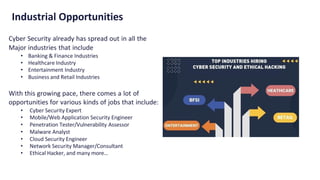
Cyber Security already has spread out in all the
Major industries that include
• Banking & Finance Industries
• Healthcare Industry
• Entertainment Industry
• Business and Retail Industries
With this growing pace, there comes a lot of
opportunities for various kinds of jobs that include:
• Cyber Security Expert
• Mobile/Web Application Security Engineer
• Penetration Tester/Vulnerability Assessor
• Malware Analyst
• Cloud Security Engineer
• Network Security Manager/Consultant
• Ethical Hacker, and many more…
Placement and Income Opportunities
• Cybersecurity analyst - Average annual salary: ₹5,10,203
• Security tester - Average annual salary: ₹7,24,297
• Network security engineer - Average annual salary: ₹6,13,536
• Chief information security officer (CISO) - Average annual salary: ₹19L
• Ethical hacker - Average annual salary: ₹5,14,639
In-Demand Cyber Security Skills:
• Cloud security
• Programming (especially scripting) languages
• Encryption
• Risk assessment
• Intrusion detection
• Problem-solving
• Analytical thinking
Questions ?
CONFIDENTIAL: The information in this document belongs to Boston Institute of Analytics LLC. Any unauthorized sharing of this
material is prohibited and subject to legal action under breach of IP and confidentiality clauses.
THANK YOU !!!

01-Induction cybersecurity and ethical hacking.pdf

  • 1.
    INDEX • Introduction toCyber Security & Ethical Hacking • CIA Triad • CVE & CVSS • Types of Security Testing • Introduction to Network & Network Topology • Categories of Computer Networks • LAN, MAN, WAN • Computer Network Architecture • Peer-to-Peer Architecture • Client-to-Server Architecture • Career & Placement
  • 2.
    What is CyberSecurity? • Cyber Security is the art of protecting networks, devices, and data from unauthorized access or criminal use and the practice of ensuring confidentiality, integrity, and availability of information. • Cyber Security refers to a set of techniques used to protect the integrity of networks, programs and data from attack, damage or unauthorized access. Introduction to Cyber Security & Ethical Hacking
  • 3.
    Cont… • The useof cyber security can help prevent cyber attacks, data breaches, and identity theft and can aid in risk management. • So, when talking about Cyber Security, one might wonder, “What are we trying to protect ourselves against?” • Well, there are three main aspects we are trying to control, name: • Un-Authorised Access • Un-Aauthorised Deletion • Un-Authorised Modification
  • 4.
    Core Fundamental Conceptsof Security • In Cyber Security, the factors to consider are endless. The three core fundamental concepts of security: Vulnerabilities, Threats and Risk.
  • 5.
    What is EthicalHacking? • Ethical hacking is to scan vulnerabilities and to find potential threats on a computer or network. An ethical hacker finds the weak points or loopholes in a computer, web application or network and reports them to the organization. • Carrying out an ethical hack involves duplicating strategies and actions of malicious attackers. • This practice helps to identify security vulnerabilities which can then be resolved before a malicious attacker has the opportunity to exploit them.
  • 6.
    Phases of EthicalHacking • Reconnaissance, also known as the preparatory phase, is where the hacker gathers information about a target before launching an attack • In Scanning phase, the hacker identifies a quick way to gain access to the network and look for information. • The Hacker gains access to the system, applications, and network, and escalates their user privileges to control the systems connected to it. • Here, the Hacker secures access to the organization’s Rootkits and Trojans and uses it to launch additional attacks on the network. • Once the Hacker gains access, they cover their tracks to escape the security personnel. They do this by clearing the cache and cookies, tampering the log files, and closing all the open ports. This step is important because it clears the system information making hacking a great deal harder to track.
  • 7.
    What is CIATriad? • The three letters in "CIA triad" stand for • Confidentiality, • Integrity, and • Availability. • The CIA triad is a common design model that forms the basis for the development of security systems. • The components of the triad are considered to be the most important and fundamental components of security CIA Triad
  • 8.
    CIA Triad • Confidentiality •Confidentiality is the protection of personal information. Confidentiality means keeping a client’s information between you and the client, and not telling others including co-workers, friends, family, etc. • Integrity • Integrity, in the context of computer systems, refers to methods of ensuring that data is real, accurate and safeguarded from unauthorized user modification. • Availability • Availability, in the context of a computer system, refers to the ability of a user to access information or resources in a specified location and in the correct format.
  • 9.
    What is CVE? • CVE stands for Common Vulnerability and Exposure. • CVE is a standardized, unique identifier assigned to security vulnerabilities or exposures in software and hardware products. • The CVE system facilitates accurate tracking and management of security issues across diverse platforms, vendors, and technologies, empowering users, vendors, and regulatory authorities to efficiently identify, catalog, prioritize, and remediate potential cybersecurity threats. Common Vulnerability Exposure (CVE)
  • 10.
    What is aVulnerability? • A vulnerability is a specific weakness or flaw within a software, hardware, or network system that can be exploited by an attacker to compromise its security. • Vulnerability can further be classified as: • Human Error • Design Flaws • Configuration Issues • Third-party Components • Unpatched Software • Zero-day Vulnerabilities
  • 11.
    What is CVSS? • The Common Vulnerability Scoring System (CVSS) is a free and open industry standard for assessing the severity of computer system security vulnerabilities. • CVSS attempts to assign severity scores to vulnerabilities, allowing responders to prioritize responses and resources according to threat. Common Vulnerability Scoring System(CVSS)
  • 12.
    CVSS Framework • Scoresare calculated based on a formula that depends on several metrics that approximate ease and impact of an exploit. • Scores range from 0 to 10, with 10 being the most severe. While many utilize only the CVSS Base score for determining severity, temporal and environmental scores also exist, to factor in availability of mitigations and how widespread vulnerable systems are within an organization, respectively
  • 13.
    Security Testing • Securitytesting checks whether software is vulnerable to cyber attacks, and tests the impact of malicious or unexpected inputs on its operations. • Security testing provides evidence that systems and information are safe and reliable, and that they do not accept unauthorized inputs. Security Testing
  • 14.
    Main Goals ofSecurity Testing • Identify assets • Things that need to be protected, such as software applications and computing infrastructure. • Identify threats and vulnerabilities • Activities that can cause damage to an asset, or weaknesses in one or more assets that can be exploited by attackers. • Identify risk • Security testing aims to evaluate the risk that specific threats or vulnerabilities will cause a negative impact to the business. Risk is evaluated by identifying the severity of a threat or vulnerability, and the likelihood and impact of exploitation. • Perform remediation • It provides actionable guidance for remediating vulnerabilities discovered, and can verify that vulnerabilities were successfully fixed.
  • 15.
  • 16.
    Security Testing Approaches •Black Box Testing • In black box testing, the security tester evaluates a system’s security from the outside without knowing the internal processes generating responses. • White Box Testing • In white box testing, the tester designs test cases and tests based on the software’s source code. • Gray Box Testing • Gray box testing is a hybrid of white box and black box testing – black box testing involves a test object with an unknown internal structure; white box testing requires the application’s internal structure to be fully known.
  • 17.
    What is anetwork? • A network is two or more computers (or other electronic devices) that are connected together, usually by cables or Wirelessly. • Using a network allows you to share: • hardware, such as a printer • software, allowing multiple users to run the same programs on different computers • data, so that other people can access shared work and you can access your data from any computer on the network Introduction to Networks & Network Topology
  • 18.
    Network Topology • Topologydefines the structure of the network of how all the components are interconnected to each other. There are two types of topology: physical and logical topology. Types of Network Topology • Physical Topology • Logical Topology Both these types can be further classified.
  • 19.
    Types of PhysicalTopology • Bus Topology • A single communication line or cable is shared among all devices in this type of topology. If a failure is encountered in the communication line, all devices connected to it are affected and eventually stop functioning. • Mesh topology • One host gets connected to several other hosts, thus having a point-to-point connection. Mesh topology is utilized in large buildings with a wireless network for internet access.
  • 20.
    Types of PhysicalTopology • Star topology • A central device, known as a hub device, is involved in a star topology. This includes Ethernet, which is family-based and uses cables to send and receive data in a local network area. • Ring topology • This topology involves connecting one host device to two other devices, which creates a ring or circular network layout. A failure of one host in ring topology leads to the collapse of the whole structure.
  • 21.
    Types of LogicalTopology • Broadcast topology • This topology allows a host to send data to all other hosts available in that network. No order or restrictions are observed among the hosts regarding sharing data. • Token-passing topology • This topology only allows the sharing of data to hosts through the access of an electronic token. • If one host has no data to share, the electronic token is passed to the next host in the sequence.
  • 22.
    What is aComputer network? • A computer network is a set of computers sharing resources located on or provided by network nodes. • Computers use common communication protocols over digital interconnections to communicate with each other. • These interconnections are made up of telecommunication network technologies based on physically wired, optical, and wireless radio- frequency methods that may be arranged in a variety of network topologies. Computer Networks
  • 23.
    Types of ComputerNetworks • LAN (Local Area Network) • A Local Area Network (LAN) is a group of connected devices that are in a limited area such as a school, office, building, or home. It is a network mostly used for sharing hardware resources such as printers, files, scanners, etc • There are two types of LAN: • Wired LAN– In this type of LAN, wired cables such as twisted pair or coaxial cables are used for the connection and transmission of data. • Wireless LAN– In this type of LAN, devices are connected by wireless cables such as radio, and light waves.
  • 24.
    Understanding Computer network Architecture •Computer Network Architecture is defined as the physical and logical design of the software, hardware, protocols, and media of the transmission of data. • Simply we can say that how computers are organized and how tasks are allocated to the computer • The Architecture is further classified into two Categories Computer Network Architecture
  • 25.
    Types of ComputerNetwork Architecture • Peer-To-Peer network • Peer-To-Peer network is a network in which all the computers are linked together with equal privilege and responsibilities for processing the data. • Peer-To-Peer network is useful for small environments, usually up to 10 computers. • Peer-To-Peer network has no dedicated server. • Special permissions are assigned to each computer for sharing the resources, but this can lead to a problem if the computer with the resource is down.
  • 26.
    Types of ComputerNetwork Architecture • Client/Server Network • Client/Server network is a network model designed for the end users called clients, to access the resources such as songs, video, etc. from a central computer known as Server. • The central controller is known as a server while all other computers in the network are called clients. • A server performs all the major operations such as security and network management. • A server is responsible for managing all the resources such as files, directories, printer, etc. • All the clients communicate with each other through a server
  • 27.
    Career Opportunities • Asthe threat of cyberattacks grows, so does the demand for cybersecurity experts. • Cyber security is a growing industry that is still in need of skilled professionals Market Size and Growth • Cyber security is a method of protecting systems, networks, and programs from digital attacks. • The cyber security market size was valued at USD 153.65 billion in 2022 and is projected to grow from USD 172.32 billion in 2023 to USD 424.97 billion in 2030, exhibiting a 13.8% CAGR during the forecast. Career & Placement
  • 28.
    Emerging Cyber Security •Diving Factors • Increase in Remote and Hybrid work • Rising adoption of Application Security • Shift to Cloud-based delivery Models • Focus on Consumer Security • Challenges • Ransomware Evolution, Wipers and Destructive Malware • Cloud Third-Party Threats & Mobile Malware • Global Attacks on Business • Blockchain Revolution & AI Expansion • IoT Threats • Keeping Abreast of Technological Advancements
  • 29.
    Industrial Opportunities Cyber Securityalready has spread out in all the Major industries that include • Banking & Finance Industries • Healthcare Industry • Entertainment Industry • Business and Retail Industries With this growing pace, there comes a lot of opportunities for various kinds of jobs that include: • Cyber Security Expert • Mobile/Web Application Security Engineer • Penetration Tester/Vulnerability Assessor • Malware Analyst • Cloud Security Engineer • Network Security Manager/Consultant • Ethical Hacker, and many more…
  • 30.
    Placement and IncomeOpportunities • Cybersecurity analyst - Average annual salary: ₹5,10,203 • Security tester - Average annual salary: ₹7,24,297 • Network security engineer - Average annual salary: ₹6,13,536 • Chief information security officer (CISO) - Average annual salary: ₹19L • Ethical hacker - Average annual salary: ₹5,14,639 In-Demand Cyber Security Skills: • Cloud security • Programming (especially scripting) languages • Encryption • Risk assessment • Intrusion detection • Problem-solving • Analytical thinking
  • 31.
  • 32.
    CONFIDENTIAL: The informationin this document belongs to Boston Institute of Analytics LLC. Any unauthorized sharing of this material is prohibited and subject to legal action under breach of IP and confidentiality clauses. THANK YOU !!!